
ASUS P5B Premium Vista Edition (Intel P965)
ASUS gives the P5B Deluxe an upgrade to Premium status, removes the WiFi-AP component, but adds a set of Vista ready functionality. The new P5B Premium Vista Edition is also an incredible enthusiast board as well. Want to know what we're talking about? Read the review now.

Introduction
The ASUS P5B series is probably the largest motherboard family in the market at the moment spanning 11 different SKUs spread over the Intel P965 and G965 chipsets. And now, ASUS expands it even further by adding another two models into the lineup, increasing the total to a whopping 13 boards in one series alone. Most of the P5B boards are variants of each other, with almost the same features, but designed with specialized functionality like the P5B/TeleSky. The two new additions follow in the same vein, but this time ASUS takes on a brand new front that many other manufacturers have yet to touch on - Windows Vista. Yes, every manufacturer and vendor worth their salt have been gunning for those little 'Vista Certified' logos on their products, but how many of them can boast of one that is tailored to actually use the new features that Vista provides? This is a fresh market that ASUS hopes to be tapping onto first.

The ASUS P5B Premium Vista Edition motherboard.
The two new ASUS boards in question are the P5B-Plus Vista Edition and P5B Premium Vista Edition; so what's new or special about them? You've seen our special preview of the ASUS WF5e SideShow notebook, well these are basically ASUS' SideShow capable motherboards. For this review, we've gotten our grubby little hands on the P5B Premium Vista Edition.
As usual, the box packaging for an ASUS high-end board is bursting through the seams. It's quite amazing how ASUS can keep adding peripherals into the same packaging box:-
- 4 x SATA data cables
- 3 x SATA power converter cables (dual plugs)
- 1 x 80-conductor Ultra ATA data cable
- 1 x 40-conductor IDE data cable
- 1 x floppy drive data cable
- IEEE 1394a port bracket
- USB 2.0 (2 ports) bracket
- ASUS ScreenDUO
- ASUS AI Remote set
- ASUS Q-Connector set
- ASUS array microphone
- Cooler fan
- I/O shield
- Driver CDs
- InterVideo MediaOne Gallery suite
- User's manual

Rear I/O panel on the P5B Premium comes with PS/2 connectors, Serial port, Optical/Coaxial S/PDIF, FireWire, eSATA, surround audio, dual LAN and four USB 2.0.
The P5B Premium and Vista
The ASUS P5B Premium itself is derived from the older P5B Deluxe. Its PCB design, component layout, chipset and features are identical to the former. The only real difference between the P5B Premium and P5B Deluxe (besides the new Vista features), is its use of a full solid capacitor design. Since we've actually reviewed the P5B Deluxe WiFi-AP before, we won't bore you with a recount of the exact same board that the P5B Premium is. For more detailed information regarding the board's general features and layout, you should check out our original review of the P5B Deluxe right here .
What we'll focus on instead in this review are the special Vista Edition features. The P5B Premium Vista Edition carries not one, but a few new functions that enhances its lifestyle, ease of use and performance aspects by tapping onto the latest Microsoft operating system.
ASAP (ASUS Accelerated Propeller)
What ASUS calls ASAP is really an ingenious solution to take advantage of Vista's ReadyBoost function. While we didn't see specifics on any of the promotional material from ASUS, ASAP is basically an additional 512MB of flash memory built directly on the board specifically to use with ReadyBoost.
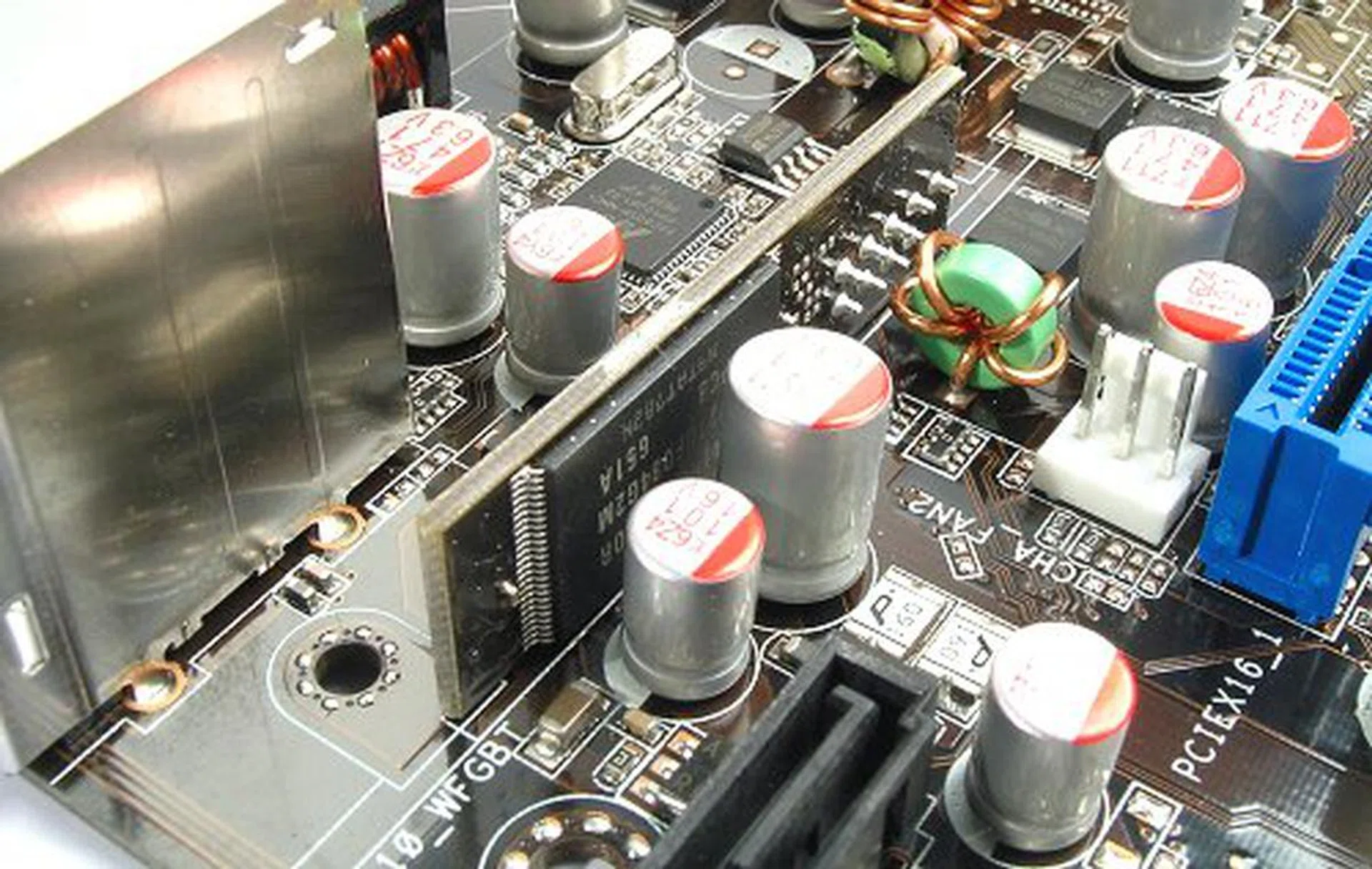
Simple 512MB NAND flash connected to a USB header on the board. Too bad it's soldered on, so you cannot replace it.
This concept may remind you of the recent news regarding hybrid HDDs and/or Intel's own Robson technology, where NAND flash memory is used to boost notebook startup and application performance. However, the ASUS ASAP is less technical and much much easier to implement. Essentially, the ASAP module on the board is just a USB flash drive. It is attached to one of the board's USB headers, thus limiting the usual ten USB 2.0 ports on the P965 chipset to eight.
The gains derived from ReadyBoost highly depend on your own system configuration, processing power and available physical memory. So, 512MB may or may not be sufficient to deliver visible performance differences on the P5B Premium - especially since most people eyeing on this board would likely have a well spec'd setup. However, the way that ASAP is implemented means that it can be used just like any USB flash drive (except for the fact that this one is soldered on your board). We tested ASAP on Windows XP and Vista and they both detected it as a regular flash drive. In fact, the P5B Premium sees the extra flash memory in its BIOS as well and can be configured as extra storage or detected/used as a Floppy.
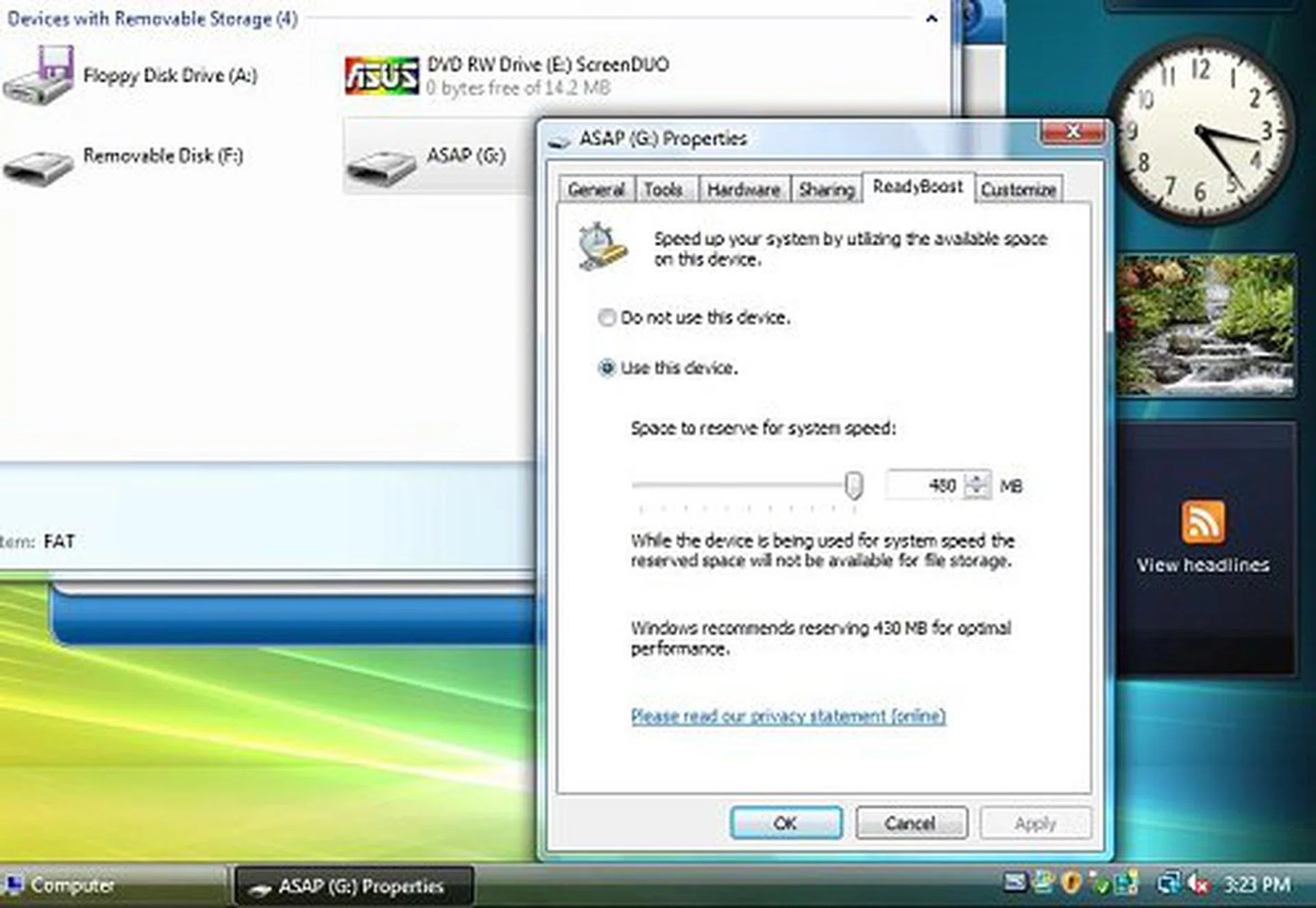
ASAP used for ReadyBoost in Vista. You can set aside up to 480MB.
What we're trying to say is that ASAP doesn't have to be used specifically for ReadyBoost. Since it is a USB flash drive, almost any OS should be able to access the storage on the module, which means that the board isn't restricted to Windows Vista users only. You can use it to create your very own boot disk, store recovery tools or even for BIOS updates. Sure, you can do all of these with an actual USB thumb drive, but ASAP is just highly more convenient and who can argue with extra non-volatile backup storage integrated onto a motherboard?

Under Windows XP, ASAP can be used just like any other flash drive.
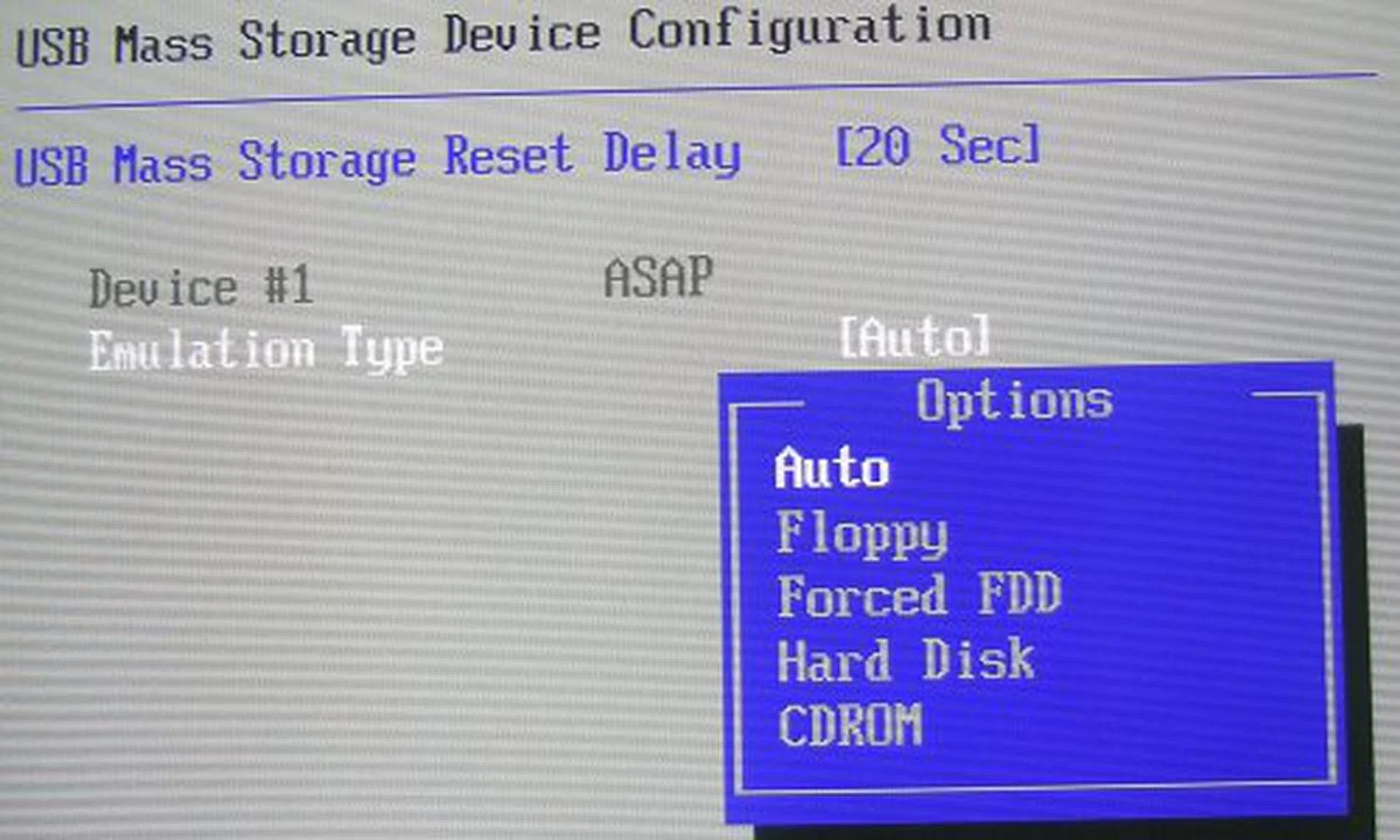
Use ASAP as a Floppy or CD-ROM, you can even boot up with it and update your BIOS through it.
AI Remote
Basically, this nifty little remote allows you to control startup/shutdown, application launching and power saving features of the motherboard. You can control ASUS AI Nap and AI Gear with the remote, two proprietary ASUS technologies that allow you to put your PC on standby without closing your applications and an on-the-fly overclocking profiler respectively. The AP Trigger buttons are also configurable to allow launching to predefined applications. Besides these features, the AI Remote can also be used to control various media player applications such as Windows Media Player or PowerDVD.
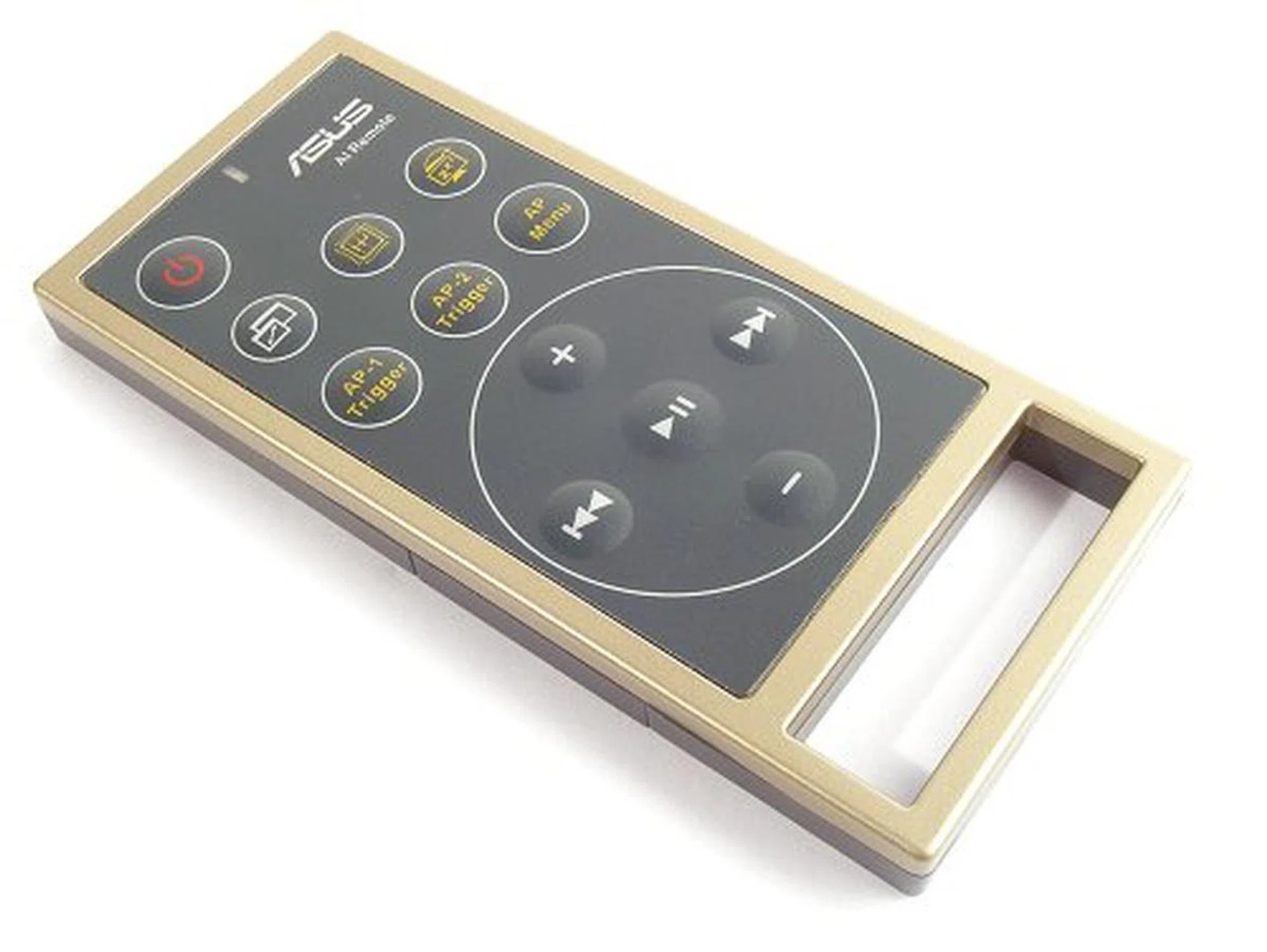
AI Remote control offers quick and easy overclocking, system standby, media controls and favorite application startup.
Technically, this is not a Vista specific feature, nor is it new as we've seen one variation of the AI Remote from the P5W DH Deluxe motherboard before. While the AI Remote does add a lifestyle element to the board, it is more of a glorified remote - good to have around, but rarely used.
SideShow for the Desktop
Now we come to the main attraction of the P5B Premium, the ASUS ScreenDUO auxiliary display unit. Essentially, the ScreenDUO display is used to provide quick access to information such as RSS feeds, email and calendar functions. It can also be used for media playback and control or system monitoring. The gadget connects to your PC via USB and it comes with its own software suite that already includes all of these functions.
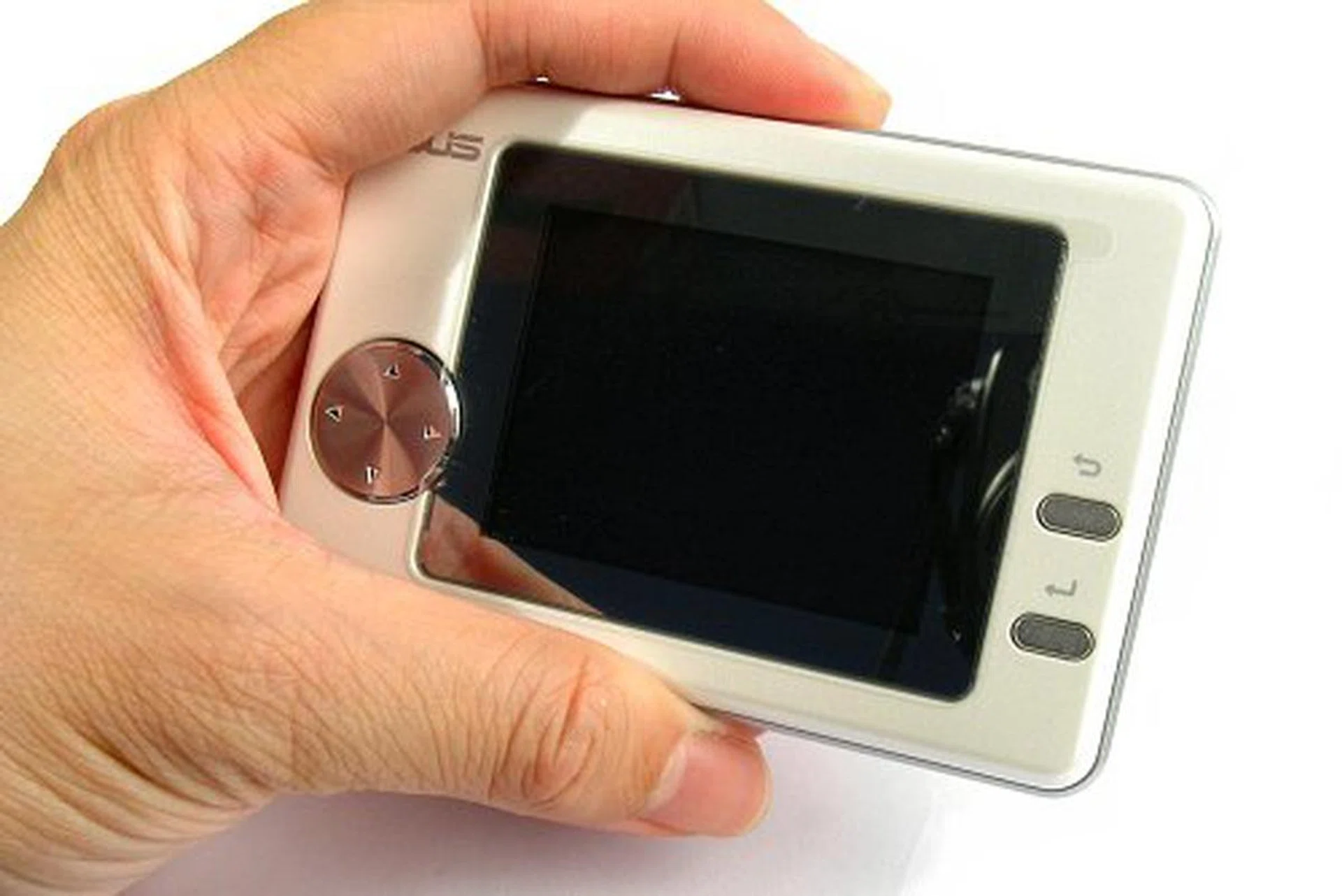
ASUS ScreenDUO auxiliary display unit.

The 2.5-inch QVGA screen makes for a decent display.
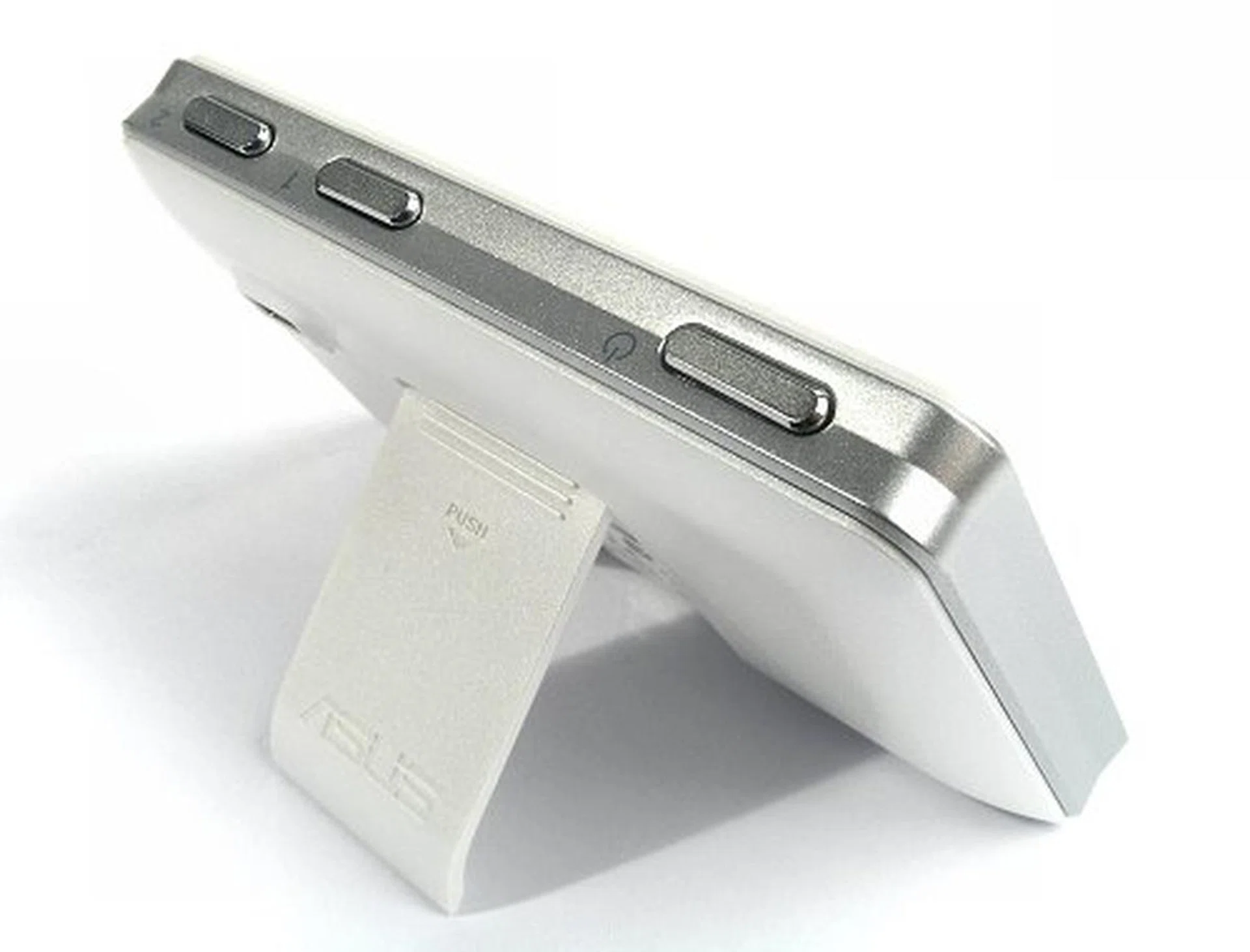
Pull out stand lets you prop up the ScreenDUO.
We've successfully installed ScreenDUO and its control panel on Windows XP, so the gadget is also not exclusive to Vista users. Not only that, despite what ASUS may say, the ScreenDUO is a standard USB device and can be installed on any motherboard as well. Of course, ASUS wants to capitalize on Vista's new SideShow function, which the ScreenDUO is supposed to be able to synchronize with to enhance its functionality further, but our own testing has shown that the ScreenDUO isn't fully compatible with SideShow.
We've had no luck at all trying to get the ScreenDUO to work with Vista's SideShow. After installing the latest drivers and software suite both from the CD included with the board and ASUS' support website (V1.07.5 at press time), SideShow still claims that the ScreenDUO is an unsupported device and will not sync with it. With all the hype that ASUS is pouring into their Vista ready products, this is a pretty big ball to let drop without someone catching it.

Even with the latest drivers and software, ASUS ScreenDUO is not compatible with any Vista SideShow gadget.
On the other hand, ASUS' own software for the ScreenDUO works extremely well in both Windows XP and Vista. In fact, ASUS has actually built more functionality into the ScreenDUO than is available for SideShow at the moment. The SideShow control panel works in a modular fashion and users can add or remove 'gadgets' to run on the screen. There are 12 gadgets available to ScreenDUO at the moment, and we hope that ASUS will continue to independently improve its functionality with further software releases or at least allow third party development of gadgets that can sync with ScreenDUO. However, considering that ASUS wants to make use of Vista's SideShow in the long run and not create a competing product, the chances of this happening is quite slim.
Here are a few examples of the ScreenDUO's native applications in action:
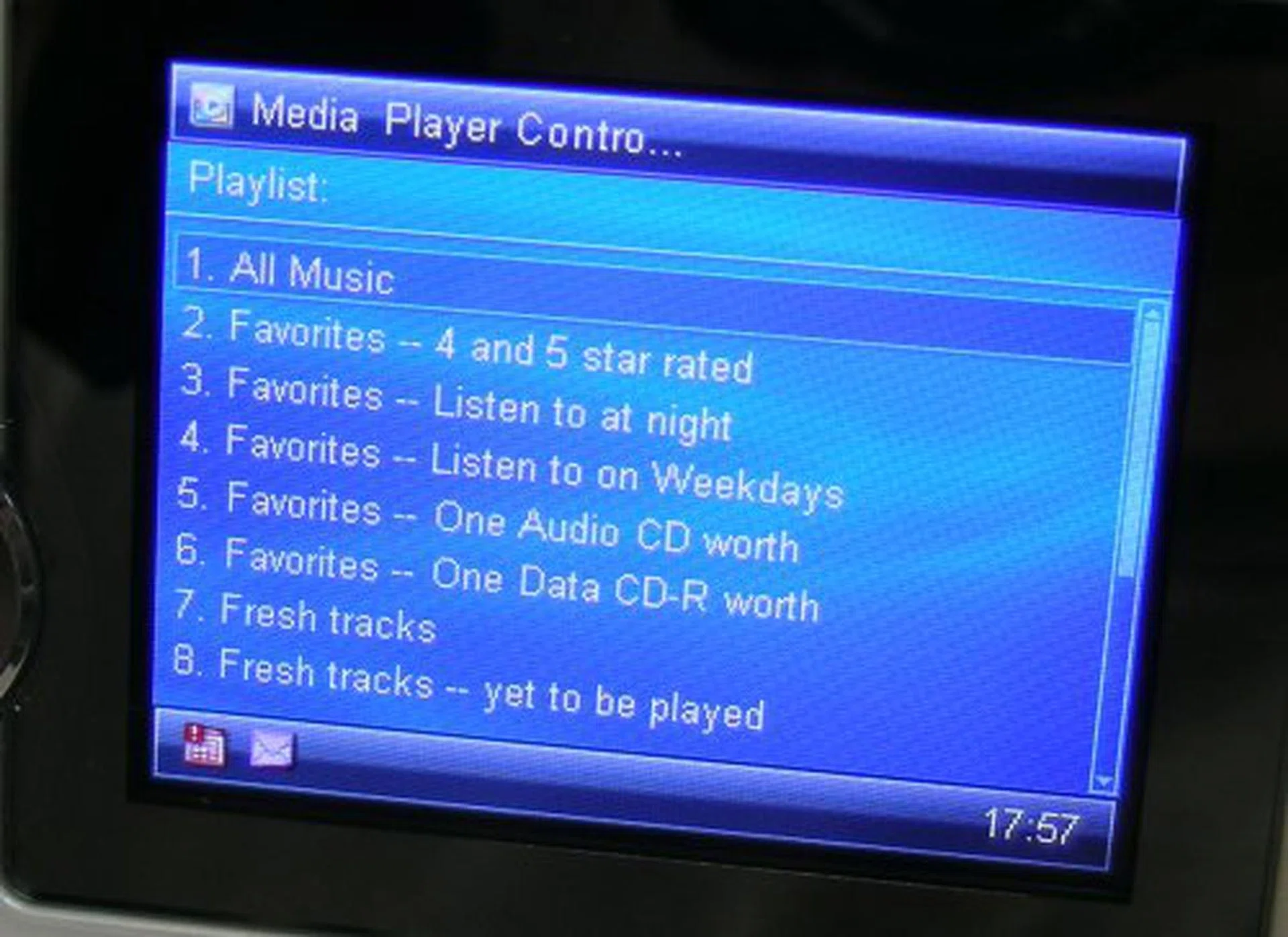
Control Windows Media Player and iTunes with the ScreenDUO.
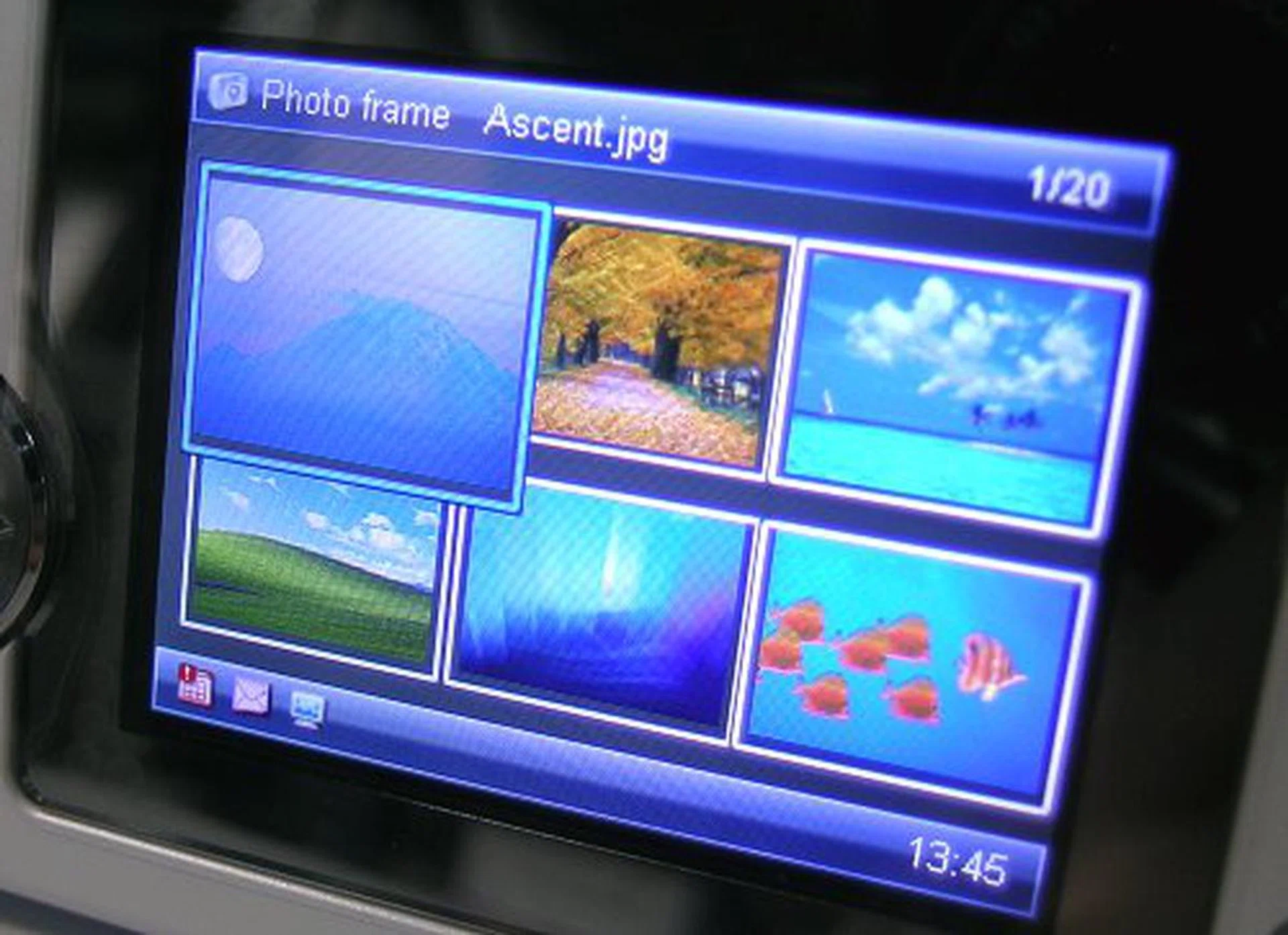
You can use the ScreenDUO as a digital photo frame if you want or set up a slide show to view images from any source without tying up your desktop.

System monitoring is also available.
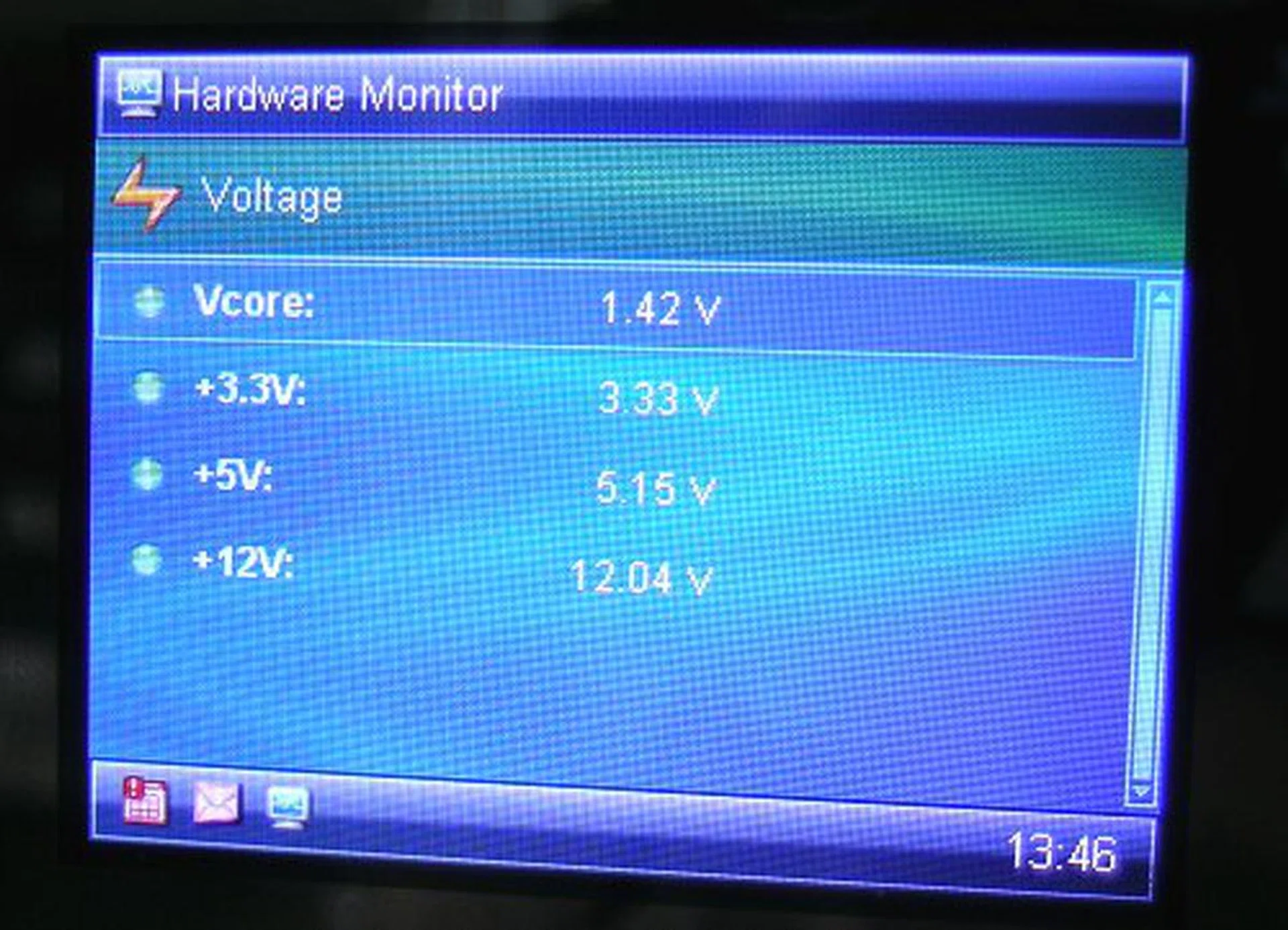
More monitoring utilities on the ScreenDUO.

You can connect with Outlook Mail, Outlook Calendar and Outlook Contacts, but you will need additional software installed.
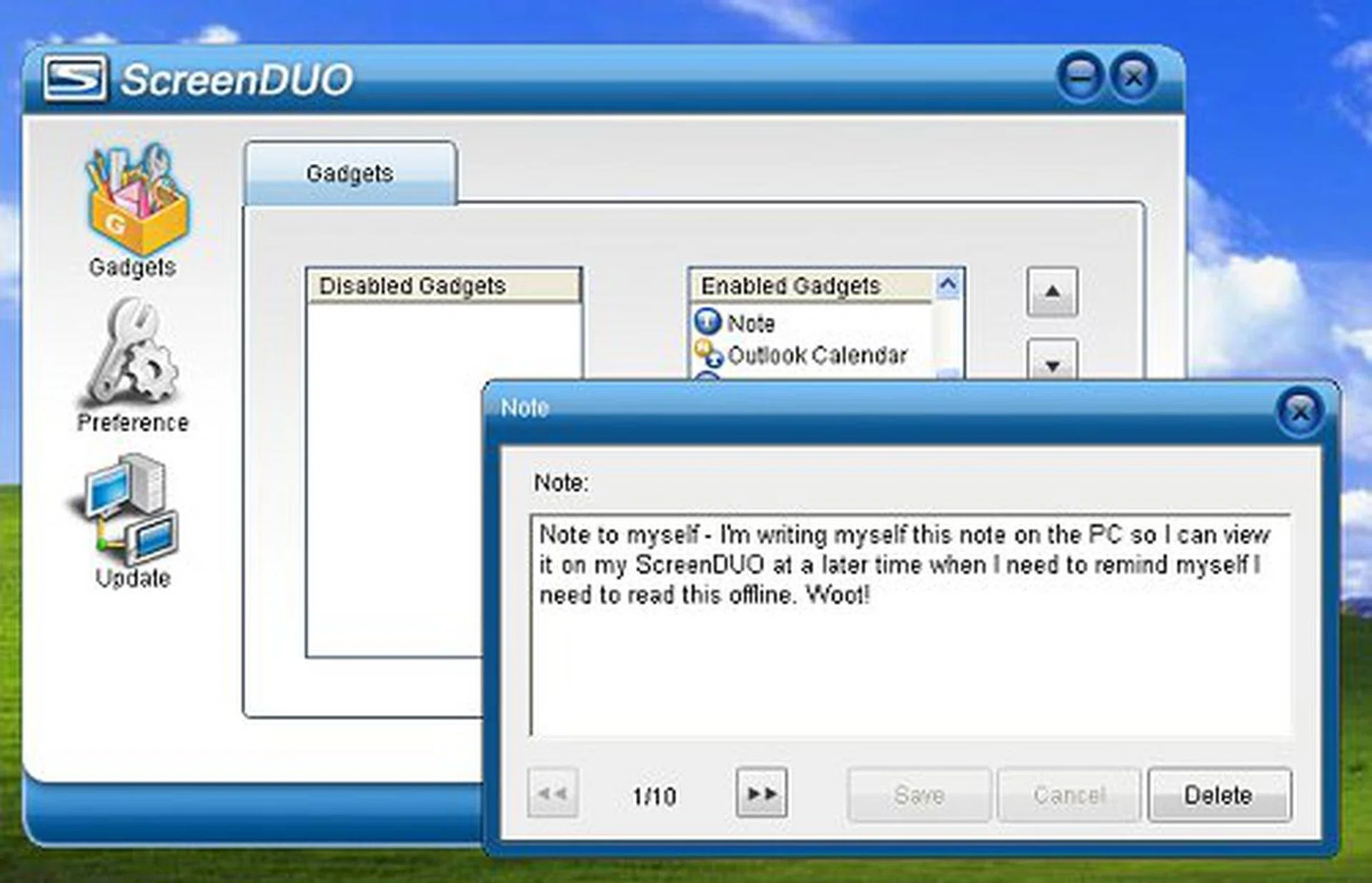
Write yourself sticky notes that can be viewed on the ScreenDUO display.
There are several limitations to its functionality though. The device syncs with the ScreenDUO application directly, so you will need to have ScreenDUO running in order to use its functions. If you happen to turn the background manager off, you will not even be able to tell the time.
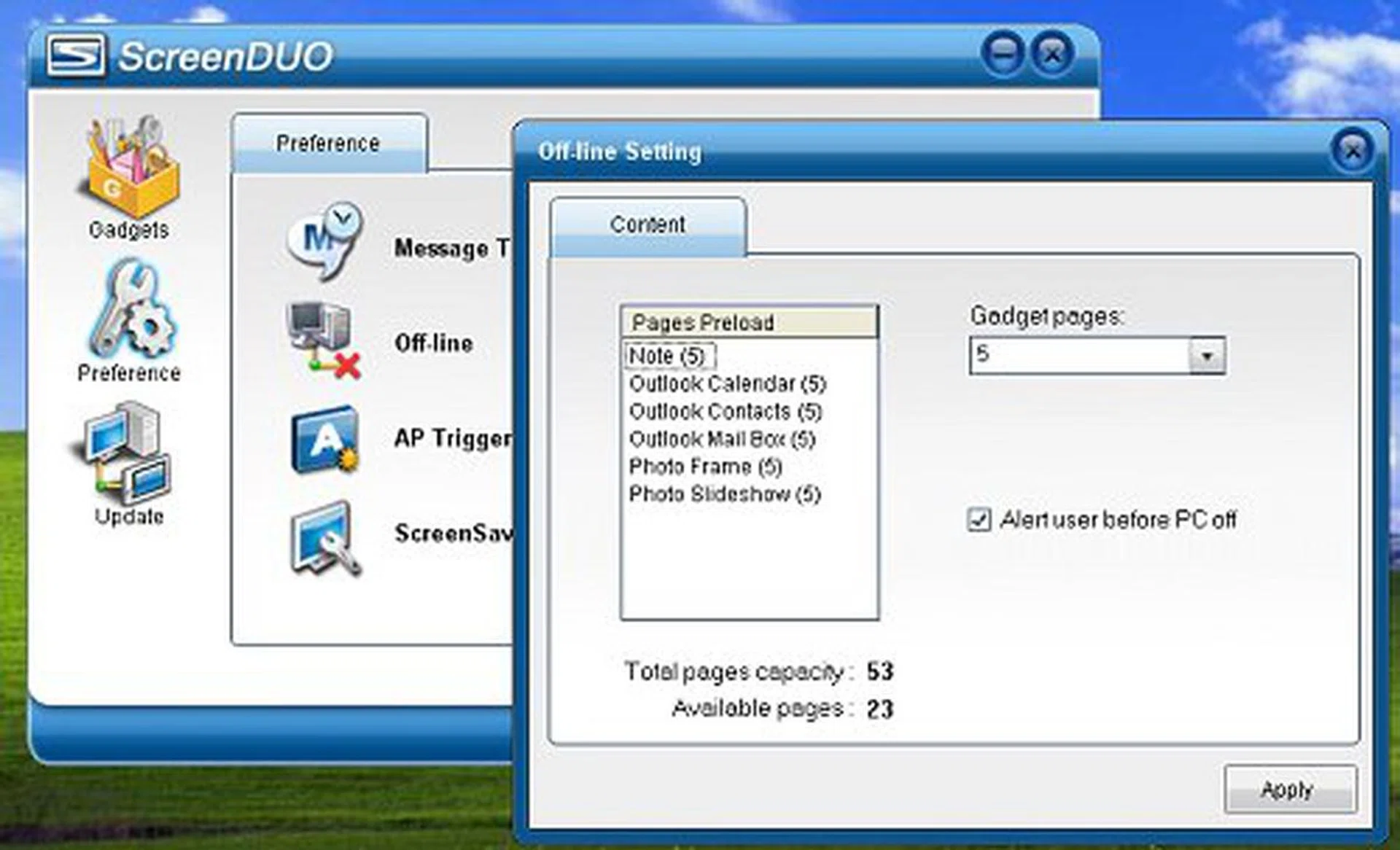
ScreenDUO does work offline when your PC is shut down, but USB power must still be maintained. You can configure up to 53 pages of storage for offline viewing.
Secondly, the display is powered by USB. It has 32MB RAM onboard, which is used as a small buffer to store 'offline' information when your PC is powered off. Since RAM is volatile memory, plugging the display out of the USB port will erase any information stored on the device. It needs to be constantly connected to your PC with the ScreenDUO manager running in the background to be of any use. Although very restrictive, ASUS probably designed it this way so that one cannot use the ScreenDUO display as a separate device. Otherwise it would have been an equivalent to a portable media bank/player, which isn't a wise for the feature/product positioning, nor cost-wise of the entire package.
Overclocking
- FSB Settings: 100MHz to 650MHz
- DDR Settings: DDR2-400 / 533 / 667 / 711 / 800 / 889 / 1067
- PCIe Frequency: 90MHz to 150MHz
- CPU Voltage Settings: 1.100V to 1.700V (in 0.0125V steps)
- Memory Voltage Settings: 1.80V to 2.45V (in 0.05V steps)
- NB Vcore Settings: 1.25V, 1.45V, 1.55V, 1.65V
- SB Vcore Settings: 1.50V to 1.80V (in 0.1V steps)
- ICH Chipset Voltage: 1.057V, 1.215V
- FSB Termination Voltage: 1.20V to 1.40V (in 0.1V steps)
- Multiplier Selection: Yes (unlocked CPUs only)
From the time the P5B Deluxe was released till now, ASUS has had plenty of time to tweak their boards for better performance, especially since they have become such experts with the Intel P965 chipset. The P5B Premium carries the legacy of a very overclockable series for ASUS into another level. When we first reviewed the P5B Deluxe, we managed to hit 490MHz FSB on the board, one of the highest achieved at the time. The P5B Premium pushes the envelop further by topping 515MHz in our overclocking tests. It required a 0.2V boost to the chipset voltage to achieve better stability, but the board's BIOS had plenty to offer, so we had no trouble at all.

CPU-Z overclocking screenshot. Click for full sized image.
Test Setup
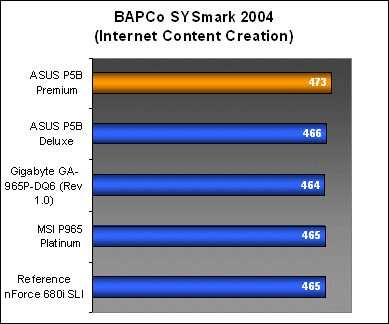
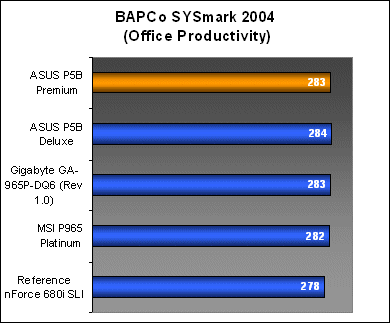
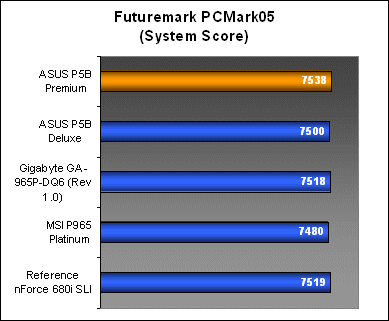
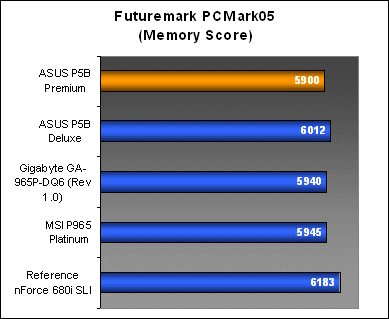
You've seen the special features of the P5B Premium, and now we take a look at its performance. We put the P5B Premium and P5B Deluxe together in the same benchmark to see how the twins perform against each other. In comparison, we will also include the benchmark scores of the Gigabyte GA-965P-DQ6, MSI P965 Platinum as well as a reference NVIDIA nForce 680i SLI motherboard into the mix.
The standard test bed configuration for all the boards tested in this review is listed below:
- Intel Core 2 Extreme X6800 processor (2.93GHz)
- 2 x 1GB Kingston HyperX DDR2-800 @ 12-4-4 CAS 4.0*
- Seagate Barracuda 7200.7 80GB SATA hard disk drive (one single NTFS partition)
- MSI GeForce 7900 GT 256MB - with NVIDIA ForceWare 91.47
- Intel INF 8.1.1.1001 and Intel Matrix Storage (AHCI) 6.1.0.1022 driver set (for Intel P965 only)
- NVIDIA nForce 9.53 driver set (for NVIDIA nForce 680i SLI only)
- Microsoft Windows XP Professional with Service Pack 2 (and DirectX 9.0c)
Additional Notes
- The MSI P965 Platinum and nForce 680i SLI reference board share an anomaly where CAS timing is locked at CAS 3 even when CAS 4 has been manually selected in the BIOS.
Benchmarks
The following benchmarks is used in the review to gauge the performance of the P5B Premium:
- BAPco SYSmark 2004
- Futuremark PCMark05
- SPECviewperf 9.0
- Futuremark 3DMark05
- AquaMark3
Results - BAPco SYSmark 2004
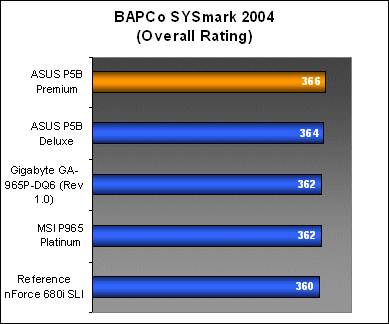
The performance of the P5B Premium was very impressive in SYSmark2004. The board managed to beat its predecessor, the P5B Deluxe in the overall ratings by a hair. This was contributed by a very high Internet Content Creation result, which topped our charts.
Results - Futuremark PCMark05
In PCMark05, the P5B Premium performed mostly on par with the competition in all areas, except for a minor dip in memory subsystem performance compared to the P5B Deluxe. It did however, come out top again in PCMark05's System scoring, which suggests a strong graphics subsystem performance after considering the rest of the scores.


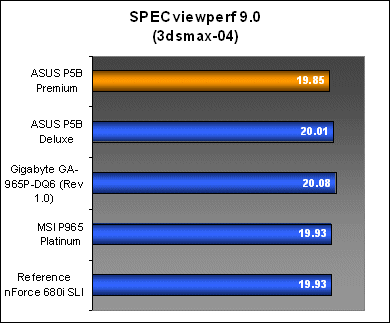
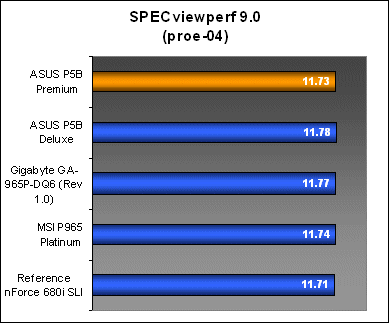
Results - SPECviewperf 9.0
This time around, the P5B Premium performed slightly below that of the P5B Deluxe in both OpenGL and memory intensive workloads, though on overall, its scores were still well within expected standards.
Results - Futuremark 3DMark05
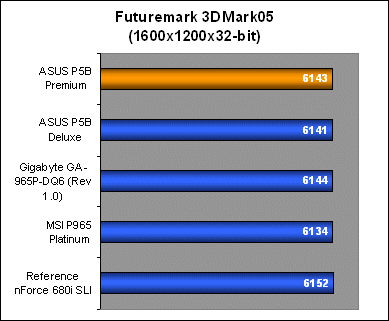
Although the overclocking bandwidth of the P5B Premium seems to have improved, its general performance thus far looks to be the same. As per our expectations, all the Intel P965 motherboards share very similar results in 3DMark05 for all resolutions.



Results - AquaMark3
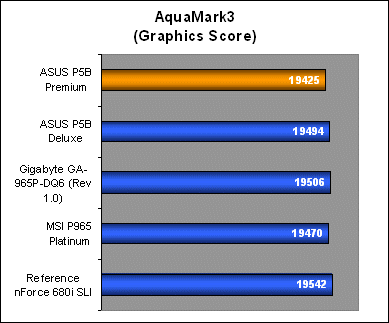
The P5B Premium shared the top spot in AquaMark3 for CPU performance, though its GPU results were not as good. Other than the high System scoring on PCMark05, the P5B Premium has so far shown middling 3D performance when compared with the other boards. Not to a point where there will be a drop in real world performance, but its numbers are among the lower ranks for P965 boards in our benchmarks.

Conclusion
ASUS has really been putting on their thinking caps, getting out innovative boards such as the P5B Premium Vista Edition. They're looking at current trends and tapping onto different avenues to garner consumer interest and we think it is working - at least the hype is there. Windows Vista is the topic of the month now, and most new users will go gaga over Vista's GUI. However, once the initial euphoria is over, it is but another OS upgrade. The P5B Premium changes this by giving users a reason to try out some of the new additions available to Vista. Best of all, the new features that ASUS put into the board can also be used on Windows XP as well, so the board isn't locked in to benefit Vista users only.
Among all the Vista Edition enhancements to the P5B Premium, the ASAP feature has the most practical usage on a motherboard. USB flash drives and memory cards are a dime a dozen these days, but most people would like to be able to carry around their data, instead of locking up a huge portion for ReadyBoost cache and keeping it as a more or less a permanent fixture on your PC. With the ASAP module, ASUS is basically giving users extra flash storage to use in almost all situations, including ReadyBoost. Its ability to emulate boot up devices like a Floppy makes it an ideal storage for BIOS and OS recovery tools as well.
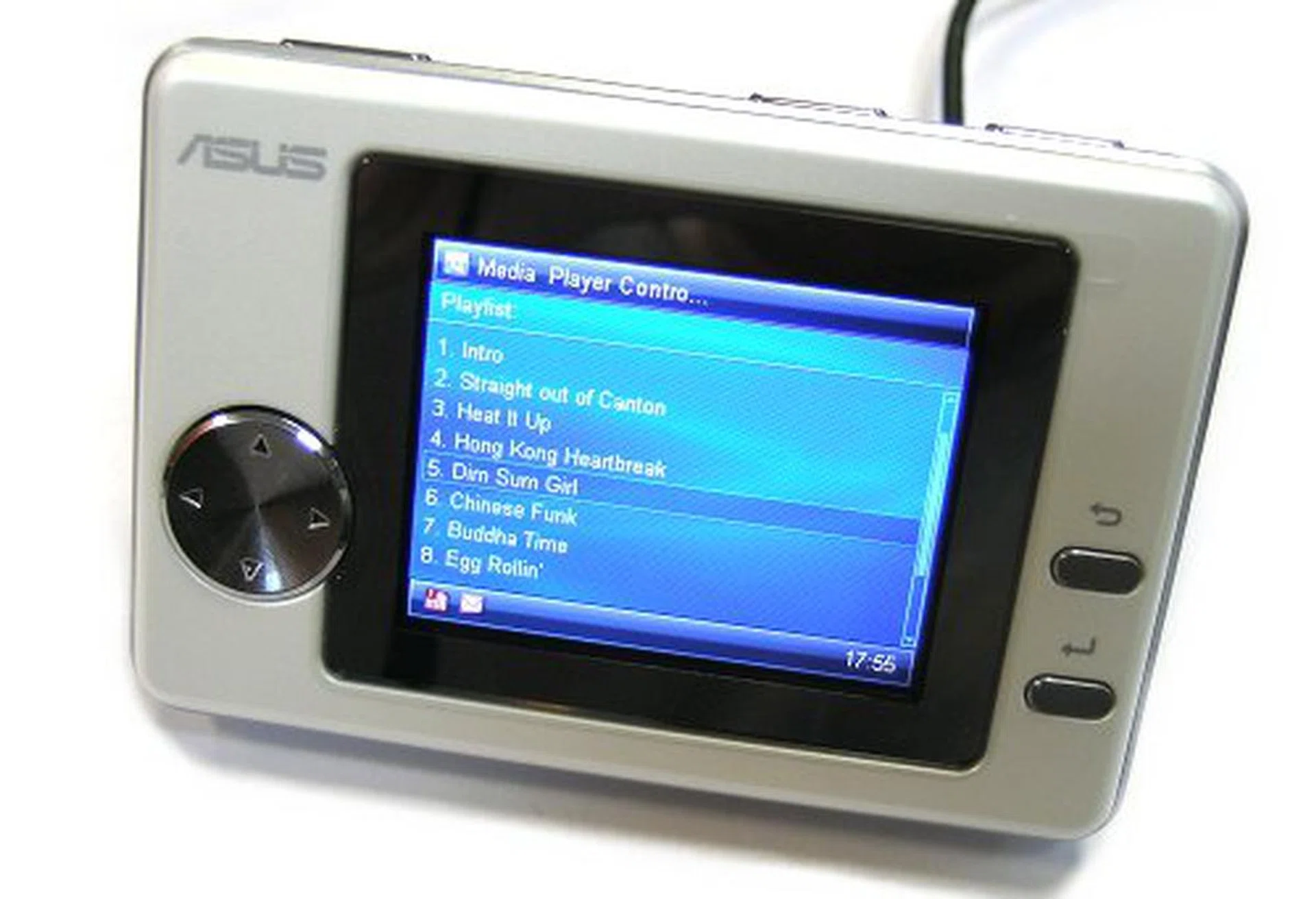
The ASUS ScreenDUO would have been much more impressive if it had full Vista SideShow compatibility.
The much hyped about ASUS ScreenDUO display however, lost some of its shine after we played around with it for a bit. Its features are nice to have around, and we've actually gotten a little used to having an auxiliary screen just to view media play lists and RSS feeds. It tends to clear up your desktop space, but the limitations imposed on its functionality are too restrictive for our tastes. Also, its incompatibility with SideShow at the moment is a slight downer in terms of seamless integration with the new OS. ASUS will have to fix this issue for the ScreenDUO to last beyond its initial hype. They are also not selling the unit as an independent product as well and you can only get it with purchase of selected Vista Edition motherboards.
As a motherboard, the P5B premium is another example of good engineering. We didn't have problems with the P5B Deluxe and we do not have any problems with the P5B Premium. From its design, layout to installation, compatibility and stability, the P5B Premium gets a clean bill of health. Now that it has a full solid capacitor design, it might even be more enticing to enthusiasts who want a board with greater durability.
Performance-wise, the board pumps out some decent scores, though a few benchmarks show some slightly diminished numbers compared to the P5B Deluxe. It makes up for it however, with its incredible overclockability. 515MHz FSB is the highest overclock we've achieved for any Intel P965 motherboard with stock cooling, matching the performance of the Commando. The only other board to have passed the 500MHz mark with an Intel Core 2 Duo in our lab is the nForce 680i SLI based Striker Extreme - all ASUS motherboards. Without doubt, the P5B Premium Vista Edition is one of the best Intel P965 boards from ASUS.
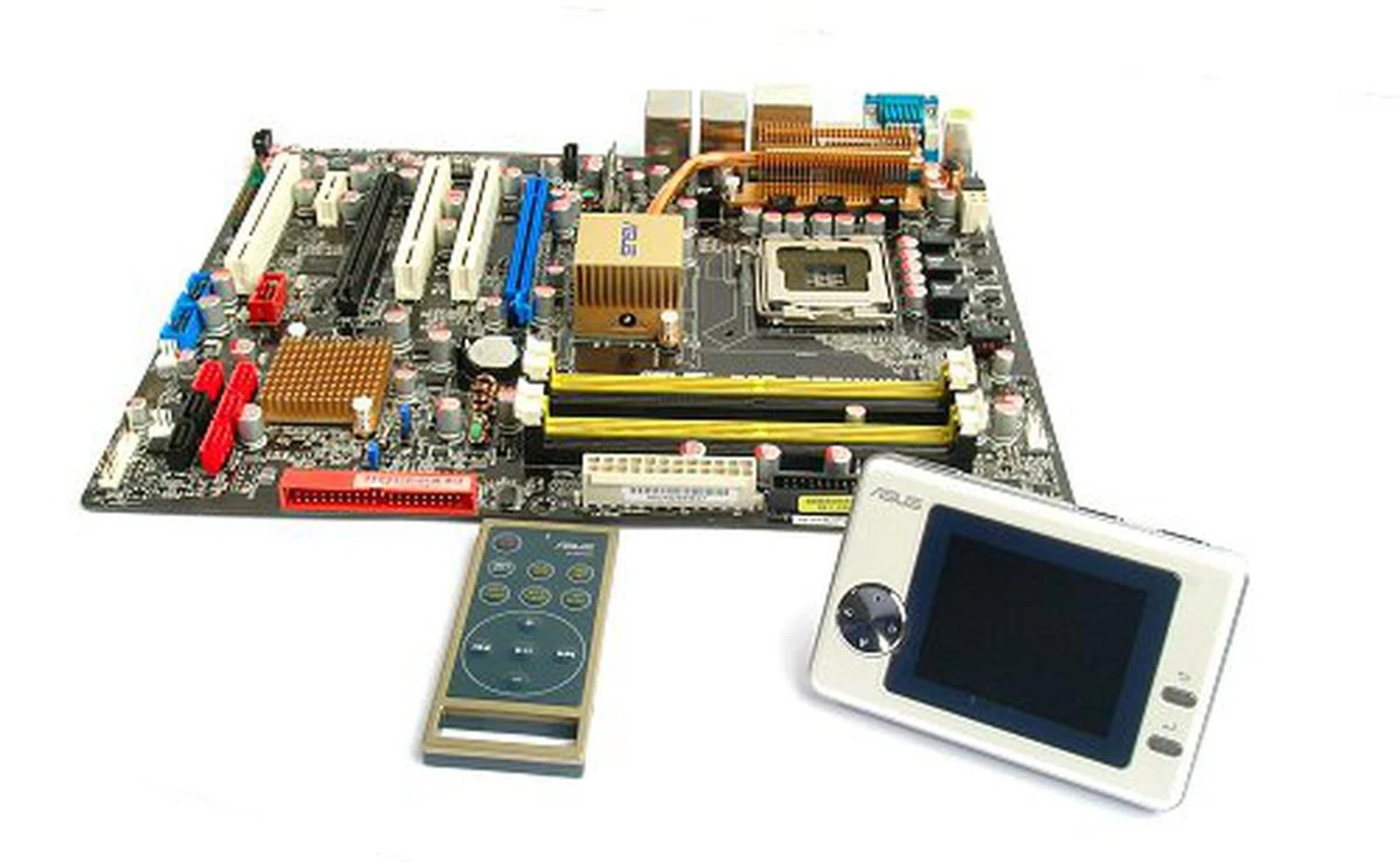
ASUS P5B Premium Vista Edition is still a great enthusiast motherboard, but it will burn a hole in your pocket. If you do not require the additional Vista features, the good old P5B Deluxe will do you by just fine.
Here's the kicker. The ASUS P5B Premium Vista Edition retails for around US$270, a pretty hefty price to pay for an Intel P965 board today. The P5B Deluxe WiFi-AP can be found for less than US$200 today and we've even spotted the ASUS P5N32-E SLI, an nForce 680i SLI board for US$20 less. Considering how cheap flash memory is these days - a generic 512MB USB 2.0 flash drive costs about US$10 - you are really paying for the ScreenDUO feature. We would have initially awarded the ASUS P5B Premium Vista Edition with a 4.5 Star award, but with ScreenDUO not working as intended and being rather restrictive, we deducted another 0.5 Stars.
Our articles may contain affiliate links. If you buy through these links, we may earn a small commission.