

Refreshing Apples
It's been three years since the last MacBook Pro design refresh in late 2008, and since then, we've only seen Apple tweaking the notebook's overall design with a non removable battery. Otherwise, the unibody design has so far resisted any change for its looks and perhaps Apple has finally settled on a design that they think could be perfect. Heck, they may be due for a change in design come the later half of the year, but don't quote us on that.
Since the overall design hasn't been changed at all (well, except for being 0.8mm thicker), it's really the innards that have undergone much redesign since the initial introduction of the notebook. When the MacBook Pro unibody first debuted, they came packing Intel's Core 2 Duo processors while using NVIDIA's discrete solutions. Fast forward to last year and Intel's and NVIDIA's spat over the licensing of the Core i range of processors meant Apple couldn't upgrade all its . While the issue has finally been resolved, Apple seems to have switched camps and the new notebooks either use Intel's new Sandy Bridge integrated graphics or AMD's discrete mobile GPUs.
Apple also introduces into the newer MacBook Pros, though the ports have all been rebranded as Thunderbolt. There aren't that many devices out there that can actually use the port, but when they do, expect blazing fast transfer speeds of up to 10Gb/s. There's still USB 3.0 to contend with though, which means that Thunderbolt may end up the way of FireWire, but the technology is still too new to make a call.
To check out the latest iteration of the MacBook Pro, Apple has loaned us the top of the line Intel Core i7 equipped 15-inch model, and this notebook also uses an AMD Radeon HD 6750 for graphics. All these specs does cost a pretty penny though, and the notebook retails for a cool S$2,988, and that's before you even consider changing the screen to a higher resolution anti-glare screen option which will cost you a further S$203.30. Well, at least they do offer it as an option unlike many other notebook vendors that stick by the single resolution glossy screen.

The Apple MacBook Pro (Early 2011) keeps the same looks but boasts of new speedy internals from AMD (Radeon HD 6000 series graphics) and Intel (second generation Core process and platform).
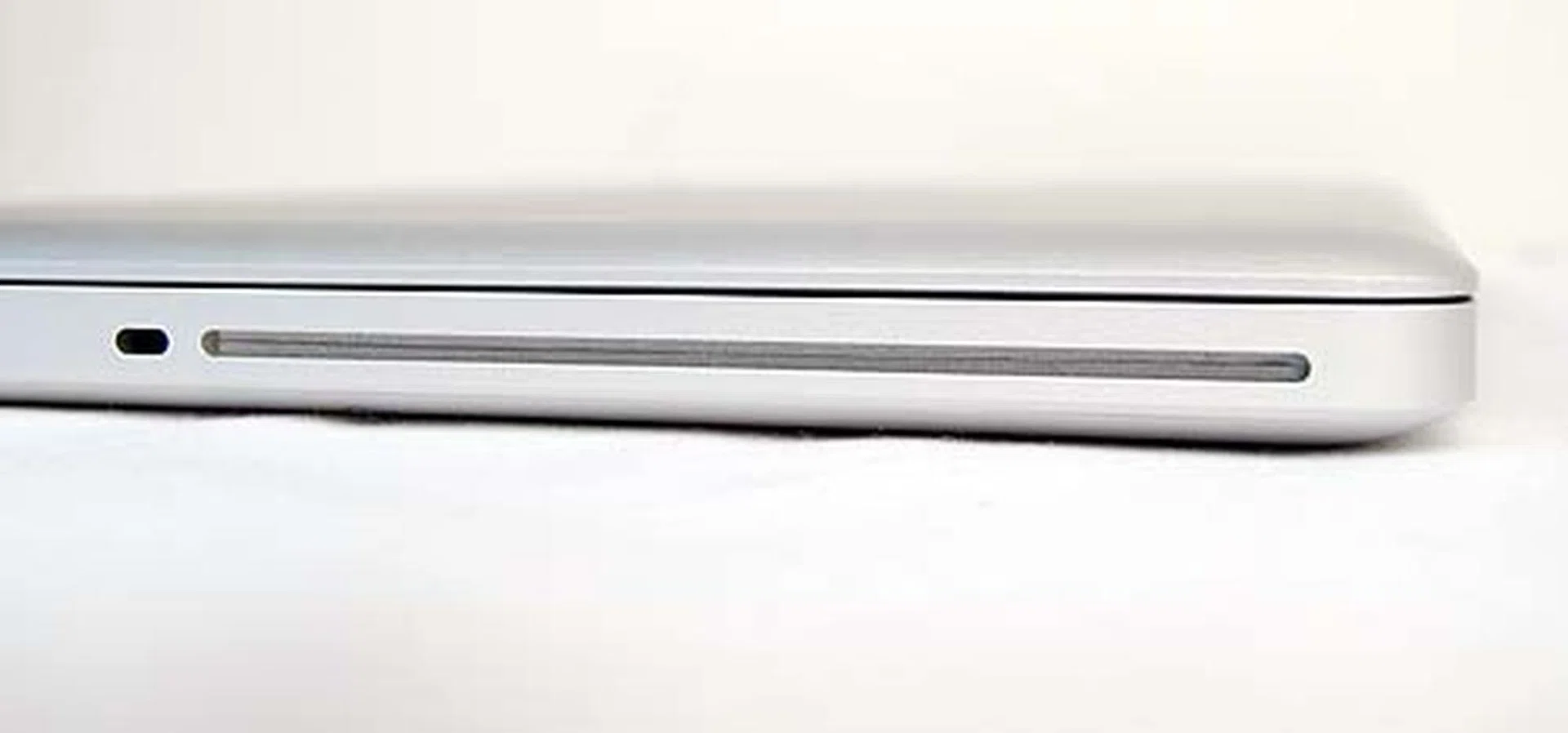
On the right side is the usual slot loading optical drive.
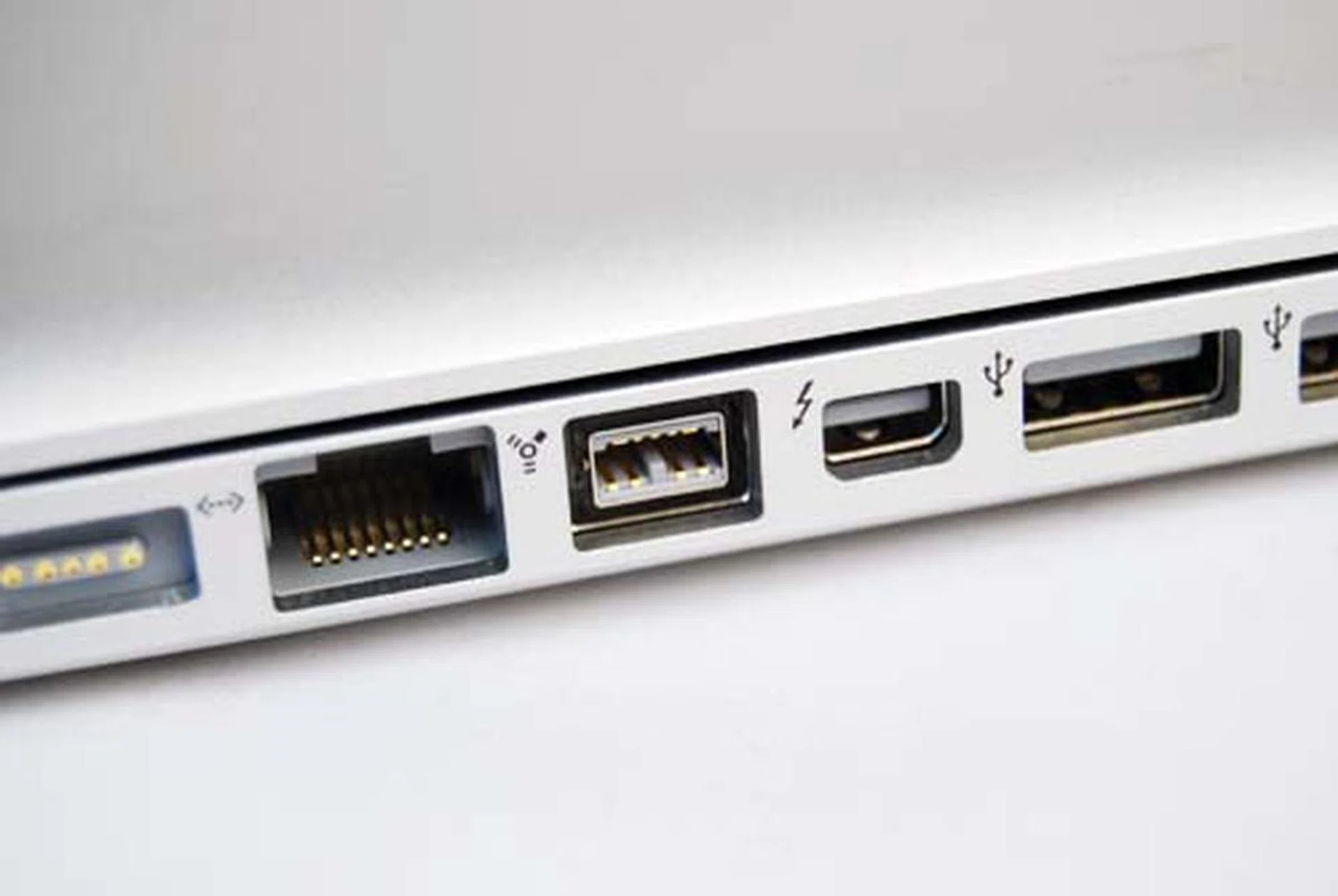
On the left side are ports, including the shiny new Thunderbolt (denoted with a lightning icon). Otherwise you'll find the usual two USB 2.0 ports, the Gigabit ethernet port, a FireWire 800 port, audio input and output and the SDXC card slot (not shown in picture).
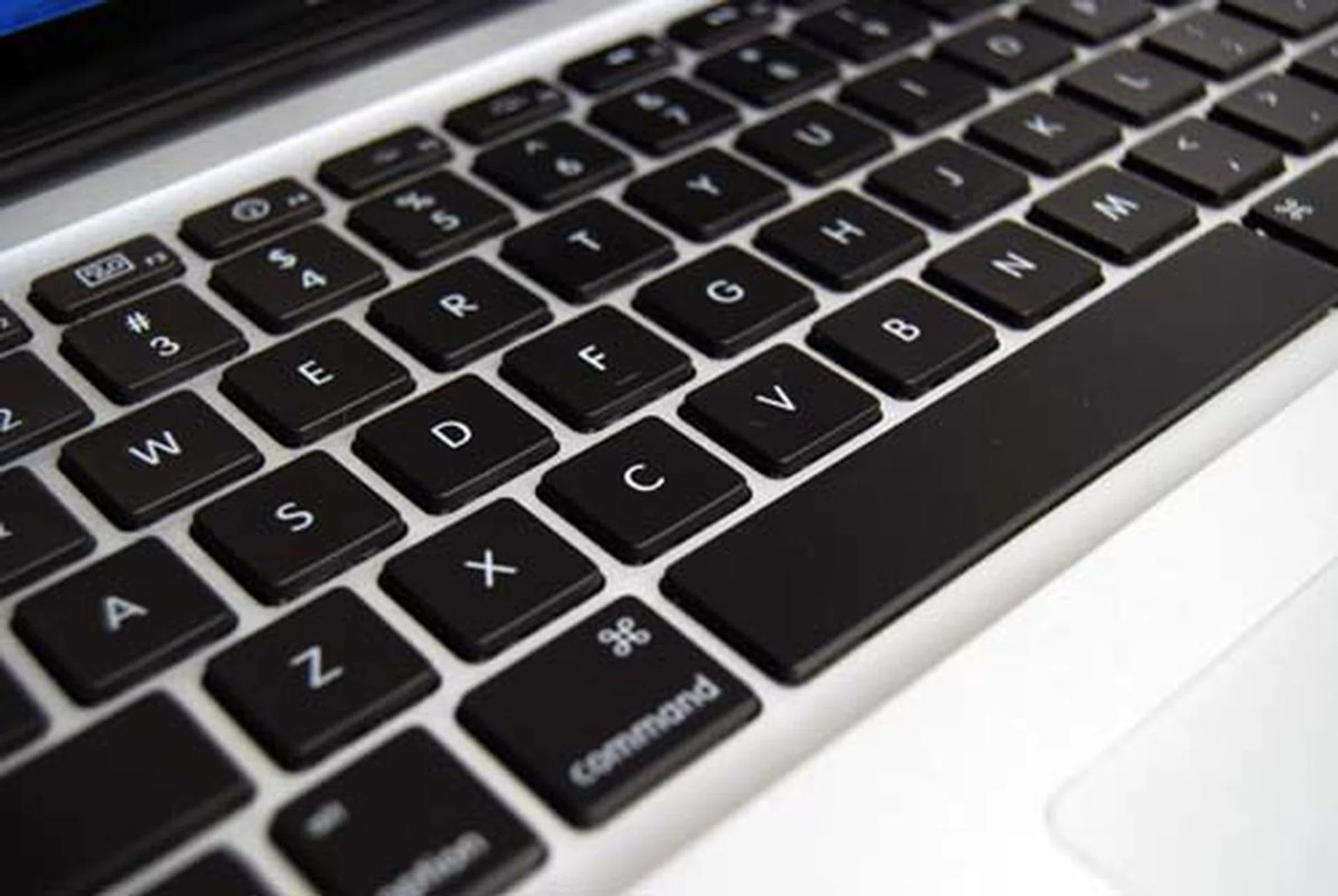
Lifting the lid, the interior will be familiar to you if you've seen the unibody MacBook Pro before. The keys are backlit, and are great for working in dark places (such as your secret basement lair).
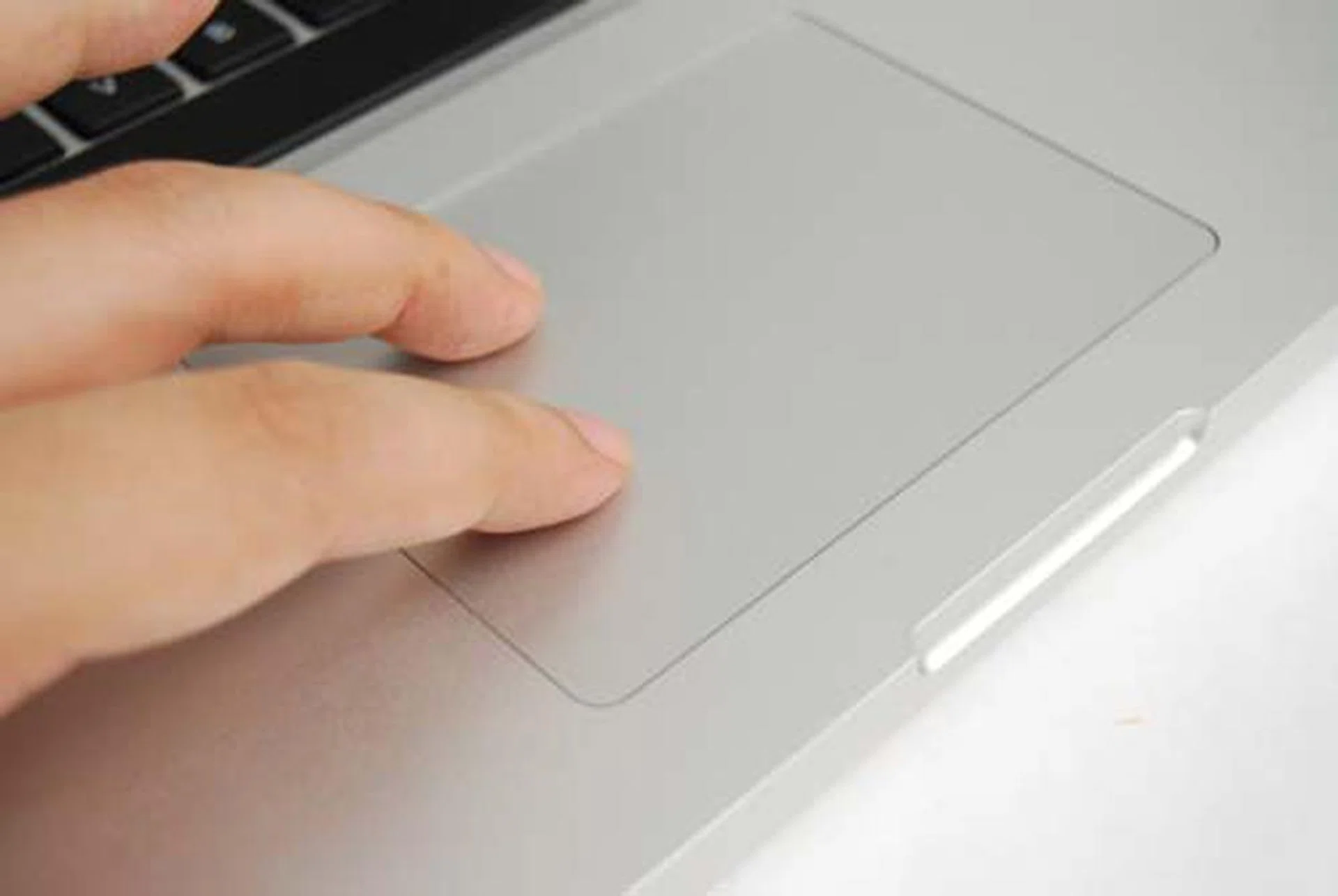
The large mulit-touch trackpad is the one of the better reasons to get a MacBook Pro as its comes in handy for productivity needs.
Performance Benchmarking
Since there's really nothing new to add on to the design and functional aspects of the notebook, we've decided to go straight into the performance numbers. We'll be pitting the MacBook Pro against , and against itself via a direct Windows 7 bootcamp configuration and even Parallels Desktop 6 on OS X running Windows 7 (virtualization). Scores are based on Windows benchmarks like PCMark Vantage and 3DMark 06, but we also have Cinebench 11 scores to cross compare.
Take note that while running Windows 7 in a virtual environment like Parallels Desktop 6, we could only reliably operate it with a single-core configuration and 1GB of memory. Anything higher would work, but we found it flaky. As a result, we're sharing the performance figures from our most reliable run.
Specifications / Notebook | Apple MacBook Pro (15-inch, Early 2011) | Apple MacBook Pro (15-inch, Early 2011) + Parallels Desktop 6 | Apple MacBook Pro (15-inch, Early 2010) |
Processor | Intel Core i7-7270QM 2.2GHz, 6MB Smart Cache | Single Core | Intel Core i7-620M 2.66GHz, 4MBL2 cache |
Chipset | Intel HM65 Express | NA | Intel HM55 |
Memory | 4GBDDR3 | 1GBDDR3 | 4GBDDR3 |
HDD | 750GB
(5400RPM) | NA | 500GBSATA (5400RPM) |
Video | AMDRadeon HD 6750M + Intel HDGraphics 3000 | Parallels Desktop 6 | NVIDIAGeForce GT 330M + Intel HD Graphics |
Operating System | OSXver 10.6.7 (Snow Leopard) | Windows 7 Ultimate | OSX ver. 10.6
(Snow Leopard) |
PCMark Vantage
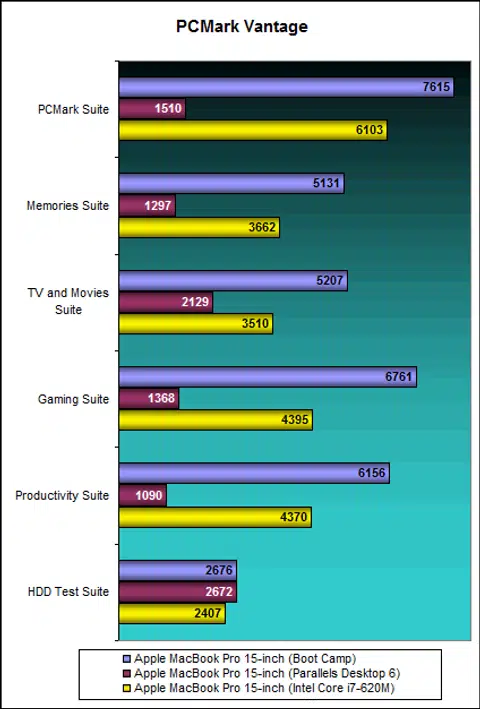
Since the MacBook Pros can't really run benchmarks made for Windows, we went and Boot Camped the notebook to run Windows 7. We updated all relevant drivers, and then installed Parallels Desktop 6 (PD6) to see if we would get a different performance results. As you can see from our table above, our PD6 config only ran on a single core and 1GB RAM. We did try upping the number of cores to four where we got almost comparable results, but the virtual machine wasn't too stable.
Performance results do show that the Intel Sandy Bridge models show a 20% improvement in benchmark scores over the previous Core i7 model and gaming scores also show a 35% increase from the switch to a newer AMD discrete graphics. As for Parallels Desktop 6 performance, it's actually not too bad if you factor in that it's only running on a single core. Don't be too hard on the virtual machine yeah?
3DMark06
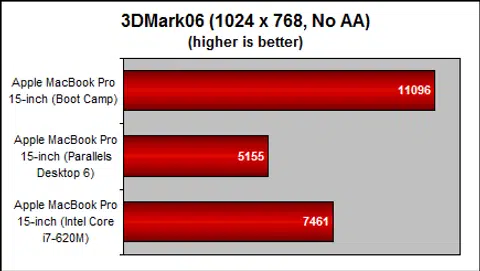
Our 3DMark06 run on PD6 was marred by some weird driver bugs that caused the discrete graphics to freeze, but after some patching with Apple's fix, we found the system to be much more stable and less prone to an unrecoverable freeze. Results wise, your best bet for performance is to run your games in Boot Camp.
Left 4 Dead 2
Our recently added real world gaming benchmark uses the L4D2 game and we've basically recorded a timed demo. Now, to be fair, the game engine isn't exactly modern, so older hardware should be able to run better. We've tried to standardized the graphic settings across all three test platforms, so our final testing is done with 2x anti-aliasing. Interestingly, PD6 gave us the best performance, but only if the VM was limited to a single core and 1GB RAM. Upping up the cores and RAM in the virtual machine made the game totally unplayable. Still, PD6's settings are quite limited graphically, if you want to max out the graphic settings, Boot Camp is still your best bet.

OS X Benchmarking
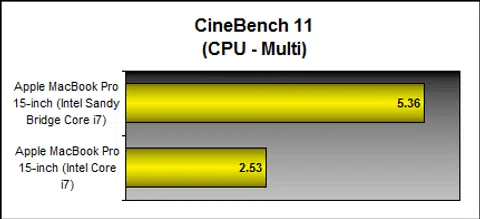
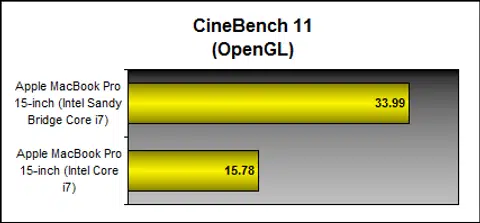
On the productivity and creation side of OS X, we used Cinebench 11 to give you an idea on the performance improvements derived from the new Intel Sandy Bridge hardware. As you can see, the newer notebook scores double of the previous notebooks, due to the better hardware and software optimization of the OS. If you held off buying the previous Intel i7 machine for the Sandy Bridge version, based on the results, we're guessing that you're probably a happy owner of the latest edition.
Battery Life and Portability Index
Apple's MacBook Pros are well known for their marathon-like battery life, though the trade-off is the inability to swap the batteries out for fresh ones. That said, the notebook is rated at a cool 7 hours by Apple, but we'll see how it will fare when we put it to the test. There's also no change in battery capacity according to Apple, the newer 2011 MacBook Pro uses the same 77.5Whr battery as the previous generation 15-inch model. Based on our previous experiences, the Windows Boot Camp battery performance is usually quite shoddy due to poor optimization of the drivers, so we're skipping this aspect of testing as it makes no sense to compare the battery performance when the results will be so obviously skewed.
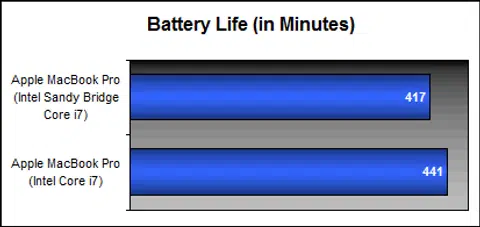
Surprisingly, our DVD battery test where a movie DVD is looped nonstop until the notebook dies while keeping screen brightness and volume to 50%, showed the 15-inch notebook lasting just three minutes shy of the 7 hour mark, which is pretty darn impressive for a non-netbook device. Oddly, even though the battery performance should be better due to the more energy efficient Intel Sandy Bridge processor, we're seeing the notebook lasting about 24 minutes shorter than the previous generation MacBook Pro. This could be due to a more powerful discrete GPU used. While 24 minutes may seem like a long time for notebooks with a much shorter battery life, for notebooks with over close to 7 hours of battery uptime, it's not much of a difference.
Power Consumption
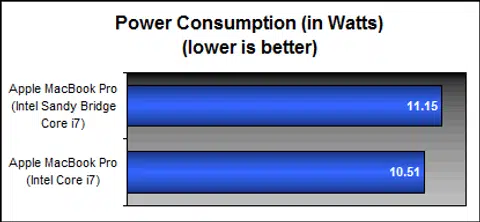
With almost 7 hours of running time, this should translate to a pretty low power consumption while movie watching. We aren't surprised that this is the case, as recent notebooks have shown marked improvement in power consumption due to better power management features in the chipsets and operating systems. Apple has also packed quite a hefty battery (77.5Whr) into the MacBook Pro (which is the same battery as the previous generation MacBook Pro), so that's another reason why we're seeing such long lasting performance from the notebook.
Portability Index
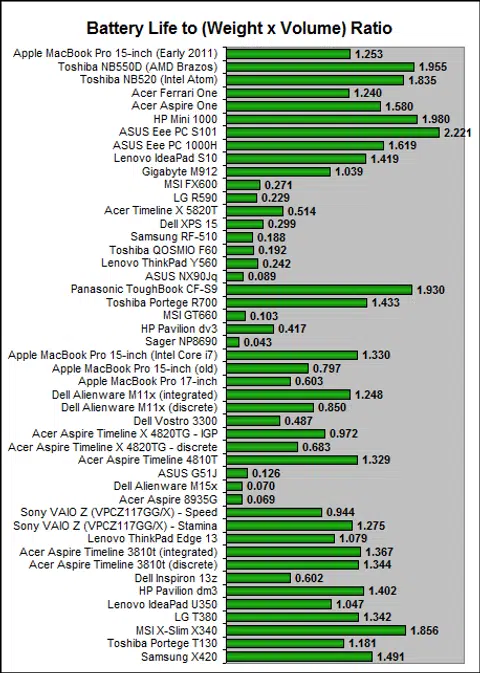
Our portability index test takes the battery uptime divided by the product of the unit's weight and volume and the resulting figure is a ratio that we use to determine how portable a unit is. The higher, the better and is used to specifically compare products of the same class.
The MacBook Pros have long been decent performers in the test, so we aren't at all surprised to see the 15-inch notebook score rather high here. Understandably, its ratio of 1.253 is a little less than the 1.330 obtained by the previous generation model. However, when pit against other mid-range and performance oriented 15-inch models, such as the multimedia notebooks from Dell (XPS 15), Acer (Timeline X 5820T) and many more, a ratio of 1.253 compares extremely well against the general average that's 0.300 or less for its class.
In the end, it's a trade off between a replaceable battery and one that has a decent amount of staying power. Seven hours is nothing to mock at, though depending on what you do with the notebook while it's off the wall plug will of course determine your real battery life usage.
Going Apple
Apple's notebook design has been solidly consistent for the last two years, and while we hesitate to call it perfect, we do note that some of its design ideas seem to have made its way to other notebooks made by other manufacturers. While there are some resemblances, they are different enough so as not to be called an outright copy.
So while there's really little to say about the same designs of the MacBook Pro, it's really the hardware refresh of the 15-inch MacBook Pro that's the highlight of this review. Intel's Sandy Bridge processors deliver a credible performance to make the notebook feel as good as a desktop counterpart, while the switch to AMD's Radeon HD 6750M gives the notebook much better gaming performance. Lastly, the battery life of the notebook was excellent.
With a great design and excellent all-round performance, this near S$3,000 notebook is definitely a recommended buy. At this price point, it's a bit more affordable than , but it's a lot faster this year.
The only drawback we could find was the lack of a higher resolution screen. The default glossy screen with 1440 x 900 pixels resolution while adequate for a general 15-inch notebook, isn't sufficient for a power user. Although you can pay an additional S$139.10 for a 1680 x 1050 pixels resolution glossy screen (or S$203.30 for a non-glossy screen), it's really a shame as we thought the higher resolution should have been the default option in the first place. However with most manufacturers sticking to a 1366 x 768 pixels resolution glossy screen for 15-inch notebooks, the 1440 x 900 pixels resolution screen turns out to be actually quite decent in that regard. Also unlike most manufacturers, Apple is able to give you an option.
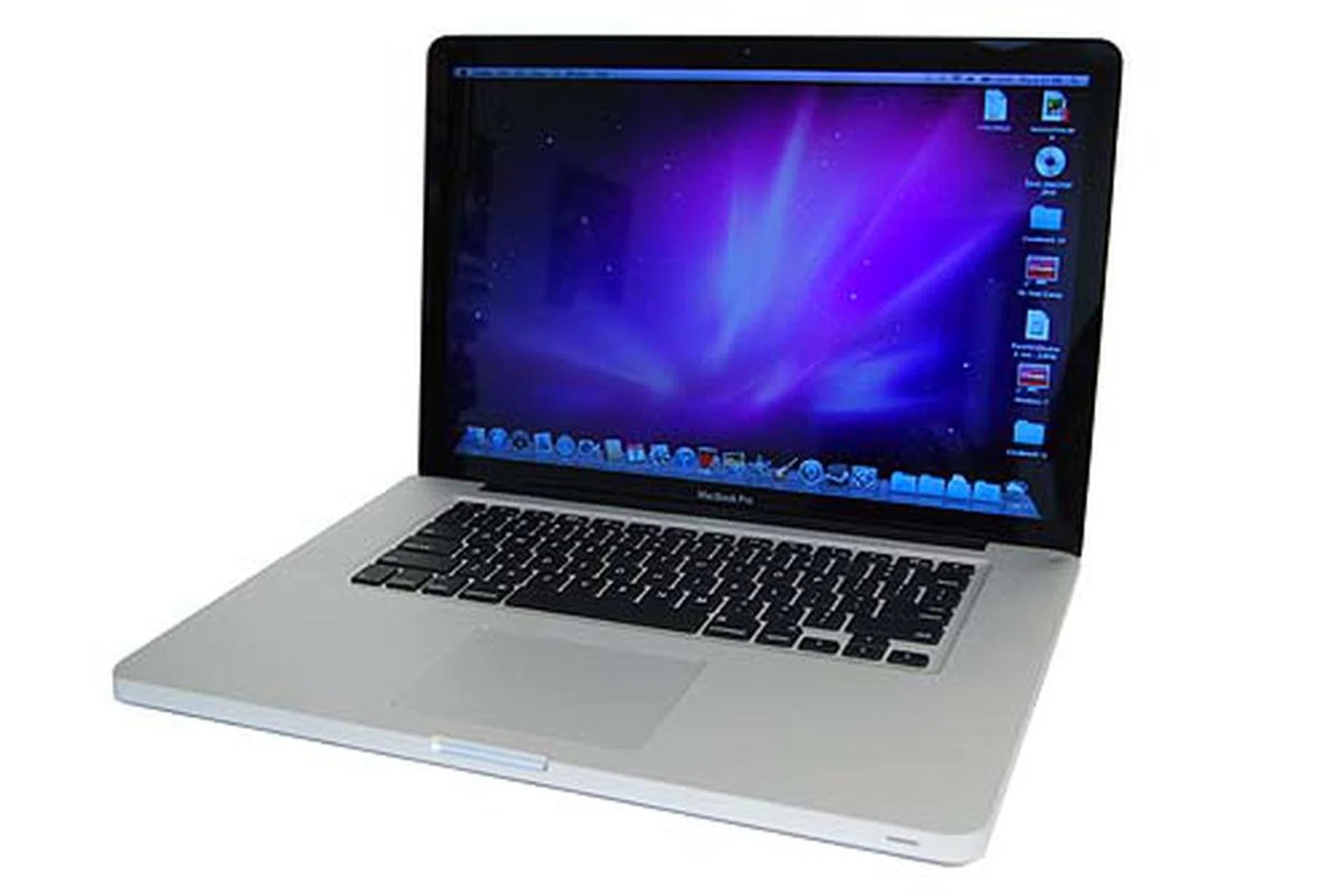
If you have S$2988 to spare, the 15-inch Apple MacBook Pro is a definite buy if you've always been lusting after a power packed Apple notebook.
Our articles may contain affiliate links. If you buy through these links, we may earn a small commission.