
Apple iPad Pro 9.7 review: The best just got better
Tempted by the power, performance and features of Apple's 12.9-inch iPad Pro, but turned off by its huge size? Now you can get all of those pro-level features in a standard 9.7-inch form factor. Say hello to the iPad Pro 9.7. And you know what? It's even better than its big brother. Here's our full review.

Overview
It's been over a year and a half since Apple launched the iPad Air 2, its last 9.7-inch tablet. And while I was thoroughly impressed by the power, performance and features of the iPad Pro 12.9, its huge size meant that it's not for everyone. If only you could get all of the same pro-level features, but in a standard 9.7-inch form factor. Well, now you can.
Design
The iPad design has remained pretty much unchanged for the past three years and for the most part, the iPad Pro 9.7 looks exactly like the iPad Air 2. In fact, the two tablets have the exact same dimensions of 240 x 168 x 6.1mm, and they even weigh the same: 437g for the Wi-Fi version and 444g for the 4G LTE version. That's astonishing considering the hardware upgrades inside the Pro 9.7. Apple will probably need to refresh the iPad's design sooner rather than later - those shiny chamfered edges are looking a bit dated - but for now, the iPad Pro 9.7 remains clean and aesthetically pleasing.
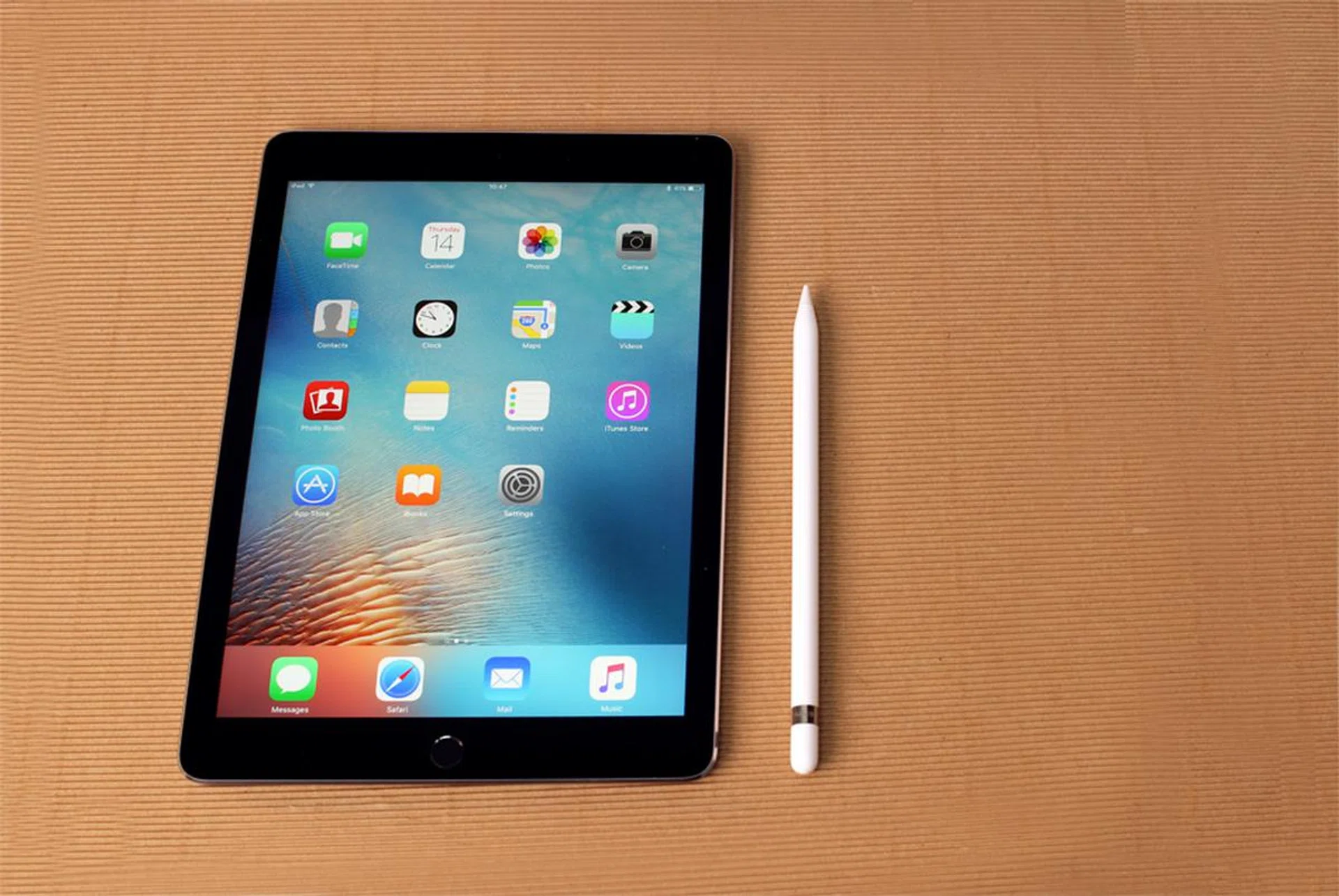
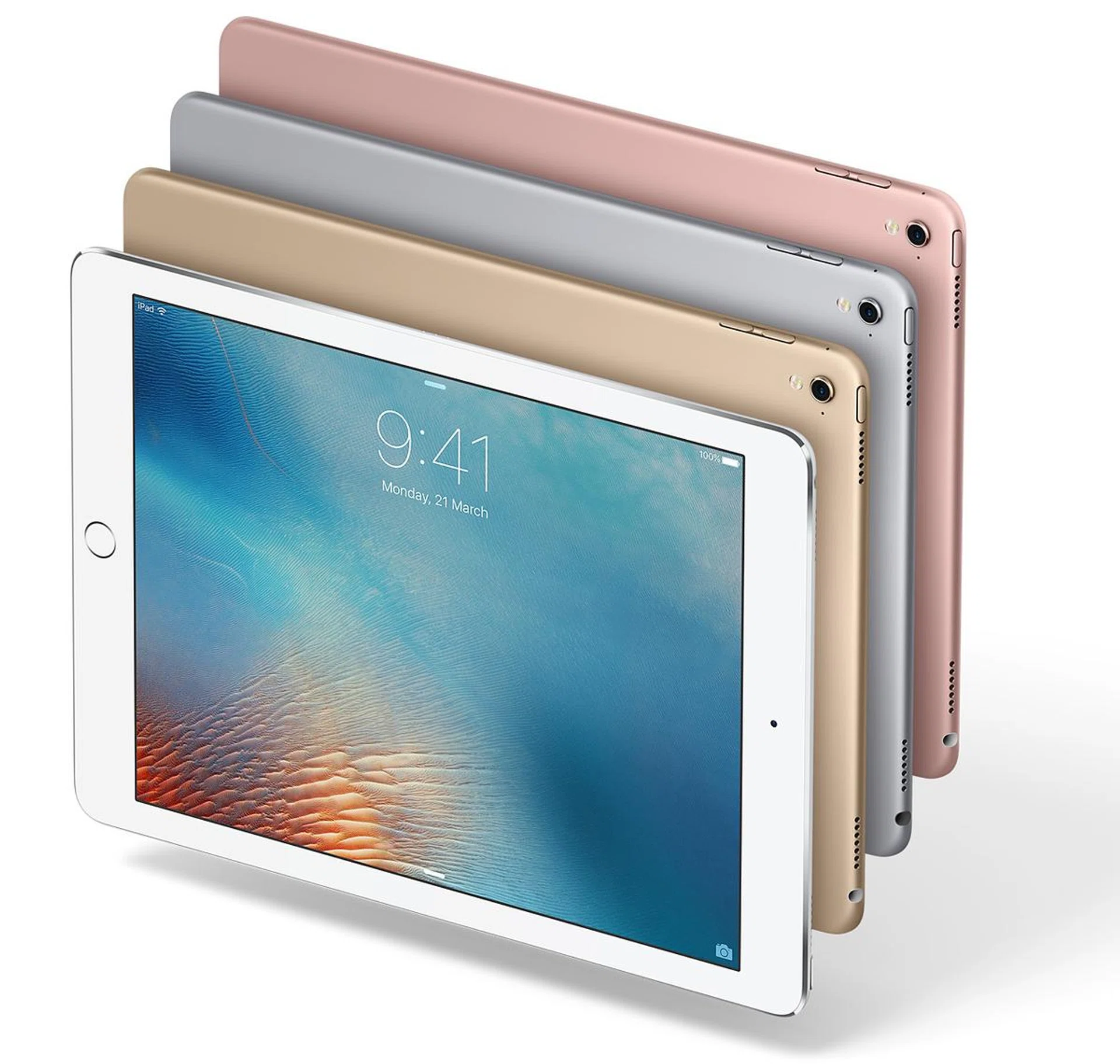
As with the last couple of iPads, you get a lightning fast Touch ID fingerprint scanner below the Retina display. The lightning port is still on the bottom, the headphone jack and power button are still on the top, and the volume rocker remains on the right side. In fact, the only way to guarantee that people know you have a brand new iPad Pro 9.7 is to get the new and exclusive Rose Gold color, as it's the only tablet, big or small, that Apple offers in Rose Gold. And yes, it's a perfect match to your iPhone 6s or 6s Plus.
Upon closer inspection you will notice some differences between the Pro 9.7 and the Air 2. Most obvious among these is the redesigned rear camera. There's a bit of a camera bump now, which is always disappointing to see, but the tradeoff is worth it. Gone is the 8-megapixel rear camera, replaced instead with a 12-megapixel iSight camera that's also used on the iPhone 6s. Unfortunately there's no optical image stabilization, but for the first time on an iPad, you do get an LED flash. It's a good one too: it's the same True Tone LED flash you'll find on the iPhone 6s. By the way, the front camera has also been upgraded. It's now the same 5-megapixel FaceTime HD camera found on the iPhone 6s.
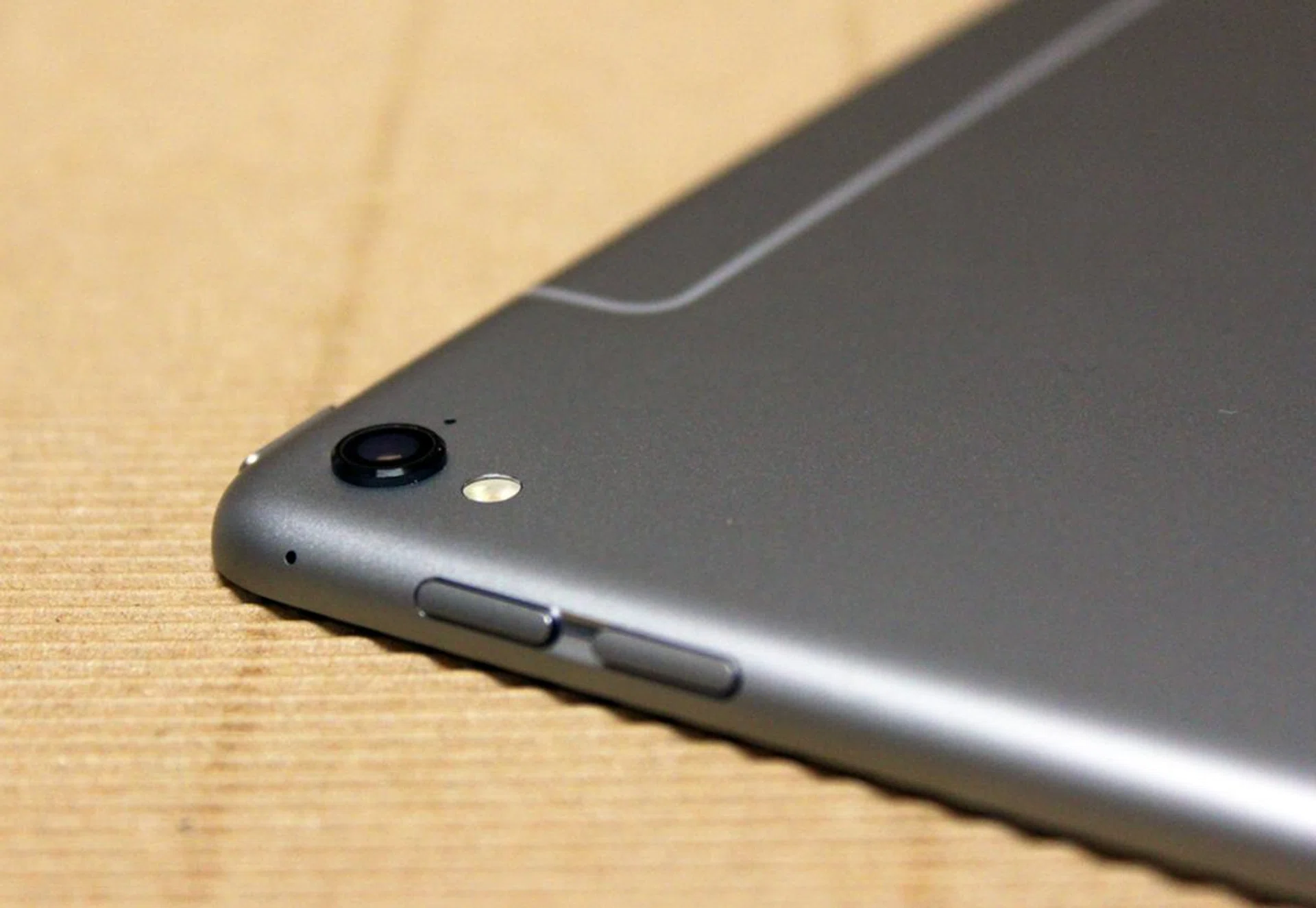
The camera bump is a bit unsightly, but the upgrade in camera performance is worth it.
The rear antenna on the 4G LTE version has also been redesigned. Gone is the unsightly plastic block, replaced with more discrete antenna lines that mirror the ones found on the iPhone 6s. Notice how subtle it looks now:-
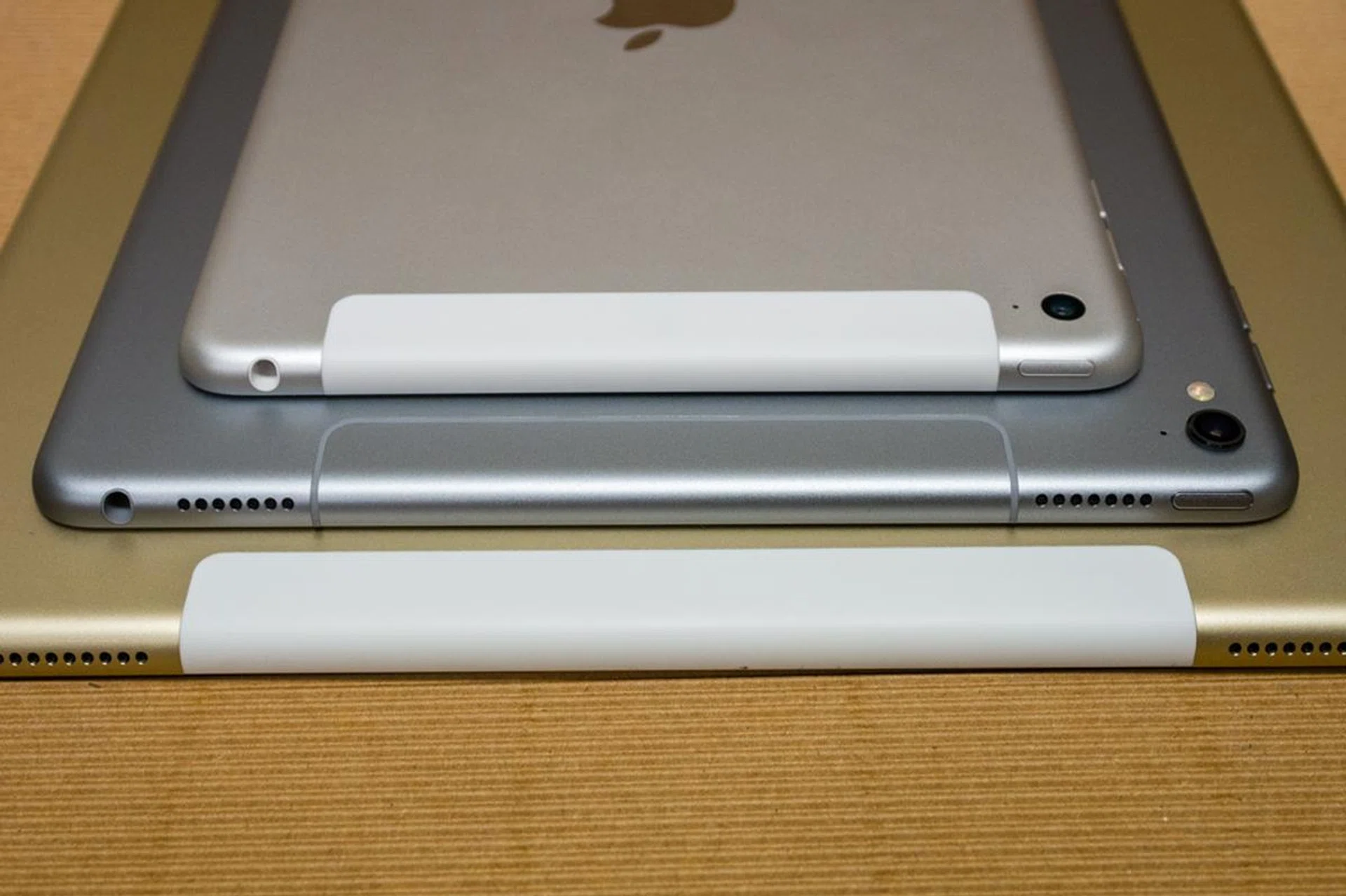
You'll also notice that, like its bigger brother, the iPad Pro 9.7 has four speakers, two on the top and two on the bottom, for a true stereo sound setup. The last minor change is a Smart Connector port on the left side, which lets the tablet connect with Apple's Smart Keyboard accessory.
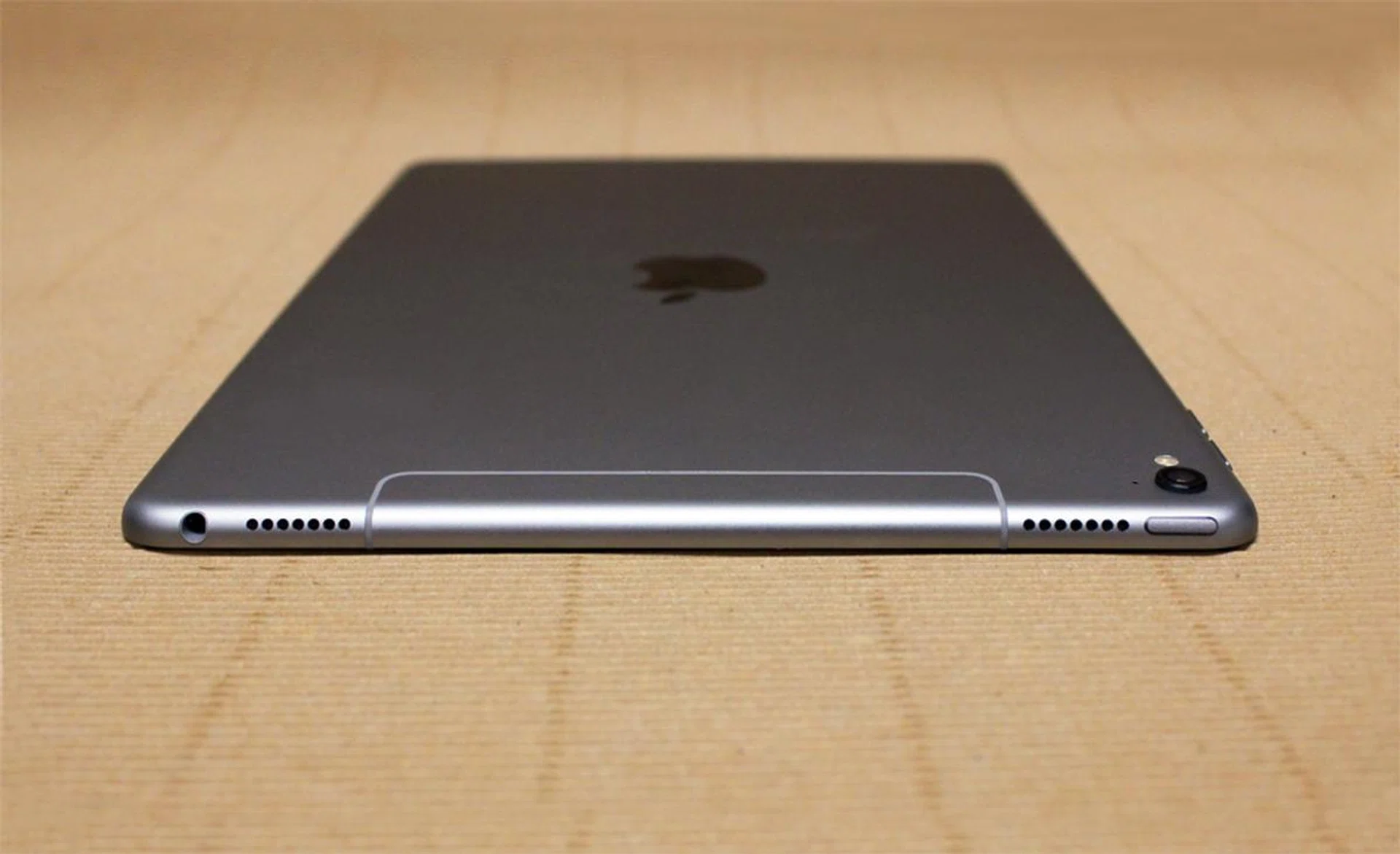
Like the iPad Pro 12.9, the 9.7 has speakers on the top and bottom.
For more photos, you can also check out our photo gallery comparison of the iPad Pro 9.7 against the bigger 12.9-inch brother and the iPad Mini 4.
Next, we'll cover the key features of the iPad Pro series and how the 9.7 variant fares in those aspects.
Display and Audio
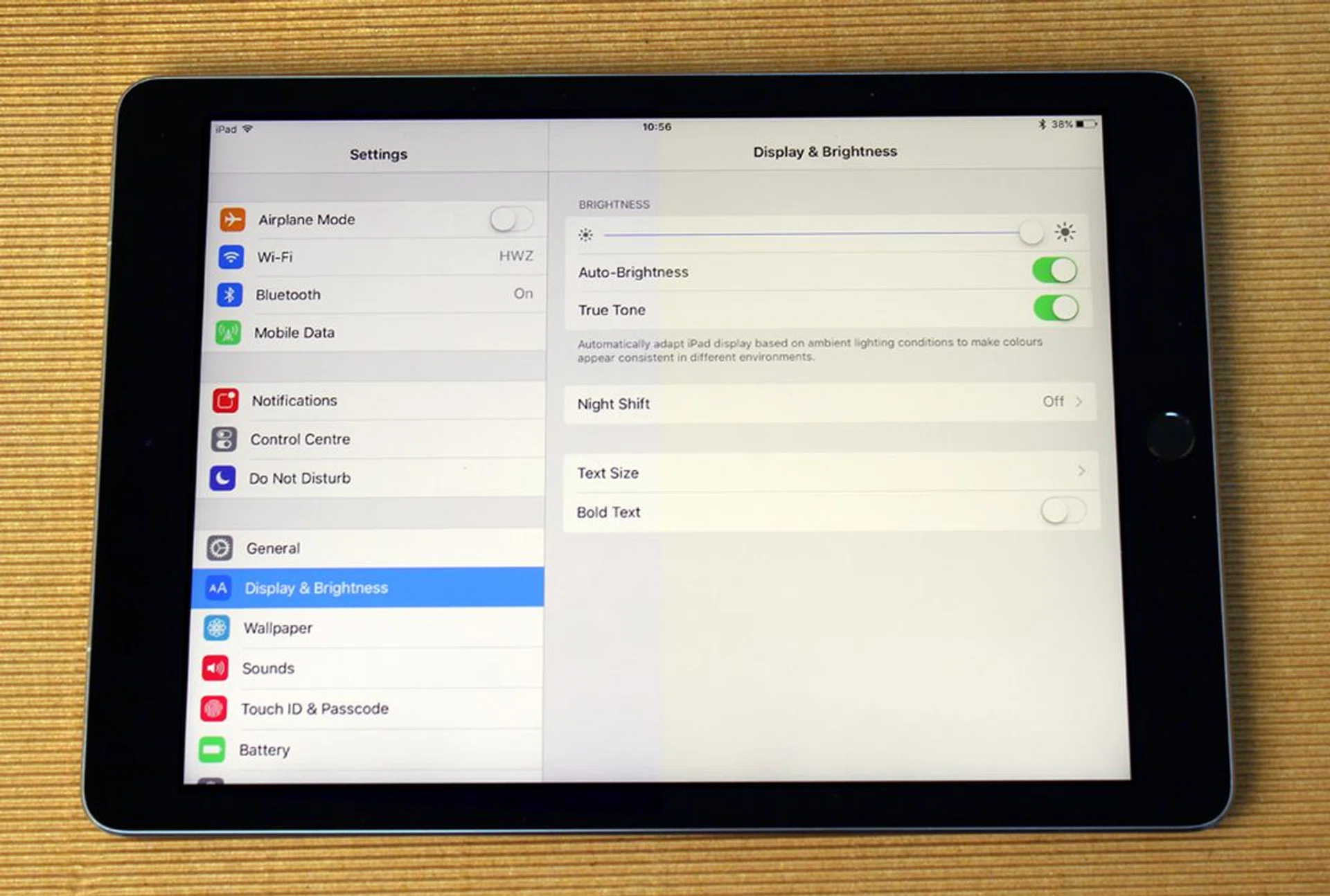
The iPad Pro 9.7's display has the same 9.7-inch size, 2,048 x 1,536 pixels resolution and 264ppi as the iPad Air 2. But don't make the mistake of assuming it's the same display. Apple has cranked up the color gamut to give the new iPad Pro 25 percent better color reproduction than the iPad Air 2 and the tablet also boasts a new True Tone display technology that dynamically adjusts the white balance of the screen to adapt its color and intensity to your environment. It does this through four-channel ambient light sensors, which also control the auto-brightness function.
True Tone is somewhat similar to iOS 9.3's Night Shift feature, and makes the screen less blue in warm light. Apple's intention here is to make the iPad Pro 9.7's display look more like a piece of paper, which makes it less glaring and easier on the eyes. Honestly, I found it a bit odd-looking at first, giving the screen a noticeably yellowish tinge under most conditions, but it soon became less and less conspicuous and after a few days of getting used to it, you actually don't notice it all. Now if I turn it off I wonder why the screen looks so cold and glaring. Even if you don't want it on all the time, I highly recommend turning it on if you're reading an e-book. Your eyes will thank you.
I've joined two images together here. True Tone enabled on the right-side of the screen, and off on the left-side. This is under warm lighting.
Like all of Apple tablets, the iPad Pro display is fully laminated with zero gaps between the display and glass. It also has a new anti-reflective coating, which makes it more usable under bright lights and sunlight.
The iPad Pro 9.7 has two speakers at the top and two at the bottom. This finally lets you watch movies and shows on the iPad in landscape orientation without suffering from one-sided audio. Like the Pro 12.9, the top speakers will always handle mid and high frequencies, and the bottom pair will handle bass duties. The tablet is smart enough to let the 'top' speakers change, depending on how you hold the iPad, rotating to match your screen orientation. The audio is much louder than the iPad Air 2, with a surprisingly decent amount of bass frequency, but isn't quite as powerful as the iPad Pro 12.9. It's still better than anything else out there though.
Smart Keyboard & Apple Pencil
The iPad Pro 9.7 is equipped to run the same types of accessories as its bigger brother. Its screen works with the Apple Pencil, and there's a Smart Connector port on the left edge for attaching a Smart Keyboard cover.
The Smart Keyboard is a keyboard cover available for the iPad Pro 9.7, sold separately for S$228. With the smaller display, the Smart Keyboard has also been shrunk down. It's not too hard to type on, but with everything so small, it's pretty easy to make mistakes. The Return and Tab keys are much smaller than on the Pro 12.9's keyboard, which can make it frustrating to navigate and format documents. With enough practice you get used to it though.
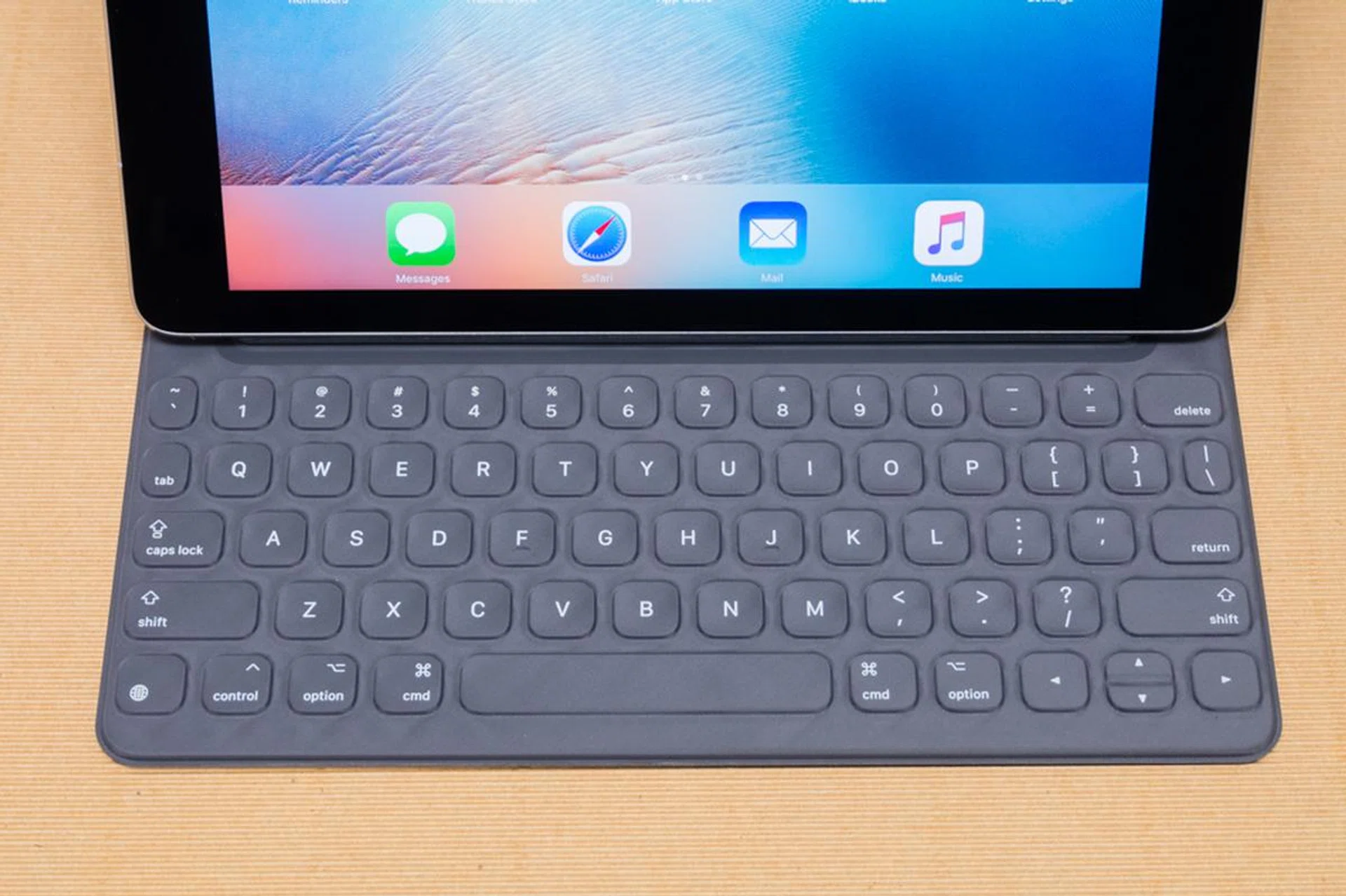
The keys themselves are covered in a custom fabric that is both liquid-repellant and gives the keys their shape. There's minimal travel, and the keys have a subdued clicking sound when pushed. Since iOS doesn't support mice, there's no trackpad, so you'll frequently be reaching to tap the screen.
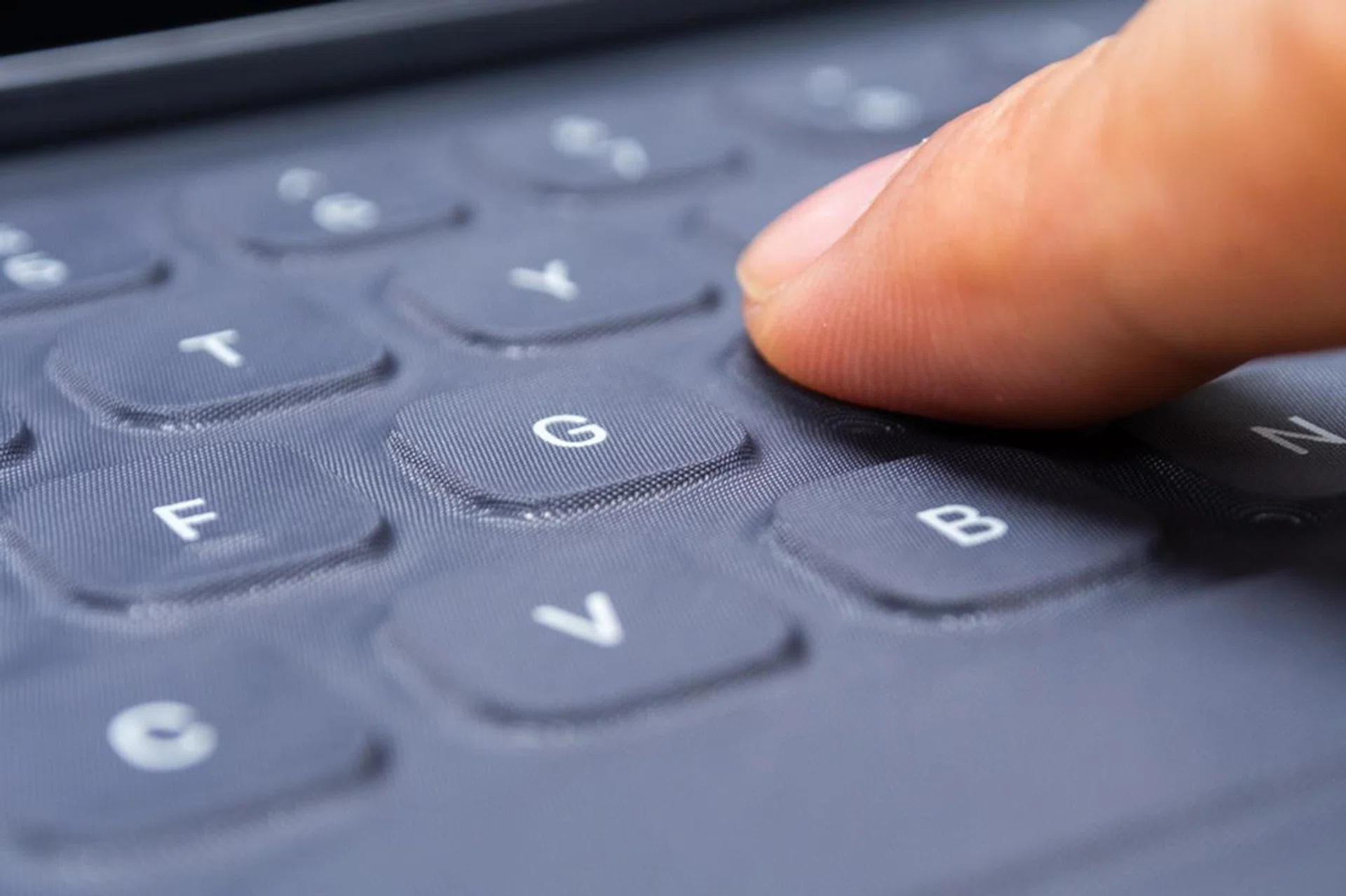
While Apple is pushing the iPad Pro as a laptop replacement, actually using it on your lap isn't a great experience. The Smart Keyboard only sits at one angle, and it doesn't feel particularly sturdy. The display wobbles when you type too. This is an area where Microsoft's Surface tablet has Apple beat, thanks to its hinge design and adjustable angles. The Smart Keyboard does much better when you can put it on a flat surface like a table.
The Apple Pencil (S$148) is also compatible with the iPad Pro 9.7. It can do everything the original could do, and is pretty much essential for anyone that enjoys drawing and sketching. Like the original iPad Pro, the iPad Pro 9.7 and the Apple Pencil both have sensors to detect the pressure you're using and the angle you're holding the stylus at, making it effortless to create lines of different thicknesses.
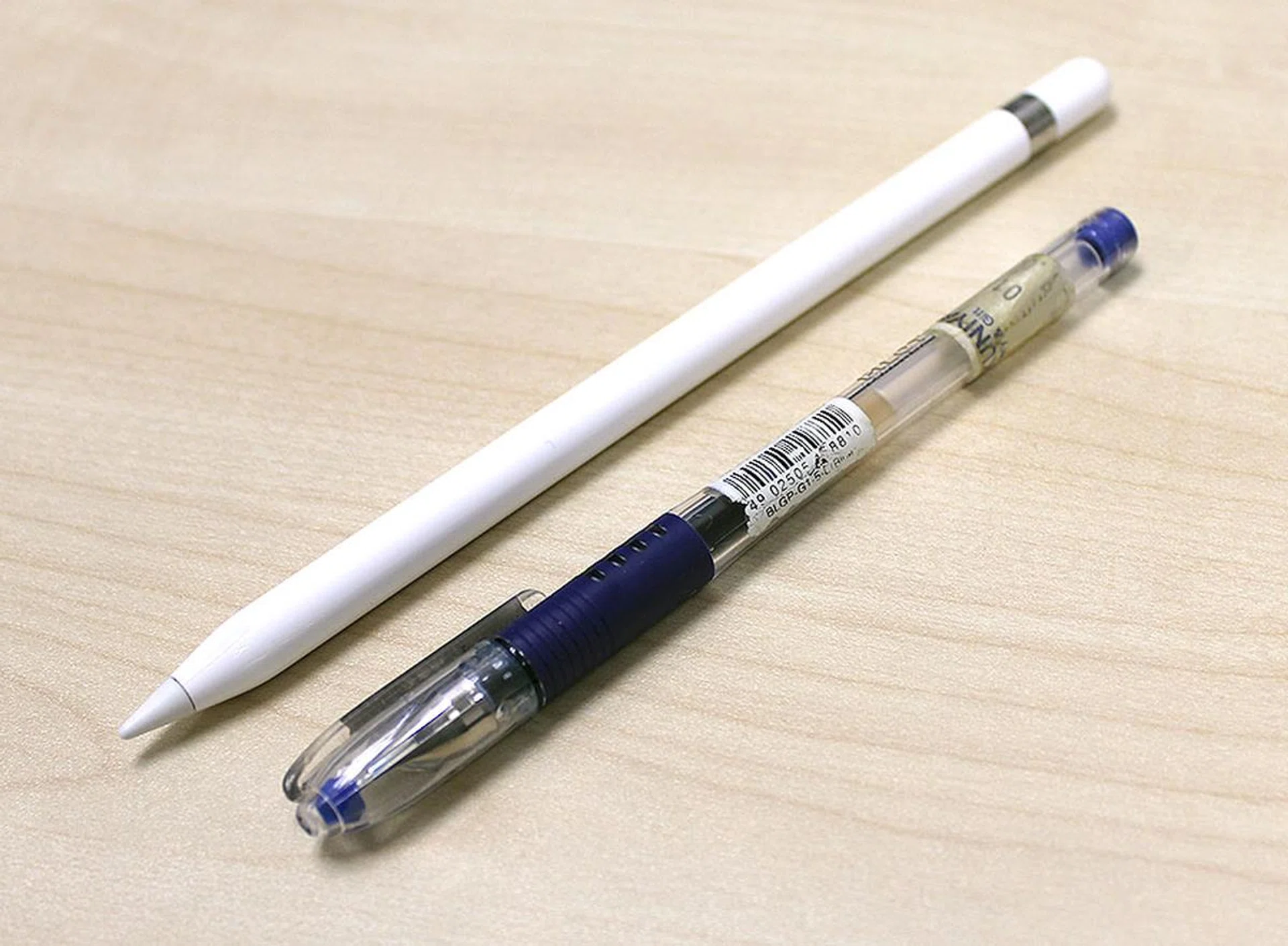
One minor annoyance I encountered is that the Pencil isn't able to do everything your finger can do - such as swiping up from the edge of the display to bring up Split View mode - so you have to momentarily juggle the Pencil to use a finger, or use your other hand. This is also a problem the iPad Pro 12.9 had though. I also wish there was a slot on the iPad Pro or even the Smart Keyboard case to holster the Pencil. I constantly feel like I'm going to lose it. Like the original iPad Pro, you charge the Apple Pencil by plugging it into the Lightning port at the bottom of the iPad.
Benchmark Performance
The iPad Pro 9.7 runs on the same 64-bit A9X SoC that you'll find inside the iPad Pro 12.9. Its bigger brother is marginally faster with a 2.26GHz clockspeed, compared to 2.16GHz on the 9.7, but the 12.9 also has to work harder to drive its larger display.
The A9X also comes with the same M9 motion co-processor and 12-core PowerVR Series 7 GPU. One pretty big difference is that the 9.7 only has 2GB RAM, compared to 4GB on the 12.9.
In terms of storage, Apple has doubled all of the previous configurations available on the iPad Air 2. Like the iPad Pro 12.9, your new options are: 32, 128, and 256GB.
Sunspider
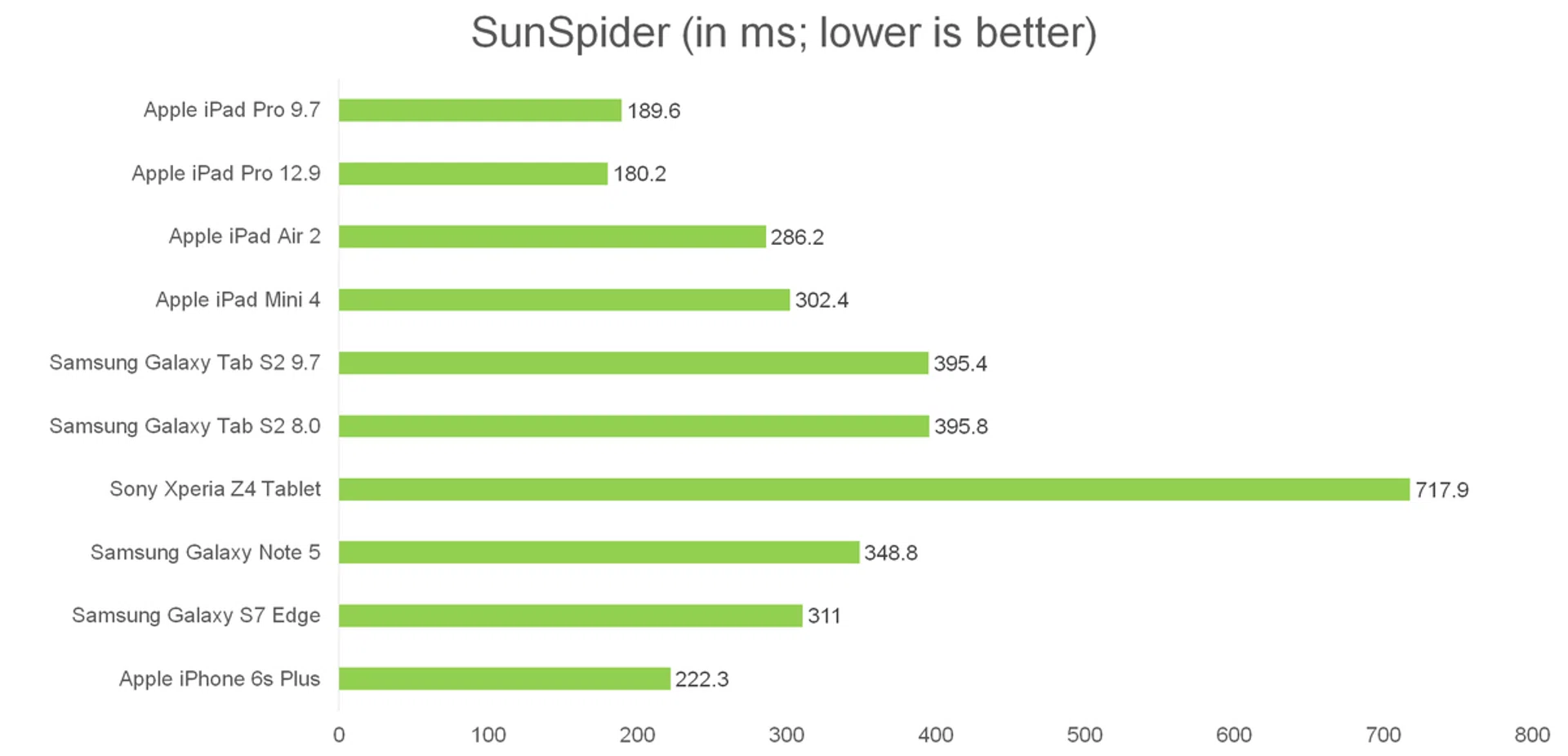
SunSpider JavaScript measures the browsing performance of a device. It not only takes into consideration the underlying hardware performance, but also assesses how optimized a particular platform is at delivering a high-speed web browsing experience.
Safari has always been well optimized for Apple's processors and the A9X was no exception, with the iPad Pro 9.7 running circles around everyone except its bigger brother. In actual usage, web browsing and interface navigation on the Pro 9.7 is fast and fluid. Apps open effortlessly and transition animations are as smooth as can be, even with Split View mode showing two apps at the same time.
3DMark Ice Storm Unlimited
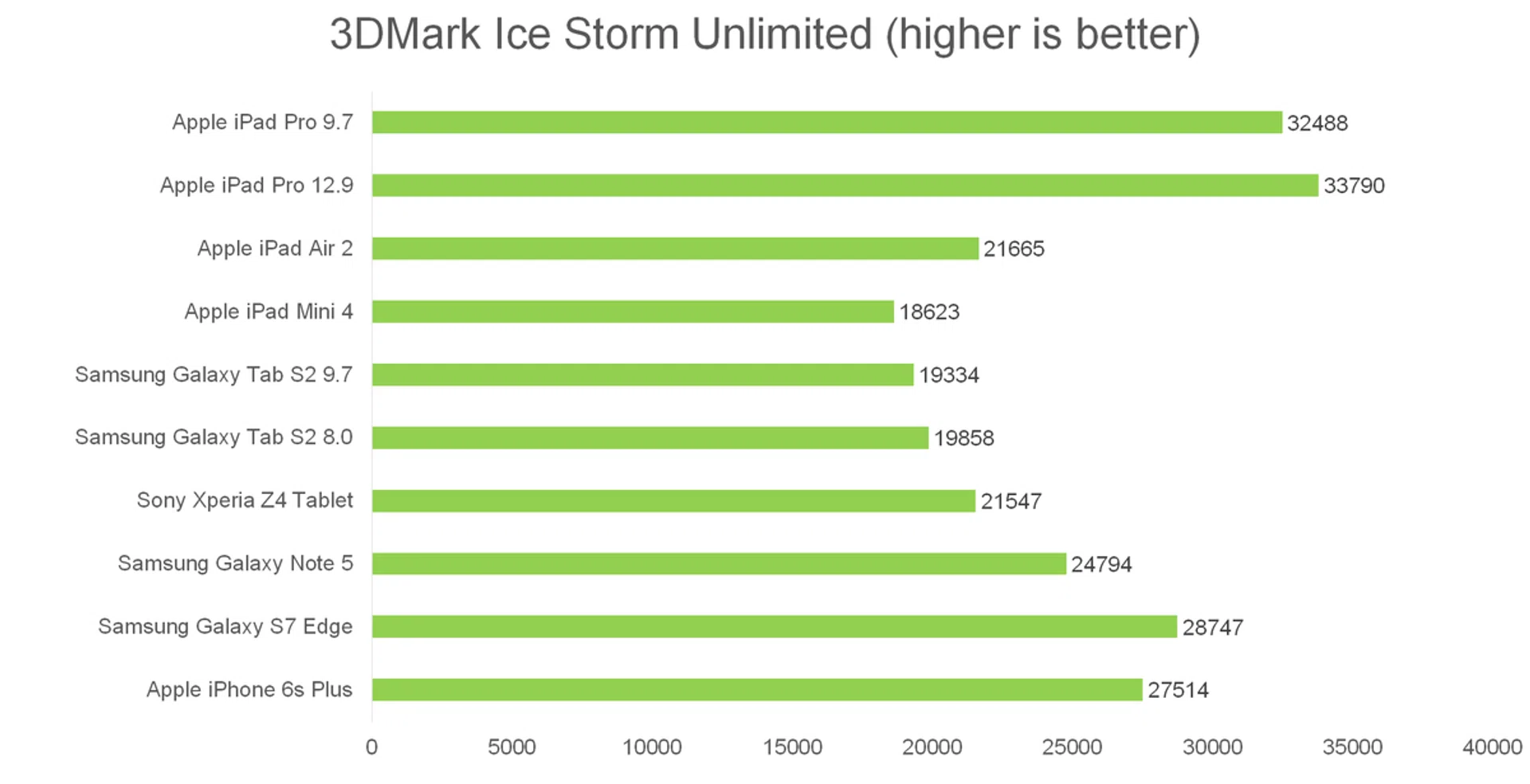
3DMark (2013) is a synthetic benchmark consisting of two graphics tests packed with high quality textures and post-processing effects designed to stress the GPU performance of the device and a physics test to stress its CPU performance. With all of our devices easily maxing out the Normal and Extreme versions of this test, we'll just be looking at Ice Storm Unlimited, which is used to make chip-to-chip comparisons of different chipsets, CPUs and GPUs, without vertical sync, display resolution scaling and other operating system factors affecting the result.
The A9X continues to impress, with the iPad Pro 9.7 only slightly trailing the iPad Pro 12.9. For reference, in 3DMark's new Sling Shot Extreme benchmark, the iPad Pro 9.7 scored 3150. For reference, that score is much higher than what the Snapdragon 820 toting LG G5 managed to obtain.
Camera Performance
Taking photos in public with your tablet is a major faux pas, but if you don't care about looking a little foolish, the tablet to do it with is the iPad Pro 9.7. Both front and rear cameras have gotten a major upgrade. The rear now sports the same 12-megapixel iSight camera found on the iPhone 6s, with a True Tone LED dual flash - but unfortunately no optical image stabilization, that remains exclusive to the iPhone 6s Plus.
Like Apple's latest smartphones, the iPad Pro 9.7 is capable of taking Live Photos, which capture 1.5 seconds of video, complete with sound, before and after you press the shutter button. To activate a Live Photo later, just press and hold down on the screen. The rear camera also is capable of shooting 4K video at 30fps now and Slo-mo video mode has been upgraded to 1080p at 120fps and 720p at 240fps. Previously, you were limited to 720p at 120fps.
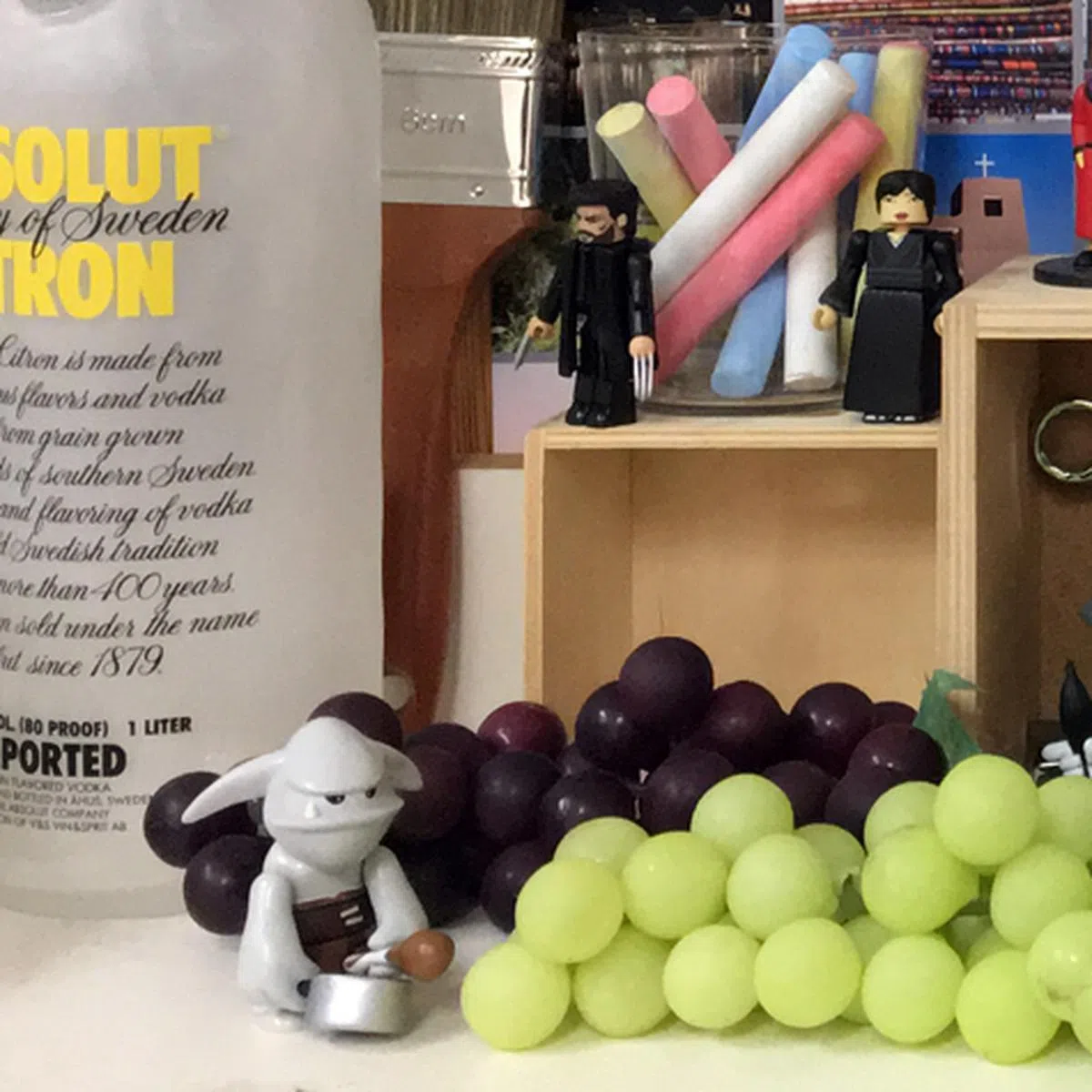
Picture quality, as expected, is excellent, with great color reproduction, contrast and lots of detail. The rear camera is by far the best available on any tablet, besting even the iPad Pro 12.9. Honestly, no other tablet even comes close.

Click for full-size image.
 |  |
Battery Life
Our standard battery test for tablets includes the following parameters:
- Looping a 720p video with screen brightness and volume at 100%
- Wi-Fi and Bluetooth connectivity turned on
- Constant data streaming through email and Twitter
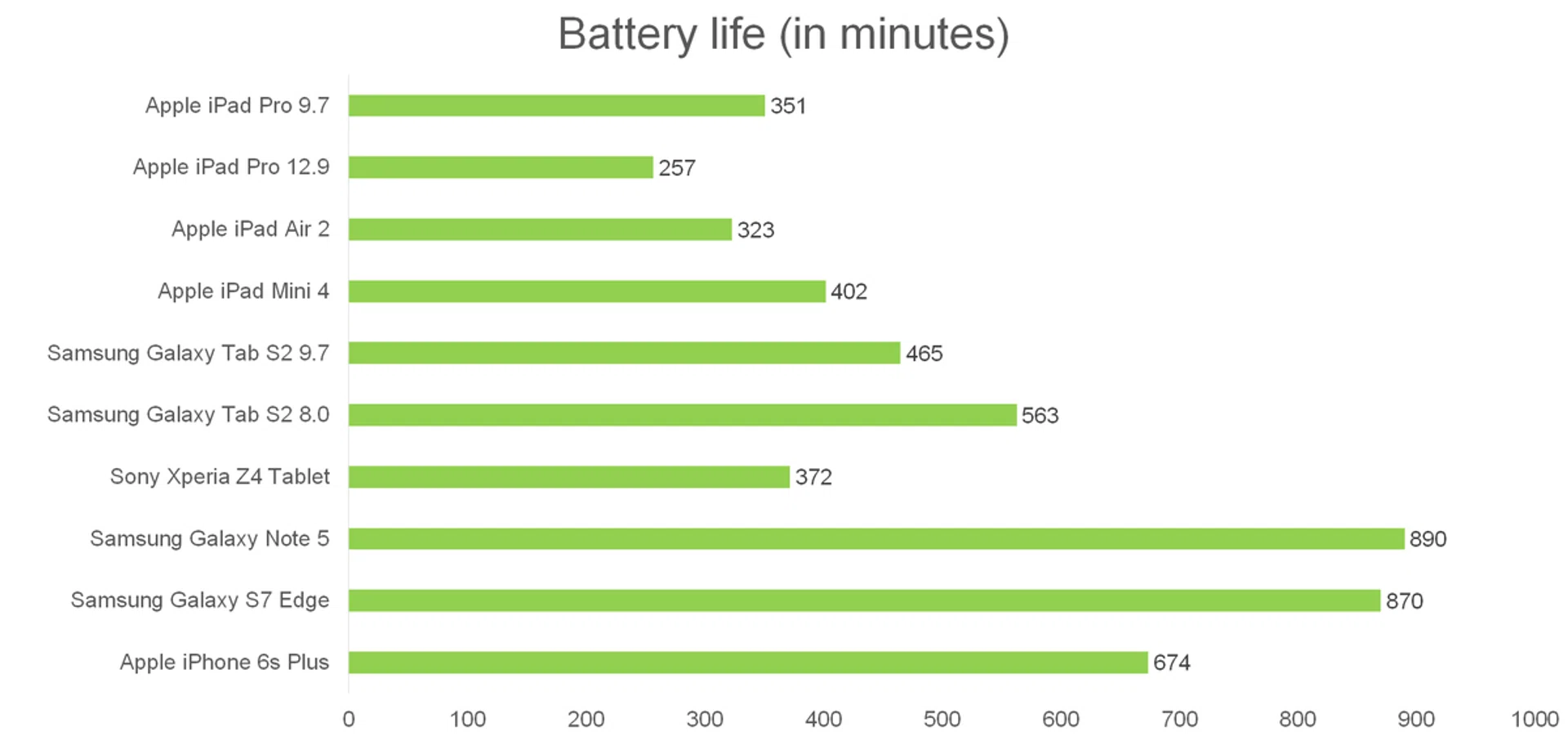
The iPad Pro 9.7's 7,306mAh battery is marginally smaller than the 7,340MAh battery found inside the iPad Air 2. Nevertheless, the new A9X processor proved its power efficiency by lasting longer in our video looping benchmark, lasting just under six hours in total. While this certainly isn't amazing (Samsung's AMOLED tablets both managed to last over seven hours), it's still a decent upgrade from both the iPad Air 2 and the iPad Pro 12.9.
Conclusion
The iPad Pro 9.7 is easily the best tablet Apple has ever made, even besting its bigger brother, the iPad Pro 12.9.
The 9.7-inch form factor is more manageable, lighter, thinner, and easier to pack in your backpack or handbag. It also fits nicely onto airplane seat back trays and those tiny desks you find attached to classroom chairs. With its four speakers and gorgeous display, it's without a doubt a fantastic media consumption device.
But will it replace your laptop? Honestly, probably not. The Smart Keyboard is a fantastic accessory, and iOS doesn't need a trackpad for navigation. But iOS itself isn't the best OS for productivity. Yes, you can technically multitask with it, but Split View will only get you so far. It's nothing compared to the true desktop experience and multiple tabs you can run simultaneously with OS X or even Windows 10. As a result, the iPad Pro 9.7 feels like a media consumption device first, with some added crossover laptop functionality thrown in. It's great for sending emails on the go, or Internet surfing, and I even use it for typing up notes at press conferences and interviews, but at the end of the day, I come home and fire up my laptop and the real work gets done there.
Then there's the price. The iPad Pro 9.7 starts at S$898 (32GB, Wi-Fi only), which is S$210 more than what the iPad Air 2 launched for. In fact, the most expensive iPad Air 2 you can currently buy (64GB, 4G LTE) is only S$888, making it $10 cheaper than the cheapest iPad Pro! On the other end of the scale, the most expensive iPad Pro (256GB, 4G LTE) costs a whopping S$1,618. For S$70 more you can get yourself a 13-inch MacBook Pro Retina.
Does the iPad Pro 9.7's 'Pro' features really justify its much higher price? I suspect for many people the answer will be no. The stereo speakers are amazing, but on a plane, or any public area, you're going to be using headphones anyway. The performance is unrivaled, but if you're mainly watching videos and surfing the Internet, you just don't need that kind of performance. The camera is fantastic, but when was the last time you actually wanted to use your tablet to take a picture? It's not any lighter or thinner than the iPad Air 2, and the battery life is only slightly better. The most compelling reason to purchase a new iPad Pro is the much larger storage space (assuming you buy a 128 or 256GB version - which you should).
If you can afford it, the iPad Pro 9.7 is in a class of its own; if not, the iPad Air 2 is still a great iPad. And a lot cheaper too.
Our articles may contain affiliate links. If you buy through these links, we may earn a small commission.