

Performance you can carry around
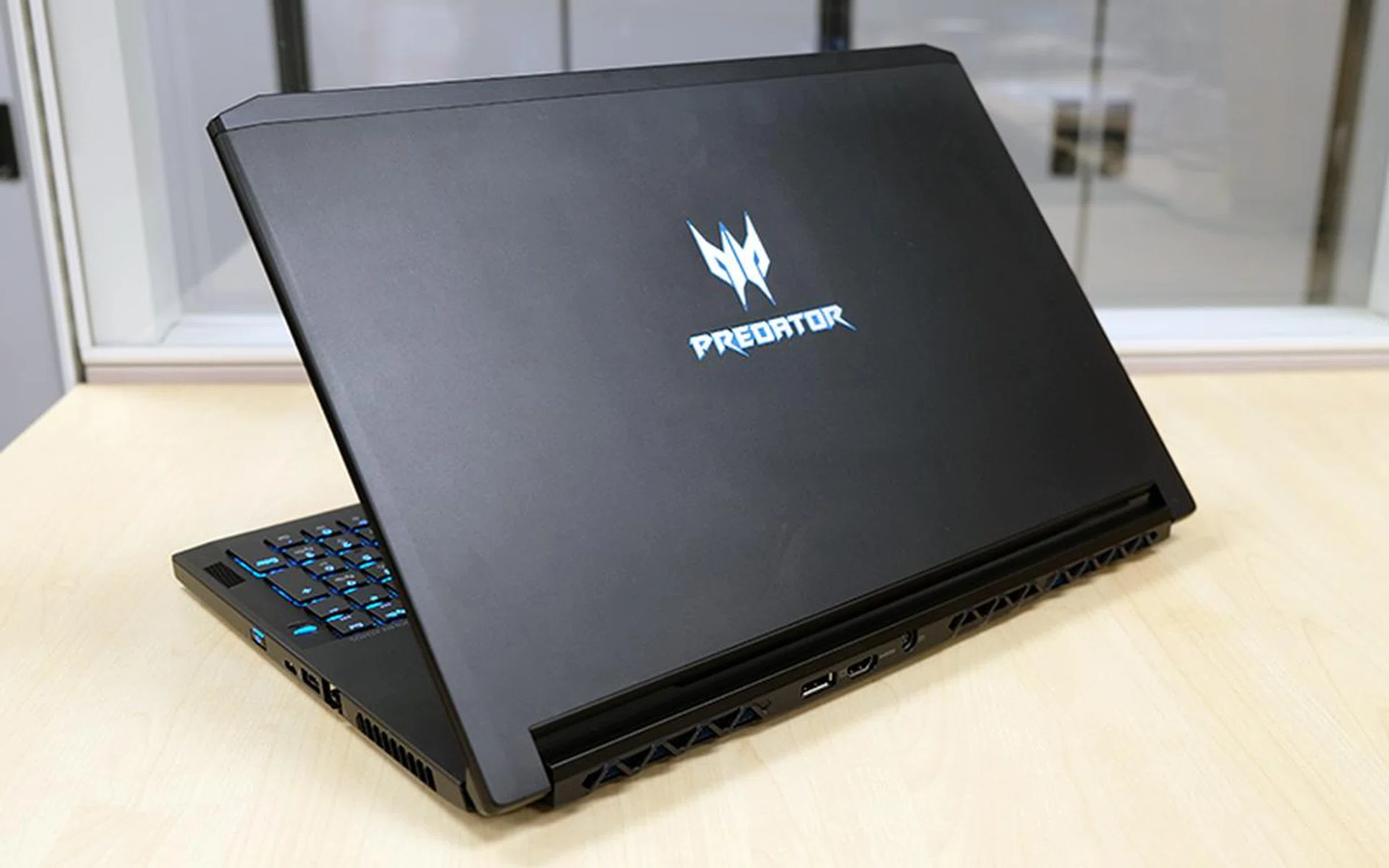
This is one of the most powerful gaming laptops money can buy.
Today’s gaming laptops pack a ton of performance into lean and mean chassis, so you never have to leave the gamer in you back at home.
The Acer Predator Triton 700 is a prime example of such a laptop, and it squeezes absolutely beastly specifications into a chassis that measures just 18.9mm thick. It’s one of those laptops that defies expectations about how much performance you should be getting in a certain form factor, and a lot of that is thanks to NVIDIA’s Max-Q optimizations.
Here’s an overview of what you’re getting:
- 15.6-inch 1,920 x 1,080-pixel IPS 120Hz G-Sync display
- Intel Core i7-7700HQ processor (2.8GHz, 6MB L3 cache)
- 32GB DDR4-2400 dual-channel memory
- NVIDIA GeForce GTX 1080 Max-Q graphics
- 1TB PCIe SSD (RAID 0)
- 54Wh battery
- 390 x 266 x 18.9mm
- 2.4kg
Acer looks like it’s taken care to push every spec of the laptop, and even the storage drive is a speedy 1TB PCIe SSD RAID 0 array.
Unsurprisingly, this comes at a significant price premium, and the Triton 700 will cost you an eye-watering S$5,888. That’s nearly a thousand dollars more than the already-expensive ASUS ROG Zephyrus GX501 (S$4,898), which is its closest competitor.
While the Zephyrus lacks the RAID 0 SSD array and has slightly less RAM, it makes up for that with a slimmer, lighter, and overall better design. The trackpad on the Triton 700 leaves a lot to be desired, and I’ll talk about that in greater detail on the next page.
Ultimately, it’s a case of give-and-take between the two. Is the Triton 700 worth its stiff price tag? Read on to find out.
Design, Hardware & Features
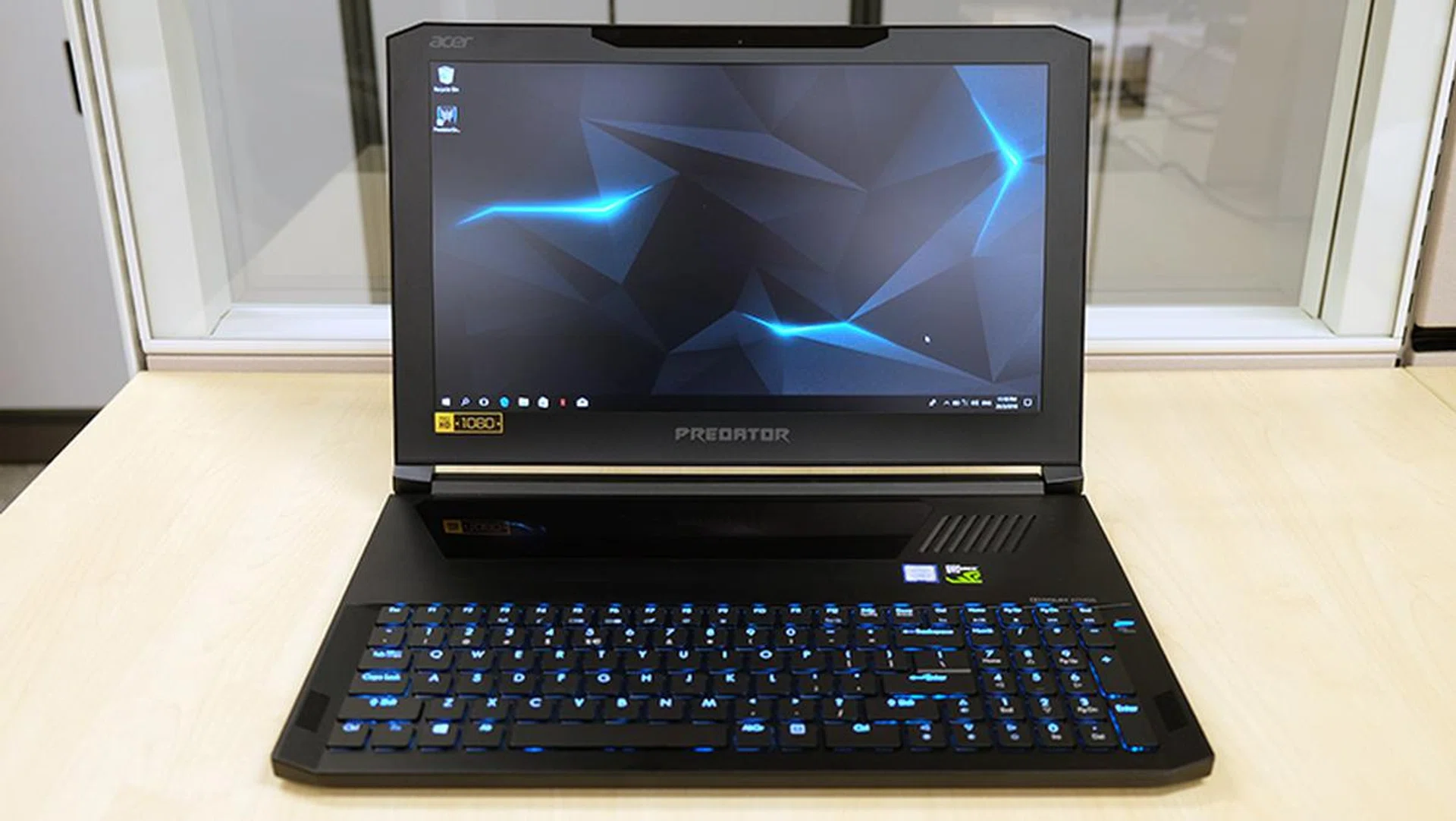
The trackpad is located above the keyboard, which really isn't the best place to put it.
This is one laptop that has no intention of being called boring. The Predator Triton 700 is visually striking, to say the least, with a large illuminated glass trackpad above the keyboard. It’s probably the first thing you’ll notice about the laptop, and it’s safe to say that no other notebook looks quite like it.
The matte aluminum chassis looks great and does a good job at resisting pesky fingerprints, so you don’t have to wipe the laptop down every time you touch it. It feels really solid, with little discernible flex around the keyboard.
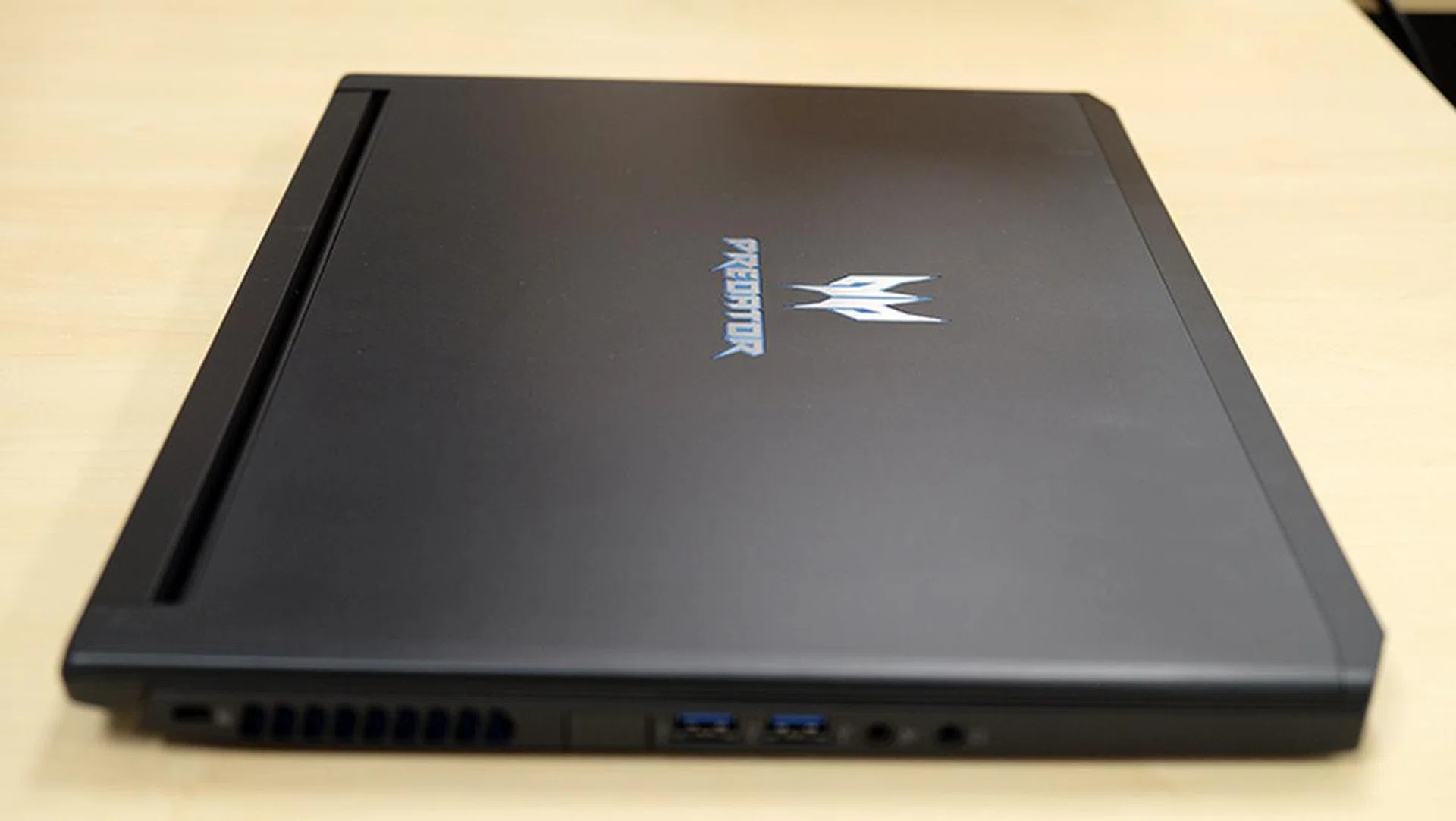
The aluminum chassis feels solid and well put together.
On paper, it’s also an absolute specifications beast, with nearly everything you could ask for in a laptop. This means an NVIDIA GeForce GTX 1080 Max-Q graphics, 32GB of DDR4 memory, and even a blazing fast 1TB RAID 0 SSD array.
This Predator notebook measures a mere 18.9mm thick and weighs 2.4kg, which is practically a featherweight for the amount of power it offers. The GeForce GTX 1080 Max-Q can run just about any game out there at 1080p, which is precisely the display resolution on the Triton 700.
On the topic of the display, it uses a 120Hz refresh rate IPS panel and supports NVIDIA G-Sync. This combination should provide a super smooth and fluid experience, eliminating annoyances like stuttering or tearing. A high refresh rate display is truly one of the best upgrades you can get for your gaming experience, and it’s nice to see it offered on a growing number of premium gaming laptops today.
To cap matters off, Acer managed to squeeze a full-size mechanical keyboard into the Triton 700’s slim chassis. It employs low-profile mechanical switches that are both tactile and clicky, making for one of the best typing experiences I’ve had on a laptop. Each key press feels deeply satisfying, and you can customize the RGB lighting on a per-key basis as well.
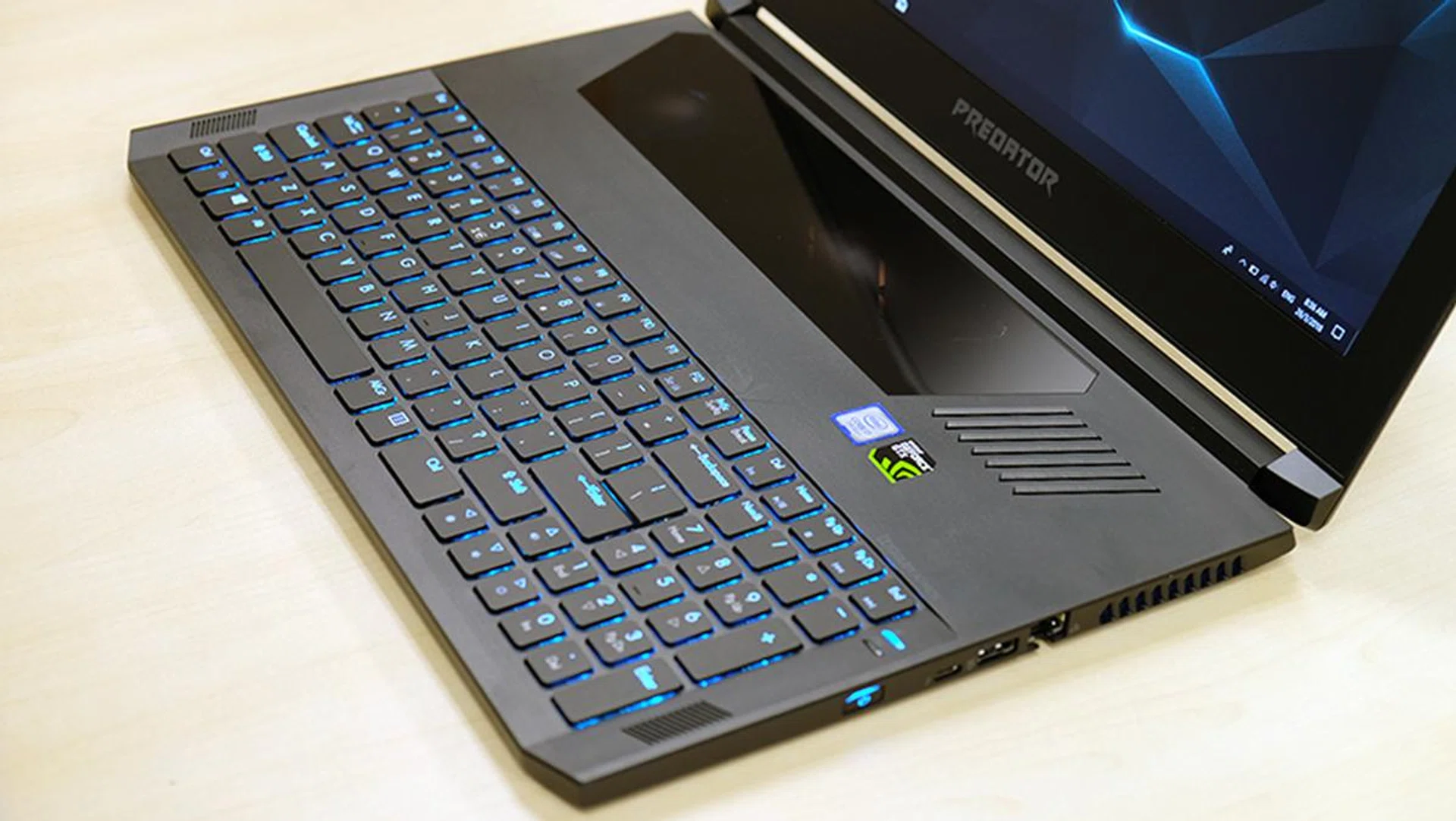
The mechanical keyboard here is simply excellent.
The lighting effects are well implemented and show minimal backlight bleed, so there’s really little to complain about here.
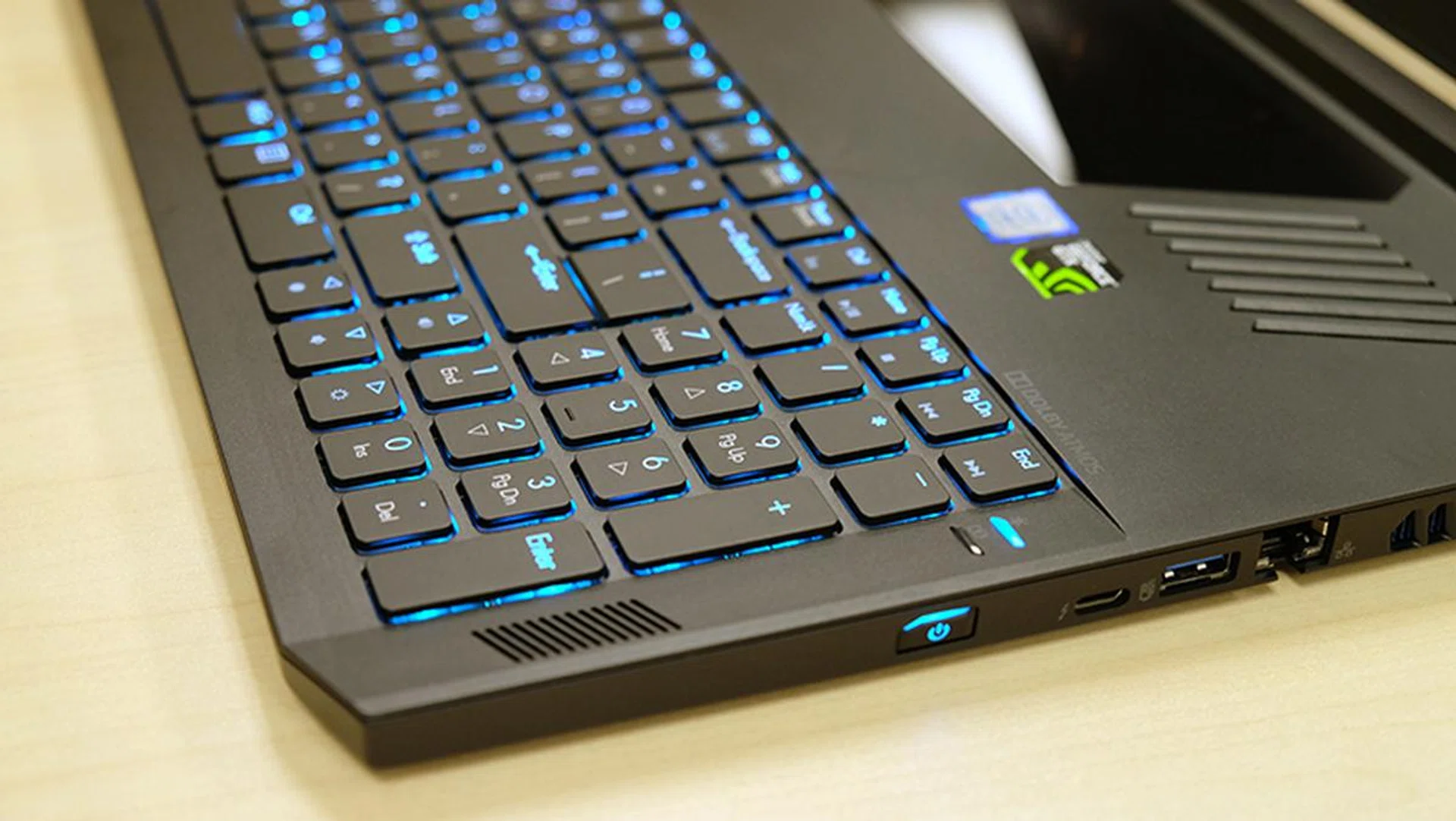
Each key provides deeply satisfying feedback.
I truly appreciate being able to have a mechanical keyboard on a laptop that isn’t as bulky as something like the MSI GT80 2QE Titan SLI, which also looks like someone slapped a regular desktop keyboard onto the body of a laptop.
The stereo speakers are located on either side of the keyboard and face upwards, which is probably one of the better speaker arrangements on a laptop. They’re free from obstruction, and are capable of pumping out loud tunes to fill a room. However, the low-end can sound a little anemic, so you’re really better off using dedicated headphones. That said, the support for Dolby Atmos is a nice touch, and it only seems fitting for a laptop that costs this much.
As expected from a notebook of this caliber, there’s also no shortage of connectivity options. This includes three USB 3.1 (Gen 1) Type-A ports, one USB 2.0 port, and a Thunderbolt 3 connector. There are also HDMI and DisplayPort outputs on the rear – they may be slightly less accessible than ports at the side, but it can make cable management slightly easier.
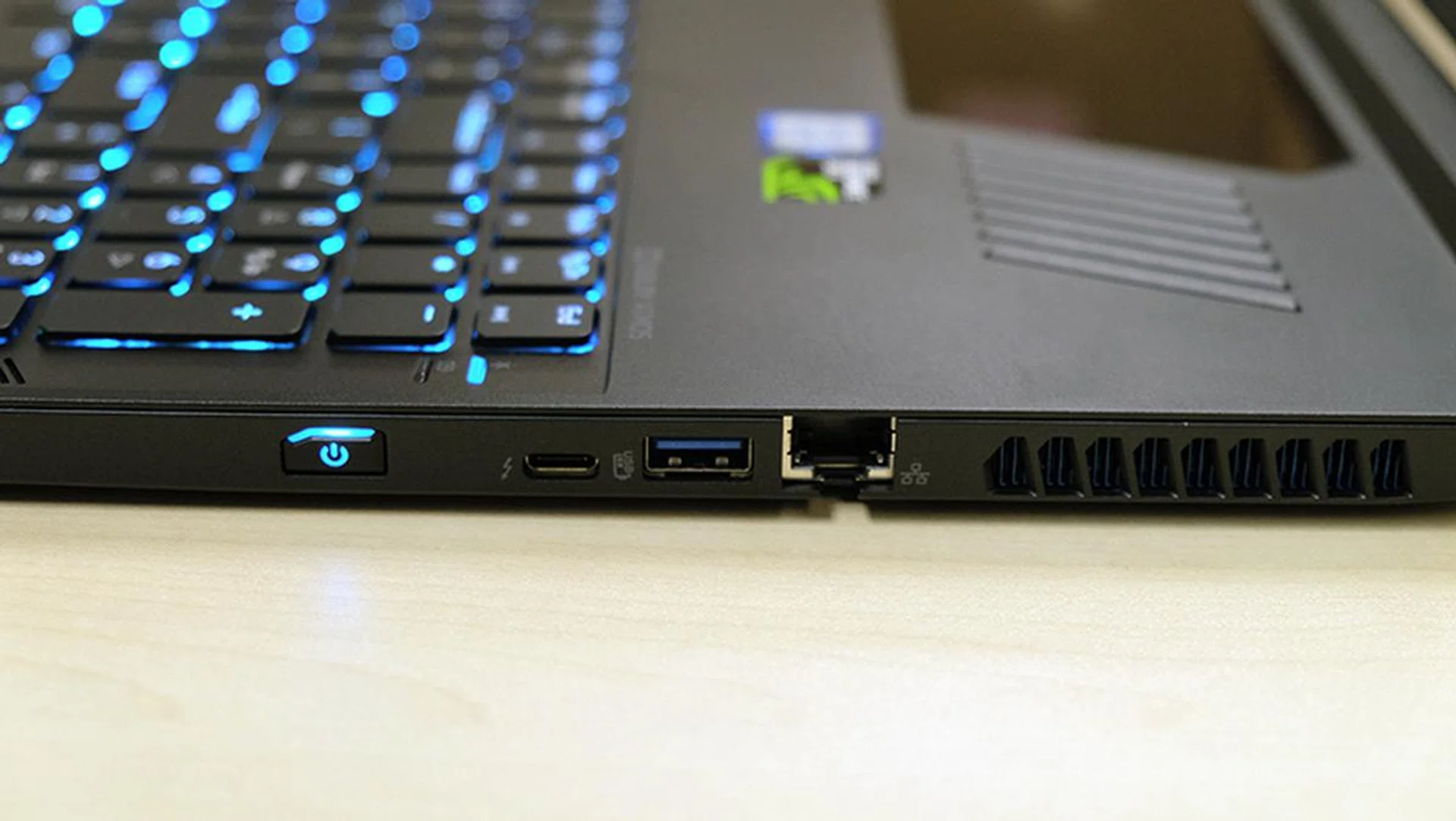
The power button is located at the side of the notebook.

There are dedicated ports for your headphones and microphone.
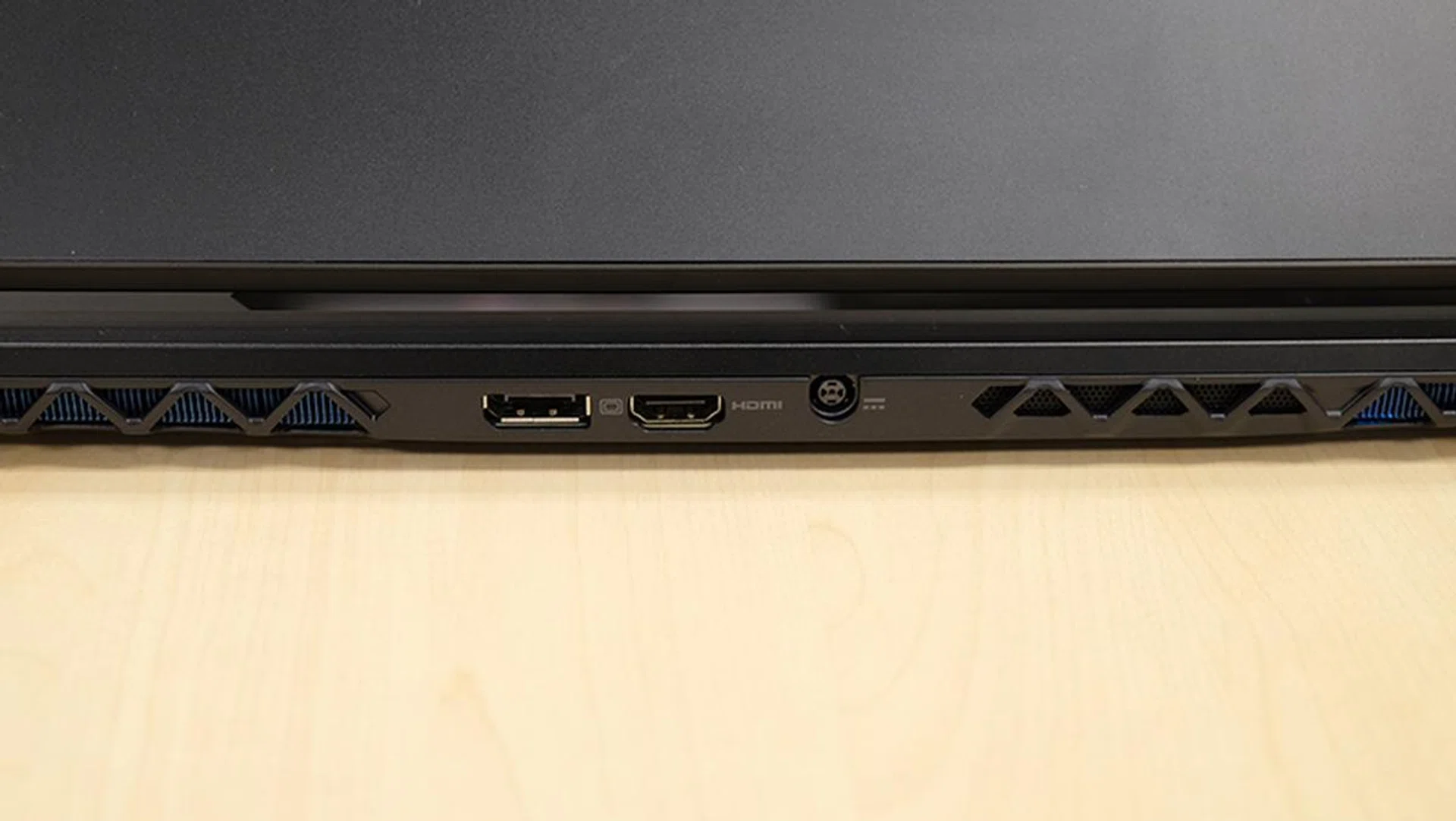
The display connectors are located at the back.
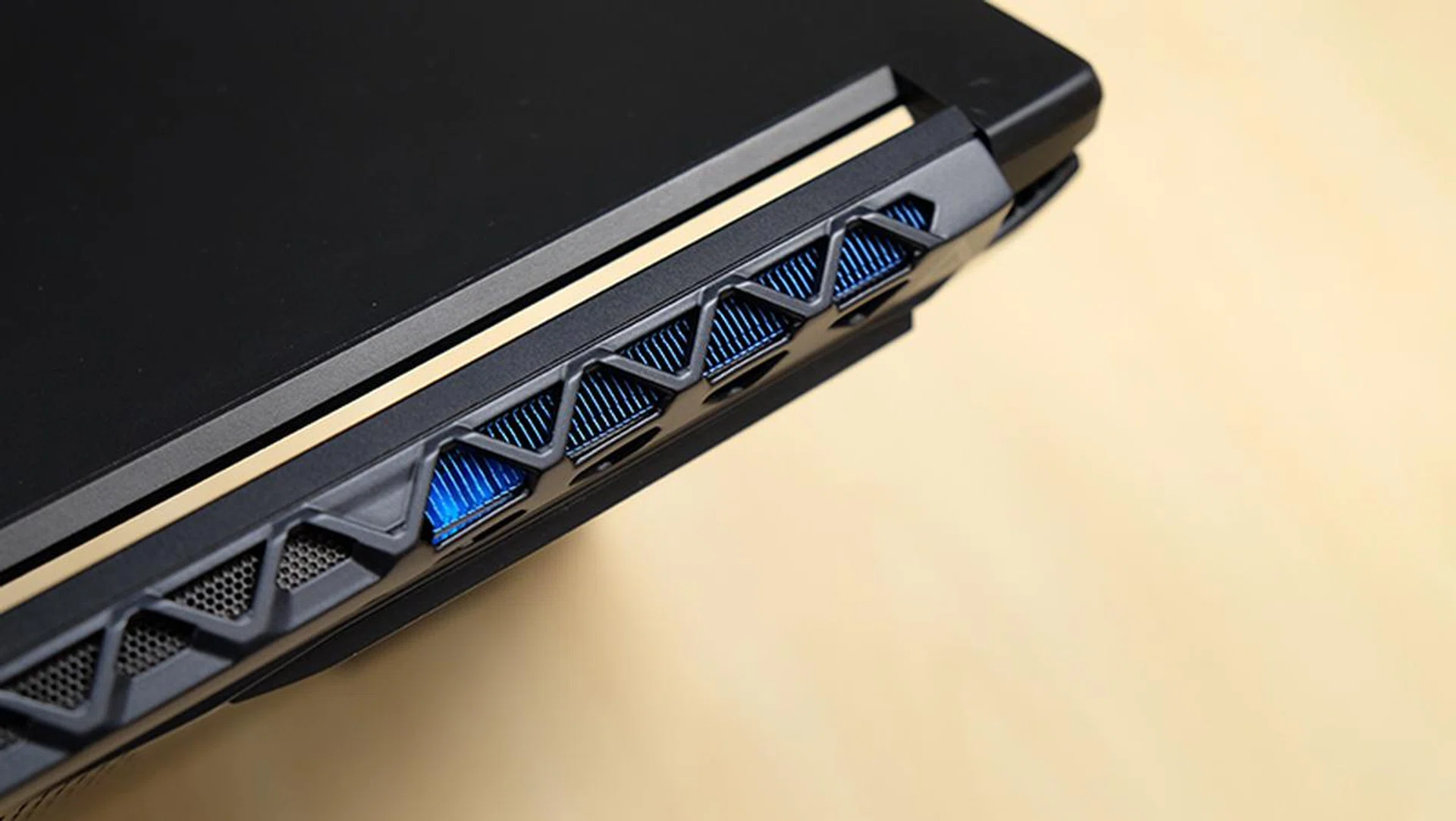
Furthermore, for a laptop this thin and powerful, the Triton 700 is reasonably quiet. The fans are definitely audible, but they never approach the piercing noise levels on something like the MSI GT75VR 7RF Titan Pro. However, there’s the option to ramp up fan speeds in the PredatorSense software, so the fans can actually get quite loud.
To keep the laptop cool, Acer has gone with two all-metal AeroBlade fans and five heatpipes. Cool air is pulled through the intake vent at the top, and hot air is expelled through the vents at the back.
There’s no doubt that the Predator Triton 700 is one of the most impressive gaming laptops around. Unfortunately, the notebook also comes with one major flaw that puts a huge dampener on what would otherwise be a stellar experience all around. I’m of course talking about the trackpad, which sits above the keyboard.
This placement feels super unnatural and difficult to get used to. It feels tiring to constantly have to move your hand up whenever you need to navigate, and it’s anything but intuitive. I’d much rather have the trackpad sit where the number pad is, which the ASUS ROG Zephyrus does to great success.
To sum things up, the trackpad is super pretty and great to look at, but it’s otherwise a huge letdown. It’s covered by a sheet of Gorilla Glass and reveals a fan spinning underneath. The AeroBlade fan is also softly lit by a blue glow, so it’s definitely pretty cool to look at.
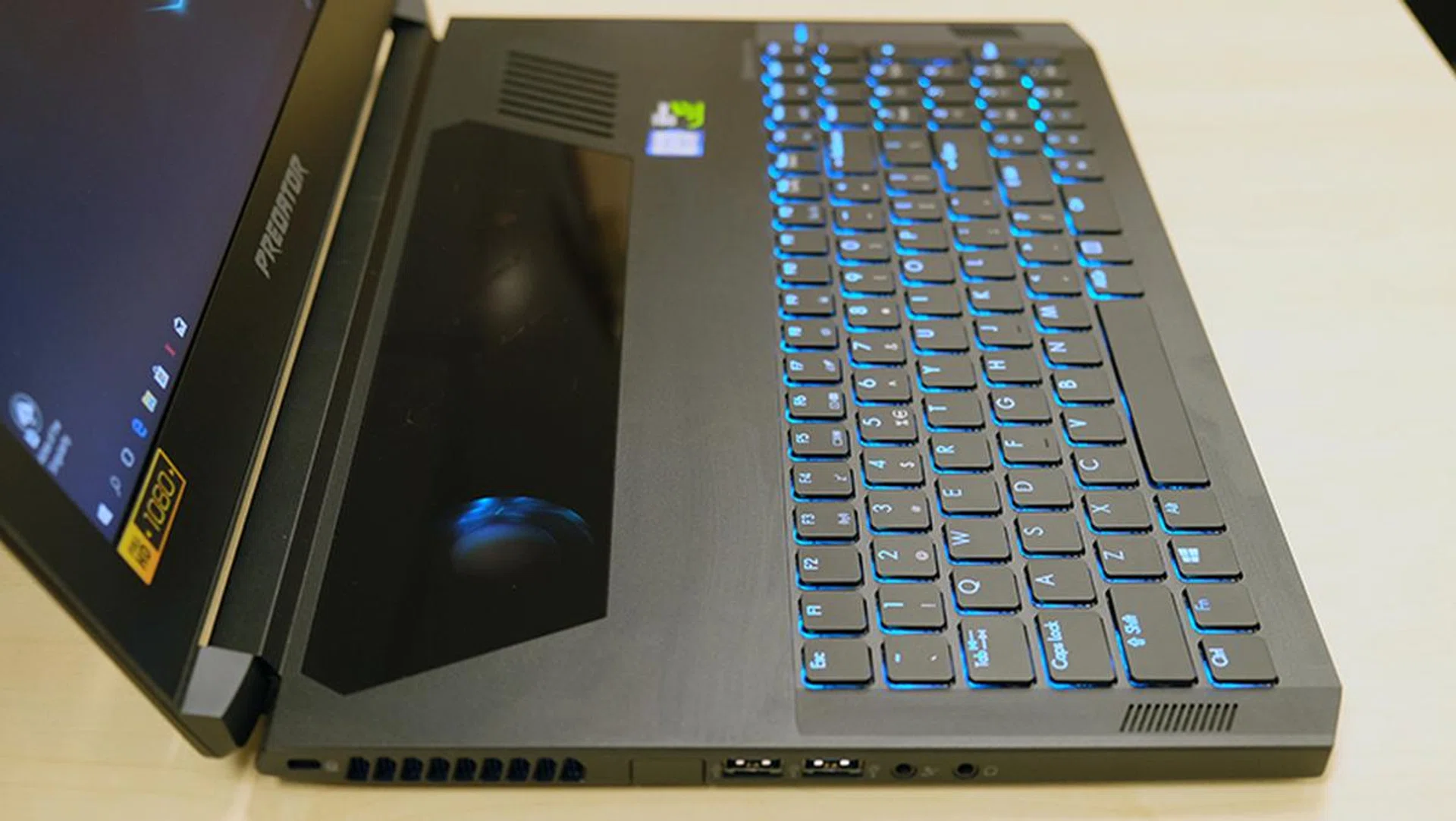
The AeroBlade fan can be seen through the glass trackpad.
It’s just a pity that it’s simply not very usable. Other than the lack of any physical buttons for tactile feedback, the actual tracking area is limited to a small section of the glass window, and is delineated by barely visible white markings. This meant I often found my mouse pointer unresponsive, because I’d inadvertently wander outside of the tracking area. Furthermore, the trackpad gets rather hot to touch, as it’s located above critical heat generating components.
If you can overlook the trackpad’s design, the Triton 700 makes for quite an impressive specimen, albeit at a horribly steep price of S$5,888. Still, the sleek aluminum chassis screams quality, and it serves up performance in spades. Just make sure you’ve got a mouse on hand always, because you won’t want to spend much time with that trackpad.
Test setup & Performance
I’ll be comparing the Predator Triton 700 against a handful of other Max-Q notebooks listed here:
- Acer Predator Triton 700
- ASUS ROG Zephyrus GX501
- Gigabyte Aero 15X
- MSI GS63VR 7RG Stealth Pro
The ROG Zephyrus GX501 is obviously the Triton 700’s closest rival, both in terms of specifications and price. However, I’ve also included the Aero 15X and GS63VR 7RG Stealth Pro to give an idea of what you’d be getting with a step down the ladder to a less extreme configuration. Hopefully, this should help you decide whether the extra luxuries on the Triton 700 are worth the additional cash.
[hwzcompare]
[products=634354,634366,634369,623629]
[width=200]
[caption=Test notebooks compared]
[showprices=1]
[/hwzcompare]
All the laptops were put through our usual suite of benchmarks. The full list can be found below:
- PCMark 10
- 3DMark
- VRMark
- Ashes of the Singularity
- Deus Ex: Mankind Divided
- Tom Clancy’s The Division
I used the 3DMark Fire Strike Extreme Stress Test for temperature measurements, and the battery life benchmark in PCMark 8 Home to test the battery (PCMark 10 doesn’t yet come with a built-in battery benchmark).
PCMark 10 Extended
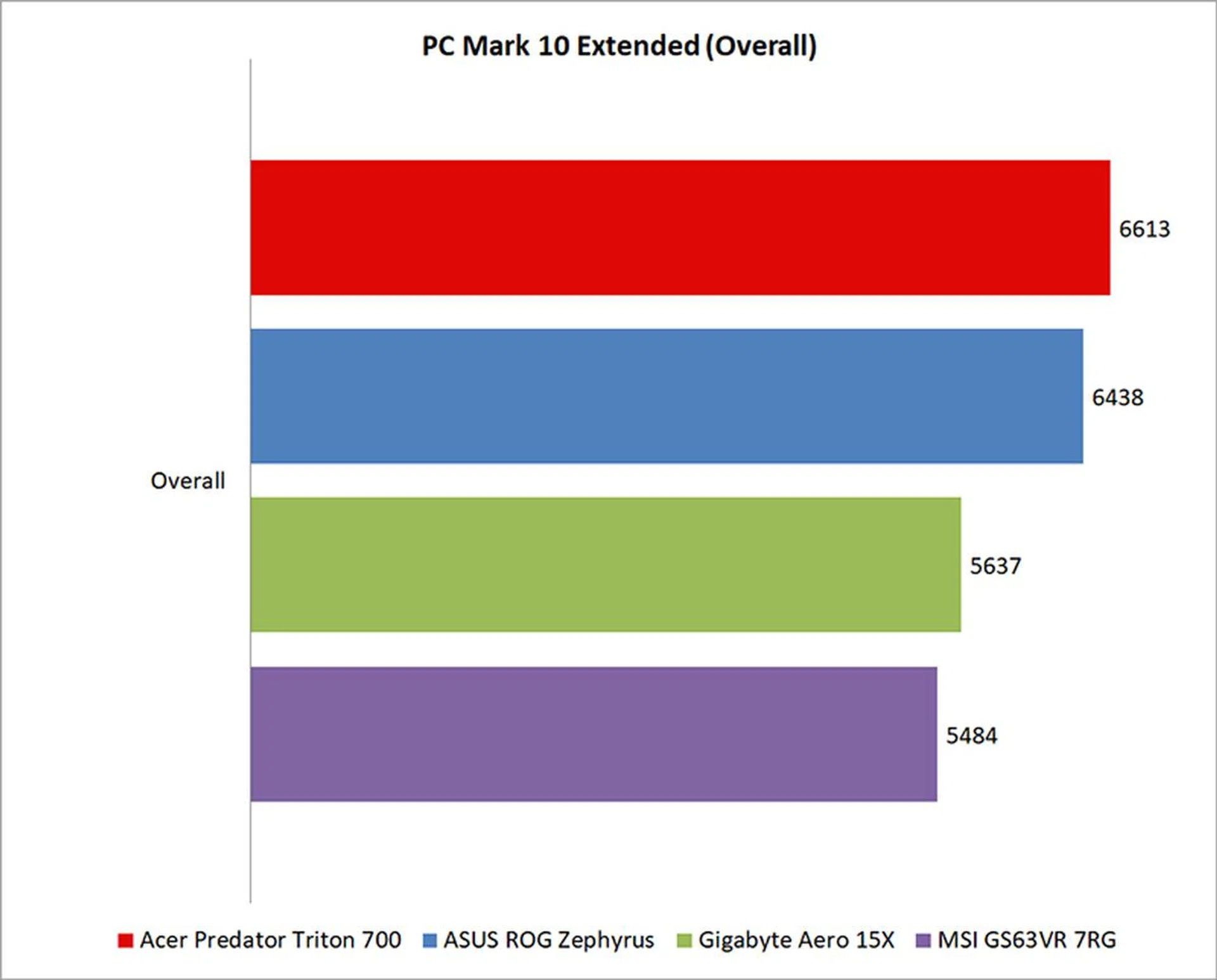
PCMark 10 Extended assesses the performance of systems in a variety of workloads, including basic computing tasks, productivity applications, digital content creation, and gaming. Compared to PCMark 8, it also adds in new test metrics, such as app startup times, which quantifies how long it takes to launch a variety of real-world apps, and a rendering and visualization workload to simulate professional graphics and engineering applications. In addition, existing workloads have been updated to reflect modern usage.
However, this is a balanced benchmark that takes into account performance in varied scenarios, and as such does not highlight the strengths of these gaming systems. But since there’s a good chance that you’ll be using one of these notebooks for more than just gaming, the figures here are of interest as well.
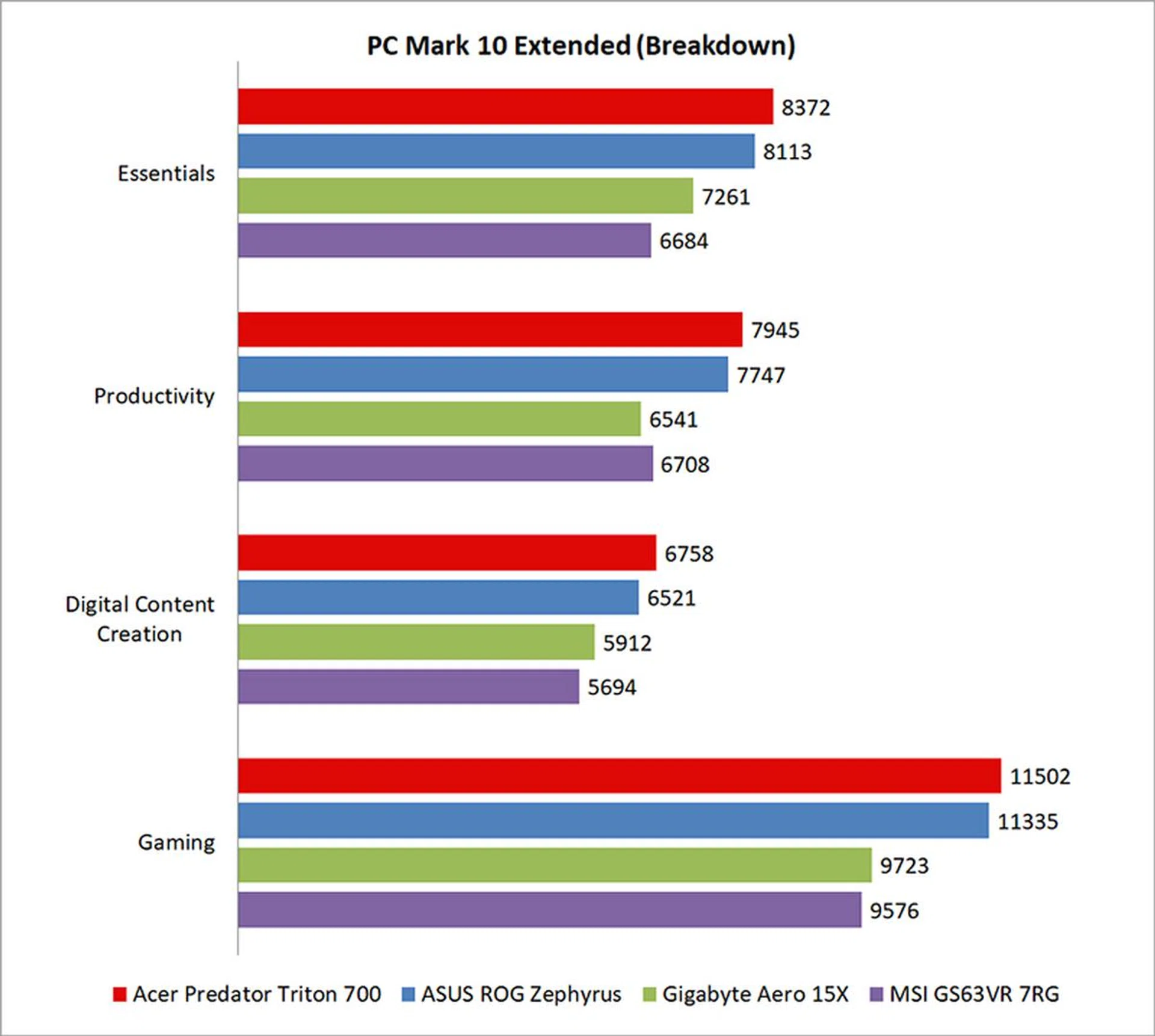
It’s no surprise then that the Acer and ASUS laptops came ahead, given that they’re the only two laptops equipped with the NVIDIA GeForce GTX 1080 Max-Q. Their lead was not insignificant either, amounting to a roughly 14% advantage in the overall scores.
The more detailed score breakdown also shows them coming ahead in the Essentials and Productivity benchmarks as well, so their advantage encompasses more than just gaming. It’s also worth noting that the Triton 700 managed to inch ahead of the ROG Zephyrus, perhaps on the back of its larger helping of RAM, faster RAID 0 storage, and slightly higher clocked GPU.
While both of these laptops feature an NVIDIA GeForce GTX 1080 Max-Q, the Triton 700’s card features a base clock of 1,290MHz to the Zephyrus’ 1,227MHz. Similarly, the MSI laptop has a lower base clock of 1,101MHz compared to the 1,215MHz on the Gigabyte, even though both of them have the same GeForce GTX 1070 Max-Q GPU.
3DMark
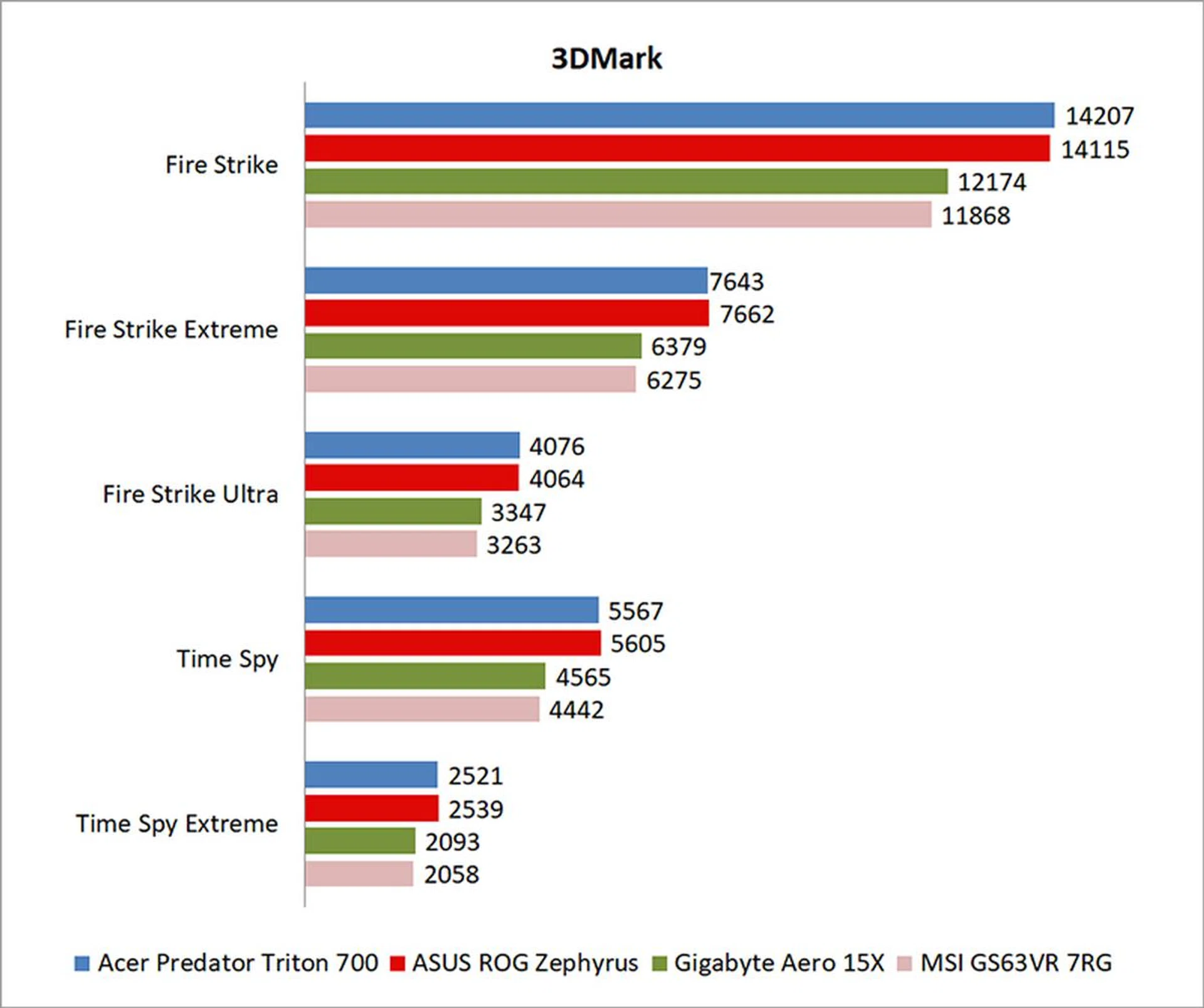
3DMark is a more relevant assessment of gaming performance, and it puts the system through a range of graphics and computational performance tests at different resolutions, starting at 1080p and going all the way up to 4K.
The GeForce GTX 1080 Max-Q notebooks once again left the competition behind in 3DMark. Compared to the GeForce GTX 1070 Max-Q in the MSI GS63VR 7RG Stealth Pro, the Acer Predator Triton 700 was around 19% quicker in 3DMark Fire Strike.
Even in the more computationally intensive Time Spy benchmark, the Triton 700 was 25% quicker than the MSI notebook.
Finally, it doesn't seem like the higher clocked GPU on the Triton 700 made much of a difference here when compared to the ASUS laptop. The two were neck-and-neck in all the benchmarks, and took turns taking the pole position.
VRMark
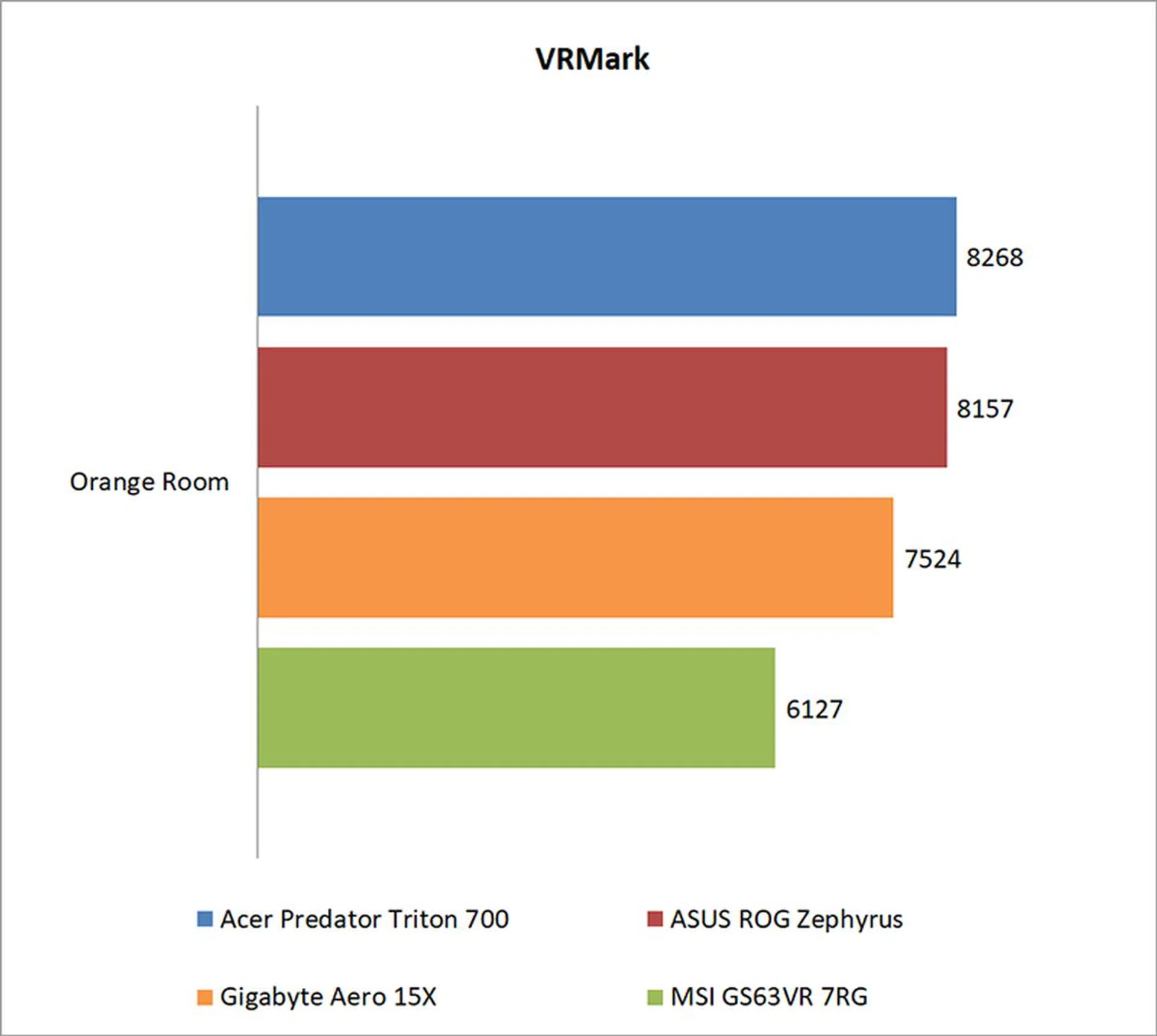
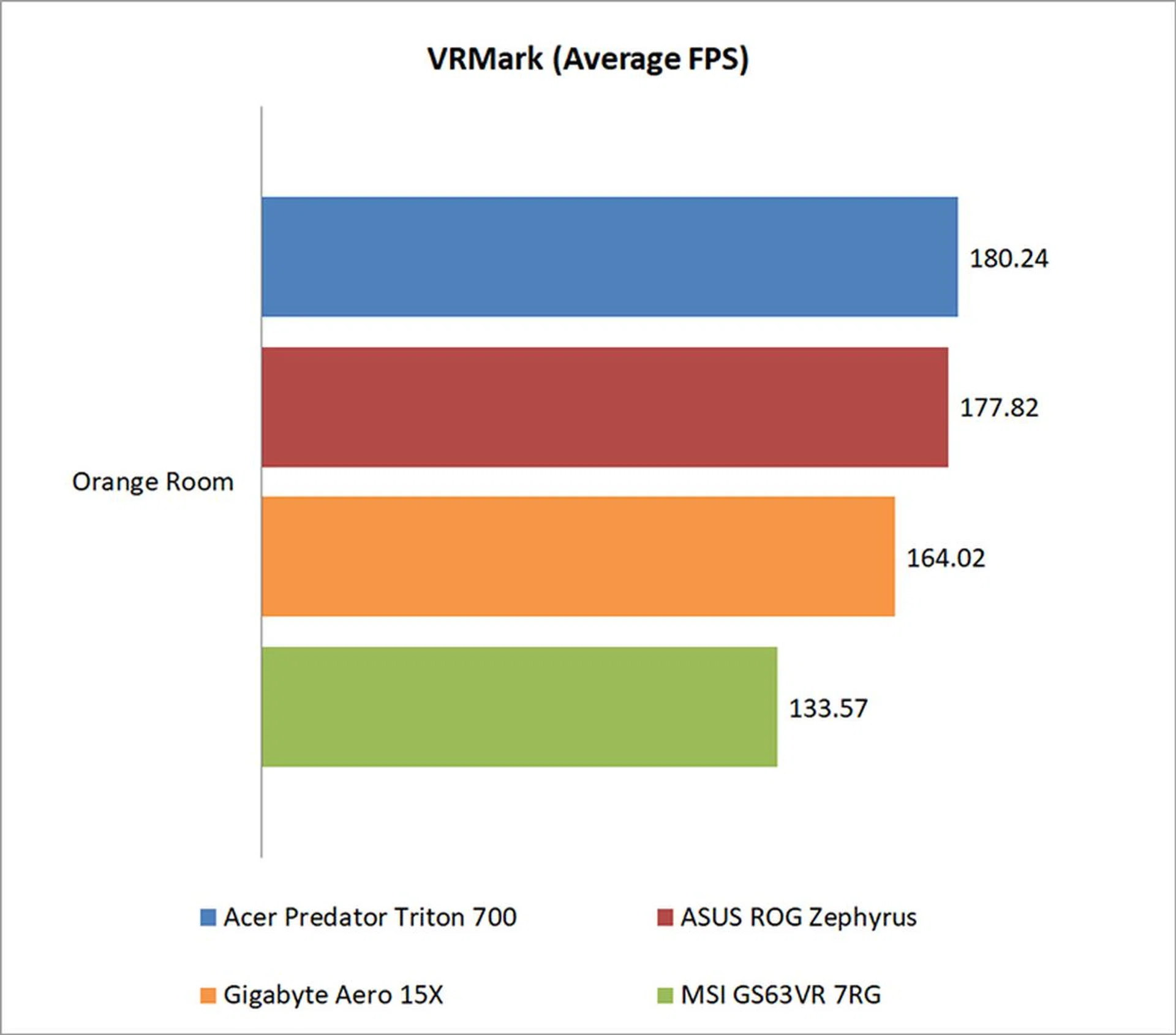
Futuremark’s VRMark benchmark is designed to assess a PC’s ability to handle high-performance headsets like the HTC Vive and Oculus Rift. If a PC passes the Orange Room test, it is ready for the latter two systems.
All the laptops had no trouble passing the target frame rate of 109FPS, but the Acer and ASUS notebooks once again had a clear edge here. In fact, the Triton 700 was a good 35% quicker than the MSI laptop.
Ashes of the Singularity
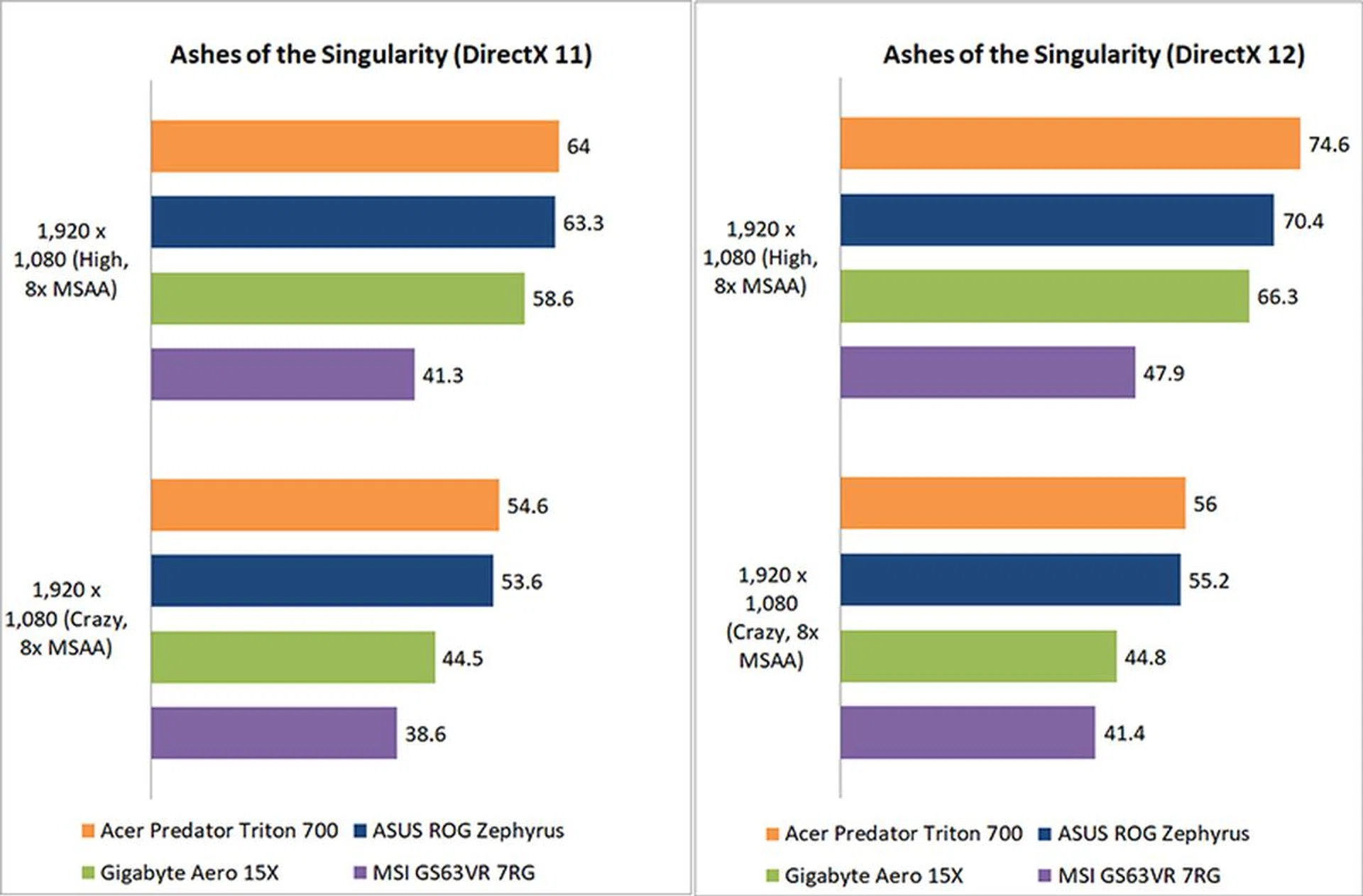
Ashes of the Singularity is a demanding real-time strategy game that puts thousands of units on screen, and it’s capable of pushing even the most powerful GPUs (even if it can be CPU-bound at the lower settings).
All the notebooks benefited from moving to DirectX 12 mode, with the Acer and ASUS laptops continuing their strong lead. At Crazy settings, the Triton 700 was 25% faster than the Gigabyte Aero 15X and its GeForce GTX 1070 Max-Q card.
The MSI laptop also continued to lag behind here, likely due to its lower clocked GPU.
Deus Ex: Mankind Divided
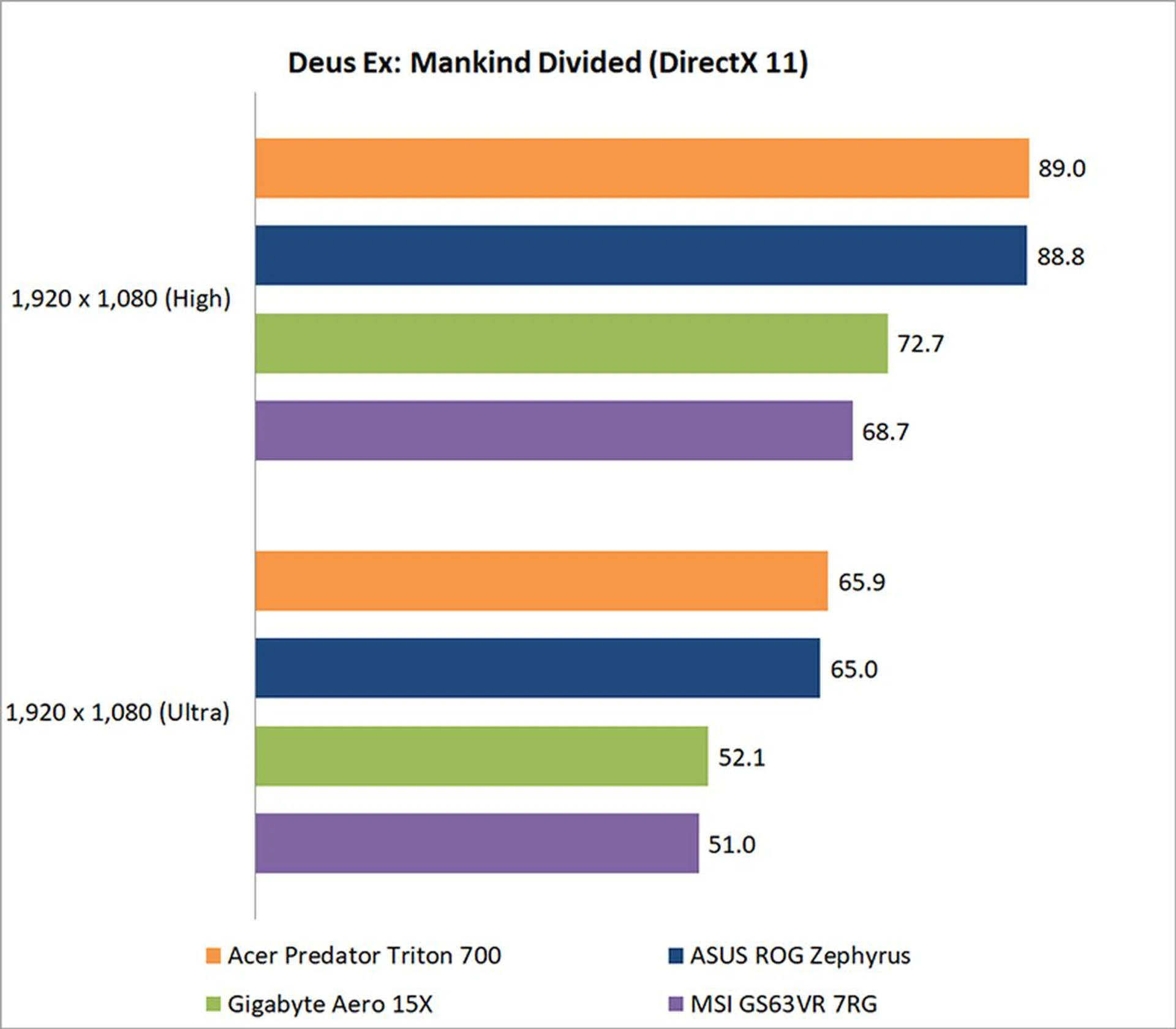
All the notebooks are quite capable of running Mankind Divided on Ultra settings, but it was only the Acer and ASUS laptops that managed to push past 60fps. On average, they had a lead of just under 30% over the GeForce GTX 1070 Max-Q models on High settings, so there’s no question of what to look at if top-notch performance is a priority.
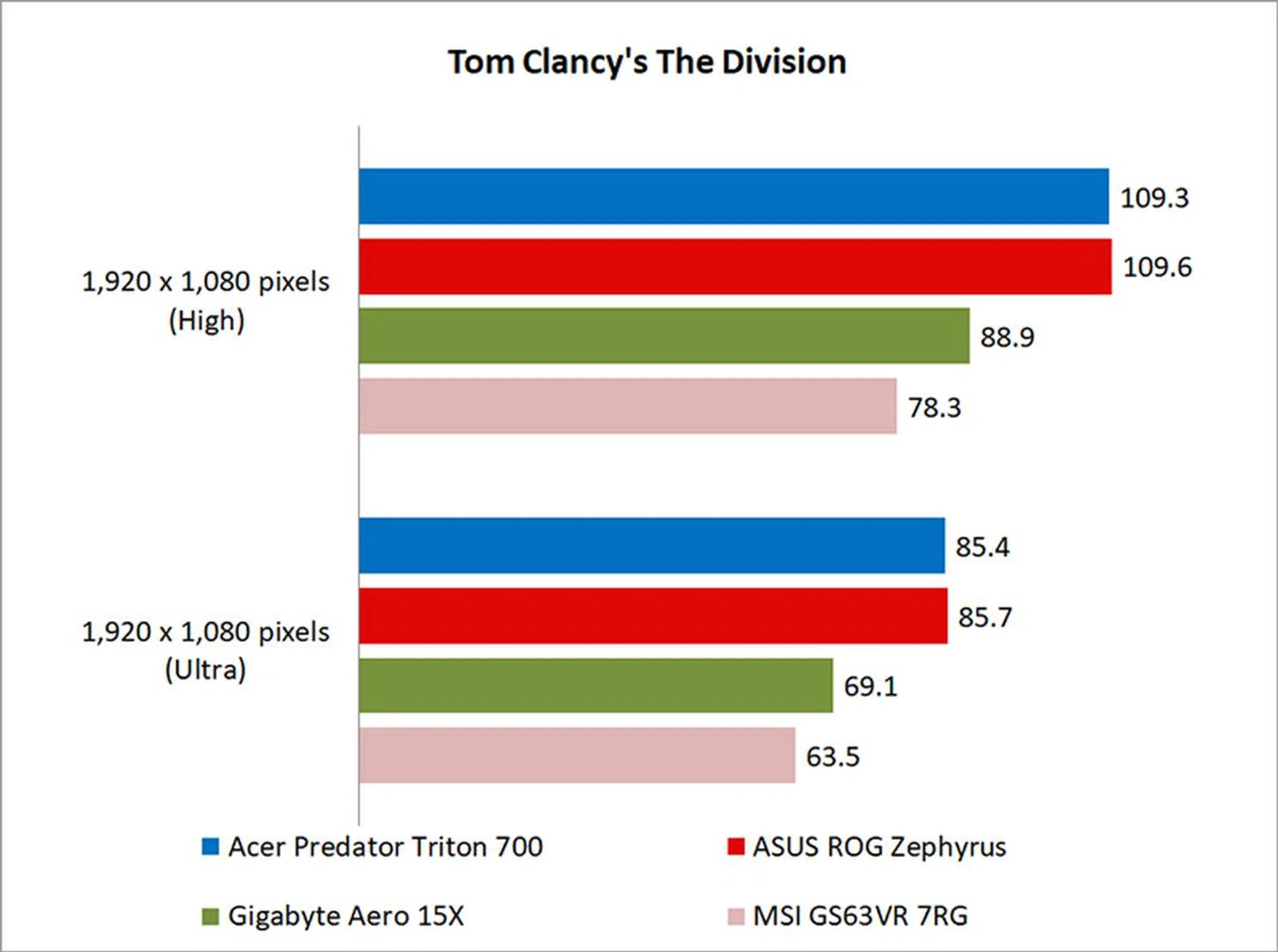
Tom Clancy’s The Division
The Division isn’t as demanding to run as Ashes of the Singularity or Deus Ex: Mankind Divided, but its Snowdrop engine can still stress cards with the use of dynamic lighting and the like.
That said, the Triton 700 and ROG Zephyrus managed the game handily, where they were roughly 23% quicker than the Gigabyte Aero 15X at Ultra settings.
Temperature, Battery life & Portability
Temperature
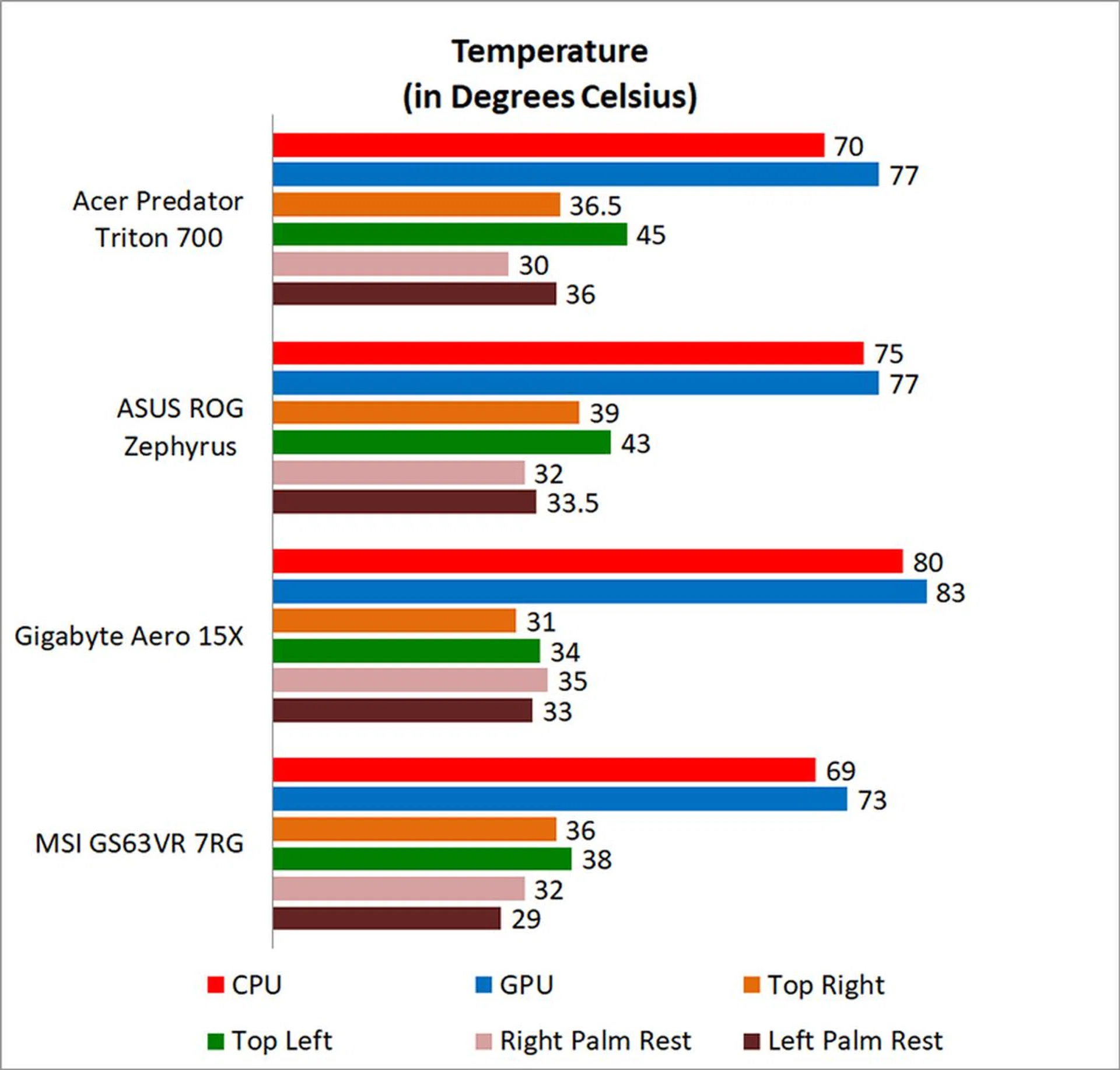
I measured the external temperatures of the four quadrants of the notebook after looping the 3DMark Fire Strike Extreme stress test for 15 minutes. This amount of time is more than enough to get an idea of your average maximum running temperature for this workload.
Since the Triton 700 has no palm rests, those temperatures aren’t particularly relevant. Instead, I should point out that the areas surrounding the trackpad, and the trackpad itself can get pretty toasty, which doesn't make for the best user experience.
Battery life and power consumption
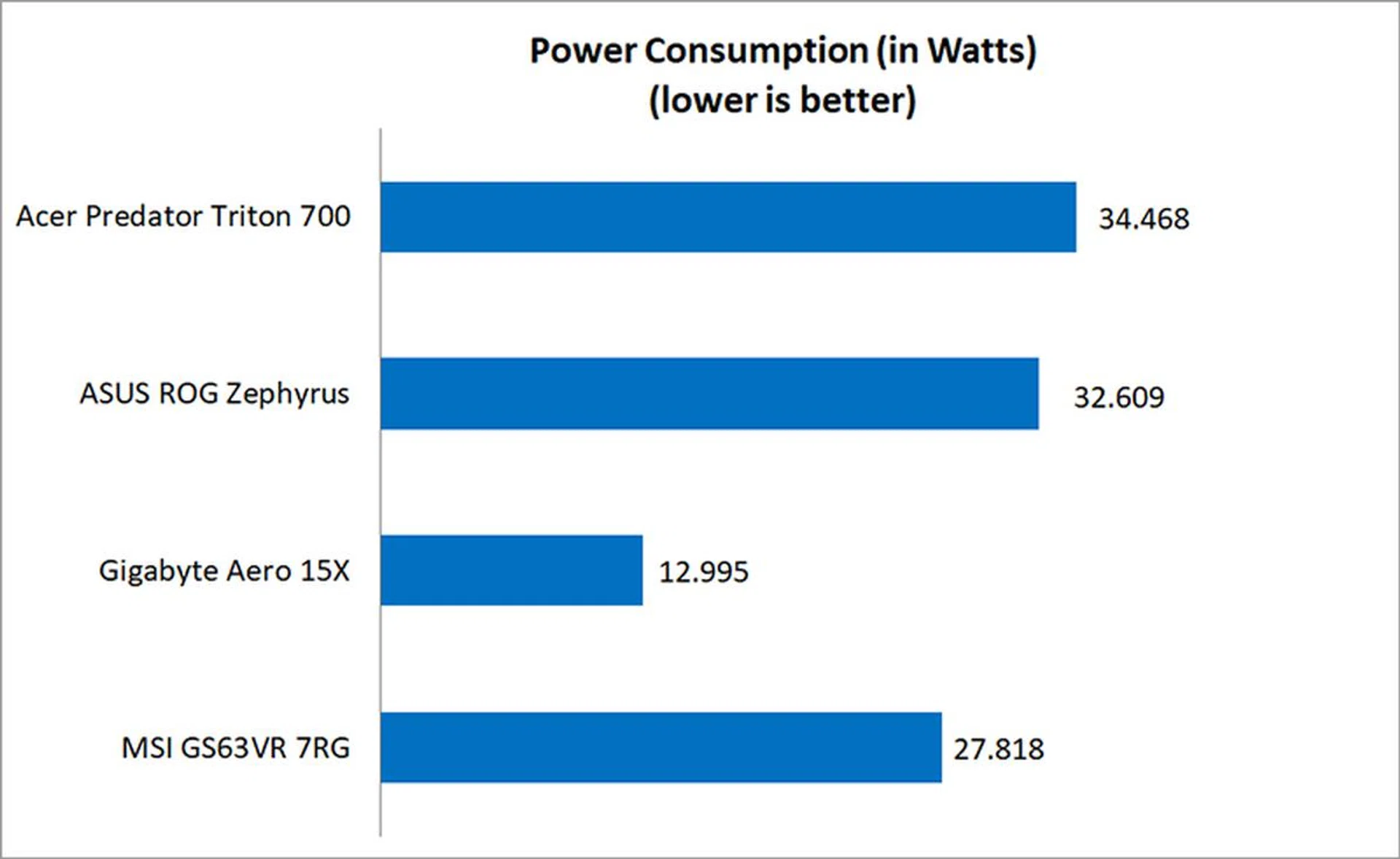
The Gigabyte Aero 15X led the pack with an impressive 434 minutes of battery life in PCMark 8 Home’s battery test. That’s no doubt due in large part to its generous 94Wh battery, but what’s impressive is that it isn’t actually a whole lot thicker, or even heavier, than the other notebooks.
While both the Predator Triton 700 and ROG Zephyrus are practically featherweights for the level of power they offer, one of the biggest compromises they’ve had to make is on the battery life front.
The 54Wh battery on the Triton 700 might be enough for a less powerful gaming notebook, but it’s barely enough for something as high-spec'ed as this Acer laptop. This is not a laptop that will take well to any extended period away from a power outlet.

Portability Index
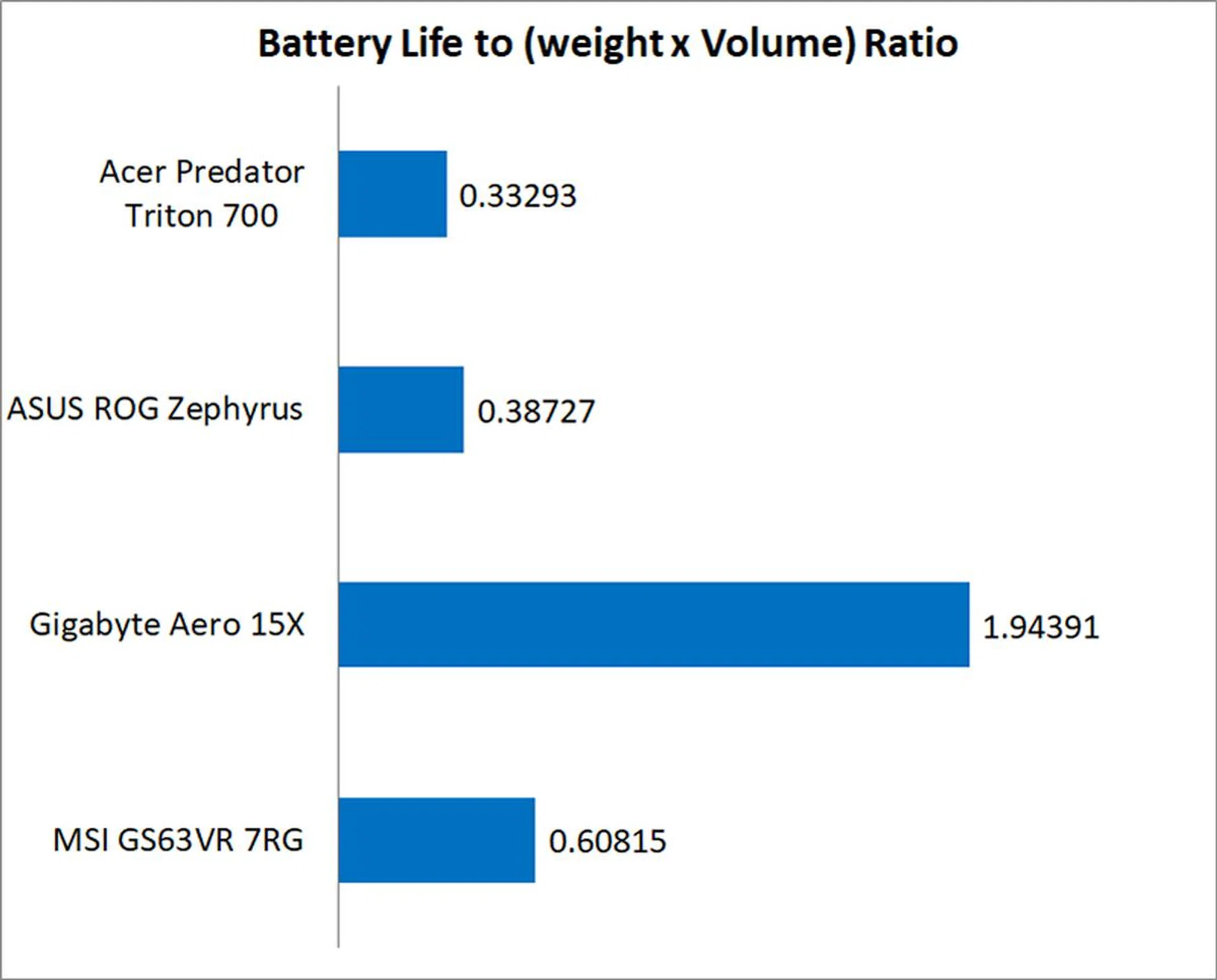
Our portability index attempts to provide an objective measure of how portable a notebook is, taking into account factors like size, weight, and battery life. The Gigabyte Aero 15X did particularly well here, largely thanks to its excellent 7-hour battery life in PCMark 8.
On the other hand, both the Acer and ASUS laptops fell short by quite a bit. Despite their slim and lightweight designs, they’re both bogged down by their subpar battery life. They’re technically portable, which is to say that you can put them in your backpack with little trouble, but you’ll still find yourself tethered to a power socket most of the time.
Great keyboard, terrible trackpad
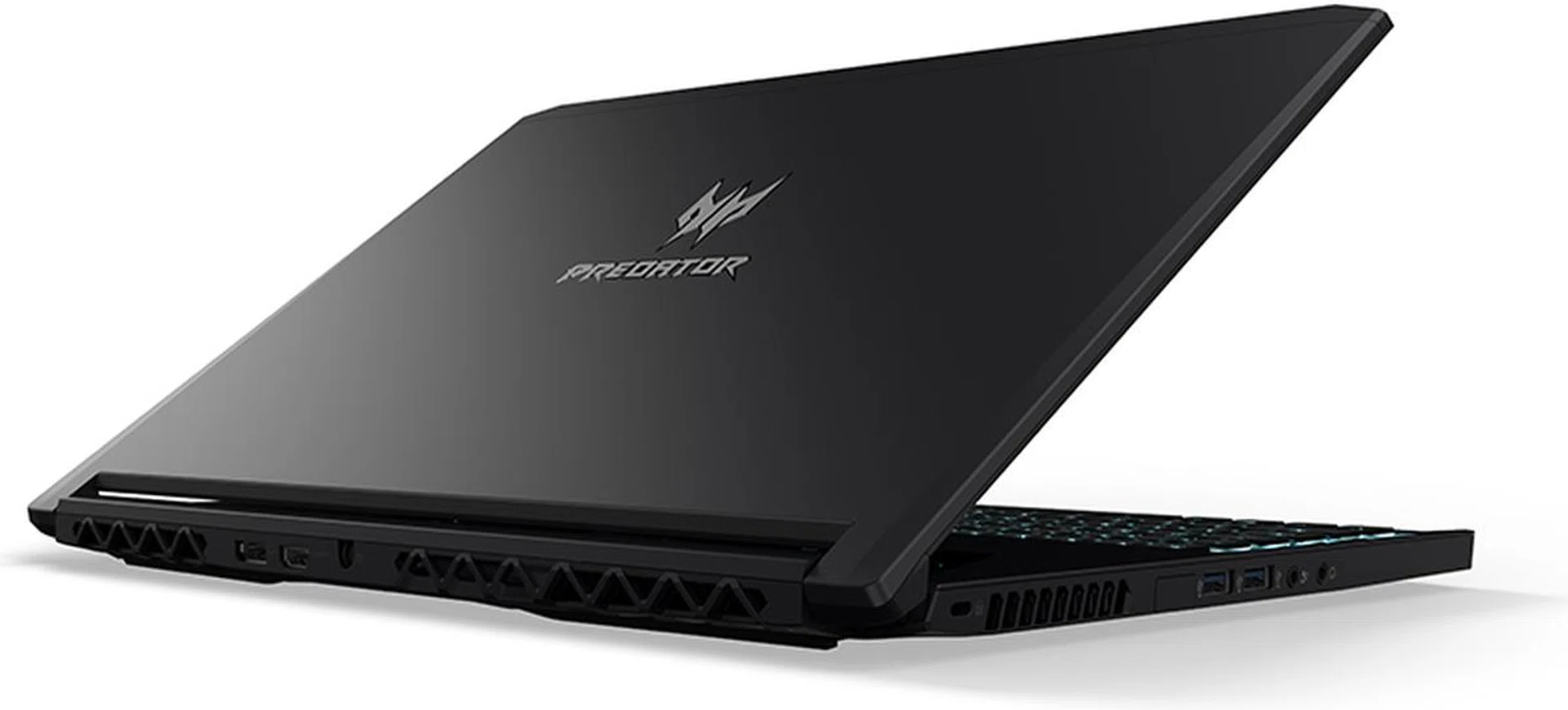
Image Source: Acer
If you’re looking for a slim and light desktop replacement, the Acer Predator Triton 700 will fill the role admirably. I say desktop replacement because despite the Triton 700’s svelte dimensions and light weight, its poor battery life means that it has no business straying far from a power outlet.
Nevertheless, this machine is an absolute performance powerhouse, inching out even the very similarly configured ASUS ROG Zephyrus GX501. There’s literally nothing more you could want on the specifications front, with a 120Hz G-Sync IPS display, NVIDIA GeForce GTX 1080 Max-Q, 32GB of RAM, and even 1TB RAID 0 SSD array.
Its speakers pump out voluminous sound, and the keyboard really stands out as one of the best I’ve encountered on a laptop. The low-profile mechanical keys provide clicky, satisfying feedback, all without adding much thickness to the dimensions of the laptop.
Unfortunately, the overall experience is somewhat marred by the poor design of the trackpad. It’s located in an unintuitive position above the keyboard, and features barely discernible markings around the tracking area. It also gets rather hot and uncomfortable to touch under load, and doesn't feel like something I could get used to, even after a long period of time.
At S$5,888, I don’t think you should have to put up with compromises like that, especially when the ASUS ROG Zephyrus GX501 costs a thousand dollars less and features a much better design. The Triton 700 may have more memory and storage, but the performance difference doesn't seem to be large enough to make up for the much higher price and awkward design.
That doesn't necessarily make the Triton 700 a bad laptop. What it means is that you’ll have to take more things into consideration when searching for a portable desktop replacement. If you’re prepared to work near a power outlet and always have a mouse on hand, the Triton 700 will serve you well. However, if you think that any design compromises at this price is unacceptable, you’ll be happier looking elsewhere.
Having said all that, the Triton 700 is still one of the rare few notebooks that offer desktop-grade performance in a truly slim and light form factor. With laptops like this and the ROG Zephyrus on the market, gamers now have more choice than ever before.
Our articles may contain affiliate links. If you buy through these links, we may earn a small commission.