
Speed Freaks
You've probably heard the news by now about Intel entry into the Solid State Drive (SSD) market (if you haven't, we suggest taking a quick trip via a time warp ), and the two new SSDs that they will be launching, the Intel X18-M and the X25-M. The 1.8-inch and 2.5-inch models are a logical step for Intel to take, seeing as how it is a semi-conductor company after all. Also, consumers can look to SSD prices falling as the giant enters the fray, which of course, leaves us rubbing our hands in anticipatory glee.
Of course, like with most "new" technology, there are both pros and cons to the whole SSD thing going around right now (we'll start with the cons), the first and foremost concern to most consumers, will be the cost, as mentioned earlier. SSDs don't come cheap, and this is due to the prices of the flash memory used, and as such, will be a drawback to some adopters until the prices start falling.
Another cost issue for SSDs to take note of is the small storage capacity of the drives compared to the similar form factor hard disk drives which are able to store more for much less. As the technology matures though, we hope to see SSDs reach parity in terms of pricing (or at least turn out to be a much cheaper alternative). SSD lifespan too has traditionally not been a selling point, as there's a limit to how many write/erase cycles that the type of flash used on the SSD drive can support, though this is more often than not, a moot point as normal consumer level usage doesn't usually reach the breaking point even after a few years of use.
If you're willing to pay the price for a SSD though, you will find that quite possibly, that the drive does offer advantages in both performance and power savings compared to normal hard disk drives. Unlike traditional hard disk drives, SSDs aren't prone to shock and have no moving parts, so coupled with the abovementioned advantages, the SSD does make an ideal argument for use in today's mobile computing needs and is suited for very rugged applications.
Intel's offerings, the X18-M and the X25-M claim to stand out from the other offerings in the market, as Intel has its own proprietary controller that gives its own SSDs a higher data throughput and lifespan. While we didn't manage to gather other SSDs at the point of testing in such short notice, nevertheless we went ahead to take a stab at the X-25M that Intel has so kindly loaned us. To see how it holds up, we've also asked the nice folks at HP for a loan of their pretty and shiny HP Pavilion dv5 (which uses the latest Intel's Centrino 2 platform) to see just how much the very latest SSDs offer over their magnetic platter brethren.
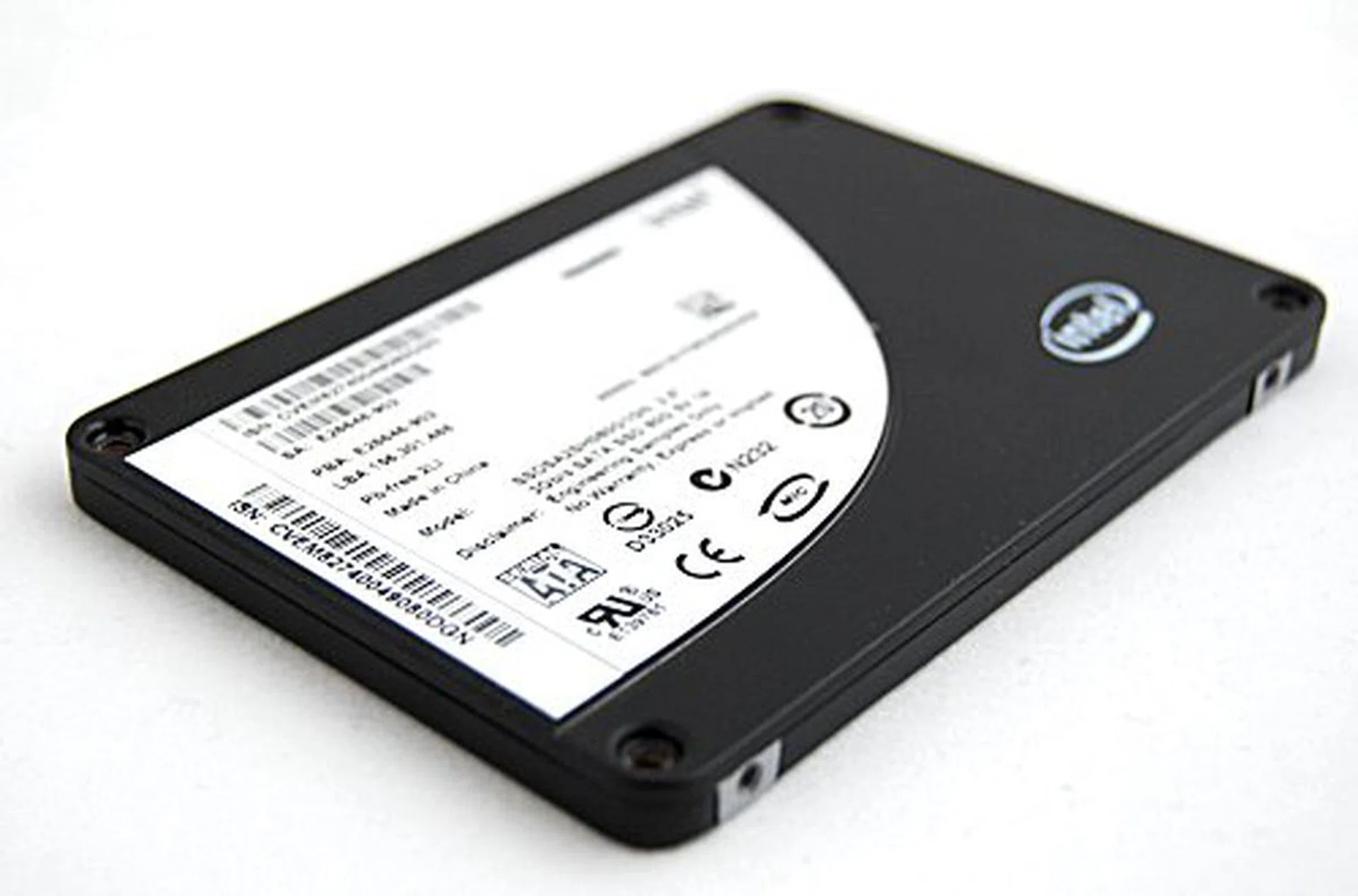
The Intel SSD X25-M 80GB.
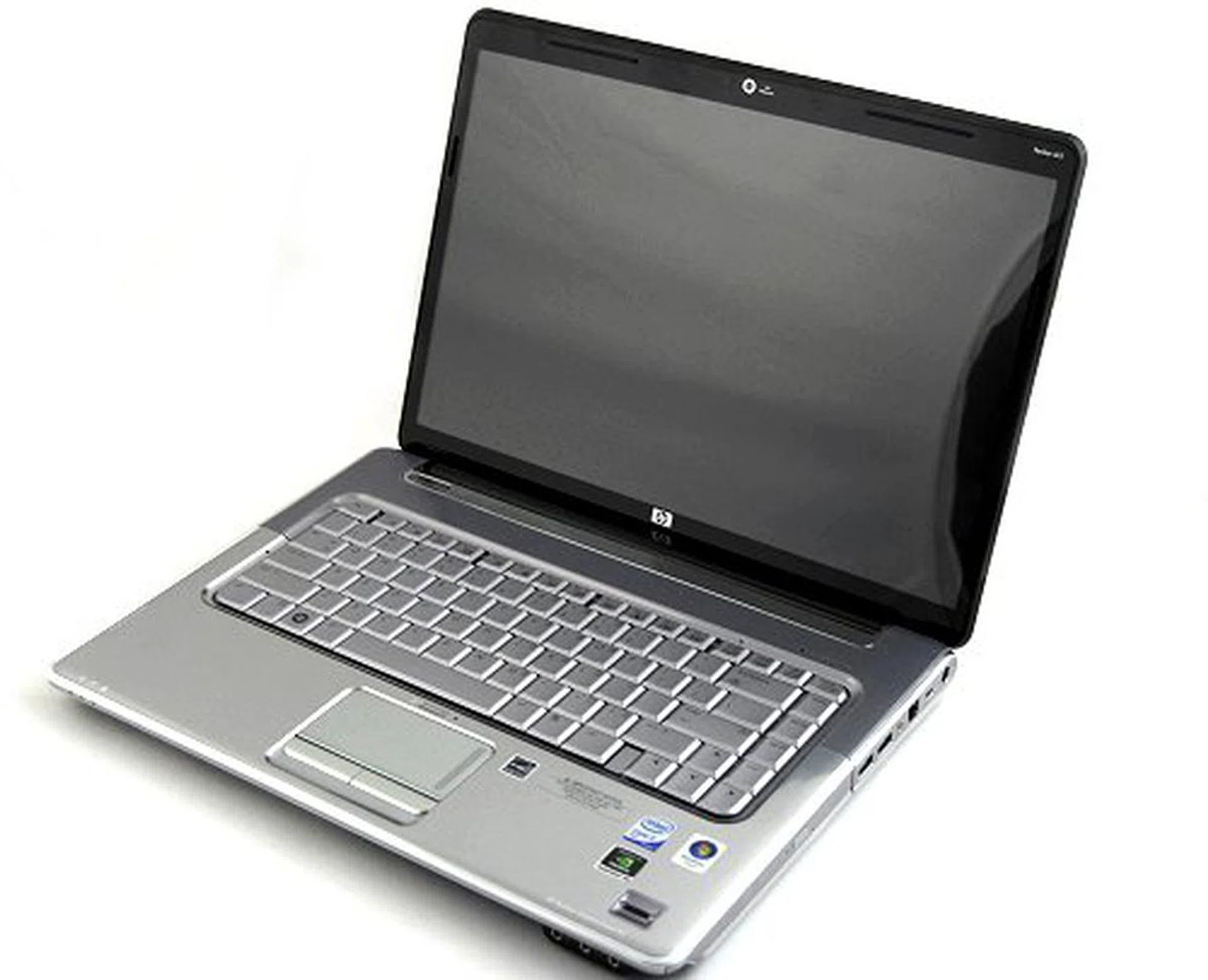
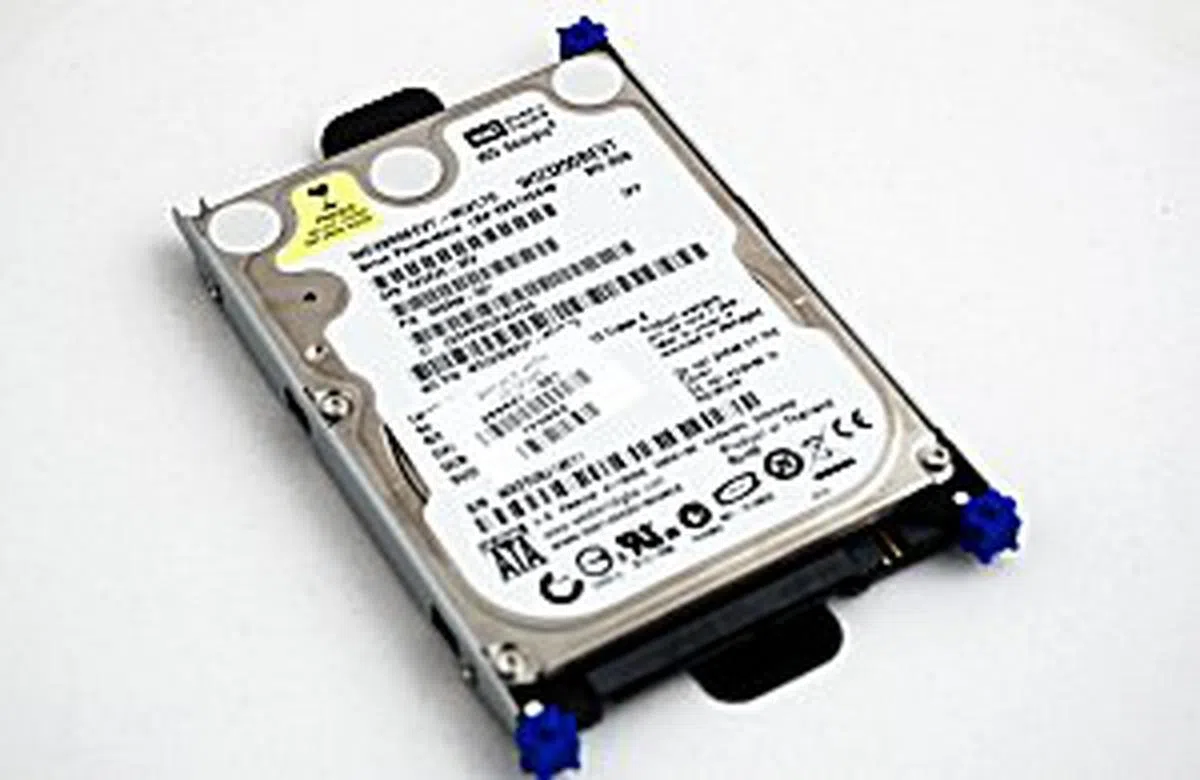
Our test unit, the HP Pavilion dv5 which features an Intel Core 2 Duo T9600 (2.8GHz) processor, 4GB DDR2 RAM, 15.4-inch screen, NVIDIA 9600M GT graphics chipset and a Blu-ray optical drive. As a bonus, the dv5 has a very easily removable HDD compartment at the back which holds a 2.5-inch Western Digital Scorpio Blue 320GB.
The Internals
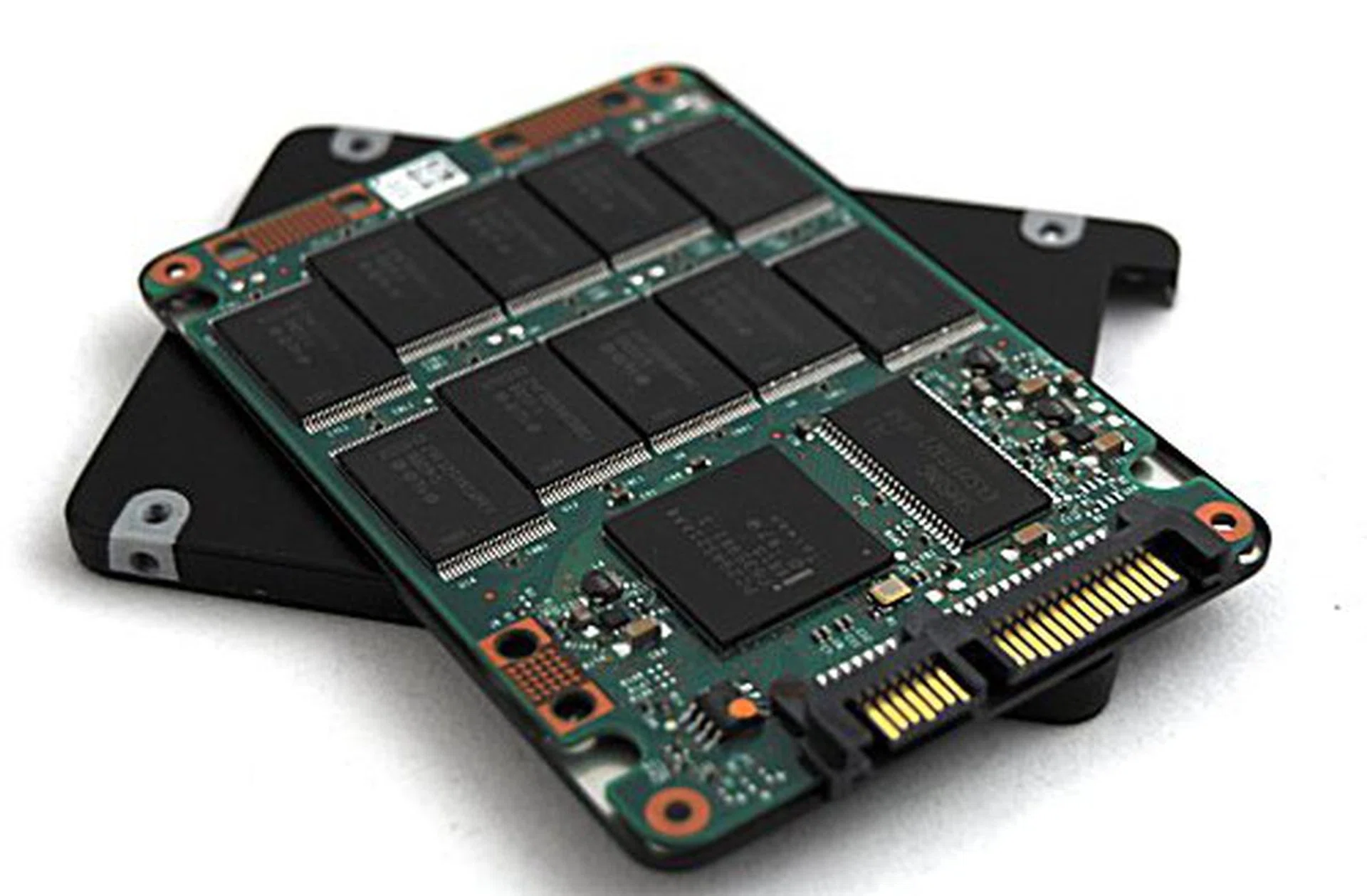
Inside the X-25M you will find instead of your standard magnetic disks, an array of flash memory neatly arranged on the board. There aren't any moving mechanical parts to worry about, just one circuit board in between a metal casing. Of interest is the Samsung K4S281632I-UC60 memory chip, which is kind of ironic to find given that Intel is competing against Samsung in this arena. Layered on both the top and bottom of the PCB are the flash memory chips with 10 on each side, and these are the chips that hold your precious data.
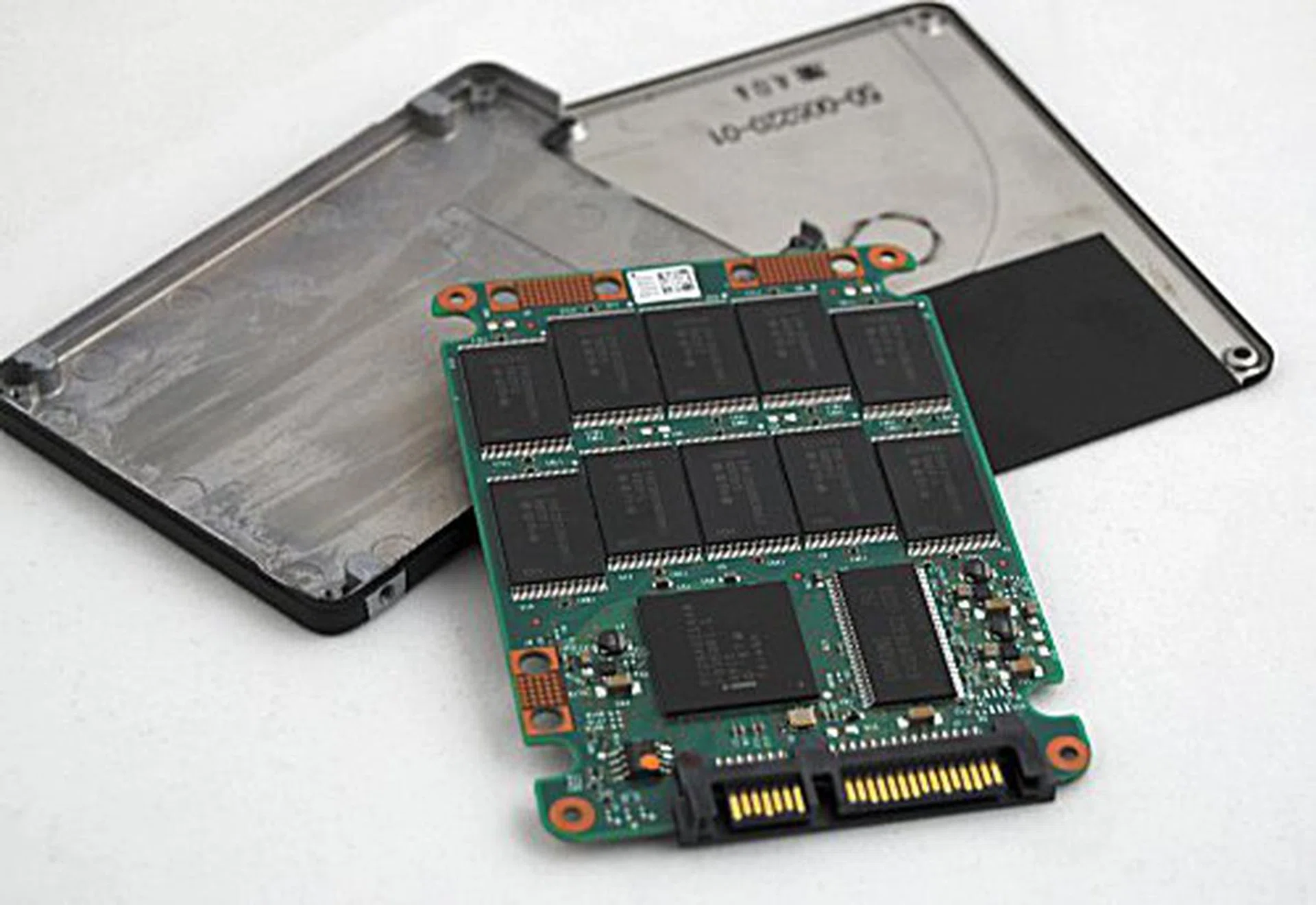
That's all there is folks.
Performance Benchmarking
We were unable to call in an older first generation SSD due to time constraints, so we would like to apologize in advance if you were looking for a one-on-one comparison. Instead we're taking a different approach and are looking to see how much of a performance gain you'll be getting if your real life notebook was using the latest SSD like Intel's one we've at hand instead of the usual HDDs. To do this, we've taken the 2.5-inch Western Digital Scorpio Blue 320GB hard disk out from a HP Pavilion dv5 and cloned the active partition onto Intel's X25-M (ignoring the difference in storage capacity). Our settings remained the same as when we tested the HDD through our benchmarking procedures, and we ran the same benchmarks on the SSD.
 |
|
 |
|
Windows Experience Index
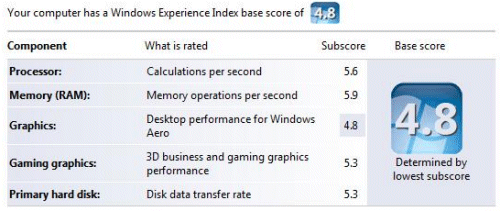
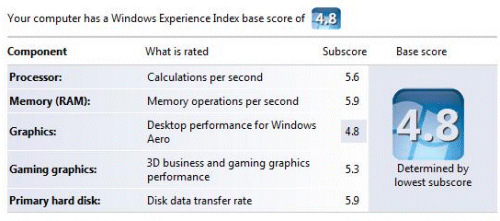
Nothing really changed when we put in the X25-M into the dv5, Microsoft's Windows Experience Index only showed a minor jump in the disk data transfer rate portion, from the already speedy 5.3 figure to 5.9.
PCMark Vantage
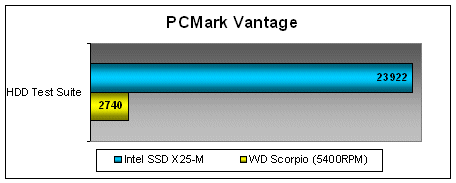
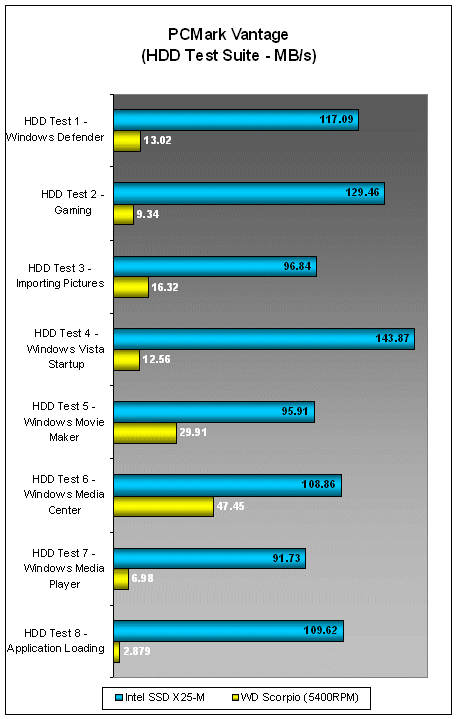
Using the Intel X25-M SSD drive showed a remarkable boost to the overall scores in PCMark Vantage compared to the original 5400RPM HDD of the dv5. Component test scores were also generally boosted by about 1000 to 3000 marks, and the hard disk benchmarking segment showed the greatest increase from 2740 to 23922. It's obvious where the performance bottleneck lies with regards to the dv5, given that its other specifications are pretty much top of the line, so it's no surprise that a switch to a faster storage device would result in a definite boost in overall productivity scores. We also have a breakdown on the HDD test scores, which also shows just how much faster the X25-M is. It's no surprise here at how fast the X25-M is and hopefully, and as SSDs get cheaper and storage capacities get increased, we'll soon see notebooks with SSDs as a default option in the near future.
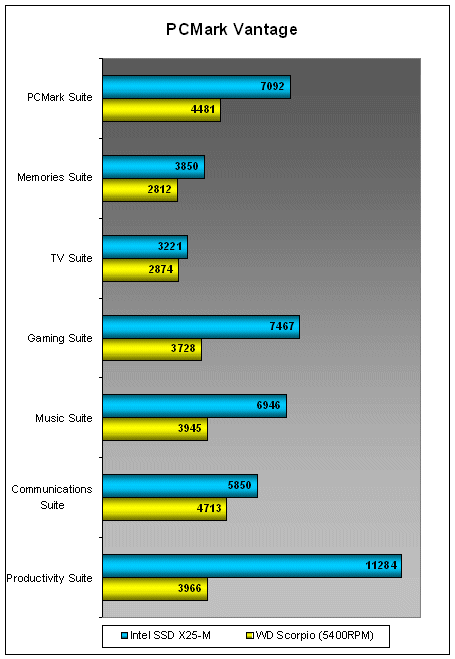
*Note: We had to break the graphs into two seperate portions because the HDD Test Suite scores were so high and would make comparing the other scores a little hard on the eyes.
HD Tach
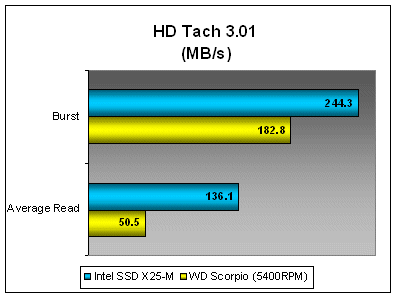
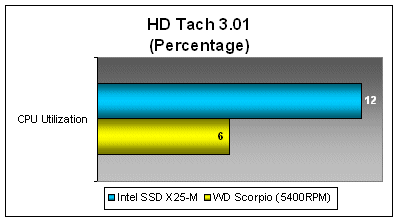
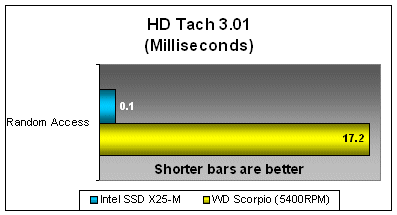
So far, we've found out that the Intel X25-M SSD will give a normal notebook a big boost in overall performance, but just what's the maximum possible? To solve this mystery, we decided to run a test using HD Tach 3.0 to determine how much more of an increase the X25-M offers over the default 5400RPM drive. As you can see below, in burst speeds, average read and random access scores were definitely much better, but at the cost of more CPU utilization. While this might sound like a bad thing, it actually isn't, as it's an indication of how much faster the disk drive is and such that the CPU doesn't have to wait to process the data coming in from the X25-M.
OS Loading Time
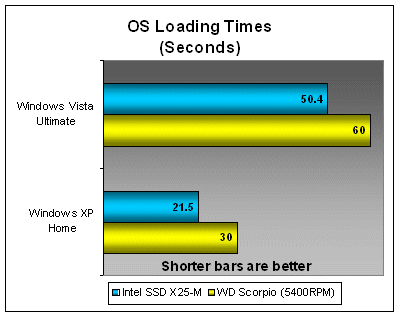
Our last test is a pretty simple one really: we timed the HP Pavilion dv5 using the X25-M and the default 5400RPM HDD to see how fast it took for it to load the operating system. Interestingly enough, there's really not too much of a gain from using the X25-M compared to the default drives. In fact, the results were pretty similar to when we tested the slower SSDs found on the Sony VAIO VG-TZ18GN, so we figured it may have been an OS related issue. So we whipped out an XP-based notebook to see whether we would get a better result from XP and found out that it wasn't that much of a difference either.
Driving Miss Speedy
Unfortunately, as we mentioned earlier, we don't really have a first generation SSD to compare against Intel's newest and finest, so we took a more real-world approach to testing the X25-M instead. By itself, Intel's X25-M is a fast and speedy demon as can be seen from our tests. There's a definite and measurable performance gain to be seen from switching to a SSD which is definitely a much needed boost in the world of mobile computing.
Based on the results, it's logical to conclude that, yes, solid state drives are an obvious choice for those looking for performance enhancements that are easily and readily viable without having to go through the hassle of buying a new notebook. SSDs offer a viable alternative upgrade option, though it does have its drawbacks (in both cost and storage capacity). These drawbacks will of course fade away with more improvements made to the technology and the lower cost of manufacturing in the long term, but for now, we'll have to make do.
The X25-M may be expensive, but we can't really complain given its spectacular performance.
If SSDs are the coming wave of the future, then Intel's X25-M is a wonderful entrant to the market as its entry will force Intel competitors to not only improve their products, but to lower costs in order to stay in the competition. While we can't actually predict when and how much costs will fall, it's safe to assume that the prices of SSDs will become as cheap as today's hard disks (with an appropriate time span). Seeing as how the X25-M will currently set you back US$595 at least, we're hoping that prices will fall soon enough that most of us can think of it as a viable upgrade option.
Our articles may contain affiliate links. If you buy through these links, we may earn a small commission.