
Shuttle XPC X100 (Core Duo)
The lines between a console and a full fledged system are blurring with the powerful processors of the next generation consoles. Shuttle took a different approach, by shrinking its PC-based SFF to the dimensions of a console. Here's what we thought of the world's smallest SFF - the Shuttle XPC X100.

The Console SFF
Ever since the PC started encroaching into the living room space with the convergence of digital media and broadband, we have all been waiting for its Holy Grail - that perfect blend of style and performance which acts as the indispensable hub of your home entertainment system. Parallel developments like Microsoft launching its Windows XP Media Center Edition and the rise of AMD to challenge Intel in the processor arena in terms of cheaper and cooler chips have helped to drive this trend.
At the forefront of this has been Shuttle, which pioneered the small form factor (SFF) enclosure that found favor as both portable LAN gaming machines and equally stylish home theater PCs (HTPCs). Its SFF systems have been popular among enthusiasts who cherished its good build, aesthetically pleasing enclosures and the variety and support for dozens of chipset and processor combinations. If you can name it, Shuttle has the barebones system for it; the company has been the first to introduce both dual-core processor and SLI support to the SFF niche. Recently, Shuttle has expanded its scope beyond the versatile SFF domain to building systems targeted and tailored for HTPC usage. These systems, like the Shuttle XPC M1000 are undeniably made for the living room and look more like your typical DVD recorder while giving you the functionality of the PC and user-friendliness of a typical end-user appliance.
Based on Intel's Viiv platform, it seemed that the XPC M1000 was just the beginning of a new range of media PC oriented products. For instance, Shuttle felt that there was a market for very small SFFs, one that looked more like a competitor to Apple's Mac Mini or even a gaming console. Don't believe us? Here's the ultra small form factor of the new Shuttle XPC X100:
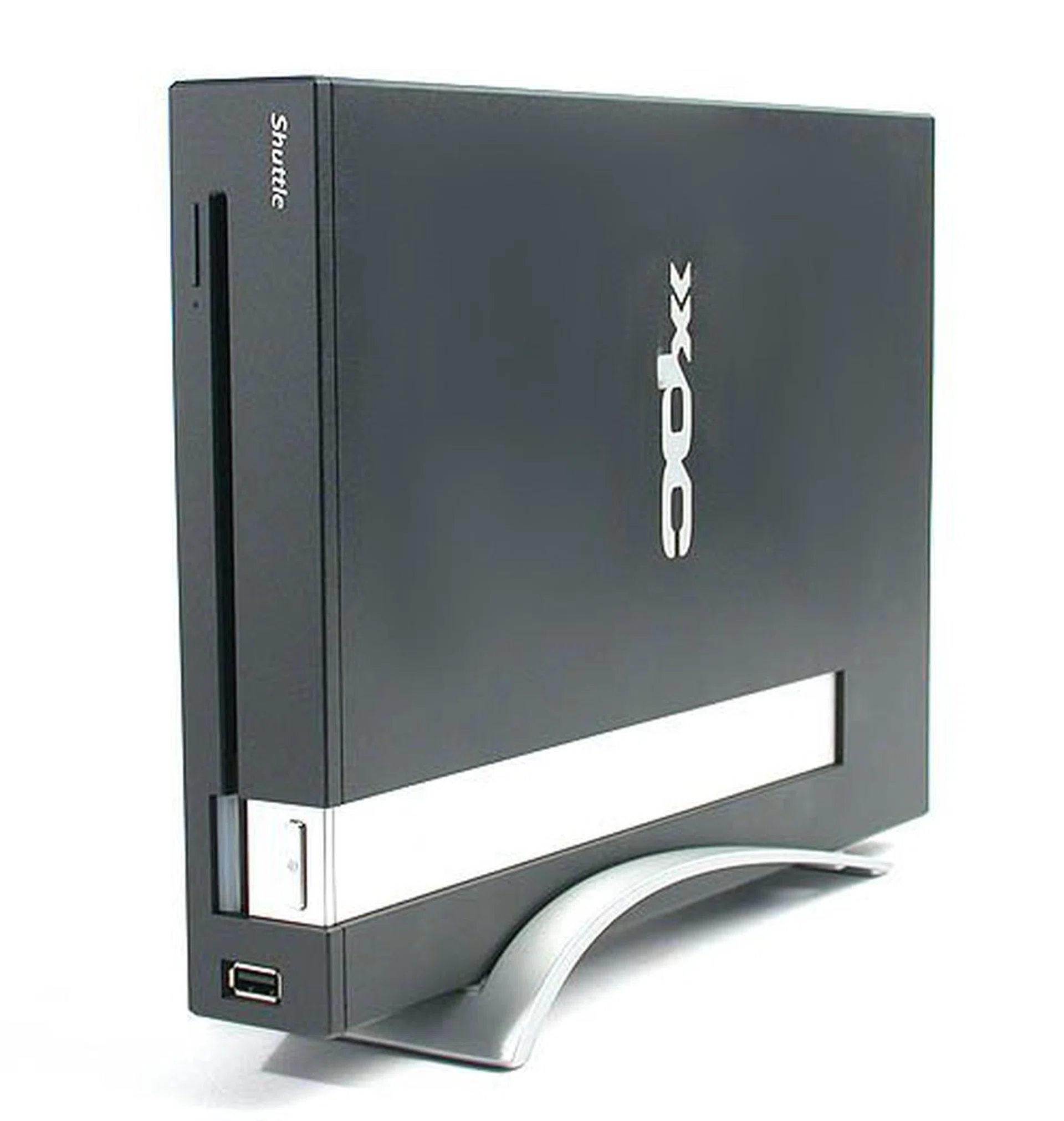
For the XPC X100, Shuttle goes for the console lookalike, probably because the console has already found its niche in the living room.
Exterior Design
It is perhaps not a coincidence that the exterior of the Shuttle XPC X100 reminds us of a console, albeit one from a previous era. After all, with the boom in video gaming, consoles have certainly staked a place in the living room. So emulating the appearance of one allows the X100 to blend in. But unlike the slim elegance of the latest refined version of Sony's popular PlayStation 2 console, the thick chassis of the X100, along with its black and silver appearance is more old-school Nintendo than sophisticated Sony. Especially if you place the X100 lying flat instead of using the included stand.
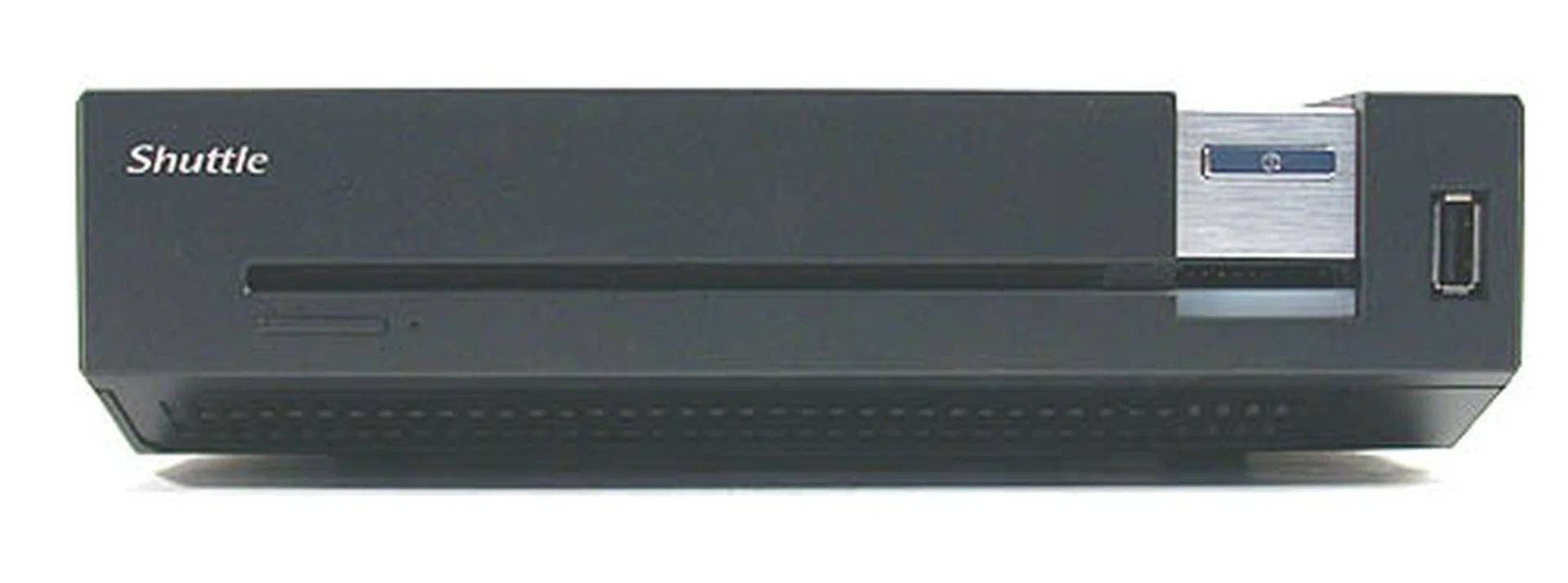
We liked the slim slot loaded DVD drive (dual-layer burner) as it certainly reminded us of a console. The lack of a hard drive indicator may irk some of you, but bodes well for a media PC used in a dark room; blinking lights do distract the movie experience. The exposed USB2.0 port however disrupts the outward appearance.
If you do place it standing upright, Shuttle has a brightly marked warning label that the X100 should be placed upright according to the direction indicated. According to the warning, to do otherwise may damage the system. This is probably due to the way the heat pipe based cooler for the processor is orientated internally. The wrong orientation will likely lead to the cooler being less than efficient and the consequences could be fatal to the system.
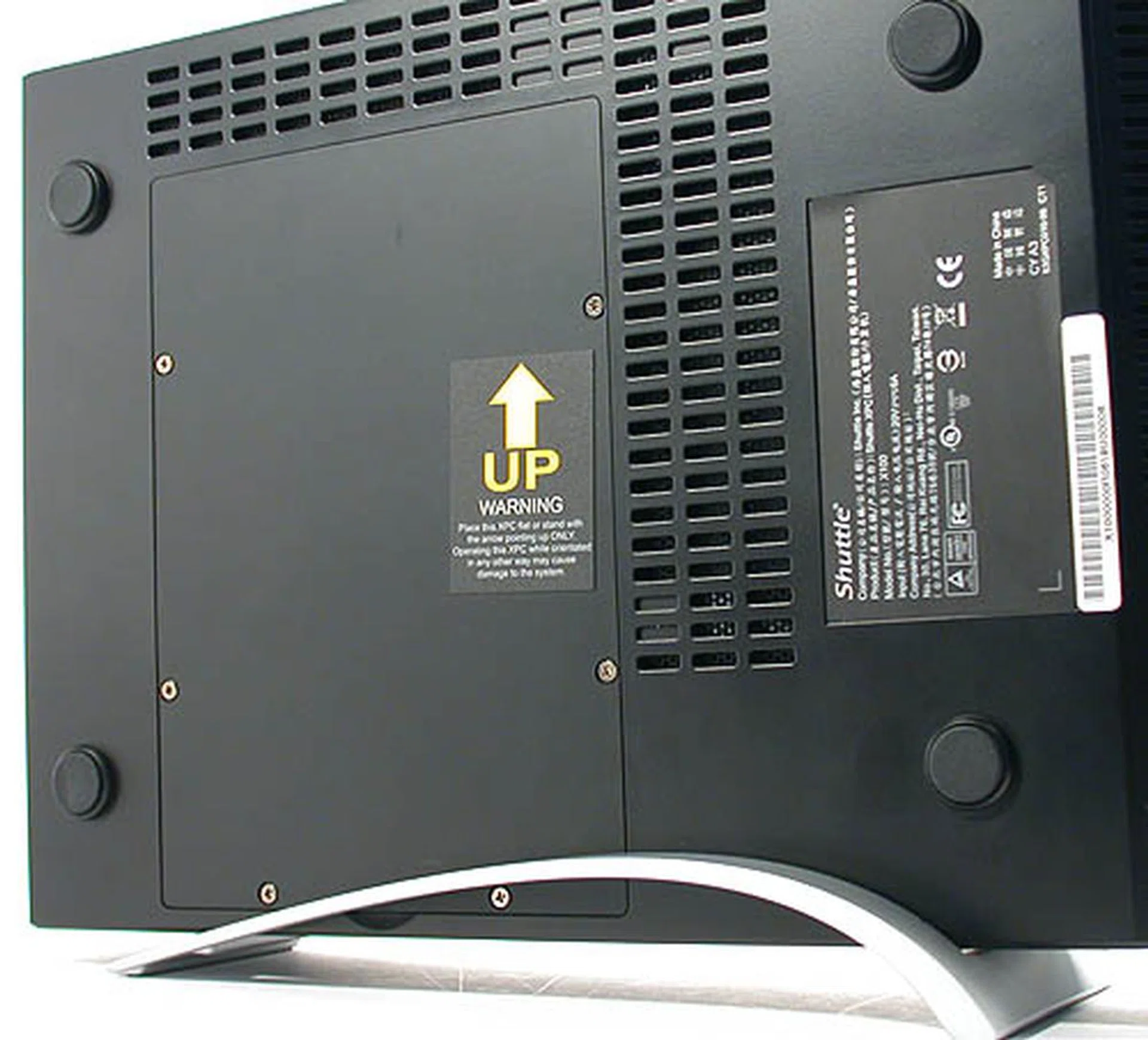
If you prefer to stand the X100 upright, Shuttle tells users quite explicitly what is the correct orientation. Putting it upside down may affect the performance of the heat pipe based CPU cooler or worse. As you can see from the four rubber feet, if you leave the X100 flat, this is the bottom side.
A slim slot loaded DVD burner dominates the design of the front panel for the X100 together with an integrated 4-in-1 card reader. There is a prominent silver power button but no reset switch. Neither did we find any LED to indicate hard disk activity though there was a gentle blue glow to show that the system is powered on. Finally, a USB2.0 port is also conveniently located at the front but we felt that it would have been better to hide it behind a flap as the exposed port does disrupt the smooth facade.
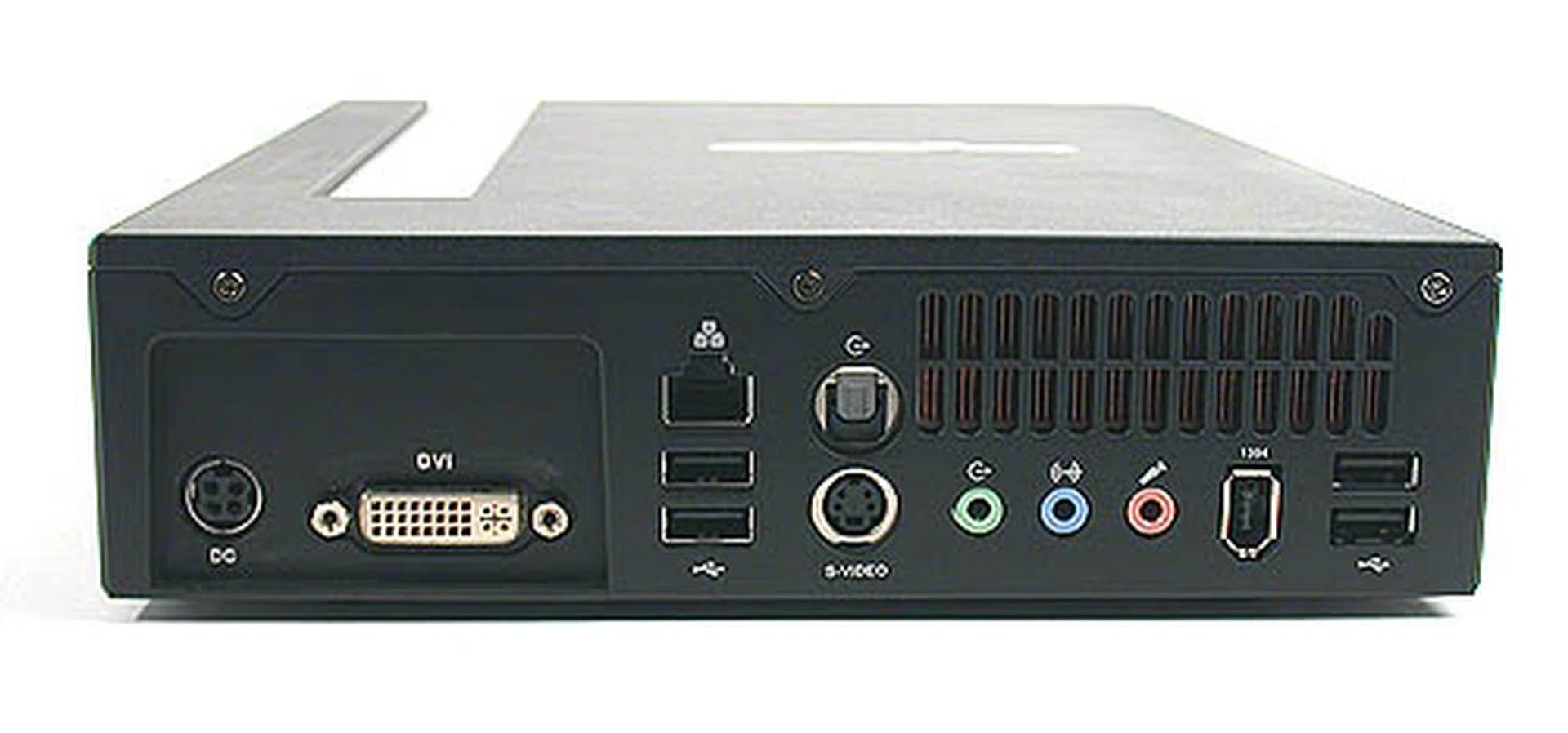
There are no legacy ports, so no PS/2 ports. Instead, you'll get 4 USB2.0 ports along with S/PDIF out, DVI and S-Video outputs, LAN and FireWire ports and the standard audio jacks.
Shuttle does seem to be going on a one-company crusade to end legacy devices and ports. Like a couple of their high-end and latest SFF systems, there is no support for PS/2 devices so if you're still using the old keyboard and mouse, it might be time to change to the USB version. There are four USB2.0 ports at the rear but other familiar and 'historic' ports like parallel or serial are all removed from this forward looking XPC. One of our favorite buttons on a Shuttle XPC, the BIOS reset switch is not to be seen. This is understandable since the casual audience expected for the X100 is probably very different from the SFF enthusiasts. Besides, we found the BIOS truly lacking in any kind of options that would require such a switch. Other useful ports include a S/PDIF digital audio output, as well as DVI and S-Video display outputs. However, if you plan to connect the X100 to your brand new HDTV via HDMI, you may need a DVI-to-HDMI converter. However, the Mobility Radeon X1400 graphics onboard does not have proper HDCP support so playing protected high definition content from the X100 on your HDTV is not feasible. Other traditional content can of course be enjoyed without restriction.
Similar to a notebook or the Apple Mac Mini, the Shuttle XPC X100 has shifted the power supply to an external power adaptor. This substantial power brick easily weighs half a kilogram and together with the estimated 3.41kg of the X100 itself, this Shuttle XPC is definitely not a notebook. The generous use of steel give the X100 a very solid and sturdy build, but the hefty weight incurred from the choice of materials and components however negates its 'portable' form factor. While some desktop replacement notebooks will end up heavier, they have the luxury of a LCD display to compensate. You won't get that with the X100 and frankly, we were quite taken aback by its weight initially. The small footprint of the chassis had us fooled into thinking that within its console like dimensions, it would be as handy and light as one. Instead, that did not seem to be the case, so what lies underneath its black exterior?
Interior Design
At the heart of the Shuttle XPC X100 that we received for review is a Core Duo T2400 (1.83GHz) processor, which is Intel's premium (at least before the Core 2 equivalent, Merom hits the market) dual core processor for notebooks. We understand that there may be some latitude for configuring the processor, but with its Intel 945PM chipset, a Core Duo processor is a safe bet. The X100 has two SODIMM slots supporting DDR2-533 memory modules. Our review unit came with 2 x 256MB for a total of 512MB of memory. This amount of memory is just about adequate for running Windows XP but with Windows Vista on the horizon, 1GB may be the minimal required for a decent computing experience. As for your network needs, this is provided by the built-in Intel PRO/Wireless network adaptor. For those still using anarchic wired connections, a Realtek 8110 Gigabit Ethernet controller gets the job done as well and at higher speeds too.
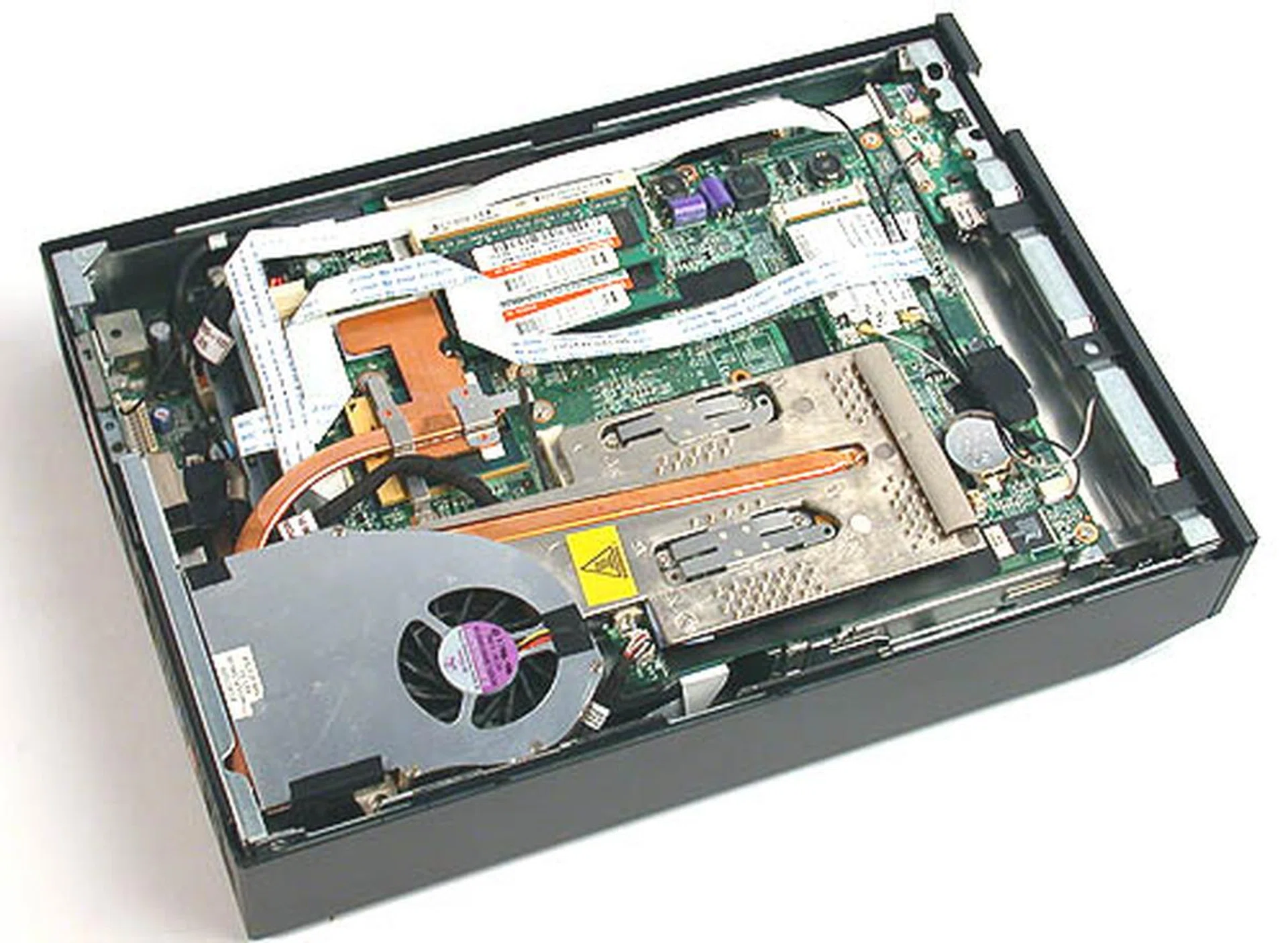
Space is a premium inside the X100. All the components look as cramped as a notebook, but there are a few upgrade options for the enthusiasts.
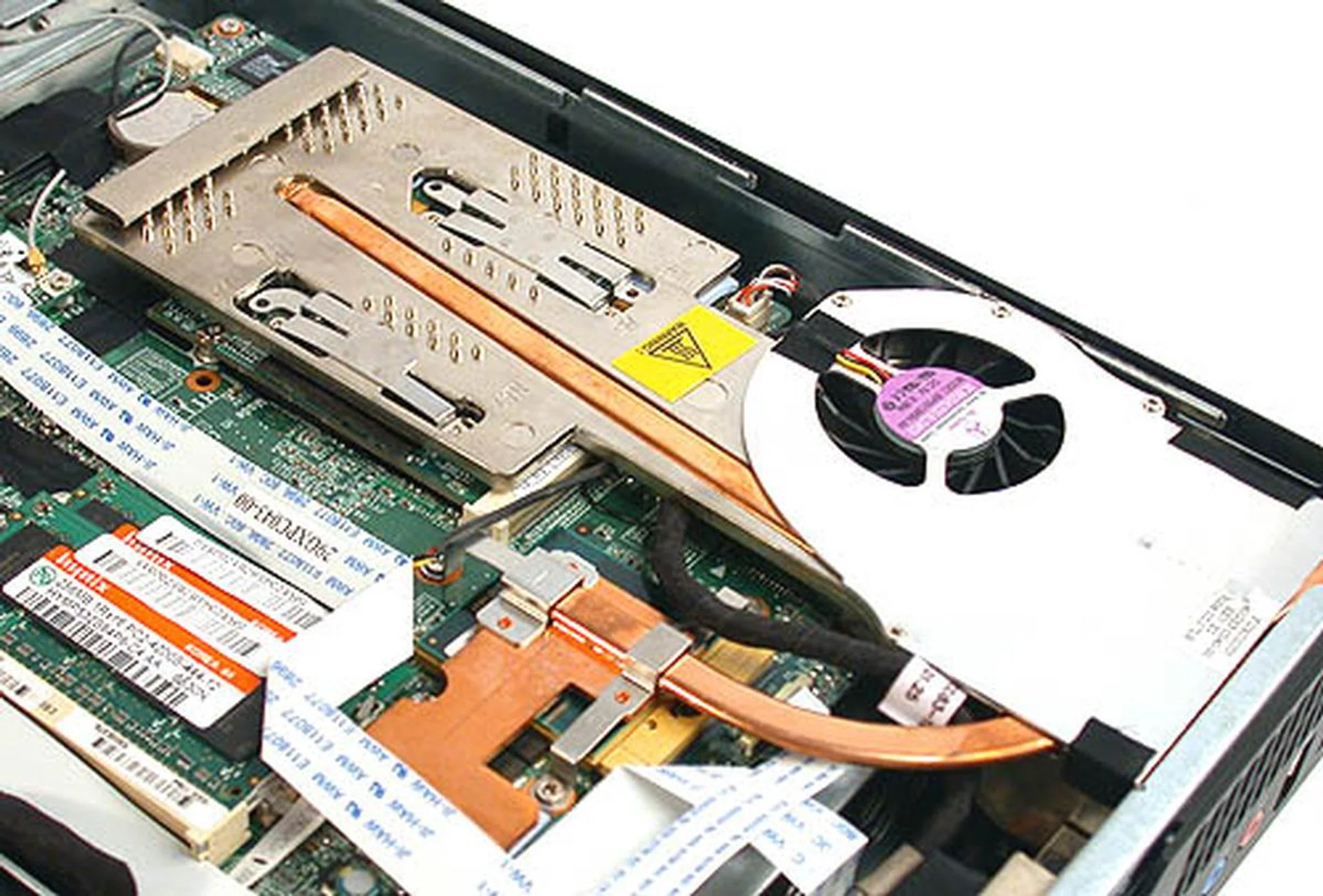
Shuttle's custom CPU cooler uses a combination of heat pipes, heatsinks and a fan to vent the warm air outside the chassis. From our experience, the fan was barely audible. The unit was also about as warm as a typical notebook.
Do the components sound familiar so far? If you think that the Shuttle XPC X100 is no different from a notebook then you're not far off. From the motherboard chipset to the processor, this Viiv-certified media PC is a notebook in disguise. It's probably how Shuttle manages to keep the weight and power consumption down. Even the graphics used is an ATI Mobility Radeon X1400 (HyperMemory version that acquires its frame buffer from the system) and it uses the notebook-only MXM (Mobile PCI Express Module) interface. So it is unlikely that you can upgrade the graphics as and when you prefer like a proper SFF for MXM type graphics is not sold over the counter.
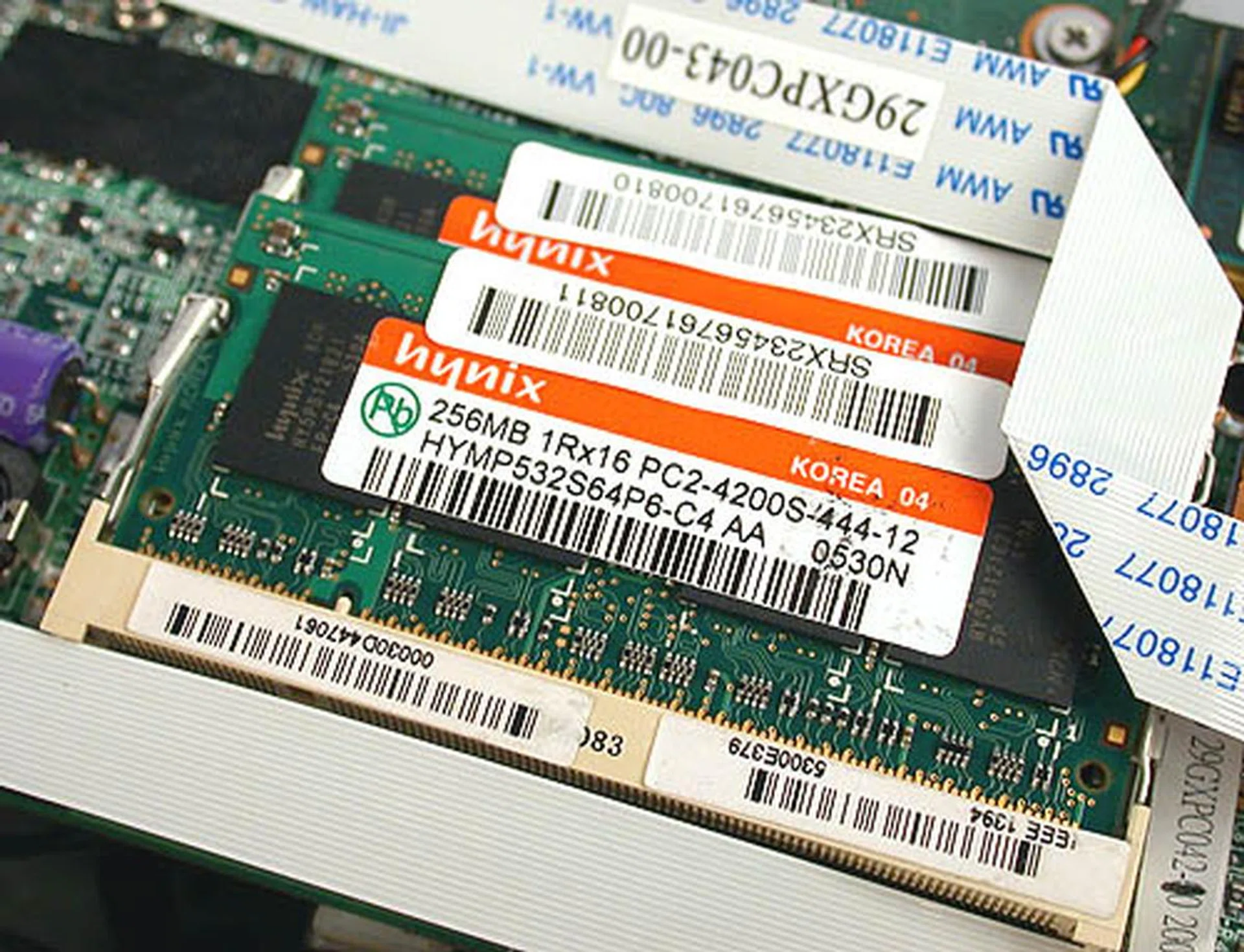
One of the few components that are easily upgradeable by end-users - the DDR2 SODIMM modules used by this XPC. The default comes with 2 x 256MB DDR2-533 modules, courtesy of Hynix and running in dual channel mode.
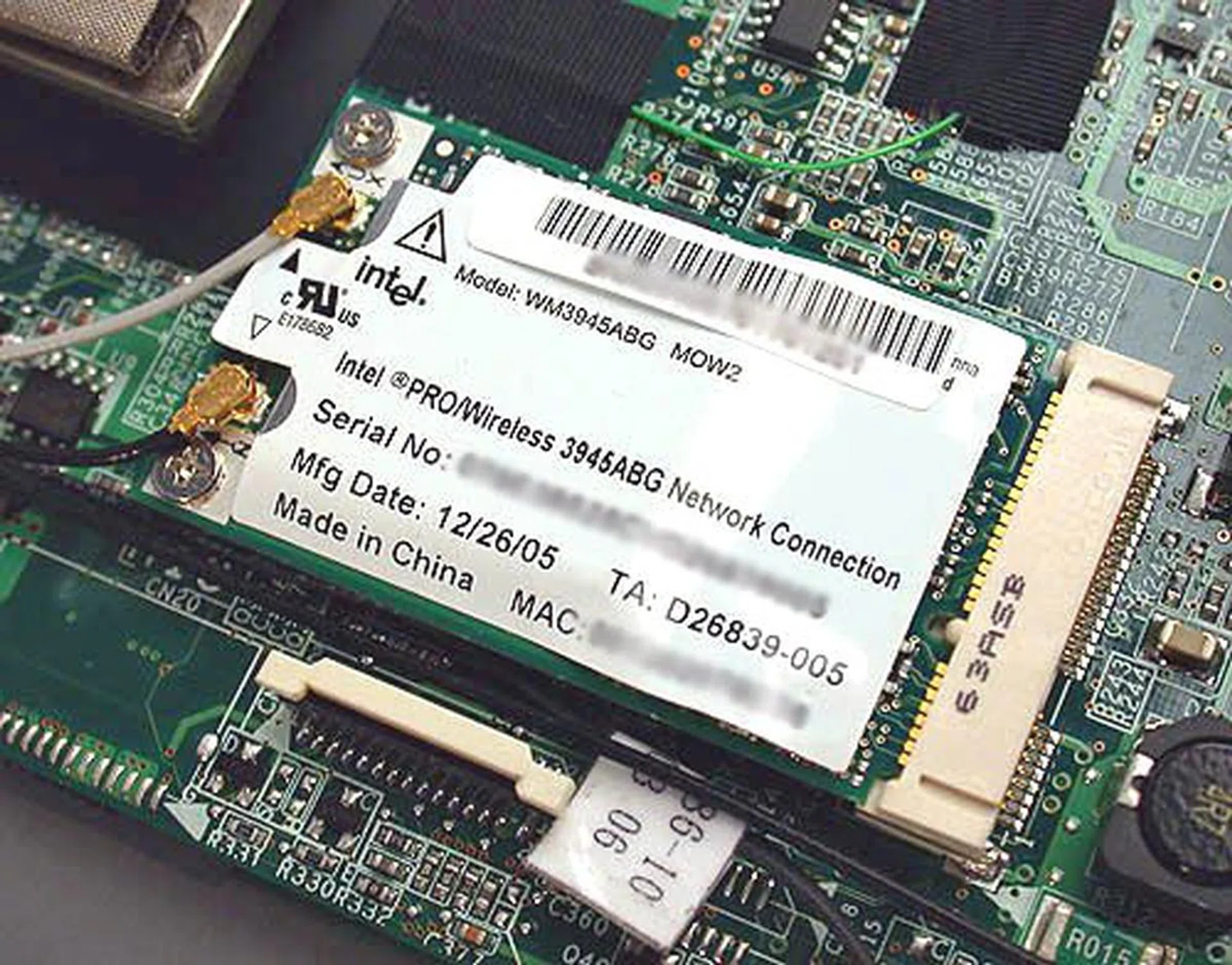
See why we felt that this XPC is a notebook in disguise? It uses Intel's wireless adaptor and is exactly the same as the one found in a Centrino notebook.
Fortunately, while the performance of the Radeon X1400 is mediocre at best, it does have ATI's Avivo technology, along with support for Windows Vista's Aero graphical user interface. Shuttle hasn't made any announcements about any future upgrade options and it could all depend on what reception this product receives in the market. However, we would advise against banking on having upgrade options; it would be more accurate to treat the Shuttle XPC X100 more like a notebook where at most one could only upgrade the memory and hard drive. Speaking of which, the only viable upgrade path for most consumers would be the hard drive. As the X100 uses a standard 3.5-inch SATA hard disk, you could just purchase one off the shelf and install it yourself. The process is painless and very simple. Anyone who has fiddled with his or her systems before will find this upgrade trivial. Of course, quite a few users would be satisfied with the 250GB Seagate that we found in the review set.
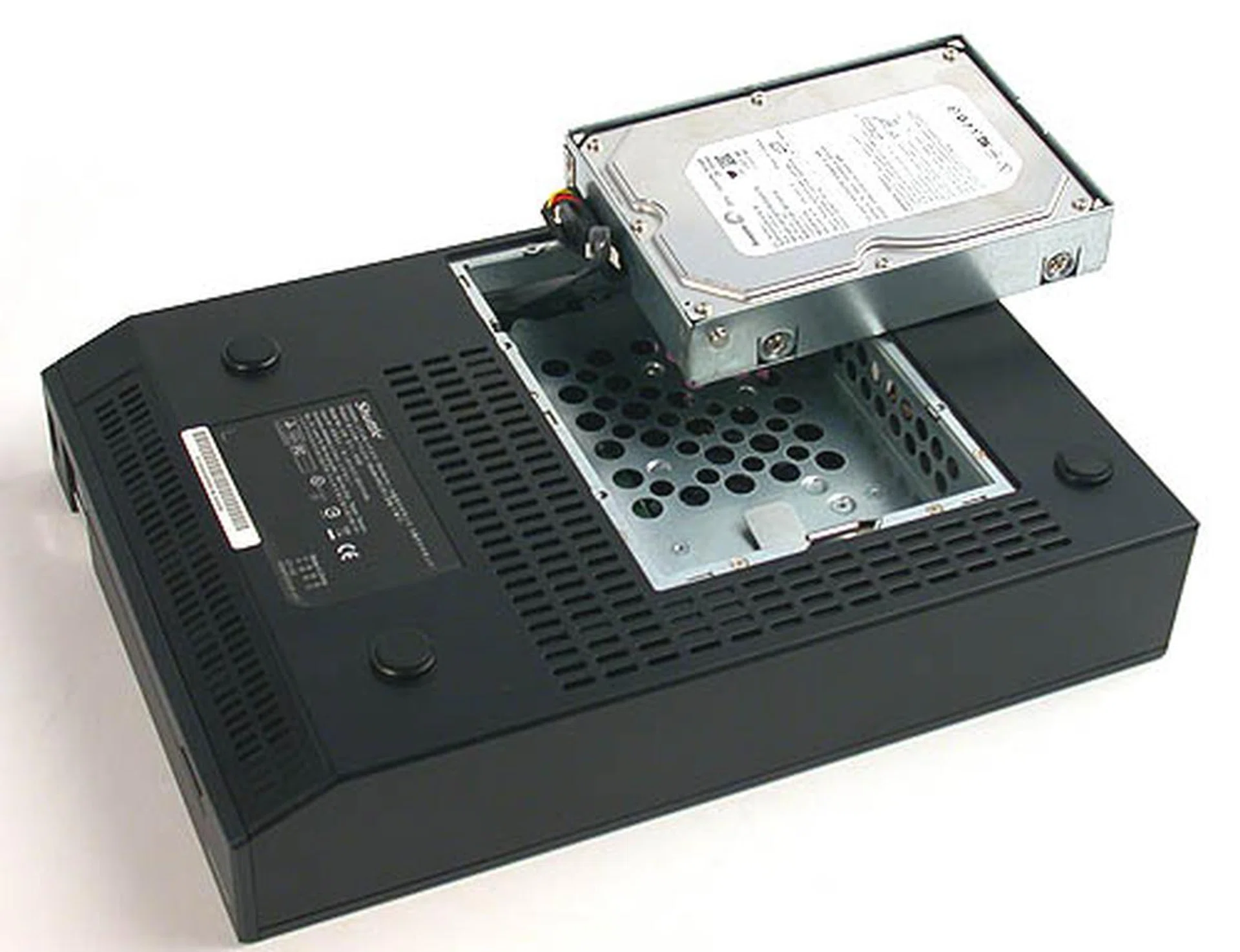
Flip over the XPC and unscrew the bottom section to change the pre-installed Seagate 250GB SATA hard drive. This is a standard hard drive that you can buy from stores and it's relatively easy to change it to a larger capacity. Of course, you can only have one hard drive at any time.
BIOS Options and Test Setup
Unlike the host of overclocking options on a normal Shuttle SFF, there are practically no choices of any kind on the XPC X100 and there's not even a mention of FSB or memory timings. The BIOS to put it plainly, is almost completely not configurable and probably less informative than some notebooks that we have seen. The only options that can be changed within the BIOS are the date and time, the boot sequence and the Ultra DMA modes for your storage devices.
The main question we had to struggle with during our testing was to decide which category the Shuttle XPC X100 fell into. It shares many similarities in hardware with a typical Centrino Duo notebook and the limited BIOS options certainly push it in that direction. Unfortunately, the closest Centrino Duo notebook that we had for comparison is the Dell XPS M2010, which has a more powerful T2600 processor (2.16GHz) and 2GB of DDR2-667 RAM. We also added a reference result of Intel's desktop dual-core Pentium D 920 processor in SYSmark 2004 so that you know where this system stands especially if you're debating between a mainstream SFF and the X100. The main difference here again is the 1GB of DDR2-667 RAM available to the Pentium D 920 reference system used in our CPU tests. As you can tell by now, we really felt that 512MB of DDR2-533 RAM is not enough for the Shuttle XPC X100, but we that's the default configuration offered. The following benchmarks were used to test the X100:
- BAPco SYSmark04
- Futuremark PCMark05
- Futuremark 3DMark 2005 Pro (ver.120)
SYSmark 2004
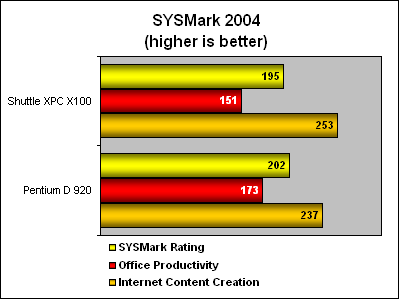
The SYSmark 2004 results show the Shuttle XPC X100 slightly slower than the Pentium D 920. It did quite well in the Internet Content Creation section but faltered for Office Productivity. Of course this is not a fair apples-to-apples comparison but it does help to put the performance of the X100 in perspective with a mainstream retail processor. More RAM on the X100 would have certainly helped boosted its scores here, but it was just too bad it came outfitted with 512MB of memory.
3DMark 2005 Pro (ver. 120)
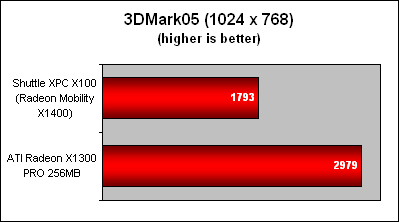
The Shuttle XPC X100 is not for gaming as these rather pathetic 3DMark05 scores attest. Deriving a large portion of its memory from the system is a major disadvantage. Considering that the X100 only has 512MB of system memory in total, there isn't too much to go around. The discrete Radeon X1300 PRO (as tested on our graphics testbed), which is architecturally similar to the Mobility Radeon X1400, easily outperforms the mobile unit on the Shuttle XPC X100 by around 66%. Considering that the Radeon X1300 PRO itself isn't much of a modern gaming ally, you can tell that the Mobility Radeon X1400 won't be of much help in the latest games. However, it plays a crucial role for accelerating video playback using its Avivo engine, and that's its primarily role for being incorporated in the X100 media PC.
Results - PCMark05
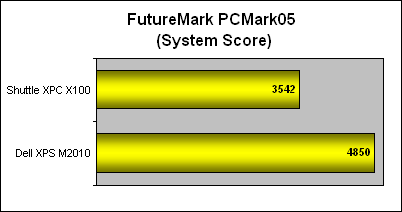
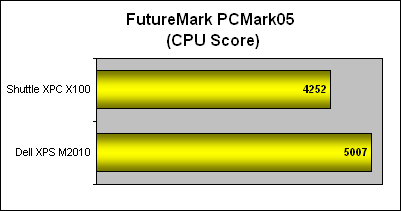
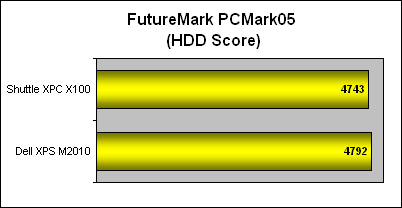
Compared to the monster desktop replacement notebook that is the Dell XPS M2010, the Shuttle is hardly the right contender to it in PCMark05. However, given the limited scores we can accumulate on notebook-class systems, we have to make-do with the comparisons available. Only the hard drive scores were close, since both systems used 7200RPM SATA hard drives with 8MB buffers, the result was not surprising. But for the other important aspects like the CPU and overall System score, the faster processor and additional memory made all the difference and thus there was a sizable gulf in performance between the two. Given the differential between the two systems, the outcome of the Shuttle XPC X100 is quite decent.
The Smallest SFF Yet
The Shuttle XPC X100, the world's smallest SFF may look more like an old-fashioned console but make no mistake, its sight is squarely aimed at this niche currently dominated by Shuttle's own legions of SFF models. For all its dominance of the genre it created, Shuttle's products lack the mainstream recognition that Apple's Mac Mini garnered instantly on its debut, thanks to a combination of Apple's superior brand name and its trendy designs. And the X100 intends to change that impression.
To achieve this, Shuttle has turned to the mobile segment for inspiration, with the entire foundation of the XPC X100 based on Intel's Centrino platform. The Core Duo processor and the MXM interface graphics are straight ports from the notebook form factor and the quiet and low power consumption of the X100 owns much to this decision, as does its external power adaptor. While the specifications for the X100 may vary, the standard configuration that we saw on Shuttle's website mirrored our review unit and we have to say that its performance is decent for a notebook-class desktop. Matched with a typical SFF, it will fare well against older models but it pales in comparison to the Shuttle's newest offerings. Of course, the X100 is a whole lot smaller and lighter. It is an ultra compact SFF and Shuttle deserves credit for cramping all its functionality in that form factor. Of course at the same time, we can't help but compare it against a typical mid-range notebook, partly due to its specifications and partly due to its dimensions.
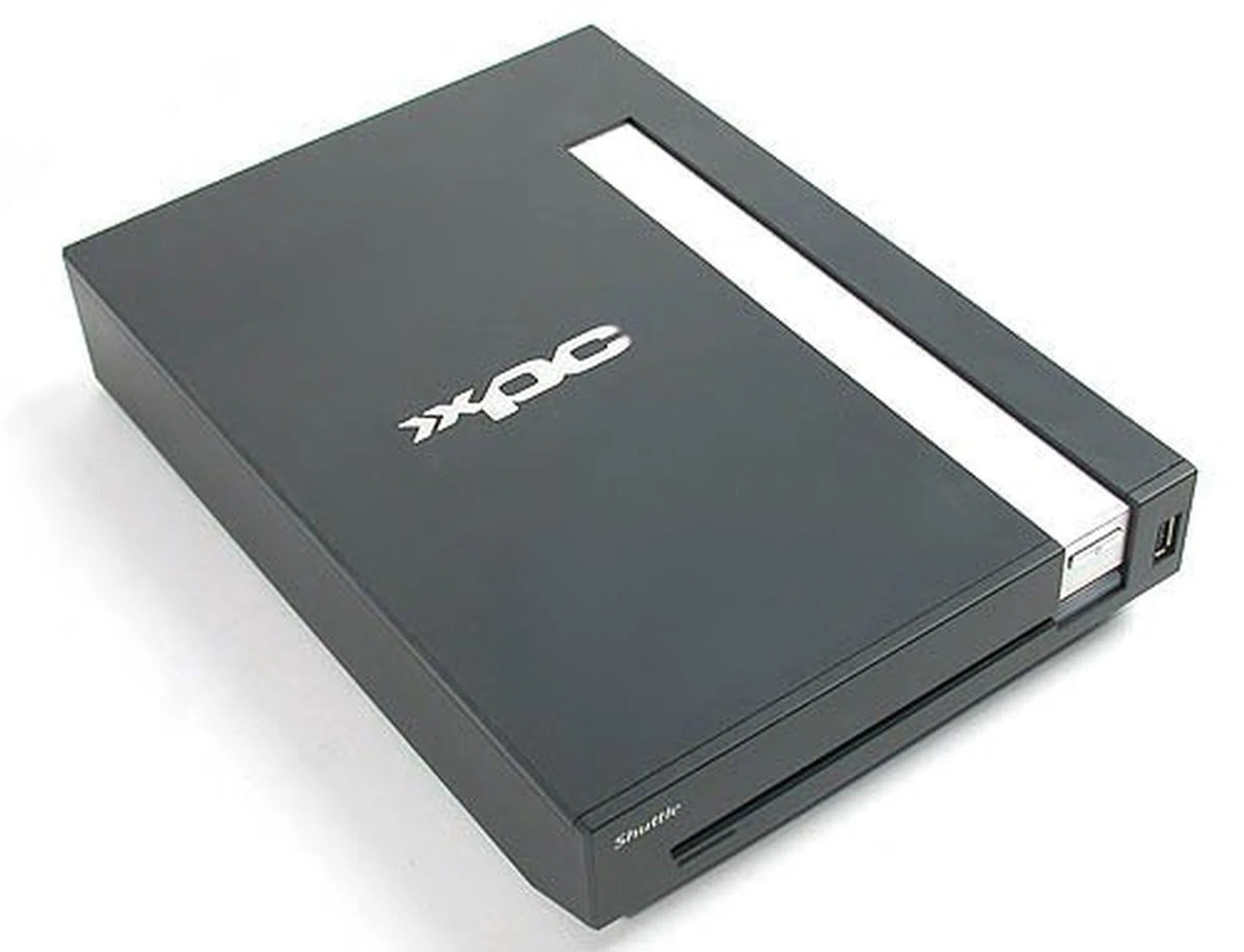
Longer and heavier than a Mac Mini, it's also more powerful than its Apple competitor. Upgrade options seem a bit limited, especially graphics-wise but it's early days yet. Overall, the Shuttle XPC X100 presents itself as a mildly configurable petite little media PC more than anything else.
The notebook equivalent hardware and form factor also accounts for some of its limitations if you are squarely looking at it from a traditional SFF viewpoint. First, you can forget about gaming, as the ATI Mobility Radeon X1400 graphics processor will cut no ice even against a low-end discrete Radeon X1300 PRO. Next, the upgrade options for the X100, contrary to most of Shuttle's SFF, are few. The hard drive and memory are probably the only realistic upgradeable components. The processor is also upgradeable, supporting even the upcoming mobile Core 2 Duo mobile variety, but as with all mobile processors, it's not a part that's easily available in your PC DIY stores.
While Shuttle does not advertise the XPC X100 as a HTPC system and we agree with that, one of the main selling points of an SFF is to function as a HTPC. Certainly the exterior appearance of the X100 fits in the living room quite nicely. However, it offers somewhat limited functionality. First, there is a lack of a built-in TV tuner and the non-existent upgrade options make that impossible (not to mention the space). Users would have to rely on external USB TV tuners to supplement this. The lack of true HDCP support will also make the X100 less than ideal for true HDTV setups and even besides that, the Mobility Radeon X1400 is not quite cut out for accelerating HD content playback as opposed to its mid and upper range GPU variety. Even the choice of either Windows XP Professional or Home Edition as the pre-installed operating system (on preconfigured X100 units such as ours) seems to indicate that this SFF is not really for the HTPC crowd. After all, where is the Media Center Edition that one would expect? In other words, if HTPC is your cup of tea and you need a completely pre-configured system as opposed to building one using Shuttle's traditional SFF, then our recommendation is for Shuttle's more competent alternatives, such as the Shuttle XPC M1000 or the revised and improved M2000.
So we have established that the Shuttle XPC X100 is neither the traditional SFF offering full customization, nor is it a competent HTPC system, and it is definitely not a notebook. Where does that leave the X100 then? Simply put, the X100 is still an SFF at heart but leverages on the notebook components factor to achieve its tiny dimensions, whisper quiet operation, low power consumption and still leaving some room for configurability. The X100 could have been even smaller and lighter if not for its 3.5-inch hard drive intake design, but this is exactly what it offers end-users - potentially vast storage capability simply by purchasing a 500GB, if not a 750GB hard drive. Just imagine the media storage possibility coupled with a capable processor and the onboard ATI MXM graphics module. The X100 is suitable as a tiny media server. Limited it may be as opposed to other options discussed earlier, but its unique attributes should appeal to a niche user group. That's right, Shuttle has yet again carved another sub segment for itself. The question remains however if this segment is enough to support future revisions of the X100.
In certain regions like our own locality, the Shuttle XPC X100 is sold like a barebones system, which means it comes without a processor, hard drive and memory and that will set you back by S$1159 (US$736), which is considerable. Considering that mobile processors are not easy to come by in retail channels, you are likely to purchase a completely configured version with all the necessary hardware from appointed retailers that carry the Shuttle XPC X100. Of course, the overall price of the complete X100 system will vary according to the hardware configuration so the stated price above is just the base cost of a Shuttle XPC X100. A minimally configured system might set you back by about another S$500. We advise you to check with your local Shuttle distributor(s) to find out how they plan to retail the Shuttle XPC X100 and its prospective configuration.
While the 'glamorous' Mac Mini costs a fair bit cheaper and possibly has the edge physically and aesthetically, its lesser hardware capabilities limit its role to that of a simple, regular desktop machine rather than compete for the more tech-savvy crowd that the X100 is aiming for. Yet another possible contender in this space is the much-publicized upcoming PlayStation 3 console with its entertainment and multimedia functionality. However, it targets an audience who probably prefer its consumer appliance-like convenience. What the Shuttle XPC X100 has that trumps both these options is its extra versatility and configurability and these advantages should go down well with the traditional PC user. Despite these advantages, the Shuttle XPC X100 will probably appeal only to a select group of users for its uniquely small form factor and for those willing to pay a premium.
Our articles may contain affiliate links. If you buy through these links, we may earn a small commission.