
ASUS ROG Strix GL12 review: A fuss-free, powerful, and compact gaming desktop
The ASUS ROG Strix GL12 defies convention that gaming desktops need to be big hulking machines. This is a compact gaming desktop with just about everything you need.


The ROG Strix GL12 was designed to be powerful but also compact. (Image source: ASUS)
Powerful and Compact
The ASUS ROG Strix GL12 is the successor to the old ROG Strix GD30 and it is the newest gaming system from ASUS’ gaming-focused ROG lineup. It is unusual in the sense that it is neither a full-tower or mid-tower desktop system. The fact is that it is somewhere between the size and so ASUS simply calls it a gaming tower.
It is outfitted with the latest components and it is available in a variety of configurations so let’s take a look them now in this table below:
Model | GL12CM-SG005T | GL12CM-SG009T | GL12CM-SG010T | GL12CP-SG016T |
Processor | Core i7-8700K | Core i7-8700 | Core i7-8700 | Core i7-8700 |
Memory | 64GB | 32GB | 16GB | 8GB |
Graphics | GeForce GTX 1080 | GeForce GTX 1070 | GeForce GTX 1060 | GeForce GTX 1050 |
Storage | 512GB SSD + 2TB HDD | 256GB SSD + 1TB HDD | 256GB SSD + 1TB HDD | 2TB HDD |
Price | $3,998 | $2,798 | $2,298 | $1,598 |
The unit we are testing today is the range-topping model with a Core i7-8700K processor, GeForce GTX 1080 graphics card, 64GB RAM, and 512GB SSD and 2TB HDD.
I have covered the ROG Strix GL12 quite extensively in an earlier video, which I shall embed below. But it is worth going through some of the product’s features.
- ASUS mATX Z370 motherboard
- Interchangeable transparent side panel
- ASUS Aura Sync (RGB lighting)
- Hot-swap SSD tray
- 2 x SSD drive trays
- 2 x HDD drive trays
- 500W PSU
- 2 x USB 3.1 Gen 2 Type-A ports
- 6 x USB 3.1 Gen 1 Type-A ports (2 front, 4 rear)
- 4 x USB 2.0 Type-A ports (2 front, 2 rear)
- Bluetooth 5.0 connectivity
- 802.11ac Wi-Fi (2x2; up to 867Mbps)

As I mentioned in the video, the construction, assembly, and accessories of the system are good. The casing itself feels sturdy and cable management is exemplary. The system even comes with a keyboard and mouse. Obviously, it isn't a mechanical keyboard and it isn't the most fluid or ergonomically-friendly mouse in the world, but it does mean that the only thing stopping you from playing your games right away is the lack of a monitor.
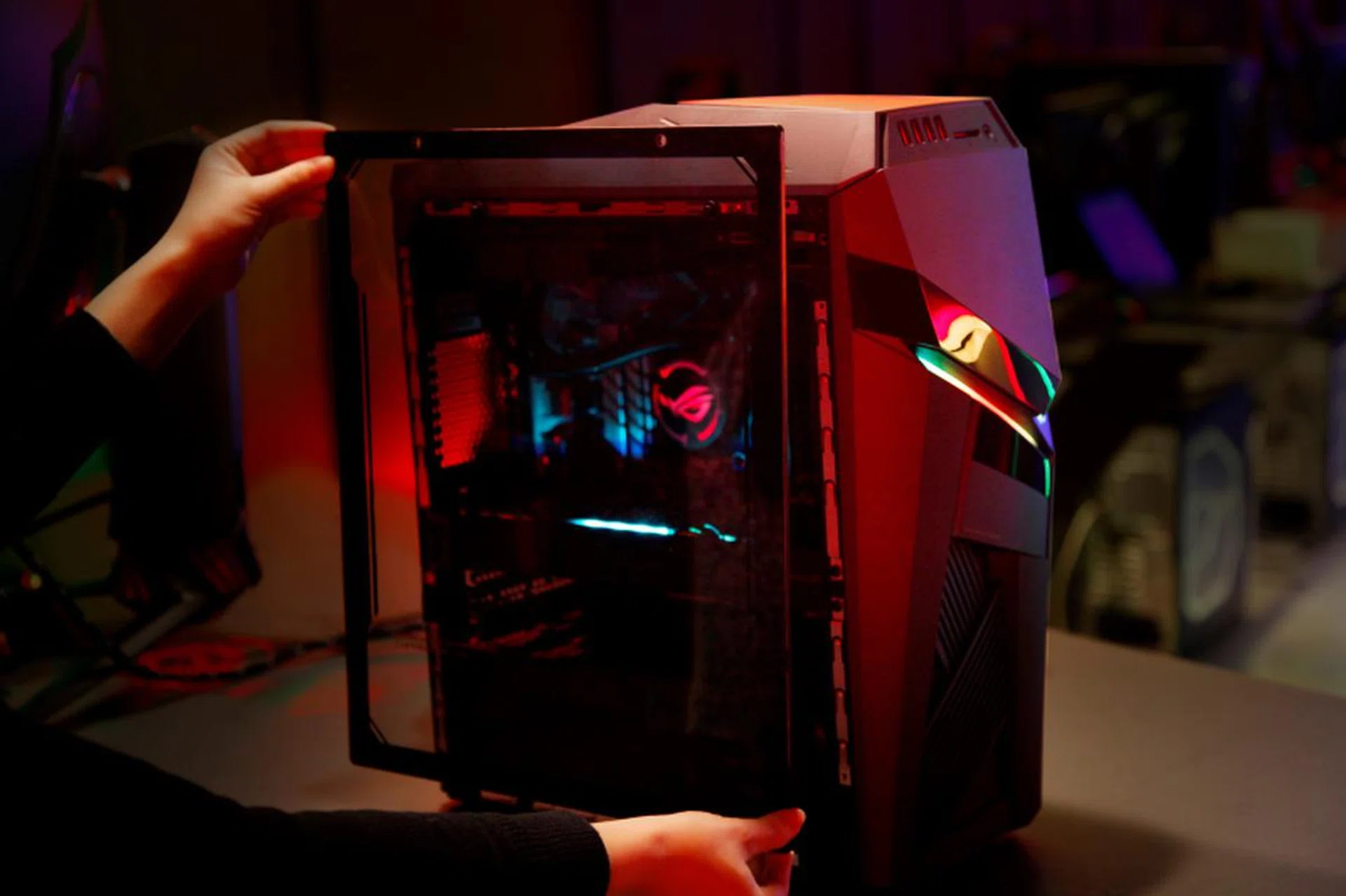
The side panel doesn't slide into the chassis. Instead, it has to be affixed using additional feets and fasteners. (Image source: ASUS)
The ROG Strix GL12 also comes with a swappable transparent side panel that lets its owners see the inside of their system. It is a thoughtful addition but installing it is a hassle because it isn’t a direct replacement for the standard side panel. Instead, users are required to install metal feet and fasteners so that they can affix the transparent panel to the side of the system.
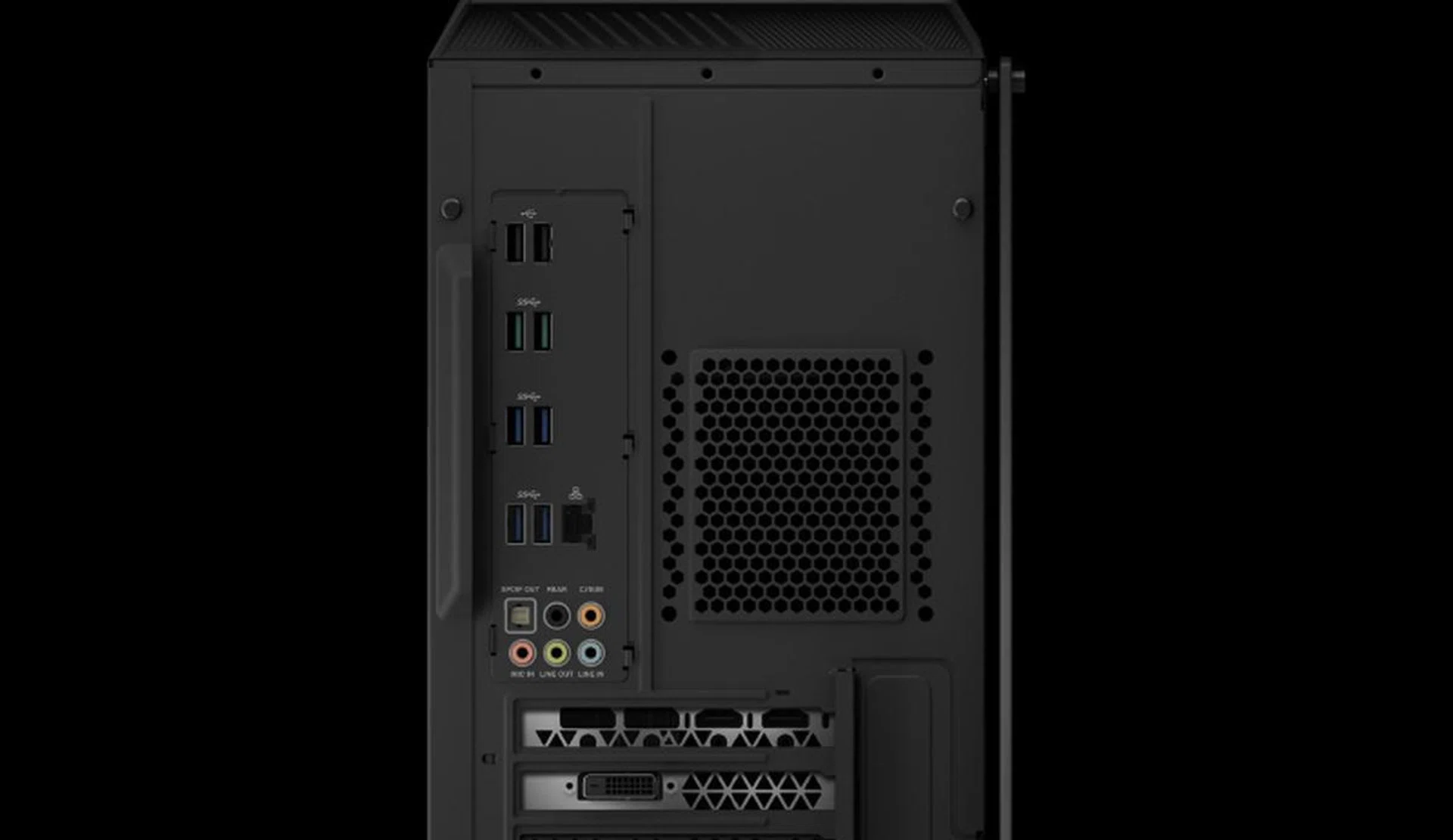
The ROG Strix GL12 has no shortage of USB ports. (Image souce: ASUS)
In terms of features, the ROG Strix GL12 has just about all the crucial ones that gamers need. However, the lack of USB-C and Thunderbolt 3 connectivity is a little concerning. Still, if it’s any consolation, USB-C isn’t quite mainstream yet and neither are Thunderbolt 3 devices. Plus, Thunderbolt 3 devices are generally quite expensive. Lastly, ASUS compensates with no less than 12 USB Type-A ports supporting a variety of USB standards, including two that supports the newer and faster USB 3.1 Gen 2 speed.
You can upgrade and swap components on your own. If you need extra memory or storage, the ROG Strix GL12 has provisions of them. The only shortcoming is that since it uses a mATX motherboard, SLI is out of the question.
Performance Analysis
To gauge the ROG Strix GL12’s performance, we will be running it through our usual suite of benchmarks and comparing it against our DIY graphics testbed system, which has been outfitted with a variety of graphics cards. Before we take a look at the ROG Strix GL12’s performance, it’s worth comparing its key specifications against that of our DIY system.
System | ROG Strix GL12 | DIY System |
Chipset | Intel Z370 | Intel X99 |
Processor | Intel Core i7-8700K | Intel Core i7-6950X |
Memory | 64GB DDR4-2666MHz | 16GB DDR4-2666MHz |
Storage | 512GB PCIe SSD | 256GB Samsung SSD 840 Pro |
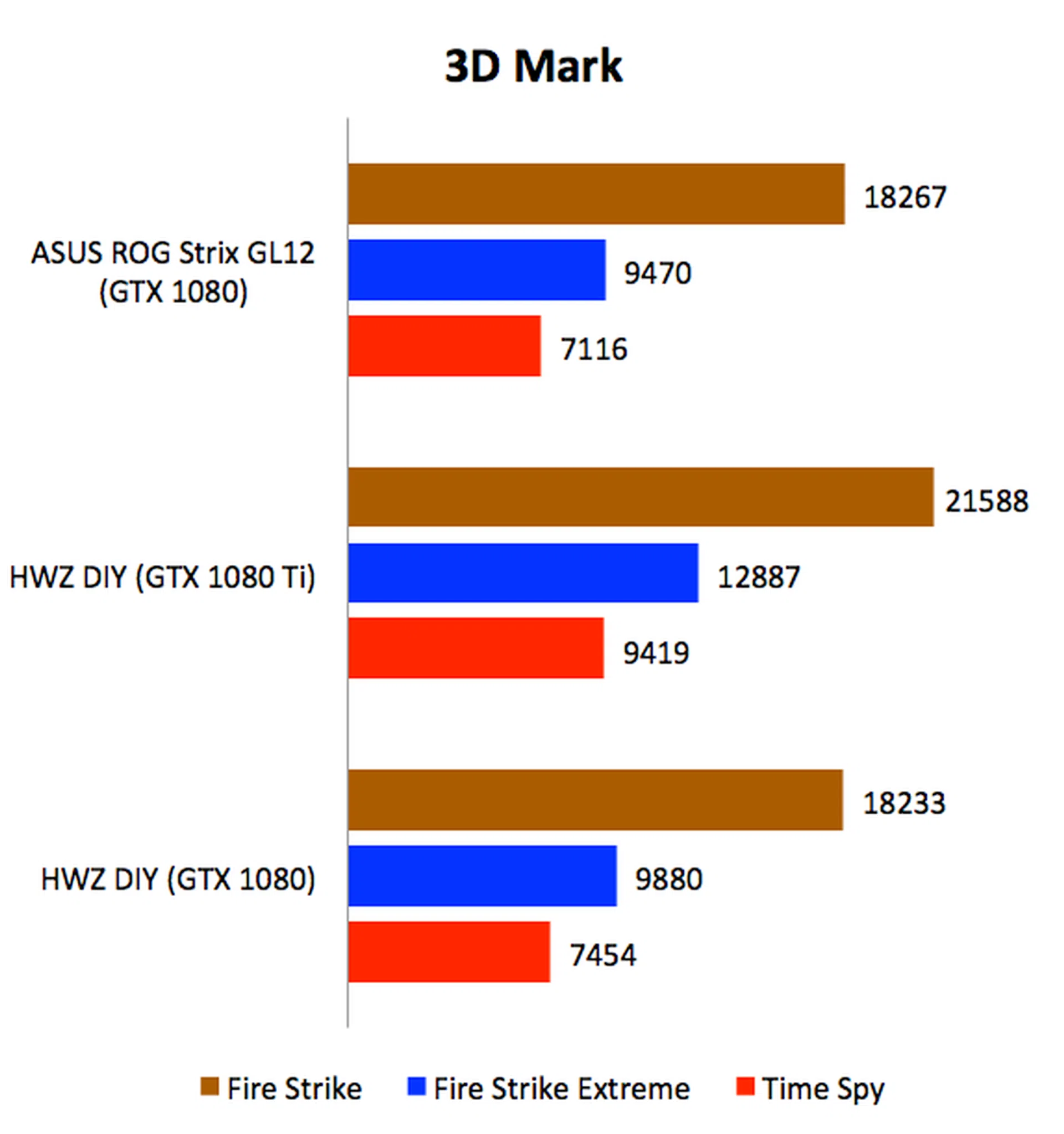
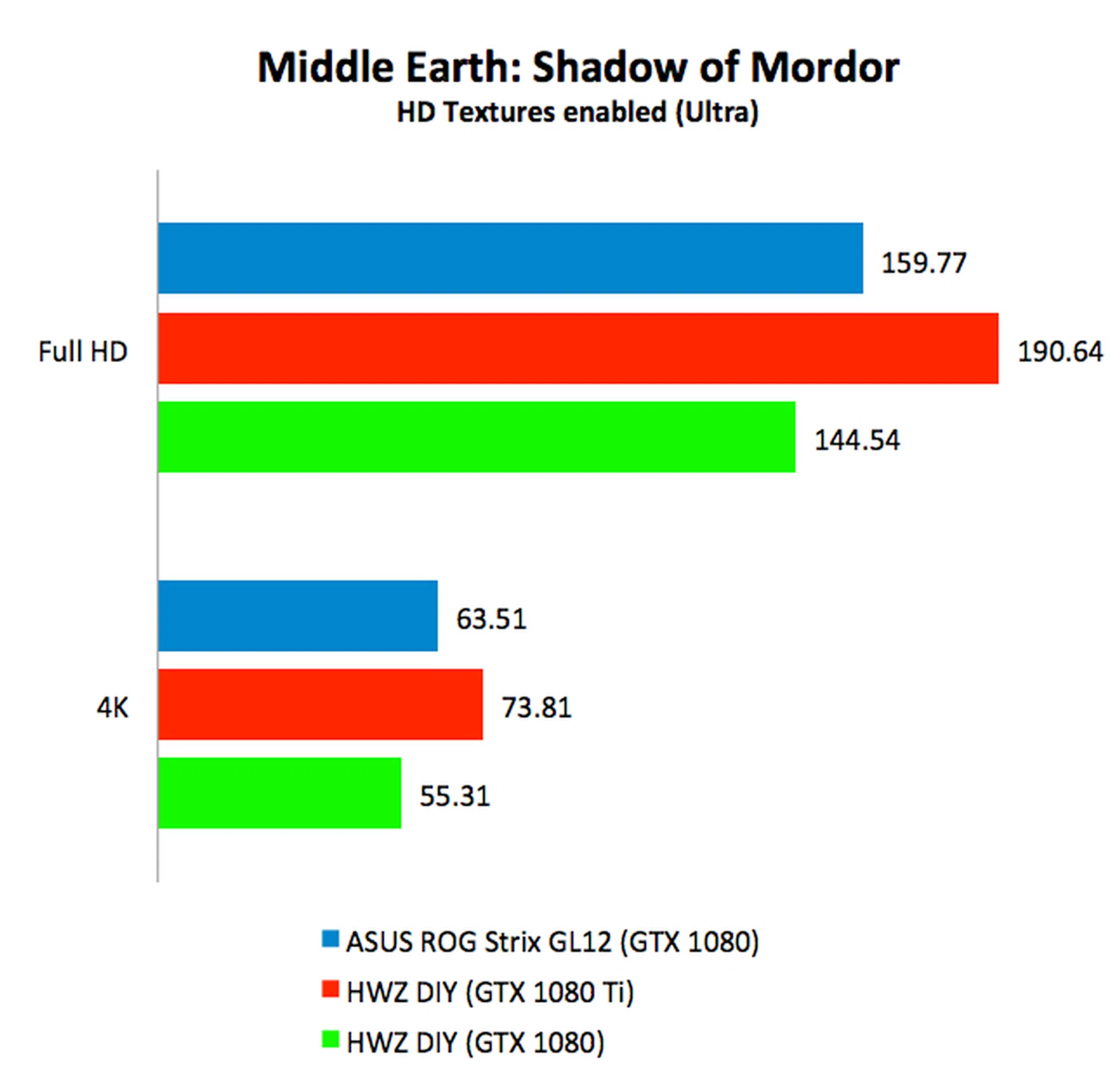
The two systems are quite evenly matched so it is no surprise to see that the ROG Strix GL12 performed comparably against our DIY system when outfitted with the same GeForce GTX 1080 graphics card. Performance graphs are below if you wish to scrutinize their performance figures.
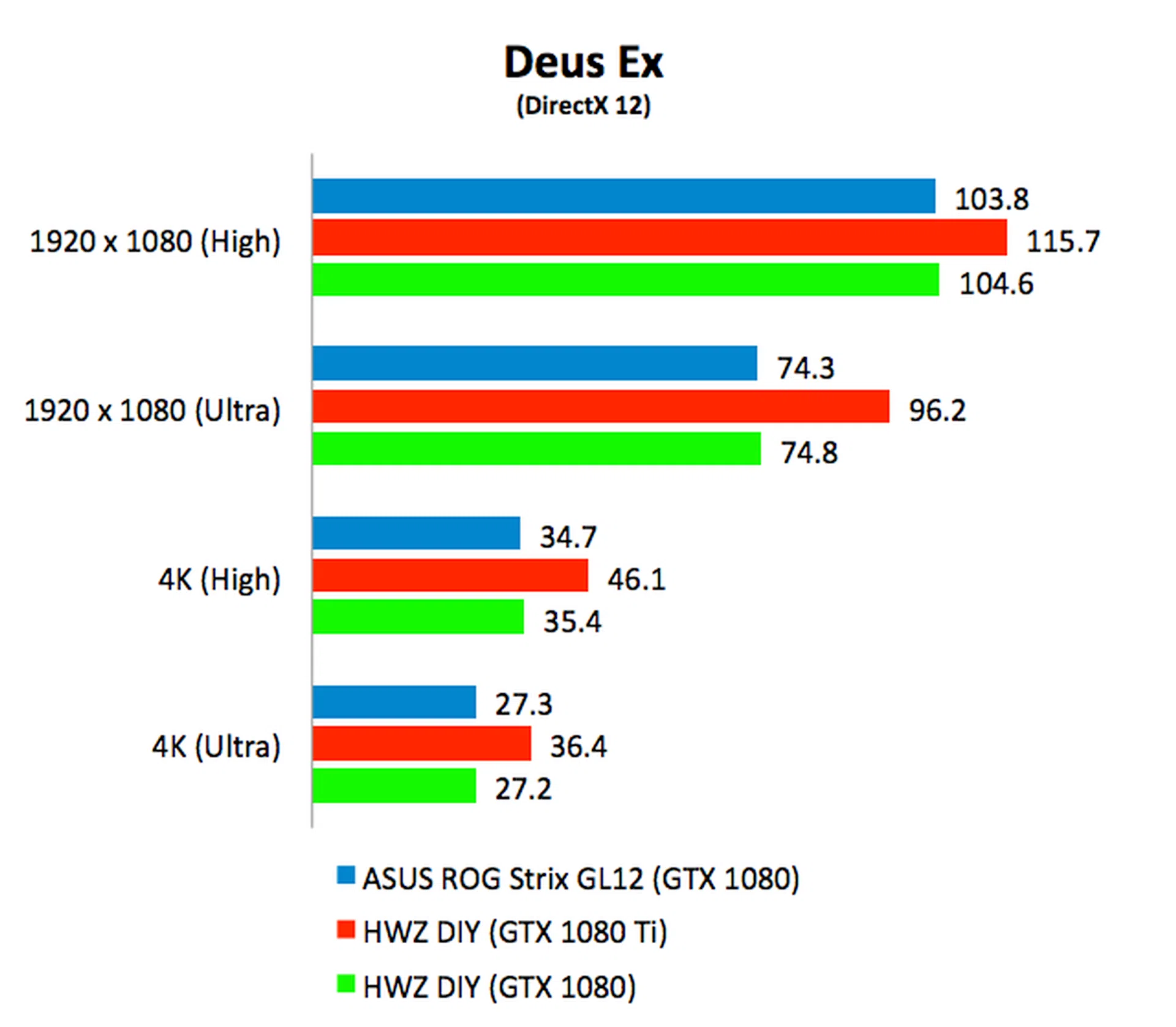
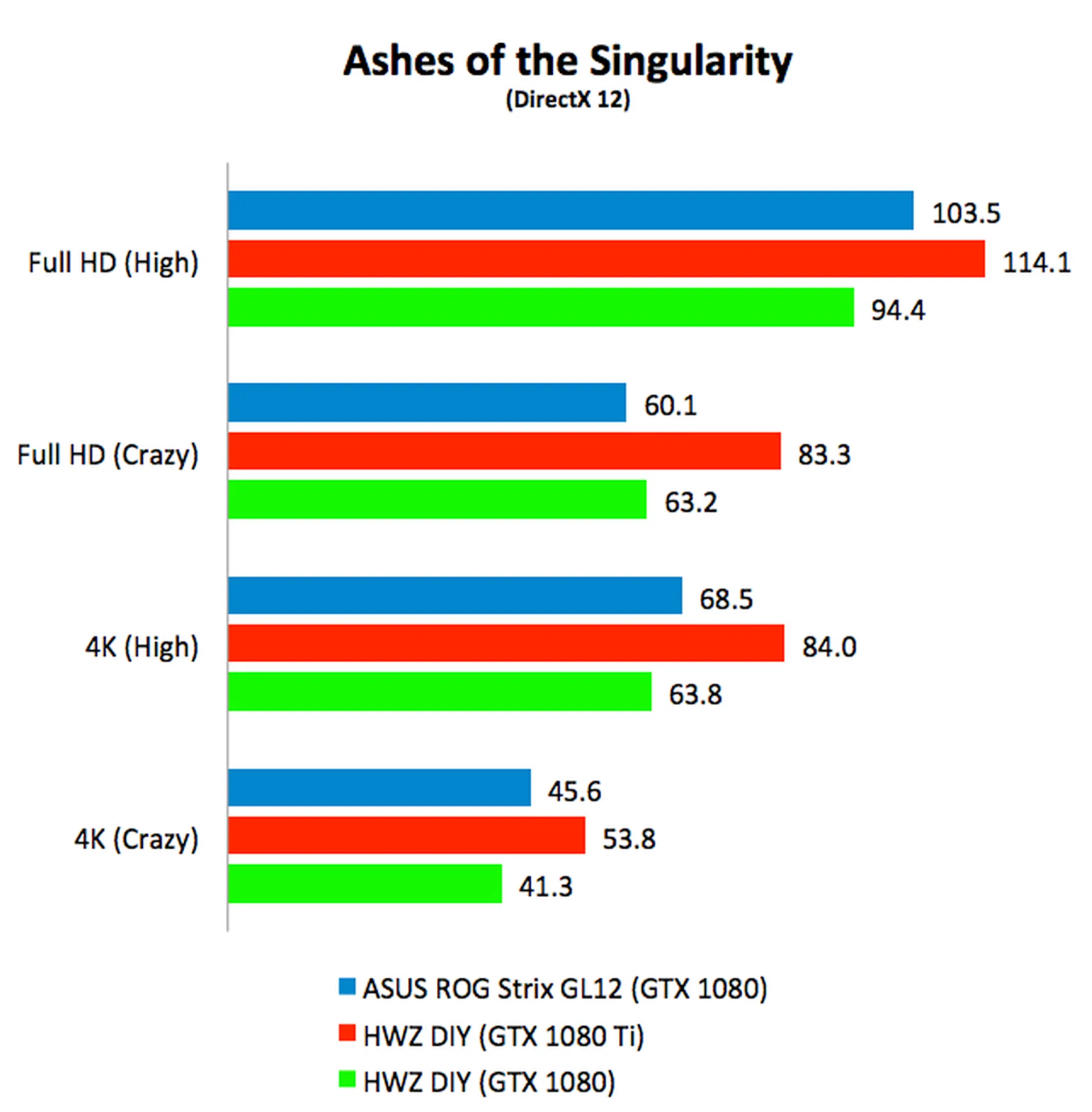
Cost vs DIY
There is a long-running assumption that assembled systems by branded manufacturers typically cost more than a self-assembled system made with off-the-shelf components but is that really true? Bearing in mind that the ROG Strix GL12 with our tested configuration costs S$3,998, let’s take a look at how much it would cost to assemble a comparable system with off-the-shelf components. Note that the prices quoted here are accurate at the time of writing and are rough estimates of what one can expect to pay.
Core i7-8700K processor | $520 |
mATX Z370 motherboard | $343 |
NVIDIA GeForce GTX 1080 | $1000 |
64GB RAM | $1100 |
512GB PCIe SSD | $400 |
2TB HDD | $100 |
550W Gold PSU | $150 |
Casing | $150 |
Liquid-cooler | $150 |
Total | $3,913 |
In terms of price, it might surprise you to find that the ROG Strix GL12 actually costs about as much as a self-assembled system. The premium is very slight so that takes away one of the long-assumed advantages of DIY systems.
Price parity aside, the ROG Strix GL12 has one key advantage over self-assembled systems and that is with regard to warranties and repairs. Should anything go wrong with the system, it is far easier to simply take the entire system back to ASUS and have them troubleshoot and repair it than to have to do it yourself. Warranty for the ROG Strix GL12 is 3 years onsite, by the way. Troubleshooting a misbehaving PC is awfully tiresome and annoying because most of the time it is not immediately apparent where the fault lies, and that is me speaking from experience.
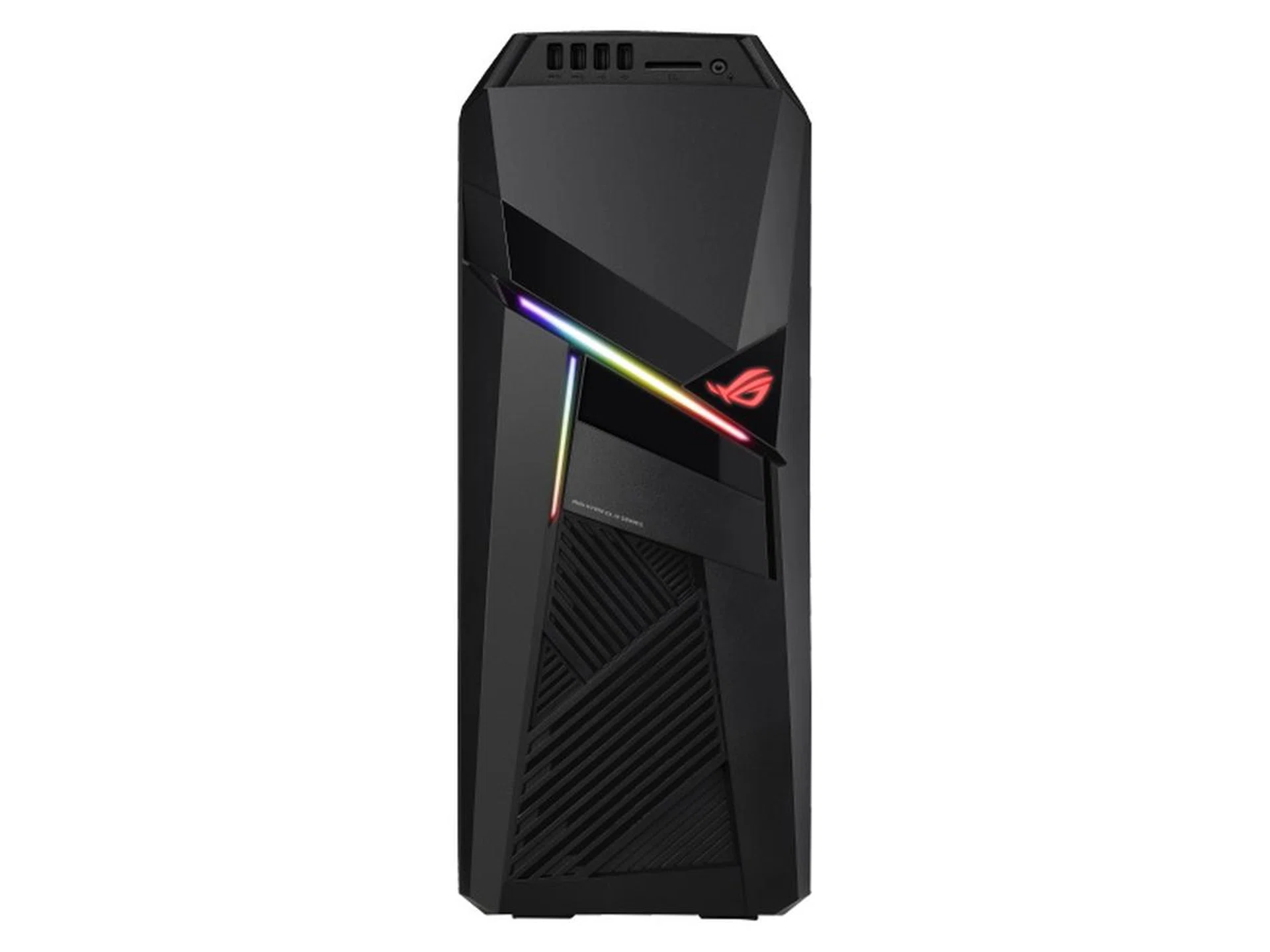
The ROG Strix GL12 comes with a 3-year long onsite warranty. (Image source: ASUS)
Let me give you an example. If the system doesn’t boot up, there can be a number of likely causes, including, but not limited to, the motherboard, processor, memory, or even the PSU or power cord. To pinpoint the exact cause is not only time consuming, it also requires you to have spare components lying around. You might have extra memory sticks lying around but processor and motherboard? How many people have extra processors in reserves for situations like this (unless you're stocked like our test lab)? You could pay someone to do it but that is going to cost you.
Final Thoughts
I won’t say the ROG Strix GL12’s styling is gorgeous but it is fairly generic and inoffensive enough that I think most gamers will have no qualms about it sitting on their desks. It is well put together and fairly compact too and has room for future upgrades. More importantly, performance is what you would expect from a high-end gaming system outfitted with a GeForce GTX 1080 card. Finally, the pricing is reasonable and the warranty period (3 years onsite) is quite generous. To sum up, for readers who don’t want to deal with the hassle of assembling a system, or the potential of having to troubleshoot a faulty self-assembled system, the ROG Strix GL12 is worth checking out.
Our articles may contain affiliate links. If you buy through these links, we may earn a small commission.