
ASUS ET2411INTI AIO PC - An Entertainment Powerhouse
The latest all-in-one system from ASUS packs an Intel Ivy Bridge processor, an integrated TV tuner and Blu-ray playback capability. And with Windows 8 around the corner, it also boasts touchscreen capabilities. Find out if it's a true entertainment powerhouse in our review.

Let Me Entertain You
We have a love-hate relationship with all-in-one (AIO) systems. On one hand, we like that they are usually pretty and sleek to look at; yet on the other hand, we dislike that they are usually not that powerful and, worse of all, lack upgrading options. However, thanks to technological progressions made to the platforms and processors, AIOs are becoming more powerful on the whole. And with Microsoft's Windows 8, which promises to be much more touchscreen-friendly, just round the corner, we think that AIOs, specifically touchscreen ones, can make a huge impact in the months ahead.
The ASUS ET2411INTI is of the newer touchscreen AIO machines from the Taiwanese hardware giants. In recent times, ASUS has been making a reputation for themselves as being one of the top Taiwanese manufacturers when it comes to design and build quality. And on first impressions, the new ASUS ET2411INTI doesn’t disappoint.
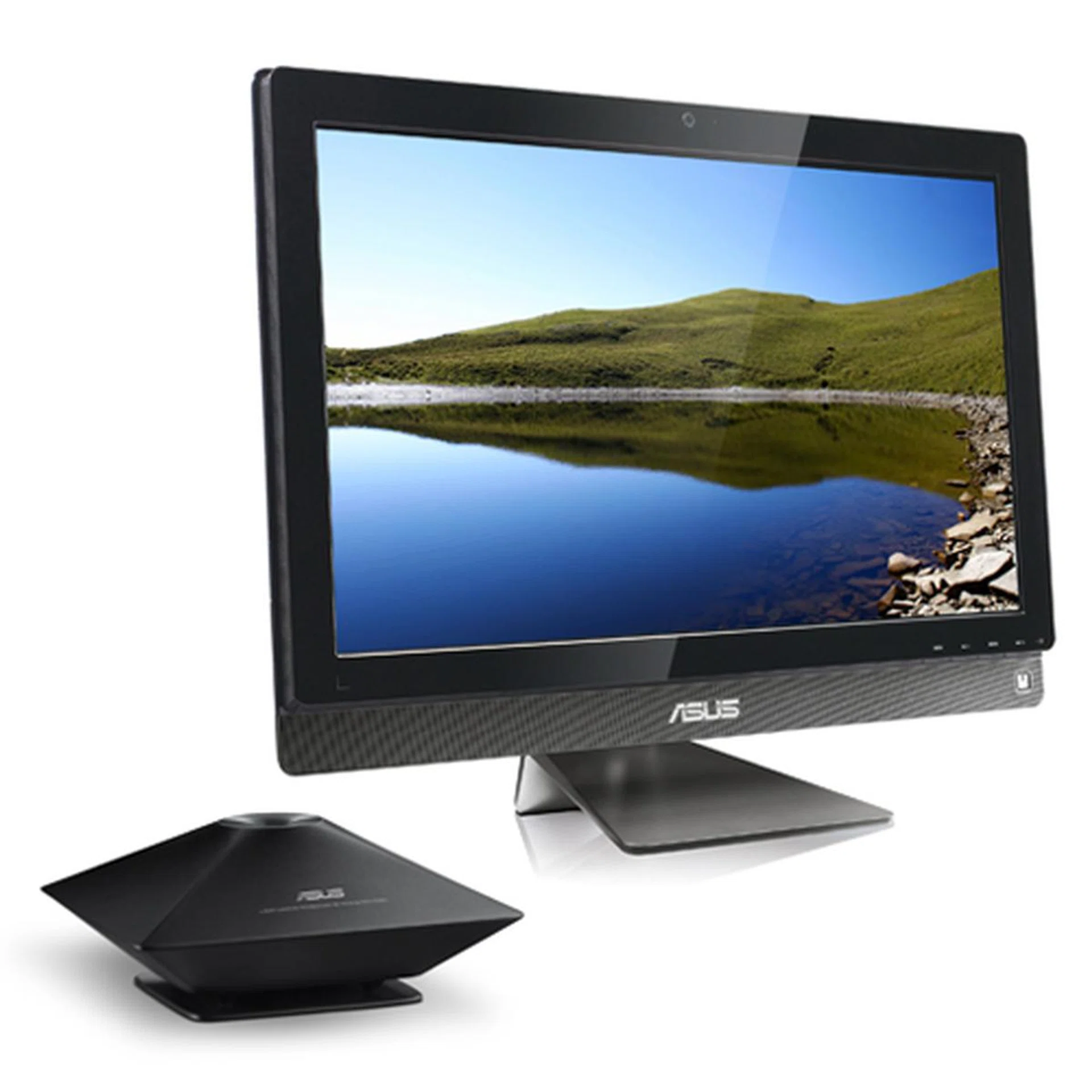
The ASUS ET2411INTI packs the latest third generation Intel processor and a host of other goodies and is positioned by ASUS as an all-in-one entertainment solution.
It looks handsome and sleek, with its glossy black bezel framing its equally glossy 23.6-inch full HD LED-backlit touchscreen display. Below it, a row of speaker grille gives it additional 'design detail' and provides a nice contrast to the glossy screen and bezel.
Looks aside, the ASUS ET2411INTI has a number of interesting features that makes it a true entertainment powerhouse. Apart from its fairly large 23.6-inch full HD LED-backlit display, it also has an integrated TV tuner and Blu-ray playback capability. Want to catch the news at nine and then watch the Godfather in all its 1080p glory? That's not a problem on this AIO system.
Underneath the hood, it is powered by the latest Intel Core i7-3770S processor. This is a fairly powerful quad-core processor with 8MB L3 cache, Intel Hyper-Threading technology and an Intel HD Graphics 4000 integrated GPU. To back it up, it has a generous 8GB of memory and a sizable 2TB hard disk, capable of storing lots of media content. Finally, its multimedia credentials are reinforced with an NVIDIA GeForce GT630M discrete graphics processor with 2GB of dedicated graphics. It’s certainly not an enthusiast/performance-grade GPU, but it’s good enough for HD video playback and some light gaming.
Here’s a quick look at its key specifications:
- 23.6-inch touchscreen Full HD LED display
- Intel Core i7-3770S 3.1GHz
- 8GB DDR3 RAM
- NVIDIA GeForce GT630M 2GB DDR3
- 2TB HDD
- Integrated TV tuner
- Windows Home 7 Premium OS
Design & Features
Now, let’s have a closer examination of the ASUS ET2411INTI. As we’ve mentioned, the new ASUS AIO is a pretty-looking system. Thanks to its slim profile (only 6cm thick at its thickest point) and attractive design, it has the sort of understated look that is very much desired these days. If we had any gripes about the design, it would be its aluminum stand. The stand looks classy but it only adjusts for tilt, and not for height.
Unusual for an AIO is that the ET2411INTI also comes with an additional subwoofer. It's a modestly-sized unit that ASUS says was designed by its Golden Ear team and it provides extra oomph to the ET2411INTI otherwise flat sound. It's a nice thought, but if you are serious about audio, you'd still want to get proper speakers to complement the ET2411INTI.
Also unusual is that the ET2411INTI has an optical touchscreen which uses multiple image sensors and infrared lights to detect your touch points. The sensors are capable of recognizing up to two points of touch and they track accurately enough once you get the hang of it.
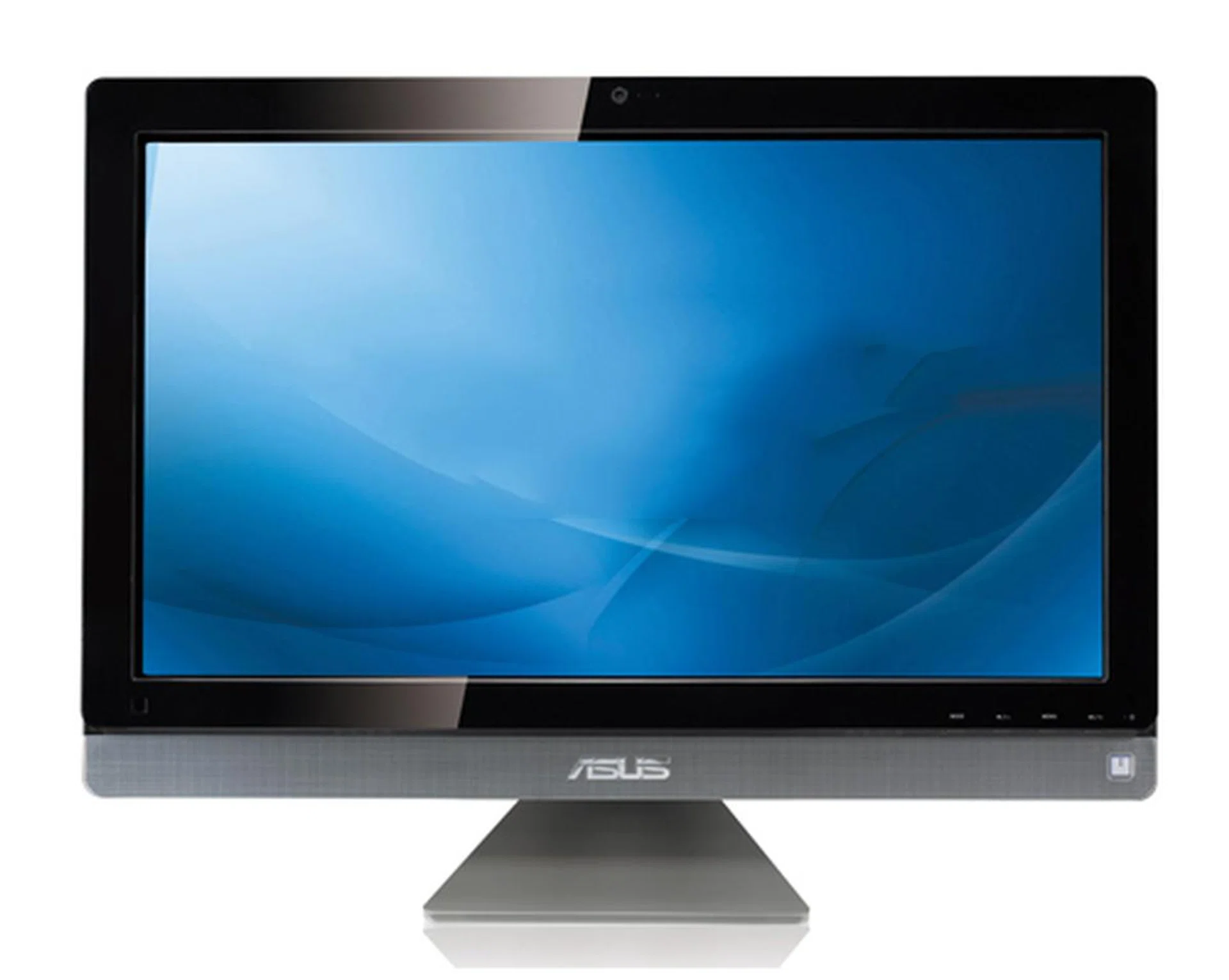
It's not the most imaginative-looking AIO, but it is certainly pleasing on the eyes.
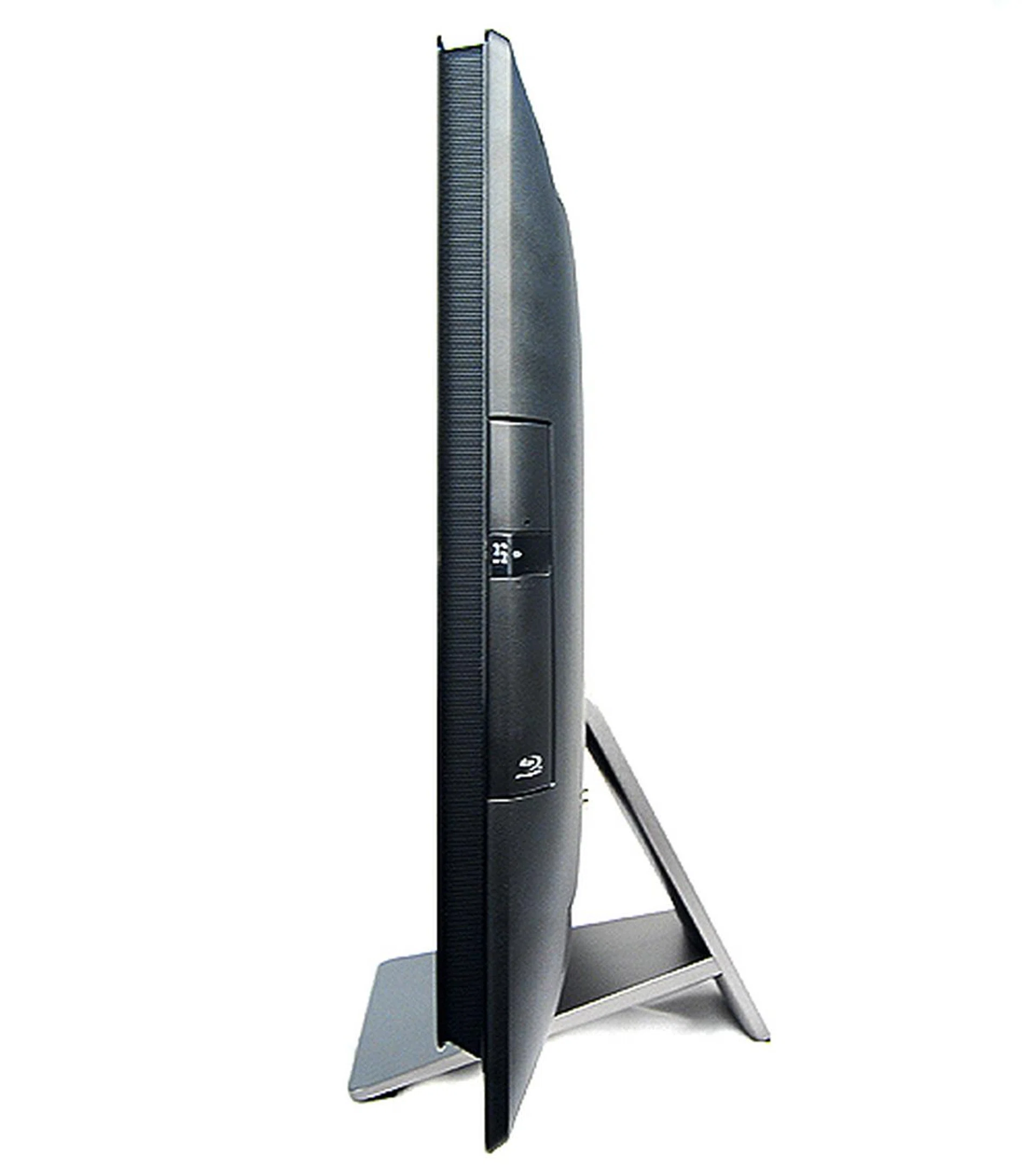
The ASUS ET2411INTI is a pretty slim considering the components it packs. Although the aluminum stand looks nice, it only adjusts for tilt and not for height.
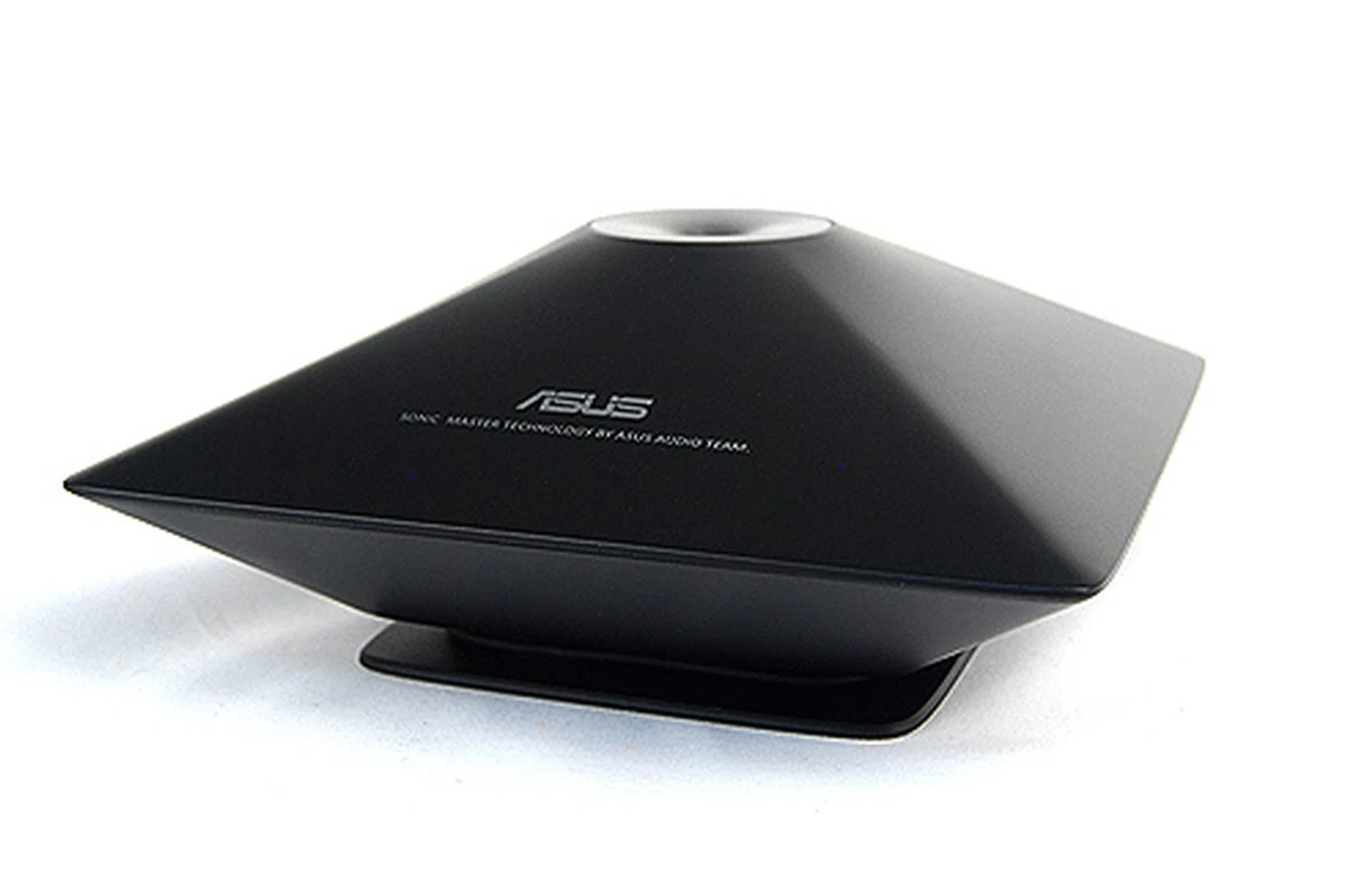
To boost the audio capabilities of the ASUS ET2411INTI, the unit comes bundled with a SonicMaster subwoofer, specially designed by ASUS' Golden Ear team. However its effectiveness in real usage is minimal and if you do want better audio from your AIO machine, our advice is to invest in a good dedicated speaker set.
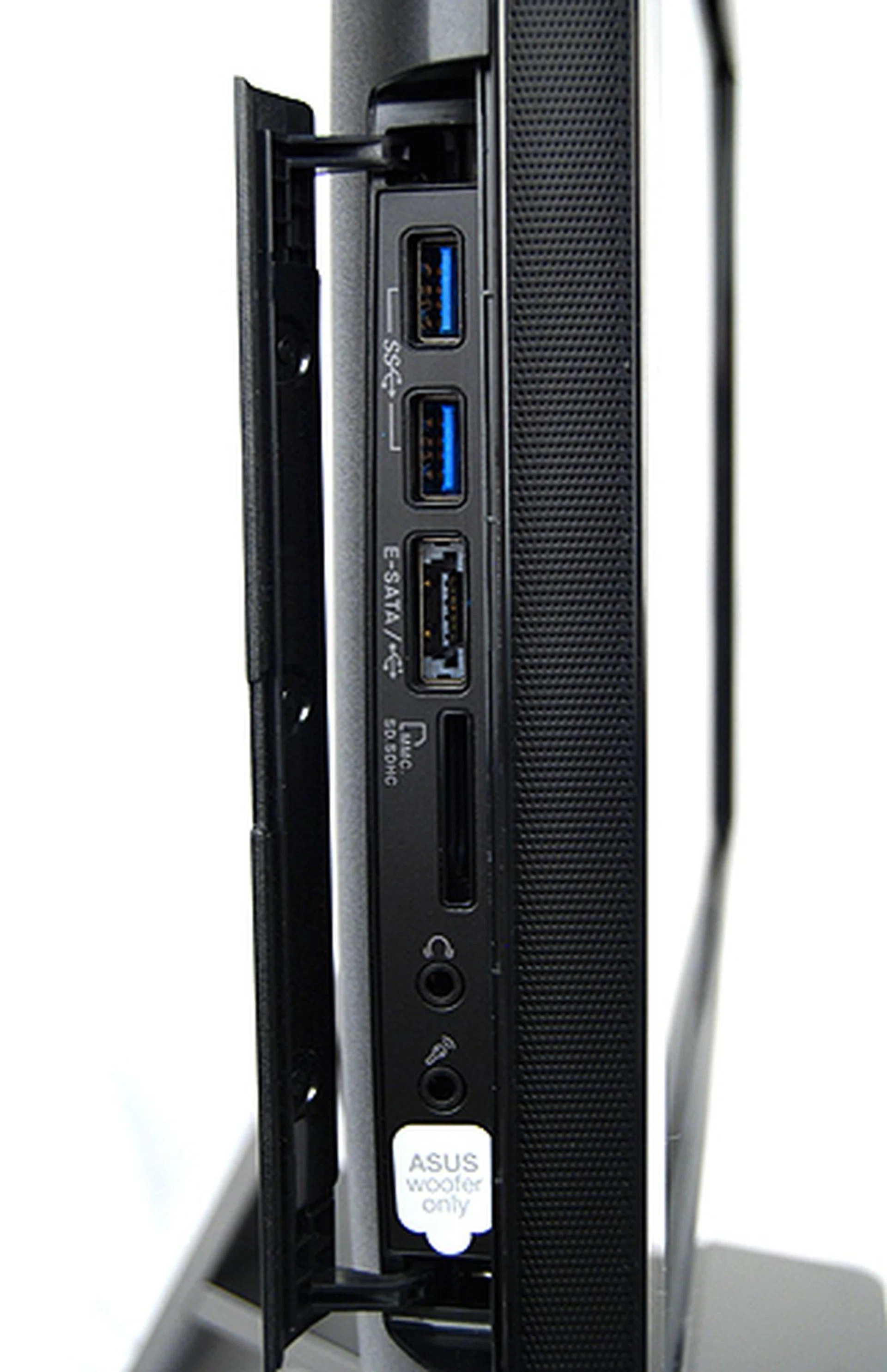
To the left of the display, behind a cover, lies two USB 3.0 ports, an eSATA/USB combo port, a memory card reader, a microphone jack and audio jacks for headphones/speakers and ASUS' own SonicMaster subwoofer.
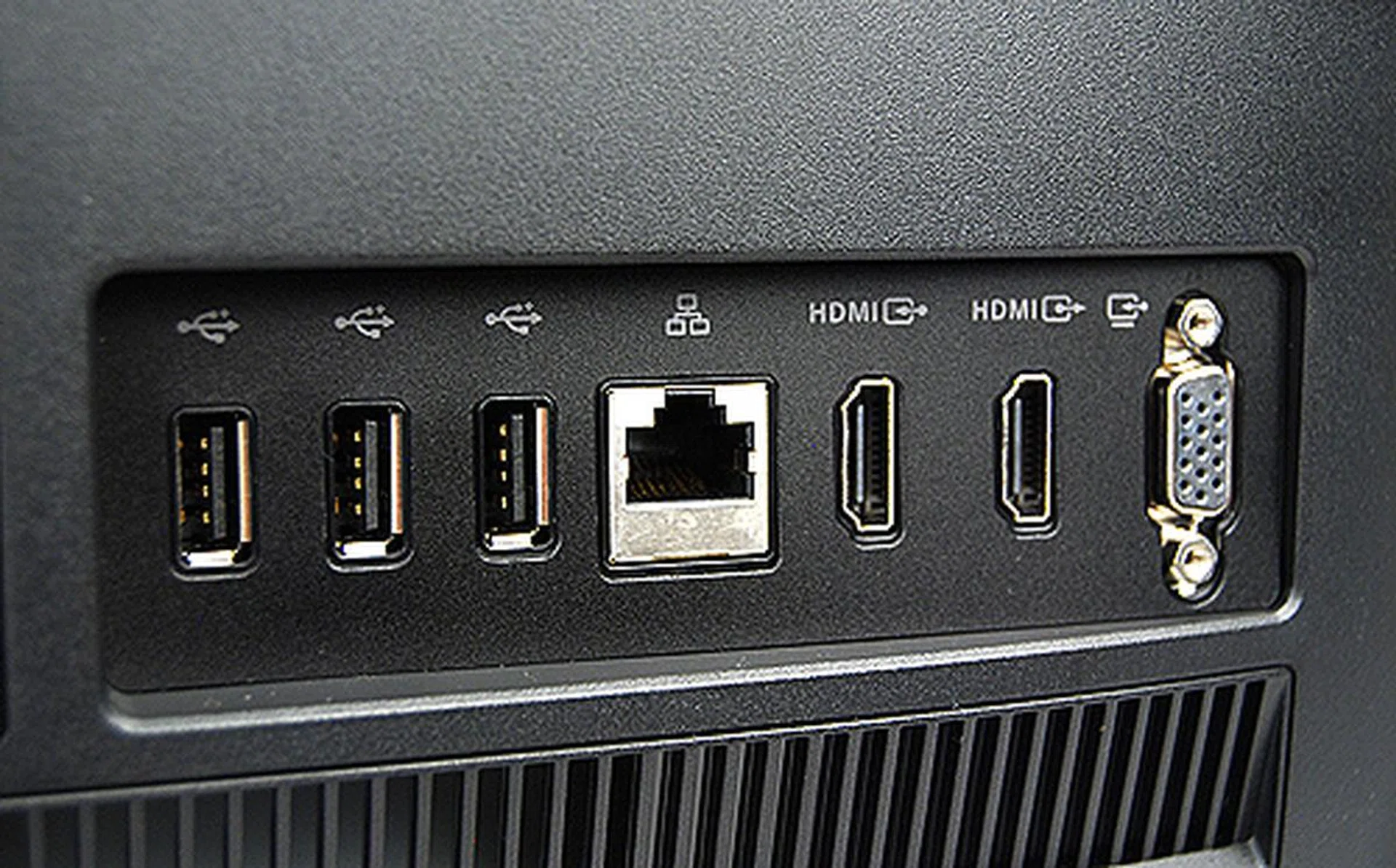
Round the back, there's an additional three USB 2.0 ports, an Ethernet jack, a HDMI output port, a HDMI input port and also a VGA input port. This means the ASUS ET2411INTI can also double up as a regular display for other devices like game consoles or other set-top devices, making it more versatile.
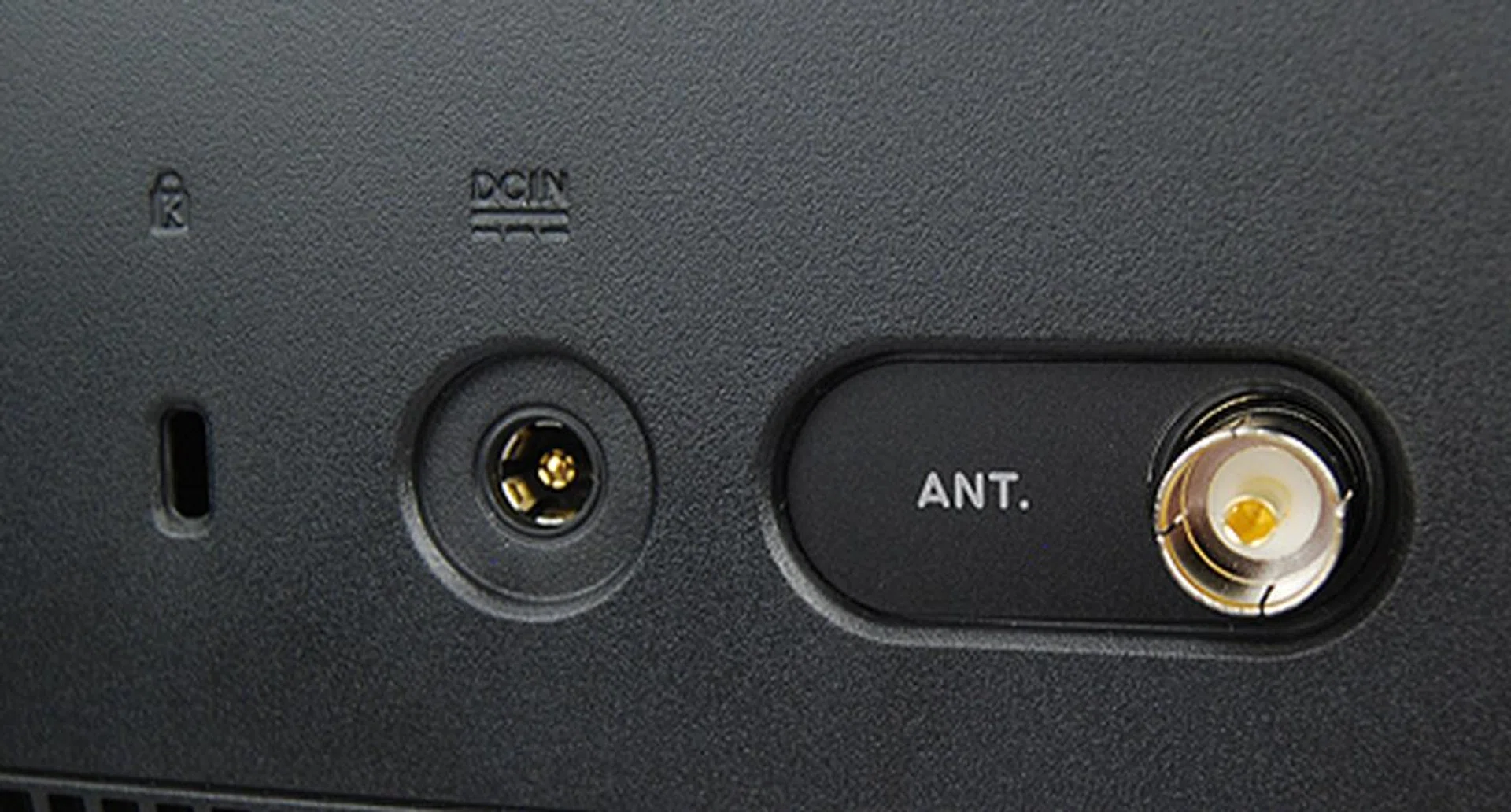
On the left side of the rear panel, there's a Kensington lock slot, DC-in to power the machine and also the antennae coaxial jack for using the integrated TV tuner.
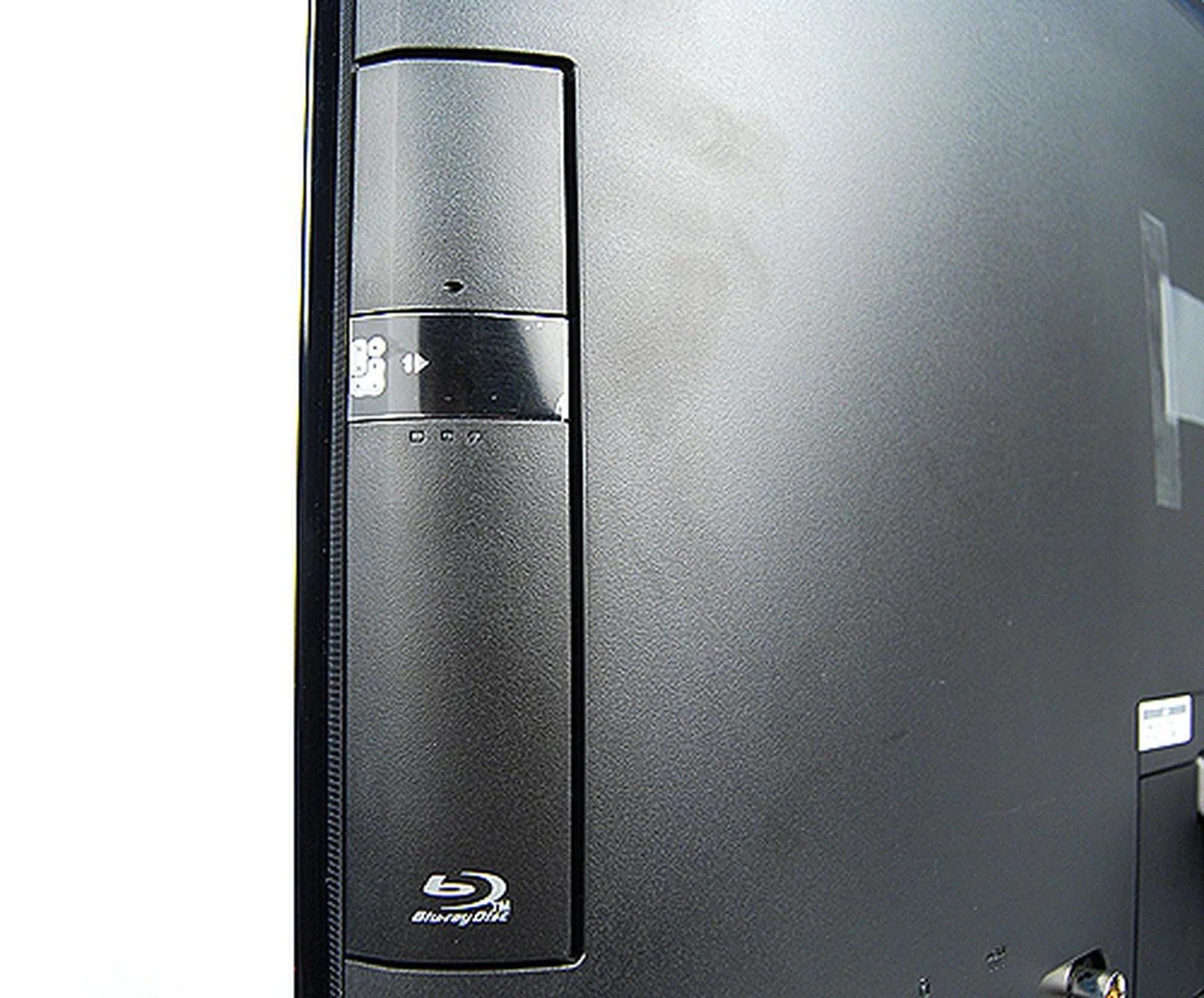
Blu-ray playback ensures the ASUS ET2411INTI can play all the latest high-definition movies.
To show off the ET2411INTI’s touchscreen capabilities, the unit came bundled with a few applications such as ASUS Memo and Paint. Admittedly, these applications feel a tad gimmicky, but they should provide young users with a couple of hours of entertainment. Users would probably find the ASUS Cinema and ASUS@vibe applications more useful. The former is an application that quickly scans your entire system for media content and presents them in a touch-friendly interface, while the latter is ASUS’ very own online entertainment store.
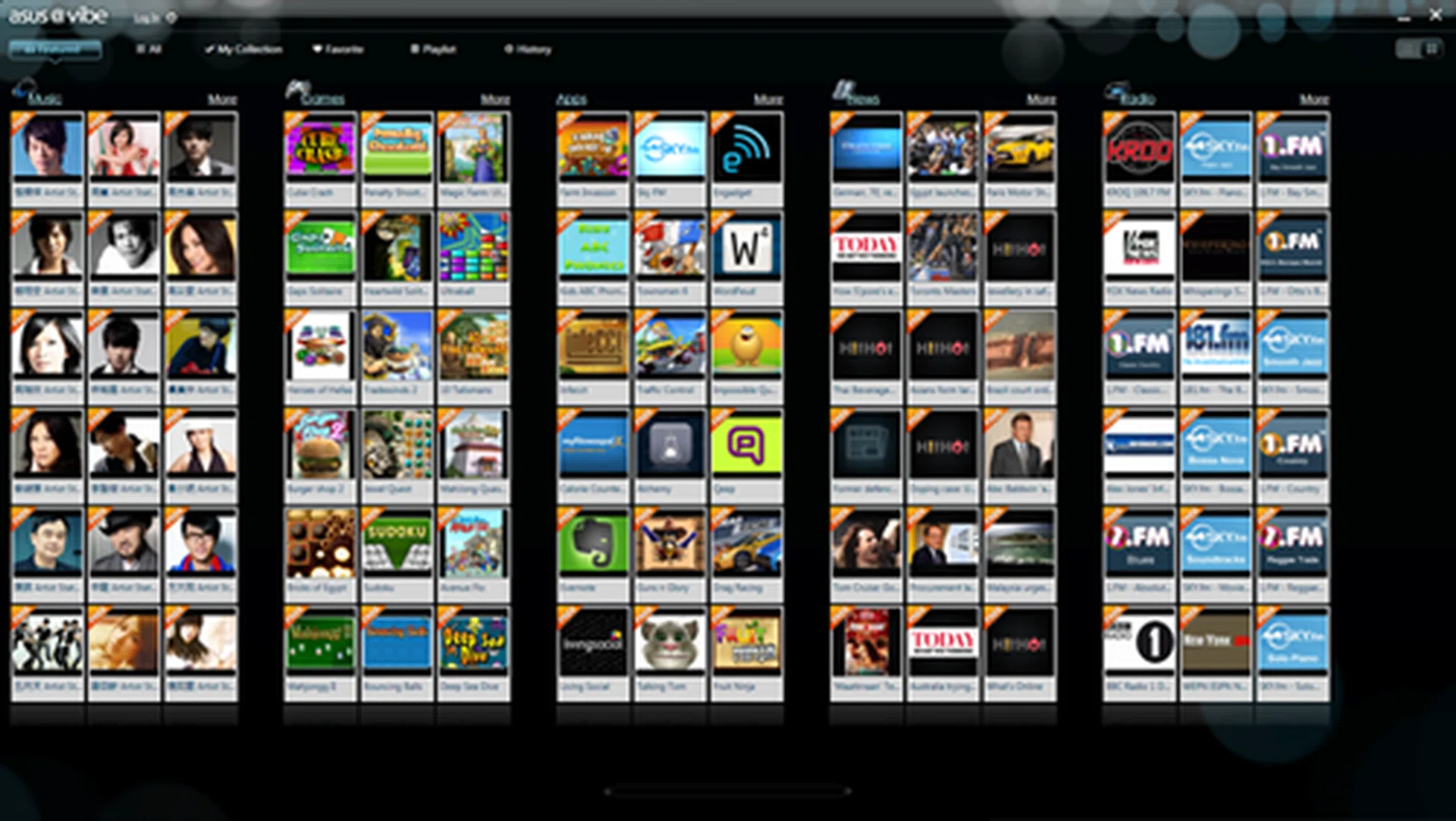
ASUS@vibe is a weird mishmash of games, apps, news, Internet radio and music. It's not polished, but there's some interesting content especially if you like checking out the various free music options available.

ASUS Paint looks like it could be fun for toddlers.
Performance
To find out how the ASUS ET2411IUNTI performs, we’ll be looking at its performance against comparable AIOs such as the Acer Aspire Z5 and Dell Inspiron 2330. Also, because the ASUS AIO is running on a notebook platform, we have also decided to include results from some of the two of the latest quad-core Ivy Bridge notebooks as well - the MSI GT70 gaming notebook and HP Pavilion dv6.
Specifications / Model | ASUSET2411INTI | Acer Aspire Z5 | Dell Inspiron 2330 | HPPavilion dv6 | MSIGT70 Gaming Notebook |
Processor | Intel Core i7-3770S (3.1GHz) | Intel Core i7-3770S (3.1GHz) | Intel Core i3-2130 (3.1GHz) | Intel Core i7-3610QM (2.3GHz) | Intel Core i7-3610QM (2.3GHz) |
Chipset | Intel H61 | Intel HD61 | Intel B75 | Intel HM77 | Intel HM77 |
Memory | 8GBDDR3 | 8GBDDR3 | 4GBDDR3 | 4GBDDR3 | 16GBDDR3 |
Graphics | Intel HDGraphics 4000 / NVIDIAGeForce GT 630M | Intel HD Graphics 4000 / NVIDIA GeForce GT 630M | Intel HDGraphics 2000 | Intel HDGraphics 4000 / NVIDIA GeForce GT 650M | Intel HD Graphics 4000 / NVIDIAGeForce GTX 670M |
Storage | 2TB | 2TB | 1TB | 750GB | 2 x 60GBSSD(Raid 0) / 750GB7200rpm HDD |
SYSmark 2007 Preview
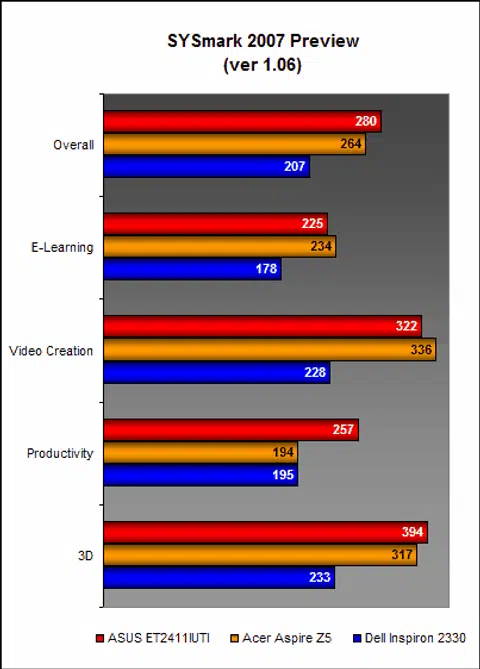
SYSmark Preview 2007 tests the systems across a variety of productivity and content creations workloads and when compared against the Acer Aspire Z5 and Dell Inspiron 2330, the ASUS ET2411INTI was the clear victor. Its overall score was around 35% better than the Dell and a modest but significant 6% better than the Acer. Looking at the breakdown, we can also see that it performed best on the productivity workloads. Dell's AIO using an older platform is likely the reason for its much lower scores compared to the Acer and ASUS machines.
PCMark 7
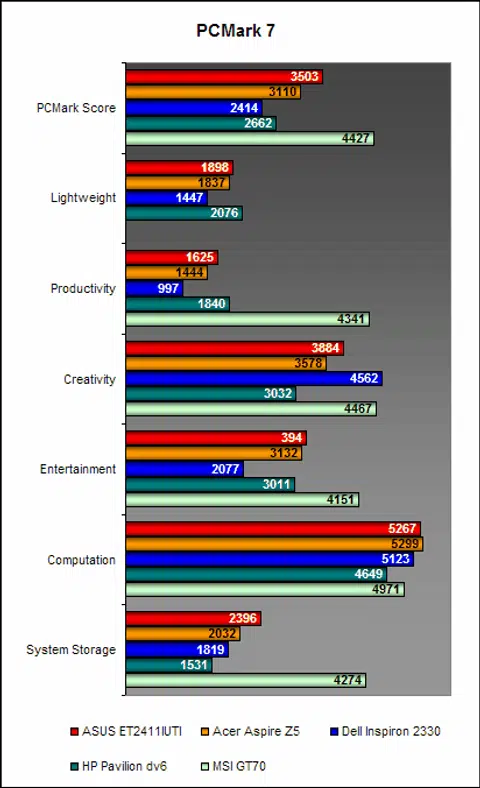
On PCMark 7, the ASUS ET2411INTI continued to assert its dominance over the Acer Aspire Z5 and Dell Inspiron 2330. We’ve also included results of two of the newer quad-core notebooks in the market and the MSI GT70 completely blitzed the competition - no doubt thanks to its dual SSDs, in RAID 0 configuration no less! Compared against more mainstream products, the ASUS AIO machine held its own fairly well.
3DMark 11
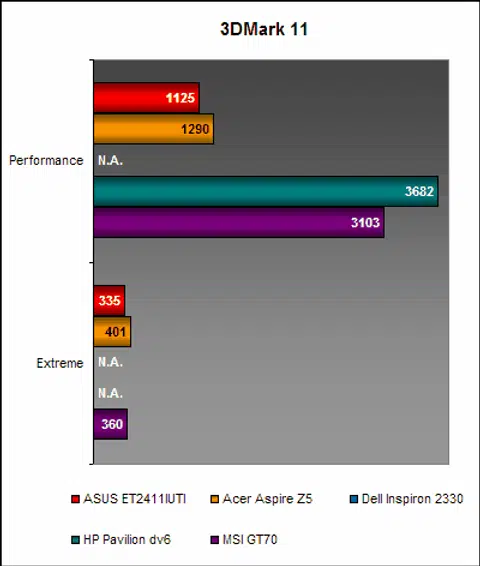
On 3DMark 11, despite boasting similar discrete graphics processors - NVIDIA GeForce GT630M - the Acer Aspire Z5 managed to claw back against the ASUS ET2411INTI as it recorded notably better scores - about 10% better than the ASUS ET2411INTI. The Dell Inspiron 2330 did not record any scores because its integrated graphics chip does not support DirectX 11. Oddly, the HP Pavilion dv6 registered a higher score than the MSI GT70, but we believe this is because of the difference in graphics driver revisions that came with these respective notebooks.
Far Cry 2 & Dirt 3
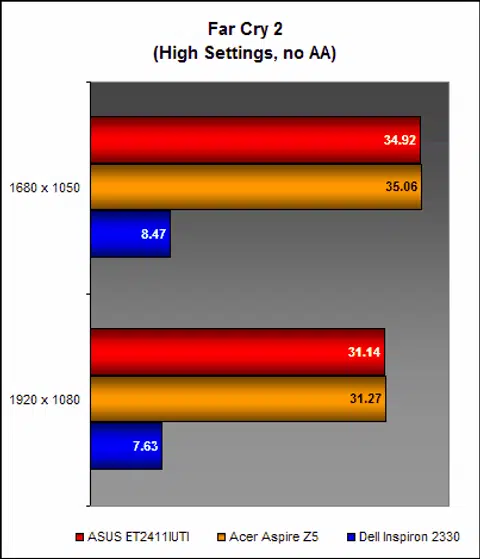
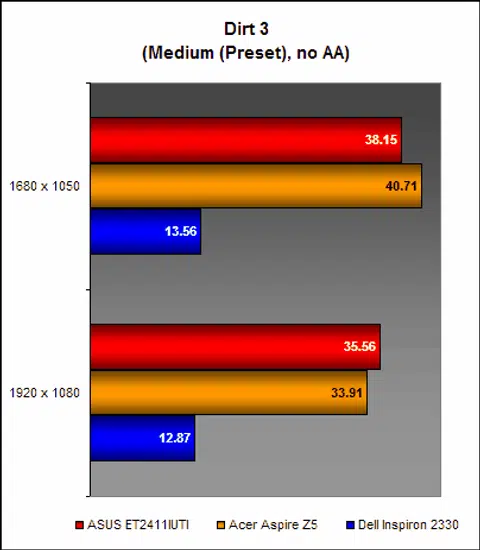
On real world gaming benchmarks such as Far Cry 2 and Dirt 3, the ASUS and Acer AIOs posted nearly identical frame rates. On Far Cry 2, nary a single frame separates the two; while on Dirt 3, the Acer took a slight lead at the resolution of 1680 x 1050 pixels before losing out at a higher resolution of 1920 x 1080. More tellingly, it shows that if you are willing to turn down graphics quality, you can get pretty playable frame rates on these machines even at 1080p resolution. On the other hand, the Dell Inspiron 2330 and its Intel HD Graphics 2000 integrated graphics was completely incapacitated and is unfit for any PC gaming needs.
Mr Do-it-all
For a long time, touchscreen AIOs have been little more than a novelty. Sure, it may be fun to use for brief moments, but for everyday tasks such as web browsing, the trusted keyboard and mouse combo reign supreme. However, if Windows 8 and its new Modern UI is everything Microsoft makes it out to be, then using touch on desktop systems as a main form of input could gain popularity and this is where touchscreen AIOs will come in to the picture.
As for now, the ASUS ET2411INTI is a decent enough AIO for those who want to hop on the touchscreen AIO bandwagon before Windows 8 comes around. Performance-wise, it holds its own very well against competing AIOs such as the Acer Aspire Z5 and the latest Ivy Bridge notebooks (the innards of the system are that of a notebook). If anything, we think ASUS should have equipped the ET2411INTI with a more powerful discrete graphics processor so as to make it a more capable all-round entertainment system. As of now, gaming performance is a little weak, and to really get the best out of it requires users to significantly reduce graphics settings and even resolution. On the upside, ASUS didn't go with the CPU's built-in graphics engine and pairing it with the discrete NVIDIA GPU has enabled it to tackle some of the lesser demanding games and satisfy the mainstream users.
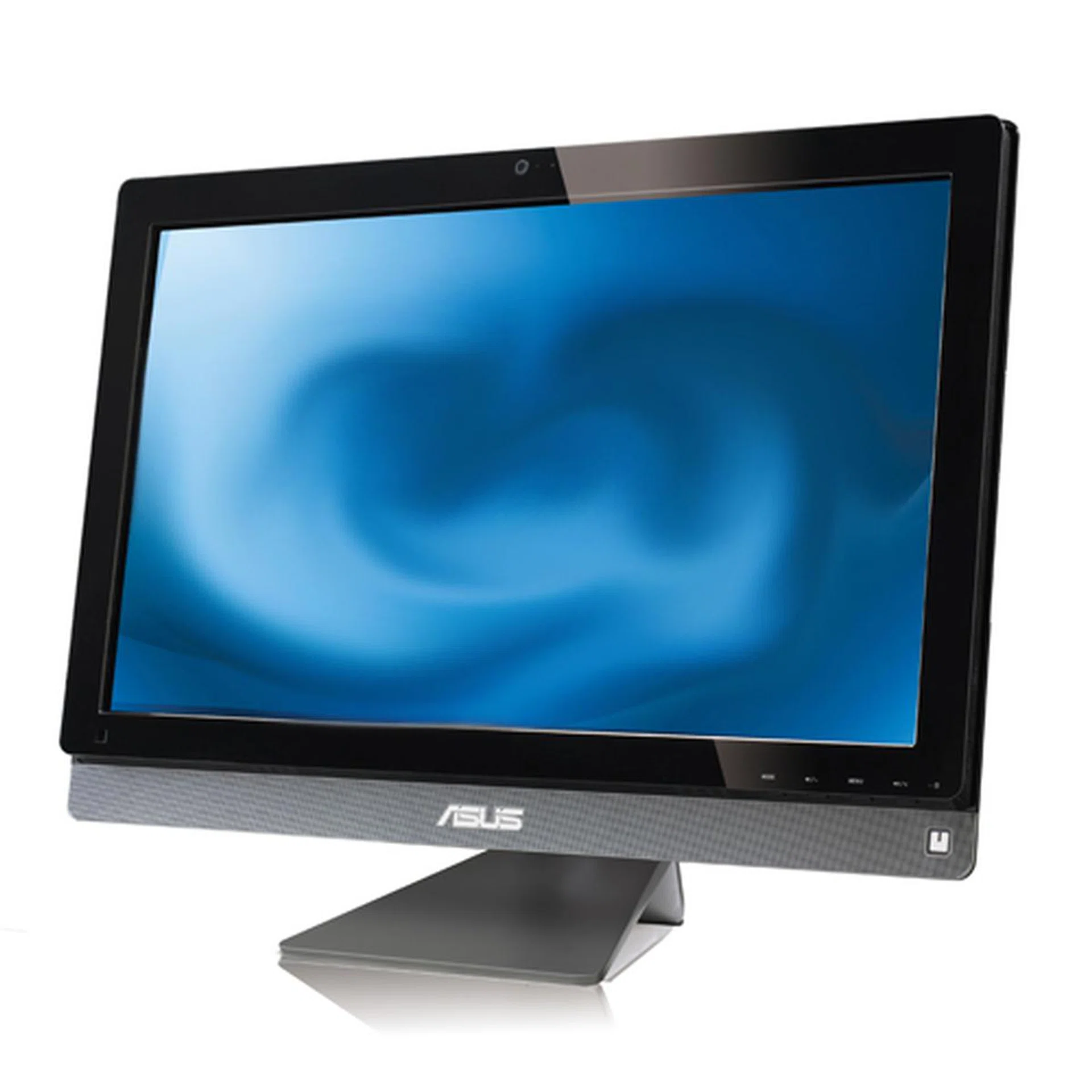
The ASUS ET2411INTI combines elements of a computer with touchscreen capabilities as well as functions of a regular television in one neat package.
At S$2069, the ASUS ET2411INTI is, as far as ASUS products go, actually reasonably priced, though that doesn't mean it's inexpensive. The Acer Aspire Z5 is considerably more affordable at S$1699, but then the Acer does not have Blu-ray playback capability - and Blu-ray drives are considerably more costly than regular DVD combo drives. Also, it does not have an additional subwoofer as the ASUS does nor a remote control. Whether these extras and the better design are worth you consideration is up to individual needs. For the more calculative folks, AIO PCs are definitely not as affordable as a DIY system, but that's a given trade-off as the premium you pay go into making a sleek and polished product, as well as the more expensive notebook form factor based components and after-sales support.
In closing, as an all-round do-it-all entertainment/computer system, the ASUS ET2411INTI is pretty hard to beat as it decently fulfills all the requirements of both a computer and a regular television. That said, there’s certainly room for improvement and a beefier discrete graphics processor along with a more advanced 10-point touch input would have really sealed the deal. Alternatively, we would have also settled for the existing configuration if it had a more enticing price point.
Our articles may contain affiliate links. If you buy through these links, we may earn a small commission.