
EnGenius ESR9855G Wireless-N Gaming Router - Game On
EnGenius' latest foray into the consumer scene takes the guise of the ESR9855G gaming router. Engineered with networking goodies such as Gigabit ports, 802.11n throughput rates and priority features, we find out if this access point is game enough for the big guns.

Potential Gaming Genius
Having entrenched one foot in the enterprise industry, EnGenius, very much like Linksys, is planting the other sole down on the consumer market space where another meaty revenue source awaits. However, the relatively low-key wireless solution provider is by no means a newbie in the SOHO scene. They've already got a sizable string of 3G routers, bridges and other networking peripherals in their lineup, including a ESR9850 media router. Of course, the latest member to join their Wireless-N family is none other than the ESR9855G gaming router we are about to undertake.
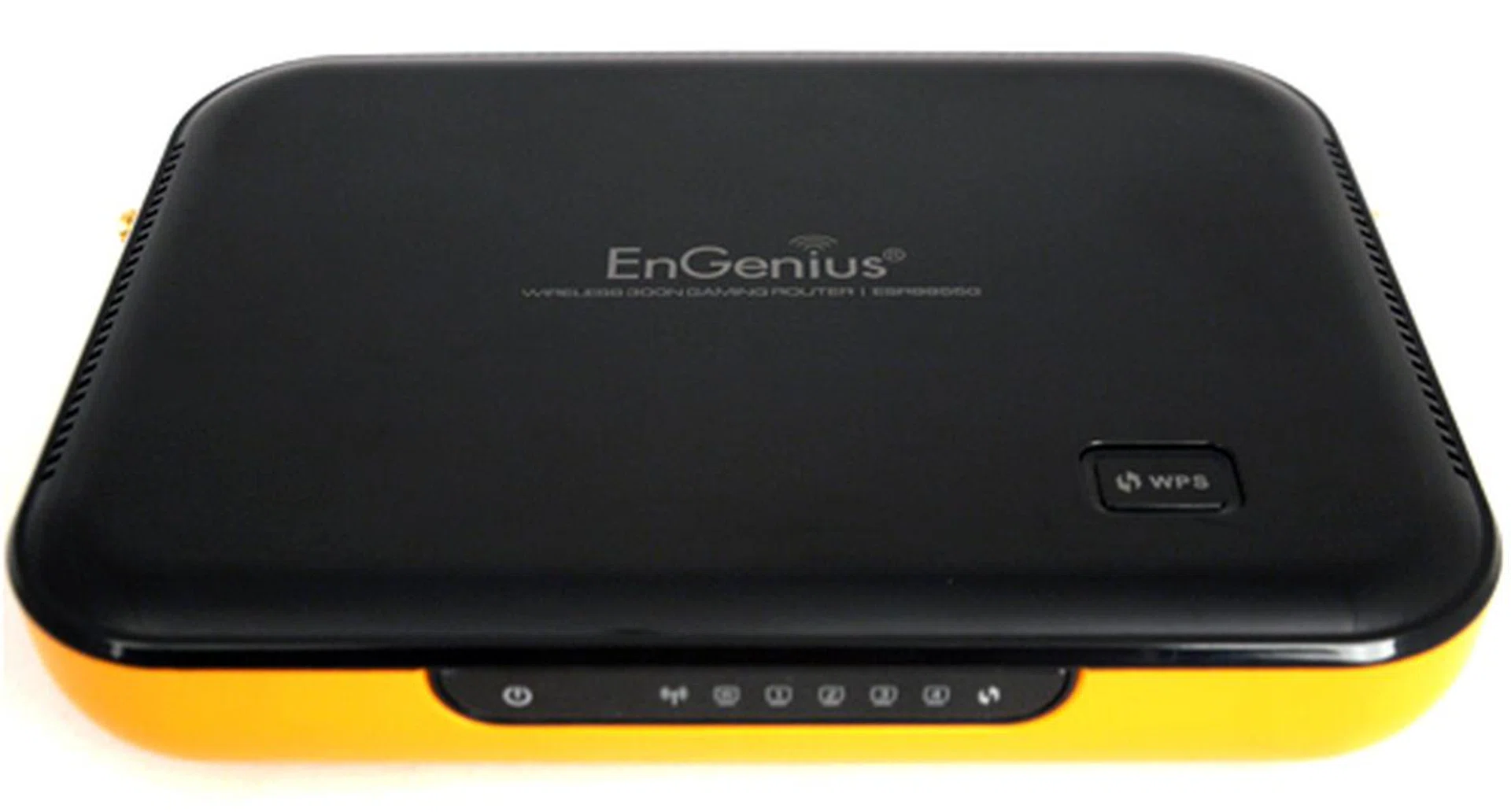
Senao Networks, perhaps better known for their consumer arm EnGenius, is hoping to make further headway into the SOHO market with a recent addition of the ESR9855G Wireless-N router. And they might succeed as well given the unit's aggressive price point.
Based on what we could gather from the specs list (check the specs tab for full breakdown), it was apparent EnGenius didn't create an access point with all the frills given the router's single-radio nature and rather subdued features. Instead, the ESR9855G gets by with just the right amount of ingredients to keep an MMORPG junkie happy, like its StreamEngine prioritization service for example. While the ESR9855G's affordable price tag might sway a few heads in its favor, its obvious lack of hardware and features in other departments might just do the opposite. We'll discuss more on these aspects after the jump. Before you grab one off the shelves plainly for its "gaming" moniker, hold that thought as we give this router a dry run to see if it's made of any notable substance; details on the next page.
Design
This is a peculiar association, but an image of Bumblebee's yellow Camaro and black racing stripes sprang to mind when we first encountered the ESR9855G. Transformable robots aside, EnGenius has crafted a conventional yet unconventional implementation with their recent networking fetish. How so? Conventional, because of a predictable form factor with a row of blue LED indicators lined up in front. The router's top is sparse, save for a WPS (Wi-Fi Protected Setup) button. Incidentally, you can restart the unit by depressing the button for 6 to 10 seconds. Unconventional, because its body is clad in yellow (orange to some) and black, as opposed to plain white or black.
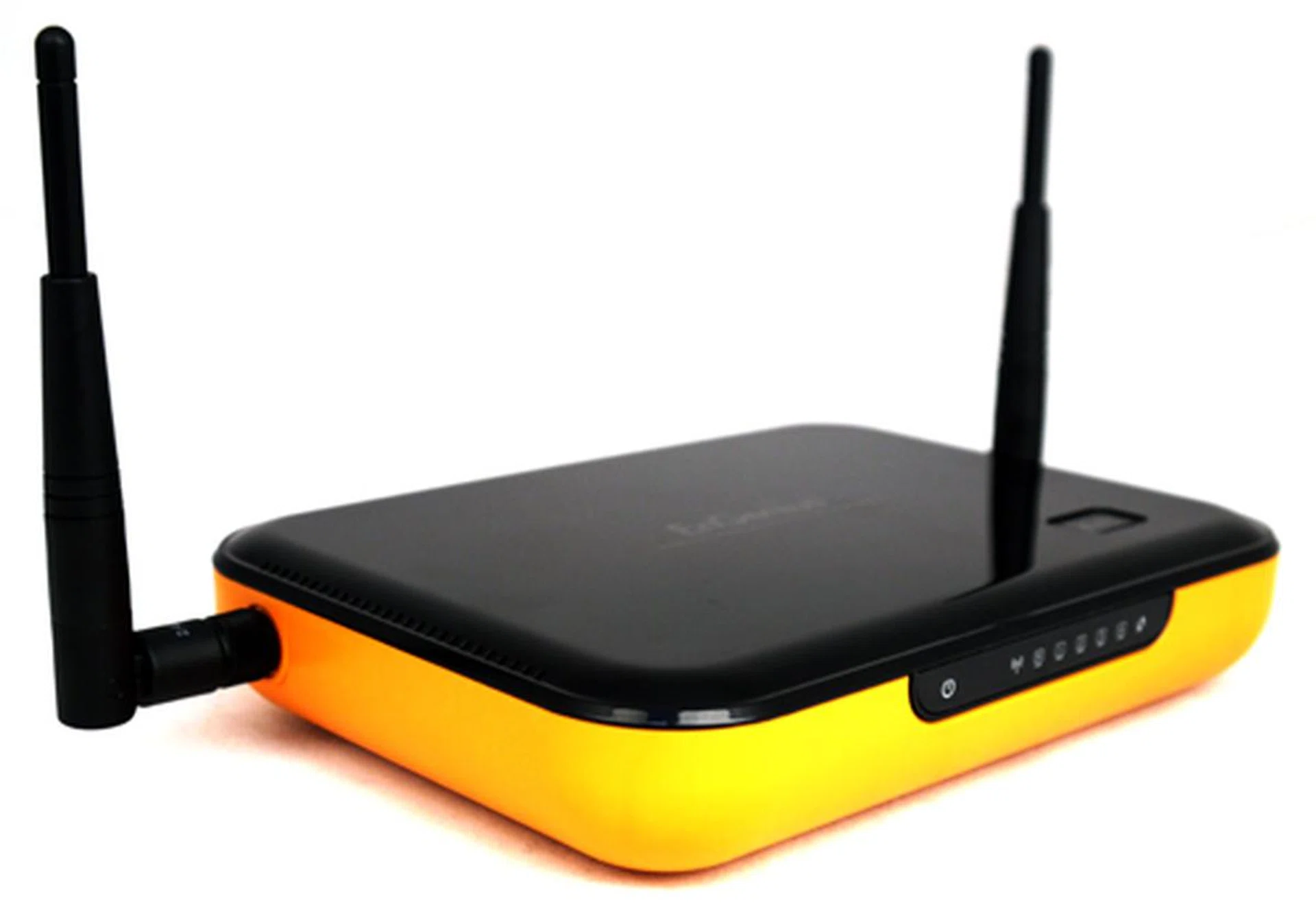
Also, EnGenius has deployed two MIMO antennas instead of the usual three; and with a rather unusual placement as well. That's right, the two detachable 3dBi rods are located at the sides rather than at the rear. Turn the networking device around, and you might not spot anything amiss at the onset. However, it soon became apparent that the ESR9855G is missing an anticipated USB port typically offered by recent AP offerings. In other words, you won't get to enjoy added features such as print server functions, or network data sharing with a plugged-in USB drive as far as this device goes. Thankfully, what it does offer, on the other hand, is four Gigabit LAN ports and a Gigabit WAN connector on its hub. Another atypical but practical addition is an inclusion of a power switch. Essentially, the ESR9855G isn't an ostentatious piece brandishing 'premium' panels such as D-Link's DIR-685 or Belkin's N1 Vision. Still, this router isn't too much of an eyesore when placed next to your desktop, not unless you have something against its cheerful dress code.
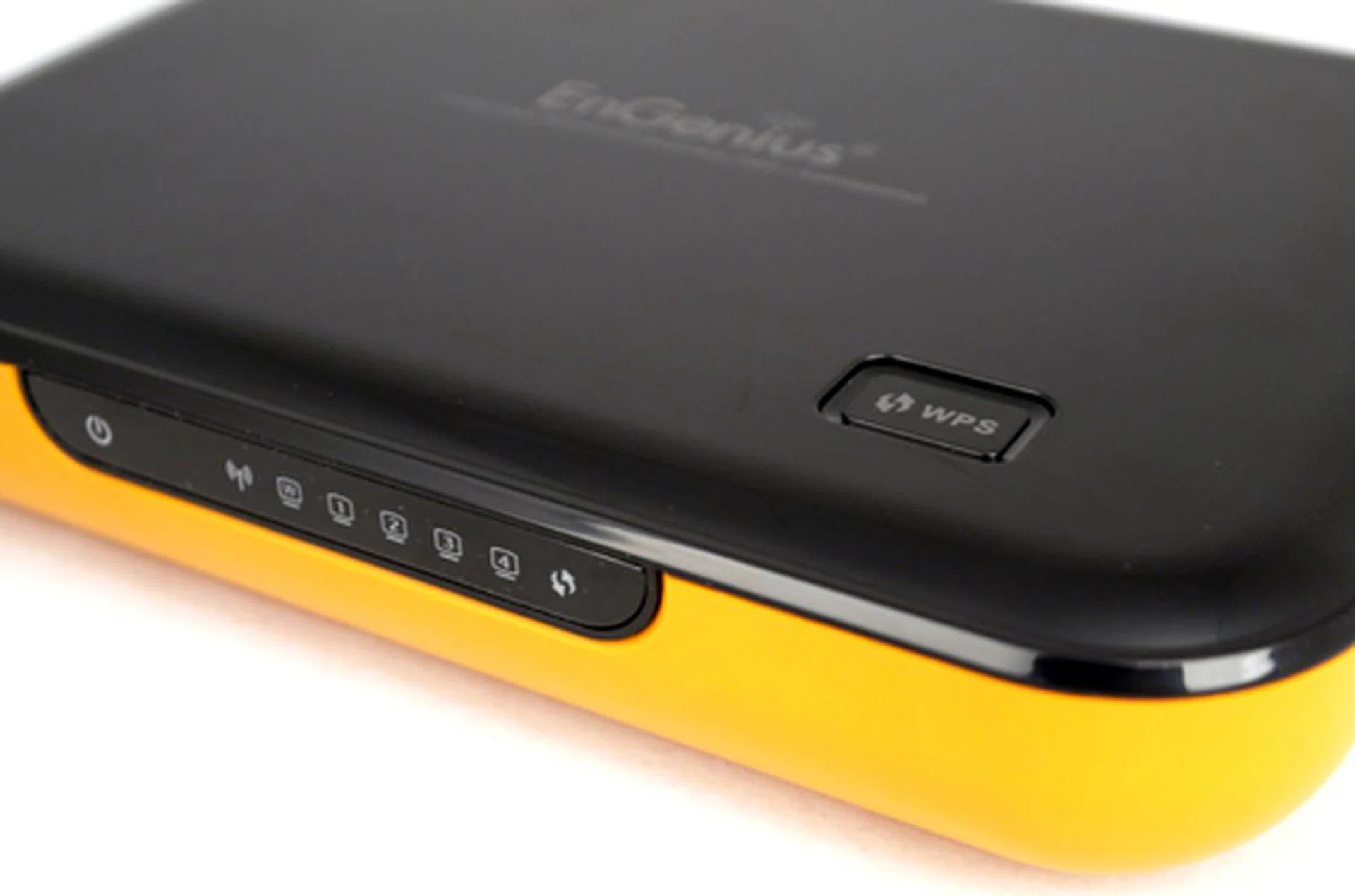
The EnGenius ESR9855G sports a two-tone color scheme with a strip of LEDs on its front panel, including a Wi-Fi and WPS status indicators. They are rather dim though, which makes them hard to discern under brighter ambient environments.
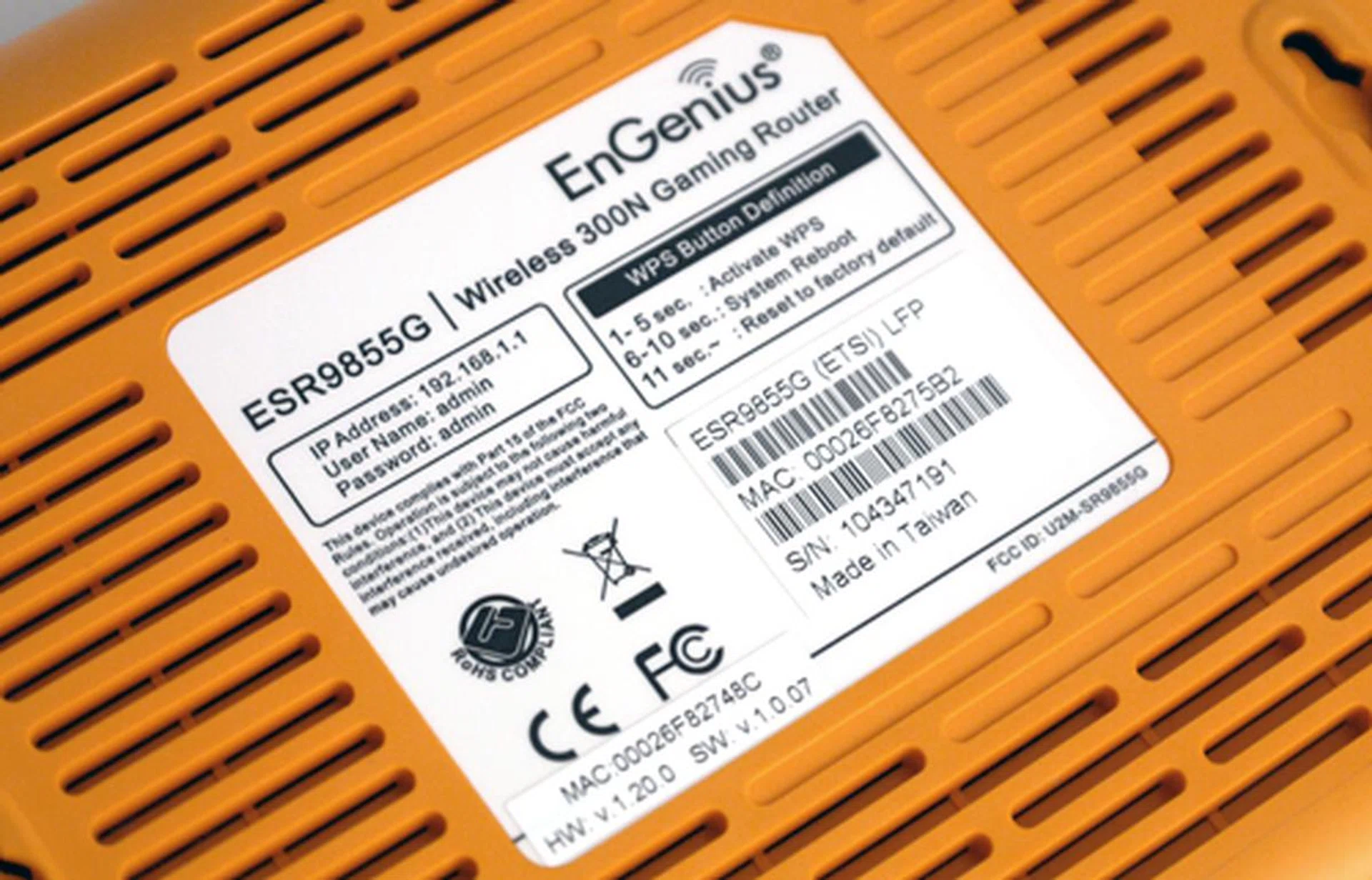
EnGenius has marked the bottom slate with a dose of useful information, such as the router's default IP, user name and password. Also note the alternate uses of its WPS button.
The Gigabit LAN ports are clearly marked out behind the router with the WAN port highlighted in blue. You won't find any USB offering, although EnGenius has added a power switch on the extreme right of the networking device.
Features
The ESR9855G's web interface is pleasant and manageable, thanks to EnGenius. To access the router's UI application, key in the default IP (192.168.1.1) on your browser's address bar before entering the given ID and pass phrase. A word of caution though. Some of the settings can be a little daunting to those unfamiliar with networking terms, like UDP/TCP Endpoint Filtering under the Firewall settings just to cite an example. If you don't know what you're dealing with, simply click on the "Help" link found on the left strip.
The router has two main traffic prioritizing applications - Ubicom's StreamEngine and WISH (Wireless Intelligent Stream Handling). The StreamEngine's QoS algorithms don't require excessive tampering, but you can add specific rules with different priorities if need be. This feature isn't new by any means, but it is invaluable for multiple clients on applications which demand a sizable upstream bandwidth, such as online gaming or video conferencing for instance. To augment this, EnGenius has thrown in a WISH prioritization feature, which includes a Windows Media Center (WMC) attribute as well. This will come in handy if you're relying on WMC for streaming purposes. The radio spectrum supports 13 channels in total. However, it's riding on a single 2.4GHz radio, which explains its dual-band deficit associated with most gaming and media routers such as D-Link's DGL-4500 that was popular in the States during its time.
Based on the 1.0.07 firmware, we are pleased to report that the router doesn't require a reboot with every single change of its system settings. More importantly, it only takes 15 seconds for the router to refresh itself. Other features of the ESR9855G include DDNS, port forwarding, and SPI firewall amongst others.
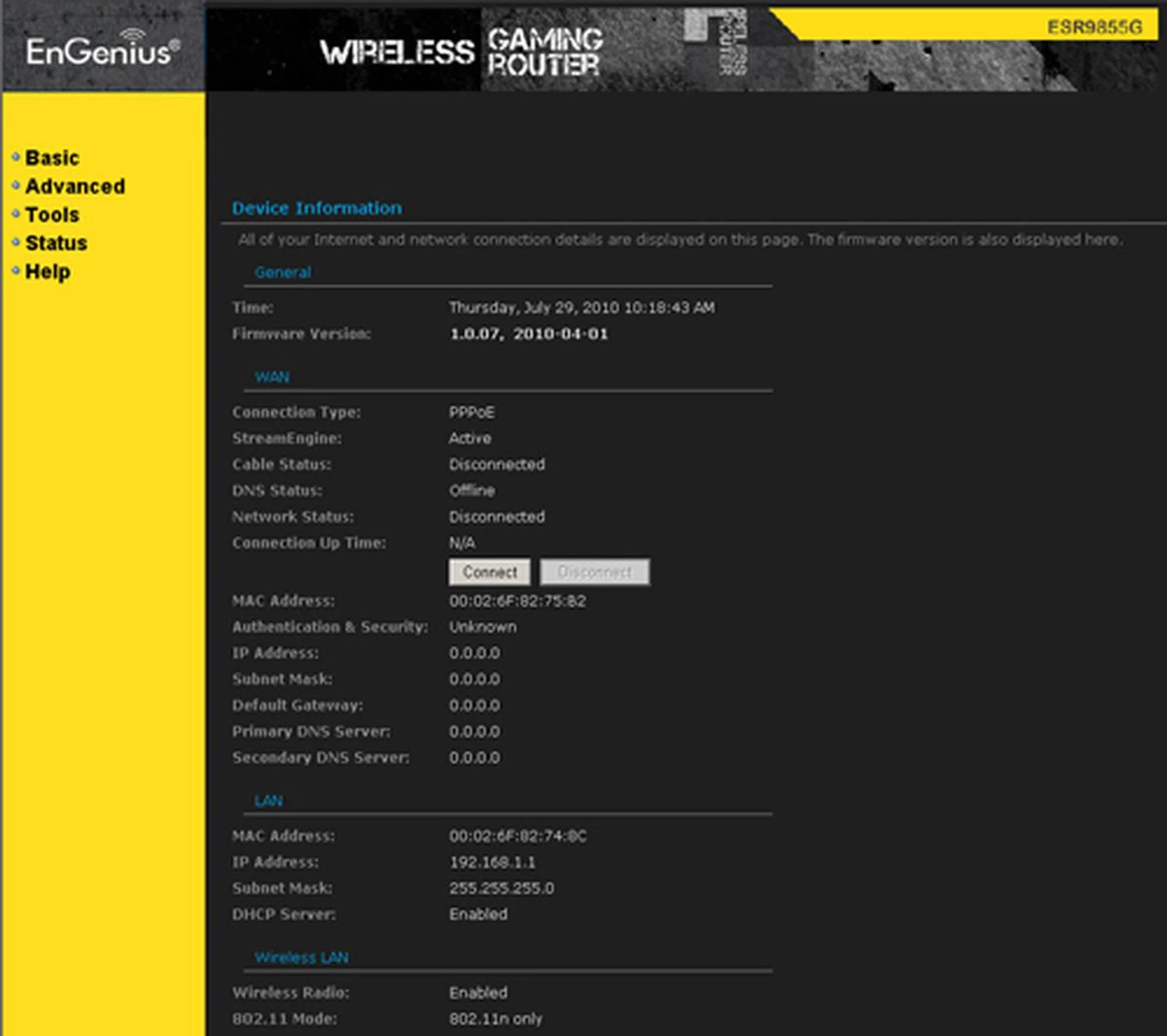
EnGenius' web interface is mostly text-based. However, it offers detailed status information you don't usually see on conventional routers. You'll find the clients' IP and MAC addresses listed further down the page.
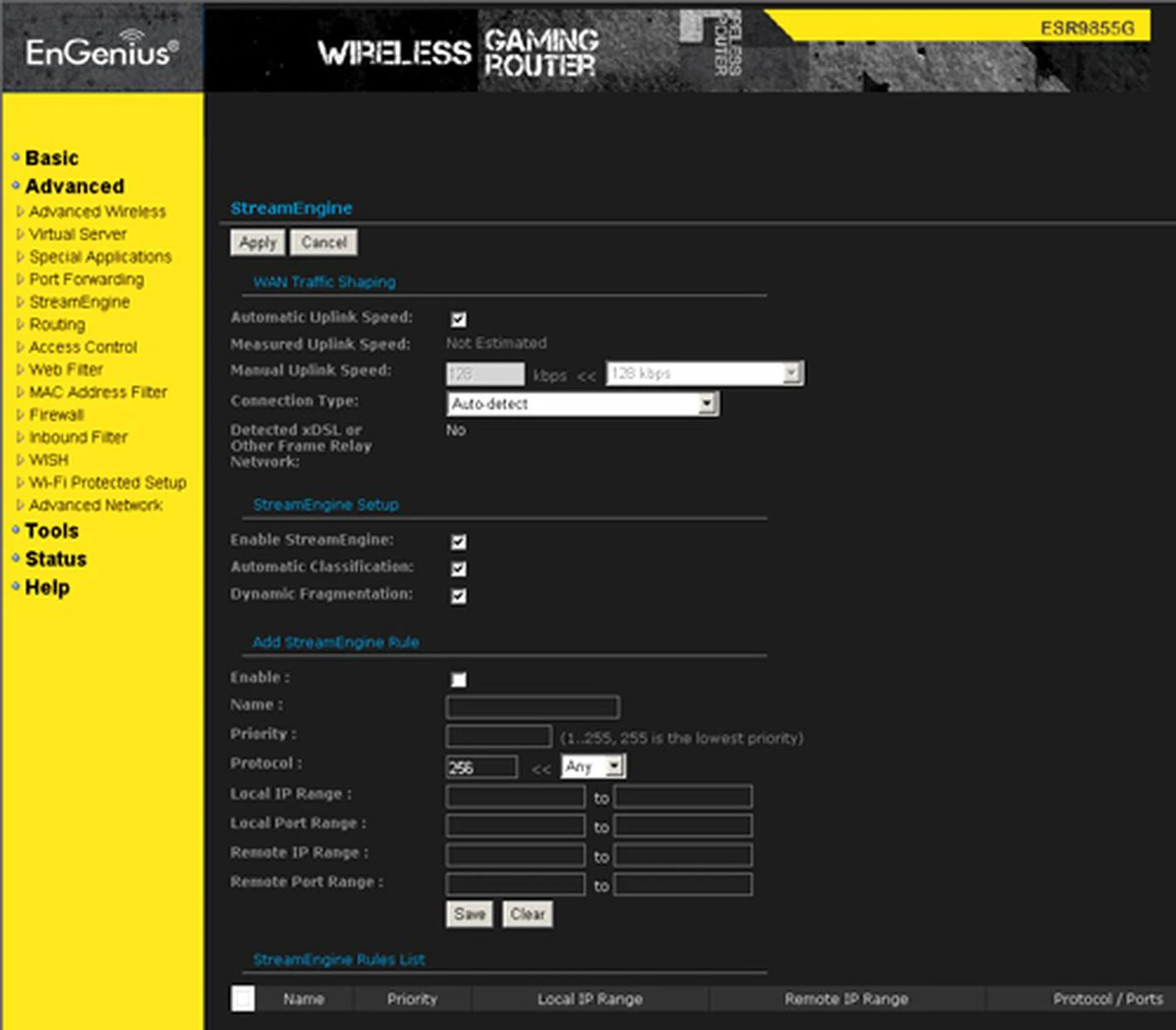
The StreamEngine page isn't as user-friendly as most QoS applications. On the contrary, it does proffer more comprehensive settings than usual. We'd recommend enabling its Dynamic Fragmentation feature if your home network happens to be suffering from poor uplink speeds.
Test Setup
To create a wireless network scenario, our routine test setup typically includes a desktop PC, the reviewed router, and a wireless client. The desktop system (with a Gigabit Ethernet port) is designed to simulate a host machine, while the router in question acts as the gateway. And lastly, a notebook plugged with a Wireless-N USB adapter fulfils the role of a wireless remote client.
To gauge the router's peak potential and to prevent any possibility of varying wireless standards used, the evaluated router is locked down at the 802.11n-only mode if its features allow us to do so. The QCheck application provides an indication of the wireless throughput (TCP) and streaming (UDP) finesse between the host and client endpoints. TCP throughputs are measured against a 1MB data packet, whilst any significant packet loss is registered with the UDP test. On the other hand, NetIQ's Chariot benchmark offers a more detailed account with average throughput and response time readings recorded over 30 seconds, based on a High Performance throughput script. Range is determined by the distance between the router and wireless client. Now, let's run through the results proper.
Chariot and QCheck Performance Testing
Average Downlink Throughput (Mbps) - Chariot | Average Uplink Throughput (Mbps) - Chariot | Downlink TCP Throughput of 1MB (Mbps) | Uplink TCP Throughput of 1MB (Mbps) | UDP Streaming (kbps) | Time to transfer 1GB Zip file |
2m | |||||
50.780 | 41.347 | 40.609 | 25.641 | 995.655 (0.0% loss) | 2 min 42 seconds |
10m | |||||
25.657 | 10.967 | 22.599 | 17.094 | 998.530 (0.0% loss) | 5 min 31 seconds |
25m | |||||
26.140 | 10.834 | 23.529 | 7.929 | 995.553 (0.6% loss) | N.A. |
2m with WPA2-TKIP | |||||
22.450 | 28.450 | 21.622 | 11.817 | 996.942 (0.0% loss) | N.A. |
The ESR9855G's wireless performance was satisfactory, more so with its downlink numbers. At 2 meters, close proximity throughput results averaged at 50.780Mbps, which is mighty decent. Its numbers paled slightly, however, when compared to TRENDnet's TEW-673GRU with its 60.150Mbps delivery. However, the EnGenius device fared significantly better than the Linksys WRT160NL which only managed 34.905Mbps across the same range. Unfortunately, the router appeared to be hampered by the WPA2/TKIP protocol with TCP throughput rates dipping to 22.450Mbps (downlink) and 28.108Mbps (uplink) respectively. The results are effectively halved if you were to compare it to the non-secured pipeline.
Nonetheless, downstream results were slightly rosier at long range. At 25 meters, the ESR9855G clocked a stable downlink throughput of 26.140Mbps even though the Chariot's graphs do indicate a slightly erratic tendency. Upstream performance wasn't so wholesome though, with the router managing a middling result of 10.834Mbps. You might want to take note of this if you are gaming or using VoIP over the air since weak uplink results can have an adverse effect with such applications. On the contrary, the router's UDP streaming abilities were laudable given its negligible packet loss between 2 to 25 meters. Translating this to numbers, nearly the entire chunk of 1MB data file was received intact at the endpoint with only a recorded loss of 128 bytes. For data transfer, the router took a relatively speedy timing of 162 seconds to complete a 1GB file transfer at the 2-meter mark.
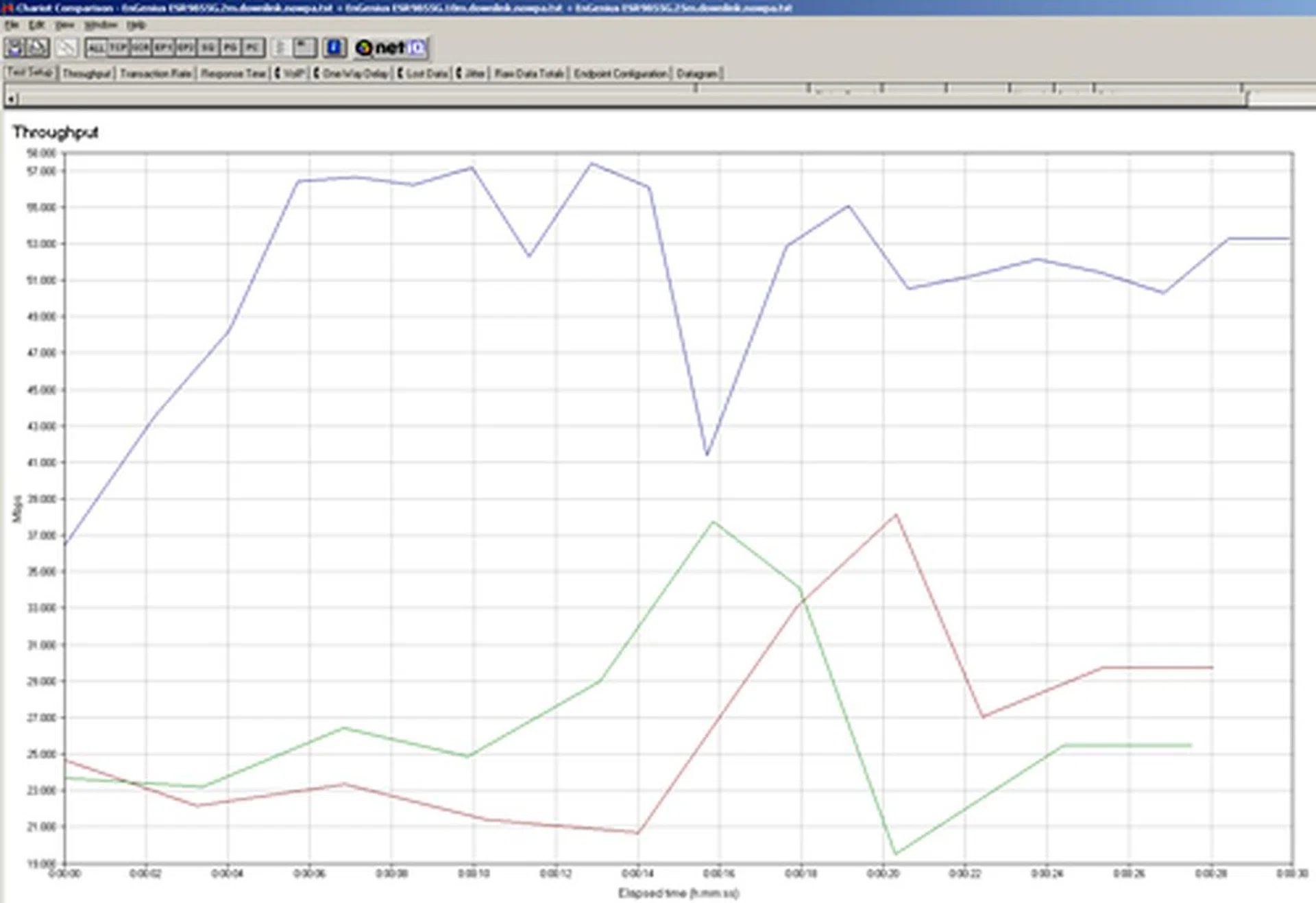
A summary of the Chariot benchmark's downstream data speeds measured at 2 meters (blue), 10 meters (red) and 25 meters (green). Identical results gathered between 10 and 25 meters is indicative of its long range reliability.
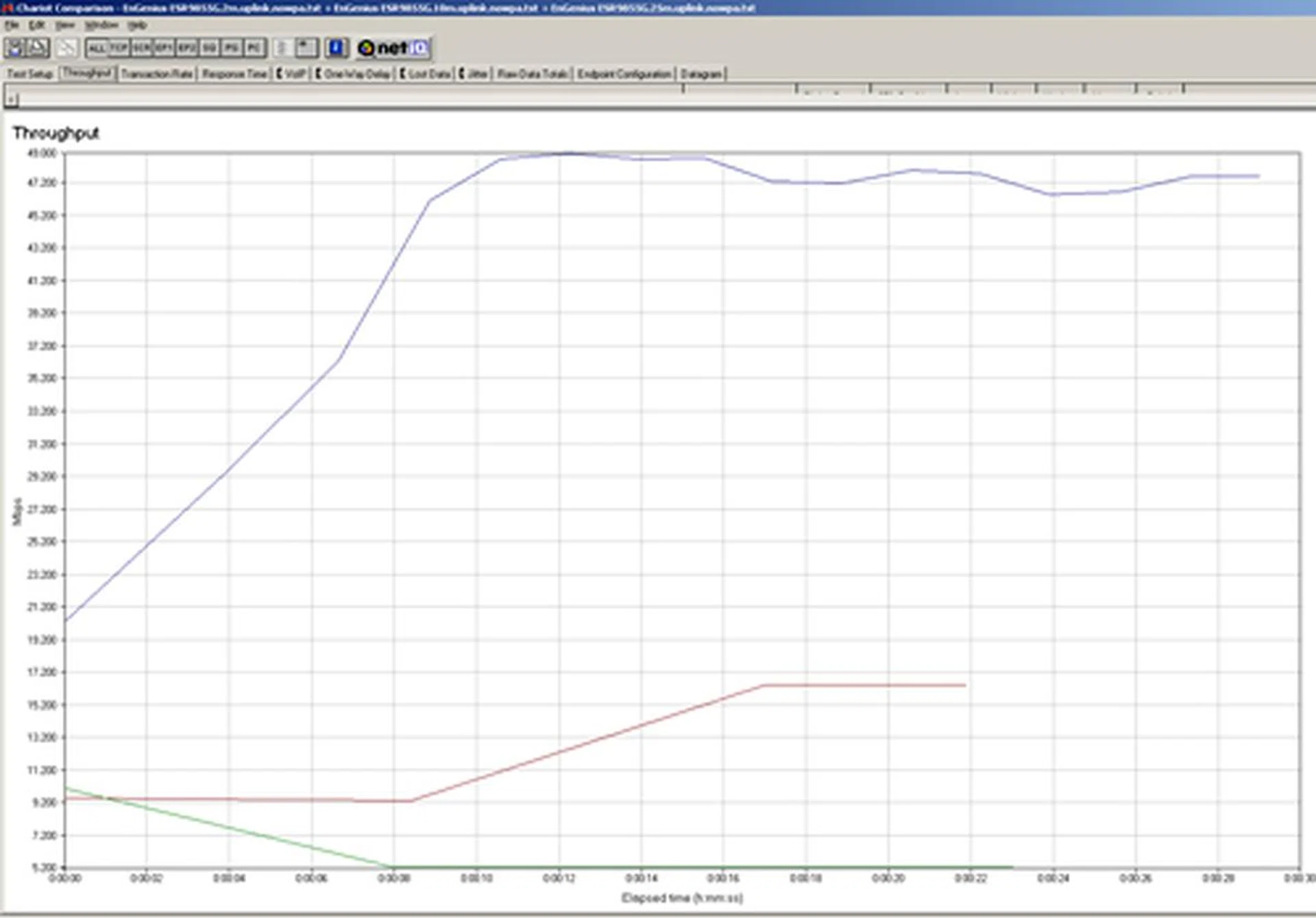
Likewise, upstream throughputs are highlighted in this graph with readings measured across 2m, 10m and 25m. As you can see, the ESR9855G's uplink finesse wasn't as burly as its downlink muscle, and throughput degradation started to show from 10m and beyond.
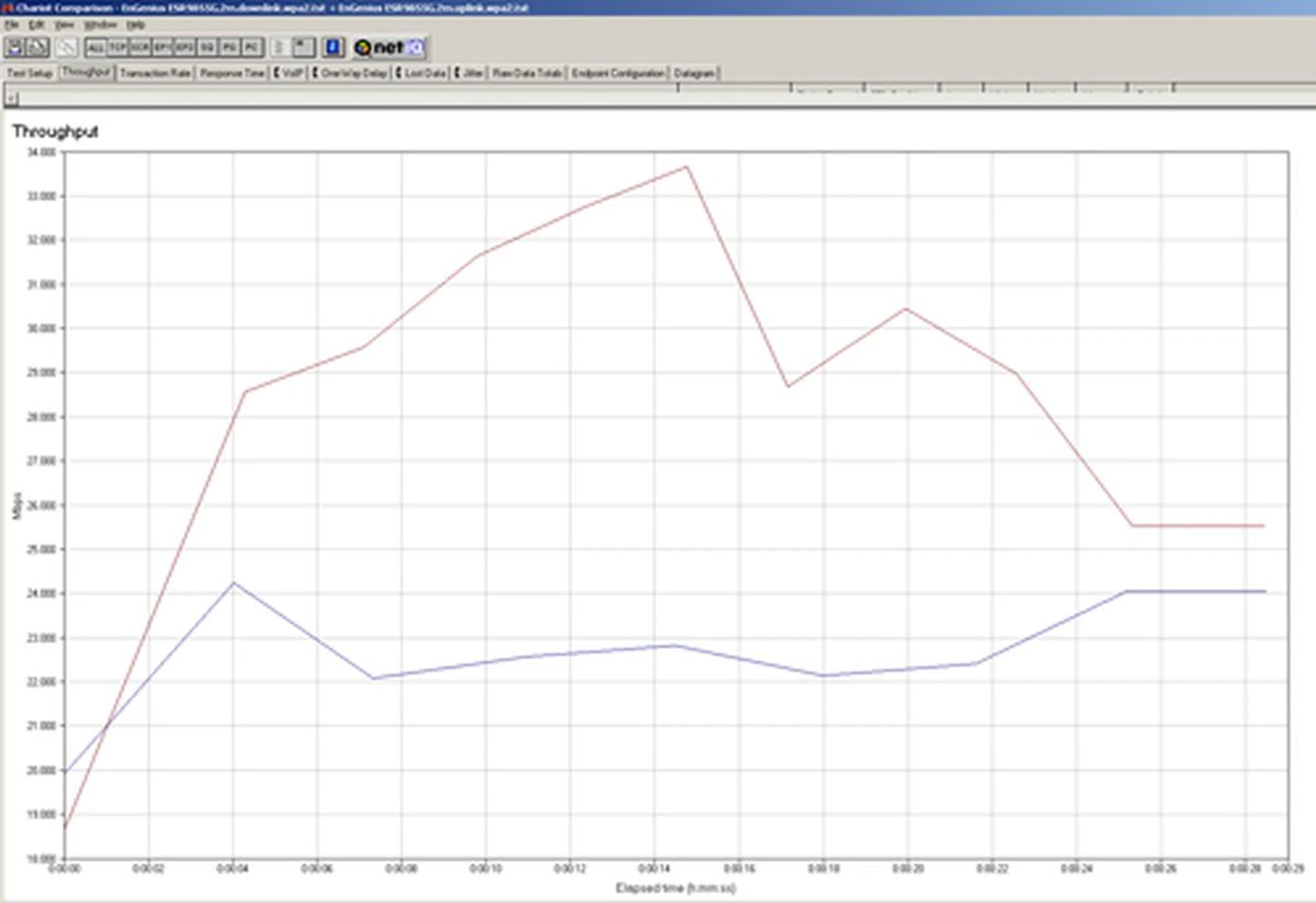
With WPA2/TKIP encryption - Securing the router did dent the router's performance significantly. Average downstream performance was almost half of a non-secured pipeline. Interestingly, uplink speeds (in red) were notably faster than the downlink rates (in blue) on the WPA2 security protocol.
The Final Word
Judging by its aesthetics alone, the humble EnGenius ESR9855G isn't as attractive as some of its competitors' prettier 802.11n rivals. Furthermore, this EnGenius wireless router has a number of inadequacies such as a missing USB port and dual-band functionality. These aren't life-saving features, but they're nonetheless important if you require a router for network printing or sharing of USB storage devices. Dual-band on the other hand, is overrated if you aren't a heavy recipient of media streaming on your home network, so it really boils down to your networking needs. Moreover, we believe a true blue gamer would prefer a wired Ethernet connection rather than rely on a finicky and interference-prone Wi-Fi link.
All things considered, the EnGenius ESR955G is the router for you if a single-band AP with stable downlink throughputs are what you're after. It isn't a speed demon, that's for sure, but at least it is reliable. So, what say you?
As much as these deficits are apparent, they not entirely critical as the ESR9855G has a number of redeeming traits to mitigate its shortfalls. For one, the ESR9855G has a substantial list of functions available on its UI such as port forwarding, SPI firewall, and virtual server options, to name a few. Not to mention a combination of prioritization features such as StreamEngine, which is a welcome additive for gamers anticipating minimal lags whilst taking out Zerg swarms in Starcraft II. Based on our test figures, the EnGenius router's wireless performance was stable and healthy at close proximities, but started to develop its share of quirks at 10 meters and beyond, mainly on its uplink pipe. Securing the router did dent its speeds by quite a fair bit as well, unfortunately. Although its long range prowess wasn't too impressive, we didn't encounter any connection drops throughout our tests - yes, even at the 25-meter range. All in all, we think EnGenius' S$189 shelf tag is justifiable, given the router's base features and how it eventually panned out. You might want to pass on the ESR9855G if you're bent on a dual-band solution. But if its single 2.4GHz radio and said functions sound good enough, then by all means, game on with it.
Our articles may contain affiliate links. If you buy through these links, we may earn a small commission.