

Note: This review was first published on 30 November 2021.

The Vaio SX14 is one of the few notebooks remaining that is still made in Japan.
Does "Made in Japan" still count for anything?
If you are of a certain age, it’s impossible not to think of Sony when you see Vaio. For so long, Vaio has been Sony’s computer brand. It wasn’t a bad one either. They were pushing boundaries and were dabbling in convertible notebooks that melded the lines between tablets and notebooks even before Microsoft made its first Surface Pro. Want proof? Just look at the Tap 11 and Duo 11. Sadly, Sony couldn’t turn a profit and was forced to sell the Vaio business.
Now, Vaio notebooks are more conventional. They are built with a focus on performance, functionality, and portability – arguably the three most important aspects of any notebook. Some are still made in Japan, which is a rarity in today’s world where just about every notebook (or thing for that matter) is made in China. But does that label still carry any cachet? Let’s take a closer look at the Vaio SX14.
Design & specs
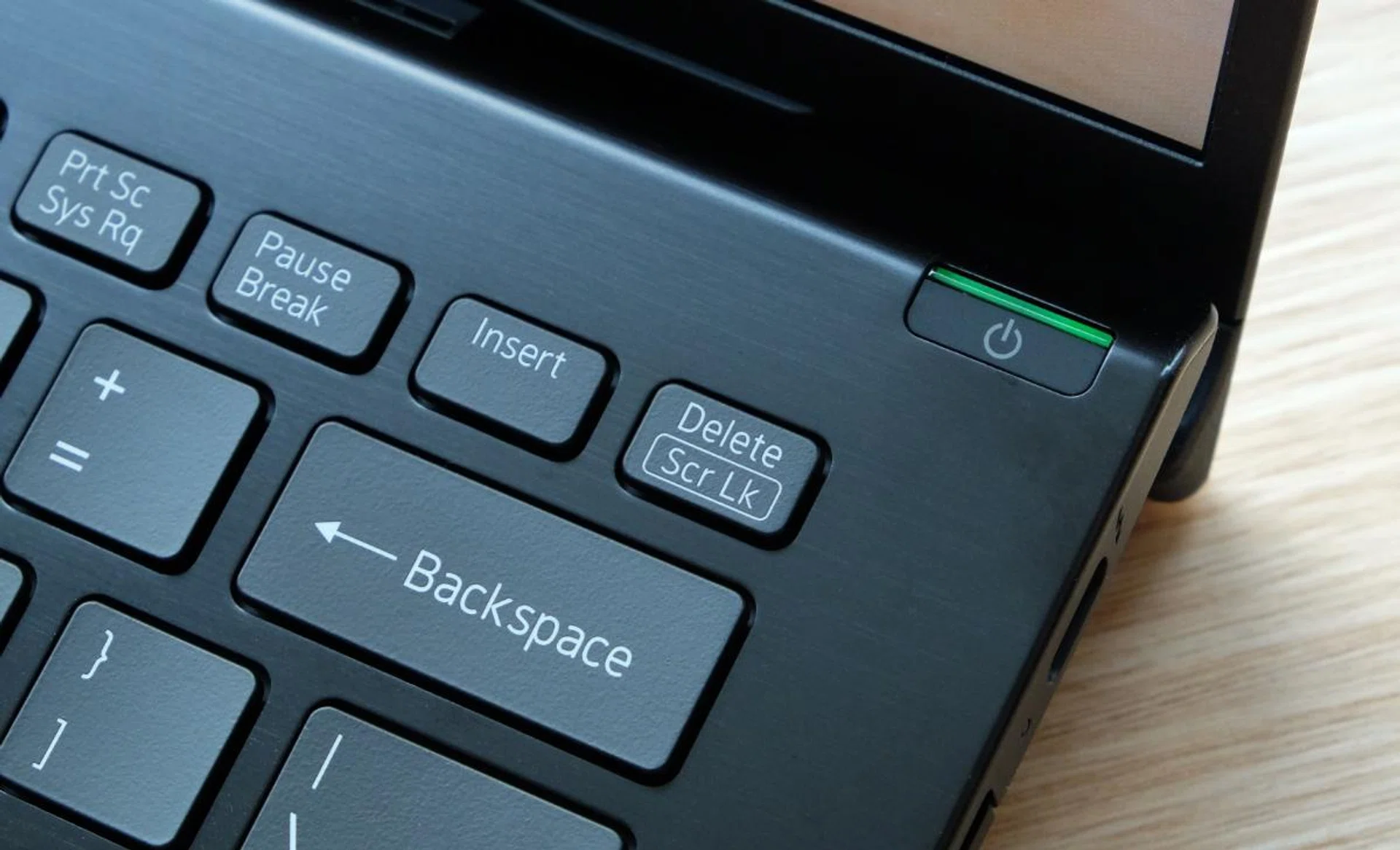
The power button has a bright green LED indicator. It also doubles up as a fingerprint scanner.
The Vaio SX14 will be available in two configurations with prices starting at S$2,999 (that “Made in Japan” label comes at a price). Both will feature Intel’s new “Tiger Lake-U Refresh” processors that come with slightly higher clock speeds. Here are the two configurations available.
Display | 14-inch Full-HD | 14-inch Full-HD |
Processor | Intel Core i5-1155G7 | Core i7-1195G7 |
Memory | 16GB | 16GB |
Storage | 512GB SSD | 1TB SSD |
Price | S$2,999 | S$3,299 |
Finish | Fine Black, Fine White | Fine Black |
The SX14 is one of the few notebooks that is still made in Vaio’s headquarters in Azumino City in Japan’s Nagano prefecture. The “Made in Japan” label used to mean a certain level of quality but with Chinese-made devices so good these days, it’s hard to say if “Made in Japan” still counts for something. But, since I’m a bit of a Japanophile myself, I can understand the appeal of having those magical three words on something you own. Certainly, the Vaio SX14 appears to be a well-made notebook. It doesn’t feel plasticky, and crucially, it feels solid and doesn’t flex unnervingly like some other carbon fibre notebooks do.
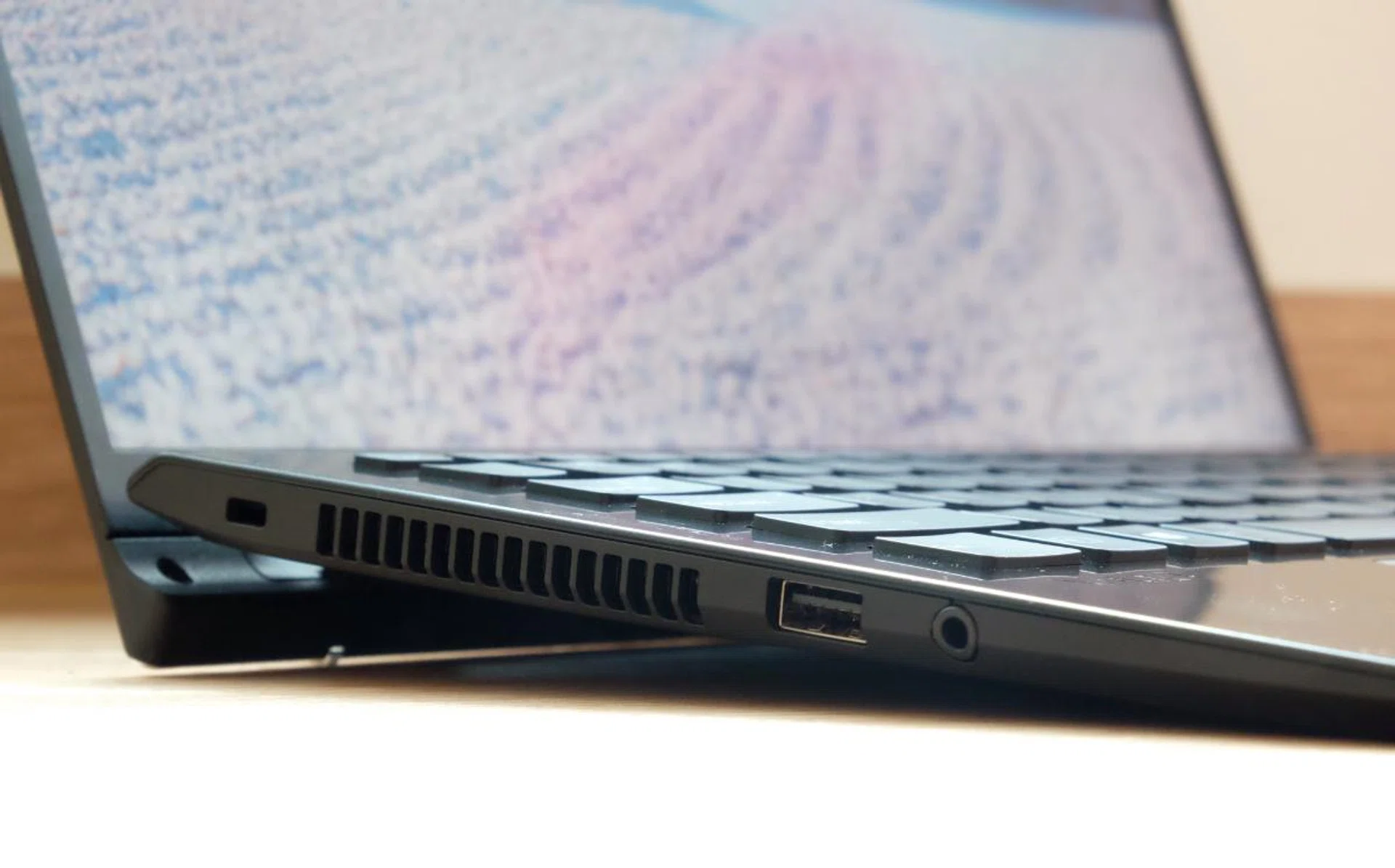
I don't remember the last time I've seen such large vents on a notebook.
The SX14 has an all-new design that more closely resembles its pricier Vaio Z sibling. Japanese design can sometimes be quirky and it’s definitely the case here. Though the SX14 looks mostly like any other modern ultraportable notebook – that is to say slim and sleek – it does have some design elements from another era. Mainly, it’s the prominent vents on the side and rear. I can’t remember the last time I saw a notebook with vents like that. I also cannot remember the last time I saw any device that had a bright green power LED indicator.
The Vaio name was mostly built upon impossibly slim notebooks. The SX14 upholds this tradition. On paper, its maximum girth of 17.9mm sounds chunky but that’s because of its unusual hinge mechanism (more on this later). It tapers down to just 13.3mm and that number better represents its size. And because the chassis is made with a blend of resin and carbon fibre moulded components, the SX14 weighs just 1.086kg. And yet despite its petite form factor, it’s built to meet MIL-STD-810H standards so it’ll more than stand up to the rigours of normal daily use.

The bezel above the display is huge. The Full-HD web camera is middling, at best.
Another odd design quirk is the large bezel above the display. It looks out of place on a notebook in 2021 and it’s not as if it houses a particularly advanced webcam. Sure, it may be Full-HD, but the footage it captures still looks fuzzy. The only nice thing about is that it has a physical privacy shutter and that it supports Windows Hello logins. Speaking of Windows Hello, the power button doubles up as a fingerprint scanner.

My test unit came with a 4K display, which, unfortunately, won't be available here yet. For a display that has a matte display, it looks great.
The 14-inch display on my unit supports 4K resolution and has a matte finish that resists glare and reflection well. It doesn’t support touch inputs. However, I’ve been told that initial units in Singapore will only be available with a non-touch Full-HD panel at first, with the possibility of touchscreen and 4K versions coming later. I can’t speak to the quality of those displays but this 4K one looks nice. It’s sharp, colours look natural, and it gets bright. Matte displays have the tendency to look washed out and less vibrant but not this one.
When you open the display, the display cover props the back of the notebook up by a couple of degrees. If this sounds familiar, it’s because ASUS’ notebooks have a similar feature which they call ErgoLift. Vaio’s implementation is more aggressive and my measurements indicate that it lifts the notebook up by about 2cm. The downside to this is that the SX14 is chunkier at the rear. The upside, however, is that there’s a greater lift angle so typing is more comfortable. Plus, it creates more space under the notebook so air ventilation is better, which may improve performance.
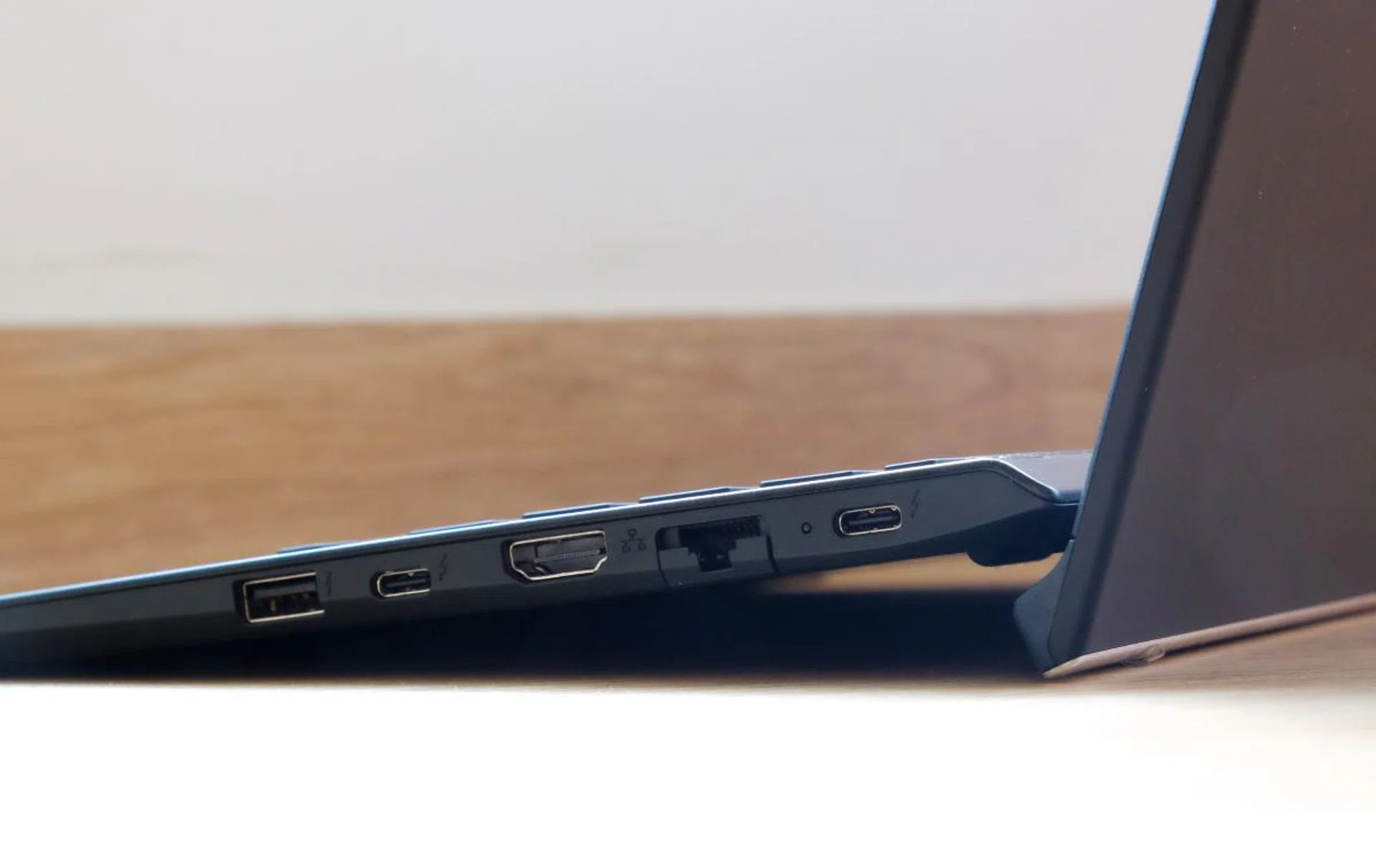
The Vaio SX14 has both USB-C and USB-A ports and even HDMI and a Gigabit Ethernet jack. Note how the display cover props the notebook up.
Amazingly, despite the SX14’s svelte dimensions, Vaio has managed to cram an impressive array of ports. On the right, there’s two USB-C Thunderbolt 4 ports, a single USB 3.1 USB-A port, a full-size HDMI port, and even a Gigabit Ethernet port. On the opposite side, there’s another USB 3.1 USB-A port and a 3.5mm headphone jack. Curiously missing is a memory card reader of some sort. Seeing that most ultraportable notebooks don’t have memory card readers, this isn’t a big loss. But if it were me, I would happily swap one of the USB-A ports or even the HDMI or Gigabit Ethernet port for a memory card reader.
Keyboard and trackpad
Vaio has given the keyboard some nice touches. It’s slightly dished to guide your fingers and the keycaps are coated with a special coating that resists unsightly fingerprints and smudges. Additionally, the keycaps feature what Vaio says it is an exclusive typeface that’s more aesthetically pleasing and legible. The layout is conventional, the size of the keycaps is good, and there’s a good amount of key travel. The only minor letdown is that the key feel could be firmer and more positive.
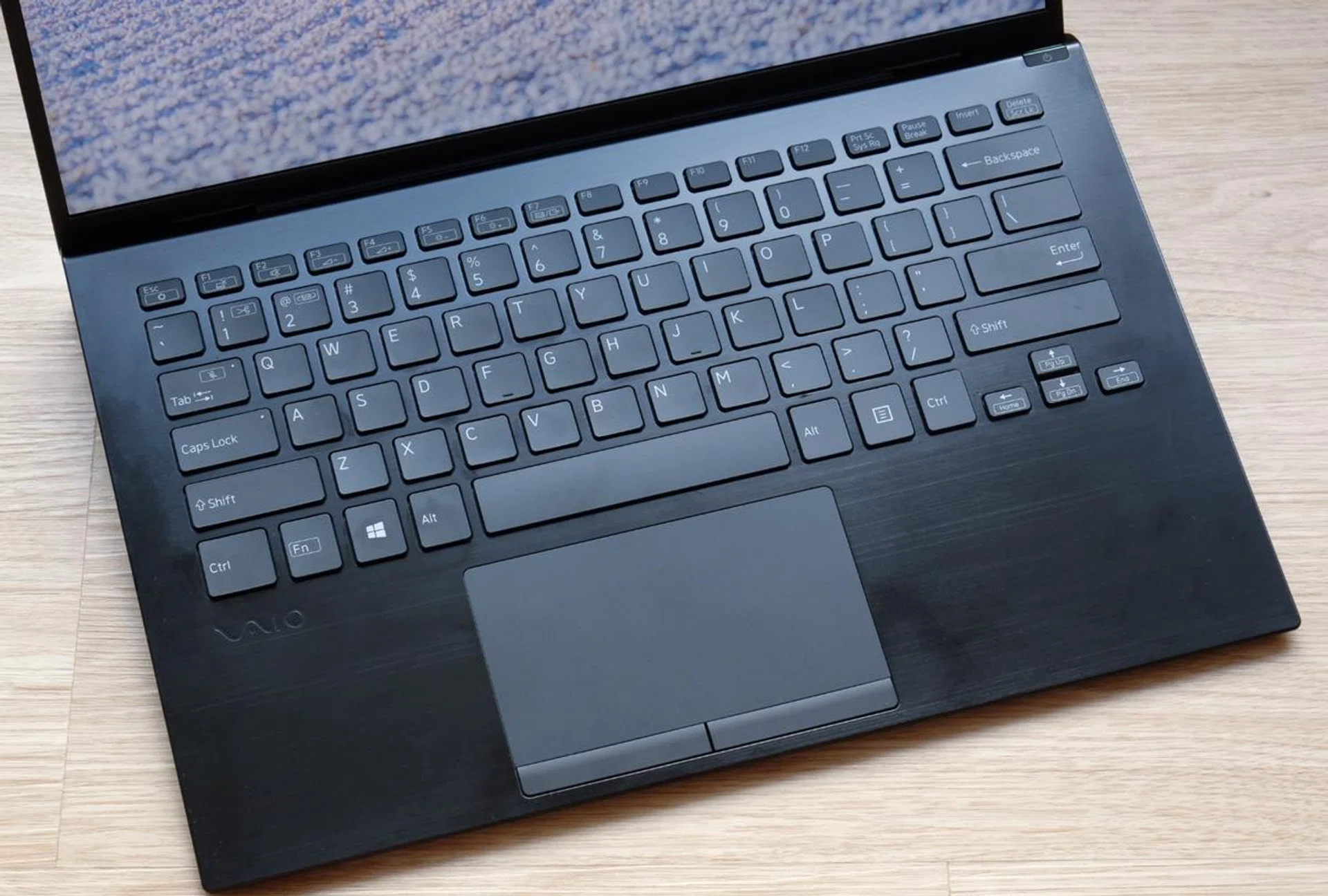
The trackpad is decent but it's non-clickable. The keyboard, fortunately, is quite good with large slightly scalloped keys.
The trackpad is a real oddity because it is not clickable. Instead, it has dedicated left and right buttons. The buttons do impinge on the overall size of the trackpad somewhat, but it isn’t too bad. What’s more disconcerting is every time you try to click only to find that the trackpad doesn’t budge. Fortunately, it’s something you will probably get used to over time. And even if you don’t, you can configure the trackpad to recognise taps with a single finger as clicks. The trackpad itself is smooth and responsive enough, though it has the tendency to feel jumpy intermittently.
Performance analysis
The Vaio SX14 is powered by Intel’s Tiger Lake Refresh processors. It’s available with the Core i5-1155G7 or the range-topping Core i7-1195G7. Before you get too excited, these chips are still built using a 10nm process and the only real improvements are slightly higher CPU and GPU clock speeds. The unit I have comes with the Core i5-1155G7 with 16GB of memory and a 512GB SSD. It will be interesting to see how it performs against older ultraportable notebooks with the Core i7-1165G7 processor.
Model | Display | Processor | Memory | Storage | Graphics |
Vaio SX14 | 14-inch, Full-HD, non-touch (4K, as tested) | Intel Core i5-1155G7 | 16GB | 512GB SSD | Intel Iris Xe |
ASUS ZenBook 14X OLED | 14-inch, WQXGA+, OLED, touchscreen | Intel Core i7-1165G7 | 16GB | 1TB SSD | NVIDIA GeForce MX450 |
Acer Swift 5 | 14-inch, Full-HD, touchscreen | Intel Core i7-1165G7 | 16GB | 1TB SSD | Intel Iris Xe |
ASUS ZenBook 14 Ultralight | 14-inch, Full-HD | Intel Core i7-1165G7 | 16GB | 1TB SSD | NVIDIA GeForce MX450 |
Dell XPS 13 | 13.4-inch, 4K+, touchscreen | Intel Core i7-1165G7 | 16GB | 512GB SSD | Intel Iris Xe |
LenovoYoga Slim 7Carbon | 14-inch, QHD+, OLED | AMD Ryzen 7 5800U | 16GB | 512GB SSD | NVIDIA GeForce MX450 |
LG gram 14 | 14-inch, Full-HD+ | Intel Core i7-1165G7 | 16GB | 512GB SSD | Intel Iris Xe |
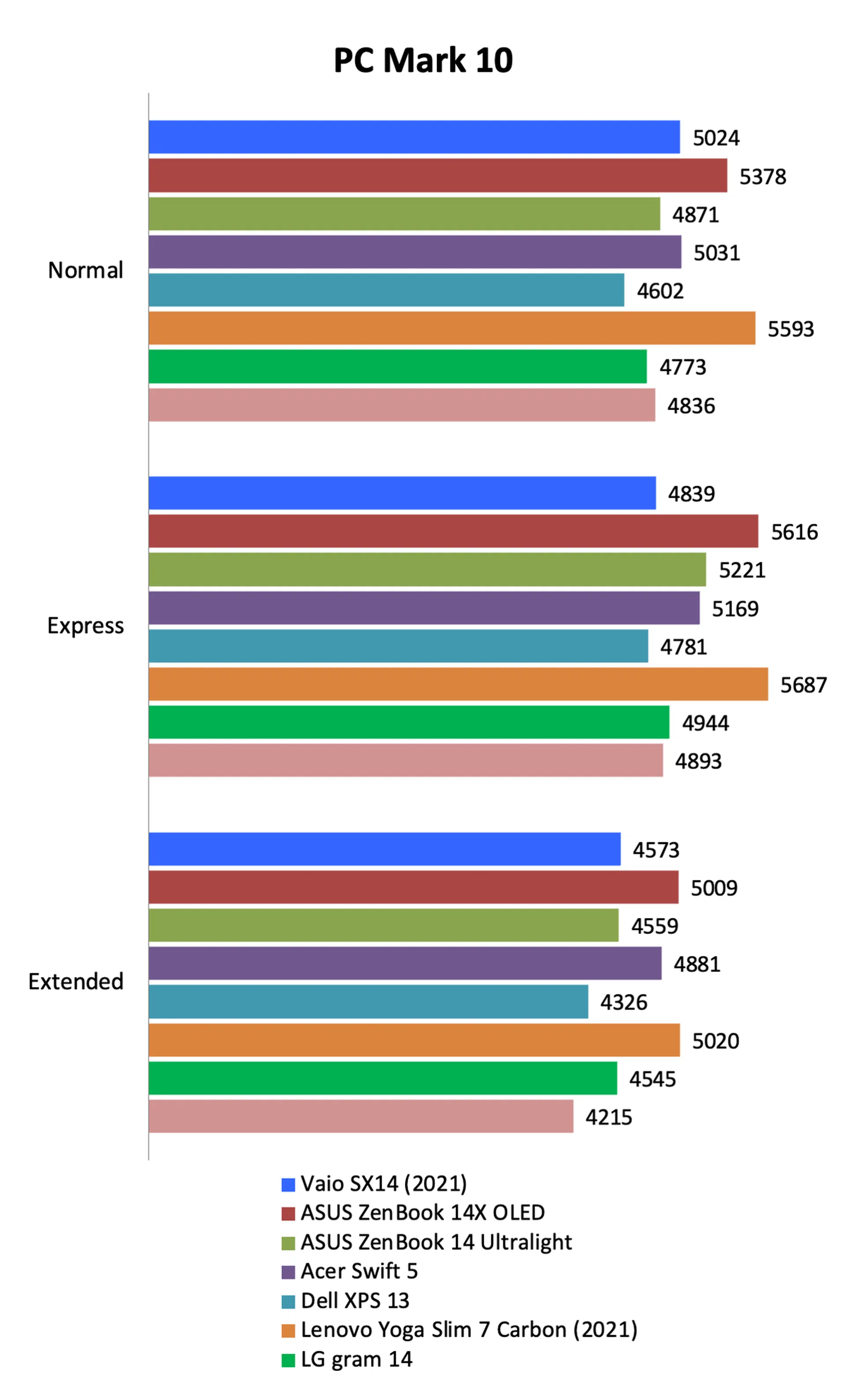
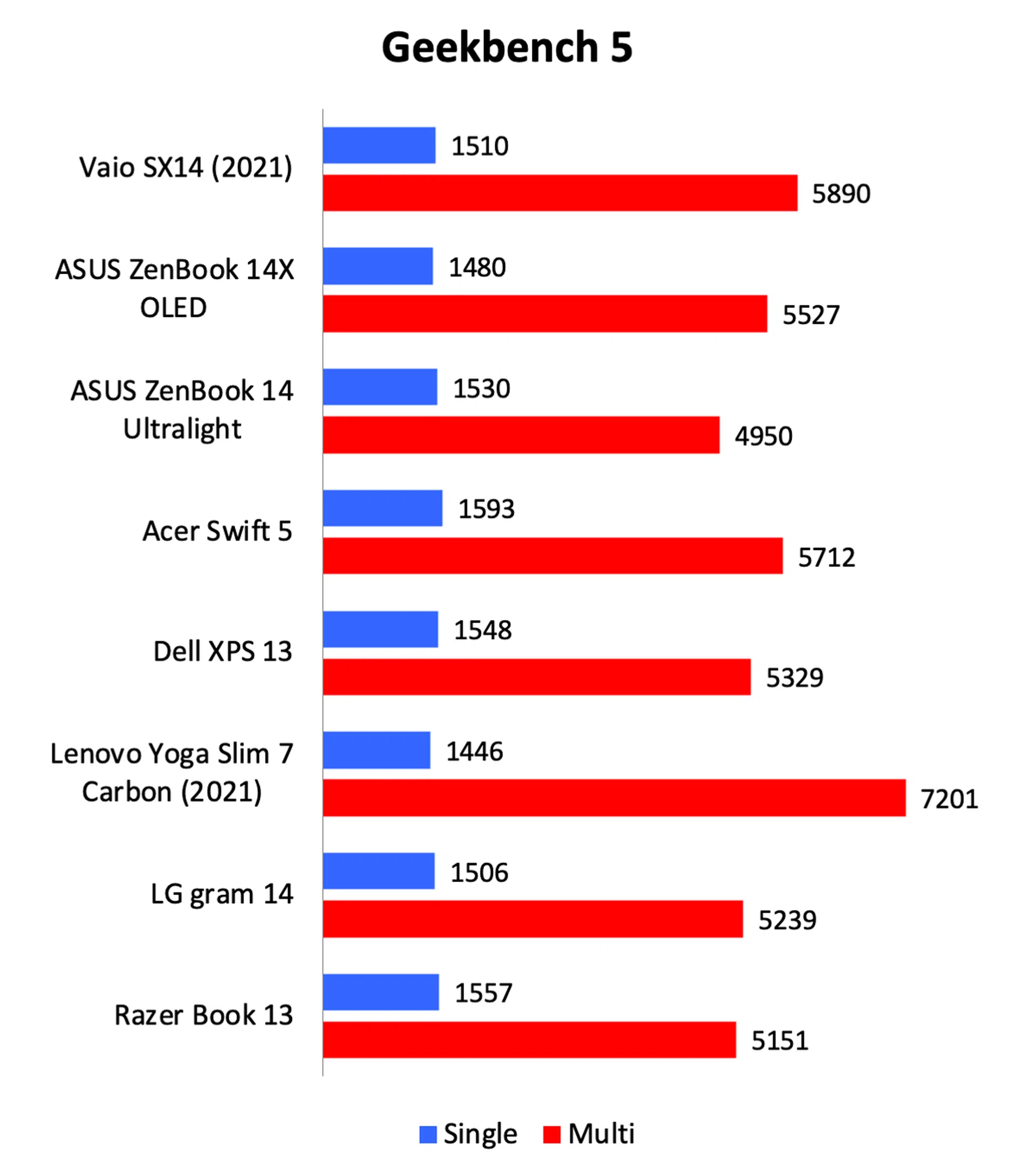
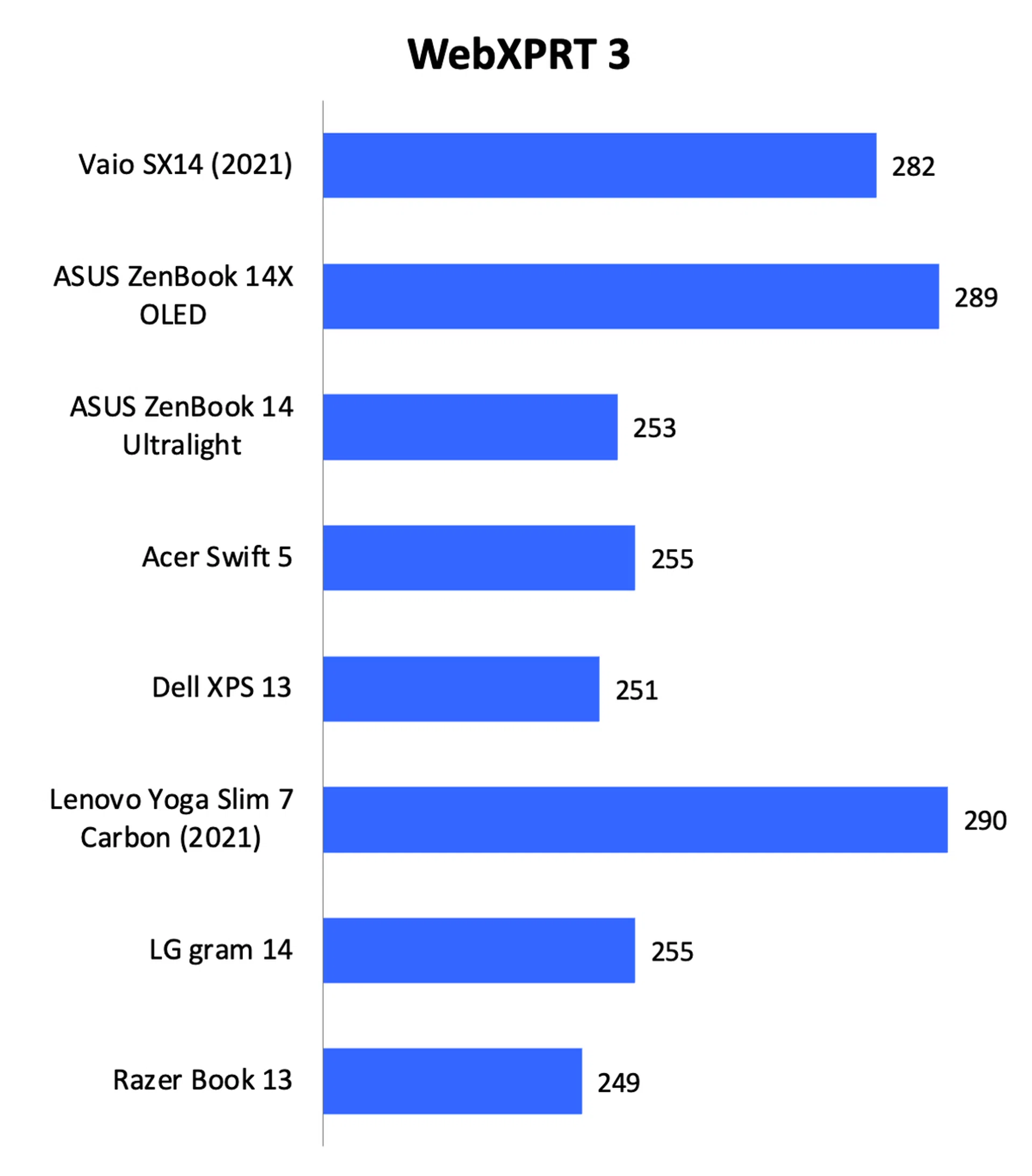
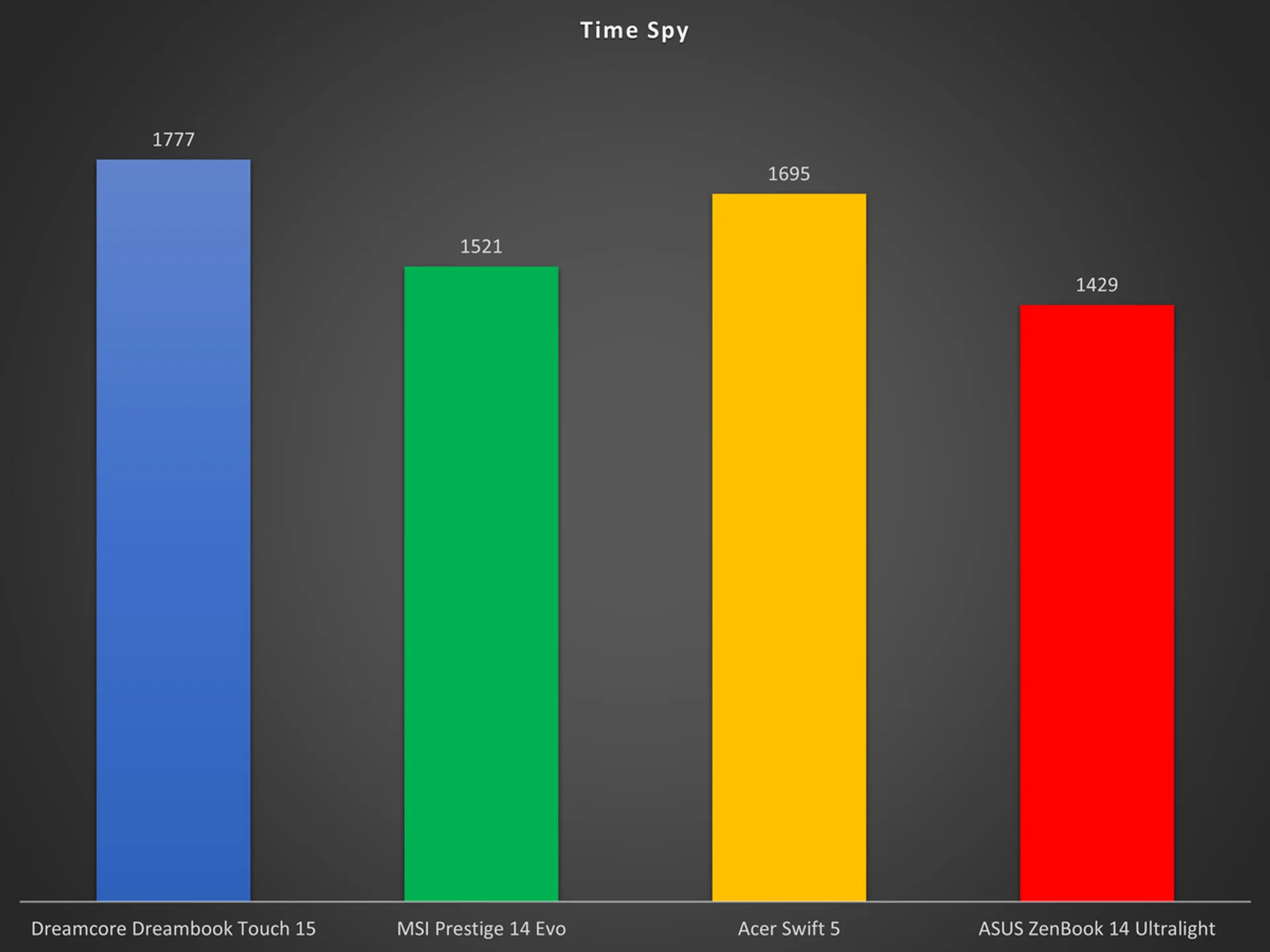
Unsurprisingly, the Vaio SX14’s performance was quite as good as most notebooks which have a Core i7-1165G7 processor. Though the Core i5-1155G7 processor in the SX14 benefits from higher clock speeds, it still trails behind the clock speeds of any Core i7 Tiger Lake processor. Not only that, the Core i5-1155G7 has to make do with a smaller Smart Cache (8MB vs. 12MB) and its Iris Xe integrated graphics processor has fewer execution units (80 vs. 96).
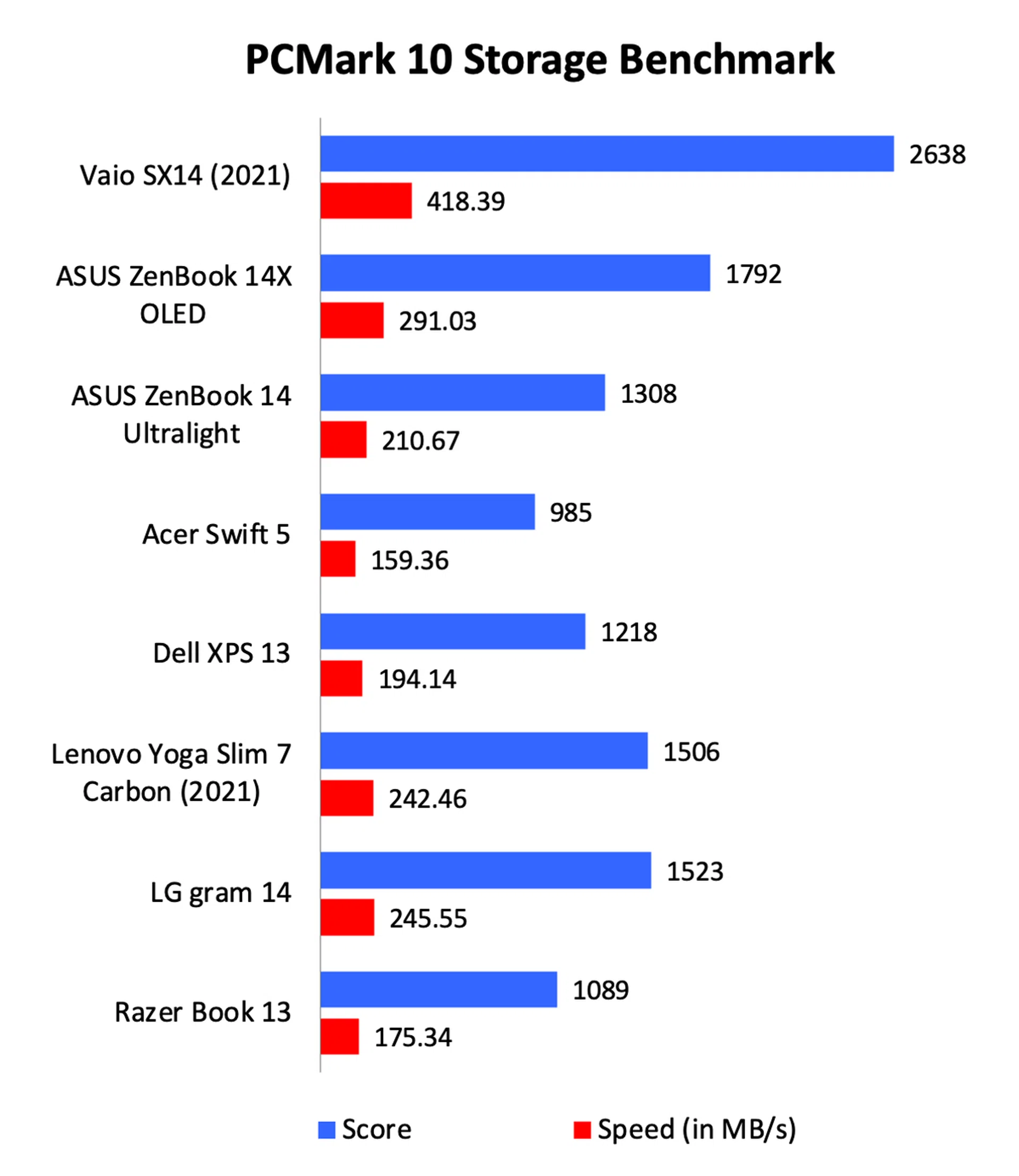
Still, there are some positives. The SX14 has very fast storage. Its Samsung PCIe 4.0 SSD recorded a PCMark 10 Storage score of 2638, which was 47% faster than the second-placed ASUS ZenBook 14X. Its average speed of 418.39MB/s was also over 40% faster than the ZenBook and over double that of other notebooks like the Acer Swift 5 and Dell XPS 13.
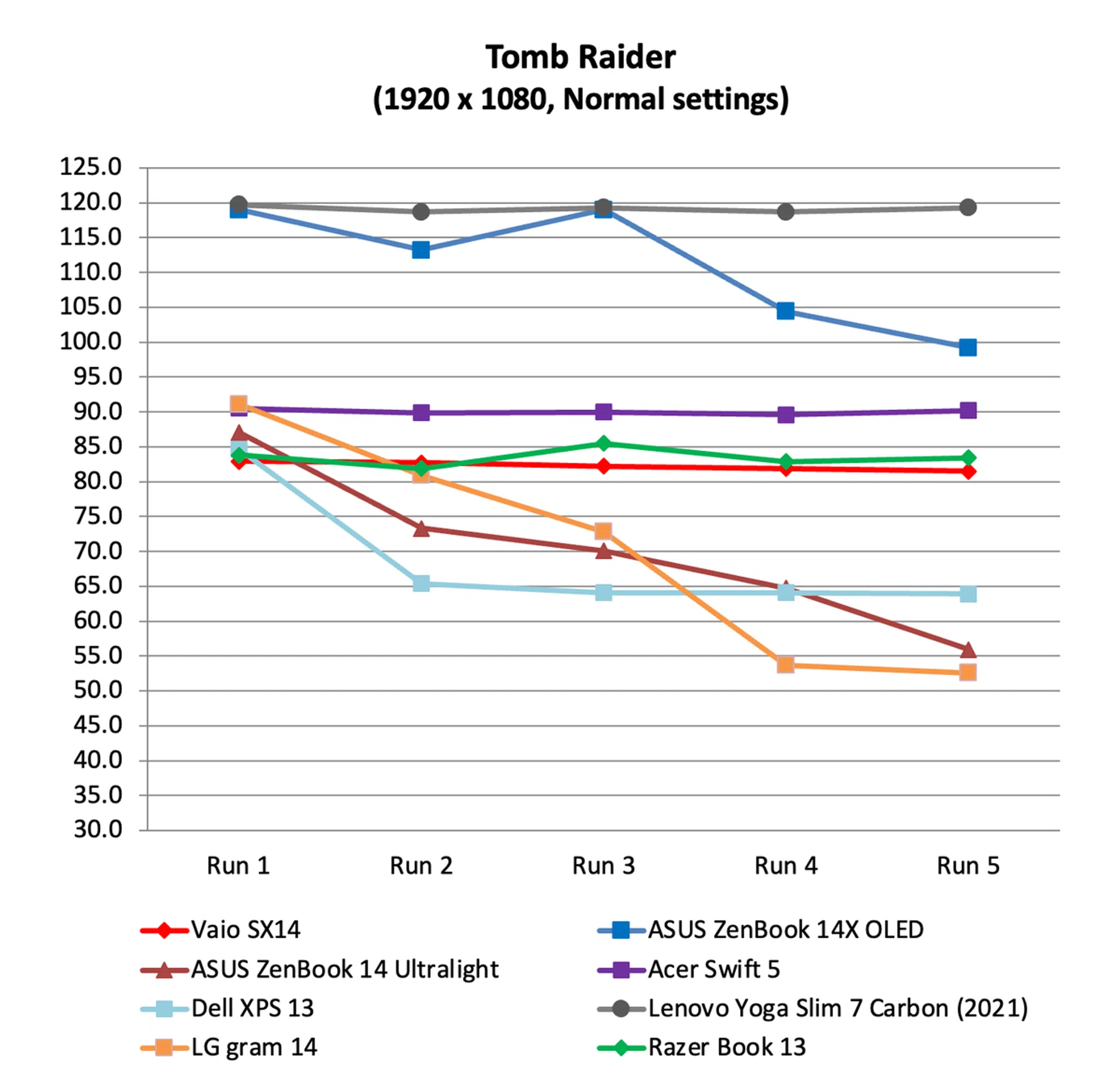
Graphics performance was also commendable despite having a less powerful version of Intel’s Iris Xe graphics. This is possibly down to its superior cooling. Looking at its Tomb Raider results, we can see that the SX14 managed to maintain its frame rates even after a few runs. That said, it did get quite warm and the fans were very loud.


Battery life
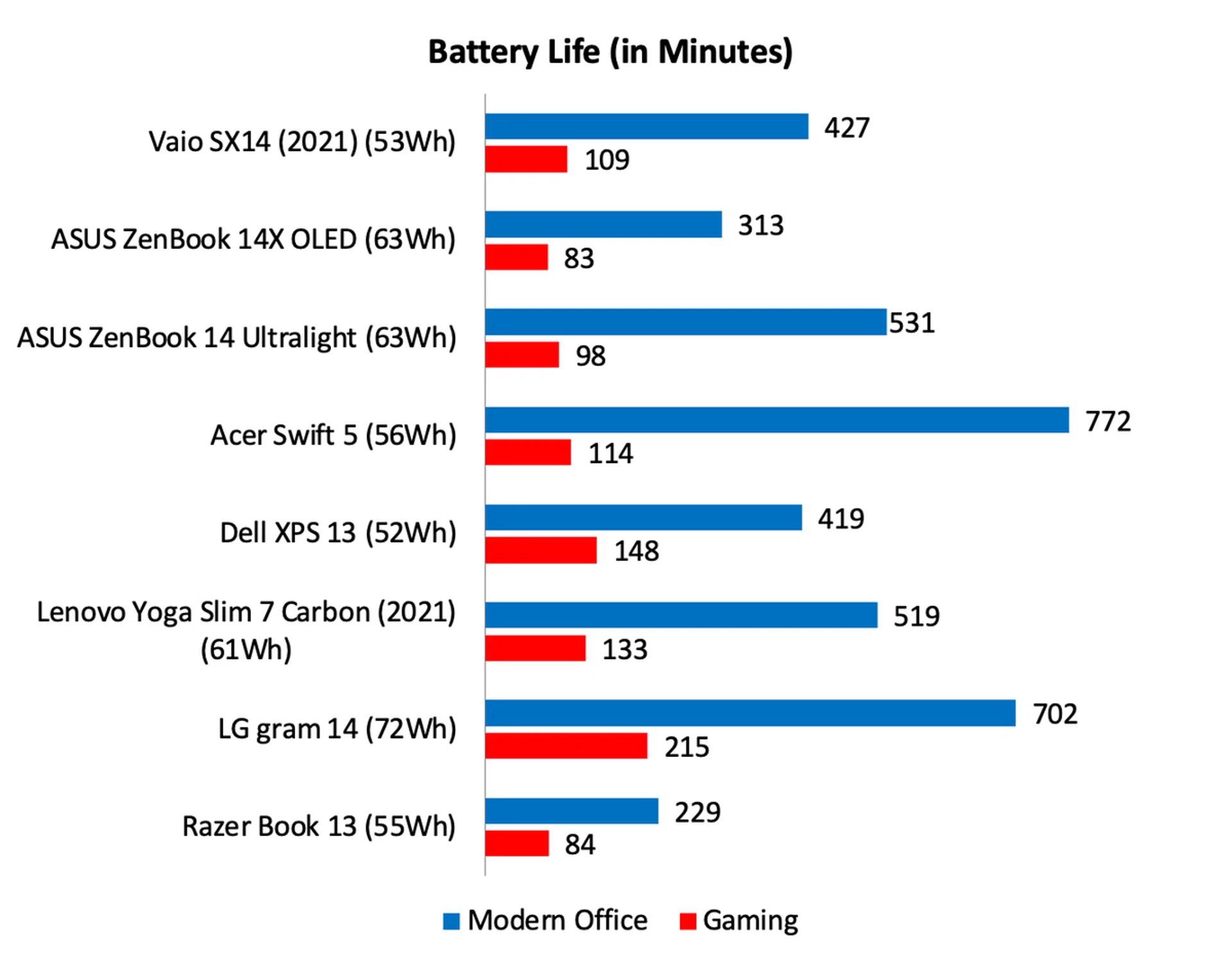
Note: Battery tests were conducted using PCMark 10's battery benchmark with display set to 100% brightness.
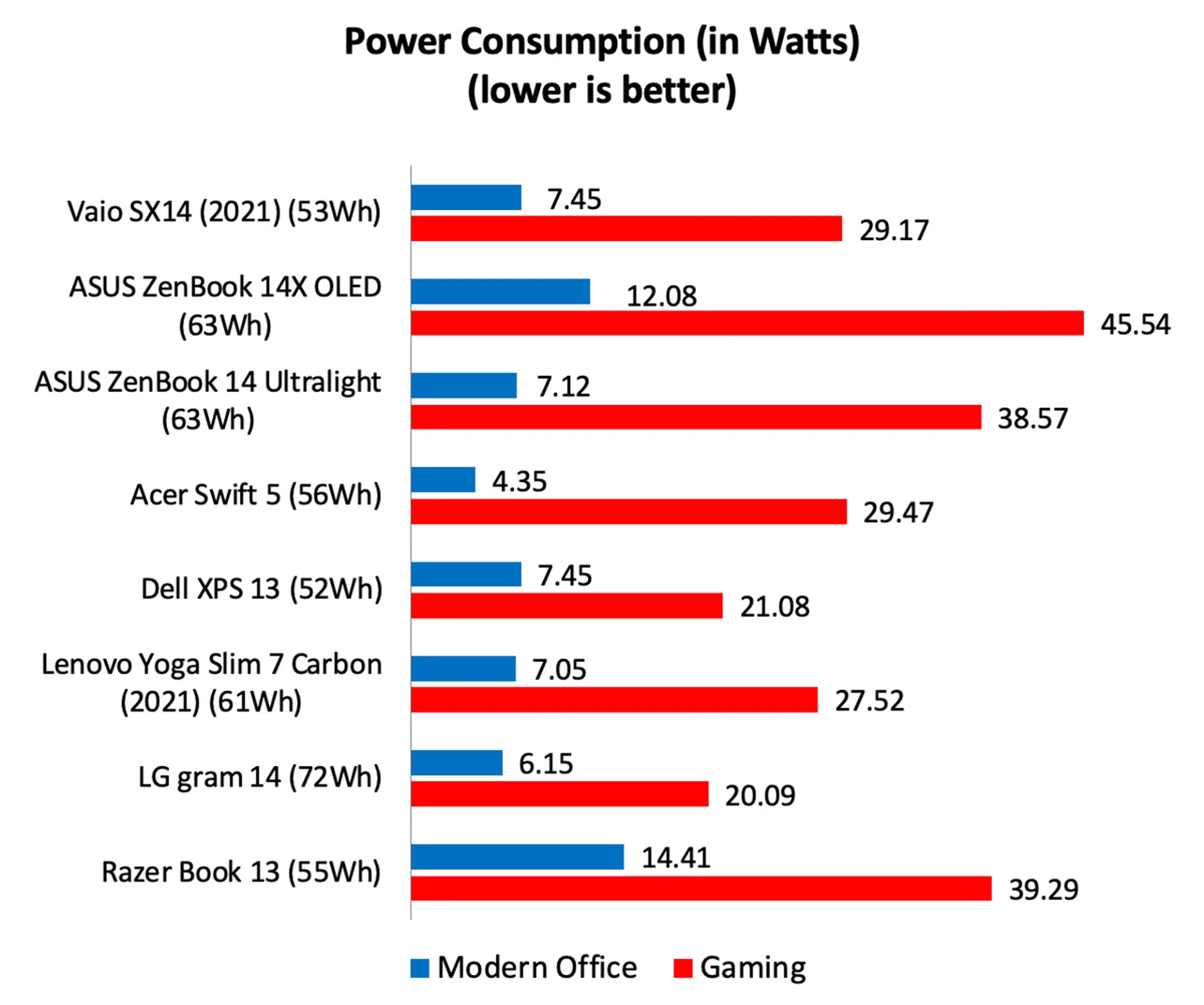
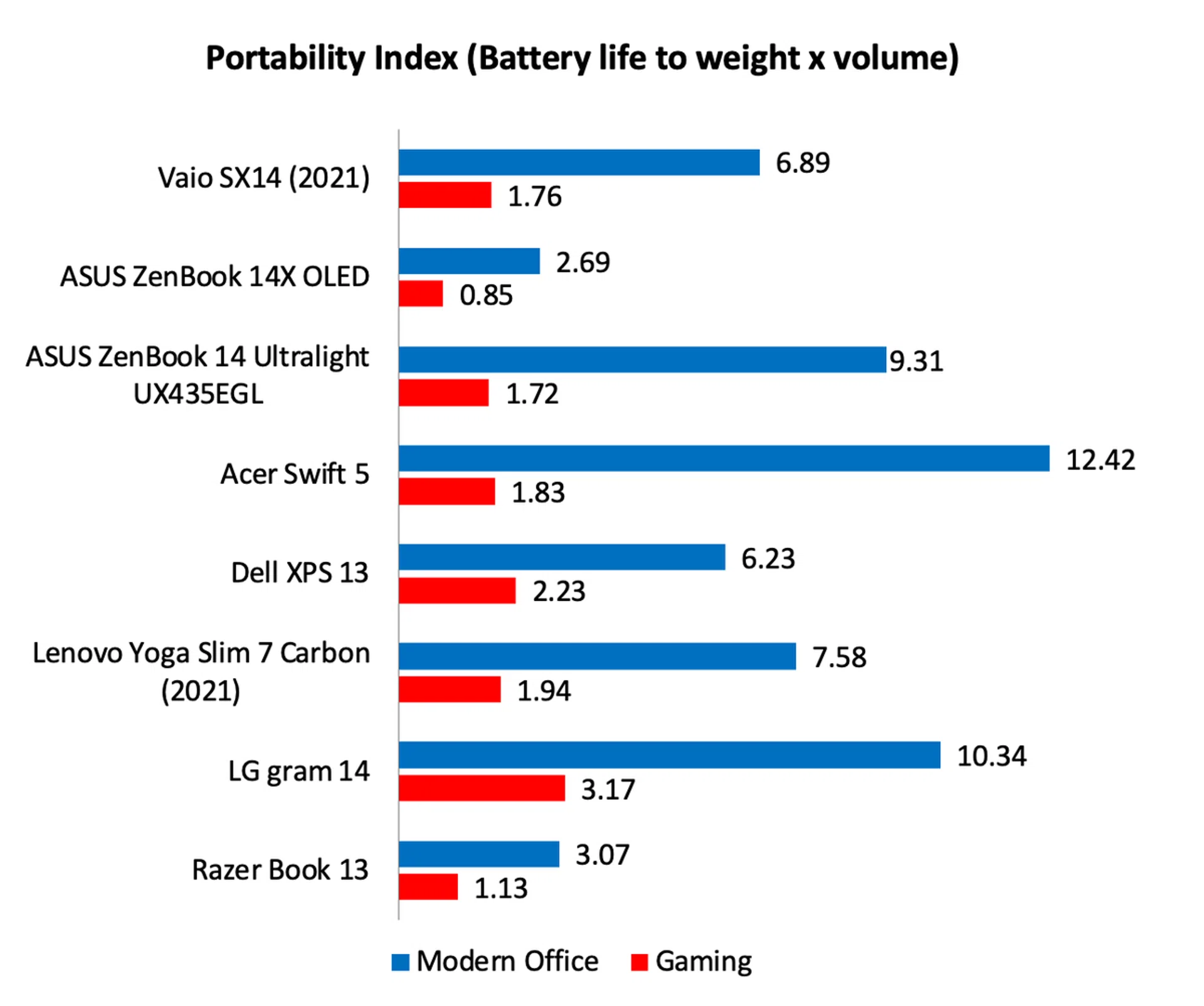
The Vaio SX14 lasted a little over seven hours in our intensive battery test. That’s quite decent especially when you consider it has one of the smallest battery capacities. Battery consumption figures are average and within the range of what one would expect from an ultraportable notebook with a 4K display. Fortunately, its lightweight and small footprint help it claw back crucial points in our Portability Index. Judged as a whole, it’s one of the more portable notebooks you can buy even if its battery didn’t last the longest.
A notebook unlike any other
Perhaps it’s because the Vaio SX14 comes from Japan, but it really is a rather unusual notebook. The design is highly functional. It’s thin and light but sacrifices little in terms of connectivity. I can’t think of another notebook in its class that has USB-C, USB-A, HDMI, and even a proper Gigabit Ethernet port. Build quality is high and the notebook incorporates some nice touches such as the hinge mechanism that props the notebook up, a large keyboard, and a physical privacy shutter that covers the camera when its not in used.
But it’s also quirky in many ways. The large vents on the side is a bit of an eyesore, plus it expels a lot of hot air which heats up the area to the left of the notebook substantially. Also, the bezel above the display is large, the power button has a bright green LED indicator, and the trackpad is non-clickable.
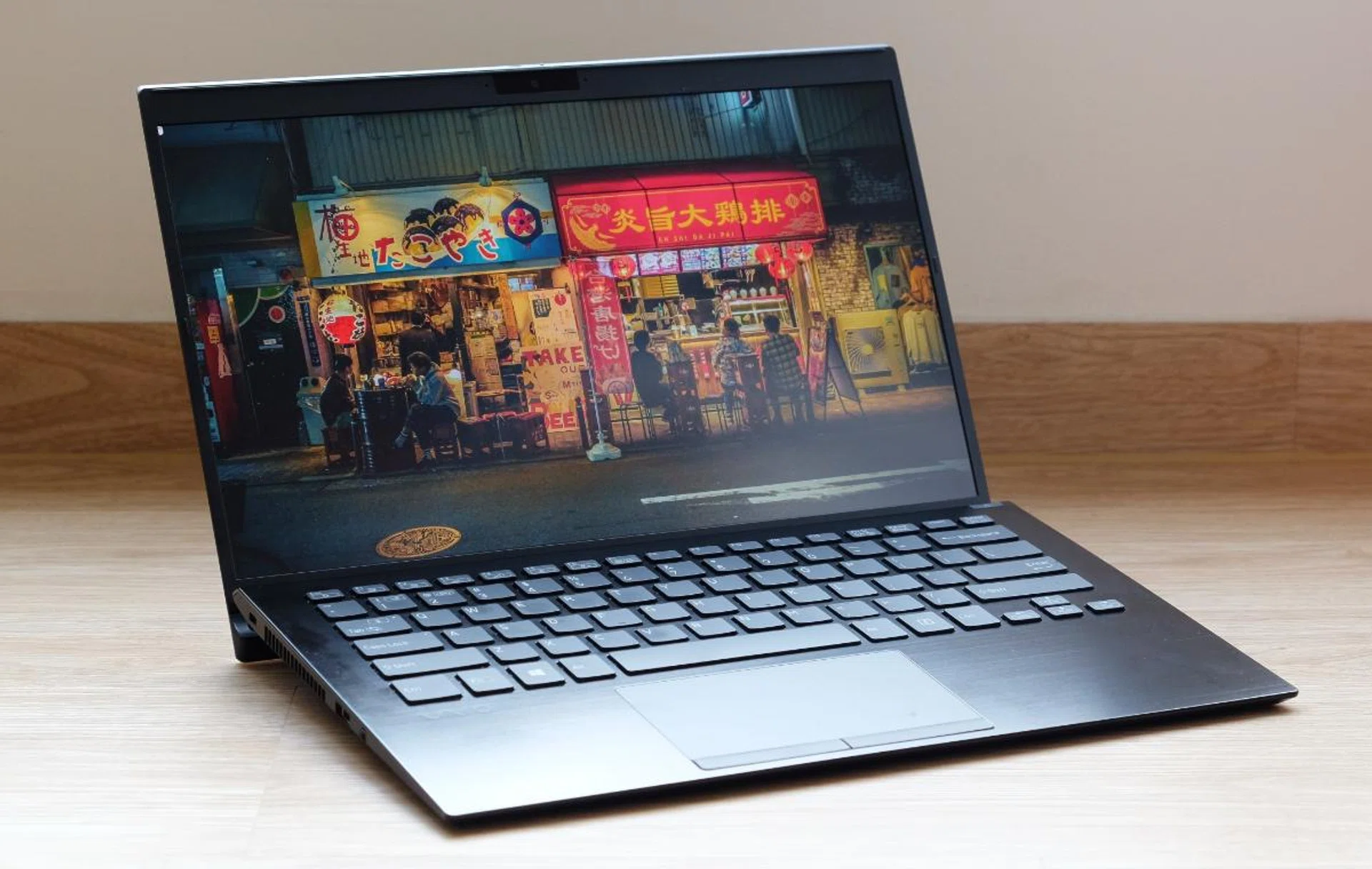
The Vaio SX14 is a nice a little notebook that has some great features, but its price makes it uncompetitive.
However, these are not deal-breakers by any means. No, the biggest issue is its price. With prices starting at a dollar under three grand, the SX14 is easily one of the priciest notebooks in its class. And apart from its rather good connectivity and incredible weight, there’s little else to justify its premium. Performance and battery life are decent but not exceptional, the screen is only Full-HD and non-touch, and while connectivity is mostly good, there’s no SD card reader. Made in Japan quality? Sure, the notebook feels nicely put together, and it is really thin and light, but the same can also be said for many other notebooks that are made elsewhere. And with lots of excellent choices at and around the S$2,000 to S$2,500 price range, it’s hard to say that this notebook offers value for money.
In the end, while the Vaio SX14 is competent in many aspects, its high price will likely deter most notebook shoppers. Still, it will find fans among diehard Japanophiles and users who absolutely need a thin and super light notebook with all the connectivity options that the SX14 offers.
Our articles may contain affiliate links. If you buy through these links, we may earn a small commission.