

Ultra Chic and Slim
It's been a decade since Sony introduced its first ultra portable notebook, the VAIO 505 in Japan. Expensive, classy but undeniably handy, this tiny notebook measured less than an inch thick, seemed to weigh even less and most of all, had an irresistible charm that has become a key requirement of the VAIO design philosophy. While its price and niche genre probably restricted it to a small audience, the notebook has its share of fans (there's even an old web ring for VAIO 505 owners with tips and information) and now, ten years from that moment, Sony has sought to commemorate this milestone with a new take on the ultra slim notebook.
The end result is the new VAIO TZ series, designed by some members of the original development team that came up with the VAIO 505 and others who have been inspired by it. Their goal was like most product refreshes - keeping with the style and elegance of the original while updating it with the latest technology. For the top model, the VGN-TZ18GN, this includes a cutting edge solid state drive (SSD) using flash memory, an ultra low voltage Core 2 Duo processor from Intel and the latest Microsoft Windows Vista OS. Meanwhile, the latest advances in material sciences and LCD technologies mean that this VAIO comes with a light but sturdy carbon fiber chassis and a vibrant, bright display that puts others into the shade, literally.
So yes, maybe we seem to be hyperventilating a bit now. But, don't take our words for granted, check out the ultra thin notebooks below and tell us honestly you don't fancy them. We received both the TZ17GN and the TZ18GN from Sony for this article, but we will only be focusing on the premium VGN-TZ18GN here. Hence, the specifications for the table are based on the TZ18GN. However, there is virtually no difference on paper between the two except for the SSD on the TZ18GN instead of the usual SATA hard drive (and the price tag of course).
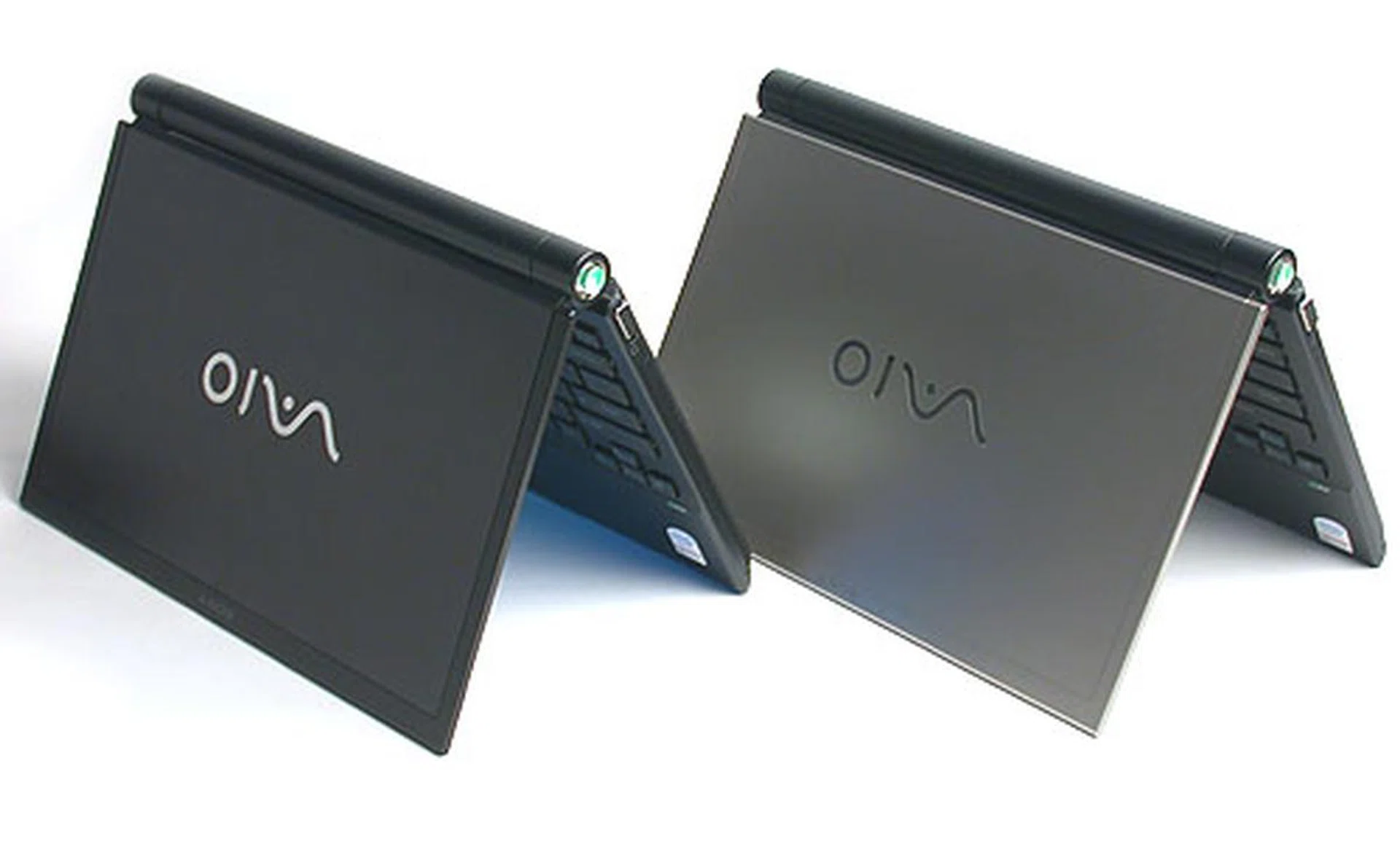
The top two models in the new Sony VAIO TZ series, the Premium Carbon version of the VGN-TZ18GN and the VGN-TZ17GN in silver and the black. Both have similar specifications and identical design, but the only difference between them is the extremely expensive solid state drive on the TZ18GN.
Star Light, Star Bright
The impression we get from Sony's latest ultra portable sensation is that it's all sinews and lean muscle. It's like a notebook that has had all its 'fats' boiled away, leaving only the bones and cartilages holding the frame together. Thanks to its carbon fiber enhanced chassis, the notebook feels thin but sturdy. If we have to use an analogy, it's like bamboo, deceptively strong despite its appearance. Considering the cylindrical core of its battery, together with the woody look and feel on the exterior lid, this seems most appropriate. Most of all, it's light at slightly over 1kg, even with the battery, hence fulfilling its ultra portable pedigree.
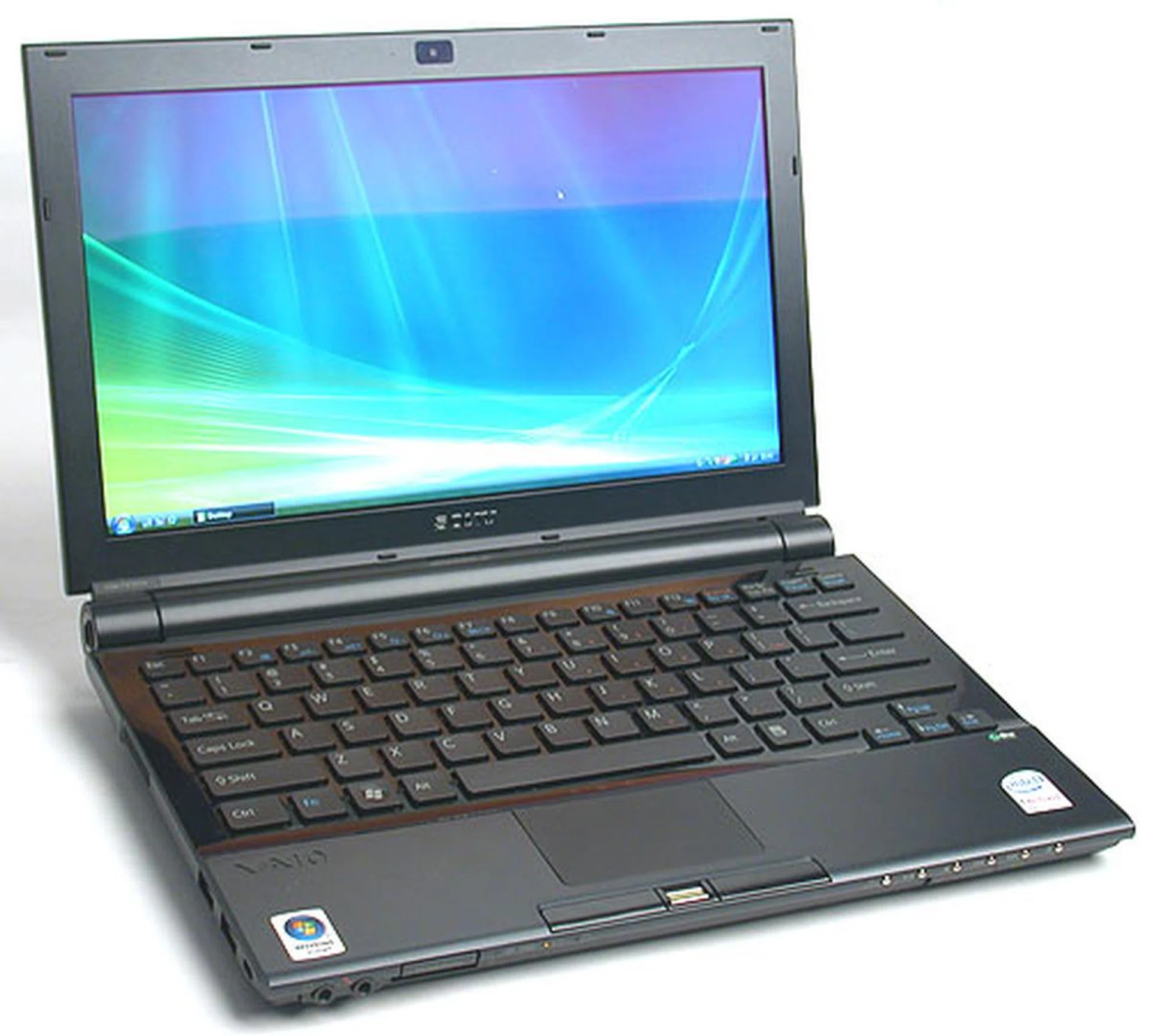
Bright, sharp and according to Sony, with a color purity at an NTSC ratio of 72%, this 11.1-inch widescreen display is truly a delight to feast your eyes on. Compared to the older VAIO TX series, the display is 20% brighter while retaining similar power consumption levels.
We haven't been too pleased with the LCD displays on our recently reviewed notebooks. These complaints should be familiar - the notebook displays were mostly glossy and reflective, often with insufficient backlight and relatively poor viewing angles. Compared to these lackluster screens, the 11.1-inch widescreen display on the Sony VGN-TZ18GN is a glorious sight to behold. Colors are bright and vibrant and closer to a quality desktop LCD screen with its native resolution at 1366 x 768. The viewing angles are also improved, probably due to the higher brightness; in short this is a screen that reproduces excellent image quality.
The next thing you'll notice is how quiet this notebook can be. Minus the moving parts of the hard drive thanks to its flash memory drive, the only sounds produced are by the ventilation fans and optical drive (only when it's running) and the end result is a silent notebook, especially since it's already using a relatively low powered processor and integrated graphics that require less cooling. What may be a shortcoming is the heat we felt in our laps, emitting from the bottom of the VAIO. This is usually quite common among notebooks but the thicker chassis on other notebooks alleviate this to some extent. There is no such allowance for this ultra thin notebook and a rough measurement with our temperature sensor placed it in the range of around 40 degrees Celsius. It's not burning hot but one can definitely feel the warmth after prolonged usage. We then did a similar test with the TZ-17GN and it came out slightly worse, with temperatures hovering around 50 degrees. This is because the TZ-18GN's SSD is likely to produce less heat than the SATA hard drive on the TZ-17GN.
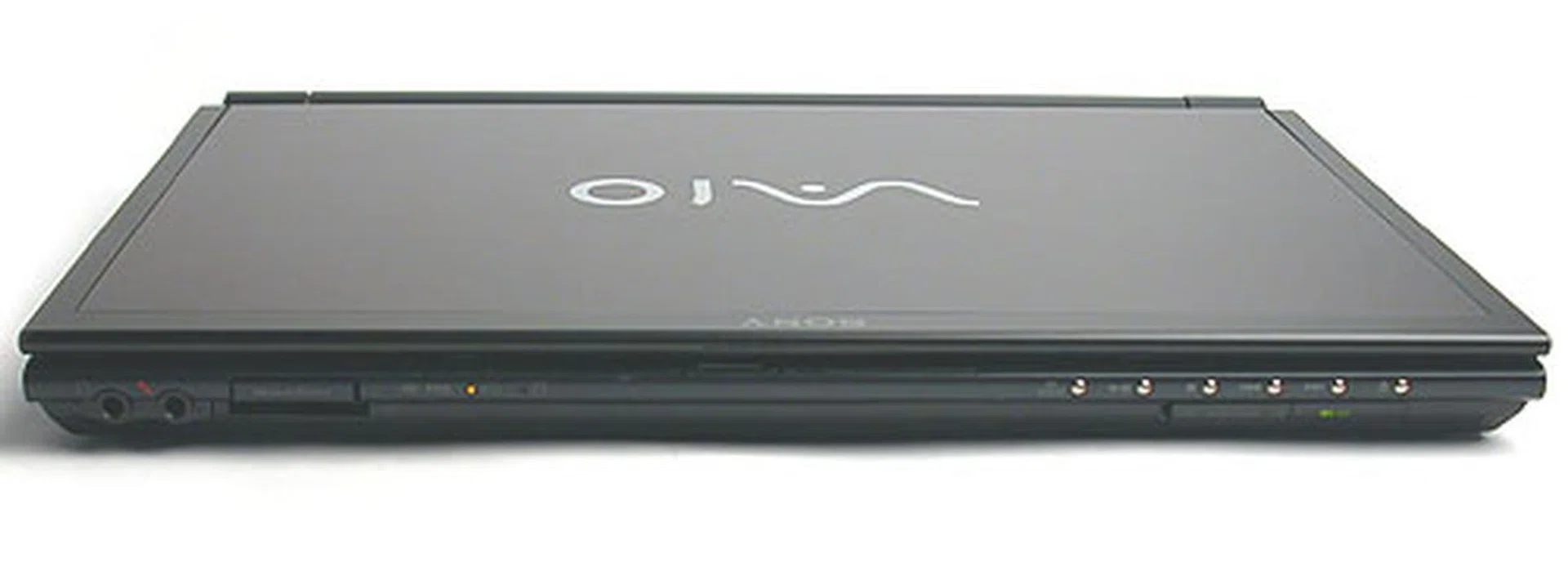
The TZ18GN is the slimmest at this angle, with the front sloping down from the fatter, cylindrical battery at the rear.
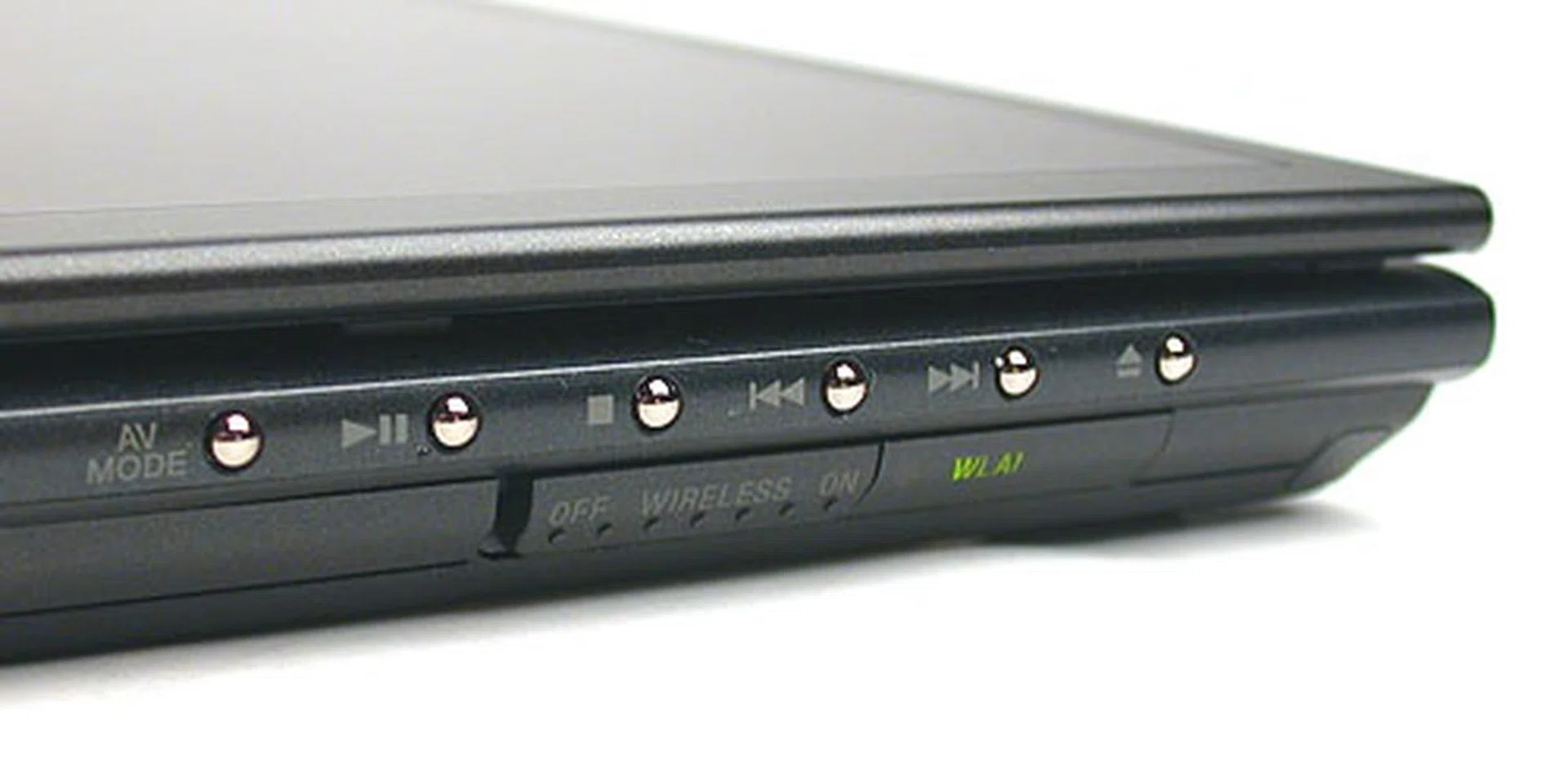
The tiny silver buttons here are for the instant AV mode which can work at the touch of a button without first booting into Windows. They are again rather small and may be difficult to press. There's also the usual switch to toggle the wireless LAN connection.
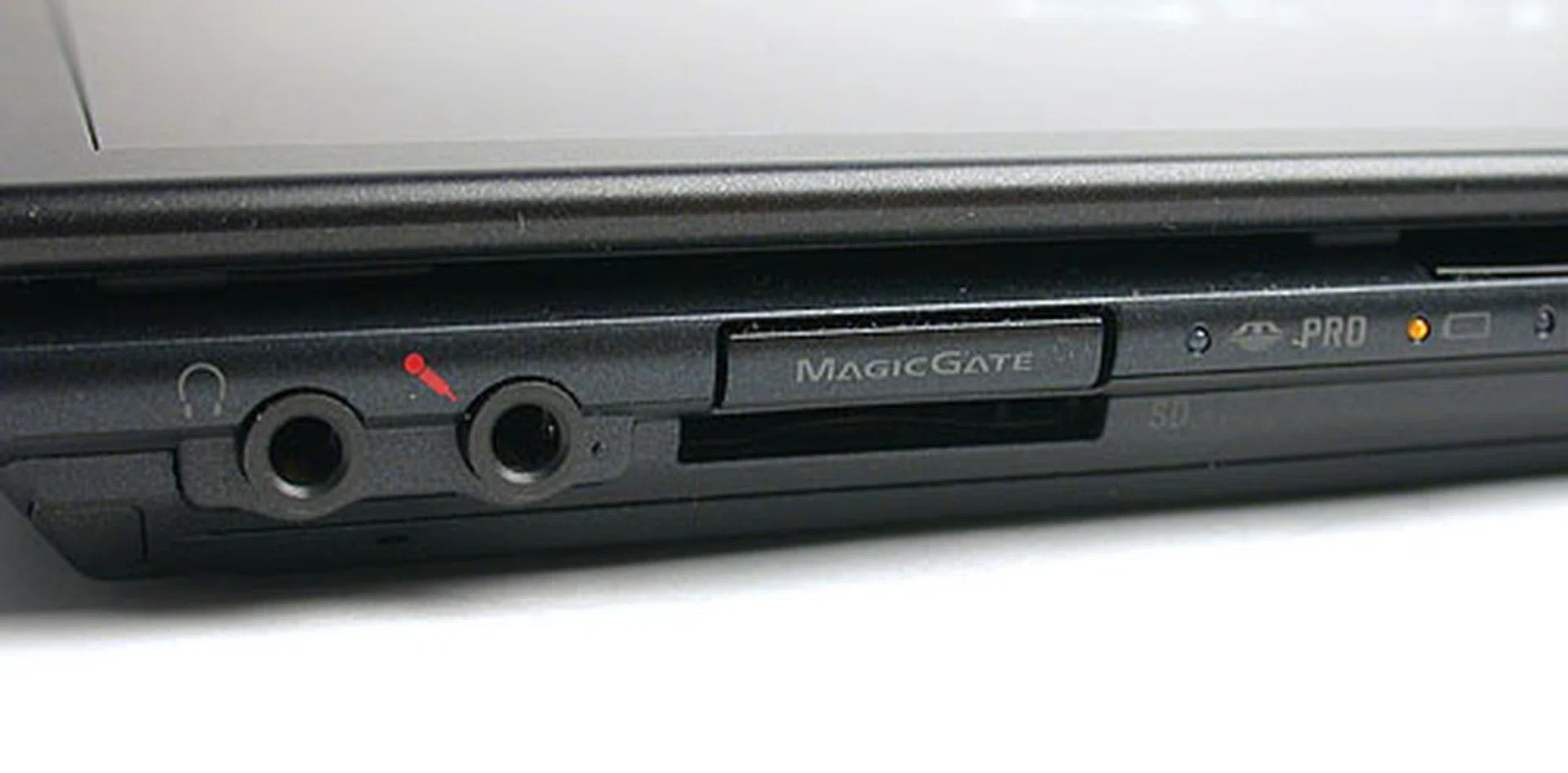
Here we have the 4-in-1 card reader and as with all Sony products, proprietary formats like Memory Stick are found though it does support SD memory cards at least.
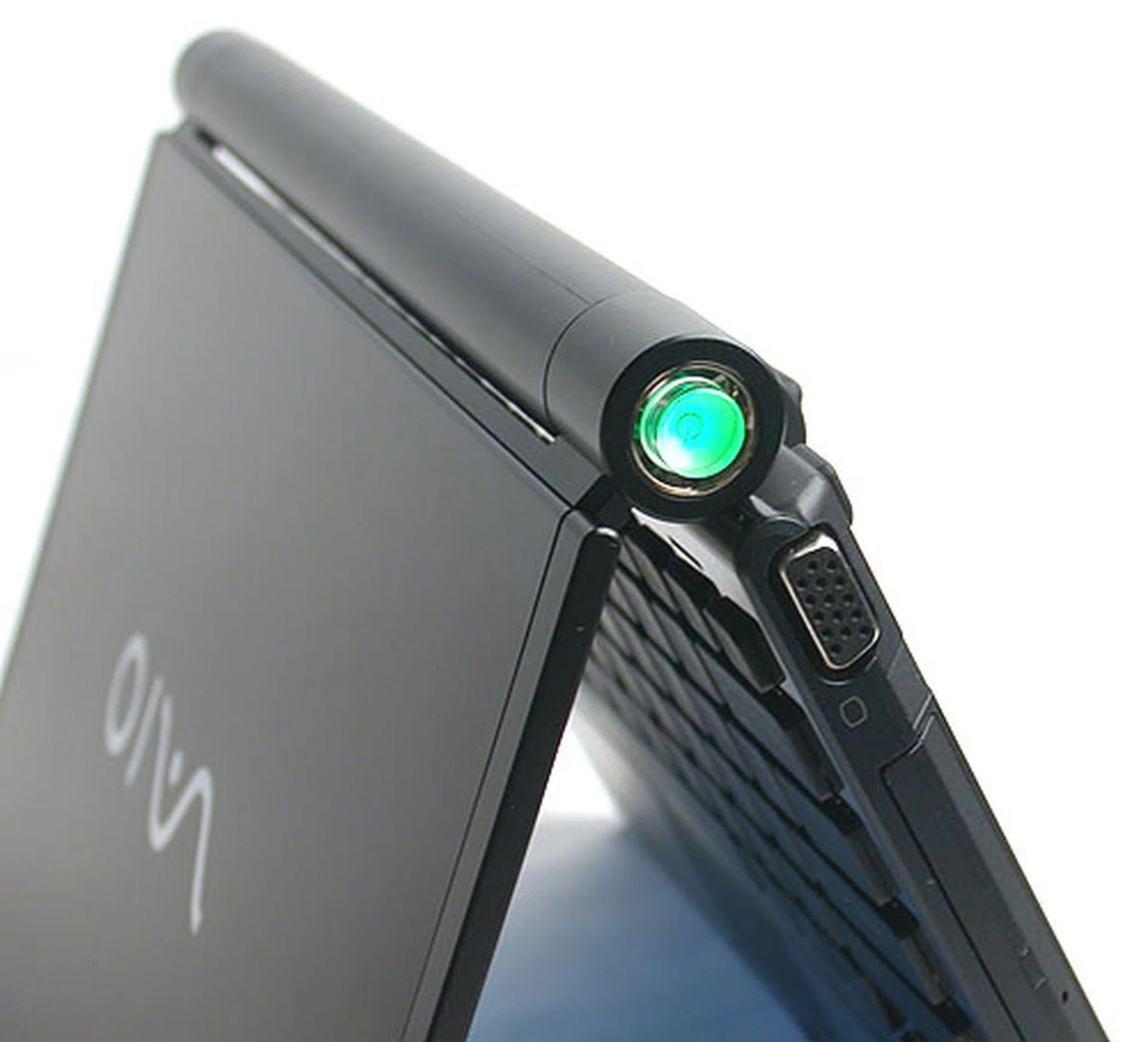
If you go by the interviews with the design team for this VAIO on Sony's website, getting the color of the LED on the power button to be that particular shade of emerald green was not an easy task. We'll let you interpret what that says about the design process but it is no doubt a striking color that's not your usual blue/yellow/green LEDs. The battery is integrated elegantly into the spine of the notebook and on removing it, the screen is attached to the rest of the notebook with only two hinges at the sides.
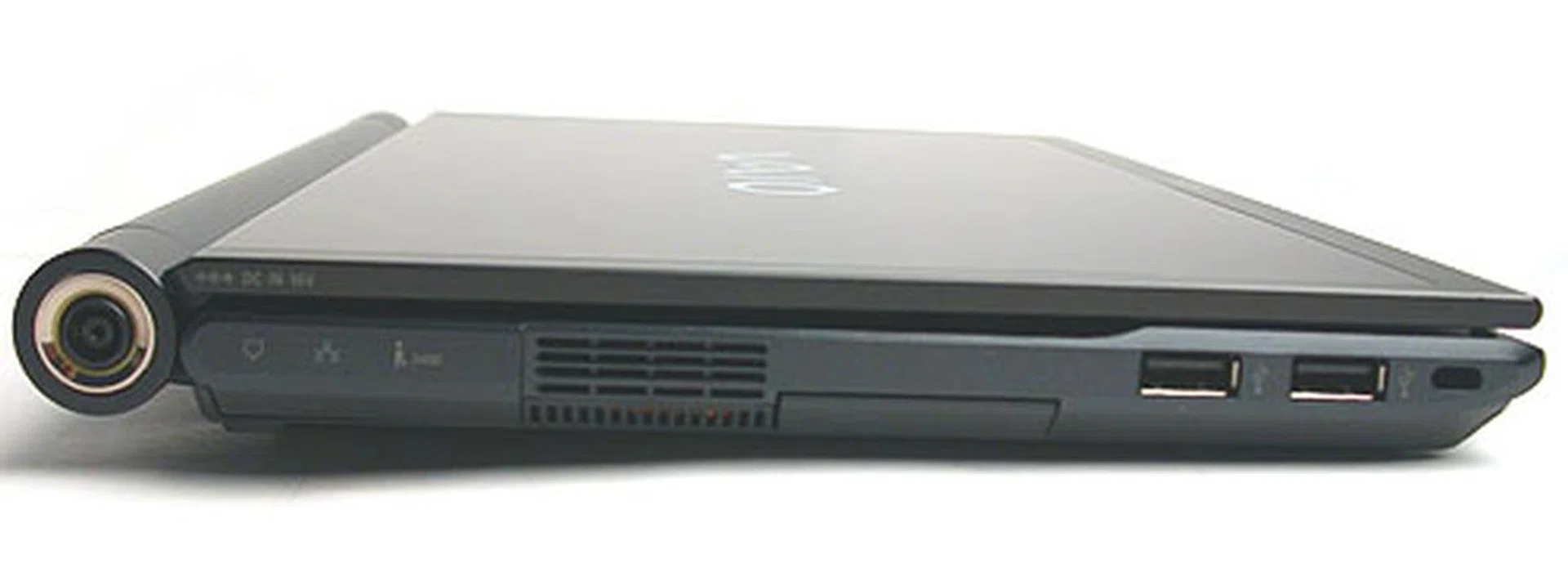
In part due to its small form factor, the number of I/O ports is limited. The essentials are there of course but there are only two USB 2.0 ports.
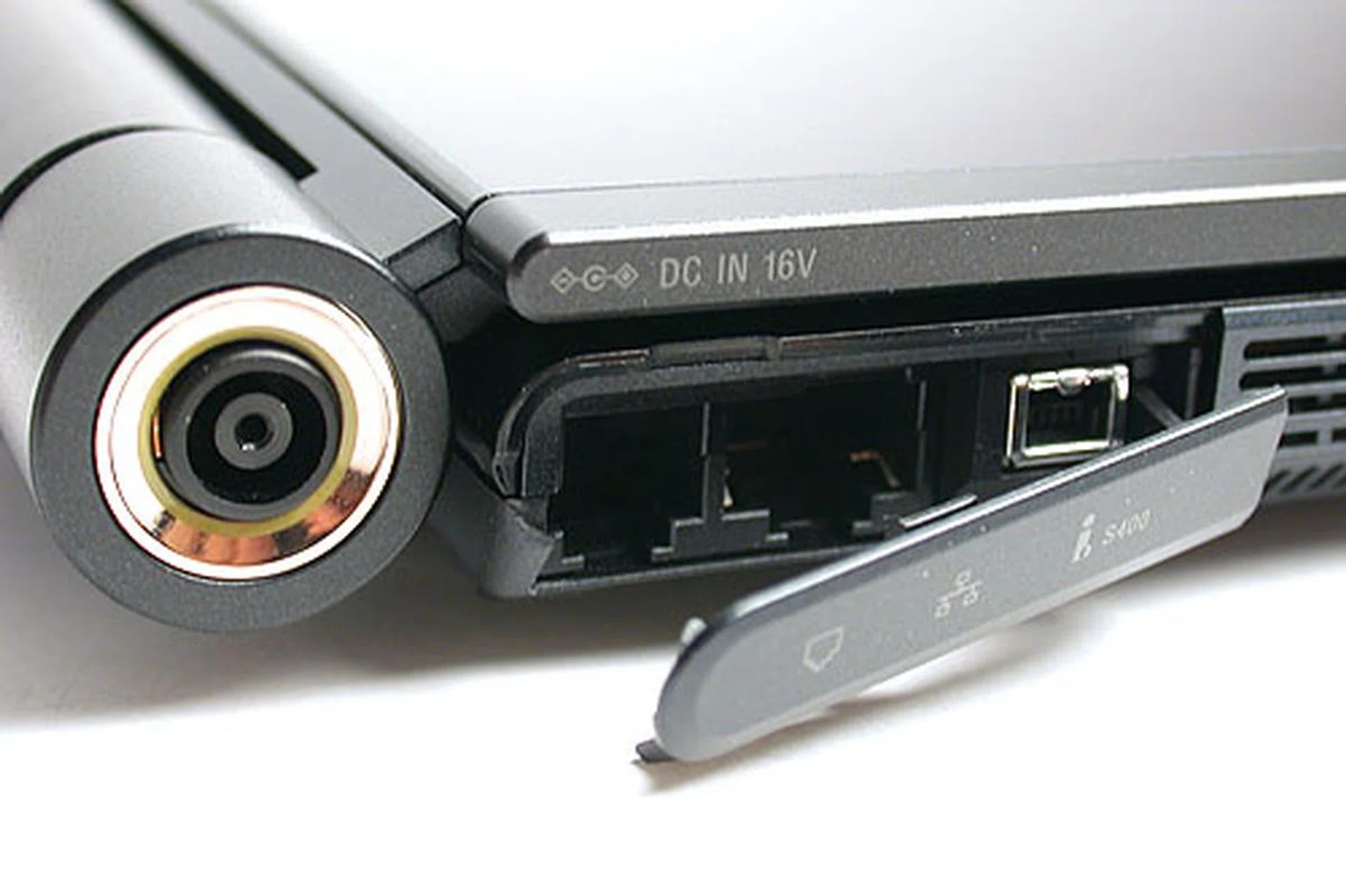
Some of the less oft used ports are concealed, like the mini FireWire and phone modem jack. The connector to recharge the battery is also integrated into the cylindrical spine of the notebook like the power button.
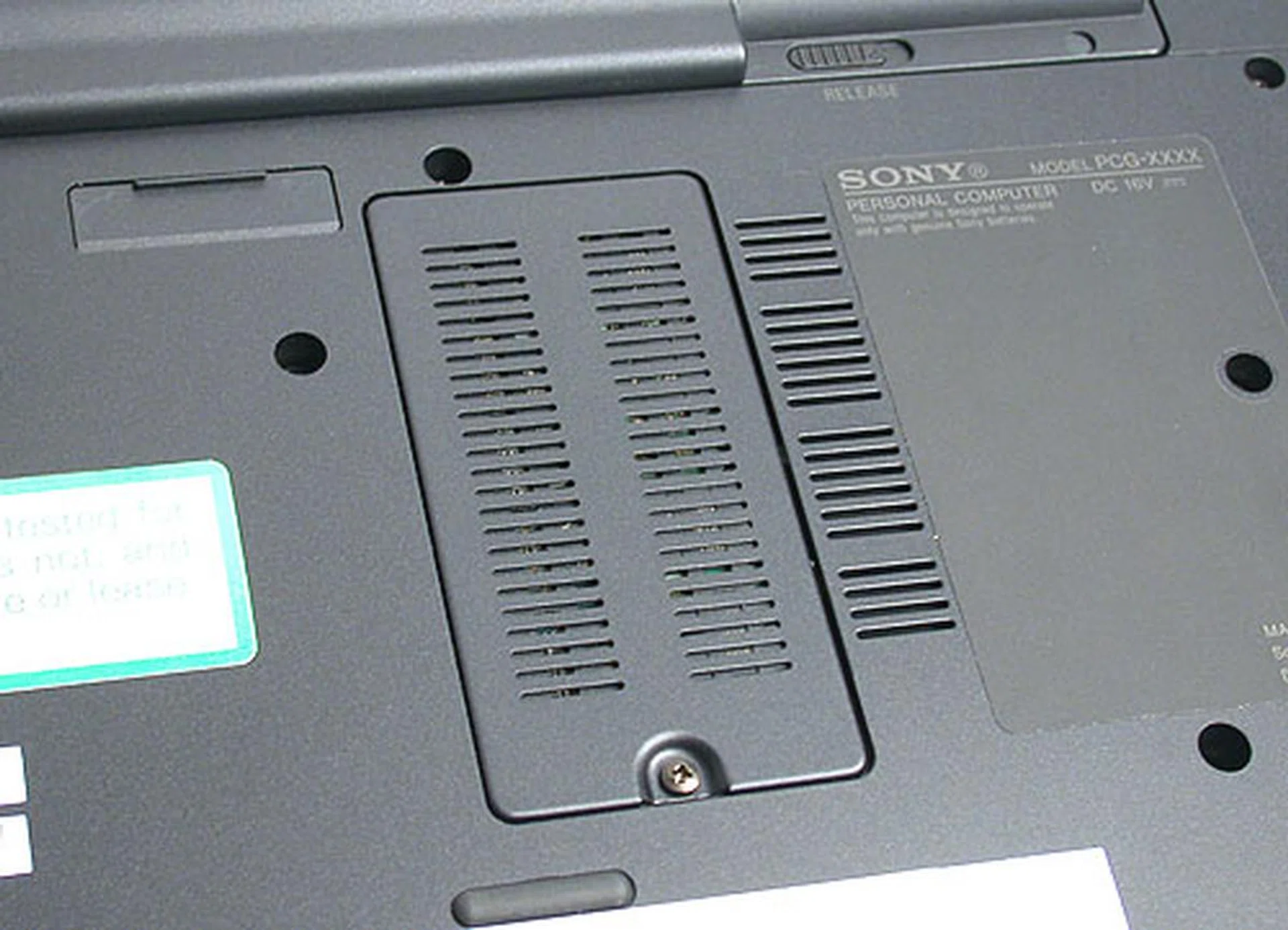
Access to the single SODIMM slot is quite convenient though having only 1 slot does limit the upgrade options.
Next, we have the keyboard, which is nicely spaced out to compensate for the relatively small size of the individual keys. It is obviously not full sized with only 82 keys but there's still quite a healthy amount of tactile feedback while typing. The bezel is in glossy black and could get smudged with fingerprints and stains but looks great at the moment. The indicator lights for Caps Lock, Num Lock, etc are discreetly positioned below the space bar, while the fingerprint sensor and touchpad are located further below.
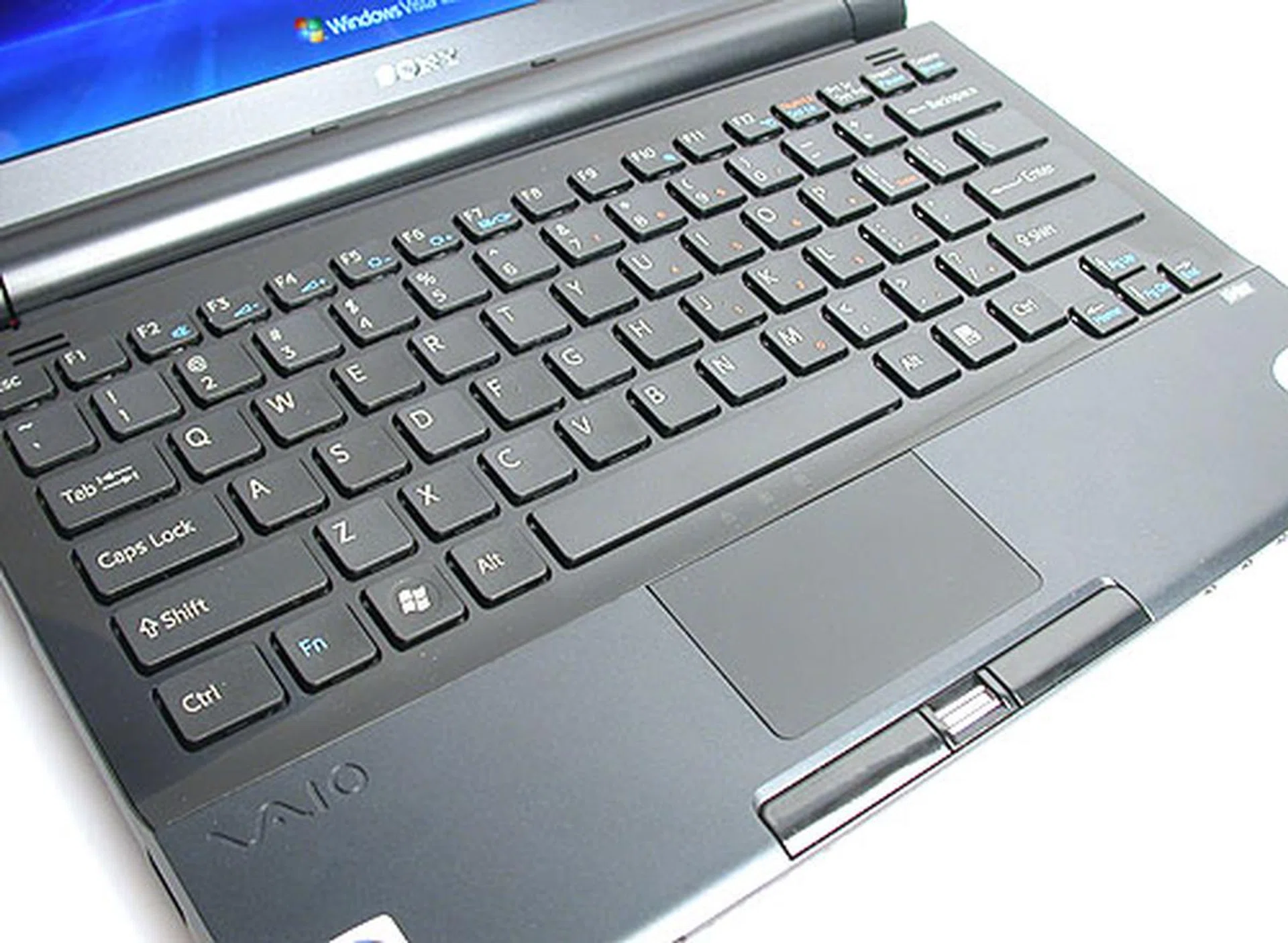
A glossy black background contrasts with the matte black keys and it looks a definite fingerprint magnet. But what the heck, it looks fabulous. Naturally, the key pitch is rather small at 17mm but Sony has spaced the keys to reduce the stress of typing on such a small keyboard. We won't say it's 100% effective and those with larger hands and fingers will find it rather cramped but we could manage decently with our thankfully Asian sized fingers.
There are the usual function keys to control the brightness and volume but most importantly, dedicated keys for the AV Mode feature, which is a media center interface to play media like DVDs and images. This feature has been present on previous VAIO notebooks and you can enter this interface without even booting into Windows first. According to Sony, the apparent improvement on the TZ series besides tweaks to the interface includes the ability to play MP3s for the first time.
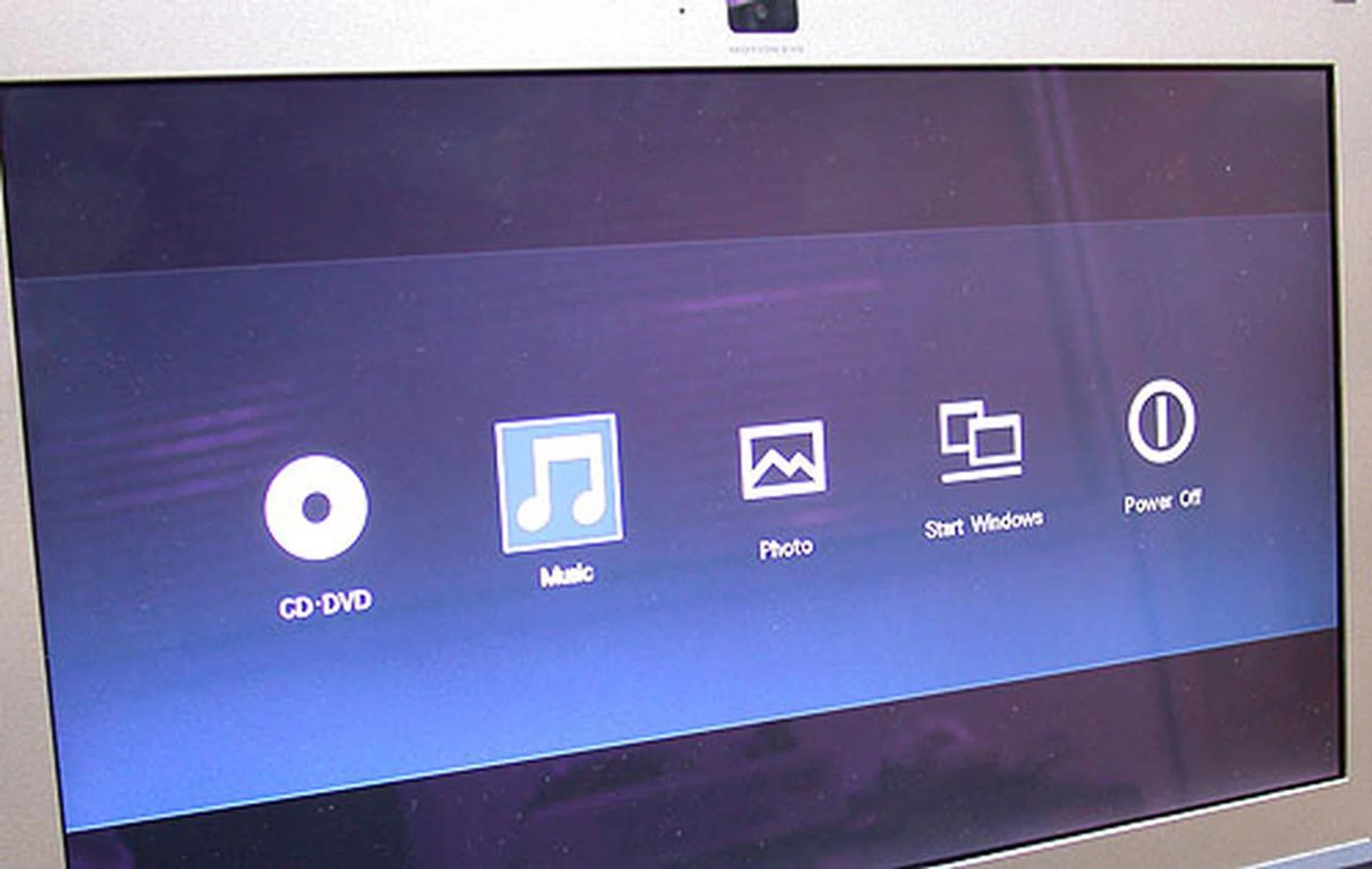
Like many vendors touting its multimedia capable notebooks, this Sony VAIO has an 'instant-on' mode which allows you to access your media files without going through the OS. Obviously, this feature only works if the original hard drive partition has not been wiped clean or replaced with another OS.
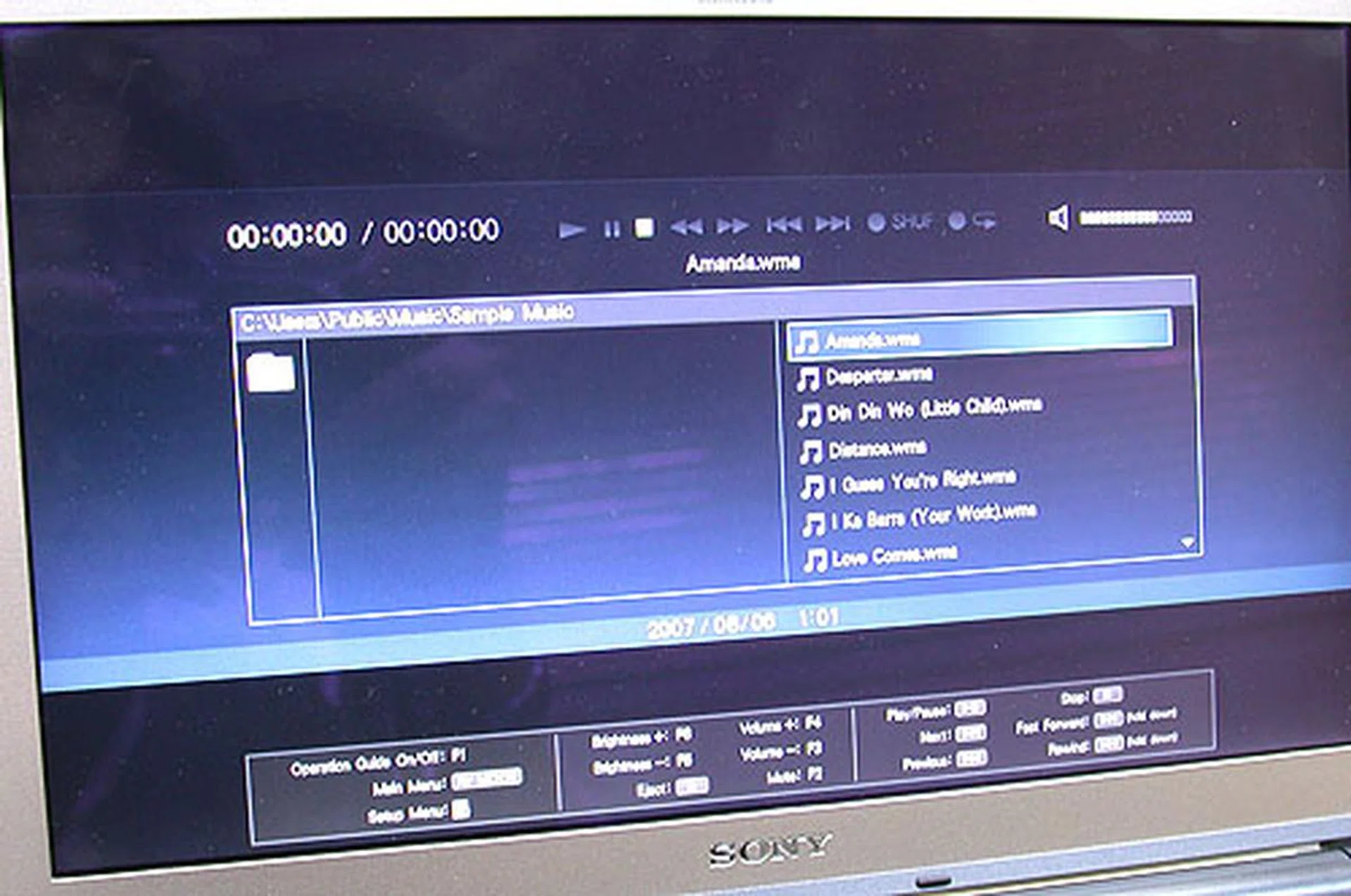
Yup, we could play our MP3s, DVDs/CDs and images through this media-centric interface. The keyboard and AV Mode buttons are used to make your selections. However, we found the buttons a bit too small and you may have to press a few times to get it to respond as intended. The interface too is relatively simple. It's not perfect, though nothing serious was encountered.
Solid State Drive Examined
With notebooks starting to use hybrid drives that merge the advantages of flash based memory with the capacity of the conventional hard drive, it's not surprising that some vendors have taken the plunge fully and introduced pure solid state drives (SSD). The advantages of SSD are quite well documented, from almost instantaneous random access, lower latency and lower noise/heat due to the lack of moving parts. As aficionados of MP3 players would have experienced, it's also unlikely to jitter because your kid decides to juggle your notebook.
Similarly, the high cost of flash memory has so far deterred vendors from going fully solid state. Capacity and cost have been its weak points, with 64GB drives one of the larger commercial SSD options available and costing hundreds of dollars more. Compare that with the standard SATA hard drive and its prodigious capacity, especially with the new perpendicular recording drives. However, such speedy SATA drives of 7200RPM and above have yet to be found in the vast majority of notebooks, suggesting that capacity alone is not the whole story when it comes to the notebook market where other factors like heat, noise and power considerations are weighed thoroughly. All these factors contribute to why SSD looks like a very promising option for notebook vendors - at least in the long run when costs then are supposed to be reasonable. However Sony seems bullish of the market segment of its new ultra portable notebook and has made the SSD hard drive a reality today in the notebook segment (albeit the notebook carries a hefty price tag because of this luxury).
Therefore, we would have jumped at any opportunity to test a SSD. To our delight, we got the perfect scenario with the VAIO TZ series: testing a notebook with a 32GB SSD (TZ-18GN) together with an identically configured version using a normal 4200RPM SATA hard drive (TZ-17GN). Besides this key aspect, both notebooks are essentially similar, from the processor to the graphics to the software and even the exterior.
First, we ran a simple but significant test - starting up the operating system. The TZ-18GN with its SSD took an average of 11 seconds faster than the TZ-17GN when booting into Windows Vista Business. Both notebooks had the same startup programs installed so this test gave an interesting glimpse of the SSD's advantage. We would also like to say that launching applications were faster on the TZ-18GN but the real situation was more murky, since Windows Vista is not exactly that responsive, especially with the 1GB of memory onboard these two notebooks. In short, the difference when it came to launching applications was not as apparent as boot up.
We also used HD Tach 3.0.1 to produce some numbers on how these two drives differed. Like we expected, the random access on the SSD is startling but the burst rate for transfers was not as fast as the SATA drive. Sequential I/O is constant but limited to around 45MB/s and will surely lose out to faster SATA drives found on desktops. We noted that the SSD was detected as an Ultra ATA/66 device and this interface limitation might have dampened its overall throughput. Finally, the current capacity and cost of these drives remains a barrier to mass adoption of SSD.
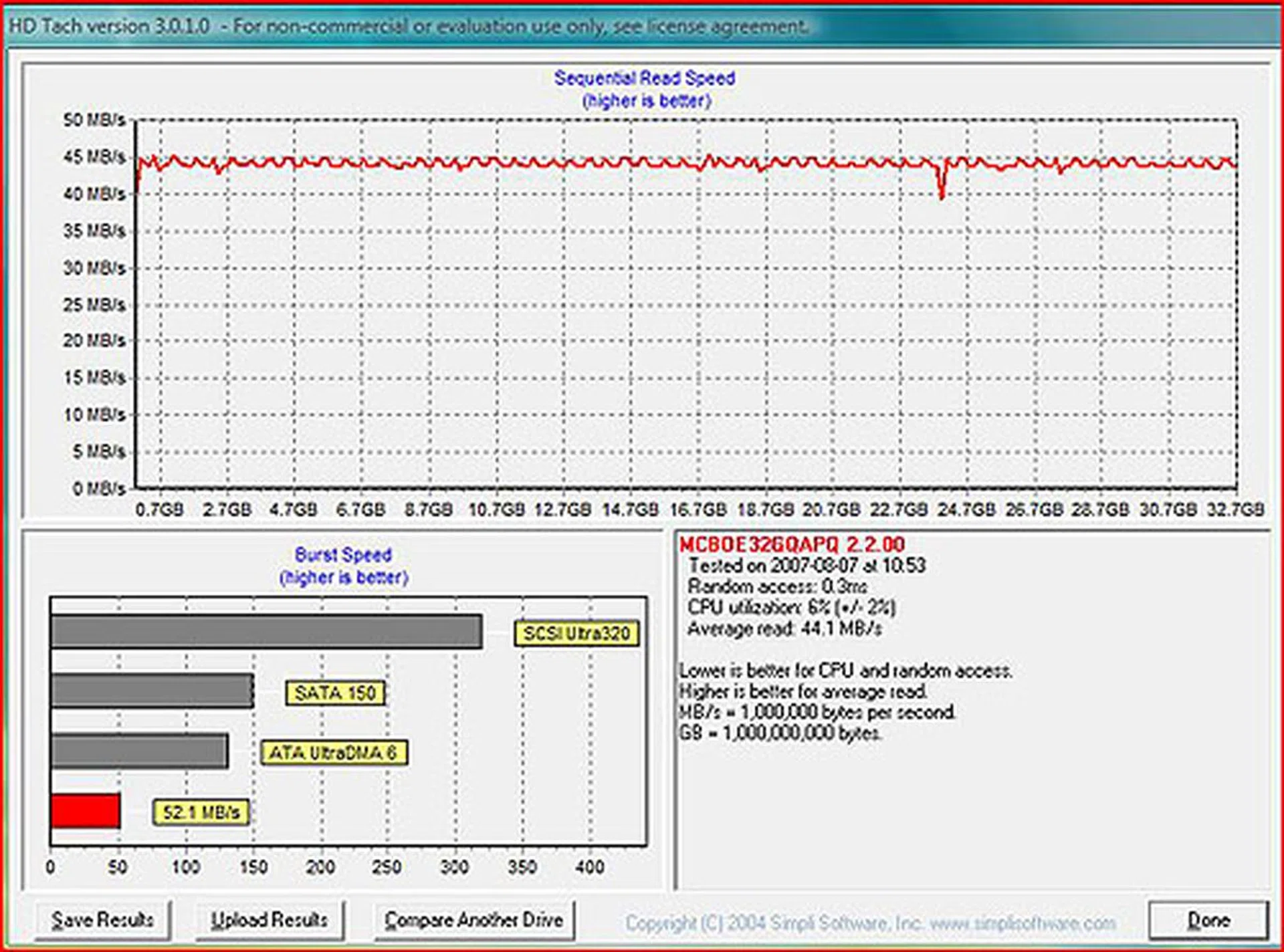
The main advantages of a SSD is evident here. Random access is almost instantaneous at 0.3ms while the read speed stayed consistent at around 45MB/s. It is a Ultra ATA/66 device however, hence the burst speed is rather modest compared to new desktop class hard drives or even notebook hard drives.
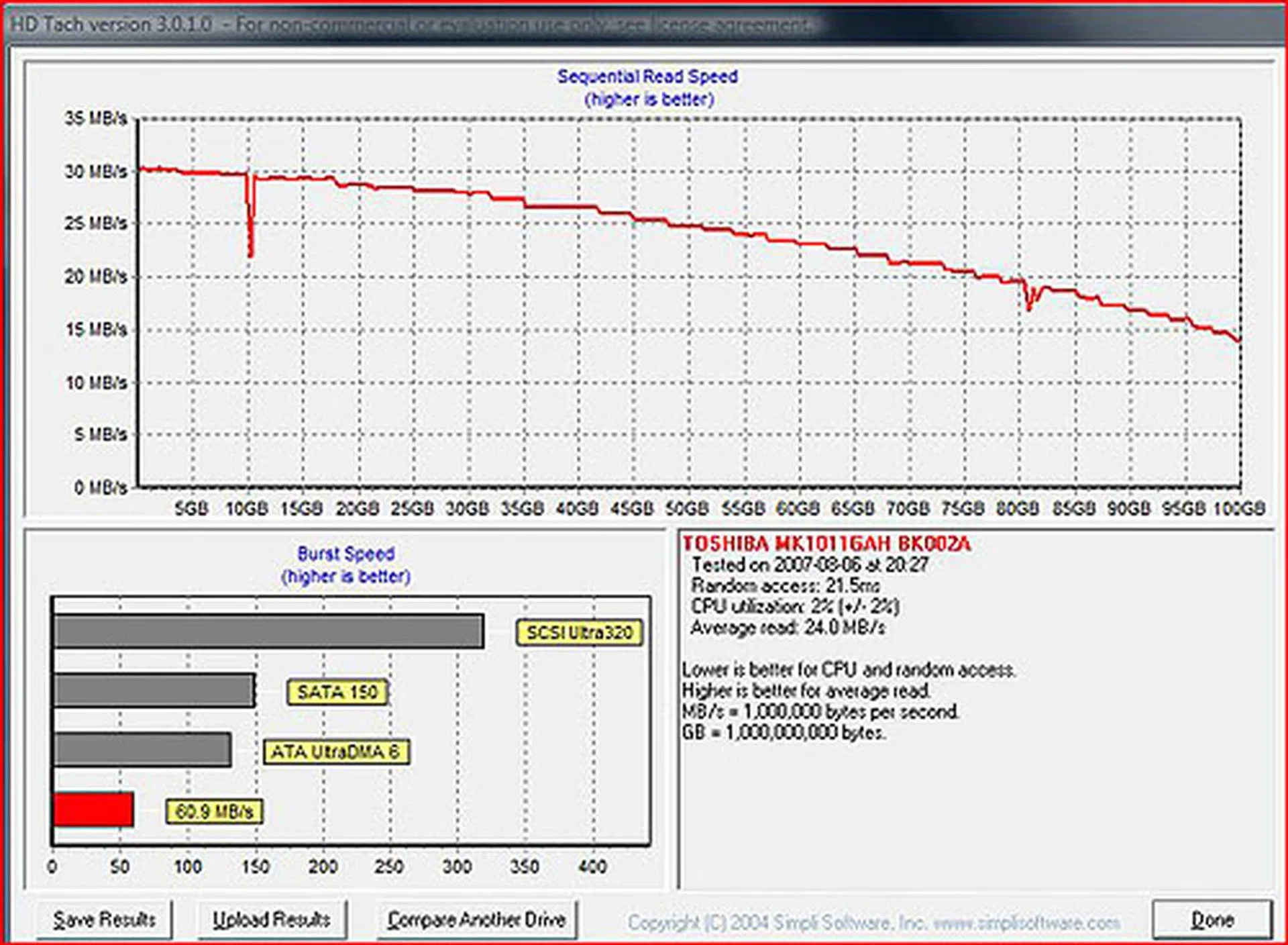
For comparison, we had the HD Tach scores for the TZ17GN, which uses a 4200RPM 100GB SATA drive. Random access for one is much higher while the sequential read speed is not as high and not constant.
Rest of the Hardware
Notebooks are moving on to the latest Centrino Duo platform, Santa Rosa but the Sony VAIO TZ-18GN is not following suit yet. We could think of various possible reasons why this new notebook does not have the latest technology but given its niche as an ultra portable, we doubt that this will affect its sales. After all, it is still powered by a very capable ultra low voltage Core 2 Duo processor based on Intel's capable 945GMS Express chipset. We're not talking about obsolete technology here and the business users that are the target audience of the Sony VAIO TX are likely to be more sensible and conservative in their choice of notebooks. What they require typically is portability and long battery life and that is something this VAIO provides in spades. As you can see from the Windows Experience Index, the weak integrated graphics drags the entire score down, including the outstanding hard drive score.
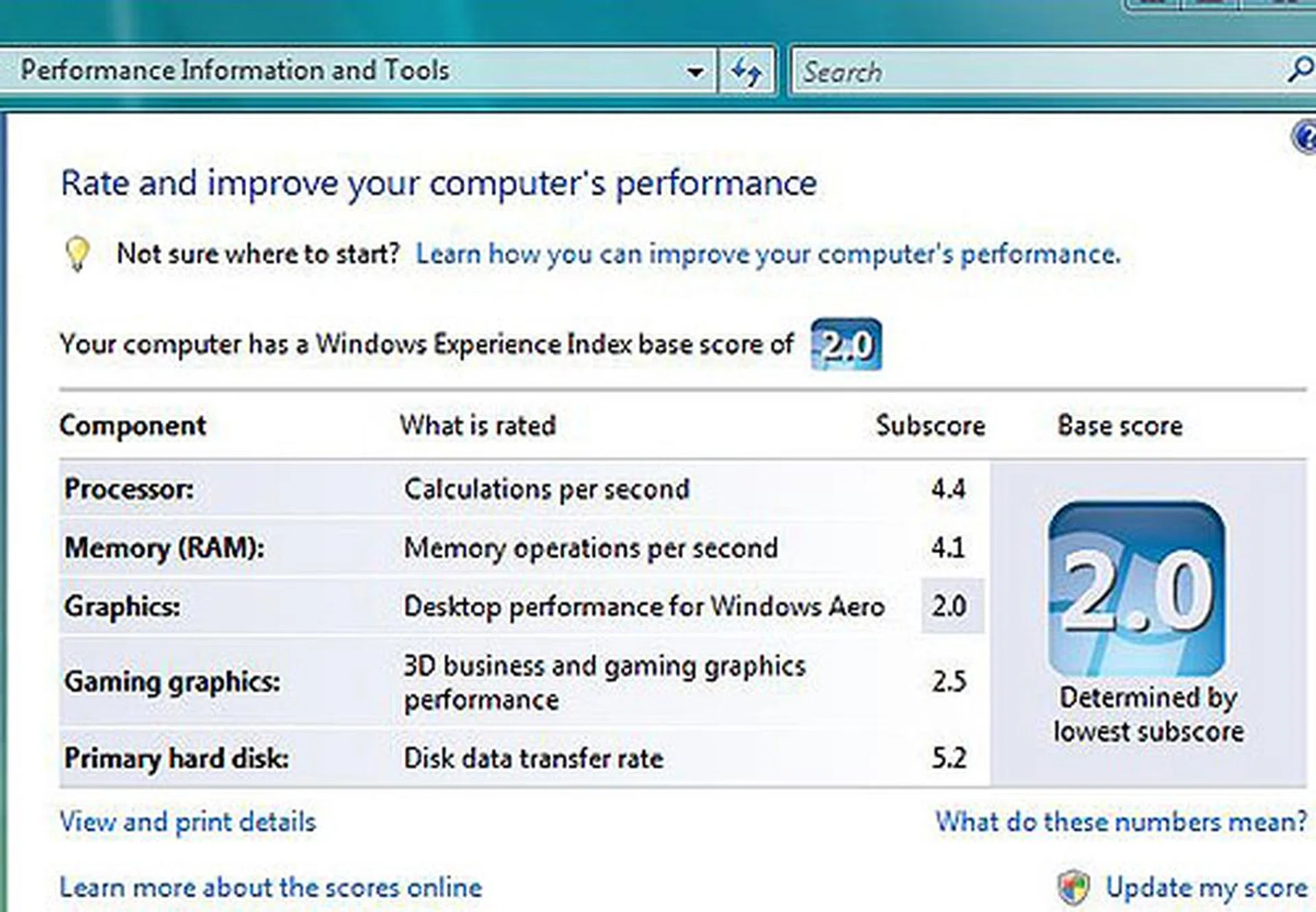
With its flash memory drive, the hard drive score in the Windows Experience Index is probably the highest we have seen on a notebook. The graphics however is another story but inevitable given its ultra portable size.
Other features include the built-in wireless LAN, which may be slightly inferior to the newer variant as it lacks draft-n support. The 1GB of DDR2 memory is also not ideal for running Windows Vista and with only 1 occupied SODIMM slot, the maximum you can upgrade it is 2GB. Since this is a business-oriented notebook, a TPM 1.2 chip is included for encryption and security and complements the fingerprint sensor onboard. There's also a multi-format optical drive that can read and write to practically any format for DVDs and CDs. Again, speed is not its strong point here but then that's not the point of such a notebook. Then, there is the 32GB flash based solid state drive. With the number of applications that Sony had pre-installed on our review unit, there was hardly much space left; we had roughly 6GB of free space. This included the recovery option, which according to Sony, takes up 8GB of space alone but when enabled allows users to restore the hard drive to its original pristine condition.
As mentioned earlier, there are loads of pre-installed applications from Sony, including media center programs, video, picture editing software and the compulsory antivirus and security programs. Together with the new Windows Vista Business operating system, the VGN-TZ18GN can feel downright sluggish at times. A default memory configuration of 2GB would have really bolstered the notebook well and if you are eyeing this notebook, we would encourage that.
Notebook Comparison
It's fair to say that unlike components i.e motherboards, processors, etc, a notebook is harder to compare against because it is a complete system, with a sheer number of different components and factors that can affect its performance. Hence, we have to make do with comparisons that may not be wholly appropriate in the strictest sense but should provide a rough ballpark figure. This is the case again for the Sony TZ series and the following table includes the list of notebooks we have compared it against or simply just used as reference points. Some are chosen selectively for certain aspects and will not be featured in every one of the benchmarks.
Specifications/Notebook | Sony VAIO VGN-TZ18GN / VGN-TZ17GN | MSI PR200 | BenQ Joybook S41 | Sony VAIO VGN-TX37GP | Intel Santa Rosa Prototype |
Processor | Intel Core 2 Duo processor U7600 (1.2GHz, 2MB L2 cache) | Intel 2 Duo processor T7300 (2.0GHz, 4MB L2 cache) | Intel Core 2 Duo processor T7100 (1.8GHz) with 2MB L2 cache | Intel Core Solo U1400 (1.2GHz, 64KB L1, 2MB L2 cache) | Intel Core 2 Duo Processor T7700 (2.4GHz, 4MB L2 cache) |
Chipset | Intel 945GMS Express | Intel GM965 | Intel PM965 | Intel 945GMS Express | Intel PM965 |
FSB | 533MHz | 800MHz | 800MHz | 533MHz | 800MHz |
Memory | 1 x 1GB DDR2 | 2 x 1GB DDR2 | 1 x 1GB DDR2 | 1 x 1GB DDR2 | 2 x 512MB DDR2 |
Video | Intel GMA 950 | Intel GMA X3100 | NVIDIA GeForce 8600M GS | Intel GMA 950 | Intel GMA X3100 |
Battery Life and Portability Index
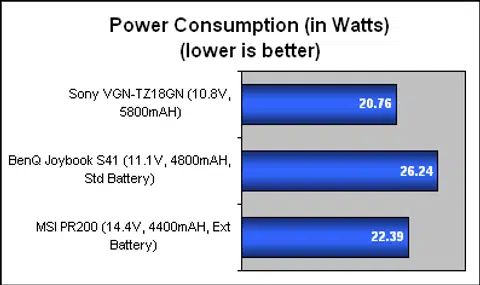
First, let's take a look at battery life. Sony quotes the TZ-18GN as having up to 11.5 hours of use under the JEITA Battery Run Time Measurement Method, which seems to be Japanese based. Since our usual MobileMark doesn't play nice with Windows Vista, we have been substituting this so far with a DVD playback test for our notebooks. This is conducted similarly with the TZ-18GN and with our X-Men 3 DVD, it lasted an impressive 3 hours and 35 minutes. Compared with the recent batch of notebooks we reviewed, the ultra portable TZ-18GN has a clear advantage, even beating out the MSI PR200 with its extended battery. Sony also has an optional extended battery for the TZ-18GN with an additional 6.5 hours of battery life (JEITA measurement). Meanwhile, we looked at the battery in our review unit and calculated some power consumption numbers, which were again superior to our comparisons.
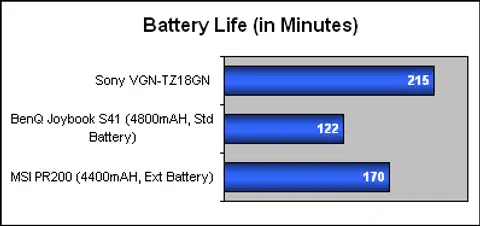
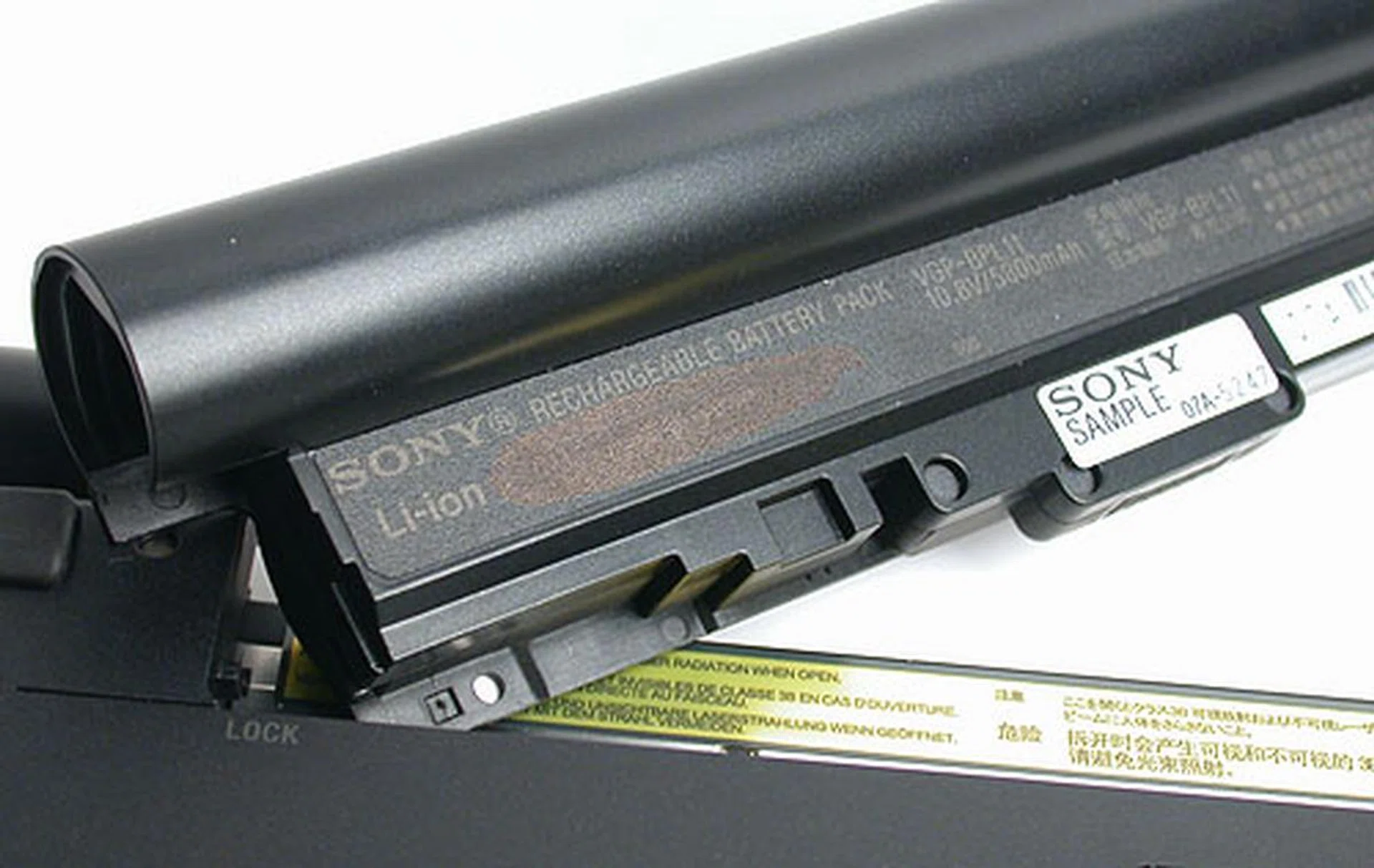
Despite its size, this Li-ion battery lasts quite a while and is rated at more than 11 hours according to Sony. Our own DVD playback test at full brightness saw it last a very good 3 hours and 35 minutes.
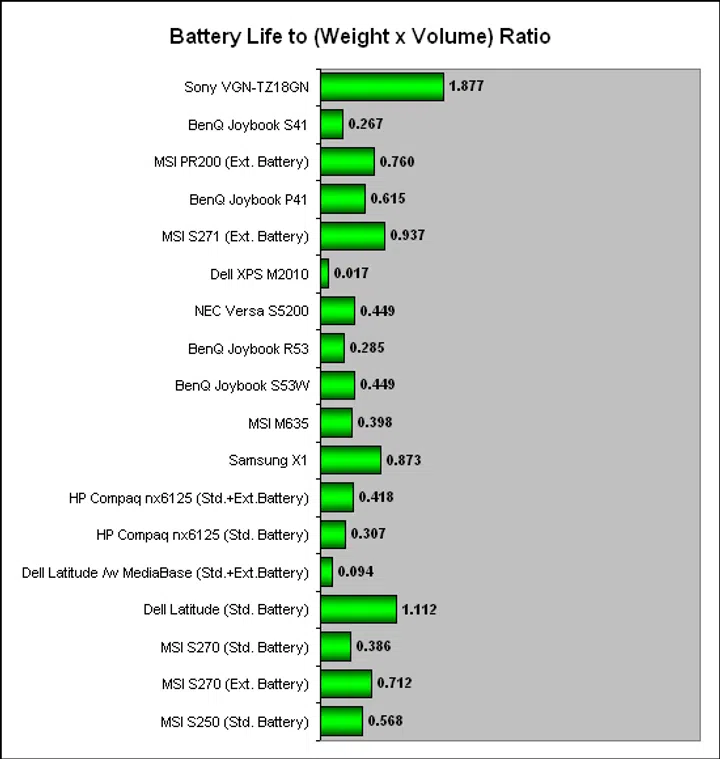
Next, based on its battery life and its small dimensions, we calculated how portable this notebook actually is, relative to other notebooks of course. This index below shows that and again it's a ratio that's only useful when seen in the context of other notebooks. Even with its standard battery, the TZ-18GN scores highly thanks to its twin highlights of weight and battery life.
System Benchmarks
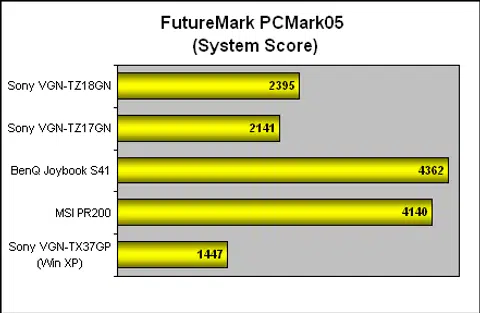
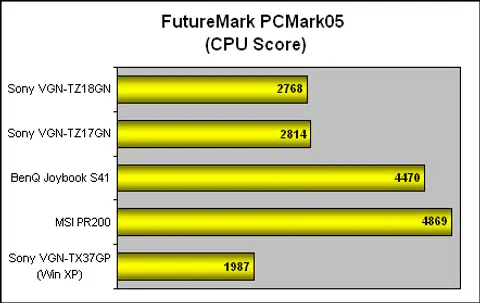
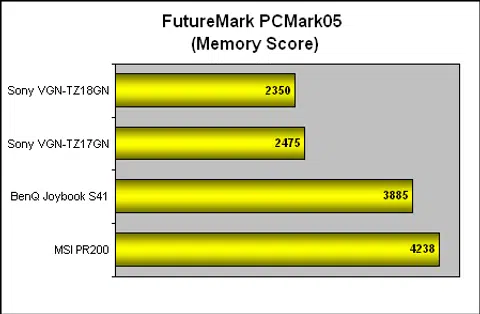
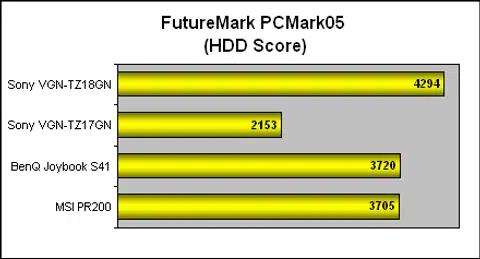
Our system benchmarks have basically been reduced to PCMark05 due to the incompatibilities of Windows Vista. Nevertheless, this benchmark breaks down the various sub-systems of the notebook and gives an idea on how the TZ-18GN fairs, relative to others. Going from the Core Solo on the older VAIO TX (based on the Windows XP operating system) to the Core 2 Duo on the VAIO TZ, there's a significant gain but the TZ series lagged behind the new Santa Rosa (and admittedly higher clocked processors) notebooks. This trend stayed mostly for the memory and CPU sections but the SSD on the TZ18GN made its impact in the HDD segment, where it easily outperformed the others. As you can see here, the two TZ notebooks are very similar as it should be, though the slower 4200RPM hard drive pulled the TZ17GN back compared to the other 5400RPM based comparisons.
Graphics Benchmark
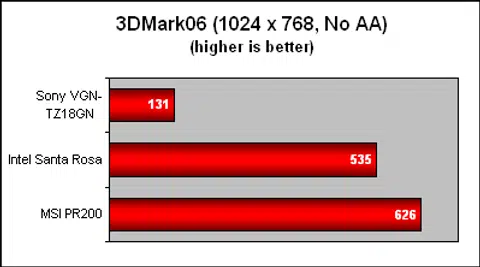
With the older Intel GMA 950, the integrated graphics on the Sony TZ series was simply no match for the newer GMA 3100 on both Santa Rosa notebooks. It's quite clear that this notebook is not meant for anything more taxing than the most casual of games and with its small 11.1-inch screen, we can understand that.
Final Thoughts
Can we put a price to style? That's the question that confronted us while gathering our thoughts about the new Sony VAIO TZ series. There is much to admire about the design of the Sony TZ series, from its simple, minimalist chassis, pared down to the essentials so as to maintain its ultra portable form factor, yet flexible and not at all fragile. The unique and seamless integration of the battery into the spine and hinge of the notebook such that it really feels like a book, in both its relative weight and size. Its understated elegance is appropriate for the genial facades of the business world, where impressions are everything and of course, the Sony VAIO brand has established itself as a premium, expensive one that speaks of the finer things in life.
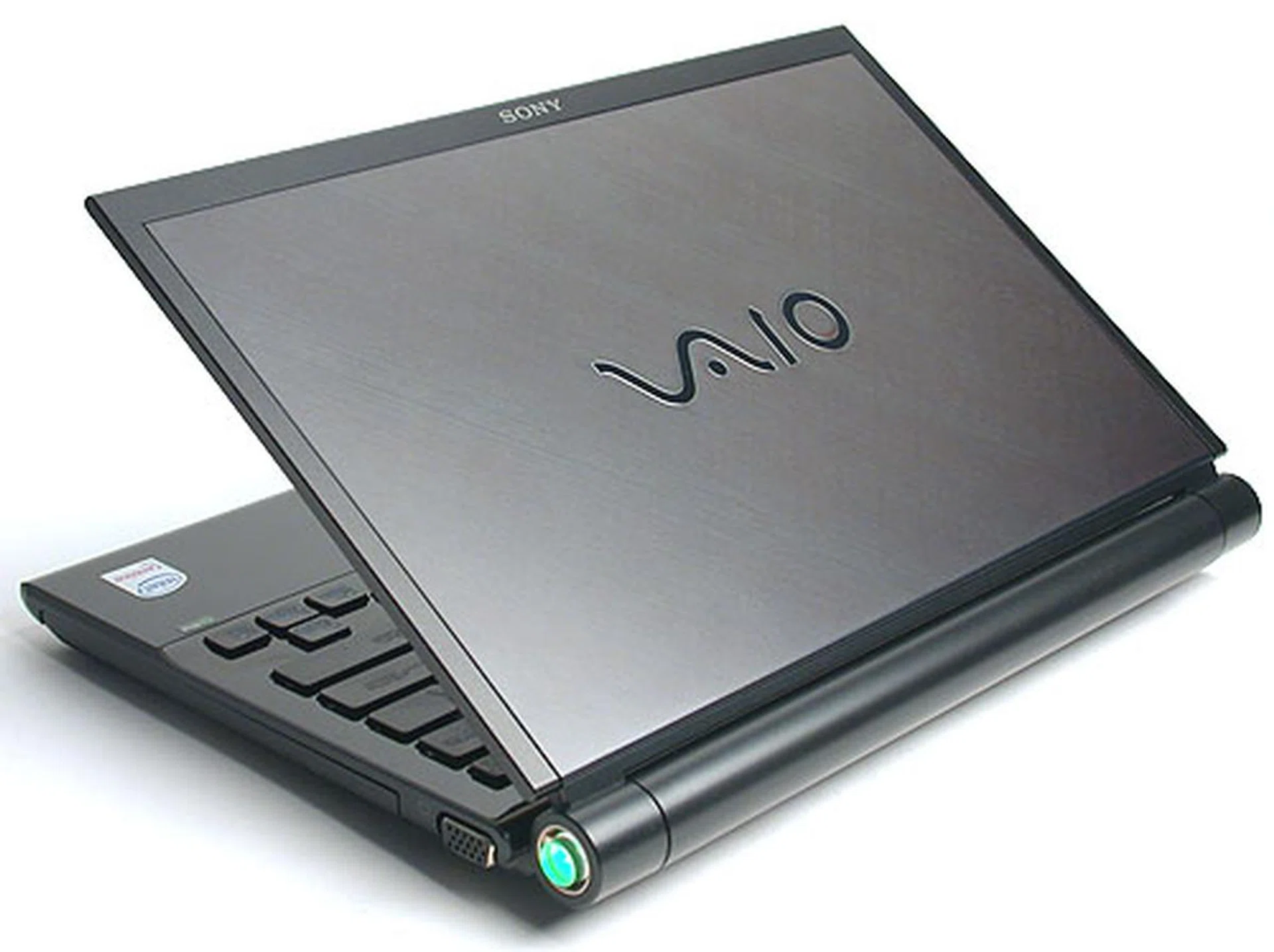
If technological artifacts can be works of art, then we have no doubt that the Sony VAIO TZ team did its best to create one here. It's expensive, bloated with software and less than responsive at times but it truly looks stunning and as light as a feather compared to most notebooks.
At least that's on the overall build and design. The internals are not as serene. It's not exactly Sony's fault as much as the Microsoft Windows 'eco-system'. Thanks to the wide diversity of programs and applications available on the Windows platform, the pre-installed applications on the Sony TZ are as diverse and just as messy. There are video, image editing tools, content creation software, multimedia players and Sony does its best to handle all these programs, especially since few of these programs are actually produced by Sony. But the fact remains that this notebook is bloated with software. Much of that, like the security programs are a constant fact of life in the Windows world. Others like the countless Sony themed wallpapers and desktop themes we found are extra chaff on the already limited disk space of the solid state drive (SSD) on the TZ-18GN. Coupled with only 1GB of memory, the TZ-18GN can feel slow and laggy at times. Given that there's only a single memory slot, Sony should have bumped the notebook to 2GB of system memory by default to counter our performance concerns. Memory isn't exactly expensive and going by the price category of the notebook, it's easy to factor in the extra cost of the memory.
Even the supposedly fast random access capability of the SSD is hindered by the bloat and the less than responsive Windows Vista Business does not help. It does lead to faster start up time but with its free capacity reduced to around 6GB after all the pre-installed programs and the recovery option, we aren't sure if getting the SSD is the pragmatic choice. The marginal benefits that we are seeing from the SSD do not seem to match the corresponding loss in the disk space and more importantly, the cost. The VGN-TZ17GN, which uses a typical 100GB SATA hard drive, is S$800 cheaper than the VGN-TZ18GN and has more than thrice the capacity. In our opinion, that's not a tough decision.
For those who can afford it, the new Sony TZ series have both the pedigree and the style to impress your business partners and be the classy companion for the high flying executive. Seriously, this is one of the most well engineered notebooks we've come across and it really exudes oodles of class, style and quality. There is also substance beneath its style and its long battery life and ultra portable form factor are major advantages for the constant traveler. Performance arguably is at a lower priority here and for its niche, the Sony VAIO VGN-TZ18GN does reasonably well. Heat output could be a concern to those who intend to use this feather light notebook on your lap, but it's really subjective and we recommend you to have a feel in the showroom. The only real sticking point as with the high-end VAIO notebooks is as usual its S$4499 price tag, exaggerated by the SSD unit. At this price, many will no doubt be admiring this notebook at the showroom than in their homes, but be warned that you might be charmed into getting one as soon as you've experienced it first hand.
Our articles may contain affiliate links. If you buy through these links, we may earn a small commission.