

Playing Catch-up
The Sony Vaio T is the first true Ultrabook to come from the Japanese tech giant, ever since the concept was revealed at last year’s CES. During that time, most of the major PC manufacturers introduced their take on what was supposed to be thin, sexy and affordable. But Sony went out of their way to produce a notebook - the Sony Vaio Z - that symbolizes what an Ultrabook should be. The Vaio Z had everything an Ultrabook wishes it had. A full HD screen, super thin and light body (16.65mm, 1.17kg), super fast SSD and even a Power Media Dock (comes with a discrete GPU) that turned it into powerful little machine. One could even say that it was ahead of its time.
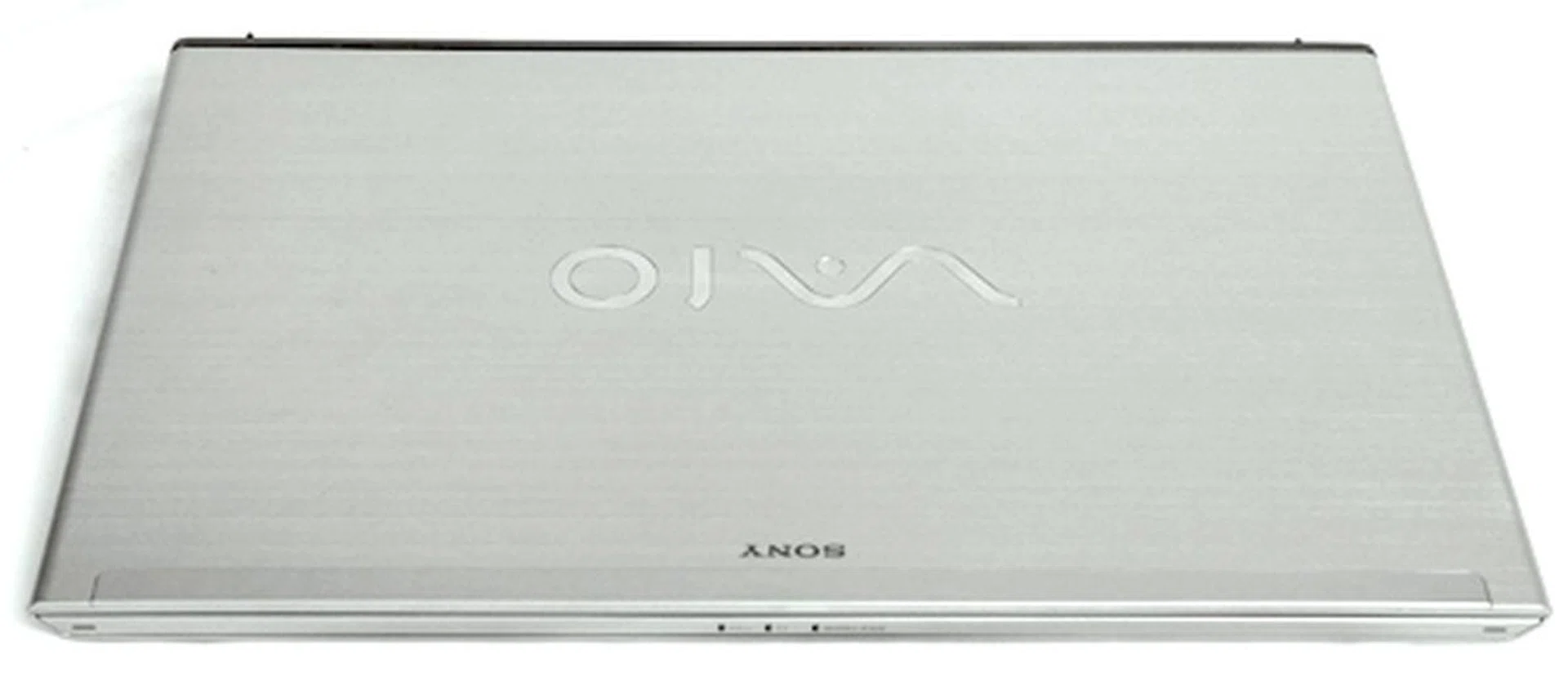
The Sony Vaio T is Sony's first Ultrabook, and its looks borrows liberally from its older sibling, the Sony Vaio Z.
Unfortunately, the Vaio Z was also targeted as a premium product and couldn't answer the “affordable” aspect of a typical Ultrabook in a manner that satisfies mass consumers. However it’s a question which Sony hopes the new 13.3-inch Vaio T can answer successfully. At a glance, the Sony Vaio T does resemble the more powerful Vaio Z, but it differs slightly in terms of height (17.8mm) and weight (1.6kg). The build materials used for the Vaio T are also different. Instead of carbon fiber, Sony opted to deck the Vaio Z in silver colored aluminum alloy (lid), silver colored magnesium alloy (palmrest) and plastic (bottom).
Sony, being known for their flamboyant notebook designs, managed to blend the three different materials quite well in one notebook design. The overall look of the machine doesn’t exactly make you gasp in amazement, but it hardly disappoints either. The diverse materials used also help to keep the weight of the machine down and keeps the price in check as well. However we noticed that at 1.6kg, it does weigh quite a bit more than other Ultrabooks (average of 1.3kg and below). So do take note of this point before you make your purchase.
As a reasonably priced (S$1299), portable multimedia machine, the Vaio T does its job fairly well. Having said that, its 13.3-inch screen could be a deal breaker with it's very standard 1366 x 768 pixels resolution, which doesn't help it differentiate from the sea of the first generation UItrabooks already in the market. At this point of time, most people are expecting a slightly higher resolution of 1600 x 900 pixels for better productivity and screen clarity. Screen matters aside, the speakers on the machine sounded adequate. They're not the best we've heard from an Ultrabook, but are much better than the weak ones found on the Vaio Z.
There are also some gimmicky things added in the software side of things, like the gesture control which works via the embedded webcam. Theoretically it’s great to be able to control your notebook with gestures. But when we tried it, it doesn’t work all the time, which kind of defeats its purpose (which is supposed to be convenience), but cool nonetheless.
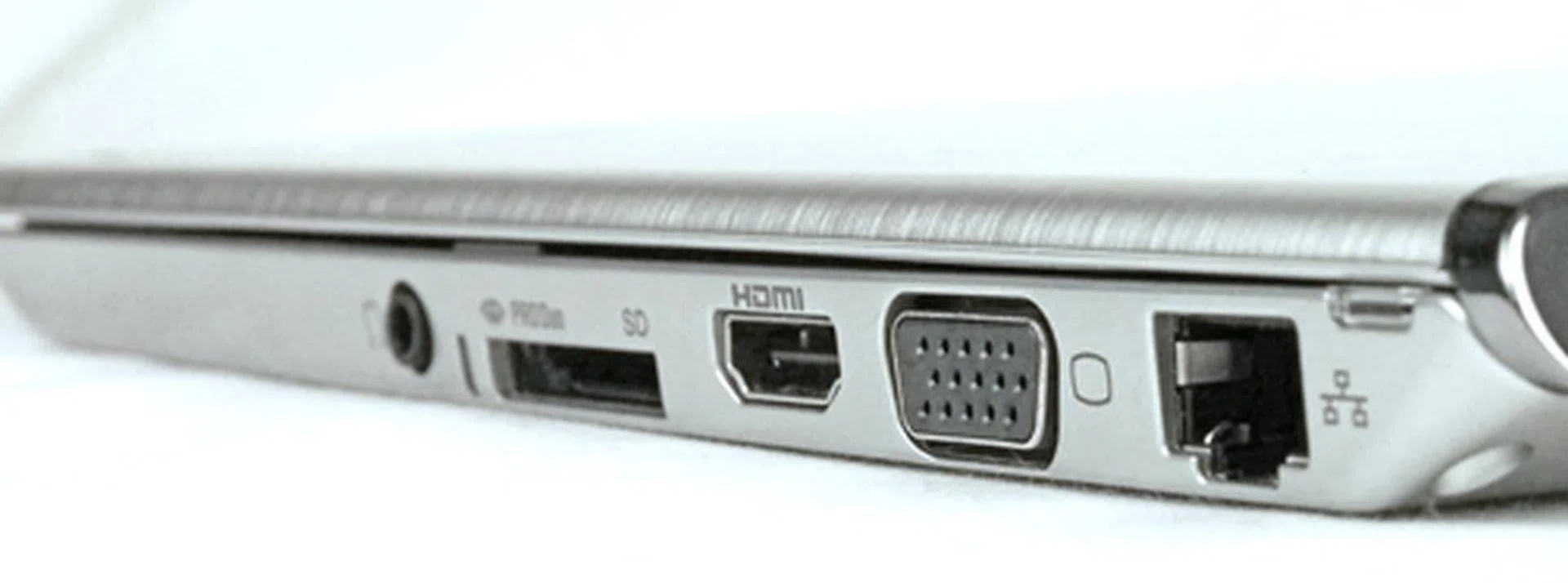
One of Vaio T’s major selling point is its wide array of ports. As you can see, it offers an RJ45 LAN and VGA ports that aren't usually seen in most Ultrabooks. HDMI port, card reader and a headphone jack round up the list of connections on this side profile.
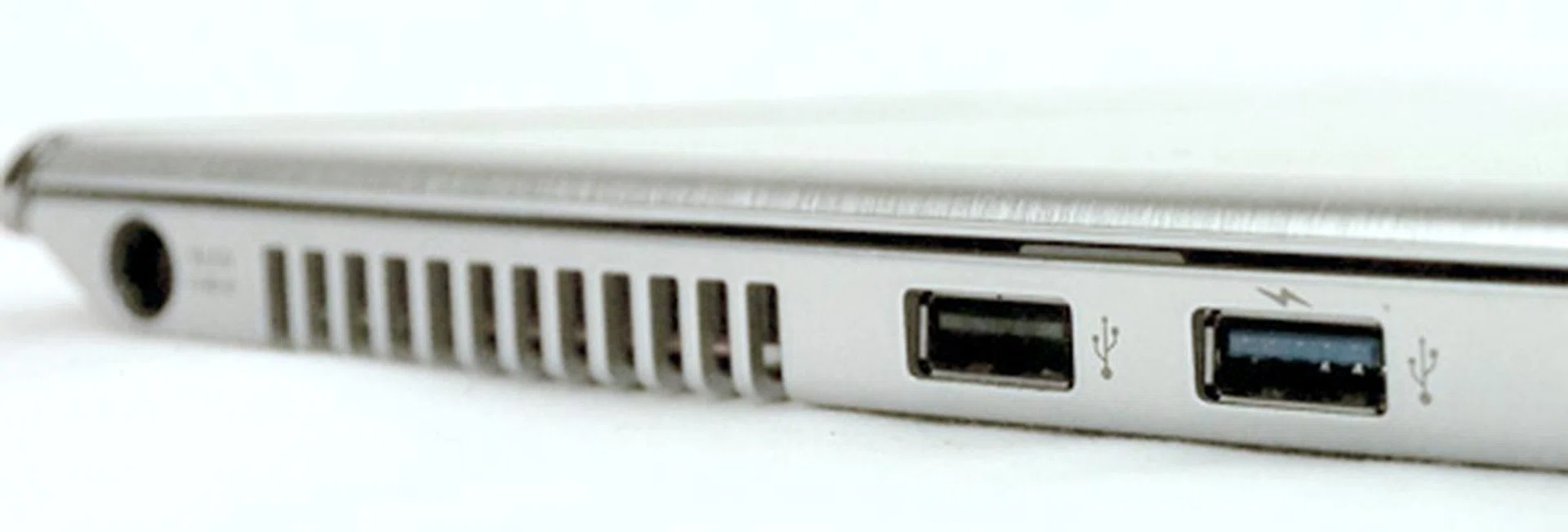
What we found disappointing however, was that it only has one USB 3.0 port (and one USB 2.0 port).
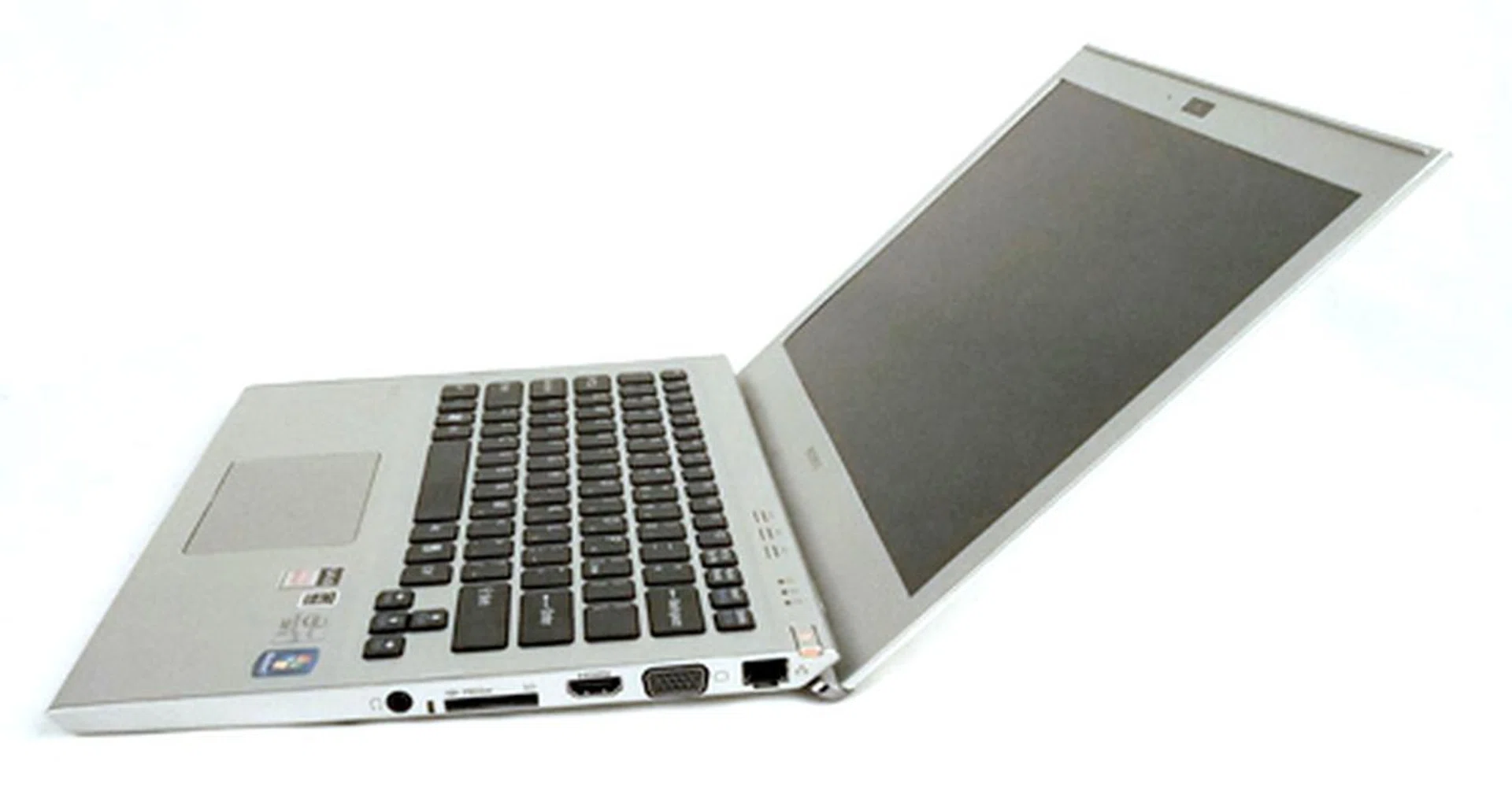
One of best things about a Sony notebook is how the lid opens easily with only one hand. It’s definitely a show of Sony’s dedication to designing the little things that make up the Sony experience.

The chiclet keys on the Sony Vaio T are pretty shallow, but fortunately it has got a fair amount of resistance. The combination of these aspects actually blend well as we generally felt comfortable typing on it.
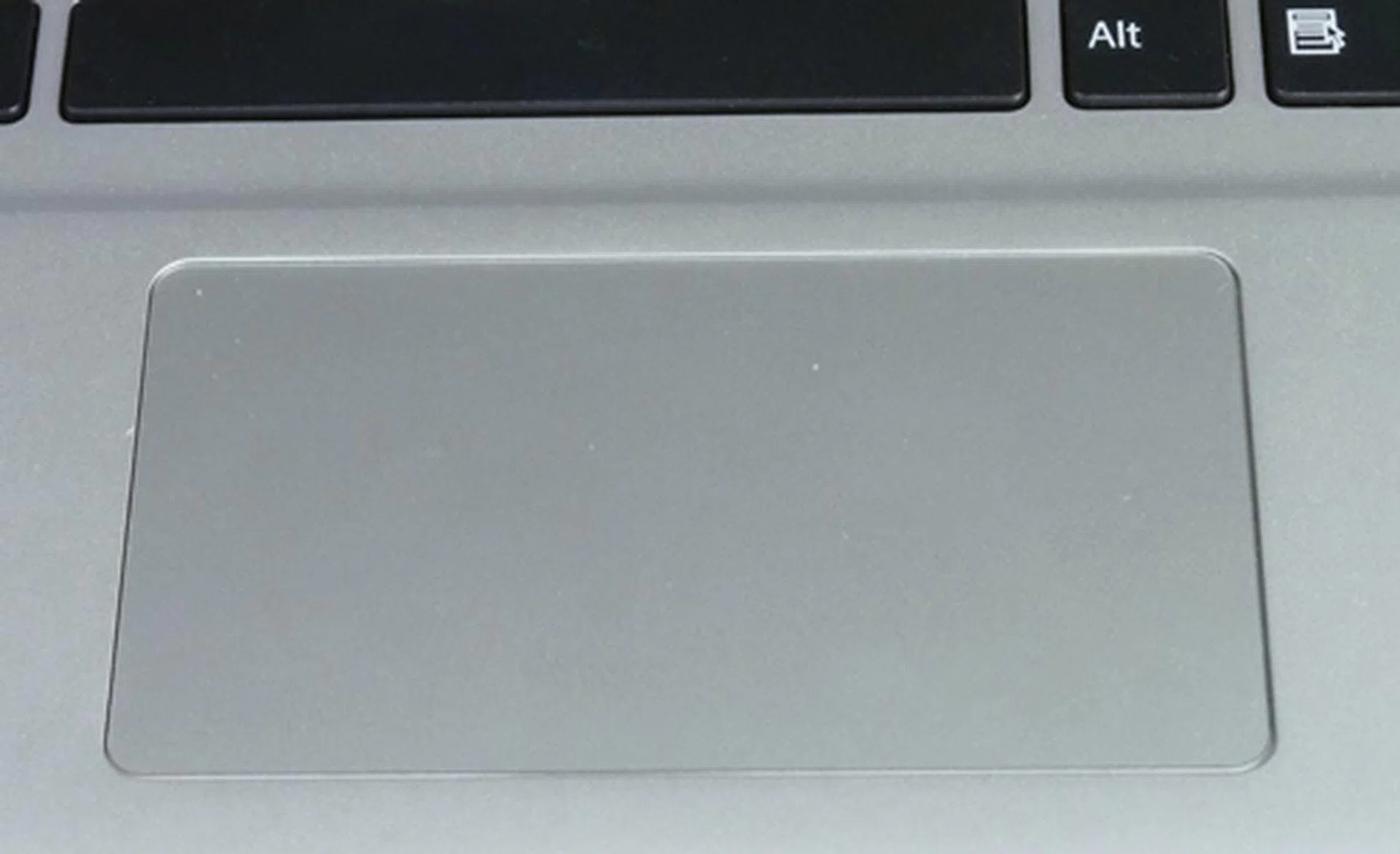
The Vaio T has a clickpad, just like most of the better equipped Ultrabooks in the market. But the implementation here is slightly disappointing as it’s obviously smaller than those we’ve seen on other Ultrabooks.
Performance and Benchmarking
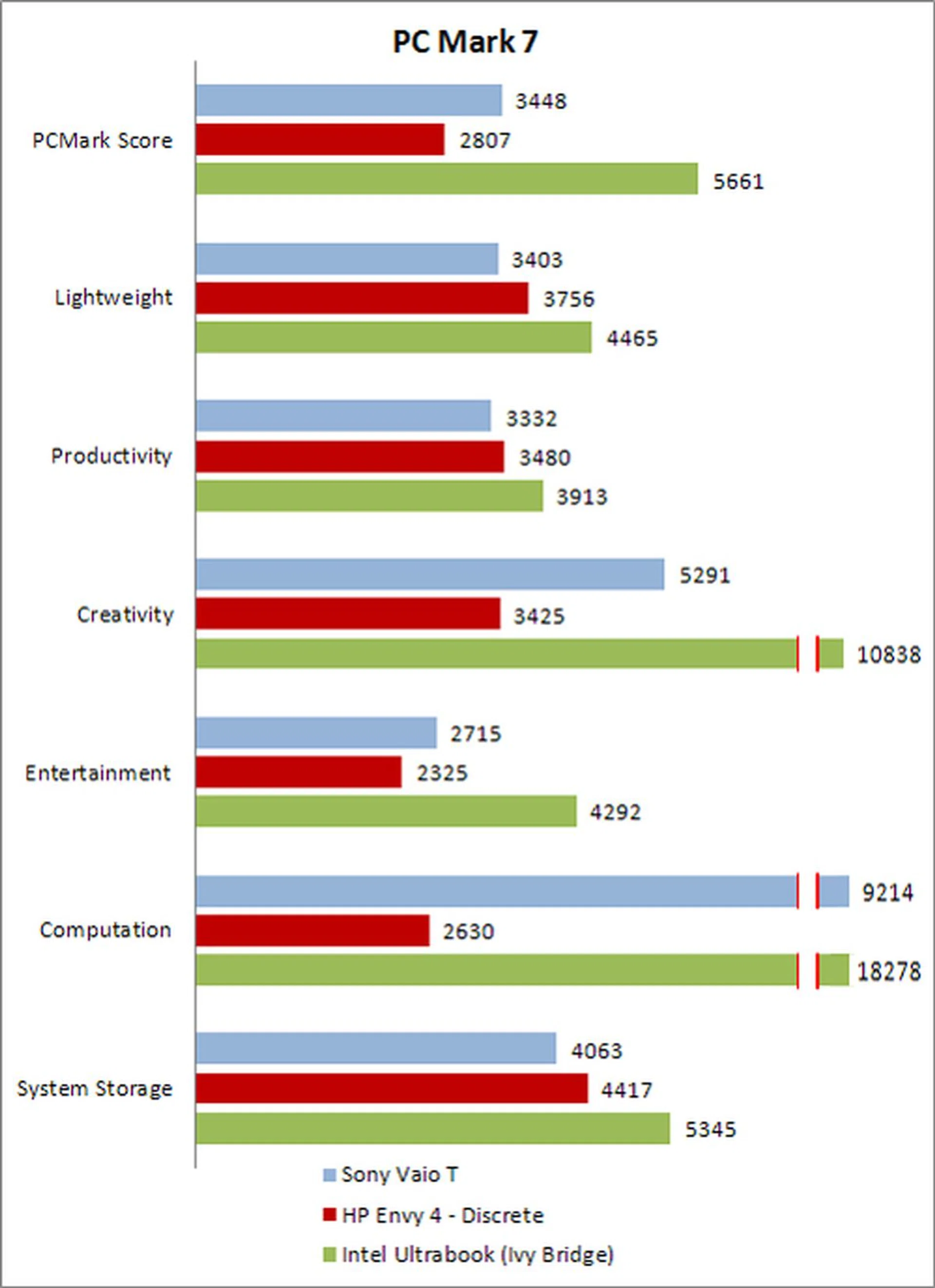
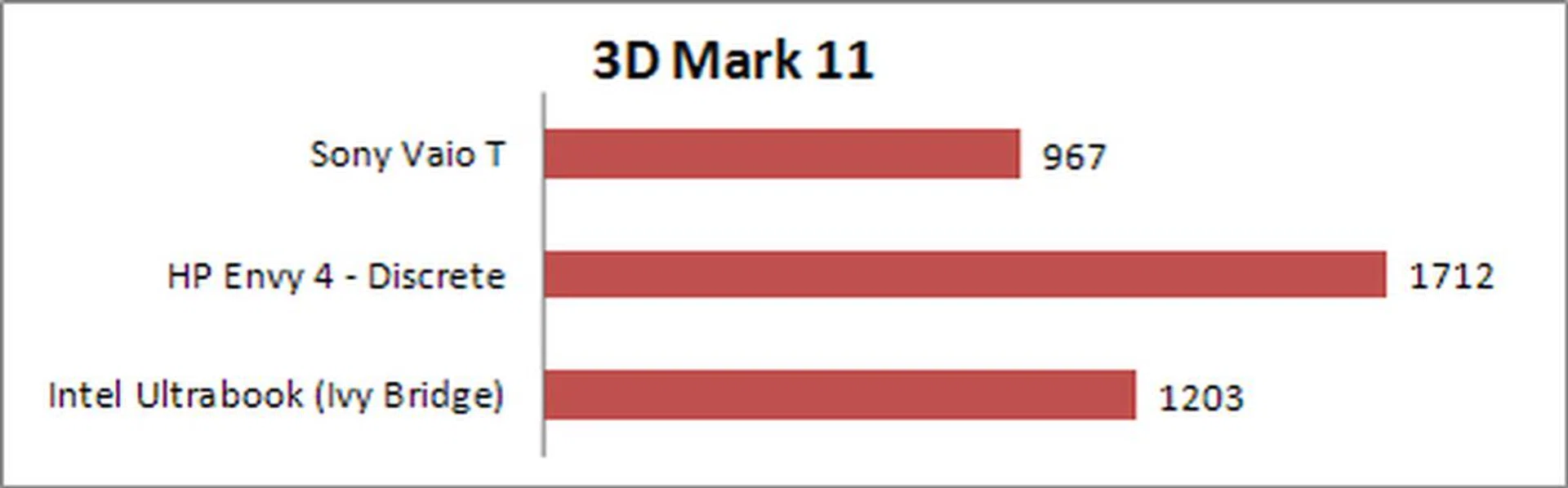
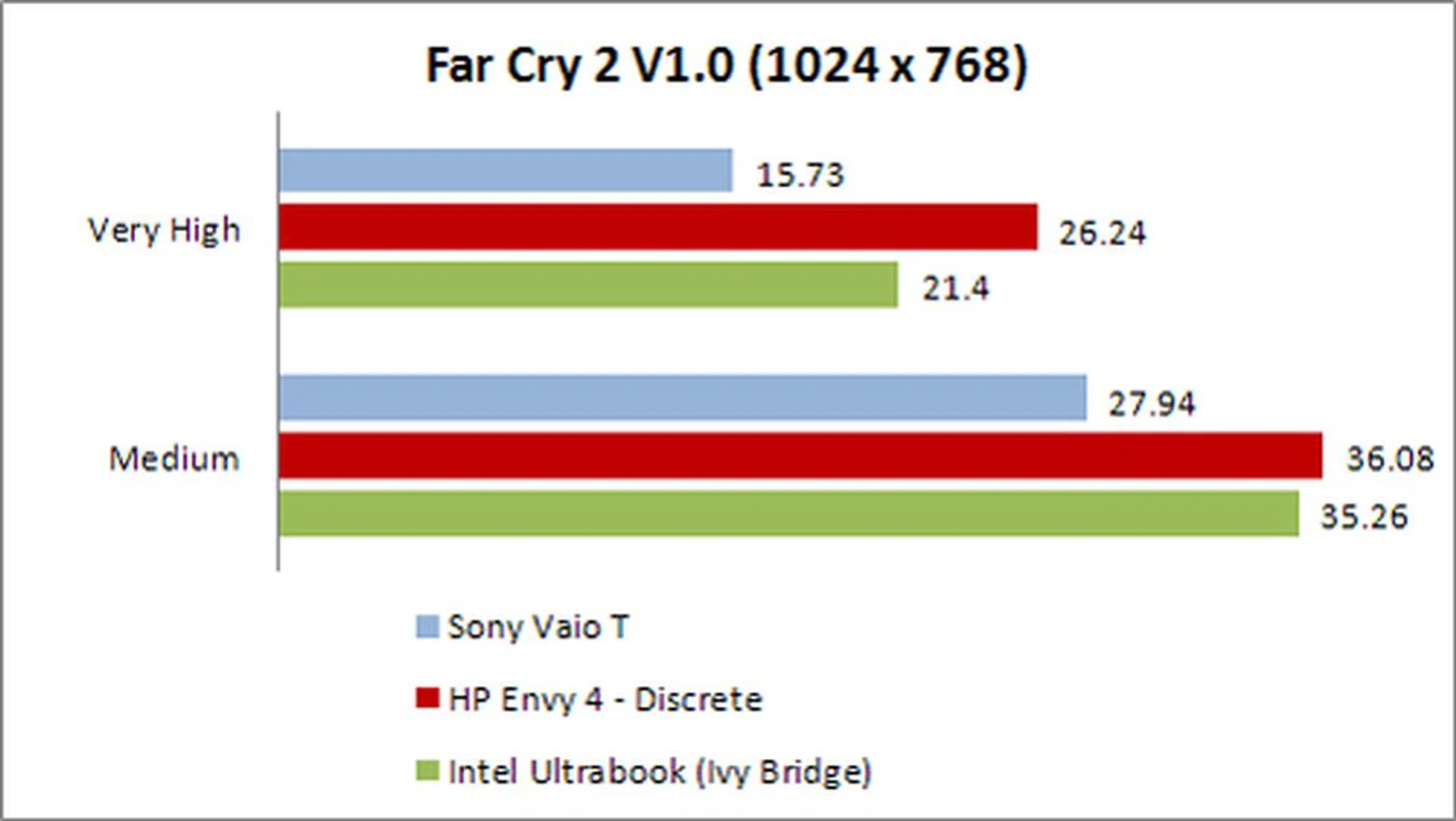
In terms of performance, there is really nothing spectacular about the Vaio T. What you need to know here is that it matches other Ultrabooks (not equipped with SSDs) out in the market, and is more than enough for what Ultrabooks were designed to tackle. We’ve gathered an Intel Ivy Bridge reference notebook (equipped with an SSD), as well as a HP Envy 4 (also using an Ivy Bridge platform with discrete graphics) to illustrate this. The Sony Vaio T system's PC Mark 7 scores are about 25% better than the HP machine, but when it comes to gaming (3D Mark 11 and Far Cry 2) performance, it pales in comparison to the Envy 4’s discrete graphics. That’s not to say that its integrated Intel HD Graphics 4000 isn’t of any use. In scenarios where web pages and light photo editing needs to be done, the Intel HD Graphics 4000 will be more than enough. As you can see when comparing against the Ivy Bridge reference platform, using an SSD will also give you slight boost in the gaming department should you need it.
Specifications/Notebook | Sony VAIO T | HP Envy 4 | Intel Ultrabook (Ivy Bridge) |
Processor | Intel Core i5-3317U
(1.7GHz) | Intel Core i5-3317U
(1.7GHz) | Intel Core i5-3427U
(1.8GHz) |
Chipset | Intel UM77 | Intel UM77 | Intel UM77 |
Memory | 8GB DDR3 | 8GB DDR3 | 4GB DDR3 |
Storage | 500GB HDD with 32GB SSD Cache | 500GB HDD with 32GB SSD Cache | 256GBSSD |
Video | Intel HD Graphics 4000 | AMD Radeon HD 7670M | Intel HD Graphics 4000 |
Battery | 6 Cell Li-ion / 45 WHr | 4 Cell Li-ion / 62 WHr | 6 Cell Li-ion / 47WHr |
Dimensions | 323 x 226 x 17.8mm | 340 x 235.8 x 19.8mm | 329 x 223 x 16mm |
Weight | 1.6kg | 1.8kg | 1.46kg |
PC Mark 7
3D Mark 11
Far Cry 2
Battery Life and Power Consumption
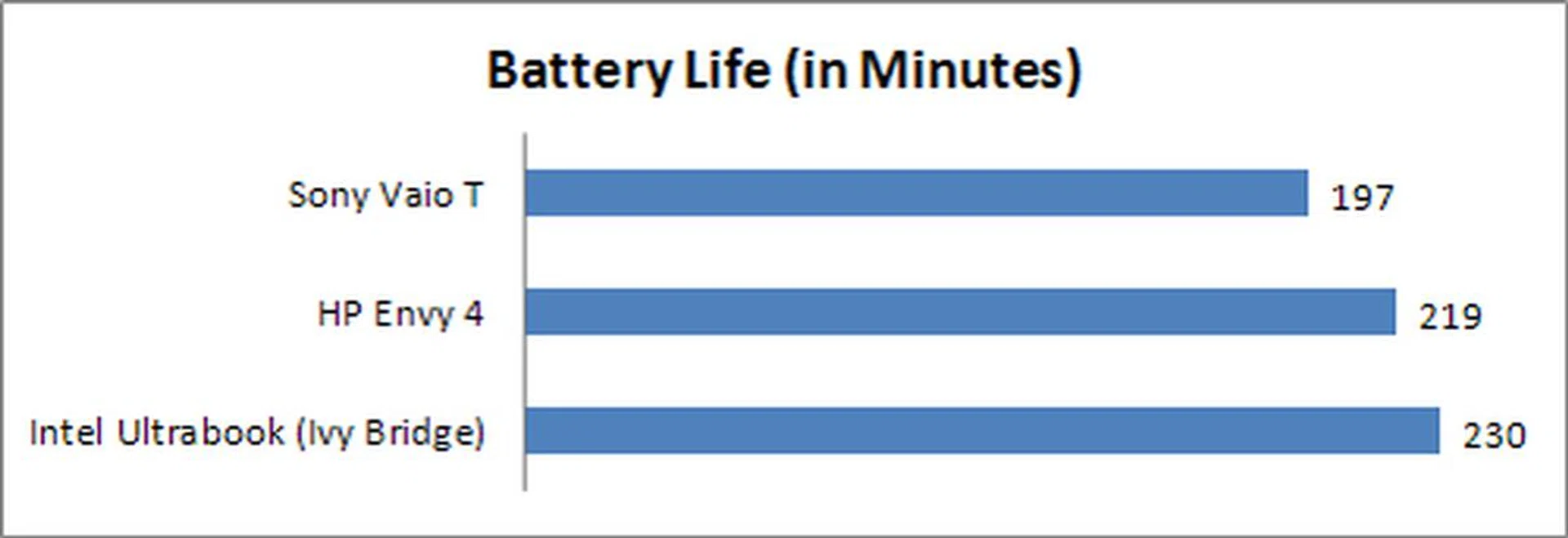
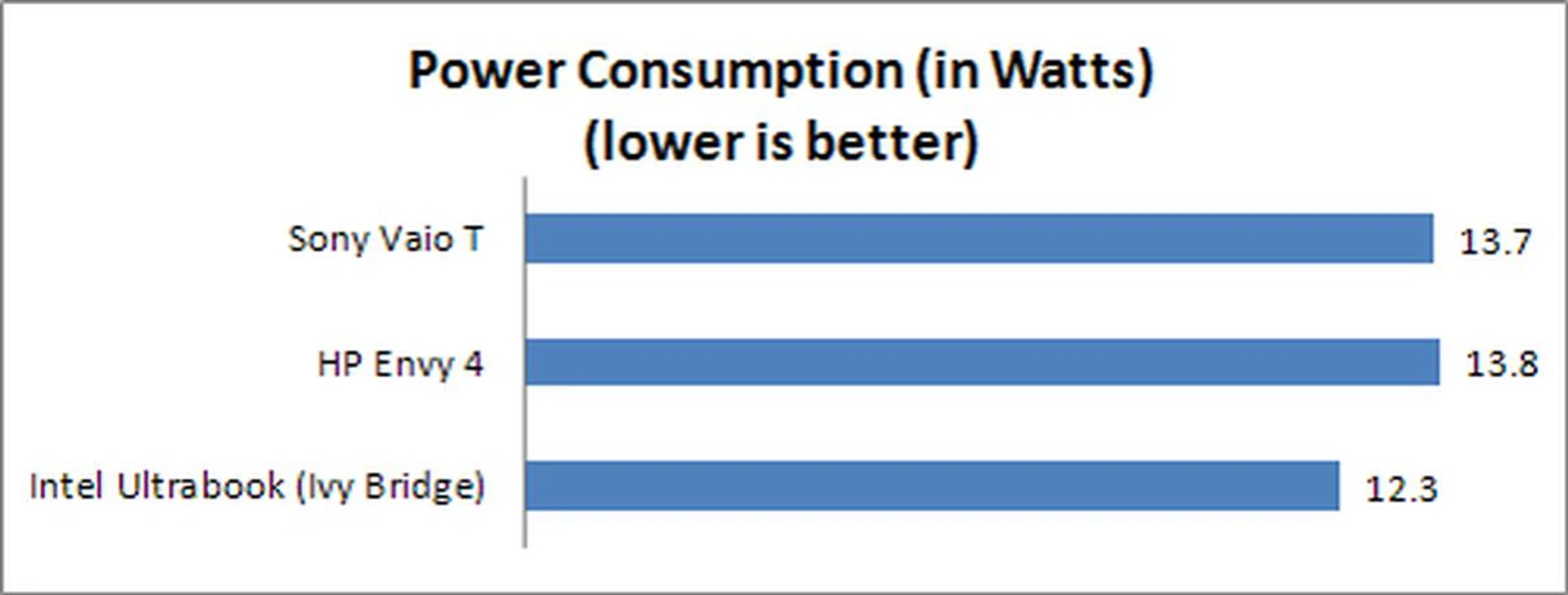
When it comes to Ultrabooks, battery life just seems to be more important than every other aspect of the machine. There are some Ultrabooks which are heavier but only because the manufacturer has added some extra battery capacity. Unfortunately for the Vaio T, its added weight isn't from more battery capacity and as a result, its battery life isn't anything spectacular. For a machine that is supposed to be closer to the Intel Ivy Bridge platform than the HP Envy 4, its battery performance is worse (just slightly) than a larger notebook with a discrete graphics module. From our drill down of the data gathered, this outcome is due to the Sony Vaio T notebook's similar power consumption to that of the bigger HP Envy 4 machine that has better hardware. This means the Sony Vaio T isn't as power optimized as we expect it to be.
Specifications/Notebook | Sony VAIO T | HP Envy 4 | Intel Ultrabook (Ivy Bridge) |
Processor | Intel Core i5-3317U
(1.7GHz) | Intel Core i5-3317U
(1.7GHz) | Intel Core i5-3427U
(1.8GHz) |
Chipset | Intel UM77 | Intel UM77 | Intel UM77 |
Memory | 8GB DDR3 | 8GB DDR3 | 4GB DDR3 |
Storage | 500GB HDD with 32GB SSD Cache | 500GB HDD with 32GB SSD Cache | 256GBSSD |
Video | Intel HD Graphics 4000 | AMD Radeon HD 7670M | Intel HD Graphics 4000 |
Battery | 6 Cell Li-ion / 45 WHr | 4 Cell Li-ion / 62 WHr | 6 Cell Li-ion / 47WHr |
Dimensions | 323 x 226 x 17.8mm | 340 x 235.8 x 19.8mm | 329 x 223 x 16mm |
Weight | 1.6kg | 1.8kg | 1.46kg |
Portability Index
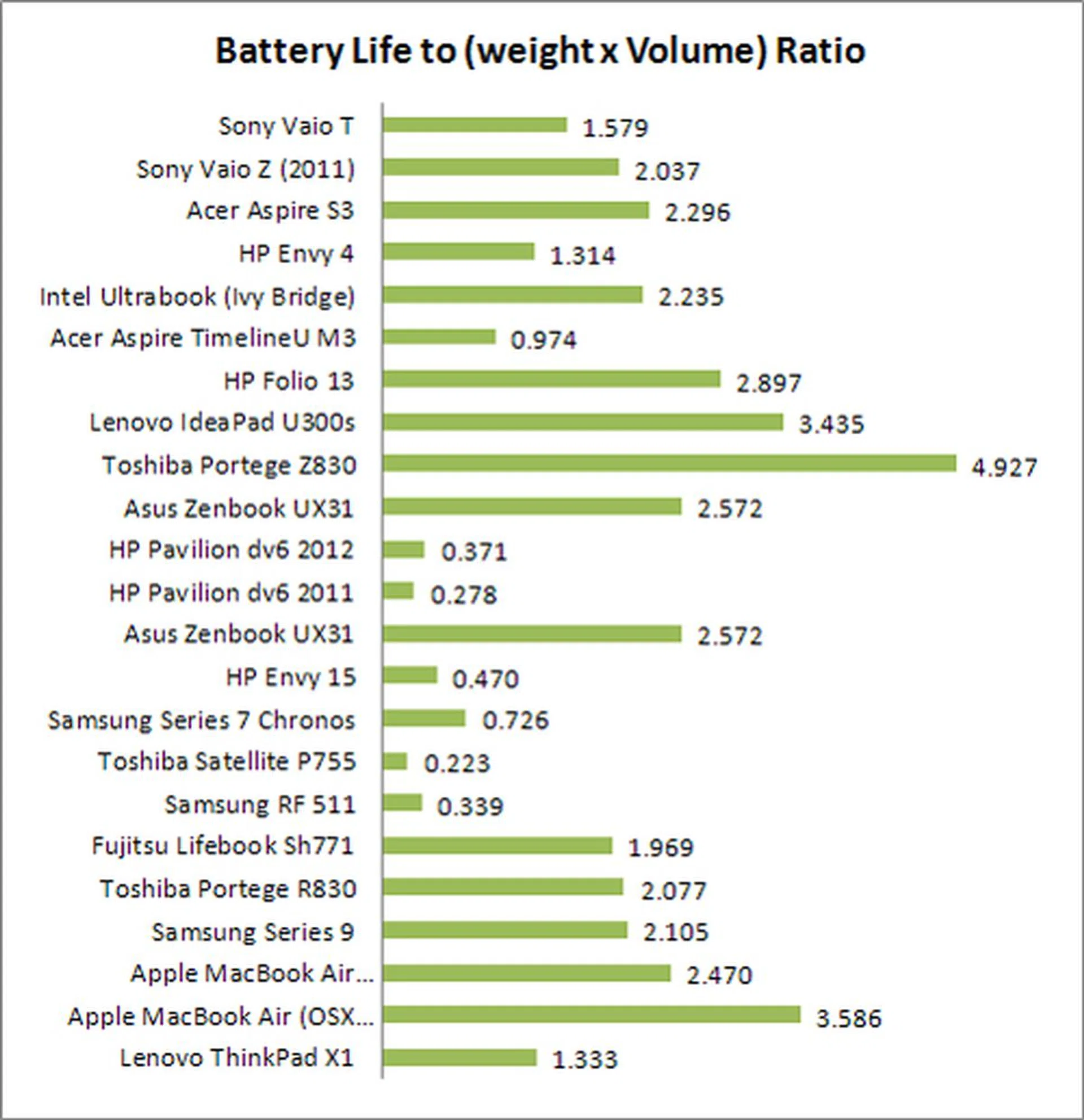
All of the above findings and the comparatively heavier frame of the machine means that the Sony Vaio T doesn't fare well in the Portability ratio as opposed to other Ultrabooks. As usual, this figure is derived by dividing the notebook's batter life (in hours) with the product of its weight and volume. The net ratio is useful to compare among the same class of notebooks to see which notebooks is most worthwhile to lug around on the move for an extended period of time - hence it factors battery up-time, weight and volume. Most of the tested Ultrabooks below managed a ration of 2.5 or higher and this doesn't bode well with the 1.58 ratio garnered by the Sony Vaio T due to its weight and slightly lower than expected battery life.
Caught Up, But Doesn't Outpace
The Sony Vaio T, being Sony’s first official Ultrabook, has some good traits going for it. Having sat out the first Ultrabook wave, they took their time to formulate an Ultrabook strategy. It scored some hits, but also just as many misses. Some of the advantages the Vaio T has are its good looks, reasonable variety of ports, decent performance and an enticing price. For S$1299, it’s hard to fault the Vaio T for some of the essential Ultrabook elements that have gone wrong, but fault it we must. First and foremost is its screen resolution; at a standard 1366 x 768 pixels, it now feels quite outdated. To be fair, some of the other vendors face the same issue, but that does not give Sony an excuse to not give their loyal fans something better than the rest.
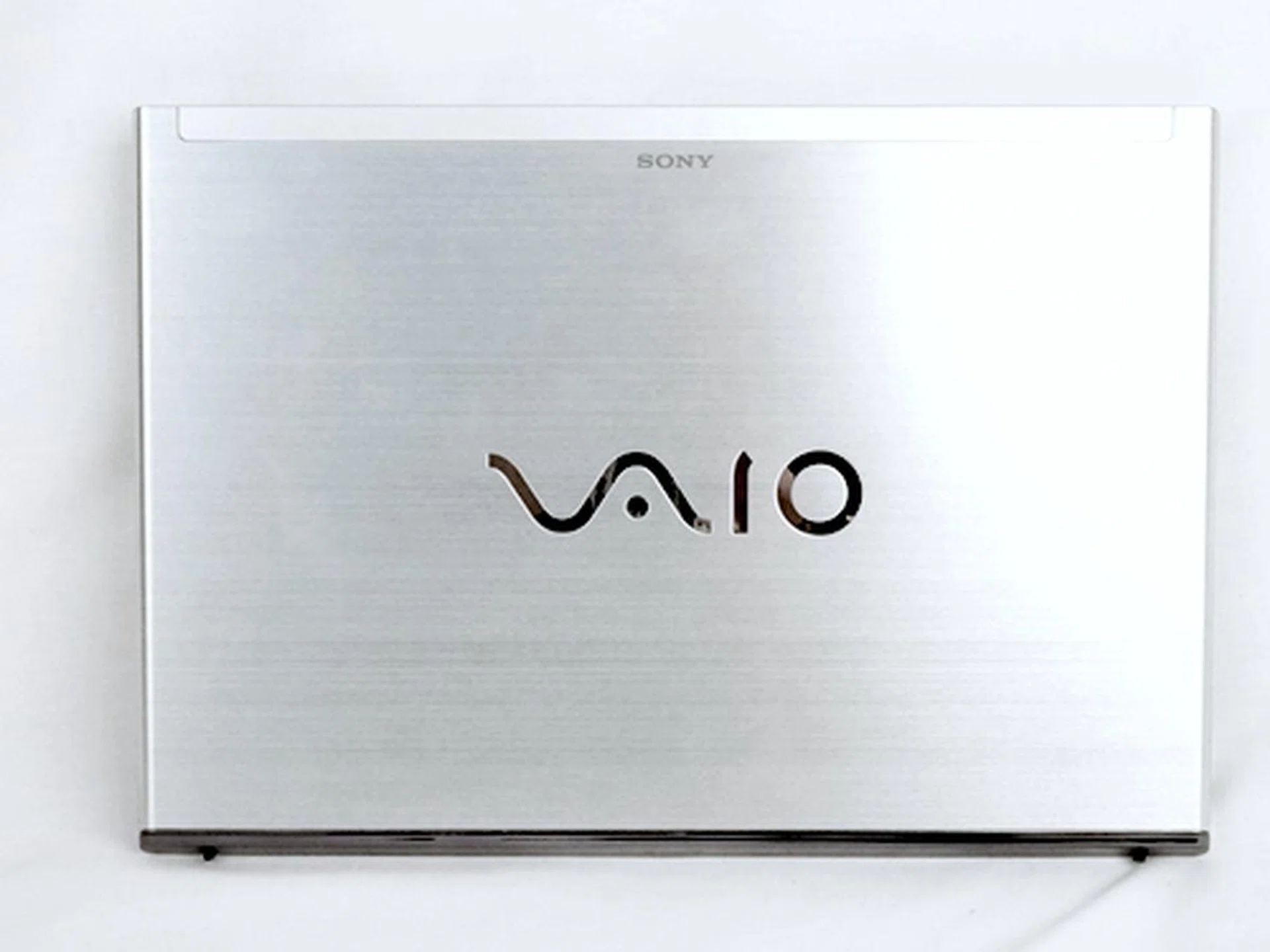
The Sony Vaio T as a slim notebook, lives up to its S$1299 price tag. But it does come with a few compromises that may not appeal to those with higher expectations from a new Ultrabook.
Next is the build quality of the machine. While the aluminum lid does improve the overall build quality, the rest of the machine didn’t give off that "made by Sony" vibe. The mix of magnesium alloy and plastic optimizes cost and machine weight, but it doesn't help with the overall finish of the machine where some aspects feel premium while other aspects just look premium. To a smaller extent, we had some gripes of its shallow keyboard and small clickpad, but that’s not to say it’s bad. In fact it was very reasonable and comfortable, but we were expecting better from Sony after seeing what they can pull off with the Sony Vaio Z.
Even its dimensions and weight disappoint somewhat when you consider Ultrabooks from other manufacturers. The Sony Vaio T does have a full flat design, but we certainly felt that the design could be optimized with a tapered profile to give it a slimmer form factor. Some Ultrabooks are slightly thick and weight more because they’ve got extra battery, but it's not the case with the Sony Vaio T.
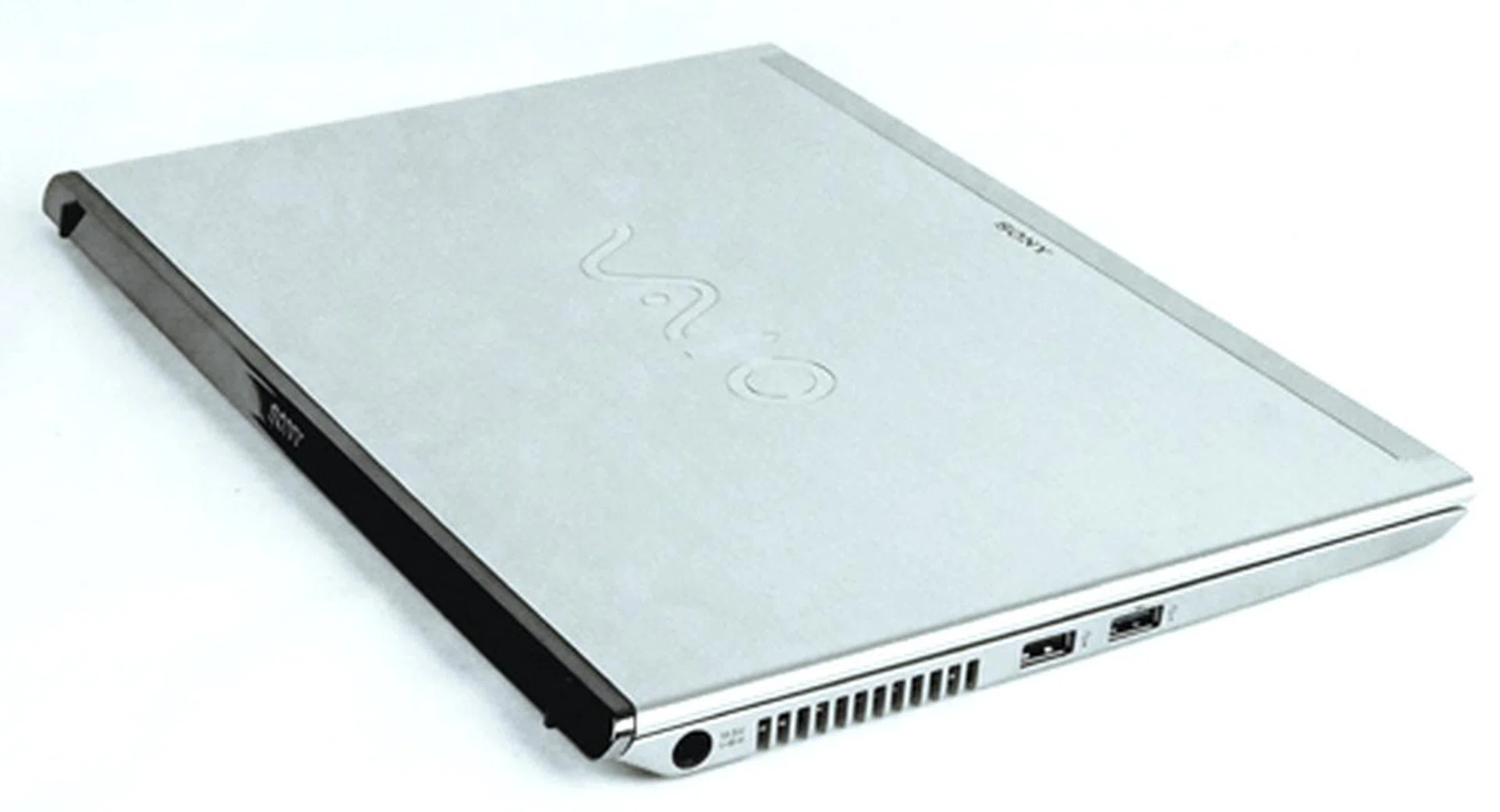
The Vaio T doesn't really conform to what you'd expect from the standards set by Ultrabooks in terms of slimness and weight, but it does deliver in terms of value and the hardware components found in Ultrabooks.
All said and done, it still boils down to whether should you buy or not buy the Sony Vaio T. Well we’d like to say yes, because at S$1299, it’s definitely a good price point for a brand new Ivy Bridge platform based Ultrabook with good connectivity options. But this is only if you can overlook some of the flaws which we’ve mentioned earlier.
It seems that Sony's first attempt at manufacturing an Ultrabook didn't outpace its competitors with something that we haven't seen before, but the overall product is still comfortable enough to recommend certain user groups. For example, SOHO users would find the available connectivity options useful as it meets some of the basic requirements of legacy connections like wired LAN and a VGA ports. Elsewhere, its affordable price tag for the latest Ultrabook platform providing a reasonably portable computing powerhouse that can blend in most environments is yet another plus point. So in the end, it really depends on who's scrutinizing it for their needs.
Our articles may contain affiliate links. If you buy through these links, we may earn a small commission.