

Note: This review was first published on 27 July 2020.
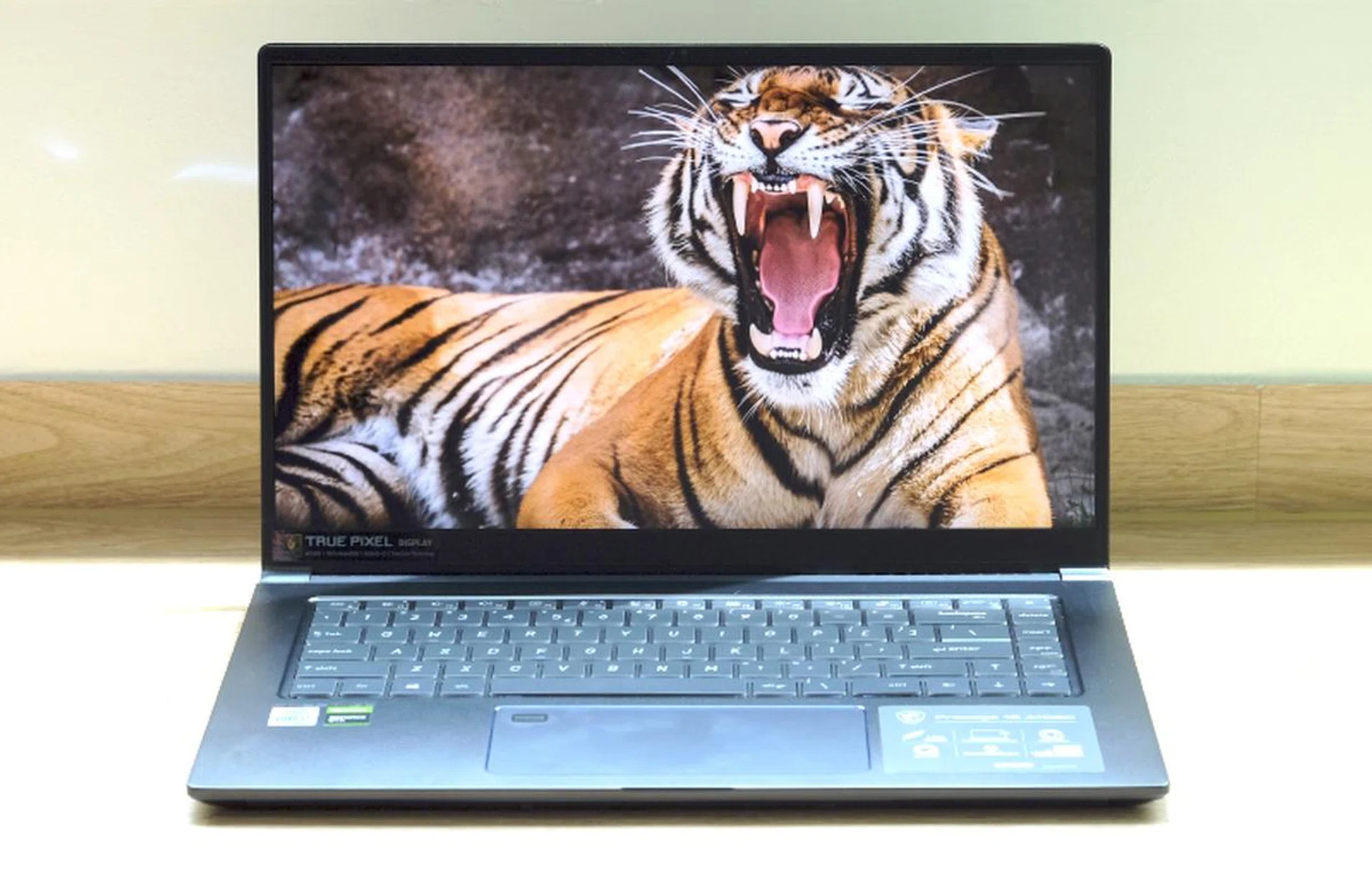
The MSI Prestige 15 is a thin, light, yet powerful 15-inch notebooks designed for content creators.
A new breed of thin and light 15-inch notebooks
Like its many of its Taiwanese rivals, MSI has a confusing lineup of notebooks. At this point, I’ve given up trying to understand their gaming notebooks. Thankfully, their lineup of non-gaming notebooks is slightly easier to understand. The Prestige series is their lineup of thin and light notebooks. They are supposed to offer a good mix of performance and portability, and are designed for content creators. An easy way to think about the Prestige 15 is that it’s MSI’s answer to notebooks like the the ASUS ZenBook 15, Dell XPS 15, and Gigabyte Aero 15.
Specifications
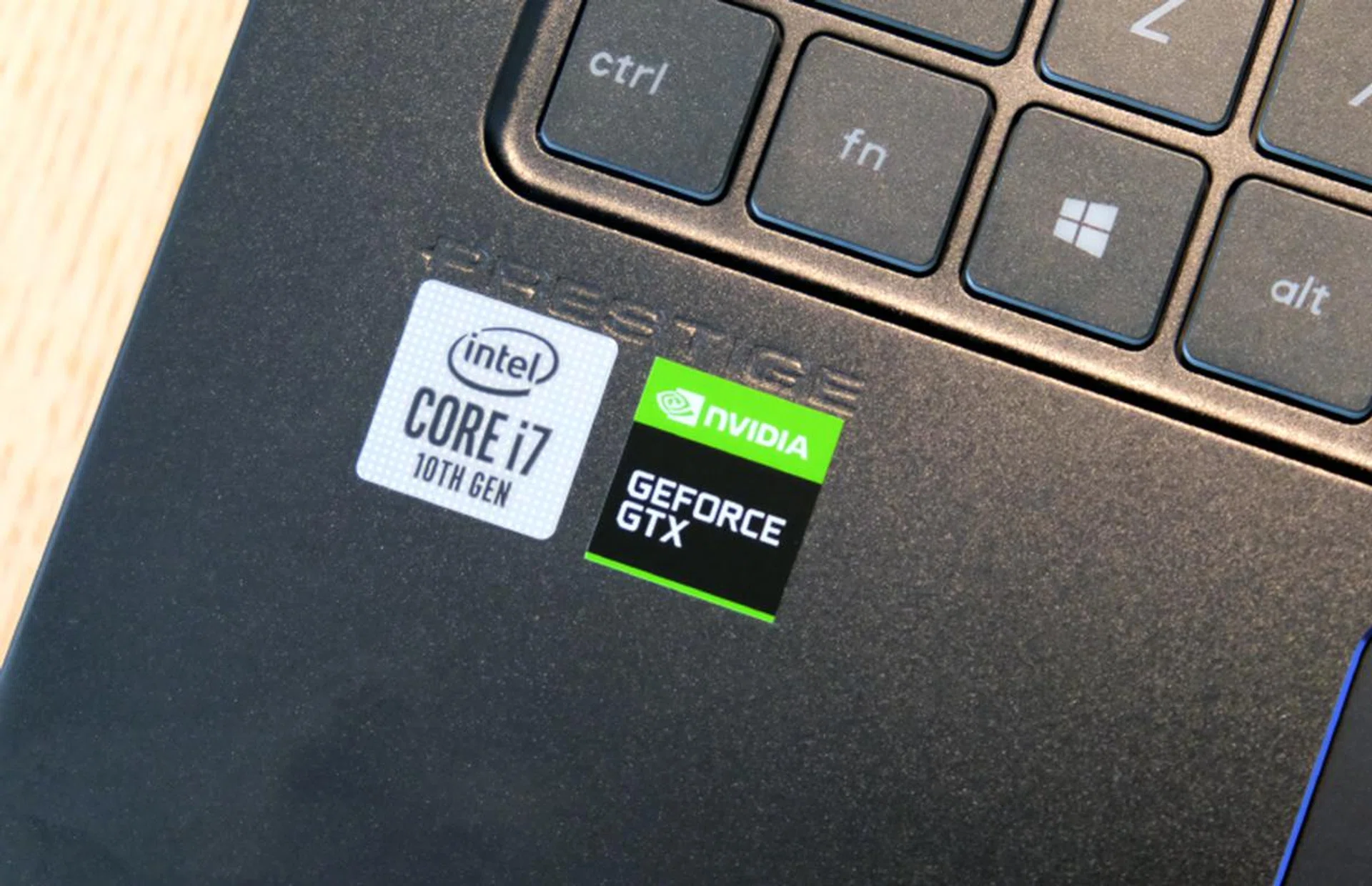
Powered by the latest Intel 10th generation processors and NVIDIA discrete graphics.
The MSI Prestige 15 is available in two configurations. Both are largely similar save for their display and storage – one comes with a Full-HD display and 512GB of storage and the other has a 4K display and 1TB of storage. The model that I’m testing is the one with a 4K display and 1TB of storage. Here’s how they stack up.
Display | 15.6-inch, Full-HD, IPS | 15.6-inch, 4K, IPS |
Processor | Intel Core i7-10710U | Intel Core i7-10710U |
Memory | 16GB | 16GB |
Storage | 512GB | 1TB |
Graphics | NVIDIA GeForce GTX 1650 Max-Q 4GB GDDR5 | NVIDIA GeForce GTX 1650 Max-Q 4GB GDDR5 |
Price | S$2,349 | S$2,649 |
Readers who are well-versed in Intel's confusing lineup of processors will no doubt recognise that instead of the more powerful 45W CPUs, MSI is using less powerful but more efficient 25W parts. This is an interesting choice because MSI is sacrificing performance to create a 15-inch notebook that's thinner and lighter than the competition.
Design, display, and features
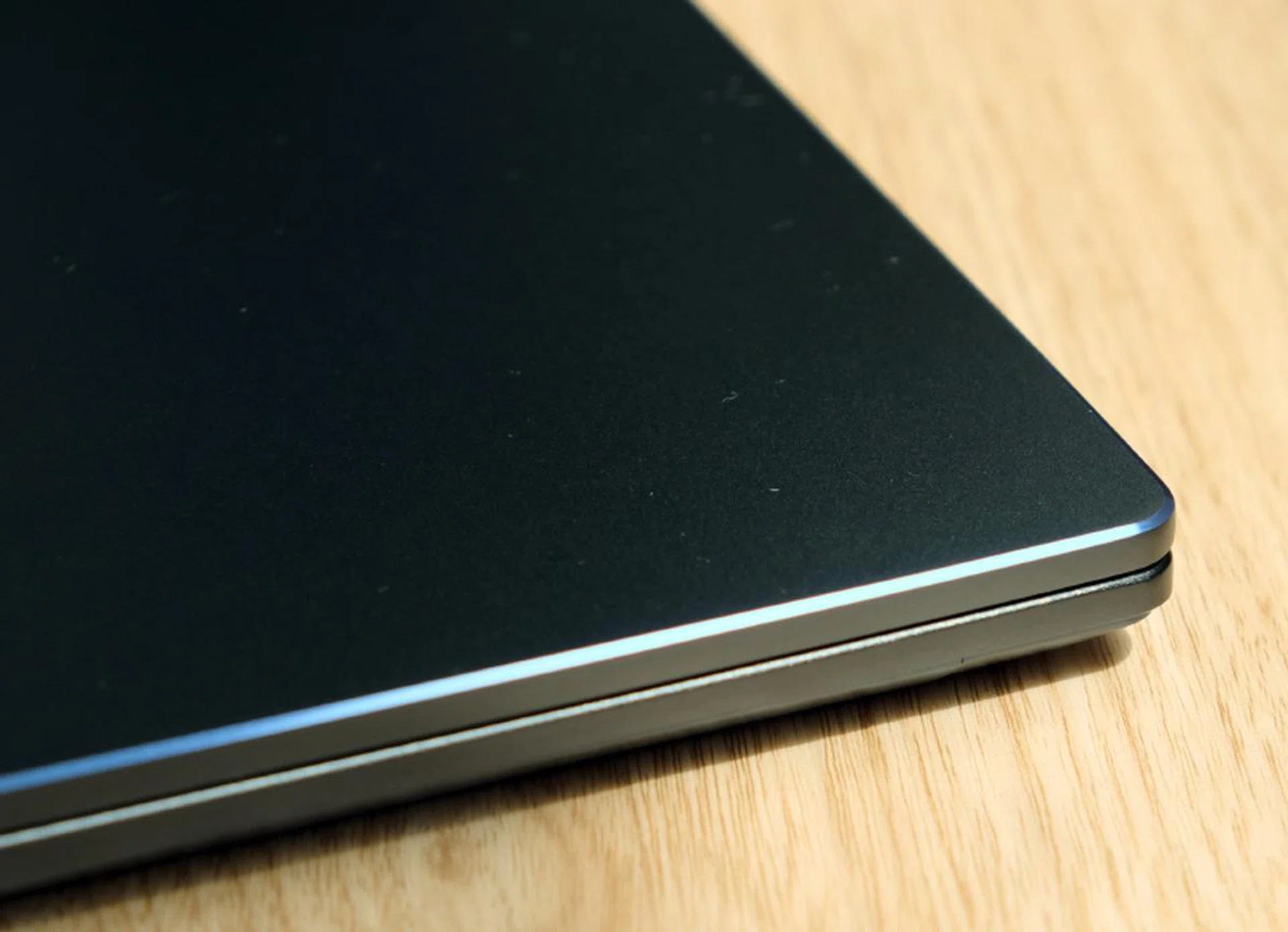
Beveled edges and just 15.9mm thick.
The Prestige 15 is one of the thinnest and lightest 15-inch notebooks that you can buy now. Thickness is just 15.9mm and weight is just 1.6kg. That’s only a little bit thicker and heavier than most 13 and 14-inch notebooks. When you pick it up for the first time, there’s a disconnect between what you are feeling in your hands and what you expect a 15-inch notebook to weigh. And while the Prestige 15 may not be as light as LG's gram 15 – that's only 1,120g – it's still a remarkable accomplishment.
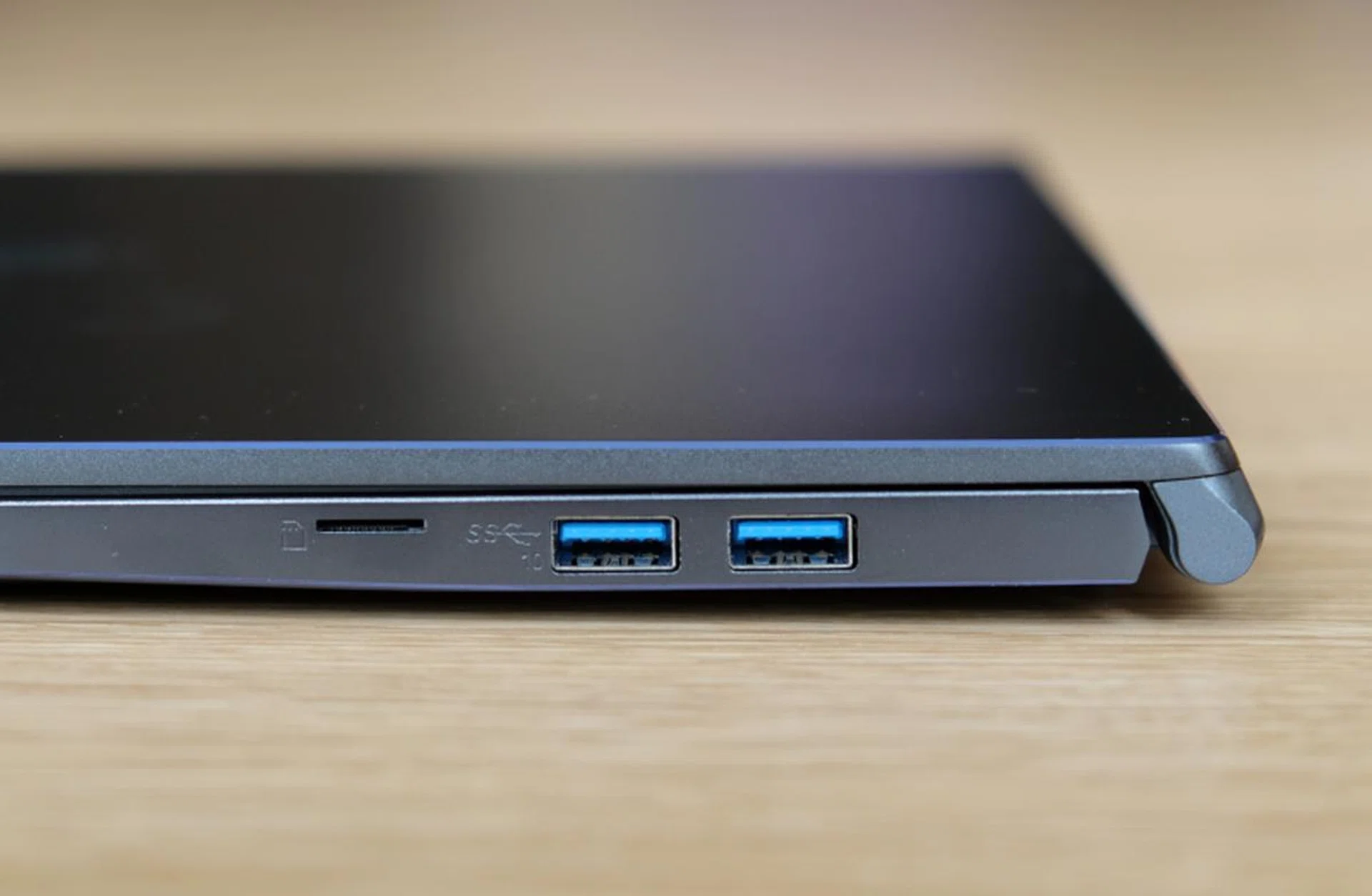
Though the Prestige 15 is just 15.9mm thick, it has two full-size USB 3.2 Gen 2 ports.
The chassis is aluminium and it comes in an unusual shade of grey that looks bluish from some angles. The edges of the display cover have diamond-cut edges that are a nice detail. Overall build quality is decent but there’s definitely room for improvement. Even though it doesn’t feel absolutely top tier and rock-solid, it is MIL-STD-810G certified. This means it has some resistance to shock, vibrations, temperature, dust, and pressure.

The display is fantastically sharp and colours are great.
MSI calls the display a True Pixel display and it is a highlight of this machine. The bezels aren’t the thinnest but the brightness and colours are one of the best that I have seen on a 15-inch notebook. MSI says it covers 100% of the AdobeRGB colour space and it is colour-calibrated at the factory by Calman, and it looks like it – the colours are vibrant and punchy. And because it is a 4K display, images and text are razor sharp and clear. It also has a matte finish so annoying glare and reflections are kept to a minimum.
There's a tiny 720p webcam above the display. Unfortunately, it doesn't support Windows Hello but it is decent enough for video conferencing. The built-in microphone and speakers are lackluster but they'll get the job done. The speakers, in particular, lack body and sound very hollow.
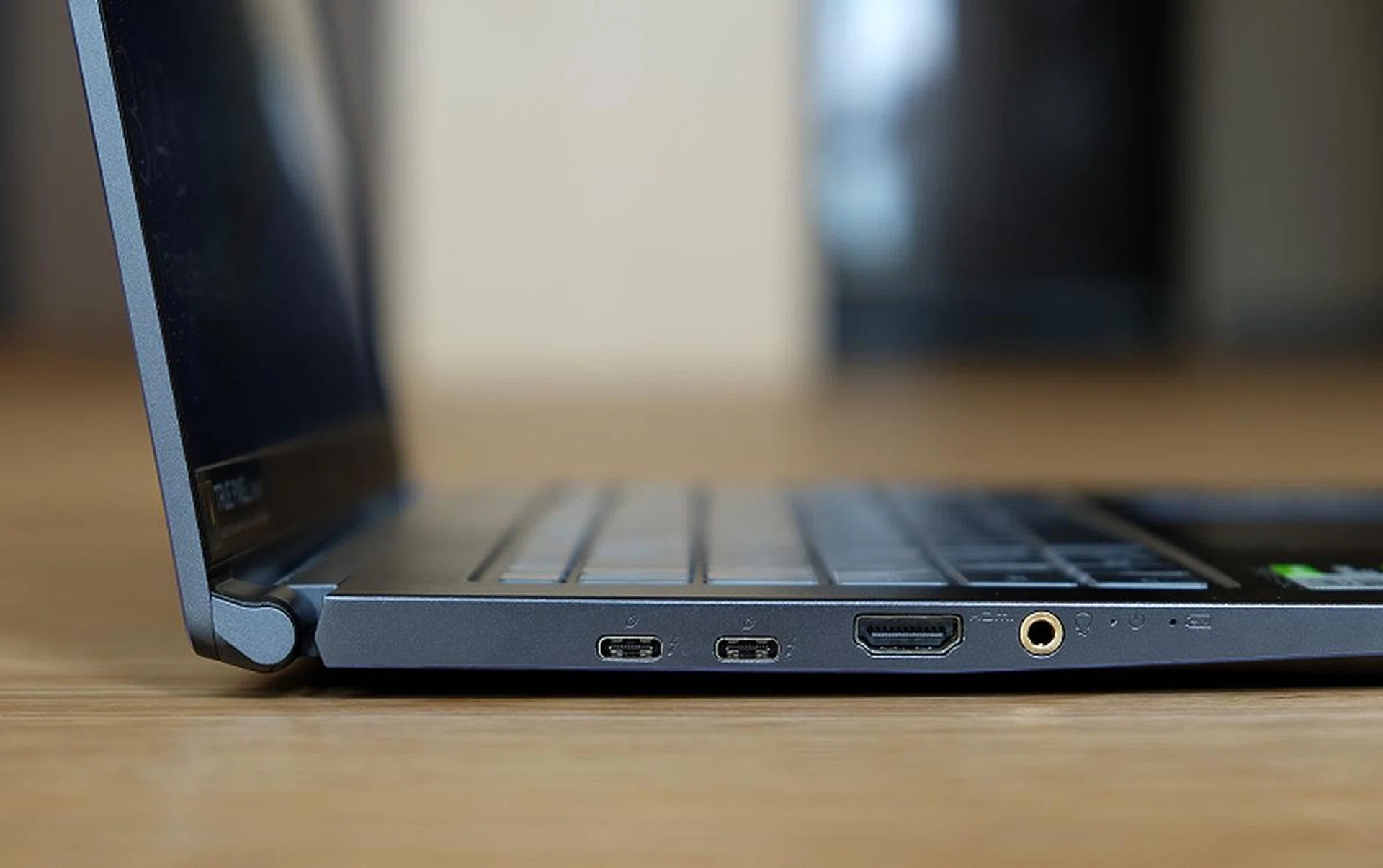
On the left are two USB-C Thunderbolt 3 ports, a full-size HDMI port, and a 3.5mm audio jack.
The Prestige 15 has a good number and selection of ports. On the left, you have two USB-C Thunderbolt 3 ports, a single full-size HDMI, and a 3.5mm headphone jack. On the right, there’s two USB-A USB 3.2 Gen 2 ports and a microSD card reader that supports high-speed UHS-II cards. On the wireless connectivity front, the Prestige 15 supports the latest WiFi 6 standard as well as Bluetooth 5.1.
Keyboard and trackpad

The keyboard and trackpad are quite excellent.
The keyboard is rather excellent. Unlike most 15-inch notebooks, the Prestige 15’s keyboard eschews a number pad. Users whose most frequently used apps are Excel are probably going to baulk at this decision, but for everyone else, this means larger keys and a less cramped layout. The keys are large and the layout is fairly conventional, though it must be noted that there’s an extra column for your navigation keys. And because the arrow keys are full-sized, the right Shift key is slightly smaller. Key travel is a claimed 1.5mm and it feels sufficient. Key feel is also well-judged and the white backlights are very bright. My only complaint is that the font used for the legends is a little too stylised and would prefer something more neutral.
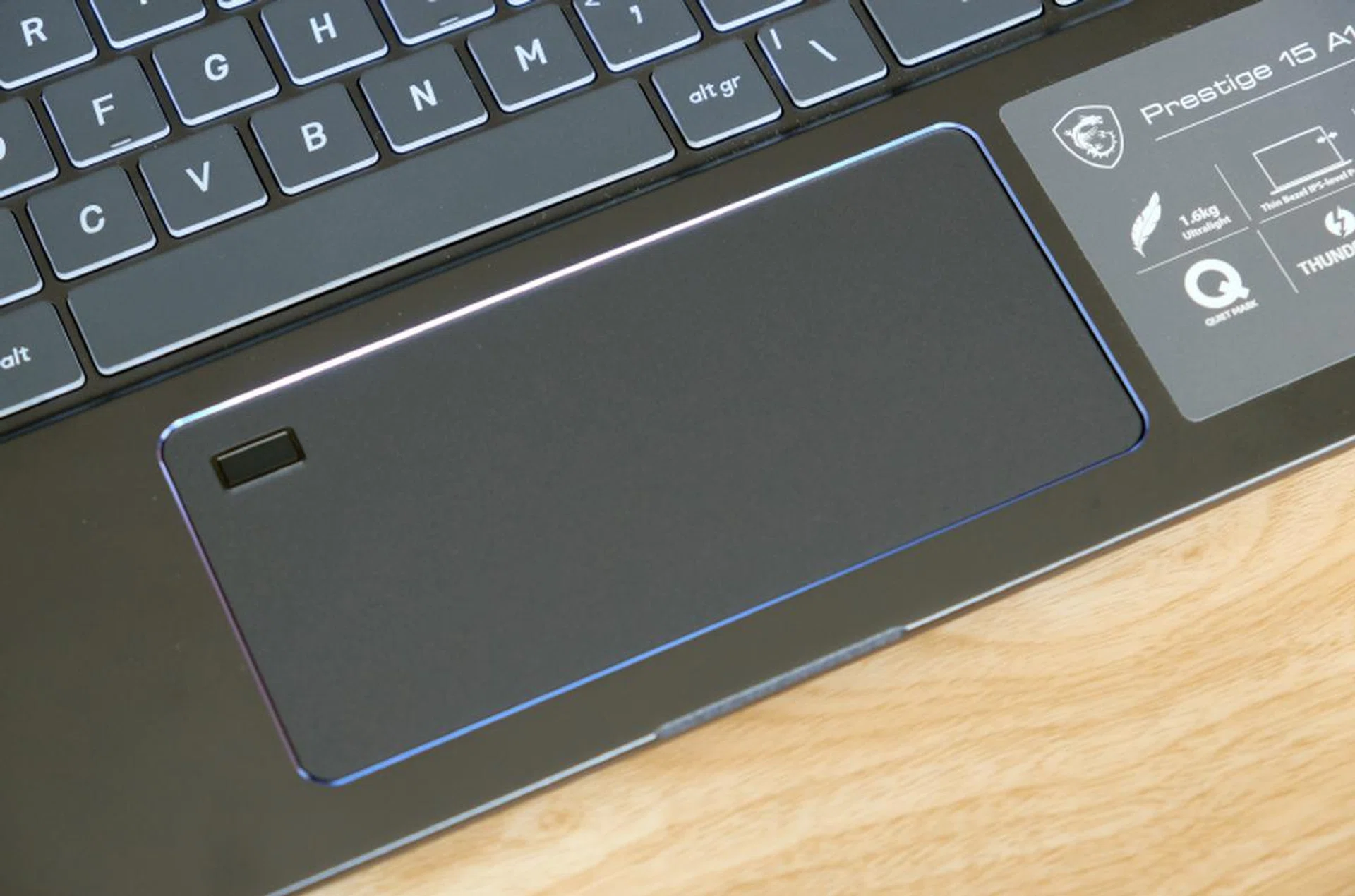
The trackpad is wide but narrow from top to bottom. Note the integrated fingerprint scanner in the top left corner.
The trackpad is 14cm wide and 6.5cm from top to bottom. It’s narrow but wide. It’s smooth to touch and uses Windows Precision drivers, so it’s fluid and responsive. There’s a fingerprint scanner located in the top left corner, which can be a little awkward for right-handers to use. Generally speaking, this is a well-implemented trackpad and I only wish it was larger from top to bottom to help with scrolling through long pages.
Performance analysis
Since the Prestige 15 is a 15-inch notebook, we are going to compare its performance against other 15-inch notebooks. Unfortunately, we haven’t tested the latest versions of the Prestige 15’s closest competitors like the ZenBook 15, XPS 15, and Aero 15. However, we do have other comparable notebooks like the last generation Aero 15 as well as gaming notebooks like the Predator Triton 500 and Forge 15 Pro. Still, the comparisons are going to be interesting because the Prestige 15 uses less powerful but more efficient components to achieve its portable size. So what we are going to be looking at is just how much performance you sacrifice and just how much you gain in portability.
[hwzcompare]
[products=684115,671781,669939,667965,669286,667554]
[width=200]
[caption=Test notebooks compared]
[showprices=1]
[/hwzcompare]
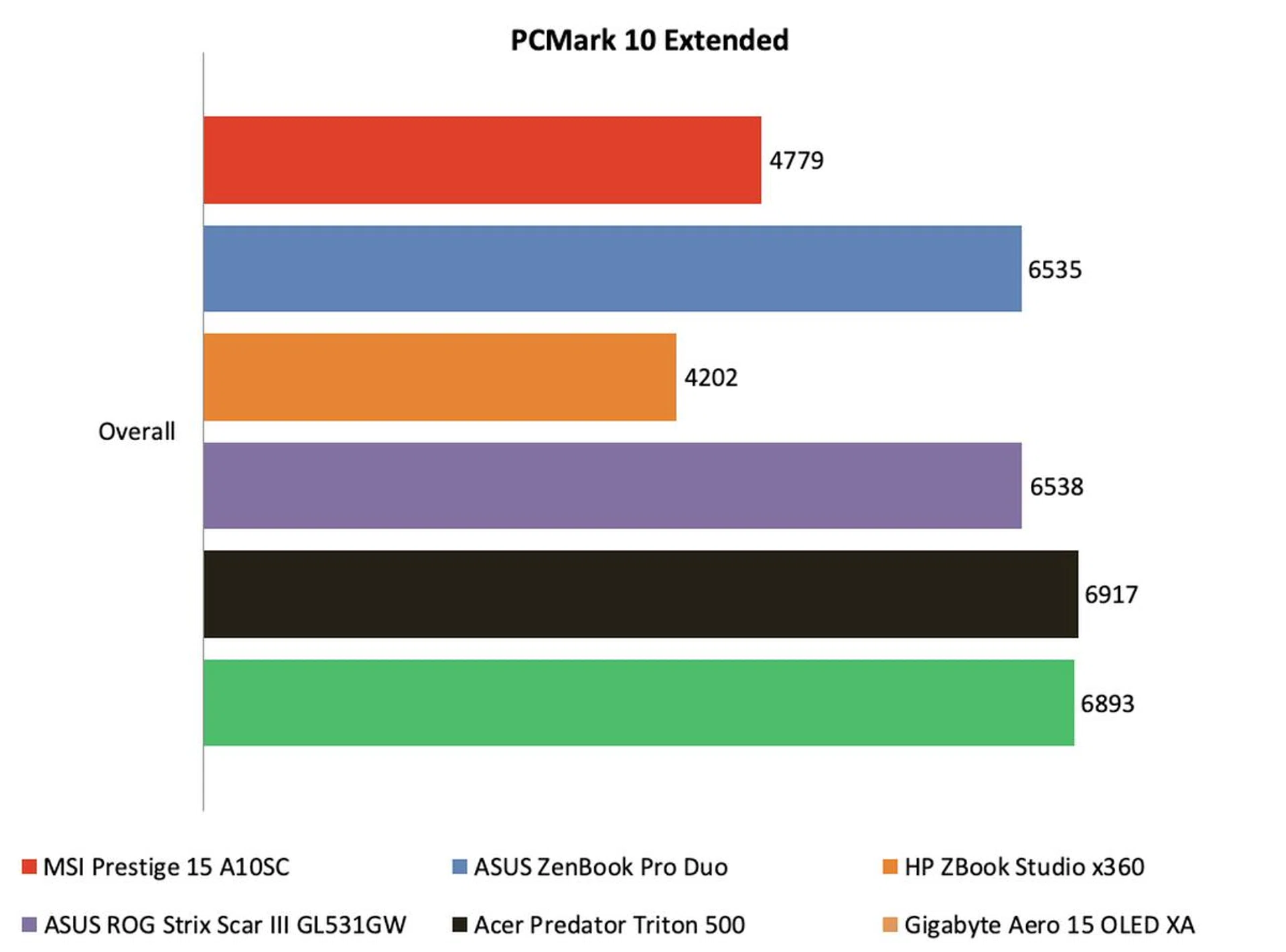
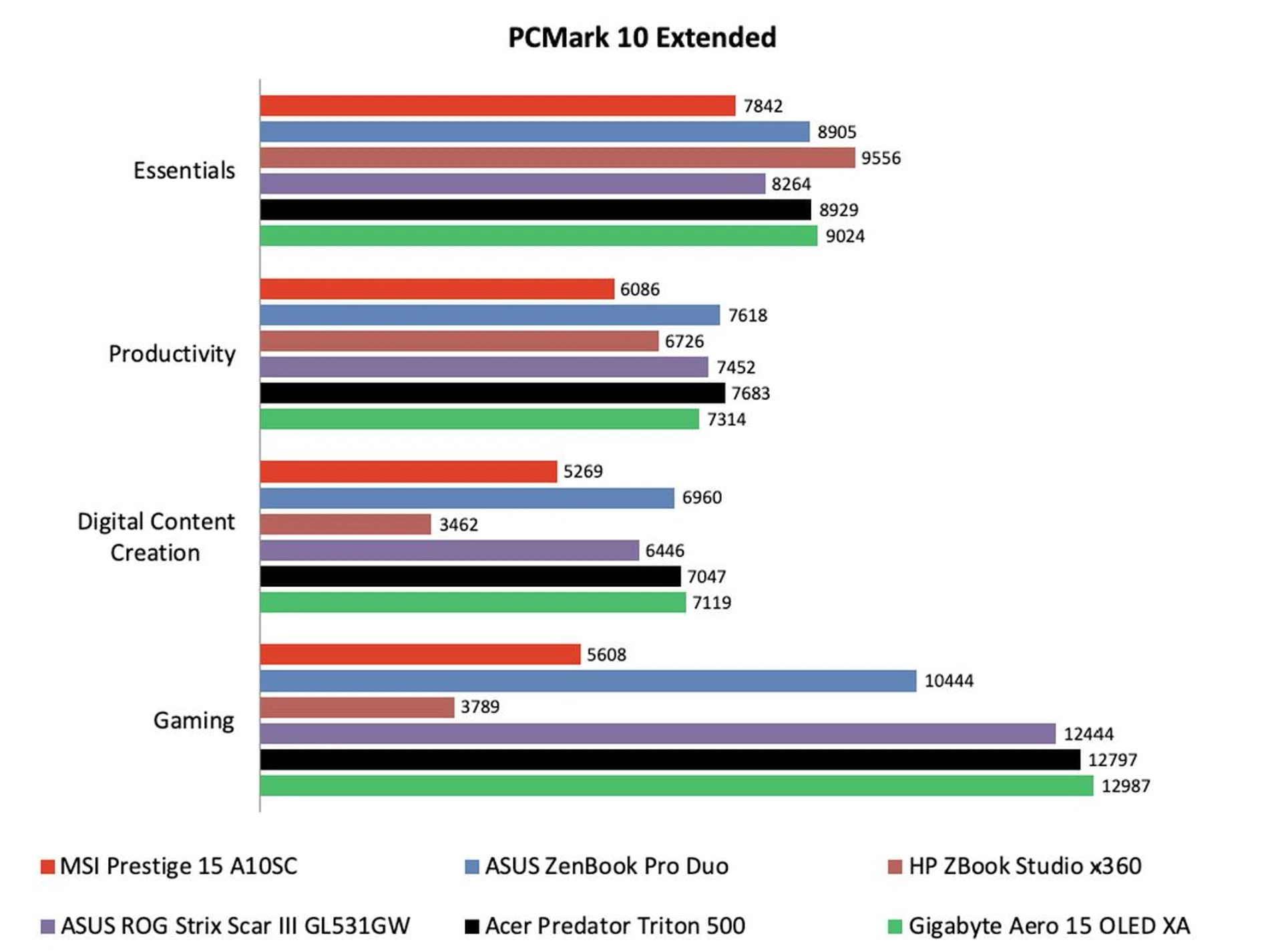
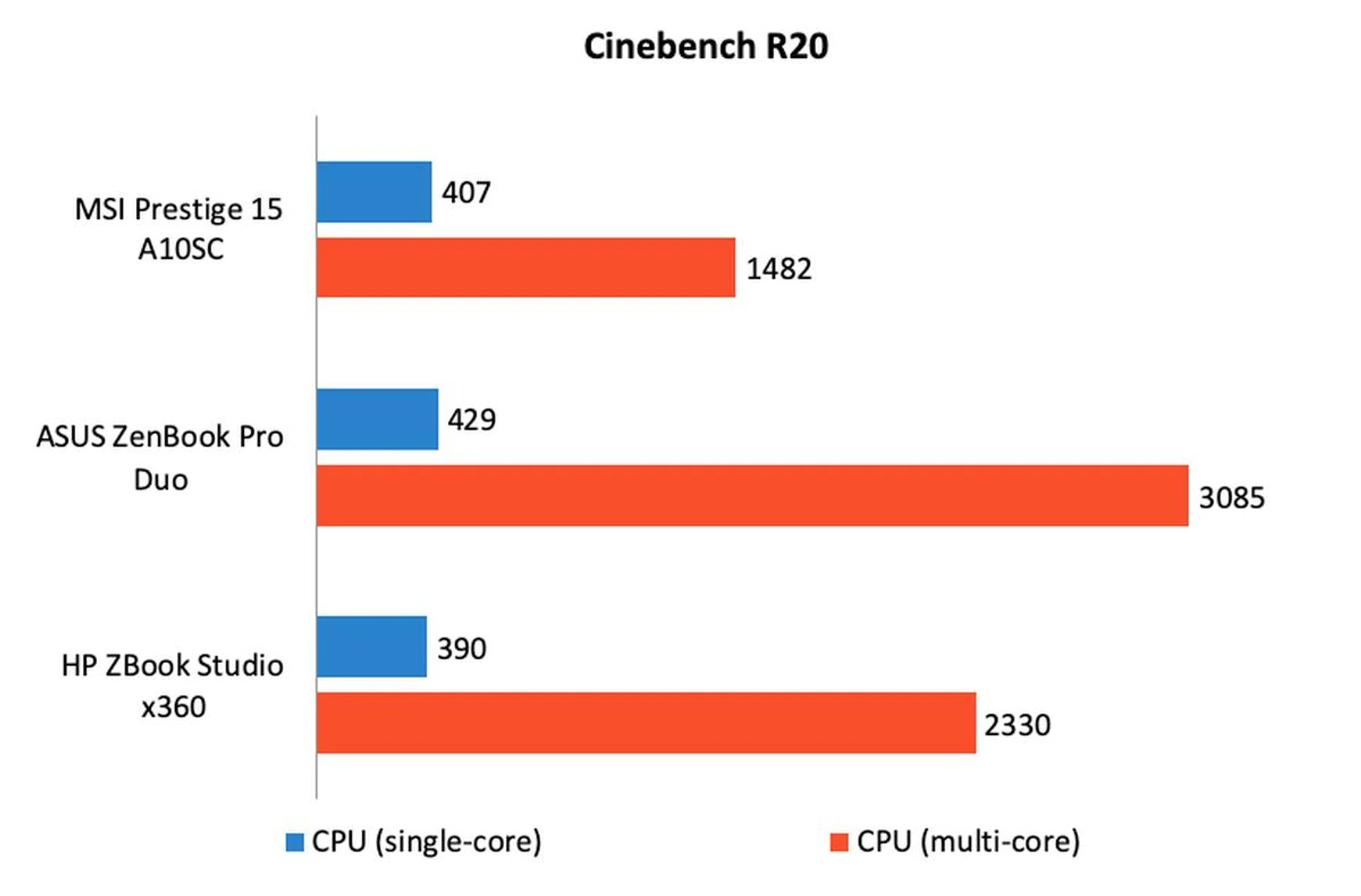
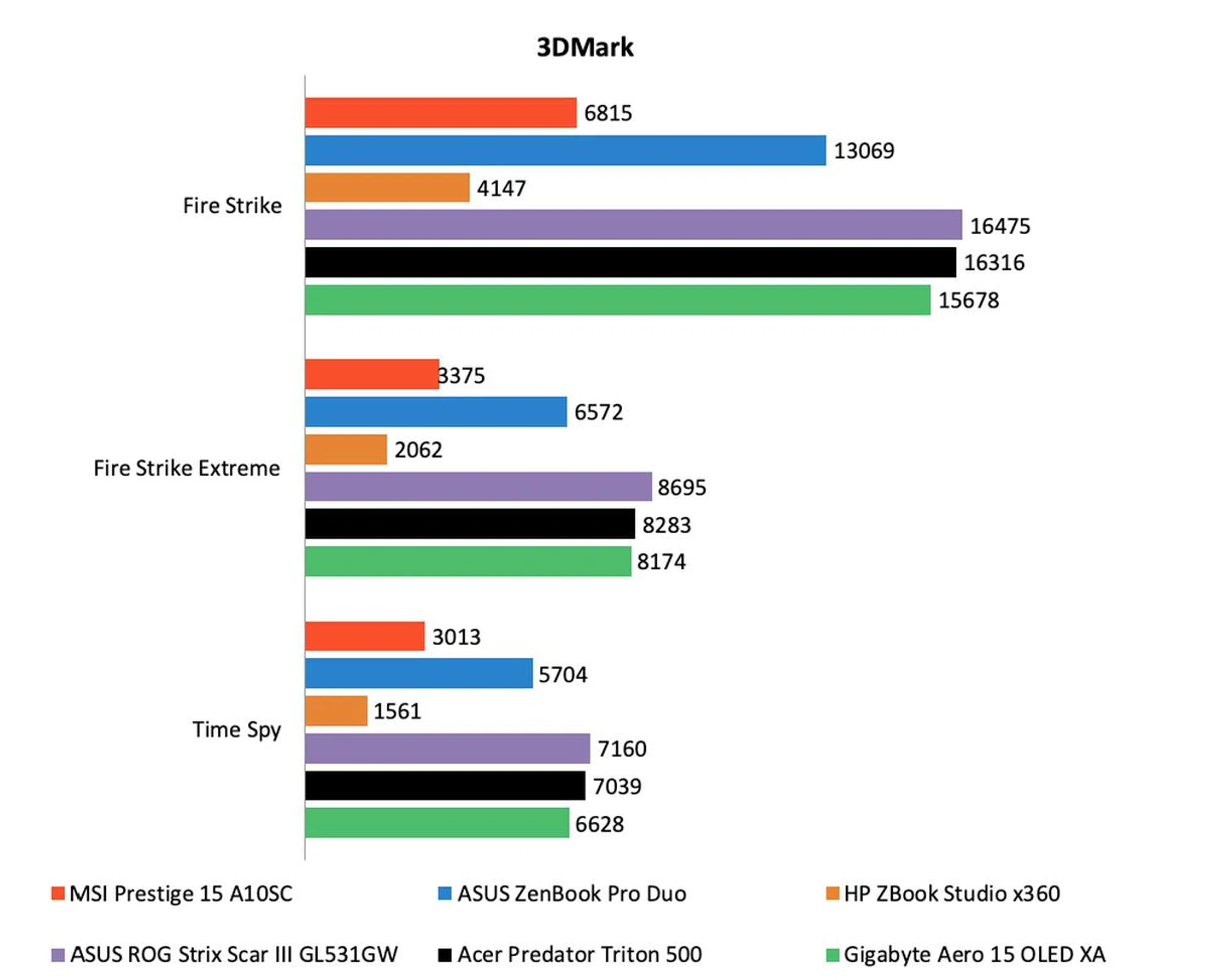
General computing performance was decent. It may look down on numbers compared to the other notebooks here but note that the other 15-inch notebooks have much more powerful processors. Even though the Prestige 15 has a Core i7-10710U processor with 6 cores, you have to remember that it’s maximum rated TDP is just 25W. In comparison, the other notebooks all have processors that have maximum rated TDPs of 45W. That’s a huge difference. If you look at other notebooks with similar medium-power processors, you’ll find that the Prestige 15’s numbers are much more comparable.
Still, there’s no denying that the notebooks with more powerful 45W CPUs are going to blitz the Prestige 15. On PCMark 10, the other notebooks with 45W CPUs and RTX-class graphics scored about 30% more than the Prestige 15. And on Cinebench R20, the ASUS ZenBook Pro Duo with the mighty Core i9-9980HK processor scored over twice as high on the multi-core workload.
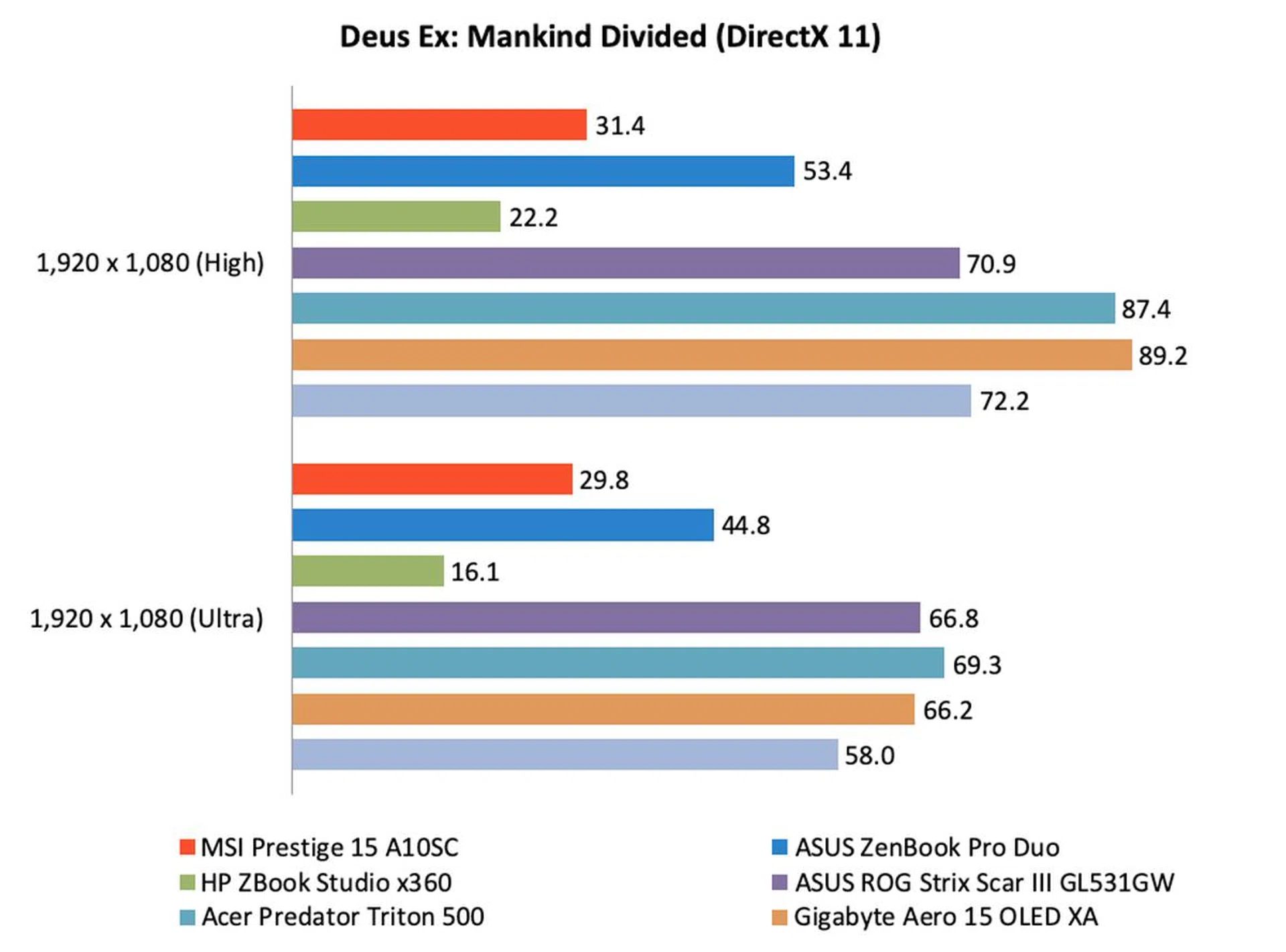
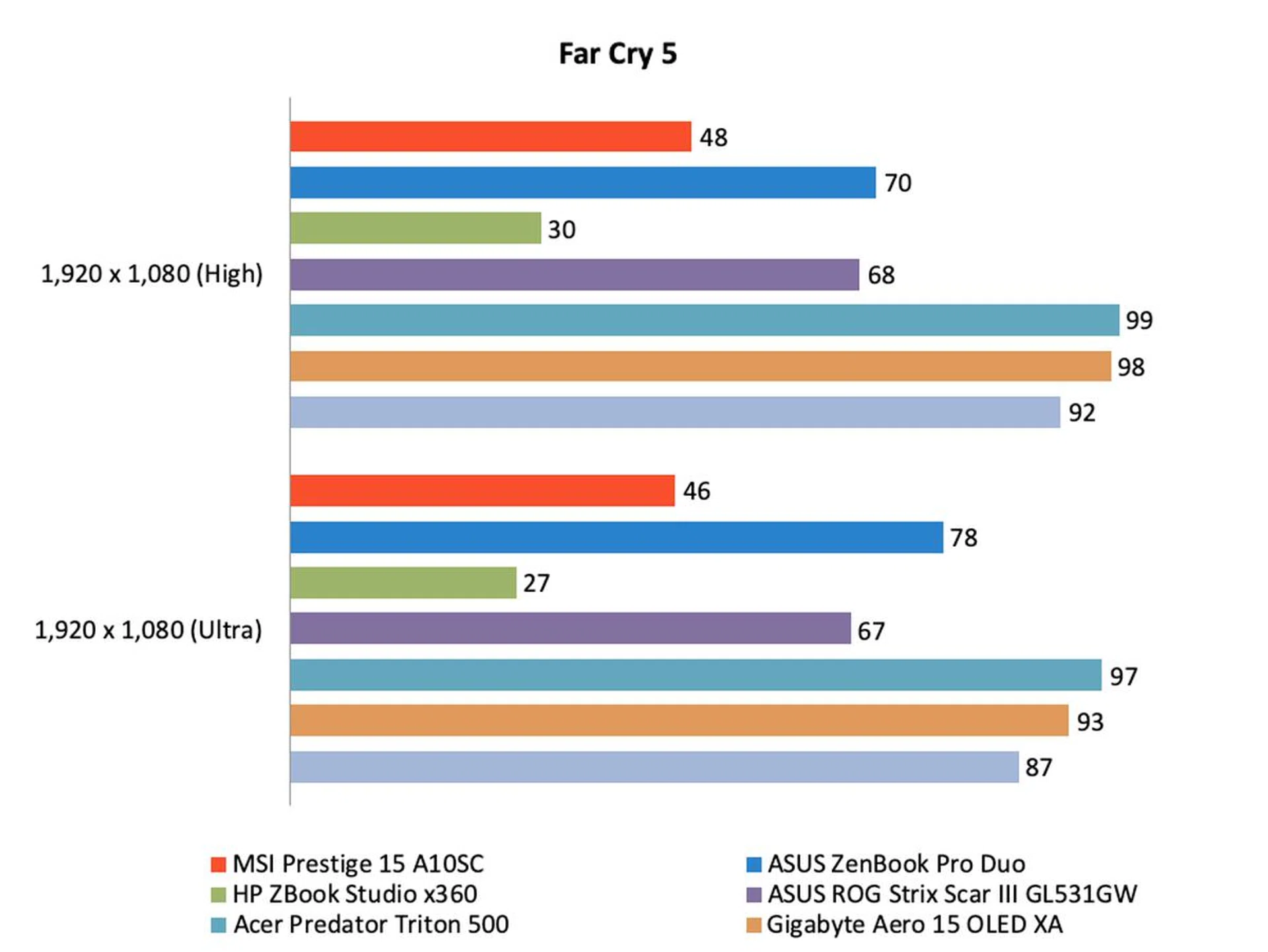
Graphics performance was also in line with our expectations, although, once again, it was no match for the other notebooks. Bear in mind that the other notebooks are powered by considerably more powerful RTX-class GPUs. To give you an idea of the difference in compute power, the GeForce GTX 1650 Max-Q is capable of 2.55 TFLOPs of compute power whereas the GeForce RTX 2060 is capable of 4.608 TFLOPs of compute power. In games, notebooks with RTX-class graphics were at least 50% faster than the Prestige. Nevertheless, the Prestige 15 is sufficient for accelerating compatible apps and also powerful enough to play games (as long as you turn the settings down). Interesting, the Prestige 15 showed little signs of performance throttling – an issue that usually plagues thin notebooks.
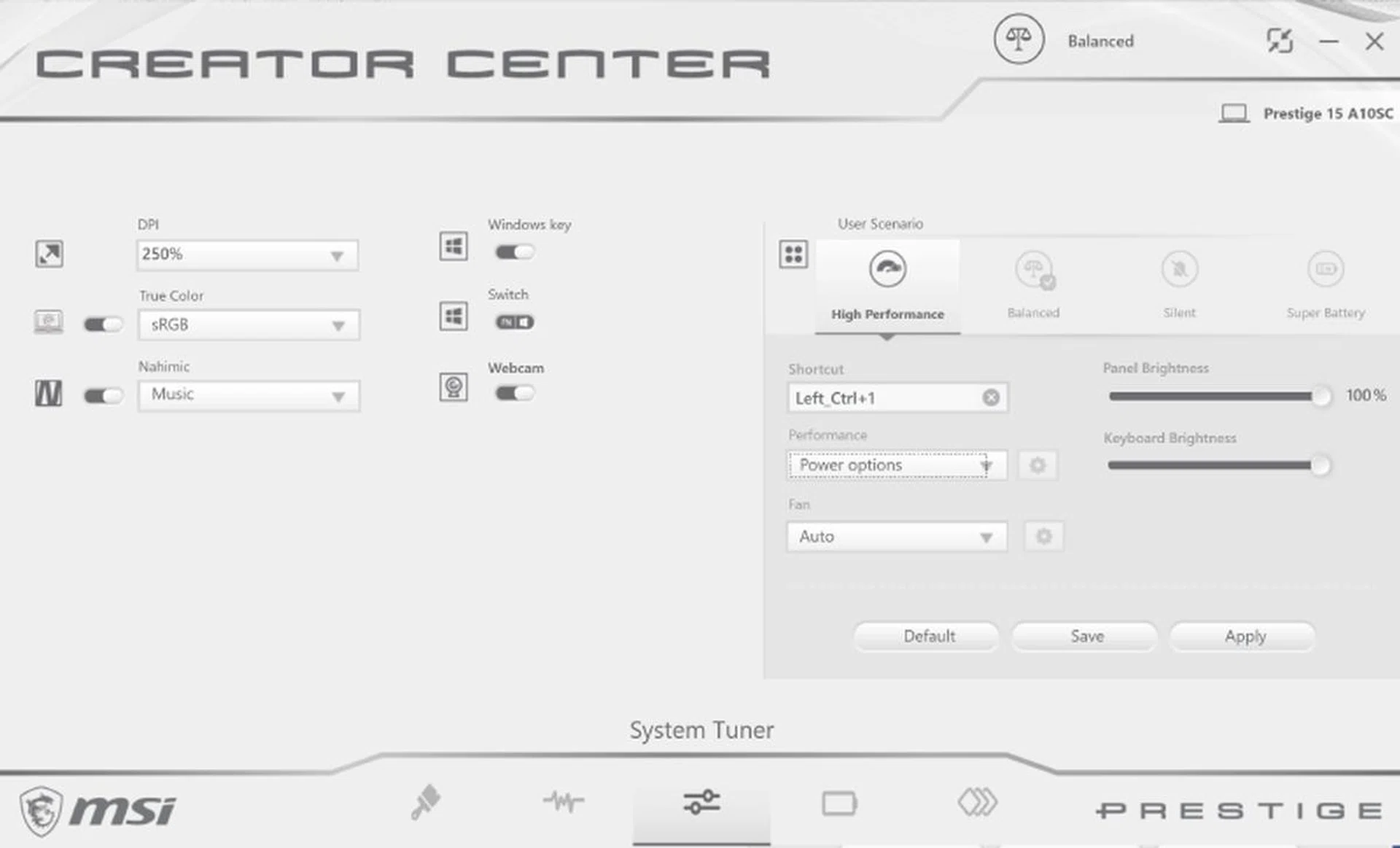
The Creator Center profiles really work.
It’s also worth noting that the Prestige 15 has a “High Performance” that can be enabled in the Creator Center app. Even though the notebook doesn’t have an overclockable CPU, turning on “High Performance” mode turns the fans up, enabling the notebook to run at higher clock speeds for longer. And there’s a genuine boost in performance especially in CPU-intensive workloads. For instance, in Cinebench, multi-core scores went up by as much as 80%. This can be handy for users who need to edit and render videos. This brings me neatly to my next point – temperature.
Temperature
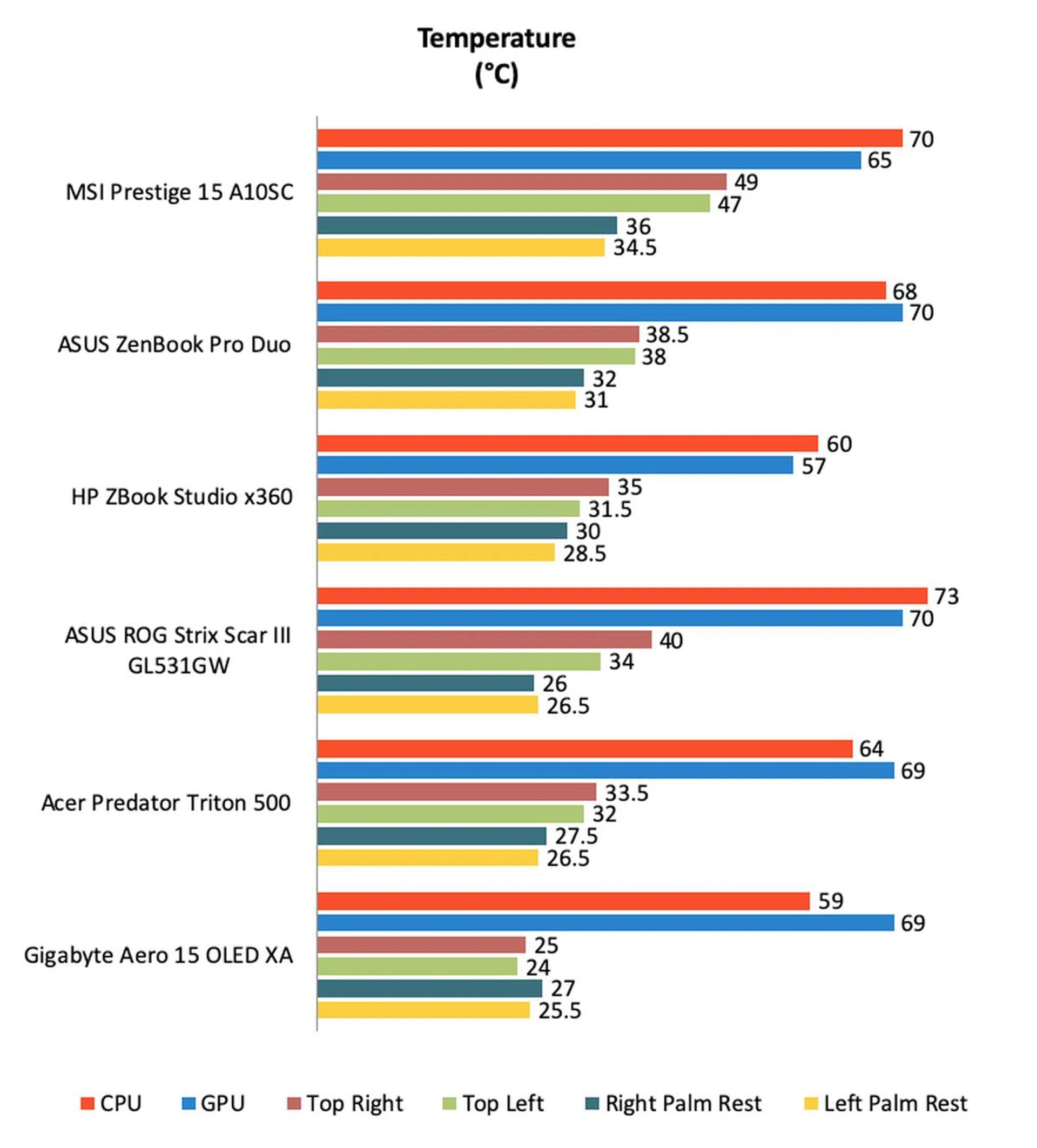
Such hardware in a body that’s just 15.9mm thick is always going to cause heating issues. And the Prestige 15 runs really warm. CPU and GPU temperatures are within the acceptable limit but the body is scorching hot when it’s heavily taxed. The top corners of the keyboard were just a few degrees shy of 50°C and were unbearably hot to touch. It’s also over 10 degrees hotter than the other 15-inch notebooks that we tested. The palm rests were hot too – the warmest amongst all the other 15-inch notebooks. In short, you probably don’t want to be doing anything too intensive if you are using this notebook on your lap.
Battery life
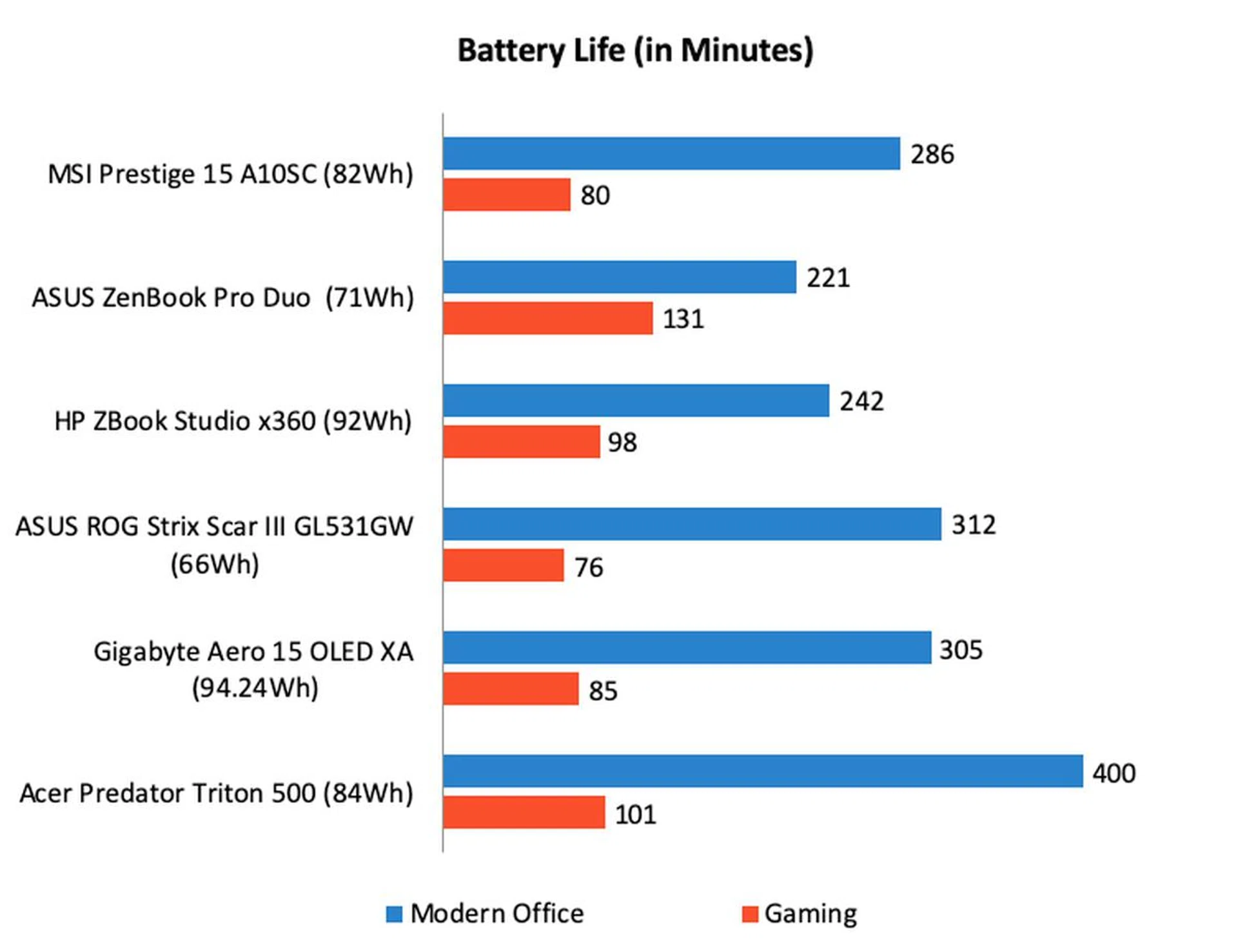
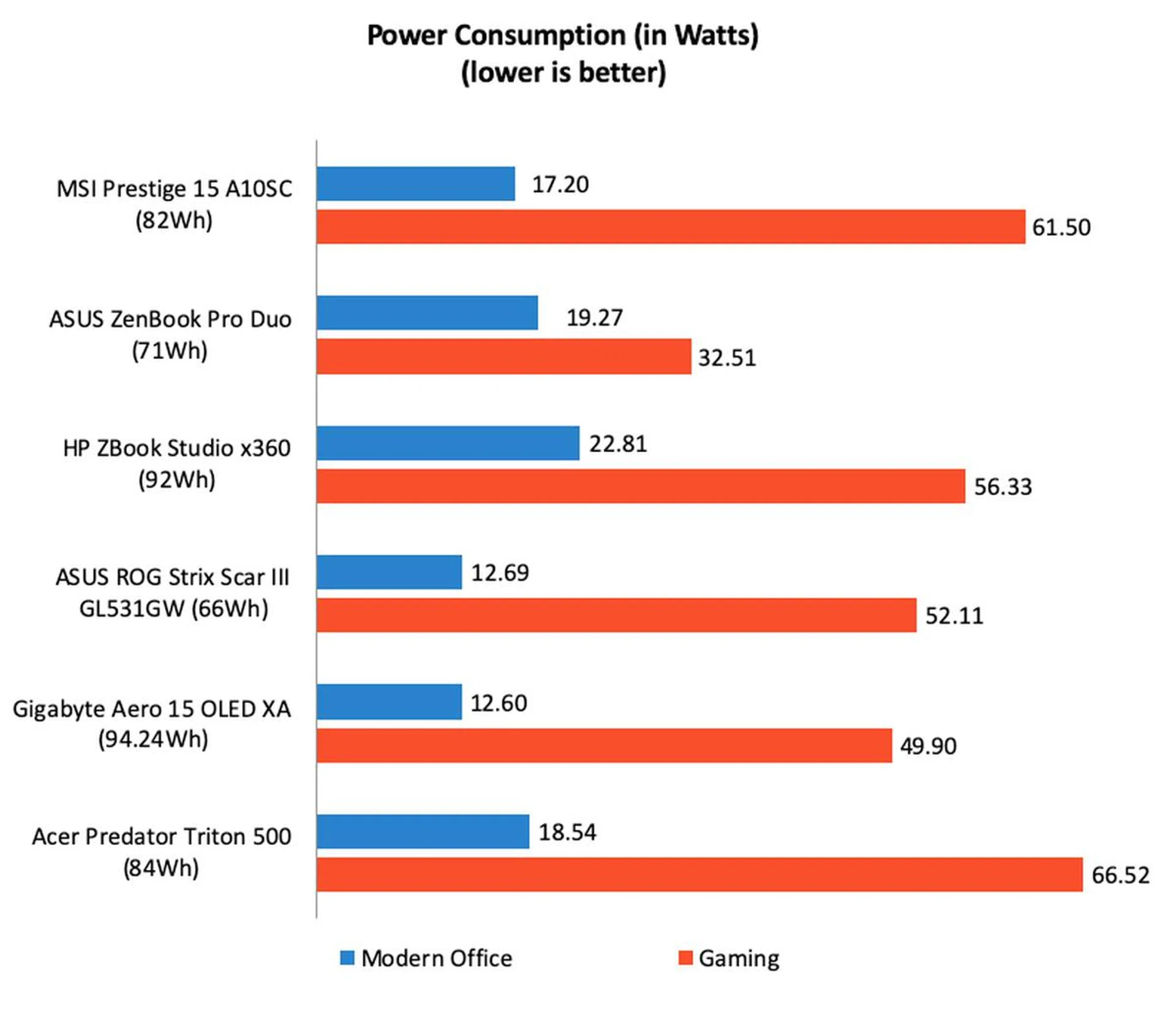
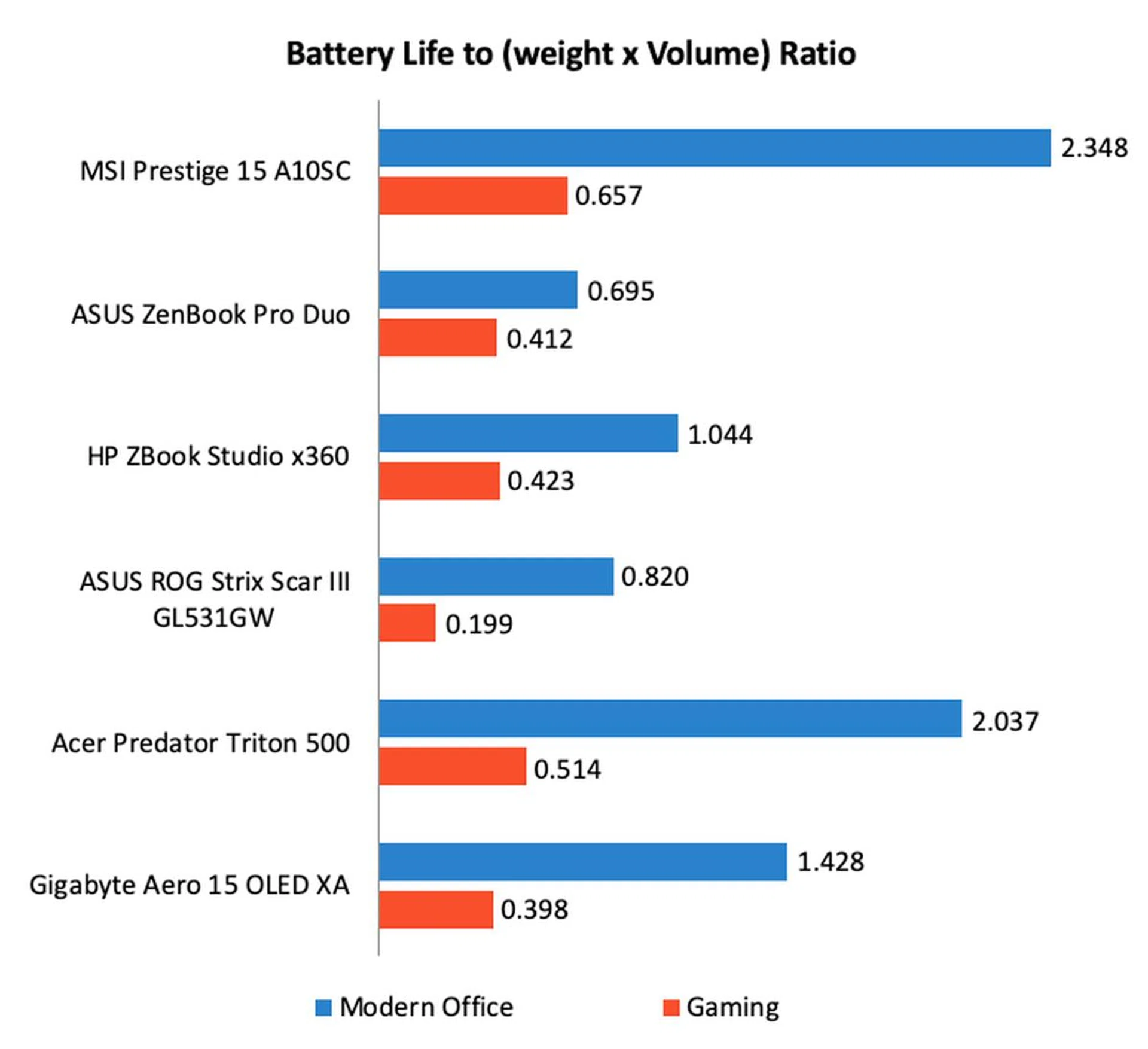
Battery life is commendable for a notebook with a 15-inch 4K display at 286 minutes or just 14 minutes shy of 5 whole hours. The only other notebooks here with 4K 15-inch displays are the ASUS ZenBook Pro Duo and Gigabyte Aero 15 OLED. Power consumption is a little on the high side but that’s forgivable given its bright 4K display. Thanks to its slim dimensions, its portability score was way ahead of the pack especially if you take into account its battery life on the Modern Office workload. It still managed the best score on the Gaming workload but because of its high power consumption, its lead wasn’t as impressive.
You can extend battery life by engaging the "Super Battery" mode in the abovementioned Creator Center app. This dims the display and forces the processor to run in its most efficient mode. You lose performance but gain a lot of battery life. In my tests, I found that I could stretch its battery life to an incredible 583 minutes – that's more than double.
Thin, light, and powerful, but with compromises
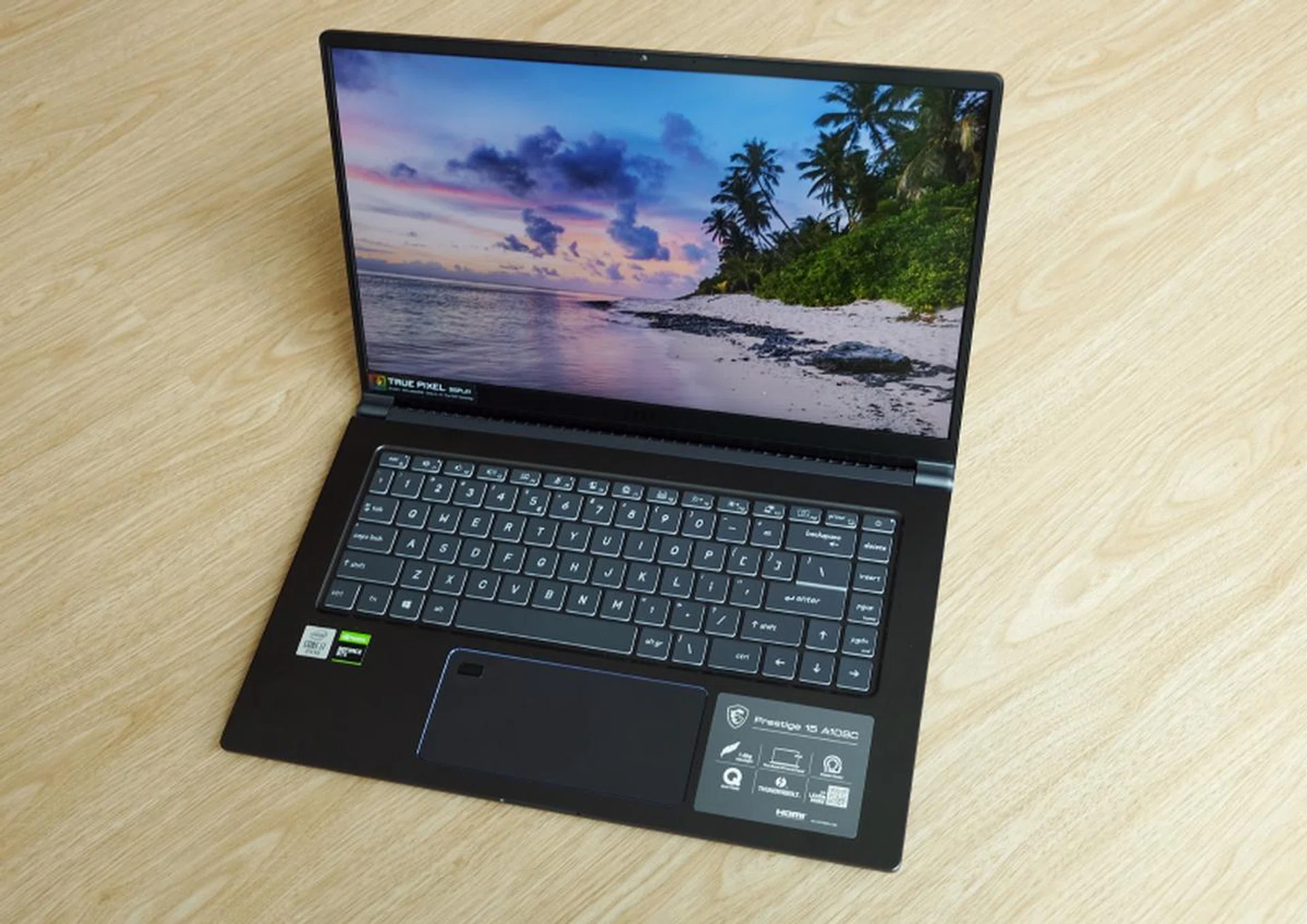
The MSI Prestige 15 is not quite as powerful as its peers but it is a whole lot thinner and lighter.
The Prestige 15 is a laudable attempt at creating a powerful 15-inch notebook that’s still relatively slim and light. But I think it’s an awkward compromise.
Performance was in line with expectations, but without activating the “High Performance” mode, CPU performance wasn’t actually that much better than a 13 or 14-inch notebook. Graphics performance was a step up but then it trailed behind other 15-inch notebooks which have more powerful discrete GPUs. And then there’s the issue of heat. Under load, this notebook gets scorching hot. I'm usually skeptical about notebook coolers but you might need one for this notebook.
As I mentioned at the start, its closest competitors are ASUS’ ZenBook 15, Dell’s XPS 15, and Gigabyte’s Aero 15. Now, I haven’t had hands-on experiences with them, but on paper, the ZenBook 15 is the closest rival since it has identical CPU and GPU. The XPS 15 and Aero 15, on the other hand, are markedly more powerful machines. The XPS 15 and Aero 15 have more powerful 45W CPUs and more powerful discrete graphics. The downside is that they are thicker and heavier, but not by a margin so wide that I’ll immediately discount them if I was looking for a powerful and portable 15-inch machine.
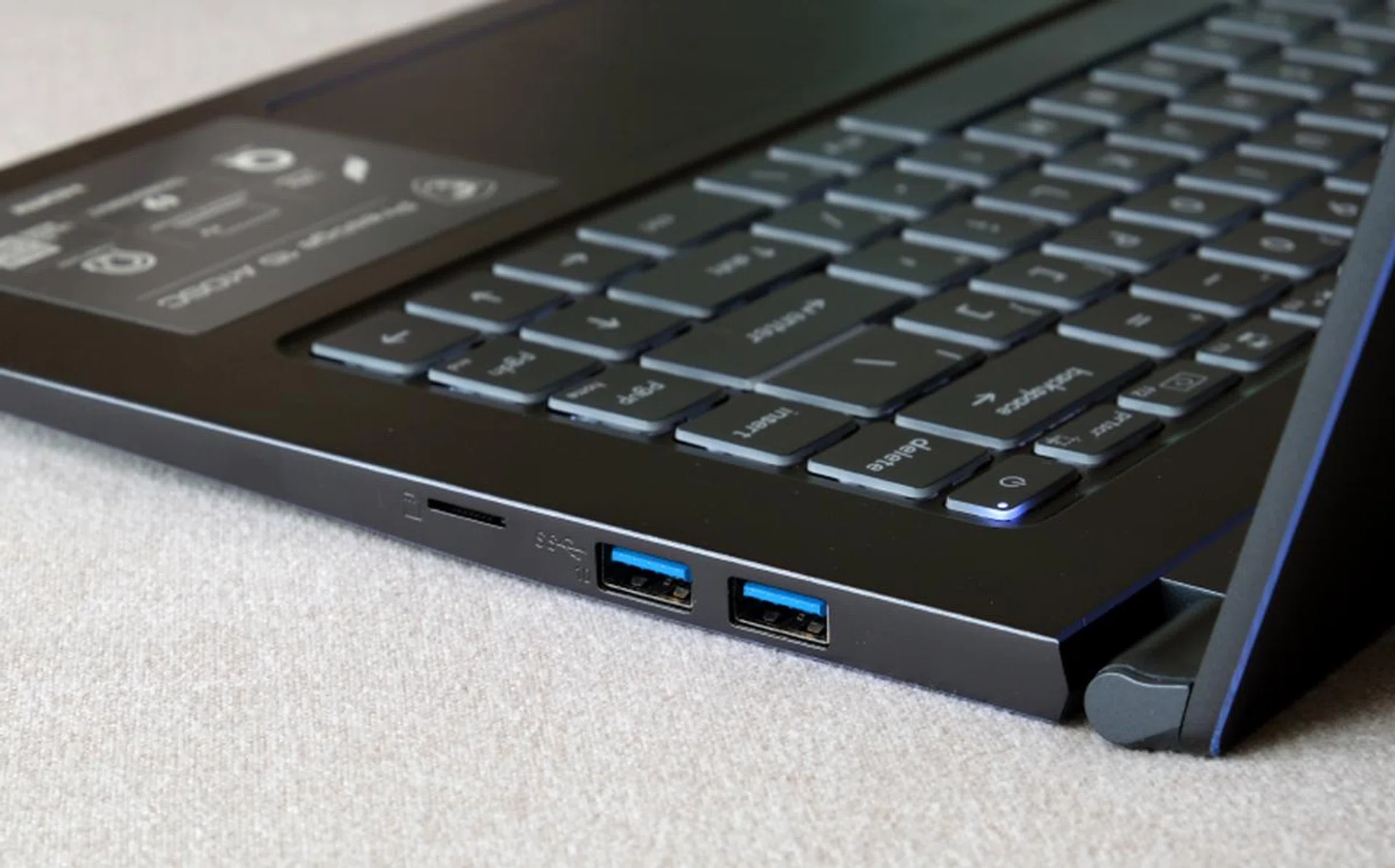
Full-size USB ports negates the need for clumsy adapters.
Still, if portability and performance are important to you, the Prestige 15 is worth a close and hard look. Few other 15-inch notebooks are as slim and light. LG’s gram 15 is lighter but it relies on integrated graphics so its performance isn’t competitive at all. And while the ZenBook 15 might have identical specs, it’s thicker and heavier than the Prestige 15. The XPS 15 and Aero 15 might be more powerful but are heavier still. The two weigh about 400g or 25% more. If you need to carry around your notebook all day, every gram counts. It also helps that at S$2,649, the Prestige 15 (even with the optional 4K display) is much cheaper than the XPS 15 and Aero 15, though it's dearer than a similarly-spec'ed ZenBook 15 (S$2,498).
So while the Prestige might be an awkward compromise between performance and portability, it does at least carve a happy niche for itself in the marketplace. Just remember to keep it off your lap.
Our articles may contain affiliate links. If you buy through these links, we may earn a small commission.