
MSI GE40 2OC Dragon Eyes - Affordable, Svelte & Powerful
Don't be fooled by appearances. Despite its slim profile and light weight, the MSI GE40 2OC Dragon Eyes packs the latest Intel "Haswell" processor and NVIDIA GeForce GTX 760M discrete graphics under its hood. We check it out to see if it's the notebook for weight-conscious gamers.

Dragon Eyes
With each passing generation, processors have become more power efficient. And this has had a major effect on notebooks design and specifications. Crucially, more efficient processors means more performance at a given TDP (thermal design power). TDP is important in a notebook design because it refers to the maximum amount of heat the cooling system in the notebook would need to dissipate. If a new notebook boasts a lower TDP than a previous generation, it means that the notebook does not have to dissipate that much heat (thanks to more efficient components) and it can do with simpler heatsinks and lesser fans (or even no fans in some cases). Also with more efficient components, notebook manufacturers need not integrate large batteries into their machines. All this means you stand to get slimmer and lighter notebook. This is exactly the change that's happening right now with products like convertible and hybrid Ultrabooks and ultra-slim gaming notebooks.
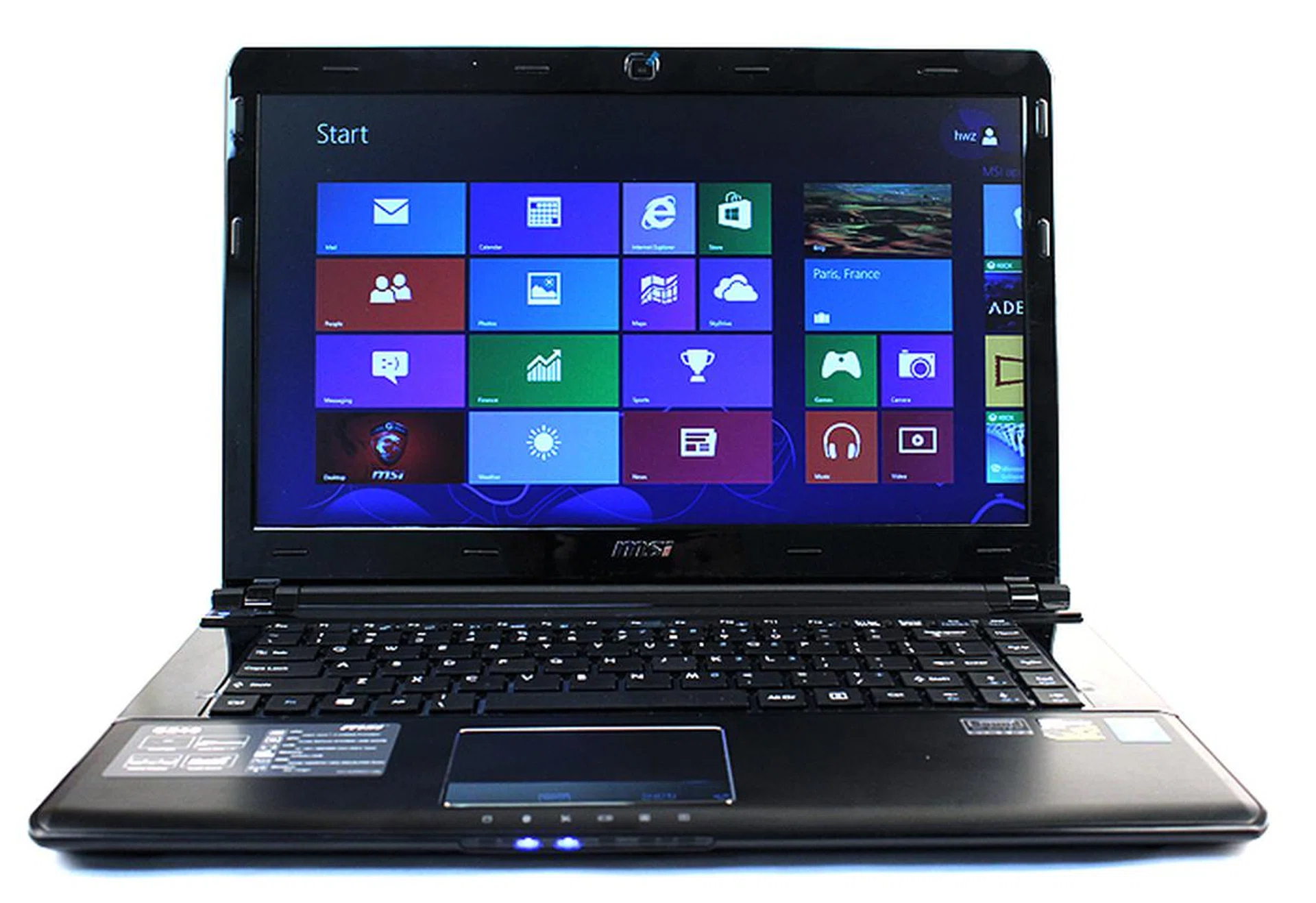
The MSI GE40 is the first notebook that we have tested to be powered by Intel's newest fourth generation Core processor.
Which brings us nicely to the new MSI GE40 2OC Dragon Eyes (henceforth known simply as MSI GE40), which is part of MSI’s G-series gaming series and has Intel’s latest fourth generation Core processor under its hood. Specifically, the notebook is powered by the new Core i7-4702MQ processor, which has a TDP of 37W, making it Intel’s lowest TDP quad-core mobile processor. This is a fairly high-end processor that runs at 2.2GHz, supports Hyper-Threading and has a large 6MB L3 cache with integrated Intel HD 4600 Graphics.
Thanks to the processor’s relatively low TDP (for a quad-core processor), MSI has managed to cram it into a body that is just 29mm thick at its thickest point and weighs just 1.9kg. Considering that under the hood of this 14-inch notebook is also NVIDIA’s latest GeForce GTX 760M GPU, two 64GB mSATA SSDs in a RAID 0 configuration and a 750GB HDD, this is a pretty impressive achievement. Here's a video preview to whet your appetite:-

Design
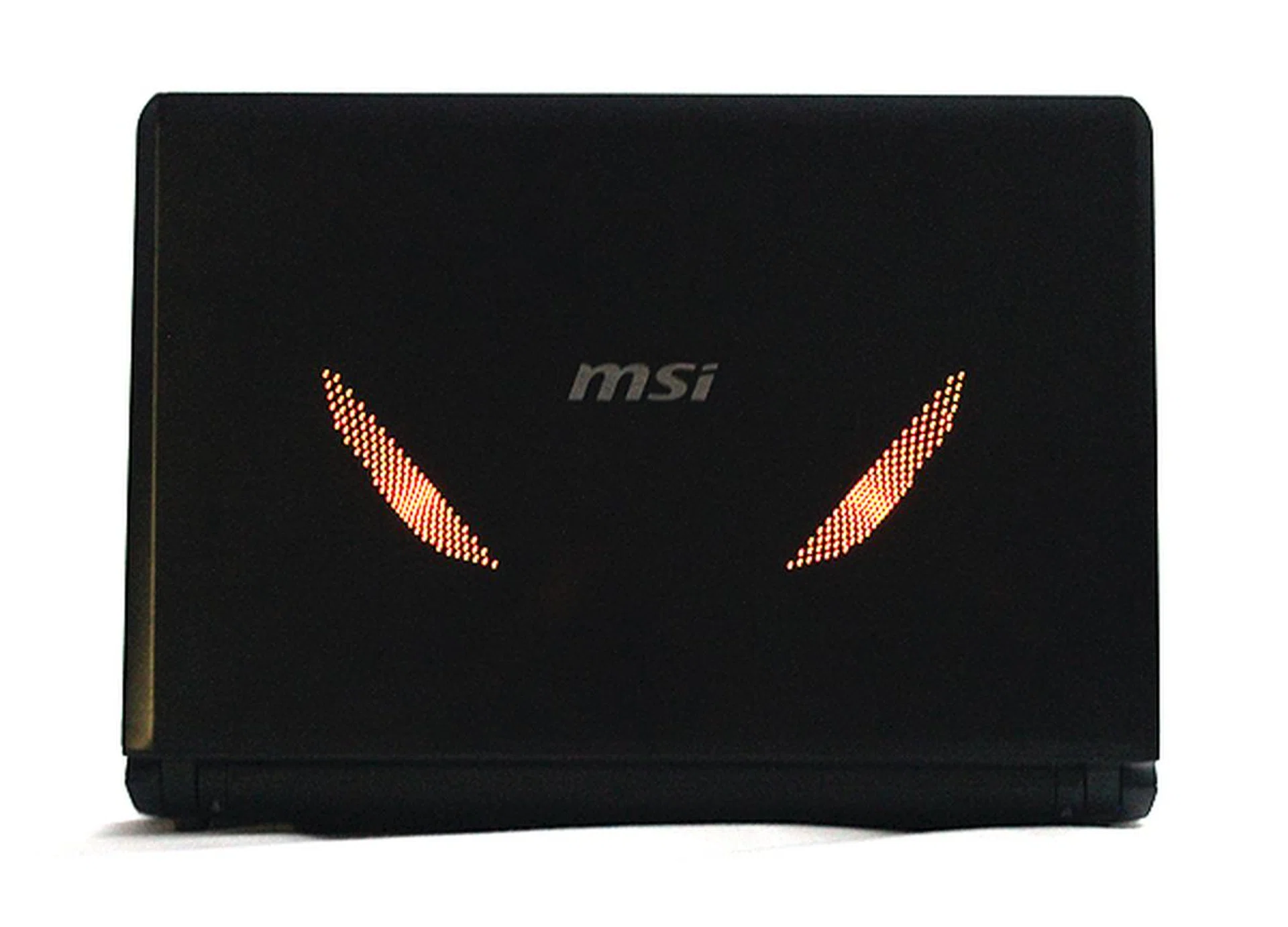
And this is how the MSI GE40 2OC Dragon Eyes got its name. See those two lighted slits?
The MSI GE40 is so- called because of the special deisgn on its lid. On the lid are two slits of perforated holes that light up to look like the eyes of a dragon when the notebook is turned on. Although a little gimmicky, this little design cue does breath some life into an otherwise uninteresting-looking notebook.
On the flip side of the lid is 14-inch HD+ matte display that has a native resolution of 1600 x 900 pixels. Although this is not an IPS display, we found that it offered good viewing angles and colors were sufficiently brilliant. The MSI GE40 also features MSI’s Matrix Display technology, which lets users output to an additional two displays simultaneously via the notebook’s HDMI and VGA ports.
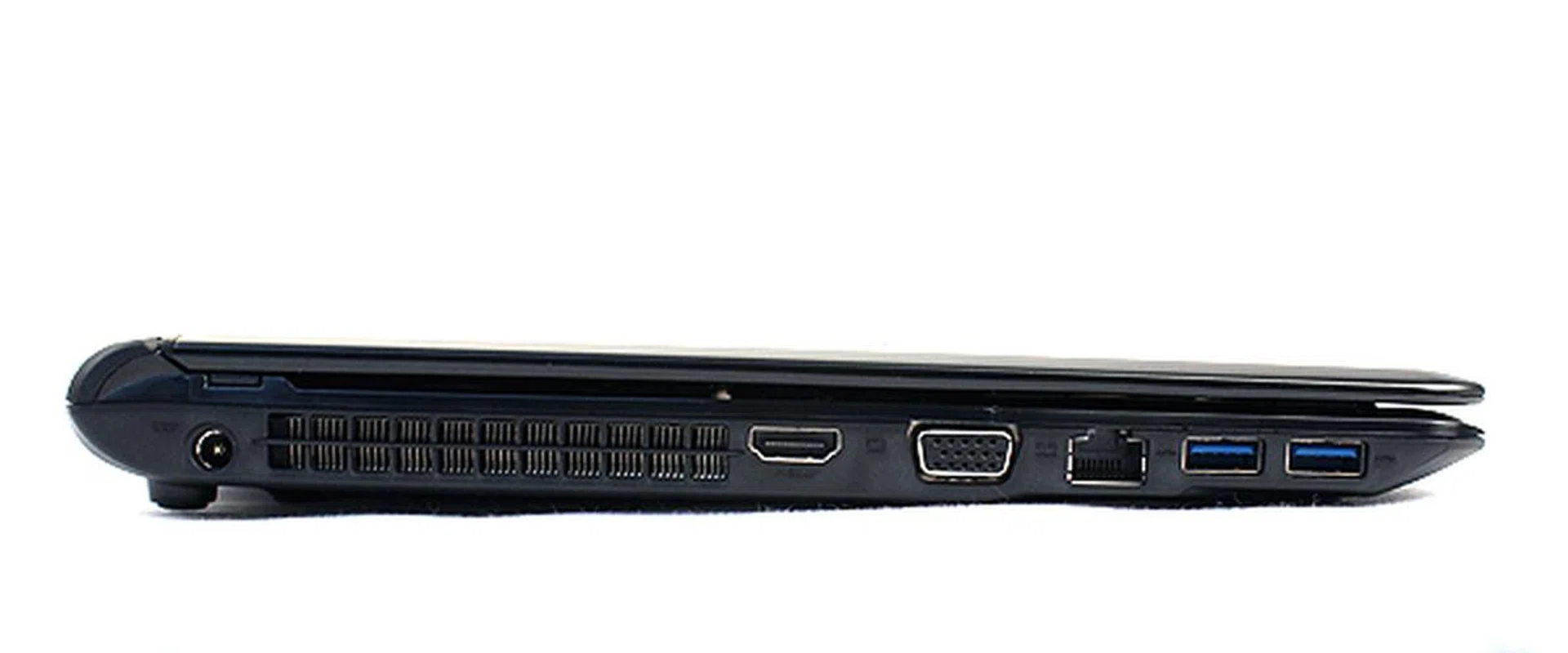
The MSI GE40 is fantastically slim for a notebook with its specifications, at just under 30mm thick at its thickest point.
That said, the highlight of the MSI GE40 must be its slimness and weight. The unit is under 30mm thick and weighs just 1.9kg, making it one of the thinnest and lightest gaming notebook around at the moment. Off the top of our heads, only the new Razer Blade possesses slimmer dimensions and a lower weight, but they don't differ by much.
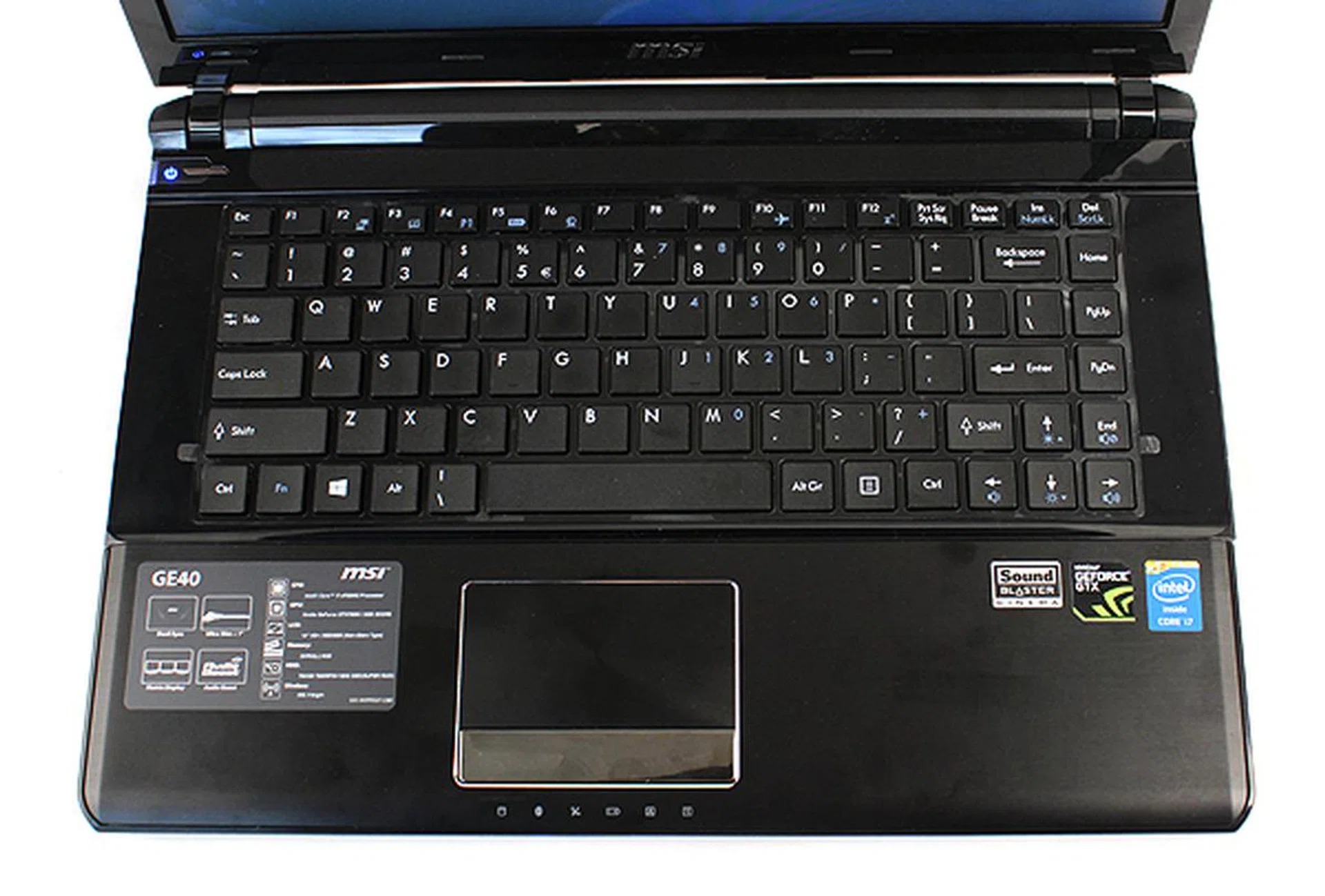
The keys are well-sized but the keyboard exhibited flex when typing and did not feel as solidly put together as we would have liked. The touchpad is a tad small, but is responsive and works well enough for occasional needs.
As for the MSI GE40, it achieves its low weight thanks to its extensive use of aluminum. The lid and palm rest are both crafted out of aluminum. The remaining panels are glossy plastic. Overall, the notebook looks reasonable, but it isn't exactly eye-catching - other than when it's powered up. As for overall build quality, we found the MSI GE40 to be decent but far from fantastic. Our main gripe was that when typing, we felt that the keyboard did not feel solid enough, as there was noticeable flex. The use of glossy plastic in certain areas further detracts from the build quality, but that's just our personal observation.
Features
Apart from its slim and lightweight design, the other key features of MSI's GE40 lie in its specifications. We have already talked about its new fourth generation Intel Core processor, but apart from that, it has NVIDIA’s new GeForce GTX 760M GPU and a blazing fast storage configuration: dual 64GB mSATA SSDs in RAID 0.
The GeForce GTX 760M was only recent launched and it uses NVIDIA’s new Kepler architecture - not a rebadged Fermi GPU. The new GeForce 760M fills the gap between the old GeForce GTX 660M and 670MX and it packs 768 CUDA cores, which makes it one of NVIDIA’s more powerful mobile GPUs. Additionally, it also has NVIDIA’s new GPU Boost 2.0 technology, which automatically raises the GPU’s clock speeds based on its power draw and thermal conditions to ensure maximum gaming performance.
That aside, users would be most excited about its storage configuration. As if having an SSD alone is not enough, MSI has gone out and given the MSI GE40 two mSATA SSDs in RAID 0 configuration. Although 128GB is not a lot, it should be sufficient for most users to install their OS and performance-sensitive applications. On top of that, the MSI GE40 also packs an additional 750GB HDD for storing other content such as music, videos and photos. This combo should be more than sufficient for most users.
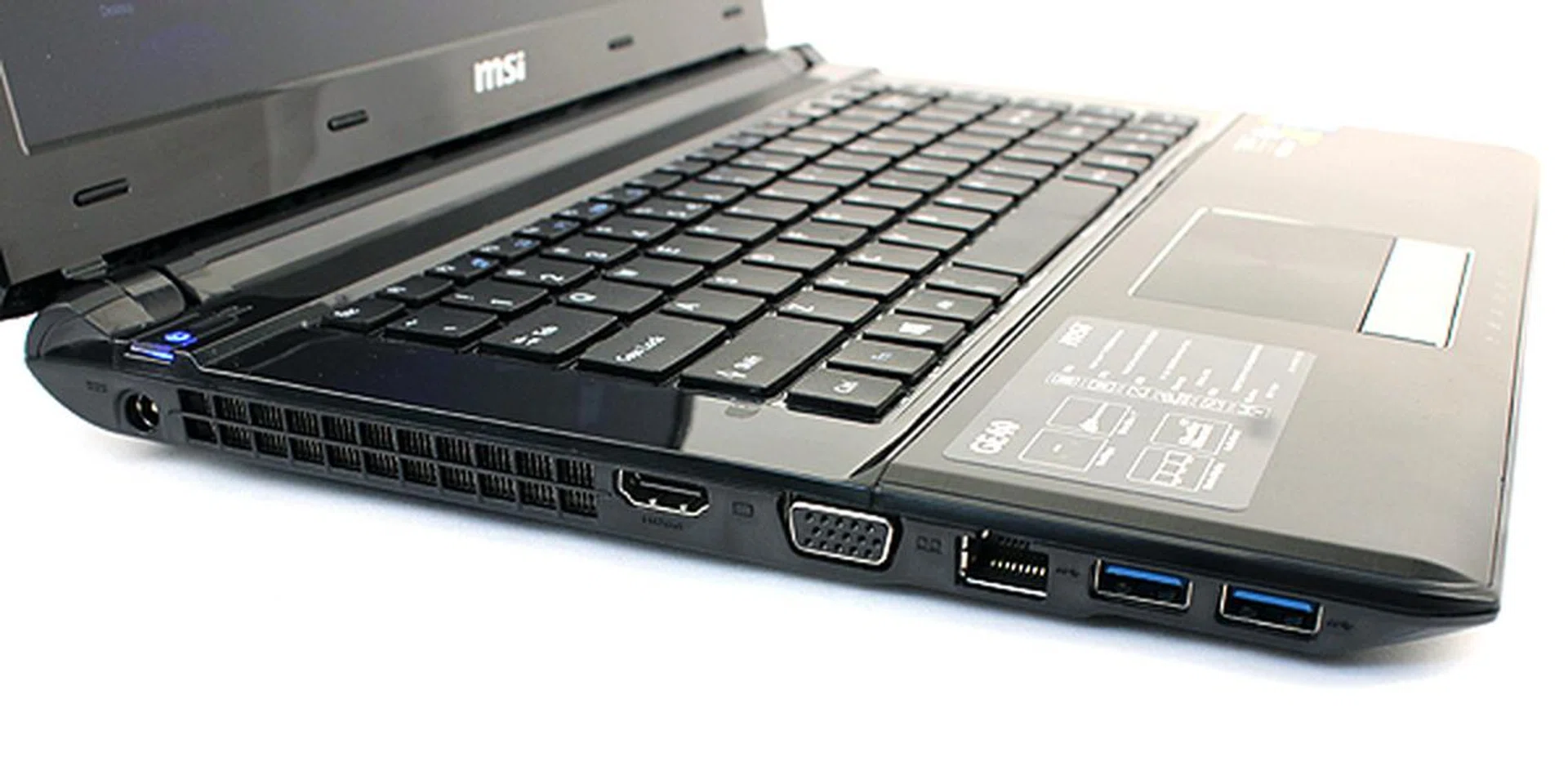
The left side of the MSI GE40 houses most of its ports. There are two USB 3.0 ports, an Ethernet jack, HDMI and VGA ports.
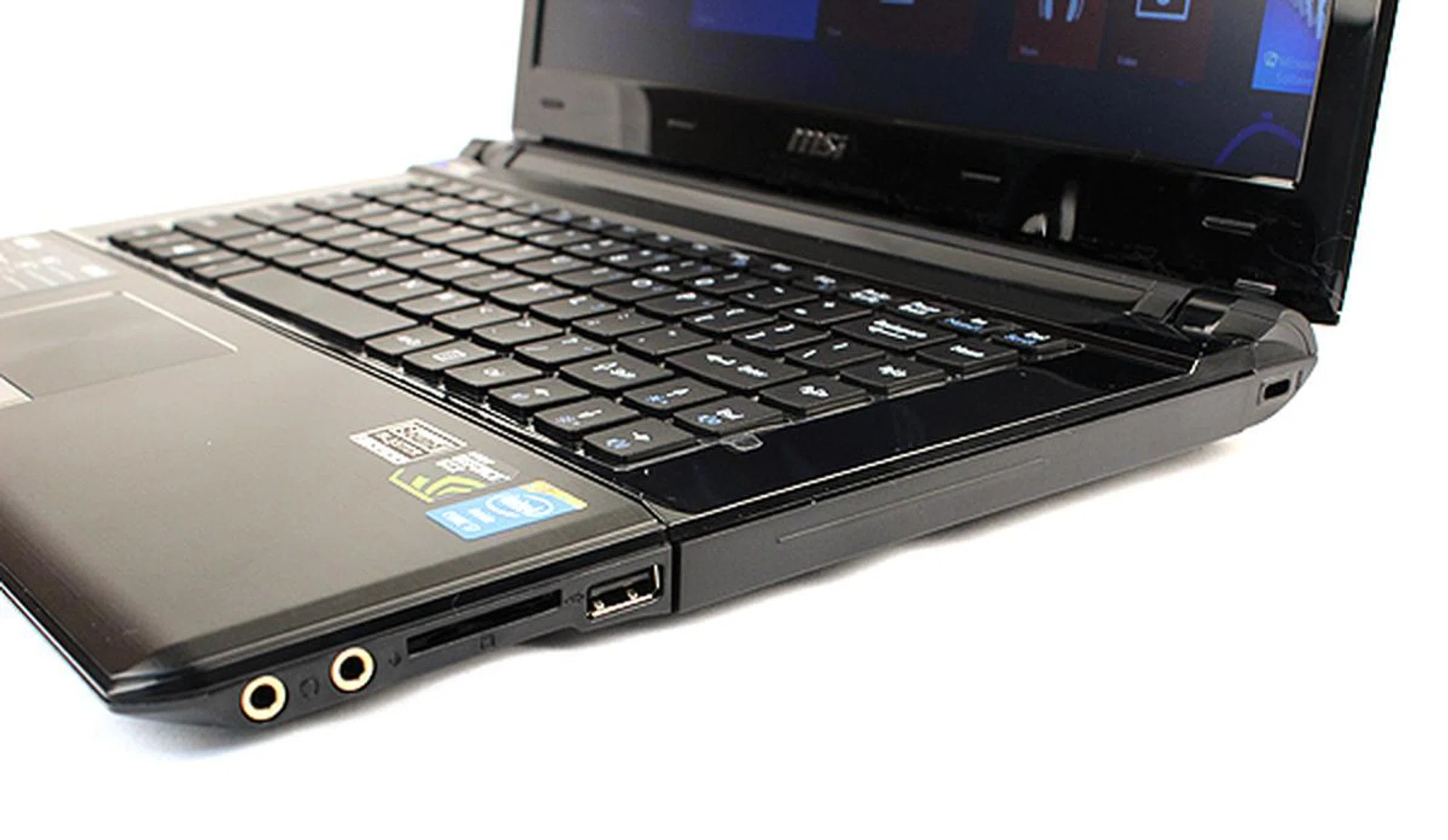
On the right, we find gold-plated audio jacks, a memory card reader and an additional USB 2.0 port. The optical storage bay has been converted to house the 750GB HDD. So don't be fooled into thinking there's an ODD there.
Despite the slim form factor, the MSI GE40 2OC Dragon Eyes has a healthy selection of output connectivity in the form of two USB 3.0 ports, a single USB 2.0 ports, the aforementioned HDMI and VGA outputs, an Ethernet jack, audio jacks and a memory card reader. Thanks to its Matrix Display technology, the notebook is able to output via its HDMI and VGA ports simultaneously, which means users can run a total of three displays (including its own) all at once.
Audio-wise, the MSI GE40 features MSI’s own Audio Boost technology which claims to enhance sound detail and sound stage. Additionally, the notebook also comes with Sound Blaster Cinema technology and gold-plated headphones jack. The notebook speakers sound decent enough, but suffer from the same problems that plague most other notebook speakers, namely lack of bass and crackling at high volumes.
Test Setup
To test the MSI GE40, we will be putting it through our usual benchmarks. You will find the full list below. As for comparison, the MSI GE40 will be pitted against the gaming notebooks that we have tested recently, namely the Lenovo IdeaPad Y500, Razer Blade, Alienware M17X R4 and MSI GT70 0NE.
This is the full list of benchmarks used:
- SYSmark 2012
- PCMark 7
- PCMark 8
- 3DMark 11
- 3DMark 2013
- Far Cry 2
- Crysis 2
[hwzcompare]
[products=399121,384550,296827,384781,384753,384757]
[width=175]
[caption=Test Notebooks Compared]
[showprices=0]
[/hwzcompare]
SYSmark 2012
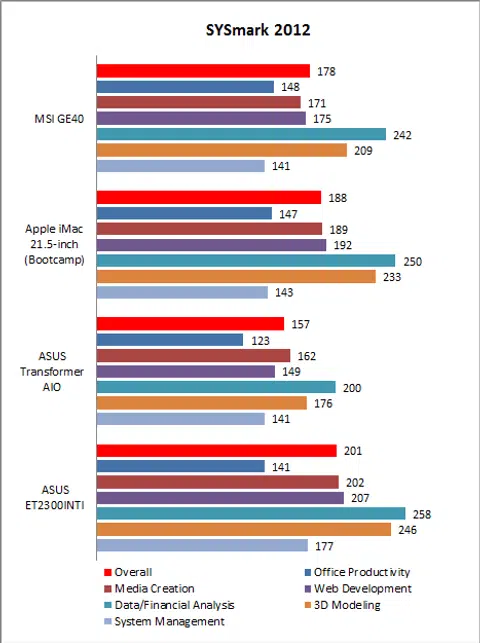
Last year, BAPco recently released SYSMark 2012, the latest edition of their popular benchmarking software. SYSMark 2012 puts the system through a rigorous series of various workloads ranging from office productivity, data analysis, media creation and 3D modeling.
Since SYSmark 2012 is still a relatively new benchmark, we haven’t had the opportunity to recall the other gaming notebooks for a re-evaluation, the Lenovo IdeaPad Y500 also could not complete the benchmark, hence we will be comparing the MSI GE40 against some of the AIOs that we have tested recently. The MSI GE40 did well scoring an overall score of 178, which puts it just about on a par with the Apple iMac, which was a speedy machine. However, the ASUS ET2300INTI was the top performer here thanks to its beefy Core i7-3770 processor, which has the highest clock speeds and largest L3 cache.
PCMark 7
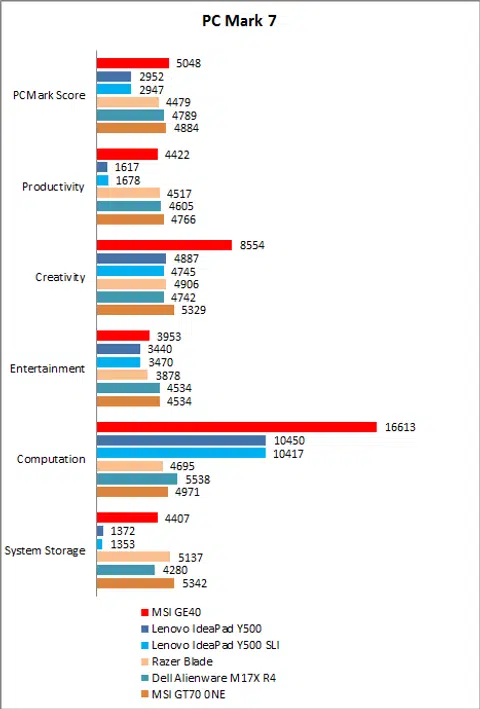
On PCMark 7, the MSI GE40 managed an overall score of 5048, which is the highest score among the notebooks we've put together for comparison. Looking at the score breakdown, we can see that it did exceptionally well on the Creativity and Computation workloads, and this can be attributed to its powerful new GeForce GTX 760M GPU.
PCMark 8
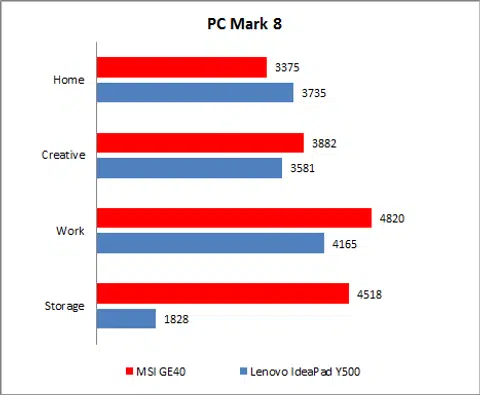
PCMark 8 is the latest benchmarking utility from Futuremark and was designed to measure the performance of Windows 8 systems. We will be testing the system using four different scenarios, Home, Creative, Work and Storage, which simulates different workloads that a user might subject the system to.
Since PCMark 8 is still new and we could not recall the rest of the notebooks for re-evaluation, we will only be looking at the results of both the MSI GE40 and Lenovo Y500. However, rest assured we will be populating this list moving forwards in future reviews.
Looking at the graph, we can see the MSI GE40 was superior in most of the workloads. It lost out only on the "Home" workload, which is made of low computation tasks such as web browsing and word processing. Unsurprisingly, thanks to its SSD, the MSI GE40’s biggest margin of victory came in the Storage workload as opposed to the Lenovo machine not using an SSD drive.
3DMark 11
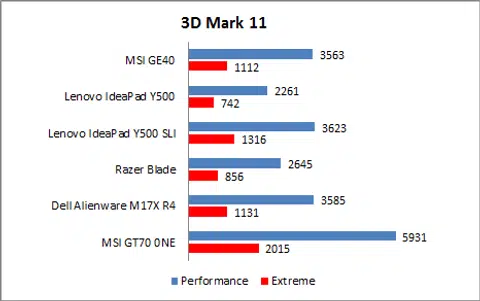
Since 3DMark 11’s Extreme Preset runs in full-HD 1920 x 1080p resolution, we hooked the MSI GE40 up to an external display to ensure it was tested fairly. It managed 3563 and 1112 on the Performance and Extreme presets respectively, which is about on a par with the Lenovo IdeaPad Y500 when it is in dual-GPU mode and also the Dell Alienware M17X R4. The MSI GT70 0NE, thanks to its powerful GeForce GTX 680M GPU, was the top performer. Still, the GE40's brand new GeForce GTX 760M is plenty powerful that it can match the SLI configuration on the Lenovo IdeaPad Y500 machine.
3DMark 2013
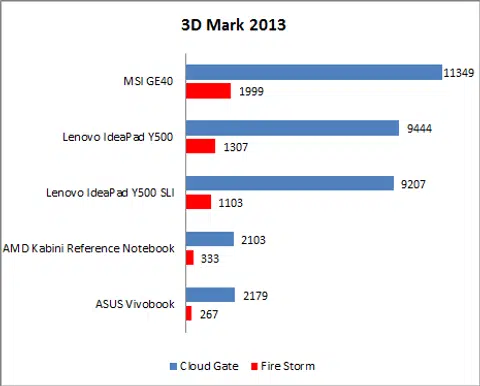
3DMark 2013 is the latest graphics benchmarking utility from FutureMark and we will be gauging the systems’ performance using the Cloud Gate benchmark, which was designed to measure the performance of integrated and entry-level GPUs, as well as mobile GPUs. Since the MSI GE40 has been positioned as a gaming notebook, we are also including results from the more intensive Fire Strike benchmark.
Unfortunately since 3DMark 2013 is a new benchmark, we have not had the chance to test it on the older gaming notebooks. However, we have included selected results from our AMD Kabini preview article to demonstrate the difference between integrated graphics and discrete graphics on a notebook platform.
Unsurprisingly, the MSI GE40 easily trumped the Lenovo IdeaPad Y500, thanks to its superior discrete graphics chip. Note that results of IdeaPad Y500 in SLI mode was low because of some incompatibility with the benchmark. Finally, we can also see the gulf in performance between discrete graphics such as the MSI GE40’s GeForce GTX 760M and integrated graphics such as those found on our AMD Kabini reference notebook and the ASUS Vivobook.
Far Cry 2
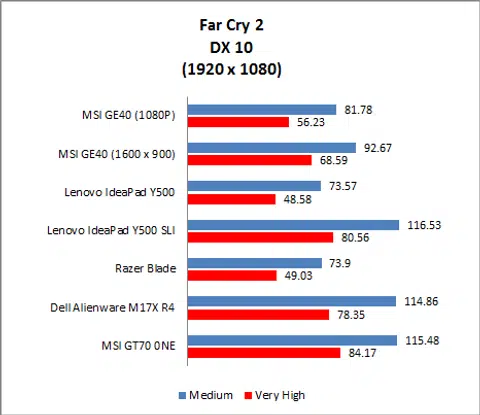
Moving on to real-world gaming benchmarks, the MSI GE40 did reasonably well as it saw off the Lenovo IdeaPad Y500 and Razer Blade (2012). However, it was no match for the Lenovo IdeaPad Y500 when in SLI mode and also the Dell Alienware M17X R4 and MSI GT70 0NE.
Additionally, we can see that while using the MSI GE40’s native resolution of 1600 x 900 as opposed to 1920 x 1080, we can expect to get about 15% bump in frame rates.
Crysis 2
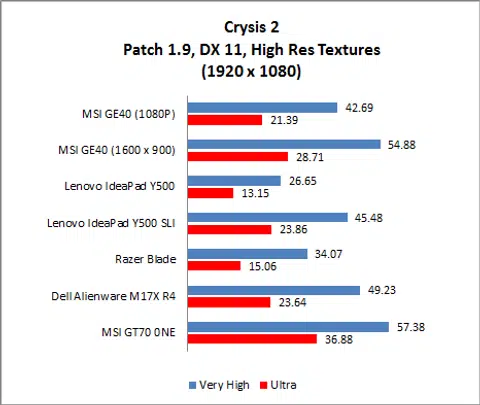
The MSI GE40 ran Crysis 2 comfortably even in full HD and stuttered only when we upped the settings to "Ultra". Although its performance was about on a par with the Lenovo IdeaPad Y500 in SLI mode, we found that it recorded lower frame rates than both the Dell Alienware M17X R4 and MSI GT70 0NE.
To add, running Crysis 2 on the MSI GE40’s own display and at its native resolution of 1600 x 900 would net us about a 30% increase in frame rates.
Battery Life & Power Consumption
Intel has claimed that its new fourth generation Core processors are its most efficient processors ever and said that notebooks can expect to see as much as a 50% increase in battery life. Bold claims, indeed.
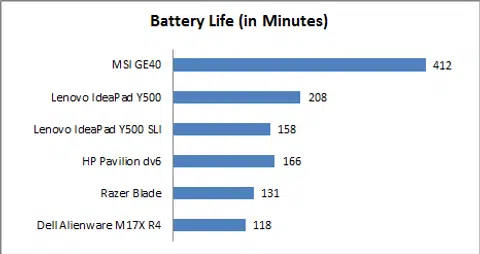
Usually, we use Powermark to determine the battery life of a notebook system, but for unknown reasons, Powermark refused to run on the MSI GE40. As a result, we had to fall back on our previous testing methodology, in which we looped a high-definition video clip over and over until the notebook ran out of juice. From our extensive testing experience, we've found found that both testing methods will net somewhat comparable results.
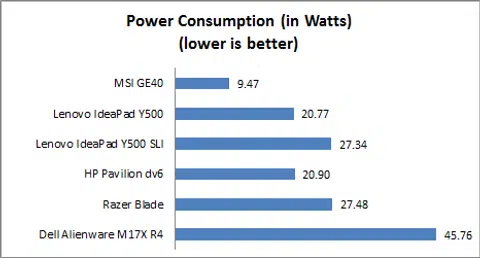
The MSI GE40 has a decently-sized 65Wh battery pack and we found that it could run nearly 7 hours, which is impressive, far exceeding any of the other gaming notebooks here. Calculating its power consumption, we arrived at a very low figure of just 9.47 watts, which is just half that of its competitors. Based on this, it seems that Intel has delivered on its promises and claims. The new fourth generation Core processors are truly its most power efficient yet!
Portability Index
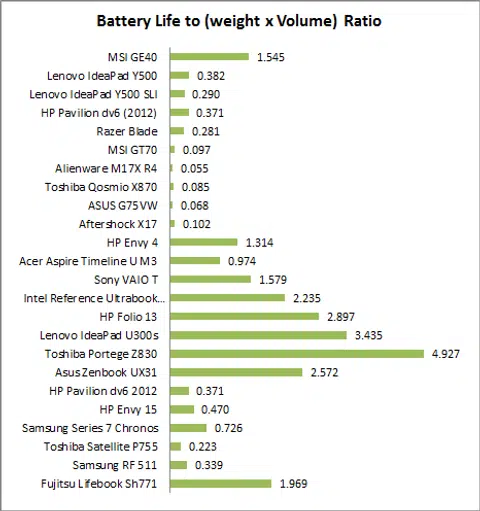
Our Portability Index factors in battery life, weight and volume so you can see which notebook is the most worthwhile to carry around. As you can clearly see, its portability index score far exceeds that of any gaming-class notebook and is a rival for Ultrabooks.
Fantastic Value
The MSI GE40 is the first notebook we have tested to use both Intel’s new fourth generation Core processors and also NVIDIA’s latest GeForce GTX 760M GPU. From a performance standpoint, the MSI GE40 performed admirably.
The processors on the MSI GE40 and Lenovo IdeaPad Y500 are actually quite comparable, but the results on PCMark 7 are lopsided because of the MSI’s SSD storage configuration. That said, we noted that MSI GE40 was on a par with the rest of the high-end gaming notebooks such as the Dell Alienware M17X R4 and MSI GT70 0NE. On PCMark 8, we can see that the MSI GE40 performed better overall if we were to look at the Home, Creative and Work workloads.
As for graphics performance, the MSI GE40 has been bestowed with the new NVIDA GeForce GTX 760M, which is a very competent mid to high-end discrete graphics chip. It was able to run Crysis 2 at Full HD resolution even at "Very High" settings and also blitzed through Far Cry 2. Some users might lament the fact that the MSI GE40's display was not Full HD, but as we found out, having a lower resolution display could be a blessing in disguise as performance on its native resolution was often significantly better.
Perhaps most impressive of all is the MSI GE40's battery life. Intel claims that its new Core processors would improve battery life by significant margins and they were not kidding. In our tests, we found that the MSI GE40 could last almost 7 hours, which is unheard of for a notebook offering this kind of performance. It is a bit too early yet to provide a definitive verdict on the impact of battery life from Intel's newest processors, but the MSI GE40's showing is very encouraging.
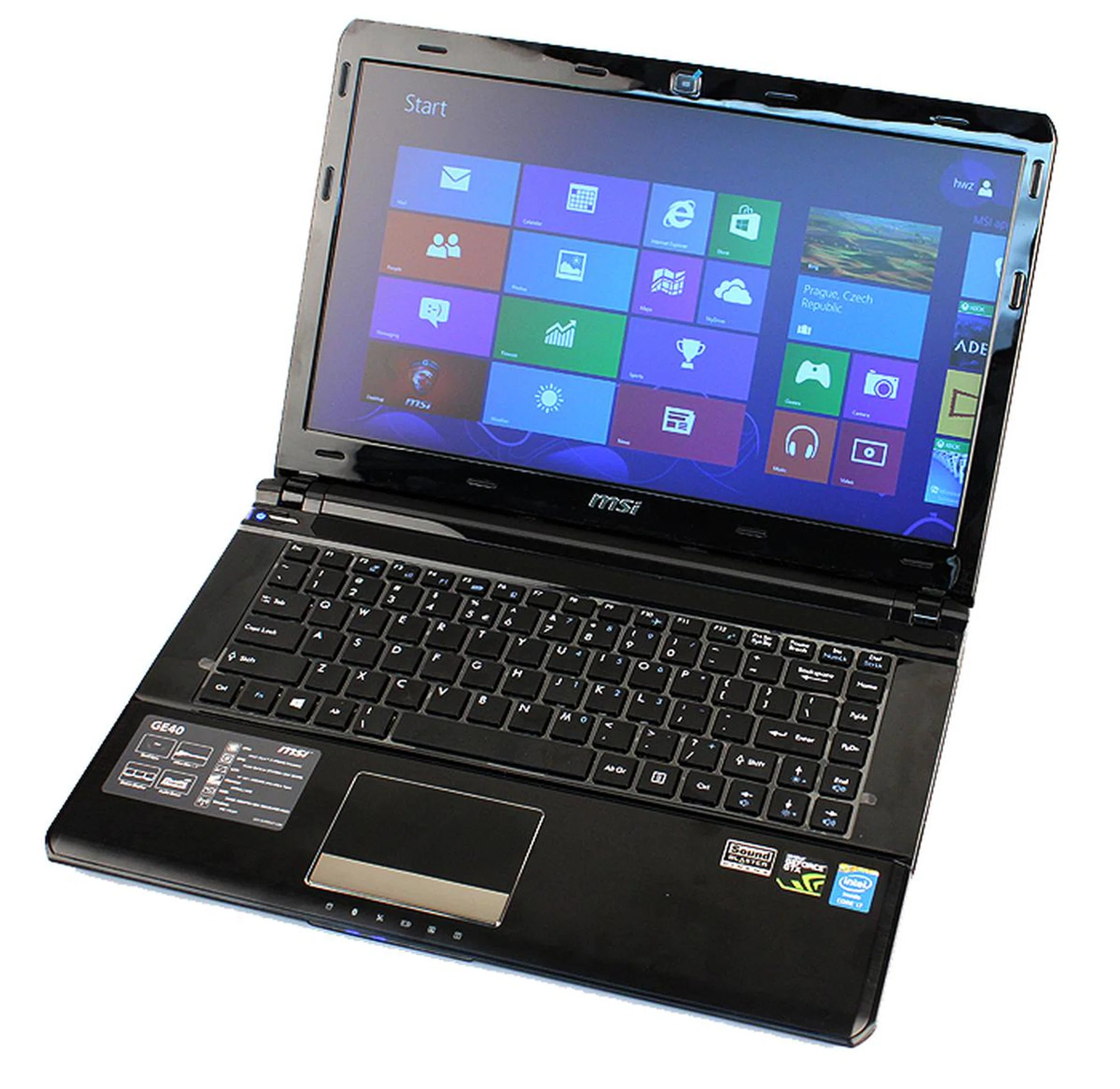
The MSI GE40 may not set the standard for notebook build quality, but it offers great performance, awesome battery life and compact dimensions at a very enticing price.
Overall, the MSI GE40 is very capable machine and is easy to recommend, especially when you consider its price - just $2099, which is just $100 more than the previously review Lenovo IdeaPad Y500. Of the two, the MSI GE40 is easily the more capable gaming machine thanks to its beefier GPU, but it is also more compact, lighter and offers a much longer battery life.
However, the old adage that goes "You get what you pay for" rings true for the MSI GE40. We won't go as far as to say that the MSI GE40 is cheaply made, but it does not feel well put together. Specifically, the flexing in the keyboard is quite unnerving if you are an enthusiastic typist. Furthermore, it lacks some of the features that you get in more premium notebooks such as an IPS display or a backlit keyboard.
In a way, you can think of the MSI GE40 as the computing equivalent of a Mitsubishi Evolution. It's not as well-built or as luxurious as its European rivals, but the Evolution has got the goods under its hood to be capable of keeping up with the best of the European sports saloons.
For the MSI GE40, what you are paying for really are the components in its chassis: the fantastically frugal and capable Intel Core i7-4702MQ, the powerful GeForce GTX 760M and the pair of blazing quick mSATA SSDs.
Our articles may contain affiliate links. If you buy through these links, we may earn a small commission.