

Hey there, good looking
There’s never been a better time to be a notebook user. Advances in technologies have made notebooks thinner and lighter than before; but with a recent emphasis on style and form, notebooks have never been better-looking and sleeker.
Many would argue that the notebook to beat was released all the way back in 2008 - yes, the MacBook Air. When the late Steve Jobs pulled the MacBook Air out of an envelope, little did we know that the world of notebooks would never be the same again. Today, the MacBook Air is something of a computing icon, and though it has been extensively copied, it has never been usurped.
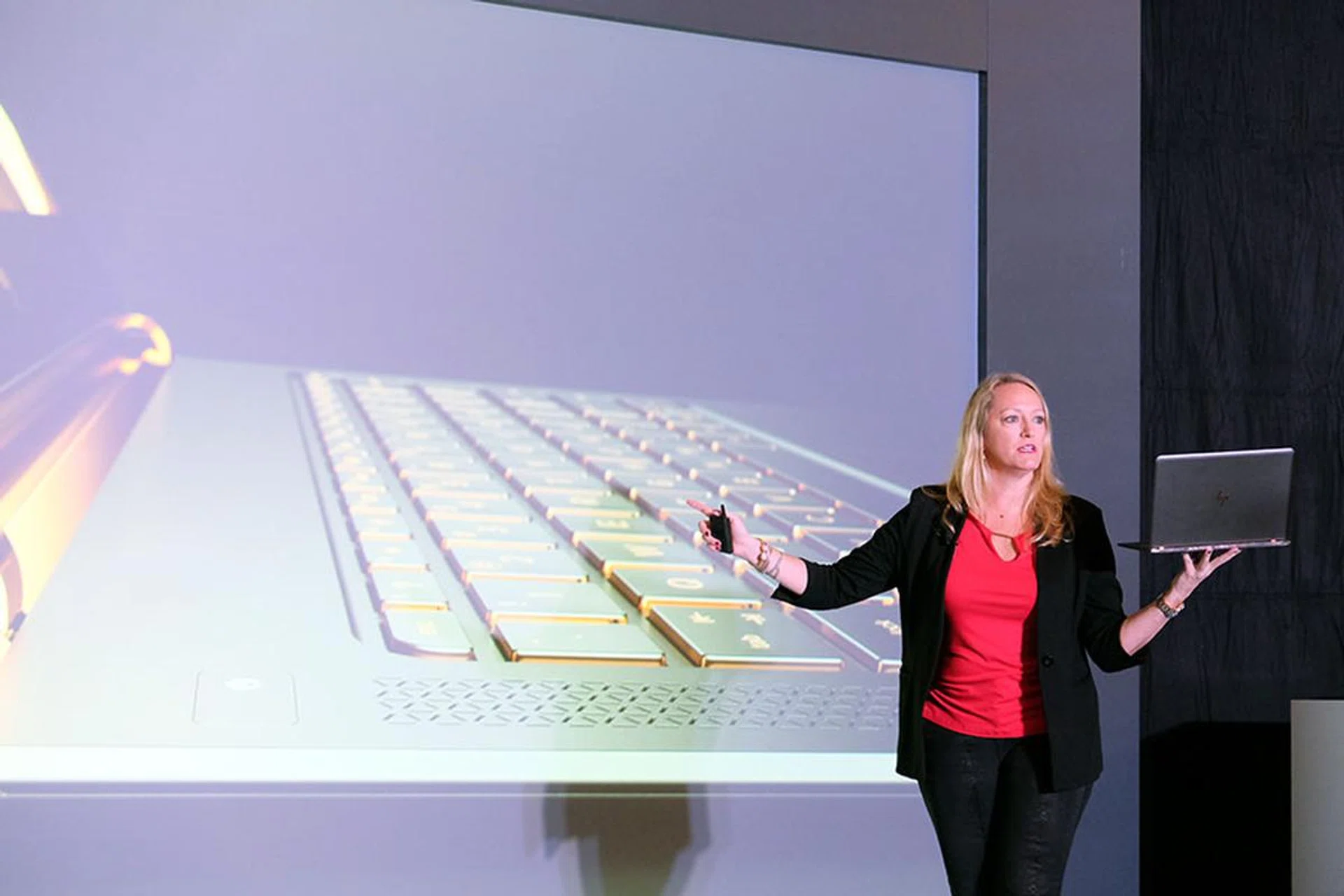
Anneliese Olson, HP’s General Manager and VP of Personal Systems Business in APJ, talks about the new HP Spectre at a special HP event in Macau earlier this year.
Well, HP wants to change that. And the weapon that they are bringing to the fight is their very new and very rose gold Spectre notebook. We had the chance to handle it at a special HP event in Macau, but now, we finally have one in our labs. Time to put it through its paces to find out just what lies underneath that pretty face.
Style and substance
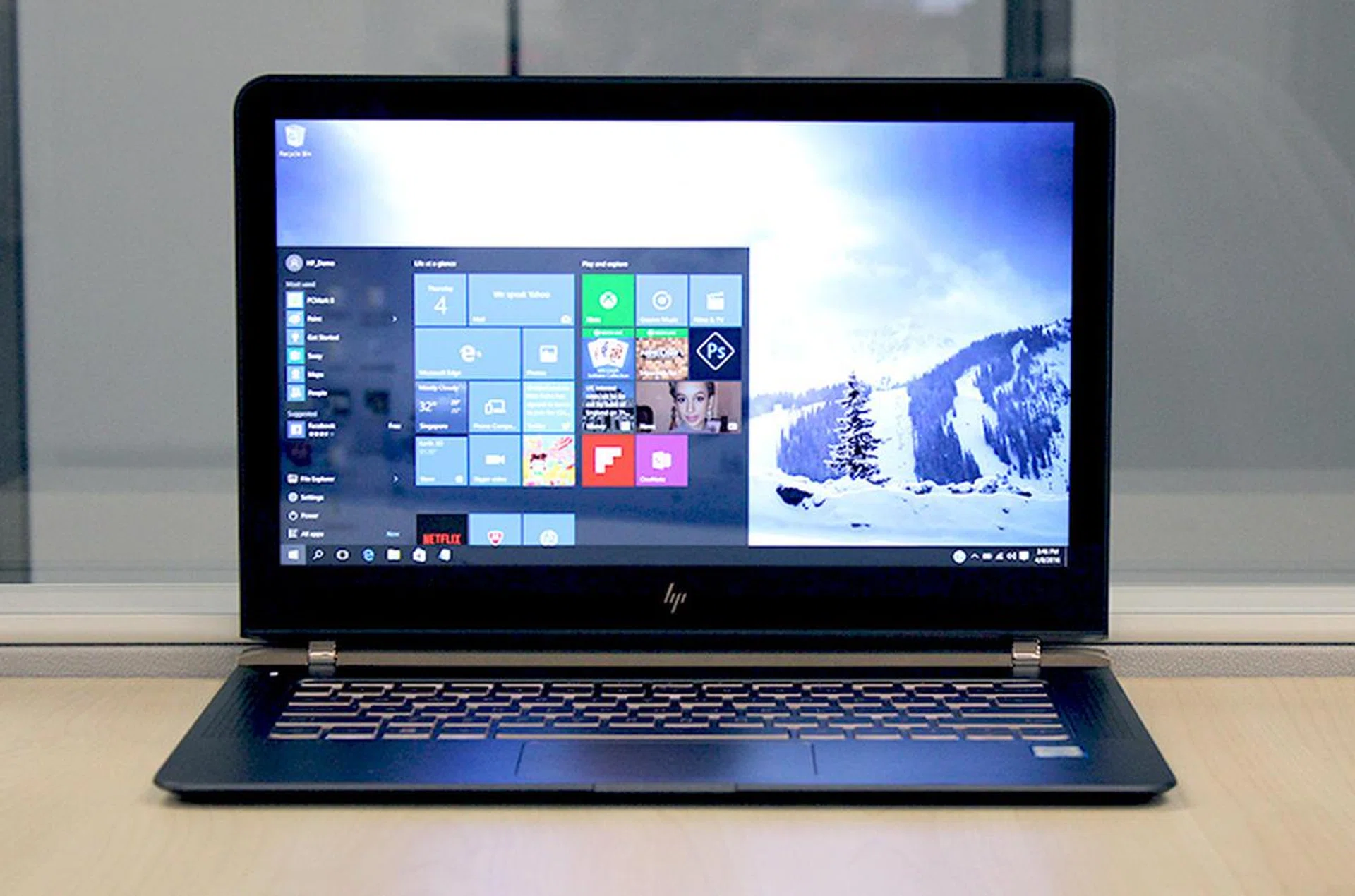
The HP Spectre is one of the most compact and portable 13-inch notebooks we've seen.
Typically, we begin our reviews discussing the specifications of the notebook, but I think that would be wrong in the face of a notebook as good-looking as the new HP Spectre.
The first thing that strikes most people is just how thin and light the Spectre is. Thanks to a blend of carbon fiber and aluminum, the Spectre measures just 10.4mm thick and weighs a scant 1.11kg. These are very impressive figures for a 13-inch Ultrabook, easily beating Apple’s MacBook Air and Dell’s XPS 13 - two 13-inch notebooks that we hold in very high regard.
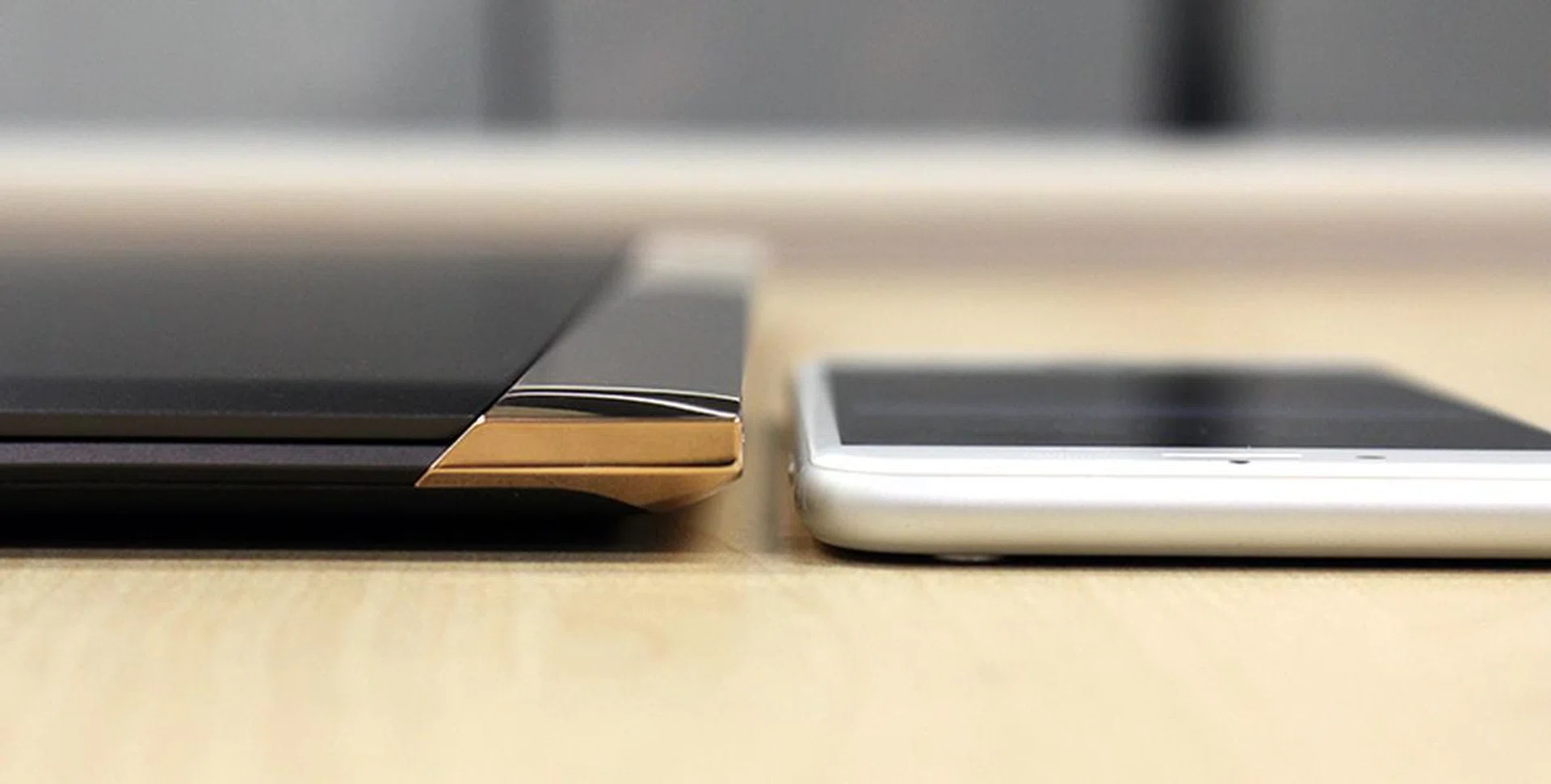
How thin is the Spectre? Here it is next to an iPhone 6s.
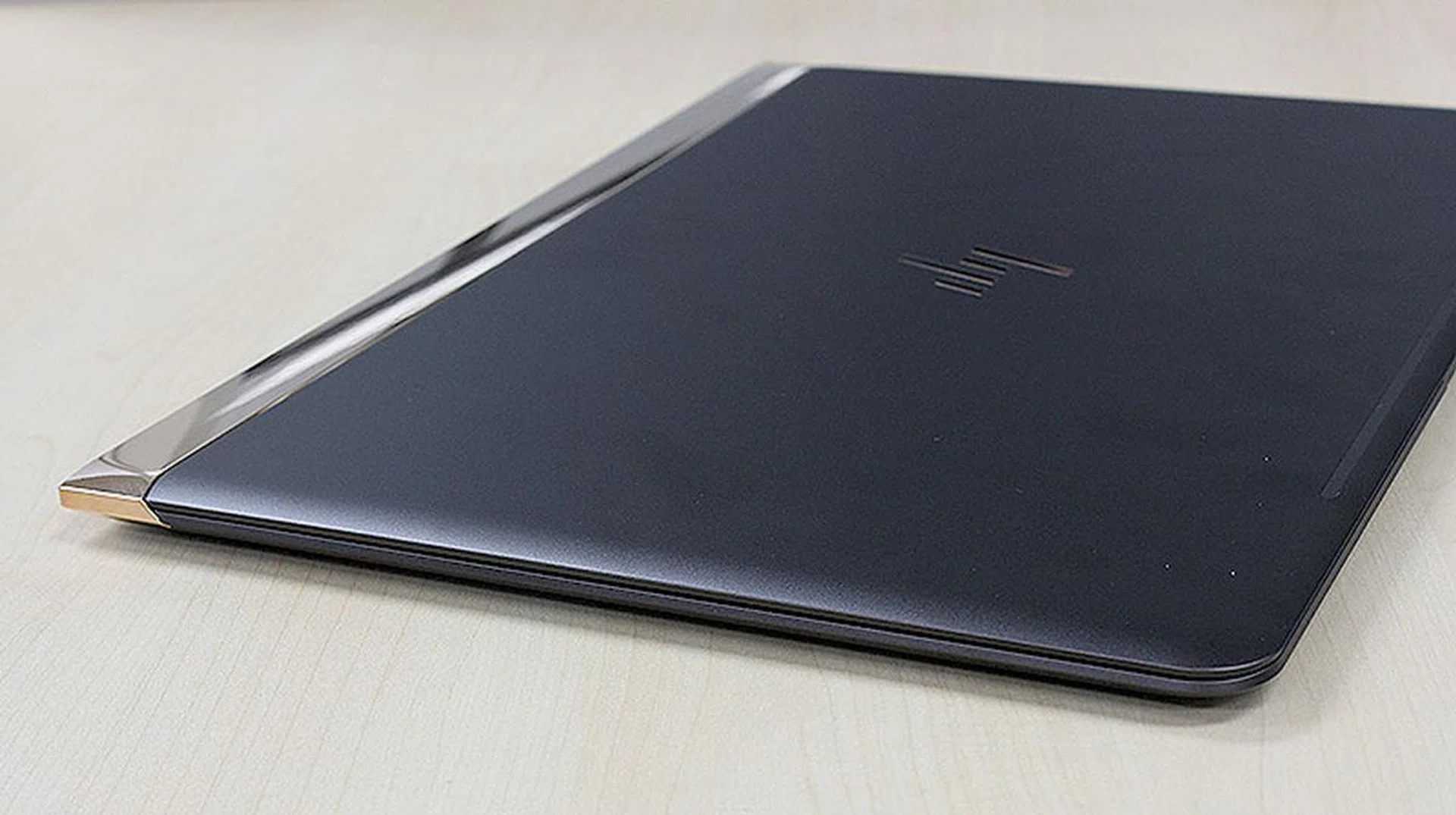
The Spectre cuts a sleek profile.
It looks really good too and that’s largely due to the attractive color scheme. Matte black and rose gold is a combination that’s hard to beat, in my books. There’s more visual drama round the hinges. Using what HP calls a “hidden hinge design”, the Spectre folds flat for a very clean flush look. HP wanted to create a luxurious look and feel for their new Spectre and I think they have succeeded.
You might imagine that a notebook so thin must be powered by Intel’s low-power Core M processor, but you’d be wrong. In fact, the Spectre can be spec’ed with either a Core i5 or Core i7 processor. The unit I'm testing has been equipped with the more powerful Core i7-6500U processor (2.5GHz, 4MB cache). It also has 8GB of LPDDR3 RAM and speedy PCIe SSD that supports the NVMe protocol with 512GB of storage capacity. Graphics processing duties are handled by the integrated Intel HD Graphics 520 iGPU. These are very respectable specifications for a notebook that is so thin and light.
Features
So far so good, but if you are thinking that there has got to be some compromises some where, then you are right. Though the 13-inch display uses IPS technology and features Corning Gorilla Glass protection, it only sports a resolution of 1,920 x 1,080 pixels (Full-HD). That’s not bad, but certainly not as good as rivals like the Dell XPS 13, whose InfinityEdge display boasts a much higher resolution of 3,200 x 1,800. On the bright side, colors are good and images and text are sharp and crisp.
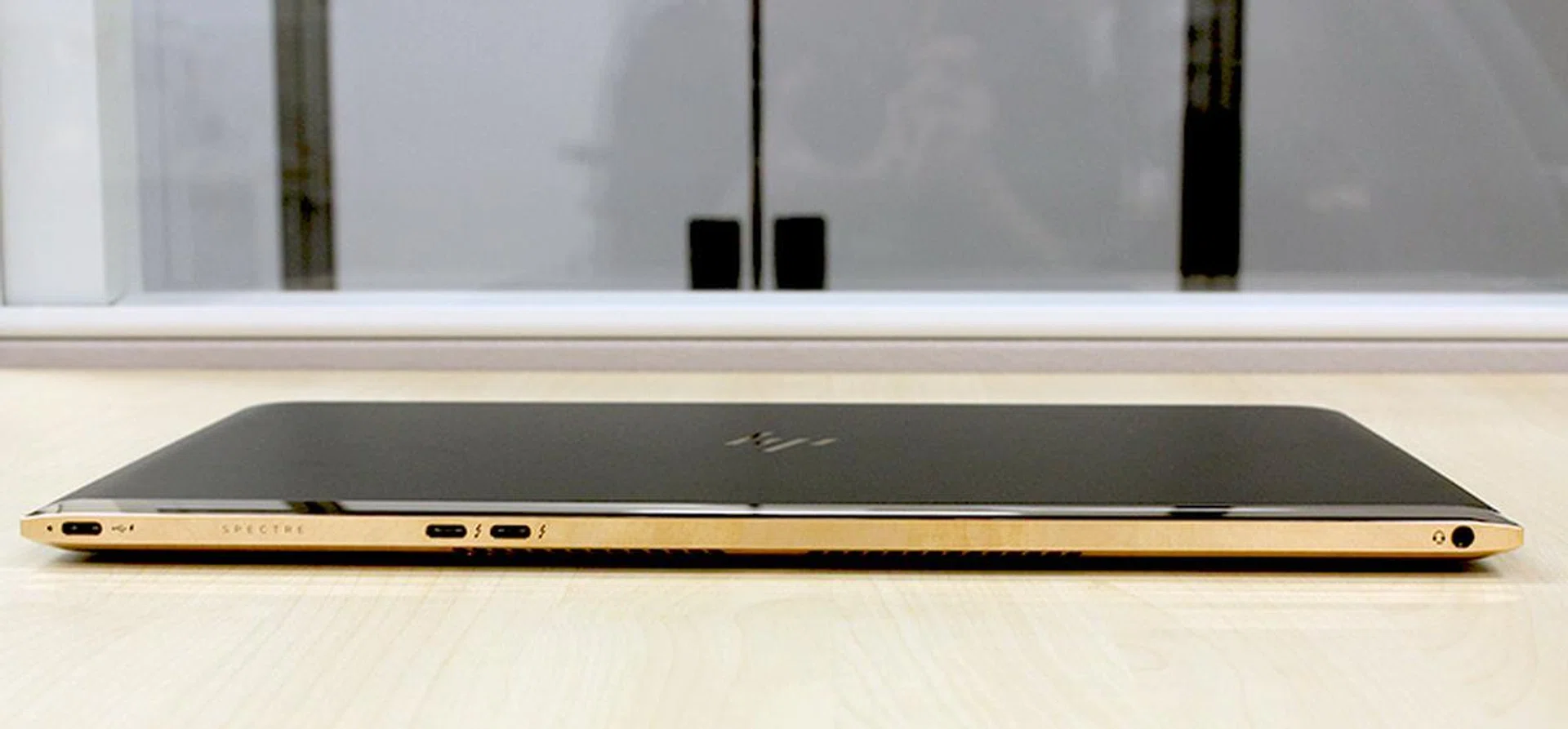
All the I/O ports are positioned on the back, behind the hinge.
Then there’s the ports. To keep thinness to the absolute minimum, HP has eschewed the more typical USB Type-A ports for the newer USB Type-C ports. Fortunately, unlike Apple’s MacBook which only has one USB Type-C port, HP’s Spectre has three - but bear in mind that one of them is required for power and charging as there isn’t a separate jack for power. Although that’s much more practical, users will still need adapters if they want to use it with their existing USB devices.
One thing to note is that although all three USB Type-C ports support the latest USB 3.1 standard, only two of them support the faster Gen. 2 standard and Thunderbolt 3, while the other one only supports the Gen. 1 standard. The key difference between Gen. 1 and 2 is that Gen. 1 only allows for transfer speeds of up to 5Gbps, while Gen. 2 supports speeds of up to 10Gbps.
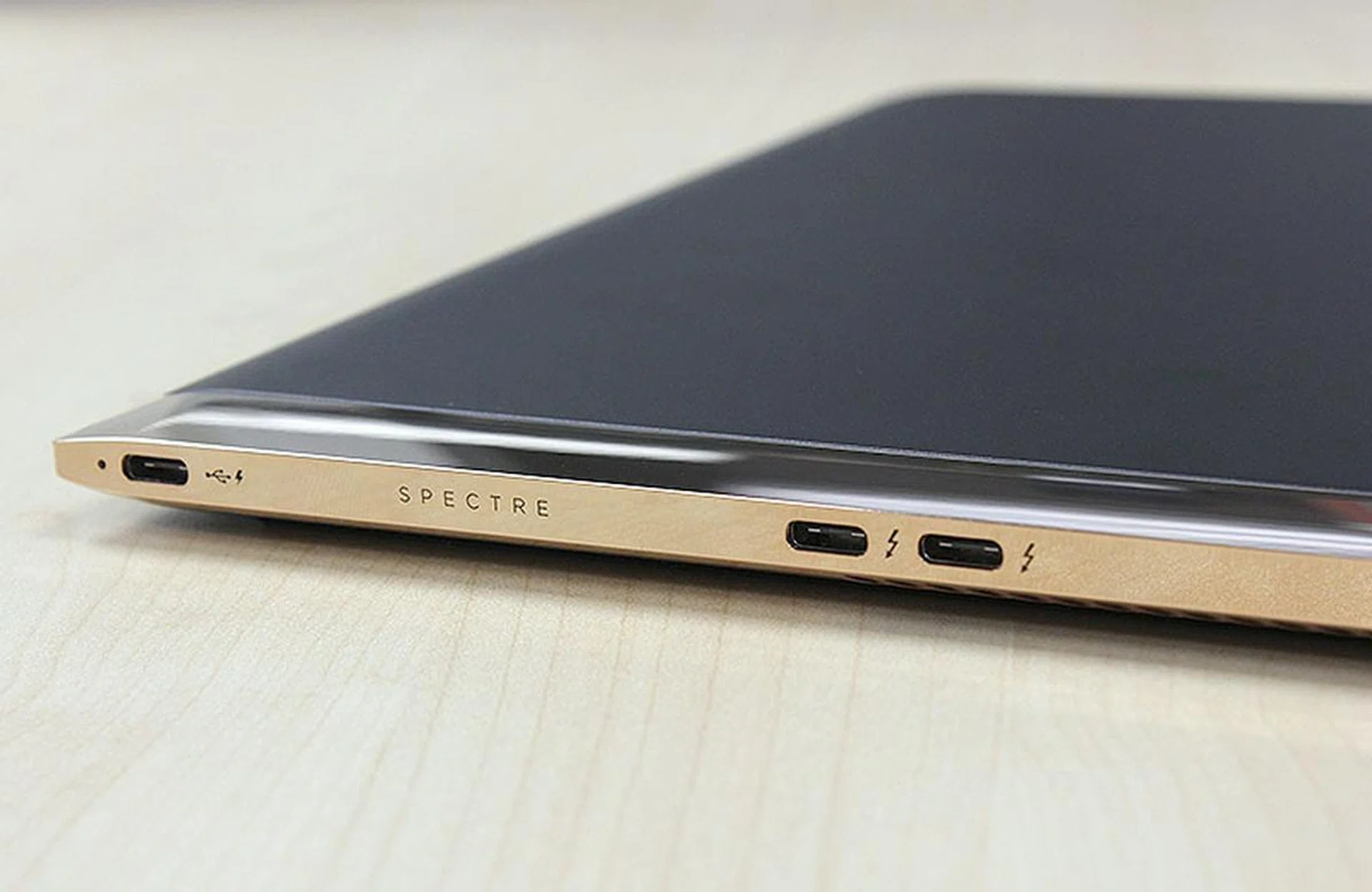
There are only three USB Type-C ports for users. You'll require adapters for video output and for connecting to older USB devices and peripherals.
And as far as I/O connectivity is concerned, the three USB Type-C ports are all users are going to get. There’s no HDMI or mini-DisplayPort here, which means adapters are necessary if you want to output video to an external display. More crucially, and annoyingly, there's no SD card slot. If you happen to take photos often, this is definitely something you'd want to take note of.
Speaking of ports, the three USB Type-C ports, as well as the lone headphones jack, are all located at the rear of the notebook, behind the hinge. Some users might not like it because it can be more cumbersome to reach them, but again, this design choice was necessary to keep the Spectre thin.
Audio has never been a strong suit of notebooks, so it wasn’t a surprise to find that the Spectre’s Bang & Olufsen-branded speakers sounded thin and meek. It doesn’t have great speakers, but then notebooks which do are as rare as finding a wild Dragonite in your bedroom, so it's not a deal breaker.
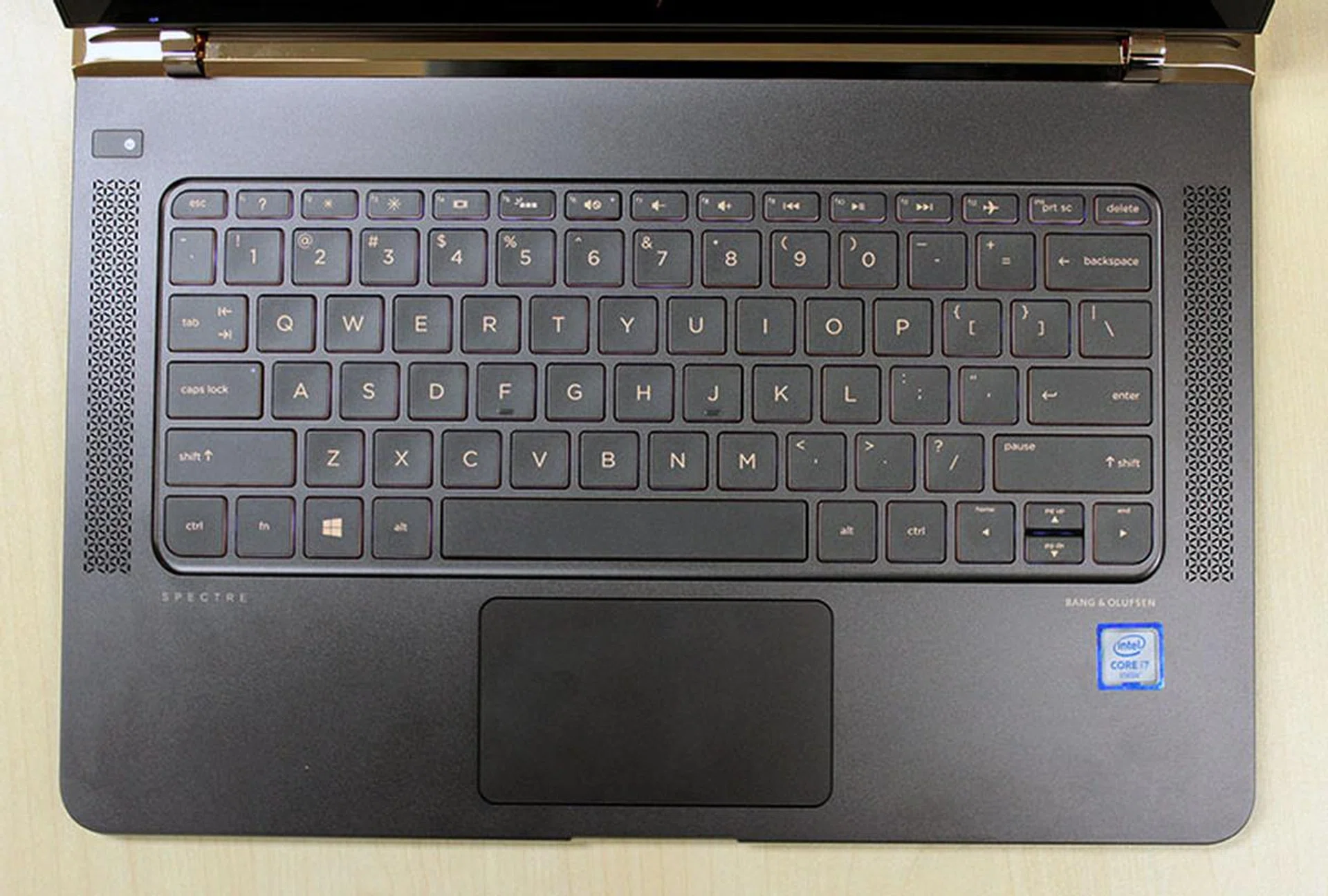
The Spectre's keyboard is pleasant to use and has a surprising amount of travel for a notebook so thin.
From here on I've have better news. Considering the thinness of the Spectre, I was pleasantly surprised by its keyboard. Unlike the MacBook keyboard, which had to be re-engineered and therefore feels a bit odd to use, the Spectre’s keyboard felt more like a typical notebook keyboard. It’s a tad shallower than most keyboards, but it remains very usable. More importantly, it does not have that learning curve of the very flat keys of the MacBook, which means users will get accustomed to typing on the Spectre more quickly. One thing to note is that the Spectre does not have dedicated function keys.
The trackpad is also very usable. It’s really wide, but could use with more height. More crucially, it’s responsive and accurate, though it could sometimes suffer some lag. But that’s an intermittent thing and could have more to do with the fact that ours is a review unit.
And finally, the Spectre has decent wireless connectivity. It supports Bluetooth 4.0 and the latest 802.11ac wireless standard with speeds of up to 867Mbps, which is pretty standard stuff for most premium Ultrabooks.
Performance Benchmarking
I ran the new HP Spectre through our usual suite of benchmarks, and will be comparing it to other 13-inch Ultrabooks such as Dell XPS 13, Lenovo Yoga 900, and Acer Aspire R13. I have also included results from comparable Apple notebooks such as the Macbook Air and the newer MacBook.
Here’s a list of all the benchmarks used:
- PCMark 8
- 3DMark (2013)
- Tomb Raider
- Far Cry 2
Here is how the Spectre compares against its rivals.
[hwzcompare]
[products=566538]
[width=200]
[caption=HP Spectre (2016) Specifications]
[showprices=1]
[/hwzcompare]
[hwzcompare]
[products=545252,532672,545253,545254,553550,503599]
[width=200]
[caption=Test Ultrabooks Compared]
[showprices=1]
[/hwzcompare]
PCMark 8
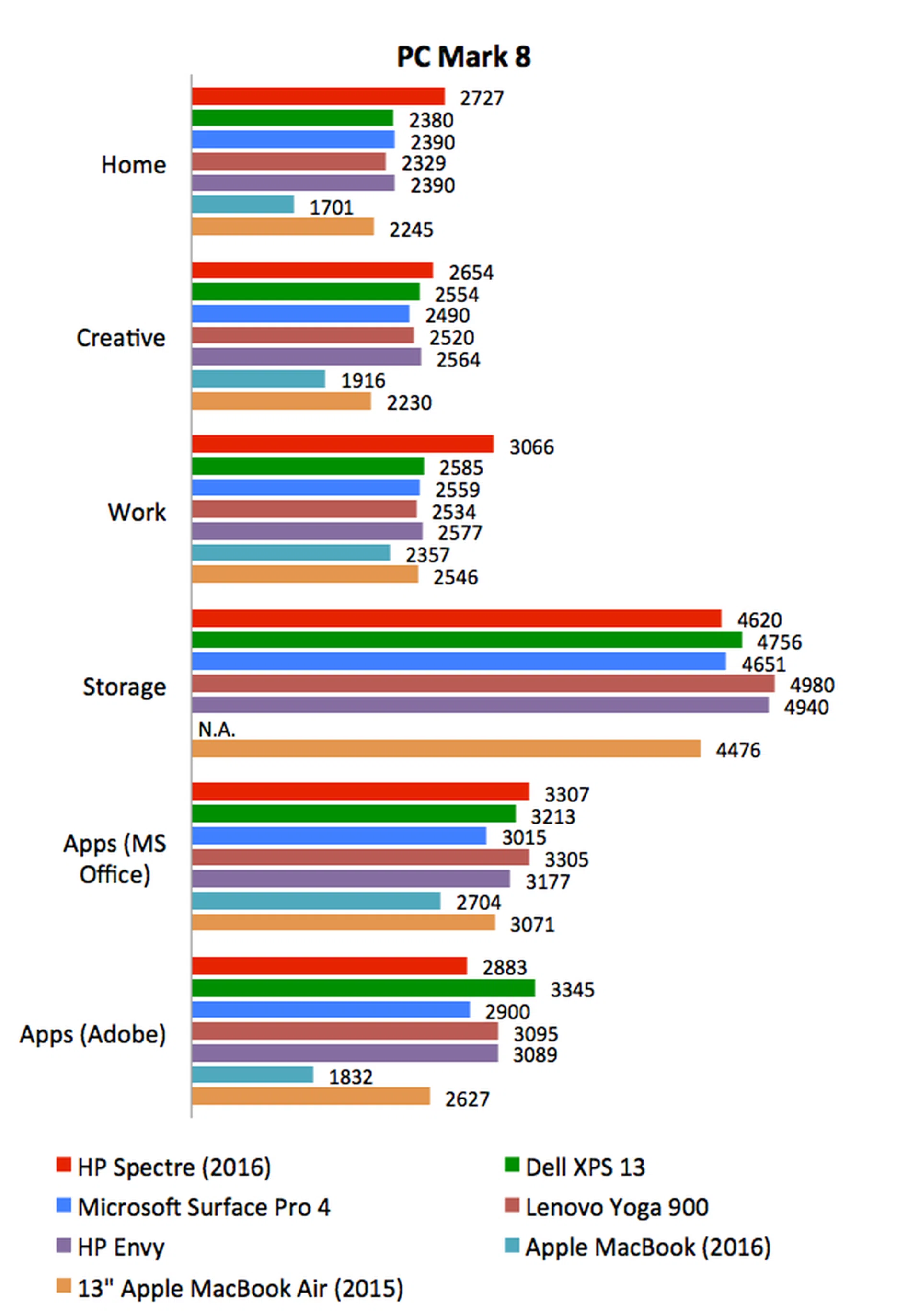
PCMark 8 tests a system’s performance by putting it through different tasks that reflect the workloads typical of various kinds of users, for instance the casual home user or the working creative professional. The notebooks that we have gathered have more or less the same specifications - minus the Apple MacBook which is running off a less powerful Core m3 processor and the Apple MacBook Air which is powered by last generation Broadwell processor - so there shouldn’t be any significant difference in performance.
However, the Spectre somehow managed to pull an impressive lead on both the Home and Work workloads. On Home, the Spectre scored 14% better than the second-placed Microsoft Surface Pro 4 and HP Envy; while on Work, it scored 18% better than the second-placed Dell XPS 13. On the other workloads, the Spectre’s performance are more or less similar to the competition. Since there’s little hardware differences to separate them, these improvements are likely due driver improvements.
3DMark
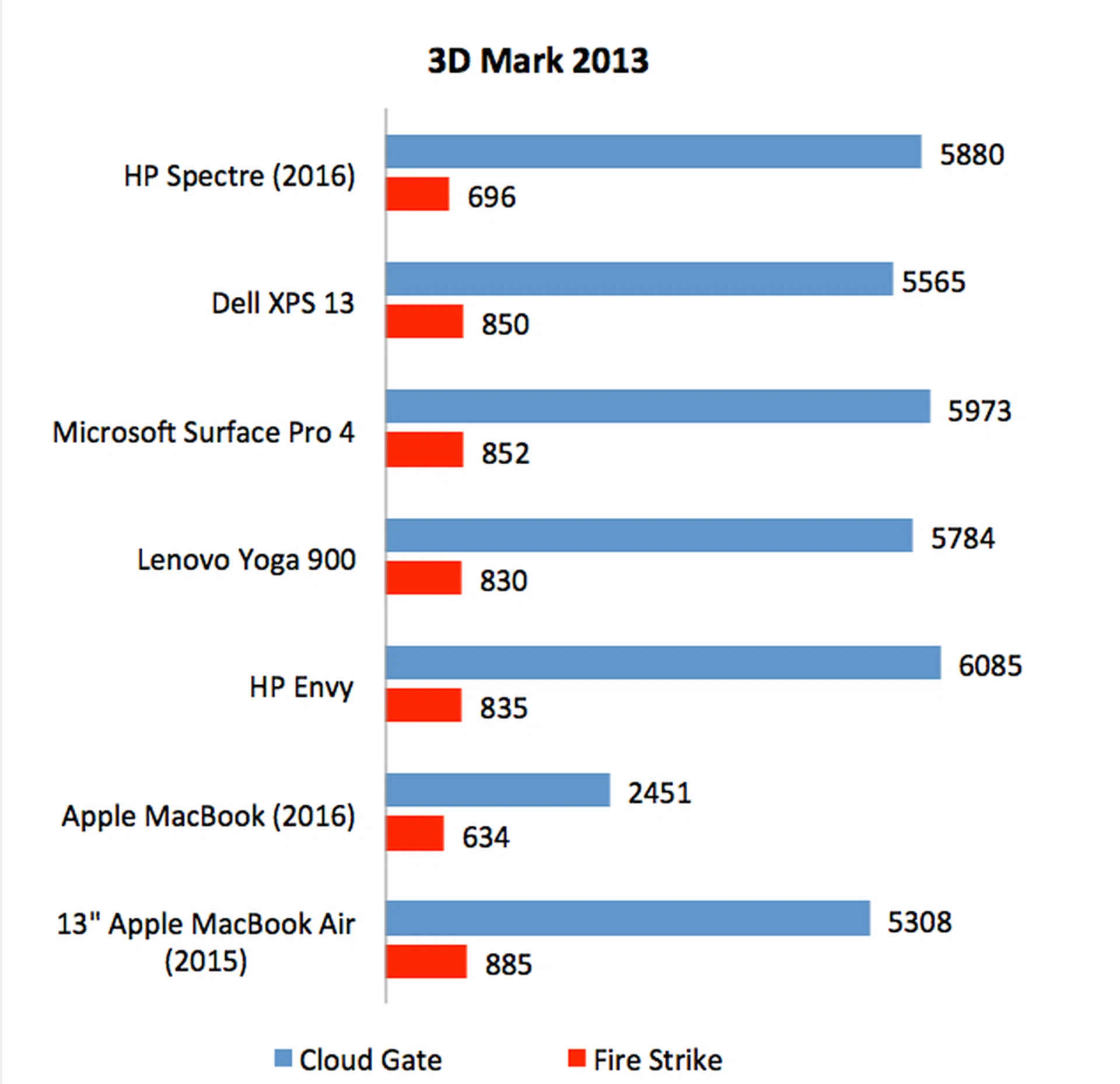
The Spectre has the same Intel HD Graphics 520 integrated GPU as its closest competitors so their 3DMark scores are quite similar. However, notice that its score on the more intensive Fire Strike scenario is lower than expected. Here, it managed just 696, while other comparable notebooks like the Dell XPS 13, Microsoft Surface Pro 4, and even the older MacBook Air, managed at least 850 points. A possible explanation could be its cooling system is not quite as good as its competitors, which wouldn’t be out of the ordinary since it has to use smaller fans to accommodate its smaller dimensions.
Far Cry 2
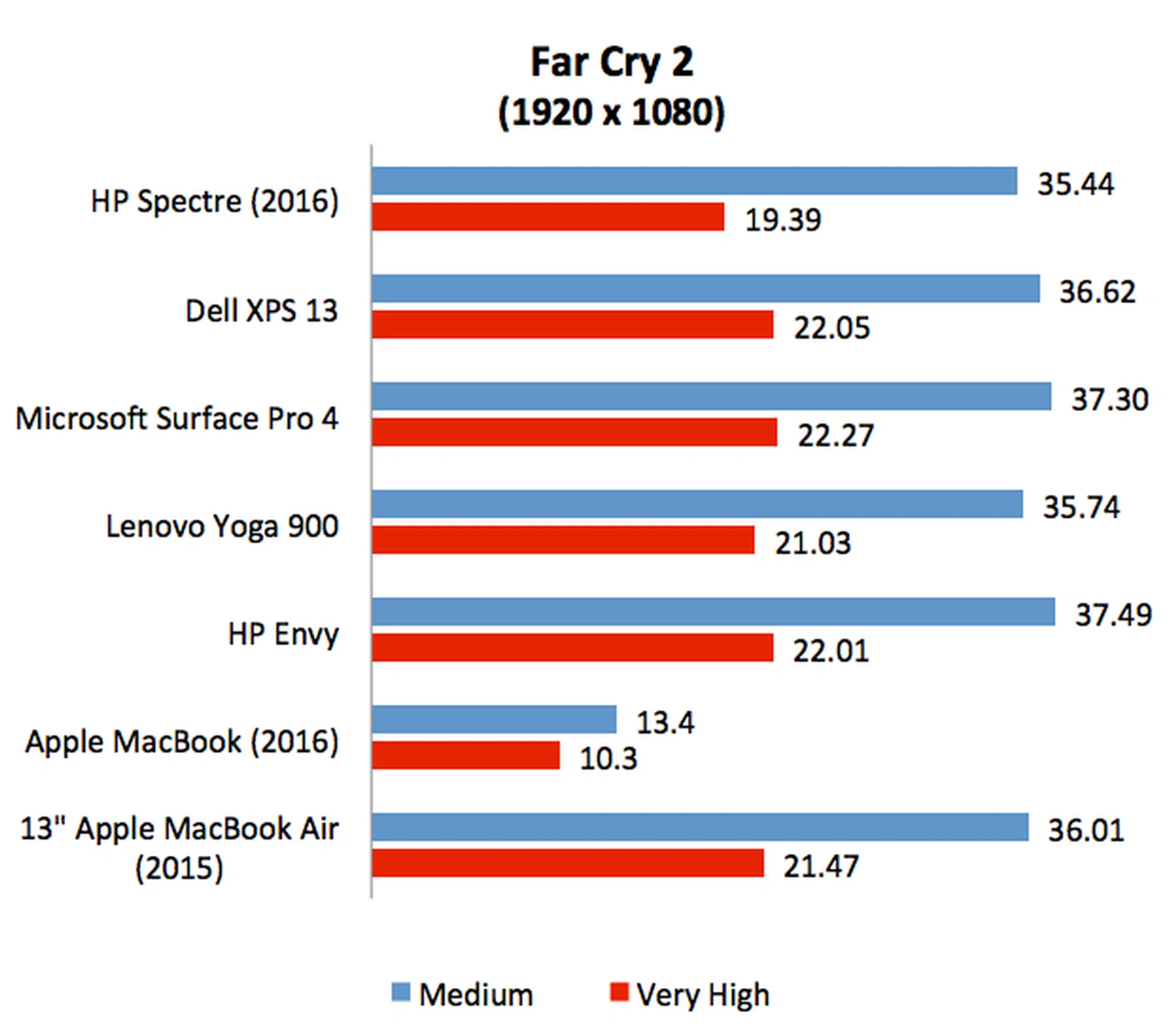
The latest integrated Intel GPUs are quite capable of light gaming and the HP Spectre was able to run Far Cry 2 quite comfortably at Full HD resolution at frame rates of above 30fps. That’s quite an achievement, even if Far Cry 2 is a really old game. The Spectre seems to be slightly weaker than its rivals in the graphics section, because I noticed that it was marginally slower, especially on the more demanding “Very High” settings.
Tomb Raider
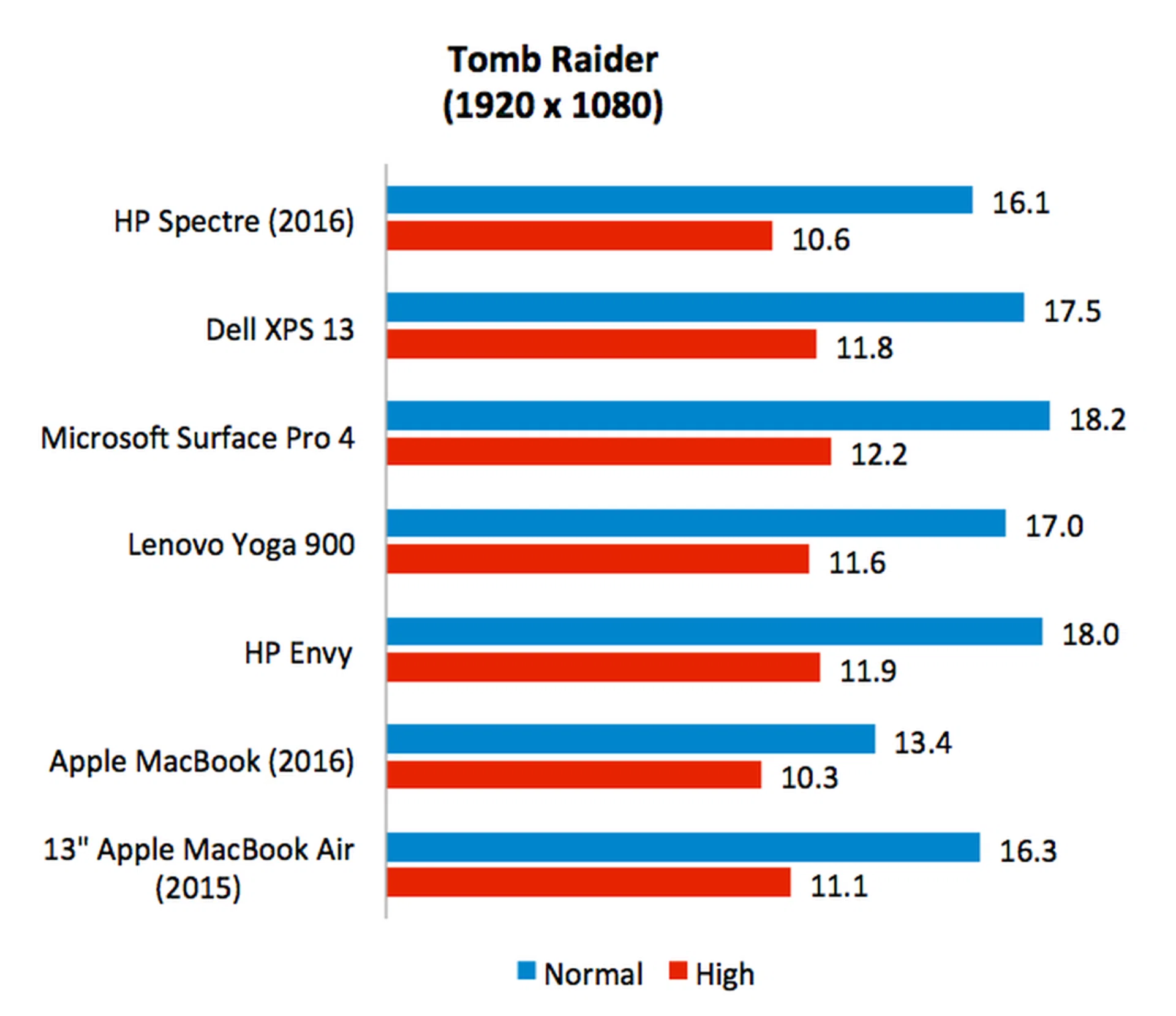
It was the same story on Tomb Raider, the HP Spectre once again seemed to be lagging a little behind its rivals when it came to graphics performance. To be sure, the difference isn’t all that much, but it’s definitely appreciable. Even though it has the same Intel HD Graphics 520 integrated GPU as its rivals, its score on the more demanding “High” settings is almost 9% slower than its closest competitor.
Battery Life & Power Consumption
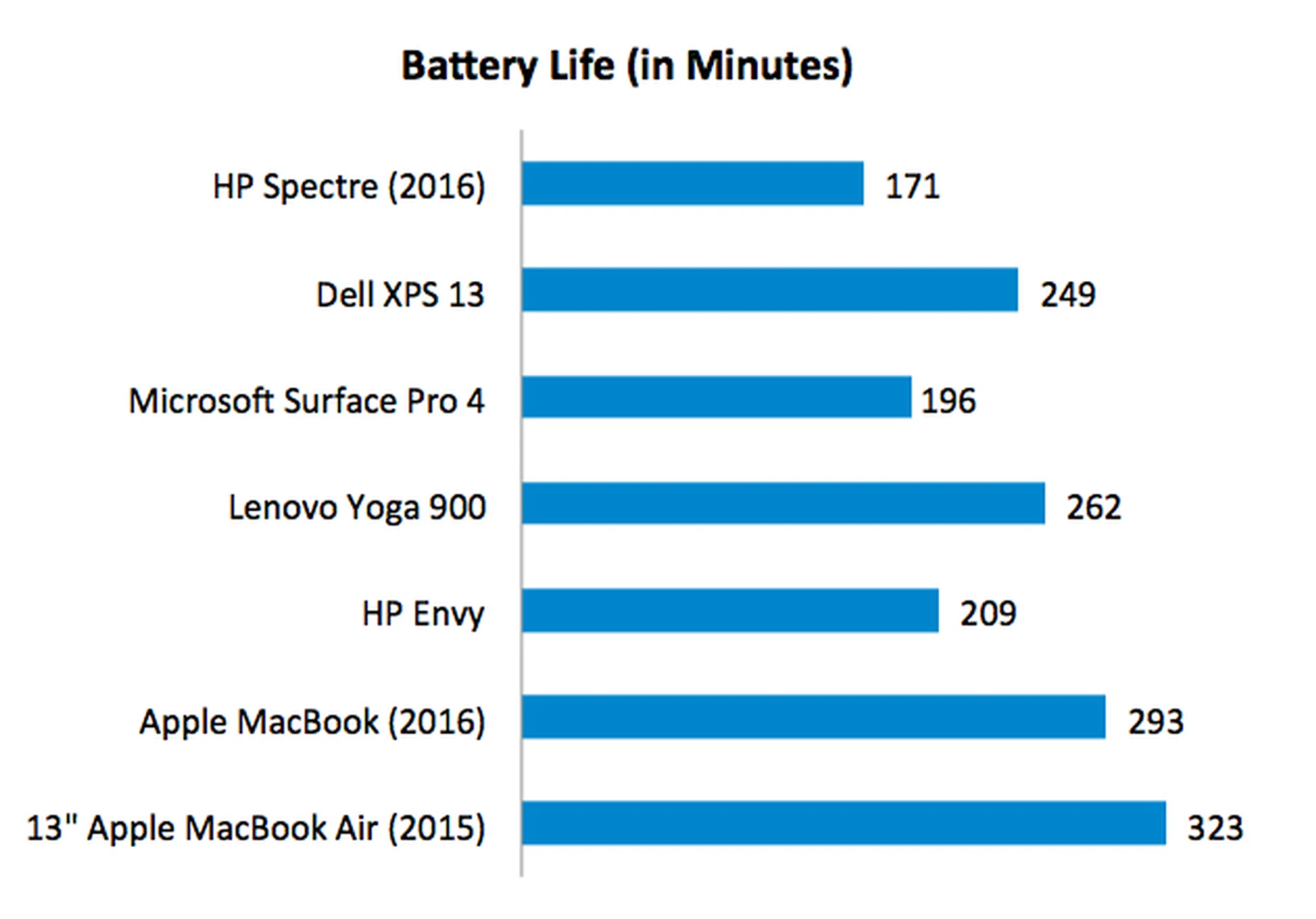
There’s no other way to put, the HP Spectre’s battery life is disappointing. It managed just 2 hours and 51 minutes, nearly half an hour less than the Microsoft Surface Pro 4 and over an hour less than Dell XPS 13 and Lenovo Yoga 900. In fact, it’s nearly half of last year’s MacBook Air, which had a less efficient Broadwell processor.
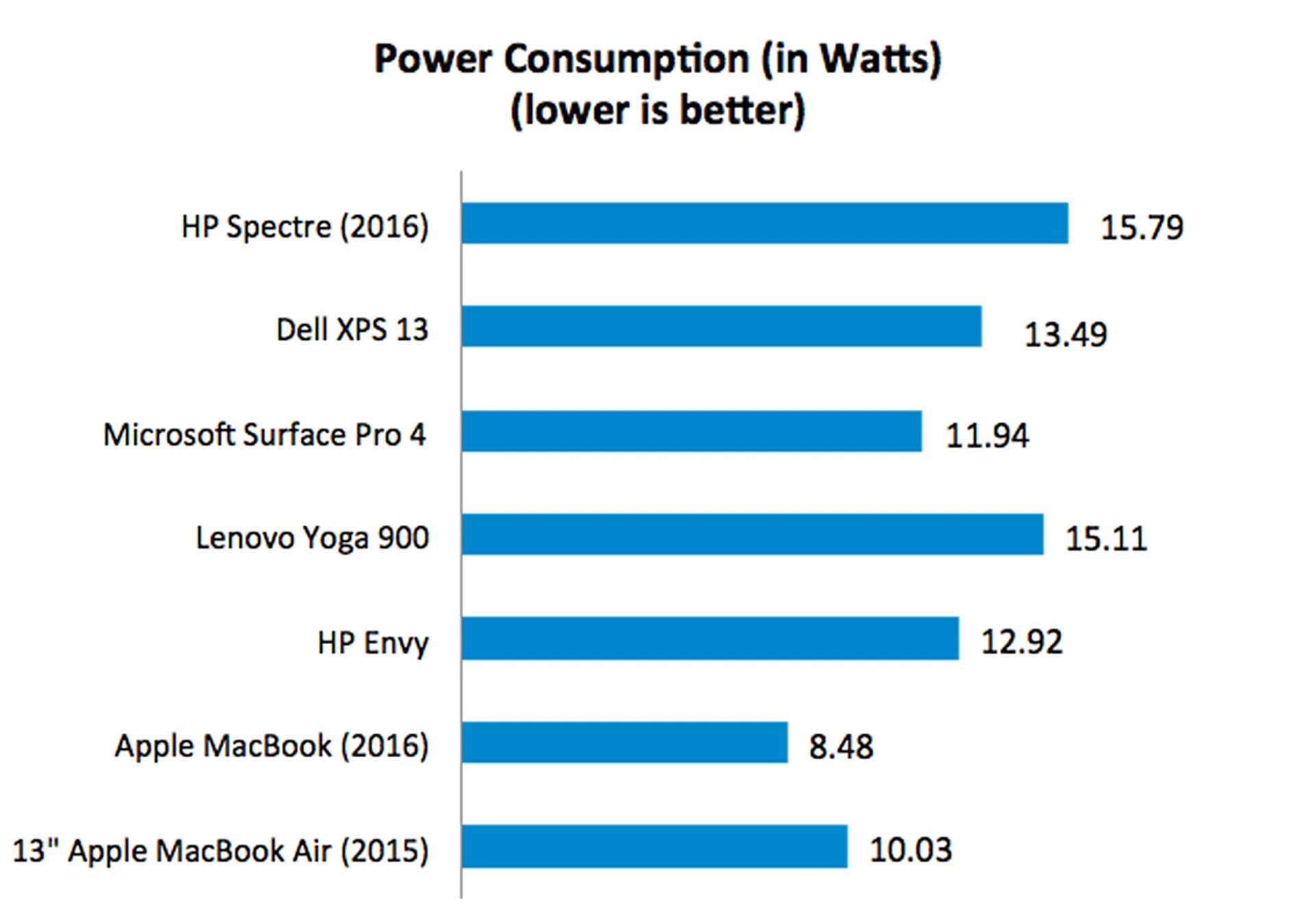
Granted, it doesn’t have the largest battery. At 45Whr, the Spectre’s battery is only larger than the Surface Pro 4 and the MacBook, but this is no excuse for such a short battery life. Looking at the power consumption figures, we can see that the Spectre recorded the highest power draw, which no doubt contributed to its poor battery life showing.
Portability Index
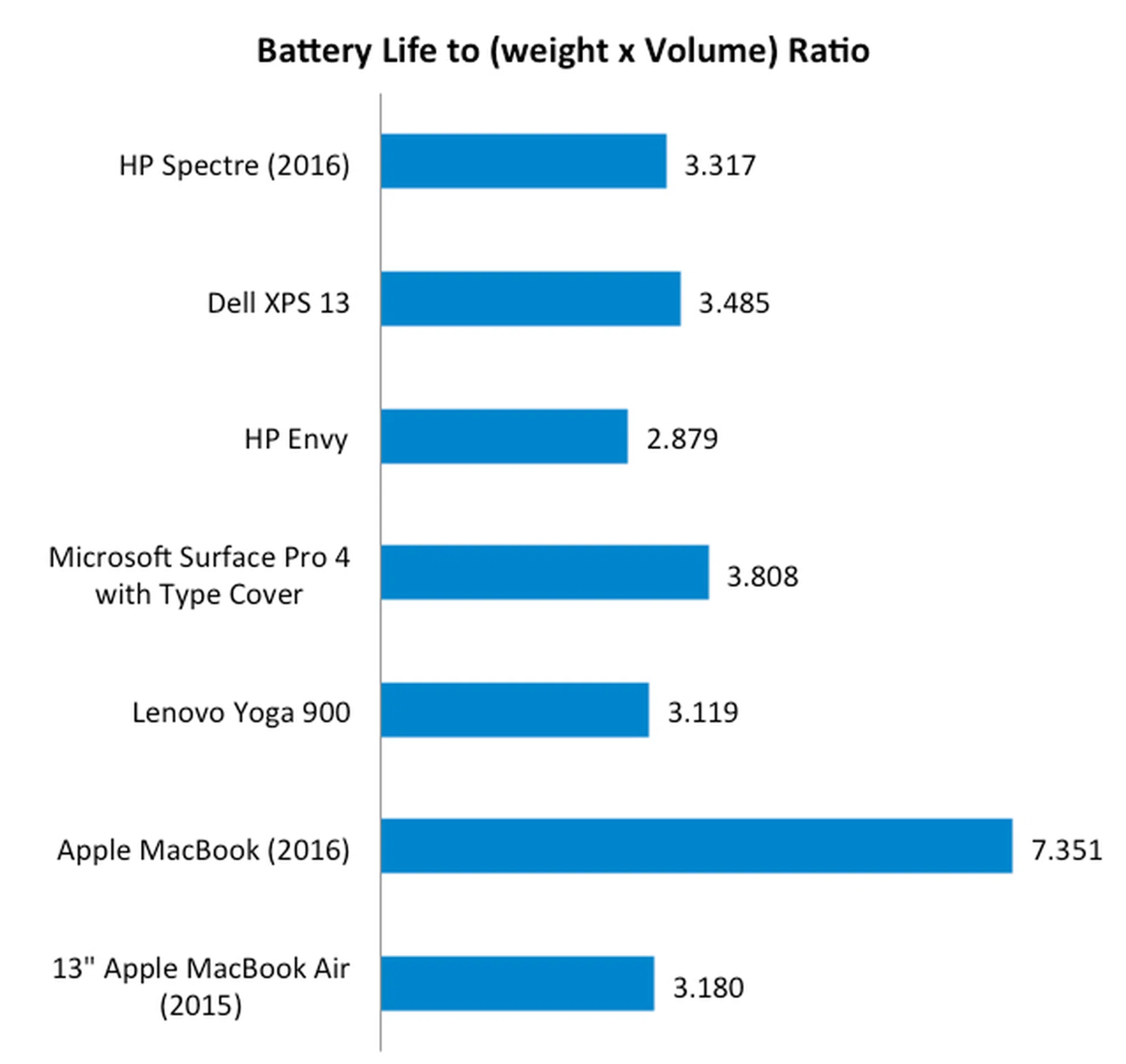
Our portability index attempts to provide an objective measure of how portable the different ultrabooks are relative to each other by taking into account things like size, weight, and battery life. And in this benchmark, the MacBook reigns supreme with a score of 7.351 points - nearly double that of the second-placed Microsoft Surface Pro 4. Here, we can see that even though the HP Spectre is remarkably thin and light, its overall portability score was hampered by its poor battery life. In light of that, it might actually make more sense to carry a slightly heavier notebook like the Dell XPS 13, which provides significantly longer battery life.
Pretty, but with some compromises
And I mentioned at the start of this review, there’s never been a better time to be a notebook user, and the short version of the conclusion here is that the HP Spectre is a great notebook that successfully combines style with performance, but with some caveats.
Let’s start with the caveats. The one that most users will be concerned about is probably battery life. In my tests, I found it to be significantly shorter than its rivals. That said, our battery test suite is pretty intensive and consists of intensive graphics workloads and gaming that drain batteries quickly. Users will certainly be able to get more out of the Spectre if their intended use is for lighter tasks such as browsing the web, reading and composing emails, watching videos, and typing documents.
The other thing users will need to take note of is the ports. The Spectre comes with three USB Type-C ports, which although fairly plentiful, does still mean that adapters will be required for connecting to non-Type-C peripherals - at least for the time being and foreseeable future. Though USB Type-C peripherals are soon coming to the market, they are still fair from mainstream. So if you want to plug in an external hard disk drive or even your favorite wired mouse, you’ll need adapters to do it. Most glaring of all, however, is the lack of an SD card reader. This will definitely frustrate photography enthusiasts and only serves to highlight just how important adapters are if you wish to connect any sort of peripheral to the Spectre.
Apart from these issues, there’s really not much else to nitpick about the Spectre. We really like its looks and appreciate its compactness and portability. It’s one of the most compact 13-inch notebooks I have ever carried out and I think it gives the excellent XPS 13 a run for its money. The display, though not of a high resolution, is plenty bright and sharp too. It also performs decently, and, in the real world, will run just as quick as any of its rivals.
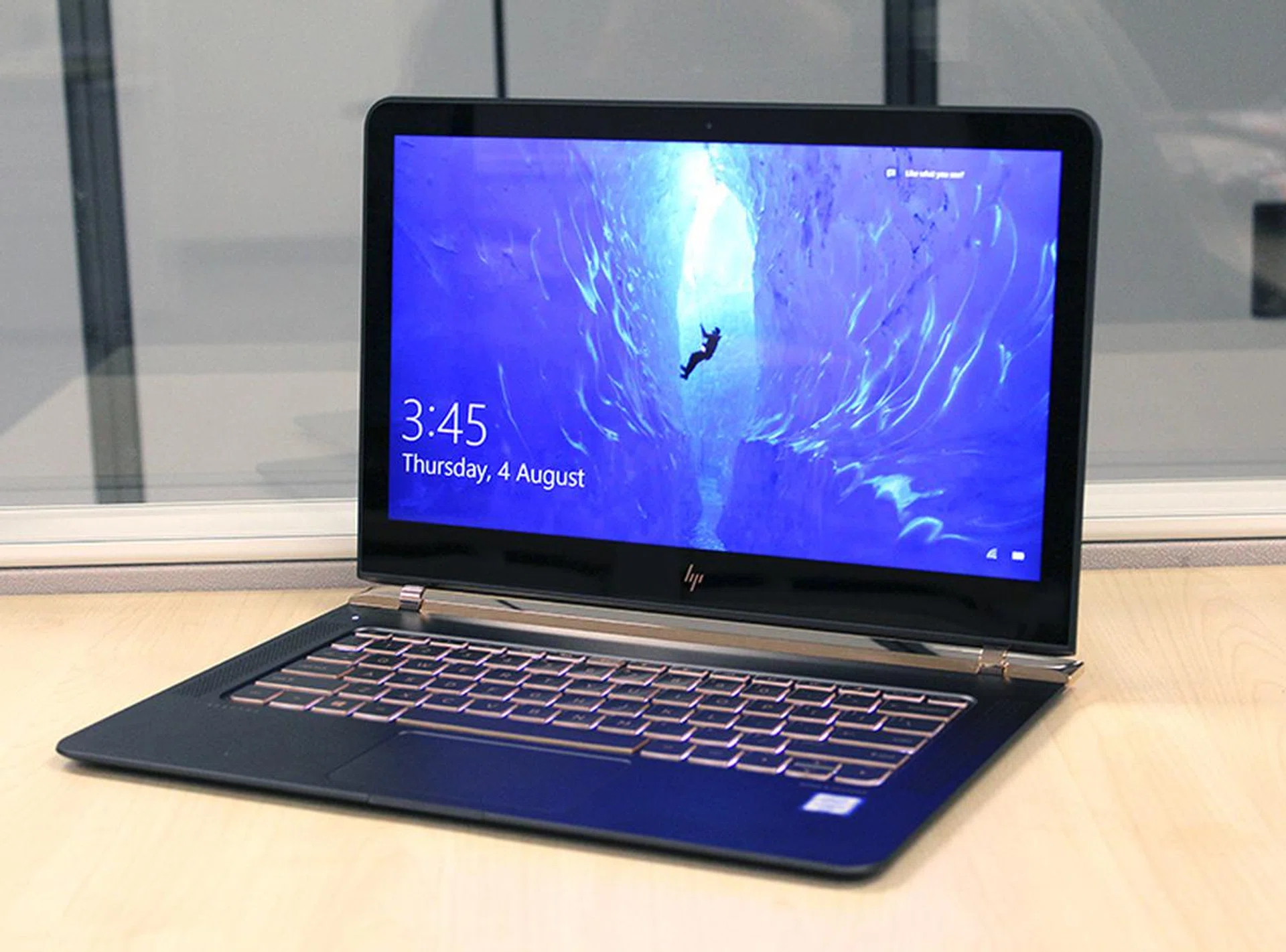
The new HP Spectre is supremely pretty and portable, but it does have a few drawbacks that could turn some users off.
In terms of price, be prepared to pay a little premium for the Spectre’s good looks. The model that I tested with the faster Core i7-6500U processor and larger 512GB PCIe-based SSD comes in at S$2,599. Compared to its competitors, a similarly spec’ed Dell XPS 13 and Lenovo Yoga 900 are both cheaper at S$2,299, but they have smaller 256GB SSDs. And for the same money, you’ll get a slightly more powerful Lenovo Yoga 900 with the Intel Core i7-6560U that has a better integrated GPU and more RAM (16GB). But it isn’t so bad really, and you’ll soon forget how much you spent once you notice passers-by checking out your new Spectre the next time you show it off at Starbucks.
If S$2,599 is a bit too much for you, HP offers a lower spec model for S$2,299 that suffers only from a slightly slower processor - Core i3-6200U (2.3GHz, 3MB cache) - and lesser storage - 256GB. Everything else remains the same.
In closing, the HP’s newest Spectre is a moderate success at marrying form and function. It’s really pretty and compact, but sacrifices a bit of practicality in its less than stellar battery life and poor selection of I/O ports. But if those niggles don’t bother you and all you want a supremely beautiful and compact notebook, the Spectre is hard to beat.
Our articles may contain affiliate links. If you buy through these links, we may earn a small commission.