
Gigabyte Aorus X7 - True SLI Graphics in a Slim Gaming Machine
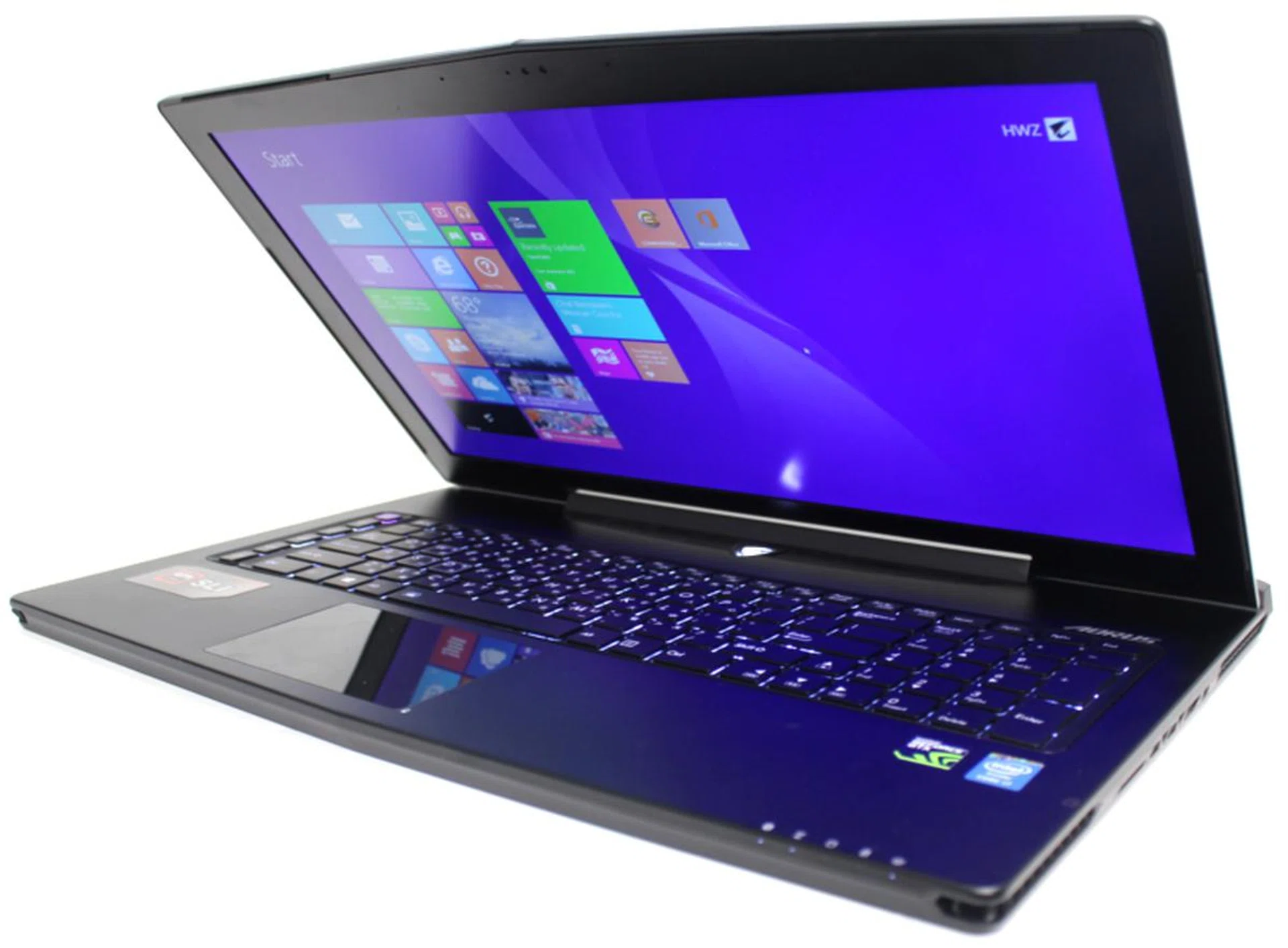
Beware, gaming notebook makers. Here comes competition in the form of the 17.3-inch Aorus X7 that's packed with twin NVIDIA GeForce GTX 765M GPUs. This brawny powerhouse comes in a 22.9mm slender package that rivals an Ultrabook, but yet it packs serious gaming firepower. Tune in to our review for the full details!

Overview
When you think about buying a gaming notebook, you think about massive graphics and display (usually that of the 17-inch class). Of course, big processing power with cooling capabilities is a must if you want to support a visually stimulating gaming experience. Even so, if you don't moderate on your hardware requirements, you'll end up with something as astronomical as the Dell Alienware 18, which, for the record, is 57mm thick and 5.6kg heavy. That's way too hefty to be hauled around, and understandably, gamers would rather forgo lugging around a 5.6kg machine just for bragging rights.
So that brings us to the topic of 17-inch portable gaming machines where you'll inevitably mention the Razer Blade Pro, and maybe the less decorated MSI GS70 Stealth. Well, here comes some serious competition, in the form of the Aorus X7. If you're scratching your head and wondering why you haven't heard of the Aorus brand until now, here's why: Aorus is Gigabyte's new subsidiary that was officially introduced to the world at the CES 2014, where the brand debuted by unveiling its X7 gaming notebook. Aorus has since further inked itself in the gaming peripherals market, having pushed out the Thunder series of mechanical gaming keyboard and MMO gaming mouse. How will the X7 fare against gaming notebooks manufactured by more established brands like Razer and MSI? In this review, we find out if the Aorus 17.3-inch gaming flagship model makes the cut.
The Aorus X7 has already managed a feat, by packing not one, but a pair of NVIDIA GTX 765M graphics chips (that's pretty much on a par with a GTX 780M GPU) in an incredibly slender chassis that's only marginally thicker than most Ultrabooks. It's not the first to implement NVIDIA SLI graphics though - Aftershock Titan and Dell Alienware 18 have done so, but piled on substantial weight because they integrated a top tier CPU and corresponding top-end dual GPUs that require a more robust cooling subsystem (Aftershock Titan tips the scales at 3.9kg).
Powered by an Intel Haswell i7-4700HQ processor with 16GB DDR3L memory running at 1,600MHz, it offers dual 128GB mSATA SSDs setup in RAID to cut loading times to a minimal, and 1TB (5,400RPM) of hard drive space to store your games and other content. What's more, it has four memory slots for you to expand the memory subsystem if you need more stamina tor juggle several simultaneous applications or larger graphics/video editing tasks.
Surely now we're not the only ones that are impressed with Aorus cramming all that glorious muscle in a gaunt body. But, before we jump the gun, let's first thoroughly assess our review unit. Here's the full specifications list of the S$3,599 Aorus X7:-
Design
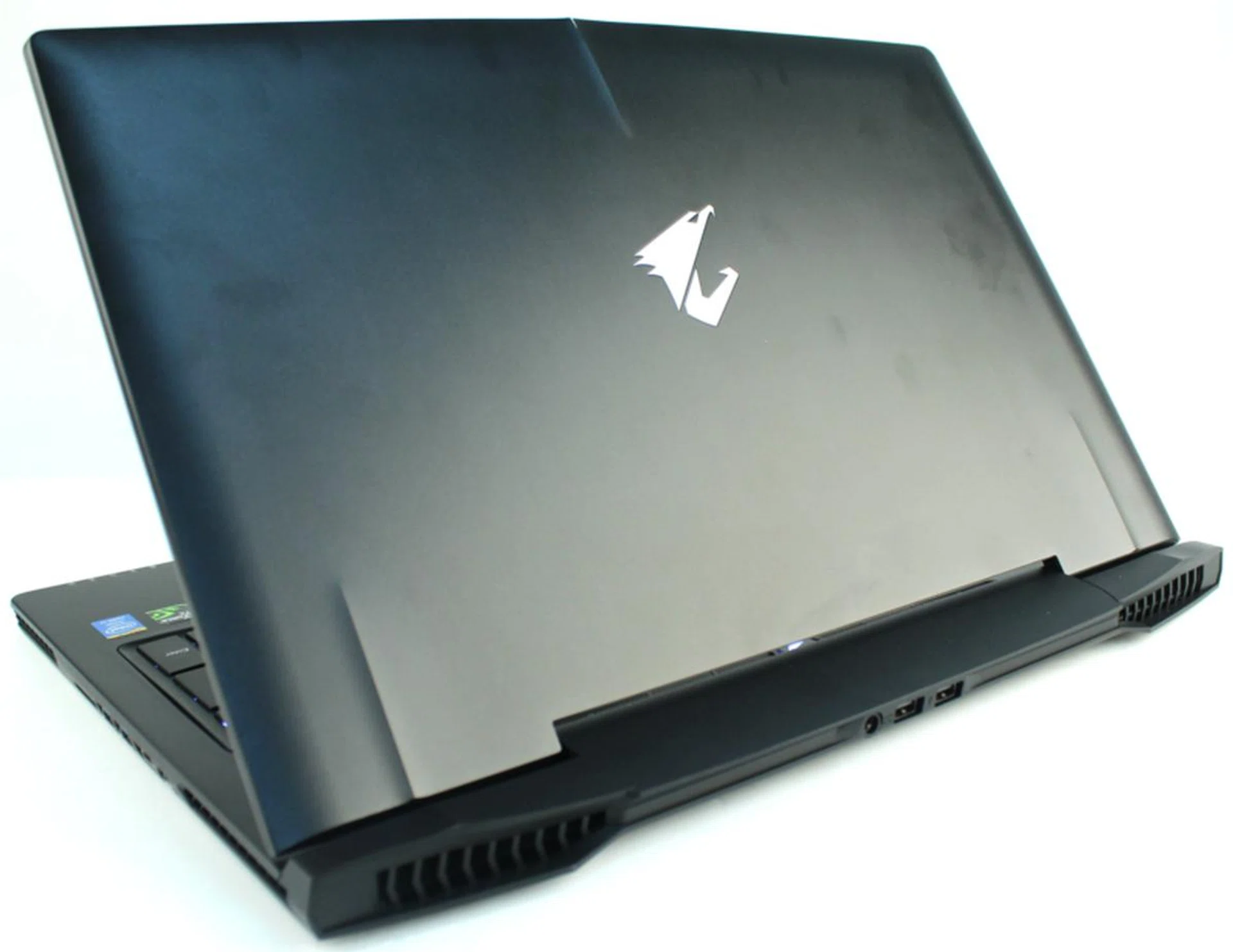
The surface of the top cover attracted fingerprints so much so that cleaning it was a challenge.
In contrast to its overwhelming specifications, the X7 undeniably exudes minimalism, with an unadulterated, aerodynamic silhouette. It also sports sculpted lines and three molded ridges around its full aluminum matte black chassis. While it's 22.9mm lean profile might not be the thinnest frame around (the Razer Blade Pro bests it with a 22.4mm slim profile and retains the title as the slimmest 17-inch gaming notebook, but runs on only a single graphics chip), the 17.3-inch X7 notebook's understated beauty tips the scales at a healthy 2.9kg, making it rather travel-friendly just in case you prefer using your own system than one of those gaming desktops you find in LAN gaming centers.
No doubt the X7 ranks high in our charts for its subtle design, but, like we mentioned earlier, cooling proficiency is instrumental, especially for a notebook as slim as the X7. In order to ensure that heat generated while gaming does not jeopardize the gaming experience, Aorus has incorporated its exclusive Thermal+ technology, which includes a total of four side and rear vents, five thermal pipes, and two fans. These were built to provide optimal air flow efficiency, and we think they served their purpose. At least, our wrists weren't scorched throughout our week-long usage of the notebook.
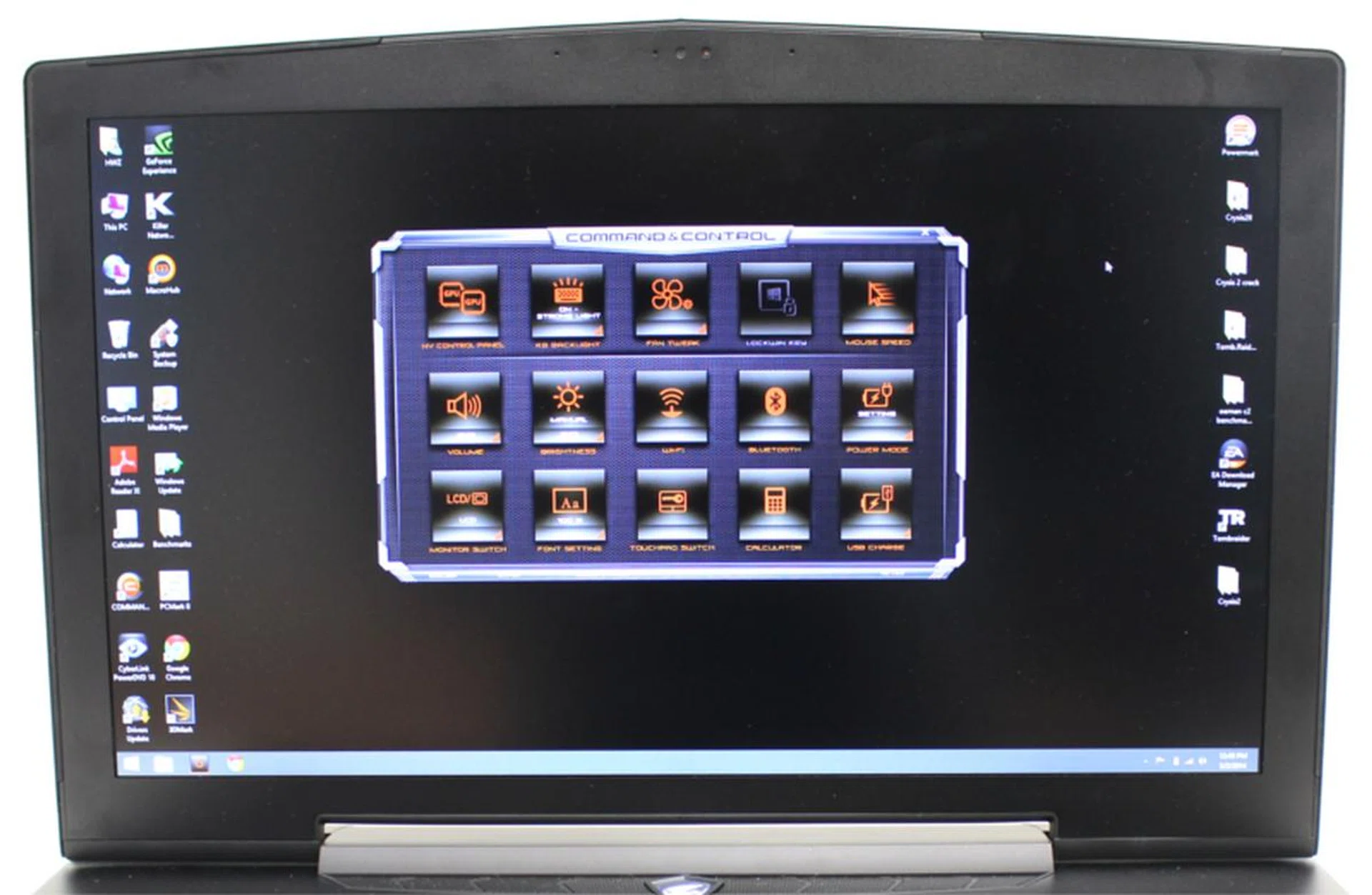
There are many programmable functions on the Command & Control UI - one of them allows you to choose your desired fan mode according to the applications you're using.
Additionally, the Command & Control software on the X7 (more on this as we move along) lets you select between three fan modes - Auto, Stealth (for quiet operations), and Turbo (for extreme gaming) - so you can properly balance performance and system stability.
As far as we know, no notebook we came across was aesthetically perfect inside out. The X7 came very close, but ultimately it made no exception. Having said that, our only two complaints were that its exterior picked up too many fingerprints faster than we could wipe off, and the connecting hinge of the lid became surprisingly more flexible only after some usage. Eventually, the loosened hinge may pose a concern for gamers who frequently shuttle between their homes and gaming center, but it's still early days for us to draw a conclusion on that observation.
Display & Audio
Equipped with an anti-glare Full HD (1,920 x 1,080p) display, its 72% NTSC color gamut screen enhances clarity, presenting sharper images with decent black levels when viewing duller images. FPS (First-person Shooter) gamers will be delighted to know that the 300-nit bright panel delivers a response time of 8ms, fighting dreadful motion blurs which may happen during gameplay. Viewing angles were fantastic, considering that the 17.3-inch screen rides on TN (Twisted Nematic) technology instead of IPS technology which panel makers usually opt for these days.
There's also built-in NVIDIA Surround technology, so you can output Full HD graphics to all three screens via HDMI outputs available on both flanks of the machine (with the notebook's screen being the center monitor). Gamers can benefit from this by enjoying a complete view of the battlefield in RTS (Real-time Strategy) games, managing their inventories and tracking their parties in their MMORPGs (Massively Multi-player Online Role-playing games), or detect their enemy's movement quicker and react before they do in FPS games.

While TN panels traditionally support rather restricted viewing angles compared to IPS models, the former is less pricey to include, and we find that it's adequate for gaming purposes. After all, the X7 will be used directly in front of you when you game, right? In any case, we're happy with the viewing angles of this notebook's screen as well as it's general color and clarity.
We appreciate that Aorus put in a great deal of effort in the X7 to supply better acoustic quality. The gaming notebook comes furnished with Aorus Acoustic+ technology: four speakers, including two enhanced bass units, in an attempt to increase bass fidelity. Audio is churned from both sides of the X7, and like the Dell XPS 15, sound quality is not compromised regardless of the lid's position. This means that you could hook the machine to a bigger monitor and lower the lid and still bask in the same aural experience. If you urgently need to discuss strategies on blueprints of maps with your gaming mates, there's a webcam on board so you can communicate via video conferencing.
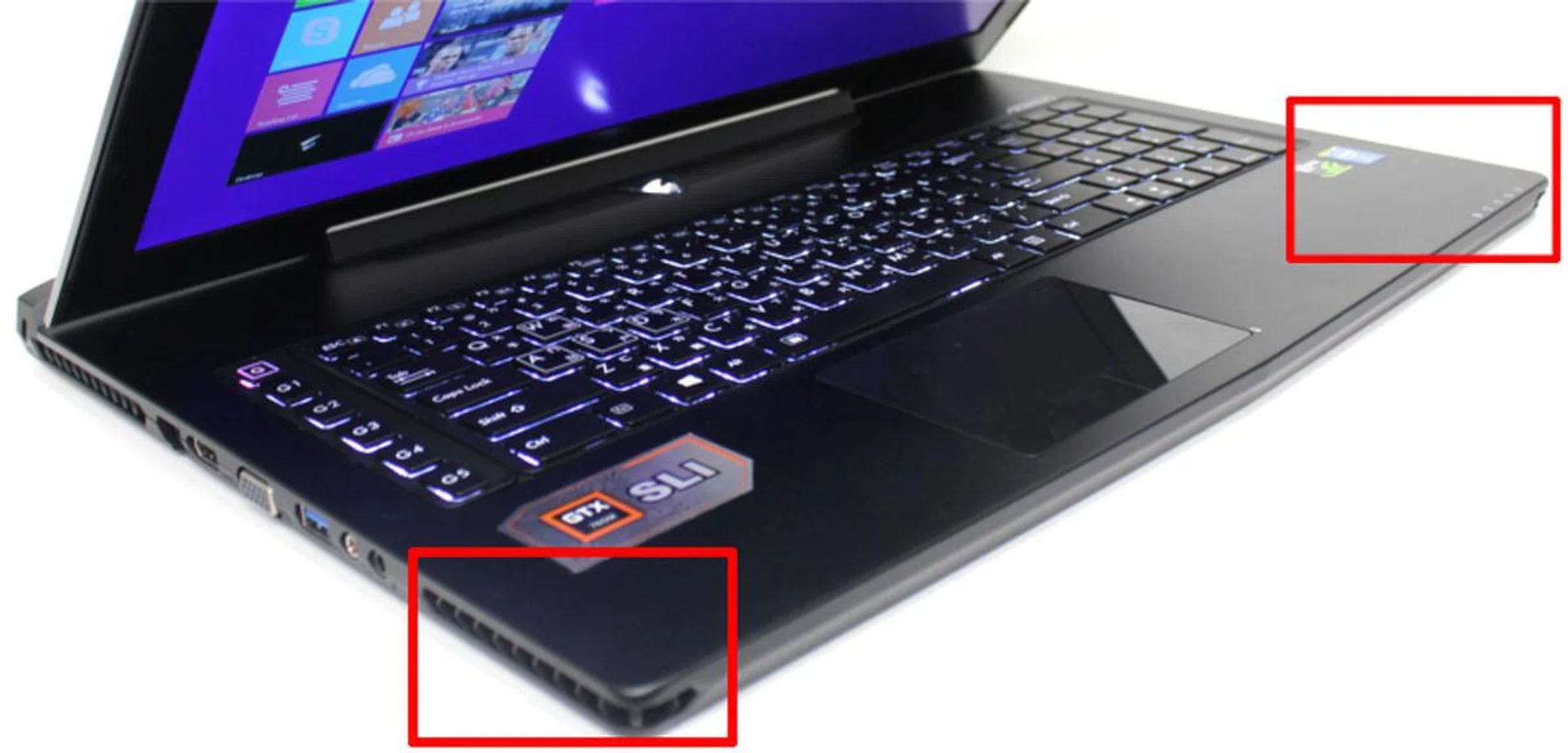
Speakers are situated at the sides of the X7, so feel free to link up the machine to a separate monitor, bring down the lid, and enjoy a movie from a comfortable distance.
Keyboard & Trackpad
Good audio reproduction may give you the extra edge in-game, but a good keyboard is definitely the foundation you want to build that upon. While sound is rather dependent on the headset you plug in, and movement is heavily reliant on the mouse you use, you hardly see anyone connect a separate keyboard to a gaming notebook. (Sure, you may notice professional cyberathletes hooking up their personal/sponsored mechanical keyboards to gaming notebooks provided in e-sports tournaments everywhere, but you also realize that, to begin with, visuals are already displayed on a separate monitor with each system.)
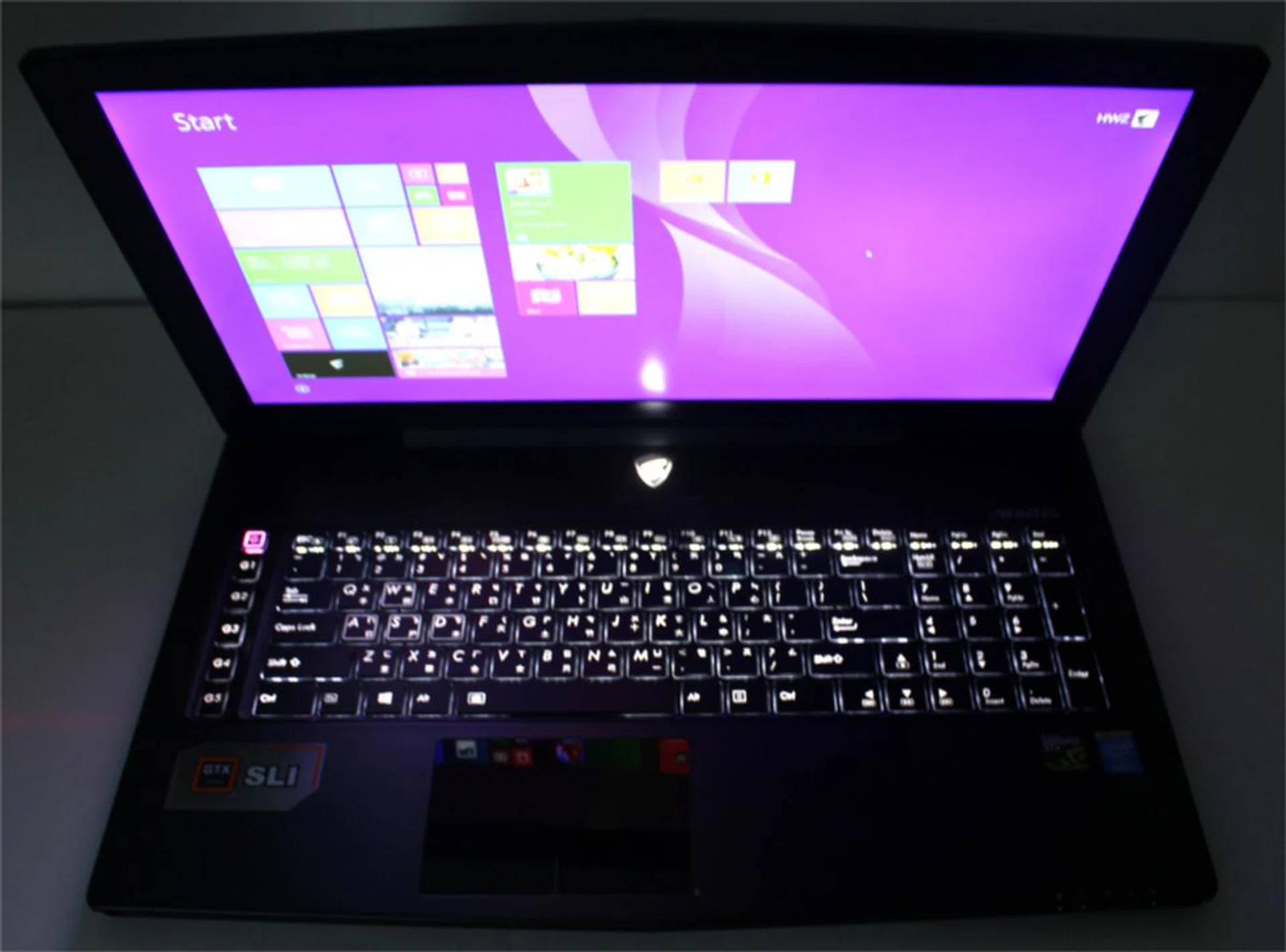
Keyboard illumination is definitely ample in dimly lit environments. (Here, the keyboard is set at 100% brightness in a room with the lights switched off)
Because the keyboard mounted on a gaming machine is almost irreplaceable, chances are that you'll use it frequently, and hence, it is often seen as the crux of a gaming machine. On the X7 are G keys (macro keys) and a complete number pad, along with the rest of the keys you'll usually find on a notebook. All keys come with an anti-ghosting function, with the G keys additionally employing a scissors-switch key structure. The full-size backlit keyboard was engineered to enable a more speedy and responsive typing experience, but it took us longer than usual for our fingers to get accustomed to the whole layout.
The entire island of keys was too shallow for our liking, although some gamers will argue that they prefer minimal tactile feedback as they rely mostly on the keyboard for communication, choosing to type instead of using a microphone, so they prefer quicker registering of keys over the "key execution feel". We felt that the keys could do with a bit more elevation, but we'll rather struggle (only for a short period while getting accustomed to them at the beginning anyway) if heightening the keys meant sacrificing its skinny frame.
Now, here's something all gamers will unanimously benefit from - you can toggle between two levels of brightness for the keyboard's backlight. Certainly, this is a prevalent function, even among the non-gaming notebooks, but can you adjust backlighting using only your left hand, without moving its position at all? You can, with the X7, because its spacebar is the key you hit to do just that (of course, you have to long press the fn key first). This is useful, especially if you're gaming midway and need to make the change.
What if you unintentionally tap the Windows key while you're trying to switch the backlighting? Fret not. The Command & Control center which we mentioned earlier allows you to lock the Windows key. The on-board software also lets you do much more - select your power mode, adjust volume and brightness of the screen, or turn off the trackpad, just to name a few.
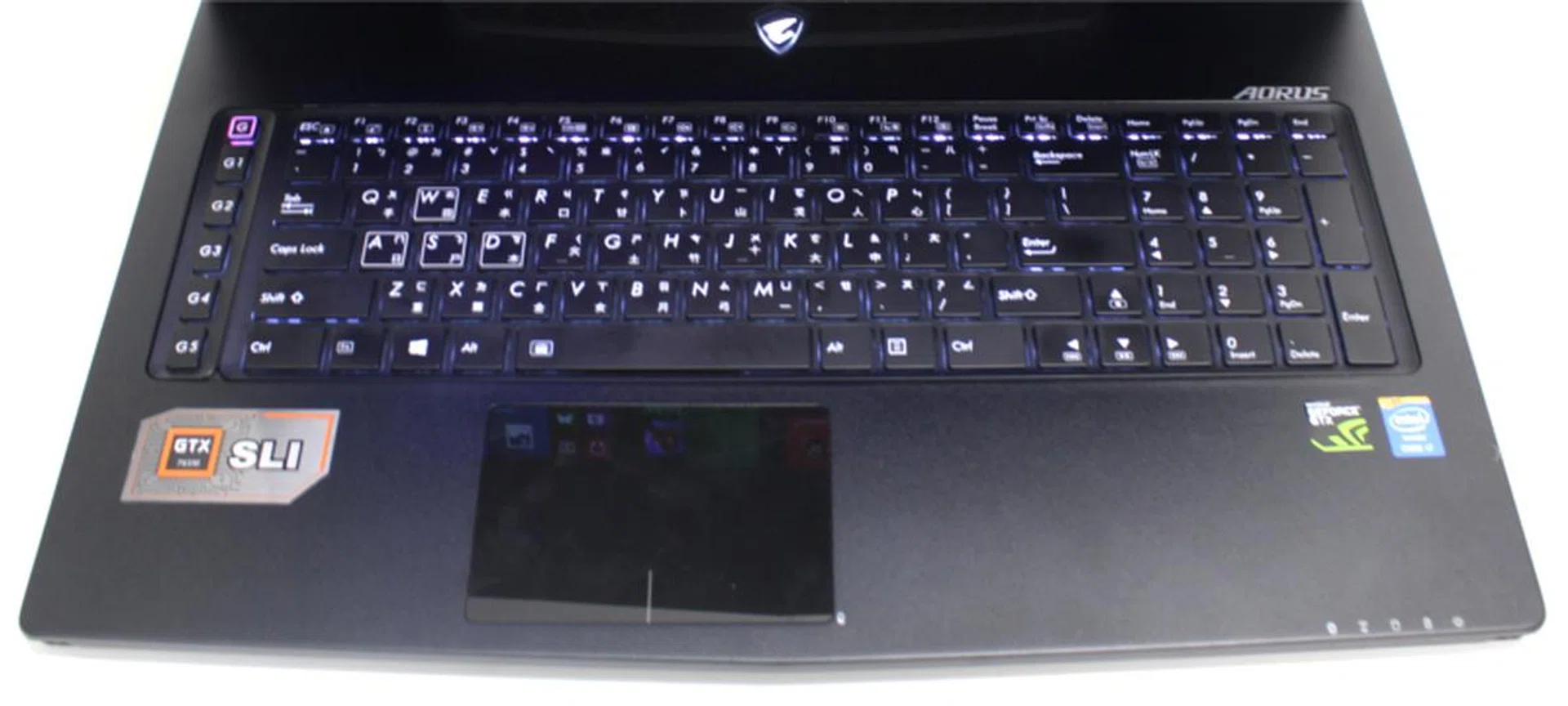
Though the placement of the trackpad is rather peculiar, it will definitely not affect your gaming experience - unless you would rather use a trackpad to game?
The glass-like trackpad is not centralized; it was very much inclined to the left to align with the keyboard (minus the numpad area). At first, it was arduous to game because half of our left palms rested on the touchpad, while the other half was on the interior. We initially found the position rather awkward, as our wrists had to lie on two different surfaces. This reviewer couldn't get used to the glassy experience; its surface caused some friction, and the trackpad wasn't as responsive as we hoped it to be, deviating uncontrollably at times from our intended path of navigation. Also, it doesn't detect contact if your fingertips are slightly wet, so you'll have to wipe your fingers after each sip from your chilled can drink. That being said, we're pretty positive that no gamer, professional or not, will use a trackpad to game. Besides, you can disable the trackpad, so it shouldn't be much of an issue.
Connectivity
The X7 houses decent connectors - three USB 3.0 ports, two USB 2.0 ports (at the rear of the X7), dual HDMI outputs, VGA (D-sub), RJ45, SD card reader, microphone-in, earphone-out (S/PDIF), and a Kensington security lock. Thanks to the built-in Killer LAN chip, gamers can look forward to minimal network latency while gaming online. Highly sought after fluid gaming is possible; gone are the days where FPS (or any game involving twitch gameplay) gamers experience frustrating lag spikes. You won't have to "teleport" in-game or find your character dead after recovering from a delay. Even the IEEE 802.11ac wireless standard is supported, so you can actually overcome wireless gaming annoyance in an appropriately supported wireless LAN infrastructure.
We're grateful for the absence of an optical drive, which we feel isn't very important to include. In fact, we feel that it is almost redundant as of late, since games are increasingly available via online stores like Steam. It would be simply illogical to jack up the X7's svelte physique just to retain a optical drive which you won't be using much of.
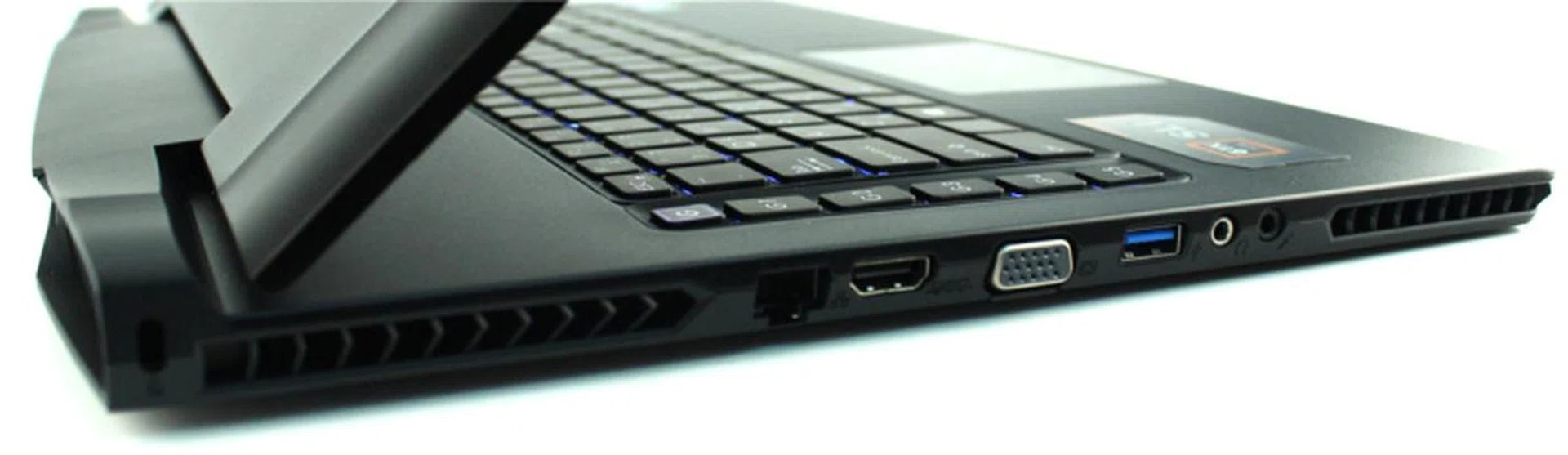
Left: RJ45, HDMI, VGA, USB 3.0, microphone/headphone jacks.
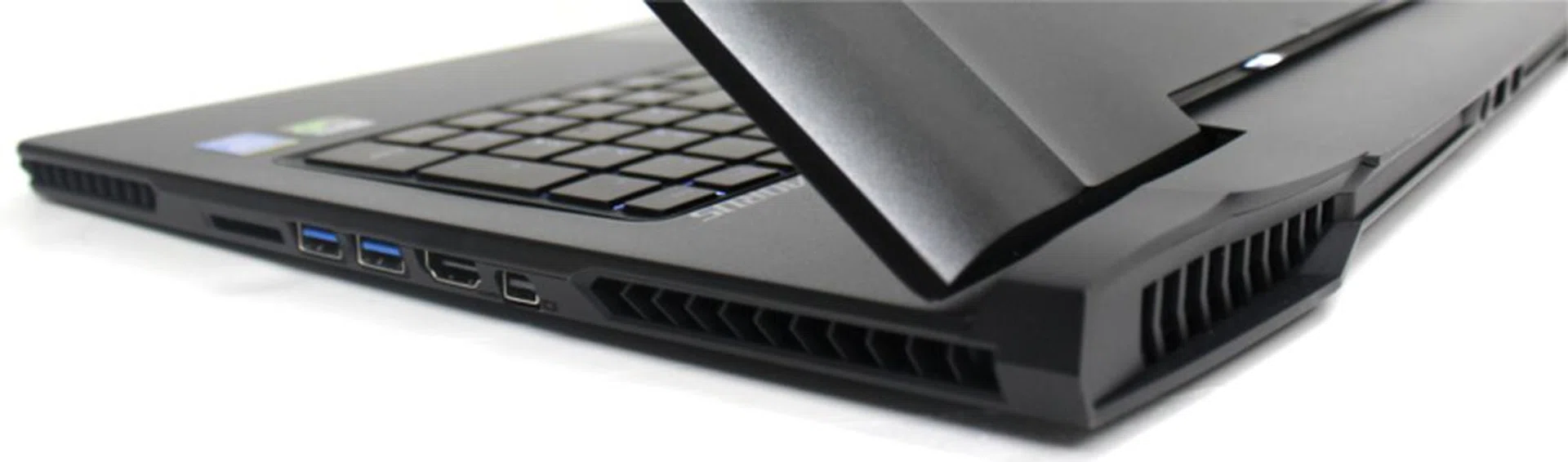
Right: SD card reader, 2 x USB 3.0, HDMI, mini-DisplayPort.
Rear: 2 x USB 2.0.
Performance Benchmarks
As iterated on the earlier page, the Aorus X7 employs a fourth-generation Intel Core i7-4700HQ processor, two GTX 765M GPUs in SLI, and is equipped with 16GB of RAM (2 x 8GB), along with two 128GB mSATA SSDs and a 1TB 5,400RPM HDD.
For comparison, we're pitting our review unit against two other 17-inch gaming machines - the Razer Blade Pro and the MSI GS70 Stealth from last year. These three notebooks share plenty in common - they all come armed with an Intel Haswell i7 processor that's based on a mobile Intel HM87 Express chipset, and NVIDIA GeForce GTX 765M graphics (with the exception of X7 adopting two of those GPUs).
The MSI GS70 Stealth with 128GB of flash storage is priced at S$2,499, while its 256GB variant will set you back by S$200 more at S$2,699 (both models include a 750GB HDD spinning at 7,200RPM). The Razer Blade Pro with 256GB of flash storage costs S$3,599, with its 512GB variant valued at S$3999.90.
Now that we've listed the prices of all the 17-inch gaming notebooks, our review unit doesn't seem extravagantly priced at all, does it? Yes, although the MSI GS70 Stealth may be weigh only 2.66kg and measure 21.8mm thin, but let's not forget that the newer Aorus X7 holds 250GB more storage capacity, and bear in mind that - we can never stress this enough - it comes with twin graphics chips. Enough to compensate for the sizable S$900 difference? Perhaps.
The reason for our slight hesitation is that the new Razer Blade Pro (2014) model comes with a newer and better single GeForce GTX 860M GPU, while the new MSI GS70 2PE Stealth Pro offers even more storage and graphics firepower with the GeForce GTX 870M GPU. Compared with the specs of a GeForce GTX 765M (even if you consider it in SLI mode), the GeForce GTX 870M on the MSI notebook looks rather formidable. For a reference of price, the new Razer model with 256GB SSD will set you back S$3,699, while the MSI GS70 2PE Stealth Pro comes up to be just S$3,099. In case you're wondering, the physical profile of these newer notebooks are identical to their older cousins.
Unfortunately, we've not yet obtained the new Razer and MSI variants of the mentioned notebooks and we'll have to continue our performance comparison with the previous year models which the Gigabyte Aorus X7 competes with better from the perspective of using last year's hardware for its internals:-
PCMark 8
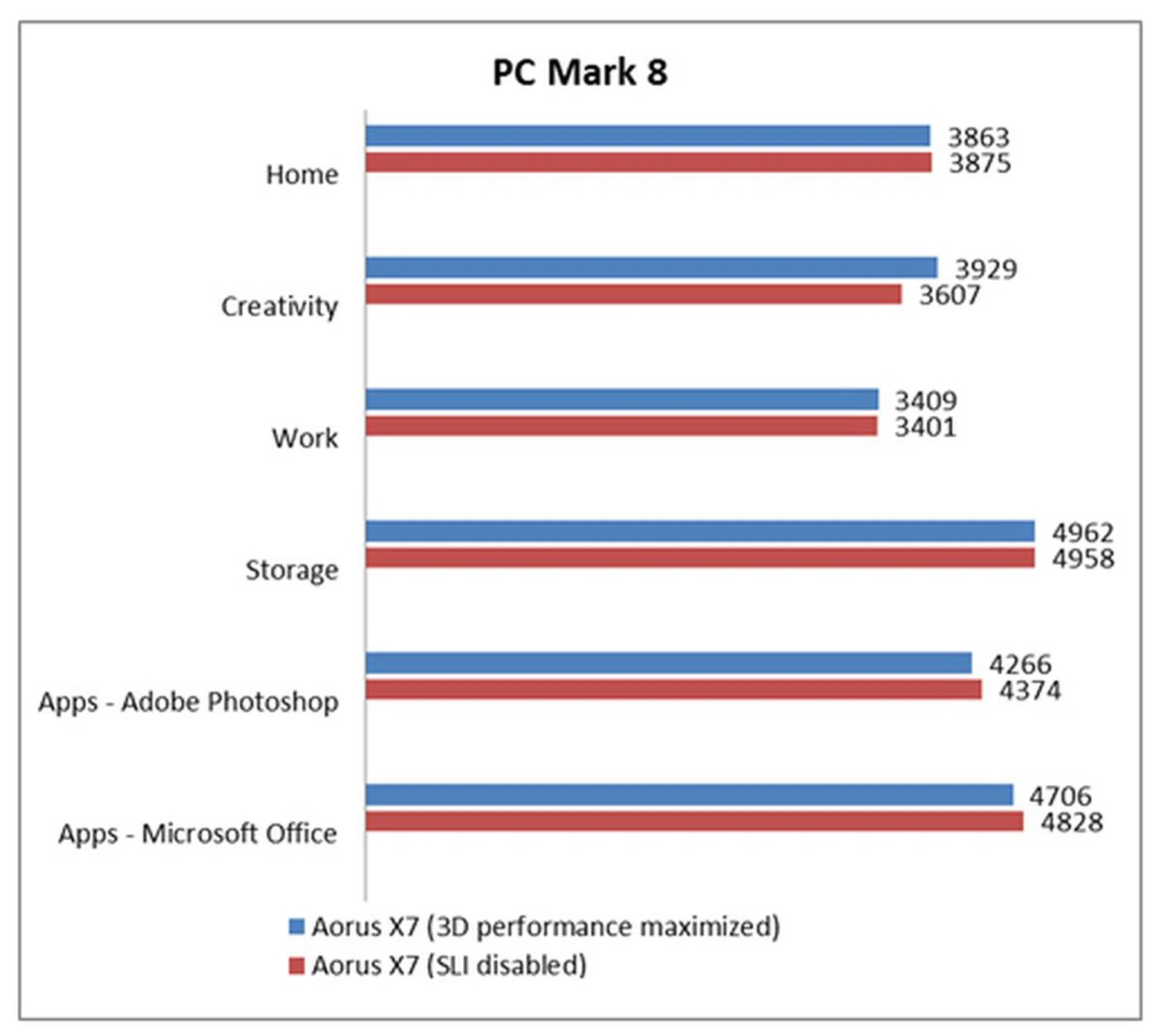
PCMark 8 is a synthetic benchmark that simulates everyday usage comprising of workloads testing web browsing, multimedia editing and document editing. The "Home" benchmark has a general array of tasks, while the "Creative" and "Work" benchmarks are more specific, and test a system’s performance at specific workloads.
We've upgraded the PCMark 8 benchmark to the Professional Edition, and all systems running the Windows 8.1 platform will perform tests using this newer version in future. As you can tell, the results were almost the same regardless of which mode (3D performance maximized, or SLI disabled) the Aorus X7 was tuned to. Of course, scores varied under the "Creativity" benchmarks, as workloads covered activities which required more graphics power. Since we've not yet had a chance to update the results of the competitive notebooks with the newer version of PCMark 8, we've only got results from the Aorus X7 for show at this point of time. According to Futuremark, the scores are not compatible with older versions of the benchmark. For those who would like to check on the discrepancy, you can check the results against those from our earlier review of the Razer Blade Pro (2013) and the MSI GS70 Stealth (2013) models.
3DMark 2013
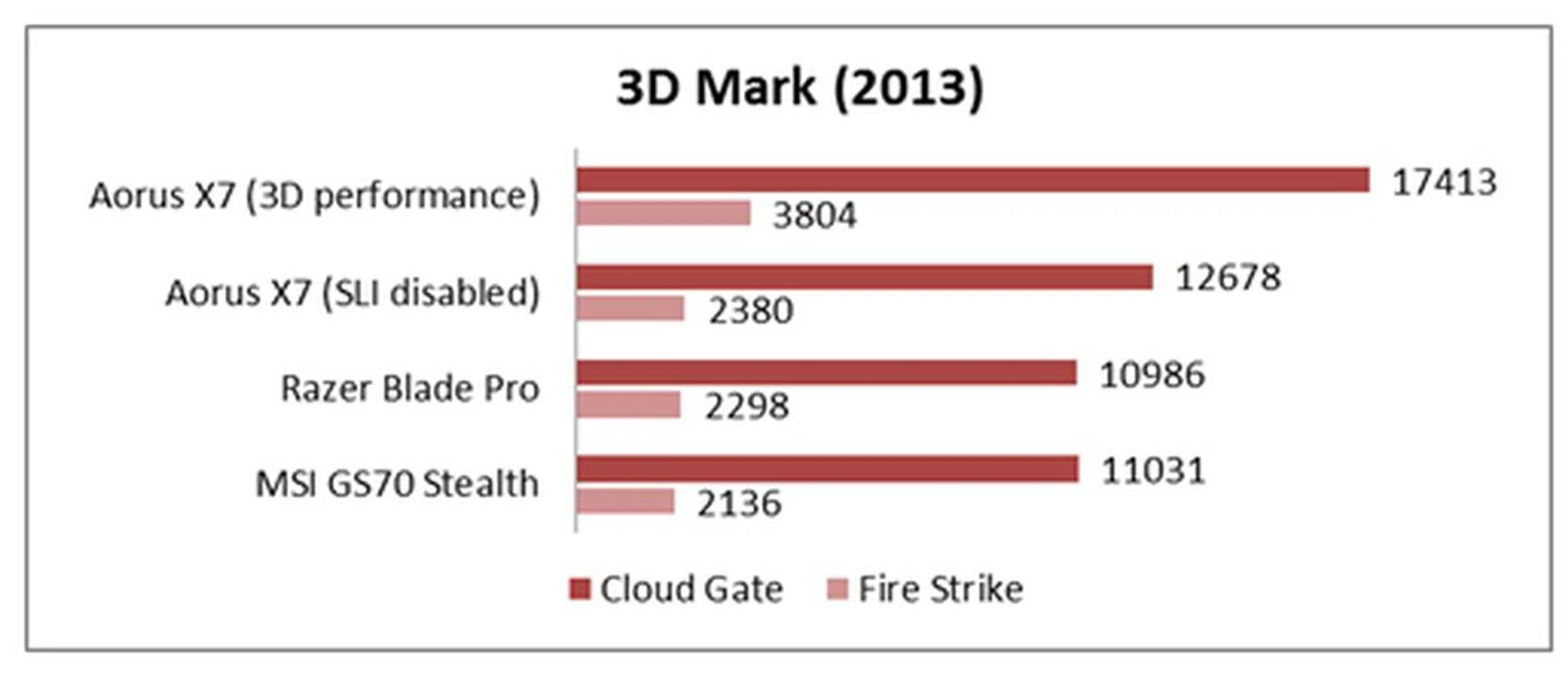
3DMark 2013 is a synthetic benchmark designed to test a notebook's graphics and gaming capabilities. For a more in-depth understanding of 3DMark 2013, please refer to our article "3DMark (2013) - Notebook GPU Performance Review". We'll be running our notebooks through two benchmarks:
- Cloud Gate is designed for integrated GPUs and utilizes a DirectX 11 engine limited to Direct3D feature level 10 (equivalent to DirectX 10) with a heavy emphasis on geometry, heavy post processing, particle effects, and volumetric illumination.
- Fire Strike serves as a showcase for DirectX 11 features, utilizing a grueling two-part test with extreme levels of tessellation and volumetric illumination, as well as complex smoke simulation using compute shaders and dynamic particle illumination.
We had expected the X7 to perform significantly superior than the Blade Pro and GS70 Stealth when it was driven by SLI graphics (3D performance maximized mode). But even with SLI disabled, we were impressed it still managed to score better than the latter two, in both Cloud Gate and Fire Strike test.
Crysis 2 & Tomb Raider
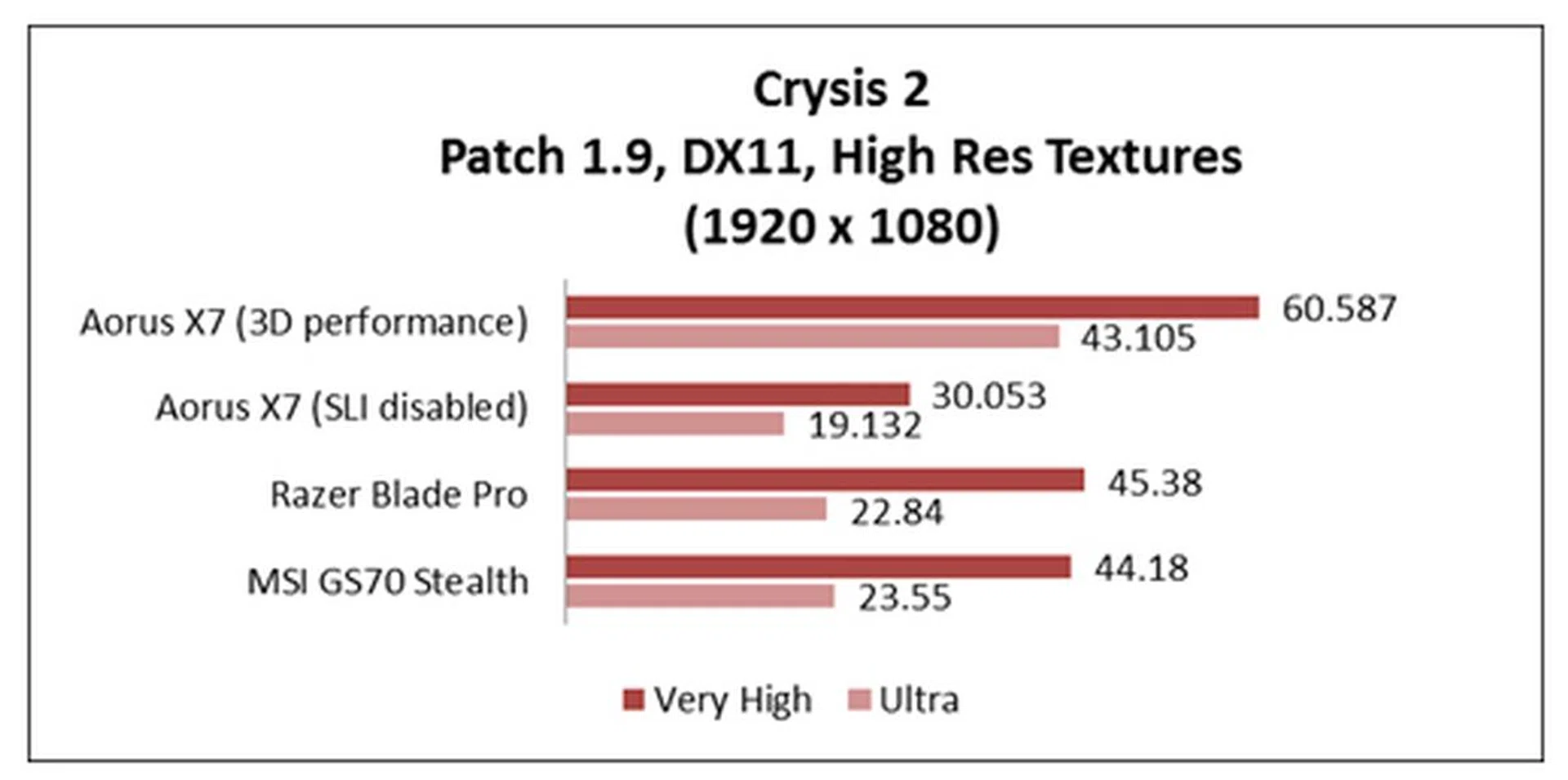
Without its dual GPUs working together, the X7 fell behind the Blade Pro and GS70 Stealth in both "Very High" and "Ultra" settings. However, when we kicked it up with SLI performance, the X7 jaw-droppingly outdid its own scores; it went so far as to double its previous scores on both settings. This translates to hitting almost twice the records in the "Ultra" setting, and around 33% in the "Very-high" setting, when compared to the other two notebooks. It can only mean one thing - X7's NVIDIA SLI drivers are exceedingly well-optimized for Crysis 2.
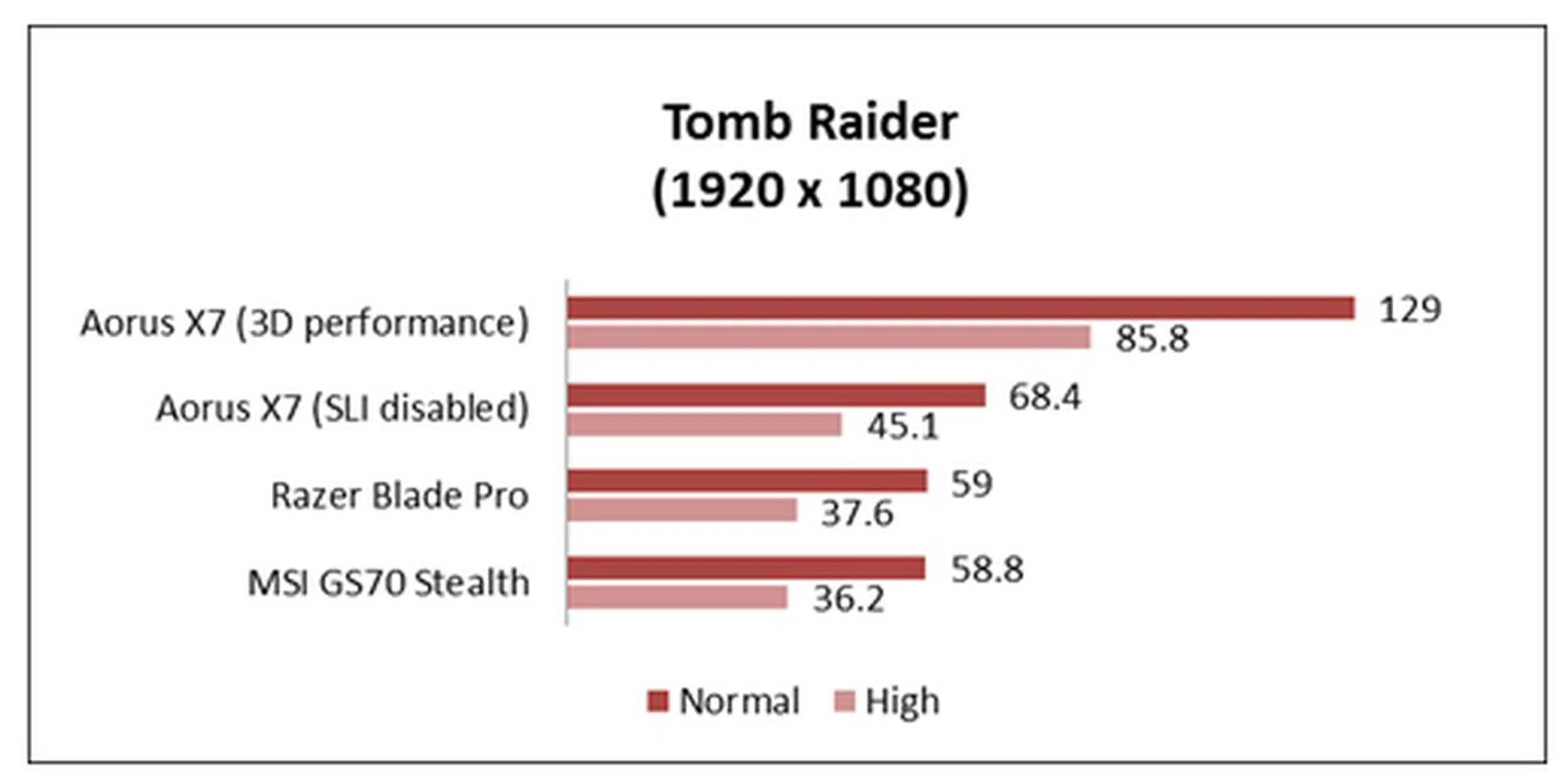
Again, we were pleasantly surprised with the X7's exceptional performance on the newer Tomb Raider game. The results obtained without SLI enabled were already quite remarkable, with the X7 easily ousting the Blade Pro and GS70 Stealth in both "Normal" and "High" settings. It repeated its feat when SLI was turned on, striking scores that were off the charts. That's twice the marks of both systems on both settings once more.
Battery Life
To test battery life, we use Powermark, a synthetic benchmark which tests a device's battery life with a number of productivity and everyday usage scenarios.
The Aorus X7 includes a 73.26WHr battery, which is on a par with Blade Pro's 74WHr battery, so we were anticipating similar battery endurance. However, it was only after running the Powermark that we realize why the former couldn't do as well as the latter - it did not support NVIDIA Optimus, which is a technology that automatically analyzes and determines how to optimize your computing experience, (including managing the notebook's battery efficiency) so you won't have to manually change settings to prolong battery life. Never mind that. Still, disappointingly, with SLI disabled, it only extended a miserable nine minutes of notebook usage.
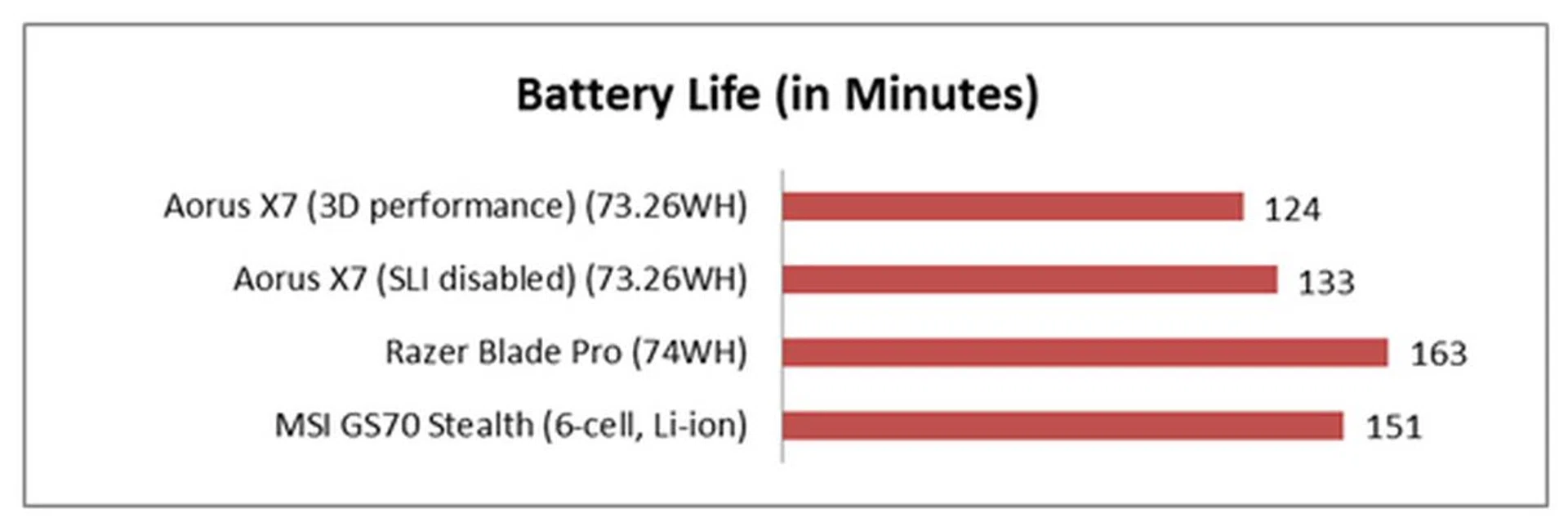
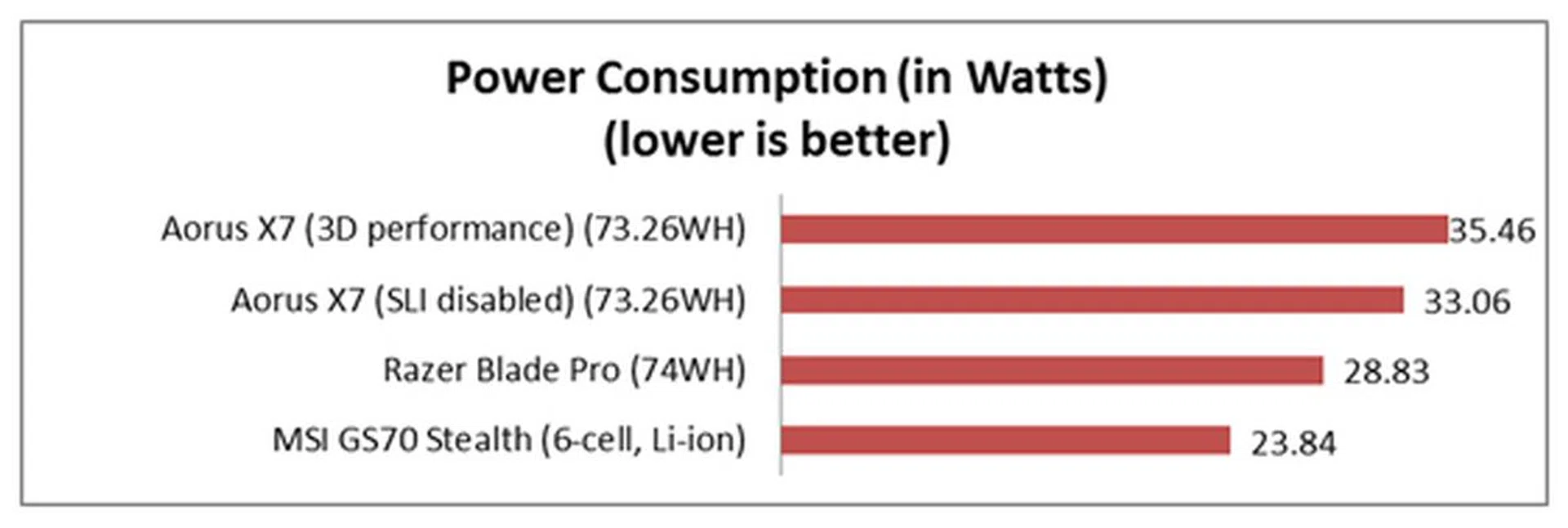
Once it was established that the X7 clocked in the worst battery life scores, it wasn't as startling to see that it exhausted the most energy. We found ourselves wishing that it had incorporated a larger battery, or the NVIDIA Optimus power-saving technology, because it did handsomely well with the performance benchmarks, only to be let down by its great appetite for power.
Portability
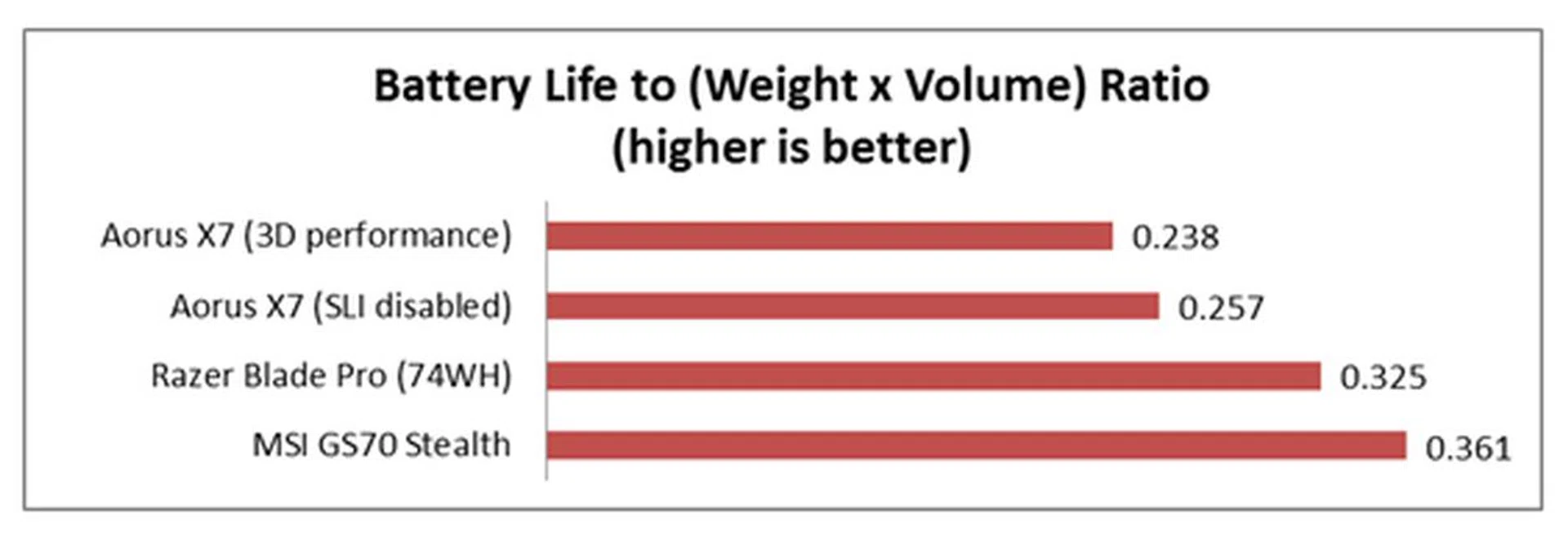
Our Portability score factors in battery life, weight and volume to give you an idea of how easy it is to carry each device around. The longer battery stamina of its competitors and slightly lighter build meant that the Aorus X7 was expectedly pegged a little behind. Still the portability ratio figures aren't as bad as the relative placements suggest; it's just not as good as the competitors.
Conclusion
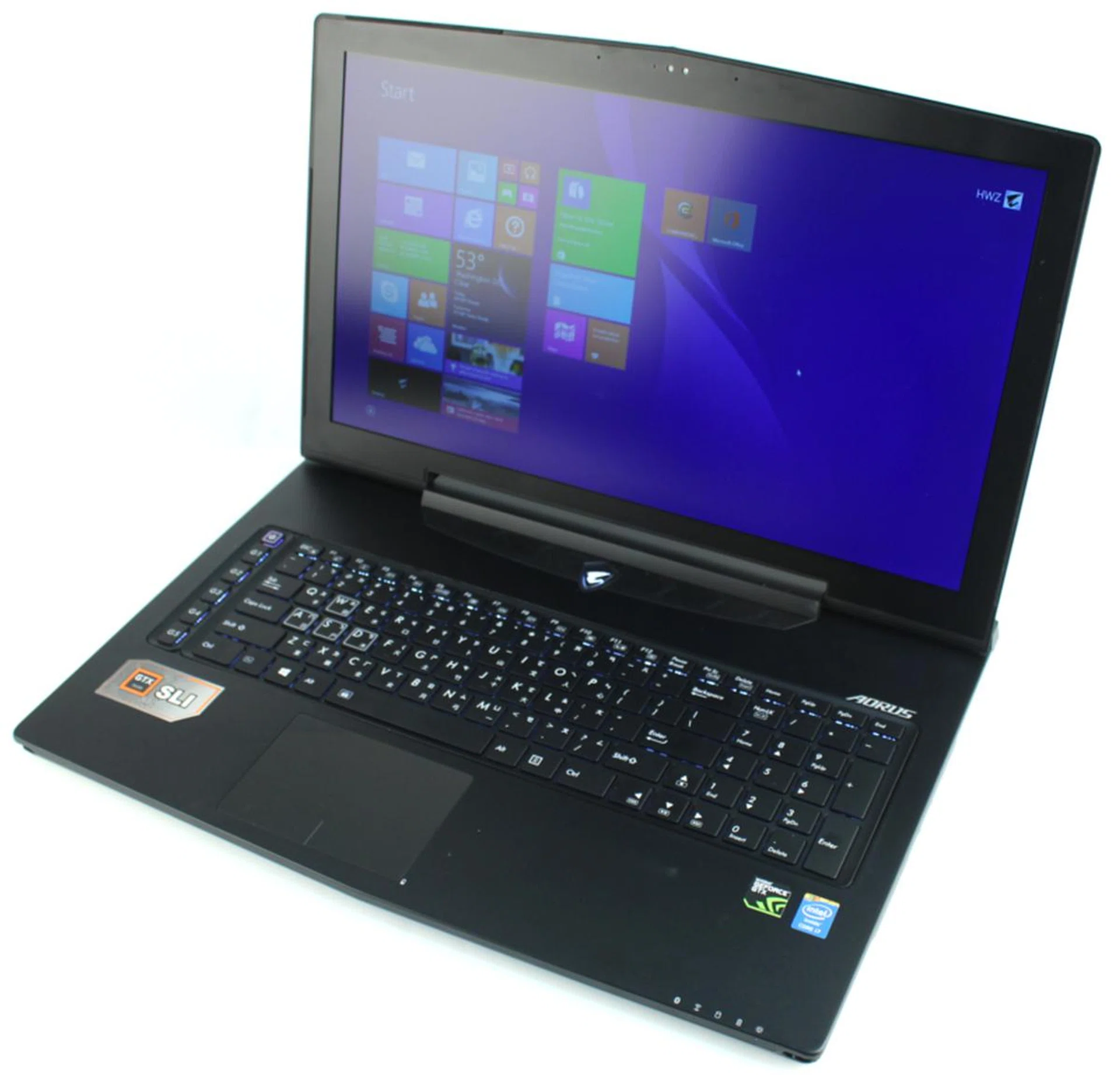
Size does matter. But, Aorus has demonstrated that it's possible to pack twin GTX 765M graphics into a 22.9mm slim chassis, without compromising on performance (especially with the heat management). There's an absurd amount of things going on in the X7, and we're still baffled (and extremely impressed) as to how Aorus managed to stuff all that goodness into such a slick and slim package.
Overall, the S$3,599 value of the Aorus X7 is reasonably in-line with the muscle it's built with - be it the design, the specifications, or its capabilities. We're not saying it's everything. Sure, there were some hiccups here and there - like its surface being such a magnet to fingerprints, its slackened lid hinge, its shallow keys (this can be up for debate as mentioned earlier), the insensitivity or the location of the glassy trackpad, and the lackluster battery life. But, these flaws - if you would harshly call them - are relatively minor and definitely far from jeopardizing your gaming experience.
Kudos to Aorus, considering that this is the company's virgin stab at building a portable gaming machine. Of course, we're pretty positive they sought some of Gigabyte's (it has existing gaming hardware) expertise for certain elements and probably for the design area. Yes, we were somewhat skeptical after receiving the review unit, thinking that since a seemingly tremendous amount of effort was put into the aesthetics, it wouldn't possibly have the prowess to match. We were so wrong. It surpassed our expectations of what a gaming notebook should possess, thankfully without too exorbitant a price tag.
Even with all its goodness, the Gigabyte Aorus X7 might be a little to late to hit the retail channel. Had it been out late last year or early this year, it would have gotten our unreserved recommendation. However at this juncture with much newer graphics hardware made available by NVIDIA, the twin GeForce GTX 765M GPUs might be looking long in the tooth and are due for an update. No doubt the Aorus X7 performed very well, just imagine what it might have achieved with newer graphics hardware. This is where the newer version of its competitors pose a closer competition than what was compared with in the performance analysis section. Its nearest competitor is the S$3,099 GS70 2PE Stealth Pro by MSI with marginally better storage hardware and has a single GeForce GTX 870M GPU, which is rather high up the scale in the number of CUDA cores and wide graphics memory bus.
Despite the positioning of its competitors, they've yet to be tested and proven in our field test, which the Gigabyte Aorus X7 does well across the board except for the few setbacks mentioned earlier. Further to that, it operated at a comfortable operating temperature throughout our weeks of usage, proving that its cooling system is robust (without making a din). While it's not built to supersede top class gaming notebooks that can output double the gaming scores of the X7, it does handsomely well in its territory of slim and portable 17-inch gaming notebooks.
Overall, we think that Aorus is a serious competitor in the gaming market and will continue its efforts to make a name for itself. Rivals should be very concerned about its entry and not write-off this freshly-minted manufacturer just yet.
Our articles may contain affiliate links. If you buy through these links, we may earn a small commission.