
Dell XPS 15z - Putting The “P” In Premium
The Dell XPS 15z is the latest thin-and-light notebook from Dell, and could possibly be one of the better looking notebooks out in the market - even though it may look familiar to some. We gave this entry-level multimedia 15.6-inch notebook a spin, so read on for our findings.

Putting The “P” In Premium
There is a new shift in notebook design, and we can smell it. Using the well-honed art of superficial electronic ogling we have pin-pointed the 15.6-inch Dell XPS 15z’s exact source of inspiration -- the MacBook Pro. How do we know for sure? Well it gathered the same sort of oohs and aahs usually reserved for all things clad in aluminium. Impressive its looks may be, unfortunately a MacBook Pro it is not. But you have to give it to Dell, who introduced the exceptional Dell XPS 15 to us early this year.
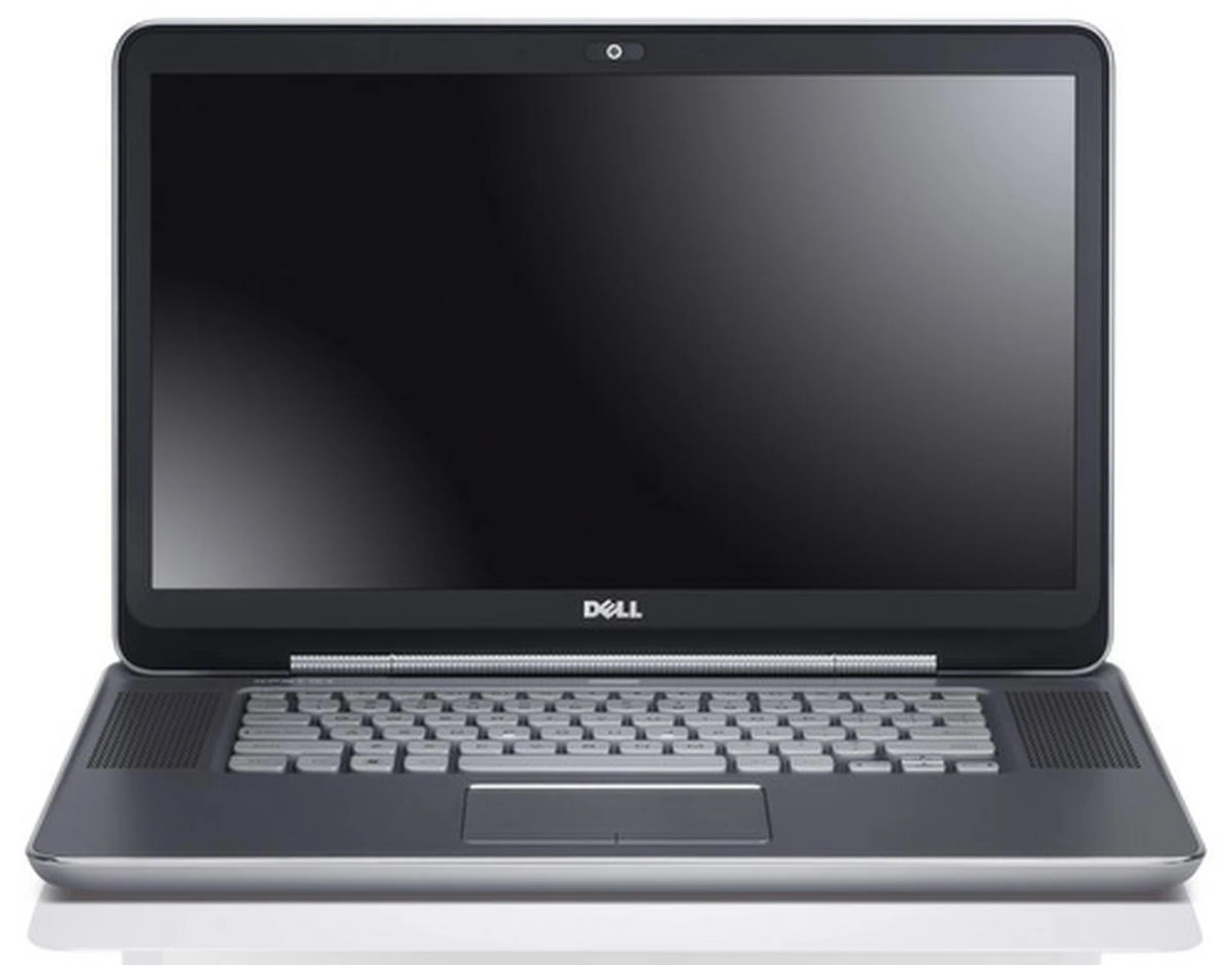
The Dell XPS 15z's good looks stem from its clean, no nonsense design.
The Dell XPS 15 was one of the better full HD resolution equipped 15.6-inch notebooks we have come across, and the enhanced Dell XPS 15z (our test unit was sporting a Core i5-2410M, 2.30GHz processor) is supposed to be even better (here's the full specs list). In some ways, that may be true. Its round curves and wholly metal body gives the machine a very solid feel. It seems to us as though all existence of plastic has been purged from the exterior, lending a regal air to the XPS 15z (just like the MacBook Pro).
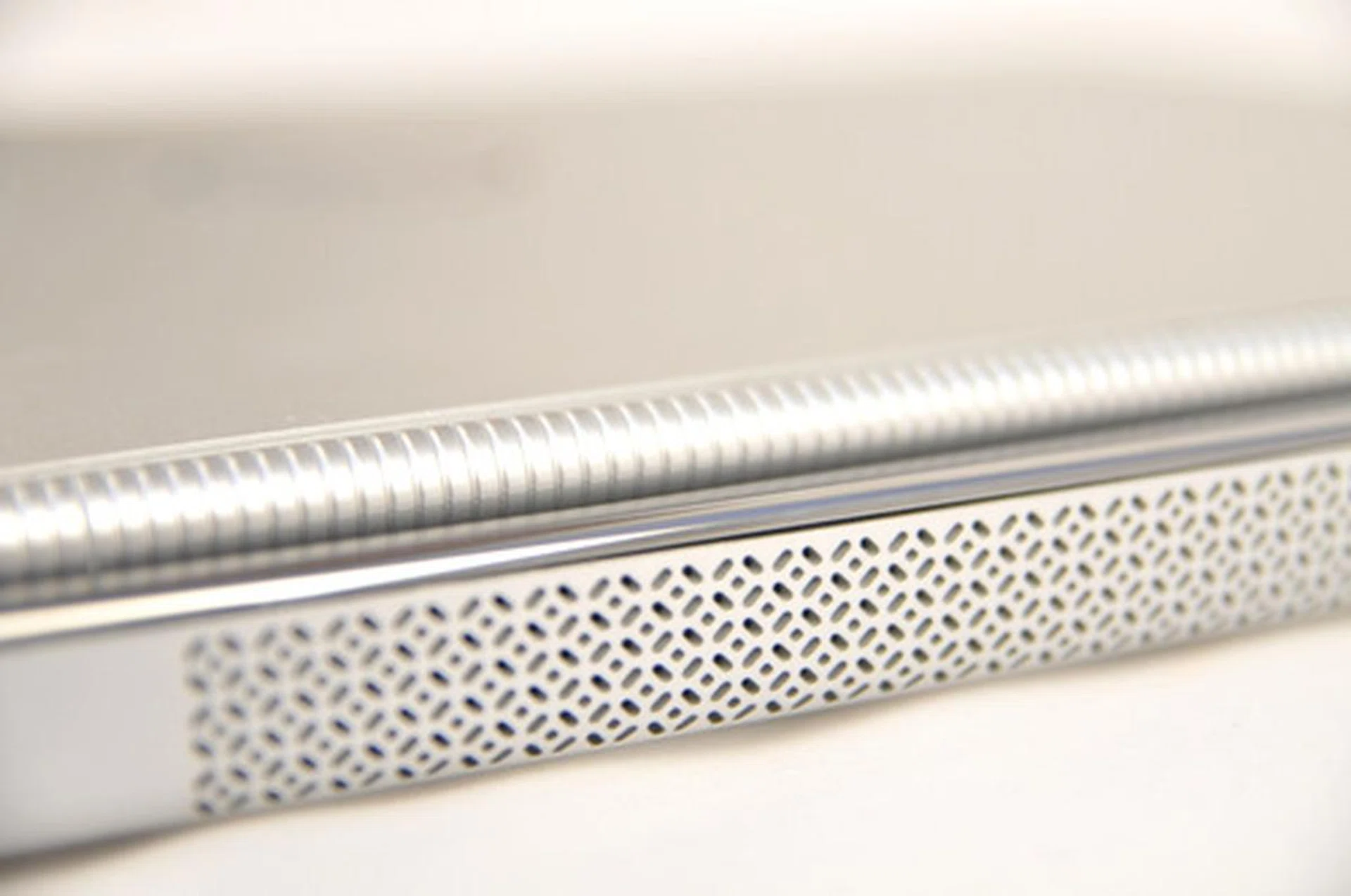
Note the alien-like ventilation grille that deviates from the design of conventional grilles with straight lines.
At the back of the machine, is the ventilation grille, which is nothing like what you have ever seen before. Instead of just using the usual (and boring) straight lines, Dell opted to exercise some creativity, with the end result being a grille pattern that looks rather alien in origin. For us, it was refreshing to see manufacturers try something new once in awhile.
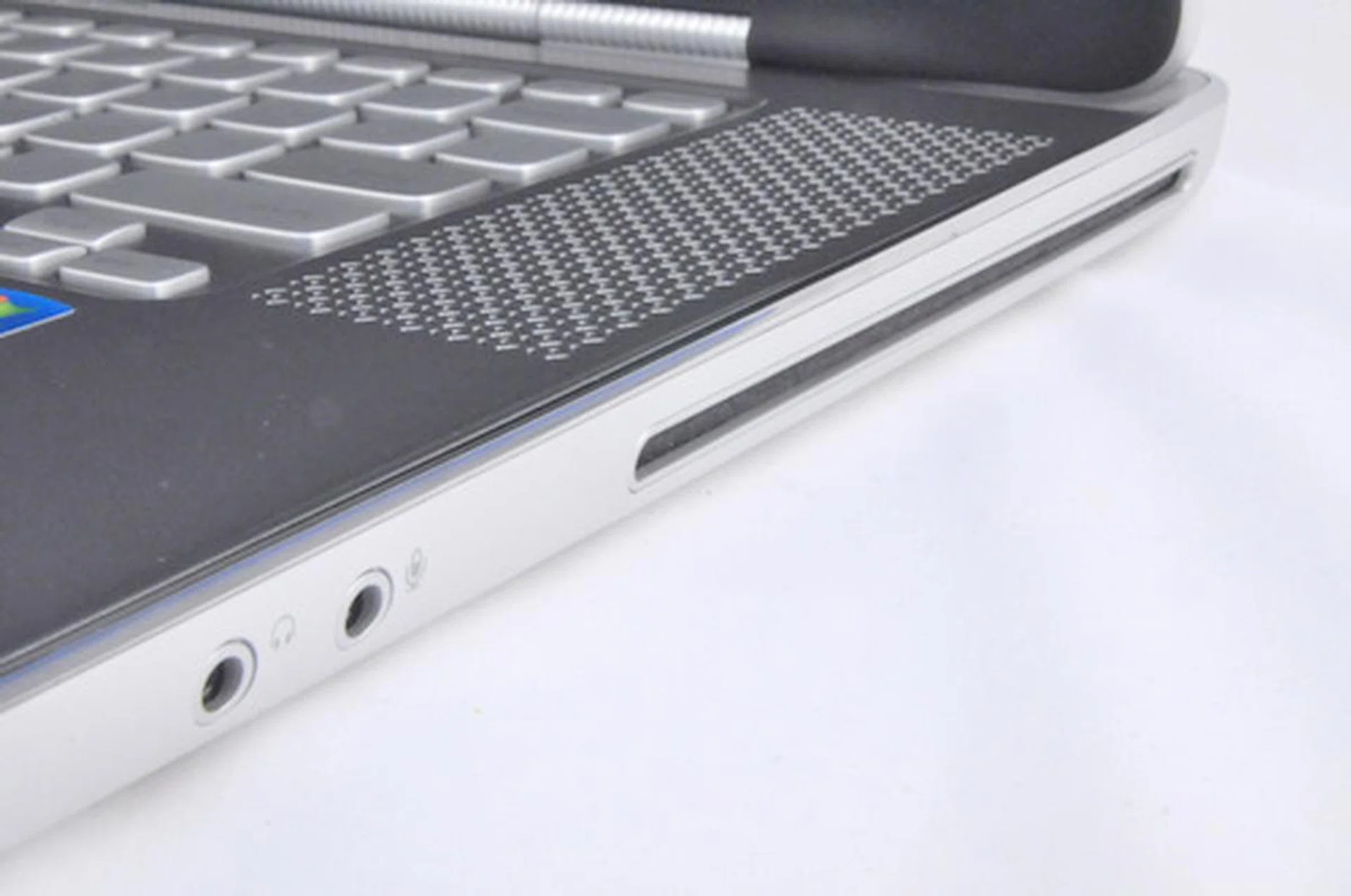
Having a slot-in drive saves precious space, allowing the machine to have a slimmer profile.
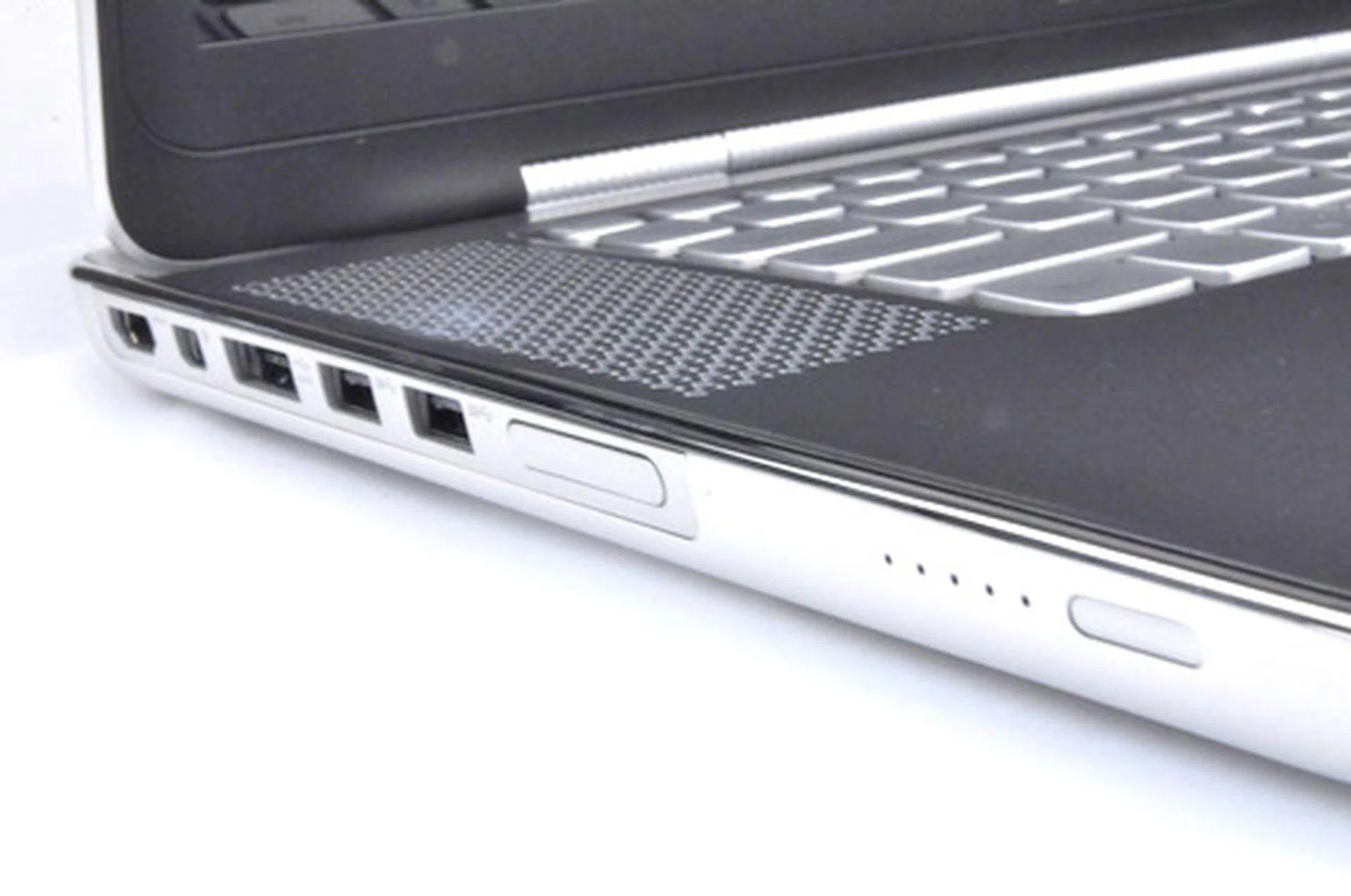
The usual ports include HDMI, Mini-DVI, an SD card reader, and 3 USB ports (dual 3.0 and a single 2.0).
Silver Lining
The interior of the Dell XPS 15z is interesting to say the least. It looks beautiful, with its rounded metallic coated chiclet-style keys and minimalist style. A chrome looking material now lines the edges along the bottom half of the notebook. We think it’s a nice gesture by Dell, because the chrome lining actually has a very practical function. It makes prolonged typing much more comfortable, and wouldn’t cut into the user’s wrists (and that's one aspect that the Apple MBP could improve upon).
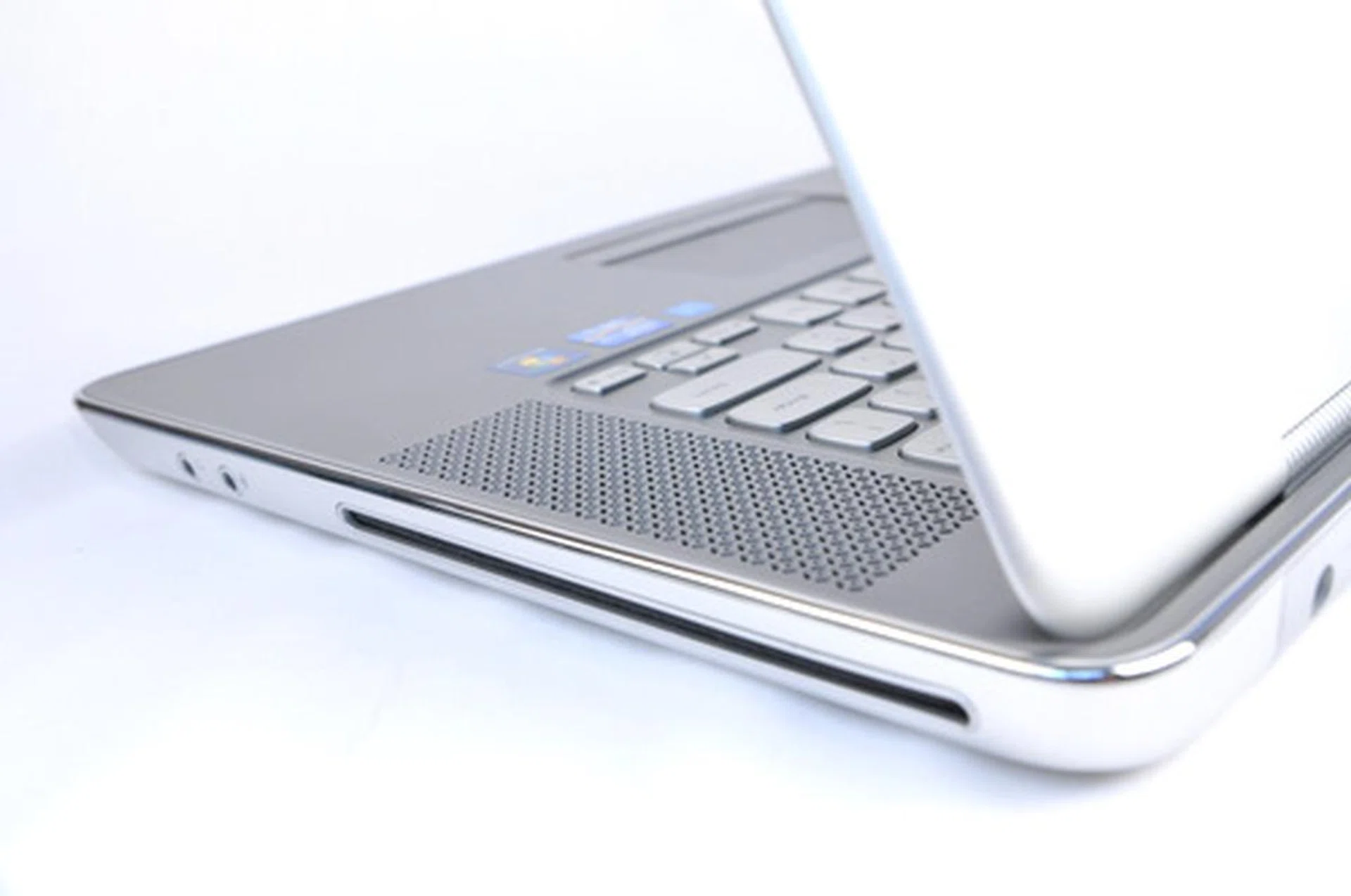
The chrome accents along the notebook isn’t just for show (which it does very well). Its practical function is to prevent sharp edges from cutting into wrists through prolonged use.
The placement of the keyboard, and the alien-looking speaker grilles on the left and right of the keyboard are very similar to that of the original XPS 15. We think that the symmetrical placement of the speaker grilles is nice, but that in itself introduces a problem. Putting the speakers in the same row as the keyboard means there isn’t any space for a number pad, which we have seen in quite a number of similar sized notebooks.
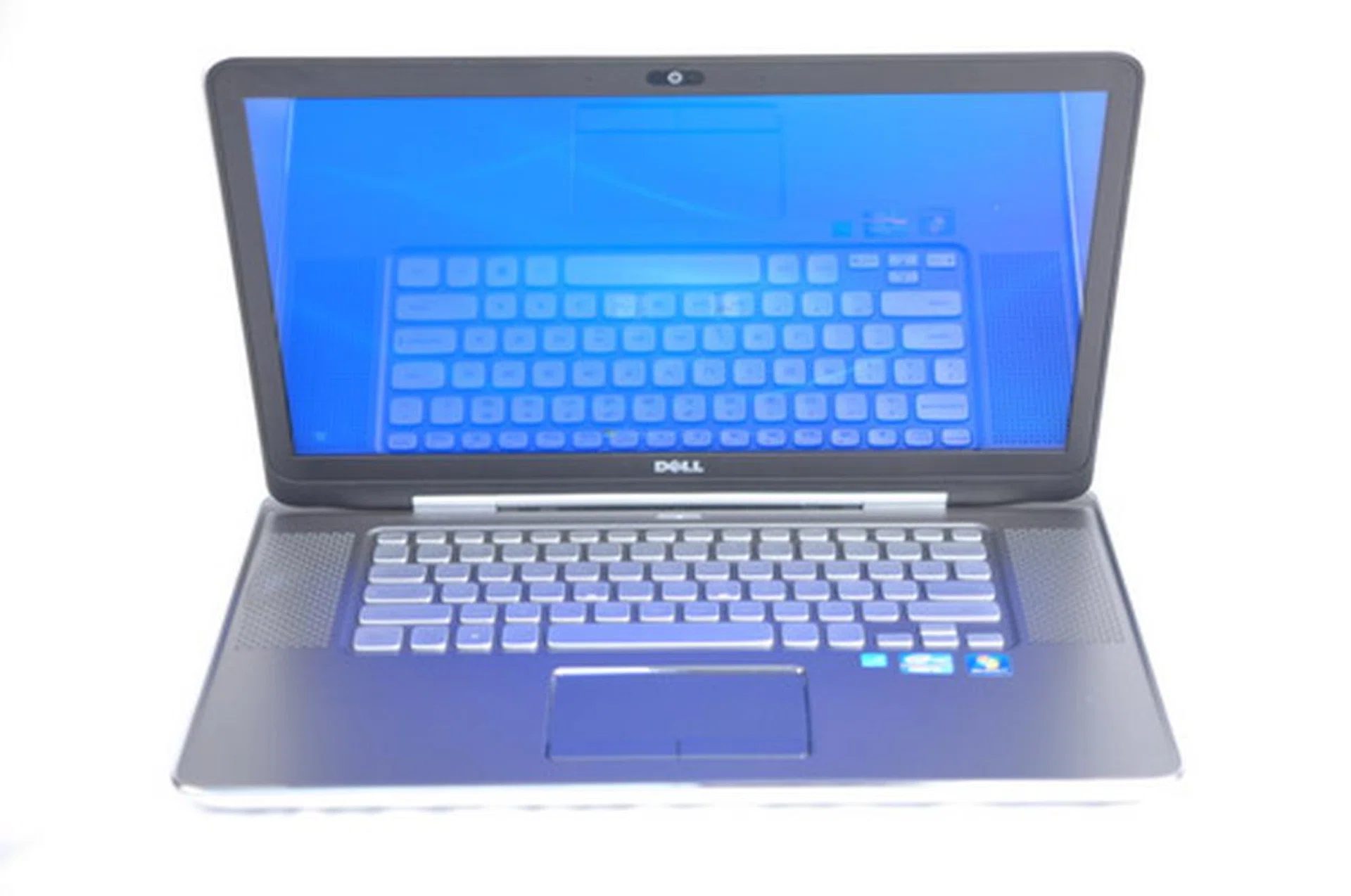
The simple symmetrical design found on the interior is what makes the XPSz so appealing, but presents other problems as well.
While it isn’t that important to have a number pad on board, we feel that if we can’t have a number pad, we’d rather have a wider keyboard. Both of which eludes us due to the simple decision to place speakers on the side of the keyboard. Well we know that we can’t have everything, but at least give us something!

Backlit keys are always welcome. Without them, it is like trying to spell “Premium” without the “P” and it just doesn’t make sense. It looks pretty, yes?
Fortunately, we do have something. White LED back-lit keys that adds a touch of class to the XPS 15z to help consumers distinguish its premium status over lesser notebooks. This is one feature which we feel definitely shouldn’t be left out if the word “premium” is bundled along with the machine, so kudos to Dell for including it.
Another minor grouse we have with the slightly recessed keyboard (again, inspired by the Apple MBP) is about the keys themselves. They are fine to type with, although they might be slightly too shallow for that tactile feel which is very important to some typists, producing a muted clickity-clack that your colleagues will appreciate.

The style of the sunken-in keyboard is similar to what is found on the MacBook Pro.
The trackpad underneath the keyboard is right smack in the middle (no numpad). It hardly interferes with regular typing but if it does, there’s no option to turn it off. Whether or not this presents a problem differs from user to user, but we had no issues with it in our testing.
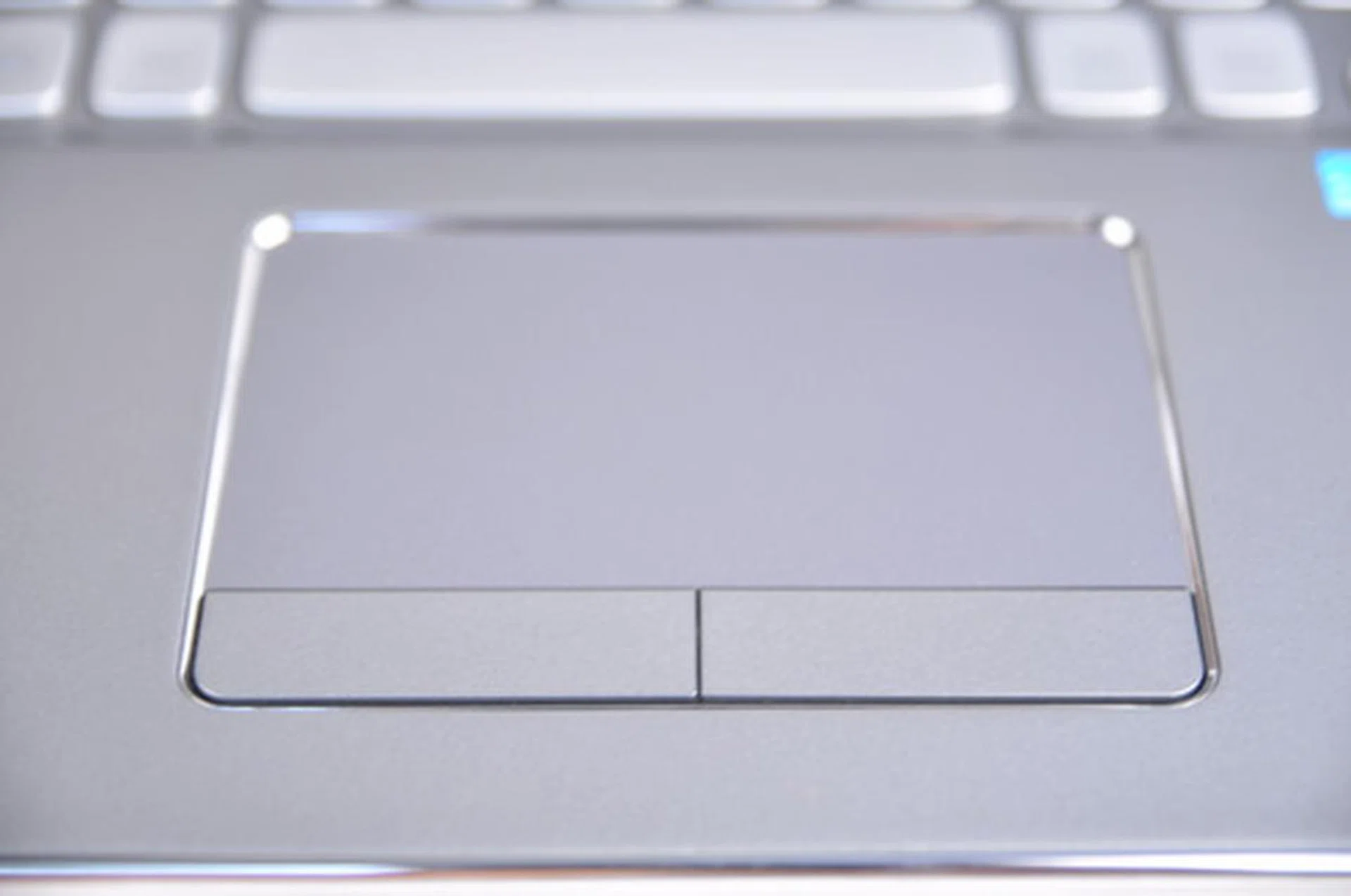
The chrome accents around the trackpad makes for an aesthetically pleasing divider between trackpad and palmrest.
The trackpad is also slightly recessed and lined with the same chrome looking material to visually separate the trackpad from the palm rest area. However we felt that the trackpad could be bigger, as there was plenty of space around it.
Yes we may have more than a few minor issues with the keyboard and trackpad, but it doesn’t detract from the fact that the Dell XPS 15z is still a very attractive machine inside and out. Even the bottom of the machine had unnecessary lines and holes completely removed, leaving only the alien-looking grille.
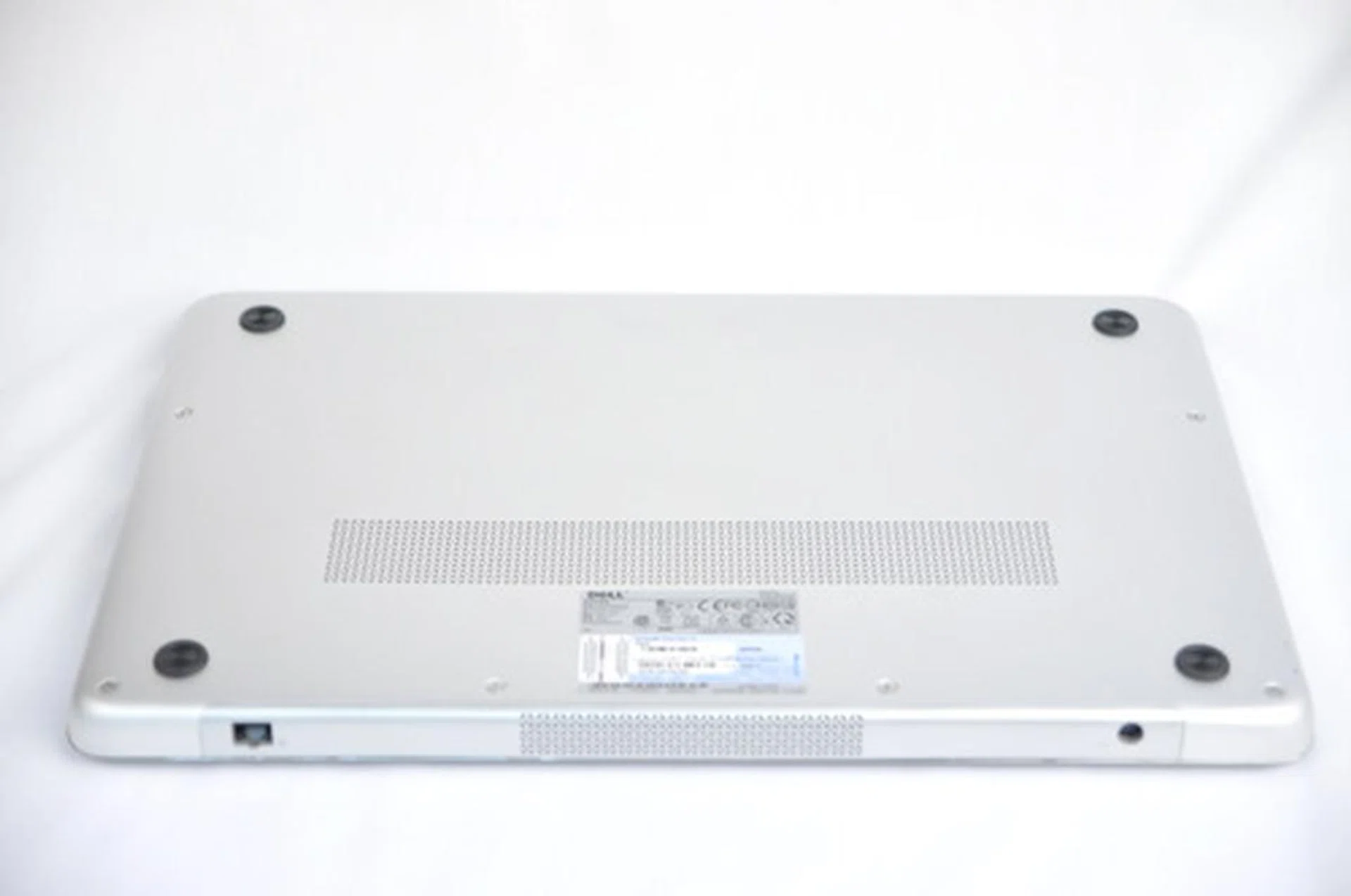
The bottom is free of distracting lines and screws, making it feel extremely soothing for the eyes.
Performance Benchmarking
But what we really want to know is, how attractive is its performance. To illustrate the 15z’s performance improvement over the previous model, the XPS 15 (with a last generation Core i5 processor), we decided to compare them side-by-side. We’ve also chosen to compare performance figures from the HP Pavillion dv6 (discrete-only results) to be part of the performance analysis as it more or less competes in the same mainstream multimedia performance class, price and with similar form factors too. There are however differences in specs such as the dual-core processor and entry-level discrete graphics con the XPS 15z versus the HP's 'slower' quad-core processor with mid-range graphics. Nevertheless, let the comparison begin and we'll see how each notebook fares.
Specifications/Notebook | Dell XPS 15z | HP Pavilion dv6 | Dell XPS 15 |
Processor | Intel Core i5-2410M
(2.30 GHz) | Intel Core i7-2630QM
(2.0GHz) | Intel Core i5-460M
(2.33GHz) |
Chipset | Intel HM67 | Intel HM65 | Intel HM57 |
Memory | 4GB DDR3 | 4GB DDR3 | 6GB DDR3 |
HDD | 750GB - 7200RPM | 750 GB - 5400RPM | 640GB - 5400 RPM |
Video | NVIDIA GeForce GT 525M | ATI Radeon HD 6770M | NVIDIA GeForce GT 420M |
PCMark Vantage
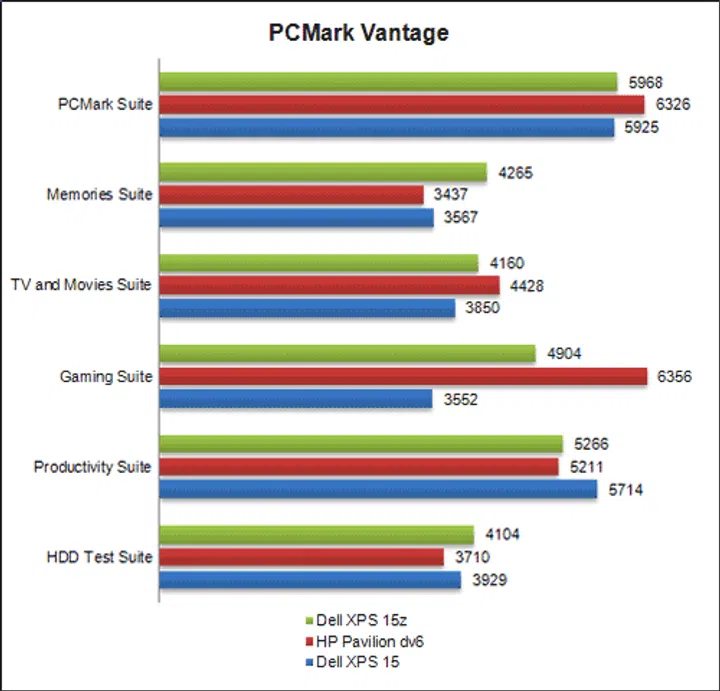
In our PC Mark Vantage benchmark test, the Core i5 of the XPS 15z didn’t fare too badly, even though it is pitted against the Core i7 HP Pavilion dv6. This is also helped by its faster hard drive, which you can see in the individual test suite. Overall scores were very similar, so consumers don’t need to be very concerned with the type of processor when mulling over which variation of the XPS 15z they want. In terms of gaming however, it still falls behind the very capable HP Pavilion dv6 and its much better graphics engine.
3DMark 06
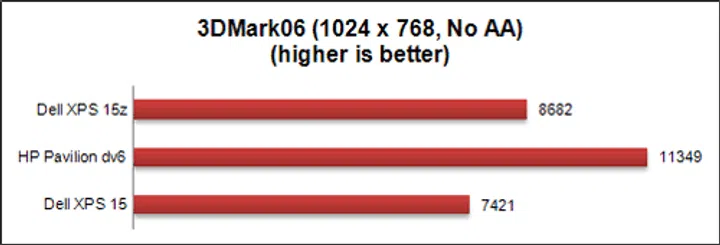
In our 3DMark 06 benchmarking tests, you can see that the better graphics engine in the HP Pavilion dv6 gives it a very clear advantage over the two Dell machines. But we’d like to assure you that the XPS 15z is more than capable of handling (very) casual gaming with its NVIDIA GeForce GT 525M discrete graphics card, as you can see from its Far Cry performance in the next section.
Far Cry 2
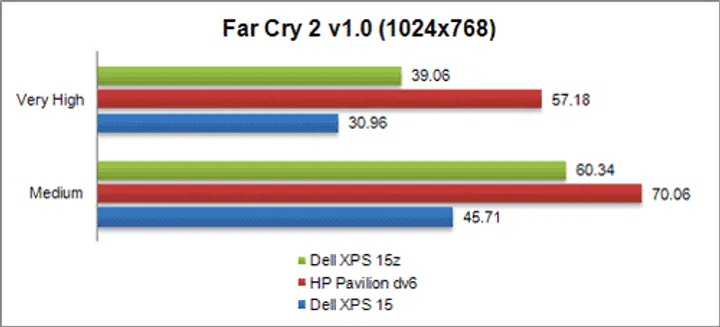
When it comes to actual gaming performance, the XPS 15z didn’t fare too badly. In our Far Cry 2 benchmarking test, the Dell XPS 15z did lag disappointingly behind the HP dv6, but this is to be expected with the difference in specifications. At least you can see that it has progressed over the earlier generation. Take note that at a more tamer "Medium" graphics quality settings, the Dell XPS 15z's higher speed dual-core processor manages to come close in sealing the performance gap with the HP dv6. However, its average frame-rate at “very high” settings was just a modest 39 FPS and was trailing much more behind the HP dv6 machine with its better discrete graphics flexing its muscle. That means if you’d like to engage in more intense games at higher resolutions, we suggest toning the visual effects quality down a couple of notches. This helps to ensure the machine keep its head above water, which is generally agreed upon to be the 30 FPS mark.
Battery Life
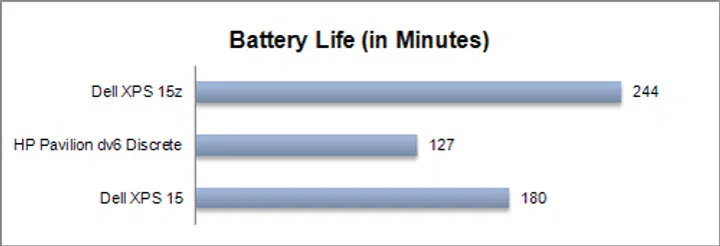
The Dell XPS 15z -- like the MacBook Pro -- has a non-removable battery. This helps with the design of the notebook, keeping it relatively svelte, while packing a good battery capacity (though not quite as much as the Apple MBP). In our DVD loop test, the Dell XPS 15z managed to stay alive for a good 244 minutes, or 4 hours and 4 mins. This is likely thanks to the combination of a slightly less power hungry processing platform as well as its higher capacity integrated battery as opposed to the HP dv6. While it's no Apple MBP killer for battery stamina, it's still pretty good for a "Wintel" machine.
What this translate to for consumers is that you are able to get quite a bit of work done when the XPS 15z is off the wall. If anything, your work attention span would probably run out before the batteries give up, so no worries in bringing the XPS 15z along to your nearest coffee shop to get some work done, or catch a few episodes of your favorite show.
Specifications/Notebook | Dell XPS 15z | HP Pavilion dv6 | Dell XPS 15 |
Processor | Intel Core i5-2410M
(2.30GHz) | Intel Core i7-2630QM
(2.0GHz) | Intel Core i5-460M
(2.33GHz) |
Chipset | Intel HM67 | Intel HM65 | Intel HM57 |
Memory | 4GB DDR3 | 4GB DDR3 | 6GB DDR3 |
HDD | 750GB - 7200RPM | 750 GB - 5400RPM | 640GB - 5400 RPM |
Video | NVIDIA GeForce GT 525M | ATI Radeon HD 6770M | NVIDIA GeForce GT 420M |
Battery | 64WHr | 51.51 WHr | 56 WHr |
Dimensions | 38.5 x 26.04 x 2.5 cm | 37.8 x 24.68 x 3.11 cm | 38.1 x 26.54 x 3.22-3.82 cm |
Weight | 2.51KG | 2.63KG | 2.82KG |
Power Consumption
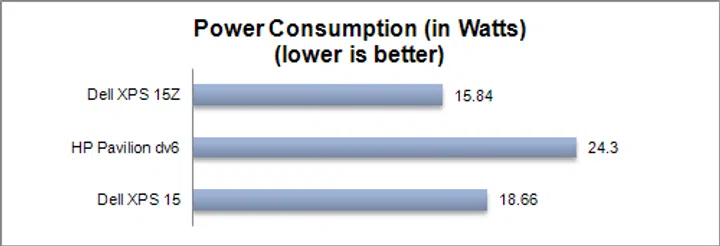
The Dell XPS 15z runs the show with discrete graphics only, so we've compared only discrete graphics equipped results for the other comparisons too. Regardless, the outcome here shows why the Dell XPS 15z shone in terms of battery life. Because it simply uses less energy! Power consumption for the Dell XPS 15z was phenomenally lower than that of the HP dv6, even with its discrete graphics turned on. Given the difference in graphics card grades used as well as dual-core versus a quad-core processor on the dv6, this was to be expected. Users looking for the benefits of a discrete graphics (DX11, best games compatibility and just maybe, CUDA support), but aren't really ardent gamers would benefit from this balance of power, performance and battery-life offered on the XPS 15z. It's rightfully more efficient than its predecessor and doesn't sip as much as a higher-end multimedia notebook of the HP dv6.
Portability Index
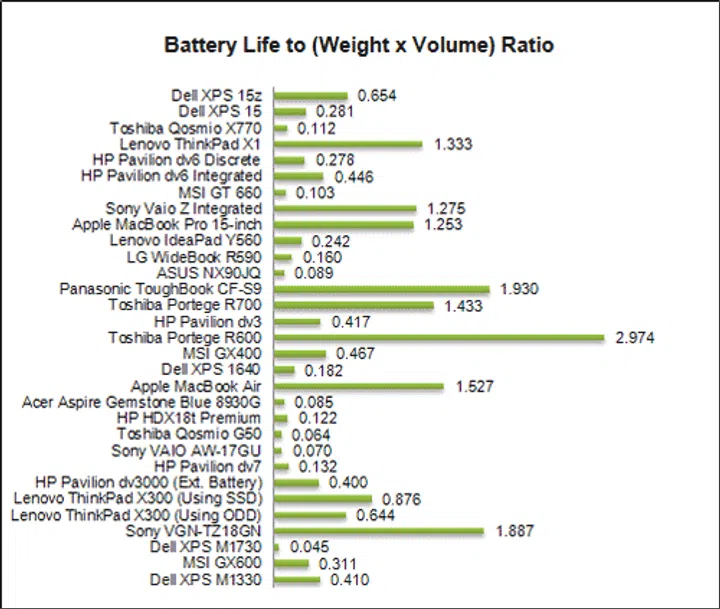
The portability index is a test in which we see if the machine is worth carrying around compared to others in its class. The machine’s battery life, weight and volume are carefully considered and the end result is a number that represents just how portable the machine is. Traditionally, multimedia notebooks like the fairly light Dell XPS 15z (with discrete graphics) have scores just under 0.5, while gaming monsters like the Toshiba Qosmio X770 have scores really close to zero. With that in mind, you can then appreciate just how good the XPS 15z is. Its good battery life is most likely the one factor that allows it to have portability score of 0.654 in its form factor. Still, this is not to say others cannot match it given similar specs, but it would be a tough order.
Close but not close enough
We’ve once come across a saying: “When you shoot for the stars, you might just end on the moon.” That description is just what we think about the Dell XPS 15z. When we say stars, we were hinting at the Apple MacBook Pro (yes we try not to mince our words). The XPS 15z very obviously draws inspiration from that direction and while there are quite a few things it gets right, there are also a few things it doesn’t.
The overall appearances that the XPS 15z is endowed with is something that Dell got right. We find that you really can’t go wrong by introducing a uniform look in your product, and decking the whole machine in brushed metal makes the XPS 15z a head-turner. The heft, feel and balance of the product also makes the machine comfortable to hold and lug around. The integrated battery gives the bottom of the machine a very clean look, with no distracting grooves or lines strewn all over, save the 'alien' looking ventilation grille.
Dell is definitely trying very hard to give consumers a quality product with the introduction of the XPS 15z, and you can tell when you open the lid of the machine. It has got relatively tight hinges holding the lid, which is sturdy as well. It comes with the usual features that a multimedia machine should have, like a webcam and built in speakers, which are loud and clear.
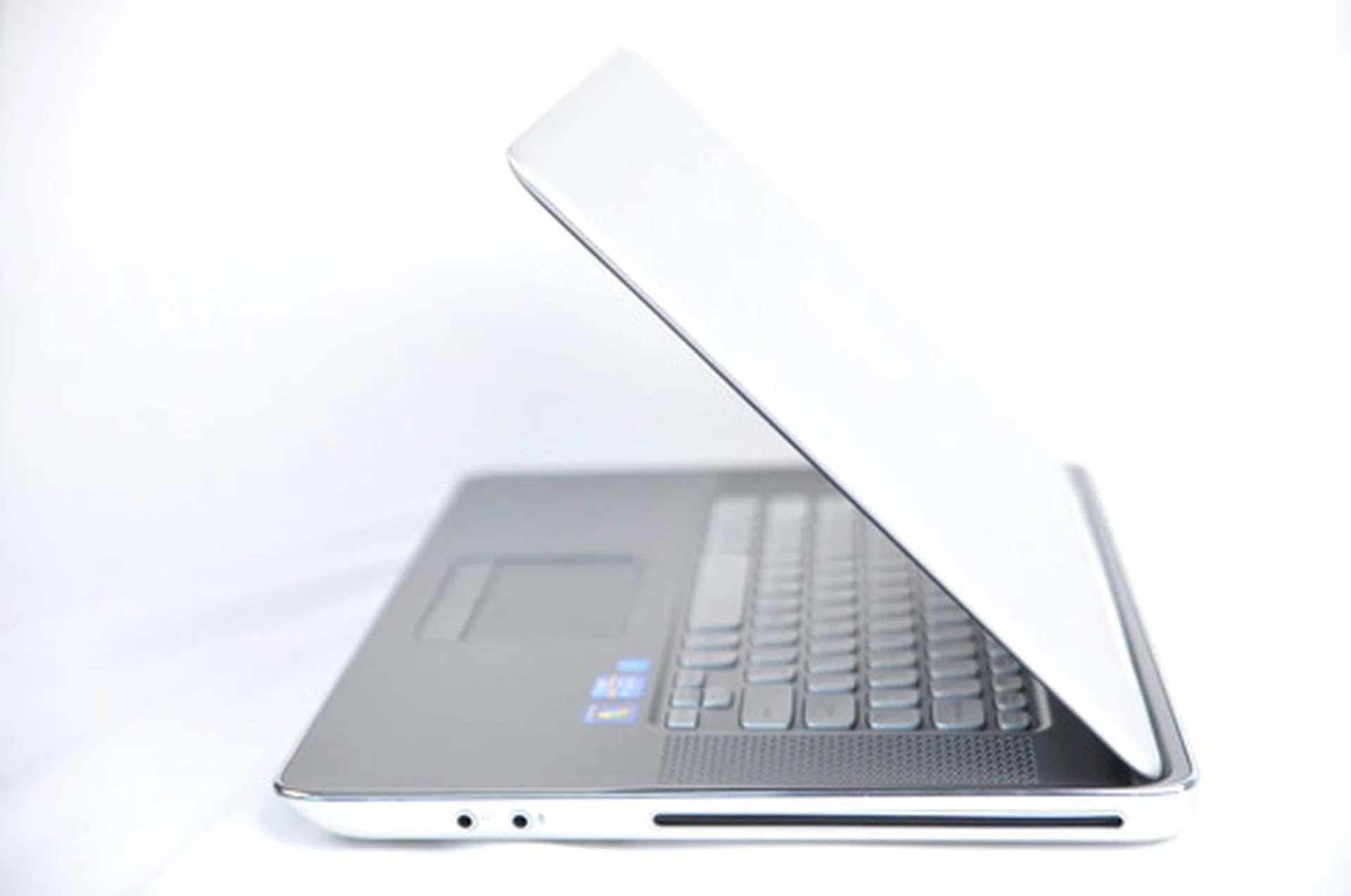
The Dell XPS 15z comes with the standard features we have come to expect from machines of this price, yet it remains quite portable with good battery performance.
But sometimes drawing inspiration from other products means negative traits will be ported over. The recessed keyboard, while comfortable to type on, feels cramped when compared to other Windows notebooks because the keyboard is flanked by the speaker grilles. The backlit chiclet keys (the best part about the keyboard) feel quite shallow at first but all it takes is some time to get used to them, after which they feel perfectly fine.
Also, some might argue that the lack of a number pad is quite alright on the Apple MBP, but we feel that there are other keyboard configurations that work just as well, or even better. Take the HP Pavilion dv6 for example. It is about the same size, but yet it has ample space for speakers (positioned elsewhere), and even a number pad.
The trackpad on the XPS 15z is also disappointingly small. There is obviously enough space on top and below the trackpad so we question the practicality of not using that space to give consumers a larger tracking space.
We’d like to point out however, that for everything the Dell XPS 15z gets wrong, it also gets something just right. We’ve heard users of the Apple MacBook Pro complaining about the razor sharp edges of the notebook that cuts into the wrists during prolonged use of the machine, and this is where the Dell XPS 15z gets its industrial design spot-on.
The machine’s palmrest edge is flanked by a chrome accent that gives it a rounded feel, and also helps prevent the issue faced by its competitor. It also adds to the overall premium look that the Dell XPS 15z is trying to achieve. This chrome accent can also be found on the edges of the trackpad, giving users a clear visual reference of the area defined for the trackpad and palm rest.
So all things considered, we’d say that while the Dell XPS 15z didn’t exactly hit the sweet spot for us, it came pretty close to the mark. The XPS 15z is definitely one of the better looking Windows machines out there and will probably remain so for quite a while to come. In terms of specifications, it leaves a few things to be desired, when you consider the price of the unit, but what you lack in specs, you get in design, build and battery stamina.
At S$1799, we feel that if you aren’t particular about looks, it’ll be better to look elsewhere for a machine that offers more for less. But if a neat package of good industrial design, relatively competent hardware and a nice price is what you are looking for, we are happy to say that the Dell XPS 15z might just be the one for you.
Our articles may contain affiliate links. If you buy through these links, we may earn a small commission.