
Dell Vostro 3300 - Mind This Business
Slim, sexy and yet solemn enough for your corporate needs. The 13.3-inch Vostro 3300 is the latest member to join Dell's family of small-business notebooks, and to top things off, it is also furbished with an drool-worthy price tag. Wait no further, as we investigate if this mobile rig really offers the best bang for your buck.

Power, Productivity and Panache
Business notebooks have come a long way since the stalwart days of the IBM ThinkPad. While manufactures still propose dependable features like a fortified physique, data protection and respectable specs, one thing has changed dramatically - the steep prices associated with the business class. Given the growing demand for affordable packages, laptop makers are now eying the ultraportable and entry-level space, slated right alongside the premium genre which offers more comprehensive features for those with deeper pockets. Most of all, essential hallmarks of a business notebook have been retained against a dieted price plan.
Aside from their exorbitant Adamo series, Dell's namesake has been associated with dependable yet affordable mobile platforms for years. Have they outdone themselves this time with the new Vostro 3300? Let's find out.
Speaking of which, that's exactly where Dell is headed with the slim Vostro 3300 series after the considerable success of their V13 offering. However, make no mistake into thinking the two suites are alike. Unlike the V13, the 13.3-inch Vostro 3300 makes a departure from low-voltage CPUs, which translates into more processing muscle for your daily tasks. Yes, Dell has harnessed the power of standard-voltage mobile Core i3 and i5 workhorses based on the Calpella platform for their latest Vostro candidate. Typical of the new Arrandale CPU family (Core i3/Core i5) based products, Dell is also offering a choice of integrated or discrete graphics, depending on which configuration suits you best. More on its performance levels when we place it through our series of benchmarks later.
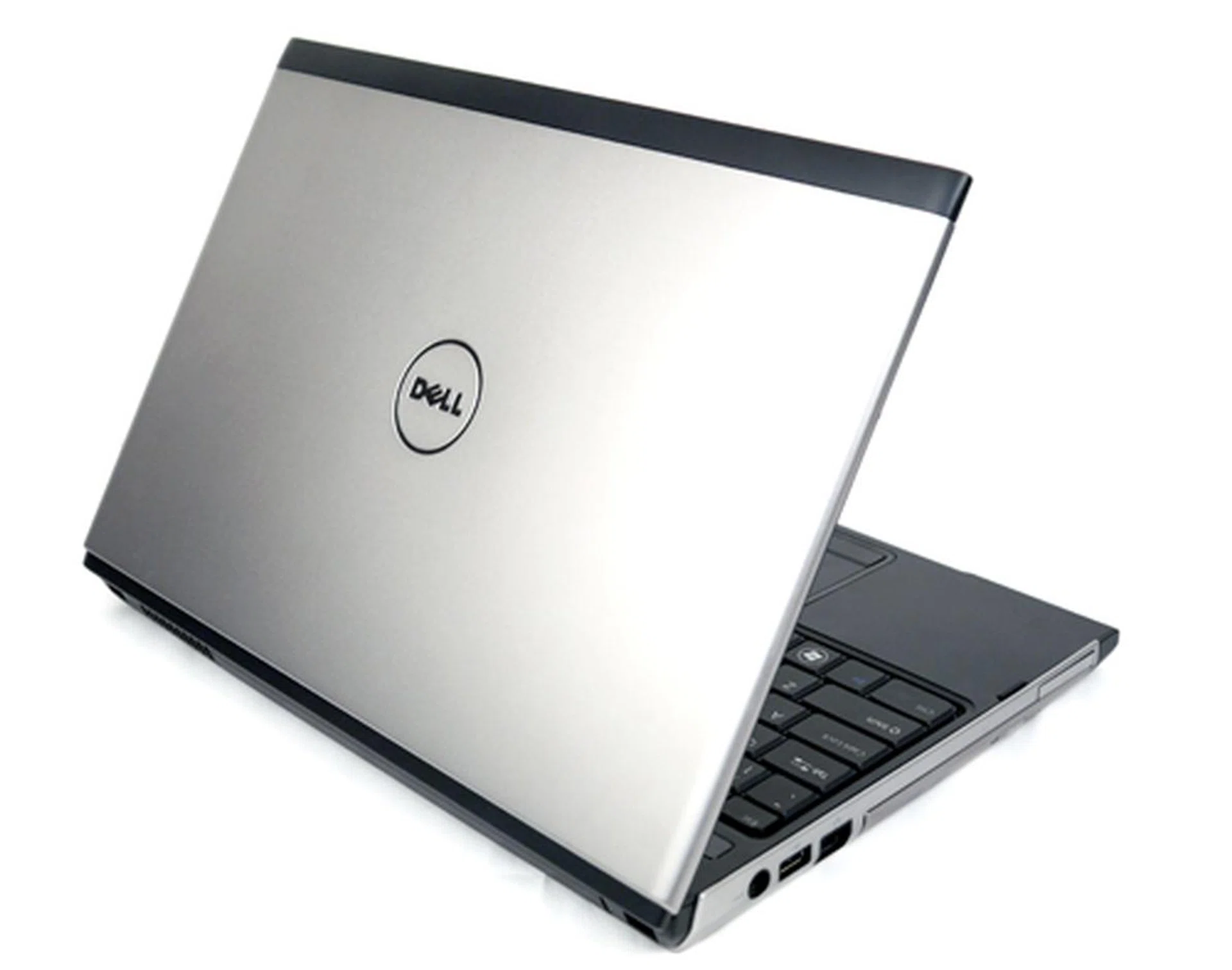
For now, let's assess the Vostro's cosmetics first. Our review unit is suited up in a silver coat, one of the three colors Dell is dishing out aside from red or brown alternatives. Judging from it exterior, we'd have to say its aluminum shell is nondescript, compared to a brushed-metal finish as worn on HP's EliteBook. On the bright side, the Vostro 3300 is fashioned with a matt texture instead of a tacky glossy coat. The materials used are mostly fingerprint-free and yet somber enough to mean business to your associates. On top of that, there are plenty of ports and slots to keep you happy, including a 5-in-1 card reader conveniently mounted in front. An LED battery indicator sits on its front lip, so there's no need to flip open its screen just to check out its charging status. This Vostro isn't wimp, thankfully, for build quality is robust with nice and firm hinges as part of its durable package. Compared to the V13, the Vostro 3300 has gained a DVD drive but lost a HDMI port in the process unfortunately. For now, do enjoy these photos of its bodily functions before we take a peek at what's underneath.
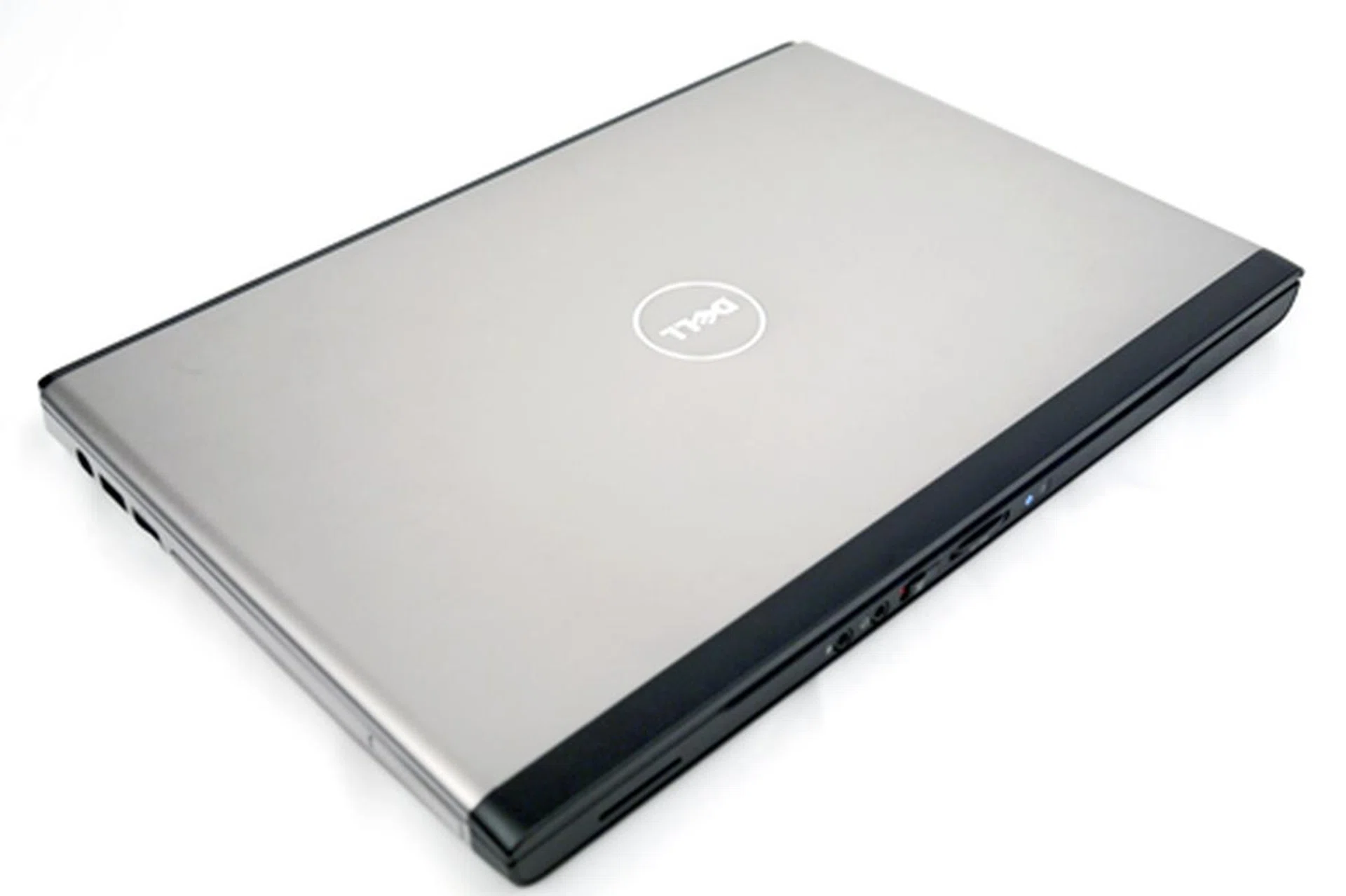
Don't let the Vostro 3300's unassuming looks throw you off. For what it's worth, this baby comes with a sweet and matt aluminum coat that's not afraid of your grimy fingers. Best of all, it also packs the new Core i5 processor within its durable shell.
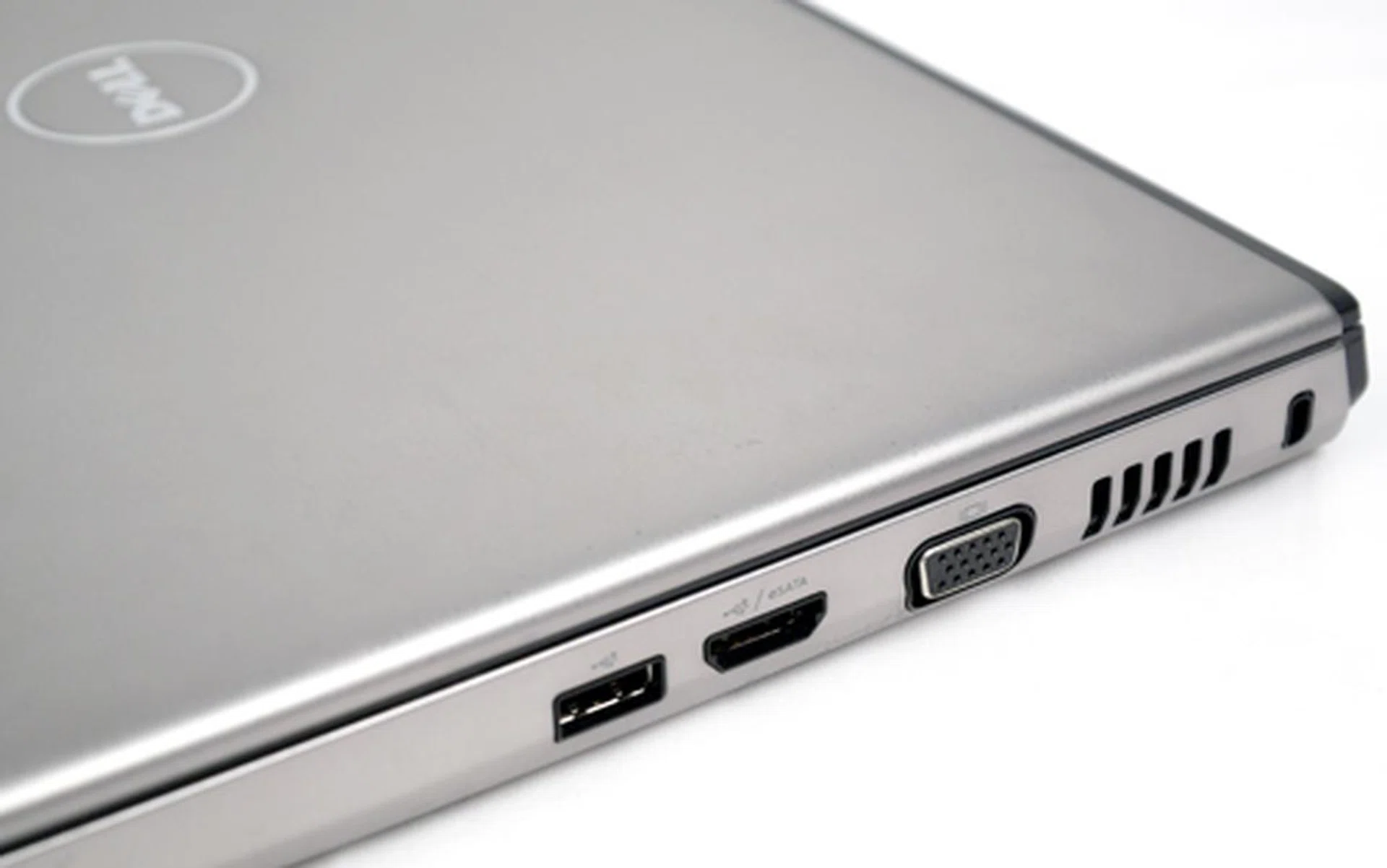
Keeping it simple and uncluttered, a VGA and two USB connectors can be found on its right flank, of which one is a combination of an eSATA and USB port.
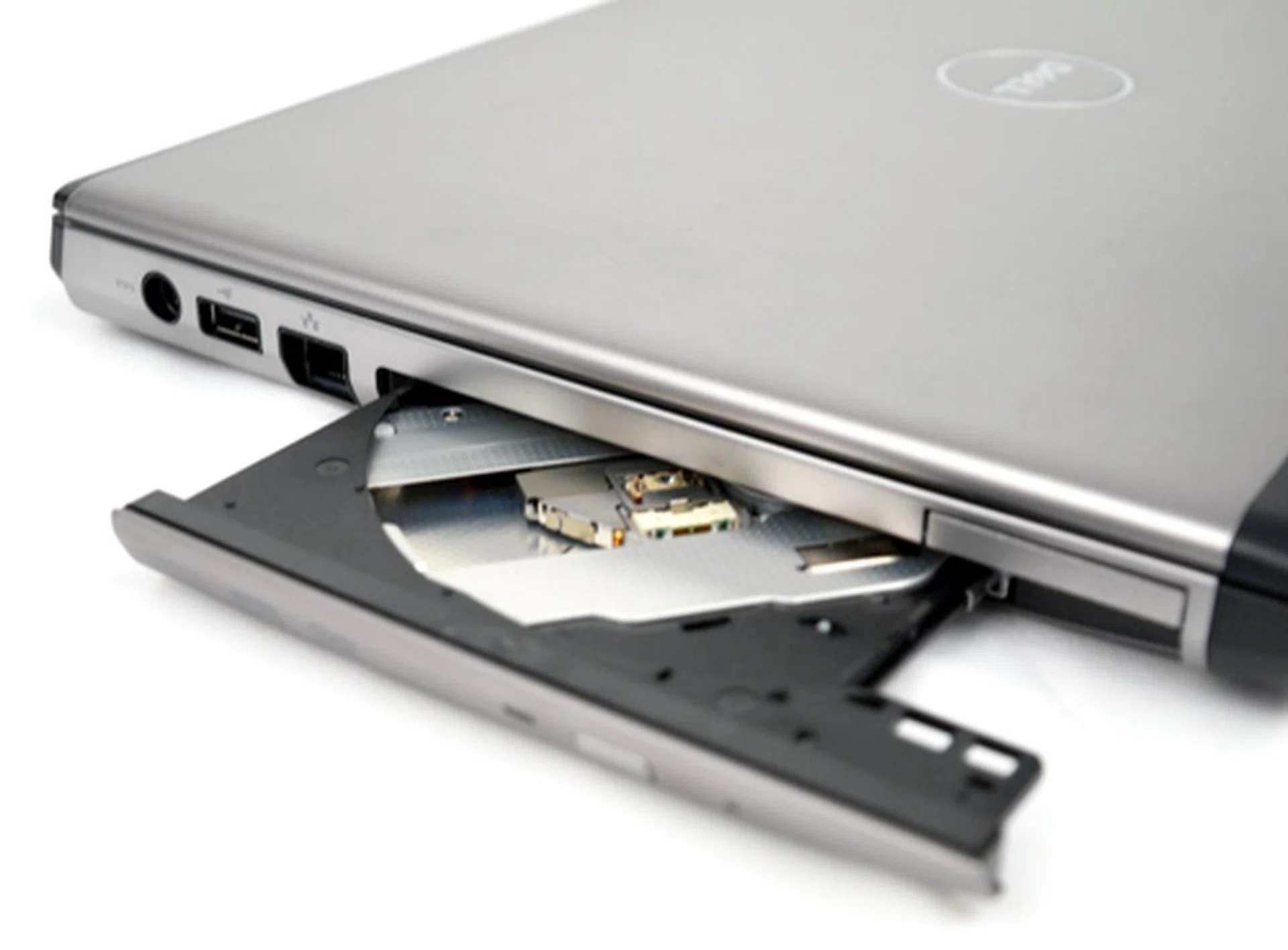
There's slightly more action on the left panel of the Vostro. A power jack, USB port and LAN connector can be seen next to its DVD writer. It's a pity the Americans have dropped the HDMI port though.
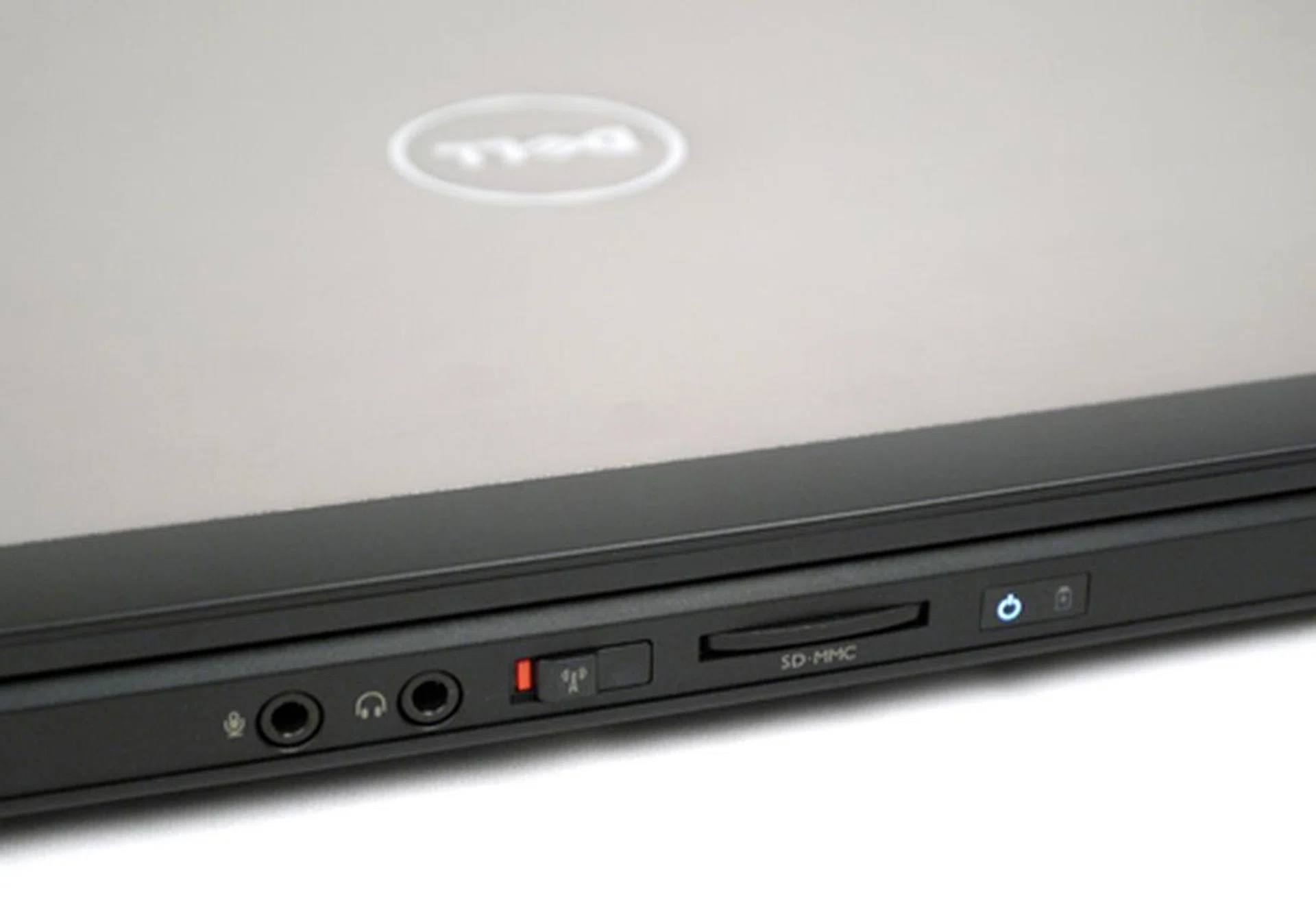
Some manufacturers don't have the habit of placing switches or ports on the front lip. Dell, on the other hand, has placed a WiFi slider along with a multi-format card reader for easy access. As a nice afterthought, the battery's charging status can be easily read as well without having to open the notebook's lid.
Inside The Vostro Vanguard
As far as the Vostro series go, its interior design does vary among models ranging from the 1014 to the 3700 suite, but one constant aspect remains; an all-black interior. The 3300 is no different, with a bezel and a generous palm-rest similarly clad in black. In fact, the anti-glare screen feels larger than its 13.3-inch sizing, which holds an LED-backlit display and native screen real estate of 1366 by 768 pixels. It's a comfortable resolution to work on when trawling the web or mugging over spreadsheets. As a side note, the slim lid does not open up 180 degrees like the HP premium EliteBook does. Horizontal viewing angle was satisfactory, and brightness levels were definitely more than sufficient under our office lights.
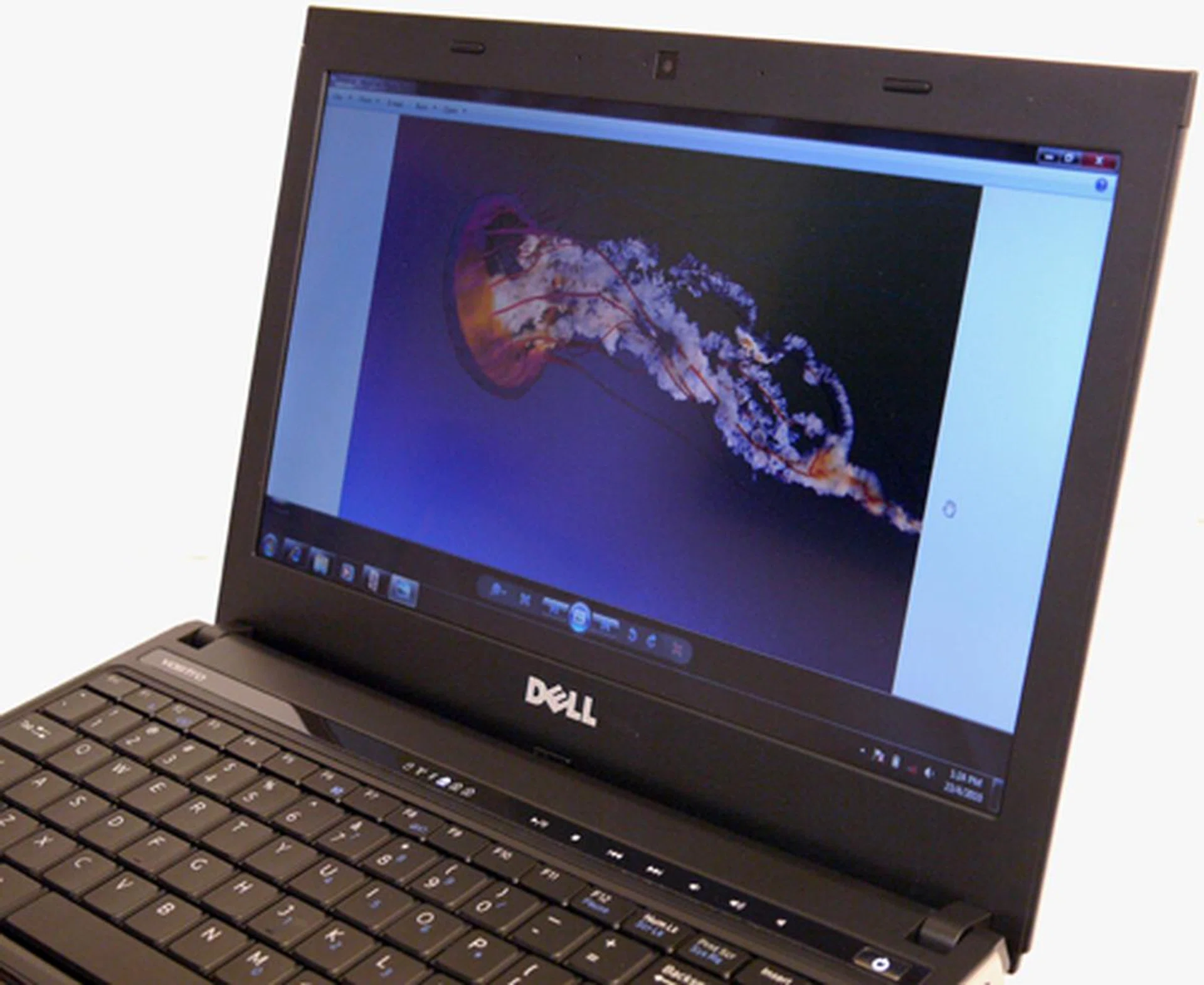
A non-reflective screen, LED backlights and generous viewing angle. There's really not much more you can ask for in a notebook's display. To add, this Vostro does feel larger than its 13.3-inch diagonal screen size.
The keyboard and touchpad are another work of art altogether. Dell did not implement an island design like Sony or Apple, but the spill-resistant keys are liberally pitched and exhibited little flex. Oh, and they come with backlights too if you prefer to type in the dark. We love the Synaptics touchpad for a few reasons. It is huge, compared to most 13-inch laptops, and it's also responsive with a few gesture options like "pinch zoom" or "two-finger scrolling" available. Touch-sensitive multimedia controls are lined above the keyboard, with soft white LEDs to help them glow. Audio quality was clean and loud, which is rather uncommon for a business notebook. By the way, don't worry if you can't seem to find the 4-ohm speaker, for it is nicely tucked away with just a tiny 'slot vent' to show on the front lip. Like most standard business notebooks, the Vostro also comes with a free-fall sensor and Dell's "Strike Zone" shock absorbers to protect your most precious hard disk. Operationally, this laptop is almost as quiet as a mouse. Here are more 'undercover' photos for your perusal.
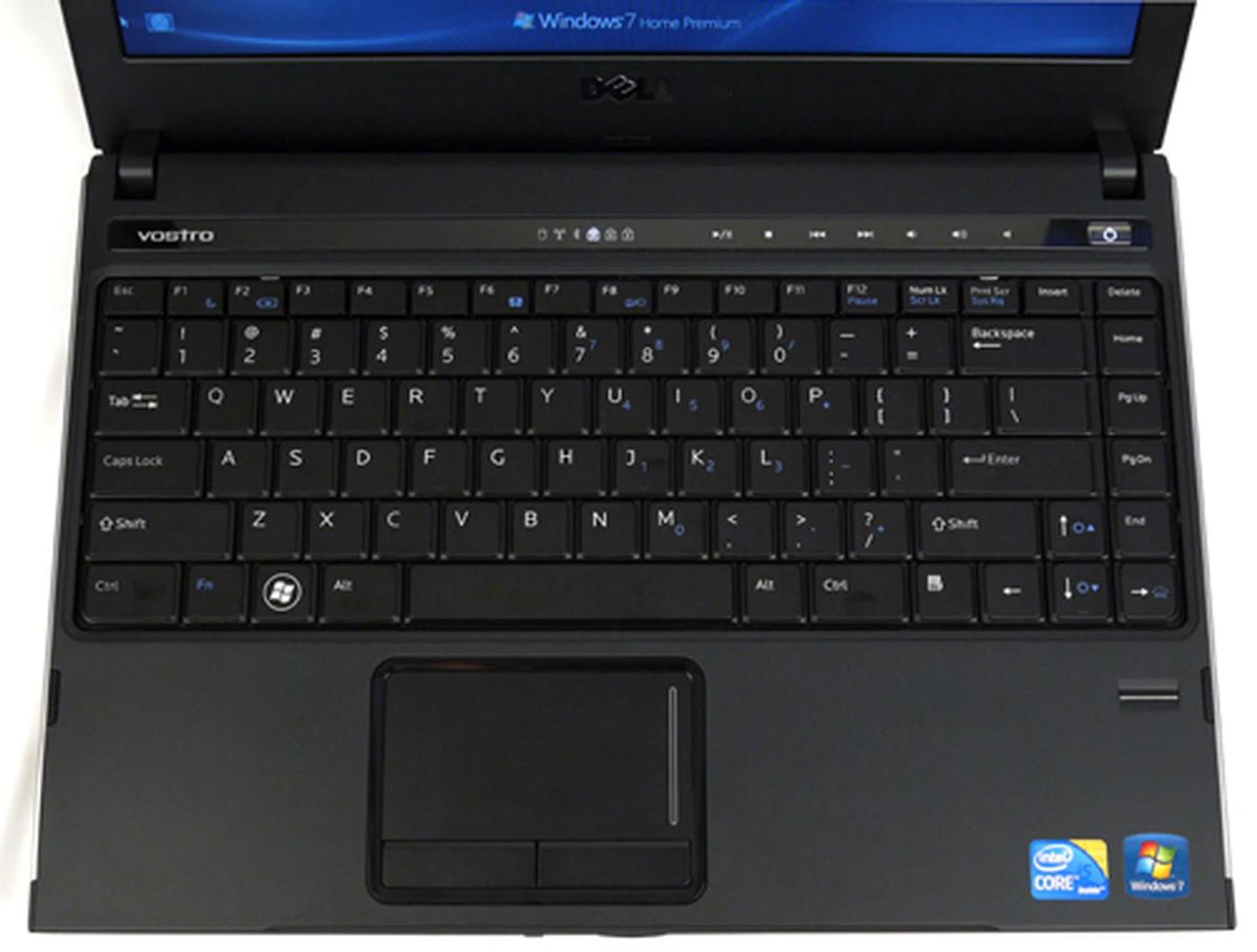
Okay, you already know there's little flex on its keyboard and wrist-rest. Allow us to add that the Vostro 3300 also has a fully-pitched 19mm keys for executives who'd love to go on a typing spree.
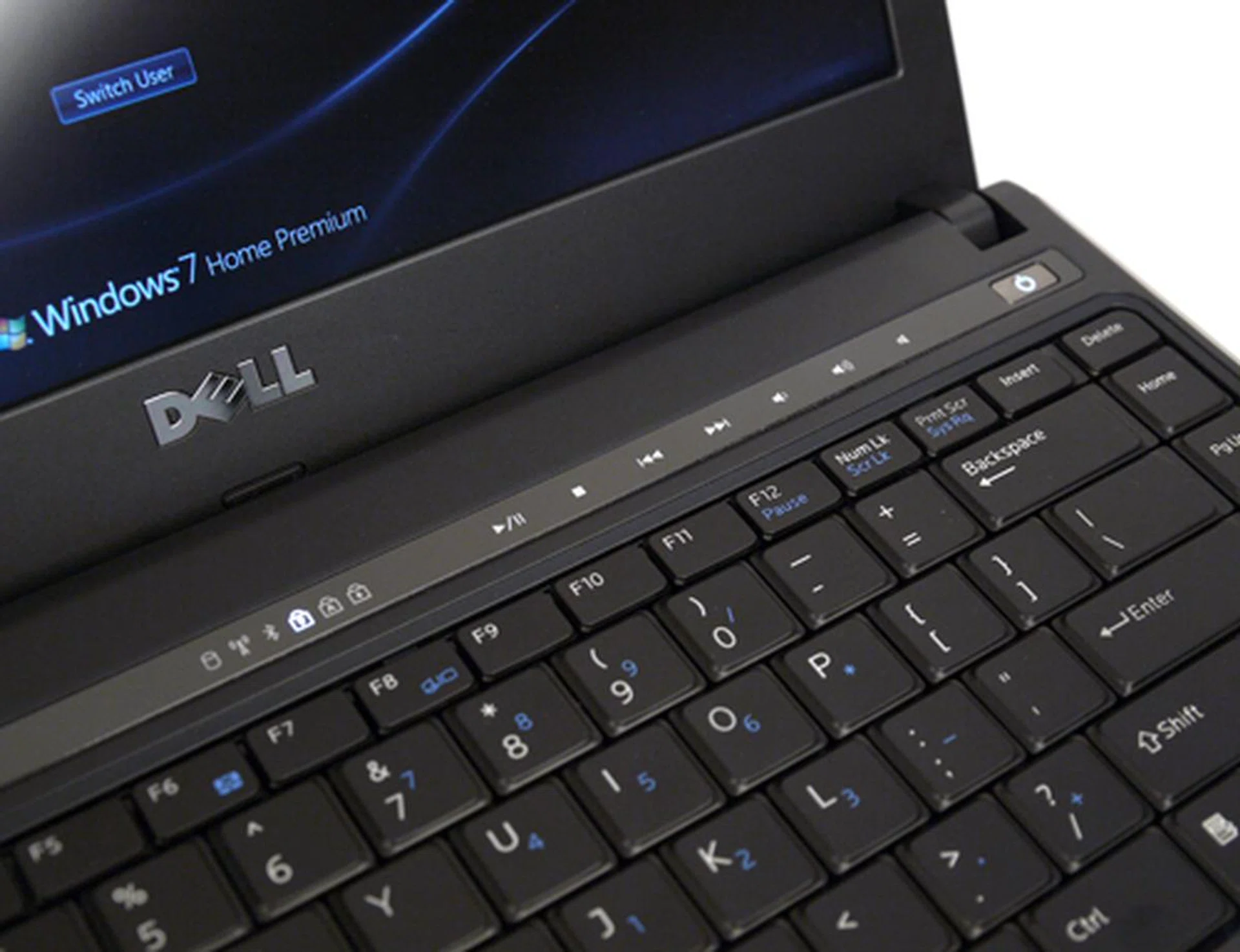
A string of touch-sensitive multimedia buttons are seated above the keyboard. We don't know about you, but we are kind of impartial towards simple yet stylish white LEDs. All in all, Dell has constructed an uncluttered and business-like design. Thumbs up.
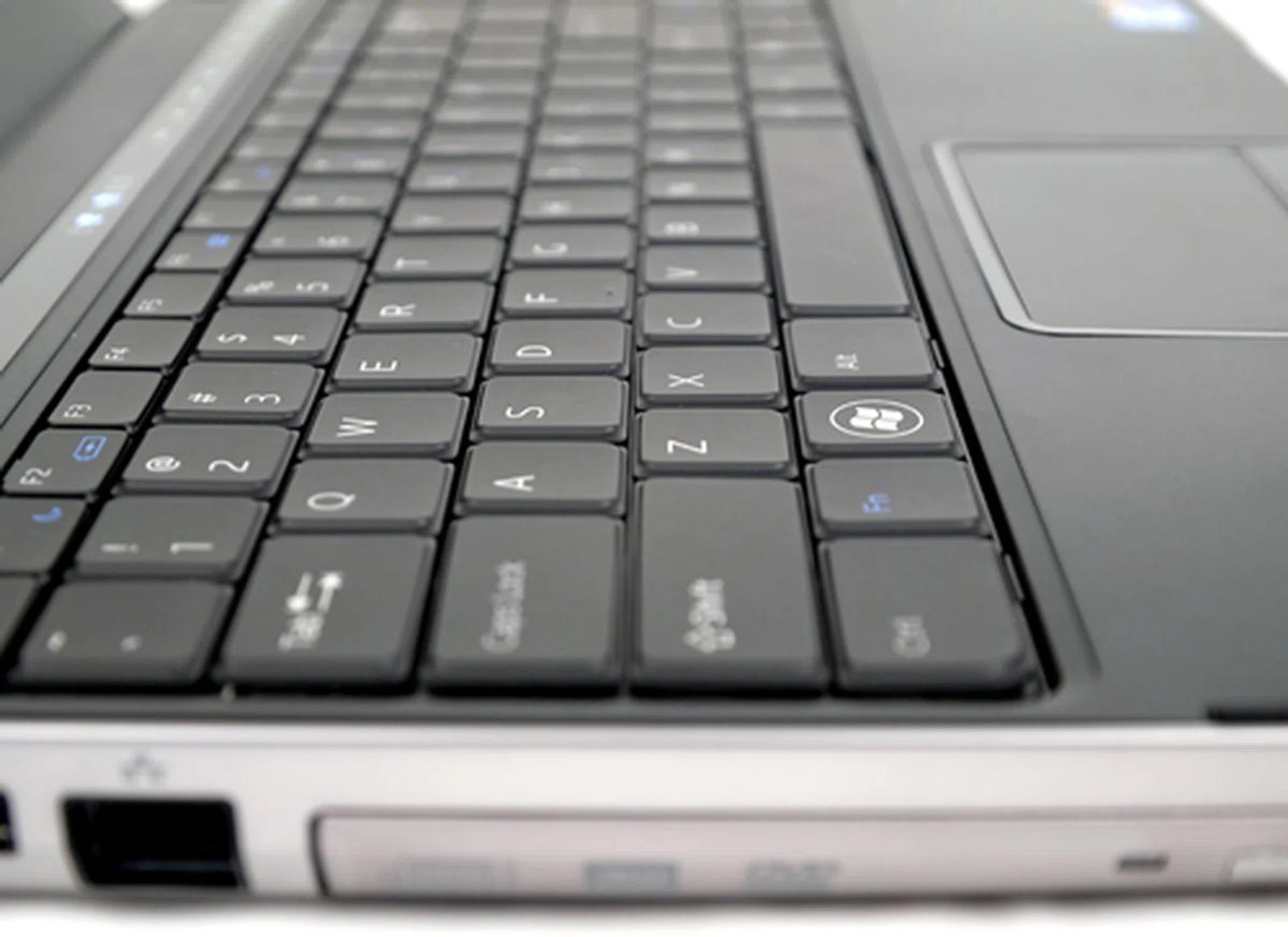
You won't find any island keys on the Vostro, but its slightly beveled keys have just enough gap-space for the touch typist to score a home run. You can disable its touchpad by hitting on its F6 function key.
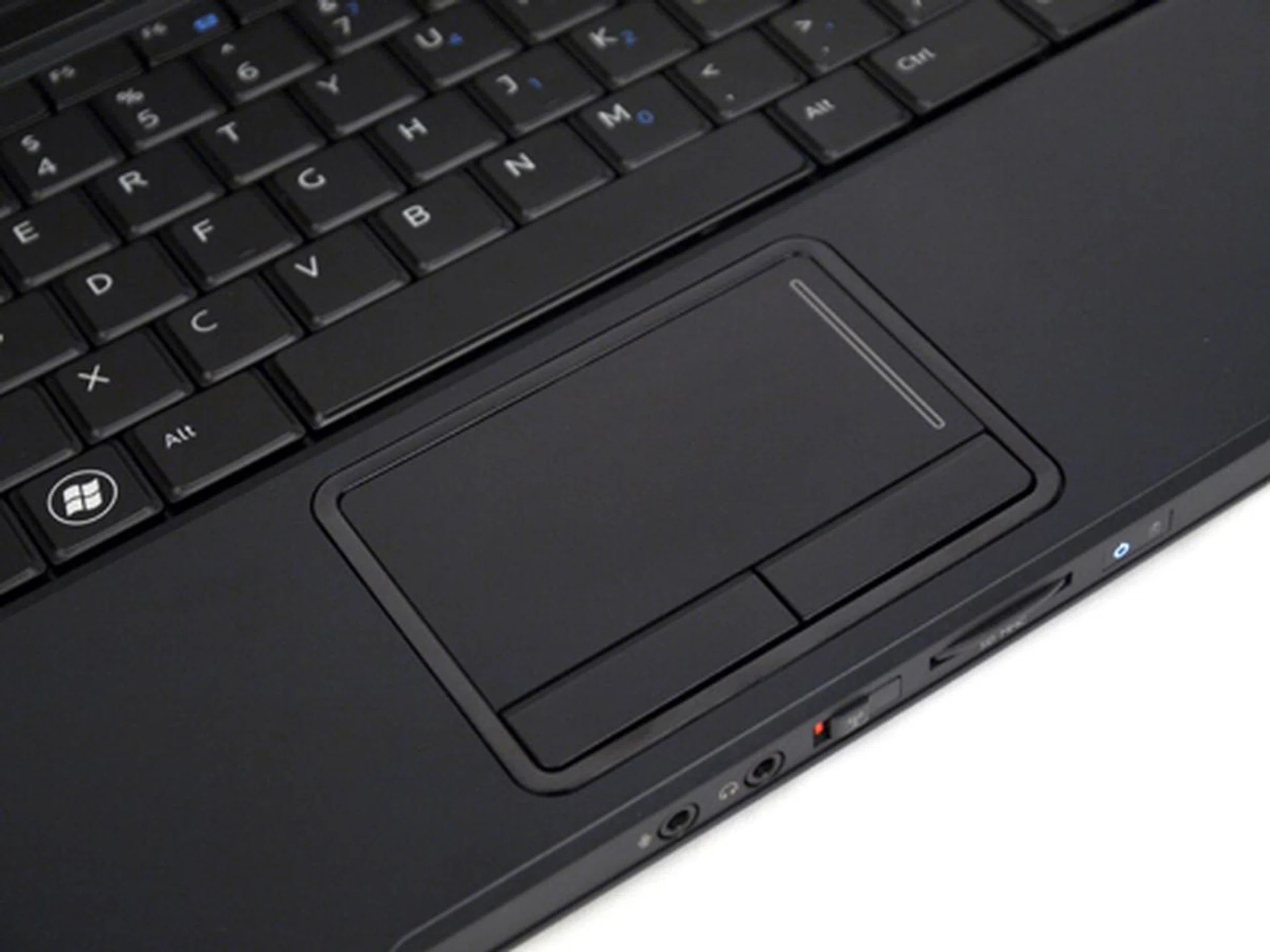
Here's the star of the show - a mega sized touchpad. Gestures? Check. Responsive? Check. Soft keys? Check. Need we say more?
Performance Results
From here on, we'll draw a direct comparison between the Dell Vostro 3300 and HP's ProBook 8440b. Both of these business machines fall under the ultraportable category, and best of all, they are also powered by the new fangled Core i5 processor. However, keep in mind the ProBook has a marginally larger screen (14-inch), and is running off an integrated GPU. Still, it's a decent comparison point and we'll detail a few more finer points of the hardware we're comparing before we present the test results.
As mentioned, both Dell and HP notebooks use the same Core i5 520M (Arrandale) processors with a beefy clock speed of 2.4GHz, partnered by the HM57 Express chipset. The new Arrandale CPU consists of two dies mainly, a smaller 32nm core for the processor, and an additional 45nm die where the graphics and memory controllers reside. Both dies reside on the same CPU package as they are designed to boost a mobile system's performance. Let's go back to the notebooks. In the memory department, the Vostro is primed to maximize the 32-bit platform (Windows 7) with an unabashed 4GB worth of DDR3 RAM, while the ProBook configuration we got only has 2GB to offer. Based on their specs, Dell's offering might stand in a better stead given its inclusion of a discrete GeForce 310M GPU. As a reference to see how far we've progressed, we'll also be throwing in the older HP ProBook 4411s business notebook which carts the previous generation platform Core 2 Duo P6570 processor.
Specifications / Notebook | Dell Vostro 3300 | HP ProBook 6440b | HP ProBook 4411s |
Processor | Intel Corei5-520M (2.4GHz dual-core) | Intel Corei5-520M (2.4GHz dual-core) | Intel Core 2 Duo P6570 (2.10GHz dual-core) |
Chipset | Intel HM57 Express | Intel HM57 Express | Intel PM45 |
Memory | 4GB DDR3 | 2GB DDR3 | 3GB DDR3 |
HDD | 500GB SATA 7200RPM | 320GB SATA 7200RPM | 500GB SATA 7200RPM |
Video | NVIDIA GeForce 310M | Intel GMA HD | ATI Mobility Radeon HD 4330 |
FutureMark PCMark05 and PCMark Vantage
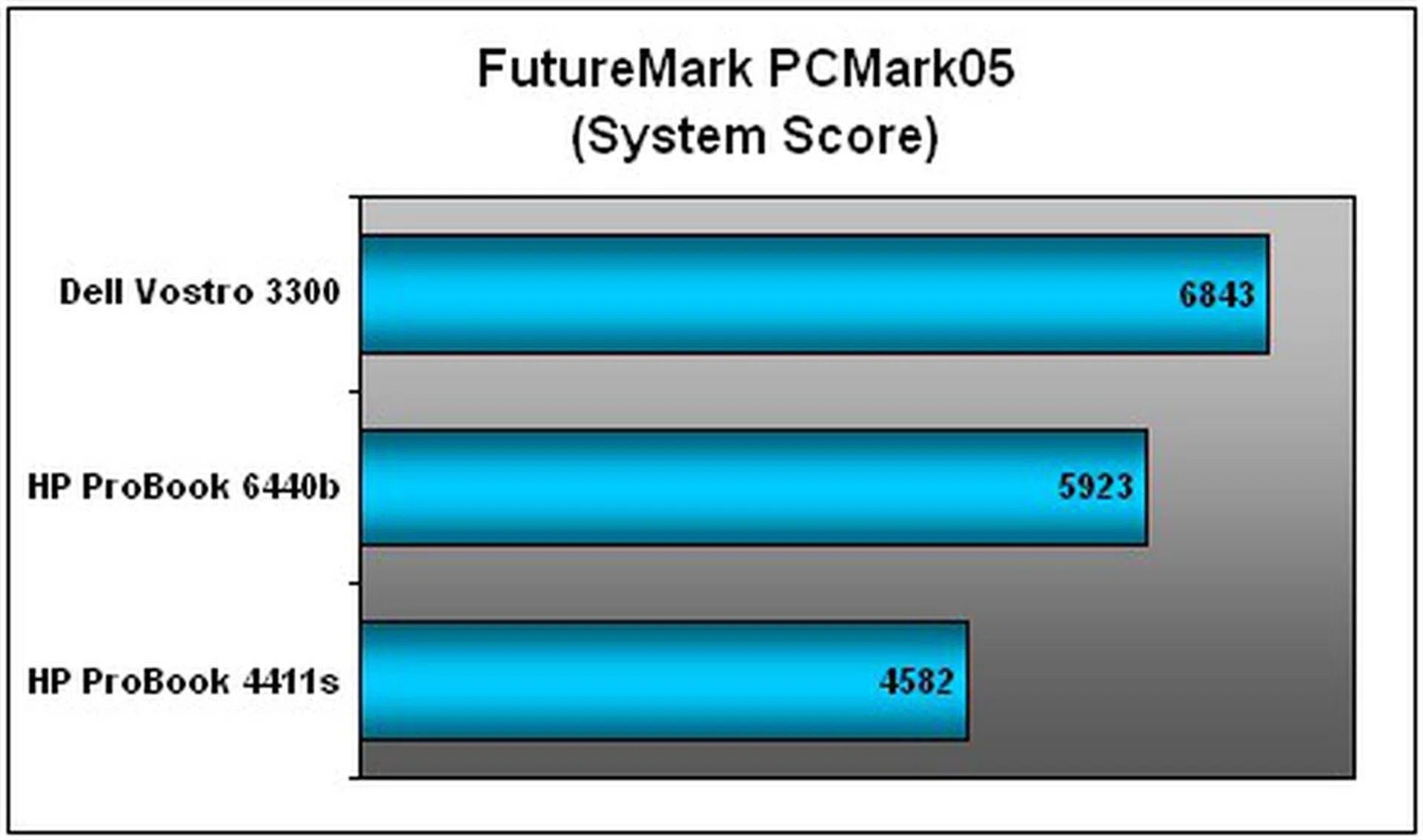
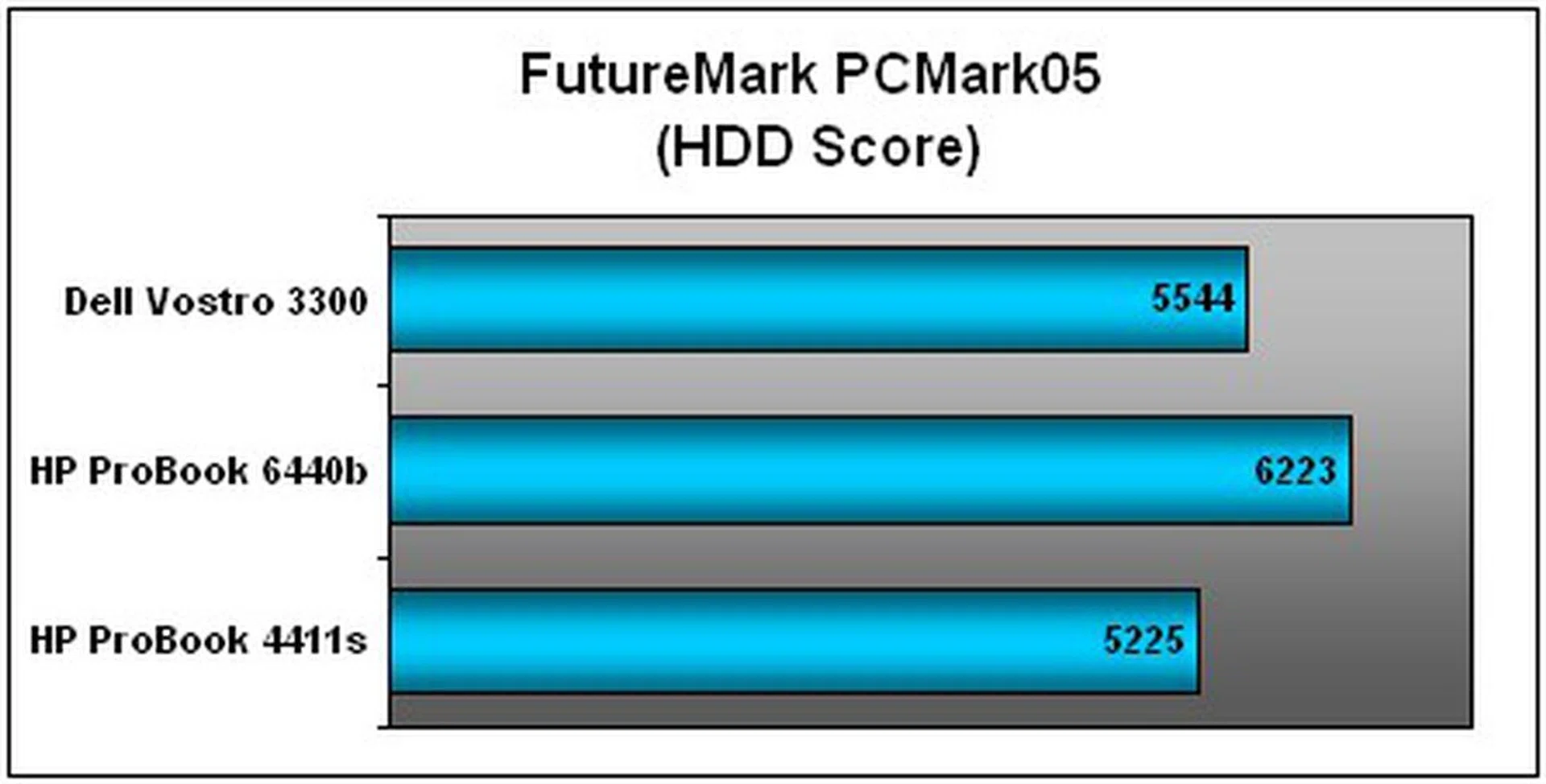
As you can tell from PCMark05's CPU scores below, there was little to tell the two executive notebooks apart given their use of similar processors. Both results hovered in the 7,500 PCMarks range. However, Dell's business offering is arguably the superior candidate given its overall systems score on both benchmarks, thanks to a perkier GPU and greater RAM capacity. The older ProBook 4411s, of course, was almost irrelevant with its slower clock speed.
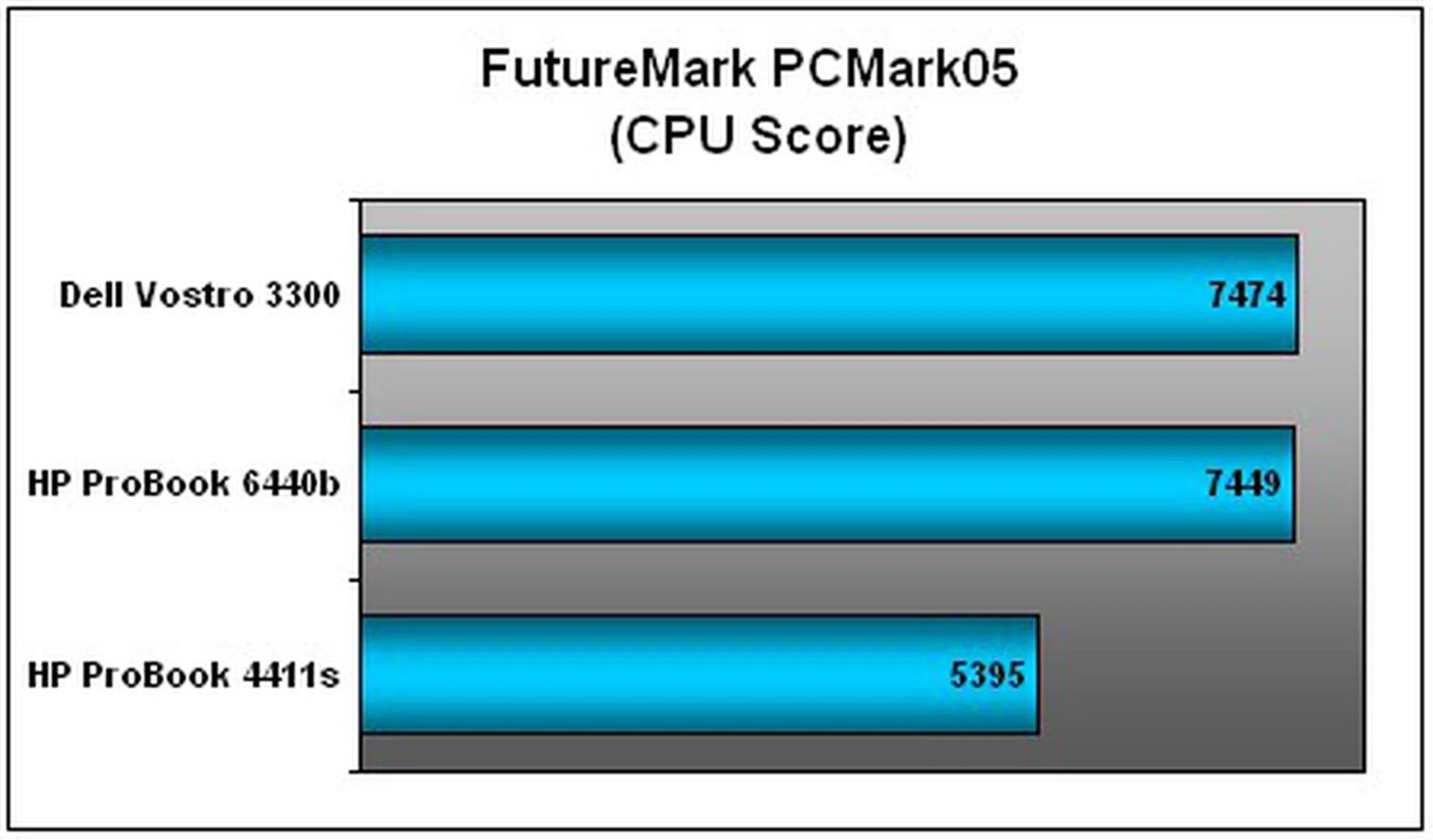
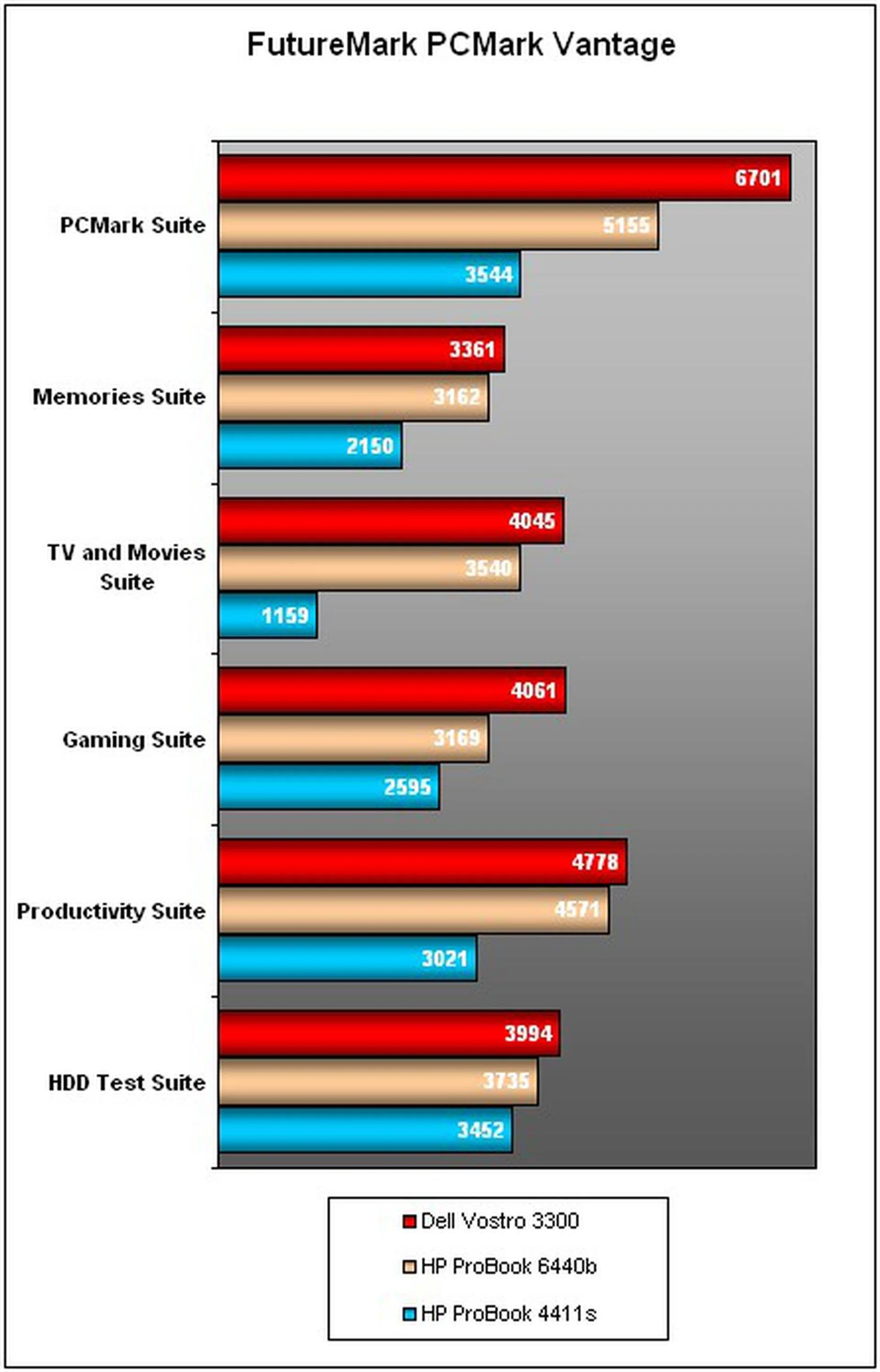
The results are even more telling with Vantage, where the Vostro had a clear lead with a commendable final tally of 6,701 PCMarks compared to the ProBook's 5,155 score. Dell's product was also ahead in the Gaming and TV suites. It was an expected outcome since applications used for both suites were designed to be graphically intensive, and Dell's choice of a discrete new GeForce 310M GPU has understandably swung things in its favor. More importantly, we tried firing up a few applications on the Vostro (with WiFi on) to see how it would fare in real-world conditions. There's Internet Explorer 8 with a number of tabs open, Windows Media Player with an audio file running, Live Messenger was hovering in the background, and we even threw in Windows 7's default "Mahjong Titans" just to zap the notebook's resources a little more. Our verdict? CPU usage hardly went past 30%, and operations were smooth sailing all around with hardly a lag or stutter.
FutureMark 3DMark06
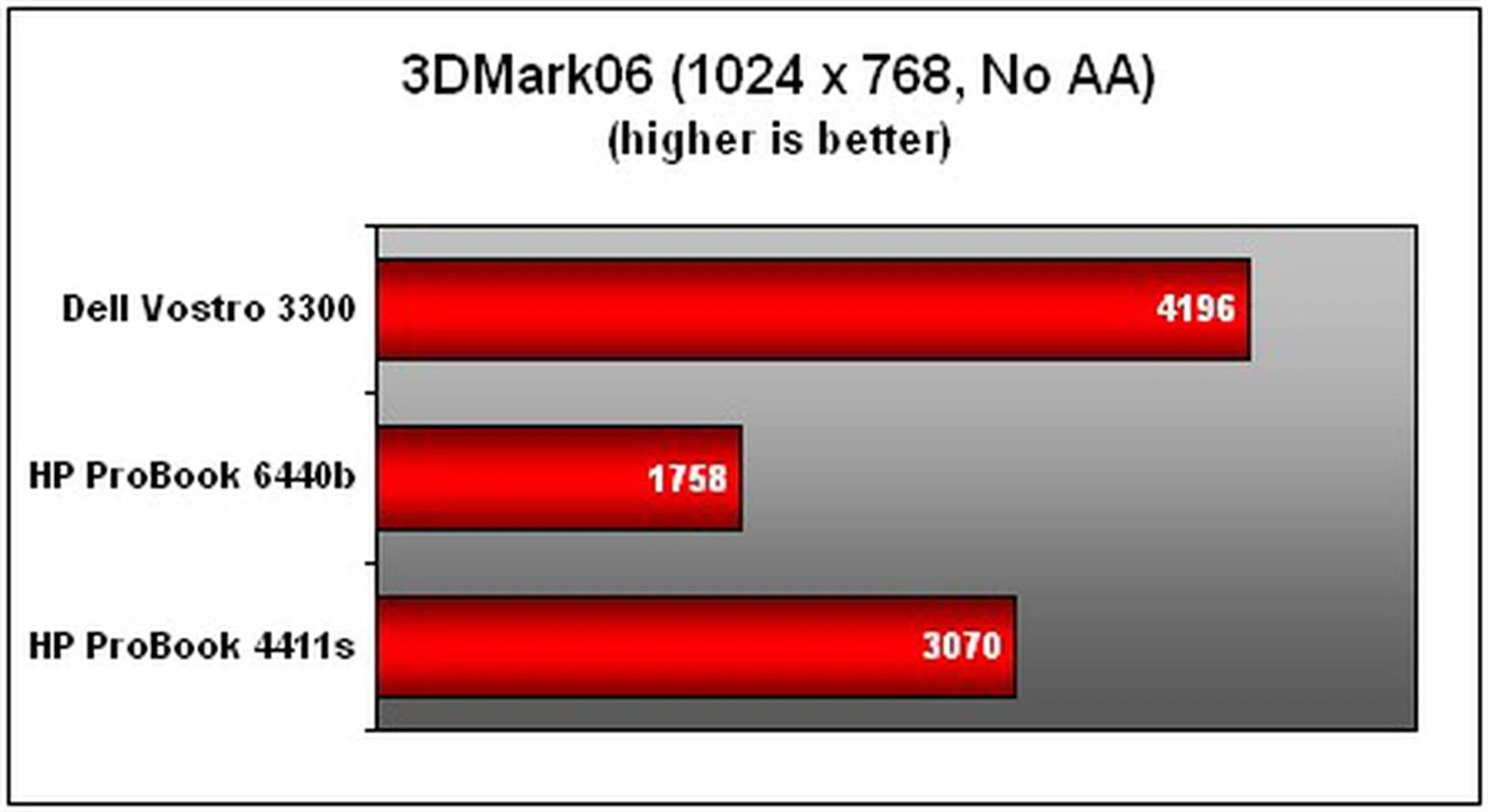
As part of our testing regime, we ran 3DMark06 as well to obtain a whiff on how the notebooks will fare with intensive grapics renders. Yet again, the Vostro has the advantage in the graphics prospect with its use of a discrete GPU. With a built-in memory of 512MB, It's more than capable of undertaking less exhaustive applications such as Flash videos or popular Flash-based games on Facebook, to name a few examples. The ProBook, on the other hand, is dependent on an integrated GMA HD solution and that's on top of a lesser system handicapped by RAM. Being so, it's hardly a surprise that the Vostro managed to trounce its rival with a final 3DMark figure of 4,196, compared to the ProBook's humble result of 1,758 3DMarks. By comparison, and most naturally, the ProBook 4411s' discrete Radeon GPU still fared a whole lot better than Intel's integrated HD package.
"Volting" The Vostro
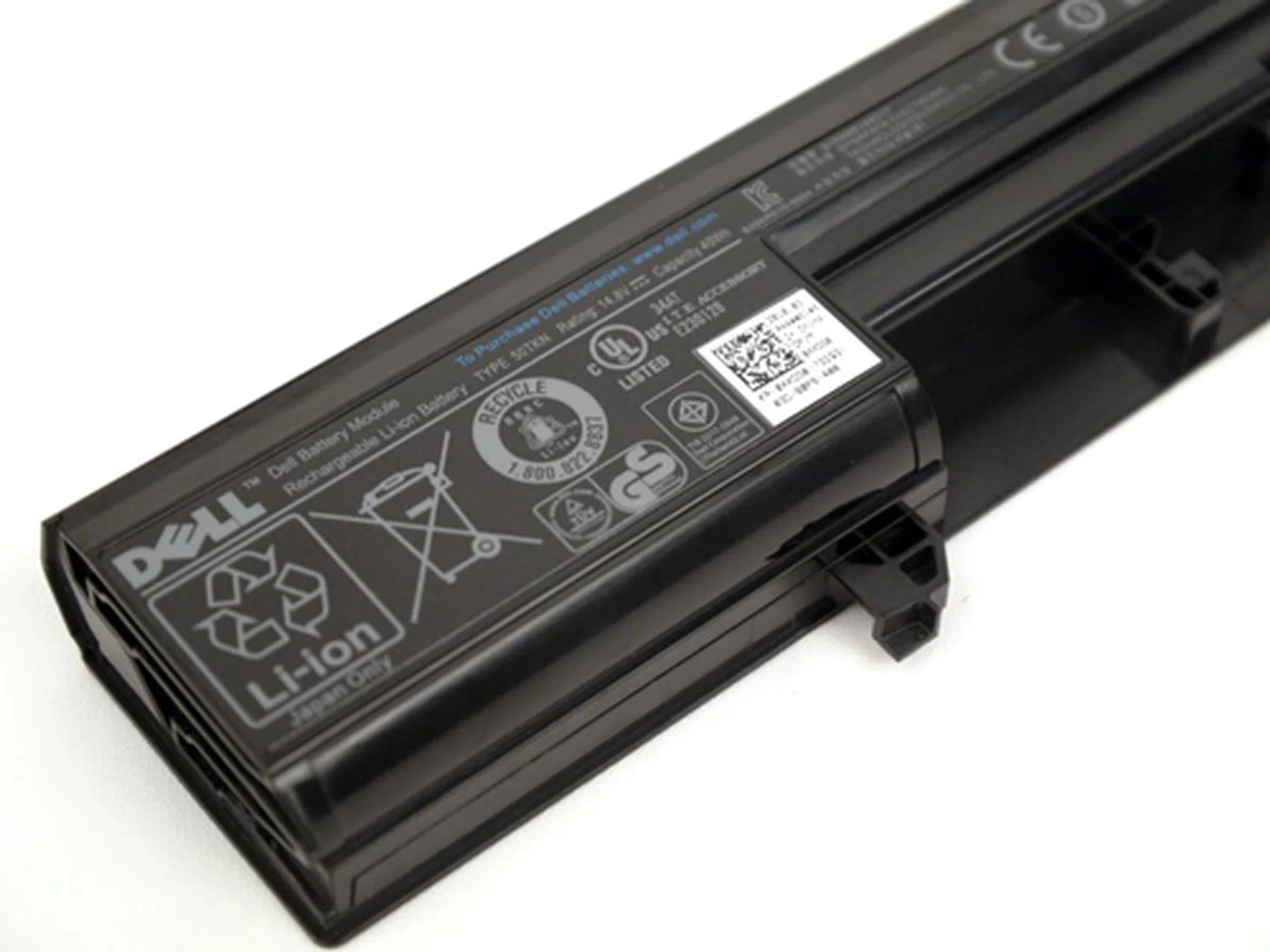
For all its brilliant engineering, it is a pity the Vostro 3300 only comes bundled with a middling 4-cell cell rated at 40Wh and 2702mAH.
As establsihed earlier, we'll draw a direct comparison between the Dell Vostro 3300 and HP's ProBook 8440b. Both machines fall under the ultraportable category, and best of all, they are also powered by the new fangled Core i5 processor. However, keep in mind the ProBook has a marginally larger screen (14-inch), and is running off an integrated GPU. Let's look at their power specifications. Dell is relying on a 2702mAH 4-cell battery with a rating of 40Wh. On the flip side, it only has a 13.3-inch to drive. However, it would appear the ProBook still has the advantage with a higher battery rating of 55Wh. To gauge its endurance, battery mileage is determined by looping a DVD video with brightness and volume fixed at 50% with WiFi disabled. This should give us an indication on the notebook's portability for mainstream handling.
Battery Life and Power Consumption
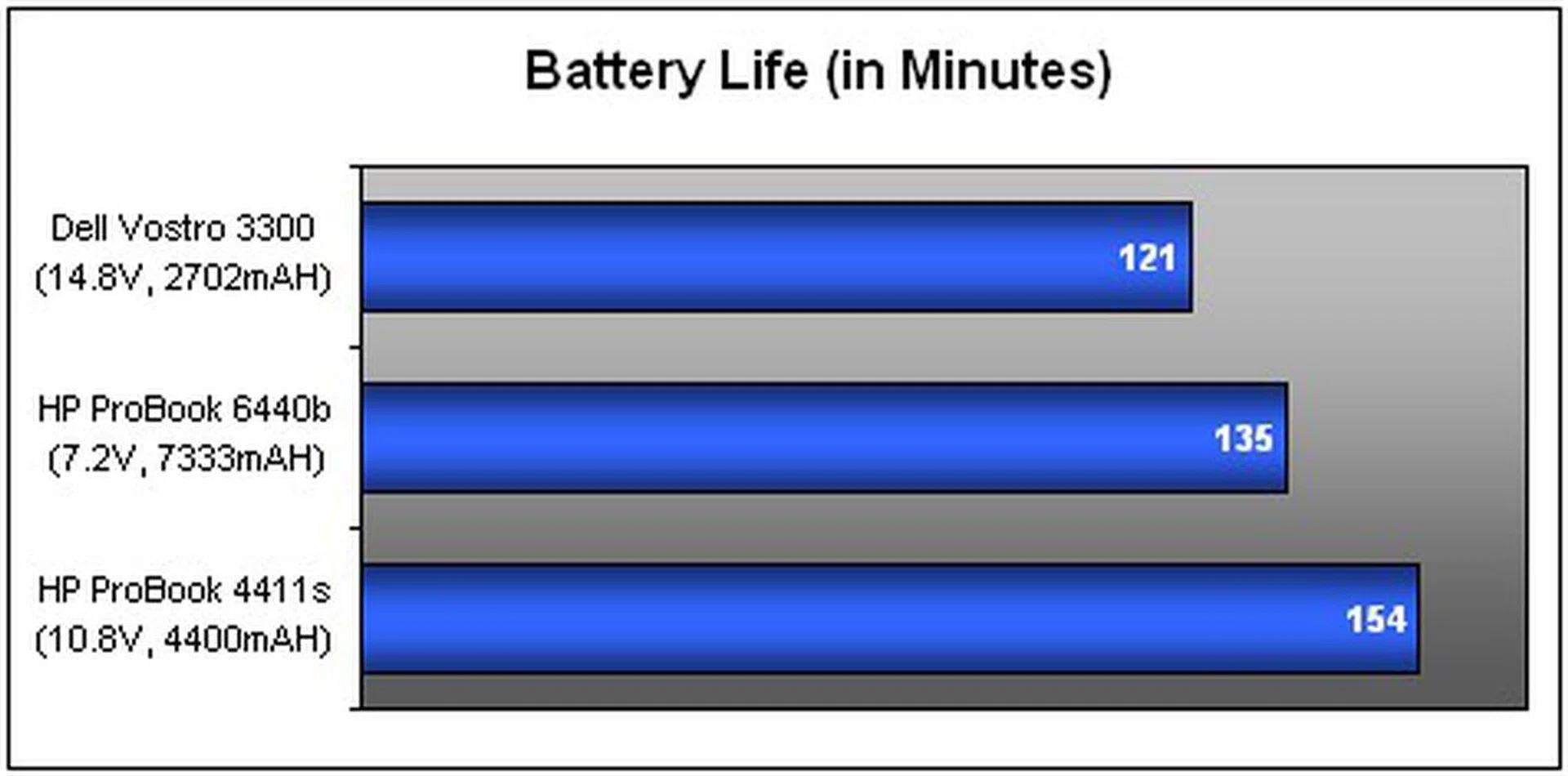
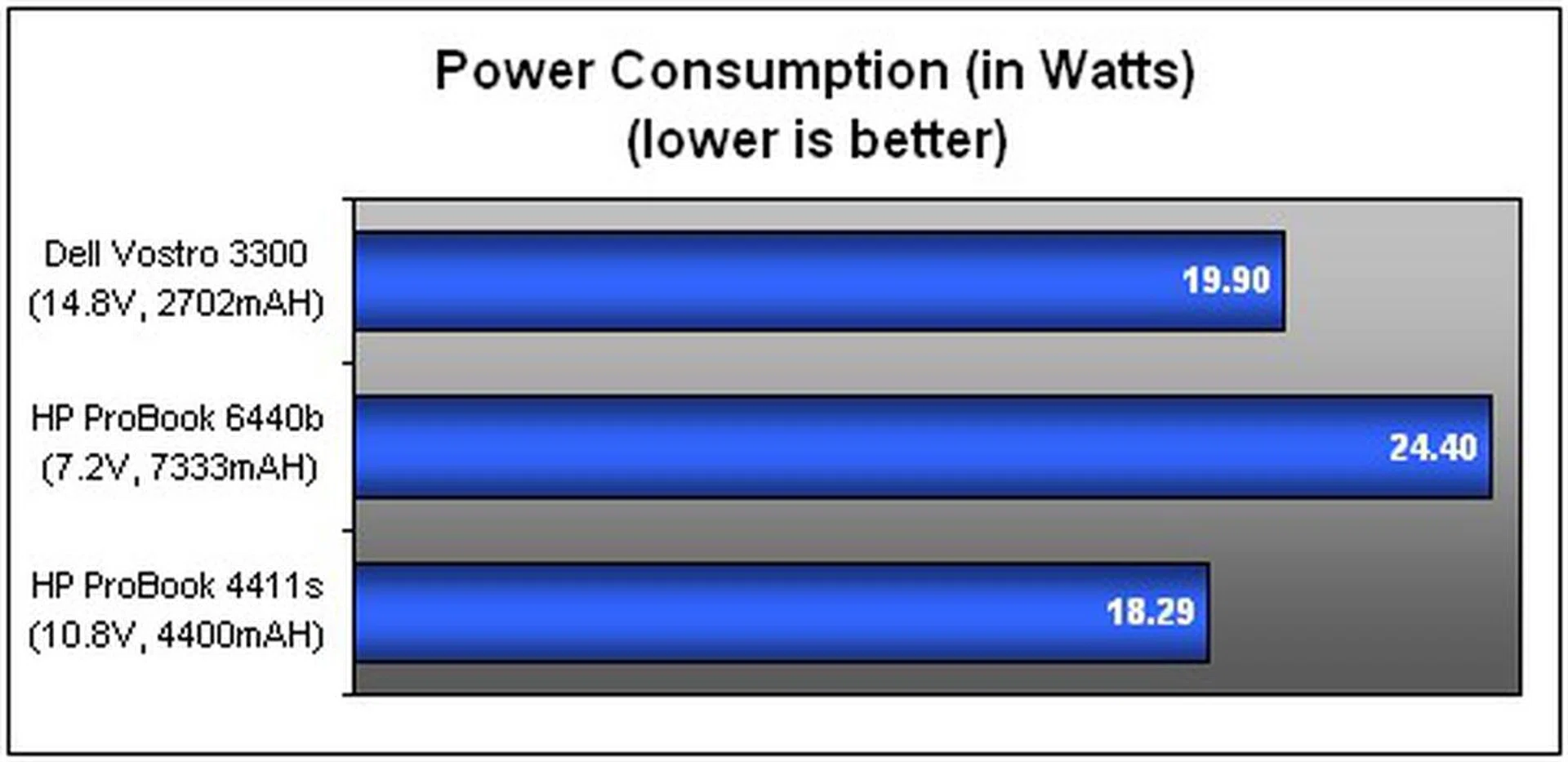
The Vostro managed to last for 121 minutes or slightly over two hours on the gruelling DVD loopback test. That said, your notebook is more or less spent after a two-hour movie run. One bout of Iron Man would do just fine. Work wise, its battery endurance has just enough juice to sustain a comparable period of uptime of two hours or more should you plan to slog on the notebook without that power brick. Say, like a type-fest with word processors or scouring the web for stock updates with WiFi enabled. If you can, we'd recommend going for Dell's 8-cell option for a more sustainable stamina, especially if you are constantly on the move. Well, it is only natural that the ProBook lasted longer by comparison, given its higher capacity battery and use of integrated graphics. One thing we have to remember though, is that while Intel has reduced power drains on its Core i5 series with an improved architecture, the 520M' processor's maximum TDP of 35 watts still leaves much to be desired in terms of battery mileage. If you were to look at Dell's power consumption, on the other hand, the Vostro's setup proved to be more economical in comparison, finishing with a power consumption of 19.90 watts versus the ProBook's higher draw of 24.40 watts. Interestingly, and despite the differential in specs, the older generation HP ProBook 4411s managed a bit better all around.
Portability Index
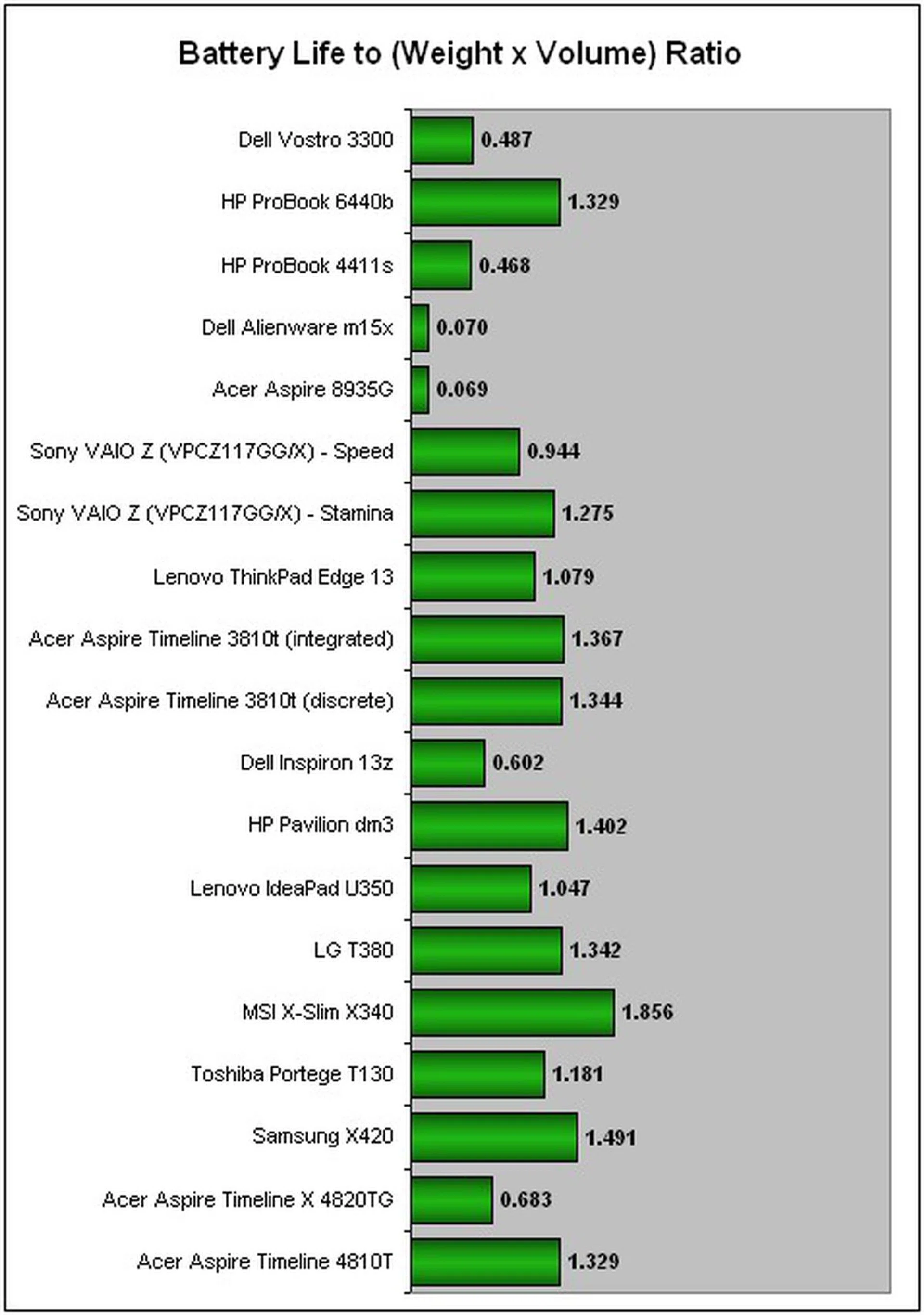
Dell's Vostro 3300 might fall under the ultraportable category, but is it really, hmm, portable? Our Portability Index is based on the battery's uptime divided by the product of the unit's weight and volume. To help you figure out what this mambo-jumbo means, just remember that the higher the ratio, the more portable the unit is. And lastly, the ratios obtained are best compared within the same product class to give more meaningful representation. The HP ProBook ended up with a higher score of 1.329 compared to the Vostro's ratio of 0.487. While Dell's Vostro 3300 may be lighter than HP's by a notch, the Vostro's shorter battery life has marginalized its portability index as a result. Of course, it is also no match for the CULV brethren such as Samsung's X420 and Lenovo's IdeaPad U350 powered by low-voltage processors. What's more, these featherweight entries don't cart an optical drive to begin with which makes them lighter on the whole. On the bright side, the Vostro 3300 is still a tad more portable than the larger 15-inch laptops like the Alienware m15x for example.
Best For Less
Let's round this baby up. The Vostro 3300 has a sweet and tough build for a business laptop, and the same goes for its interior too with regards to its keyboard and wrist rest. This machine is slim, shiny, and comes with an optical drive to boot. You might think it is dull or unattractive if flamboyant looks are what you are after, but let us assure you that it is handsome enough not to cause any major embarrassment. We enjoyed using its touchpad, for it is clearly one of the best we've worked with. The Synaptics pad is spacious and responsive with a "glide-friendly" material to match. There's no shortage on ports either, with three USB connectors inclusive of an eSATA combo. Furthermore, the Vostro is also equipped with online recovery solutions such as Dell's DataSafe Online Backup should some mishap happen to your hard drive.
Our review unit's configuration would set you back about S$1,866. It's a very decent price considering that the Vostro 3300 has almost all the bells and whistles required to fulfill a small-business notebook requirement.
As for its performance quotient, the Vostro muscled out the HP ProBook in almost every aspect, if you can discount its short-lived battery life. The laptop lasted only two hours on our DVD test, but it might probably survive a little longer if you are traversing the web with WiFi enabled instead. Results wise, the Vostro finished with an impressive PCMark Vantage score line of 6,701 and 3DMark06 score of 4,196, thus beating the ProBook on both counts. While our reviewed unit of HP's ProBook may be cheaper than Dell's, let's not forget that the Vostro is also better specced with a discrete GPU alongside a full-bodied Intel Core i5 workhorse. Years ago, it's hardly thinkable that a comprehensive business unit would fall under the S$2,000 mark. But this is the reality of the industry now, and this is how laptop makers retain their clients in a competitive market space where prices can either make or break a deal. All said, Dell has done an excellent job in producing a respectable business machine with the Vostro 3300. And if you still find this configuration a little too pricey for your liking, perhaps you might want to consider the Core i3 based configuration that's approximately S$600 dollars less.
Our articles may contain affiliate links. If you buy through these links, we may earn a small commission.