

Alien Where?
When Dell acquired Alienware back in 2006, many were expecting to see Alienware taking advantage of the Dell distribution network and go global. Such was the demand for its Alien branded gaming desktops and laptops, but unfortunately hopes were dashed when it turned out that the units were only available in six countries. However, after a corporate restructuring and the merging of the two brands' gaming lines, Dell has launched the Dell Alienware M17x and increased the reach to 35 countries, of which Singapore is one of them.
We've been pestering our local Dell reps for some time now to get our hands on the 17-inch gaming monster, but units weren't available due to factors beyond its control. However, the company has placated us with the smaller Dell Alienware m15x, which while smaller, is not to be underestimated in terms of specifications or looks. The bling-ish 15-inch gaming machine sports Intel's new Core i7 processor, a whopping 8GB of RAM, NVIDIA's GeForce GTX 260M and leaves no doubt in anyone's mind that this machine is built strictly for performance.
So before we get on to the crazy benchmark scores that you'll expect to see, let's take a look at the aforesaid bling-ish looks and the usual specifications:-
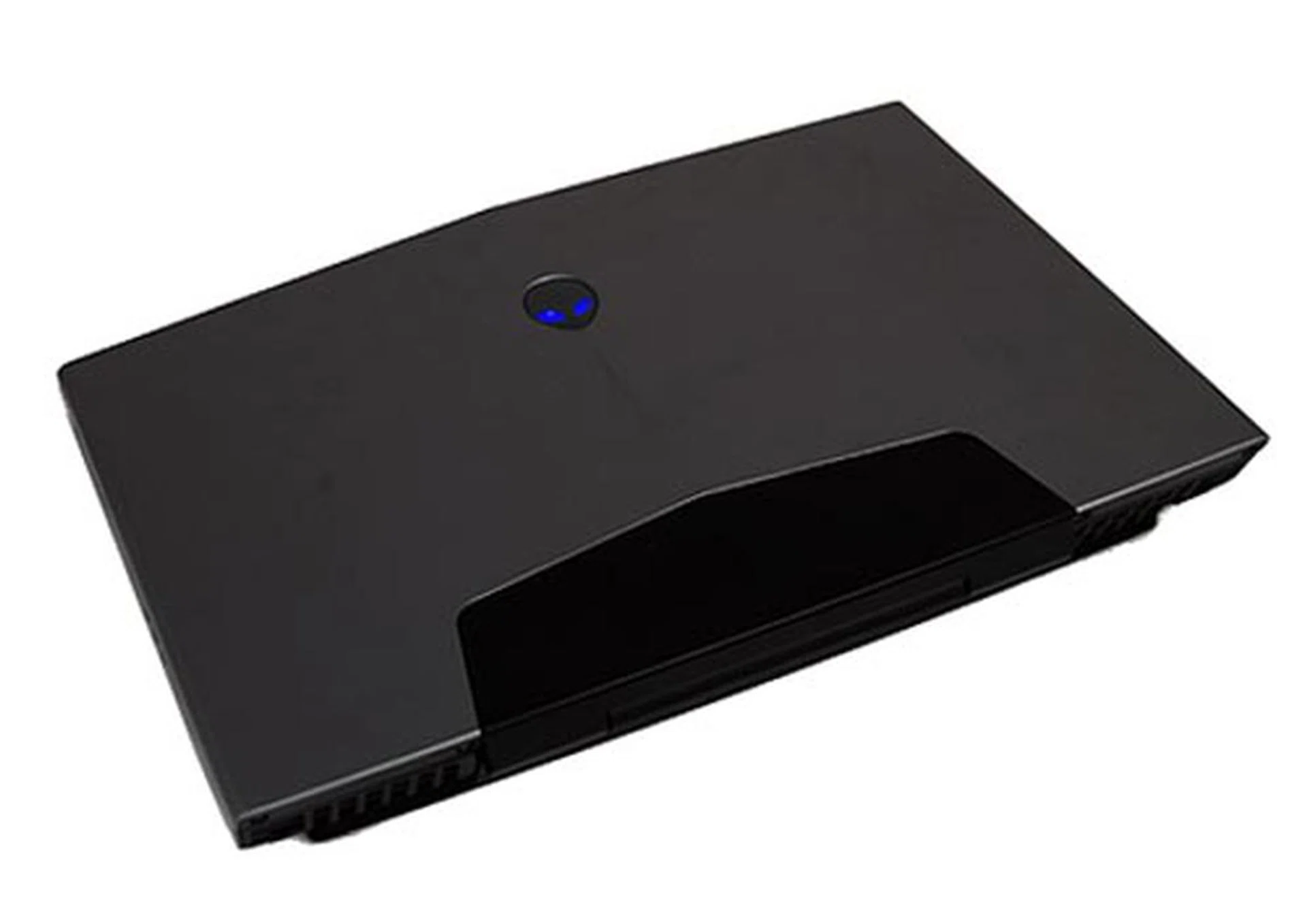
Nebula Red and Cosmic Black.
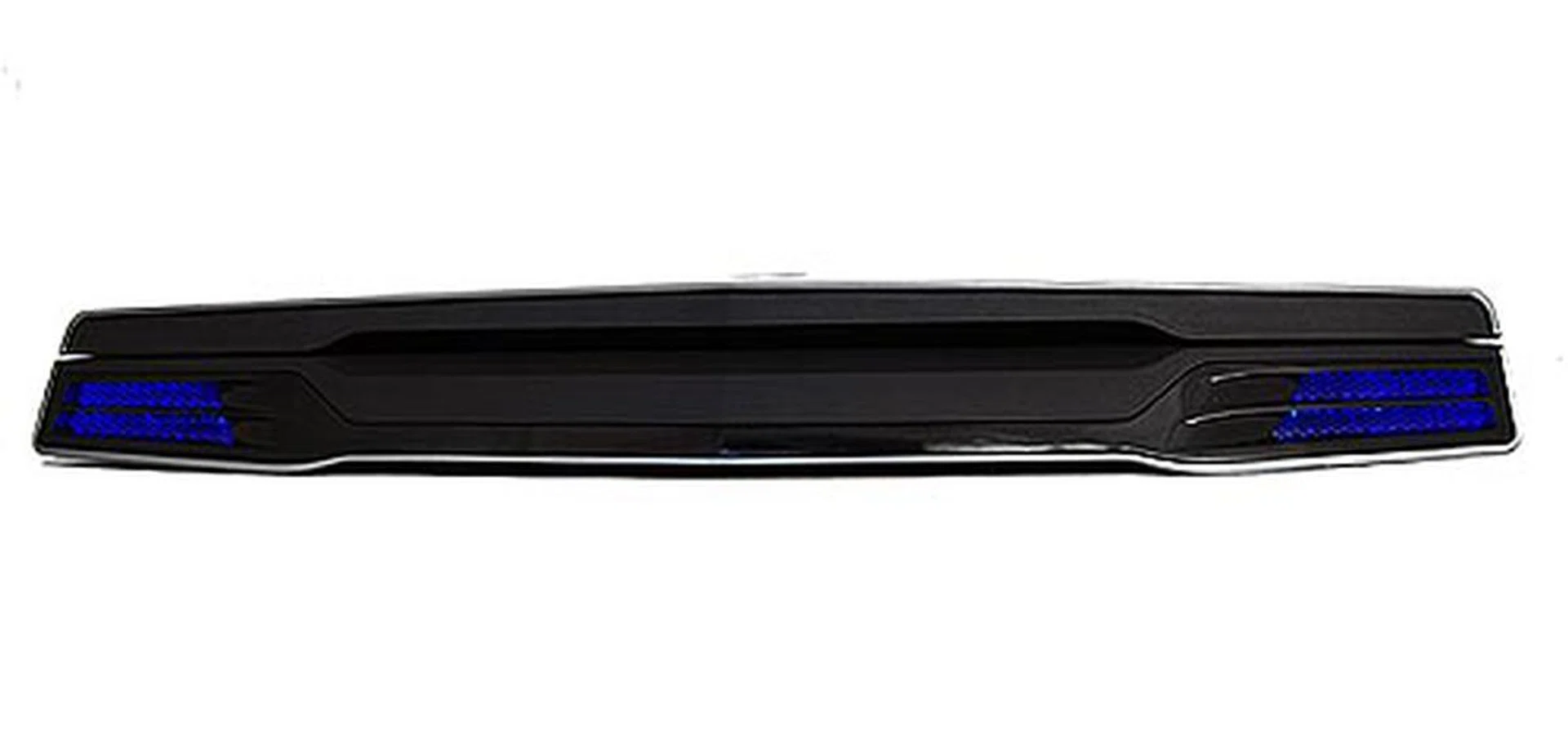
The front of the unit keeps it clean, and you can see how chunky the unit is. The two glowing blue LED-lighted areas are where the speakers are located.
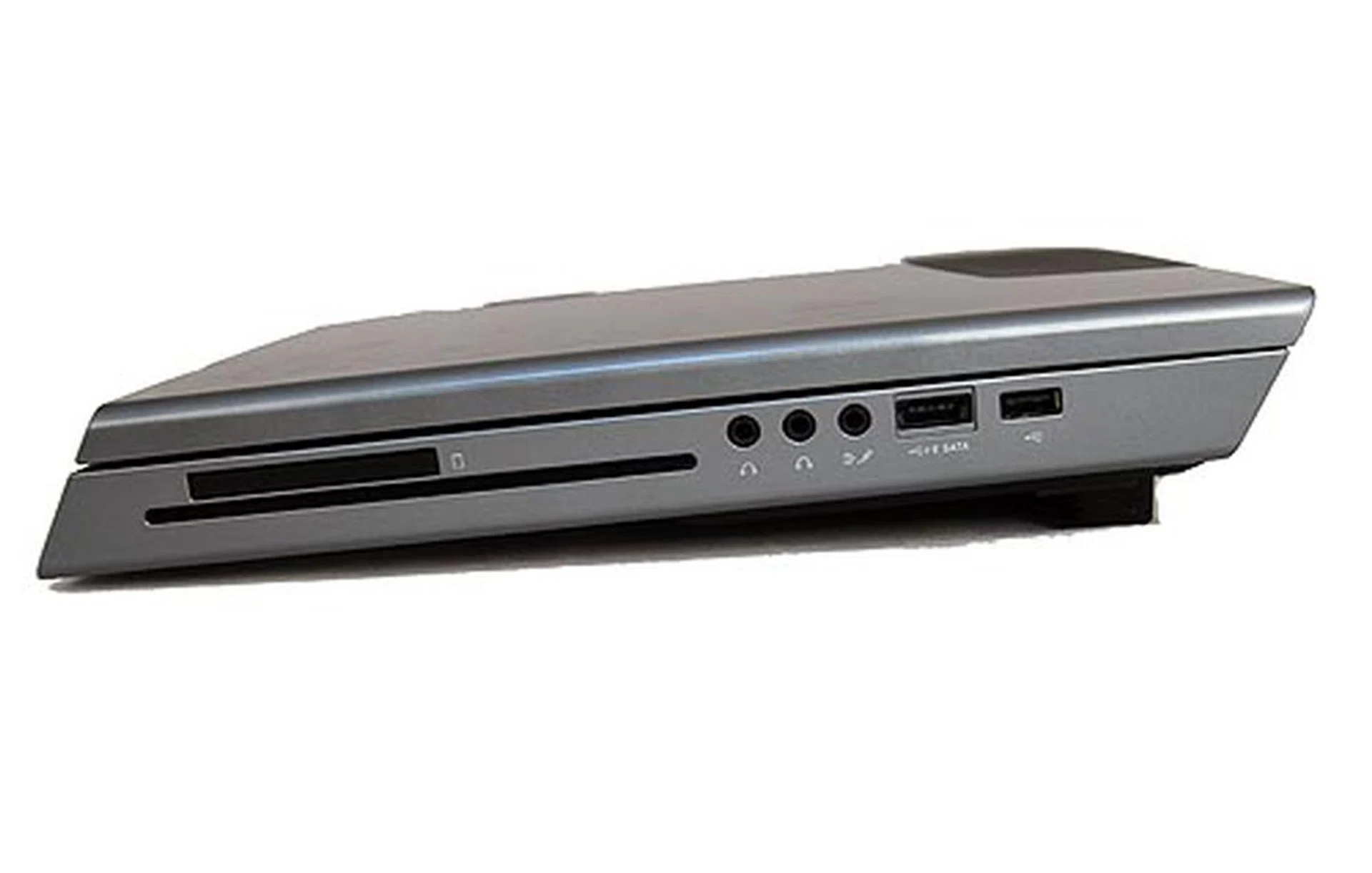
On the right hand side of the m15x you'll find the slot-loaded Blu-ray drive, ExpressCard slot, audio jacks, e-SATA/USB combo port, and a USB 2.0 port.
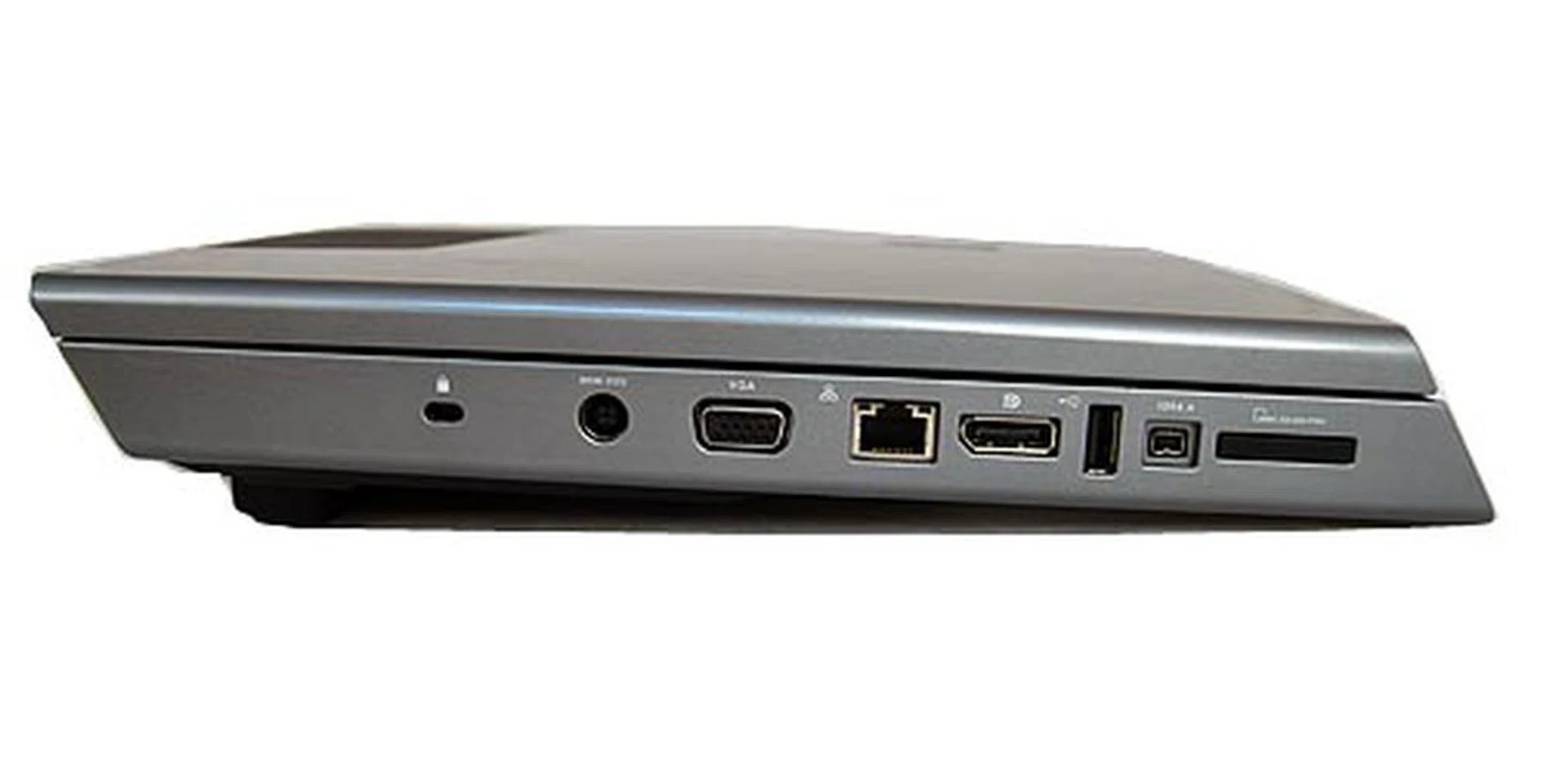
On the left side lies your VGA out, DisplayPort, USB 2.0, FireWire port, LAN port and the 8-in-1 card reader.
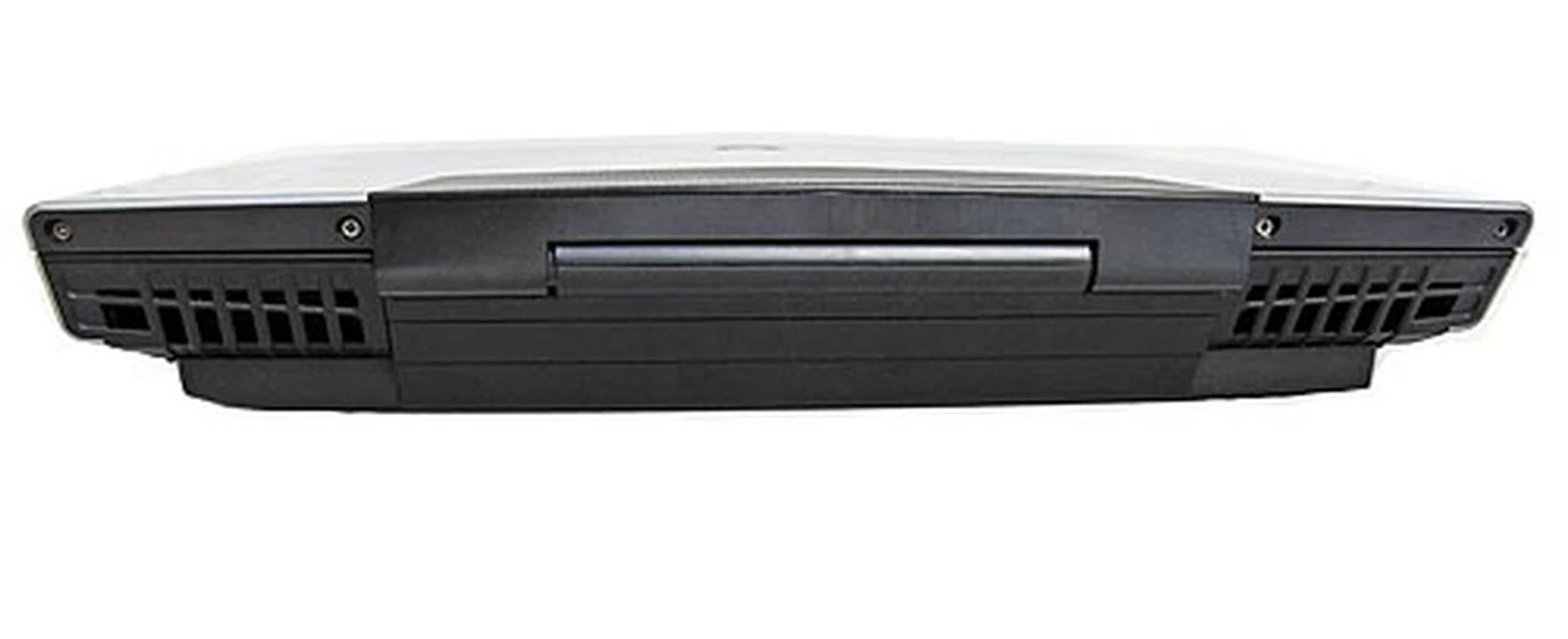
There's really nothing behind the unit's thick rear but huge fan vents to cool the unit when it starts cranking out the performance that you've paid for.
Aliens Be Here
While the exterior of the m15x may seem a little bulky and over the top, its interior keeps it simple and clean. Sure, the blue LED lights may not be that tasteful, but it is Alienware we're talking about, and what's an Alienware machine without any LED lights? Definitely not one, that's for sure.
Although you may be paying big bucks for this unit, know that you'll be getting top of the line stuff like a Full HD 15-inch screen. While most 15-inch screens tend to stick to a lower 1280 x 800 pixels resolution or less, the m15x goes for the kill with a 1920 x 1080 pixels resolution. Shame about the reflective panel though, but it's more or less expected for most consumer notebooks these days even though we've come to dread the inevitable and very visible fingerprint smudges.
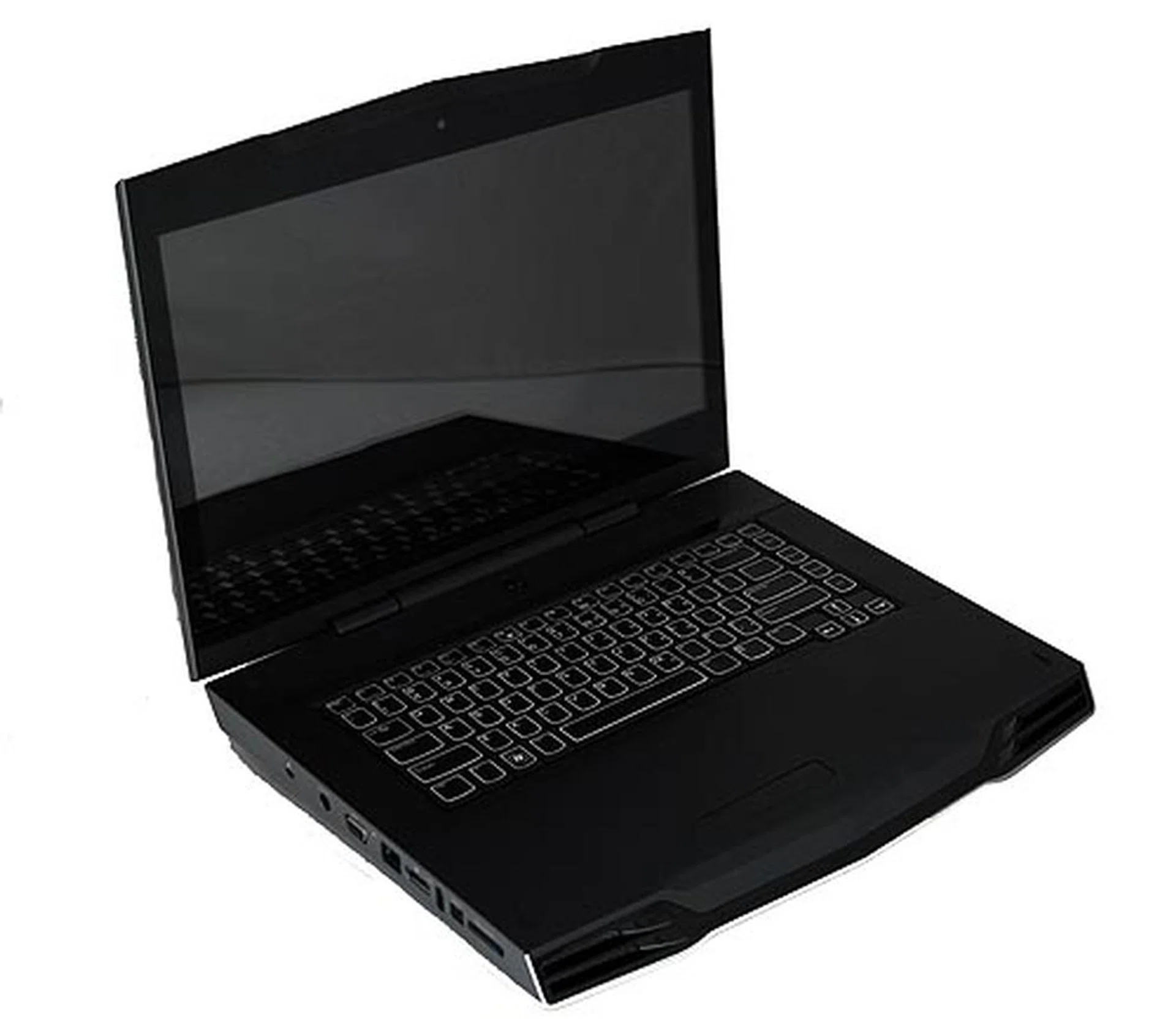
The reflective screen isn't something that we liked but it does give the unit a more polished look.
The m15x presents a clean layout that does away with the many buttons found on most laptops. Instead, you'll just be greeted by an Alien head that acts as the power button, the keyboard and the trackpad. The other buttons are hidden but activated via touch as you'll see in the pictures below. For the most part though, the keyboard was definitely a pleasure to type on, responsive and 'clacky' without being too loud. The touchpad was responsive and tracked our finger movement smoothly. Though if you're a gamer and looking for frags, you would best stick with a mouse for obvious reasons.
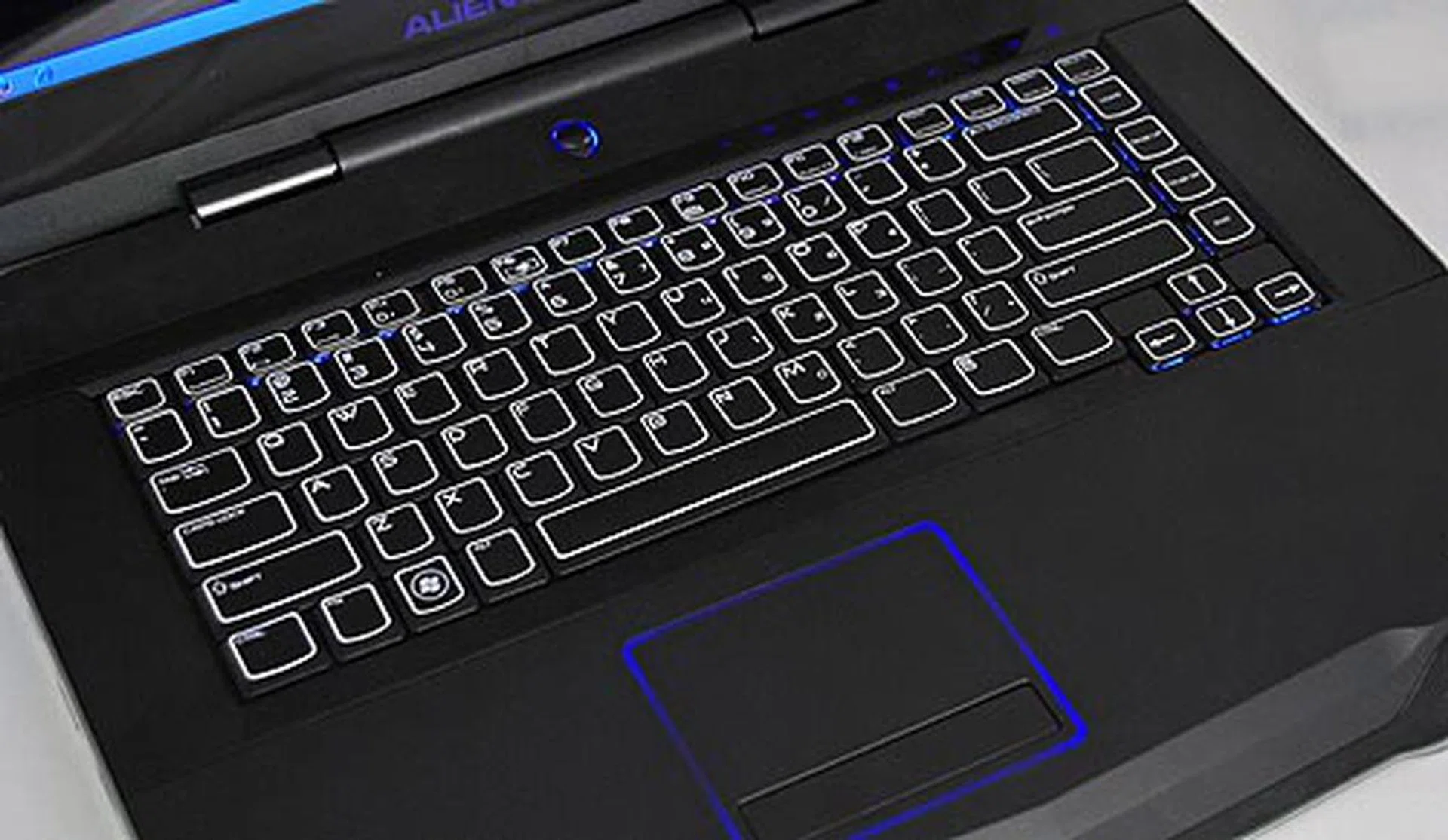
The lower half of the unit sports this really pretty looking keyboard that was a joy to type on. The colors can also be customized via the AlienFX configuration program that comes with the notebook.
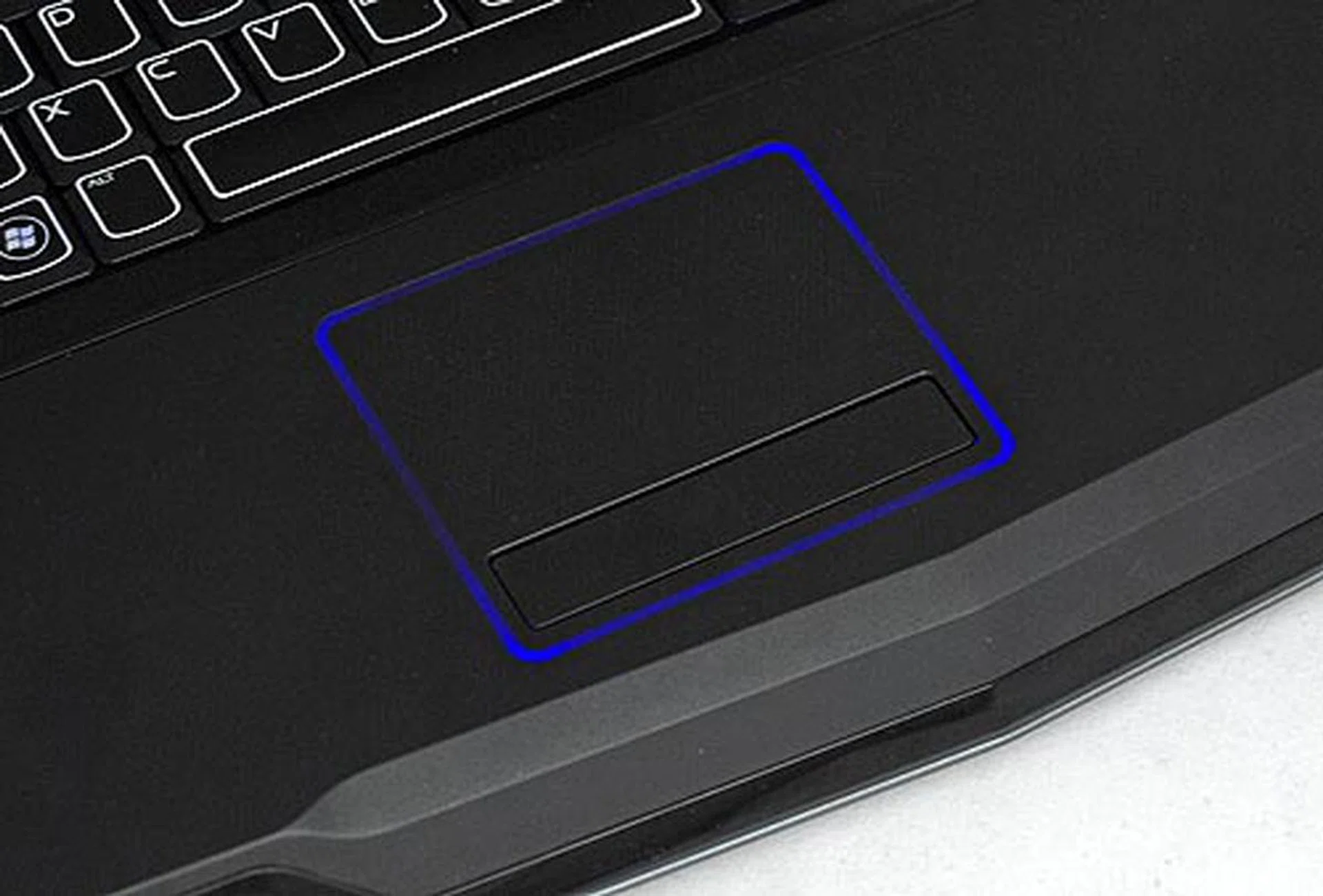
The trackpad too was lovely to use and responsive though you will want a mouse for better precision when gaming.
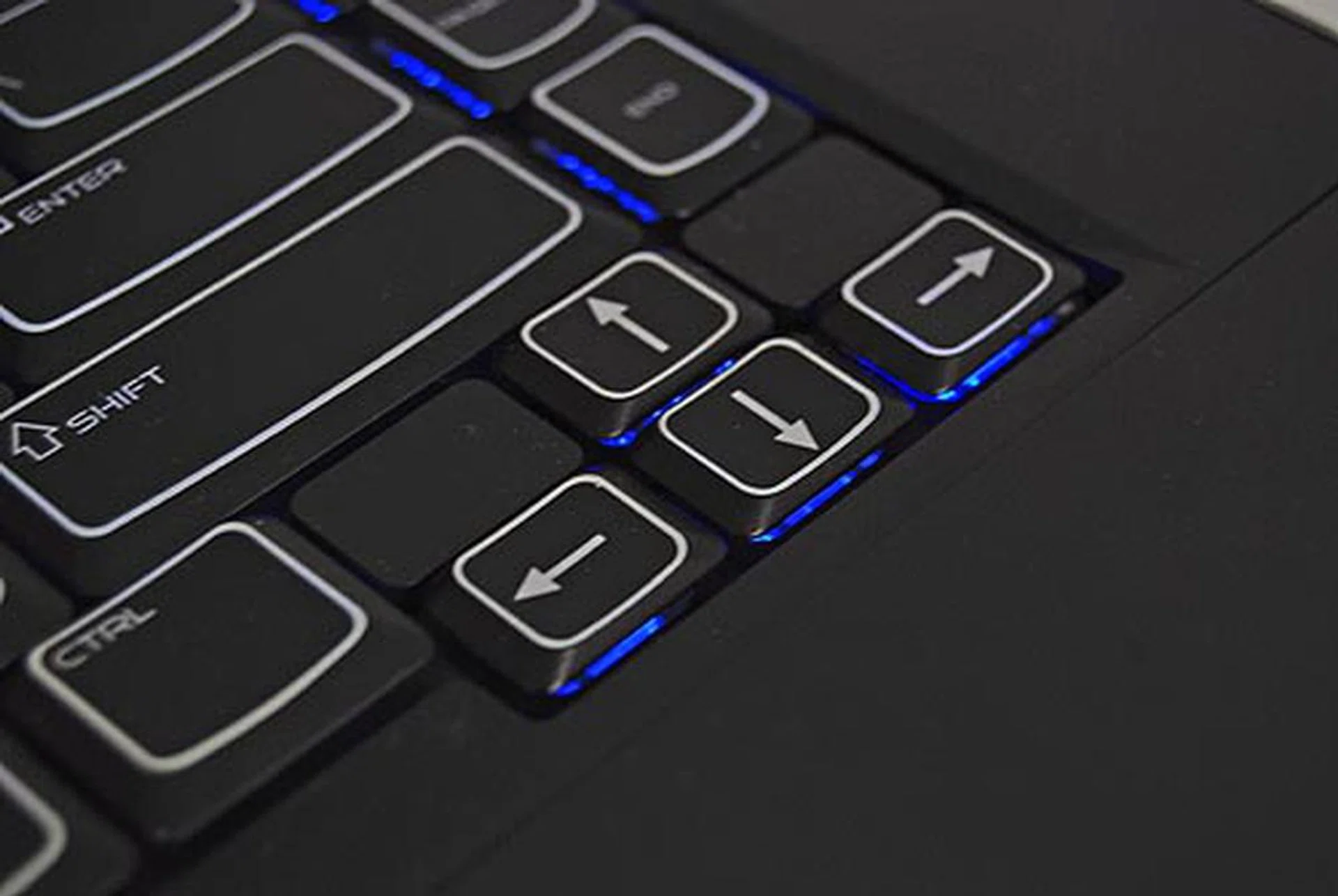
As mentioned earlier, you can change the color of the backlit keyboard and here's a closer look at the really nice keyboard.
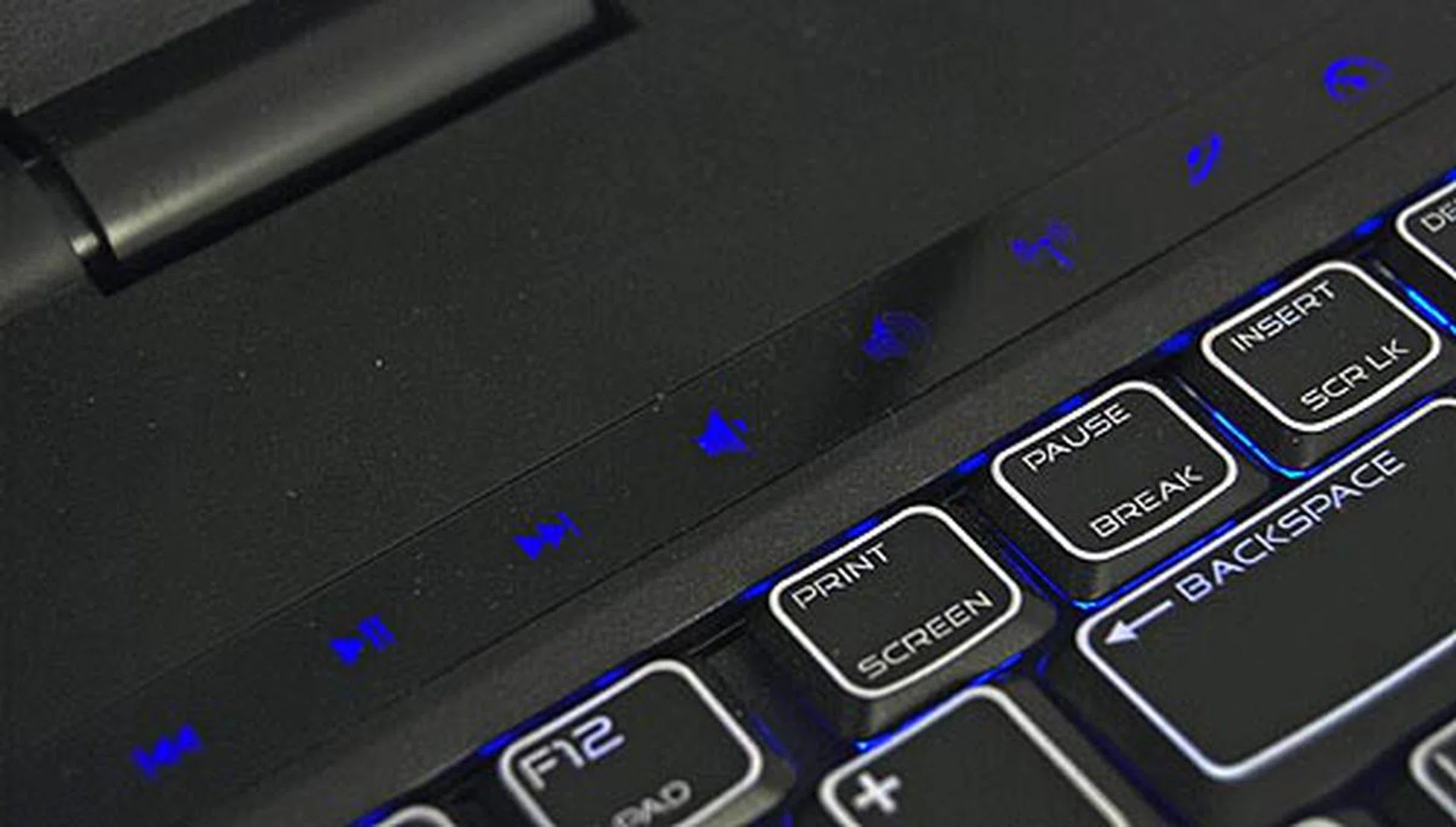
Lastly, while the unit remains free of buttons, the m15x gives you easy control over the simple stuff like volume control with these touch friendly keys.
Alien Attack!
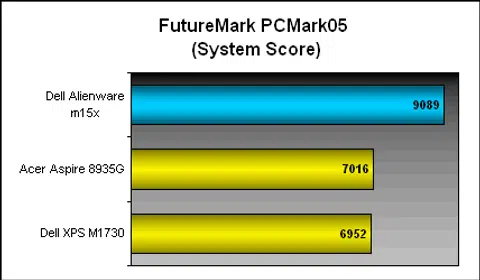
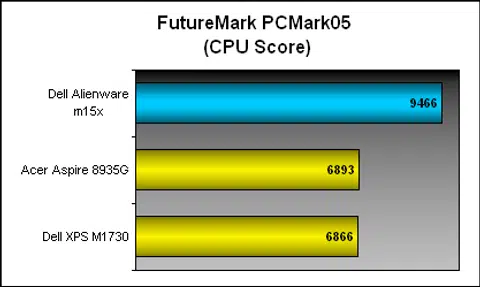
You'd expect crazy performance from this machine, and you'll not be wrong with your expectations. Given its specifications, there's simply no match up for this unit, though we do have some scores from two years ago from Dell's equally impressive XPS 1730M notebook that should give us a good idea on how beastly the Alienware m15x is. Together with the Acer Aspire 8935G, a pretty decent desktop replacement for comparison, we've put the m15x through the grinder with our usual battery of tests, from PCMark 05, PCMark Vantage and 3DMark06. And to see how it would handle for an actual game, we've also threw in Far Cry 2.
Specifications / Notebook | Dell Alienware m15x | Acer Aspire 8935G | Dell XPS M1730 |
Processor | Intel Core i7-920XM (2.0GHz, with 8MB L2 cache) | Intel Core 2 Quad processor Q9000 (2.0GHz, with 6MB L2 cache) | Intel Core 2 Extreme processor X7900 (2.80GHz, 4MB L2 cache) |
Chipset | Intel PM55 | Intel PM45 | Intel PM965 |
FSB | 1333MHz | 1066MHz | 800MHz |
Memory | 8GB DDR3 | 4GB DDR3 | 4GB DDR2 |
HDD | 1 x 500GB SATA 5400 RPM | 2 x 500GB SATA 5400 RPM | 2 x200GB SATA 7200 RPM |
Video | NVIDIA GeForce GTX 260M | ATI Mobility Radeon HD 4670 | NVIDIA GeForce 8700M GT SLI |
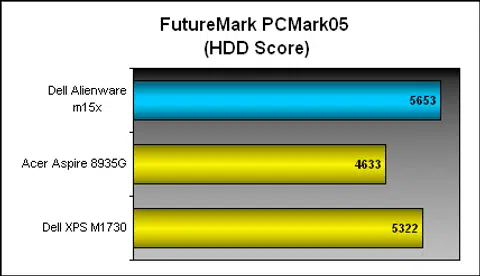
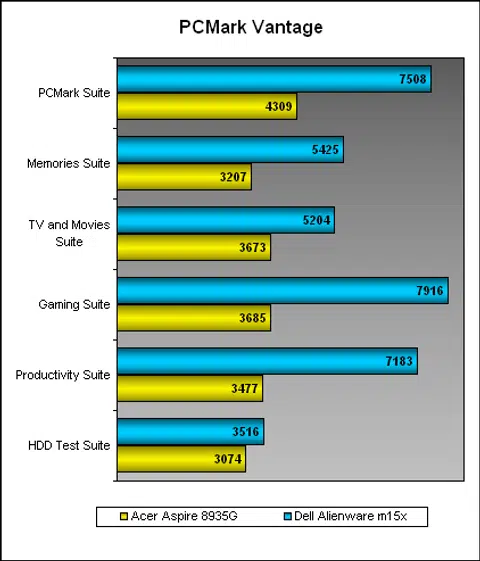
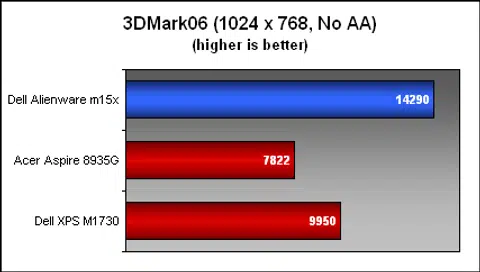
As the scores below show, the Dell Alienware m15x is simply a beast of a machine, with scores that blew every other machine out of the water that we've matched up against it. No other unit came close by a long shot. The m15x easily outperformed the competition for PCMark05 and PCMark Vantage scores, but what about 3D performance? Again, the results showed that the NVIDIA GeForce GTX260M of the Alienware machine came up tops yet again and while the PCMark scores were somewhat closer, the 3DMark06 scores just indicated that both units simply have a long way to go before catching up.
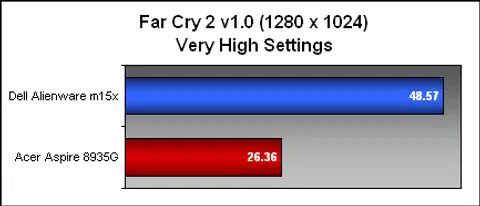
As for Far Cry 2 performance, even on Very High settings at full 1920 x 1080 pixels resolution, the m15x easily scored an average of 40.7 frames per second (fps), while on the standard test range of 1280 x 1024 pixels, it scored 48.57 fps - double of what the Acer Aspire 8935G could achieve. This is definitely more than playable, and if you're willing to crank down the settings to medium, expect to see even higher scores though the system is definitely more than capable of handling such high performance settings.
Alien Stamina?
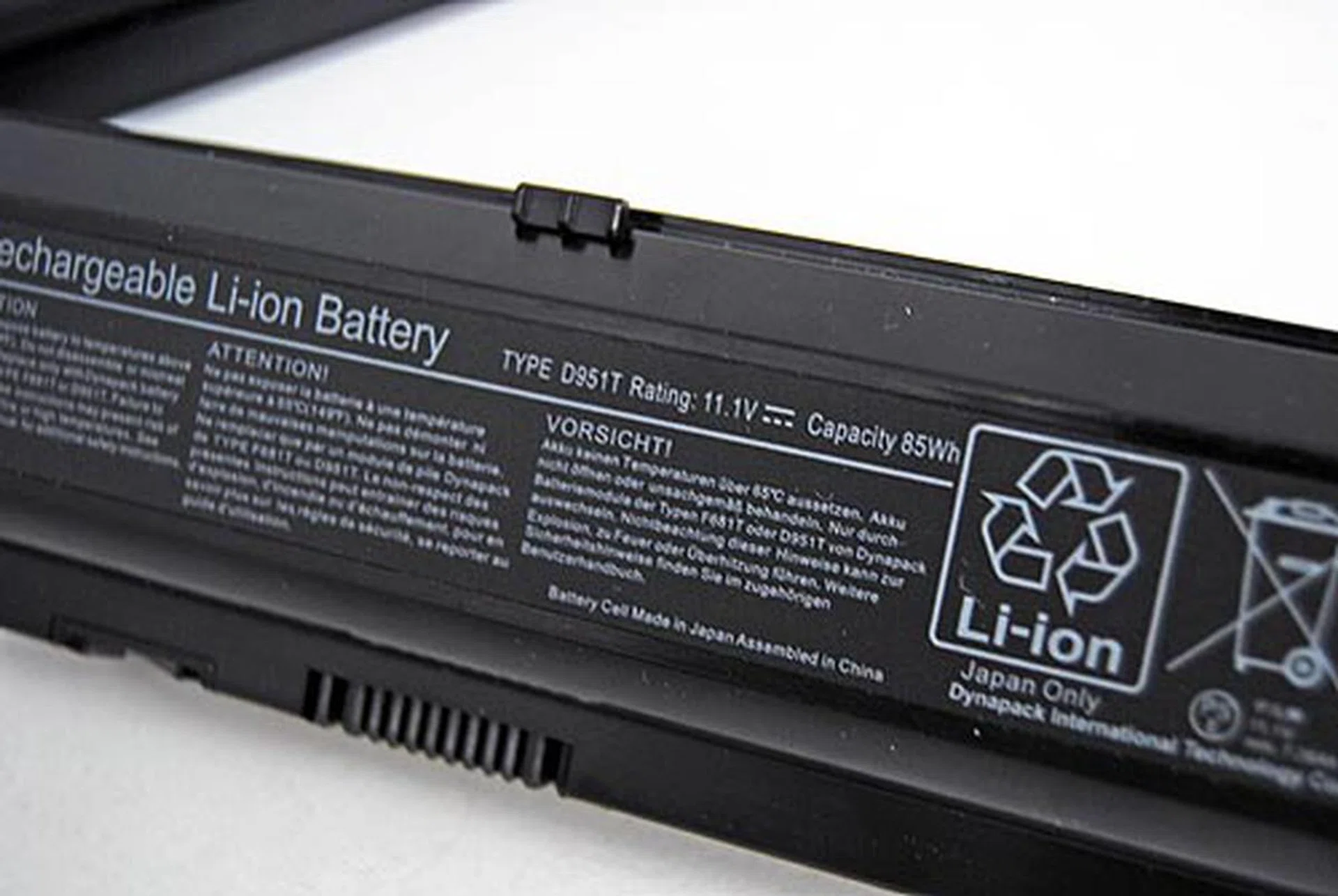
The 11.1V, 7650mAH 9-cell Li-ion battery with a capacity of 85Wh.
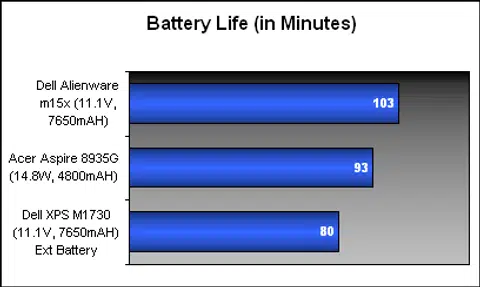
The stellar performance of the Dell Alienware m15x comes at a price though, and we aren't talking about the wallet yet. The cost here is a relatively lackluster battery life that handicaps the m15x as a truly portable gaming machine, unless you're connected to a power supply. Sure, the m15x comes with a 9-cell battery in the form of the D951T that's rated at 11.1V with a 85WH capacity, but our usual DVD battery test easily drained the battery after a quick 1 hour and 43 minutes, enough for just one full loop of our DVD. Mind you, this is just DVD playback. The bright side is that notebooks of its class probably won't fare any better as the other notebooks in our comparison had even worse battery life, albeit with a larger display. Our advice if you're going to be gaming: be sure to set camp near a power point.
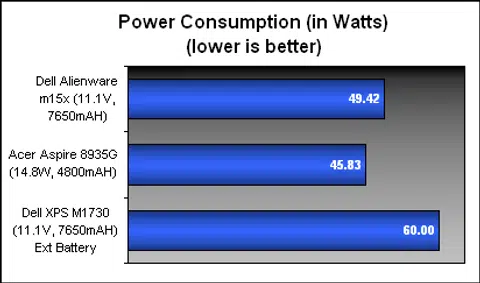
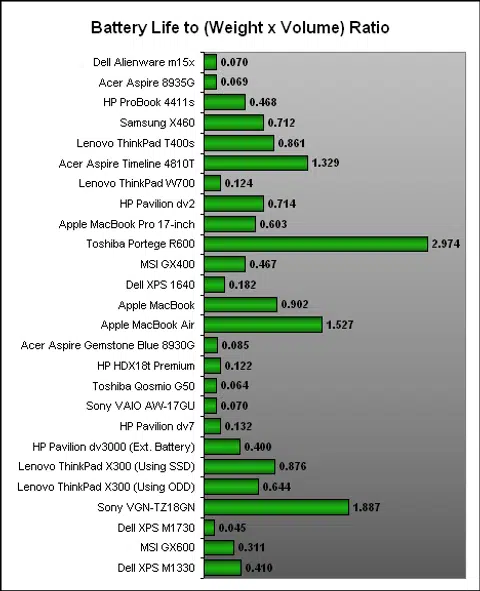
Battery life aside, mind you that the m15x is one very heavy and bulky notebook. Here's where we use our Portability Index to point out the poor portability of the notebook. This index basically measures how portable a machine is based on a simple formula that we derived (which is battery uptime divided by the product of the unit's weight and volume) - the lower the score, the less portable the unit is. The results show that the m15x had a very low portability index figure that pretty much concurs with our earlier opinions. Remember, the power brick is your best friend when dealing with Aliens.
Alien Resurrection
With the arrival of the Dell Alienware m15x, we're glad that we finally had a chance to test drive a state-of-the-art gaming monster unlike say, HP's Voodoo, which doesn't even look remotely like it's coming anywhere to this region. After this hands-on review, we're pretty much sold on the Alienware as one heck of a gaming notebook. Given the very hardcore nature of its specifications, it may not be easy to find a similarly equipped notebook that retains the build quality of the m15x.
From the outer chassis design down to its interior, the notebook exudes a certain charm that will appeal to most gamers and other enthusiasts. The ladies who prefer everything feminine would be well warned to stay away from this machine unless well, they are hardcore gamers themselves. This unit too isn't one for those with weak wallets, our unit basically comes with everything fully loaded, and its price alone will probably leave you gasping in shock and awe. A similar unit in the Dell US store will cost you roughly US$3299 (which translates roughly around S$4642), but if you ordered through the local store, the price mysteriously hits the highest levels of the stratosphere with a staggering price of S$6390.99.
So, if you really want this notebook, be sure to ask a very good friend who is either traveling or returning from the US to get the unit for you. You'll save a heck load of cash that can be used for other accessories to complete your ultimate gamer street cred checklist. If however, you're the sort that has a vault full of cash and minted gold coins, and willing to spend well for your 'portable' gaming machine, then rest assure that you'll definitely be getting your money's worth with the Dell Alienware m15x. It has pretty much set the standard for the other gaming notebooks of its size to beat, and unless they come equipped with even better specifications (like their very own m17x), we doubt that the m15x would be beaten in any benchmark in the near future.

If you're swimming in cash and looking for something that delivers the performance you need, then what are you waiting for? Grab the Dell Alienware m15x now!
Our articles may contain affiliate links. If you buy through these links, we may earn a small commission.