

'Tis Not Hard to Fall in Love
Fans of the new Battlestar Galactica be warned, the Dell Adamo isn't really named after the crusty yet solid commander that you so loved and admired despite some odd coincidental similarities. Instead, transfer your affection and be prepared to fall in love all over again with the Adamo (which is Latin for "to fall in love") as this gorgeous unibody aluminum notebook makes its way into your hearts.
Be warned folks, it's really love at first sight when you first set your eyes on this notebook. Its sleek profile coupled with soft delicious curves had us all but drooling, while the solid aluminum build only serves to reinforce the feel of the notebook that the Adamo isn't a machine that would break anytime.
As the first notebook from Dell to target the luxury market, Dell has spared no effort in making the Adamo something to lust after. If there's a better designed notebook from Dell, well we've yet to see it. Before we assess it in detail, enjoy these exterior shots of the gorgeous Adamo and scope out its specifications in the table below:-
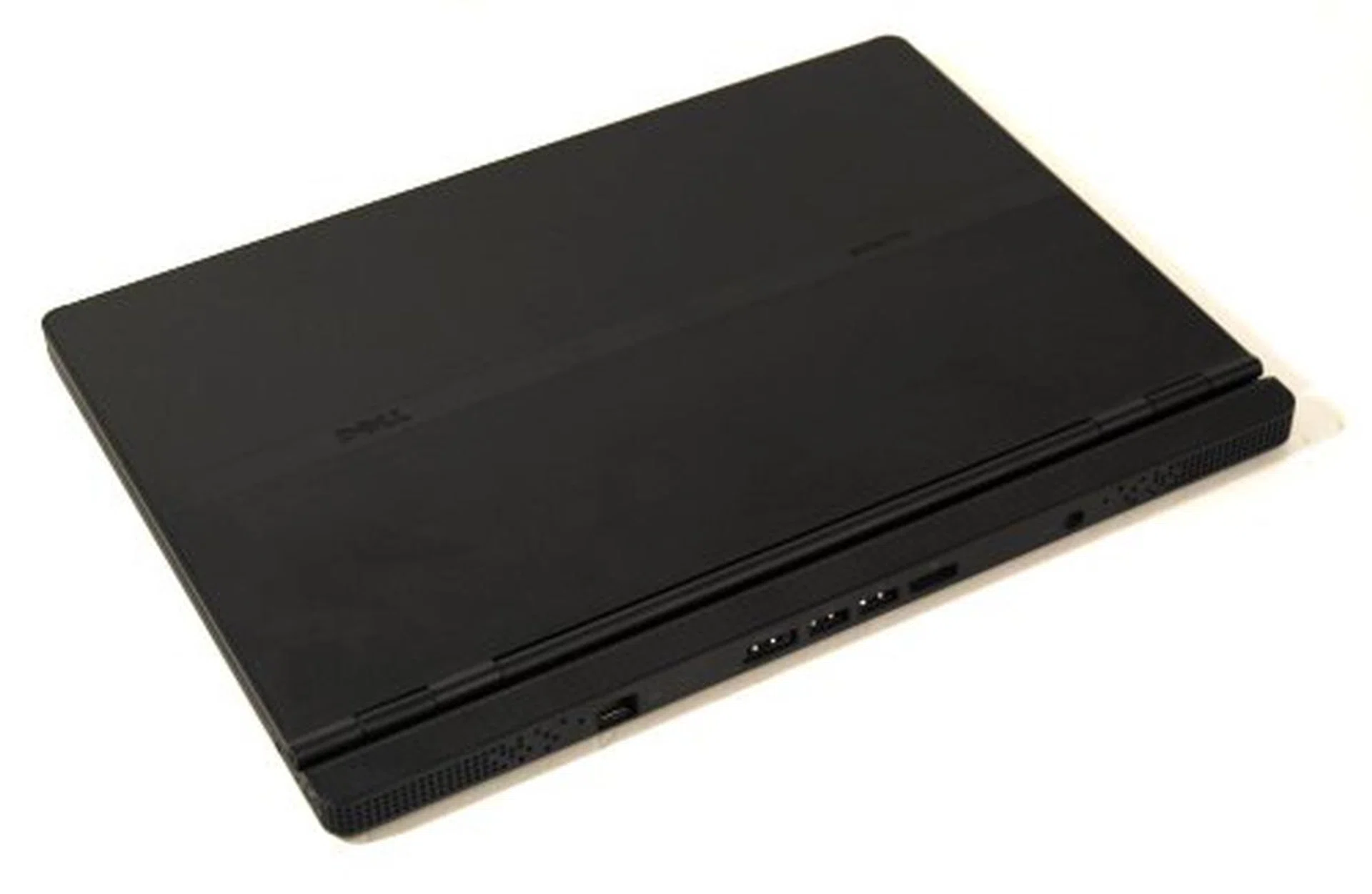
You can't really see the glossy top from this angle, but trust us when we say it's the ultimate smudge magnet for the otherwise pretty Dell Adamo Thirteen.
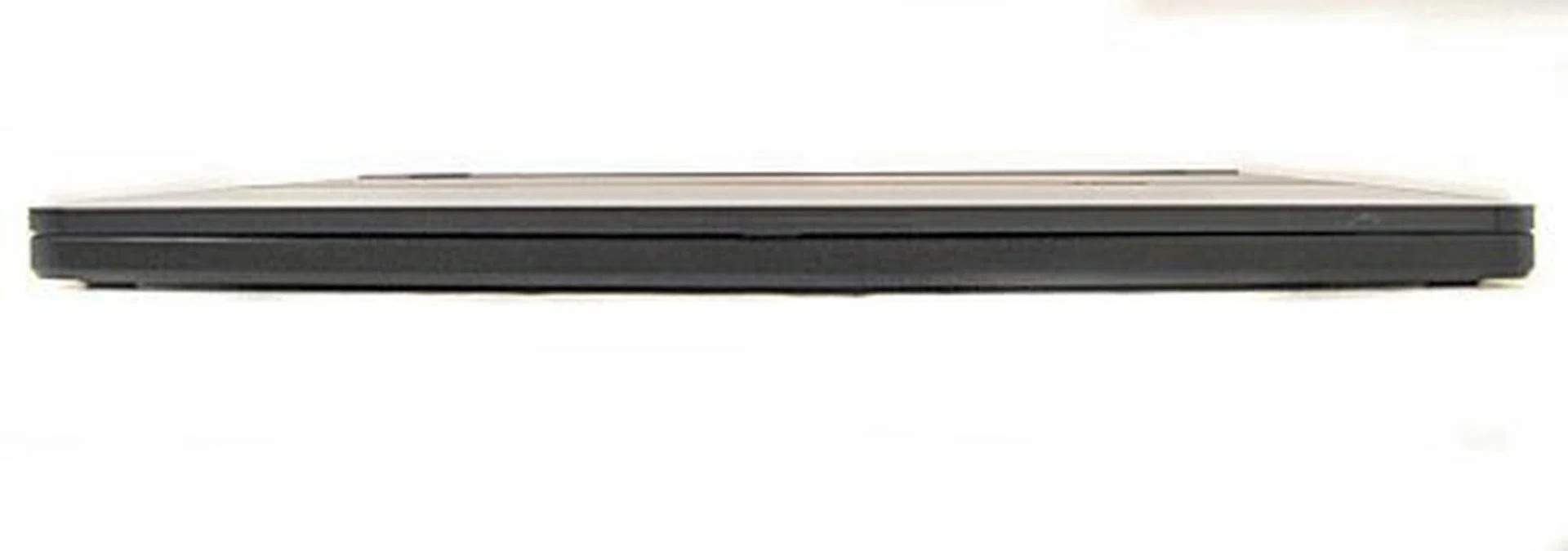
The front profile is clean of all ports due to the thinness of the notebook.
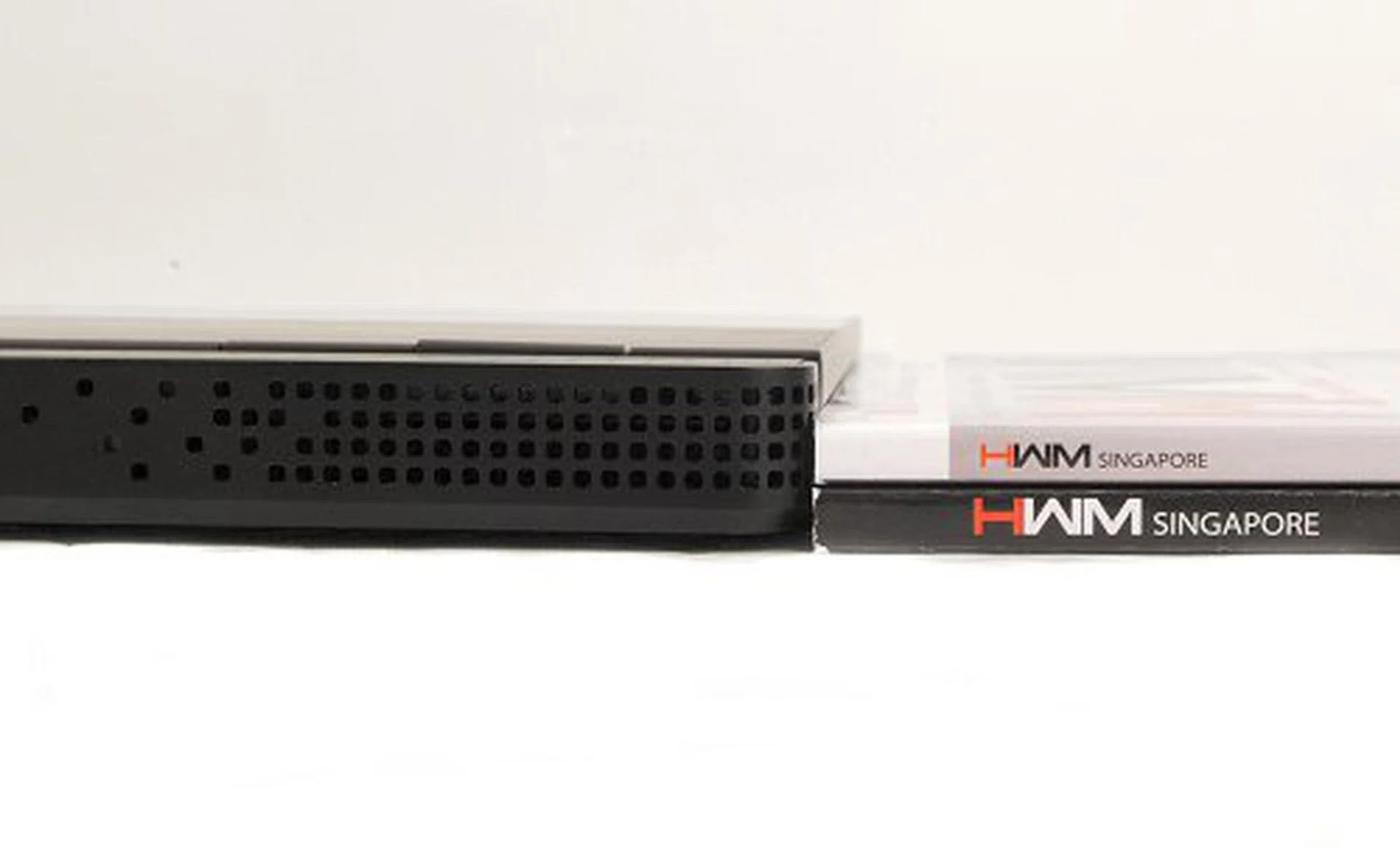
How thin is thin? Perhaps about three HWM issues as you can see.
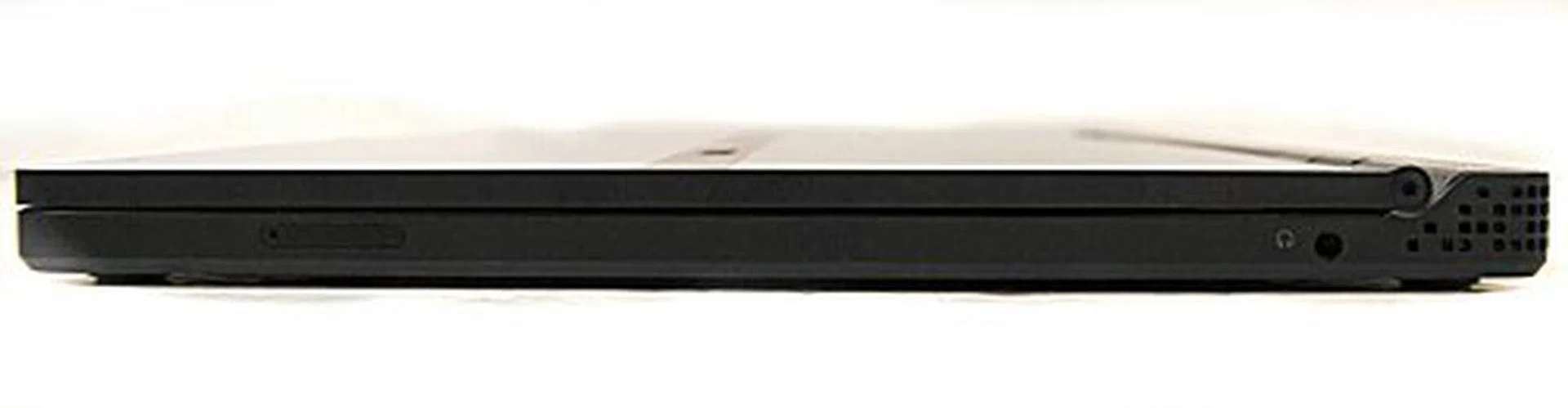
Moving along, the right side only has space for the audio jack and a SIM card slot (which doesn't work as there's no 3G modem installed on our review unit).
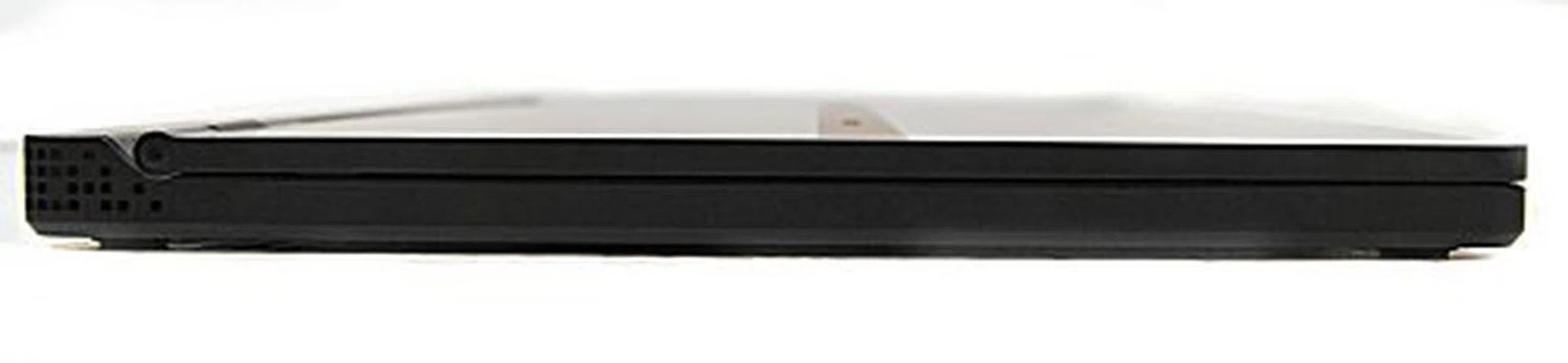
Like the front, the left side is devoid of any ports.

Owing to the way the Adamo is designed, you'll find that the ports are all located at the back. Here you'll find a LAN port, eSATA-USB combo port, two USB 2.0 ports, a DisplayPort and the power jack.
Battleship Class
The first thing you'll notice about the Dell Adamo is of course its impossibly slim figure. It has a flat uniform thickness all around, which splits nicely in half when the unit is open. This means that there are really no ports on the front and sides and everything is located at the back. The unit also doesn't quite open to the full extent as some other notebooks as Dell has designed the Adamo's opening hinges slightly away from the normal edge to facilitate the housing of the ports at the rear.
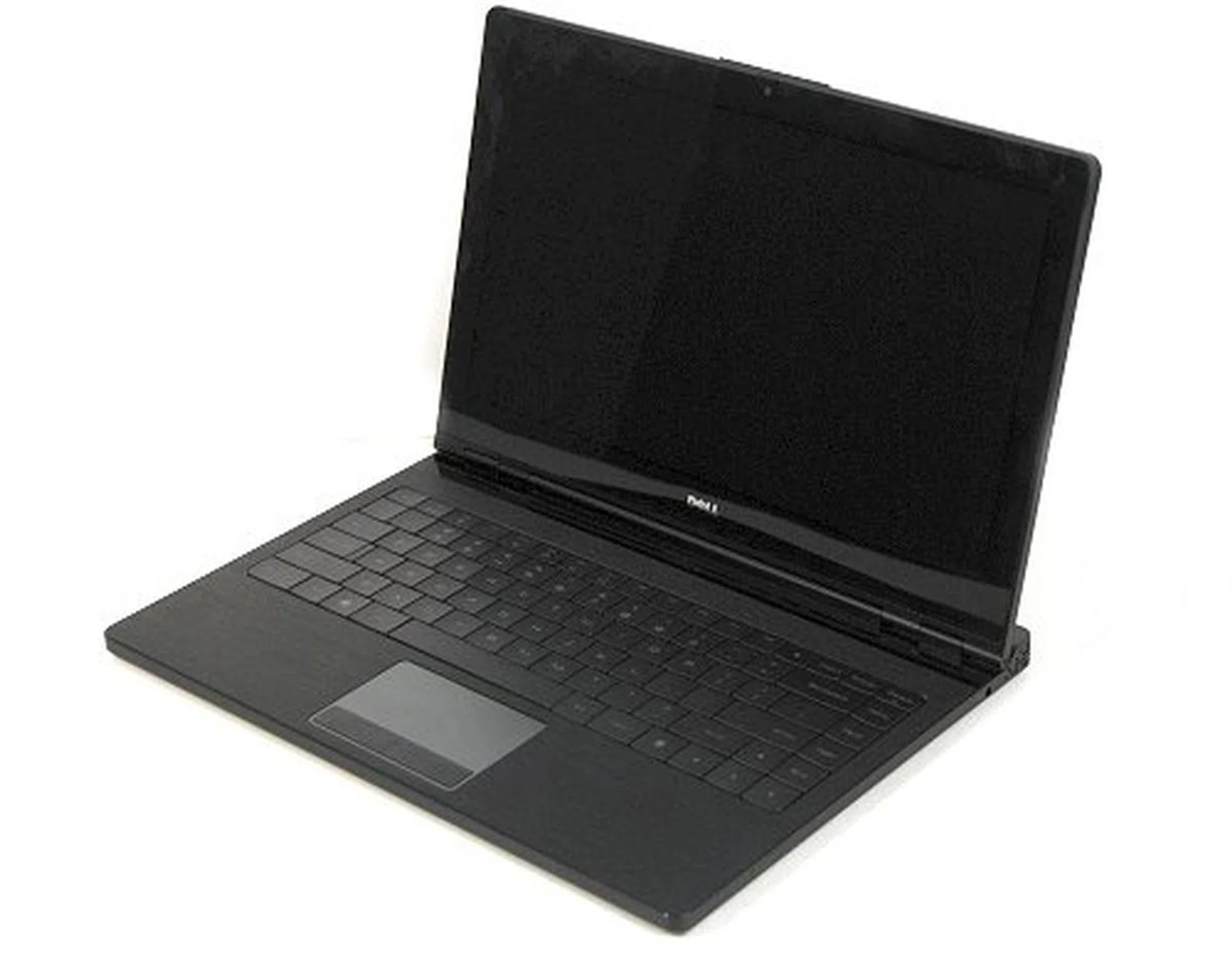
The Adamo opens up to a very elegant interior.
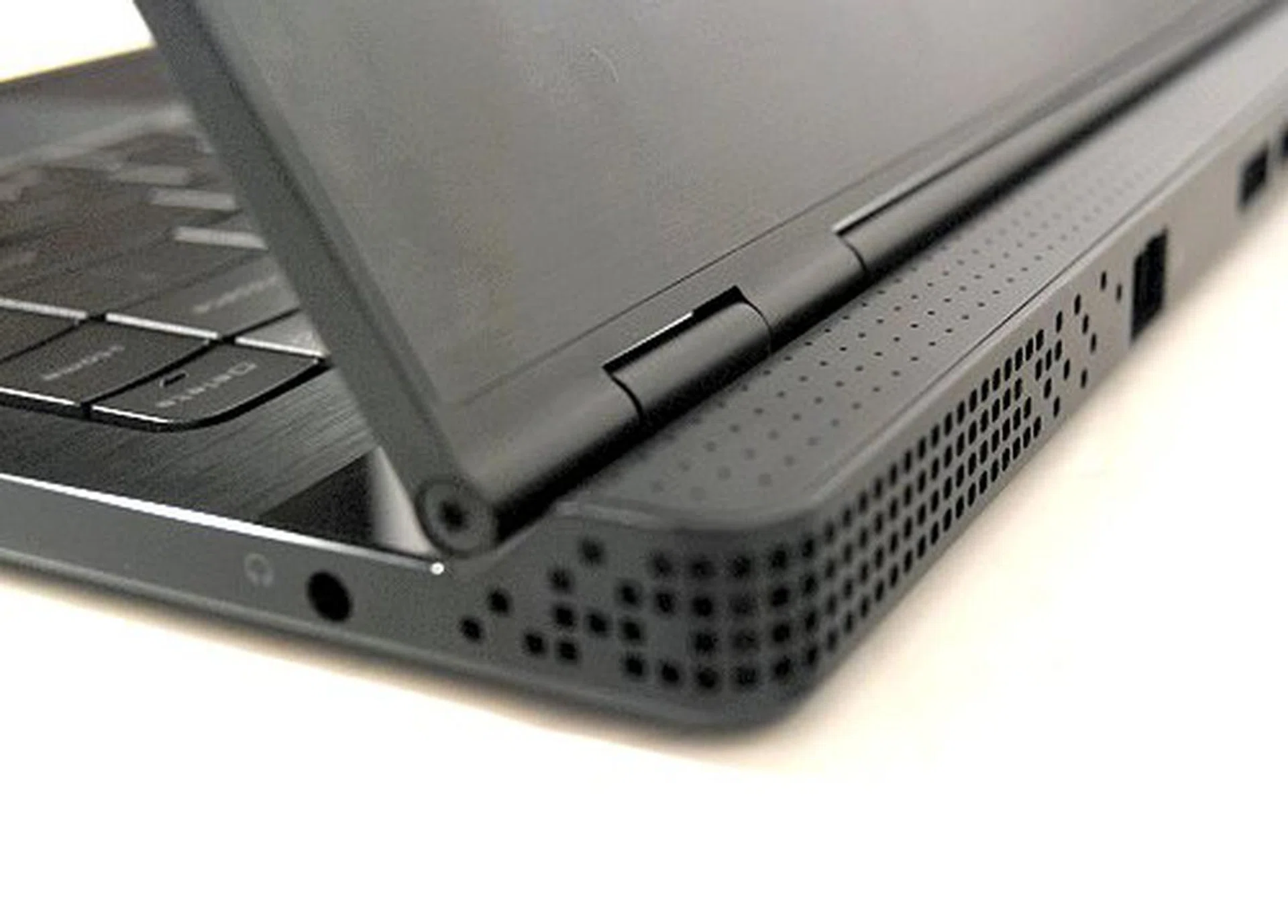
Here's a look at the very pretty vents located on the back. The speakers are also located at the rear but more towards the middle near the ports.
The second thing you'll note is the weight. For a unit of its size, the Adamo is surprisingly heavy at 1.81kg, and feels much more than that in our hands. The thin form factor will fool most people, giving them a false impression of its weight. In short, the Adamo conveys a solid, dense build and feel.
Reflective screens here make an appearance, and Dell was quick to point out to us that this was something they knew we disliked, but on the Adamo though, we have to admit that it does look good. The glass-to-glass edge just oozes class, though be warned that bright sunlight will ruin your viewing experience.
Focusing downwards, the nicely laid out backlit keyboard with scalloped keys was a pleasure to type on and the big good looking fonts located on the keys were simply beautiful. This is probably the best looking keyboard we've yet had the chance to play with, and that's saying a lot.
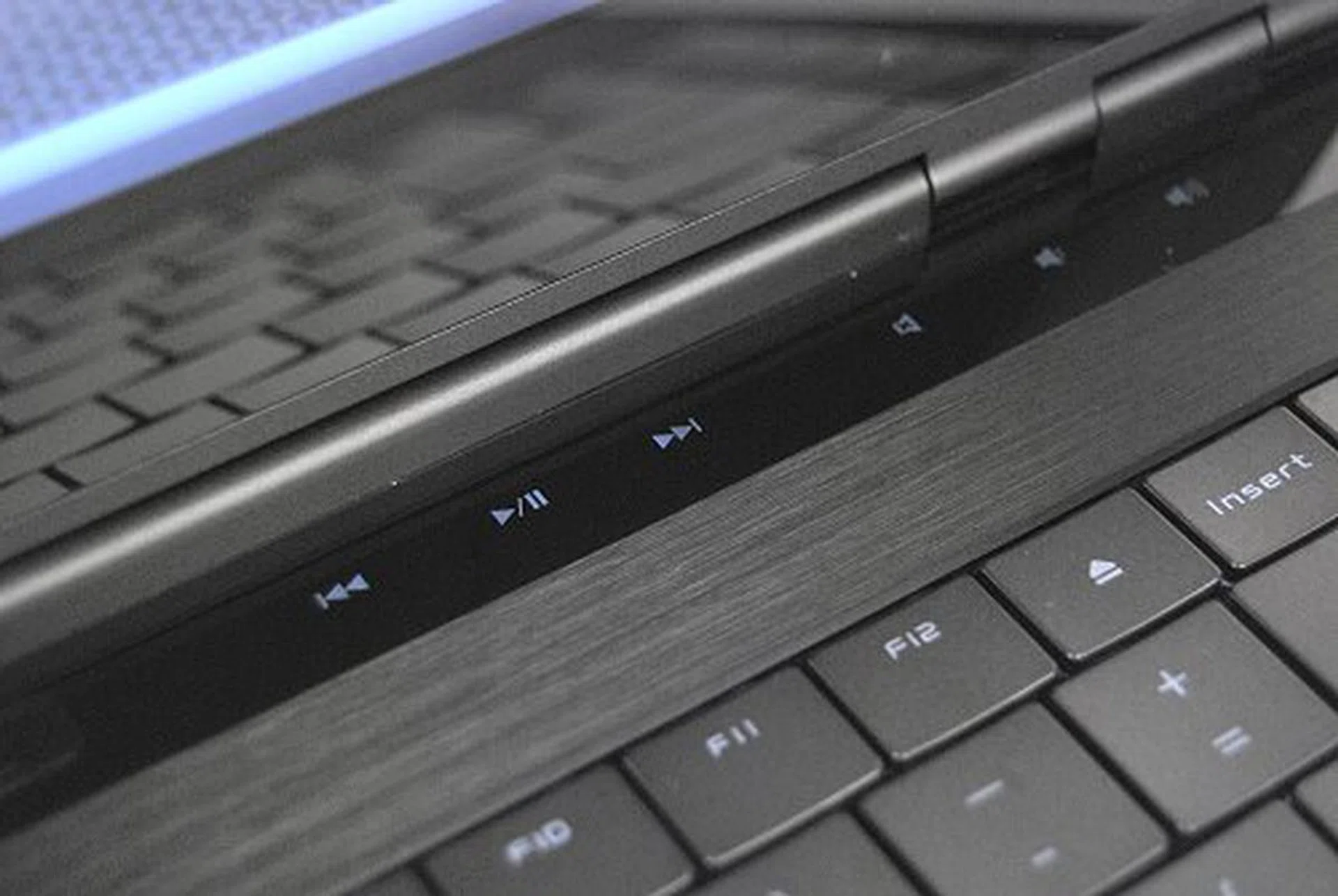
The Adamo utilizes touch controls to complete the minimalist Zen like feel of the notebook.
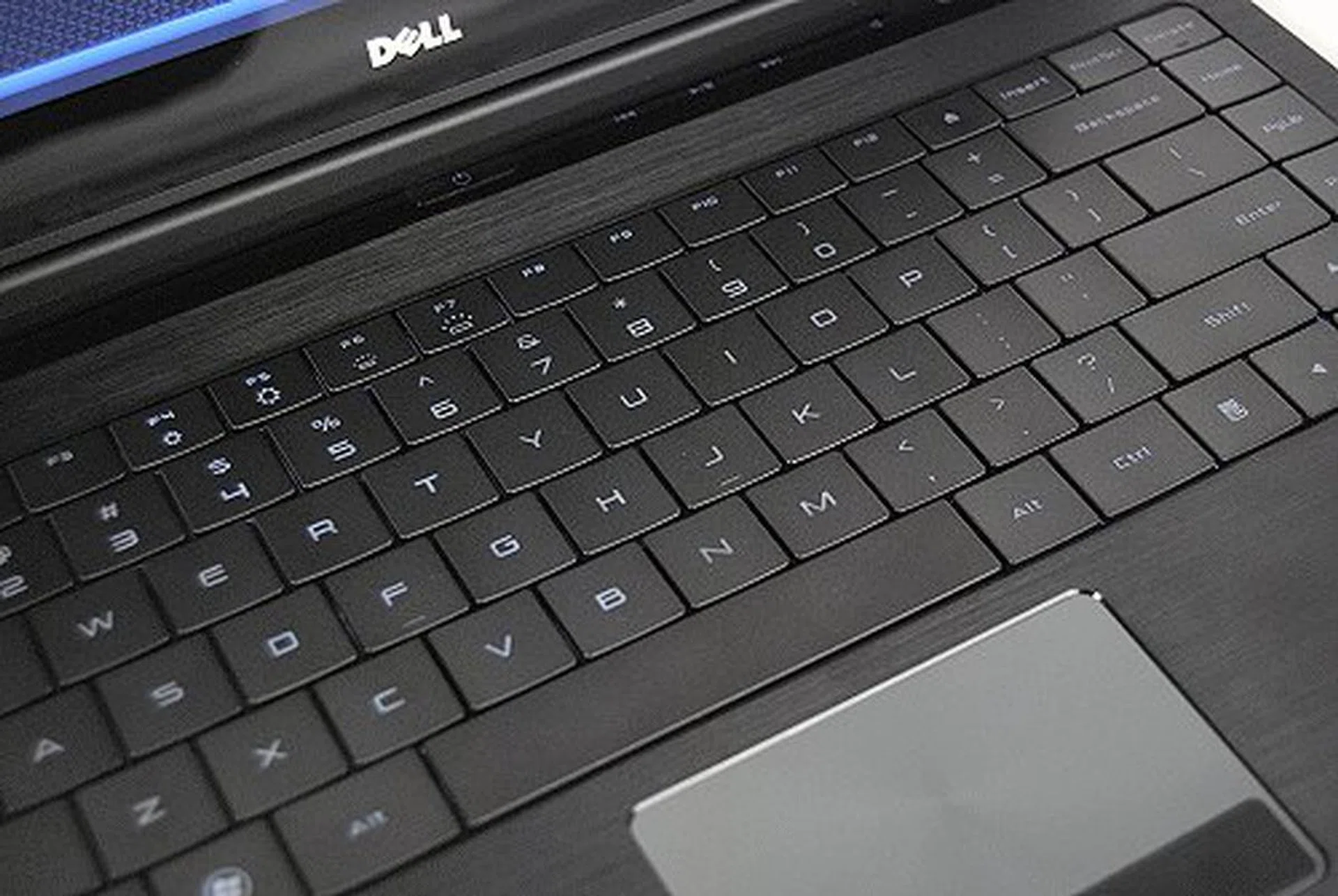
The Adamo's backlit keyboard was definitely one of the nicest keyboards that we've come across this year.
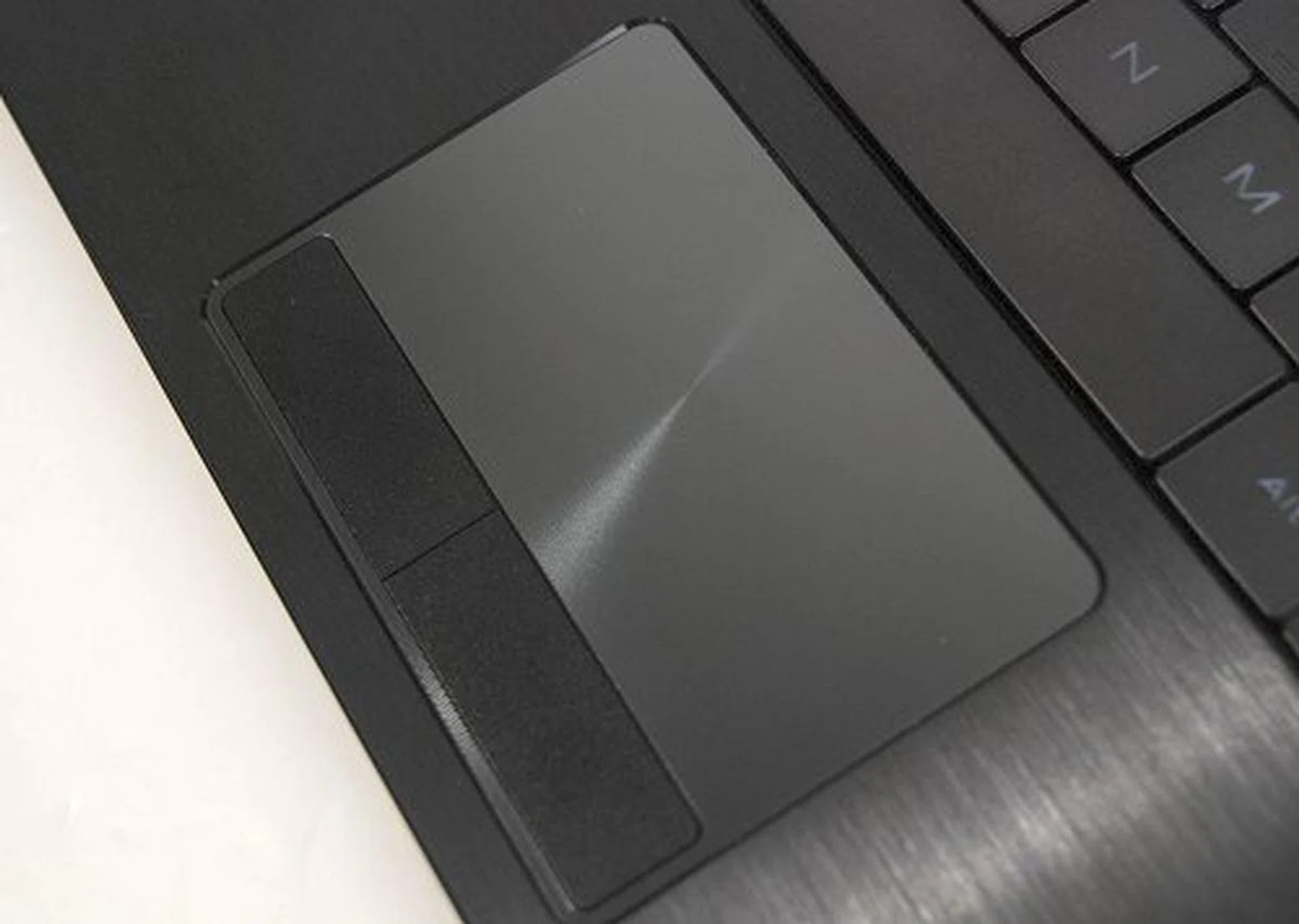
The trackpad was responsive and a pleasure to use.
The trackpad has an odd finish that makes the middle of the pad look pointed, but this is all just in your mind, because the trackpad feels smooth and responsive right from the start. You should have no problems navigating with this trackpad, and you'll find yourself liking it quite a lot.
Lastly, audio is probably the only problem that we've noticed, as we pointed out earlier, due to the way the Adamo is designed, the audio is actually coming from behind the screen. Certainly an odd placement and is totally of no help if you're outside in a noisy location trying to listen to something without headphones.
This Feeling Inside
For its internals, the Adamo is not slacker either. Sure it uses an Intel Core 2 Duo ULV (1.2GHz) processor but that hasn't stopped Dell from packing 2GB DDR3 RAM and a 128GB SSD. For the record, our review unit is actually the slightly slower 1.2GHz model and not the 1.4GHz model available here locally. Also the while our model comes with 2GB of DDR3 RAM, the faster variant comes with 4GB of memory. The SSD drive is the same for both models and should deliver plenty of performance with power savings as well. Speaking of power, the Adamo has a non-removable battery that Dell claims to deliver 5 hours of battery life, and we'll find out soon enough if it delivers on its claims.
Lastly, there's really no need to upgrade your spanking new and shiny Adamo as the notebook isn't upgrade friendly (well, you can't actually do so). Flip it around and you'll find that it's just one smooth surface on the back, with a simple metal plaque adorning the rear. This metal plaque is Dell's concession to Intel and Microsoft for not having an Intel and Windows sticker on the notebook. Frankly, while it's certainly an elegant solution to the sticker problem, we wished Microsoft and Intel relaxed their rules for a notebook of this design in the first place. Luckily, it's hidden at the bottom anyway, so it won't be that obvious to the eyes.
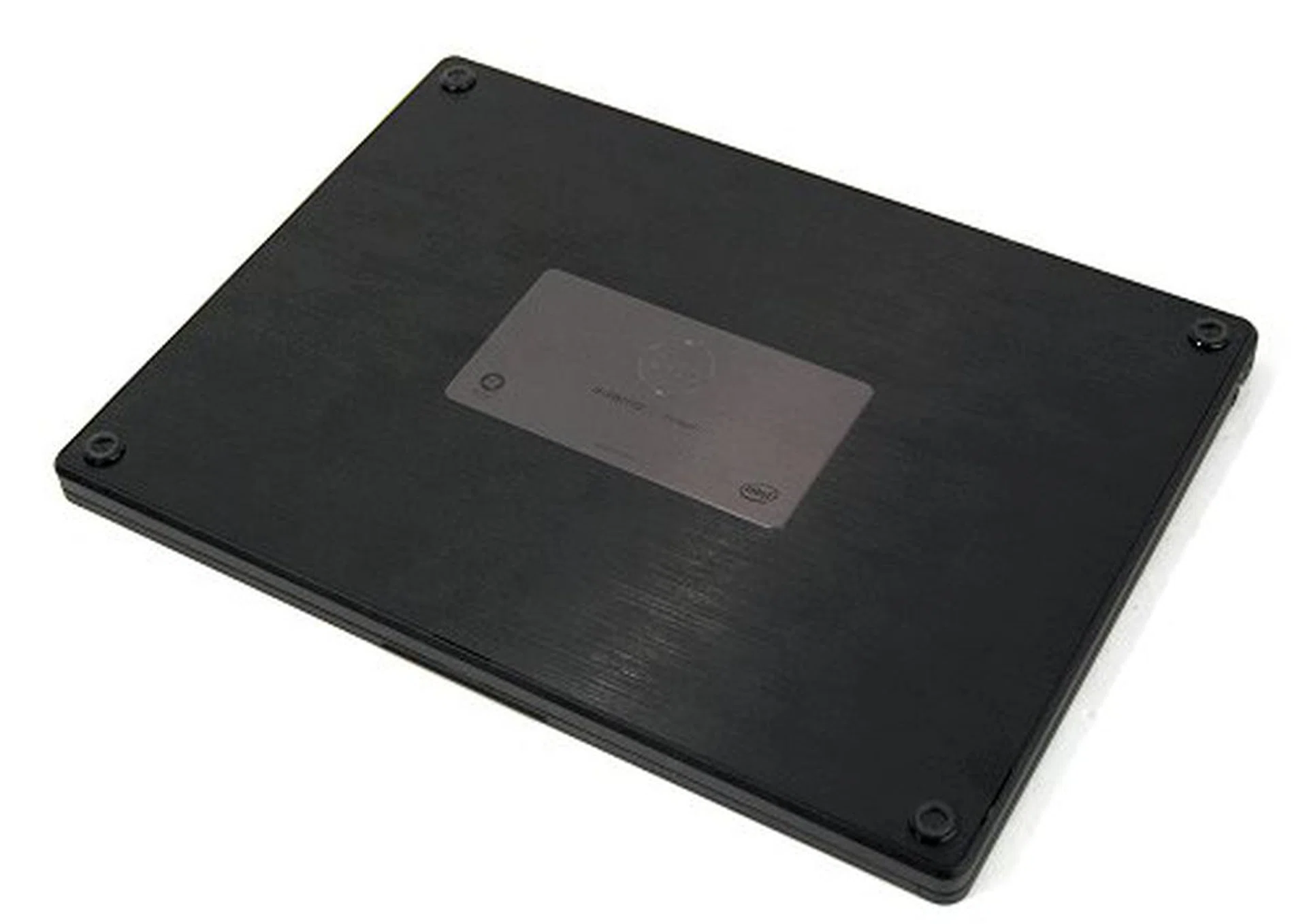
The bottom of the Adamo reveals a very clean surface with just a metal plaque adorning it.
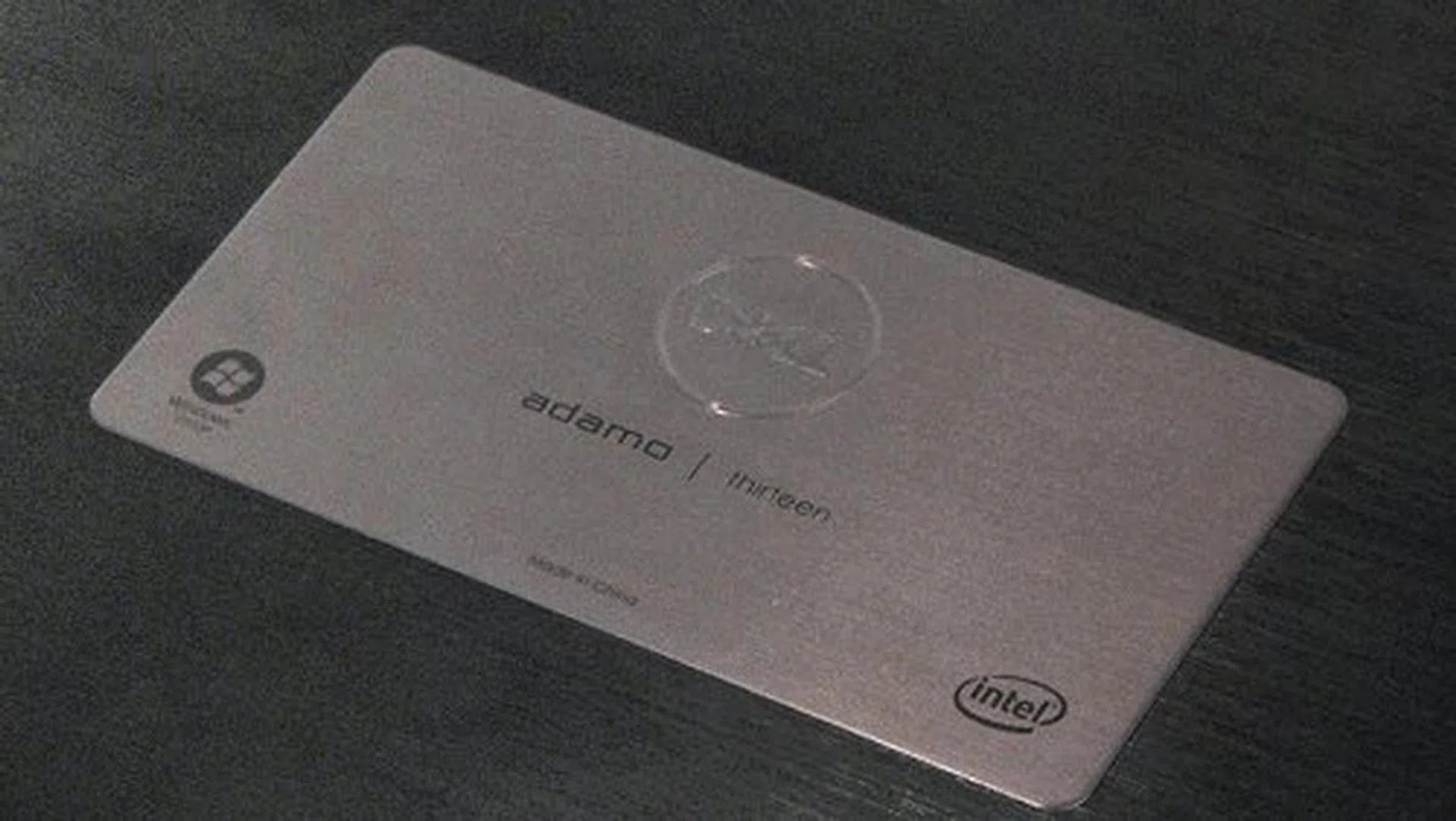
A closer look at the plaque reveals that this is Dell's solution to the requirement of having Intel and Windows stickers on the notebook.
Battery Life and Portability Index
Specifications / Notebook | Dell Adamo | Toshiba Portege R600 | Lenovo ThinkPad X300 |
Processor | Intel Core 2 Duo processor ULV SU9300 (1.20GHz) with 3MB L2 cache | Intel Core 2 Duo processor ULV SU 9400 (1.40GHz) with 3MB L2 cache | Intel Core 2 Duo SL7100 (1.2GHz, 4MB L2 cache) |
Chipset | Iintel GS45 | Intel GS45 | Intel GM965 |
FSB | 800MHz | 1066MHz | 800MHz |
Memory | 2GB DDR3 | 3GB DDR2 | 2GB DDR2-667 |
HDD | 128GB SSD | 128GB SSD | 64GB SSD |
Video | Intel GMA 4500MHD | Intel GMA 4500MHD | Intel GMA X3100 |
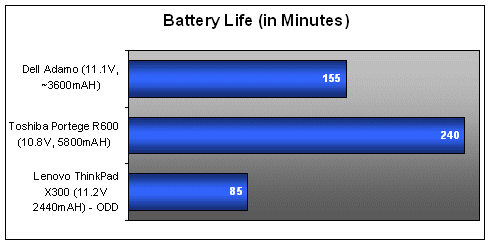
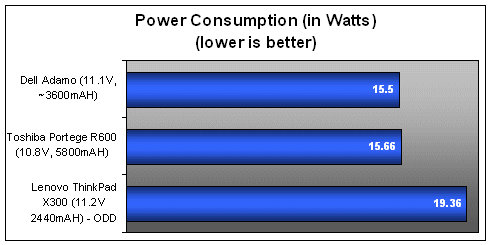
While Dell claims that the Adamo would have a battery life of 5 hours, our video playback test showed that the unit lasted for just 2 hours and 35 minutes. Note that the Adamo doesn't have an optical drive, so we used a video clip looped on the hard drive, which if given all things were equal, not using the optical drive actually uses less power. And yet the up-time achieved was nowhere near the claims of the battery life. Power consumption on the other hand, was within what we expected from the hardware of the Adamo. As you can see, the power consumption figure of the Adamo is pretty similar to the Toshiba Portege R600, an ultraportable that uses the same hardware platform. The R600 however packs in a much more powerful battery and thus lasts a lot longer too in the video playback test.
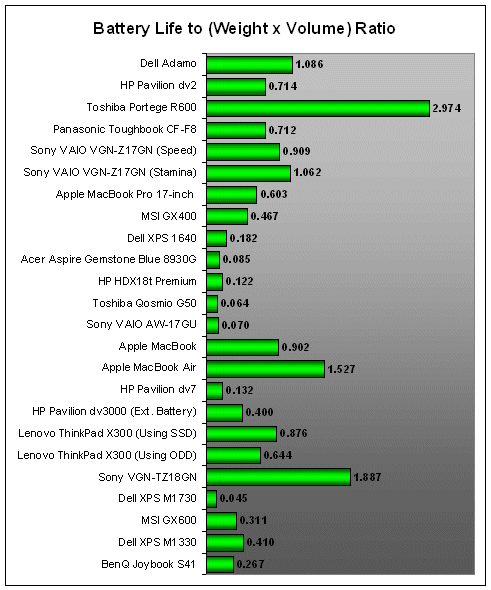
The Dell Adamo didn't do too badly in our Portability Index calculation, though it fare quite as well as our initial expectations. This is mostly due to its hefty 1.81kg weight and shorter than expected battery life which gave the unit a score of just 1.086, pretty comparable to the Sony VAIO VGN-Z17GN, but we do like to point out that the VAIO unit was using a more powerful platform compared to the Adamo. On the other hand, the Adamo is perhaps the most sturdy ultraportable you might ever get with great build quality all around. So that's something for you to think about and even try it out if chance permits.
Performance Benchmarking
As you've noted earlier during the battery performance segment, we've thrown in two other ultra light notebooks into the mix, the Lenovo ThinkPad X300 and the Toshiba Portege R600. While the Dell Adamo isn't exactly an ultraportable per se (thanks to its ultra sturdy build) , it's using hardware that's pretty similar to what both these units are using, so in this case, it's actually a reasonable point of comparison.
Specifications / Notebook | Dell Adamo | Toshiba Portege R600 | Lenovo ThinkPad X300 |
Processor | Intel Core 2 Duo processor ULV SU9300 (1.20GHz) with 3MB L2 cache | Intel Core 2 Duo processor ULV SU 9400 (1.40GHz) with 3MB L2 cache | Intel Core 2 Duo SL7100 (1.2GHz, 4MB L2 cache) |
Chipset | Intel GS45 | Intel GS45 | Intel GM965 |
FSB | 800MHz | 1066MHz | 800MHz |
Memory | 2GB DDR3 | 3GB DDR2 | 2GB DDR2-667 |
HDD | 128GB SSD | 128GB SSD | 64GB SSD |
Video | Intel GMA 4500MHD | Intel GMA 4500MHD | Intel GMA X3100 |
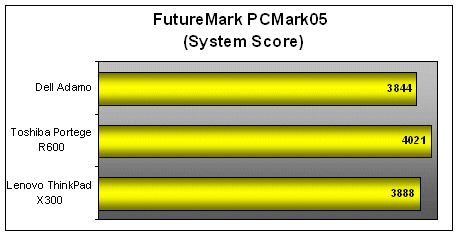
In the PCMark05 and PCMark Vantage segments, we found that the Dell unit generally held its own against the other two units, losing in the CPU test for PCMark05 to the Portege due to its slightly slower clocked processor. It did fare better in the hard drive department thanks to its speedy SSD, though it's still slower than the Lenovo's X300 blazing fast speed.
Unlike PCMark05 where it was rated slightly behind the other units, the Adamo did much better in PCMark Vantage with a slightly higher score compared to the other units. The HDD results also showed that its drive is pretty close to the X300, though the X300's performance in PCMark05 remains unmatched.
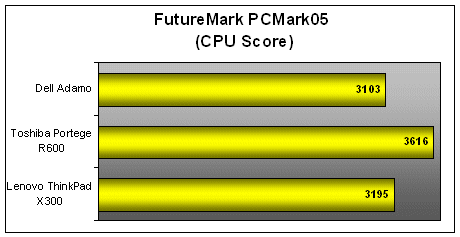
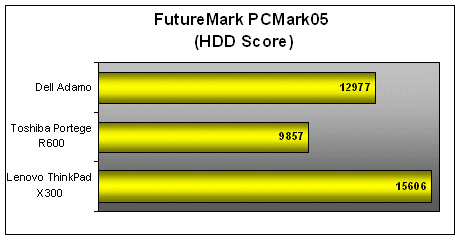
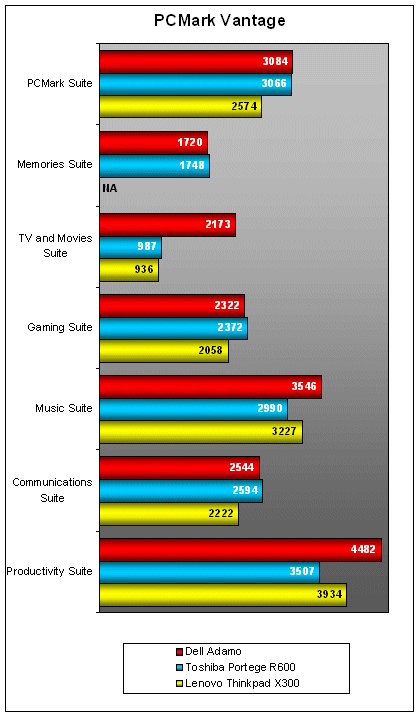
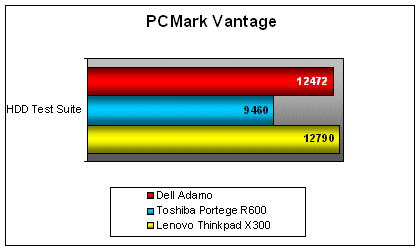
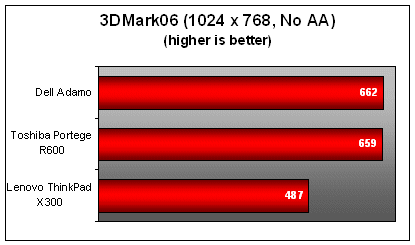
3D graphics has never been a strength of the Intel GS45 chipset, so it's no surprise to find that the results are quite similar (except for the Lenovo ThinkPad X300, which is using an older integrated graphics chipset). Then again, we doubt you would actually want to game on the Adamo anyway.
The Adamo - Sexy, Sturdy and Pricey
In a war of looks and style, the Dell Adamo will forever stand out in our books as one of the sexiest notebooks around. While it's certainly pretty looking enough, we're just disappointed that Dell didn't actually take on the gloss-free path. Still, we like that Dell has spent quite a bit of effort in designing the Adamo, and it shows in the aluminum unibody design, the exquisite thin build and the fantastic keyboard. Even the reluctant looking addition of a metal plaque at the bottom fits in well with the whole theme and concept of the notebook.
Performance wise, we have nothing much to gripe about, as the Dell Adamo performed to expectations for an Intel ULV based notebook. While it's not exactly a workhorse designed for business road warriors, it's a machine that should satisfy the folks that are rich enough to afford one.
Battery life for the Adamo doesn't seem like its strong suite: while Dell claims a battery life of 5 hours, our own tests showed it only managed half that time in our video test loop. Perhaps it might last much longer on general productivity and Internet based activities, but we did have better expectations. And mind you, you can't improve the battery life since the battery is integrated within the Adamo chassis. If you're hoping for something that will last you for quite a while without charging, the Adamo isn't quite the one - unless you simple can't resist its sexy and sturdy build quality.
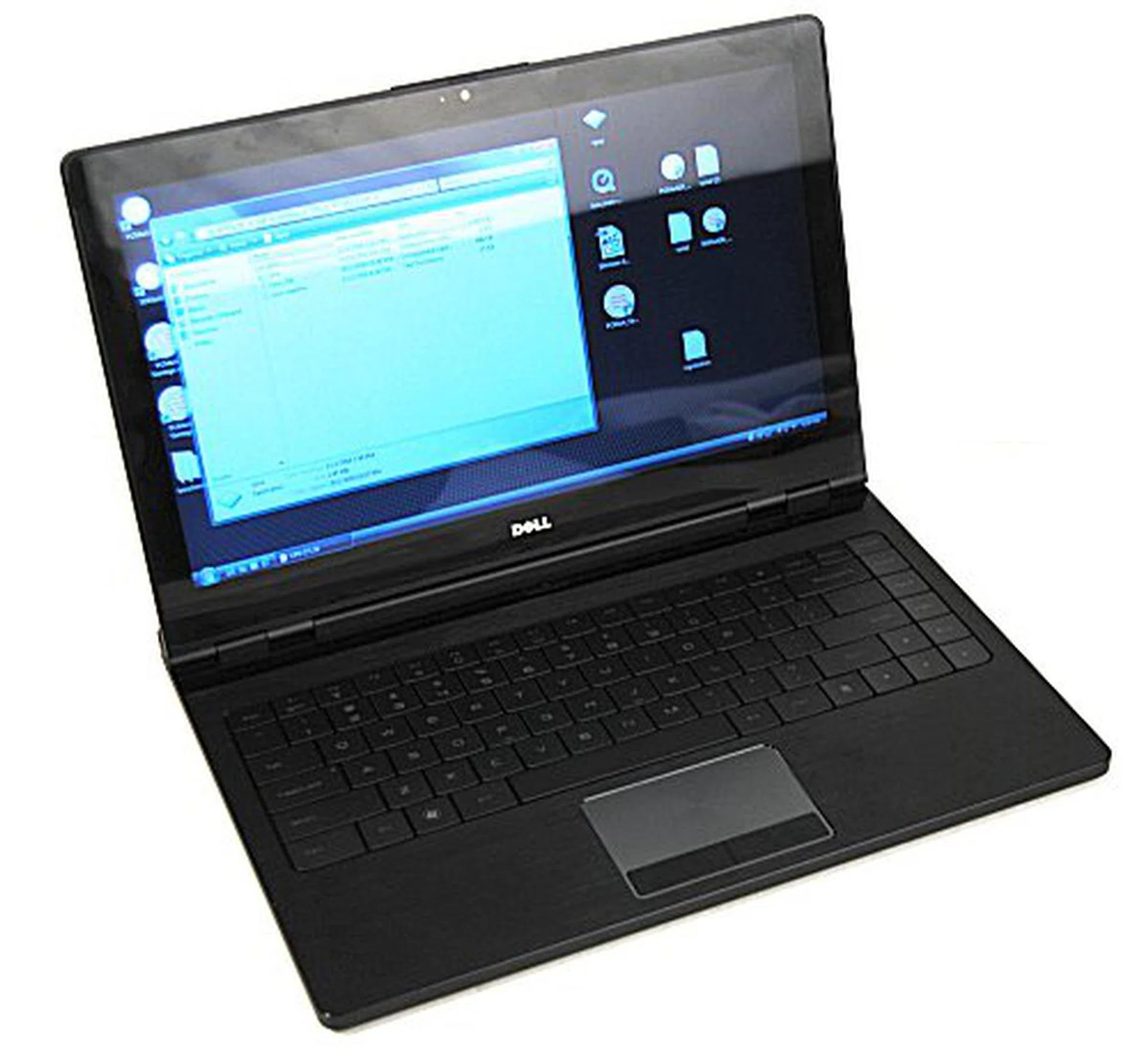
Gorgeous looks, exquisite thin build and a fantastic keyboard can be yours for mere sum of S$4499 for the 1.4GHz model. The 1.2GHz model that we reviewed is not available locally.
Retailing at S$4499 locally, you'll actually be getting the top end model with a faster processor and more memory than the unit we've reviewed which isn't available in Singapore. Furthermore, it seems that the mobile broadband feature that's available in a similar US model will not be available on local units. We've checked with Dell and they've mentioned that the local models will not be equipped with 3G modems though that may change if interest permits. It's a shame though, seeing as how the Adamo is already designed with a SIM card slot.
Discounting the missing 3G connectivity, we're happy to conclude that the Dell Adamo still has enough to knock your socks off, if you can afford it of course.
Our articles may contain affiliate links. If you buy through these links, we may earn a small commission.