
ASUS Zenbook Prime UX31A - Same Design, Better Build
At first glance, you probably can't tell the difference between a first generation 13-inch Zenbook and the second generation Zenbook Prime. But we assure you that the updated Zenbook Prime has what it takes to be at the top of the Ultrabook competition.

The Zen Prime
Since the introduction of the Ultrabook category, ASUS has branded its own Ultrabook lineup as Zenbooks. Of them, the sleekest of them is the Zenbook Prime UX31A. This eye-catching notebook adopts a 13-inch form factor, clad in a sleek aluminum body (just like its predecessor) and is coupled with updates to its screen and keyboard that would be most welcomed. We take a short break from the all the convertible/hybrid notebook variants to see how does this pure Ultrabook unit fare in our assessment. Also, since this notebook is mostly an updated edition of the original Zenbook UX31 that we've reviewed early in the year, we shall be keeping the review of this Zenbook Prime UX31A short and prim.
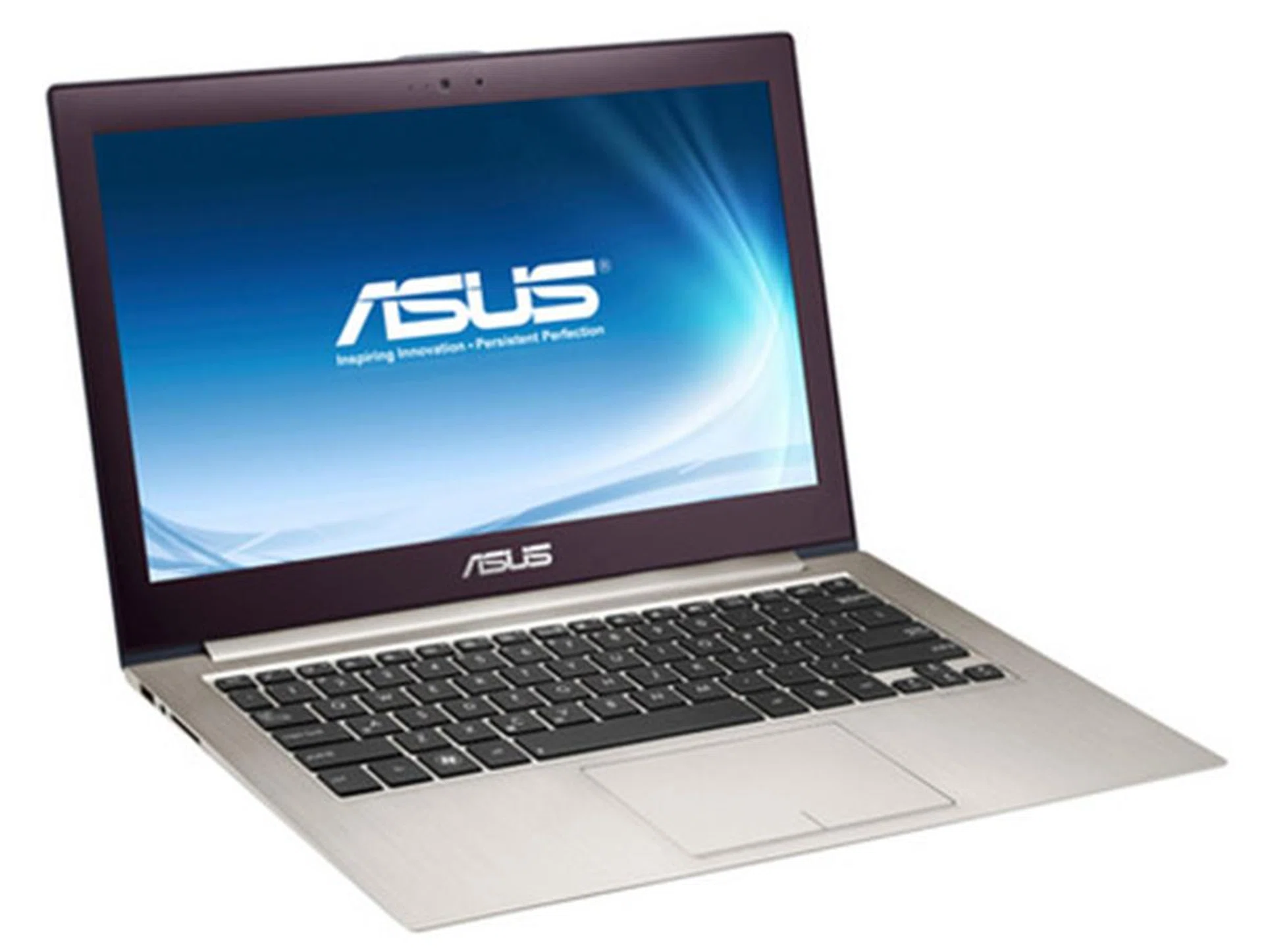
Looking almost similar to its previous iteration, the Zenbook Prime UX31A sports updated components, including an all new full HD screen and keyboard design. We bet these two aspects are enough to draw your attention.
Design and Physique
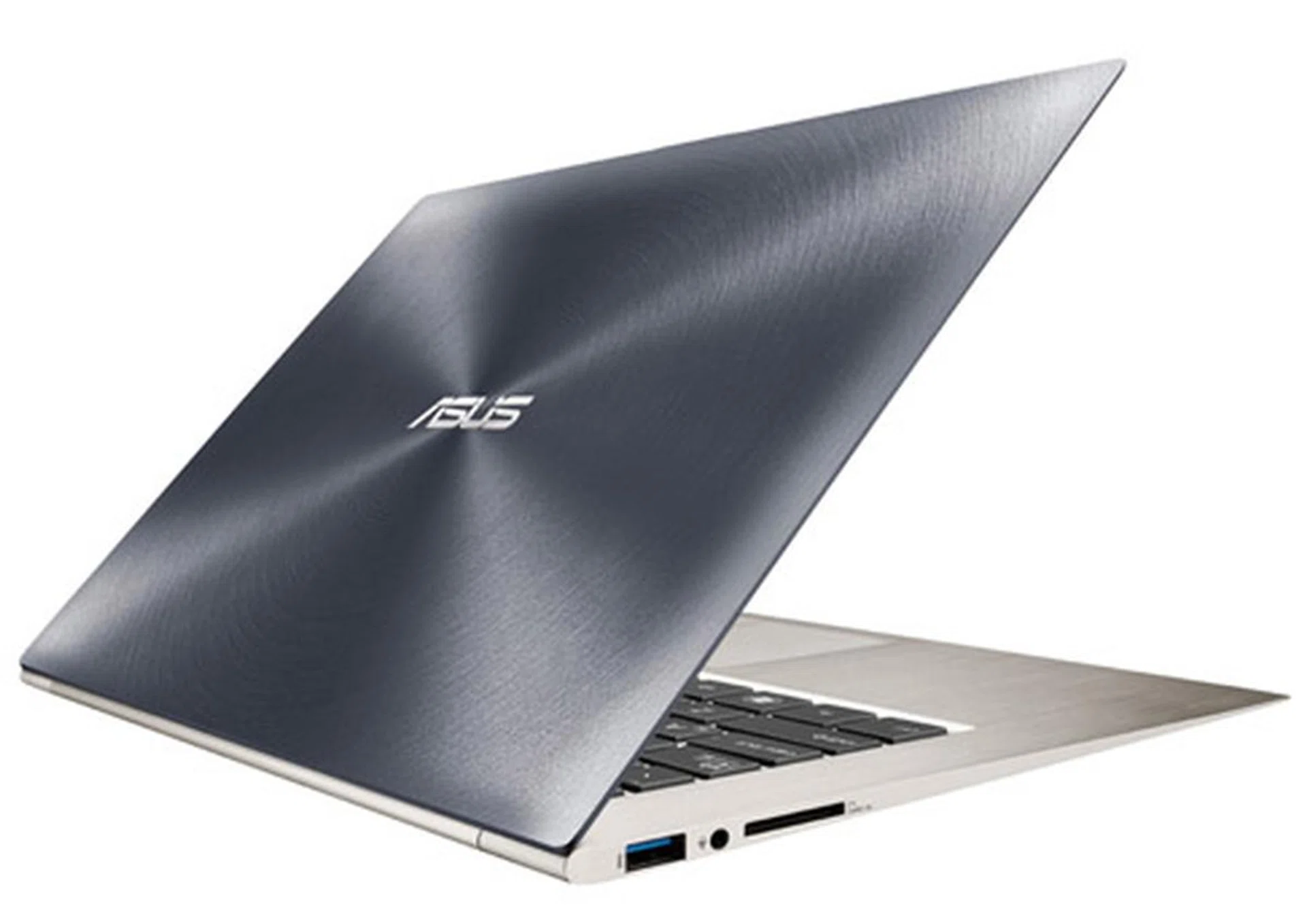
The Zenbook Prime has a premium feel due to its all-aluminum body which was also used on the previous Zenbook. The exterior of the Zenbook Prime features the "Zen" or circular pattern which gives this Ultrabook its unique look and feel. Light bouncing off the notebook's lid from any angle would reflect off it in radial pattern, which is a subtle, yet signature design of the ASUS Zenbooks and is definitely eye-catching compared to other Ultrabook designs.
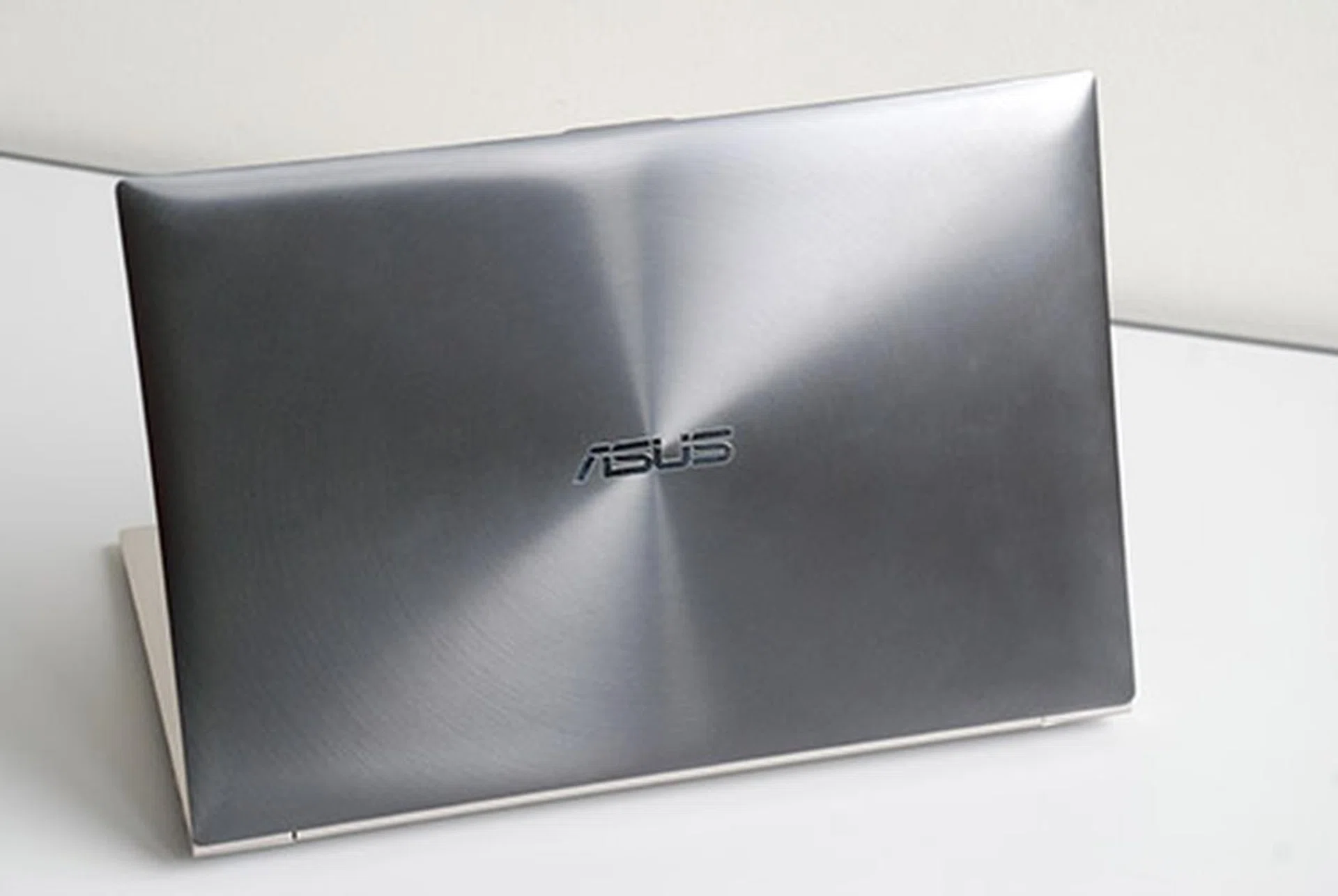
The unique aluminum finish and darker color of the Zenbook Prime's cover gives off a very nice premium distinction.
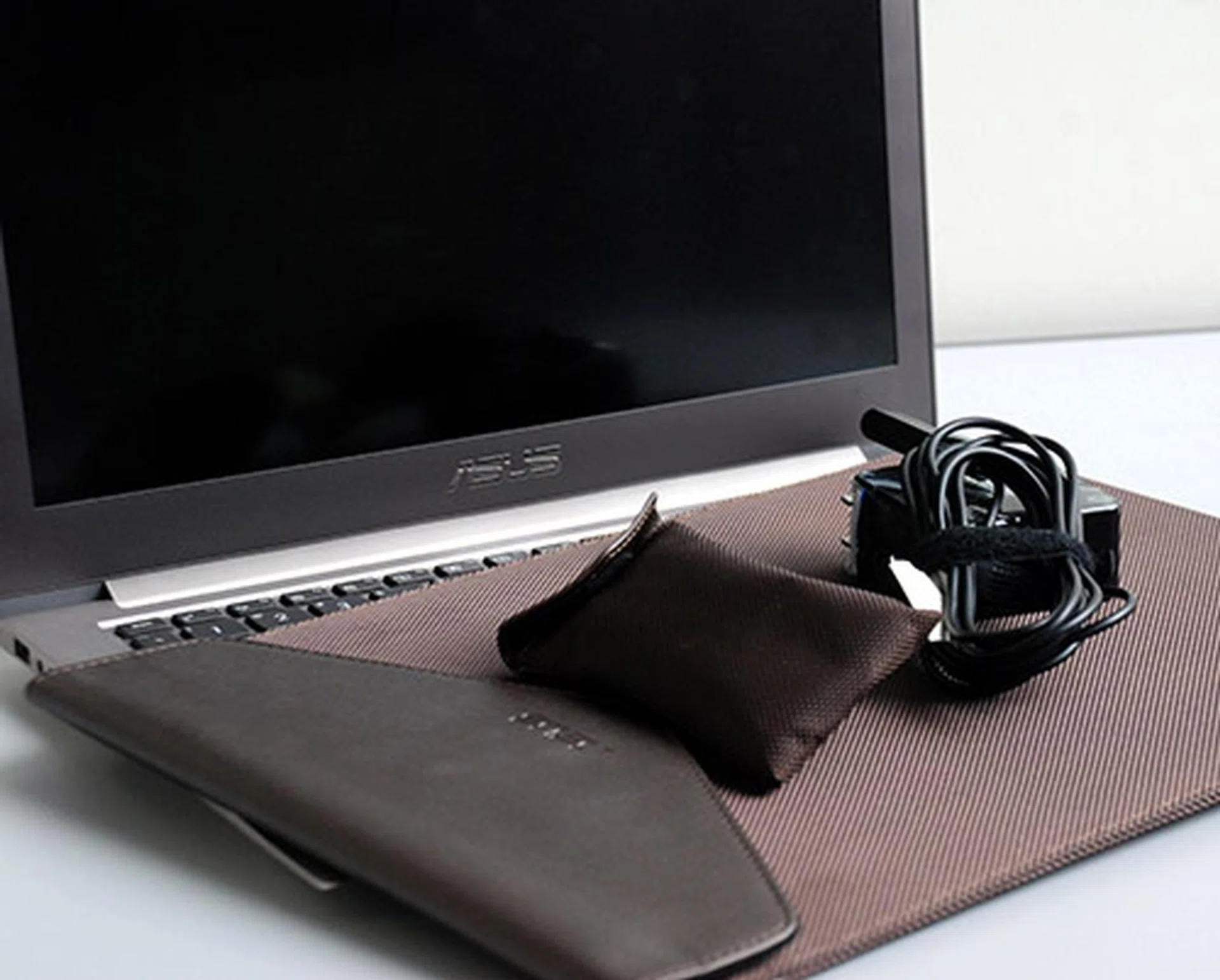
The power brick of the Zenbook Prime's charger is notable due to its similarity with the MacBook's power brick. To accompany it in a fashionable way, ASUS has included its very own stylish case that goes very well with the notebook sleeve provided.
Checking its left and right side profiles, we see that it almost has the same set of ports as the first Zenbook. However, the Zenbook Prime takes onboard two USB 3.0 ports, instead of a mix of a USB 2.0 and a USB 3.0, in addition to a mic-in/headphone-out audio jack, SD card reader, micro-HDMI, and a mini-VGA connector.
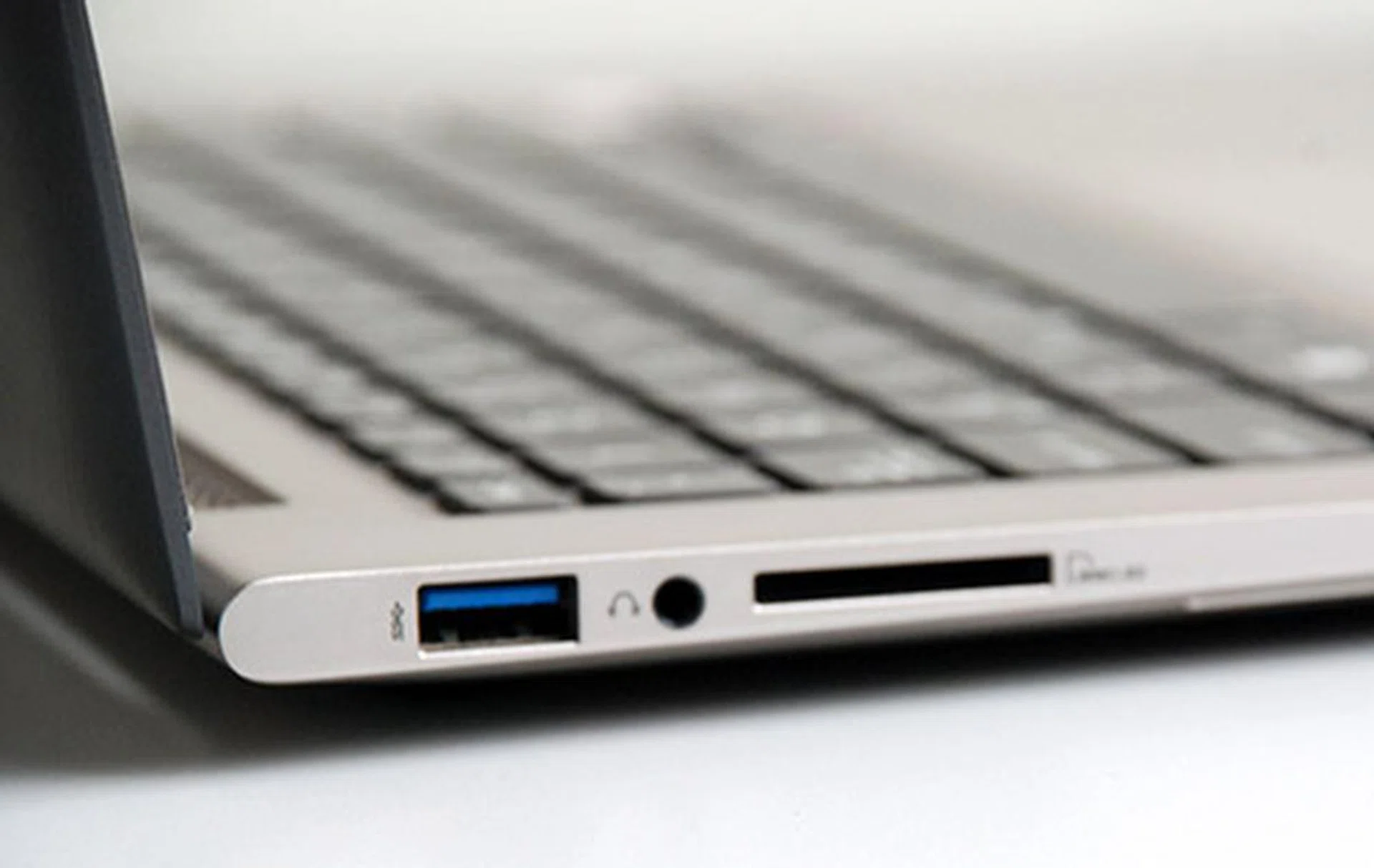
The Zenbook Prime's left side hosts a USB 3.0 port, headset port, and an SD card reader.
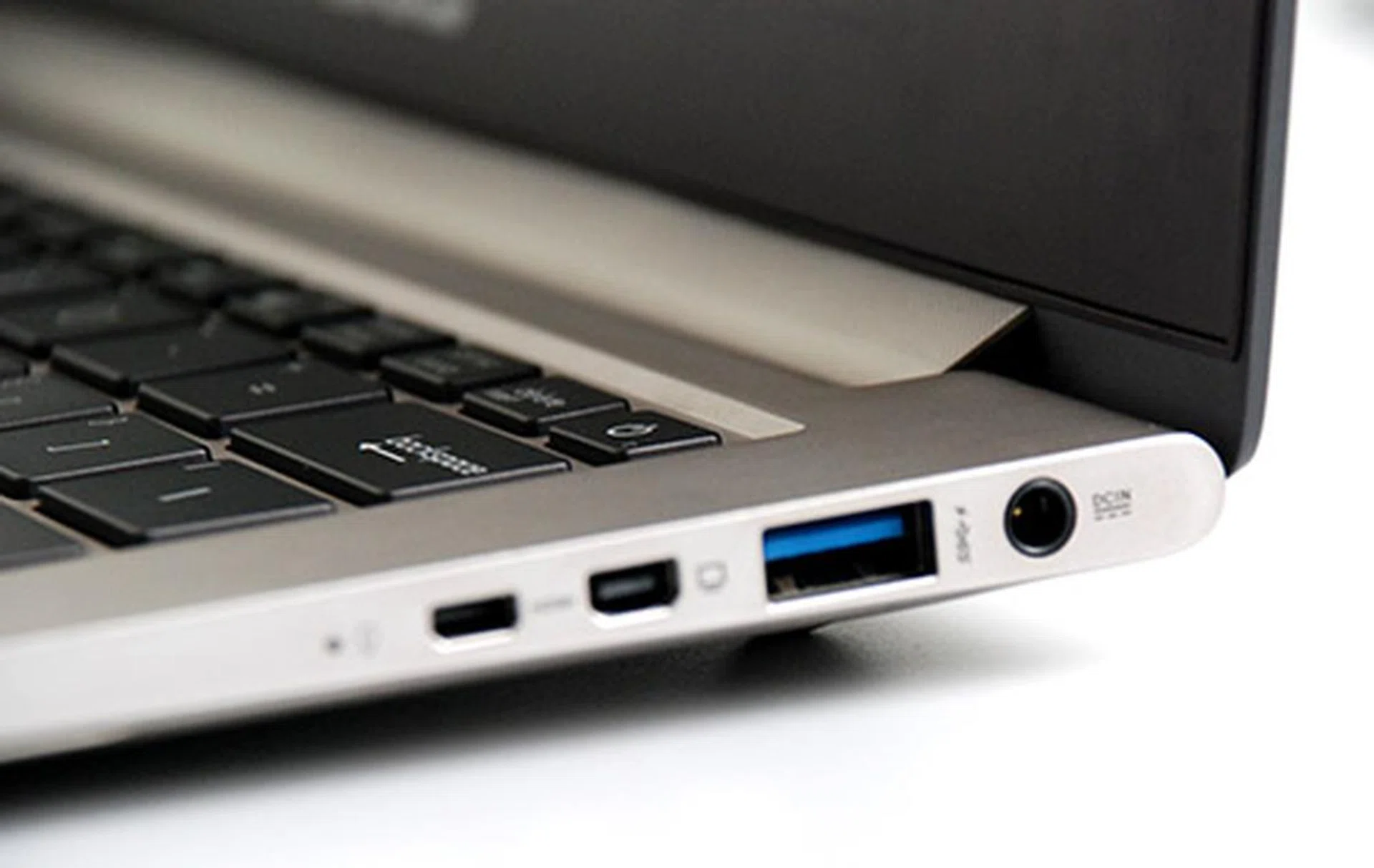
On the other hand, the right side includes a micro-HDMI, mini-VGA and another USB 3.0 port.
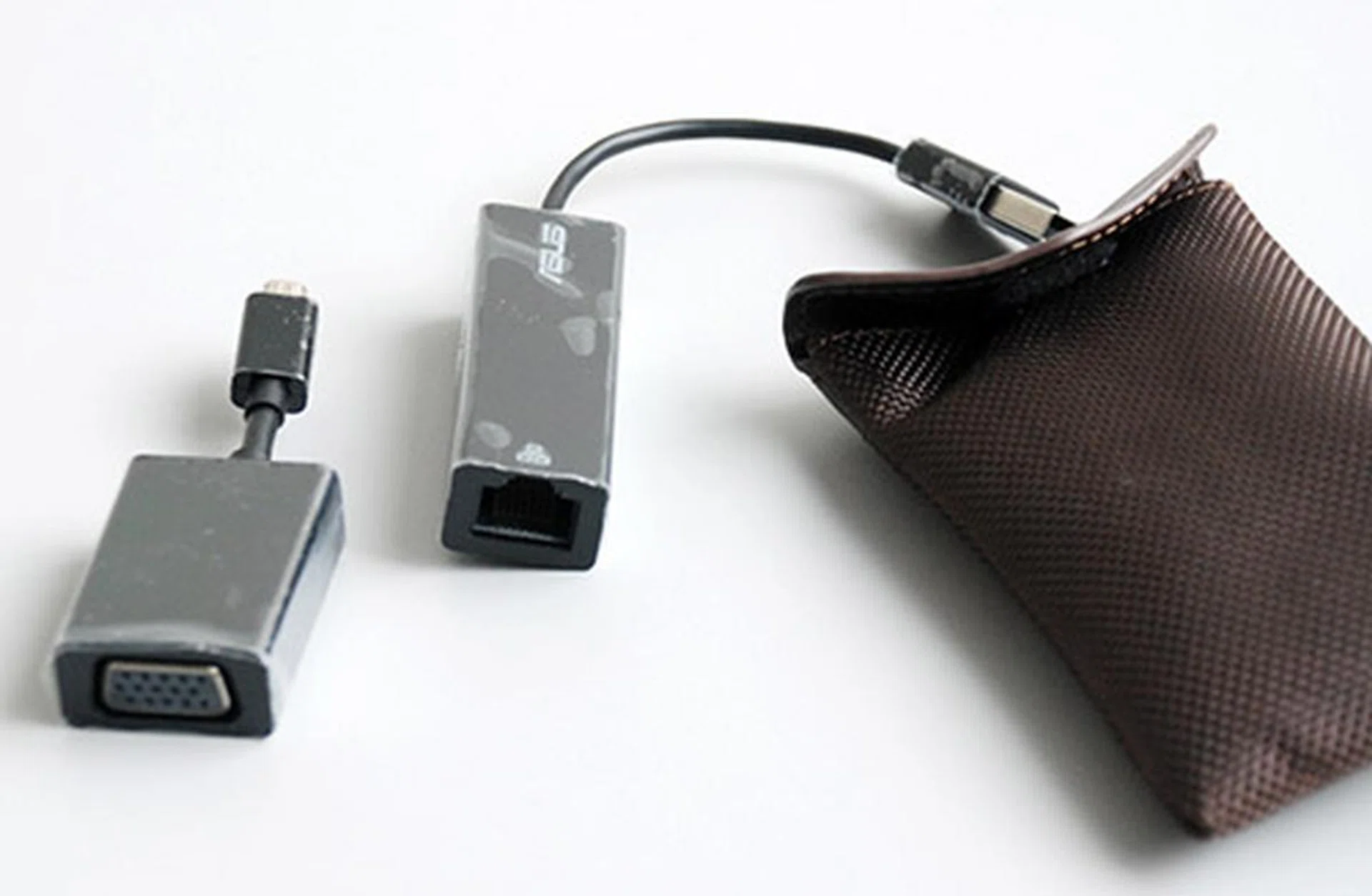
Here are the included converters to provide the Zenbook Prime with a full sized VGA and Ethernet ports. They connect via micro-USB and USB respectively.
We have no qualms with the port selection for the Zenbook Prime except for the included micro-HDMI port. Since ASUS did not include a micro-HDMI to a full sized HDMI converter, this can be quite a chore as obtaining a suitable converter isn't going to be cheap and it's not commonly available. ASUS should have included an additional converter in its package, but the problem mentioned would arise should the user misplace the converter. Given the sleek and tapered design of the Zenbook Prime, it is inevitable that some of the ports had to make sacrifices and the video outputs getting downsized is a better option than the more readily used USB ports.
Taking a look at the keyboard and trackpad of the Zenbook Prime reminds us of the previous Zenbook design, although the chiclet keyboard used for the Prime is of a darker color compared to the metallic finish of the original Zenbook. Fans of the Zenbook series will be glad to know that ASUS improved on the keyboard tremendously. The keys on the keyboard are not as shallow and now provide much more resistance for a very comfortable experience.
The tracking sensitivity of the clickable trackpad has also been improved immensely. This is particularly important because of the increased pixel density of the new full HD display. You'd need that sensitivity to get you from one corner to the next, without having to brush your fingers constantly against the clickpad.
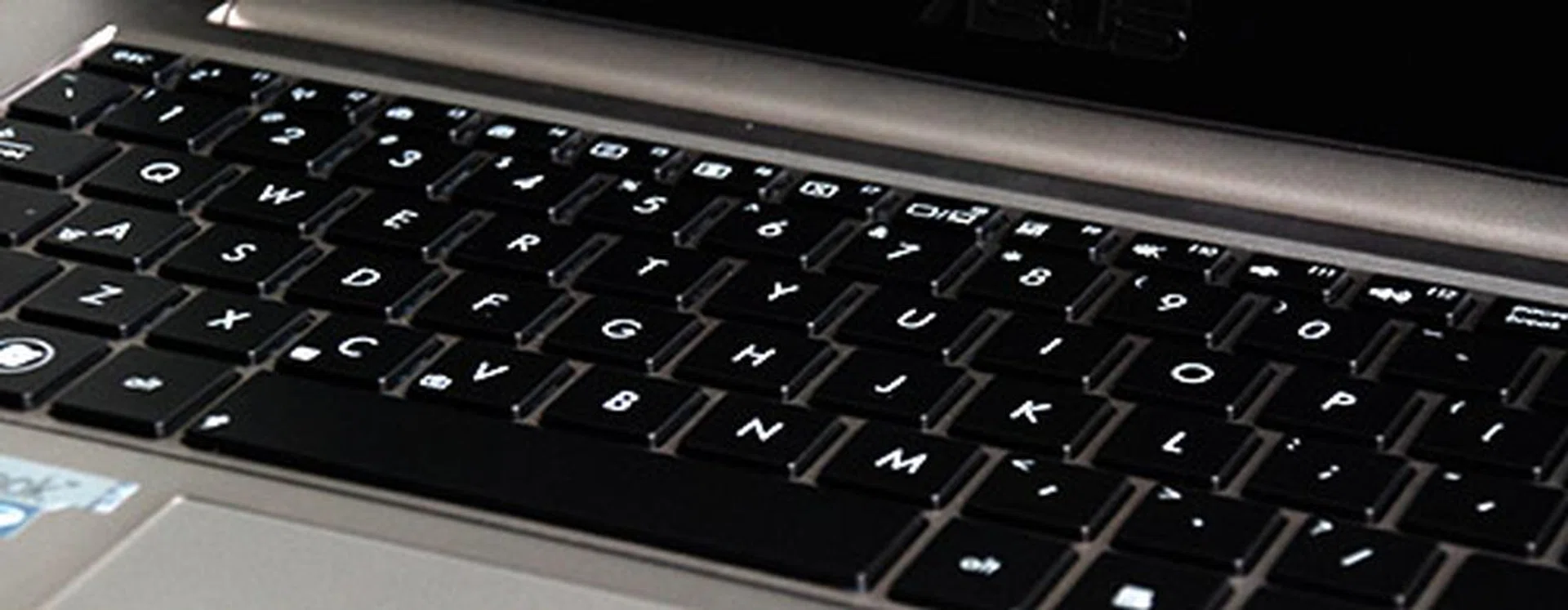
The keyboard is illuminated this time and the user is able to control how strong the illumination is.
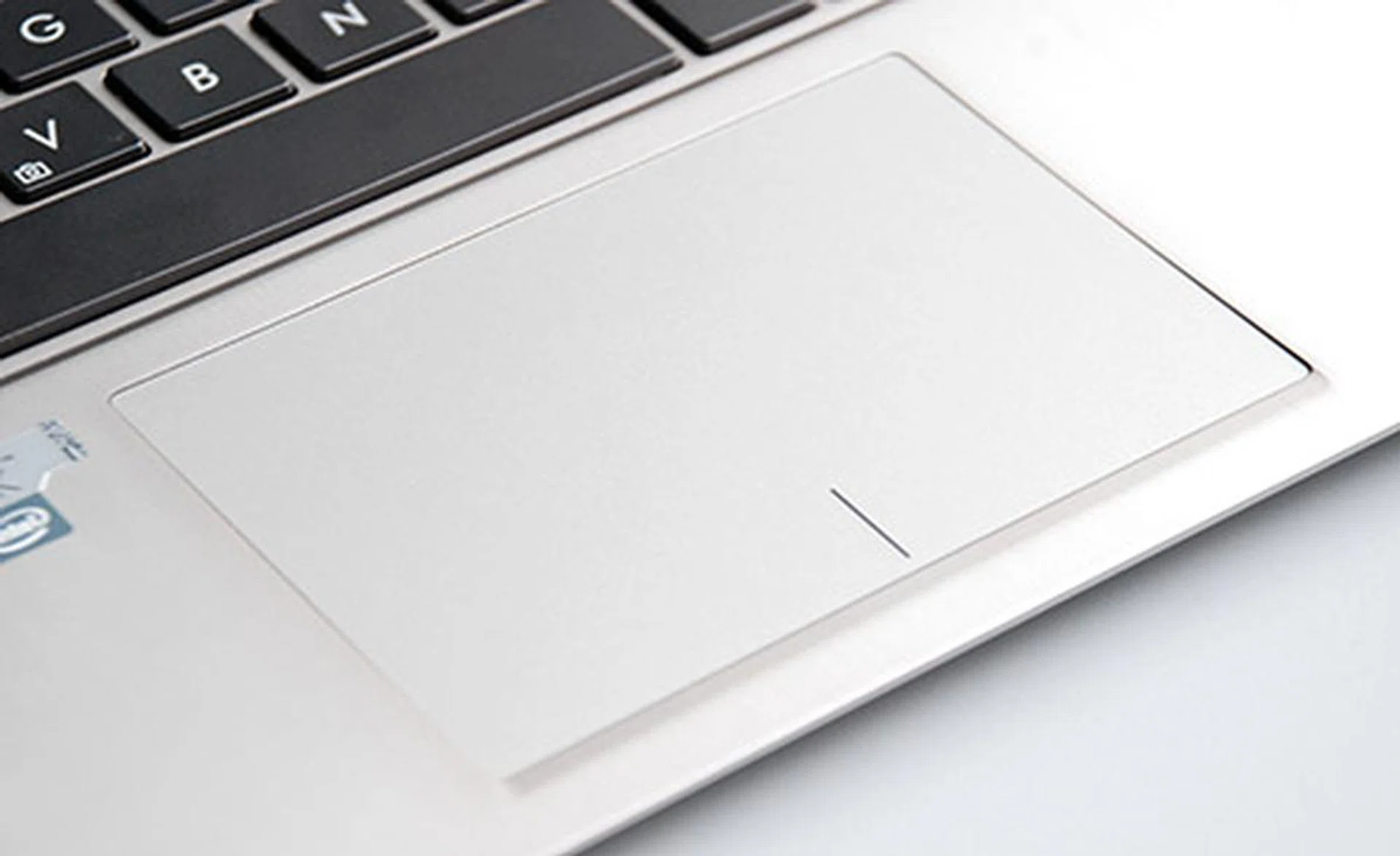
ASUS used a multi-touch clickpad for the Prime. The clickpad’s surface is quite large and tracking has improved much from the previous Zenbook iteration.
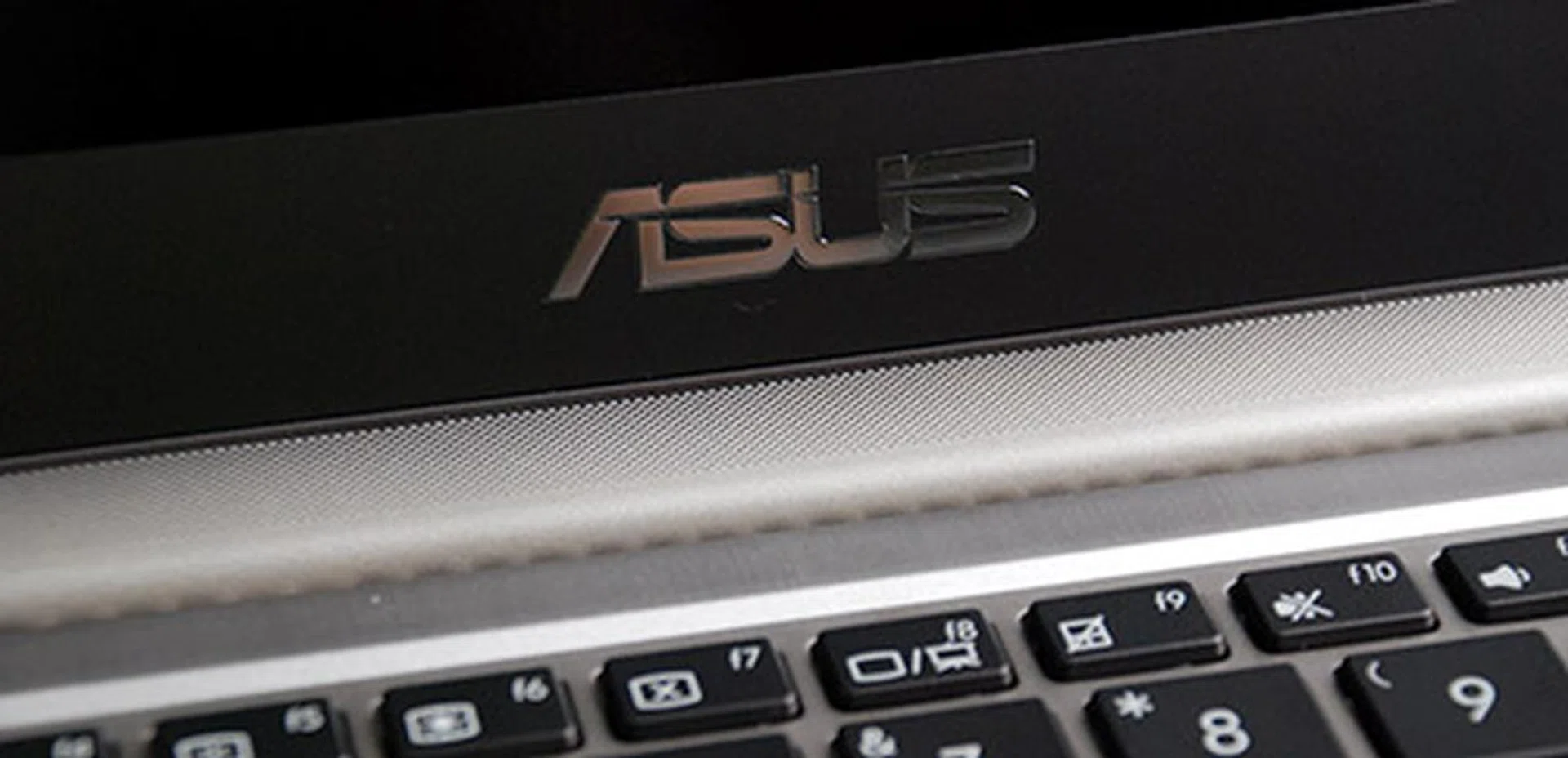
The speaker grill is located at the top of the keyboard and is attached to the hinge. This adds to the design uniqueness of the Prime.
The Prime Put To The Test
The Zenbook Prime is powered by an Intel Core i7-3517U processor clocked at 1.9GHz (turbo boost to 3GHz) coupled with Intel HD Graphics 4000 and 4GB DDR3 memory. For storage, it uses a whopping 256GB SSD, which gives users plenty of space while still having the ultra-fast throughput and seek times. The trade-off as we all know is that having a 256GB SSD means a higher asking price. Hopefully, with the pricing trend of SSDs, we’ll get to see much more affordable prices for higher capacity SSDs.
It is also interesting to see that ASUS stepped up the display capabilities for their Zenbook lineup as the Prime now comes with an option of either a 1600 x 900 or a 1920 x 1080 pixels IPS display panel. This is should be of high interest since there are only a handful of models out there that provides higher than the 'de facto' resolution (1366 x 768 pixels) for Ultrabooks.
Below is a comparison of the Zenbook Prime’s specifications, together with some contenders:
Specifications / Ultrabook | ASUS Zenbook Prime UX31A | Acer Aspire S5
| Samsung Series 9
| Intel Ivy Bridge Reference notebook
|
Processor | Intel Core i7-3517U (1.9GHz) | Intel Core i5-3317U (1.7GHz) | Intel Core i7-3517U (1.9GHz) | Intel Core i5-3427U
(1.7GHz) |
Graphics | Intel HD 4000 | Intel HD 4000 | Intel HD 4000 | Intel HD 4000 |
Memory | 4GB DDR3 | 4GB DDR3 | 4GB DDR3 | Up to 4GB DDR3 |
Display | 13.3-inch 16:9 IPS FHD (1920 x 1080) | 13.3-inch
LED-backlit
(1366 x 768) | 13.3-inch
LED-backlit
(1600 x 900) | 13.3-inch 16:9 HD (1600 x 900) |
Storage | 256GB SSD | 256GB SSD | 128GBSSD | 256GBSSD |
Dimensions | 325 x 223 x 3 - 18mm | 313.8 x 218.5 x 12.9mm | 323 x 226 x 18mm | 329 x 223 x 16mm |
Weight | 1.3kg | 1.16kg | 1.6kg | 1.46kg |
With the updated hardware the Zenbook Prime UX31A has over the Zenbook UX31, the Ivy Bridge-driven UX31A scored 3997 on PCMark 7, and 1201 on 3DMark 11. These scores when compared to the older Zenbook UX31 are higher, but this is expected since the Zenbook Prime UX31A is equipped with the latest hardware. For comparison, we took some of the closest Ultrabooks to the Zenbook Prime UX31A. The closest Ultrabooks we had benchmarks for were the Acer Aspire S5, Samsung Series 9 and we even threw in an Intel Ivy Bridge reference notebook for good measure. Below are the results:
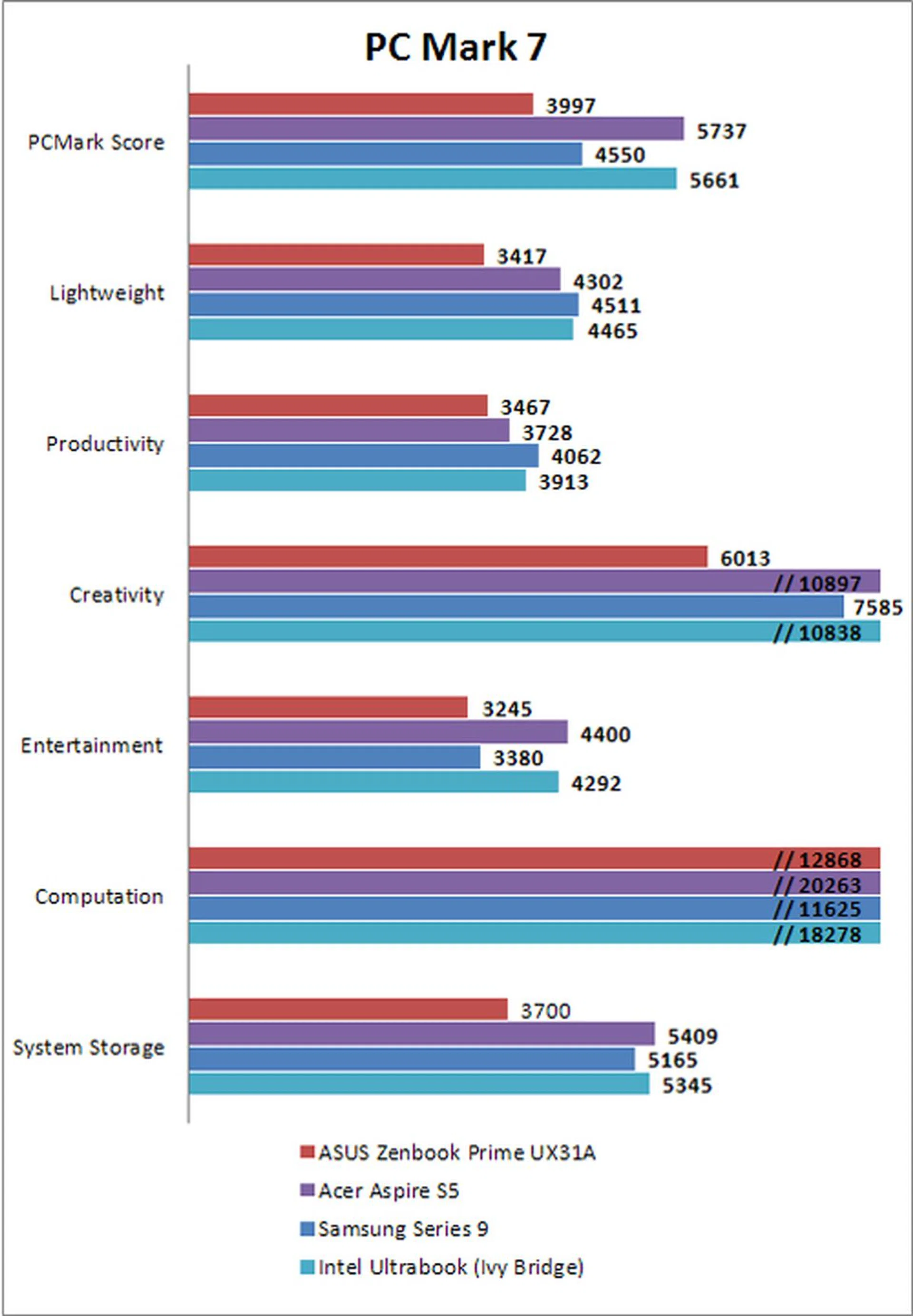
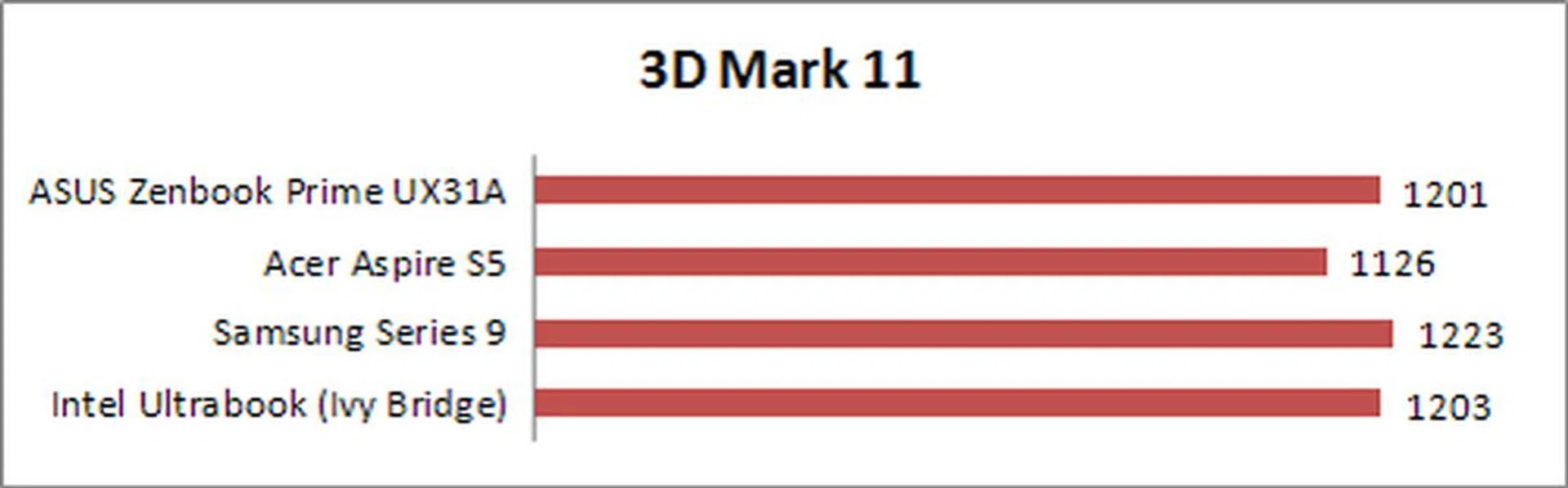
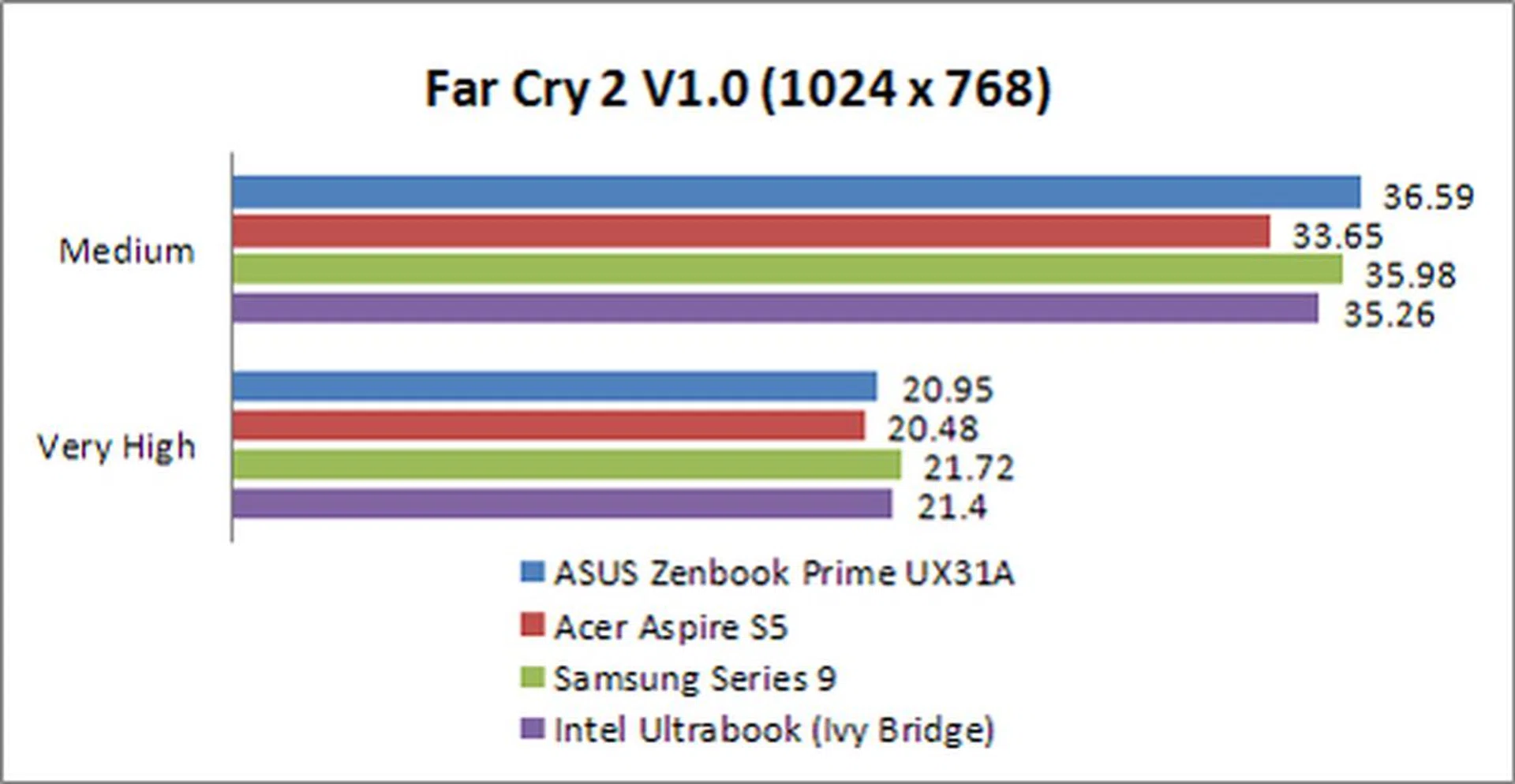
Based from the benchmarks that we used, it can be seen that the third generation Intel Core i7 doesn't perform better than its Core i5 counterpart, apart from gaming aspects. More demanding tasks like graphics rendering or video transcoding could see better improvements, but from our experience, these differences are small. The Zenbook Prime UX31A does deliver Ultrabook performance that trumps non-SSD sporting notebooks, but it trails behind when compared to notebooks with superior SSDs.
On the whole, it wasn't on top of all our performance benchmarks, but any performance difference in the benchmarks would probably be unnoticeable for everyday use. From that perspective, one could probably opt to buy the third generation Intel Core i5-equipped Zenbook Prime UX31A to shave some costs as the differential spent for the better processor isn't quite worth it.
Battery Performance
Being an Ultrabook, the battery life of the system really matters since the Ultrabooks aim to tackle the issue of longer battery life, while still maintaining desirable computing power. To test the machine’s battery life, after completely charging the battery, we ran Powermark with with the machine's brightness and volume turned down to 50%. Connectivity (Wi-Fi and Bluetooth) was also switched off.
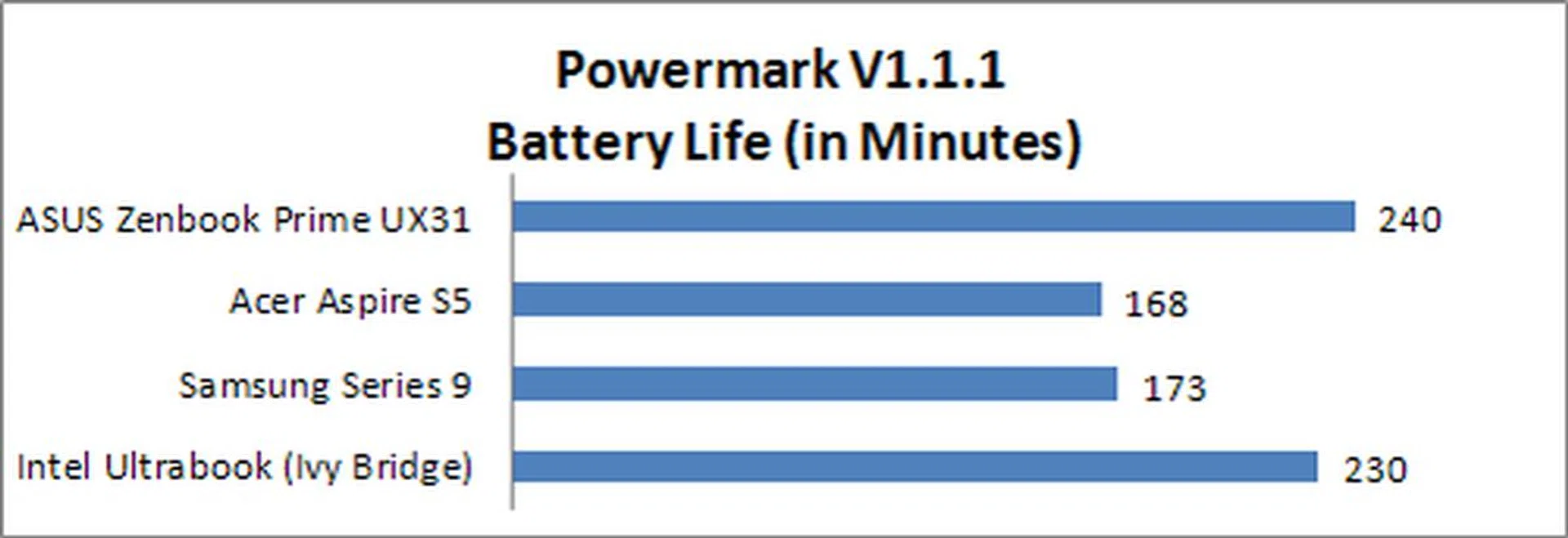
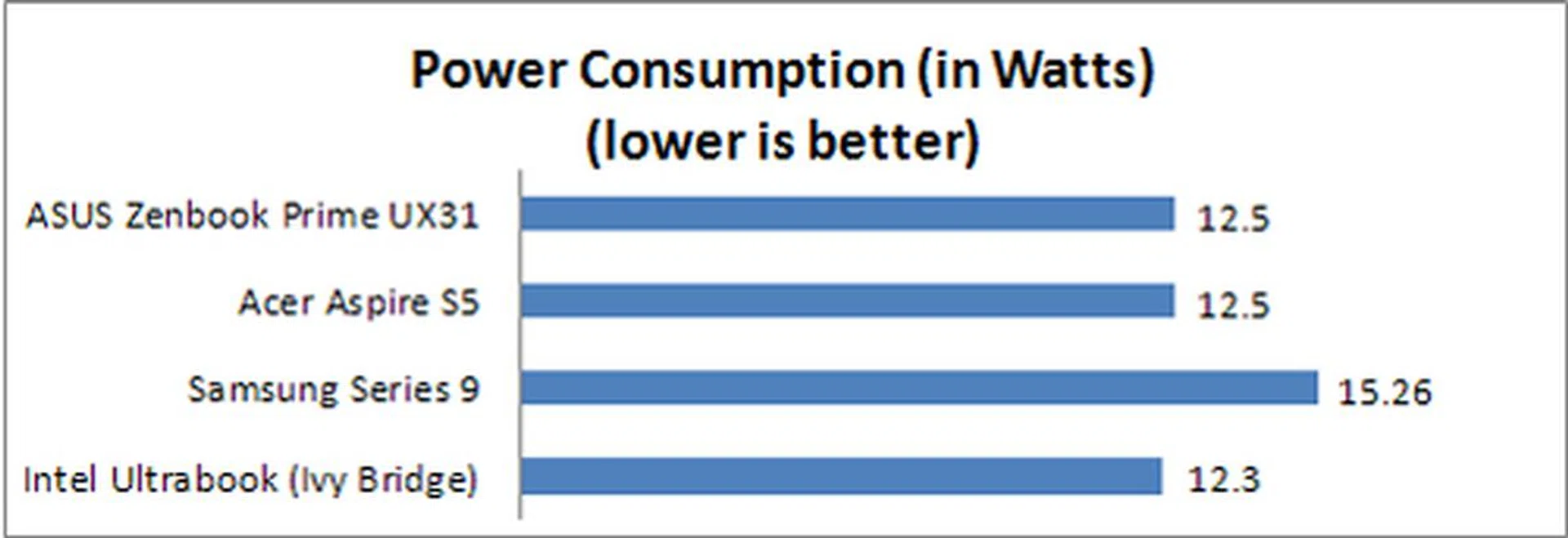
The Zenbook Prime UX31A, lasted for a good 4 hours when running Powermark. This is particularly impressive because the benchmark puts the machine through a barrage of CPU intensive tasks which the notebook is expected to go through on a daily basis. It even fared slightly better than Intel's own reference Ivy Bridge Ultrabook.
On top of that, it should be noted that the review model that we used for this test has a full HD IPS panel which means that its resolution is 1920 x 1080 pixels. Having a full HD panel means higher power consumption since it needs to light up more pixels and thus leading to greater power draw. This means that power management on the notebook is excellent, as you can see from the power consumption chart. Despite having a full HD display, power draw is almost on par with that of the 1600 x 900 pixels resolution Intel reference Ultrabook.
Portability Index
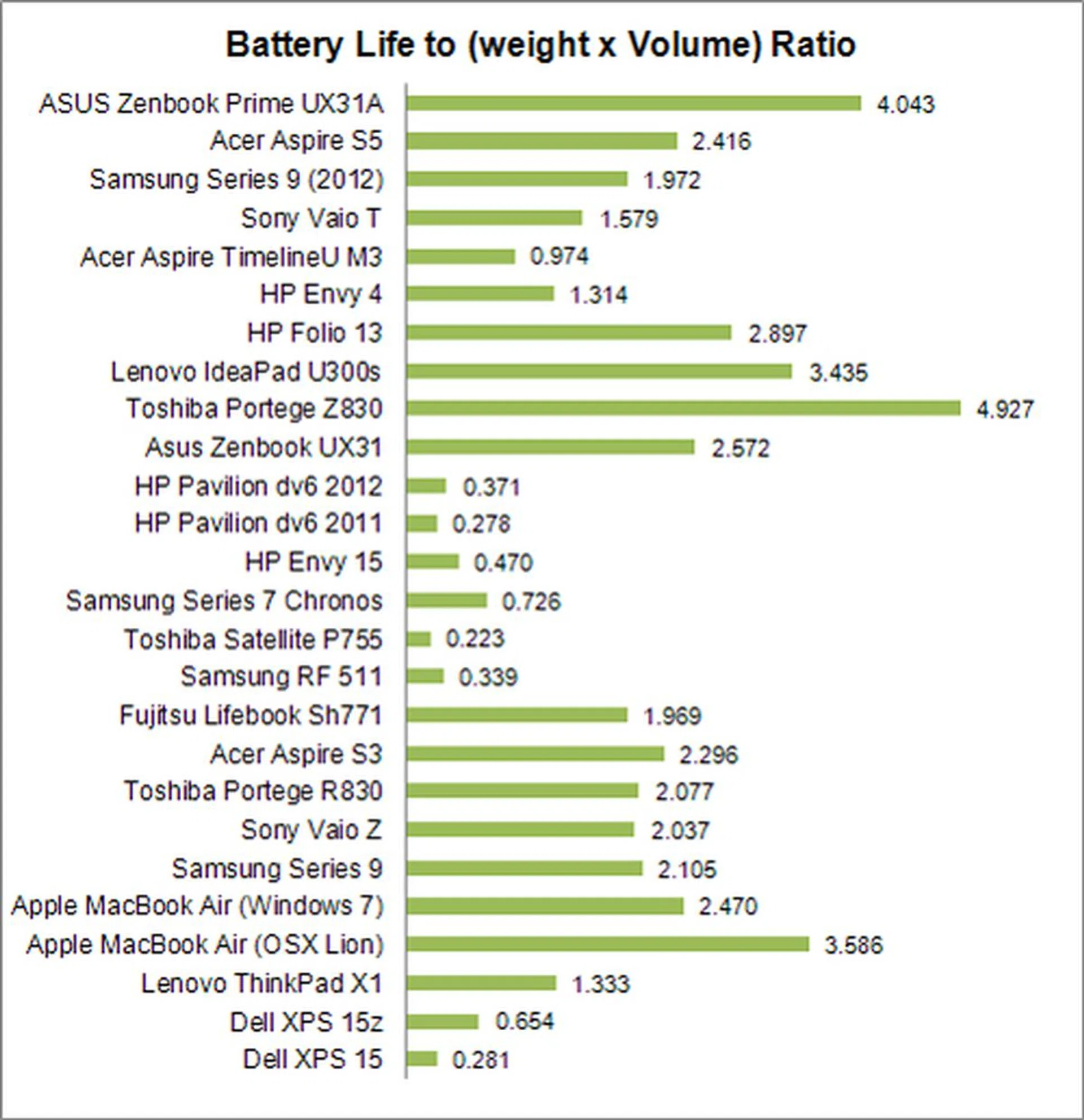
The portability index we have here, takes into consideration elements like battery life and mass of the machine. The ratio derived from the index is used as a gauge on how portable the machine is. The bigger the ratio, the more worthwhile it is for you to take it out of your home. Here, you can see that the UX31A does much better than than its competitors, largely thanks to its excellent battery life.
The UX31A is a commendable effort by ASUS, because they managed to squeeze a little bit more juice from its batteries, without the need for more battery capacity, which kept the weight of the machine at a respectable 1.3kg. However, a point to note about the ratio is that even though it's almost double that of the Acer Aspire S5, it doesn't mean it's twice as portable as the very thin and light Acer Aspire S5.
What it simply means, is that if you're looking for an Ultrabook that is extremely portable, yet has good battery life and performance, the ASUS Zenbook Prime UX31A is a very good bet.
The Second Coming of the Zen
Ultra slim, ultra sexy, ultra powerful, and everything else about the notebook shouting ultra, the ASUS Zenbook Prime is definitely one of the top dogs in the 'pure' Ultrabook scene. ASUS has outdone itself again in both design and features for the second coming of its Zenbook. This updated Prime edition even rectified and vastly improved on the areas of weakness that the original Zenbook had, such as the bad keyboard and trackpad that marred its experience.
The Zenbook Prime might not be for everyone with a rather large price premium over other Ultrabooks. However with the intricate unique design and plethora of features (all-aluminum body, backlit keyboard, multi-touch clickpad, full HD screen, high-speed SSD, and a whole lot more), the Zenbook Prime should have what it takes to still convince you as a viable option for those looking for a genuine Ultrabook experience.
With all things considered and a suggested retail price of S$2098, this Ultrabook really is an embodiment of the word.
Our articles may contain affiliate links. If you buy through these links, we may earn a small commission.