
ASUS ZenBook 13 UX331U review: Great bang for your buck
The ASUS ZenBook 13 UX331U packs an 8th-generation Intel Core i7 processor, 512GB SSD storage, and an NVIDIA GeForce MX150 into a slim and light package. It also pairs that with a sub-S$2,000 price tag, making for a truly attractive proposition. But how does it really measure up?


The ZenBook 13 UX331U is a very attractive proposition with its competitive price and specifications.
Discrete graphics in a notebook just over 1kg?
ASUS’ ZenBook series is better known for its range of sleek and ultraportable notebooks. The ZenBook 3 Deluxe was a solid ultrabook contender, but it still lacked the processing heft of a discrete GPU to tackle the occasional gaming interest.
On the other hand, while the ZenBook Pro made up for that with an NVIDIA GeForce GTX 1050 Ti, it was still a 15.6-inch laptop that couldn’t quite compete with smaller 13.3-inch models in terms of portability.
However, that’s where the ZenBook 13 UX331U surprises. It is a 13.3-inch notebook with a discrete GPU, defying conventional expectations for this class of laptops. It’s not the first to offer this, but what makes it impressive is how thin and light it is.
The UX331U weighs a mere 1.12kg and measures 13.9mm thick, which makes it one of the thinnest and lightest notebooks you can get with discrete graphics. Don’t get too excited yet though, because the GPU is a more modest NVIDIA GeForce MX150 and not a beefier GeForce GTX 1050 Ti.
That said, this does provide a decent performance boost, and it’s still more powerful than your average ultrabook with integrated graphics.
Before I dive into the specifics, here’s an overview of its hardware:
- 13.3-inch 1,920 x 1,080-pixel IPS display
- Intel Core i7-8550U (1.8GHz, 8MB L3 cache)
- 16GB LPDDR3 2,133MHz RAM
- NVIDIA GeForce MX150
- 512GB SATA SSD
- 50Wh battery
- 310 x 216 x 13.9mm
The above configuration will cost you S$1,998, which is a very competitive price for the latest Core i7 processor, a 512GB SSD, and a discrete GPU.
It looks super promising, so let’s take a closer look to see whether it holds up in practice.
Design, Hardware, & Features
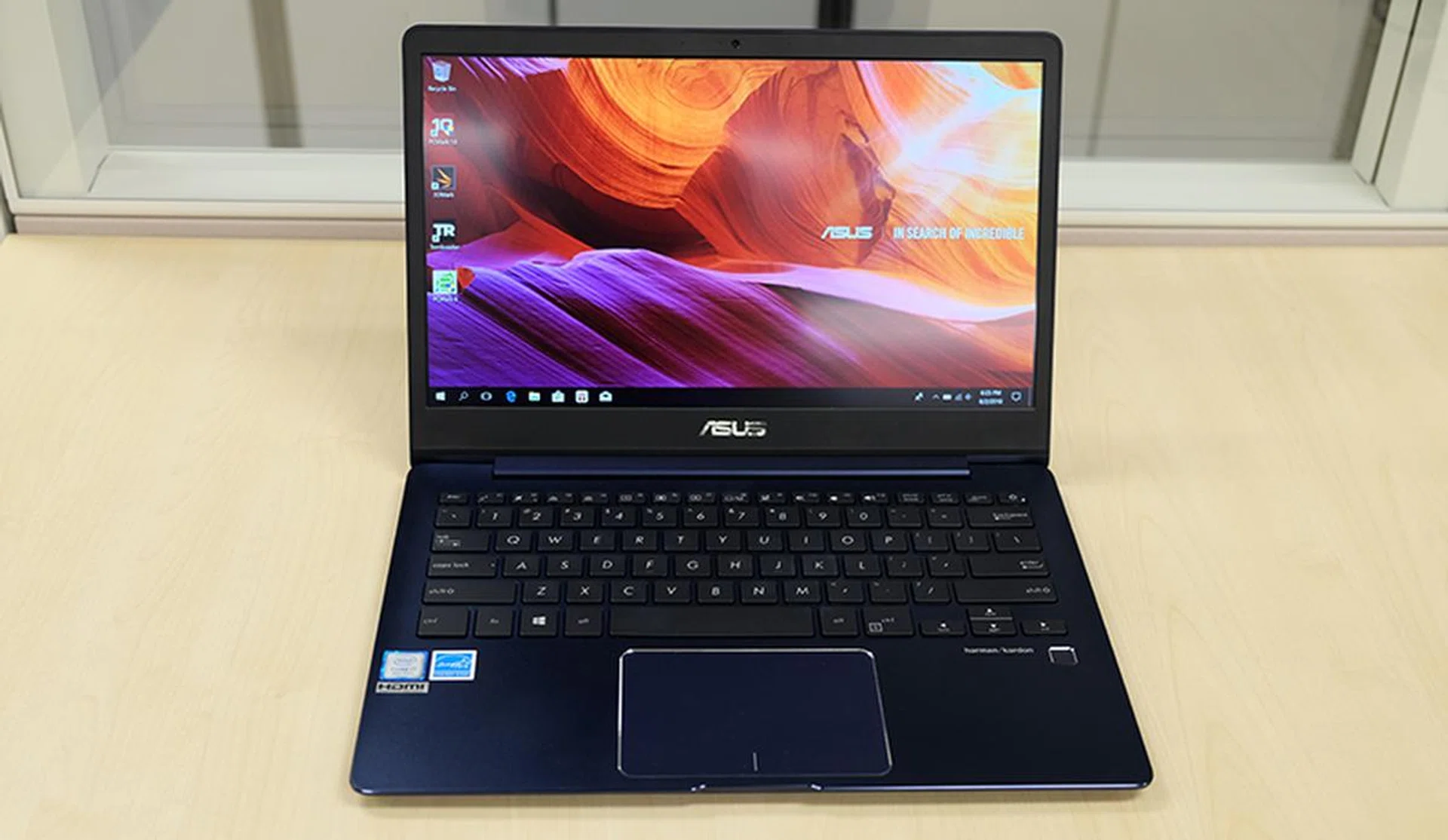
The ZenBook 13 UX331U is a well-rounded machine with powerful hardware and a compact design.
The first thing you’ll notice about the ZenBook 13 UX331U is its lid. Most ZenBooks feature a finish that quite clearly gives away their aluminum construction, but the UX331U looks like it’s topped by a sheet of glass.
I personally prefer my devices to have a metallic, matte finish (damn the scourge of glass-backed phones!), but I’ll admit that this is quite visually striking. So imagine my surprise when I learnt that the lid was not in fact glass, and instead a specially treated metal surface.
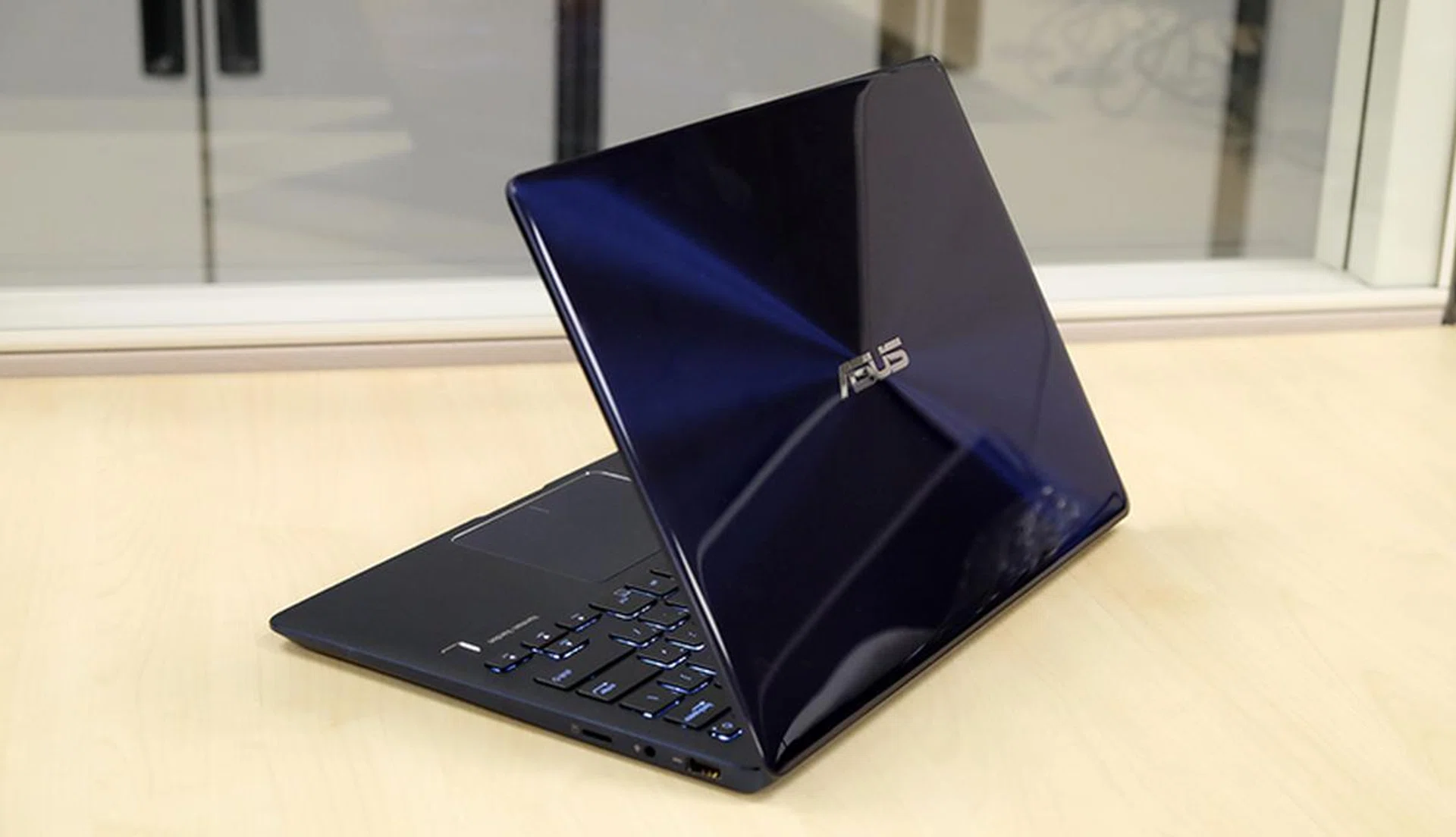
The surface looks almost liquid from certain angles.
It’s the result of a fancy-sounding process called nanoimprint lithography, which enabled ASUS to make the spaces between each concentric circle finer than a human hair (like every other ZenBook, the UX331U sports the series’ signature pattern on its lid). So while the lid looks like an unadorned piece of glass at first glance, closer inspection reveals a very subtle and fine pattern of circles.
The glass-like sheen was achieved using a chemical that is cured to a hard, glass-like finish after exposure to ultraviolet light.
That all sounds great, but I’m less enthusiastic about the practical implications for this. For starters, the finish is an absolute fingerprint magnet. It picks up prints the minute you lay hands on it, and you can be sure that it needs a good wipedown at the end of each day.
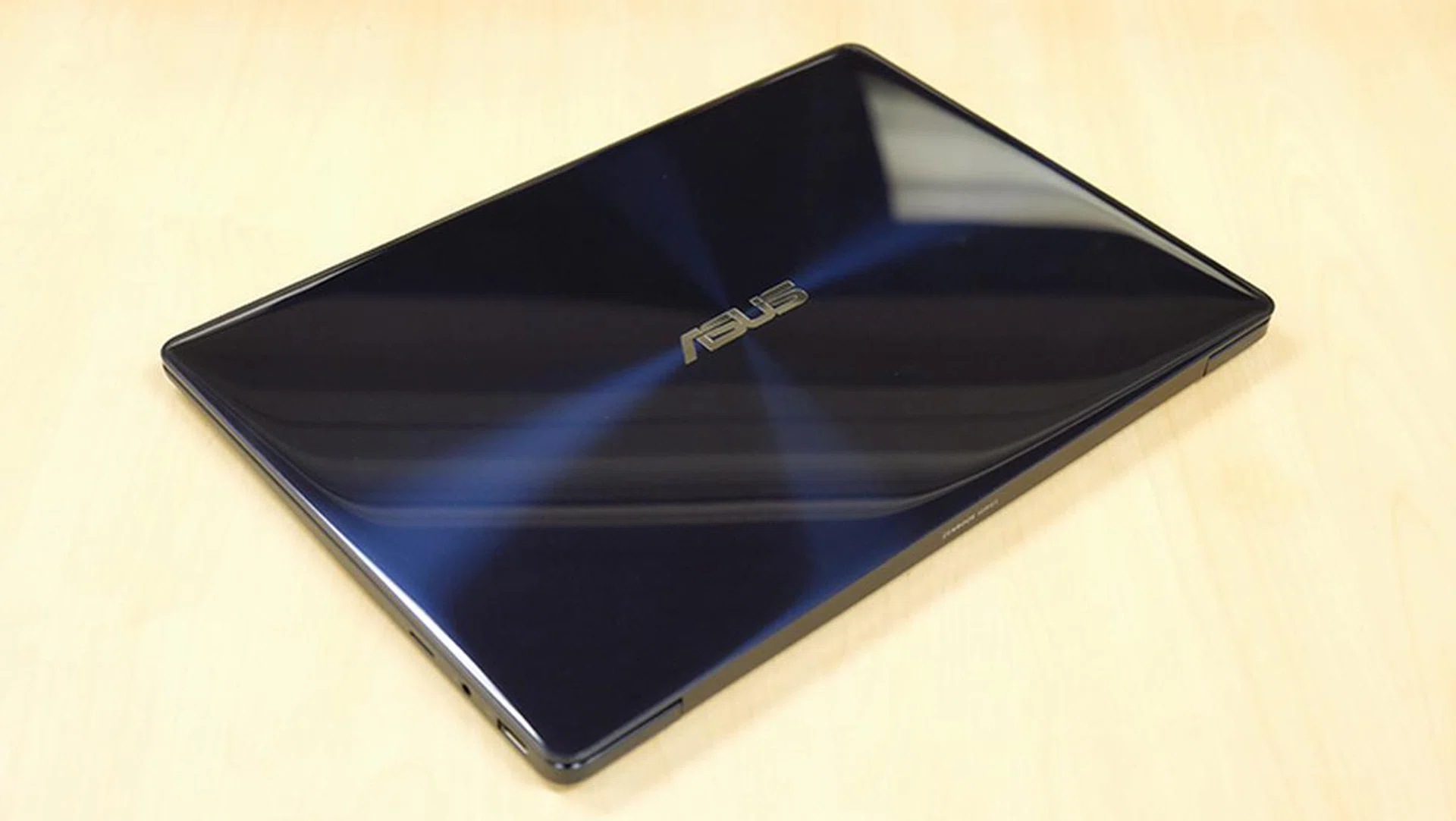
The lid catches light in some interesting ways, but it's unfortunately a fingerprint magnet.
Furthermore, it doesn’t seem to hold up very well under daily use either. I haven’t even brought it out of the office, and it’s somehow managed to pick up a few scuff marks already. Mostly, the main problem seems to be micro-scratches (remember the jet black iPhone 7?), so you’ll definitely want to pick up a good sleeve to protect this notebook while you tote it around.
Having said that, the rest of the notebook is well-designed, with an aluminum body that feels tough and rigid. I also like the sandblasted surface, which proved quite comfortable for your palms to rest on when typing.
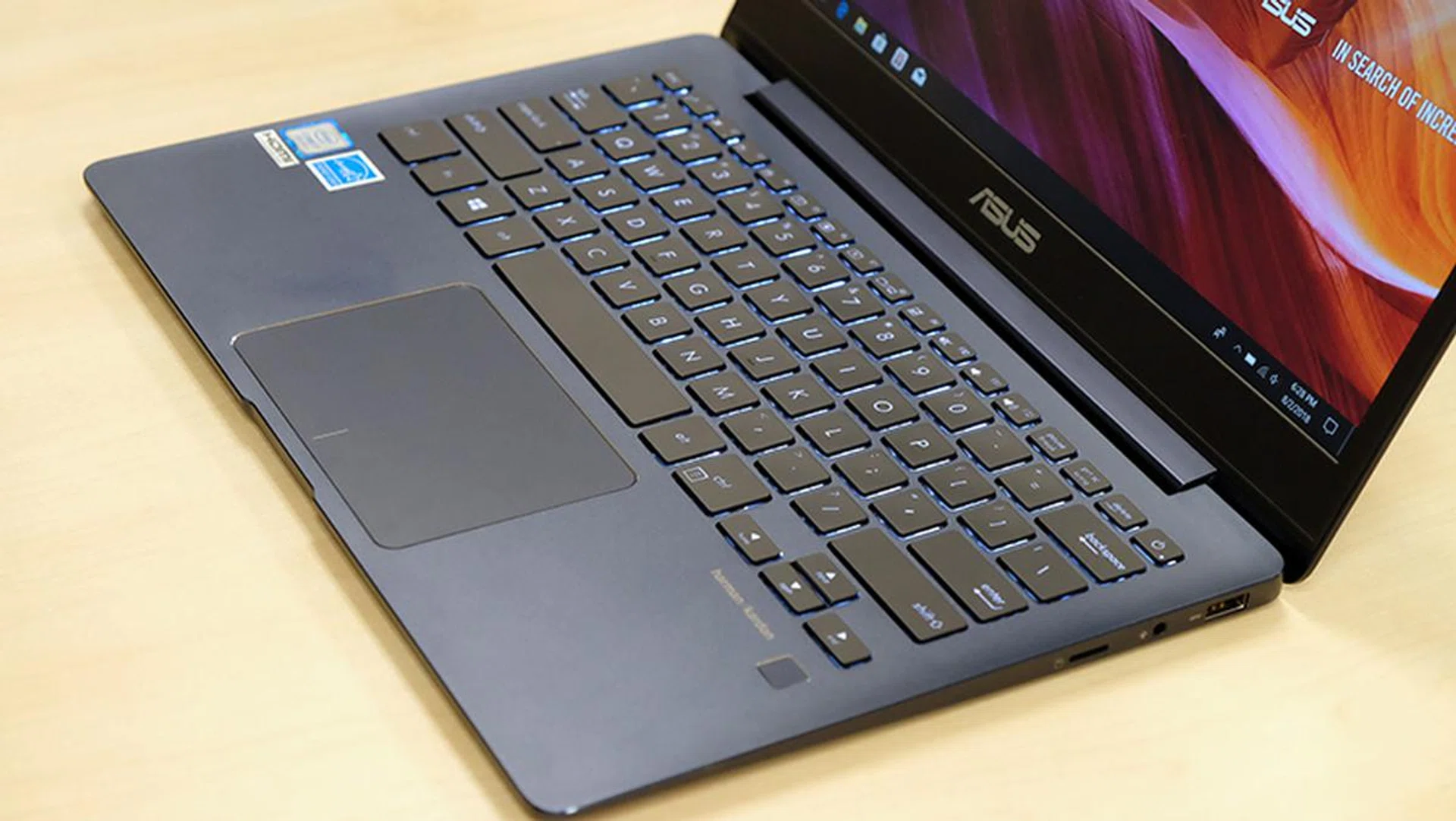
The keyboard on this notebook feels pretty good to type on.
The backlit keyboard is quite pleasant to type on as well. It offers a 1.4mm travel distance, and each key offers good feedback, for a laptop keyboard. I also required next to no time to adapt to the keyboard and was able to type at a fairly good pace right off the bat, which is more than I can say for many laptop keyboards.
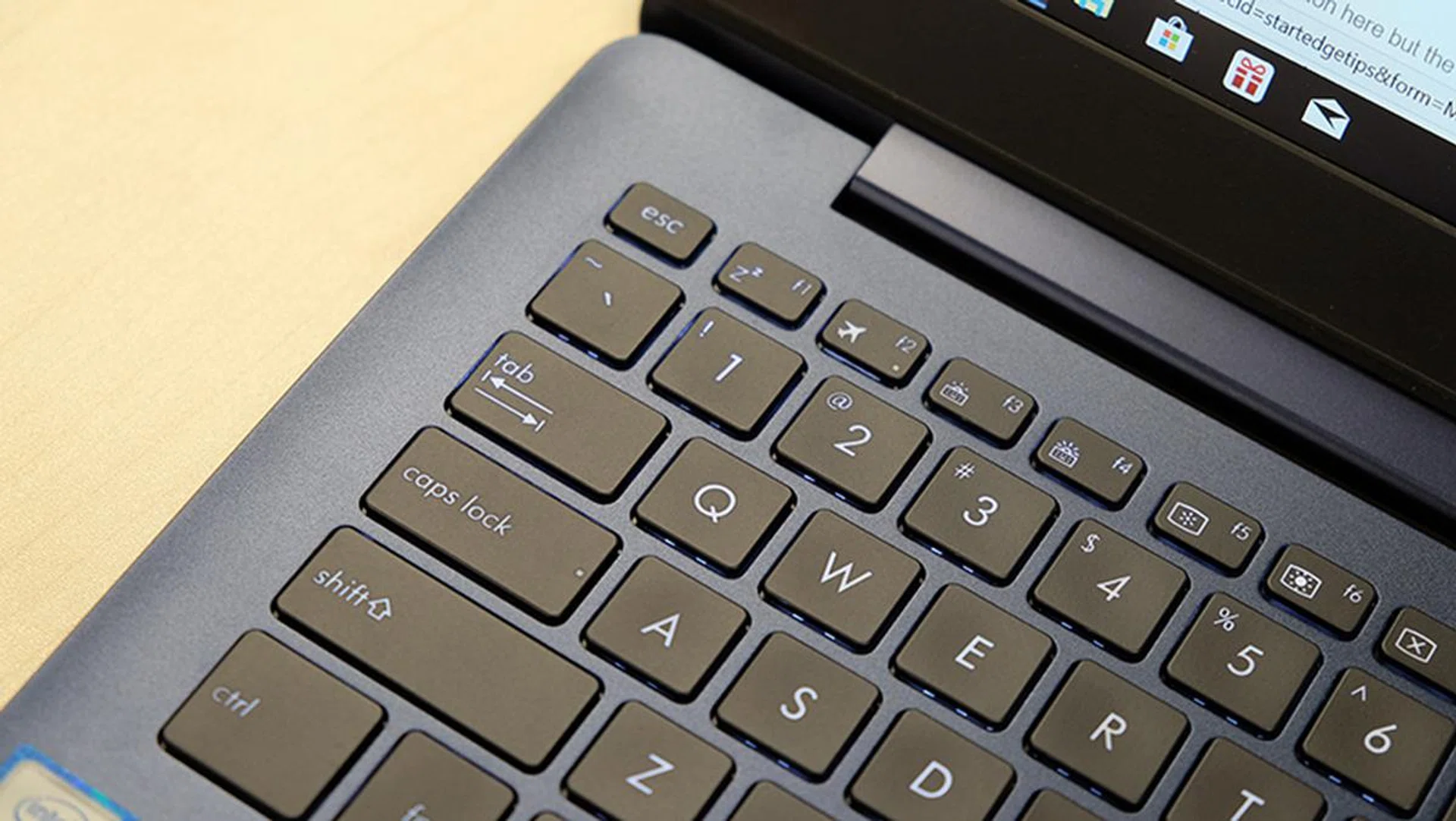
You can toggle between three levels of backlight on the keyboard.
The Windows Precision Touchpad also feels responsive and accurate, and it’s really a lot better than touchpads that don’t send raw input data to Windows itself. This time, there’s no fingerprint reader taking up space in the top right corner either, and the sensor has been moved to sit just below the keyboard.
If I were to nitpick however, I’d say that there’s noticeable flex to the keyboard when typing, and it felt like ASUS could have done a little more to firm up the base.
When it comes to the display, the 13.3-inch 1,920 x 1,080-pixel IPS panel is good, but doesn’t offer much to shout about either. Still, ASUS says it made an effort to modulate the color gamut and temperature in order to present more accurate colors or dramatic skews in color temperature, and it shows.
There's a slight bias toward the cooler end of the spectrum if you're really looking for it, but it's nothing too bothersome. Furthermore, the screen has 100 per cent coverage of the sRGB color space and colors were indeed reasonably vibrant (but not particularly eye-popping). All things considered, there’s honestly little to complain about. The display coating appears to sit somewhere on the spectrum between matte and glossy displays, so you get less of the graininess of the former and fewer problems with reflections.
That said, the display could be a bit brighter. The maximum brightness level was good enough for me in an office environment, but it might be a problem outdoors in bright sunlight.
The Harman/Kardon-certified stereo speakers point toward the bottom, and they’re actually surprisingly loud and clear. The high frequencies can sound a tad shrill at high volumes, but I was otherwise pretty satisfied.
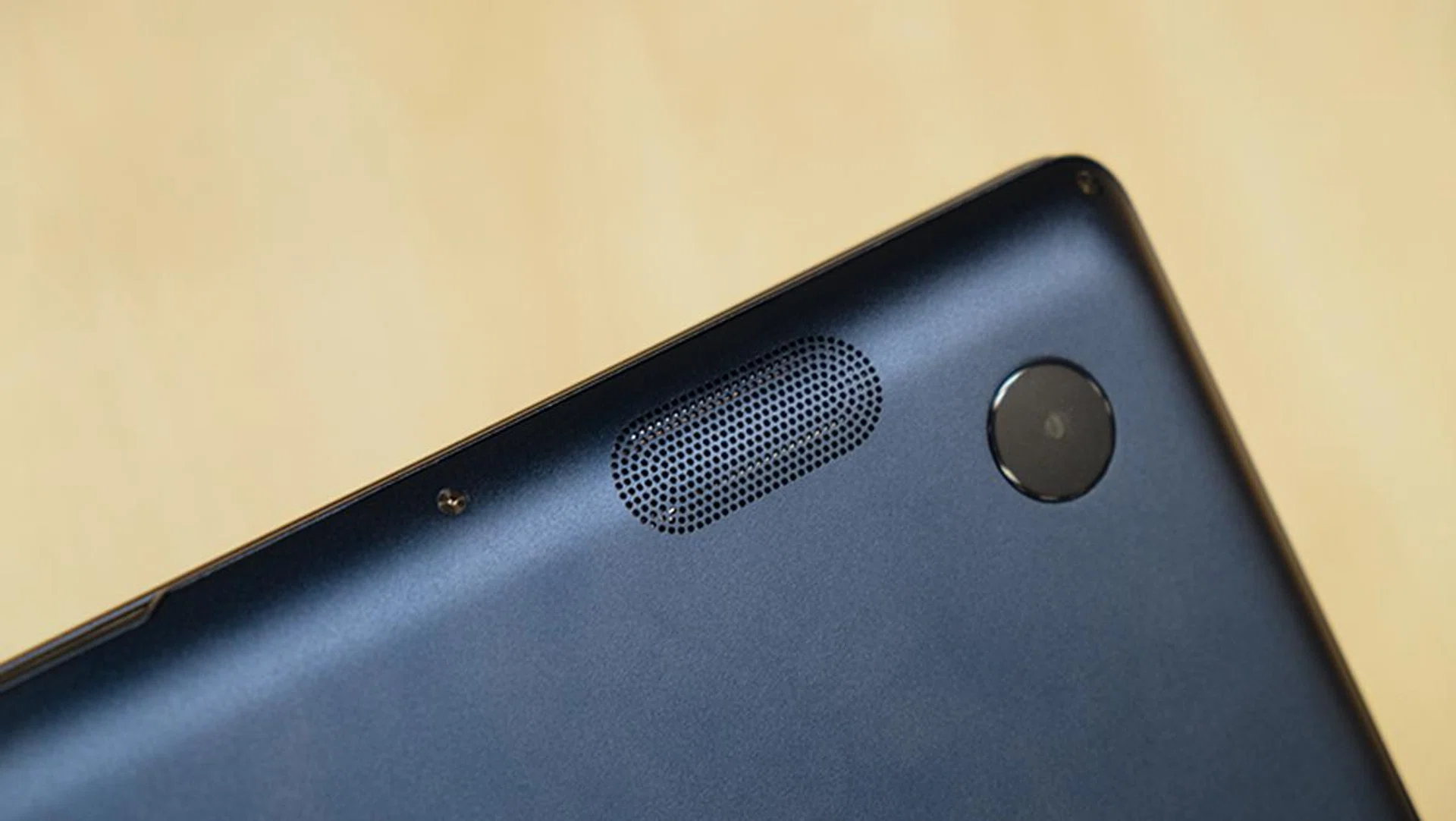
The bottom-firing stereo speakers sound pretty good - for a notebook.
The laptop uses an Intel Dual Band Wireless-AC 8265 adapter for Wi-Fi connections. This is a 2x2 module that supports MU-MIMO technology, so you get up to 867Mbps of throughput and the ability to take advantage of MU-MIMO routers.
When it comes to wired connections though, this ZenBook has a total of two USB 3.1 (Gen 1) Type-A, one USB 3.1 (Gen 1) Type-C, and a full-sized HDMI port. There’s a microSD card slot on the right as well, although I’d much preferred to have seen a proper SD card reader in its place.

It'd have been nice to see a Thunderbolt 3 port here instead.
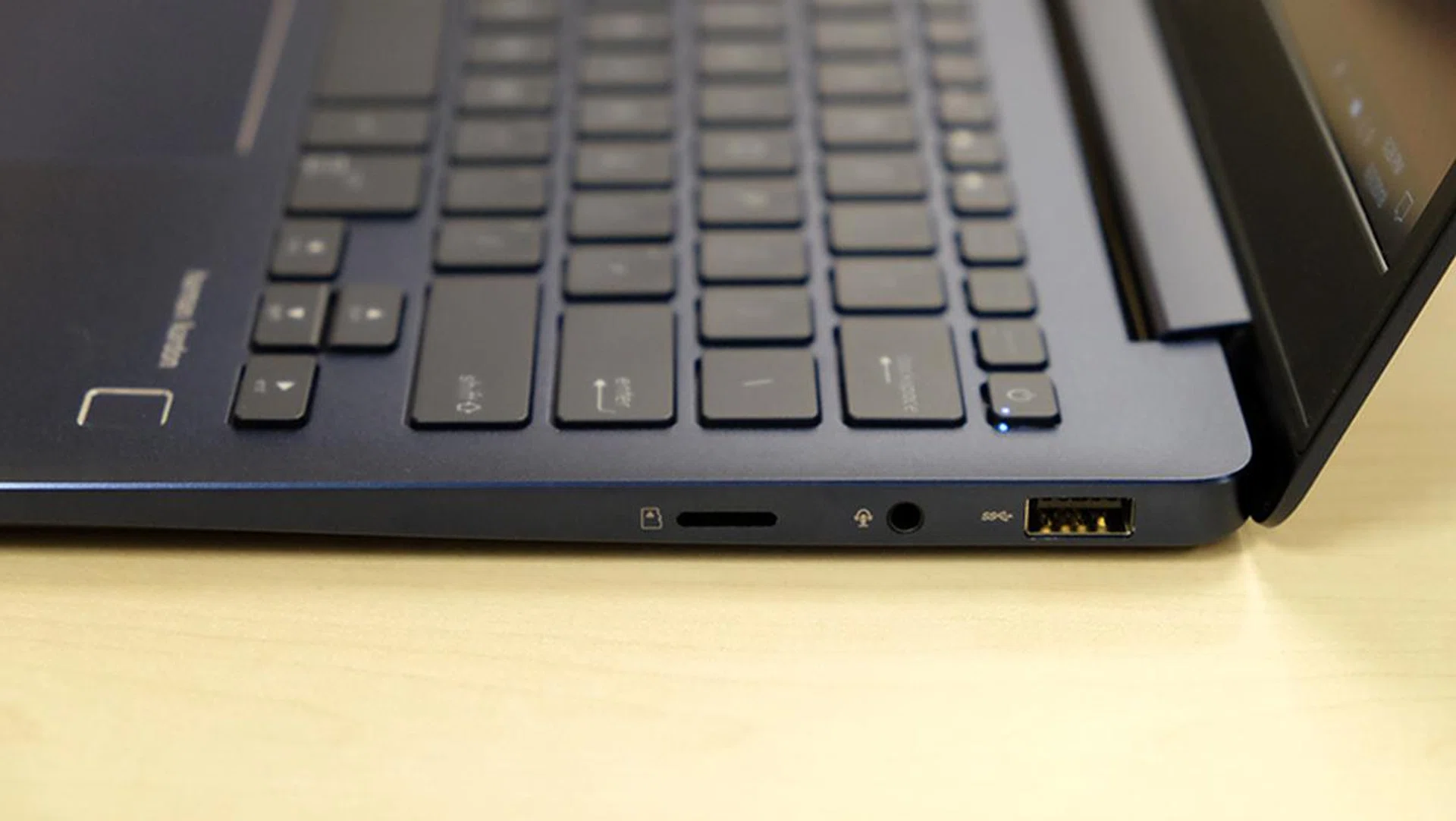
The 3.5mm combo jack and microSD card slot are located on the right.
Nevertheless, the port selection is definitely serviceable and should be enough for most folks. It’s just a pity the lone USB-C port doesn’t support Thunderbolt 3, although I wasn’t really expecting it at this price.
One final point to address is the notebook’s cooling. When you shove a discrete GPU into a 13.3-inch notebook that’s this thin and compact, you’re probably worried about whether it can deal with the additional heat output. In fact, the ZenBook 3 Deluxe did fall prey to performance throttling issues, and that only had integrated graphics.
Fortunately, the UX331U does quite well in this area and there were no signs of throttling. It passed a 40-loop run of 3DMark’s Fire Strike stress test with flying colors, with peak GPU and CPU temperatures of 58°C and 55°C respectively. 3DMark’s stress test checks for frame rate stability, and it’s a good measure of whether a system can maintain the same level of performance once it starts to heat up.
It was also surprisingly quiet throughout the run, something I wasn’t expecting considering that there’s just a single fan and heat pipe.
Performance Benchmarks, Battery & Portability
I ran the ZenBook 13 UX331U through our usual suite of benchmarks, which included older, less demanding titles to reflect the more modest capabilities of the GeForce MX150.
Here’s a list of the benchmarks used:
- PCMark 10
- PCMark 8
- 3DMark
- Tomb Raider
- Far Cry 2
For comparisons, I used other 13.3-inch/14-inch ultrabooks, equipped with a mix of 7th- and 8th-generation Intel processors. All of them run of Intel’s integrated graphics as well, so you get an idea of how much more performance the ZenBook’s discrete GPU is netting you.
Here’s a list of all the tested notebooks:
- ASUS ZenBook UX331U
- HP Spectre
- Lenovo Yoga 920
- LG Gram 14
- Razer Blade Stealth
[hwzcompare]
[products=630725,630749,630752,607165,630761]
[width=200]
[caption=Test notebooks compared]
[showprices=1]
[/hwzcompare]
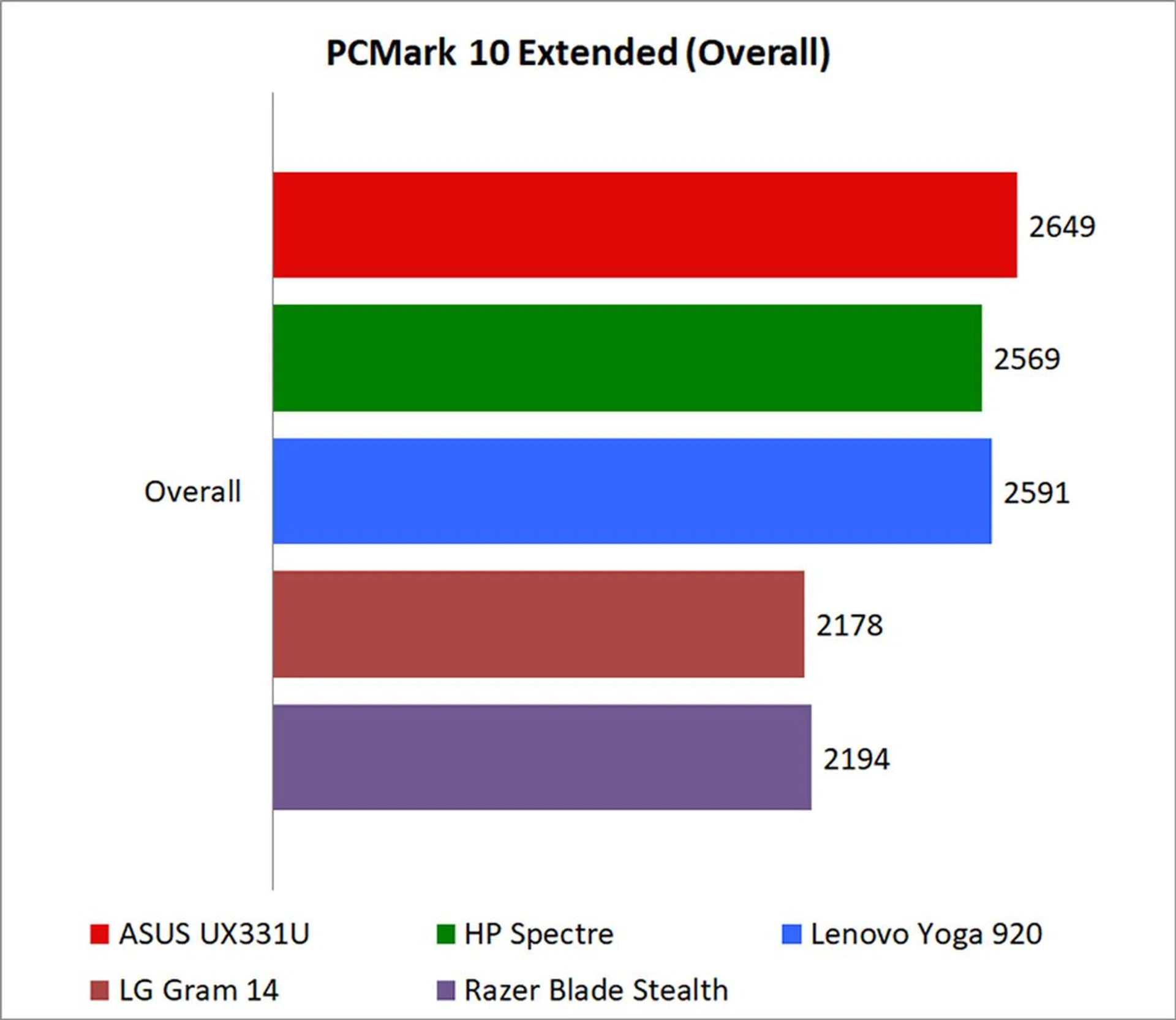
PCMark 10 Extended
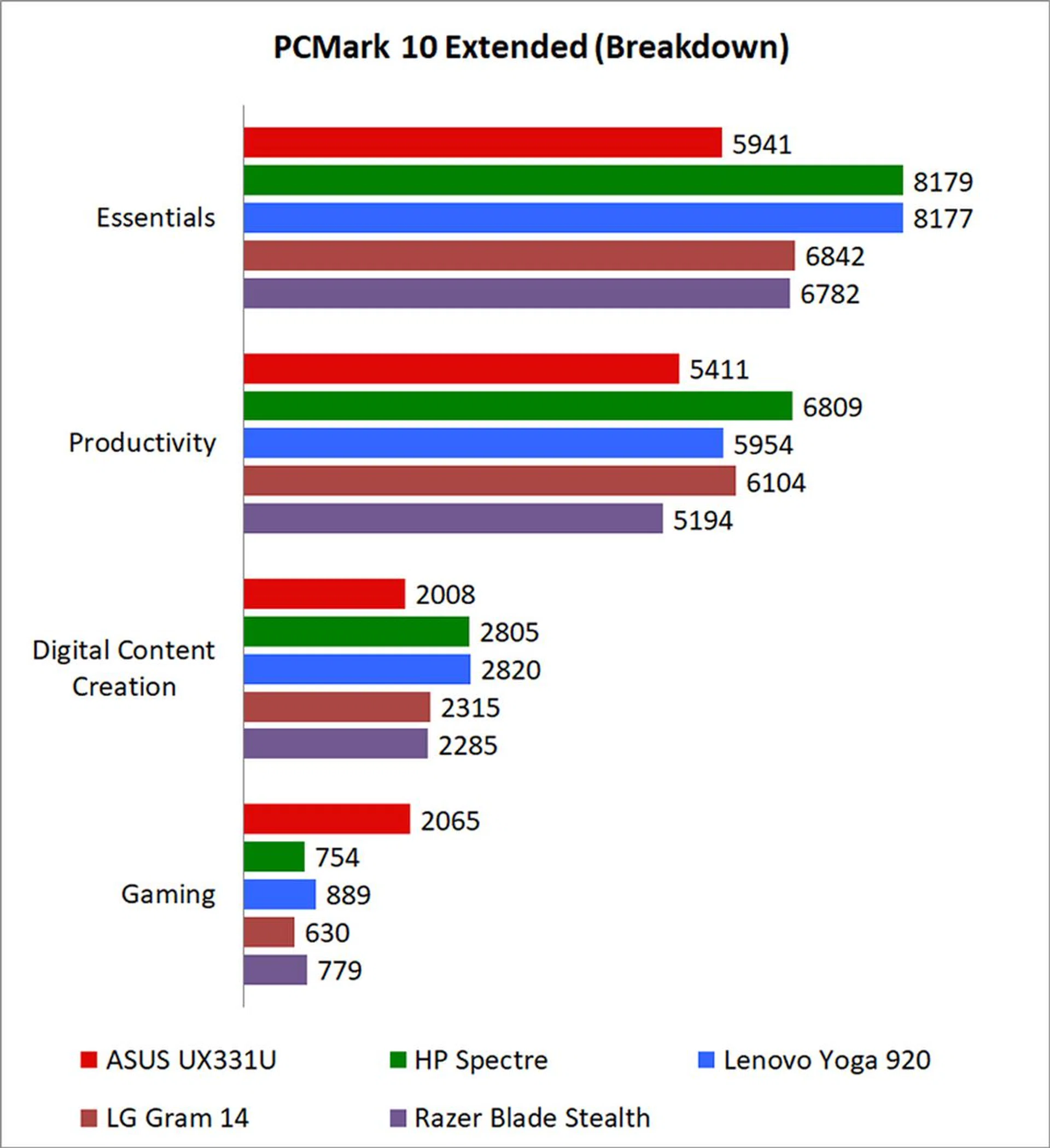
PCMark 10 Extended assesses the performance of systems in a variety of workloads, including basic computing tasks, productivity applications, digital content creation, and gaming. Compared to PCMark 8, it also adds in new test metrics, such as app startup times, which quantifies how long it takes to launch a variety of real-world apps, and a rendering and visualization workload to simulate professional graphics and engineering applications. In addition, existing workloads have been updated to reflect modern usage.
The ASUS ZenBook came ahead in overall scores, but a look at the breakdown for individual workloads shows that this isn’t as strong a result as it seems initially. It’s clear that it’s discrete GPU and strong graphics performance propelled it ahead, even though it lagged behind the other laptops in the other workloads.
That’s disappointing, as it looks like the ZenBook could have taken a much more commanding lead if it had performed up to snuff across the board. What’s particularly damning is the fact that the ZenBook underperformed even compared to the LG Gram 14 and Razer Blade Stealth, both of which were equipped with the older Core i7-7500U processor. In fact, it was around 12 per cent behind the Blade Stealth in the Essentials workload.
PCMark 8 Storage
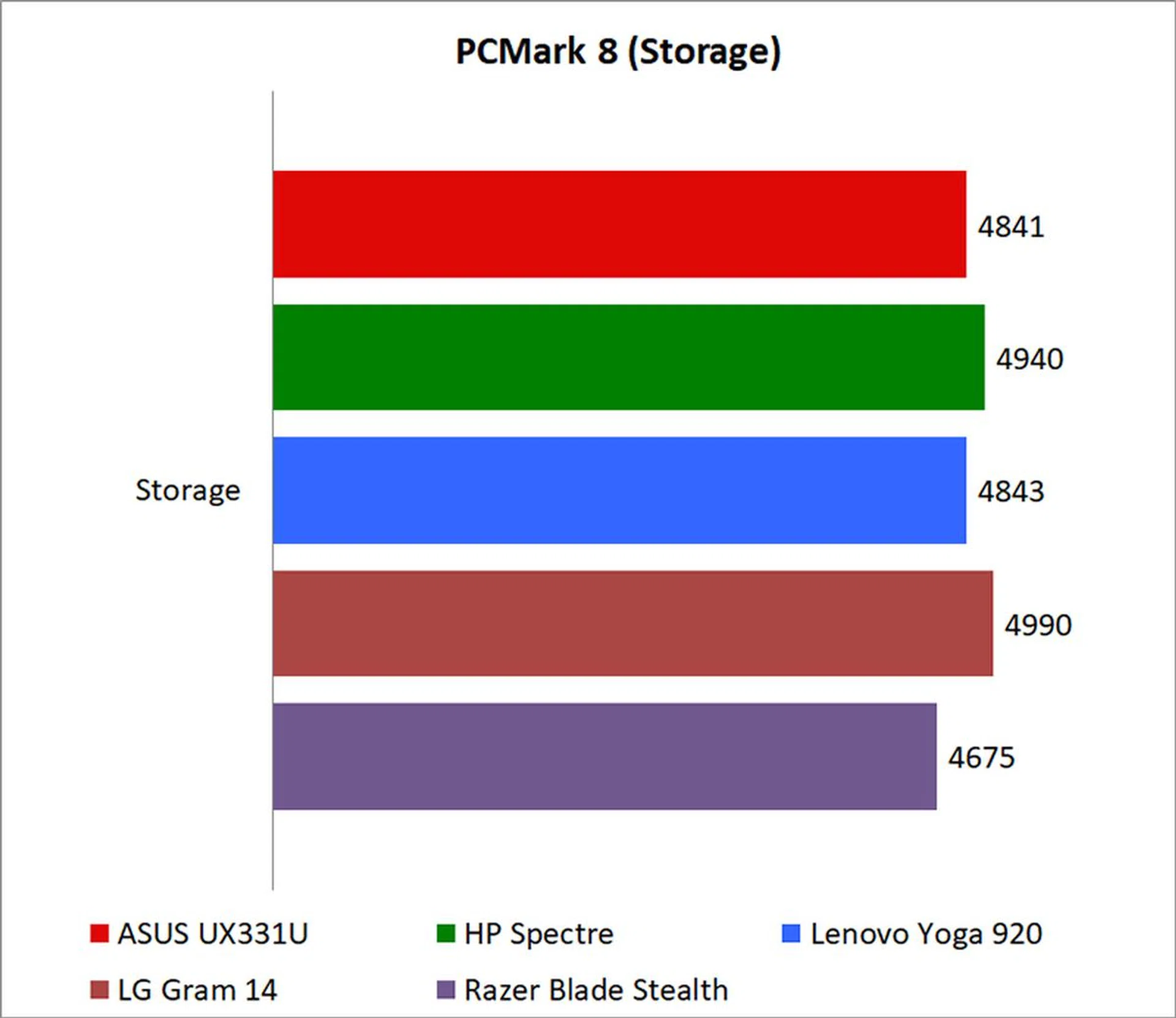
PCMark 10 doesn’t come with a built-in storage benchmark yet, so I’ll use the Storage test in PCMark 8 to stand in for that in the meantime. In a nutshell, it attempts to simulate the overall effectiveness of the system in day-to-day activities like gaming and various productivity applications.
That said, the ZenBook acquitted itself well here, even though it only comes equipped with a SATA drive compared to the PCIe SSDs on the other laptops (with the exception of the LG Gram 14).
3DMark
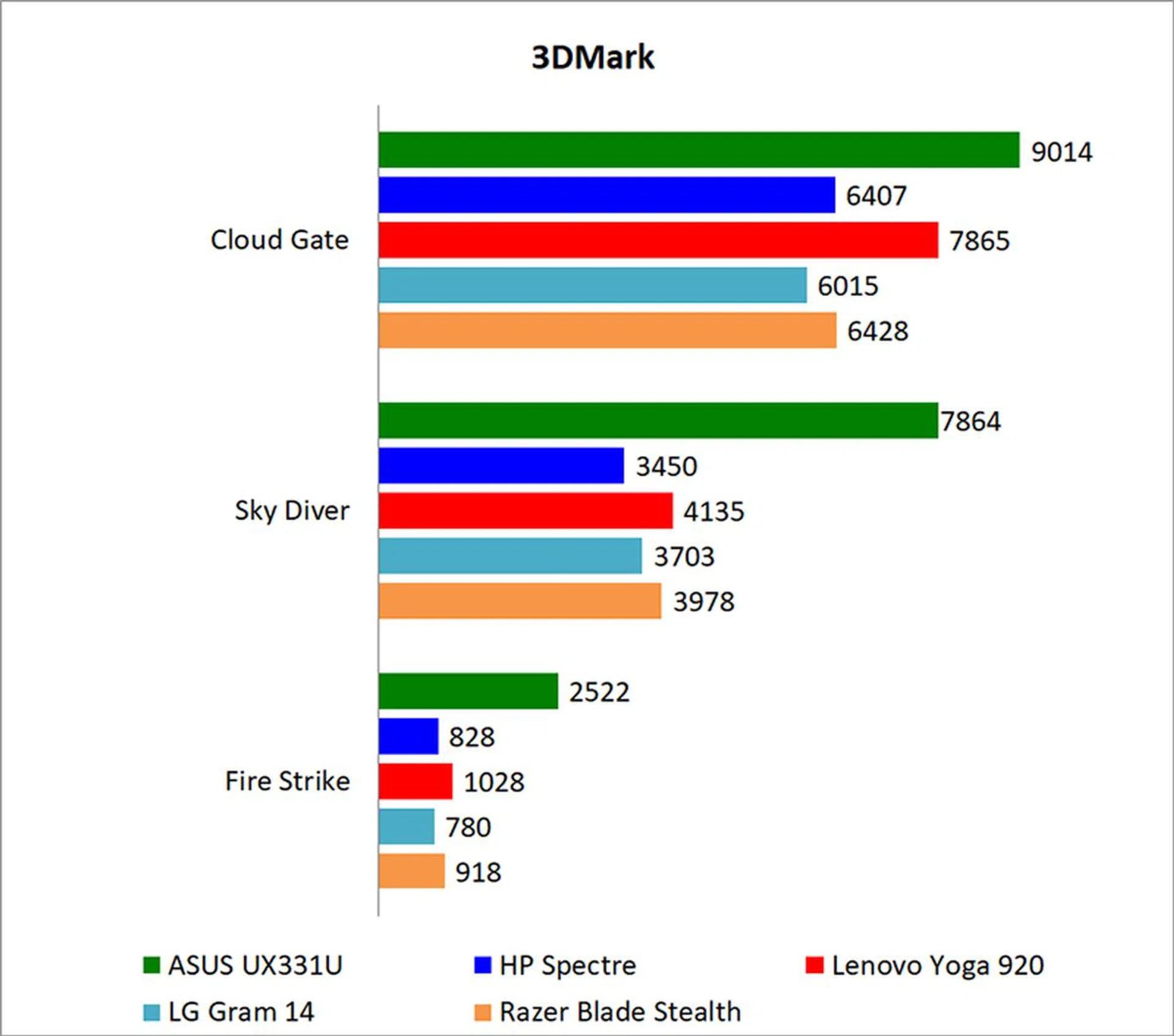
In 3DMark, the ZenBook unsurprisingly powered ahead of its counterparts with integrated graphics. In the Sky Diver test, which was designed for systems with mainstream GPUs or integrated graphics, it was a whopping 90 percent faster than the Lenovo Yoga 920, the next best performer.
The NVIDIA GeForce MX150 is no beefy gaming GPU, but there’s no doubt that it’s a big step up from the Intel HD Graphics on the other laptops.
Tomb Raider
The ZenBook took a big lead in Tomb Raider as well, where it was a good 168 per cent quicker than the Lenovo Yoga 920 and Razer Blade Stealth, its closest competitors. Once again, it’s just clear that while integrated graphics performance has come a long way, it still can’t compete with an actual discrete GPU.
Far Cry 2
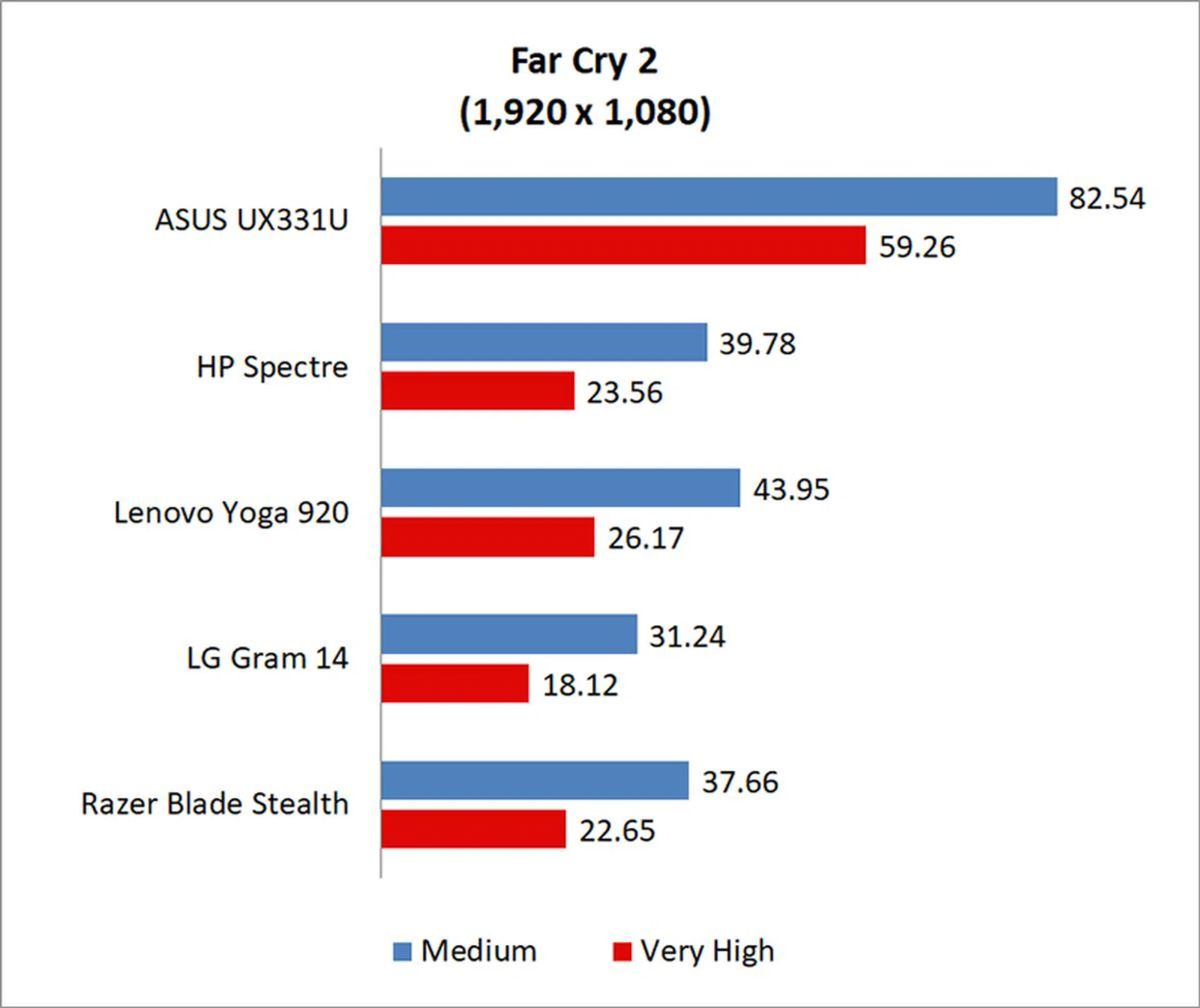
It was a similar story in Far Cry 2, and the ZenBook was around 126 per cent faster than the Lenovo Yoga 920. For older and less demanding e-sports titles at least, the GeForce MX150 looks like it should do okay if you stick to 1080p and low settings.
Battery Life and Power Consumption
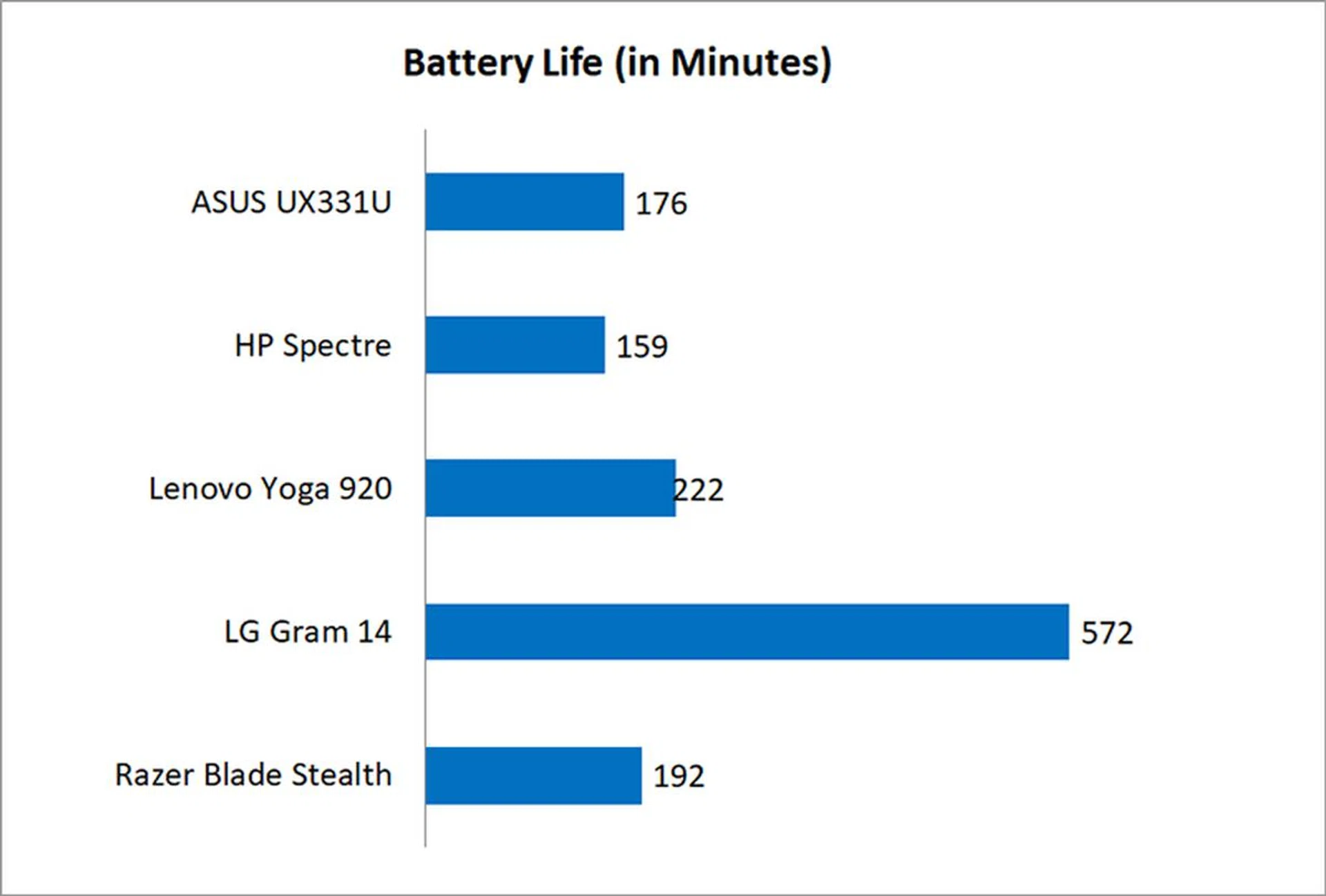
The built-in battery life test in PCMark 8’s Home benchmark was used to obtain the battery life numbers for each notebook.
The ZenBook and its 50Wh battery didn’t produce particularly amazing results when it came to battery longevity, which isn’t surprising given that it does have an discrete GPU. However, what is impressive is the fact that it managed to keep pace with the other notebooks, which seem like they should be far more efficient on paper.
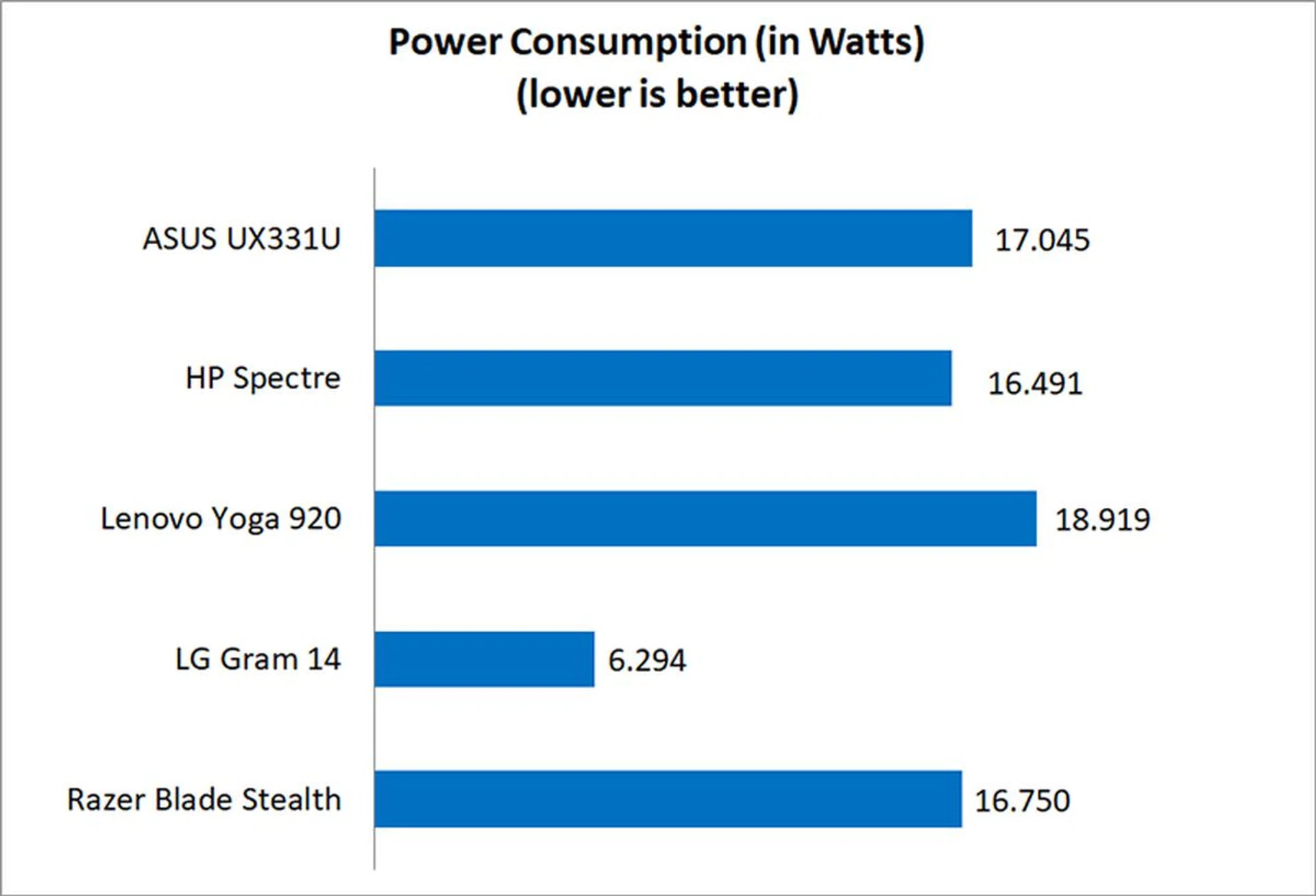
Instead, the power consumption figures for the ZenBook are pretty much in line with the other laptops, with the exception of the LG Gram 14 and its freakishly low power consumption numbers.
Portability
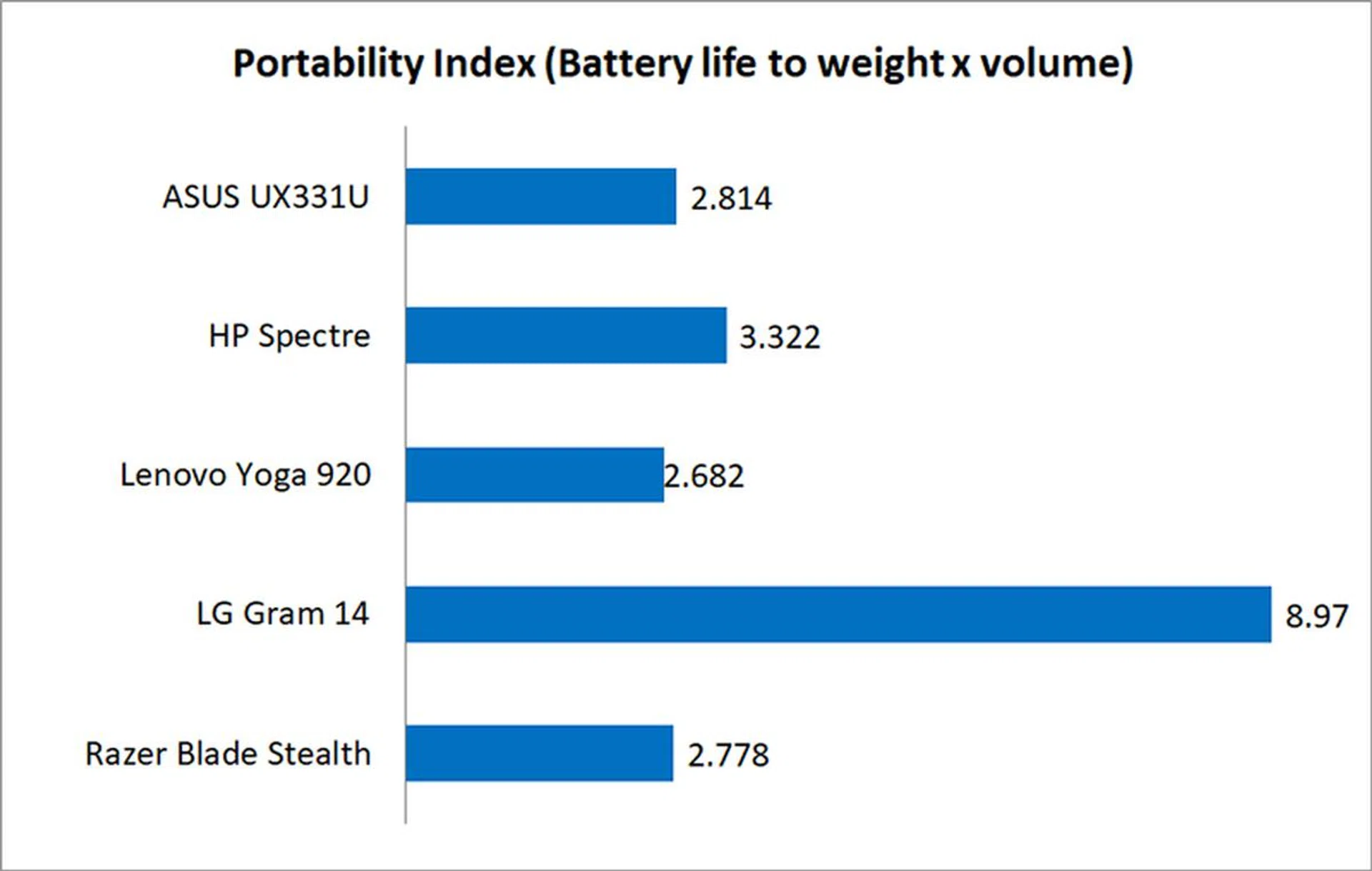
Our portability index takes into account battery life, weight, and volume to provide a measure of how easy a notebook is to carry around relative to other compared systems.
The ZenBook came in somewhere in the middle of the pack, losing out to the HP Spectre and LG Gram 14. The latter’s excellent battery life played a large role in securing it its good standing, but the ZenBook did pretty well, all things considered.
You’d expect a notebook with a discrete GPU to fare worse against other laptops with integrated graphics, so it’s to ASUS’ credit that the ZenBook managed to hold its own.
Power in a small package
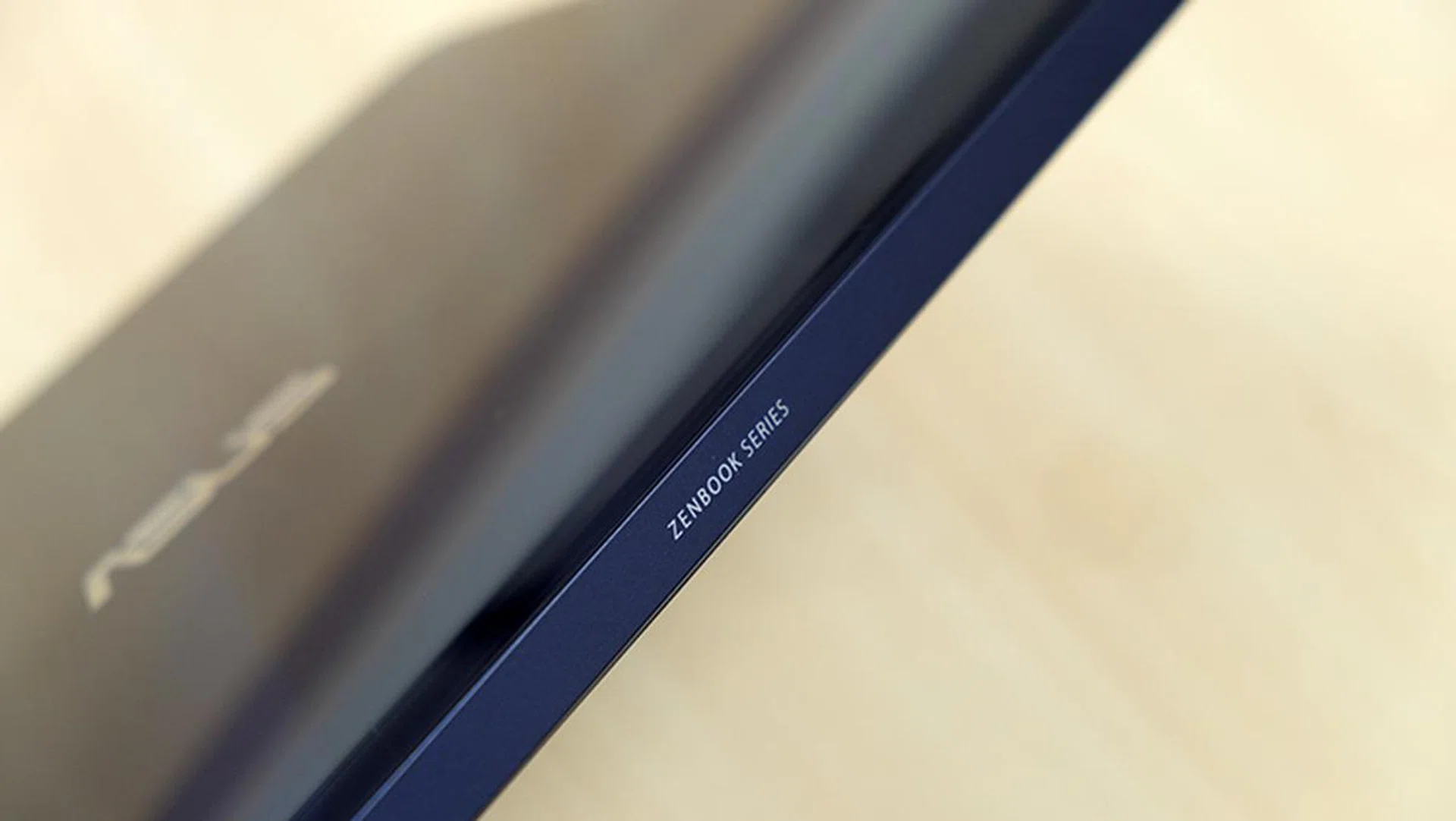
There's no gold trim on the edges unlike on the ZenBook 3 Deluxe.
The ASUS ZenBook 13 UX331U is a great example of a well-designed and powerful notebook. It’s slim, light, and packs a discrete NVIDIA GeForce MX150. In fact, if you didn’t look at the graphics numbers, you’d never have guessed that it wasn’t running off integrated graphics.
What’s more, it’s also rather affordable at just S$1,998, and its sub-S$2,000 price tag stands it in good stead among other ultrabooks, many of which cost closer to S$3,000 for similar specifications.
I have some qualms about its lacklustre performance outside of graphics and games, as evinced in the Essentials, Productivity, and Digital Content Creation workloads in PCMark 10. However, these are still synthetic benchmarks, and the notebook still felt snappy when loading and using various programs.
That said, while PCMark 10 can help quantify performance differences, it may not be that fair to attribute outsize significance to these numbers, as the difference isn’t as noticeable during real-world use. Unlike a figure like average FPS in games, I’d argue that barring huge amounts of lag, performance differences in productivity applications are less jarring and noticeable.
With that out of the way, the GeForce MX150 on the ZenBook 13 proves itself to be significantly faster than the Intel HD Graphics 620 on the other notebooks. If you’re looking for an ultrabook that can squeeze out a bit more in this department, the ZenBook 13 fits the bill nicely.
This is a well-rounded and competitively priced notebook that has more graphics processing heft than your average ultrabook, so it may have greater appeal to users who want to do some light gaming on the side. Oddly enough, the discrete GPU doesn’t seem to have helped its performance in terms of photo and video editing (as seen in the Digital Content Creation scores in PCMark 10 Extended), so I’m hesitant to say that content creators will see a tangible benefit.
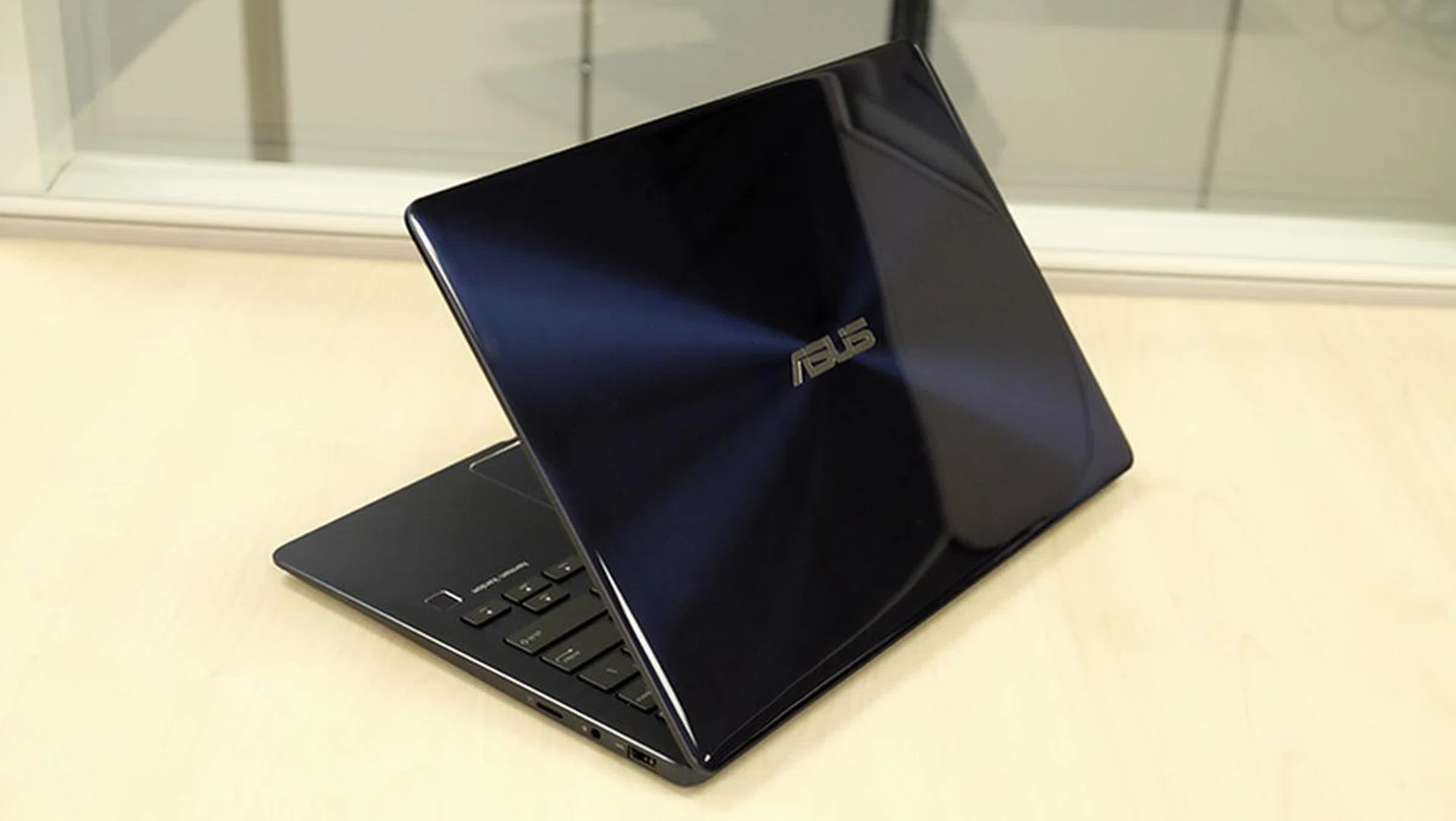
That lid is a nightmare to keep clean.
When it comes to looks, the glass-like surface on its lid is distinctive and quite attractive, but it really is a nightmare to keep clean. It’s also here that the notebook’s less premium price shows – the notebook feels and looks good, but it lacks the luxury of something like the ZenBook 3 Deluxe, which features gold lettering and trim and a Corning Gorilla Glass 5 display.
Having said all that, I think the ZenBook 13 UX331U still deserves to be considered if you’re out shopping for a portable, compact notebook. It’s affordable and features very competitive specifications and decent battery life, so it’s difficult to pass over if you’re looking for the most bang for your buck.
Our articles may contain affiliate links. If you buy through these links, we may earn a small commission.