

A more refined Zephyrus
The new ASUS ROG Zephyrus S can be thought of as the spiritual successor to the original ROG Zephyrus GX501 that debuted at Computex 2017.
But while that laptop was a study in extravagance and cost a whopping S$4,898, the Zephyrus S is more modest and refined. It has an asking price of S$3,198 – not exactly cheap, but still far more reasonable than its predecessor. Of course, that means you won’t be getting an NVIDIA GeForce GTX 1080 Max-Q with it, and the Zephyrus S comes equipped with just a GeForce GTX 1060 6GB.
However, I should point out that this is the full-fat mobile version of the card, so there’s no performance trade-off from any Max-Q optimizations and you still get in a notebook that's pretty thin and sleek.
Here’s an overview of its specifications:
- 15.6-inch 1,920 x 1,080-pixel IPS-type 144Hz panel
- Intel Core i7-8750H (2.2GHz, 9MB L3 cache)
- 16GB DDR4-2666 dual-channel memory
- NVIDIA GeForce GTX 1060 6GB
- 512GB PCIe M.2 SSD
- 50Wh battery
- 360 x 268 x 14.95-15.75mm
- 2.1kg
Having said that, ASUS actually announced updates to the Zephyrus S at CES 2019. The Zephyrus S GX531 will now support up to an NVIDIA GeForce RTX 2080 Max-Q, a huge jump from its Pascal offerings. There's also a 17-inch version coming.
However, the bulk of the notebook and its chassis remains the same, so while I’ll probably have to update the performance numbers when the GeForce RTX 20-series models are out, my current review unit can still provide a good idea of what to expect.
Lean and mean
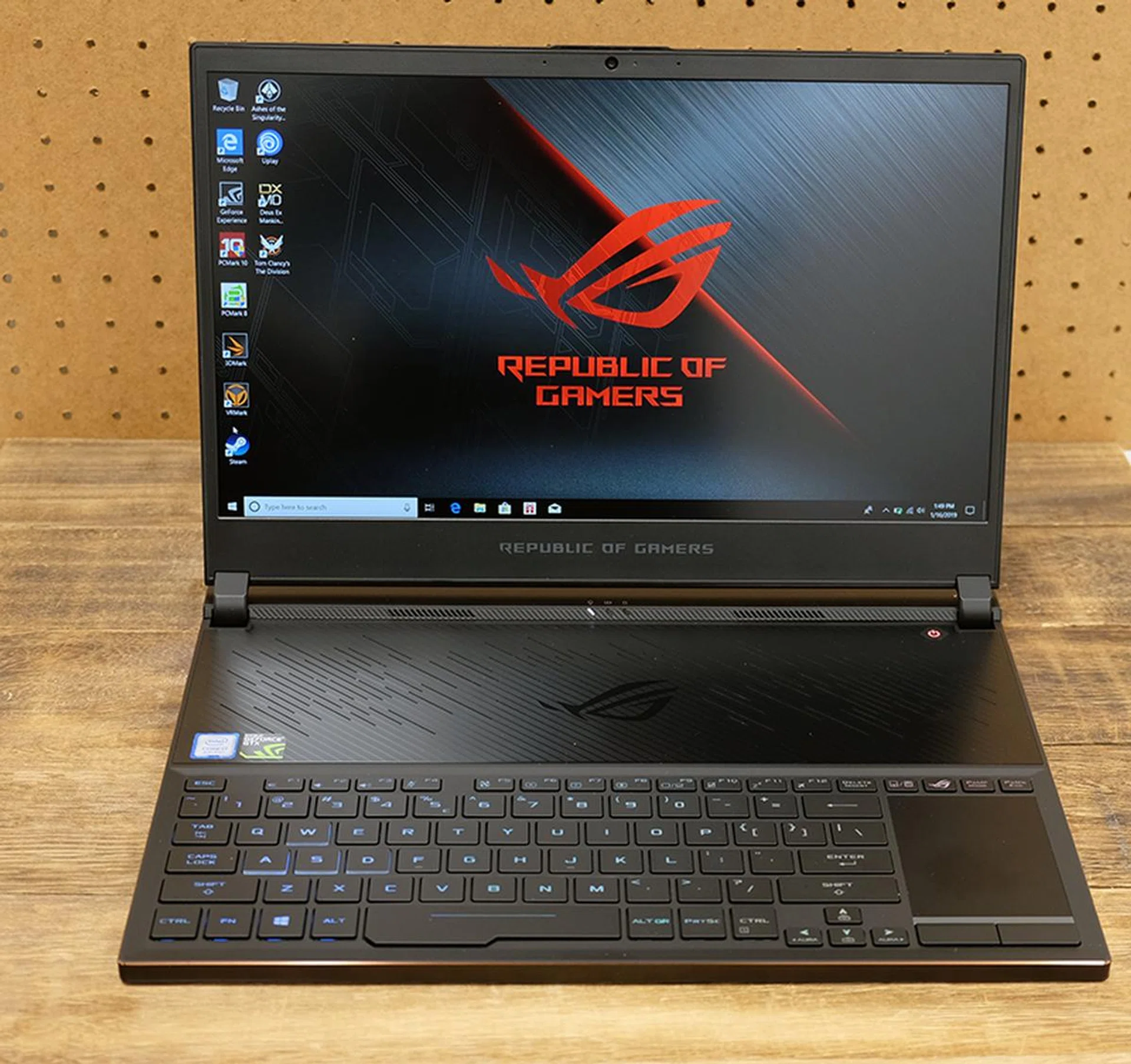
The Zephyrus S GX531 is a gaming laptop that’s looking to push the envelope in terms of mobility. At a mere 15.75mm at its thickest point, this may be the thinnest gaming laptop I’ve reviewed so far. This is one of those laptops that just exude luxury, and its aluminum and magnesium alloy chassis feels really good in hand. There’s barely any discernible flex anywhere, and this feels every inch like the premium notebook it is.
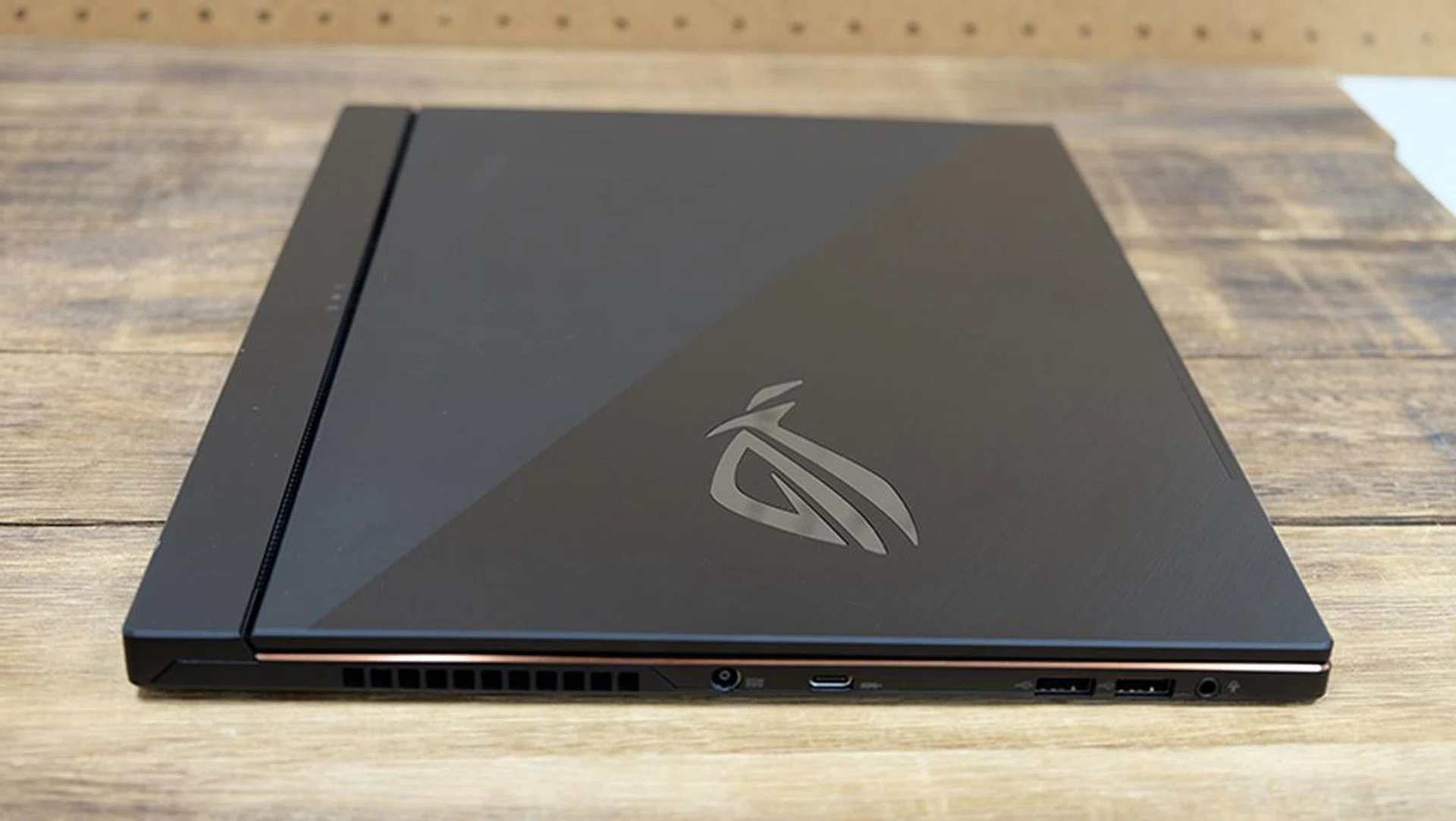
The finish on the notebook is impeccable, and the lid is bifurcated by a diagonal line that allows for the brushed metal finish on one side and a matte coating on the other. This contrasting look is pretty striking, and it gives the notebook more character.
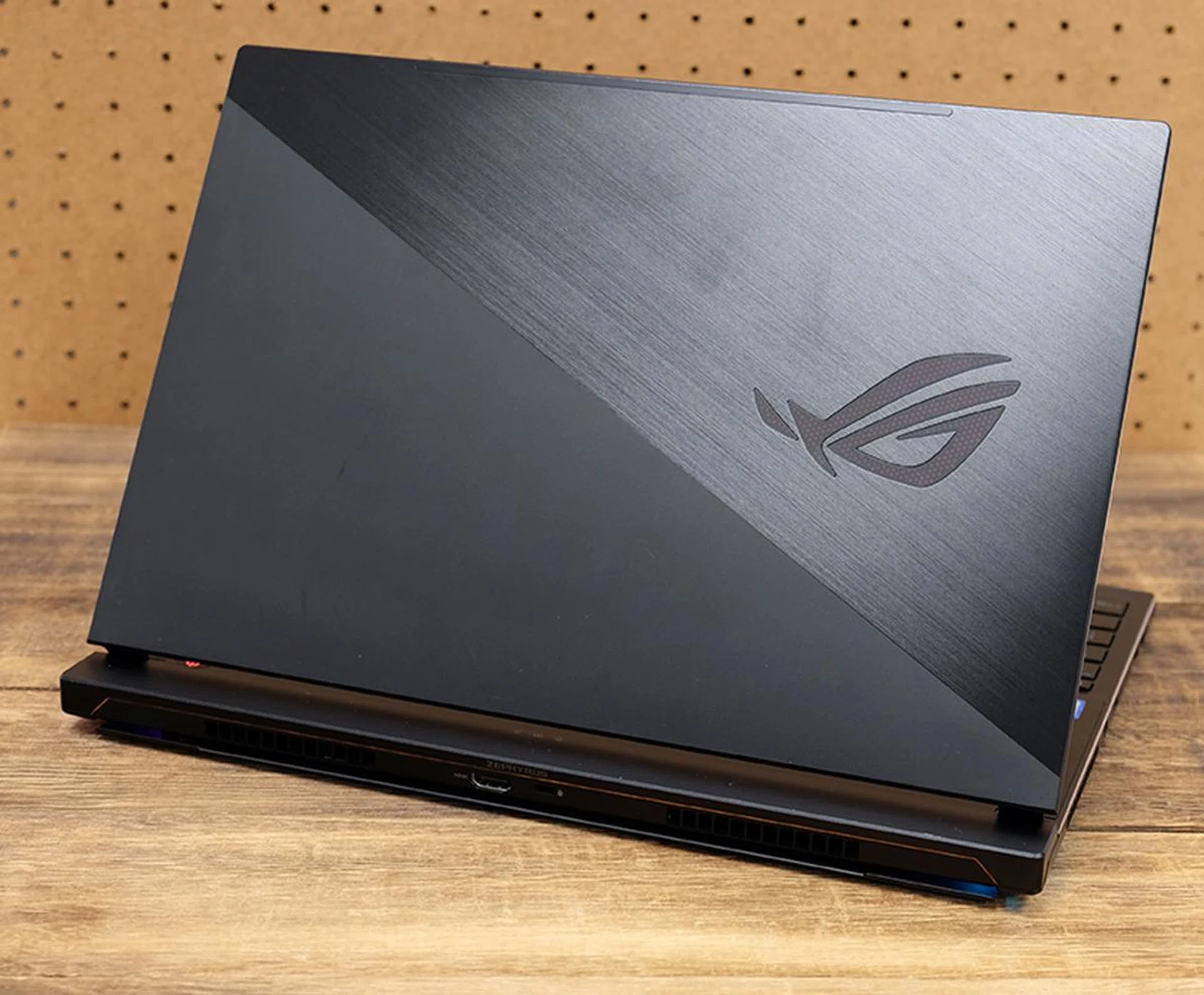
The lid sports contrasting finishes for a pretty stylish look.
That said, it’s not the lightest at 2.1kg, but it’s still sprightly enough to slip into your backpack and take around with you. It’s also pretty competitive with what other brands have to offer.
ASUS was able to make the laptop so thin because of its innovative cooling design, like the one we saw on the first Zephyrus. The keyboard has been pushed to the edge of the notebook, making room for a huge intake vent at the top of the laptop and the rest of the cooling system. The company calls this its Active Aerodynamic System (AAS), and it comprises 12V cooling fans, five heatpipes, and no fewer than four heatsinks. The fans are built from liquid crystal polymer, so ASUS has been able to make them even thinner, while still boosting air flow with a high number of blades – 83 actually – on each fan.
When the lid is raised, the laptop base opens by 5mm to create an additional intake vent for air to enter the laptop. The vent is also lit by a tantalizing underglow which is pretty cool to look at.
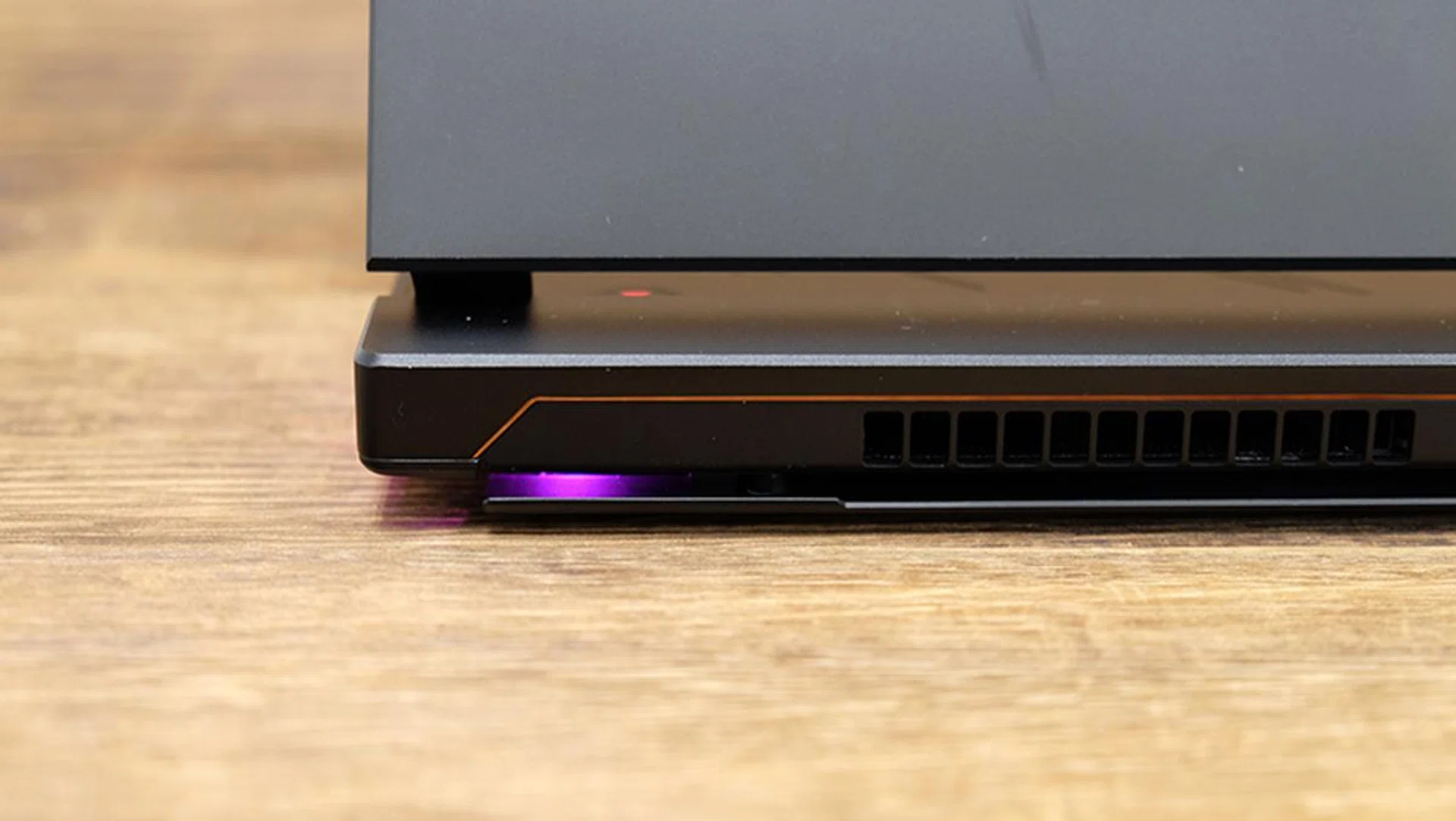
The bottom panel cracks open to pull in more air when the lid is raised.
Furthermore, the cooling system has been improved over the first Zephyrus, featuring more heatsinks than before and an extra vent on the right for more efficient heat dissipation. In addition, the anti-dust tunnels from ASUS’ TUF Gaming FX504 also make an appearance here to prevent dust build-up and degradations in cooling performance. These work by leveraging centrifugal force to drive dust out of the dust tunnels, so the heatsinks remain cleaner over time.
The fans follow their own algorithm and adjust their speeds accordingly, but you can also configure the fan speeds manually in ASUS’ Armoury Crate utility. Alternatively, hitting Fn + F5 lets you toggle between Turbo, Balanced, and Silent modes. Unfortunately, the Zephyrus S can get really noisy under load, and the fans can ramp up to a high-pitched drone that is pretty annoying. You’ll probably want to play around in the settings to see how you can mitigate this, but it’s safe to say that you’ll want to game with your headphones on.
The good news is that the unconventional keyboard placement didn’t seem to affect my typing experience much. The keyboard isn’t the most tactile, but key travel distance is still comfortable and I didn’t really have many complaints when typing. ASUS also made the spacebar extra tall, presumably to make it easier to access during crucial moments in-game.
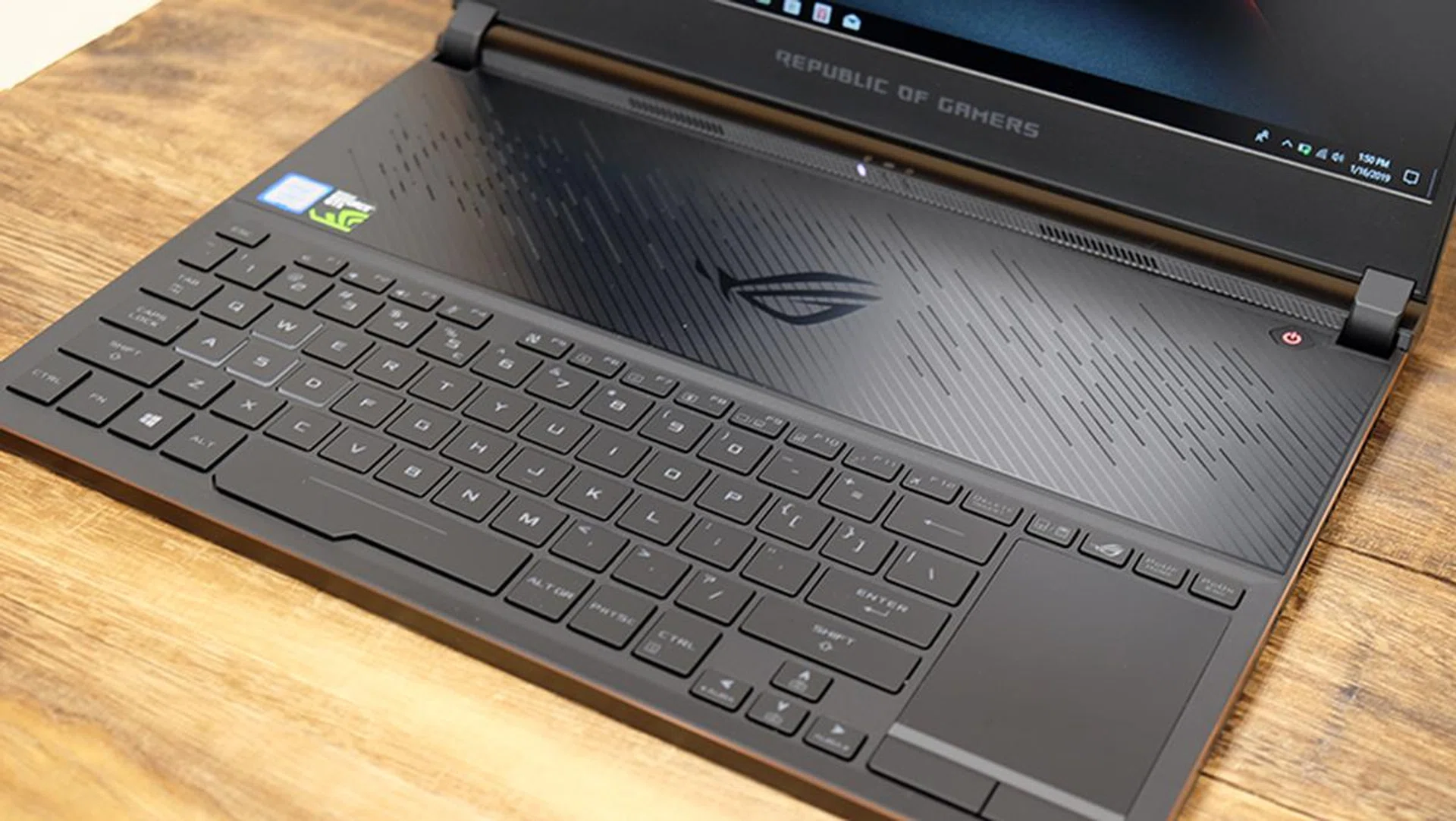
The keyboard and trackpad are actually pretty easy to get used to.
One of my favorite features from the Zephyrus GX501 also makes an appearance here. The touchpad doubles as a number pad, so you technically have access to a full-sized keyboard with as few compromises as possible. The only thing that’s missing is per-key RGB customizations as you’re limited to just four independent zones.
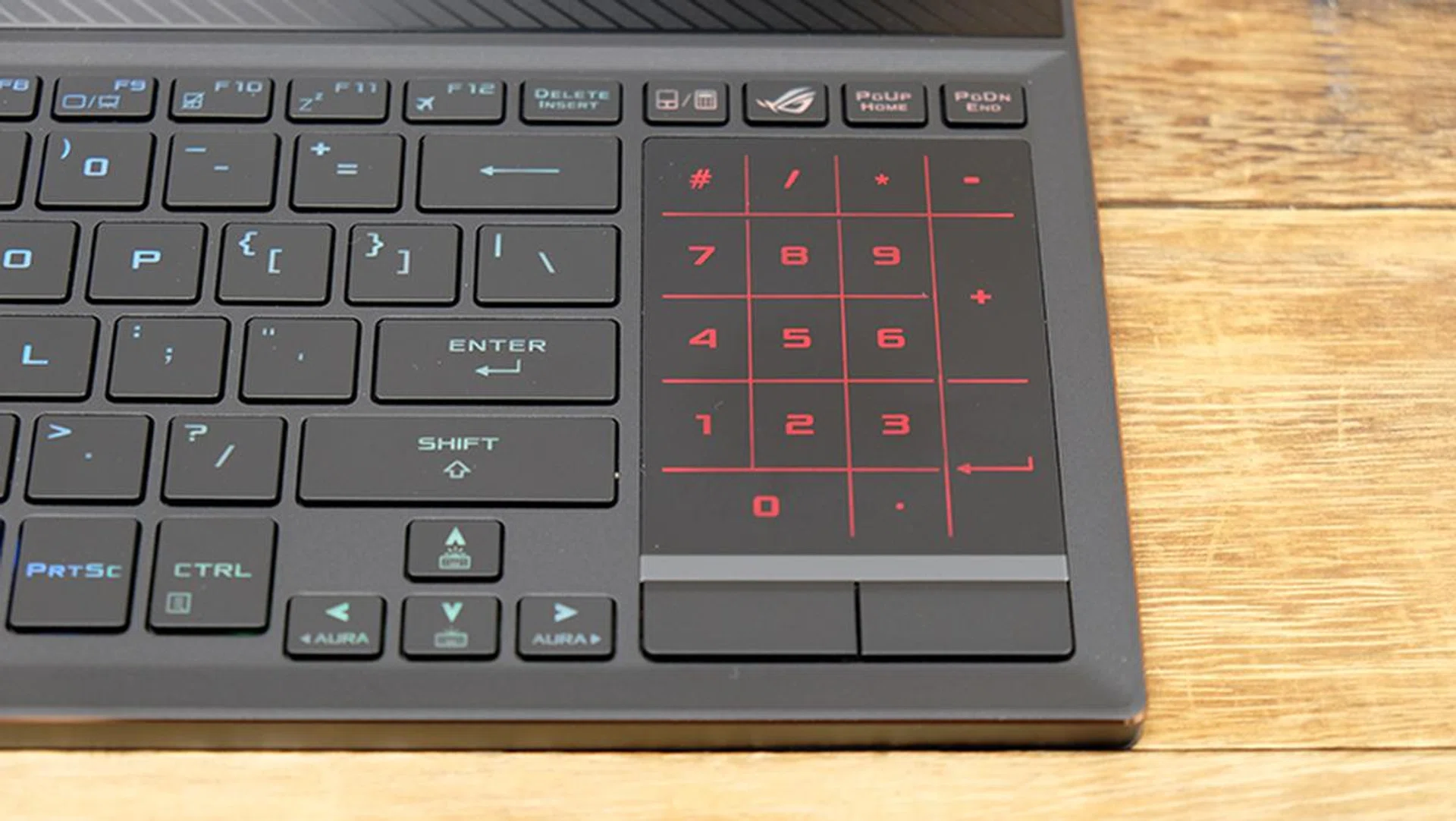
The touchpad doubles as a digital number pad.
The non-traditional layout probably raises more than a few eyebrows, but it’s actually not that hard to get used to in practice. Furthermore, ASUS practically eliminated the possibility of having warm palm rests here, so you don’t have to worry about that. The keyboard also feels cooler since it’s located away from the main heat-generating components. I quite like the positioning of the touchpad as well, and it feels surprisingly natural and intuitive to use. It helps that this is also a Windows Precision Touchpad, so your gestures feel super precise and accurate. Yes, it's a little narrow, but I find that it works well enough for basic navigation without having to rely on an external mouse.
When it comes to the design though, there are a couple of changes coming from the original Zephyrus. The hinges look larger and more robust, and the new design now creates more room at the back of the chassis for the cooling system, which is how ASUS managed to make the laptop so slim.
The bezels have also slimmed down significantly on three sides, a particularly welcome change that helps give the laptop a far more modern look. In addition, the large vent above the keyboard has taken on a more stylish look, featuring diagonal slits instead of the rather boring perforations that characterized it before.
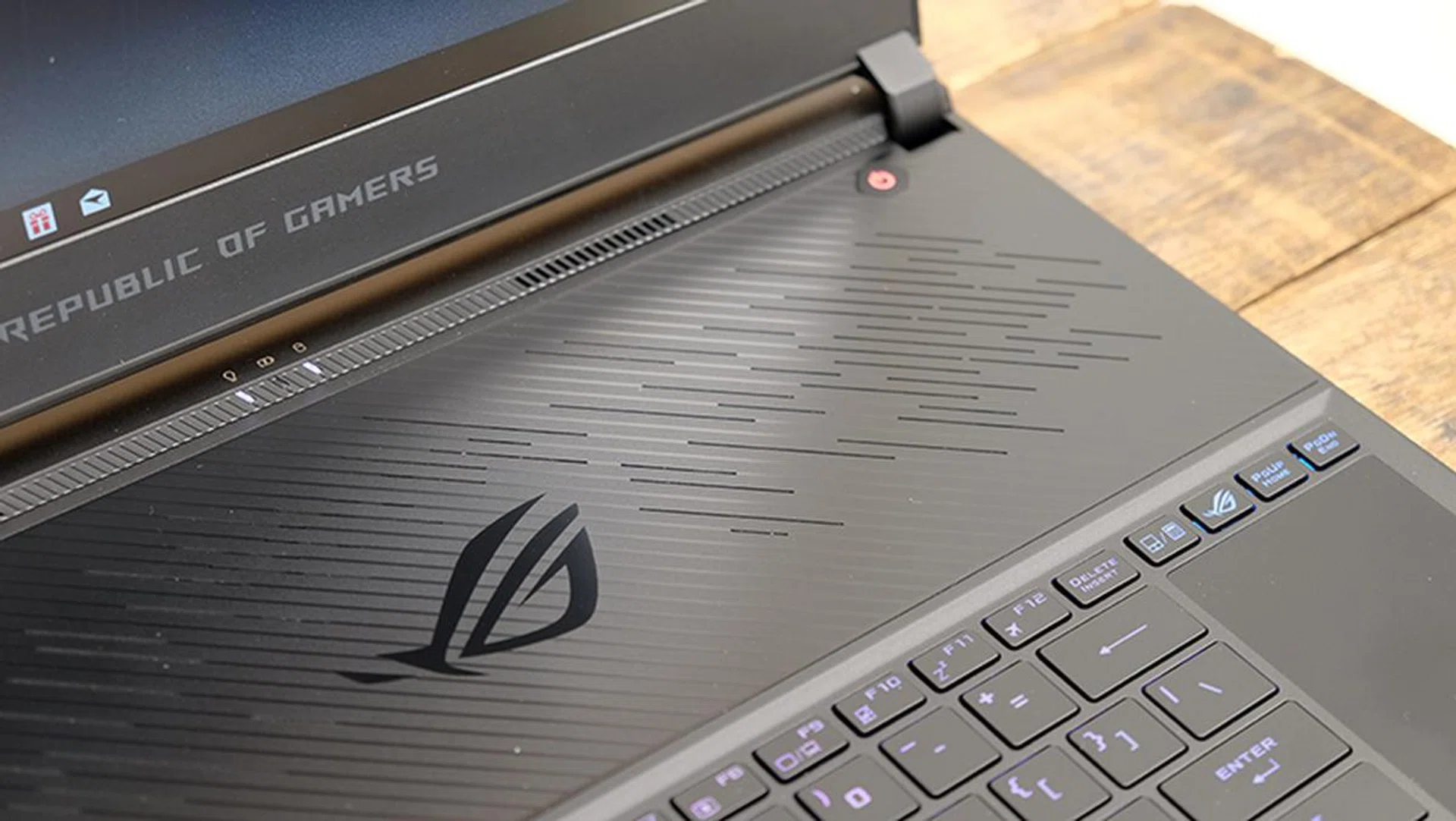
The top intake vents now feature a more modern design than before.
The 15.6-inch IPS-type display could use a little boost in brightness, but colors otherwise appeared accurate. Contrast levels were pleasing to the eye as well, and I was overall pretty happy with the panel. The screen also features a 144Hz refresh rate, so games should appear super smooth and fluid. There’s no G-Sync support, but that’s no big loss with a high refresh rate panel like this one.
On the audio front, the speakers are actually pretty decent, especially considering how thin the laptop is. It’s a little anemic on the low end, but the sound was otherwise pretty clear and loud.
The I/O ports are distributed between the sides and back, and you’ll find one USB 3.1 (Gen 2) Type-C, one USB 3.1 (Gen 2) Type-A, one USB 3.1 (Gen 1) Type-C, and two USB 2.0 ports at the sides. Round the back, there’s one HDMI 2.0 output and a Kensington lock slot. The USB-C port on the right supports Power Delivery as well, so you can use a compatible power bank or Type-C power adapter to charge the notebook if you don’t have the regular adapter.
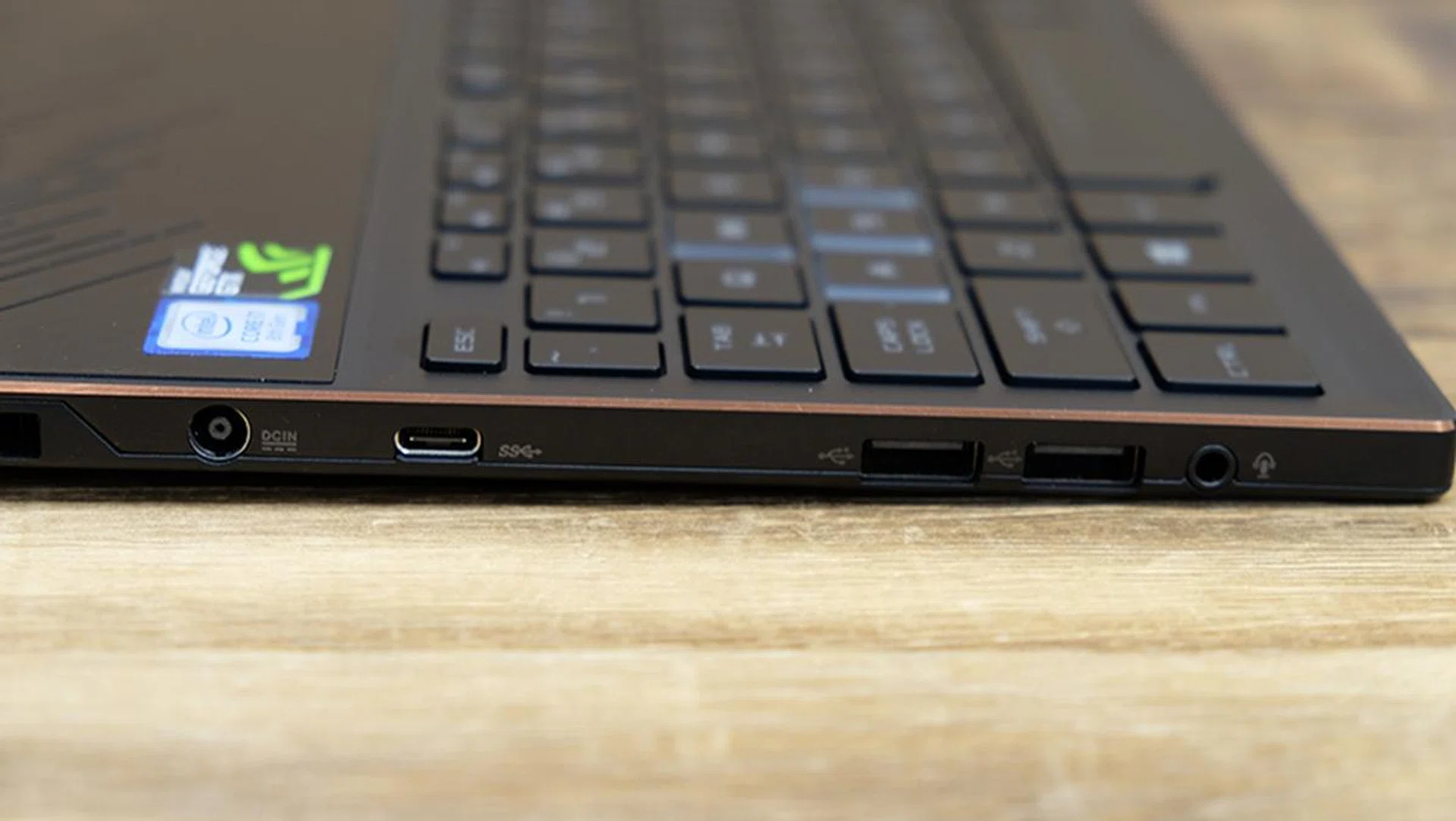
Here's a look at the ports on the left.
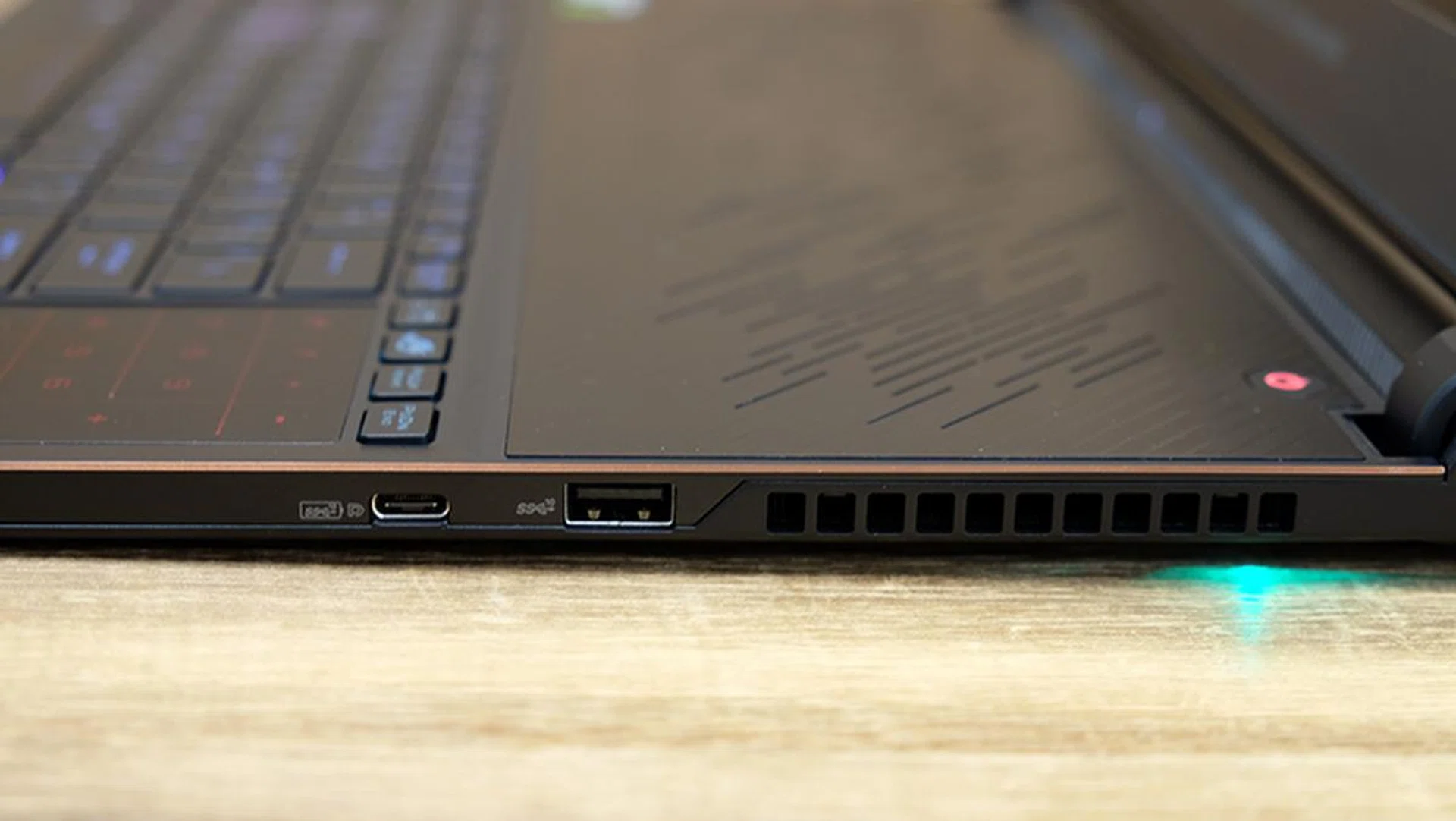
The USB-C port on the right supports Power Delivery.
Test setup and performance
Here’s a full list of the notebooks we’re looking at:
- ASUS ROG Zephyrus S GX531GM
- Aftershock APEX-15
- Razer Blade (2018)
- MSI GS65 Stealth Thin
The Aftershock APEX-15 was chosen because it also uses a GeForce GTX 1060 6GB, and we also threw in two other notebooks equipped with a GeForce GTX 1070 Max-Q to see how the ROG Zephyrus S compares against something a little more powerful.
[hwzcompare]
[products=656443,644143,642009,649344]
[width=200]
[caption=Test notebooks compared]
[showprices=1]
[/hwzcompare]
We ran the notebooks through the following benchmarks:
- PCMark 10
- 3DMark
- VRMark
- Ashes of the Singularity
- Deus Ex: Mankind Divided
- Tom Clancy’s The Division
PCMark 10 Extended
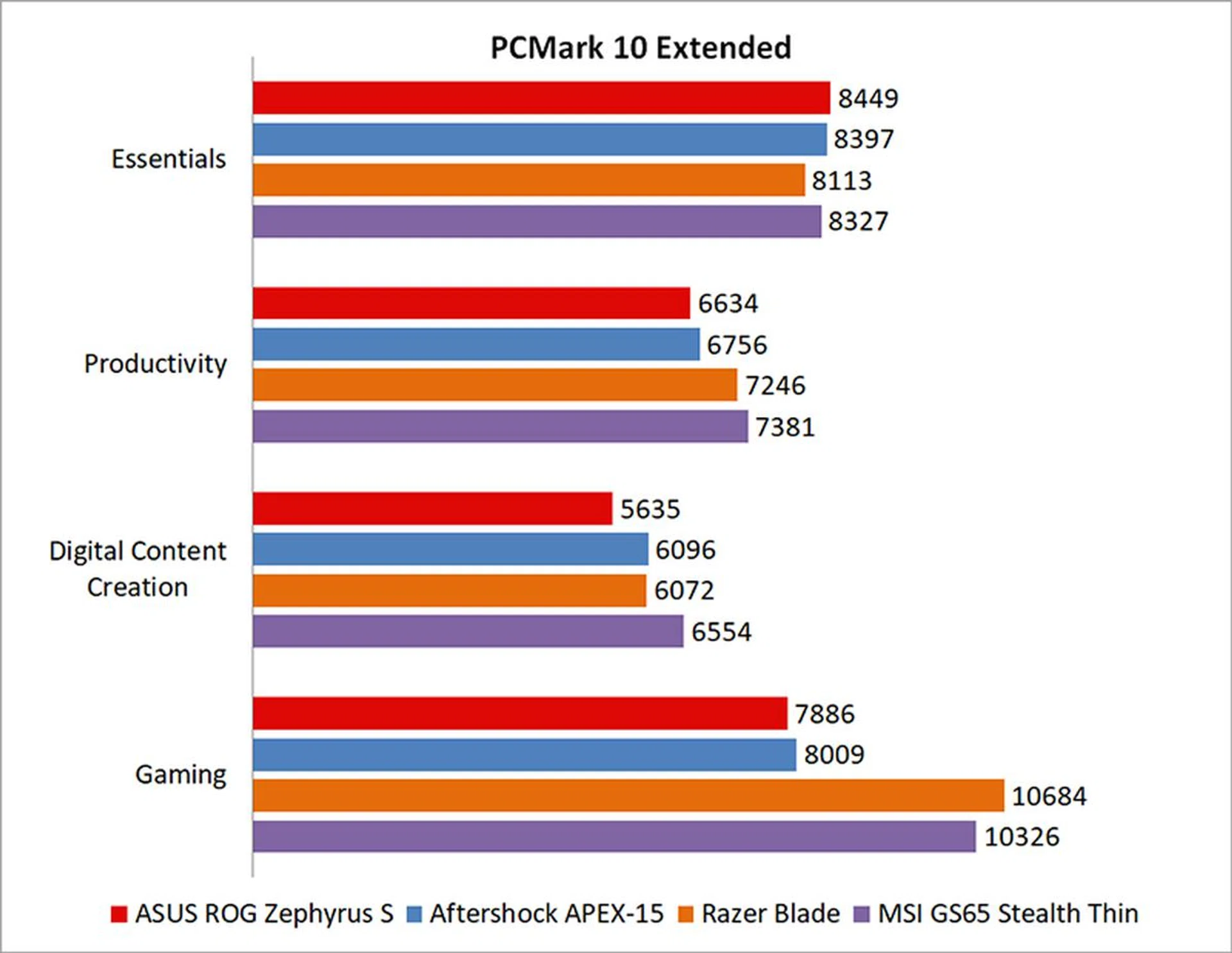
PCMark 10 Extended assesses the performance of systems in a variety of workloads, including basic computing tasks, productivity applications, digital content creation, and gaming. Compared to PCMark 8, it also adds in new test metrics, such as app startup times, which quantifies how long it takes to launch a variety of real-world apps, and a rendering and visualization workload to simulate professional graphics and engineering applications. In addition, existing workloads have been updated to reflect modern usage.
Both the ROG Zephyrus S and APEX-15 fell behind the GeForce GTX 1070 Max-Q notebooks because of the gaming component in the PCMark 10 Extended benchmark. Overall, the Zephyrus S was roughly 10 per cent behind the Razer Blade.

3DMark
3DMark is a more relevant assessment of gaming performance, and it puts the system through a range of graphics and computational performance tests at different resolutions, starting at 1080p and going all the way up to 4K.
In the Fire Strike benchmark, the Razer Blade and its GeForce GTX 1070 Max-Q was roughly 30 per cent quicker than the ROG Zephyrus S.
VRMark
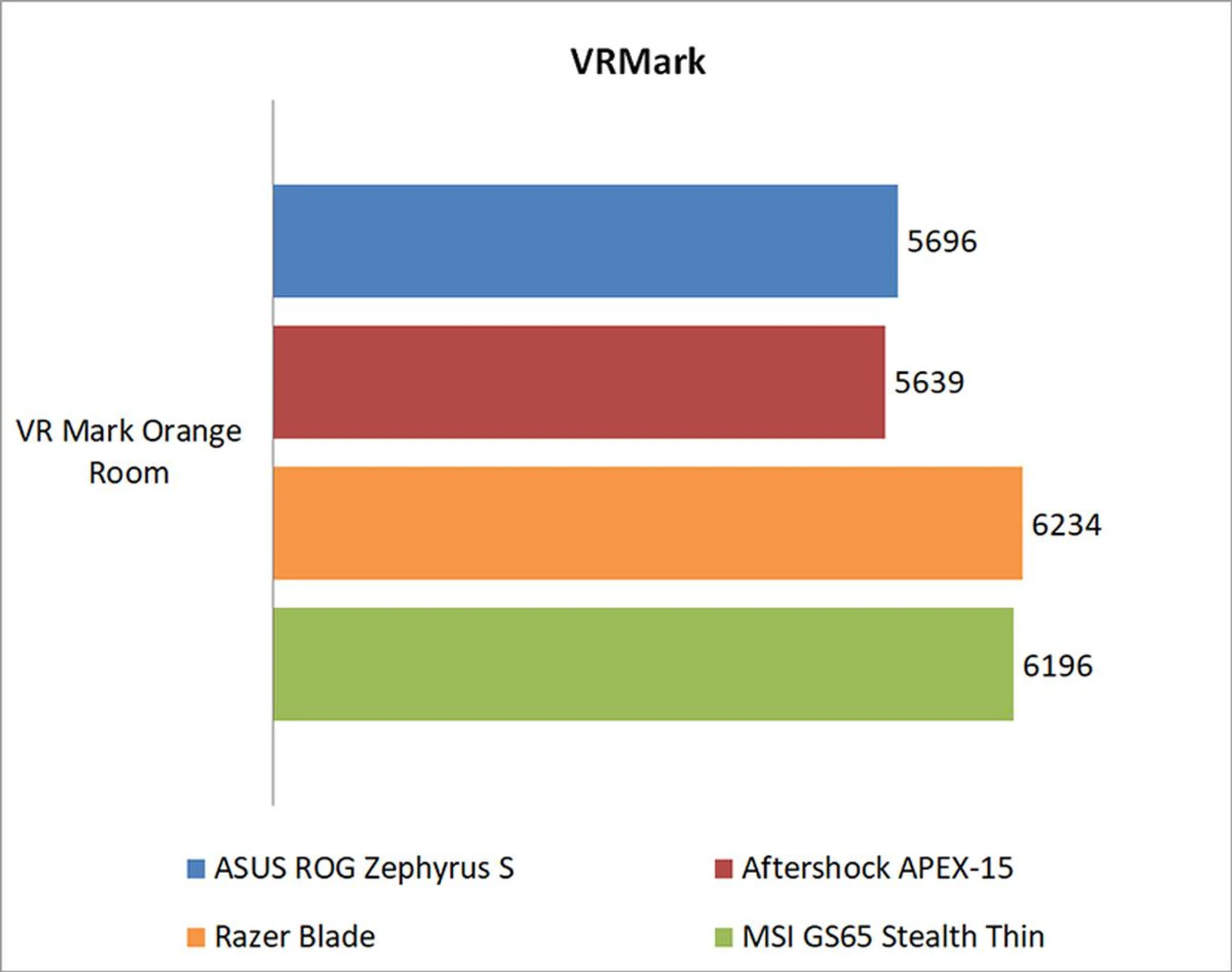
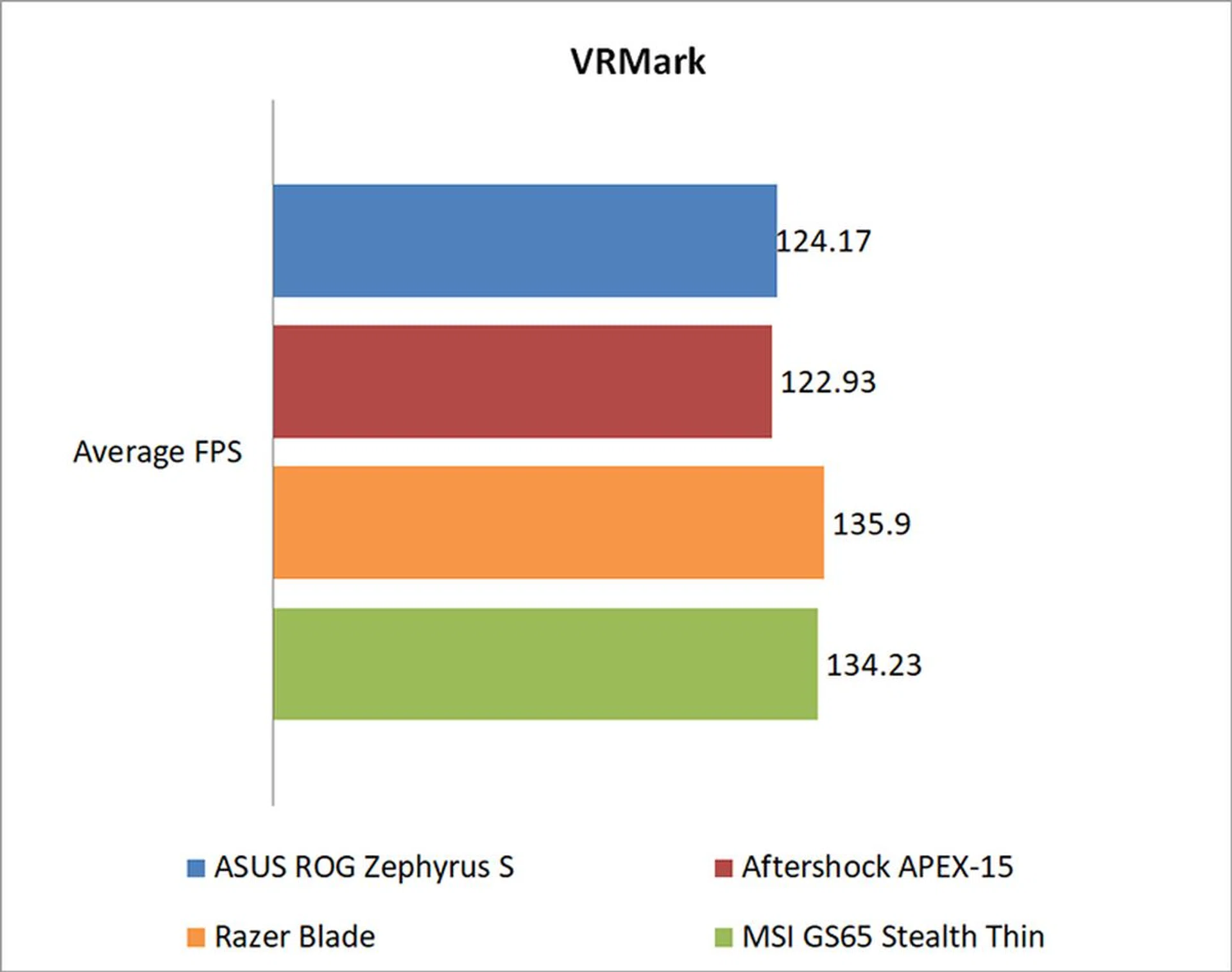
Futuremark’s VRMark benchmark is designed to assess a PC’s ability to handle high-performance headsets like the HTC Vive and Oculus Rift. If a PC passes the Orange Room test, it is ready for the latter two systems. The benchmark also has a target frame rate of 109FPS, and I've included the average FPS each notebook managed to provide a clearer measure of their respective performance.
The ROG Zephyrus S proved itself reasonably capable in VRMark, although it was behind the GeForce GTX 1070 Max-Q notebooks by roughly 9 per cent.
Ashes of the Singularity
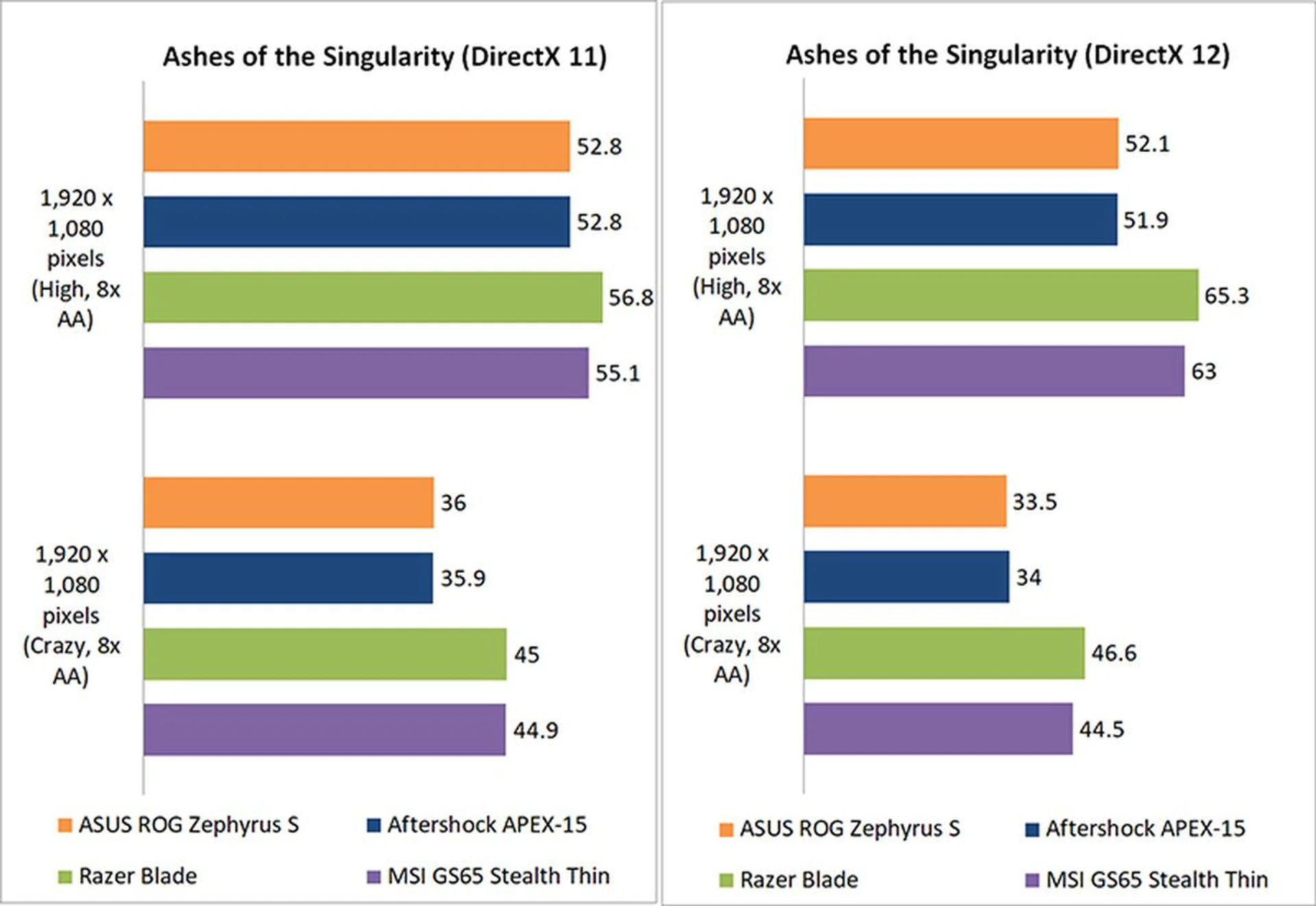
Ashes of the Singularity is a demanding real-time strategy game that puts thousands of units on screen, and it’s capable of pushing even the most powerful GPUs.
At High settings and DirectX 11 mode, all the notebooks were relatively closely matched. However, it seems like the GeForce GTX 1070 Max-Q was better able to take advantage of the DirectX 12 API, and the performance gap between the ROG Zephyrus S and Razer Blade widened to around 22 per cent.
Deus Ex: Mankind Divided
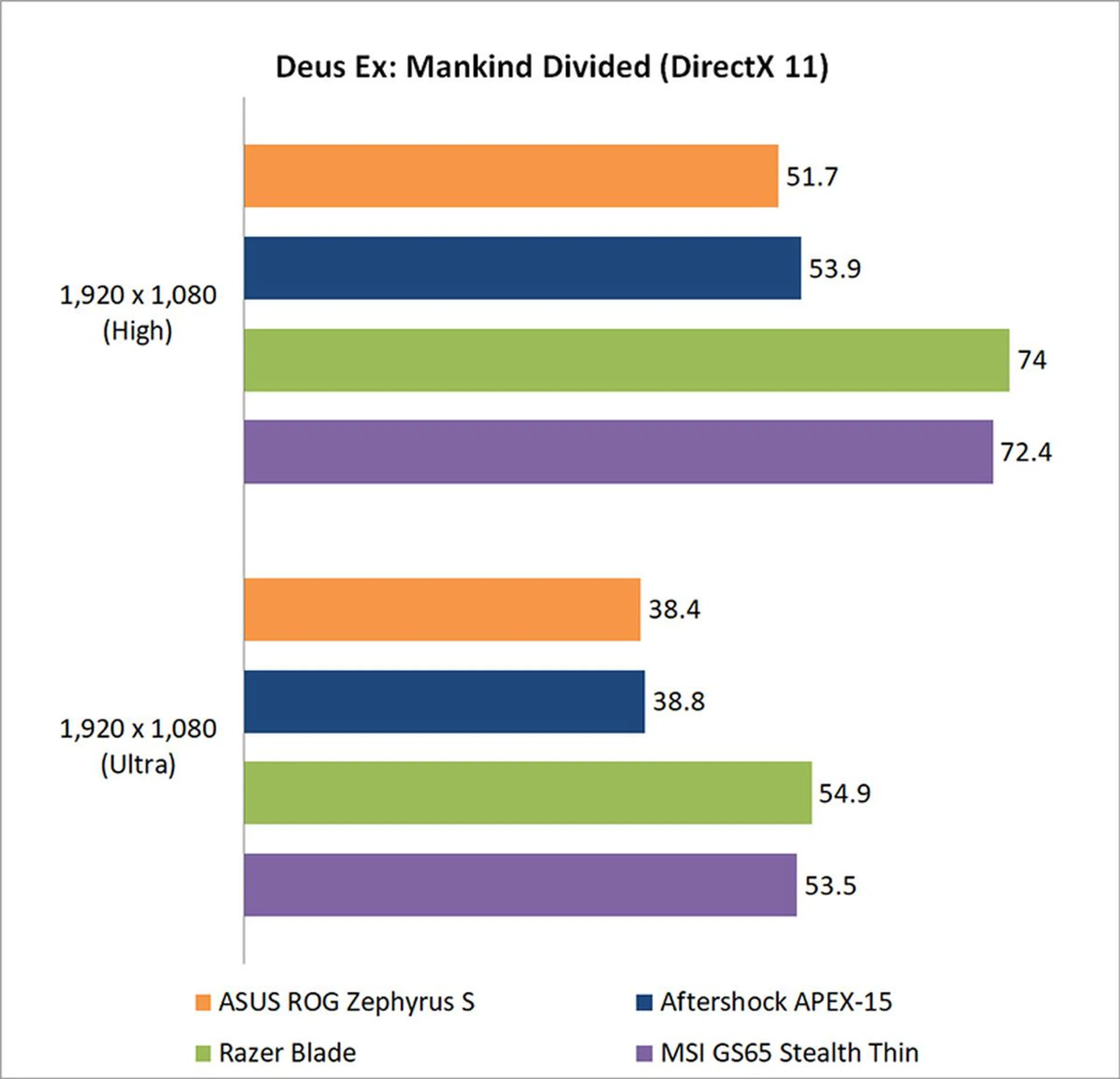
Mankind Divided is one of the most demanding titles to run today, but the ROG Zephyrus is reasonably capable of delivering a playable experience, albeit with some settings lowered. You may also want to lower the settings further if you want to achieve more than 60FPS.
At High settings, the Zephyrus S was roughly 35 per cent behind the Razer Blade.
Tom Clancy's The Division
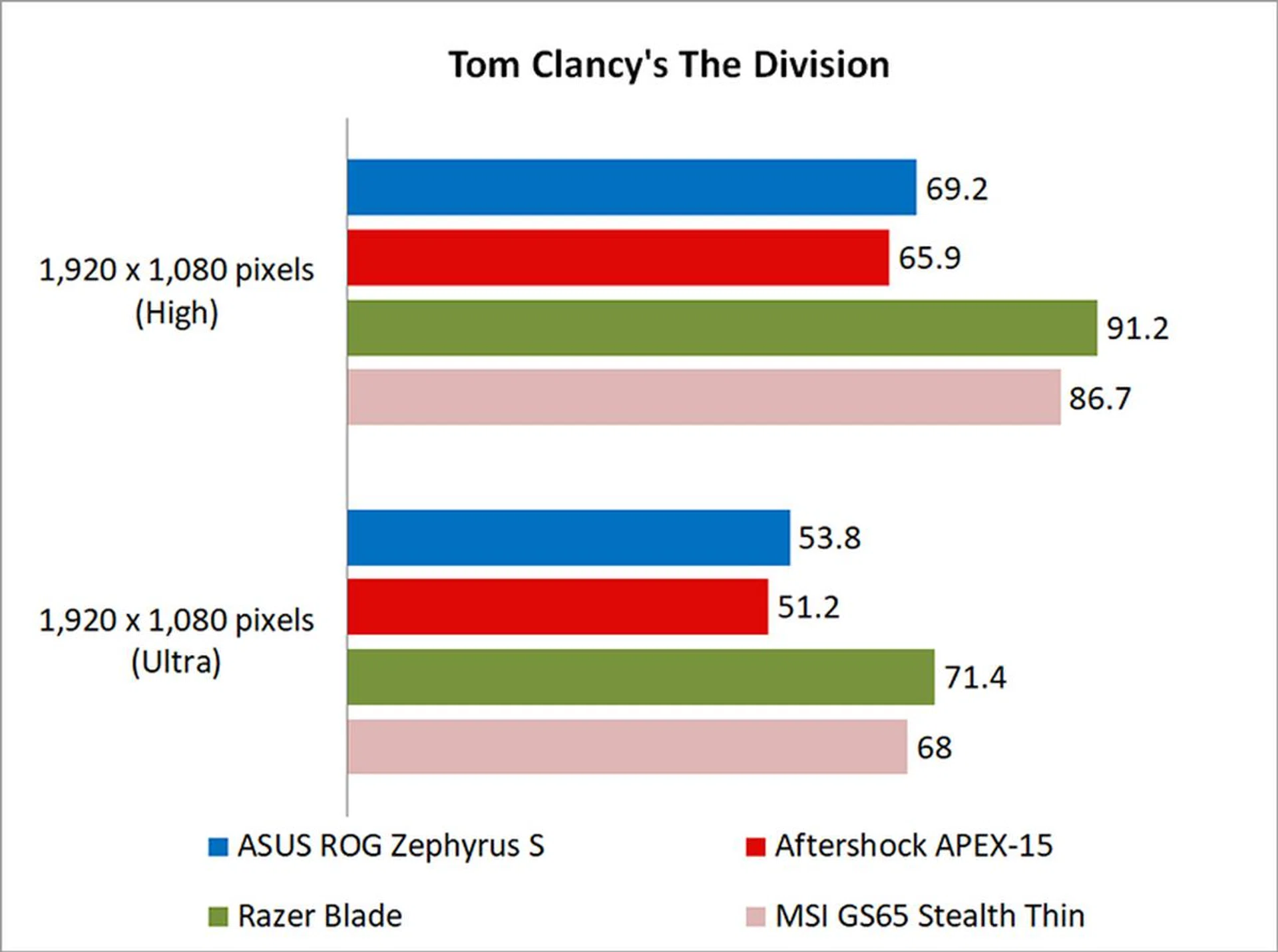
The Division isn’t as demanding to run as Ashes of the Singularity or Deus Ex: Mankind Divided, but its Snowdrop engine can still stress cards with the use of dynamic lighting and the like.
Once again, the performance gap was pretty wide between the GeForce GTX 1060 and 1070 Max-Q notebooks, with the Zephyrus S trailing the Razer Blade by approximately 27 per cent.
Temperature, battery life, & portability
Temperature
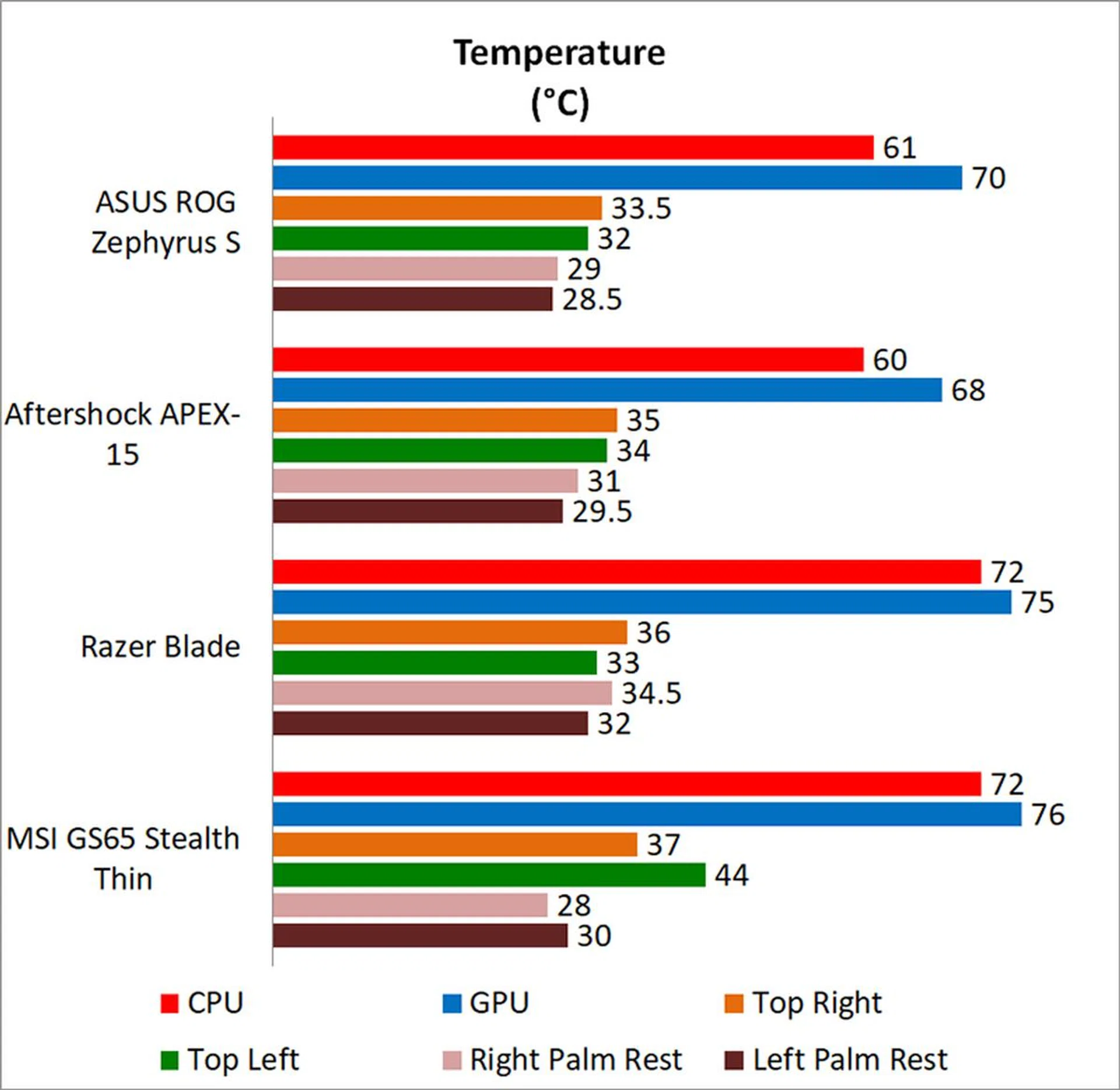
I measured the external temperatures of the four quadrants of the notebook after 40 loops of 3DMark's Fire Strike Extreme stress test. This amount of time is more than enough to get an idea of your average maximum running temperature for this workload.
Unsurprisingly, the GeForce GTX 1060 runs cooler than the GeForce GTX 1070 Max-Q, but I was disappointed to see that cooling performance wasn't better than that on the APEX-15. Of course, the ROG Zephyrus is also thinner, so perhaps credit should be given to ASUS for matching the cooling performance of a thicker notebook.
Battery life and power consumption
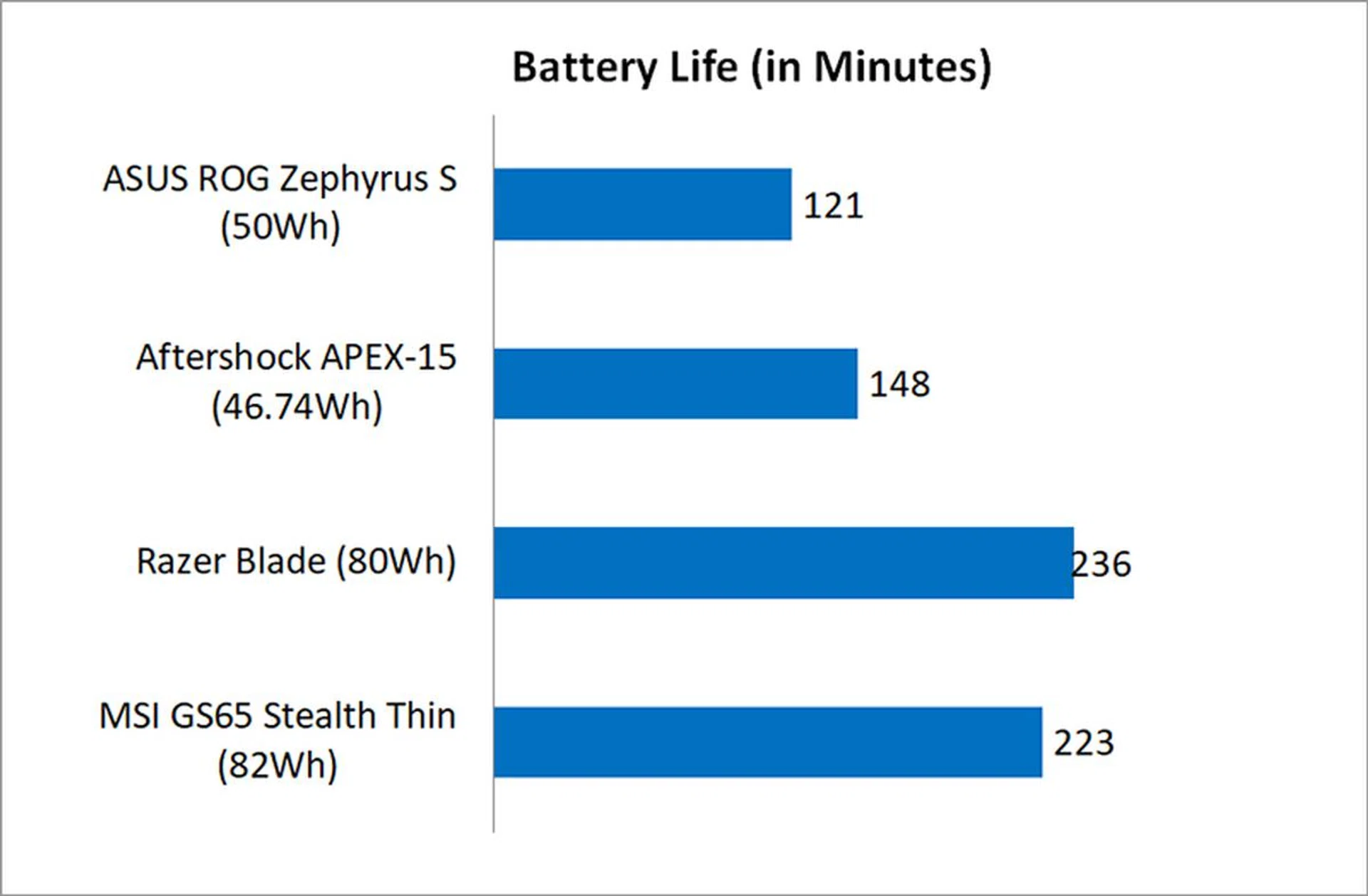
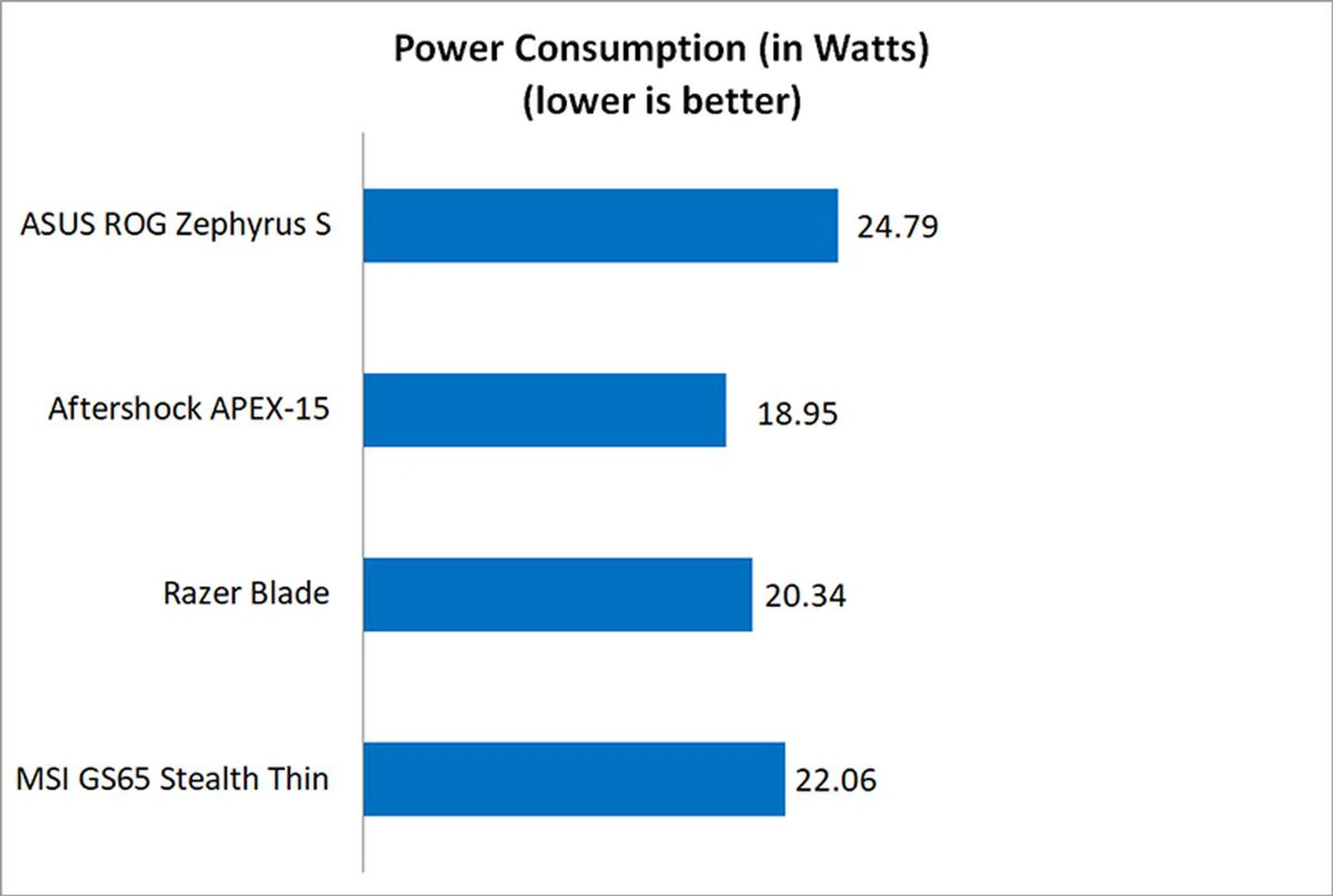
I used the built-in battery life benchmark in PCMark 8 Home to assess the battery life on the laptops.
The ROG Zephyrus S actually had the highest power consumption of the lot, and it's 50Wh battery lasted barely over two hours. That's a mediocre showing, especially considering that the Aftershock APEX-15 even has a slightly smaller battery.
Portability
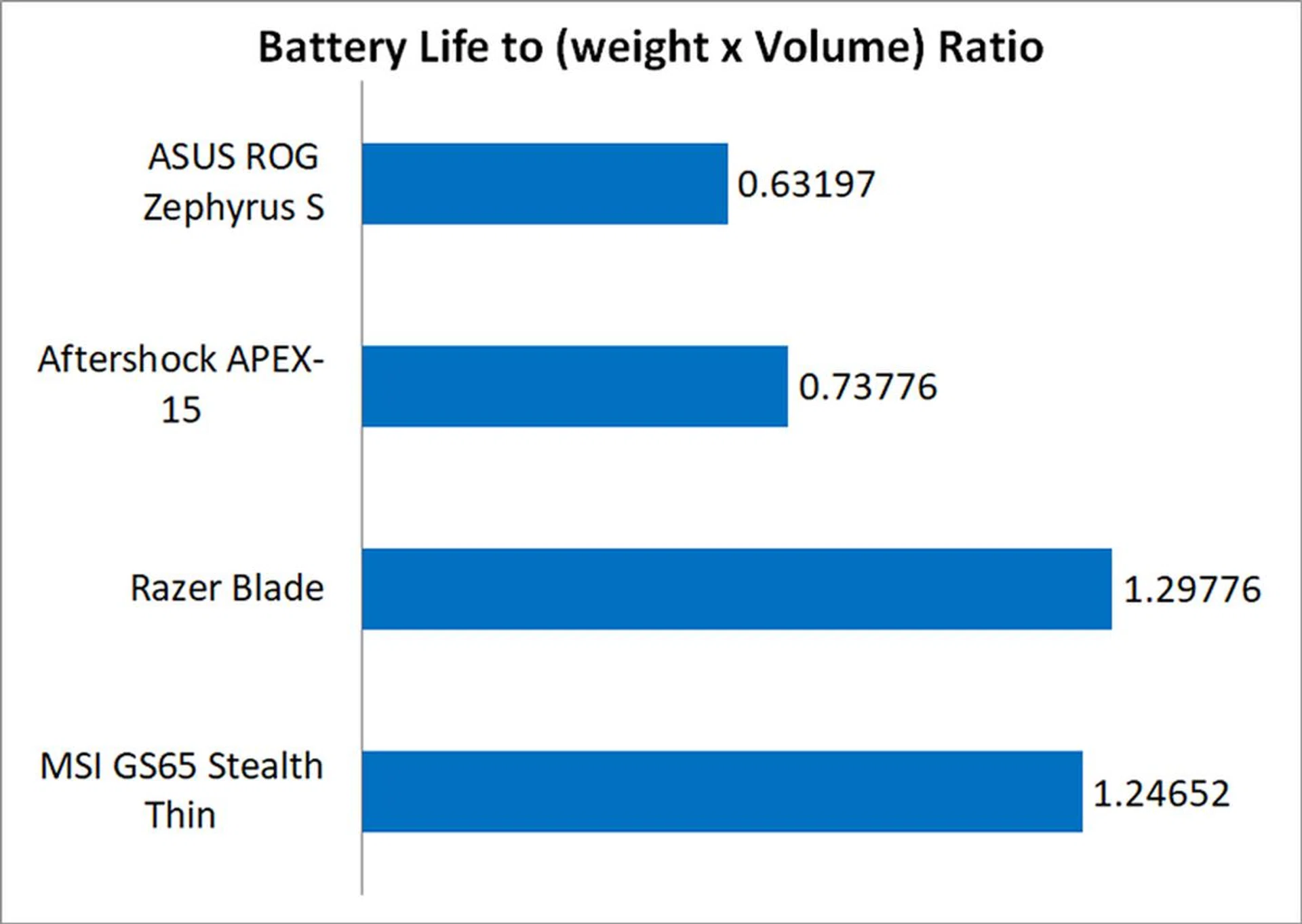
The portability index is an objective measure of how portable a notebook is, taking into account factors like size, weight, and battery life.
Because of its lackluster battery life, the Zephyrus S suffered in this metric, coming in behind even the Aftershock APEX-15. It feels like a letdown when a notebook that's as well-built as the Zephyrus S doesn't excel enough in our mobility trials.
The ROG Zephyrus S is one of the most design-centric gaming notebooks around.
Design is everything
The ASUS ROG Zephyrus S GX531 is a beautiful notebook. It's smart and innovative and a lot of effort clearly went into its design, which has paid off pretty handsomely. It's not quite as minimalist as something like the Razer Blade or Lenovo's Legion laptops, but it's eye-catching in a way that isn't gaudy. Still, this is clearly a laptop made for gamers, and you see this in the ROG logo with the mirror finish on the lid and another splashed across the top vents.
However, it seems to me that this laptop was built for those who care about looks more than anything. Its design is the best thing about the Zephyrus S, and other aspects, such as gaming performance and battery life, don't do much to differentiate it from the crowd. It is equipped with a GeForce GTX 1060 6GB, which offers modest performance at best. Sure, it can run any game at 1080p, but you'll probably need to turn the settings in some more demanding titles down.
The good news is that the laptop is primed for a significant performance boost. The refreshed model will support up to a GeForce RTX 2080 (but it will cost a lot more too). That's a huge leap forward, and you'll finally be able to maximize the 144Hz refresh rate on the screen, which you're not able to do now with the GeForce GTX 1060 6GB model.
The Zephyrus S is also dragged down by its middling battery life. It's a huge pity because given how slim and light the notebook is, it could easily have excelled in the mobility department, if only it had decent battery life and better power optimization.
At the end of the day, this is the laptop for someone who puts looks and design above all else.
If you're looking for something more powerful at about a similar price point, you can consider the ASUS Strix Scar II GL504GS. But if you really love the Zephyrus design and need something more powerful, the S$3,898 Zephrus M is probably your best bet until the refreshed models hit town.
Our articles may contain affiliate links. If you buy through these links, we may earn a small commission.