

Note: This article was first published on 22nd July 2018.
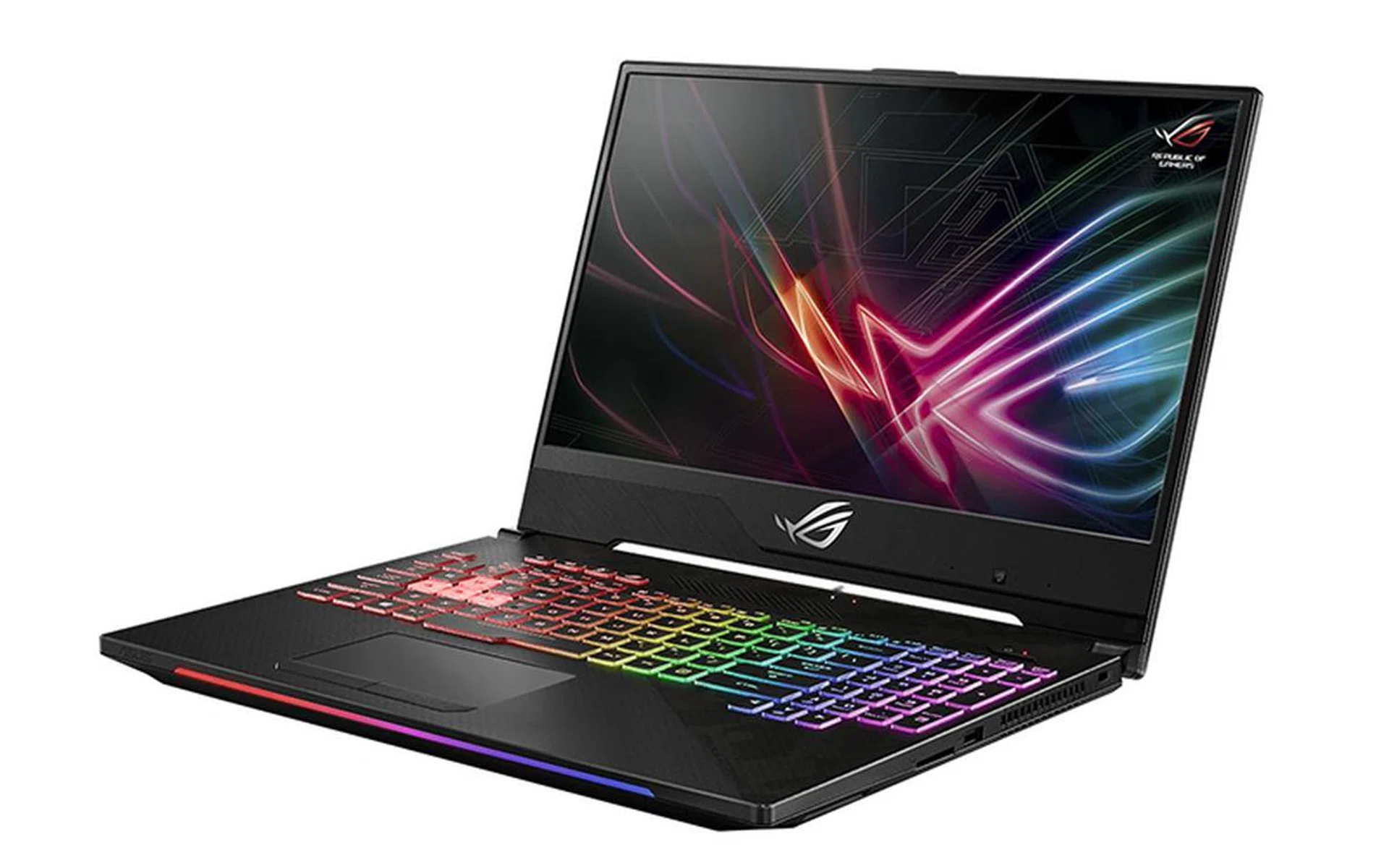
The ASUS ROG Strix Scar II GL504GS is just the latest gaming laptop to sport slim bezels for a more immersive viewing experience.
A new Scar
ASUS first introduced the ROG Strix Scar and Hero laptops at Computex last year. The Scar was targeted at FPS gamers, while the Hero was a more MOBA-oriented laptop. The Scar Edition laptop had most of what you’d expect, including a high refresh rate 144Hz IPS-type display and an NVIDIA GeForce GTX 1070. It also came with the WASD key cluster highlighted to pander to its audience.
The refreshed ROG Strix Scar II GL504GS brings much of the same to the table, but it comes with a few crucial design updates for 2018. Many manufacturers are on a crusade to get rid of as much bezel as they possibly can, and that’s what the Scar II tries to do as well.
Here’s an overview of its specifications:
- 15.6-inch 1,920 x 1,080-pixel IPS-type 144Hz display
- Intel Core i7-8750H (2.2GHz, 9MB L3 cache)
- 16GB single-channel DDR4-2666 RAM
- NVIDIA GeForce GTX 1070
- 512GB PCIe NVMe M.2 SSD
- 66Wh battery
- 361 x 262 x 26.1mm
- 2.4kg
At S$3,398, the Scar II is cheaper than some of its Max-Q counterparts. However, this also means it isn't a slim and light laptop like the MSI GS65 Stealth Thin or Razer Blade. That said, the good news is that the GeForce GTX 1070 it is equipped with is more powerful than its Max-Q counterpart because it’s less concerned with power efficiency.
Is the extra heft on the ROG Strix Scar II worth that extra bit of performance? Read on to find out.
Slim bezels, but no Max-Q optimizations
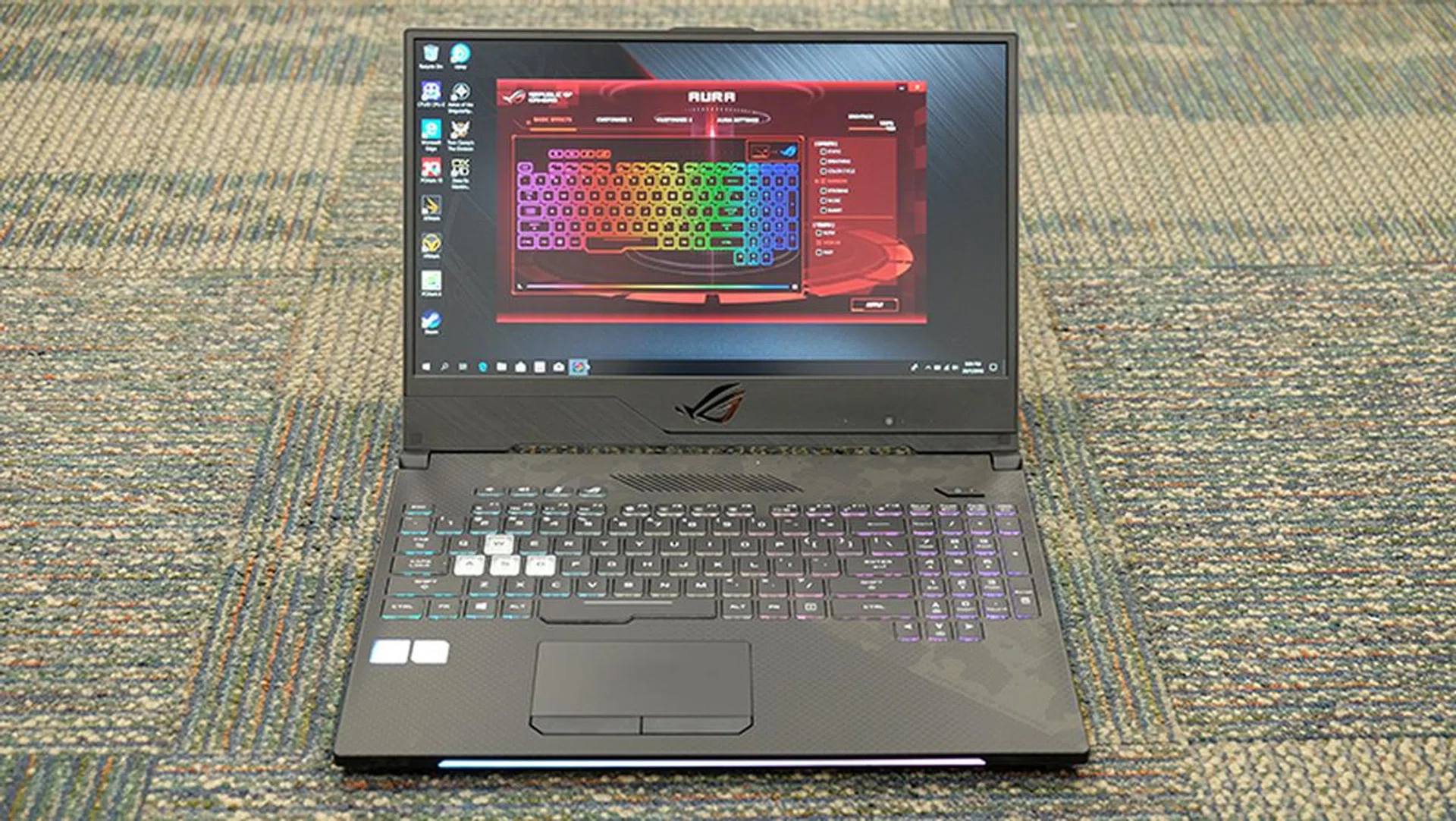
The Scar II has slim bezels on three sides, but the bottom bezel is really thick.
The new ASUS ROG Strix Scar II GL504GS is a laptop with an unabashed gaming-focused aesthetic. While laptops like the Gigabyte Aero 15X and Razer Blade favor a more subdued look, minimalism has gone out of the window with the Scar II.
For starters, the area surrounding the keyboard sports a faux carbon fiber finish. This is complemented by a dark camouflage pattern, because hey, clearly all gamers like things associated with guns and the military, right? Actually, no, and I still fail to see why anyone who is not a 12-year-old would want a laptop with a large camo print that bifurcates the entire keyboard. It's not garish, so we'll let this slide.
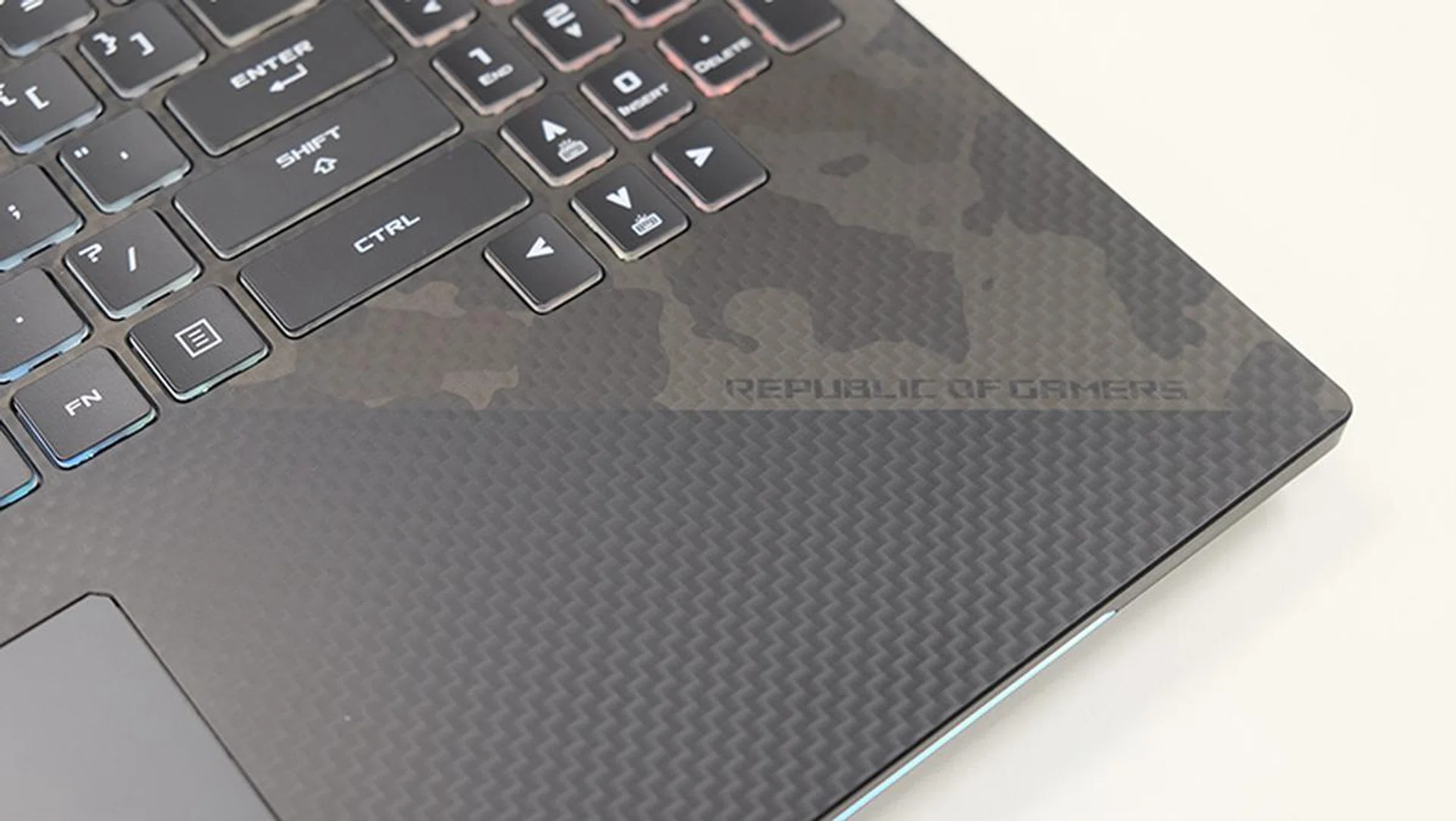
The matte coating on the palm rests resists stains quite well.
That aside, the good news is that the matte coating on the palm rests resists fingerprints quite well, so you won’t have to worry too much about keeping it clean. Build quality also feels super solid, despite the mostly plastic build. The laptop is built like a tank, and there’s no flex to the lid or keyboard, which feels very reassuring.
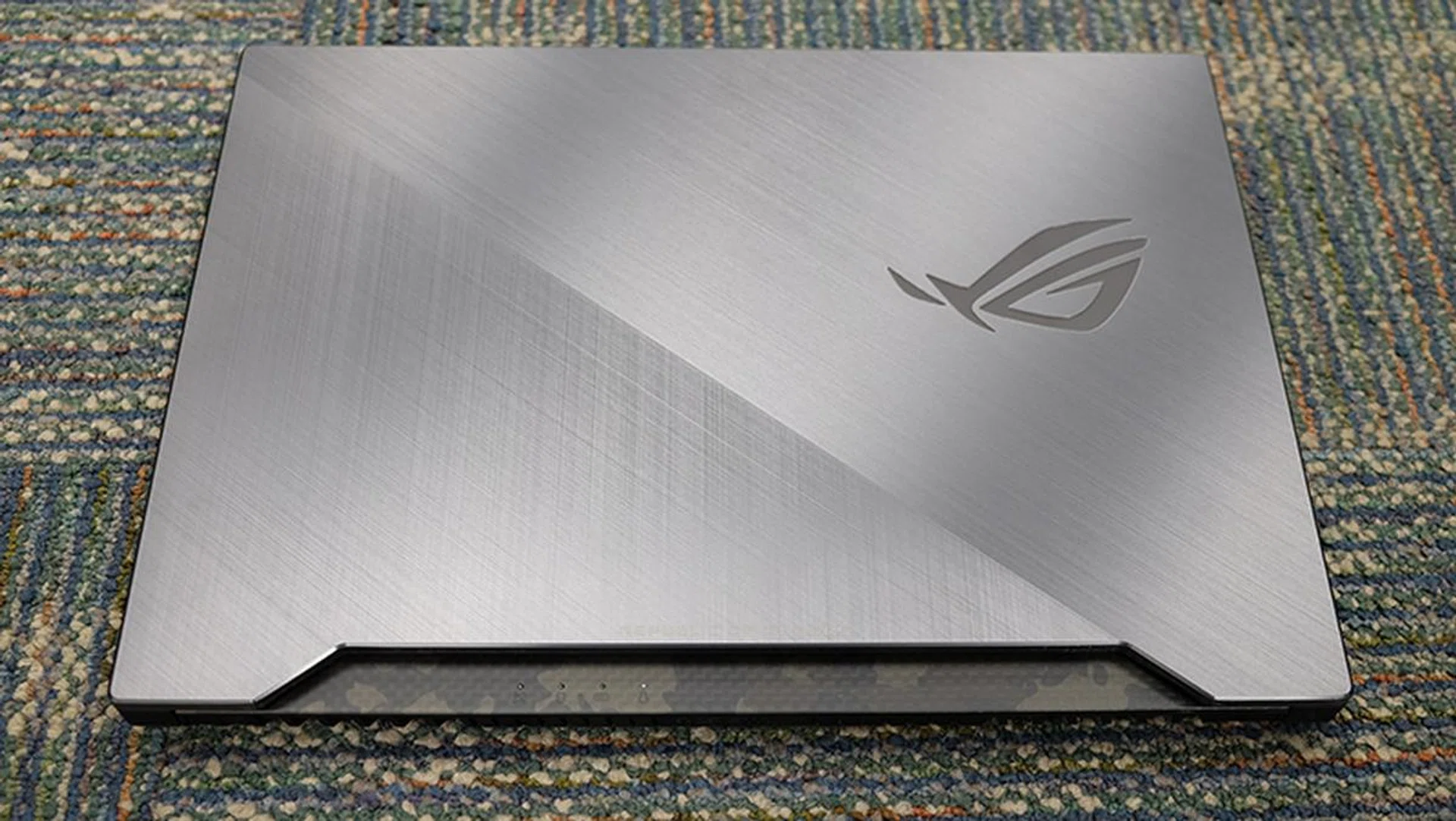
The laptop lid also features a brushed metal finish that is reminiscent of what you see on the ROG Zephyrus GX501. This looks really good, and there’s a large glowing ROG logo with an attractive mirror finish on the lid as well.
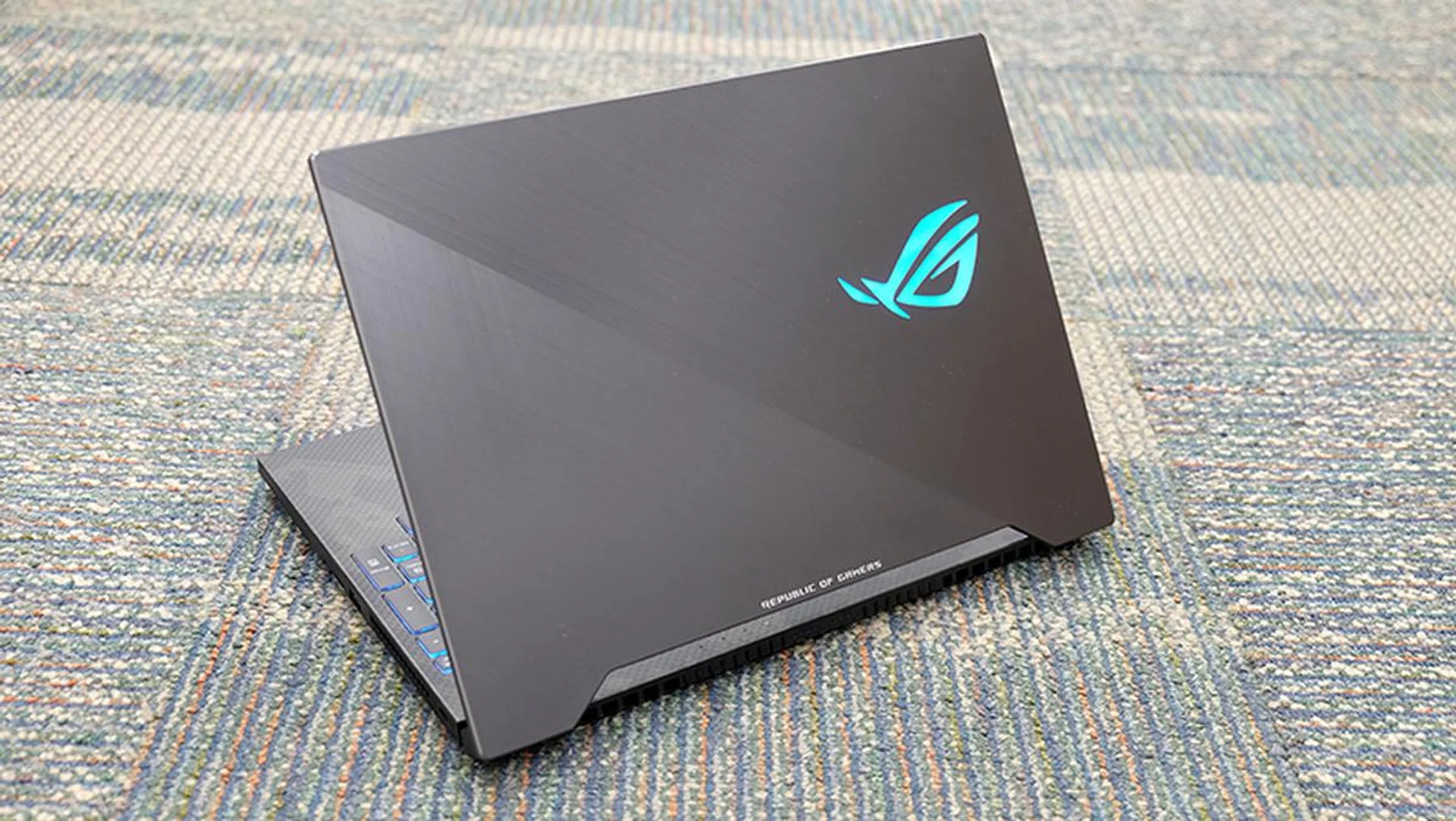
You can change the color of the ROG logo on the lid as well.
You’ll find more brushed metal on the bottom bezel of the laptop, which as it turns out, is super thick. I like the slim bezels on the other sides of the screen as it really helps create a more immersive feel when you’re gaming, but it seems like ASUS simply took whatever bezel it shaved off and put it at the bottom.
The bottom bezel and the ROG logo that’s plastered on it are huge to the point of looking silly, and you definitely don’t need that much space to fit a webcam down there. As it turns out, the webcam is located in one of the worst possible locations. It sits at the bottom right, which means you’ll have to put up with awkward camera angles and difficulties in getting a centered shot when video chatting.
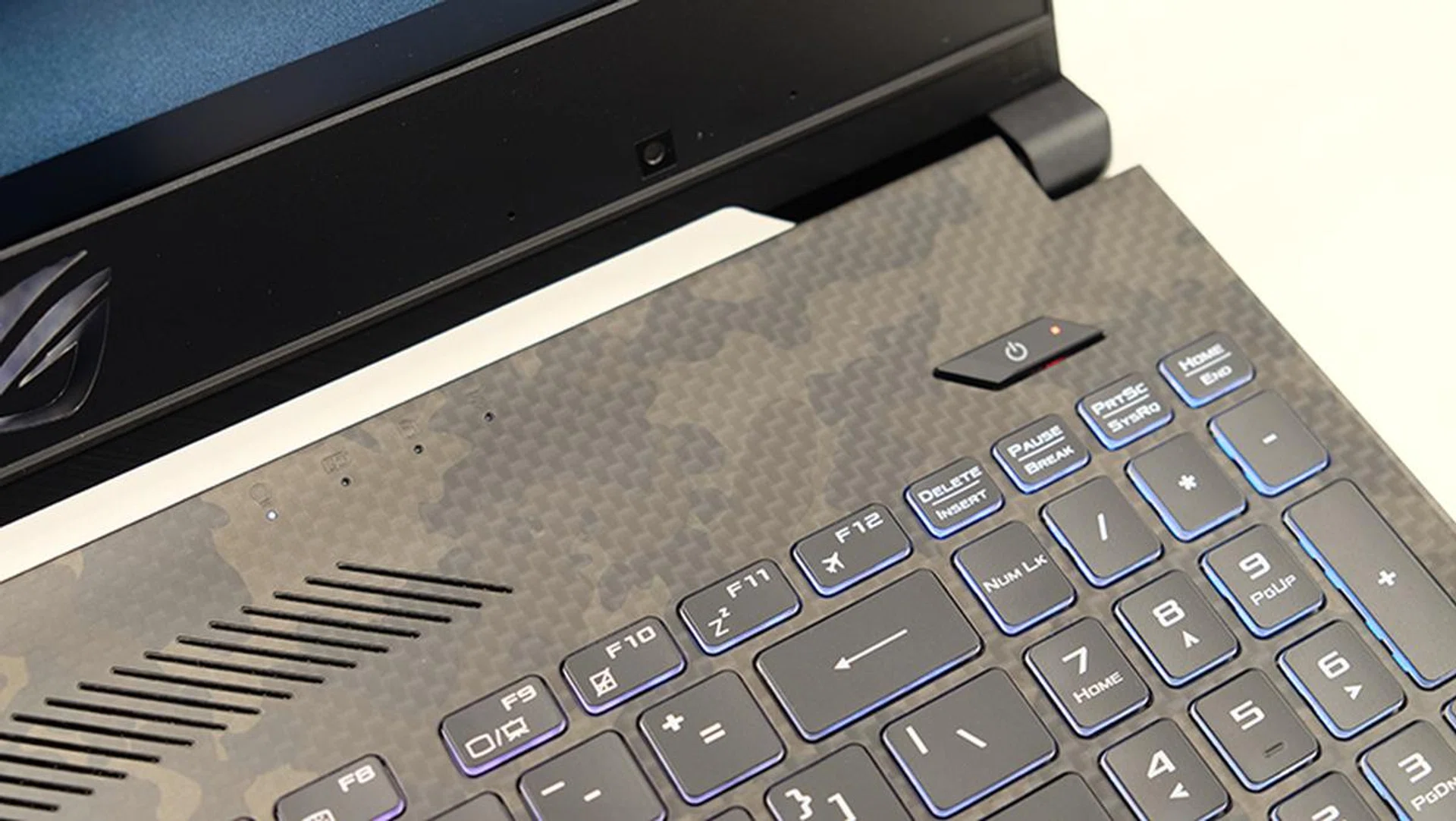
You can see here the webcam at the bottom right.
Having said that, the screen on the Scar II is fortunately excellent. It boasts 100 per cent coverage of the sRGB color space, and ASUS claims it’s also the first to have a 144Hz IPS-type panel with a 3ms response time. The screen has a peak brightness of 300 nits, and I’d say it is noticeably brighter than the screens on the Razer Blade and Gigabyte Aero 15X.
Colors also appeared accurate and vivid, and I have no complaints about this particular screen. It’s not even a problem that there’s no support for G-Sync, because the 144Hz refresh rate ensures that all the on-screen action is super smooth anyway.
The trackpad is a Windows Precision Touchpad, and it feels precise and accurate and supports all of Windows 10’s gestures. The difference between a precision touchpad and one that uses third-party drivers is pretty huge, and I’m always happy to see the former in use.
The dual side-firing speakers are another bright spot on the Scar II. When I first put on some music, I was surprised by how loud and clear they sounded. There’s a definite emphasis on the low-end though, which is good news if you really want to feel the rumble of explosions in your games and movies.
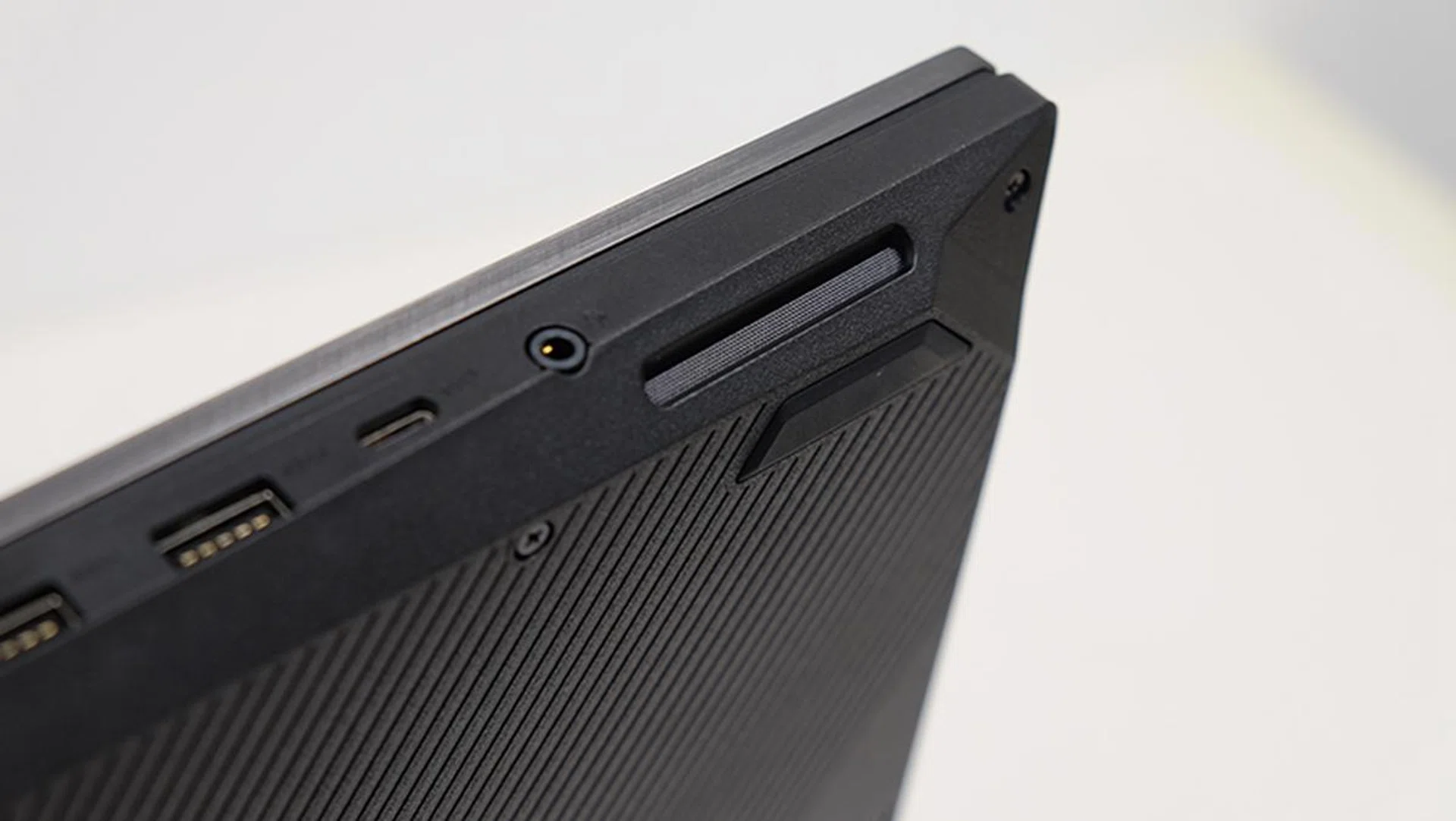
The two side-firing speakers pump out loud and clear sound.
The keyboard feels good as well, and the 1.8mm travel distance is pretty good for a laptop. The Scar II is thicker than the Max-Q laptops I reviewed recently, and the least I’d expect from this is a better typing experience. This is one of the better laptop keyboards I’ve come across, and it’s a pleasure to type on. In addition, there are dedicated keys for volume adjustment, muting the microphone, and launching the ROG Gaming Center above the keyboard.
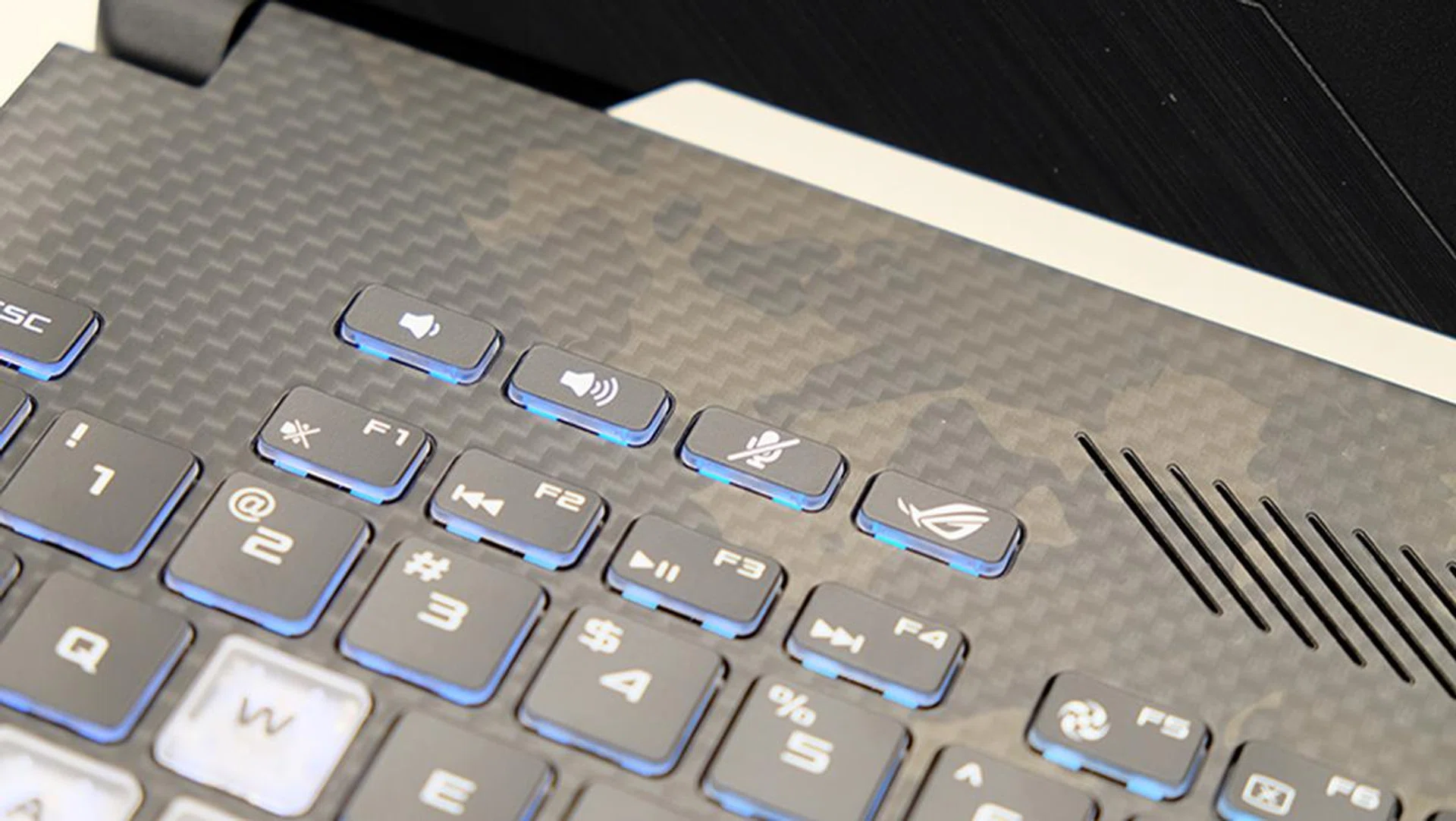
The volume control and microphone buttons will turn out to be pretty useful when using voice chat apps.
The WASD key cluster also features transparent keycaps, which is what singles out the laptop as one targeted at FPS gamers. In comparison, the ROG Hero II has the QWER keys highlighted. Another nice touch is the asymmetrical space bar, which is slightly wider on its left side. This makes it easier to hit the key with your fingers centered around the WASD key cluster, and I really like this attention to detail.
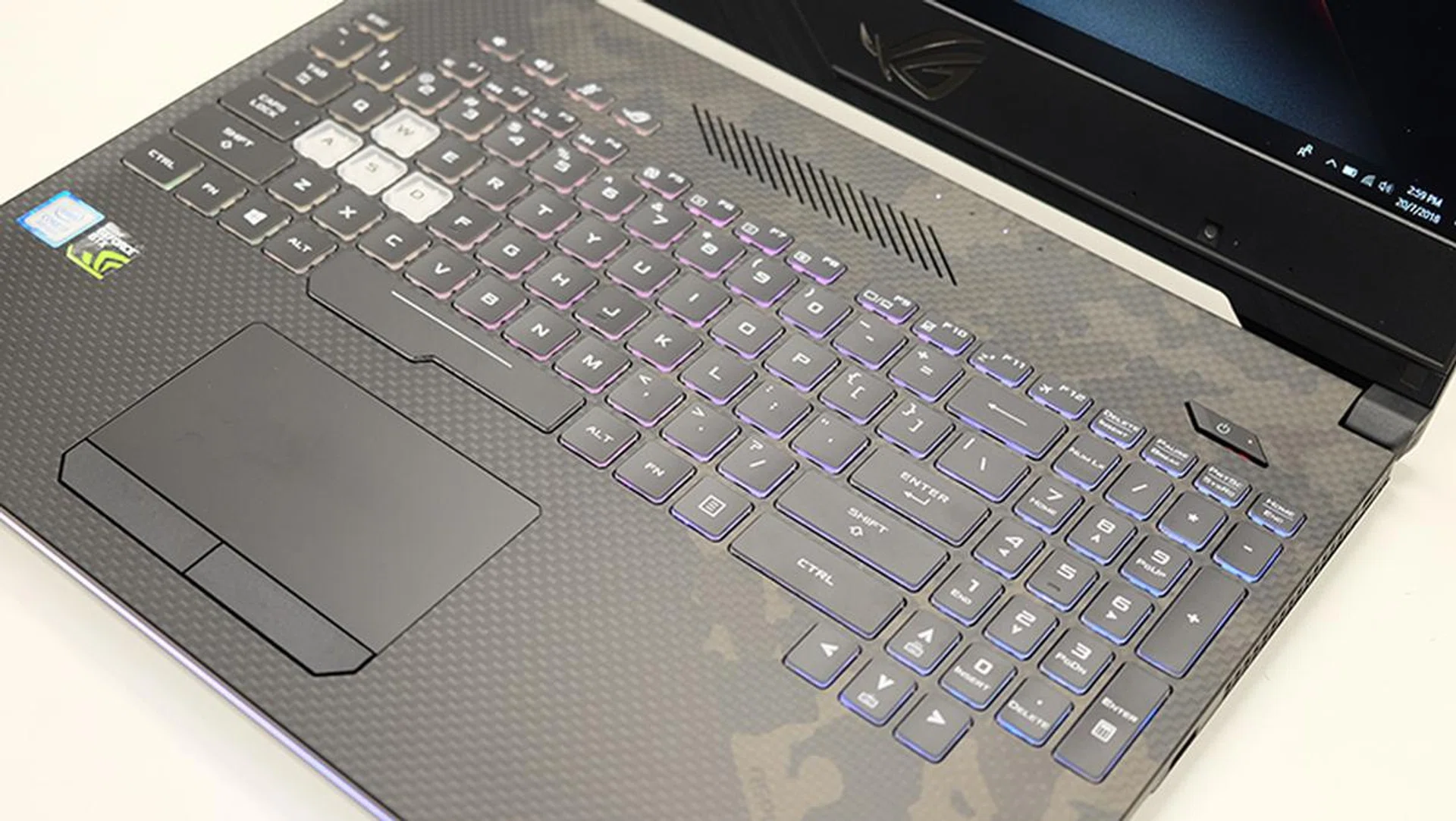
The WASD key cluster is highlighted in white.
The only thing that’s missing is per-key RGB backlighting, and you’re limited to just four independent lighting zones.
There’s plenty of ports available, including two USB 3.1 (Gen 1) Type-A ports, one USB 3.1 (Gen 2) Type-C port, and a single USB 2.0 connector. There’s no Thunderbolt 3 support for the USB-C port unfortunately, but the laptop comes with one Mini DisplayPort 1.2 and one HDMI 2.0 output. There’s also an SD card reader on the right, and I’m glad that this hasn’t been omitted.
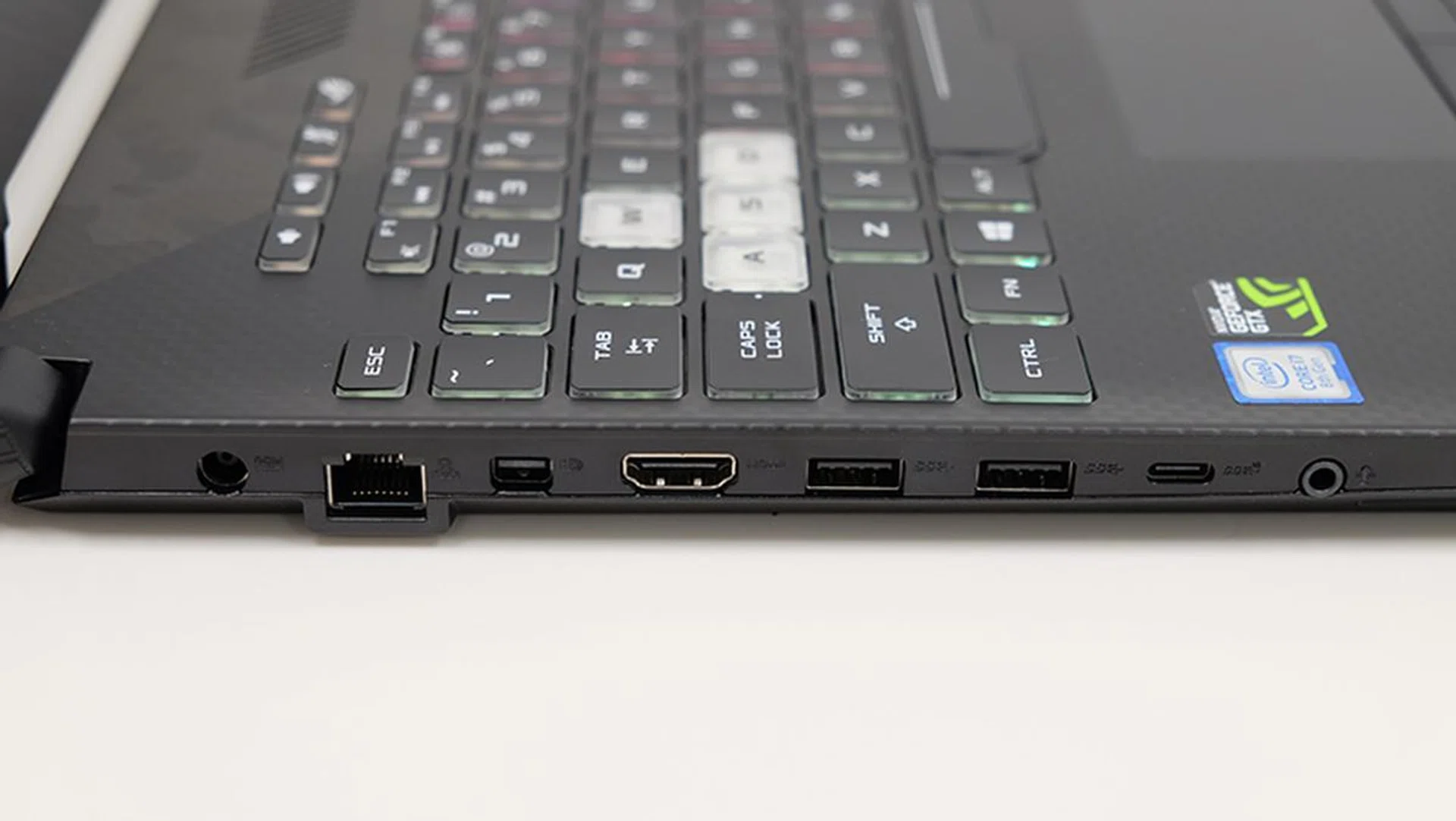
Here's a look at the ports on the left.
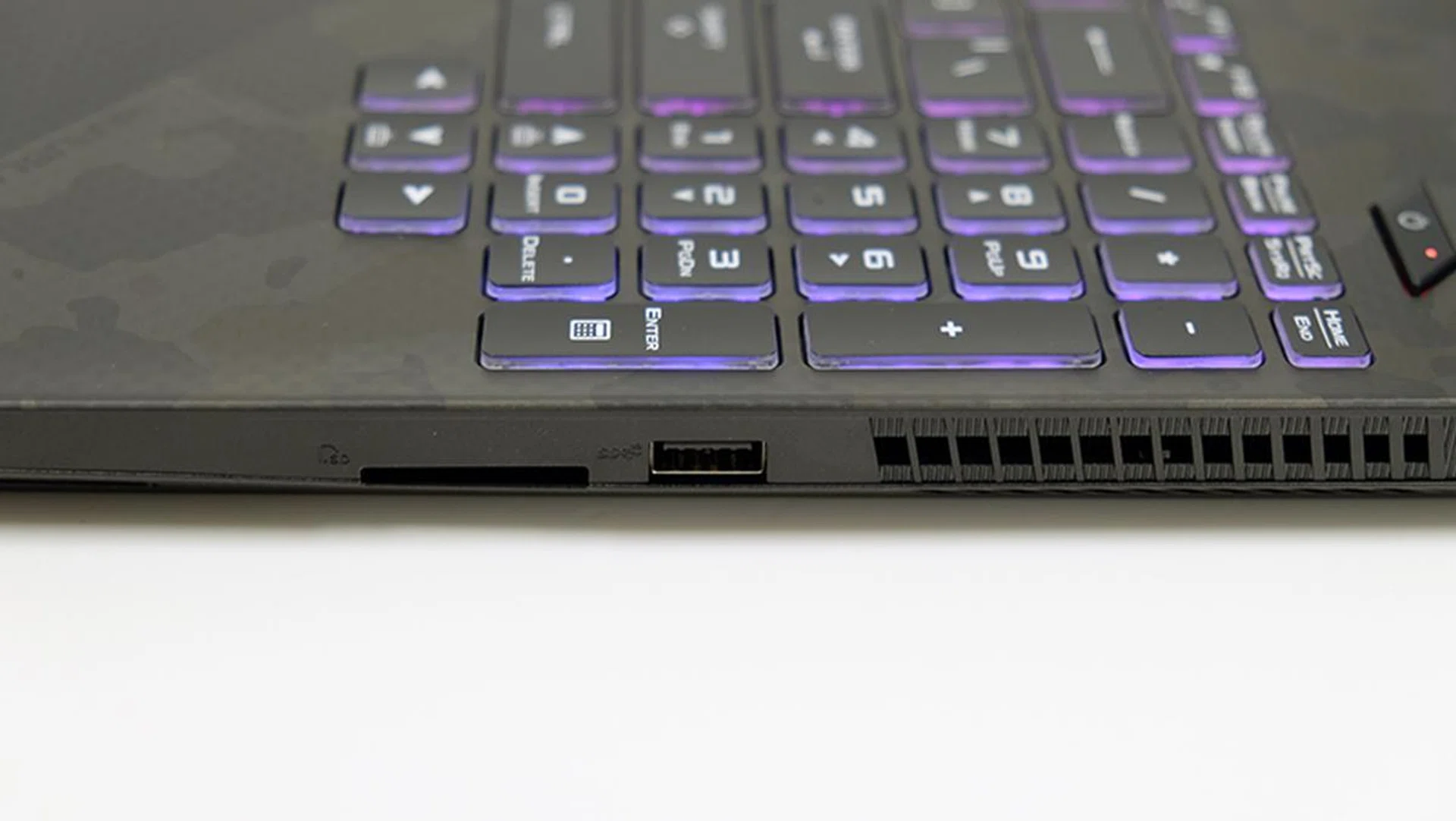
The SD card slot is located on the right.
The Wi-Fi module is an Intel Wireless-AC 9560, which supports a maximum throughput of up to 1.73Gbps, and there’s a dedicated Ethernet jack on the left.
ASUS has also done a good job of keeping the Scar II running cool. While the area above the keyboard can get quite toasty, the palm rests remain quite cool throughout, which is what’s really important. Air is drawn in through vents at the bottom and expelled through the back and right side, and the fans do get quite audible, even in the default “Balanced” mode. There’s also an “Overboost” mode if you want additional cooling, but that ramps up noise levels considerably.
Test setup and performance
Here’s a full list of the notebooks we’re looking at:
- ASUS ROG Strix Scar II GL504GS
- Razer Blade (2018)
- Gigabyte Aero 15X v8
- Aftershock APEX-15
I’ve chosen to compare the Scar II against Max-Q notebooks like the Razer Blade and Gigabyte Aero 15 v8 to illustrate the advantages of a full-speed GeForce GTX 1070. In addition, the Aftershock APEX-15 was included to provide a better idea of the other available options.
[hwzcompare]
[products=644562,642009,642013,644143]
[width=200]
[caption=Test notebooks compared]
[showprices=1]
[/hwzcompare]
We ran the notebooks through the following benchmarks:
- PCMark 10
- 3DMark
- VRMark
- Ashes of the Singularity
- Deus Ex: Mankind Divided
- Tom Clancy’s The Division
PCMark 10 Extended
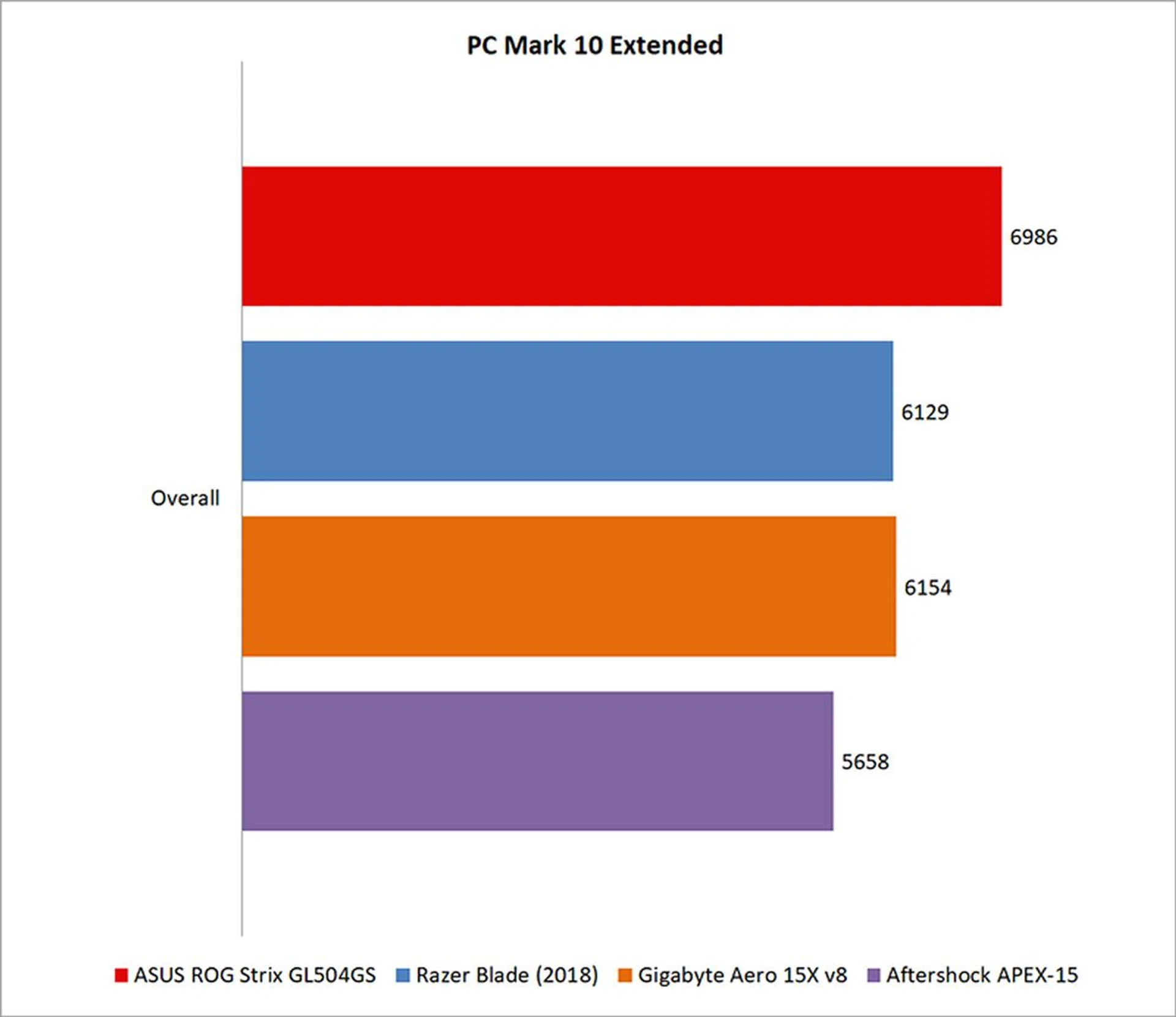
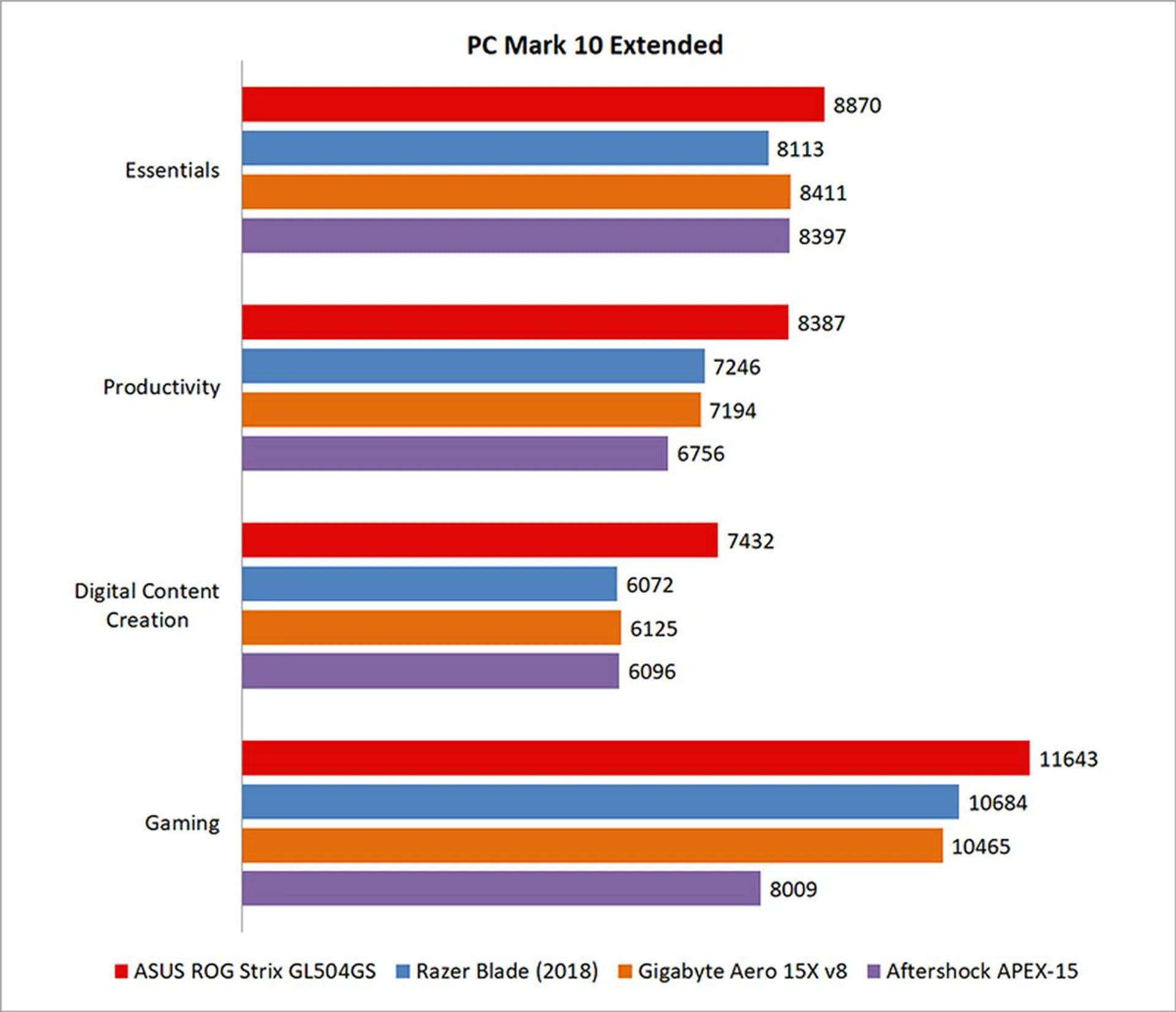
PCMark 10 Extended assesses the performance of systems in a variety of workloads, including basic computing tasks, productivity applications, digital content creation, and gaming. Compared to PCMark 8, it also adds in new test metrics, such as app startup times, which quantifies how long it takes to launch a variety of real-world apps, and a rendering and visualization workload to simulate professional graphics and engineering applications. In addition, existing workloads have been updated to reflect modern usage.
The ASUS ROG Strix Scar II was overall around 13 per cent faster than the Razer Blade. It’s unhampered by concerns about power efficiency, and it outperformed the GeForce GTX 1070 Max-Q in the Razer Blade across all workloads, particularly in digital content creation and gaming.
3DMark
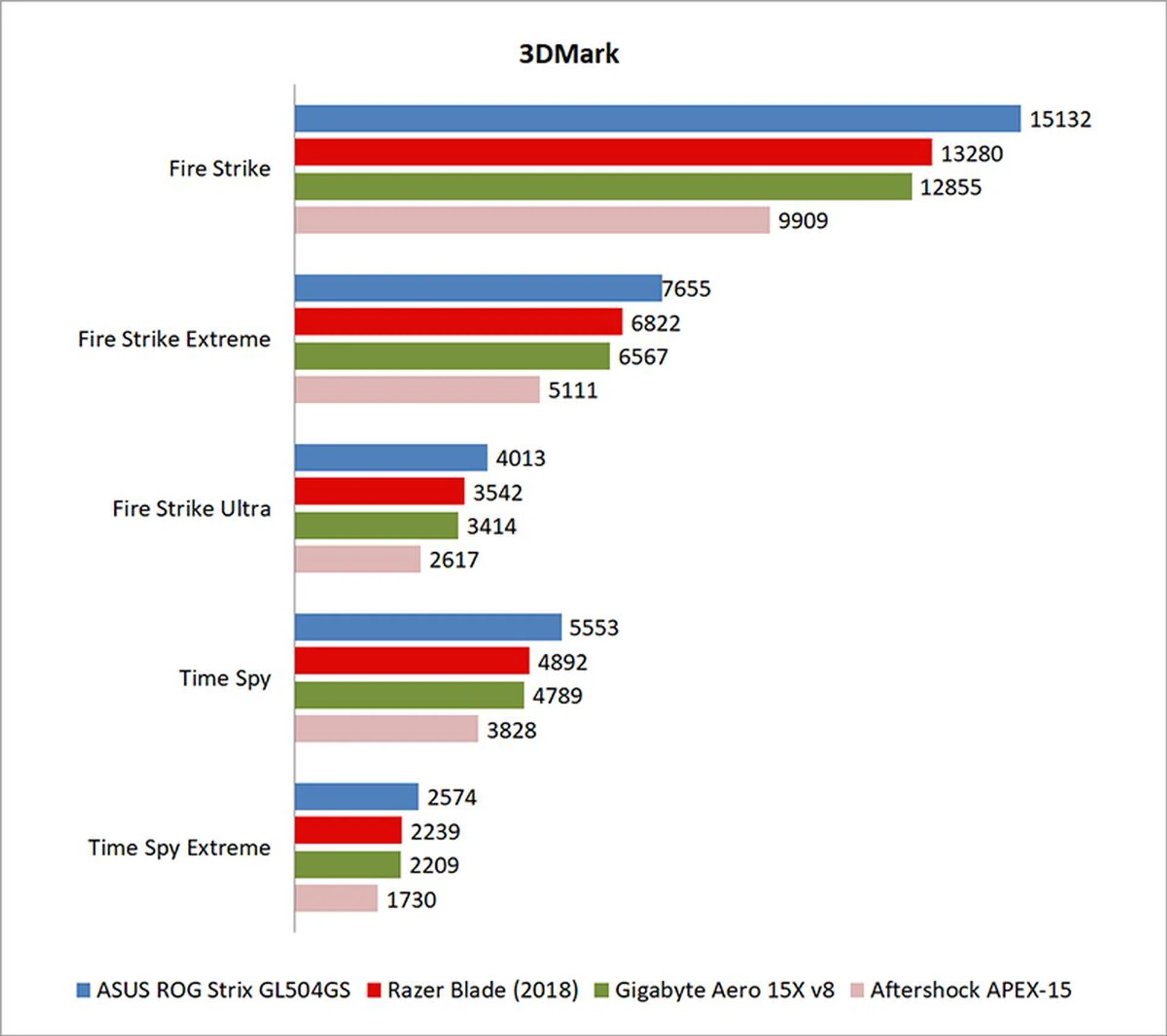
3DMark is a more relevant assessment of gaming performance, and it puts the system through a range of graphics and computational performance tests at different resolutions, starting at 1080p and going all the way up to 4K.
In 3DMark Fire Strike, the Scar II was 13 per cent quicker than the Razer Blade. That’s largely thanks to the GeForce GTX 1070 that’s clocked higher at 1,443MHz, compared to the 1,215MHz on its Max-Q counterpart.
VRMark
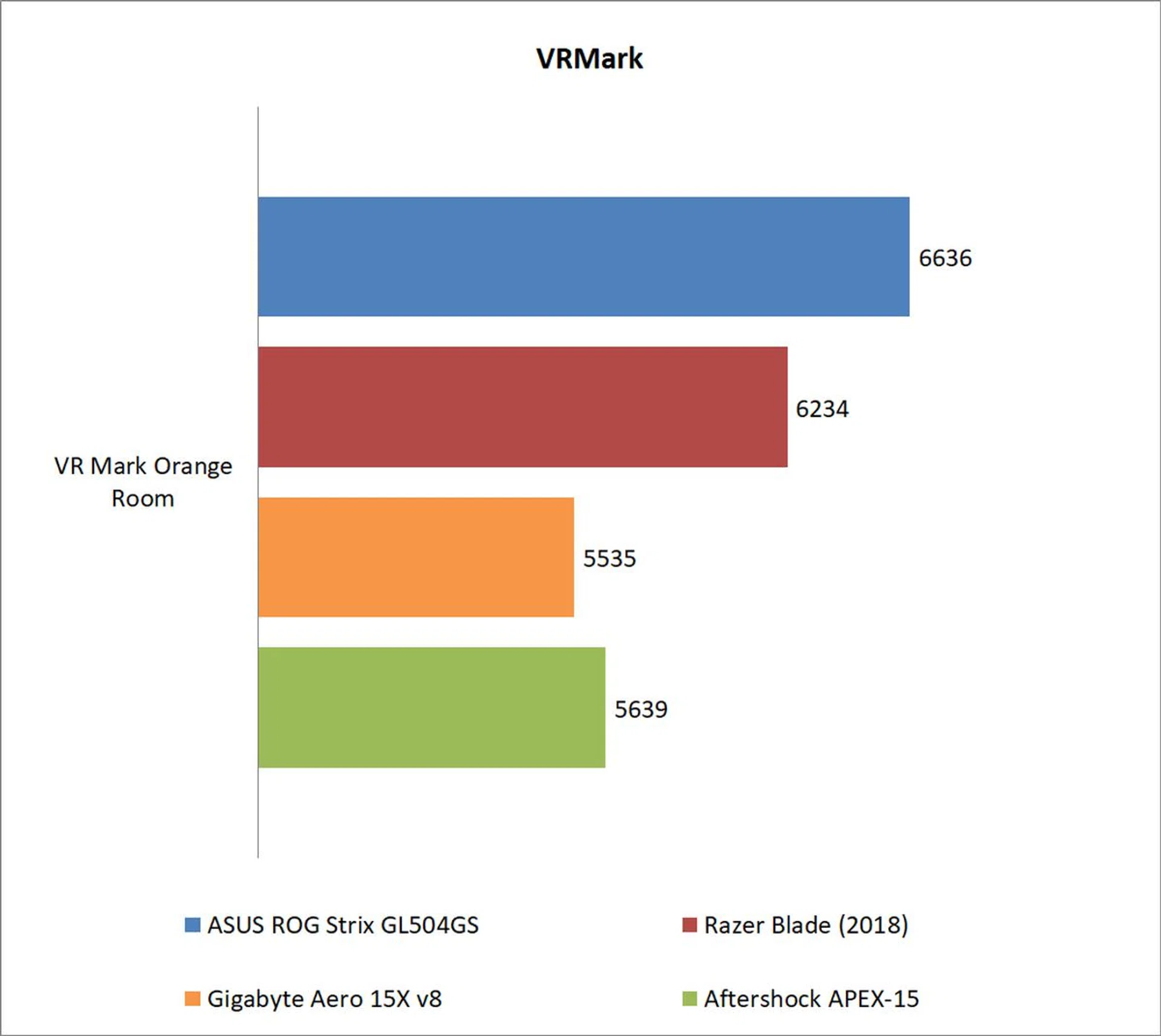
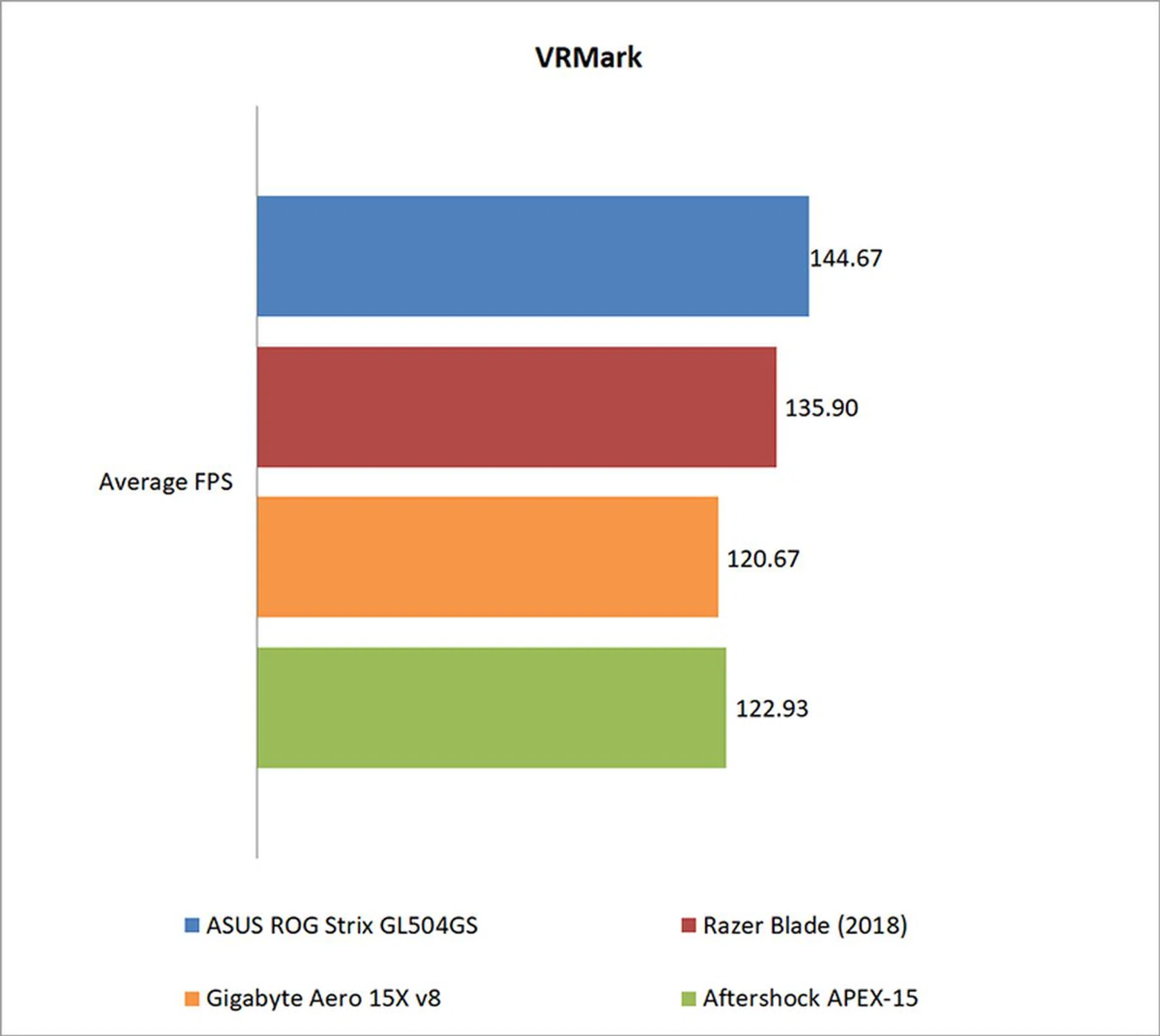
Futuremark’s VRMark benchmark is designed to assess a PC’s ability to handle high-performance headsets like the HTC Vive and Oculus Rift. If a PC passes the Orange Room test, it is ready for the latter two systems. The benchmark also has a target frame rate of 109FPS, and I've included the average FPS each notebook managed to provide a clearer measure of their respective performance.
The Scar II passed the Orange Room test with ease, beating out the Razer Blade by around 6 per cent.
Ashes of the Singularity
Ashes of the Singularity is a demanding real-time strategy game that puts thousands of units on screen, and it’s capable of pushing even the most powerful GPUs.
Oddly enough, the Scar II didn’t do too well in the DirectX 11 benchmark, the same as the Gigabyte Aero 15X. That said, it surged ahead in the DirectX 12 benchmark, coming level with the Razer Blade. That could be due to issues at the firmware level, and Ashes could just be a fluke that doesn’t really properly illustrate the performance advantages of the Scar II.

Deus Ex: Mankind Divided
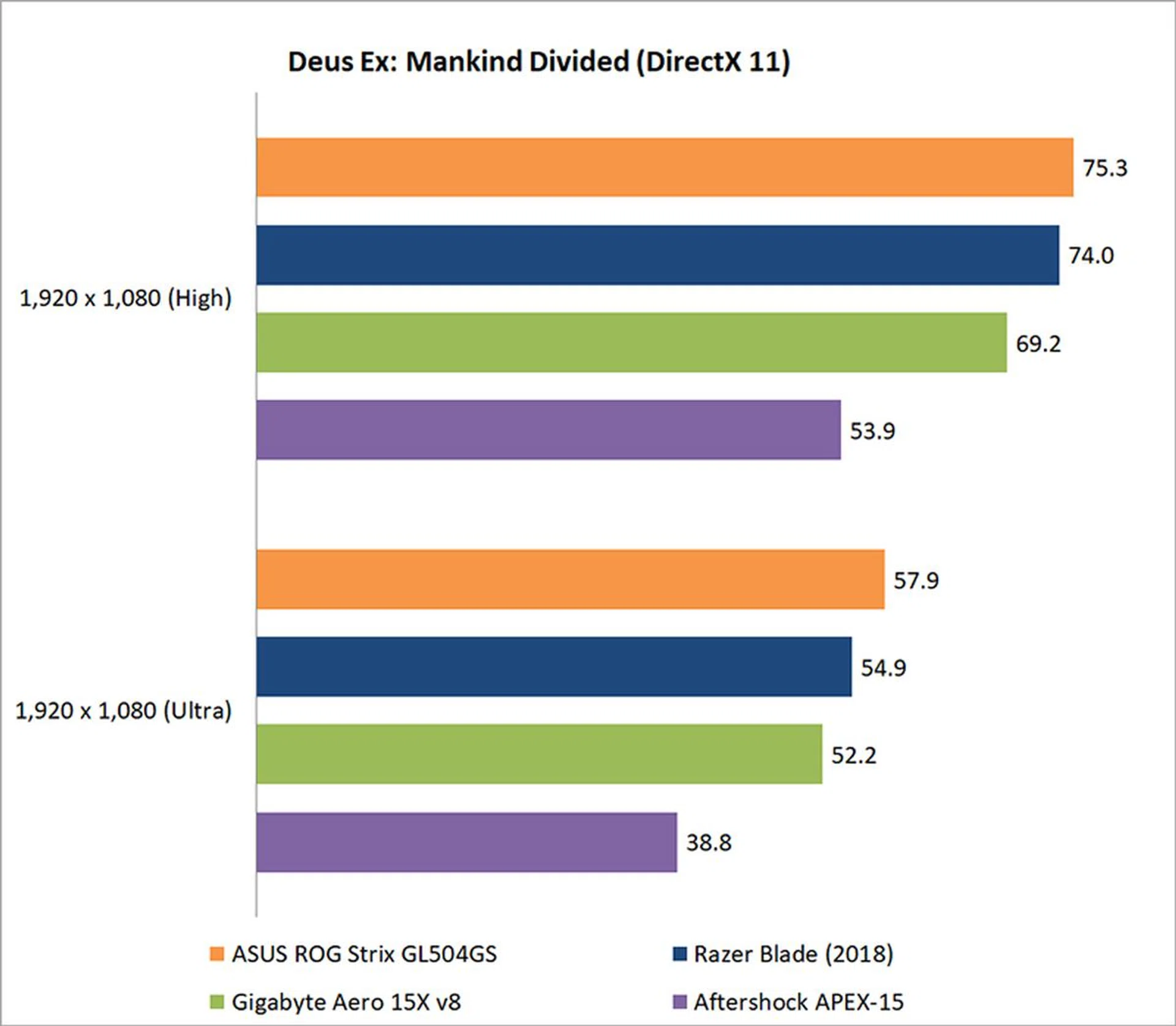
Mankind Divided is one of the most demanding titles to run today, but the Scar II is more than capable of delivering a playable experience.
However, it wasn’t that much faster than the Razer Blade, inching ahead by a just a few frames at both High and Ultra settings. It’s possible that the game is already pushing the limits of the CPU, so switching over to a slightly more powerful GPU didn’t do much to improve performance.
Tom Clancy’s The Division
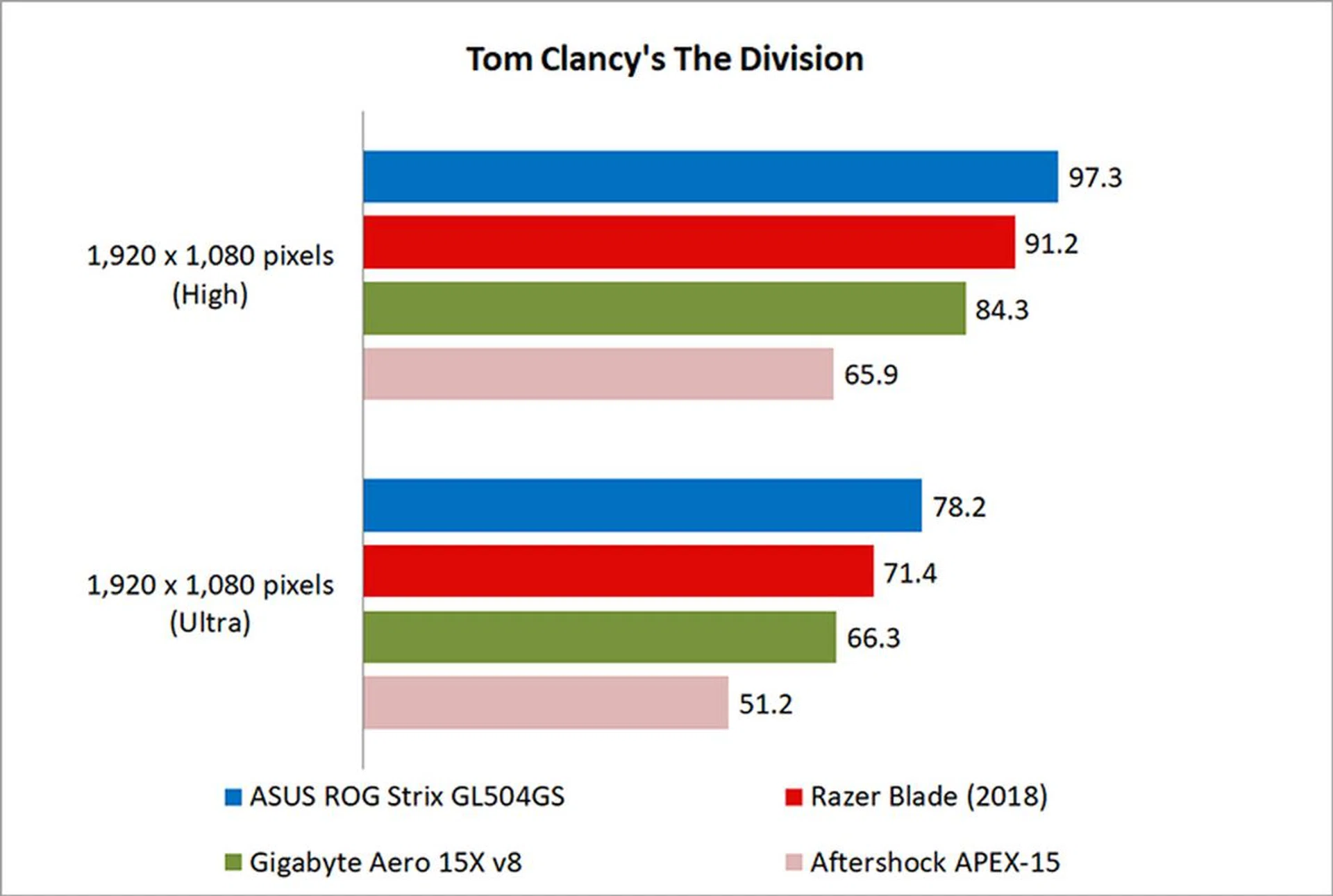
The Division isn’t as demanding to run as Ashes of the Singularity or Deus Ex: Mankind Divided, but its Snowdrop engine can still stress cards with the use of dynamic lighting and the like.
The Scar II did slightly better in The Division, and it was around 6 per cent quicker than the Razer Blade at High settings. At Ultra settings, it was roughly 9 per cent faster. As a result, while I’d estimate the performance advantage of the GeForce GTX 1070 as being approximately 10 per cent ahead of the Max-Q version on average, it’s clear that this can vary a lot on a game-by-game basis.
Temperature, performance & portability
Temperature
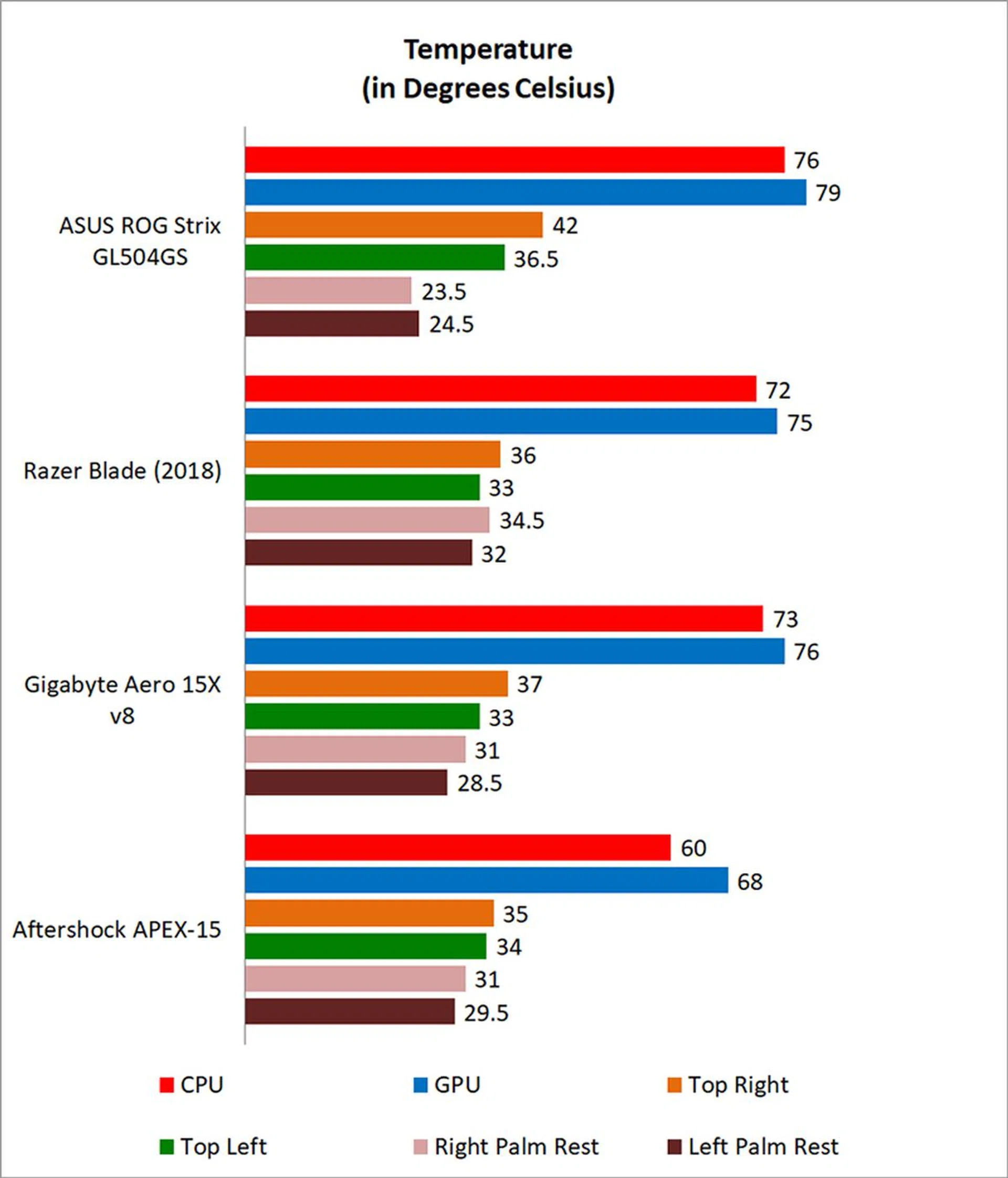
I measured the external temperatures of the four quadrants of the notebook after 40 loops of 3DMark's Fire Strike Extreme stress test. This amount of time is more than enough to get an idea of your average maximum running temperature for this workload.
While the Scar II runs slightly hotter than the competition, that’s probably to be expected given its more powerful GPU. More importantly, surface temperatures on the palm rests were considerably cooler than their thinner and lighter competitors, so the Scar II should turn out to be more comfortable to use during extended gaming sessions.
Battery life and power consumption
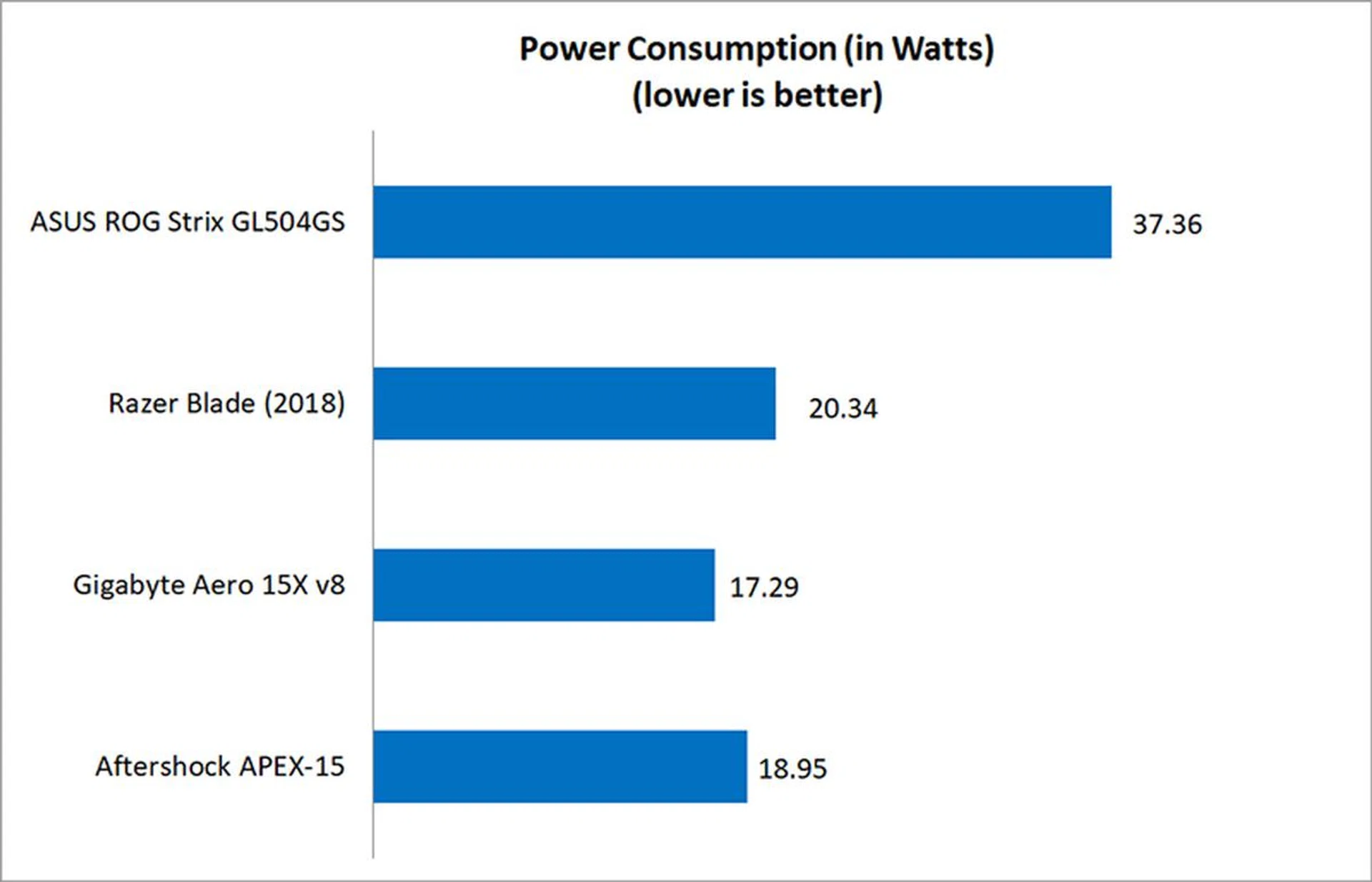
I used the built-in battery life benchmark in PCMark 8 Home to assess the battery life on the laptops.
Battery life isn’t the strongest aspect of the Scar II. In fact, the 66Wh battery couldn’t even sustain the laptop for two hours in PCMark 8’s Home battery life test. And considering that laptops like the Gigabyte Aero 15X and Razer Blade are thinner but still have larger batteries, that’s a little disappointing. Of course, the Scar II would still be hampered by the lack of any Max-Q optimizations for power efficiency, but it feels like ASUS could have done more to ensure that battery life wasn’t completely abysmal.
Either way, this is clearly a gaming system first and foremost, so the company was probably betting that battery life wouldn’t be a priority for its target audience.

Portability
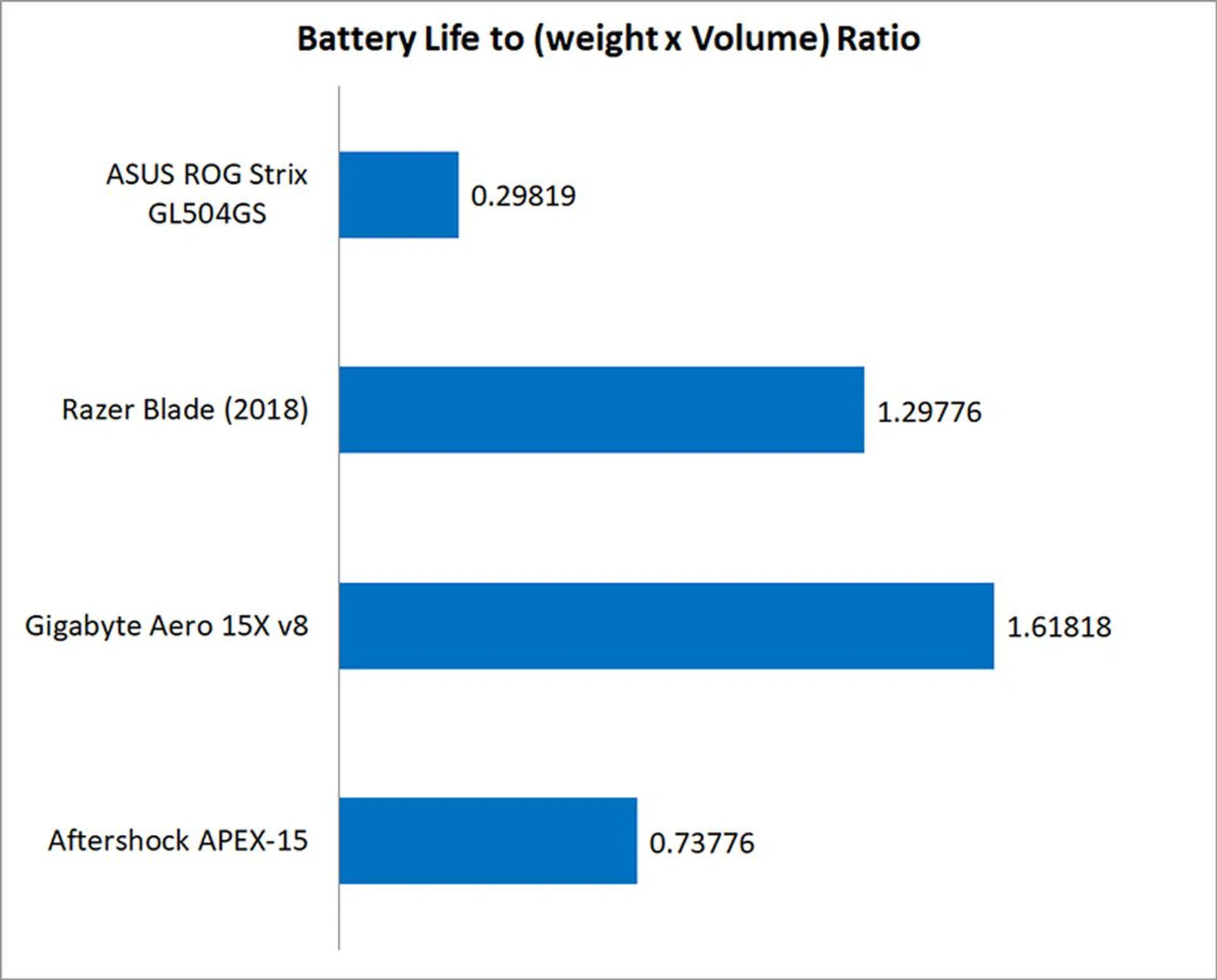
The portability index is an objective measure of how portable a notebook is, taking into account factors like size, weight, and battery life.
Given its heavier weight, bulkier dimensions, and much shorter battery life, it’s not surprising to see the Scar II trail the Max-Q notebooks by a large margin here. This isn’t a laptop that can double as a mobile workstation, and you’ll always have to make a mental note of where the nearest power outlet is.
Solid all-rounder
By most measures, the ROG Strix Scar II GL504GS is a great laptop. It’s fast, well-built, and has a great display, speaker system, keyboard and touchpad.
At 2.4kg and 26.1mm thick, the notebook is a little heavier and chunkier than the recent slew of slim and light laptops. However, it isn’t ridiculously bulky either, and actually slots into a niche between the Max-Q laptops and a full-fledged desktop replacement. It won’t be the most fun to lug around, but it’s definitely doable.
However, the lack of Max-Q optimizations also means that battery life isn’t great compared to the competition. You’ll never be able to stray too far from a power outlet, and the and gratuitous camo means that this is probably not a system that you’ll want to double as your work machine.
However, the Scar II’s FPS-focused branding could puzzle some folks. The Hero II shares very similar specifications, down to the 144Hz IPS-type display with a 3ms response time, and the main difference is that it can only be equipped with up to an NVIDIA GeForce GTX 1060 6GB. In addition, the Scar II supports larger 256GB PCIe SSD. The QWER key cluster is also highlighted on the Hero II’s keyboard, but that’s a superficial difference.
Do MOBA players need a less powerful GPU and less storage? I suppose, if you’re talking about games like Dota 2 and League of Legends, but the fact remains that they could benefit from a more powerful card anyway.
Put simply, other than the highlighted WASD key cluster and awful camo, the Scar II offers little else to justify its branding as an FPS-focused laptop. The 144Hz display is probably the strongest point it could make, but the MOBA-oriented Hero II offers that as well, and I’d argue that all game genres can benefit from a high refresh rate.
The Scar II and Hero II marketing may not amount to much for those who know what they are looking to get. Instead, this differentiated marketing effort by ASUS is their way to offer a quick product recommendation for gamers who don't necessarily want to pore through the spec details, but can easily identify themselves with the marketing alignment.
Branding matters aside, there’s no doubt that the Scar II is a very capable machine. The biggest question then is whether or not you should get this over a Max-Q laptop. If you ask me, it all comes down to price and whether you value mobility or raw performance more.
At S$3,398, the Scar II is much cheaper than the S$3,899 Razer Blade and S$3,799 Gigabyte Aero 15X. It’s roughly 10 per cent faster too, although your mileage may vary according to the game you’re playing. However, for a tiny performance trade-off, a Max-Q laptop could offer you considerably better battery life and a slimmer and lighter design - if you don't mind forking out another S$500, which is no small sum.
Ultimately, if you’re not looking for a laptop that can double as both a gaming system and a portable work machine, the Scar II is a great choice.
Otherwise, you’re probably better off considering one of the Max-Q laptops on the market, but be prepared to pay even more. ASUS too has a great alternative for those can spend more and that's with their Zepherus M.
Our articles may contain affiliate links. If you buy through these links, we may earn a small commission.