
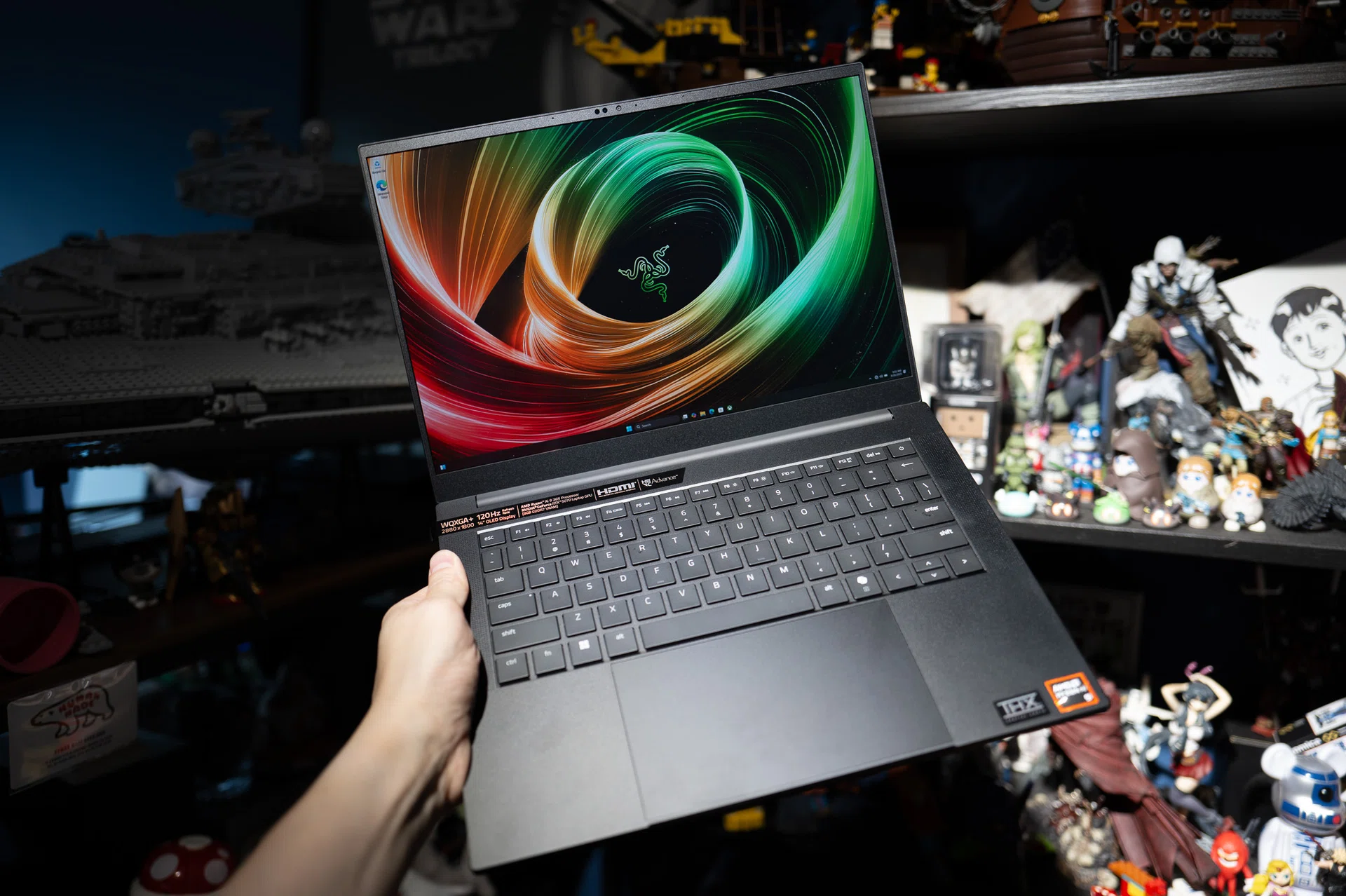
The Blade 14 has always sat in an odd little niche. Officially, it’s the smallest of Razer’s gaming laptops, but it has never felt like a “junior” model. The 2025 refresh doubles down on that approach and is now powered by an AMD Ryzen AI 9 365 chip and NVIDIA’s GeForce RTX 5070 Laptop GPU. When you first lift it out of its packaging, you’ll realise that the Blade’s reputation as the “MacBook Pro for gamers” makes sense. You wouldn’t be embarrassed setting it on a meeting room table; if anything, it’s the sort of laptop that makes you feel a little smug about sliding it out of your bag.
What you want to know about the laptop
Weighing in at 1.63kg and just under 16mm thick, the 2025 Blade 14 is slimmer and lighter than its predecessor. On paper the difference looks small, but in hand it’s noticeable. There’s enough heft to feel premium without veering into that “brick in your bag” territory that many gaming laptops can’t avoid. There’s truly something magical about a 14-inch gaming laptop, with this much power, in such a svelte form factor. The lid doesn’t flex, the keyboard deck doesn’t creak, and it all comes together with the kind of solidity you don’t always see in thin-and-light designs.
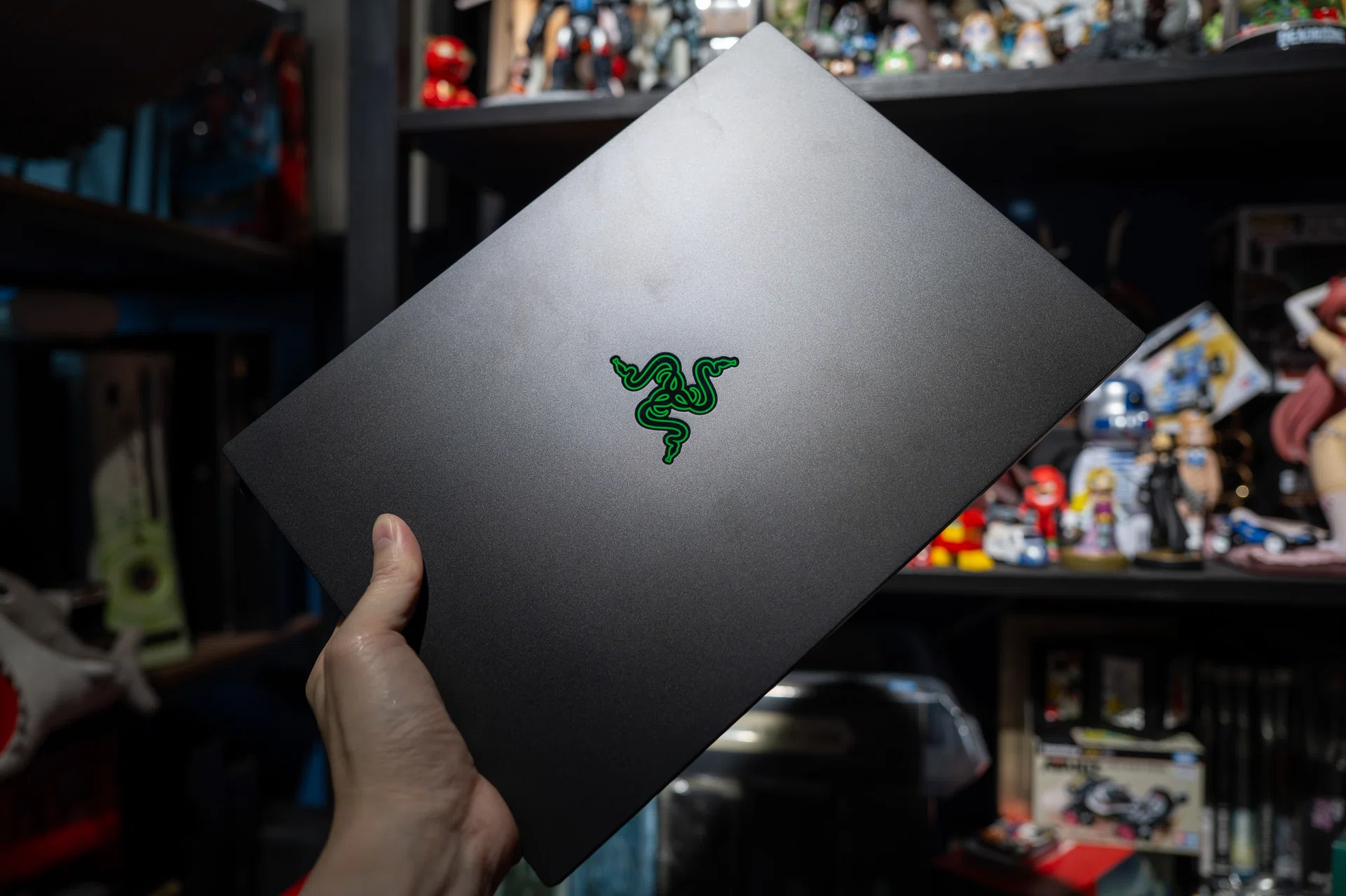
Aesthetically, the Blade 14’s look hasn’t changed radically. You still get that unibody aluminium chassis, available in the usual matte black. The lid still carries the glowing green logo. After more than a decade of sticking with this language, Razer clearly isn’t chasing new shapes or accents. Some might find it repetitive, but I think of it more as brand discipline. Like Apple’s MacBooks, the Blade design is instantly recognisable, and in an age where rivals try something new every other year, the familiarity here works to Razer’s advantage.
That said, the finish is still a magnet for smudges. Within minutes of use, you’ll find fingerprints building up on the lid and palm rest. If you’re fussy about keeping your gear pristine, the Blade 14 will keep your OCD on overdrive – you’ve been warned. Personally, I just stopped caring after a while.
The OLED screen is the real showpiece here. It’s a 14-inch panel with a 3K resolution and 120Hz refresh rate, and it looks incredible. Blacks are genuinely dark, colours punch harder than they have any right to, and even Netflix sessions feel indulgent. I found myself lowering the brightness indoors because it was overpowering. It’s glossy, so under bright sunlight you’ll notice reflections, but indoors it’s a treat.
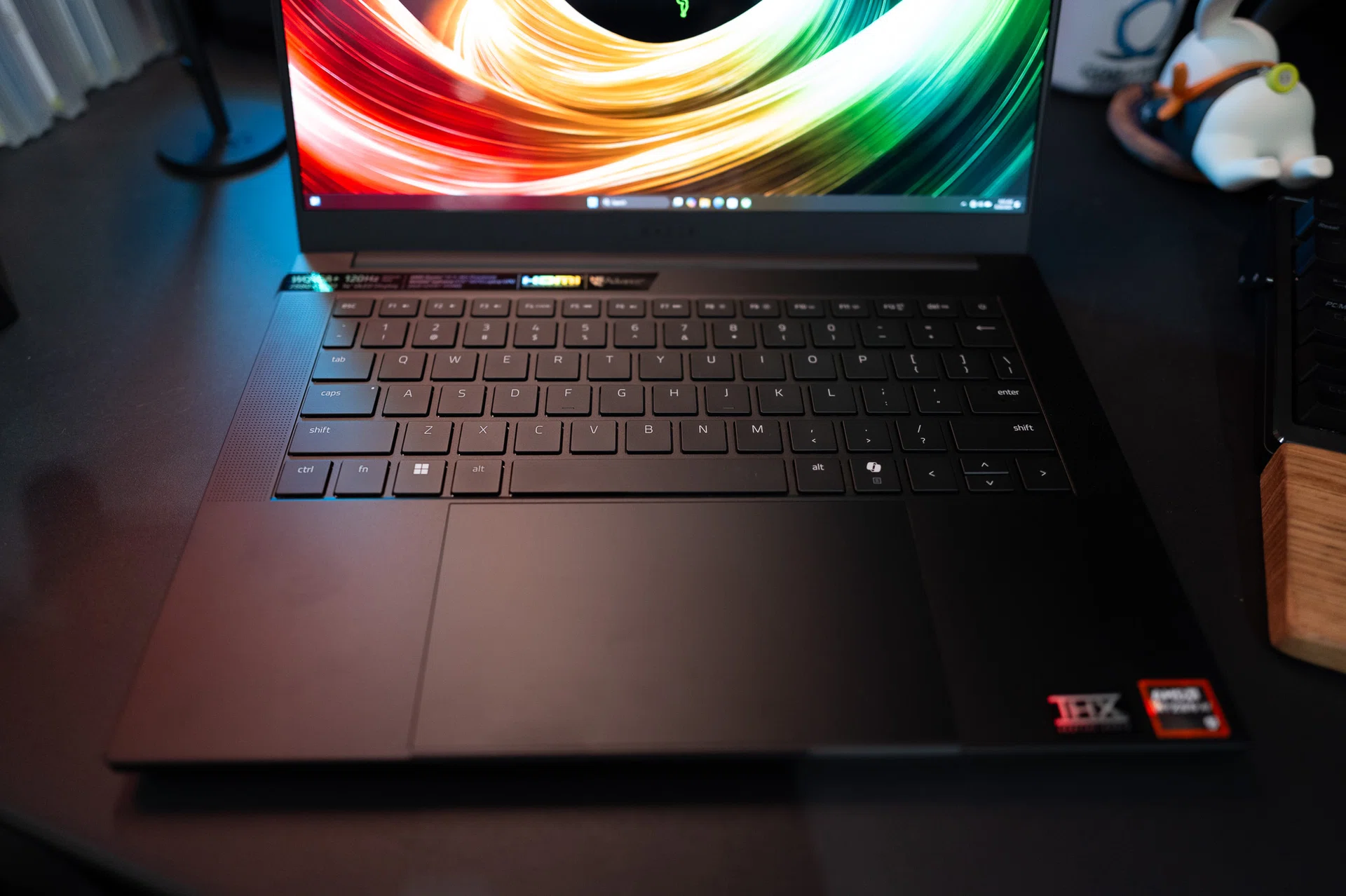
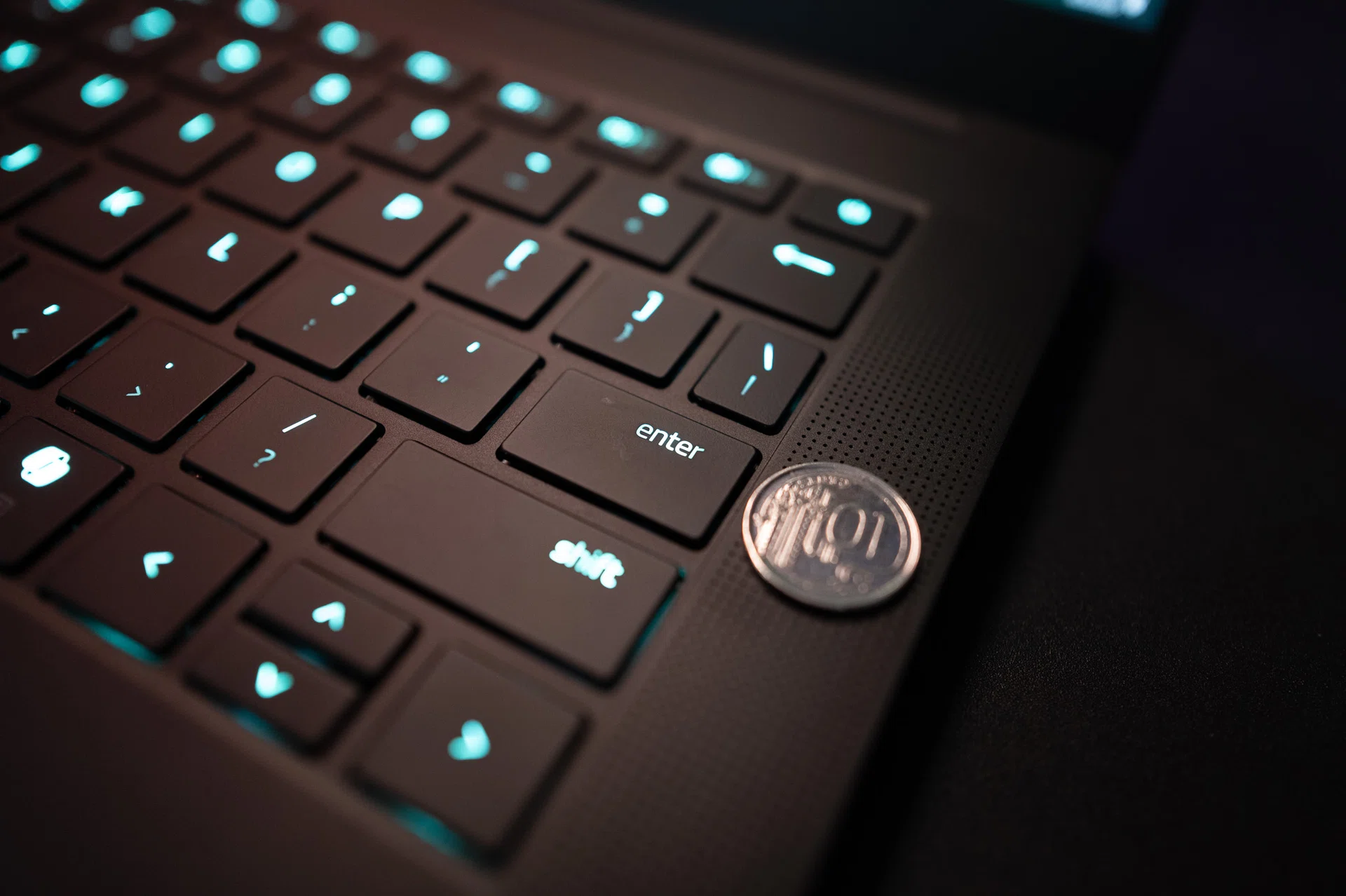
Typing on the Blade 14 is where things feel disappointing for the first time. The keys are shallow – not mushy, just not very deep. They’re fine for quick emails, but over long stretches I found myself wishing for more resistance. It reminded me of pressing on slightly stiff plastic bubbles. At least the layout is clean, and if you care about lighting, Razer’s Synapse software lets you go wild with per-key RGB. I left mine on “wave”, because I love going nuts with RGB but don’t judge me.
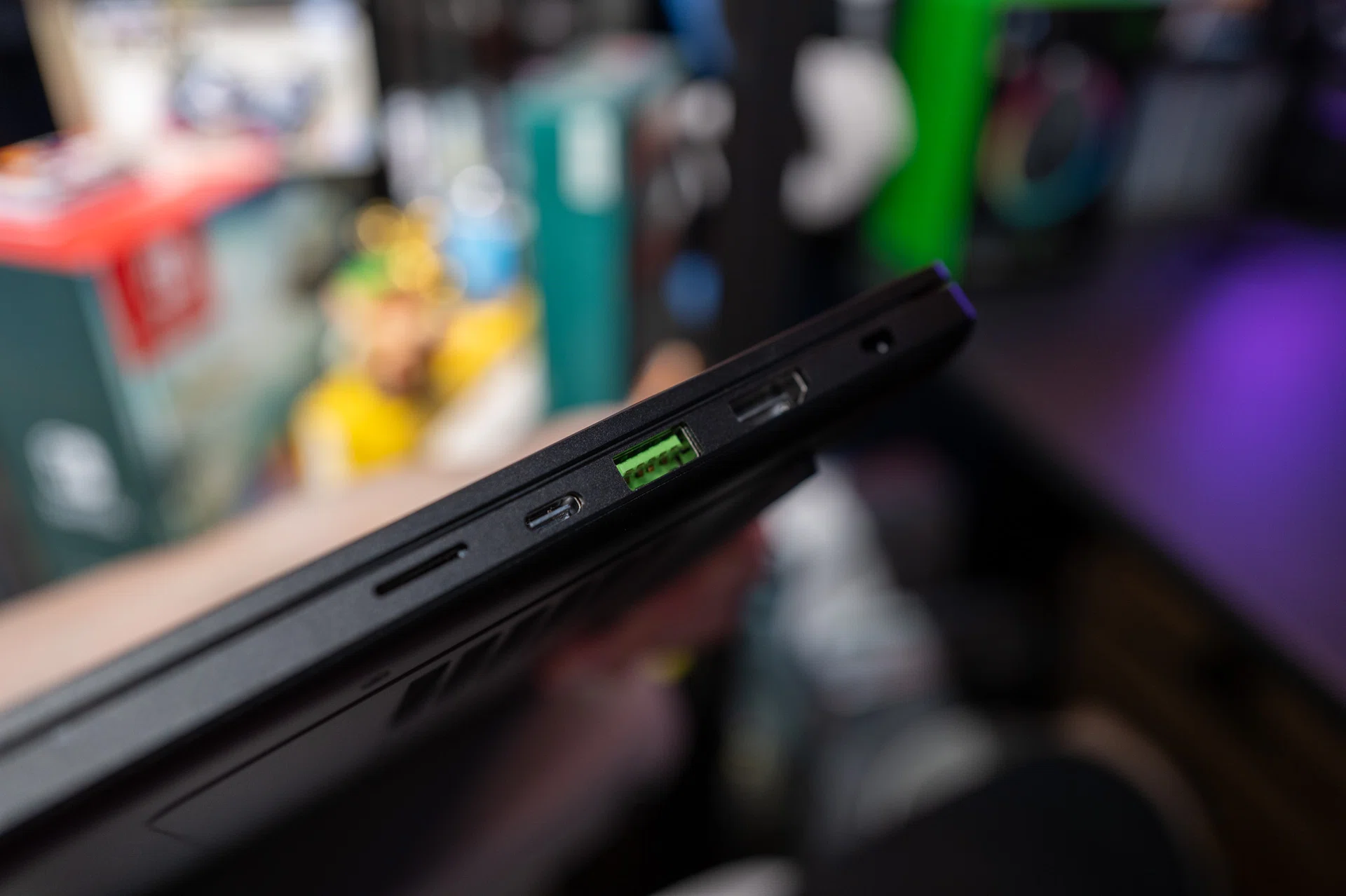
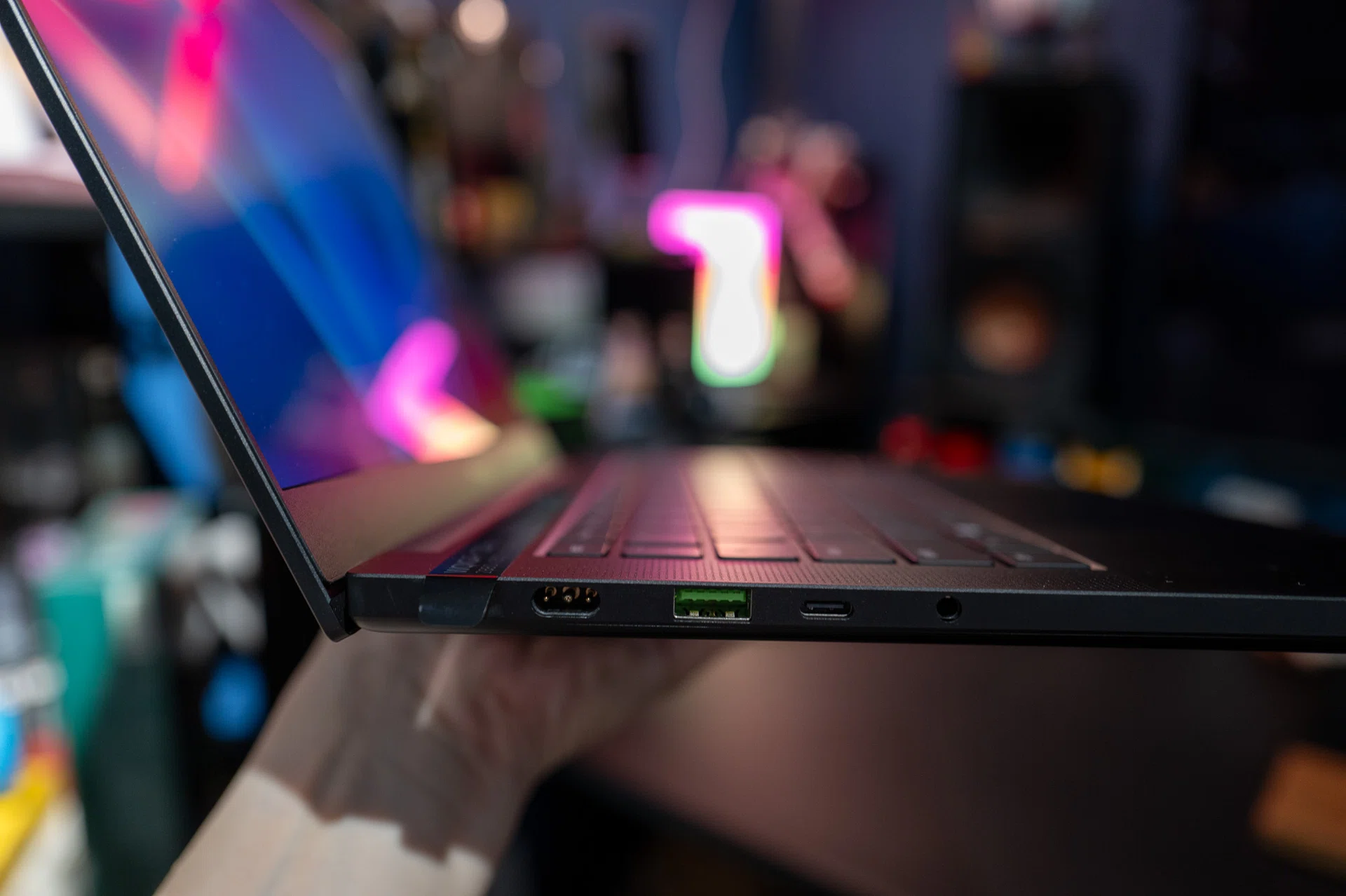
Ports are plentiful for a laptop this slim. Two USB-C (with charging and display support), two USB-A, HDMI 2.1, a headphone jack, and even a microSD card slot. It’s a solid spread, though I’d have preferred a full-size SD slot for camera work.
What about performance? Let’s find out.
Gaming performance
I didn’t have another 14-inch laptop with similar silicon on hand, so for context I used my previously tested Blade 16 as a reference point. It’s hardly a fair fight – the 16-inch model runs an AMD Ryzen AI 9 HX 370 with an RTX 5090 Laptop GPU – but it does help map out where the smaller Blade 14’s CPU and GPU combination start to fall behind once you climb from 1080p to 1440p.
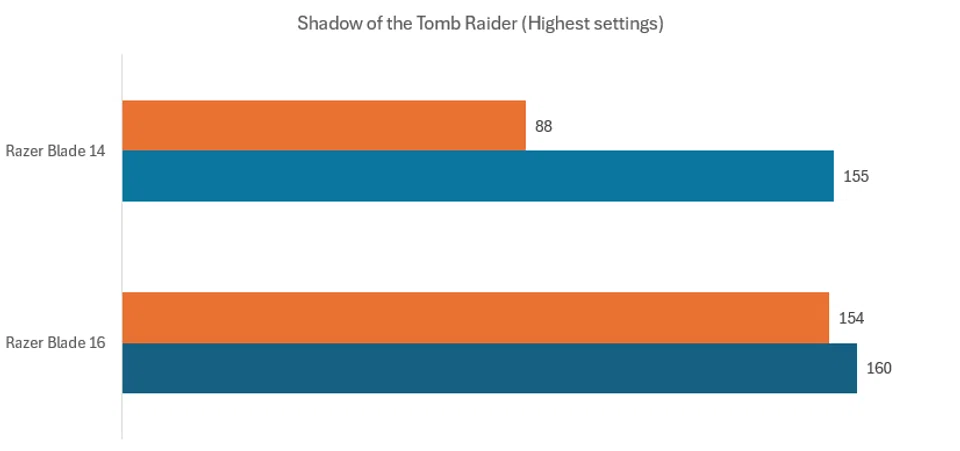
Shadow of the Tomb Raider is the best example of CPU limits at lower resolutions. At 1080p, the Blade 14 ran almost neck and neck with the high-powered Blade 16, which shows how much of the load is being handled by the CPU rather than the GPU at that setting. But once you shift to 1440p, where graphics horsepower starts to matter more, the Blade 14 drops to almost half the frame rate of the Blade 16. That’s the context worth keeping in mind – at 1080p, the game is bumping into CPU bottlenecks, which is why the Blade 14 holds its own, but at higher resolutions the RTX 5090 in the bigger laptop simply has more raw muscle to pull ahead.
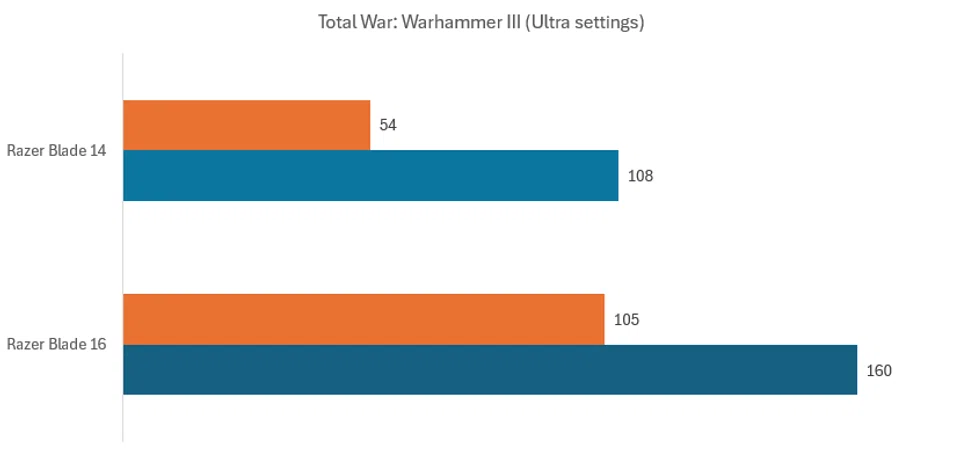
Total War: Warhammer III is a title that’s notoriously CPU-bound, and it shows. Even at 1080p on full visual settings, the Blade 14 can’t quite match the Blade 16. That said, 108fps is still an impressive result for a 14-inch gaming laptop. The drop-off happens at 1440p, where performance dips below 60fps. Here, it’s not just the CPU but also the RTX 5070 Laptop GPU’s 8GB of VRAM showing its limits, since the game’s massive unit counts and high-resolution textures chew through memory quickly.
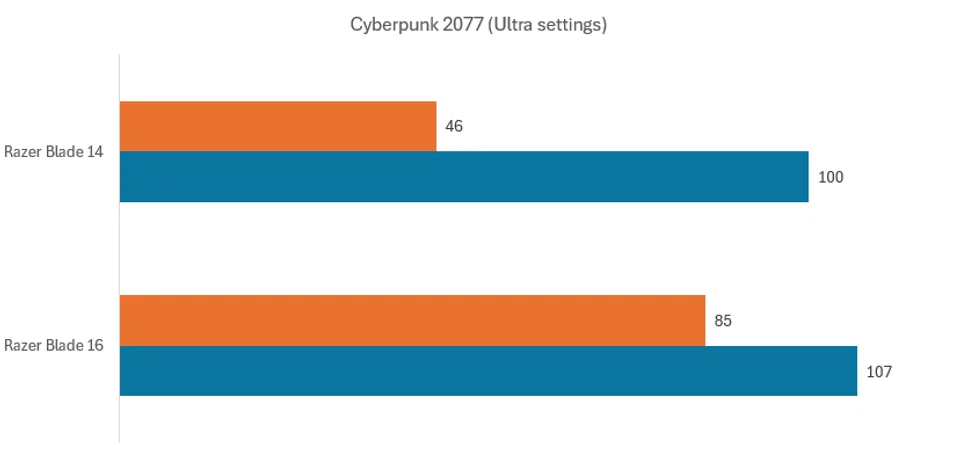
Cyberpunk 2077 tells a similar story. At 1080p in Ultra settings, the Blade 14’s 100fps result puts it right in the same ballpark as the Blade 16, which is frankly better than I expected. But crank it up to 1440p and the smaller machine dips sharply again, landing at 46fps while the Blade 16 stays well above. This is where the RTX 5070 starts to feel more mid-tier – not weak, but will clearly be stretched by more demanding games. The 8GB VRAM limitation doesn’t leave much headroom once you move to QHD resolutions with everything maxed out. In practice, it’s still perfectly playable if you lean on DLSS 4.0 or tone down a couple of graphics settings, but it’s also a reminder that the Blade 14 – despite sporting an RTX 5070 Laptop GPU – is happiest as a 1080p workhorse.
Office Productivity and Content Creation
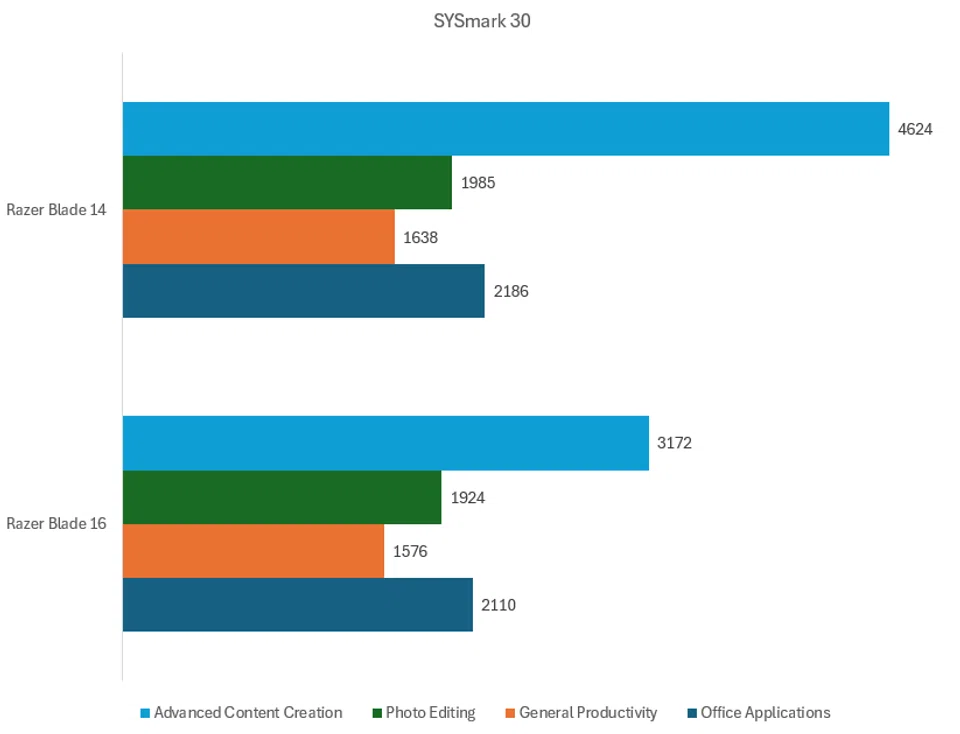
SYSmark 30 gave me a different perspective on the Blade 14. While gaming numbers showed clear GPU limits at higher resolutions, the productivity numbers painted a more nuanced picture. Across office applications and photo editing, the Blade 14 were right on par with the Blade 16. In other words, for everyday workloads, from emails to presentation to worksheets, the Blade 14 gets the job done and done well.
What caught me by surprise, however, was the Blade 14’s performance in the Advanced Content Creation tests in SYSmark. The Blade 14 actually leapfrogged its larger (and more powerful) brethen here. If I were to hazard a guess, it’s possible Razer’s firmware and optimisation work on the Blade 14 gave it an edge here. Whatever the reason, it shows that the smaller laptop can punch well above its size class in creative scenarios.
Battery performance
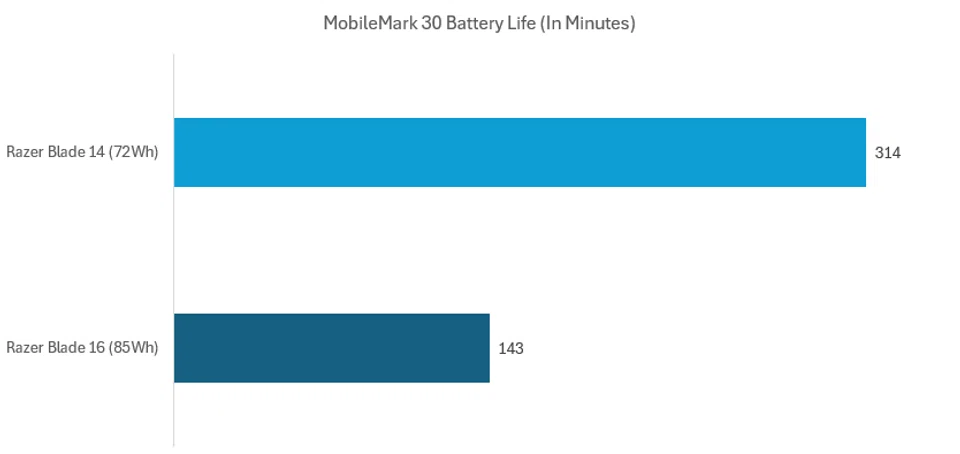
Battery life is where the Blade 14 really distances itself from its bigger sibling. In MobileMark 30, the laptop’s 72Wh battery managed to last 314 minutes, more than double the Blade 16’s, despite the larger laptop technically carrying a bigger 85Wh battery. That’s a striking result, and one that makes sense once you consider how much extra power the Blade 16’s Ryzen AI 9 HX 370 and RTX 5090 GPU demand, even when they’re idling or downclocked. It also suggests that Razer has done some clever optimisation work on the Blade 14’s power management. The fact that it can squeeze more useful uptime from a smaller battery pack hints at tighter tuning between hardware and firmware.
My final thoughts
What I really like about the Blade 14 is that it’s a laptop that plays to its strengths. Razer didn’t make this to be the most powerful almost-ultraportable gaming laptop, nor does it need to be. Don’t get me wrong, the Blade 14 is still pretty powerful for its size. But what it offers is a balance that I find few other brands get right: enough performance to comfortably handle today’s games at 1080p and even 1440p, a very good no-compromise OLED display, and a chassis that actually feels portable in the hands.
But as impressed as I am with the Blade 14, it isn’t perfect. I found the keyboard to be shallow, the aluminium chassis is as smudge-prone as ever, and the laptop’s fans can get pretty loud when under load. However, these are trade-offs that I feel are easy to live by too. And if you are in the hunt for an ultraportable-size gaming laptop that can do a bit of everything without fuss, the Blade 14 is pretty easy to recommend.
The Razer Blade 14 (reviewed here) is available now for S$2,915 at Razer’s e-store.
Read more:
Our articles may contain affiliate links. If you buy through these links, we may earn a small commission.