
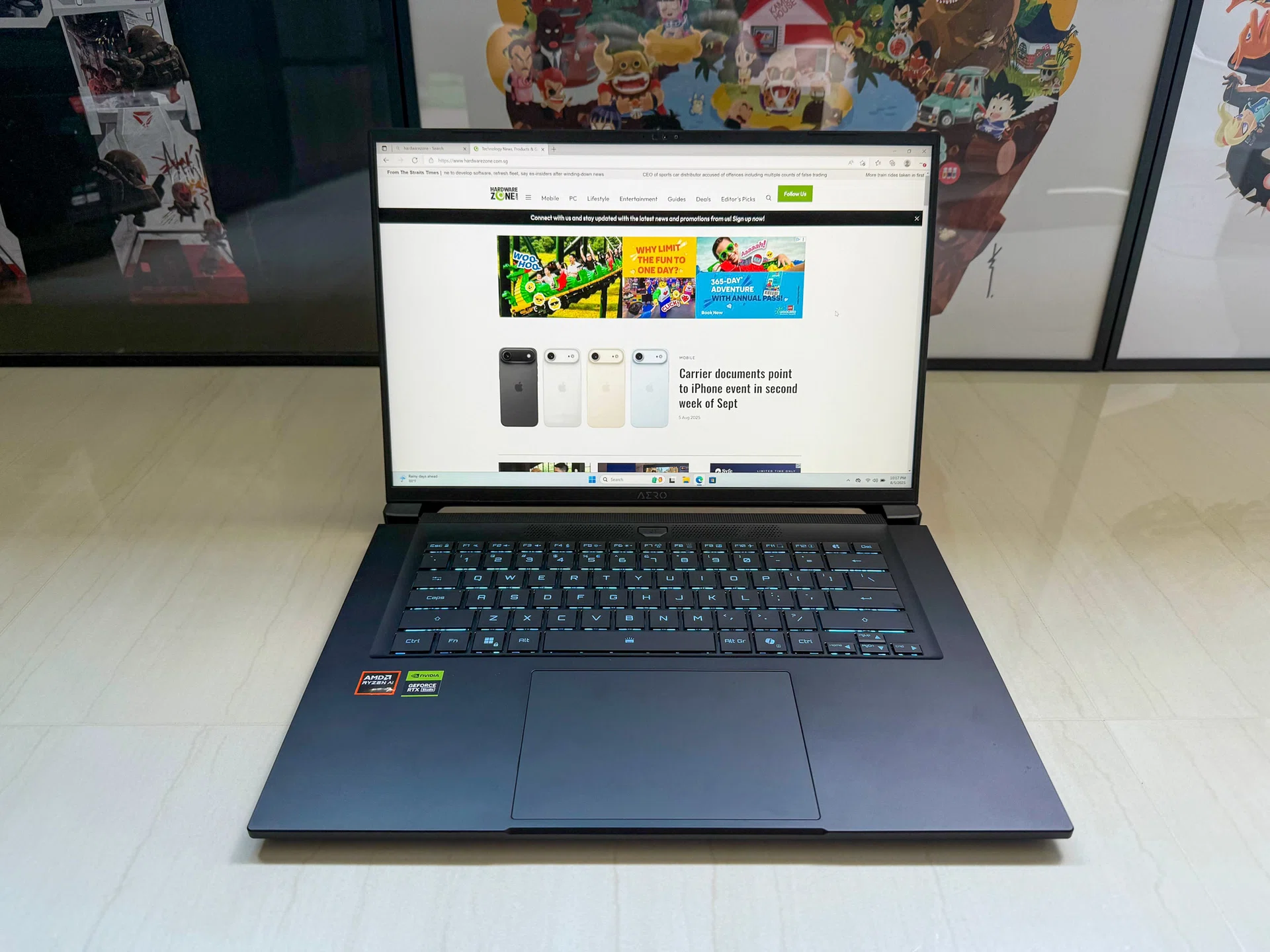
Gigabyte is pitching its newest Aero X16 as a creator-first laptop that’s happy to game after hours, and now it joins the queue of devices flying Microsoft’s Copilot+ flag. The idea isn’t new in 2025: slimmer chassis, strong mid to high tier graphics, and a helping dose of “AI” features to sweeten the value. As always, the question is whether it genuinely offers better performance and experience than your ageing workhorse – be it for productivity tasks or gaming – or if the improvements are harder to notice. Let’s find out.
Under the hood, my review sample runs on AMD’s Ryzen AI 7 350 processor paired with an NVIDIA GeForce RTX 5060 Laptop GPU, along with 16GB of RAM and 1TB of storage. For display, the Aero X16 comes with a 16-inch WQXGA (2560x1600) IPS panel with a smooth 165Hz fresh rate and 400nits of brightness. Despite packing decent hardware, it keeps a relatively slim profile at around 20mm thick and weighs just about 1.9Kg. On paper, it’s built to be a capable gaming laptop but Gigabyte has stripped away the usual gamer touches – you won’t spot RGB lighting or aggressive accents here – instead going for a clean, minimalist look.
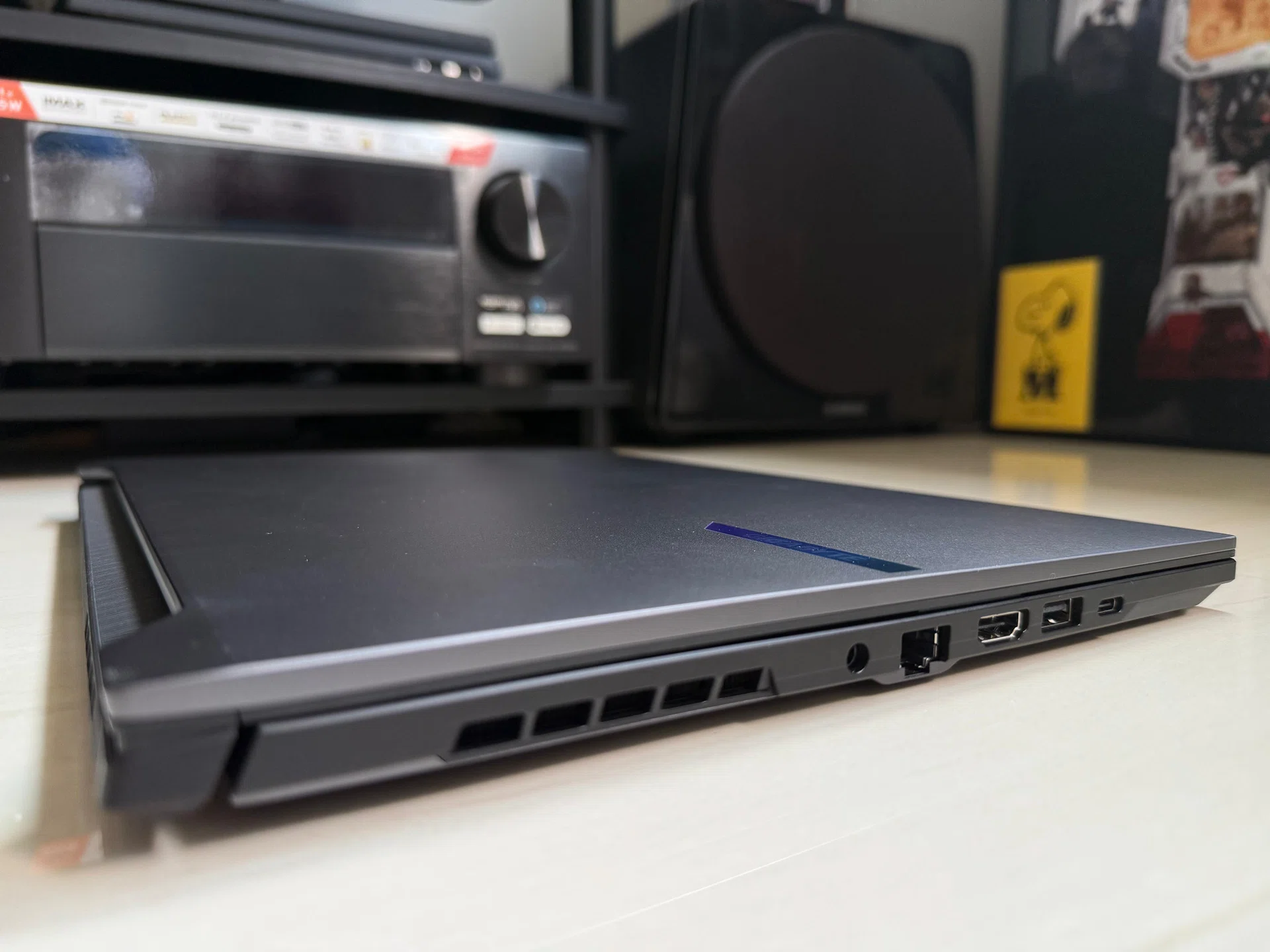
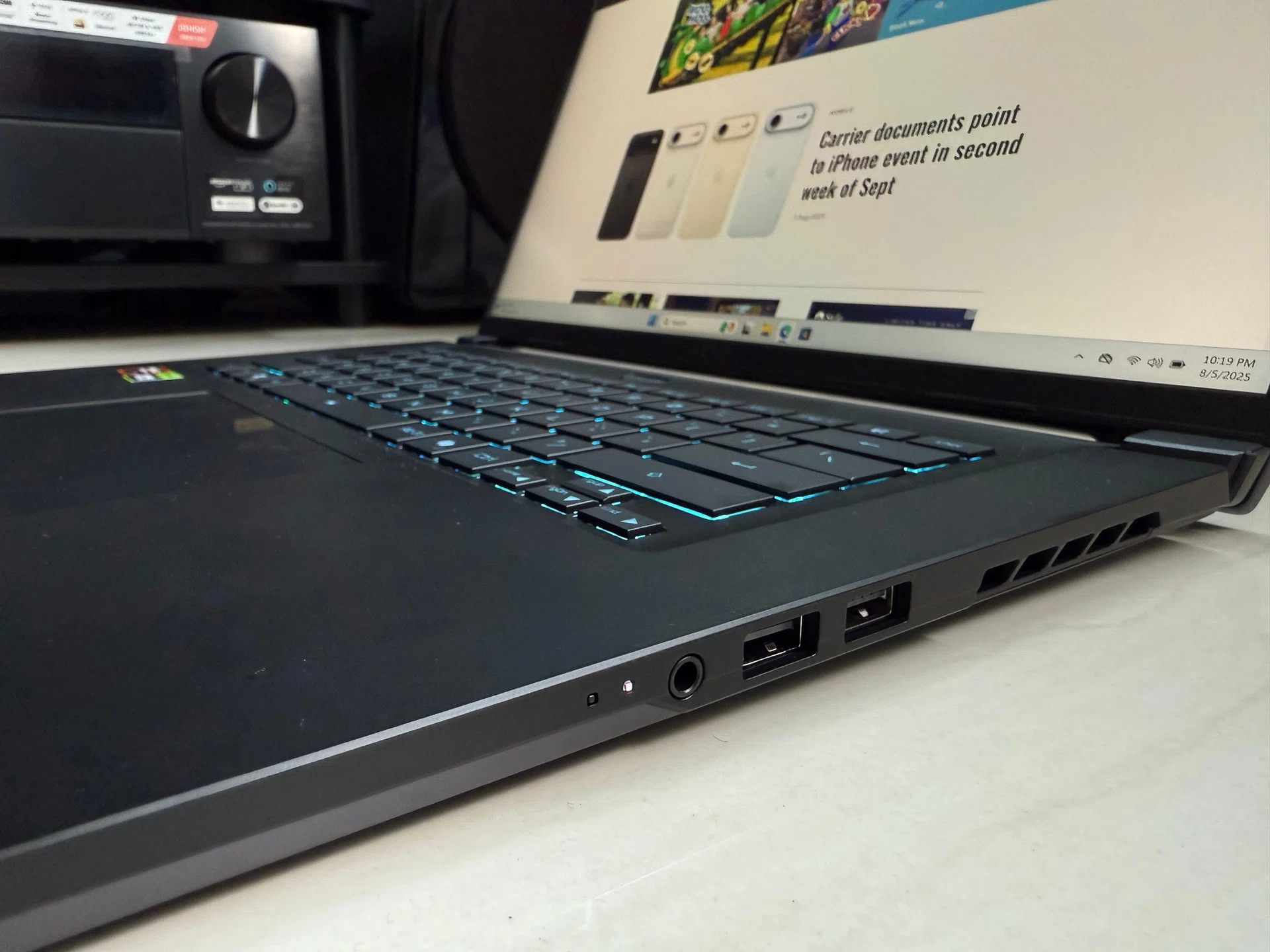
In terms of ports and connectivity, the Aero X16 has most of the essentials covered: HDMI 2.1, a headphone jack, three USB-A ports, one USB-C port, and even Ethernet. I said ‘most’ because for a laptop aimed at creators, it’s surprising that Gigabyte left out an SD card reader. That omission may not matter to everyone, but for some it could be a deal-breaker. The Aero X16 also sticks with WiFi 6E instead of the newer WiFi 7. I suspect this was to keep costs in check, though I would still have liked to see WiFi 7 included given how quickly it’s becoming the norm – even local telcos are already bundling WiFi 7 routers with broadband plans.
Aesthetically, Gigabyte has gone for understatement rather than flash with the Aero X16. The lid is a brushed-metal finish in Space Gray (for my review unit) with a subtle, iridescent nameplate that glows faintly under light. Gigabyte says it uses an anodising and sandblasting technique to produce a “premium texture” across the chassis. There’s also a Lunar White version, which for my money, is the better-looking version. The laptop measures up to 20mm at its thickest and weighs 1.9kg, and while it’s not as svelte as the Razer Blade 16, overall, I think the Aero X16 strikes a good middle ground between portability and performance even if it’s not class-leading.
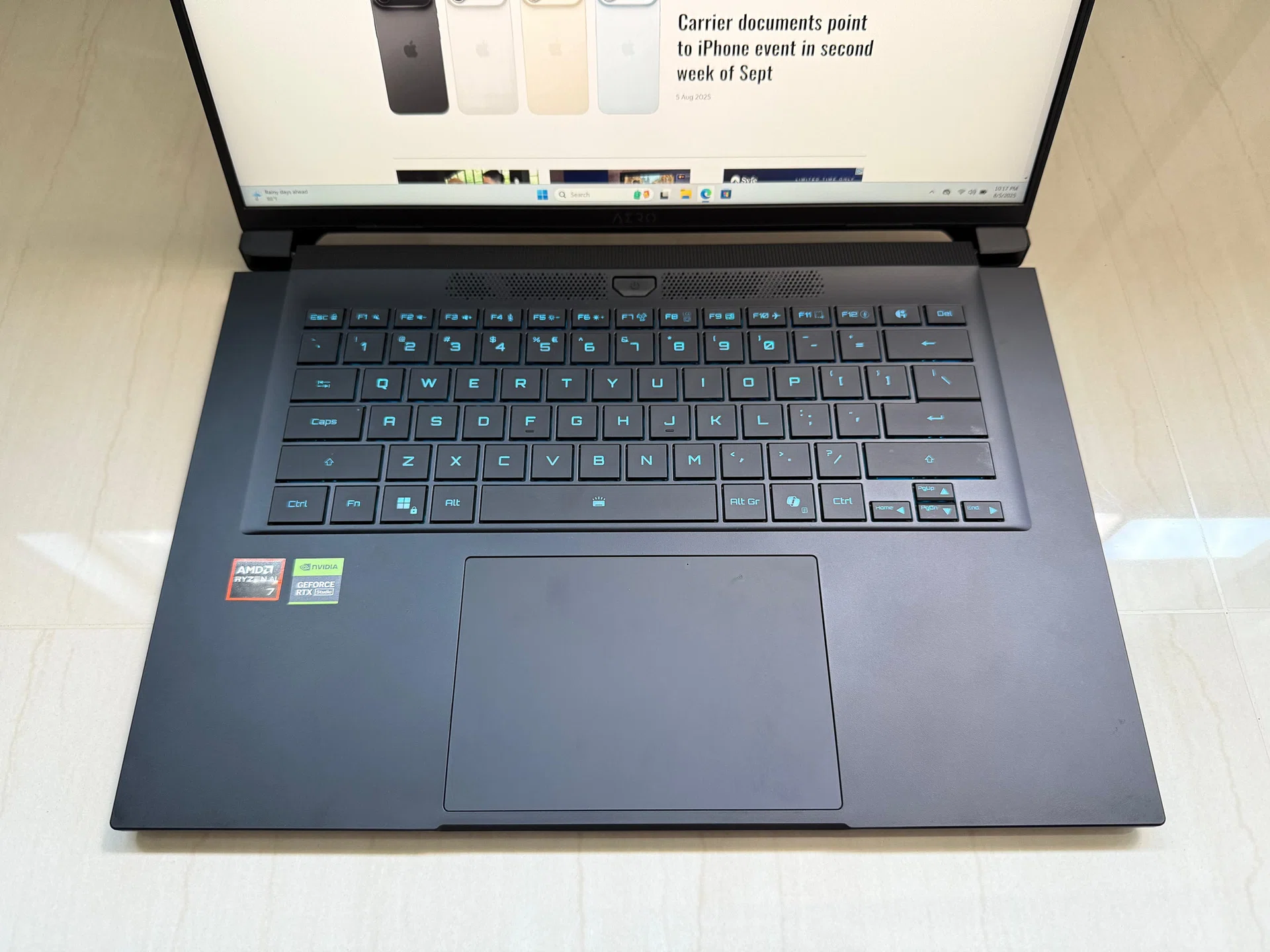
But it’s when I started typing on the laptop that the subtler compromises show up. While I found the keyboard layout to be conventional, with keys spaced in a smart way that reduces mistypes, typing felt slightly soft – mushy even – and the keyboard deck exhibits mild flex under firmer strokes. Don’t get me wrong, it’s not a deal breaker but for someone who’s gone through so many laptops, such differences are immediately noticeable.
| Model | Gigabyte Aero X16 |
|---|---|
| Display | 16-inch, 16:10, IPS WQXGA (2560×1600) 165Hz, 3ms, sRGB 100%, 400nits |
| Processor | AMD Ryzen AI 7 350 |
| Memory | 16GB DDR5 |
| Storage | 1TB SSD |
| Graphics | NVIDIA GeForce RTX 5060 Laptop GPU |
| Battery capacity | 76Wh |
| SRP | $2,249 |
Gaming performance
How does the Aero X16 performs in games? With an RTX 5060 Laptop GPU, the laptop performs quite admirably. Let’s take a look.
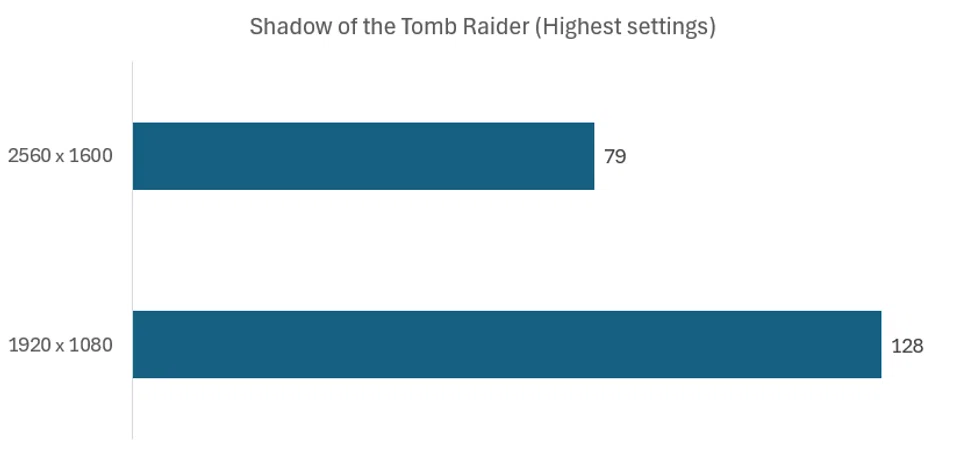
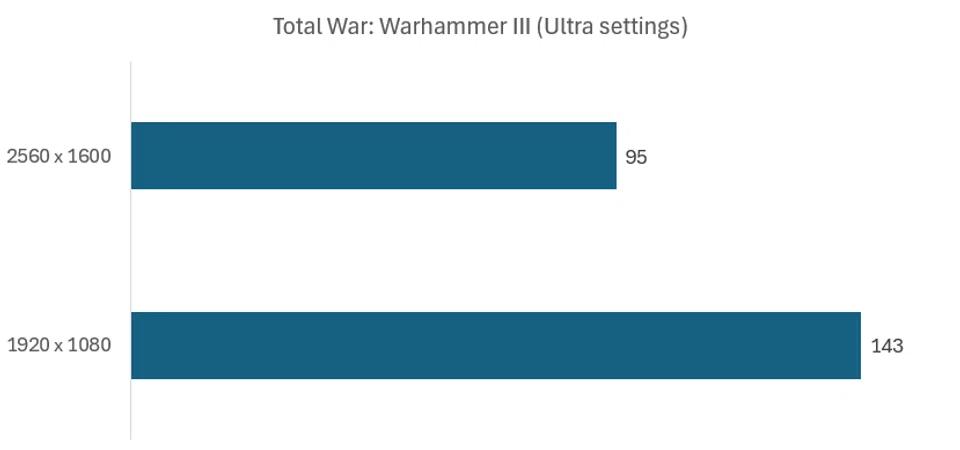
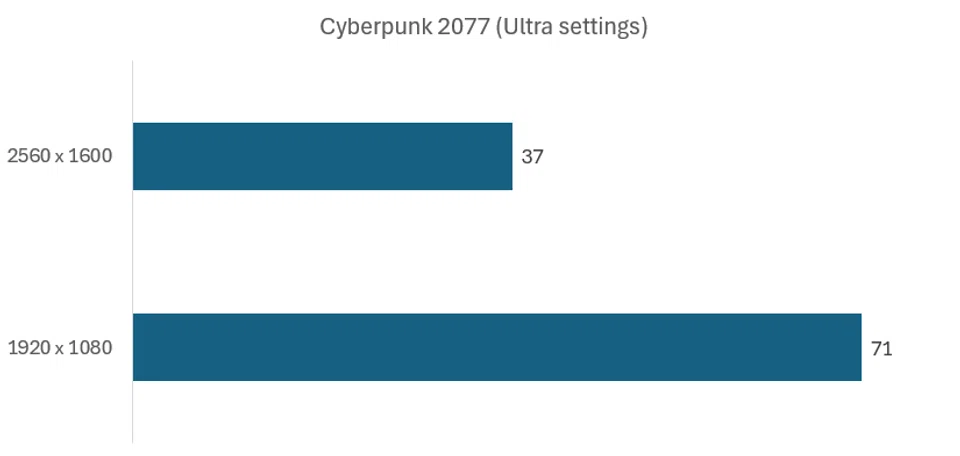
For older games like Shadow of the Tomb Raider and Total War: Warhammer III, the Aero X16 cruises easily – achieving over 120fps and a respectable 82fps respectively at 1080p. Total War: Warhammer III is a notoriously CPU-bound title, and the AMD Ryzen AI 7 350 held up pretty well here. Even a GPU-punishing game like Cyberpunk 2077 still managed to hover at around 71fps. At the laptop’s native resolution (2560x1600), however, things become a bit more varied. Lighter or older games like Shadow of the Tomb Raider still sit at playable frame rates (79fps). But Cyberpunk 2077 at Ultra dips down to 37fps, and is where compromises have to be made – you’d likely want to enable DLSS or step down to lower visual settings to keep the gameplay smooth.
But that’s the reality of the RTX 5060 Laptop GPU – it’s made to run games at 1080p comfortably, but 1600p at max settings is a bit of a stretch. If you intend to do heavy gaming on the Aero X16, then the smart choice is to go for the model with an RTX 5070 Laptop GPU.
Office Productivity and Content Creation performance
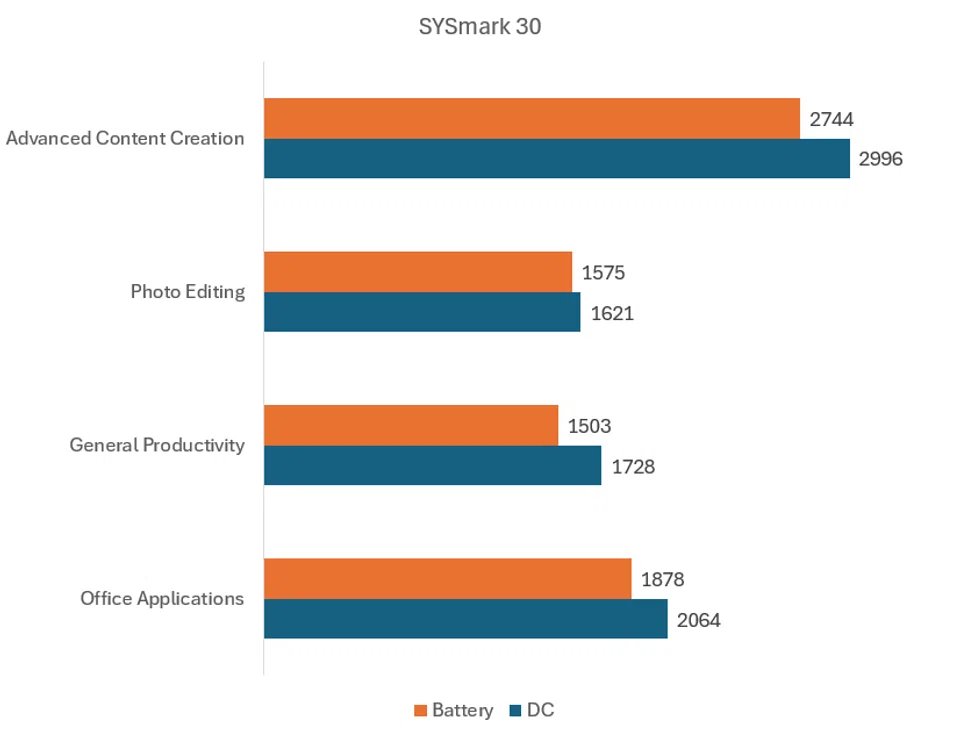
SYSmark 30 is a great benchmark as it measures and compares system performance using real-world applications and workloads – such as office suite-style applications, tasks like web browsing, file compression, and application installation, and photo and video editing applications, including multitasking.
Run the Aero X16 through SYSmark 30 and you get a decent sense of how it behaves with the kind of work most people actually do. On the desk with power plugged in, it’s snappy enough to power through content creation, photo edits, and the usual office grind without you noticing much slowdown. Unplug it and, yes, the performance dips as expected – exports and heavier creative work take a little longer – but it’s not the kind of slowdown that makes the laptop unusable. For emails, browsing, or knocking out a quick deck, it still feels responsive, which isn’t always a given with laptops that also double as gaming rigs.
What I appreciate here is the consistency and Gigabyte has done a pretty good job with the Aero X16 power optimisation. From experience, some laptops feel like two different machines once you pull out the charger (looking at you, Razer Blades), but the Aero X16 holds steady enough that you don’t feel punished for working on battery.
Battery life, however, is not wonderful. In MobileMark 30 (a benchmark similar to SYSmark 30 but is specific to laptops), the Aero 16X lasted 280 minutes in the benchmark’s real-world tests. I certainly wasn’t expecting it last more than 12 hours like we’d come to expect from today’s new productivity and business-focused laptops, but for an RTX 5060 Laptop GPU-powered, I was hoping for it to at least cross the five hour mark.
My thoughts
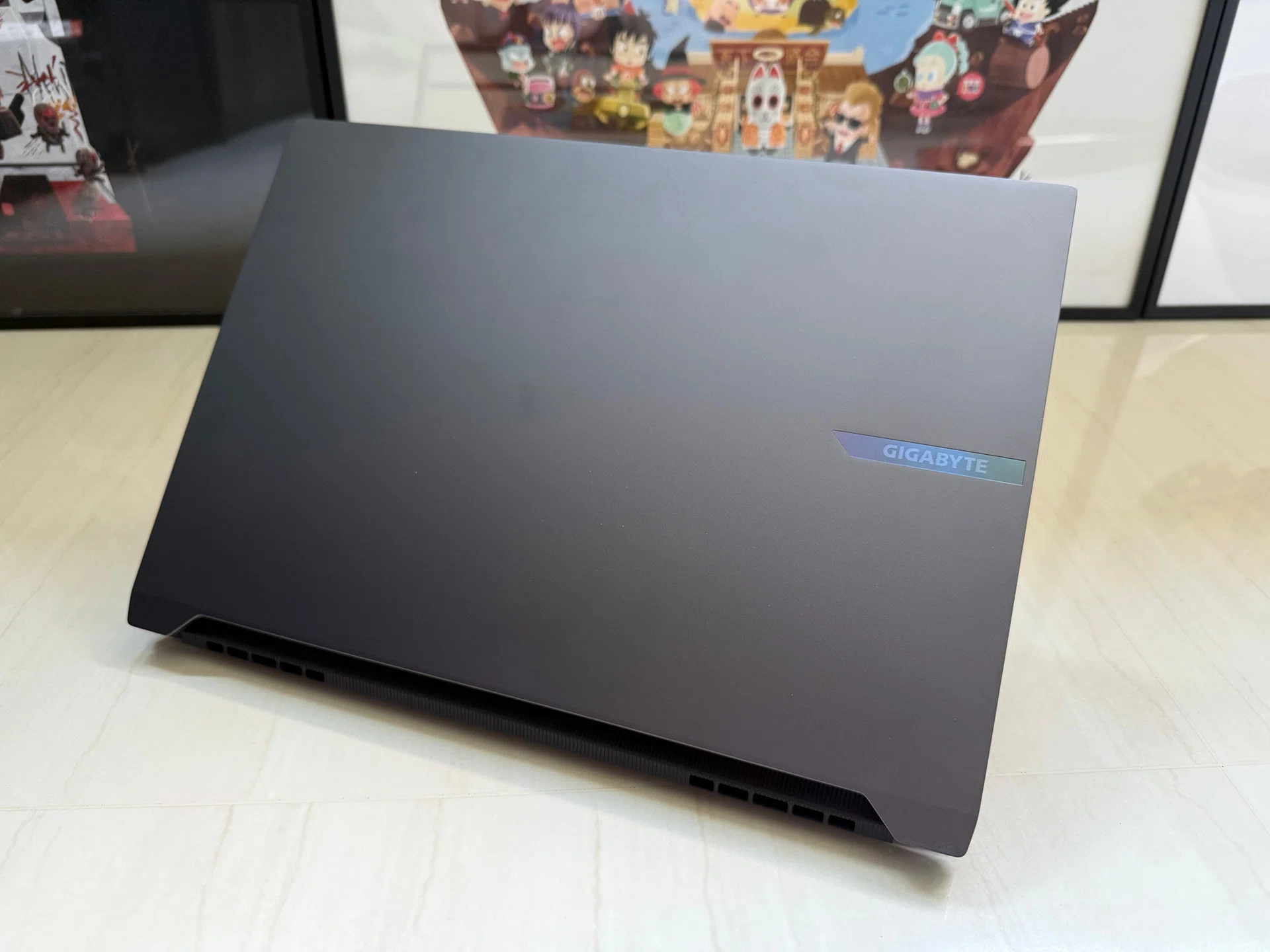
So after my time spent with the Aero X16, what’s my verdict? Honestly, it feels like a laptop that knows what it wants to be, even if it doesn’t nail everything. Gigabyte clearly built this with creators in mind, then gave it just enough GPU grunt so you can still kick back with a game or two. And that pitch works, at least most of the time.
The design is probably the clearest sign of Gigabyte’s intent. This isn’t a laptop you’ll be embarrassed to pull out in a client meeting, nor is it one that screams for attention with RGB lights. The clean chassis and brushed-metal lid are a big step away from the aggressive, “gamer” styling we’ve come to expect from gaming brands – that even Gigabyte is guilty of in the past. And I like that – it makes the Aero X16 easier to fit into different settings, whether you’re working from a cafe, editing photos in the office, or squeezing in a gaming session at home.
If there’s a catch, it’s that the Aero X16 still makes you live with a few compromises. Modern games like Cyberpunk 2077 at its native resolution will push the RTX 5060 Laptop GPU beyond its capability, and the battery life is shorter than I’d like for a laptop in 2025. Neither issue is a deal-breaker, but they’re reminders that this isn’t a machine trying to be everything at once.
And that’s where it finds its place. For S$2,249, the Aero X16 that I’ve tested here doesn’t quite place itself in the budget category, but it also isn’t a bad investment if you’re looking for one laptop that can handle both sides of your life. If you’re a creator who games on the side, or a gamer who dabbles in creative work, the Aero X16 lands in a comfortable sweet spot. It won’t replace a full-fat workstation or a dedicated gaming rig, but as a daily driver that balances both worlds, it’s practical, understated, and dependable. In a year where so many laptops lean heavily on AI buzzwords, the Aero X16’s biggest strength might just be that it feels grounded.
The Gigabyte Aero X16 reviewed here is available for S$2,249 at The Techyard. Click here to buy.