
PSA: This is how to tell if you’ve the revised Raspberry Pi 4 board
Raspberry Pi 4 Rev 1.2, which fixes a compatibility issue with e-marked cables connected to some power supplies, is now in stores.

Note: This article was first published on 23 March 2020.
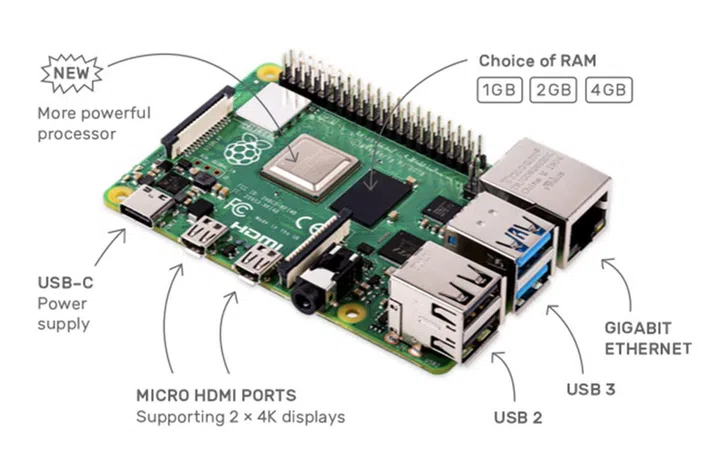
(Image: Raspberry Pi Foundation.)
When the Raspberry Pi 4 Model B dropped last year, many users quickly found out that it had a USB-C issue that prevented the board from properly recognising certain power adapters. At the time, Eben Upton, CEO of Raspberry Pi Ltd., said that a PCB revision would probably come at some point to fix the issue, but stopped short of providing an exact date.
Well, The Register checked back with Upton last month and he has confirmed that the revised design has been sent to manufacturing and the new boards should have reached end users by now. So, how can you tell if the Pi 4 you’ve bought recently has the updated Rev 1.2 design (here’s a shot of it on Imgur)?
Via CNX Software, if your Pi 4 is already up and running, the easiest way is to head to the command line and use the cat command (cat /proc/cpuinfo) to retrieve the CPU info. If you’ve the new board, the ‘Revision’ section should read ‘c03112’. And the 'Model' will be listed as 'Raspberry Pi 4 Model B Rev 1.2'.
If the board is still in your hand or if you’re shopping for one and the store allows you to inspect it, you can look for the position of the WLCSP SD card voltage switch, which has been moved from behind the microSD card slot to the top corner. Alternatively, look for this unidentified transistor thingie that seems to be new on the Rev 1.2 board:
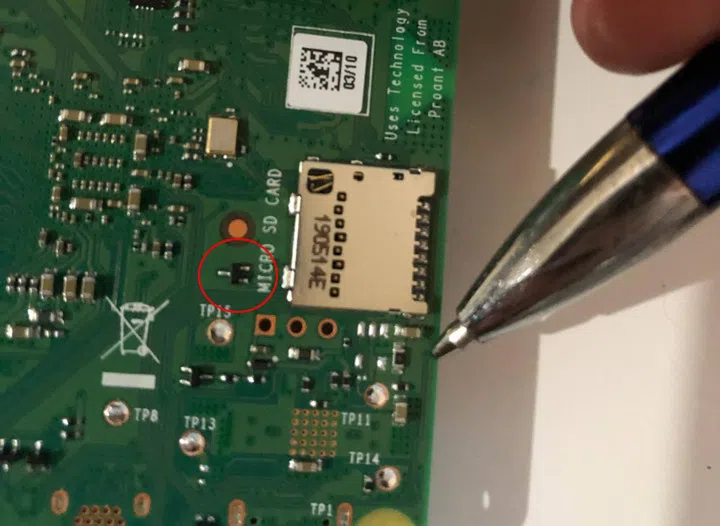
This circled part is supposedly new on the Rev 1.2 board. (Image: CNX Software.)
Now you know.
Source: CNX Software, The Register.
Our articles may contain affiliate links. If you buy through these links, we may earn a small commission.