
Here are all the AMD X470 motherboards announced so far
If you’ve got your eye set on a 2nd-generation Ryzen chip, here’s a roundup of the motherboards announced so far from the major brands.

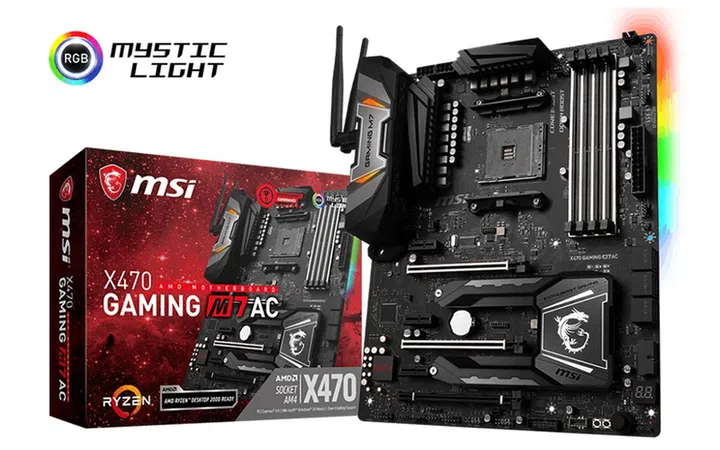
MSI X470 Gaming M7 AC. (Image Source: MSI)
AMD’s 2nd-generation Ryzen processors are here, and they’re more than just a small step above the original Ryzen chips.
The new Zen+ architecture may be just an update to last year’s Zen architecture, but it offers tangible gains such as higher base clocks, lower cache latencies, and more granular per-core frequency adjustments.
The CPU also consistently aims for the highest possible frequency by checking against CPU temperature, load, and current, which should translate into higher boost clocks in game and better performance.
Furthermore, Pinnacle Ridge also supports higher performance DDR4 2,933MHz system memory.
AMD’s board partners have appeared remarkably prepared for the launch, and it wasn’t long before we were flooded with board announcements featuring the new X470 chipset. While the core silicon remains unchanged, the crop of X470 motherboards offer additional features and refinements – optimized memory routing and an improved VRM and power layout for overclocking, among other things – that make them quite compelling options for anyone looking build a new DIY rig.
The X470 chipset is also the only one to support StoreMI Technology right out of the box. This lets you pair your slower hard drives with an SSD or up to 2GB of RAM for a combination of speed and capacity. But unlike certain RAID programs or Intel’s competing Optane Memory solution, StoreMI can be implemented or removed without any need to reinstall Windows or reformat your drives.
That said, if you’ve got your eye set on a 2nd-generation Ryzen chip, here’s a roundup of the motherboards announced so far from the major brands.
ASRock
ASRock has launched six new AMD X470 motherboards across its Taichi, Master, and Fatal1ty series. The boards include both ATX and mini-ITX form factors, so small system builders won’t be left out.
Here’s a list of all the boards announced:
- ASRock X470 Taichi Ultimate
- ASRock X470 Taichi
- ASRock Fatal1ty X470 Gaming K4
- ASRock X470 Master SLI/ac
- ASRock X470 Master SLI
- ASRock X470 Gaming-ITX/ac
The flagship of the series is the X470 Taichi Ultimate. It comes equipped with a 16-phase power circuitry, two reinforced PCIe 3.0 x16 slots, and dual M.2 sockets. The M.2 sockets support both SATA and PCIe drives, but the second socket only supports up to PCIe 2.0 x4.
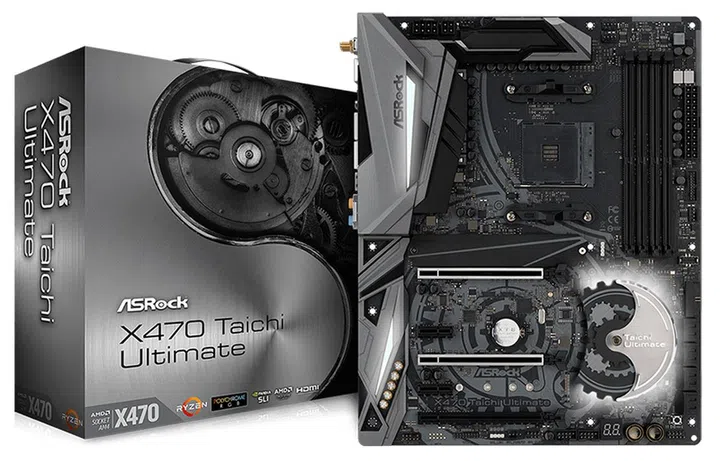
ASRock X470 Taichi Ultimate. (Image Source: ASRock)
Other features include ASRock’s new Polychrome RGB lighting system, which comprises built-in RGB illumination and a selection of onboard RGB headers. ASRock also mentioned the existence of Polychrome RGB Sync-certified accessories, so it looks like the company is also trying to create its own RGB ecosystem.
The Taichi Ultimate boasts some impressive networking capabilities as well, such as dual-band 802.11ac Wi-Fi, Bluetooth 4.2, and a 10 Gigabit Ethernet jack. The latter is thanks to the Aquantia AQC107 controller on board, which supports the 10GBASE-T standard. In addition, the board also has a regular Gigabit Ethernet port courtesy of an Intel I211-AT controller.
Elsewhere, you’ll also get a front USB 3.1 (Gen 2) Type-C header for compatibility with the latest cases. On the rear panel, the board features a wide selection of USB ports as well, including one USB 3.1 (Gen 2) Type-A, one USB 3.1 (Gen 2) Type-C, and six USB 3.1 (Gen 1) ports.
The more mainstream Taichi, Master SLI/ac, Master SLI, and Fatal1ty Gaming K4 boards share a lot in common. They differ mainly in terms of aesthetics, and the Taichi and Master boards have their own unique heatsink design, board layout, and power circuitry.
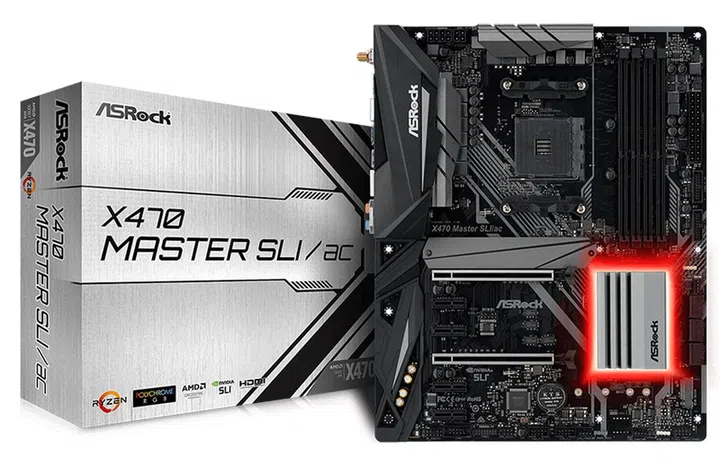
ASRock X470 Master SLI/ac. (Image Source: ASRock)
That said, the Master models have a less robust 12-phase power design, compared to the Taichi’s 16-phase circuitry.
The Master and Fatal1ty Gaming K4 motherboards also have fewer SATA 6Gbps and high-speed USB 3.1 (Gen 2) ports than the Taichi. The latter has 8 SATA 6Gbps ports and three USB 3.1 (Gen 2) connectors, but the other three boards have just 6 SATA ports and are lacking the USB 3.1 (Gen 2) Type-C front panel header.
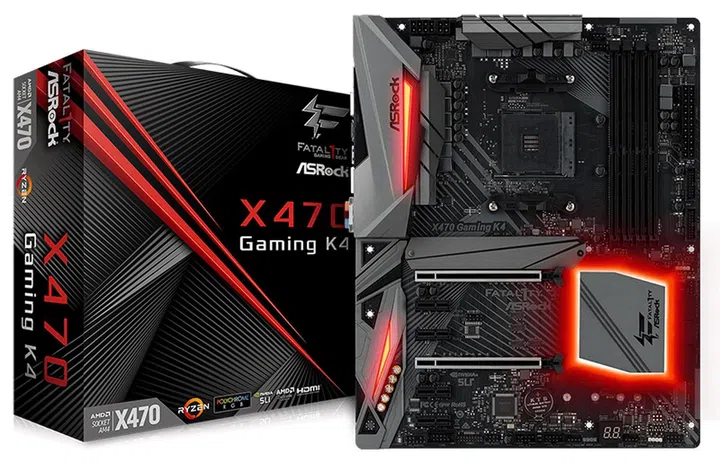
ASRock Fatal1ty X470 Gaming K4. (Image Source: ASRock)
Finally, there’s the Fatal1ty X470 Gaming-ITX/ac, the only mini-ITX X470 board from ASRock so far. However, ASRock hasn’t revealed much about the board, although we do know that it features onboard Wi-Fi, a metal-reinforced PCIe slot, and one PCIe 3.0 x4 M.2 socket.
ASUS
ASUS has readied five X470 motherboards to go with AMD’s new Pinnacle Ridge chips. Like ASRock, they comprise both ATX and mini-ITX models, all of which have been listed here:
- ASUS ROG Crosshair VII Hero (Wi-Fi) (S$539)
- ASUS ROG Strix X470-F Gaming (S$389)
- ASUS Prime X470-Pro (S$345)
- ASUS TUF X470-Plus Gaming (S$289)
- ASUS ROG Strix X470-I Gaming (S$350)
All the boards are available to buy now, with the exception of the TUF and ROG Strix X470-I Gaming.
The ROG Crosshair VII Hero (Wi-Fi) sits at the top of the line-up. This is a high-end board with almost everything you’d expect, including dual reinforced PCIe 3.0 x16 slots, dual PCIe 3.0 x4 M.2 sockets, onboard Wi-Fi, and robust support for external RGB lighting strips.
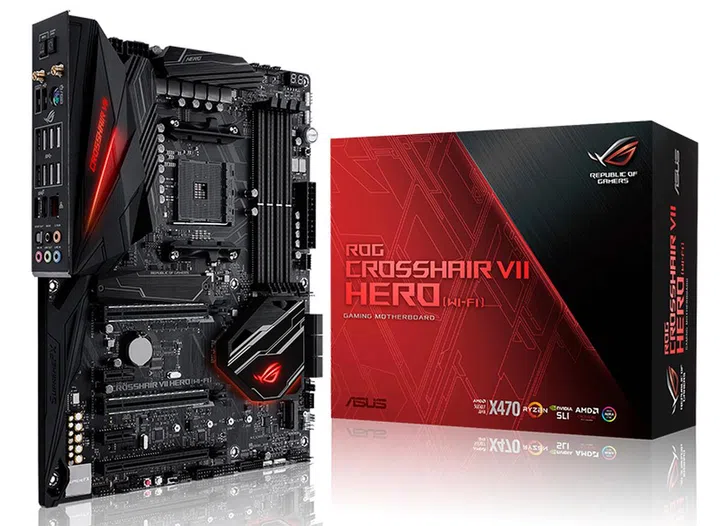
ASUS ROG Crosshair VII Hero (Wi-Fi). (Image Source: ASUS)
The board supports ASUS’ Aura Sync lighting of course, but what’s new is that it now works with the Philips Hue wireless home lighting ecosystem. According to ASUS, you’ll be able to control Hue lightings using the Aura app.
It also comes with plenty of USB connectors as well. In addition to a single USB 3.1 (Gen 2) front panel connector, it has a total of eight USB 3.1 (Gen 1) Type-A, two USB 3.1 (Gen 2) Type-A, and one USB 3.1 (Gen 2) Type-C port at the back.
However, other than the chipset, what differentiates the Crosshair VII from older boards are new ROG features such as the new silkscreen labels on the board that help highlight the native ports for your drives and peripherals, and also the optimal PCIe and memory slot configurations.
Furthermore, ASUS is introducing something called Truevolt USB connectors, which are supposedly guaranteed to provide 5V to minimize risk to devices that rely on power from your USB ports, such as portable hard drives.
Next up, there’s the Strix X470-F Gaming and the Prime X470-Pro, which are actually remarkably similar. They differ mainly in terms of looks, where the Strix board is the fancier one, with RGB-illuminated heatsink covers and an integrated rear I/O shield.
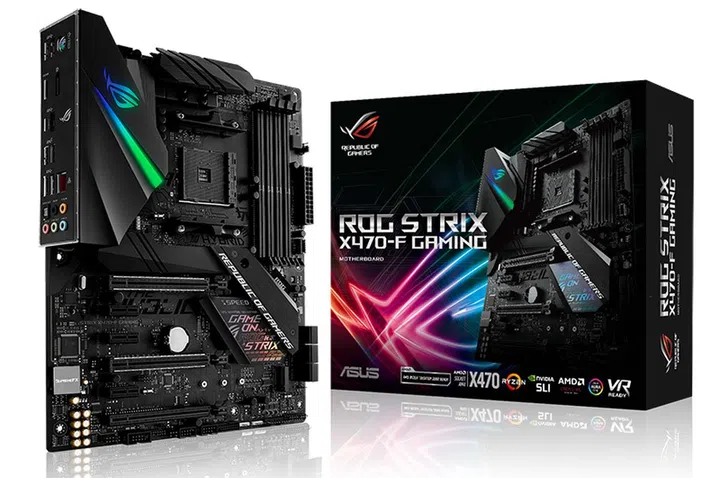
ASUS ROG Strix X470-F Gaming. (Image Source: ASUS)
On the other hand, the Prime is a little plainer, with a monochrome color scheme and less ostentatious lighting. It’s also lacking the addressable RGB header found on the Strix motherboard.
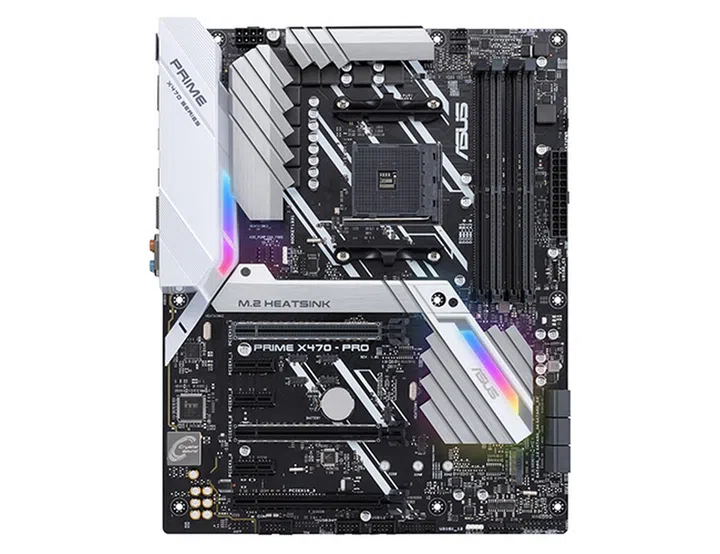
ASUS Prime X470-Pro. (Image Source: ASUS)
Furthermore, the Strix has a slightly more advanced audio solution in the form of the SupremeFX S1220A codec.
Compared to the Crosshair VII, these boards lack the dual PCIe 3.0 x4 M.2 slots, as their second M.2 socket is only PCIe 3.0 x2. But while the Crosshair dispensed with onboard display outputs because of its intended enthusiast audience, the Strix and Prime boards offer HDMI and DisplayPort outputs in case you pair them with Ryzen chips with integrated graphics.
The TUF X470-Plus and Strix X470-I Gaming round out ASUS’ X470 range. The TUF motherboard is the most basic of ASUS’ X470 boards, but it retains the series’ longstanding focus on reliability.
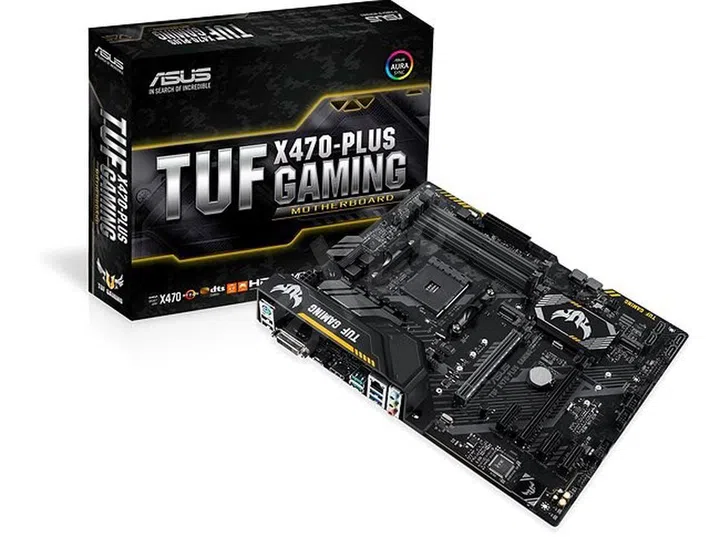
ASUS TUF X470-Plus Gaming. (Image Source: ASUS)
This means that instead of a power regulation circuitry designed for overclocking, ASUS went with one with protections against electrical faults. Other crucial board components also feature surge protections against things like lightning strikes and static electricity.
It shares the same M.2 socket configuration as the Strix and Prime boards, but features fewer USB ports on the rear I/O. It is also the only ASUS X470 ATX form factor board to not offer support for NVIDIA SLI.
Despite its size, the mini-ITX Strix X470-I Gaming is still targeted at enthusiasts, so it offers things like onboard Wi-Fi, SupremeFX audio, and RGB lighting, including one 4-pin RGB header and a second addressable header.
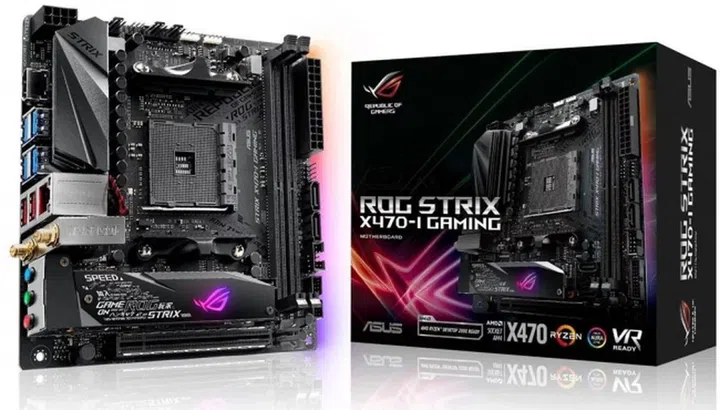
ASUS ROG Strix X470-I Gaming. (Image Source: ASUS)
It’s also managed to fit in dual PCIe 3.0 x4 M.2 sockets like the Crosshair board, although the second socket is located on the back and shares PCIe lanes with the main PCIe 3.0 x16 slot.
Gigabyte
Gigabyte is focusing on the high-end market with its initial crop of X470 boards. The company has announced just three Aorus motherboards so far:
- Gigabyte X470 Aorus Gaming 7 WiFi
- Gigabyte X470 Aorus Gaming 5 WiFi
- Gigabyte X470 Ultra Gaming
The flagship Aorus Gaming 7 WiFi is decked out from head to toe in RGB LEDs. You’ll find them nestled around the PCH heatsink, I/O cover, PCIe and DIMM slots, and even the audio shielding. There’s also the familiar swappable overlay on the top right, so this is really a board aimed squarely at those who care nothing for subtlety.
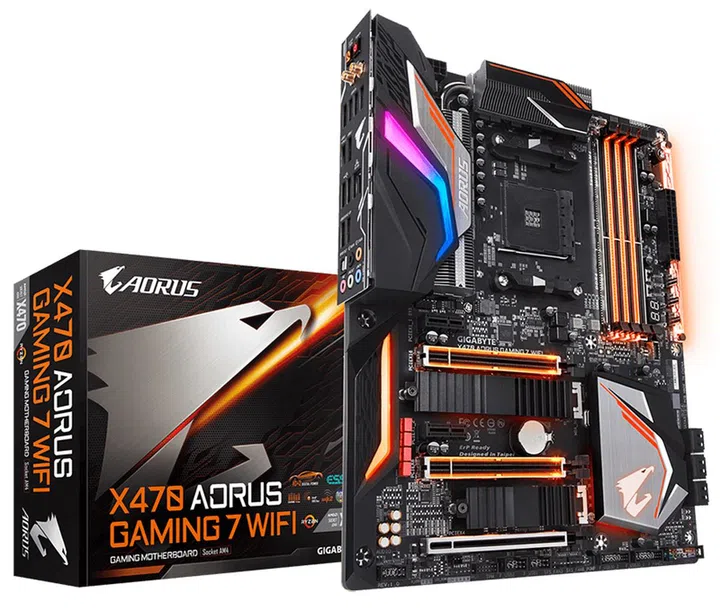
Gigabyte X470 Aorus Gaming 7 WiFi. (Image Source: Gigabyte)
The good news is that all that RGB fanfare is backed up by some quality hardware and components. For starters, the 10+2-phase power circuitry is cooled by a seriously large heatsink, while both PCIe 3.0 x4 M.2 sockets feature their own dedicated heatsinks as well.
In addition, all the Gaming 7’s PCIe x16 slots and DIMM slots are reinforced by metal.
It doesn’t stop there however, and the board also comes with an integrated metal base plate at the rear of the board for further structural reinforcement. It comes with a pre-mounted I/O shield as well, which should simplify the installation process somewhat.
The Gaming 7 boasts some robust networking features as well, with support for 802.11ac Wave 2 wireless solutions and a maximum throughput of up to 1.73Gbps.
The onboard audio solution also features an ESS Sabre DAC and dedicated headphone amplifier to power high-end headphones.
The Gaming 5 and Ultra Gaming are more modest offering with fewer RGB LEDs, although they still support Gigabyte’s RGB Fusion lighting ecosystem. The power circuitry is also less advanced, with both boards using the same 8+3-phase design.
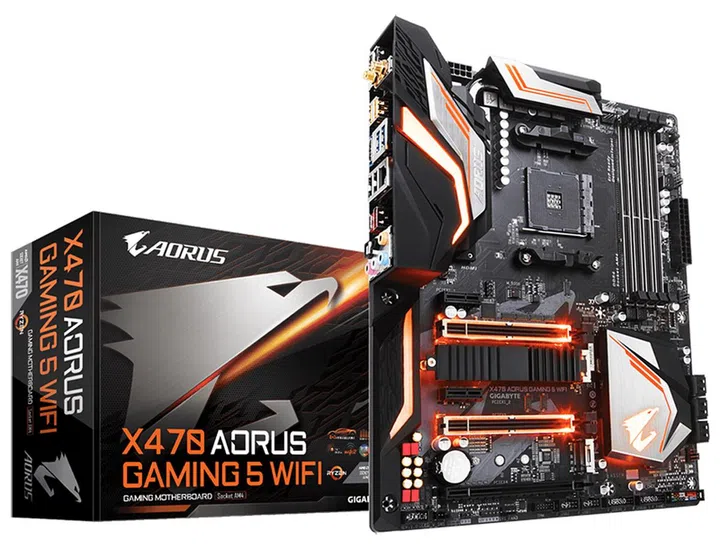
Gigabyte X470 Aorus Gaming 5 WiFi. (Image Source: Gigabyte)
That said, they do share some core features with the Gaming 7, such as the dual PCIe 3.0 x4 M.2 sockets (although only one socket has a dedicated heatsink). The Gaming 5 also has the same wireless capabilities as the Gaming 7, but the Ultra Gaming has no integrated wireless solution.
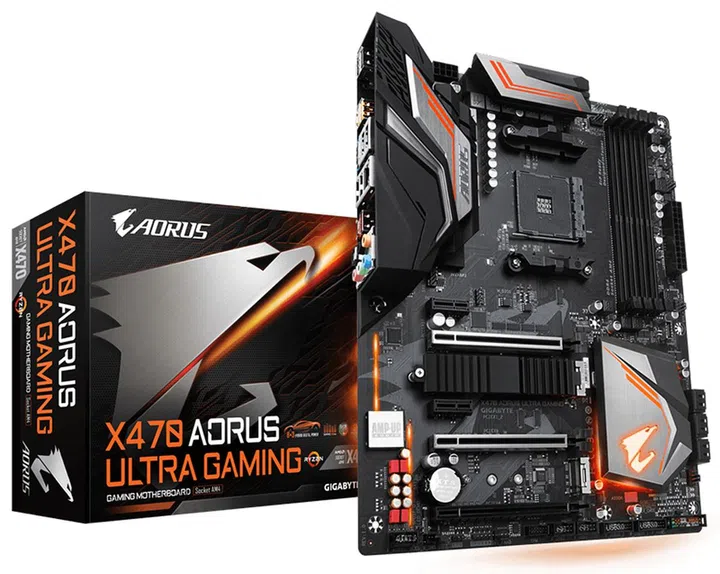
Gigabyte X470 Ultra Gaming. (Image Source: Gigabyte)
In addition, they have both front and rear USB 3.1 (Gen 2) Type-A and Type-C ports for high-speed connections, and Gigabyte’s new USB DAC-UP 2 USB ports. The latter essentially ensures that devices that draw power from the USB ports won’t suffer from voltage drop issues or any sort of connectivity or power deficiency problems.
MSI
MSI has announced a total of five X470 boards aimed mostly at gamers:
- MSI X470 Gaming M7 AC (S$425)
- MSI X470 Gaming Pro Carbon AC
- MSI X470 Gaming Pro Carbon (S$319)
- MSI X470 Gaming Pro
- MSI X470 Gaming Plus (S$235)
The flagship MSI X470 Gaming M7 AC comes with plenty enthusiast-oriented features such as dual 8-pin CPU power connectors (also present on the Gaming Pro Carbon boards), metal-reinforced PCIe and DIMM slots, and heatsinks for both M.2 sockets.
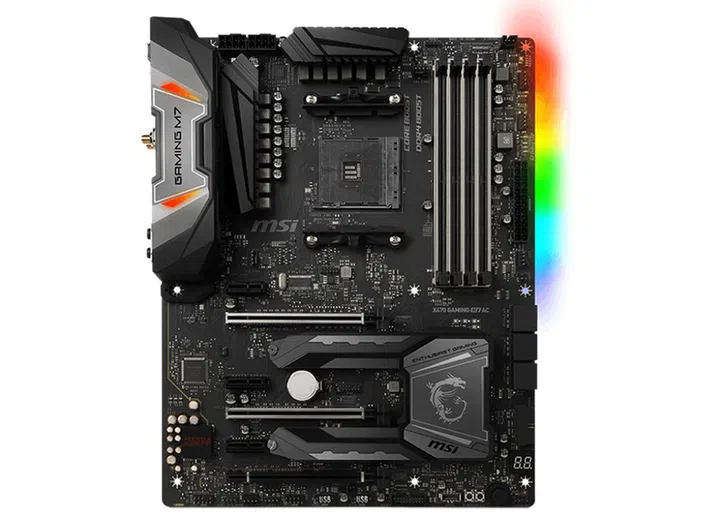
MSI X470 Gaming M7 AC. (Image Source: MSI)
This is a board targeted at the high-end of the market, so even though it supports AMD’s A-series Athlon processors with onboard graphics as well, it doesn’t offer any display outputs on the motherboard itself. In comparison, the other boards offer at least two onboard display connectors.
In addition, the M7 supports up to DDR4 3,600MHz memory, the highest supported memory frequency among all of MSI’s X470 boards.
However, there’s no support for dual PCIe 3.0 x4 M.2 SSDs on the M7, and the second slot only supports up to PCIe 2.0 x4.
Other features include Killer Gaming LAN, DDR4 Boost for optimized traces and isolated memory circuitry, and support for MSI’s Mystic Light RGB customizations.
The Gaming Pro Carbon and Gaming Pro Carbon AC are nearly identical, and the key difference is the inclusion of an Intel Wireless-AC 3168 wireless module on the latter. That aside, they have the same configuration of SATA, M.2, and USB ports.
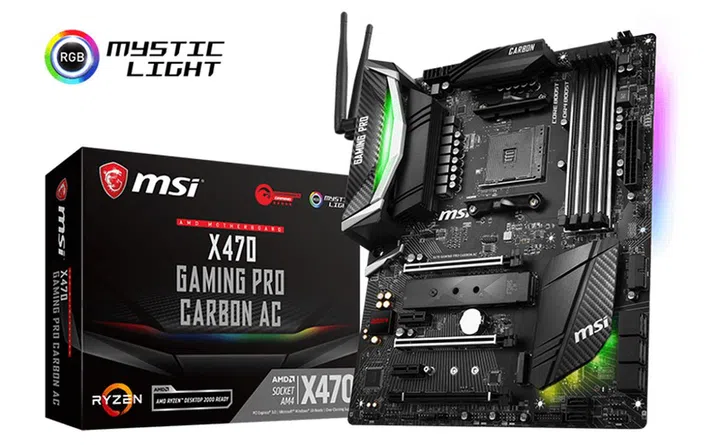
MSI X470 Gaming M7 AC. (Image Source: MSI)
When it comes to storage connectors, both boards feature eight SATA 6Gbps (two more than the Gaming M7) and two M.2 sockets. On the rear, you’ll find five USB 3.1 (Gen 1) Type-A ports, one USB 3.1 (Gen 2) Type-C port, and two USB 2.0 ports.
Furthermore, the Gaming Pro Carbon motherboards are the only ones that support RAID 0, 1, and 10 for both SATA and NVMe storage devices (the others only support SATA drives).
The X470 Gaming Pro and Gaming Plus are far more basic offerings. Neither of them support NVIDIA SLI, and there’s only support for up to three-way CrossFire. They also feature just one metal-reinforced PCIe 3.0 x16 slot.
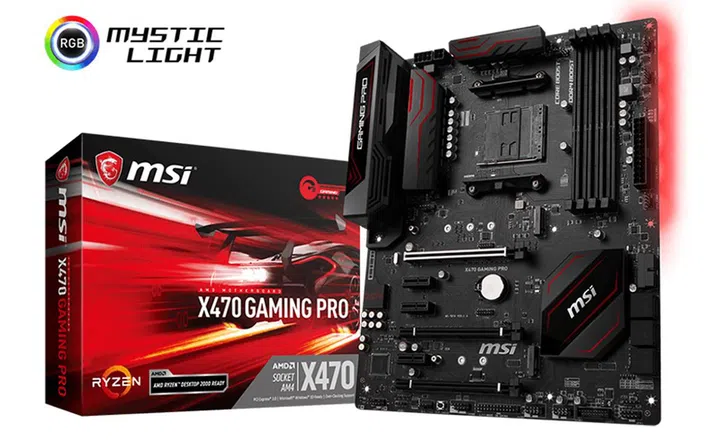
MSI X470 Gaming Pro. (Image Source: MSI)
The two boards share the same PCIe, USB, and SATA port configuration, and they differ mostly in terms of aesthetics. For instance, the Gaming Pro has a slightly more elaborate design and features a full I/O cover that covers the rear connectors. In comparison, the Gaming Plus leaves this area exposed.
Our articles may contain affiliate links. If you buy through these links, we may earn a small commission.