
MSI P45D3 Platinum (Intel P45)
The last of the big three motherboard vendors, MSI is ready to unleash its DrMOS powered Intel P45 motherboards. We check out the DDR3 compatible P45D3 Platinum and see how it stands against its ASUS and Gigabyte competitors.

MSI's 3-in-1 Solution
Now that we have seen Intel P45 representatives from two major vendors in the form of the ASUS P5Q3 Deluxe and Gigabyte's , it's about time we turn to the other member of the 'Big 3' - MSI. What are the new features that the manufacturer have up its sleeves to counter its fierce rivals?
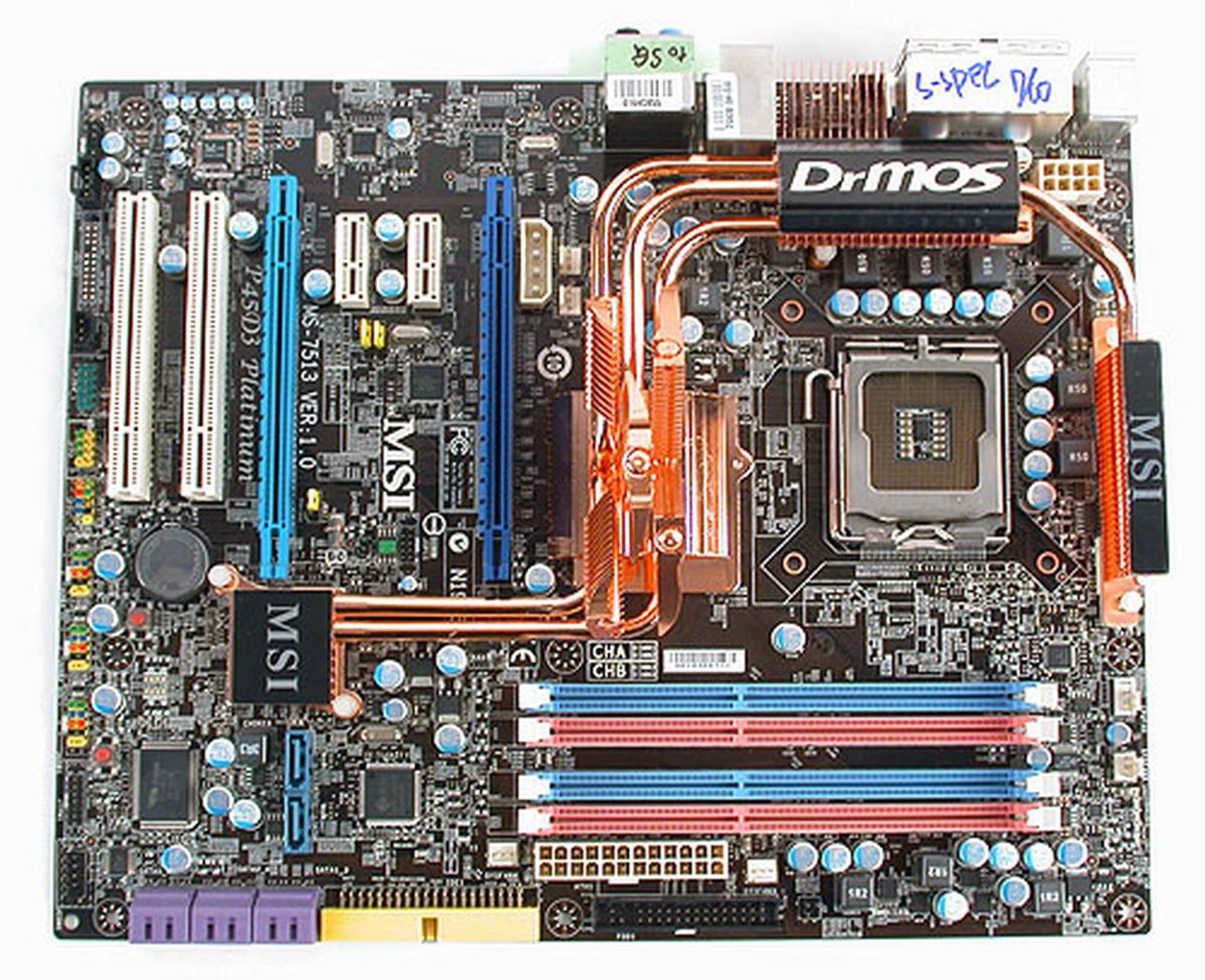
An overview of the MSI P45D3 Platinum layout and features. Check out more images in our preview article.
Well, some of you may remember that we did a of the "Eaglelake" motherboards from MSI. While we did not go in-depth, you may have a faint idea that DrMOS is a big part of all this. And you would be totally correct. But before you say "Doctor MOS", you should know that it actually means Driver-MOSFETs and it refers to an integrated Driver-MOSFET package that combines three chips together: a driver IC, a high MOSFET and a low MOSFET. These are the chief components used to regulate and provide power to the processor (as well as a few other critical components) but they are usually found separately on the motherboard. According to MSI, putting all of them together will lead to greater power efficiency while providing better performance. In short, MSI claims it's the proverbial magic bullet.
Obviously MSI has a lot more to elaborate on this DrMOS feature, which is linked to other marketing terms, XpressCool, GreenPower and RapidBoost. We'll be looking at these features more closely on the next page.
Since our preview had covered some of the board layout and features, we won't be repeating the gallery of images, just some of the more important ones below. Suffice to say, this is not MSI's flagship P45 board but as the DDR3 version of the Platinum edition, it's close to being the top dog, with the MSI P45 Diamond arguably having the edge.
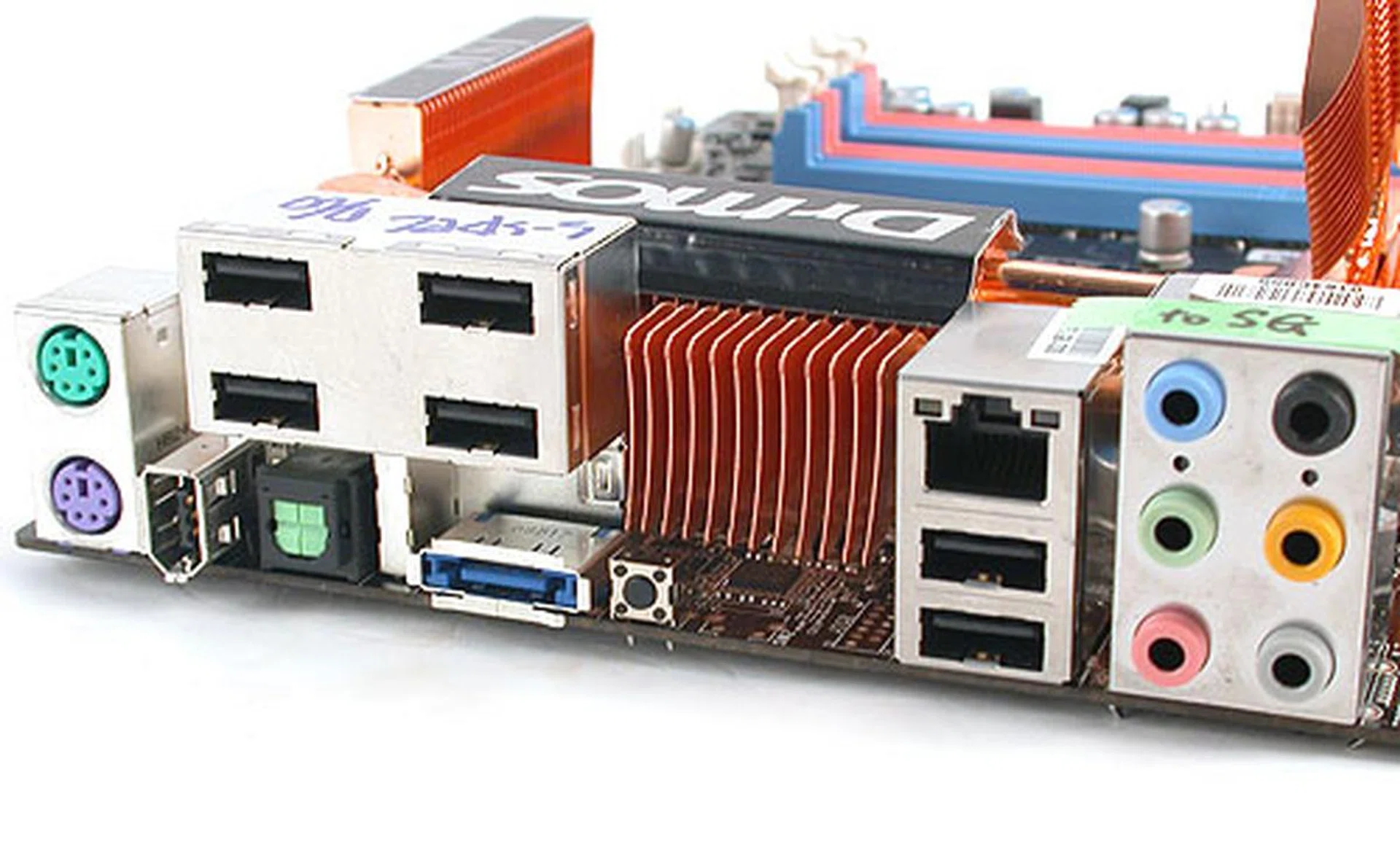
Compared to some boards, this MSI P45 board has a relatively modest rear I/O panel, with only six USB 2.0 ports and 1 Gigabit Ethernet port. Notably, there's a Clear CMOS button right besides the eSATA port (so be careful not to accidentally depress it).
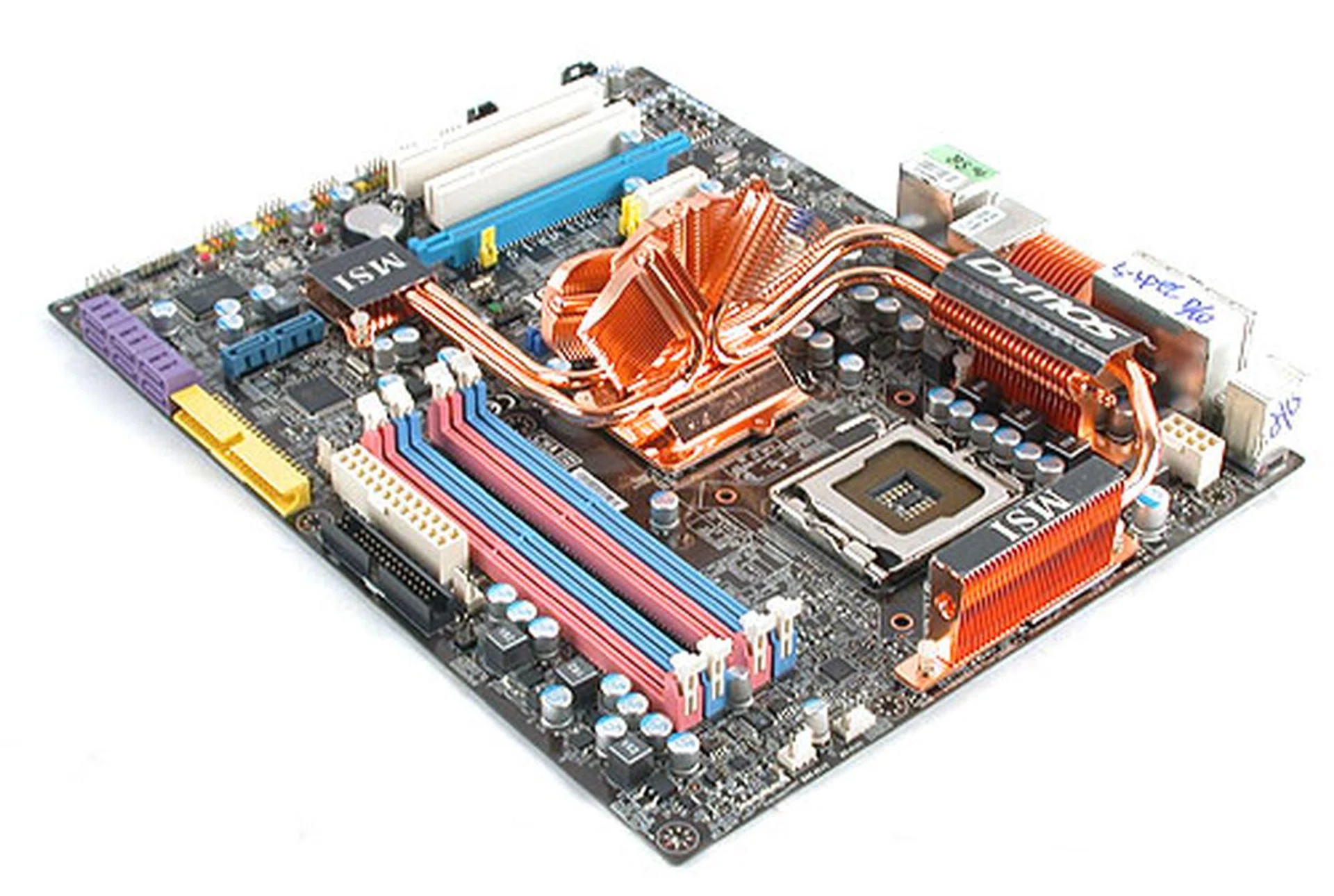
Feature-wise, it is thankfully not as over-the-top as the Gigabyte EXTREME that we saw recently, with a more mainstream configuration of supporting up to 4 DIMMs and 8GB of DDR3 memory (O/C to 1600MHz possible). CPU support is however restricted to those of 65nm and newer, meaning you'll need at least a Conroe derivative. MSI's rather famous Circu-Pipe cooler makes its return, though the new version now comes with five heatpipes, a trapezoid base and lots of fine copper fins to maximize its heat dissipation surface area. As a P45 board, it naturally supports CrossFireX, with the native PCIe 2.0 x 16 lanes splitting automatically to a set of x8 lanes when two compatible ATI cards are installed.
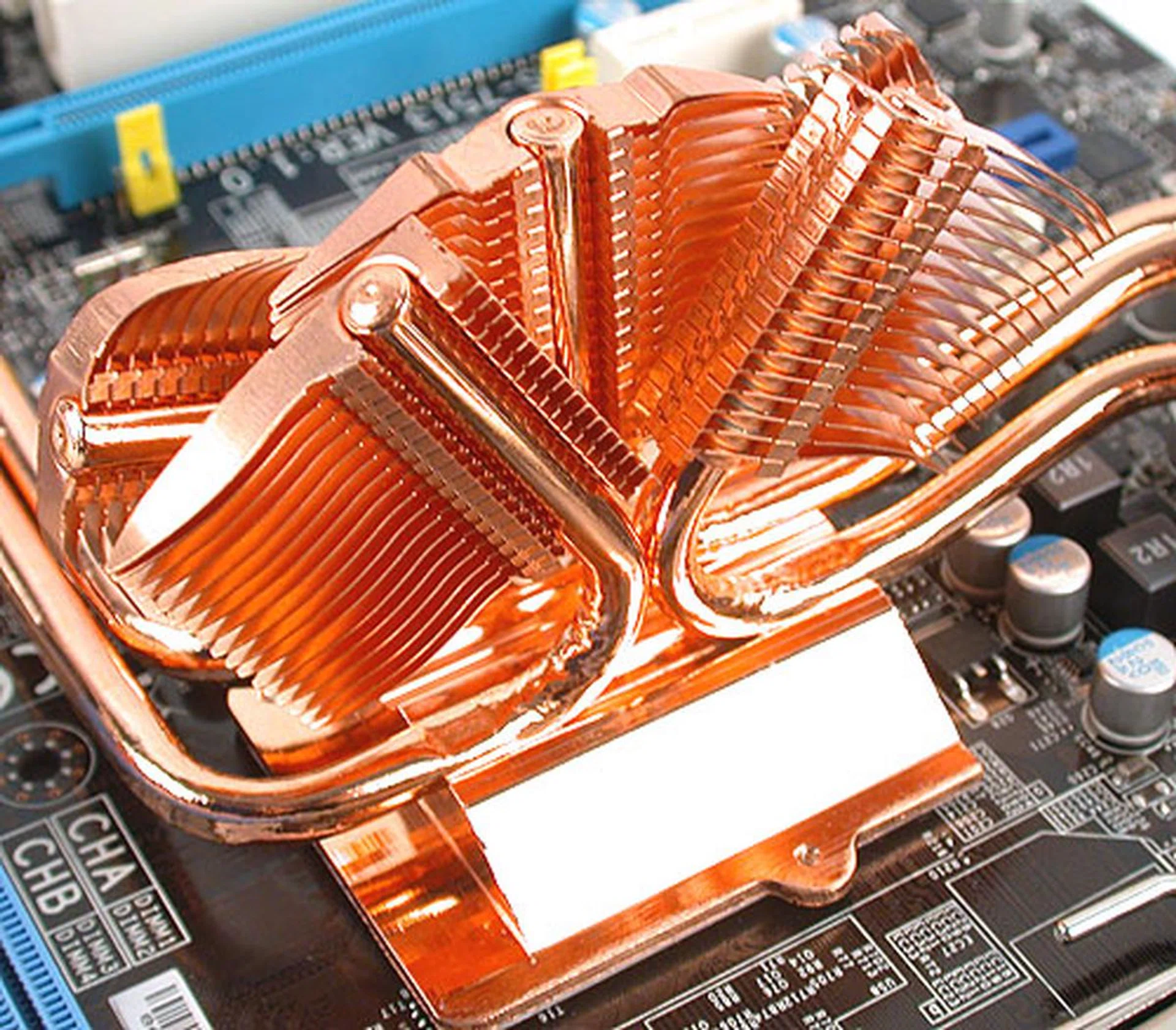
This is the Circu-Pipe 2 and represents MSI's top air-cooled solution for its motherboards currently.
Other features you may want to note include the usual presence of a Realtek ALC888 HD Audio CODEC, a FireWire controller supporting up to two IEEE1394 ports (1 rear and 1 header) and there's even a eSATA port at the rear. Surprisingly, MSI has kept to a modest configuration of just a single Gigabit Ethernet port, which we think is sensible for more the general enthusiast despite another vendor's hype over dual Gigabit teaming and backup, which are perhaps preferable only to the really top-level power users.
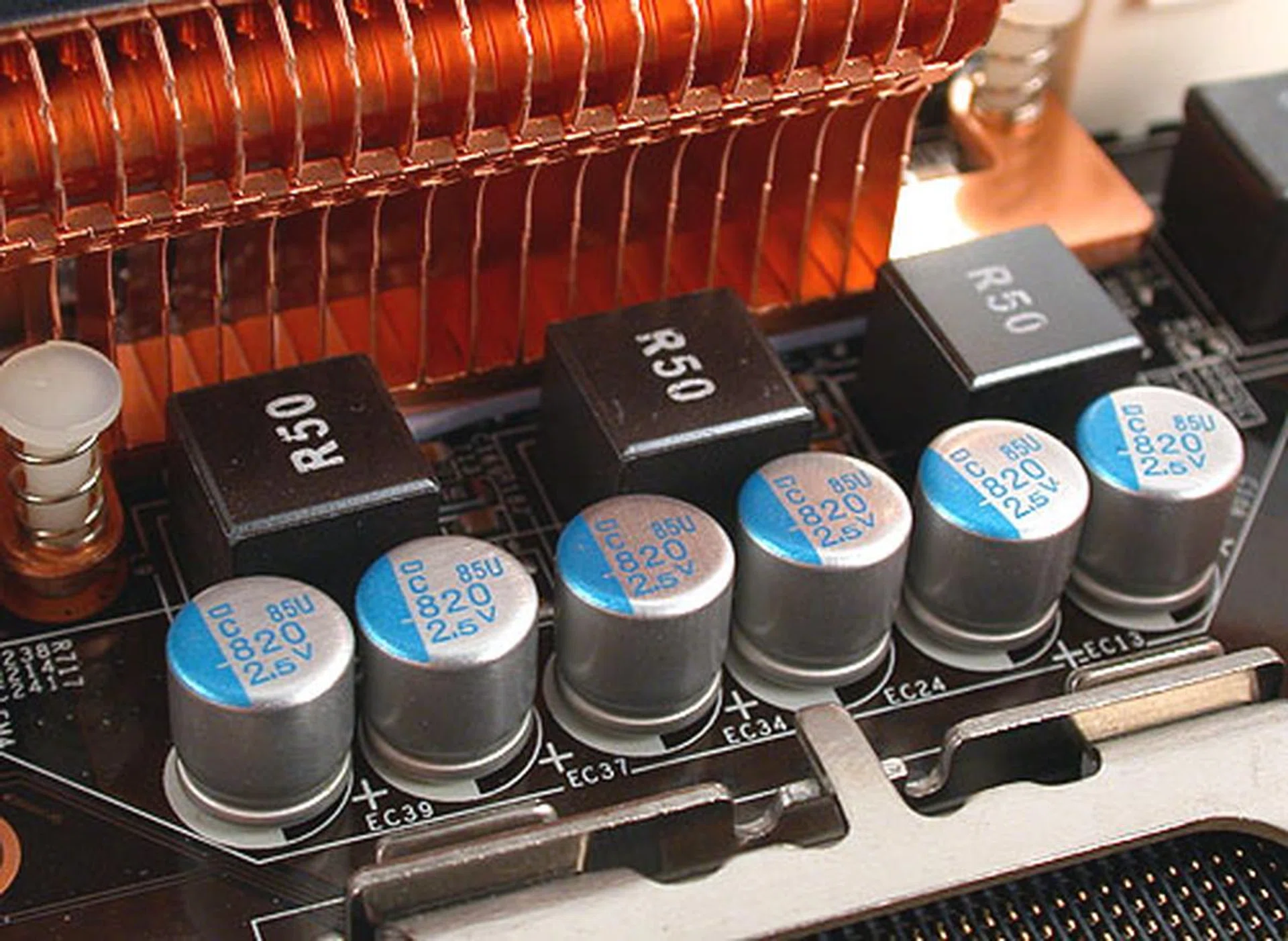
While the MSI P45 Diamond is equipped with polymerized capacitors, the Platinum stays with the now standard solid capacitors. The CPU is supplied by a five-phase PWM design. Two-phase power is also used for its memory and MCH, giving it greater stability.
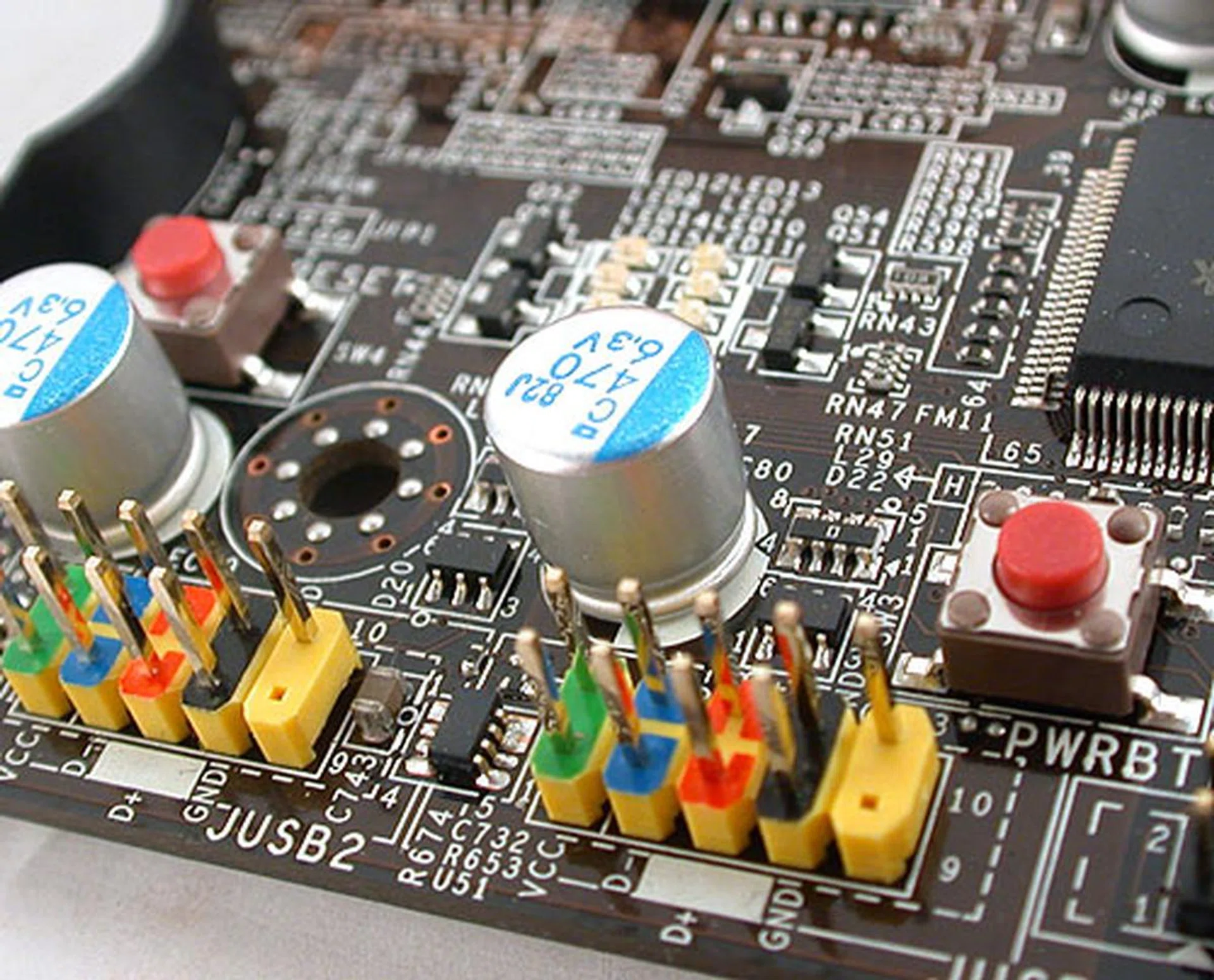
The Power and Reset buttons here may not be as pretty as the ones we saw on ASUS and Gigabyte boards but hey, they work as they should.
Some perks that we have been spoilt with and found here on this MSI board are the onboard Power and Reset buttons and a Clear CMOS button at the rear I/O panel; these are features which are much desired by enthusiasts when troubleshooting or overclocking. There are also LEDs that act as visual indicators for the boot up sequence. Overall, the board layout and design is user friendly and we had no troubles installing our hardware onto it.
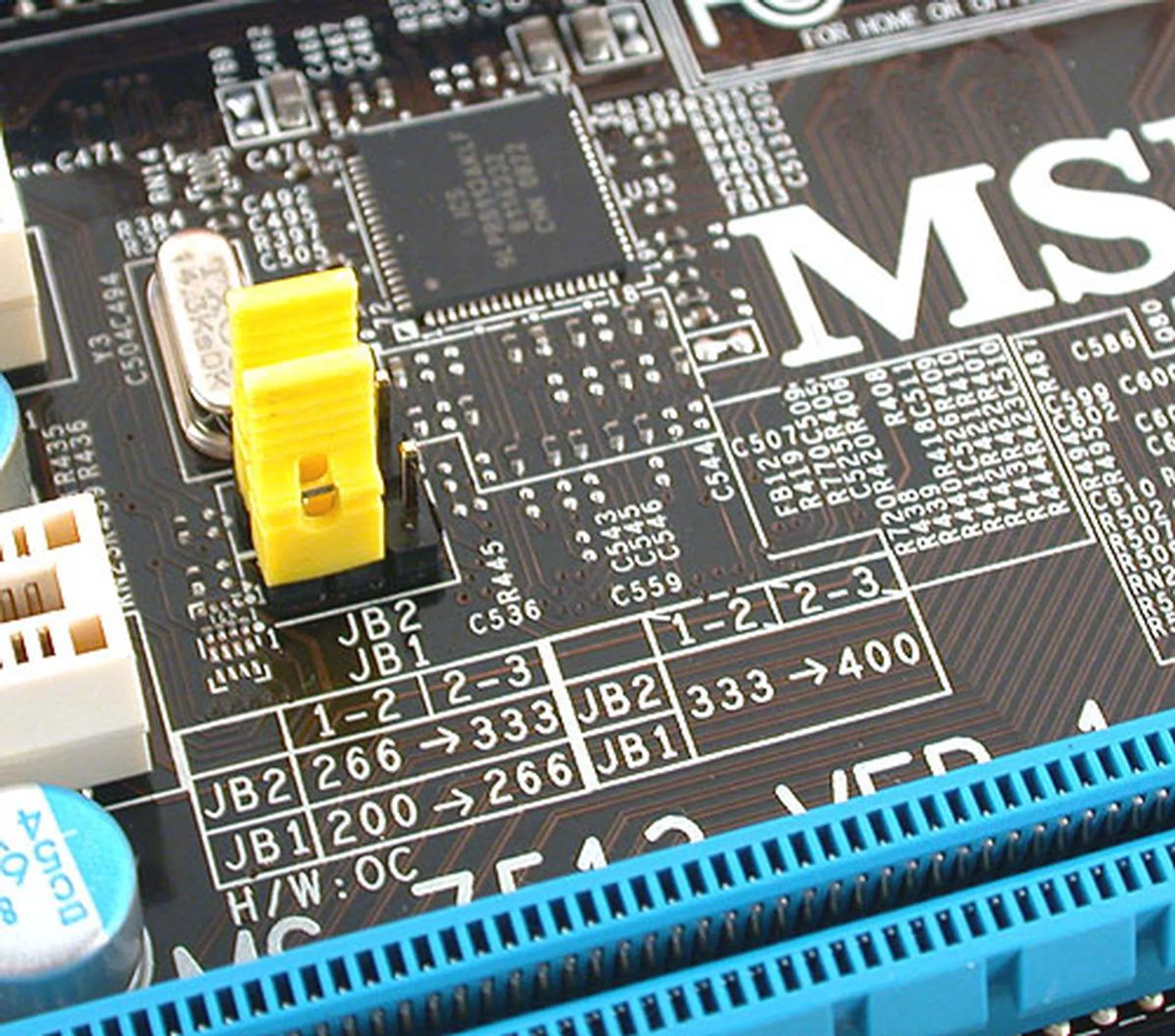
We mentioned this briefly before in the preview but we are repeating it again here since we didn't really like the idea of hardware jumpers. This set of OC Jumpers apparently change the FSB strap, something that others have as a BIOS option. When asked, MSI responded that these serve as a quick and moderate O/C tool, while the BIOS serves as a secondary step for finer refinement/control. In our opinion, the BIOS is really all that's needed.
The DrMOS Edge
Just like how ASUS and Gigabyte each have their own list of proprietary technologies and features to enhance their motherboards, MSI has recently added a new item to its own list. Known as DrMOS, it is as we have mentioned, an integrated chip containing a Driver IC and the necessary high/low MOSFETs for power regulation. MSI claims that putting them together would lead to lower temperatures, a more responsive active phase power design and greater power efficiency compared to the implementation now, where these components are separate. We'll see if it has any effect in our temperature and power tests later.
That is the hardware aspect of DrMOS. However, it's not just that, as MSI has grouped various other features under this umbrella term. First, there is Green Power, which has a BIOS component to be enabled and also a utility that is buried within MSI's Dual Core Center. This Green Power Center utility will pop up on pressing a button within the Dual Core Center and was something that took us quite a while to find. MSI also states that this feature works from the BIOS without requiring users to install the software - something which its competitors can't do yet. This is probably the best iteration of the power savings feature in motherboards as far as usability goes since you can just enable it at the BIOS level and you've got the necessary controls in action. The utility however, gives the user finer control options and profiles should he/she wishes to tweak it.
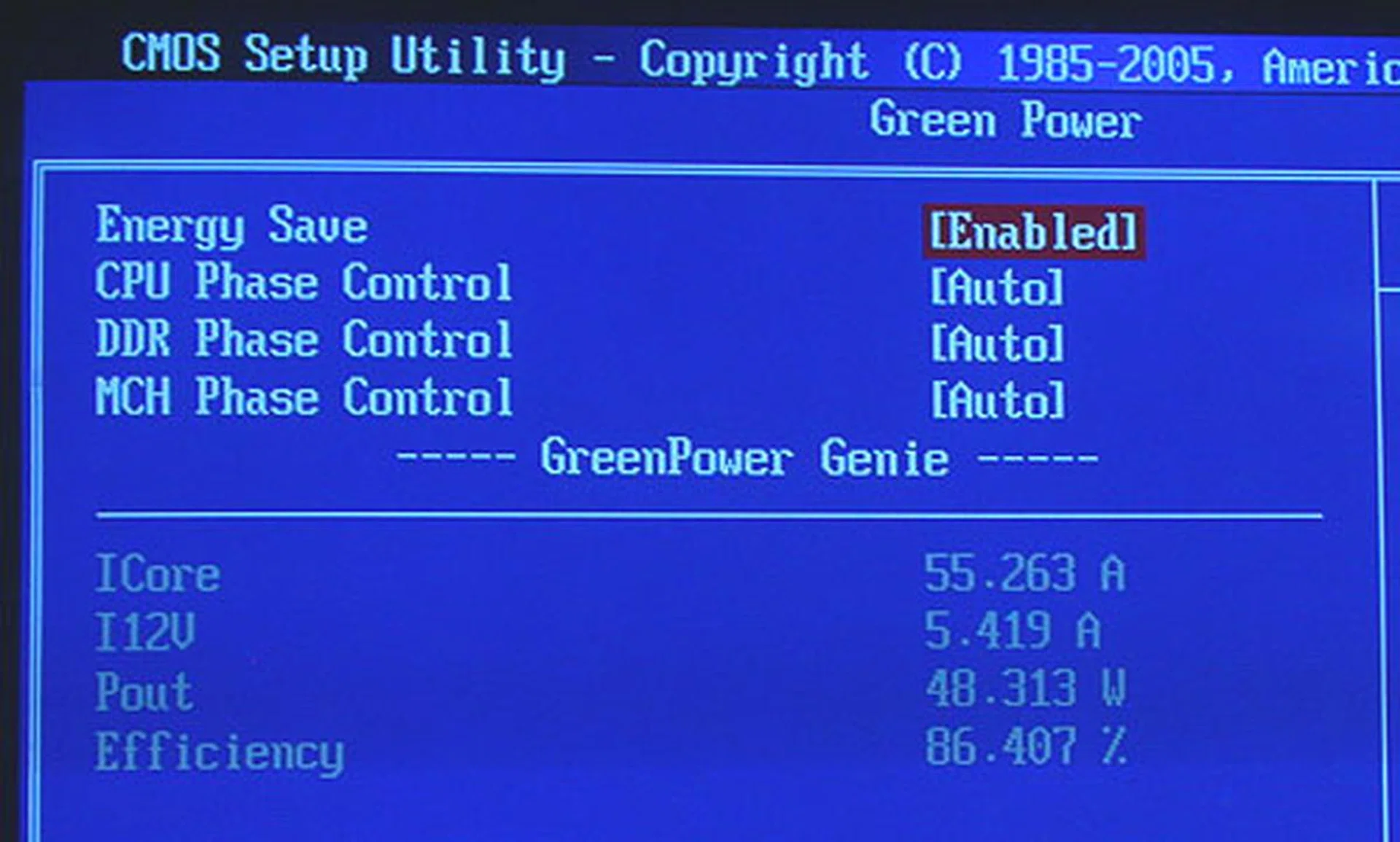
MSI says that all you need to utilize its power savings technology is to enable the options here through the BIOS. Obviously, related technologies like Intel's EIST should be enabled too.
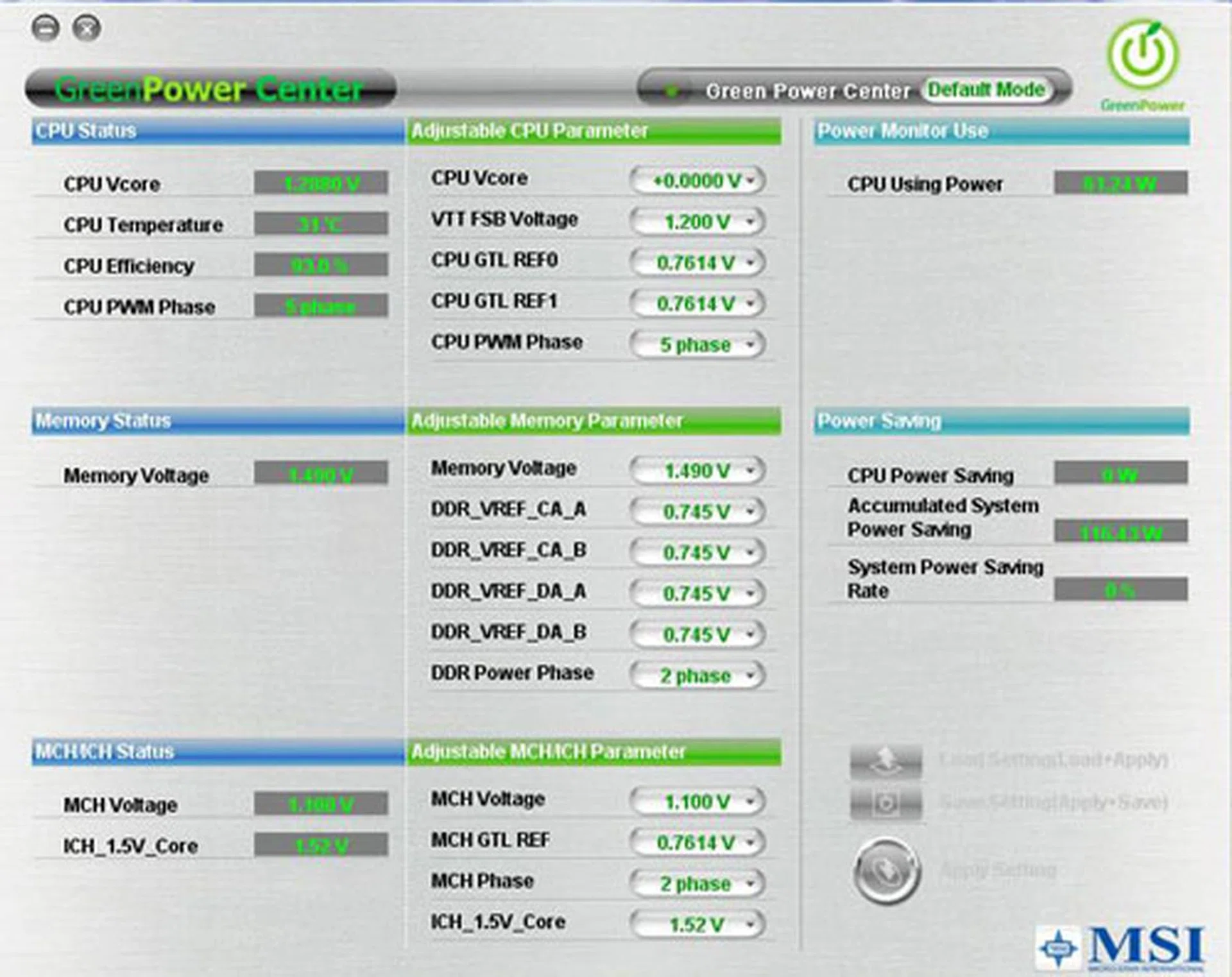
This is how MSI's Green Power Center looks when you first click on it. It's both a status monitoring and tweaking interface for users in the Windows environment.
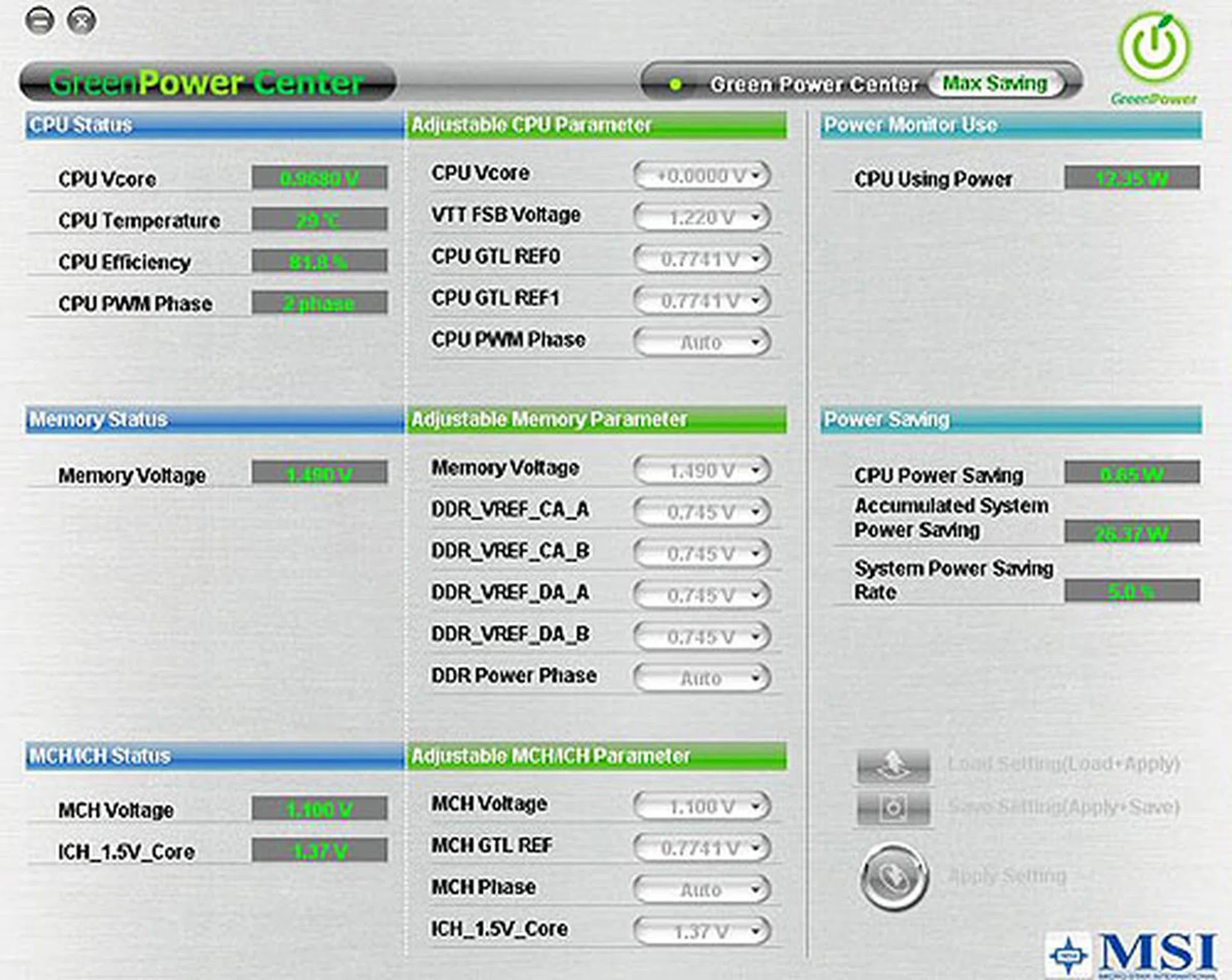
There are a couple of set profiles to choose from. This is the Max Power Savings option and on enabling it, we saw the Vcore for the CPU drop immediately.
Using this utility, users will be able to monitor the important temperature, power, memory and voltage settings involving your CPU and motherboard. You can even tweak these settings manually and they will be reflected in real-time. Convenient for some enthusiasts no doubt, though we think that most users will still prefer to do that in the BIOS. Obviously, if you have no idea what each setting do, it's probably wiser not to adjust the settings randomly. To address this, MSI has two profiles, Optimize and Max Saving. From what we saw, the Optimize will not produce as much energy savings as Max Saving, since the Vcore is higher on Optimize. It's quite likely a compromise between performance and power savings.
Next, there is what MSI calls XpressCool, which appears to refer to the Circu-Pipe 2 cooler on the board, the cool performing DrMOS chip, along with the use of solid capacitors. Using these components will lead to a silent and cool performing motherboard, hence the XpressCool badge. In our opinion, it's just another marketing term, though we do believe that these components do play an important role.
Finally, RapidBoost refers to MSI's host of features to enhance the overclocking experience and performance on the P45D3 Platinum. Again as you may noticed, it's an umbrella marketing term for the actual software involved. First, there's Memory-Z:-
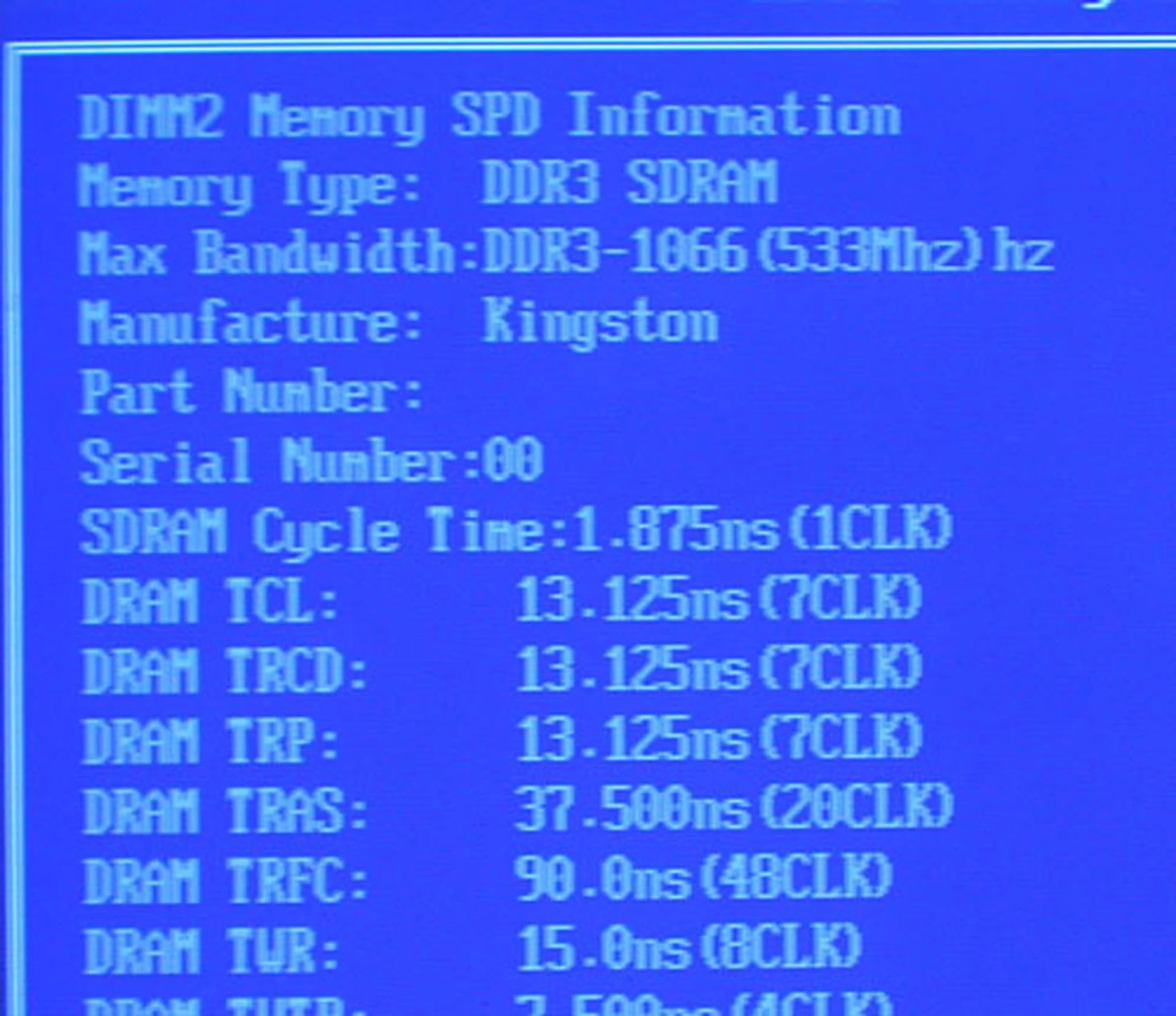
Taking its name from the ubiquitous CPU-Z, the MSI P45D3 Platinum has its own Memory-Z utility to display information about the RAM installed in its DIMM slots. However, it doesn't seem perfect at the moment, as it mistook our DDR3-1333 RAM for 1066.
When it works properly, this utility is useful for those who want to know more about their memory modules, especially their current clock settings (overclocked or not). Of course, one can go into MSI's Cell Menu to check the settings manually but to get all the information at a glance has its moments, we think.
Then, there is MSI's Multi-Step OC Booster, which may make overclocking easier for some users. Instead of having your board fail repeatedly to boot into BIOS, setting this feature (which has 2 different modes) may allow the board to only enable the overclocked settings after booting into the OS (this is known as Mode 1). When it's disabled, the board will work like usual, with your overclocked settings applied when the BIOS runs at startup. Finally, Mode 2 will apply some extent of overclocking (believed to be 80% of the desired settings) when booting up and only after the board enters the OS phase is the full extent of the overclocking applied. We feel that this should help users in their overclocking, as they can at least boot into BIOS to tweak if the overclock fails when starting up Windows.
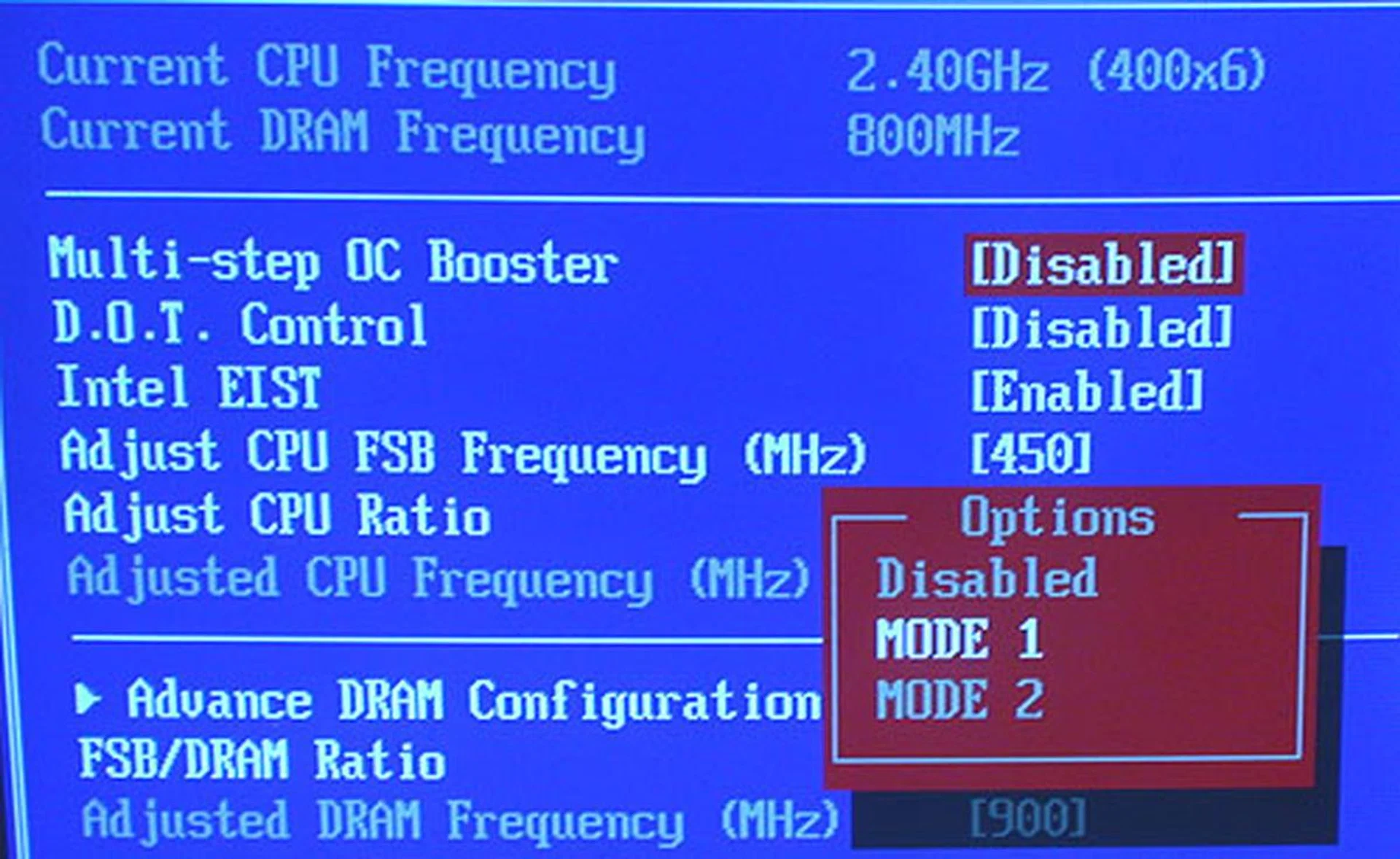
If you're having problems getting your overclocked FSB to run stable, you may wish to enable this Multi-step OC Booster option in the BIOS. What it does is to allow some control over when your overclocked settings kick in, e.g. take effect only when you enter the OS instead of right at boot up.
Overclocking
- FSB Settings: 133 - 800MHz
- D.O.T Control: 1 - 20%
- NB Frequency Strap: Default, 200/266/333/400MHz (via OC Jumper)
- CPU Voltage Settings: 0.7986V - 1.9199V (in 0.0102V steps)
- Memory Voltage Settings: 1.20V - 2.77V (in 0.01V steps)
- MCH Voltage Settings: 0.74V - 2.62V (in 0.01V steps)
- ICH Voltage Settings: 0.70V - 2.13V (in 0.01V steps)
- VTT FSB Voltage Settings: 0.70 - 2.47V (0.01V steps)
- CPU Amplitude Control: 700, 800, 900, 1000mV
- PCIe Amplitude Control: 700, 800, 900, 1000mV
- CPU Clock Skew: 100 - 1500ps (in steps of 100ps)
- MCH Clock Skew: 100 - 1500ps (in steps of 100ps)
- Multiplier Selection: Yes, 6 - 60 (unlocked CPUs only)
Let's just say that we had mixed feelings about MSI's BIOS. On the one hand, it has undeniably useful and new features like Green Power, Memory-Z and its Multi-step OC Booster. Its range and host of voltage and clock options are also as fine-grained as many of its top competitors. Yet, it seems to lack some of the basic features that we have taken for granted. One major grouse we had was the lack of an option to flash the BIOS with another version from within the BIOS itself. We also didn't like the fact that onboard jumpers are still needed to change the FSB strap and these options are missing from the BIOS. And as usual, the Help text for the BIOS options are not exactly encyclopedic in explaining what each option does (nor does their manual).
As for overclocking, we could hit 475MHz stable with some minor increases in voltages using the 1.3B2 BIOS (which is a pre-release version that is not available in retail yet) but going any further, we were greeted with random lockups, especially when entering the BIOS. Of course, with the amount of tweaking options available, you could have a field day trying them out but with our limited time with it, it's a decent and fair amount of overclocking, comparable to the Gigabyte GA-EP45T-EXTREME and within distance of the ASUS P5Q3 Deluxe.
Test Setup
With this MSI being our third P45 board, we felt that we had enough boards using this new chipset to remove benchmarks using more mature chipsets like the X38. Hence, we'll be pitting the MSI P45D3 Platinum against the Gigabyte GA-EP45T-EXTREME and ASUS P5Q3 directly. To benchmark these boards, the following hardware configuration will be used for all:
- Intel Core 2 Extreme QX6850 processor (3.00GHz)
- 2 x 1GB Kingston HyperX DDR3-1333 @ 7-7-20 CAS 7.0
- Seagate Barracuda 7200.10 200GB SATA hard disk drive (one single NTFS partition)
- MSI GeForce 8600 GTS 256MB - with ForceWare 162.18 drivers
- Intel INF 9.0.0.1007 and AHCI 8.0.0.1039 driver set
- Microsoft Windows XP Professional with Service Pack 2 (and DirectX 9.0c)
Benchmarks
The following benchmarks will be used to determine the performance of the MSI P45 Platinum:-
- BAPco SYSmark 2004 (with Patch 2)
- Futuremark PCMark05 (ver 120)
- SPECviewperf 9.0
- AquaMark3
Results - BAPco SYSmark 2004
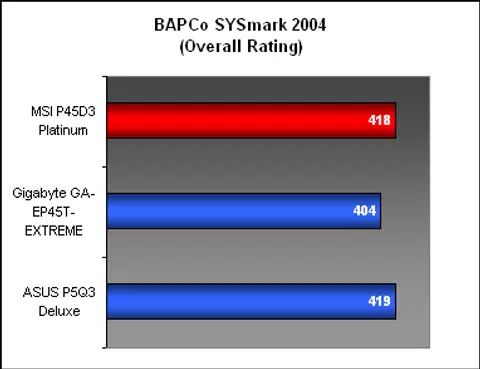
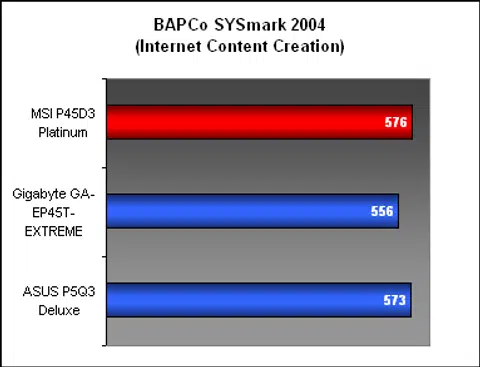
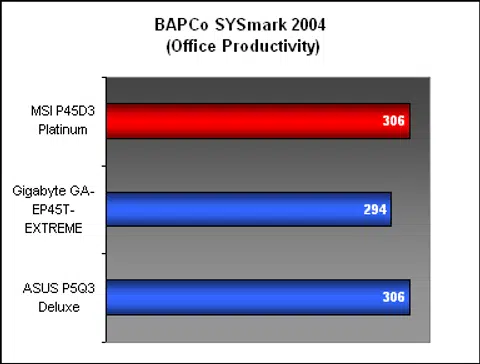
In SYSmark 2004, the MSI had near identical scores to the ASUS P5Q3 Deluxe, from the overall to the section breakdowns. In short, there are no discernible performance differences between the two boards. Compared to the Gigabyte, both the ASUS and the MSI had a slight advantage, though of course whether you'll notice that in real world applications is highly debatable.
Results - Futuremark PCMark05
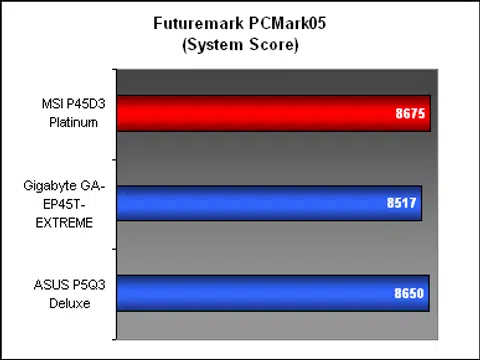
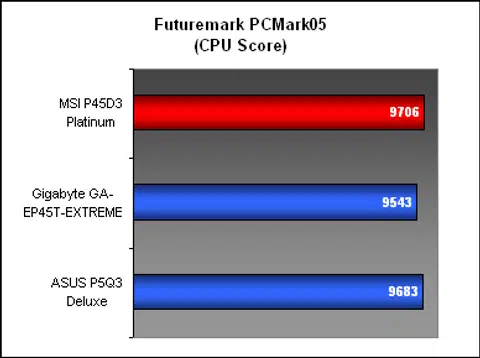
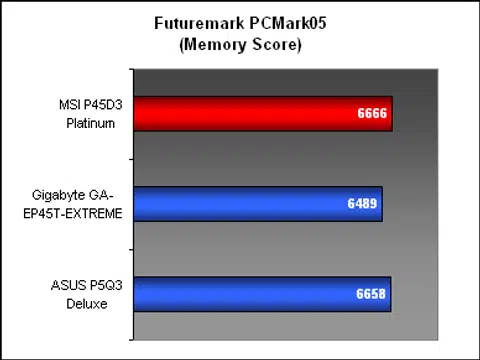
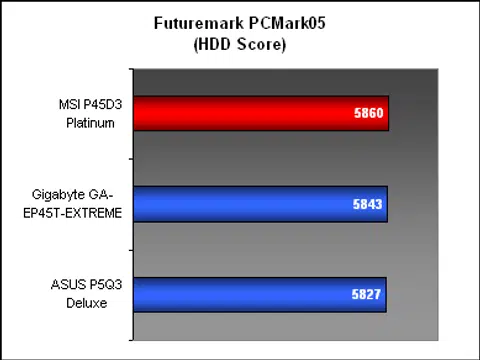
Like what we saw earlier in SYSmark, the MSI P45D3 Platinum had very similar benchmarks results to the ASUS P5Q3 Deluxe in PCMark05. In fact, the MSI board had marginally higher scores than the ASUS overall and also for the various subsystems.
Results - SPECviewperf 9.0
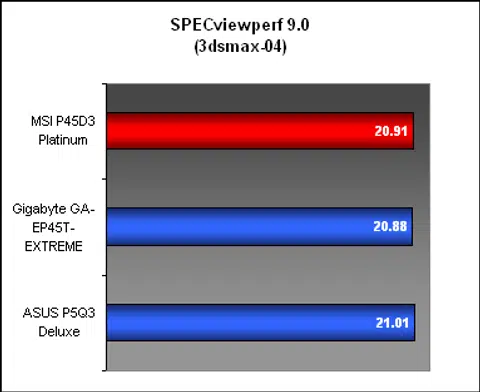
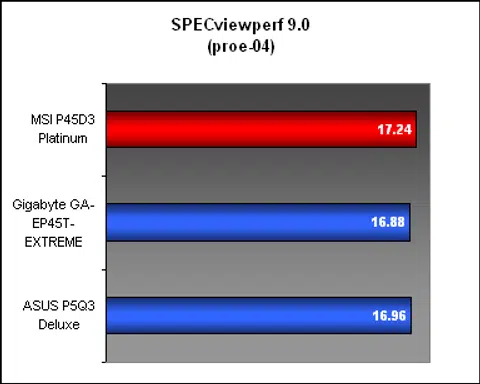
Following the trend, the MSI performed on par with its P45 peers in our SPECviewperf 9.0 benchmark. Considering that most modern boards we have seen have rather comparable scores in this benchmark, this is not surprising.
Results - AquaMark3
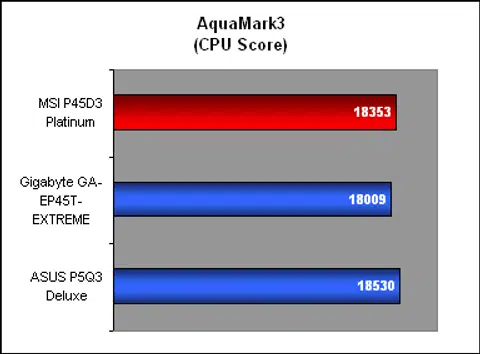
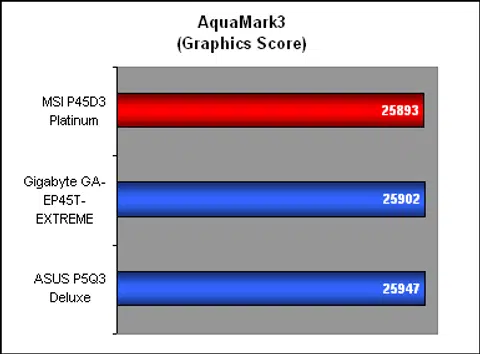
The ASUS P5Q3 Deluxe had a very narrow edge in AquaMark3 over the other P45 boards here which would probably have little bearing on actual frame rates. The MSI meanwhile finished a close second, though it's practically a tie between it and the ASUS.
Temperature
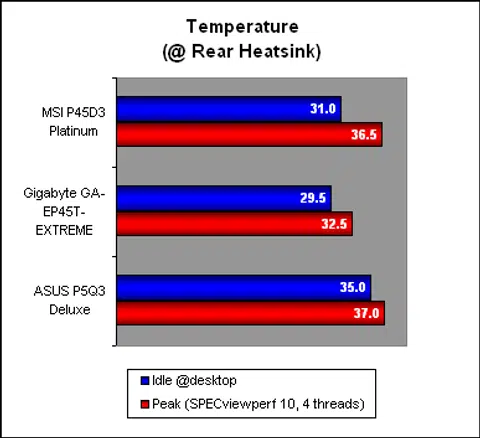
MSI's elaborate Circu-Pipe 2 cooler seemed to get the job done, as we found the temperatures on the MSI P45D3 Platinum to be comparable with its competitors. In fact, it was slightly better than the ASUS P5Q3 Deluxe, which should be a fairer direct comparison, since the Gigabyte board uses such an extremely large and separate heatsink/heat-pipe solution to achieve its low temperatures.
Power Consumption
Once again, we are looking at the energy savings technologies from these three big motherboard vendors. Previously, we have seen how the ASUS and Gigabyte have quite comparable solutions. So how does MSI fare here? To answer that, we enabled MSI's own Green Power Center through the BIOS options and also installed its utility, setting it to the Max Power Savings profile. Then we measured the maximum power draw in two scenarios: idling at desktop and when running a full load of four threads in SPECviewperf 10.0.
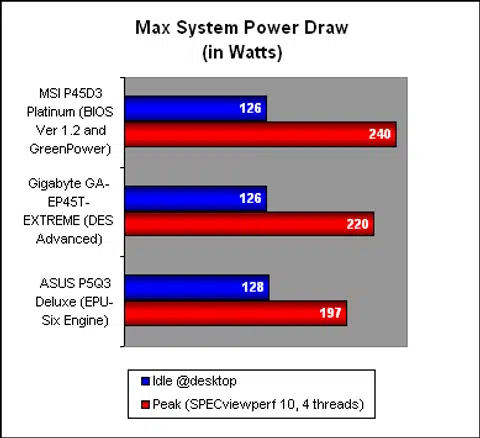
All three boards were almost identical when it came to power draw during idle. At peak however, the MSI board drew a fair bit more than the Gigabyte and the ASUS. This could add up to quite a substantial amount if full load is what you subject your PC to all the time.
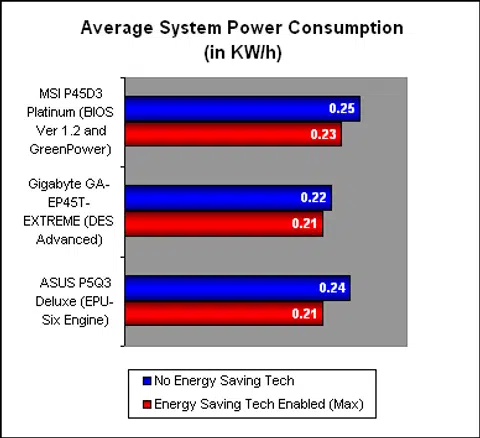
For our average power consumption figures, we subjected all the boards to a single run of SYSmark 2004 to simulate a real-world scenario, with idle and peak moments while at the same time, having a power meter measure the average power consumption of the system during the benchmark run. We did this twice, once with the respective energy saving technology enabled and once without. As you can see, in all three cases, having the energy savings technology on will reap some benefits and furthermore, the absolute numbers favored the ASUS and Gigabyte boards. If we're talking about the impact of the energy saving technology however, both the ASUS and MSI showed greater improvement than the Gigabyte, with the ASUS doing the best overall.
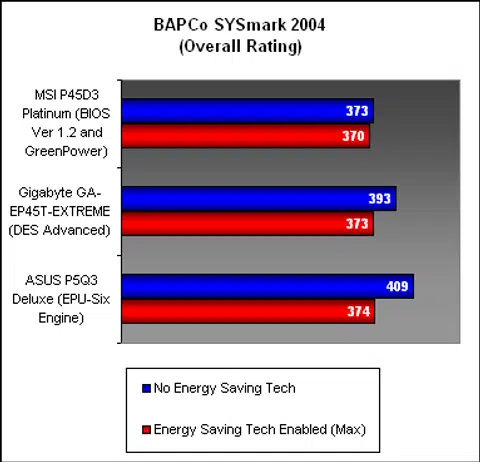
Finally, we had noticed that our SYSmark 2004 scores could be affected adversely by the energy savings, probably due to how the manufacturers have implemented their technologies. For the ASUS, this is done by down-clocking the CPU along with lowering its voltages. Hence the performance took quite a hit. While not using a similar method, the performance on the Gigabyte too is affected.
For the MSI however, we found almost negligible difference between the two, which suggests that MSI did not resort to these methods to reduce power draw. You'll get near or close to normal performance but of course the flip side is that the average power draw on the MSI is the highest among all three boards and the margin between having that enabled or not is also less than the ASUS (but higher than the Gigabyte). In short, there appears to be a performance penalty when using these energy saving technologies. However, it should not be that significant for a normal usage scenario and we will still recommend going for some form of energy savings if possible.
Conclusion
MSI's DrMOS will be found in all of its P45 motherboards, but as it refers to more than just the actual Driver-MOSFETs, some of these additional components that appear to be grouped under the DrMOS name will not be present on the lower-end models, e.g. the MSI P45 Neo will not have the Circu-Pipe 2 cooler. In any case, you can be assured that the hardware DrMOS chip will be on all these P45 boards, though whether it directly leads to lower temperatures and greater power efficiency, that is harder to tell.
MSI has a very decent performing P45 board with some unique features but the BIOS could do with some more polish.
No doubt, we have seen quite relatively low temperatures on this board, probably one of the lowest you can find on a P45 board from any of the big three manufacturers using the conventional heatpipe cooler solution at least. Yet, this advantage is a slim one that may not be as significant as the vendors hope. After all, when all the boards we tested were hovering less than forty degrees Celsius, a couple of degrees less doesn't seem that important anymore. This aspect may however play a more important role when overclocking is brought to the equation, in which case, lower is always the better to get you more megahertz or more stability.
As for the power efficiency aspect, the Green Power energy saving technology on this MSI board works, to a certain extent. Our testing showed that there was some difference, if limited, upon enabling it. The only good thing is that performance did not seem to have suffered anything from doing so, so there shouldn't be any reason not to use it, unless you're overclocking of course. And we also think that hiding the Green Power Center utility within MSI's Dual Core Center is not a good way to get users to start playing with this feature. Still, this board is the only one of the big three vendors that has implemented a BIOS-level power saving feature, which doesn't require the mandatory assistance of a Windows utility.
In terms of benchmark performance, the MSI was basically tied with the ASUS PQ5E Deluxe in our scores and both were slightly ahead of the Gigabyte GA-EP45T-EXTREME. In short, it's about as good as we have experienced with an Intel P45 board. However, that was with an pre-release BIOS from MSI; earlier retail versions like the 1.1 and 1.2 BIOS produced scores that varied from our final result. We believe that MSI is still working on the firmware and we expect at least a few more revisions before things get settled and mature enough to be trouble-free. As it is now, the BIOS looks to be the weakest link of this board, as we have experienced the occasional lockups (albeit with a beta version), while quite a few of the newer features did not have sufficient explanatory text in the BIOS.
Overall, the hardware and feature set on this MSI P45D3 Platinum reflect its price of just under US$200 at online retailers, placing it as a notch above the typical mainstream board. It's not as expensive and as extreme as some of the really high-end boards and should be a good fit for enthusiasts who want the features but not the full 'royal' treatment, like quad Gigabit Ethernet and all that extras. It's far from perfect and there are some MSI quirks that you may have to get used to, but the board has potential. If you're set on this board, we highly recommend that you keep a lookout for the latest BIOS. It could well improve your board's performance and stability.
Our articles may contain affiliate links. If you buy through these links, we may earn a small commission.