
MSI P35 Diamond (Intel P35)
MSI takes their latest DDR3 P35 board to new heights with the P35 Diamond, complete with the bundled VoIP hardware and Creative X-Fi Xtreme Audio sound card. An excellent motherboard with great performance that should not be overlooked, but is it worth it? Find out inside.

Introduction
The past few months have certainly been some of the most interesting in the motherboard market (if like us, you happen to think motherboards are an interesting affair that is). Intel's 3-Series chipsets have brought out a creative streak in motherboard manufacturers and we've seen some pretty darn impressive boards of late. The formula is the same however, DDR2 based P35 boards show up as a first-to-market strategy to stay competitive, while the 'goodies' as we'd like to call them, come later.
Many see DDR3 is a start of a new era for the PC, and we get the feel that manufacturers want to break away from the mold somewhat and try offer enthusiasts the products that will genuinely set them apart from the rest. To this end, the top board manufacturers all have their own secret recipe of success. ASUS has gone with extreme integration as we've seen with the ASUS P5K Premium boards, Gigabyte has refreshed their second generation of Ultra Durable technologies across the line and MSI... well MSI has the P35 Diamond.
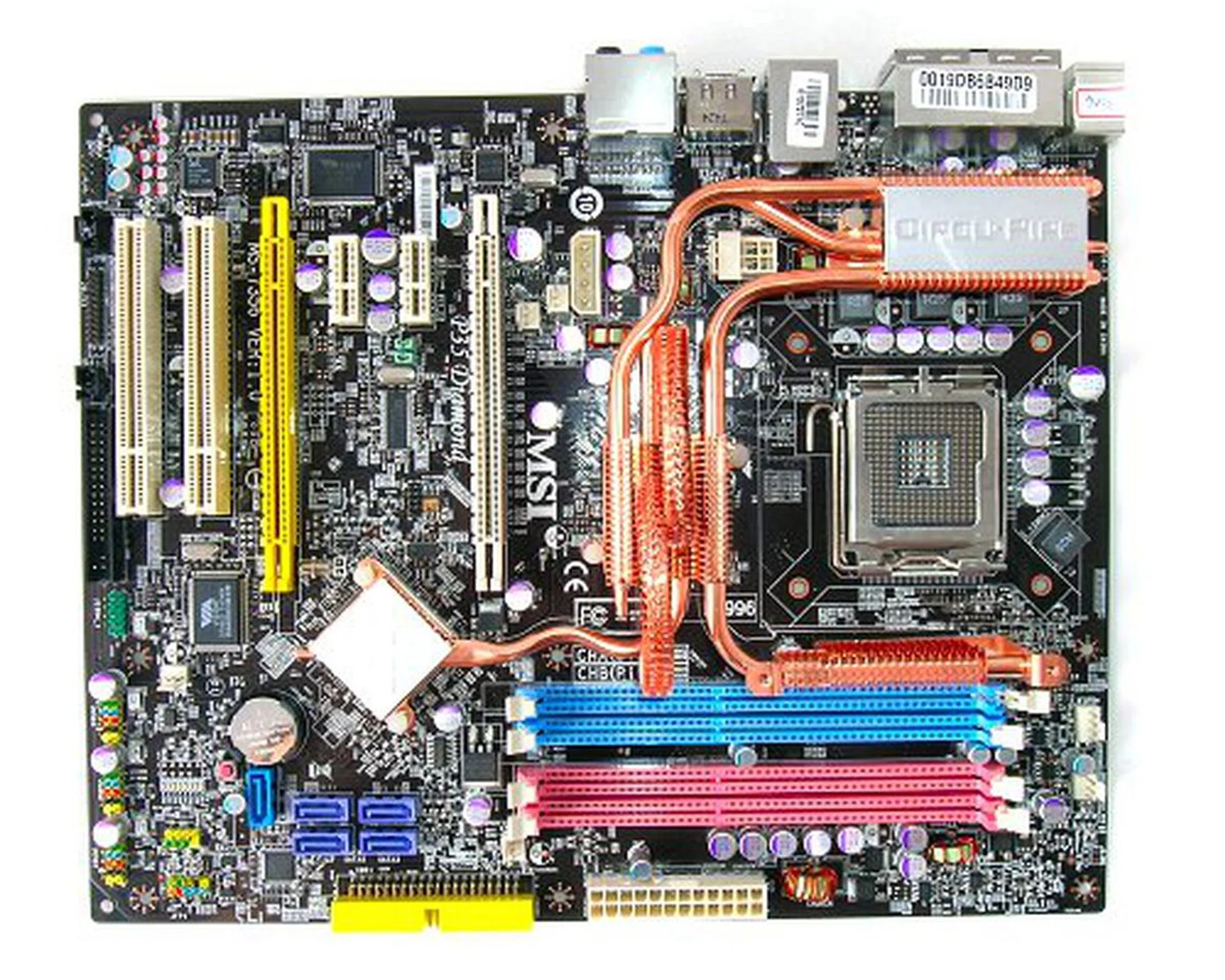
The MSI P35 Diamond motherboard.
The MSI P35 Diamond is the latest of the special edition motherboards we've been seeing of late to reach our labs. This motherboard is the Intel chipset counterpart of the NVIDIA nForce 680i SLI based P6N Diamond (also reviewed here ). Both the boards compete for the same enthusiast segment, but the P35 Diamond has its own surprises in store.
Check out its feature specification and bundled accessories below before hitting the jump.
- 6 x SATA data cables
- 3 x SATA power converter cables (dual plug)
- 1 x 80-conductor Ultra ATA data cable
- 1 x floppy drive data cable
- FireWire Bracket (1 port)
- MSI SkyTel VoIP card
- Creative Sound Blaster X-Fi Xtreme Audio card
- I/O shield
- Driver CDs
- User's guide
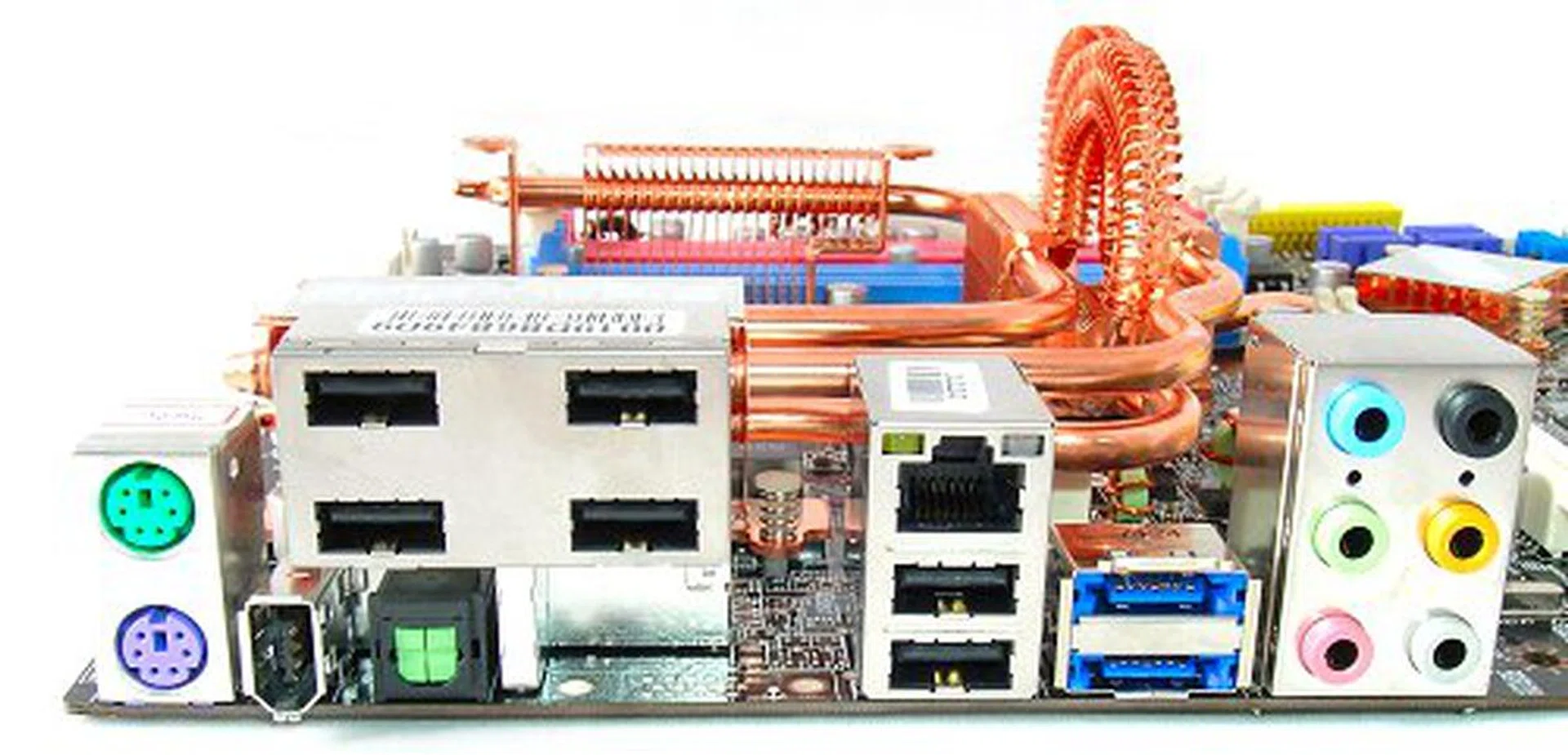
Odd looking rear I/O panel configuration with a huge USB 2.0 hub block. Other connections (from left to right) include PS/2 keyboard and mouse ports, FireWire, optical S/PDIF, RJ-45, more USB 2.0 ports, two eSATA ports and analog surround audio.
What's in a Diamond?
As mentioned before, the MSI P35 Diamond is the latest board that follows the current trend of enhancing top-end boards that are already in the market to be, well, more top-end. Like the ASUS P5K3 Premium that has just been reviewed, the P35 Diamond has its roots tied with the MSI P35D3 Platinum, which in turn is a copy of the P35 Platinum - onboard features and all. The major difference between the P35D3 Platinum and P35 Platinum is that the former supports DDR3, while the latter supports DDR2 only. The P35 Diamond is a DDR3 board and thus, is identical to the P35D3 Platinum. Since we've done this before, you know the drill. Head on to our and review for detailed coverage of the features available to the series. For this article, we will focus only on what MSI has done to turn Platinum to Diamond.
Like the P6N Diamond, the P35 Diamond features Creative's X-Fi Xtreme Audio solution. However, the board features a different implementation – if you call it an implementation that is. While the P6N Diamond had the X-Fi chipset replacing HD Audio as the onboard audio solution, the P35 Diamond actually retains the regular HD Audio onboard (via Realtek ALC888T).
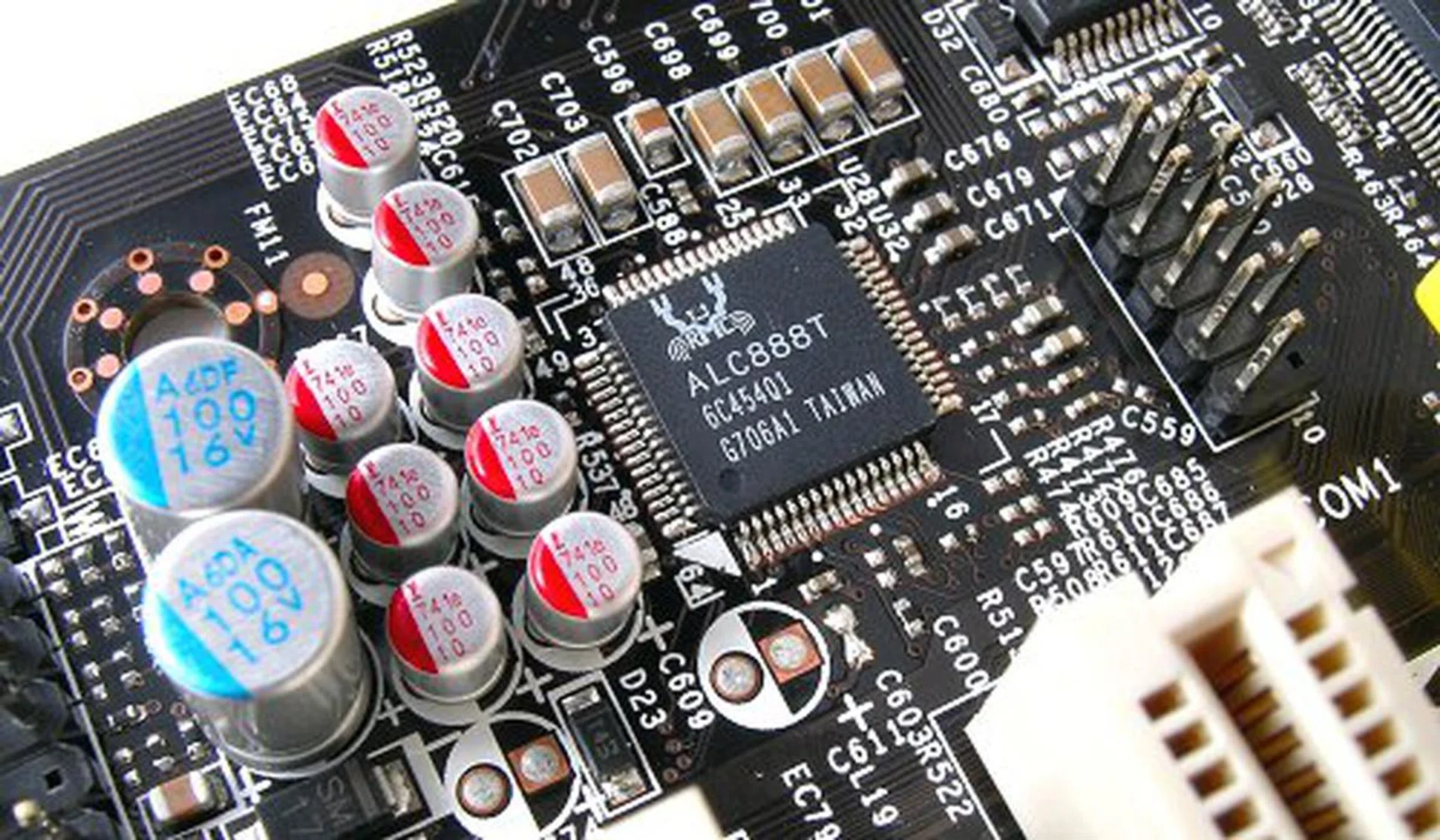
Where's my X-Fi?
Instead, MSI bundles a complete PCI Express version of the Creative X-Fi Xtreme Audio card with the motherboard. Now, this isn't a proprietary slot card like what most manufacturers do, but an actual working, off-the-shelf PCIe sound card bundled with the board. We've play tested it with other motherboards just to make sure and yes, it works. There's another bit of good news as well. When we first reviewed the MSI P6N Diamond, one drawback of having the X-Fi Xtreme Audio was the fact that Creative's Alchemy audio wrapper for Vista did not support the particular model. However, Creative recently released a new version of Alchemy (1.00.07) that finally adds support for the X-Fi Xtreme Audio card. Because of this, MSI now a real advantage for motherboard audio in both Windows XP and Vista.
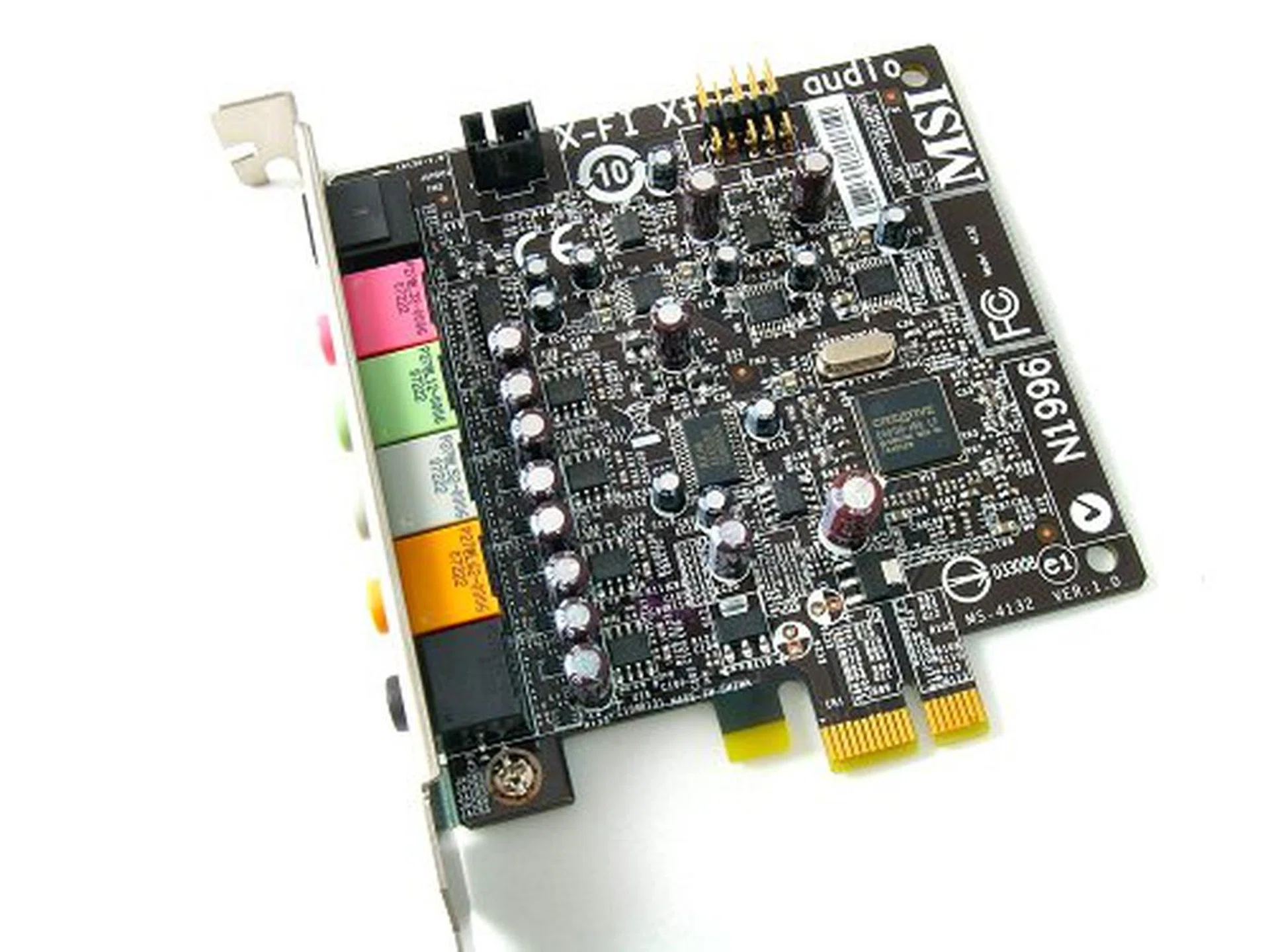
It's on a card. Creative X-Fi Xtreme Audio PCI Express card bundled as secondary audio device.
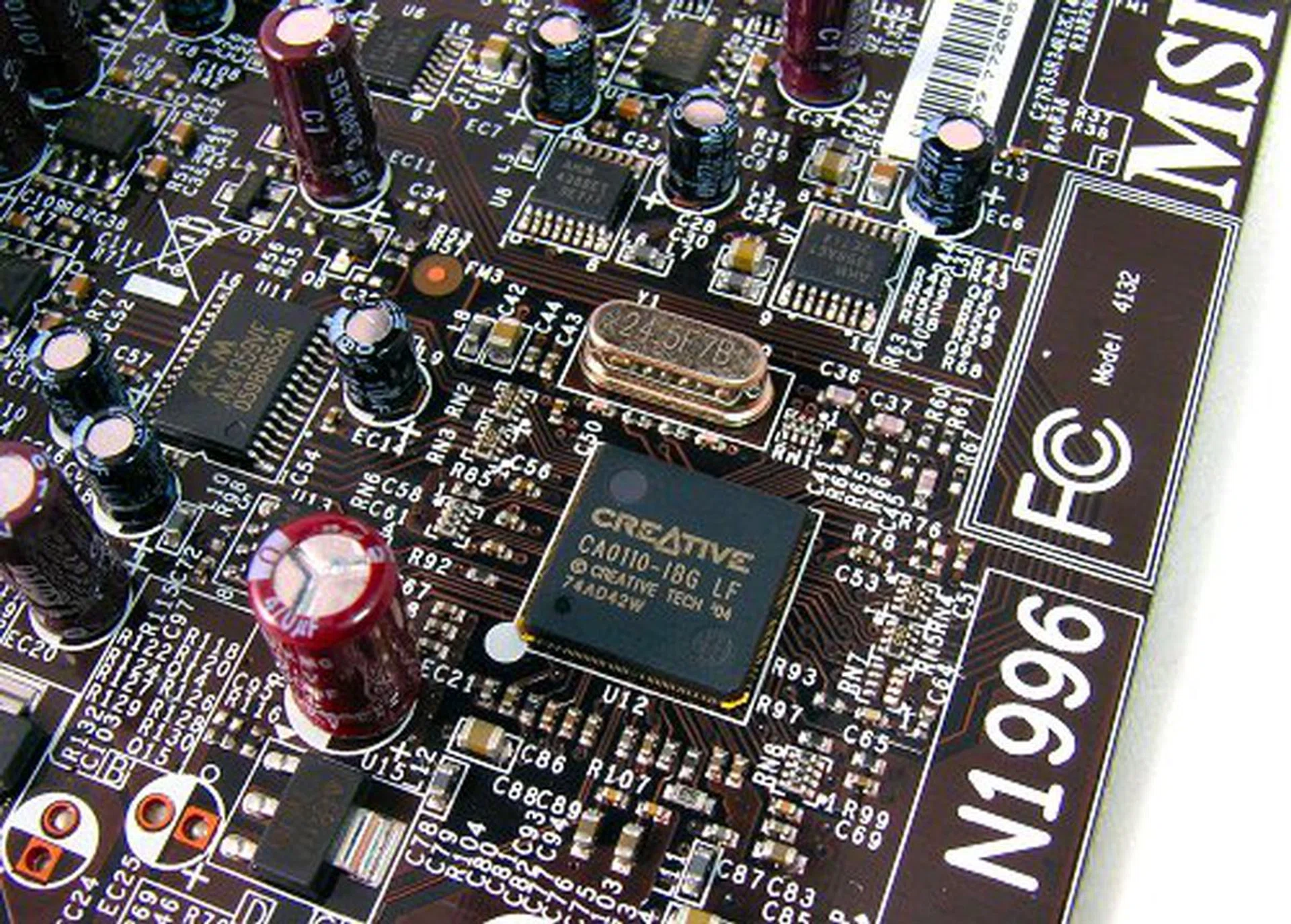
Close up of the "MSI" X-Fi card.
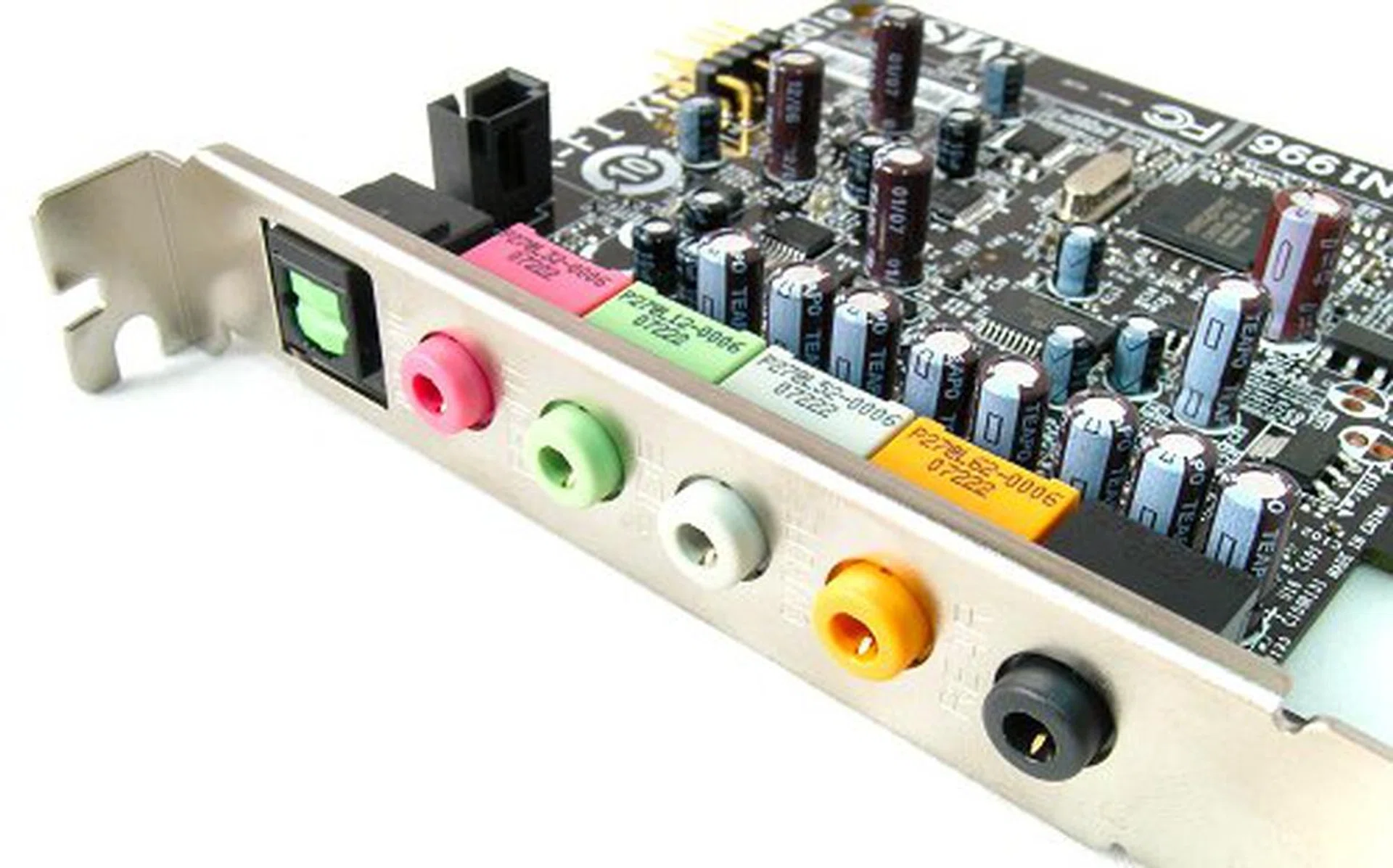
Comes with analog and S/PDIF connectors too.
Why did MSI deviate from the usual practice of replacing HD Audio (ala P6N Diamond) to supplementing a board that has HD Audio with a second sound card? Now, the reasoning may be obscure and the answer may not satisfy you, but here's our little theory.
There are two main features hyped by MSI about the P35 Diamond. One is to boast better onboard audio, which is taken care of by the presence the X-Fi. The second is onboard PSTN/VoIP functionality, very similar to what ASUS did before with their TeleSky series of boards. The MSI solution however, is to have hardware support for its VoIP functions, which is why they not only retained the HD Audio on the P35 Diamond, they used Realtek's ALC888T CODEC. This chipset was actually launched a year and a half ago, but this is the first time we've seen it implemented to actually make use of the VoIP features. Like the ASUS TeleSky, the MSI SkyTel solution works in the same way. Through the Realtek ALC888T chip, the MSI SkyTel card turns your regular house phone into a VoIP phone. It can also switch between IP and PSTN in the event that you're disconnected from the Internet or if you've powered off your PC.
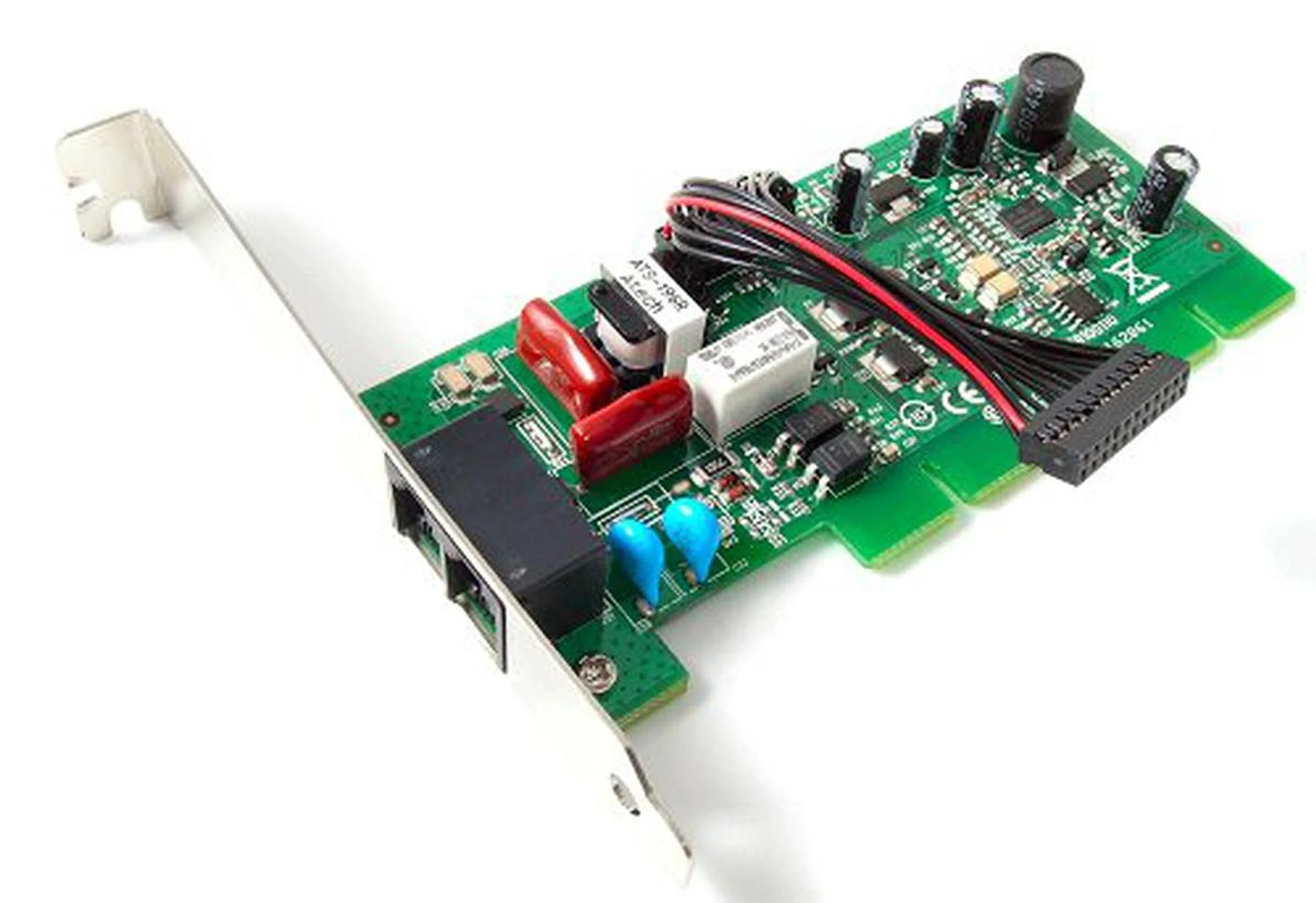
They SkyTel card. Notice that it doesn't have any electrical connections to the motherboard, but it will still take up one PCI slot.
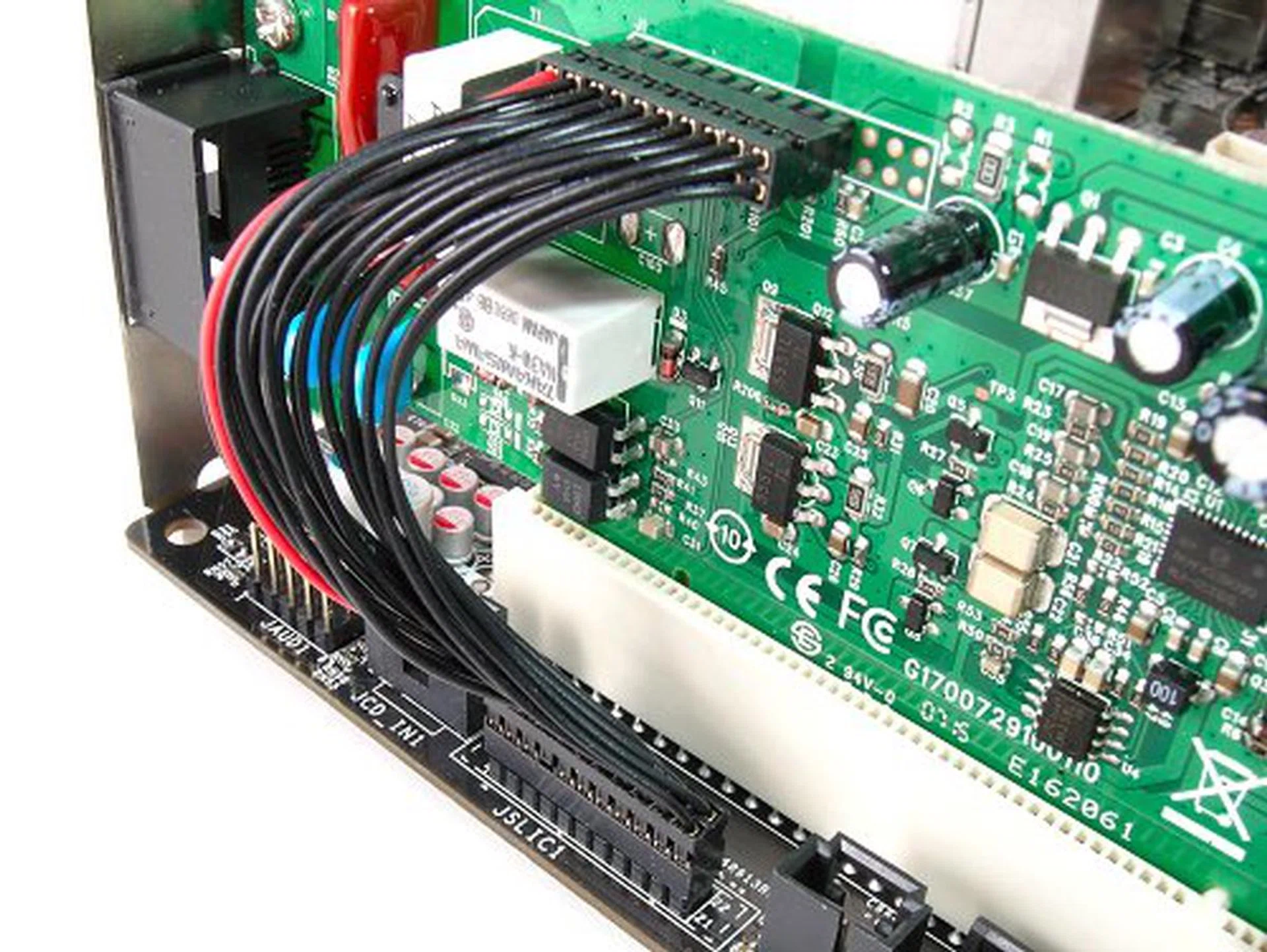
VoIP connection functionality is actually handled by the Realtek ALC888T CODEC. Just connect the cable to the board. The SkyTel card just acts as a switch between IP and analog lines.
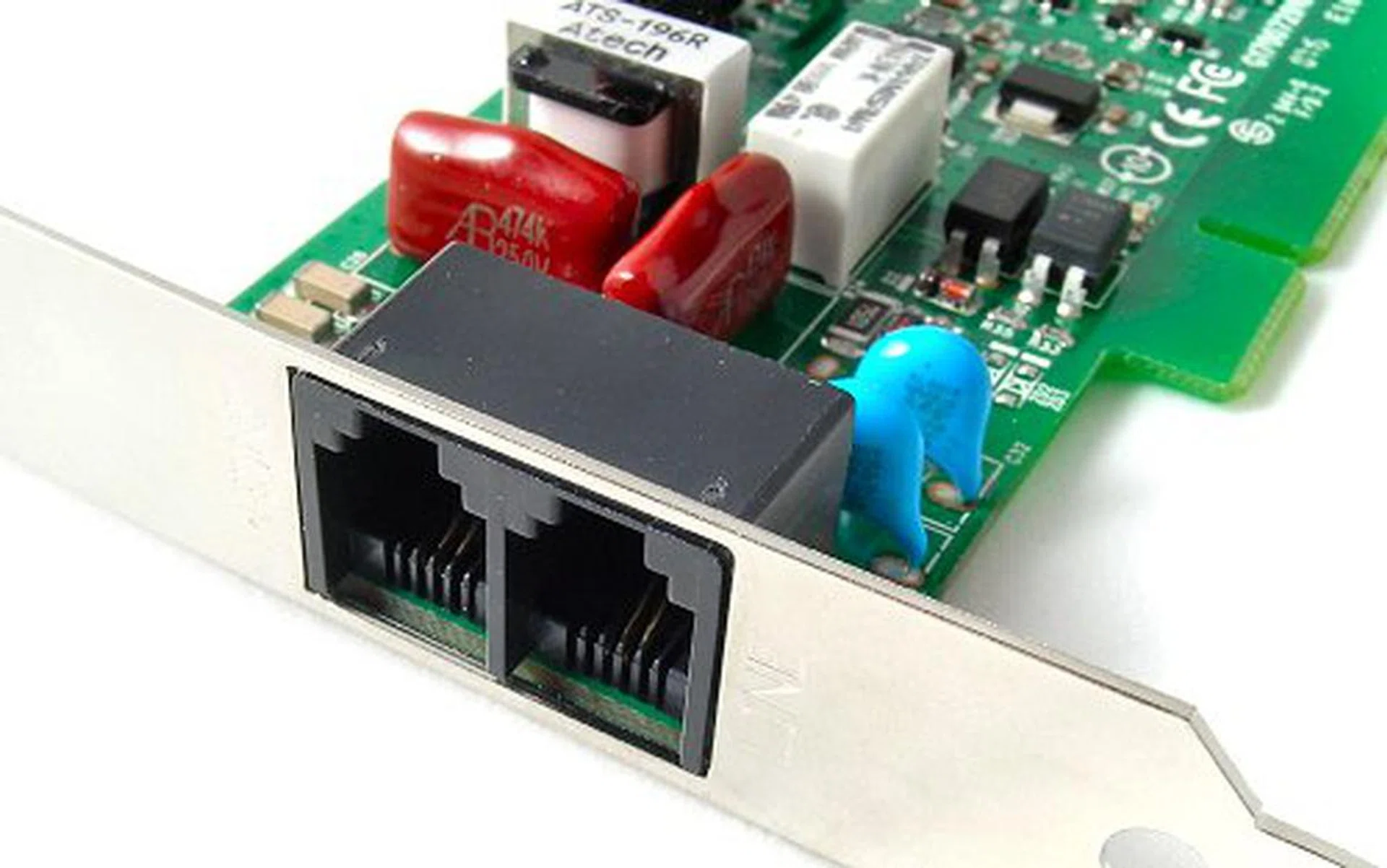
Connect your phone line into one jack and your house phone into the other. This way, you can switch back to using a land line when VoIP acceess is unavailable.
Setting the whole thing up wasn't too hard. We managed to have everything installed without any driver conflicts, but MSI doesn't seem to have provided any VoIP software to get users started on this feature. In fact, other than the bundled hardware, there wasn't any instructions even on what to do or how to get started, which may discourage the average user from trying out the feature. In contrast, ASUS initially offered free SkypeOut minutes to boost sales of their TeleSky boards.
Besides these two bundled peripherals with the P35 Diamond, we could not see any real board, component or feature difference between the P35D3 Platinum and the P35 Diamond.
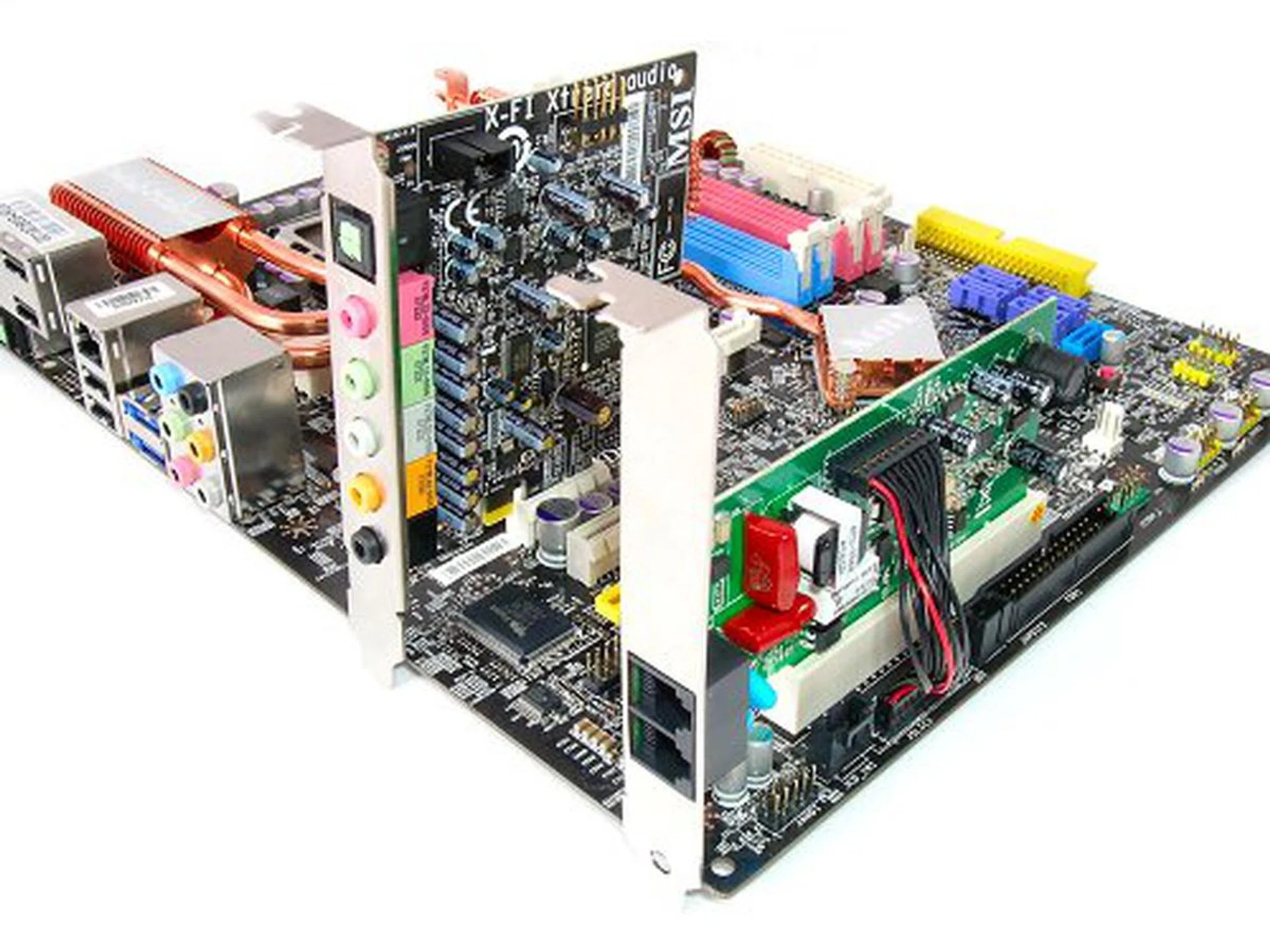
P35 Diamond with all its accessories.
Overclocking
- FSB Settings: 200MHz to 800MHz
- DDR3 Settings: Auto, 1:1.2, 1:1.5, 1:1.6, 1:2.0 ratio selection
- PCIe Settings: 100MHz to 200MHz
- PCI Settings: 33.3MHz / 33.6MHz / 37.3MHz / 42MHz
- CPU Voltage Settings: CPU Min to +0.7875V (in 0.0125V steps)
- Memory Voltage Settings: 1.50V to 2.75V (in 0.05V steps)
- NB Voltage Settings: 1.250V to 1.650V (in 0.025V steps)
- SB I/O Voltage Settings: 1.5V to 1.8V (in 0.1V steps)
- SB Core Voltage Settings: 1.05V, 1.15V
- VTT FSB Settings: 1.175V to 1.575V (in 0.025V steps)
- Multiplier Selection: Yes (unlocked CPUs only)
The P35 Diamond has a similar BIOS to the P35 Platinum and other than the difference between DDR2 and DDR3 voltage options, you'll basically see the same selection from MSI. While the overclocking options aren't as detailed as some of the more overclocking oriented competition, the P35 Diamond has sufficient tweaking capabilities. In our actual overclocking tests, the P35 Diamond performed very similarly to the P35 Platinum before. We were able to hit a maximum FSB of 465MHz (470MHz for the P35 Platinum) before the board would become unstable.
During overclocking, we also noticed that the BIOS will automatically increase the minimum chipset voltage to 1.45V up from its default of 1.25V once you hit above 400MHz FSB. After this point, manually setting it lower will result it in resetting to 1.45V, but you can further increase it. Presumably, this is to increase motherboard stability at extreme FSB situations, but too bad it didn't help the board overclock more.
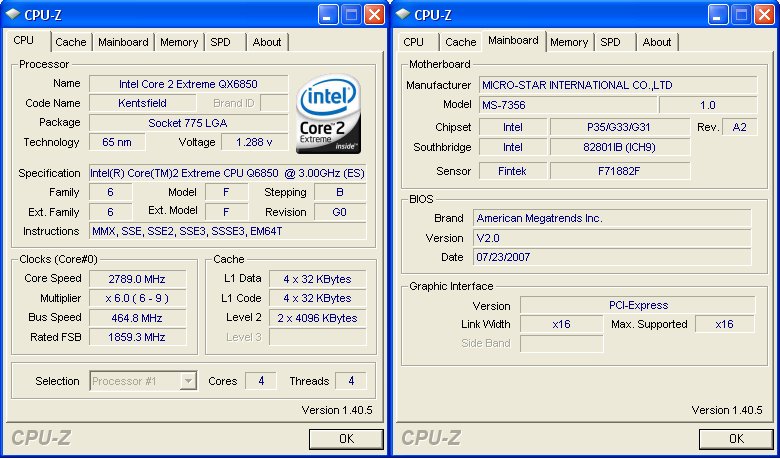
CPU-Z overclocking screenshot. Click for larger image.
Test Setup
To benchmark the MSI P35 Diamond, we will be using our new 1333MHz FSB platform test bed with an expanded set of test results. To compare its performance, we mixed and matched some of the motherboards we've reviewed before to see how well the Diamond holds up against the competition. The boards included in this review will be the ASUS P5K3 Deluxe (DDR3 only) in the enthusiast segment and the Gigabyte P35C-DS3R for a mainstream hybrid. Although we do not have the MSI P35D3 Platinum to directly compare the two boards at the time of this review, we do have the DDR2 based P35 Platinum on hand. The results from the P35 Platinum should give you a clear distinction between the DDR2 and DDR3 based P35 boards from MSI if you're still on the line on which one to get.
The following test bed configuration will be used for benchmarking throughout this review:-
- Intel Core 2 Extreme QX6850 processor (3.0GHz, 8MB L2, quad-core)
- 2 x 1GB Kingston HyperX DDR3-1333 @ 9-9-25 CAS 9.0
- 2 x 1GB Kingston HyperX DDR2-800 @ 4-4-12 CAS 4.0 (MSI P35 Platinum only)
- Seagate Barracuda 7200.10 200GB SATA hard disk drive (one single NTFS partition)
- MSI GeForce 8600 GTS 256MB - with ForceWare 162.18 drivers
- Intel INF 8.3.1.1013 and AHCI 7.5.0.1017 driver set
- Microsoft Windows XP Professional with Service Pack 2 (and DirectX 9.0c)
Benchmarks
The following benchmarks will be used when benchmarking the MSI P35 Diamond:-
- BAPco SYSmark 2004
- Futuremark PCMark05
- SPECviewperf 9.0
- Futuremark 3DMark06
- AquaMark3
Results - BAPco SYSmark 2004
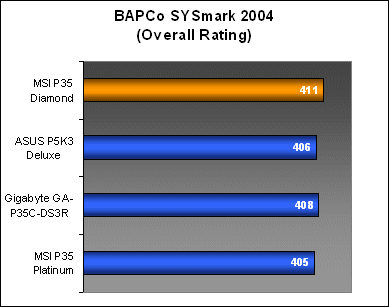
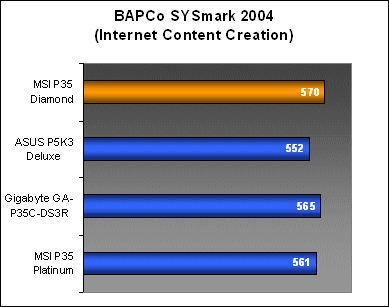
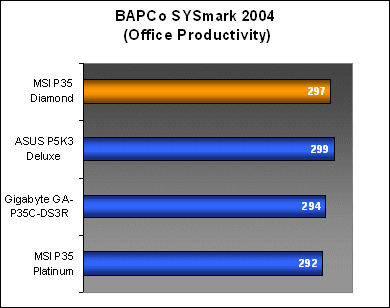
The MSI P35 Diamond was the top performer in SYSmark 2004 overall because of its consistently high results in both the Internet Content Creation and Office Productivity workloads. In comparison, the ASUS P5K3 Deluxe surpassed the P35 Diamond in Office productivity, but was unable to match up with its Internet Content Creation results, dropping its overall score. As expected, the P35 Platinum, with its DDR2-800 memory, scored lowest in Office Productivity.
Results - Futuremark PCMark05
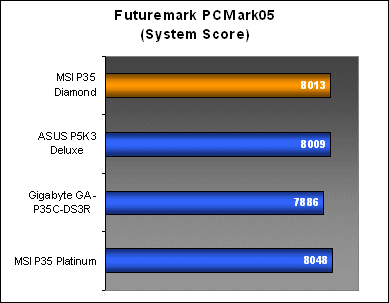
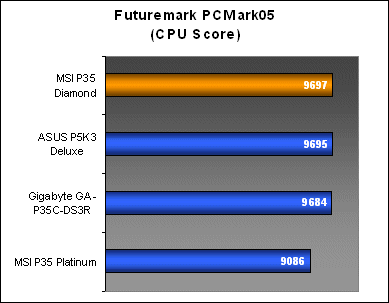
From the CPU workload results, it is clear that the lower memory bandwidth from DDR2 affected the P35 Platinum's ability to keep up with the DDR3 boards, which were almost on par with each other. Looking at the Memory specific workloads however, the MSI P35 Diamond managed again to come away with impressive results, beating the ASUS P5K3 Deluxe.
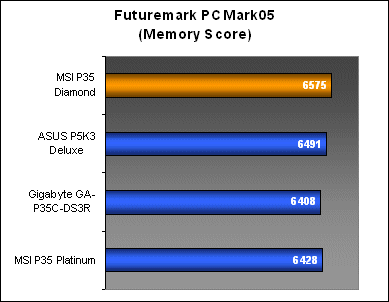
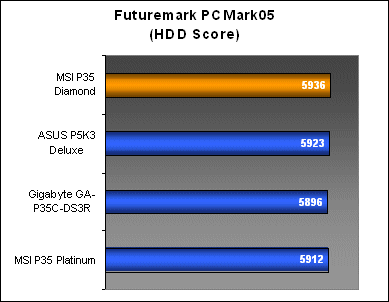
Results - SPECviewperf 9.0
For SPECviewperf, the P35 Diamond's performance no longer came as a surprise and the board was still able to edge out the ASUS P5K3 Deluxe in both graphics and memory subsystem sensitive workloads. As we move towards a full 1333MHz platform, you can see DDR2-800 starting to drag down overall system performance.
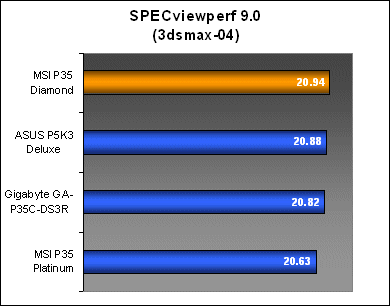
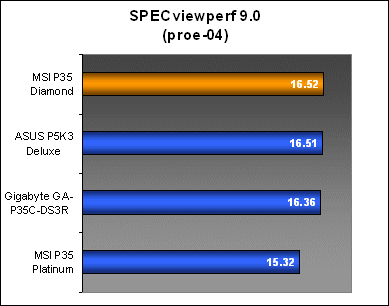
Results - Futuremark 3DMark06
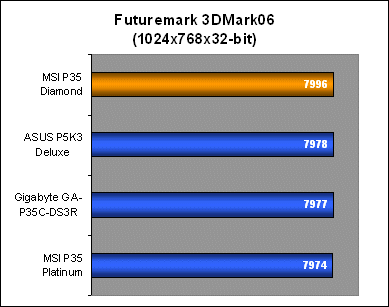
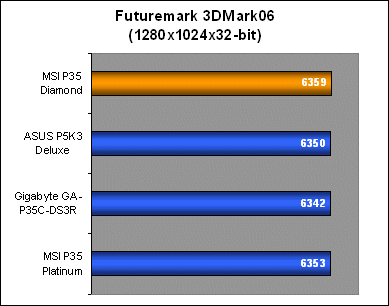
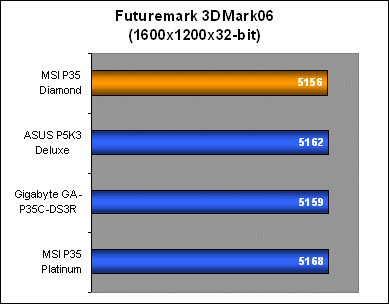
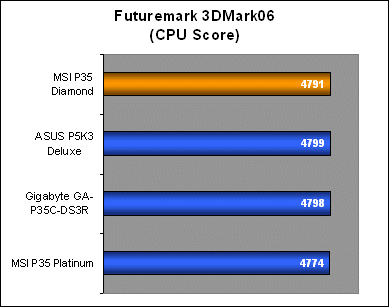
Moving on the 3DMark06, the P35 Diamond showed no obvious cracks in its armor. All the boards, including the DDR2 based P35 Platinum managed to perform decently in all resolutions. You can see the minor advantage the DDR3 boards have in the CPU results, but in terms of FPS, all the boards were on equal ground.
3DMark06 is a highly threaded benchmark and we saw quite a substantial jump in performance going from the dual-core X6800 to the quad-core QX6850. However, as you can see from the results here, memory performance do not make that much of a difference overall.
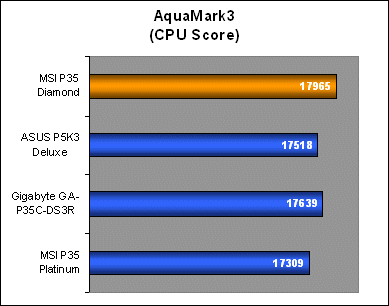
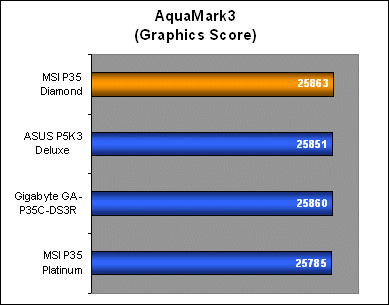
Results - AquaMark3
The MSI P35 Diamond's results in AquaMark3 showed a pretty impressive lead over the rest of the boards in terms of CPU subsystem performance, but overall, the graphics numbers were not really affected. Still, the P35 Diamond managed to squeeze a few additional frames out of AquaMark3, which is what most gamers would really want to hear.
Conclusion
Unlike the ASUS P5K3 Premium, MSI's P35 Diamond doesn't really come with any modifications to the motherboard itself. In essence, the P35 Diamond is just a premium packaging of the P35D3 Platinum with all its optional components included. As with any motherboard that tries to give consumers 'something more', there are pros and cons to deal with.
With the P6N Diamond, MSI continued its trend to replace onboard audio with an arguably better chipset (Creative Sound Blaster X-Fi Xtreme Audio). Although MSI always uses the entry-level chipsets from Creative, they offer the gaming community what HD Audio can never do, and that is full EAX support in all its various incarnations. The P35 Diamond's alternative approach to onboard audio on the other hand, can be seen as a double-edged sword.
Firstly, for someone dead set on getting a separate audio card, and assuming that we're talking about enthusiasts and gamers here who have money to spend on high end gear such as the MSI P35 Diamond, it would be safe to say that they'll have they're sights set on something more powerful such as the X-Fi XtremeGamer Fatal1ty Pro. Thus, the P35 Diamond's X-Fi Xtreme Audio bundle may not be of value to this particular group of users. On the other hand, users who aren't as judgmental about onboard audio will also not see the need of an extra bundled sound card when the board already has a decent HD Audio chipset.
That leaves the group of users that believe any sound card will do to replace onboard audio and the bundled X-Fi Xtreme Audio is icing on the cake. Of course, with the premium package pricing attached to the motherboard, it comes up cheaper to just get the P35D3 Platinum and getting an OEM X-Fi Xtreme Audio on the side separately. The cost also includes the SkyTel VoIP card as well; a neat trick to capture the current Skype generation, making setting up your home VoIP service so much easier without the need to buy additional VoIP gear. Most people are more familiar with their home phone than having to fiddle with headsets. However, the SkyTel card is also an optional item for the P35D3 Platinum equipped with the Realtek ALC888T CODEC, so its not something exclusively available only to the P35 Diamond as well.
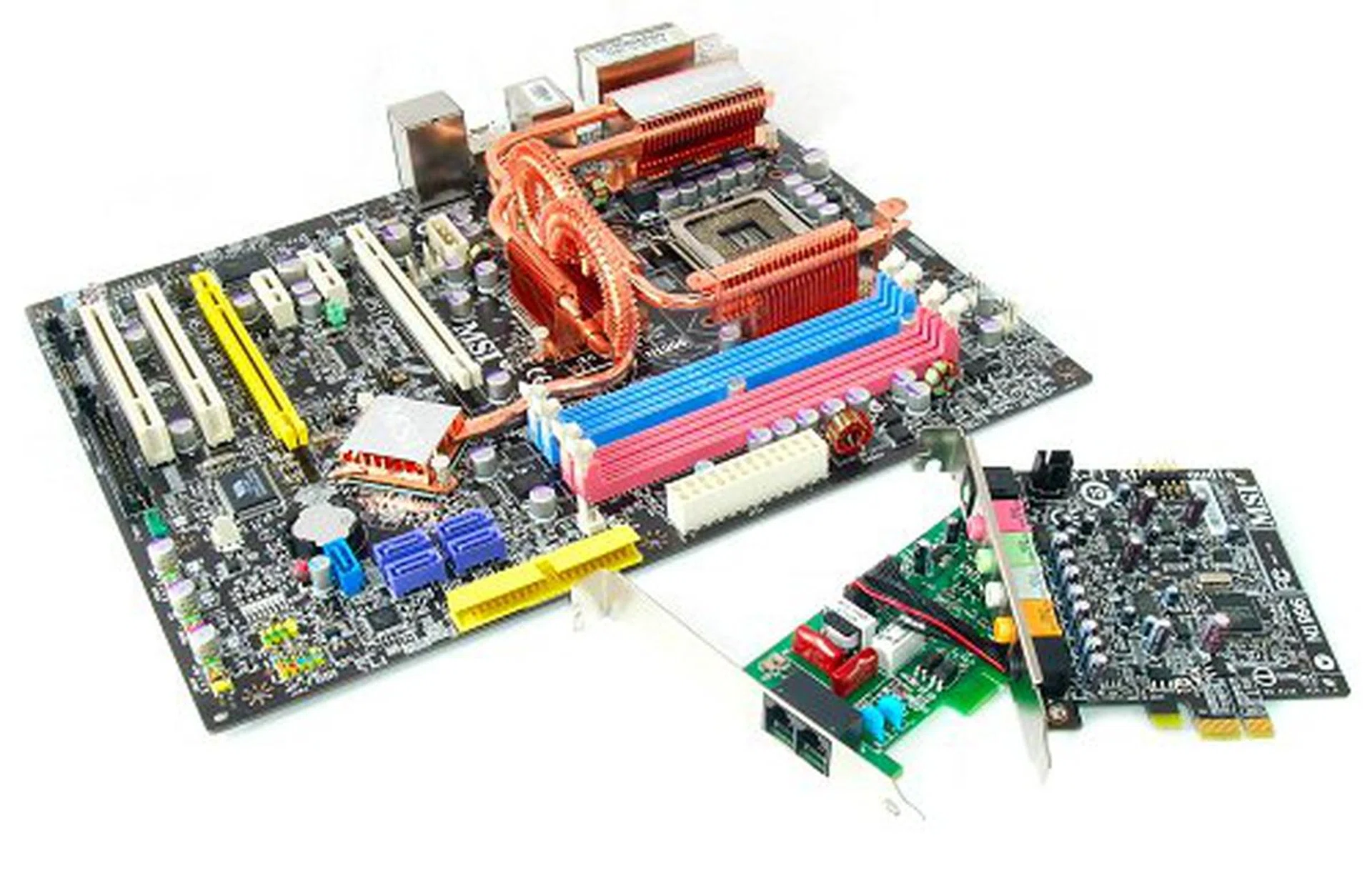
MSI P35D3 Platinum + SkyTel VoIP card + Creative X-Fi Xtreme Audio = MSI P35 Diamond
Looking at the product itself, the P35 Diamond is an excellent board. Like the P35 Platinum before, the P35 Diamond showed exceptionally strong performance in SYSmark 2004 and impressive memory subsystem performance throughout our benchmarking process, and this time, surpassing the ASUS P5K3 Deluxe in most applications. It is quite obvious that they've optimized performance real well. From what we can tell, the board was rock solid throughout our testing, so whatever MSI has done, they've managed to deliver an exceptional performer in the P35 Diamond without any compatibility or stability complications. On the down side, overclocking still won't be one of the board's main forte, but at 465MHz, it is still considered a capable overclocker.
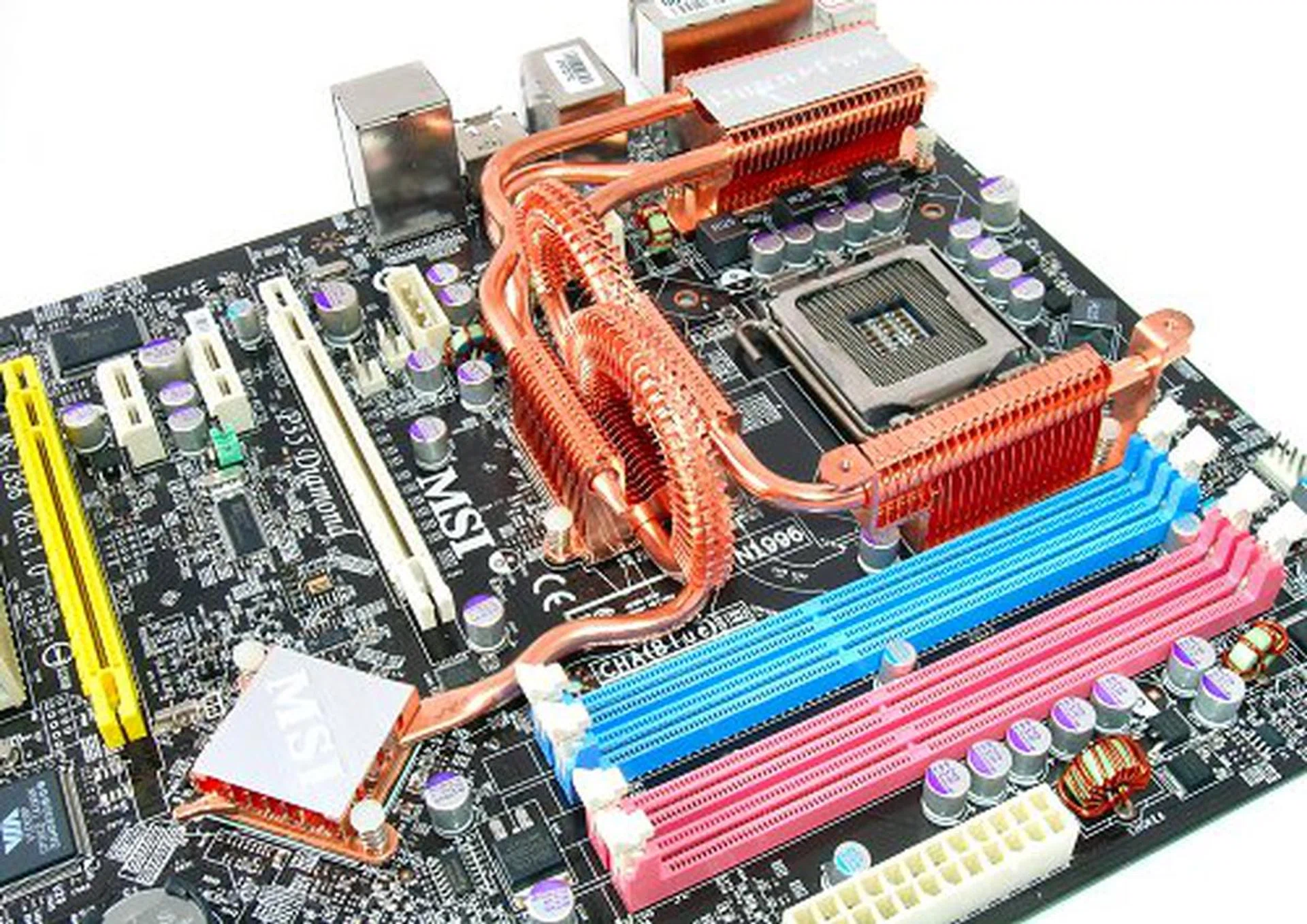
Still sporting the funky Circu-Pipe cooler.
One of the things we loved about the P35 Platinum is still what we like best about the P35 Diamond, and that is MSI's new Circu-Pipe cooling. It is not only the most unique, but it is lightweight and still the best performing (by touch) P35 chipset cooler we've come across. If you think the all-in-one packaging bundle of the P35 Diamond is your cup of tea, the board carries an average price of US$280. Alternatively, the standalone P35D3 Platinum can be found for about US$180. Whichever one you pick, MSI's performance speaks out.
Our articles may contain affiliate links. If you buy through these links, we may earn a small commission.