
MSI K9NU Neo (ULi M1697 - Socket AM2)
MSI refreshes their Socket AM2 lineup with a new V-Class budget motherboard. The K9NU Neo may have limited features, but not necessarily limited functionality. A perfect build for a casual home PC, its nForce 500-class performance will also give budget gamers a reason to smile.

Introduction
In the month following the launch of AMD's AM2 processors, MSI still has yet to officially unveil their ultra high-end K9N Diamond model at the top end. However, they've been very generous with the rest of their Socket AM2 line-up. Last month, we reviewed the K9N Platinum, an excellent mid-range motherboard based on NVIDIA's nForce 570 Ultra. The K9N Platinum was able to deliver a solid all-round performance without so much as a hitch going off throughout our testing and was priced well within its intended market range. This time, we decided to shoot lower to see if MSI can deliver a similar level of quality with their budget V-Class series.
Our pick of the litter - the ULi M1697 based MSI K9NU Neo, your typical entry level, no frills motherboard in the same vein as the recently reviewed ASRock AM2V890-VSTA. Like ASRock's board, the K9NU Neo is designed with an older chipset to bring costs down, but with ULi's track record (in our own experiences) for delivering high-performance Socket 939 chipsets, it will be very interesting to see how the K9NU Neo performs with the new Socket AM2 processors.
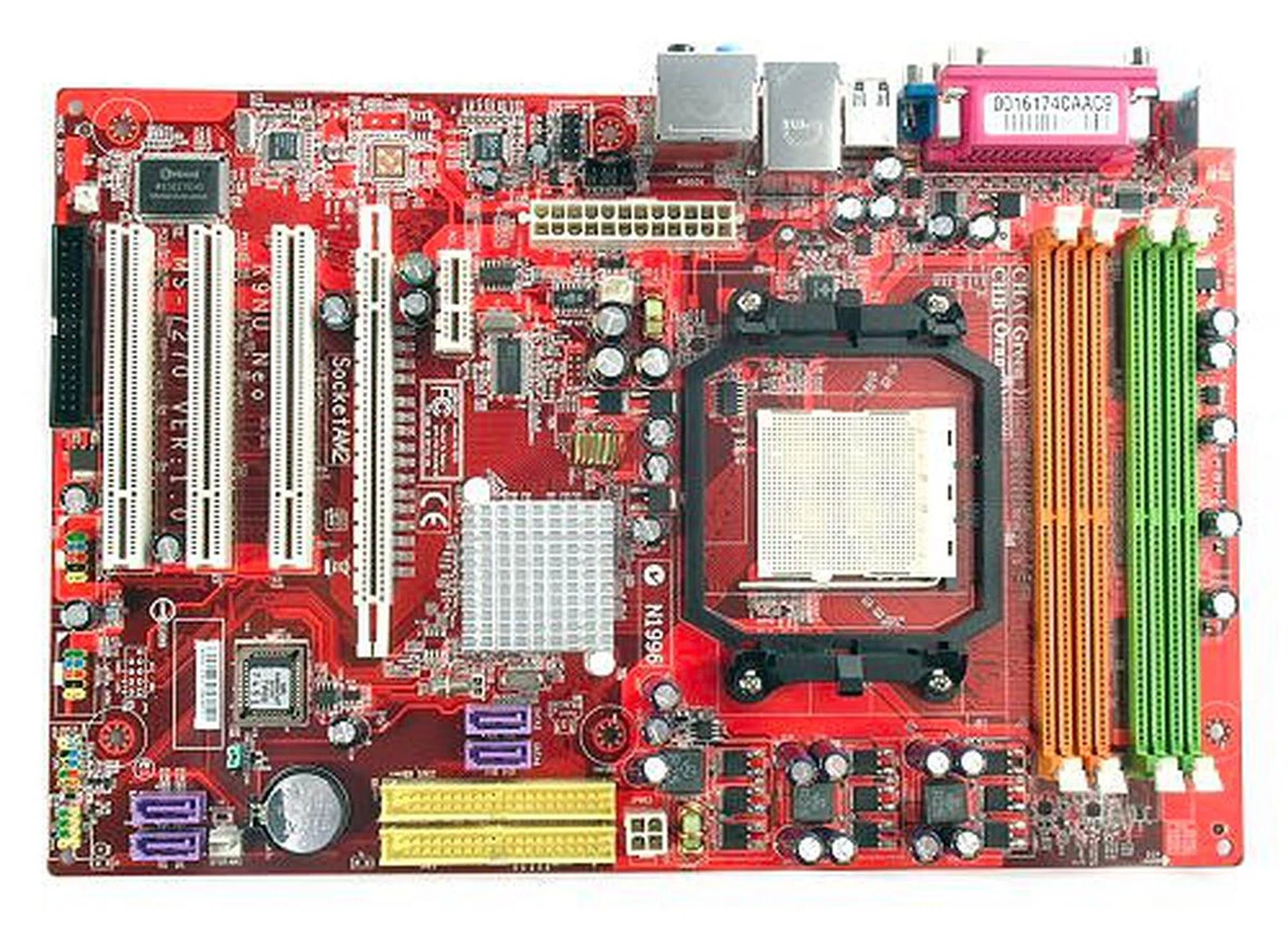
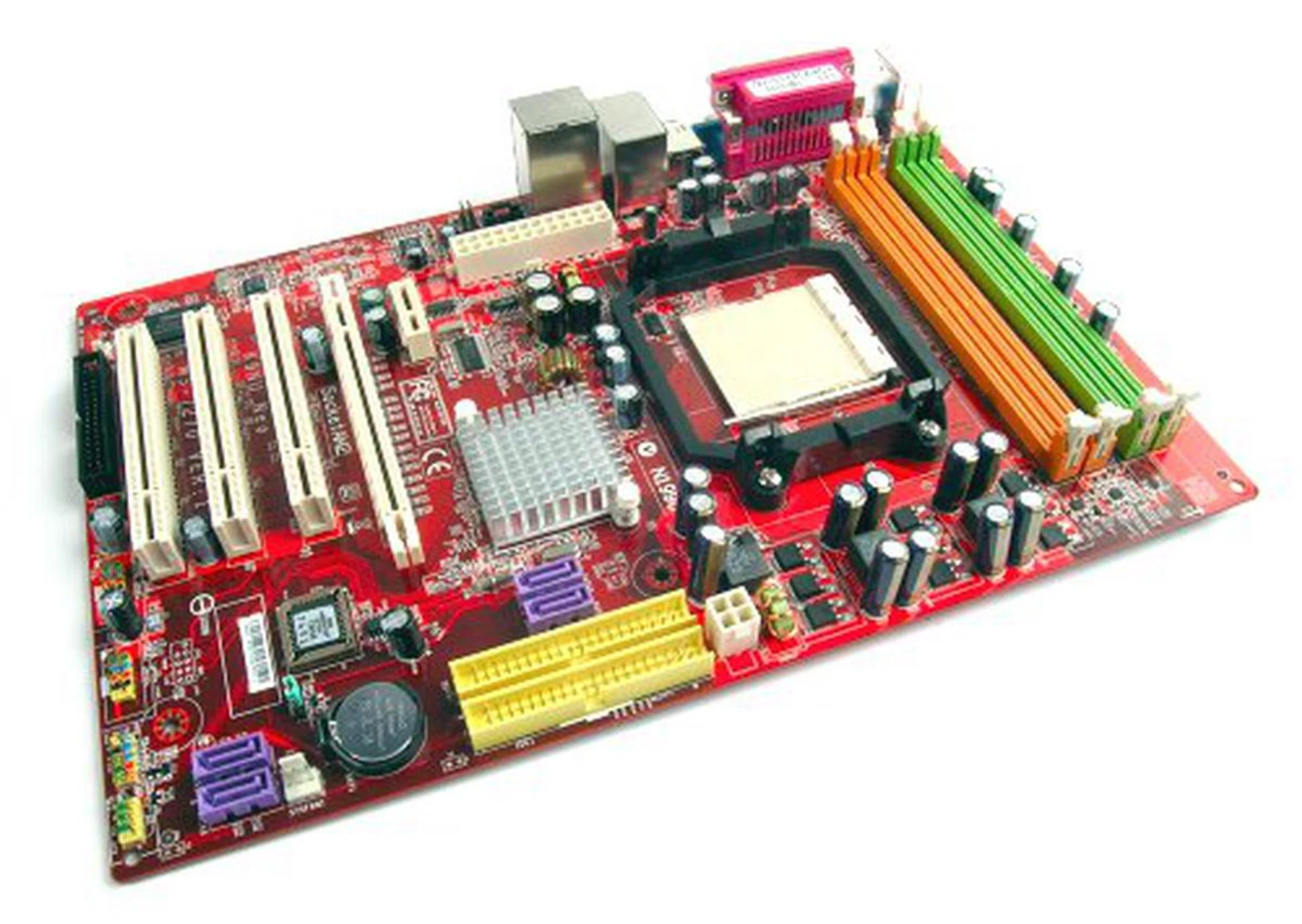
The MSI K9NU Neo motherboard.
As usual, we'll start of our review with a breakdown of the motherboard bundle:-
- 1 x SATA data cable
- 1 x SATA power converter cable
- 1 x 80-conductor Ultra ATA data cable
- 1 x floppy drive data cable
- I/O shield
- Driver CDs
- User's guide
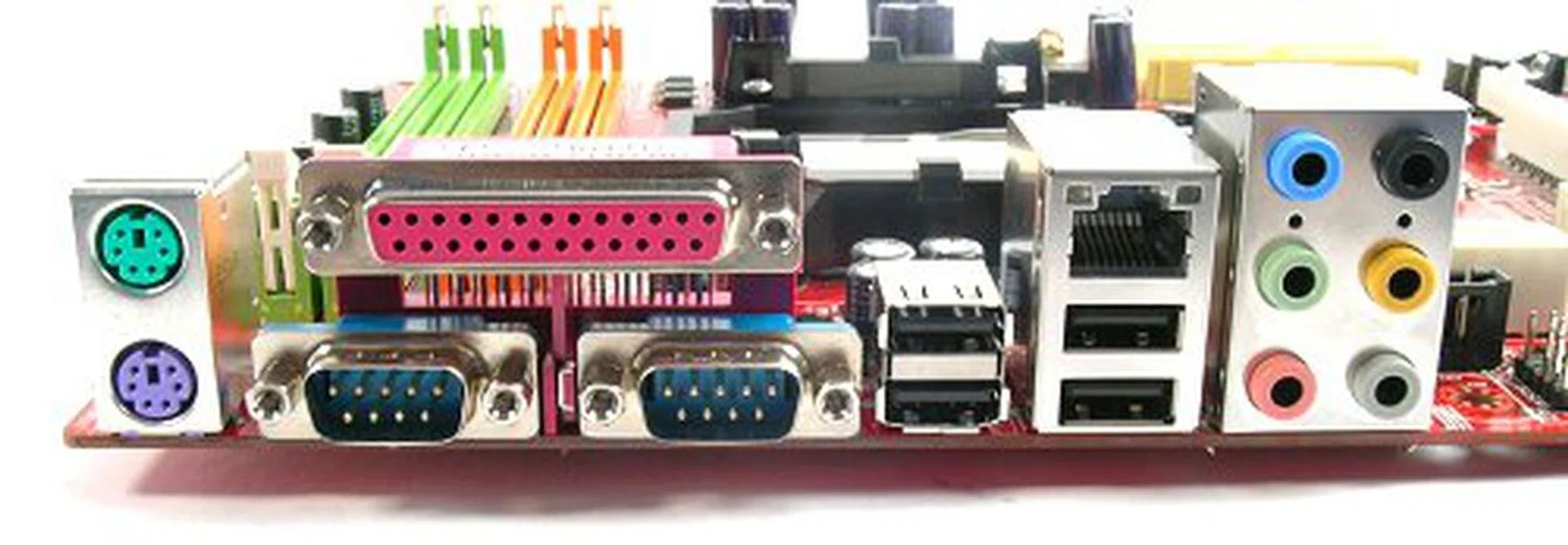
A legacy friendly rear I/O panel with PS/2, parallel and two serial ports mixed in with USB 2.0, RJ45 and analog surround audio jacks.
Features
The MSI K9NU Neo sports a very Spartan feature set compared to the majority of motherboards today, but that isn't necessarily a bad thing. With just the core functionality of the ULi M1697 chipset, there are more than enough features to deliver a decently powerful computing solution for any home user. To begin with, the K9NU Neo supports four SATA 3.0Gbps ports in addition to two Ultra-ATA 133 ports. The SATA controller also supports NCQ with RAID 0, 1, 0+1 and RAID 5 capabilities.
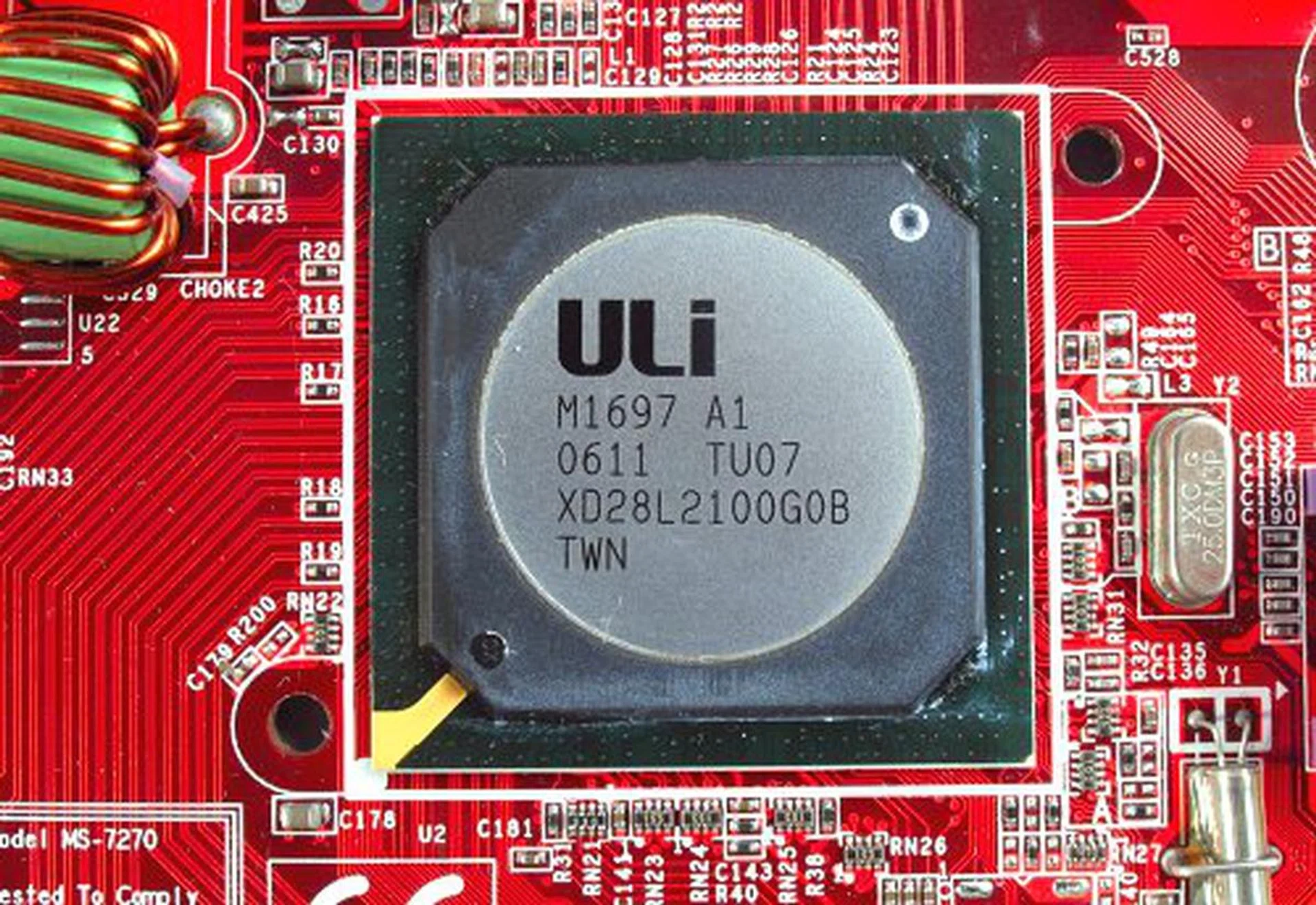
ULi single chip M1697 chipset used in a Socket AM2 motherboard.
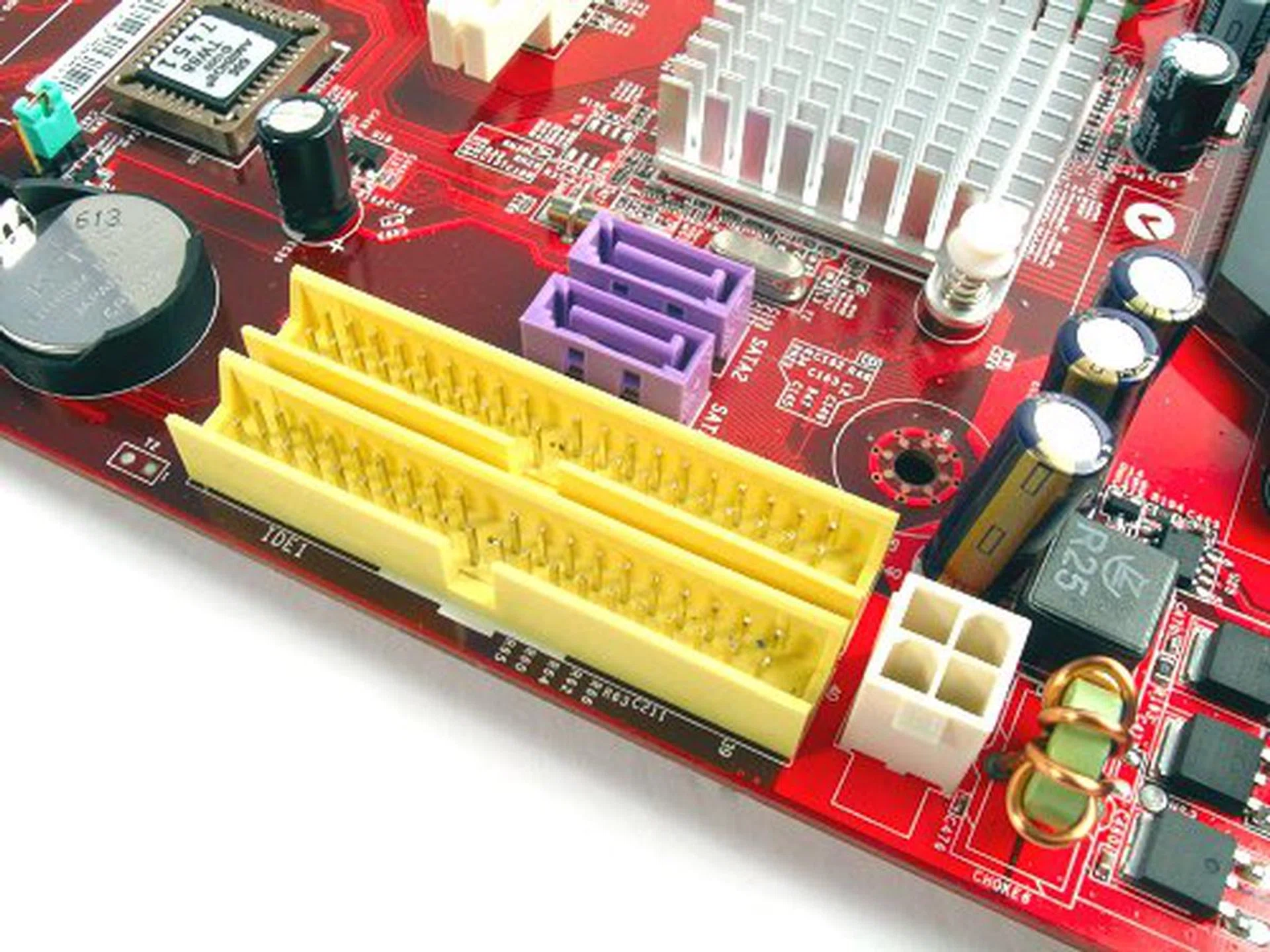
IDE and SATA ports are located towards the middle for easier access.
Its audio capabilities are up there with Realtek's ALC883 HD Audio CODEC and we believe MSI made the right choice to go with a full 8-channel CODEC instead of the lower class 6-channel ones we've seen some manufacturers resort to, especially on a budget board. Network support on the K9NU Neo is limited to a Fast Ethernet connection though, so you'll need to get yourself a Gigabit NIC if you require high bandwidth networking and MSI did not make space for FireWire onboard.
Since the K9NU Neo is targeted towards to the low-end market, its expansion capacity is slightly more traditional. Minus the PCIe x16 graphics slot, its three PCI slots should suffice for any add-on cards you may want to install and the board does come with a PCIe x1 slot to keep future choices open as well.
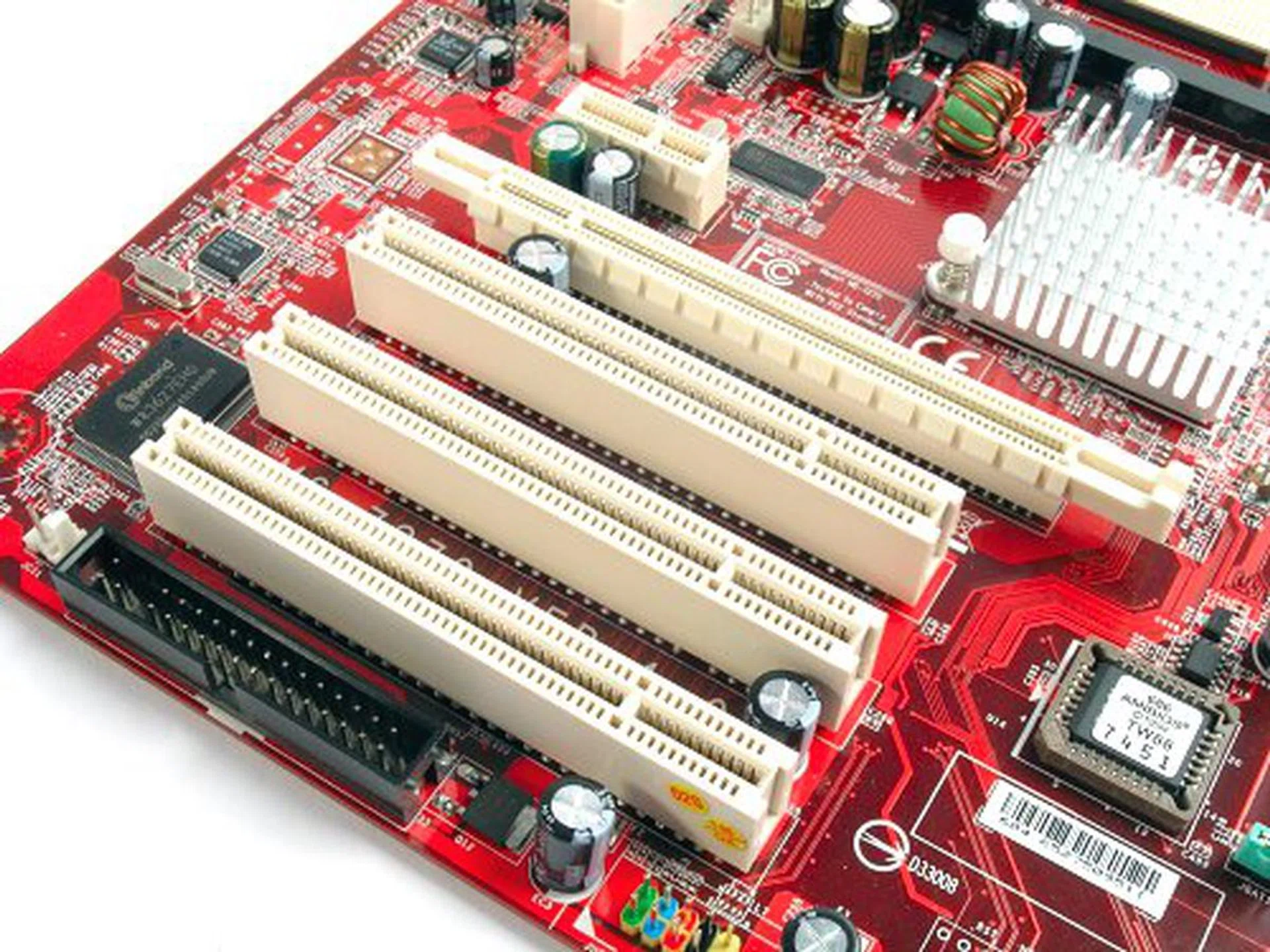
Three PCI and one PCIe x1 slots are available to the K9NU Neo for upgrading purposes.
Layout
The MSI K9NU Neo is designed on a compact ATX PCB, which is similar to the ASRock AM2V890-VSTA except that MSI makes use of a horizontal layout for the DIMM slots and CPU socket. There isn't really anything to complain about in terms of functionality and the flipped DIMM slots allow for better spacing in general. The board also has a low profile, so it should be a relatively obstacle free during installation. However, with a smaller PCB, MSI had to make some compromises with some components such as the main 24-pin ATX and floppy connectors. Fan headers are also lacking, with only one other free connection on the whole board other than the CPU fan header.
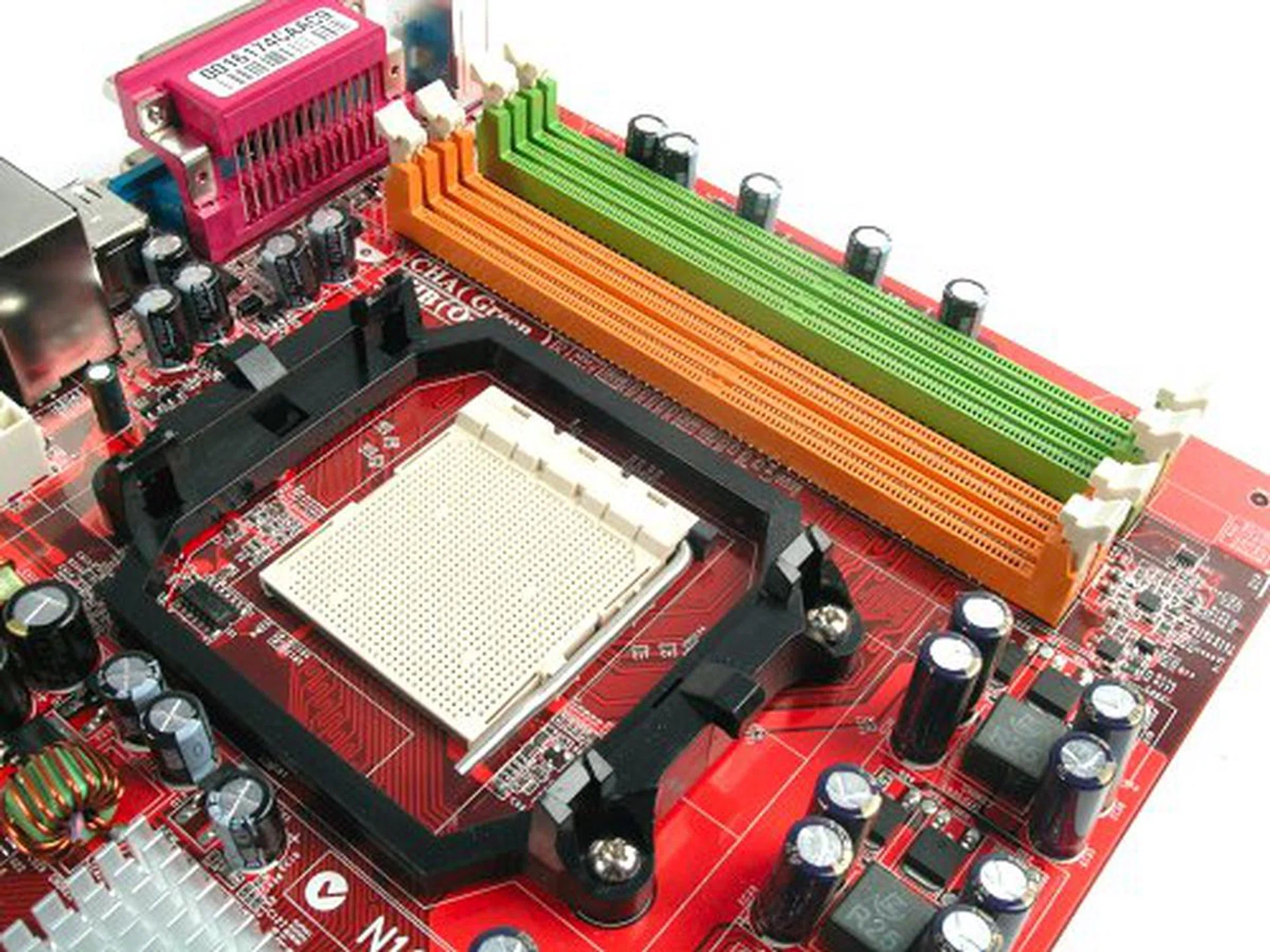
CPU Socket and DIMM slots rotated so they are parallel to the PCI slots.
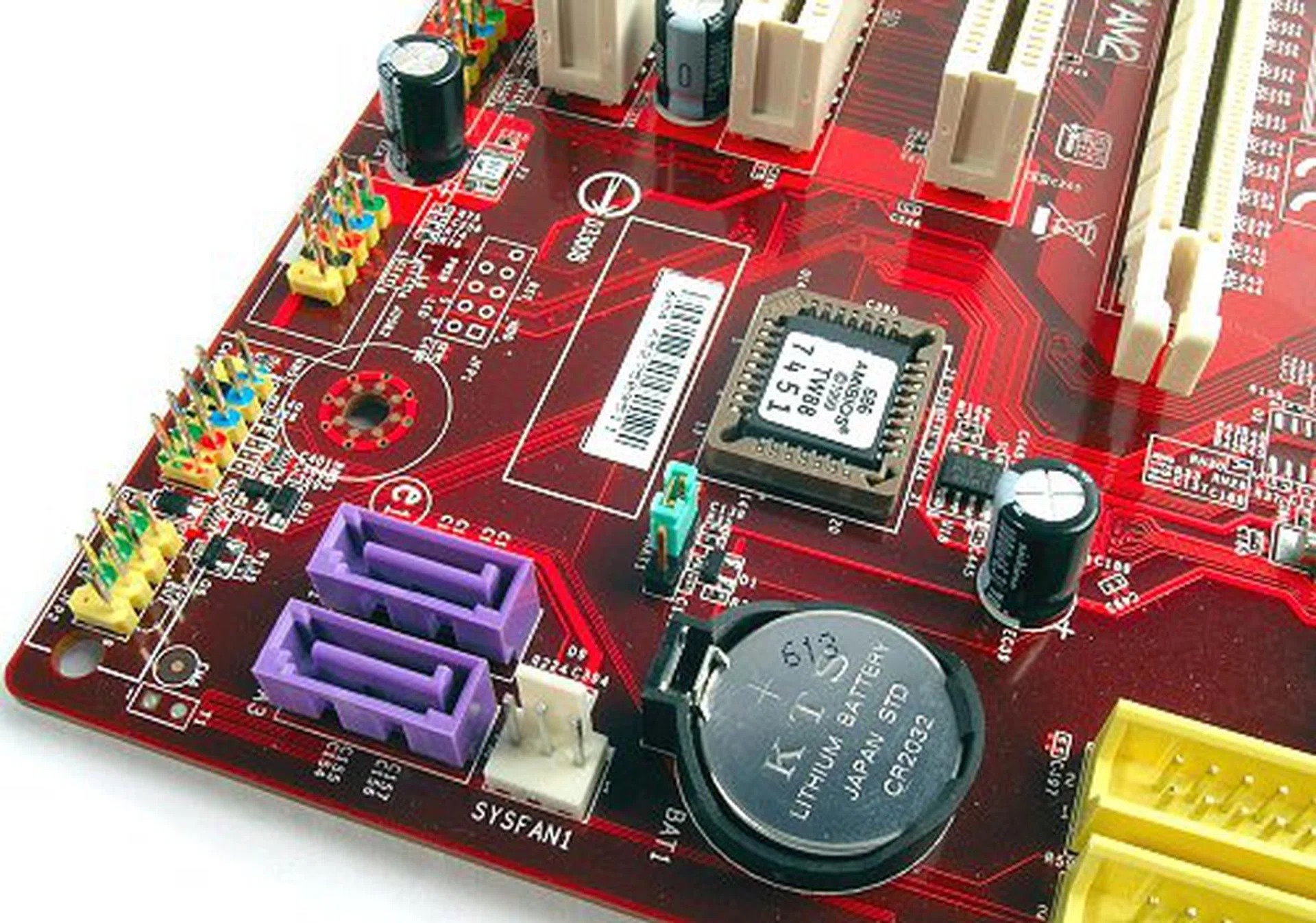
Remaining two SATA connectors are located at the bottom. Notice the one and only fan header on the board.
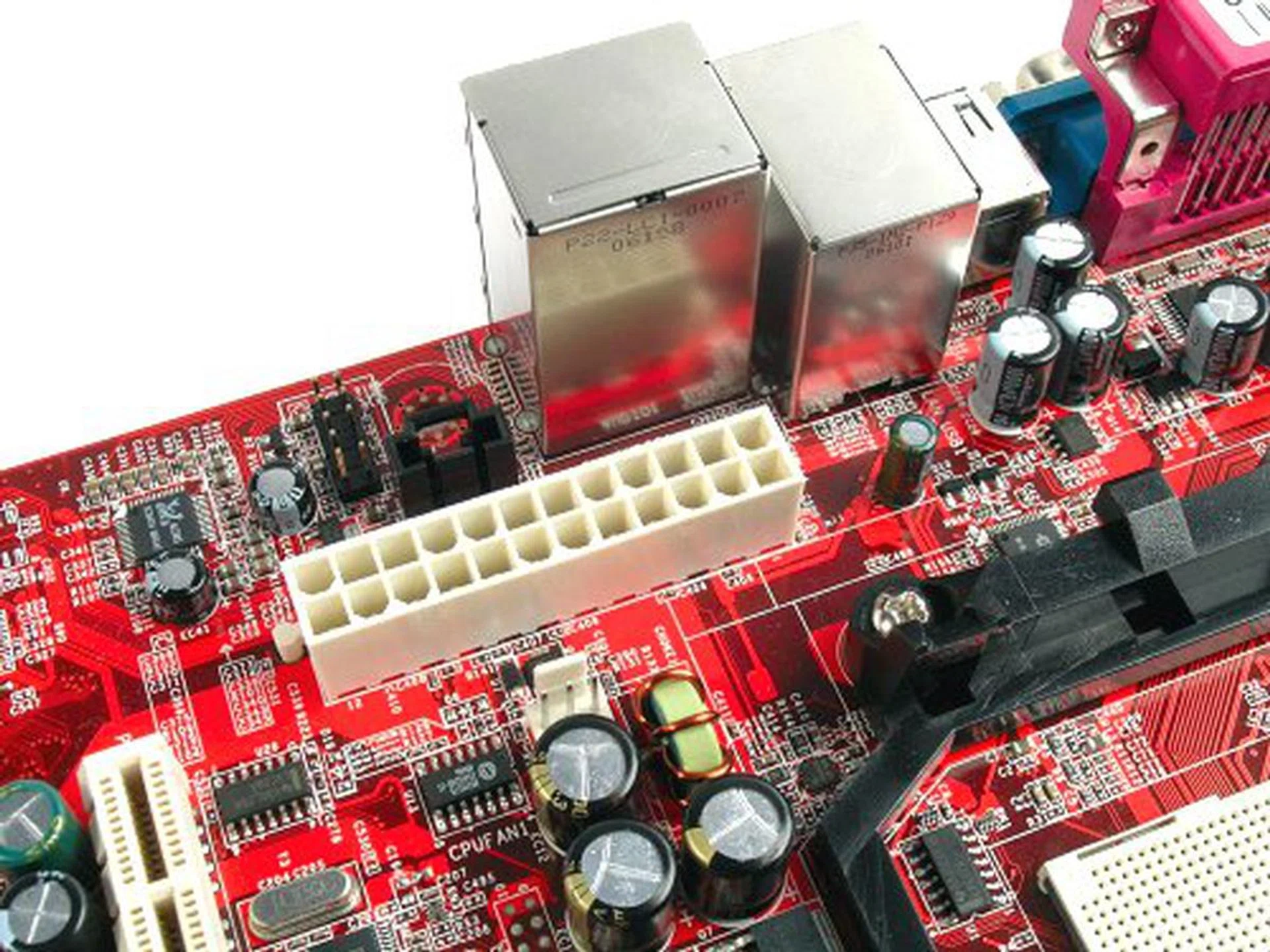
ATX power connector at the back end of the board, but because of the orientation of the CPU socket and DIMM slots, it is actually easy to work around.
Overclocking
- FSB Settings: 200MHz to 350MHz
- PCIe Frequency: 100MHz to 200MHz
- RAM Frequency: DDR2-400, DDR2-533, DDR2-667, DDR2-800
- CPU Voltage Settings: 0.800V to 1.400V (in 0.025V steps)
- Memory Voltage Settings: 1.80V to 2.20V (in 0.05V steps)
- Chipset Voltage Settings: 2.10V to 2.32V (in 0.07V steps)
- Multiplier Selection: Yes (unlocked CPUs only)
Overclocking the K9NU Neo is a very straightforward affair with very few settings to play with and limited voltage ranges, but at least the main options are available. As usual for our motherboard overclocking tests, we reduce the multipliers and frequencies of both the CPU and memory to within safe settings to ensure the maximum overclock of the motherboard.
Using stock voltages, the K9NU Neo struggled at the low 220MHz-230MHz range, but once we pushed chipset voltage up to 2.24V, we were able to take the board to a stable 265MHz on a full 5x HTT multiplier. This is actually a very decent overclock for a budget board, but at this level, the tiny Northbridge heatsink became too hot to touch, which can't be too good for the motherboard's health in the long run. If you even have an inkling of overclocking with the K9NU Neo, we strongly recommend to switch the stock heatsink.
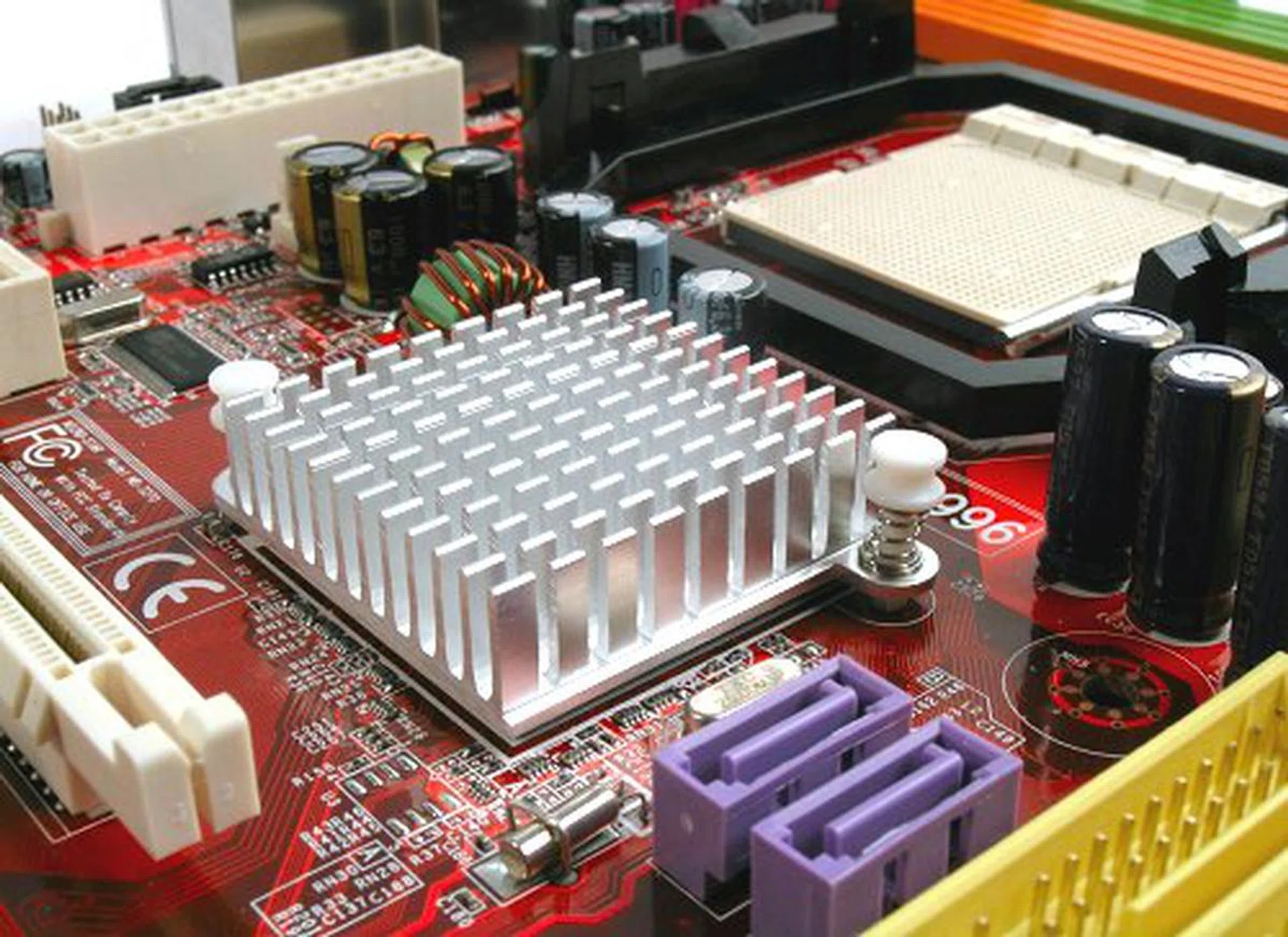
Simple low profile heatsink may not be sufficient to cool the M1697 chipset for the overclockers.
Test Setup
After our last review of the ASRock's AMV890-VSTA, comparisons with the K9NU Neo is inevitable due to the fact that both boards are similarly featured and competing for the same budget Socket AM2 market segment. In this section of our review, we'll benchmark the K9NU Neo with the ASRock AMV890-VSTA as well as MSI's own K9N Platinum, an nForce 570 Ultra board that sits on a higher price/performance segment altogether.
The test bed configurations of all three boards are listed below:-
- MSI K9NU Neo (ULi M1697)
- AMD Athlon 64 X2 5000+ (2.6GHz, Socket AM2)
- 2 x 1GB Kingston HyperX DDR2-800 @ 12-4-4 CAS 4 CMD 1T
- Seagate Barracuda 7200.7 80GB SATA hard disk drive (one single NTFS partition)
- MSI GeForce 7900 GT 256MB - with NVIDIA ForceWare 91.28 beta driver
- ULi Unified Driver 2.20
- Microsoft Windows XP Professional, Service Pack 2 - with DirectX 9.0c
- MSI K9N Platinum (NVIDIA nForce 570 Ultra)
- AMD Athlon 64 X2 5000+ (2.6GHz, Socket AM2)
- 2 x 1GB Kingston HyperX DDR2-800 @ 12-4-4 CAS 4 CMD 1T
- Seagate Barracuda 7200.7 80GB SATA hard disk drive (one single NTFS partition)
- MSI GeForce 7900 GT 256MB - with NVIDIA ForceWare 91.28 beta driver
- NVIDIA nForce 500 package 9.34 beta
- Microsoft Windows XP Professional, Service Pack 2 - with DirectX 9.0c
- ASRock AMV890-VSTA (VIA K8T890 CF)
- AMD Athlon 64 X2 5000+ (2.6GHz, Socket AM2)
- 2 x 512MB Corsair XMS DDR2-800 @ 12-4-4 CAS 4 CMD 1T
- Seagate Barracuda 7200.7 80GB SATA hard disk drive (one single NTFS partition)
- MSI GeForce 7900 GT 256MB - with NVIDIA ForceWare 91.28 beta driver
- VIA HyperionPro 508A
- Microsoft Windows XP Professional, Service Pack 2 - with DirectX 9.0c
Additional Notes
- The original BIOS that shipped with the board suffered from stability problems because it wasn't supplying enough voltage to run DDR2-800 memory (1.9V max, but we required a minimum of 2.0V). For our review, we will be using a beta BIOS MSI provided us with increased memory voltage limits to 2.2V.
- The ASRock AM2V890-VSTA is installed with a pair of 512MB Corsair XMS DDR2 memory instead of a pair of 1GB Kingston HyperX DDR2 RAM due to memory compatibility issues.
Benchmarks
The following benchmarks will be used in this review:-
- BAPco SYSmark 2004
- Futuremark PCMark05
- SPECviewperf 8.01
- Futuremark 3DMark05
- AquaMark3
Results - BAPco SYSmark 2004
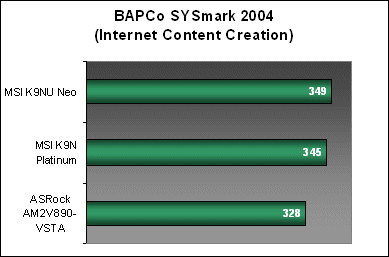
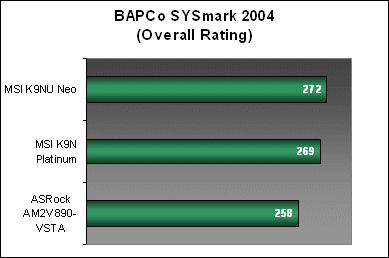
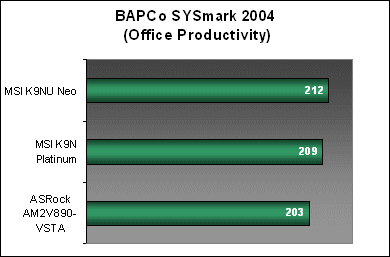
SYSmark 2004 results were very promising as the K9NU Neo performed much better than both the ASRock AM2V890-VSTA and K9N Platinum in every workload.
Results - Futuremark PCMark05
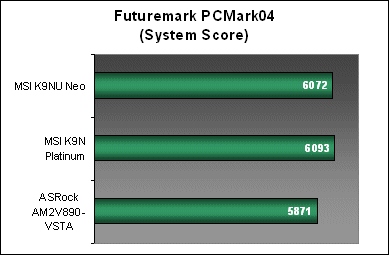
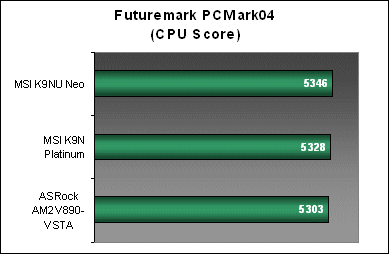
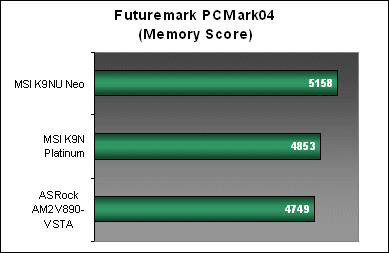
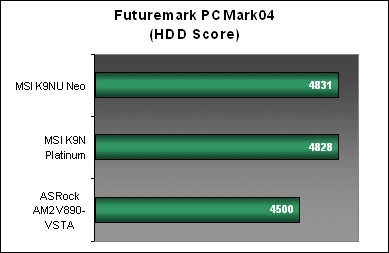
Impressively, the K9NU Neo again outperformed the K9N Platinum in PCMark05 with higher CPU and memory scores, which are actually much closer in performance to the high-end nForce 590 SLI. With an NCQ capable SATA controller, its HDD results are also on par with NVIDIA's own nForce 570 Ultra controller.
Results - SPECviewperf 8.01
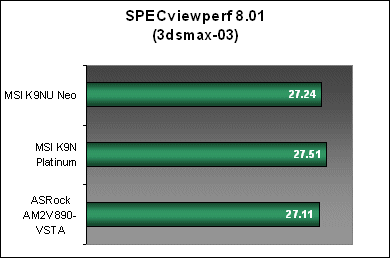
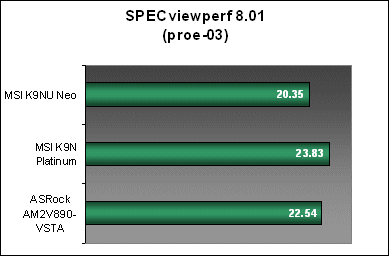
The K9NU Neo didn't fare as well in SPECviewperf 8.01. While the board managed to perform similarly to the K9N Platinum in the 3dsmax-03 workload, it surprisingly posted the lowest results for pro/ENGINEER. Being the more memory intensive workload of the benchmark suite, we had expected the K9NU Neo to at least shine here.
Results - Futuremark 3DMark05
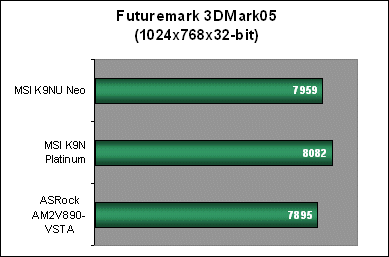
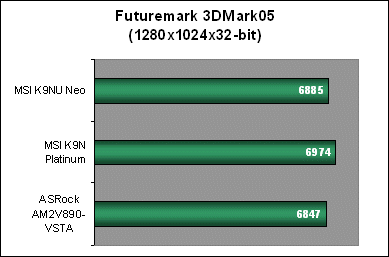
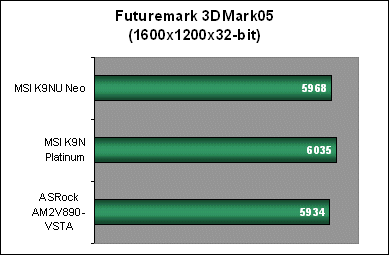
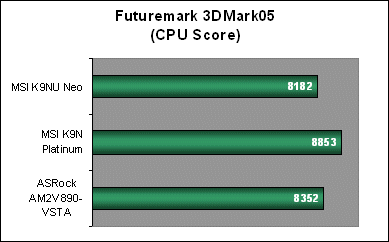
3DMark05 is another benchmark that the K9NU Neo drops back behind the K9N Platinum. In every resolution, the board managed to keep up with the nForce 570 Ultra based K9N Platinum, but not quite exceeding its performance.
Results - AquaMark3
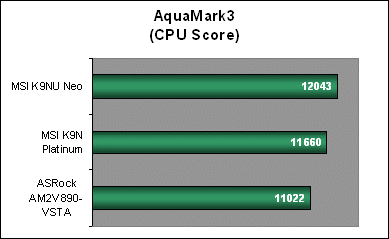
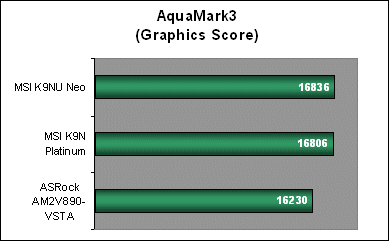
The K9NU Neo and AquaMark3 seemed to agree with one another; the board came out on top with a high 12K CPU score and a respectable graphics score that is on the same level as the K9N Platinum.
V for Value
Without a doubt, the MSI K9NU Neo is an exceptional motherboard for the Socket AM2 platform. From the tests and benchmarks that we've run, we can say MSI engineers have been very successful in the board's implementation. As the board is targeted towards the budget segments, our tests focused on boards within its range, but as our results show, the K9NU Neo is really on par with even the latest nForce 500 series chipsets in terms of raw performance. Most importantly, the board really shines in desktop productivity and business applications as reflected by its huge lead in both SYSmark 2004 and PCMark05 benchmarks, which is exactly the intended market for this board.
Gamers who are on a tight budget won't find too much to complain about either as the K9NU Neo performs just as well in real world gaming as MSI's K9N Platinum board. It sports the same Realtek HD Audio CODEC as the K9N Platinum and thanks to the M1697's NCQ and RAID ready SATA controller, the K9NU Neo can also boast high performance storage capabilities. Of all its features, the only thing that is left wanting is its 'slow' Fast Ethernet connection. Suitable for broadband and simple LAN transfers maybe, but will have its bandwidth saturated quickly in today's high-speed internal networks. Of course, one can just plonk in one of the dozens of Gigabit NICs in the market and your problems are solved.
However, some words of caution. The K9NU Neo is a budget board and as budget boards go, it is not designed to handle the rigors of tweaking. The board comes with a simple BIOS and borderline cooling features. MSI cleverly limits its options so as not to stress the board too much. In fact, the initial BIOS had such a conservative memory voltage range that both Kingston HyperX and Corsair XMS DDR2-800 memory modules were unable to operate stably. This would have severely affected the board's final rating had MSI not fixed our problems as efficiently as they did. The beta BIOS MSI provided us upped the maximum voltage to 2.2V, which resolved our memory woes and from then on, the K9NU Neo ran like a charm. You can expect later official BIOS updates to nab this simple issue. Still, 2.2V is on the low side if you're thinking of overclocking. With a really hot chipset and only one fan header onboard, we'd advise you to invest in a properly ventilated case or a power supply with extra Molex connectors and while you're at it, change the stock Northbridge cooler as well.
MSI's K9NU Neo is the perfect board for a budget AM2 setup without compromising system performance.
It is just too bad that we will probably never see a ULi M1697 based enthusiast motherboard because of NVIDIA's positioning of ULi chipsets. However, this is also a good thing as it ensures enthusiast platform performance levels even in the entry-level segment. So how much will the MSI K9NU Neo set you back? A quick check around the many online retailers show that you can grab one for around US$75 to US$79. Bottom line, the K9NU Neo is a down-to-earth motherboard with big performance potential that rivals MSI's own K9N Platinum. With a sub-US$80 price tag, you can't go wrong with it.
Our articles may contain affiliate links. If you buy through these links, we may earn a small commission.