
MSI 870A Fuzion - Fuzion for the Masses
MSI brings Lucid's multi-GPU technology back to the AMD platform with the mainstream 870A Fuzion. Once again, you can enjoy NVIDIA SLI with an AMD processor. Plus this time, you can even consider an ATI and NVIDIA mixed-mode solution. We find out whether Lucid's Hydra Engine is ready for the masses.

Fuzion for the Masses
It had been a pipe dream for enthusiasts - the ability to link multiple graphics cards from two different vendors (ATI and NVIDIA) and their incompatible architectures on the same motherboard. A fabless semiconductor firm, Lucid, however made it a reality with its vendor-agnostic Hydra 200 chip. We reviewed the first commercial implementation of this technology with the earlier this year. While the basic premise of this technology worked, it came with its fair share of bugs and compromises. These, coupled with the premium positioning and asking price for the Big Bang Fuzion, meant that the product was even more niche than the usual high-end enthusiast motherboard.
It's half a year later, and while Lucid to try out its Hydra 200 chip, that ASUS motherboard is also targeted at the high-end segment. MSI meanwhile has changed its tack and announced two mainstream models that come with the Hydra chip, both of which . Today, we get the chance to try out the version intended for the AMD platform, the MSI 870A Fuzion.
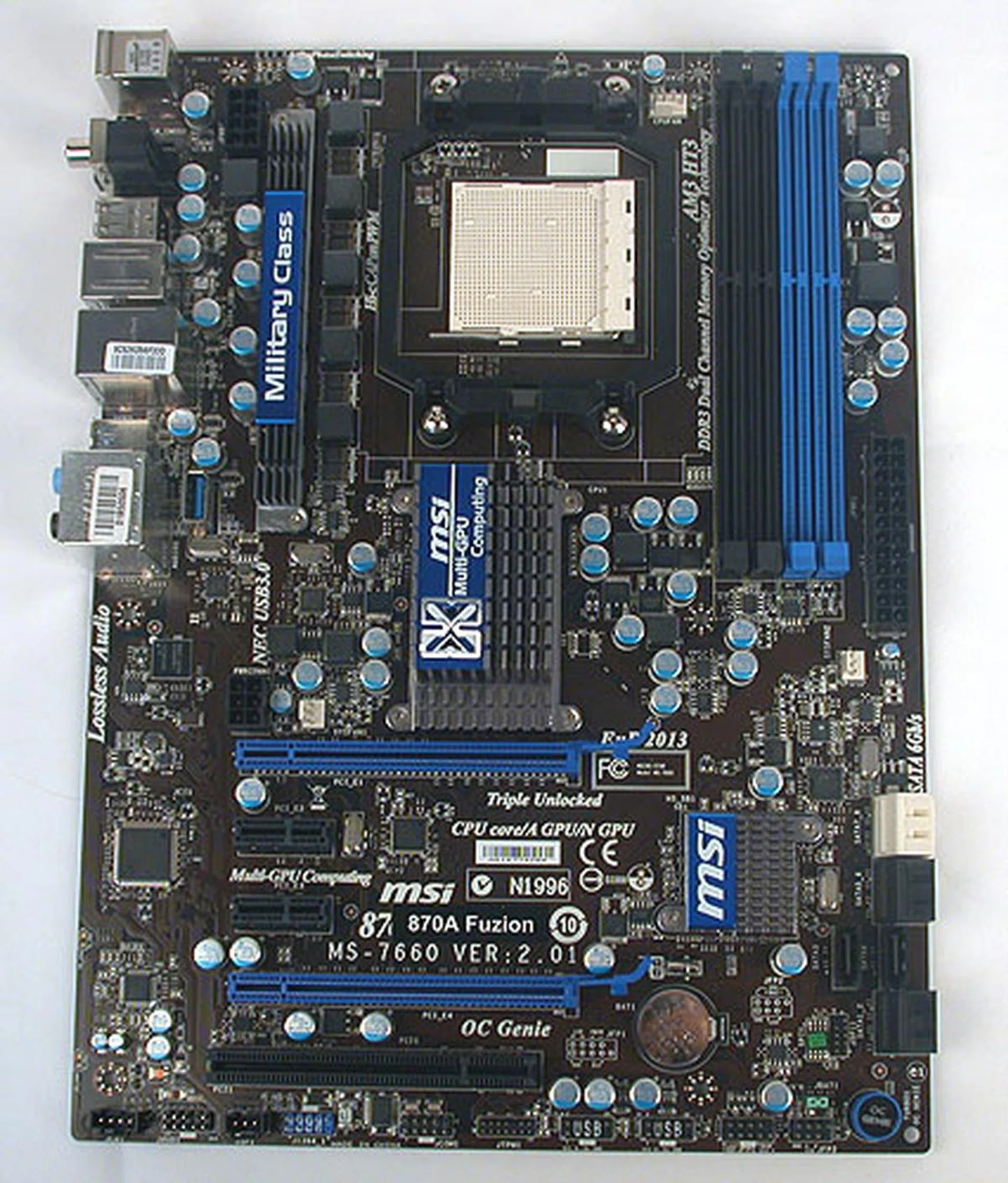
The familiar brown, blue and black theme used by MSI in recent boards continues its run on the 870A Fuzion. We said it before and will say it again - we aren't exactly fans of its brown PCB.
MSI has been using the 'Fuzion' branding to identify motherboards that come with the Lucid Hydra chip, but users may not be too familiar with the 870A designation. The '870' here refers to its use of the AMD 870 chipset, which is itself a minor update of the AMD 770 chipset. MSI has also gone wth the SB710 Southbridge, and not the newer 800-series that debuted this year. The 'A' indicates that it comes with USB 3.0 and SATA 6Gbps support (albeit both functions via thrid-party chips onboard), a naming convention that seems to have taken root among motherboard vendors.
Since the withdrawal of NVIDIA from the chipset scene, there hasn't been a way for NVIDIA users to get their SLI fix on the AMD platform. The MSI 870A Fuzion claims to be the first motherboard on the AMD platform to support SLI and that's certainly the case (at least for a while), albeit via the Lucid Hydra chip instead of native SLI, but do users care if it quacks like a duck?
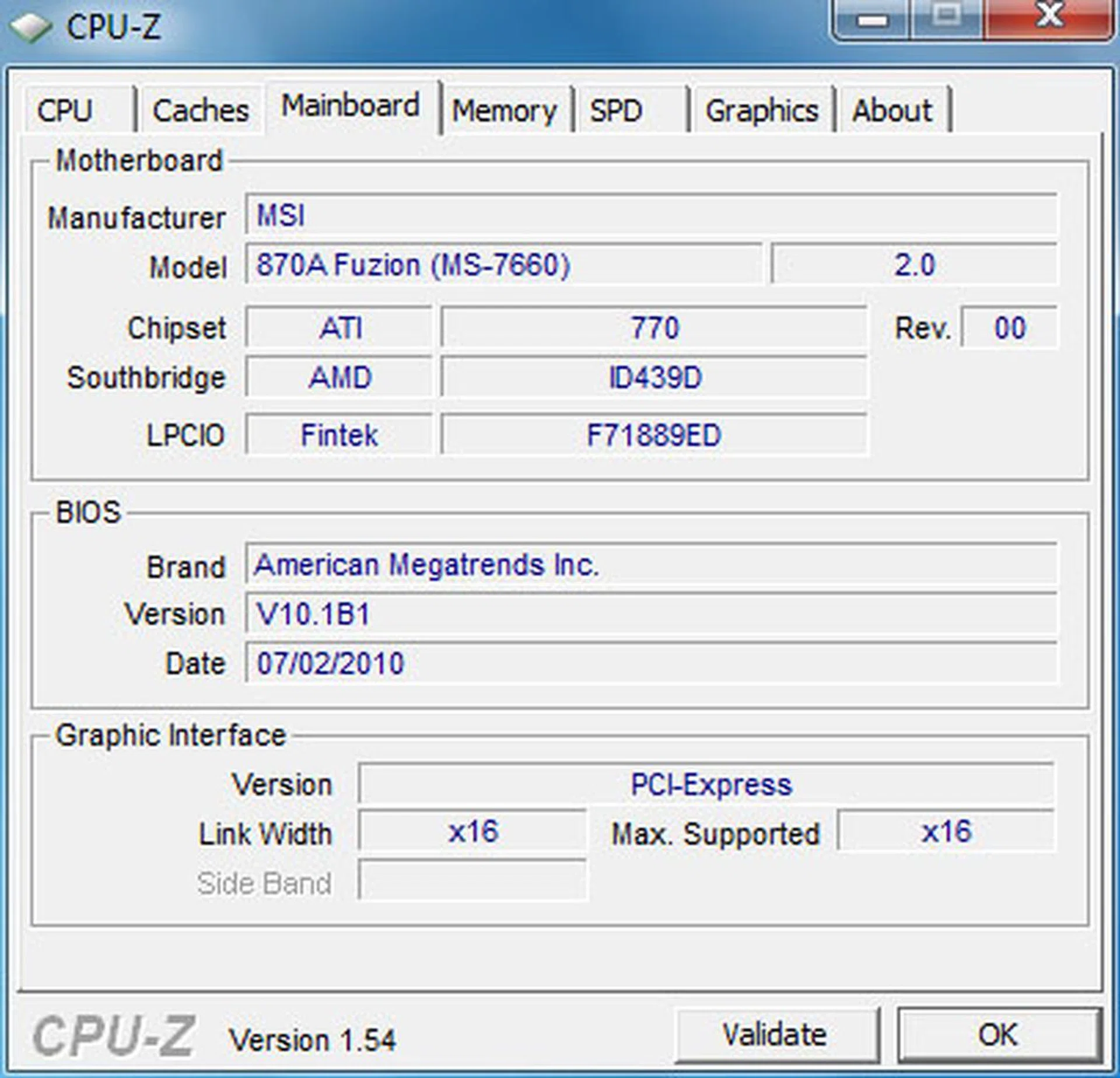
Despite what CPU-Z thinks, this board is using the 870 chipset and not 770, though it's essentially the same. This chipset has no integrated graphics and is targeted at the budget to mainstream segments. MSI has chosen to partner it with the older SB710, instead of the newer 850 which comes with native 6Gbps SATA ports. This feature however is on this 870A thanks to a Marvell controller.
The variety of ports at the rear include both coaxial and optical S/PDIF outputs, a Clear CMOS button, USB ports, including one USB 3.0 port, a FireWire port and the usual LAN port. A generally well balanced selection.
The MSI 870A Fuzion
As we mentioned, the MSI 870A Fuzion uses a 'new-old' chipset, the AMD 870. It also has an older Southbridge, the SB710 instead of the newer 800-series ones that are found in AMD chipsets launched this year. MSI could be trying to keep a lid on the cost with such choices, but despite their age, they should still be relevant today. More so, since MSI has chosen to augment the Fuzion with USB 3.0 and SATA 6Gbps functionality, both implemented using third-party controllers.
Not only that, the 870A Fuzion comes with native CrossFireX support, so if Lucid's Hydra Engine is not working for you, there's something to fall back on. There's no native SLI support of course, but that's another story. And lest you think that the chipset determines the CPU support, you can be reassured that this board has an AM3 socket that accepts AMD's 6-core Phenom processors with no issues, with HyperTransport 3.0 too.
In fact, taking aside the older chipset used, this board is very current with MSI's own technologies, with the presence of its 'military class' components like Hi-c capicitors onboard, while its auto-overclocking utility, OC Genie is also found as an onboard button and in the BIOS. You can even unlock the hidden cores on some AMD processors through the BIOS, a feature that's only found openly on the latest AMD motherboards (the previous generation required more work and even special BIOS versions to enable).
MSI has also added quite a few features to the basic AMD 870 chipset, including FireWire support with a VIA chip and dual PCIe 2.0 x16 slots with the full 16-lane bandwidth. HD audio is handled by the popular Realtek ALC892 CODEC, making this a rather modern board overall.
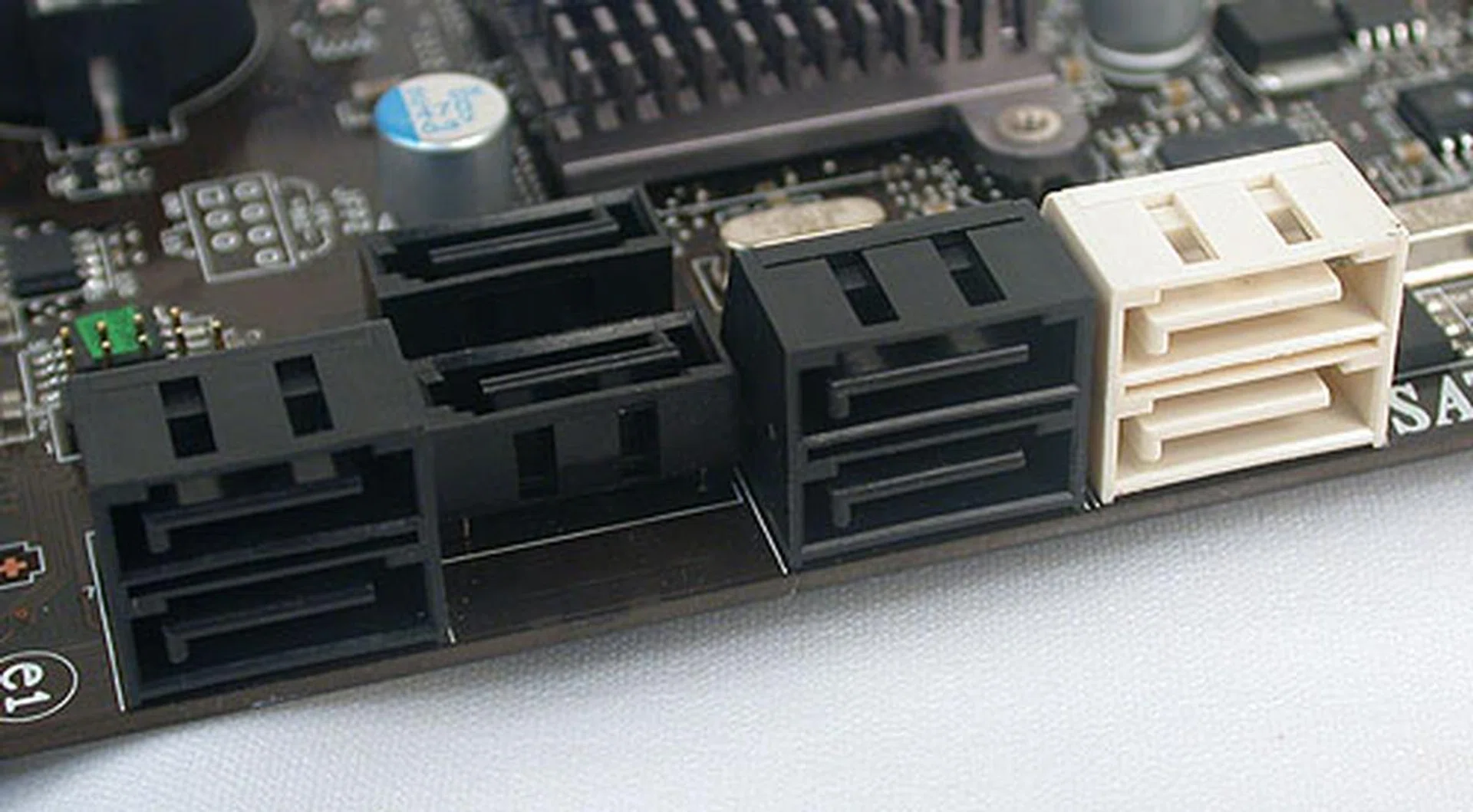
The six black SATA ports are 3Gbps only, offered by the SB710 chip. The two in white however are SATA 6Gbps capable and are powered by a Marvell 9128 chip. Don't ask us why two of the black SATA ports are facing upwards instead of being in line with the rest. We have no idea why MSI went with such a strange design, but at least it doesn't appear to interfere with your graphics cards.

The standard four DIMM slots you can expect on an AMD board, with its dual-channel memory architecture. These DIMMs support up to DDR3-1600 (O.C). Yes, it's not exactly very conducive for hardcore overclockers, but this board wasn't meant for such extreme endeavors.
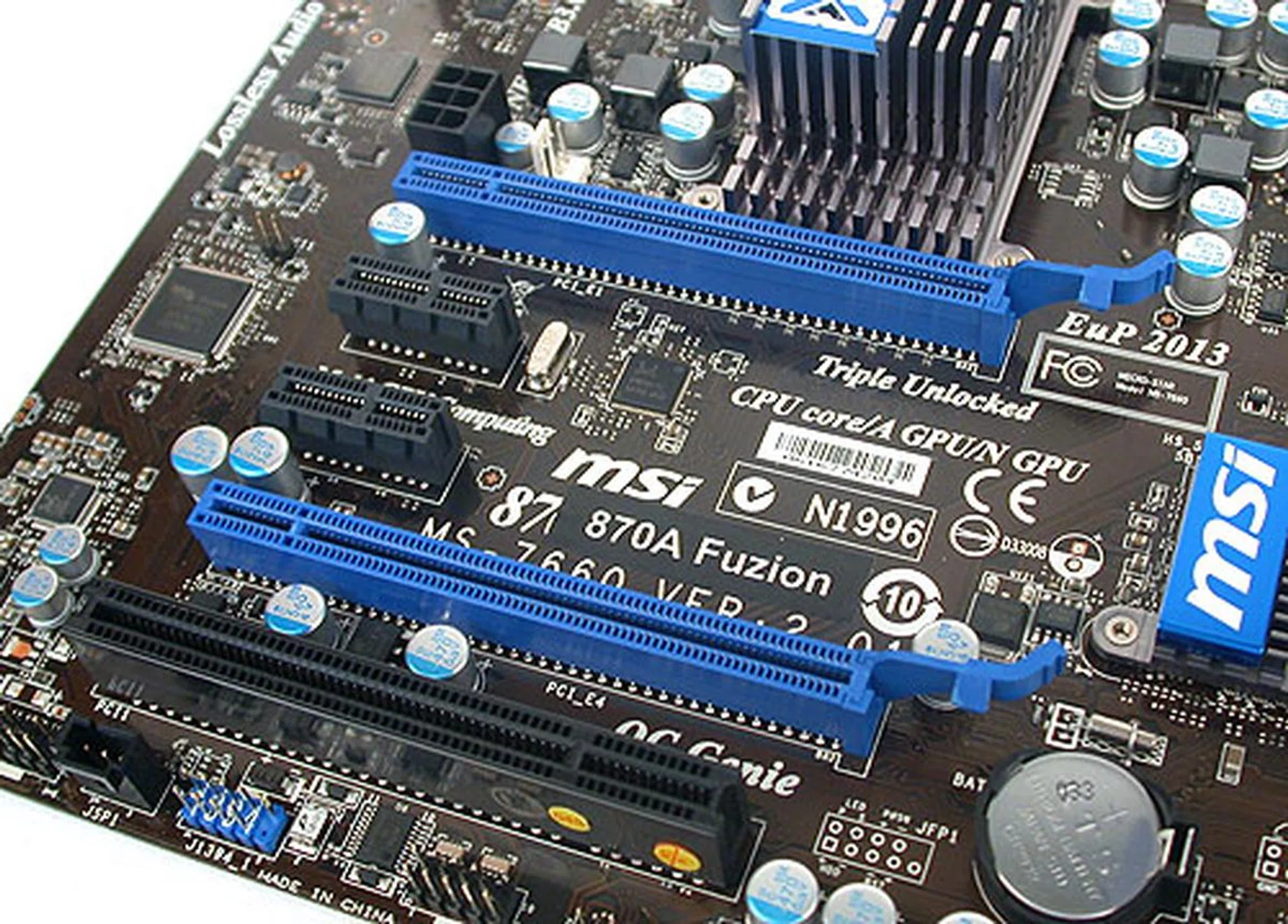
The two PCIe 2.0 x16 slots are in blue, with two PCIe x1 sandwiched in between so that one can install dual-slot graphics cards. There's also a single PCI slot that will be rendered useless if you do install such large graphics cards. A 6-pin power connector allows you to provide extra juice to power-hungry graphics cards, though we feel it's unlikely.
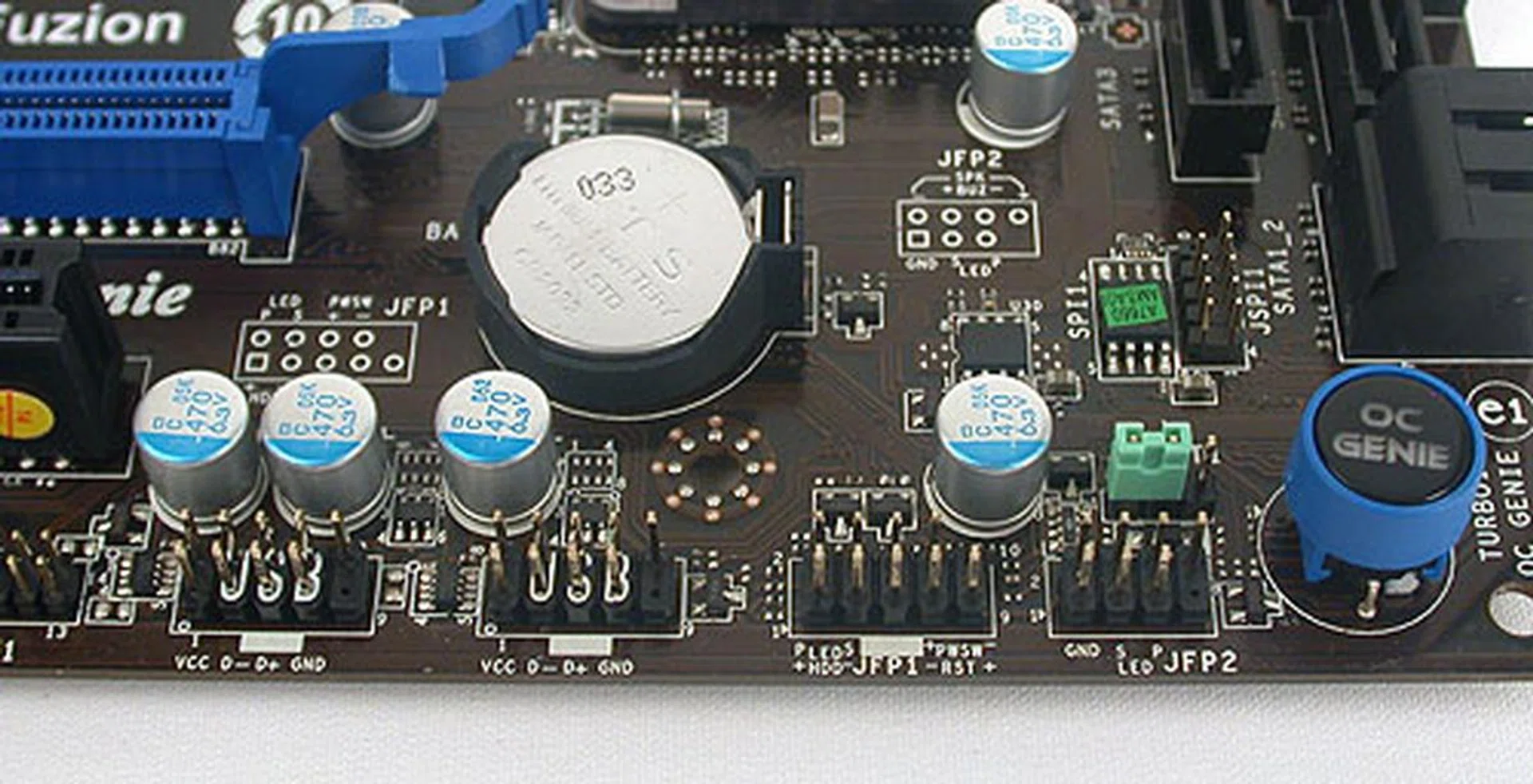
There are no onboard buttons for power and reset so get ready to hook up your casing's front-panel chassis connections to this board. There is however an OC Genie button for easy, automatic overclocking.

Like the numerous boards that come with USB 3.0 functionality, NEC's controller is used. There's also an internal USB 3.0 connector which MSI mentioned it would be handy for the newer casings that have a front-panel USB 3.0 connector. While we agree it's thoughtful, we can't imagine it being too useful in its current location at the back of the system.
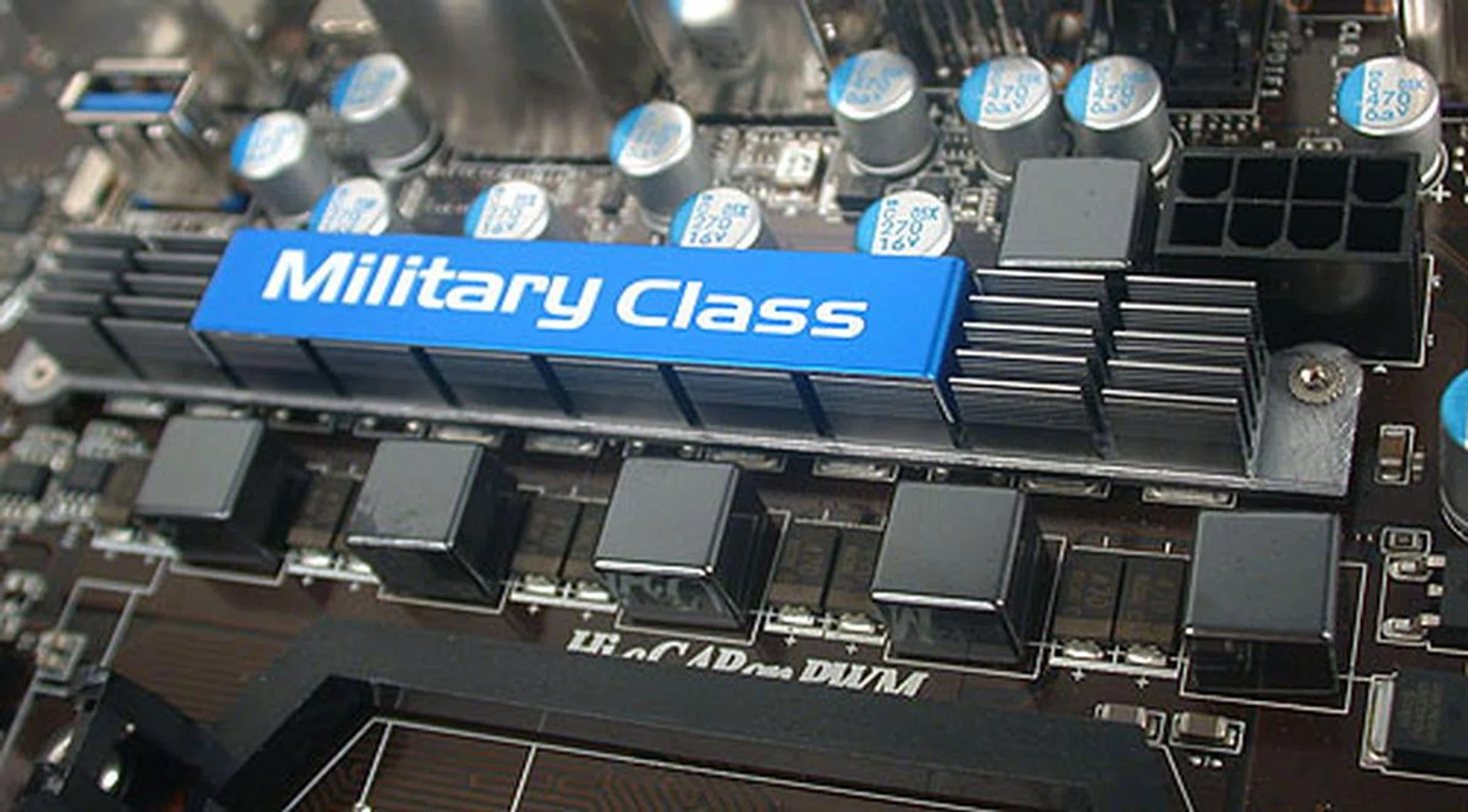
MSI's military class components are used to bolster the power delivery to the processor and include solid capacitors, hi-c capacitors, and icy chokes, all of which help to improve the lifespan of this board.
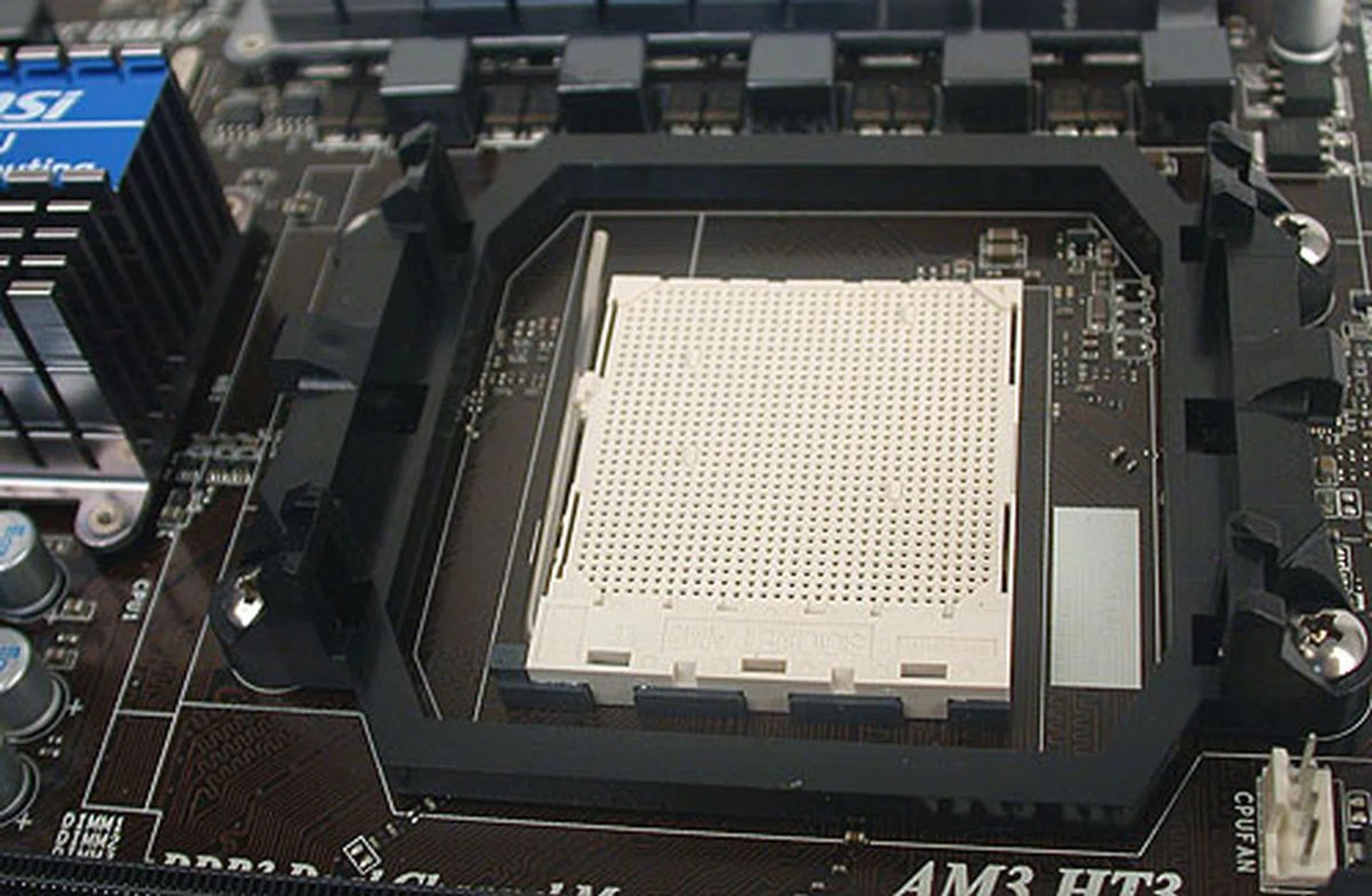
The standard AM3 socket, with sufficient clearance for most coolers. At least we had no issues with our third-party cooler.
In terms of the MSI 870A Fuzion's layout, we didn't spot anything major that could result in angst for the user. Of course, there were some strange decisions, like the two upward-facing SATA ports, but at least they didn't interfere with anything. We would also have preferred having two external USB 3.0 ports at the rear, and not just one.
BIOS Settings
The MSI 870A Fuzion has all the bells and whistles that you'll find on MSI's current motherboards. Hence, utilities like an integrated BIOS flashing tool (M-Flash), overclocking profiles and MSI's core unlocking tool (for those AMD processors which have certain cores disabled) are present. The BIOS options are on par with its competitors and the extra touches, like OC Genie Lite, help to make this a very clear, concise and easy to use BIOS.
O/C Settings | MSI870AFuzion |
Base Clock (MHz) | 190 - 690 |
CPU Ratio | 4 - 32.5 (0.5x increments) |
Memory Ratio/Multiplier | Auto, 1:2, 1:2.66, 1:3.33, 1:4 |
Voltage Adjustments |
|
Tested Overclock Settings |
|
Test Setup
Since we haven't reviewed any motherboards based on the AMD 870 or 770 chipsets, we could only compare it against other AMD 7 and 8-series motherboards. Keeping in mind the mainstream nature of the chipset, we have tried to keep the costs down and avoided the premium models. Hence, our comparisons included a reference AMD 790FX motherboard, the Biostar TA890FXE we featured in our and the ECS A890GXM-A from our . The system configuration below was used for all the boards:
- AMD Phenom II X4 955 (3.2GHz)
- 2 x 1GB Kingston HyperX DDR3-1333 @7-7-7-20
- Seagate Barracuda 7200.10 SATA HDD (single NTFS partition of 200GB)
- NVIDIA GeForce 9800 GTX 512MB (ForceWare 195.62)
- Windows 7 Ultimate
The following benchmarks were used:
- BAPCo SYSmark 2007 Preview (ver 1.05)
- Futuremark PCMark Vantage (ver 1.0.3.1)
- Futuremark 3DMark Vantage (ver 1.0.3.1)
- SPECviewperf 9.0
- Far Cry 2
Results - SYSmark 2007 Preview
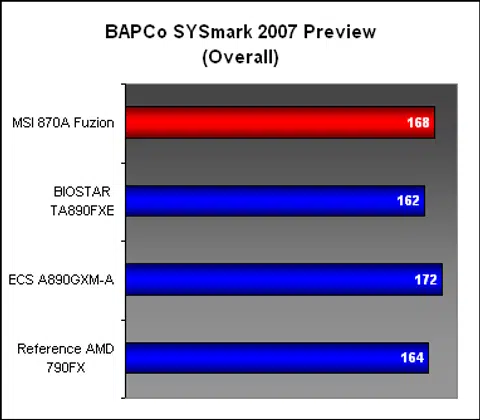
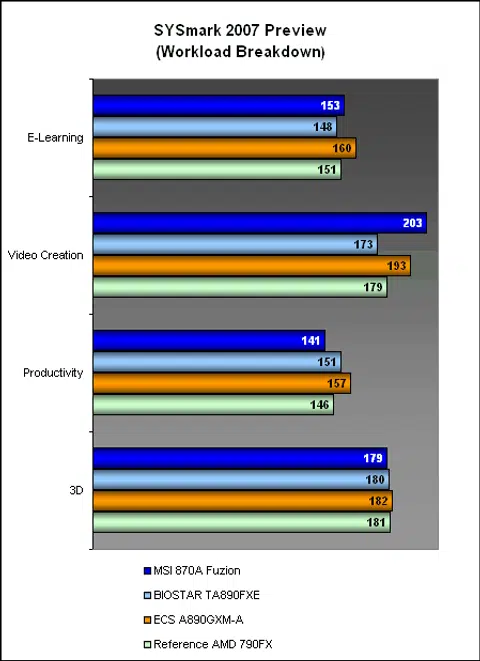
While the MSI 870A Fuzion was not the best performer among the four boards in SYSmark 2007, it was up to the task of matching the more costly AMD chipsets, at least in this system suite. Of course, the differences between the chipsets revolve around their features, rather than their performance. The Fuzion appeared to be particularly strong in the Video Creation segment, though the Productivity was a tad slower.
Results - Futuremark PCMark Vantage
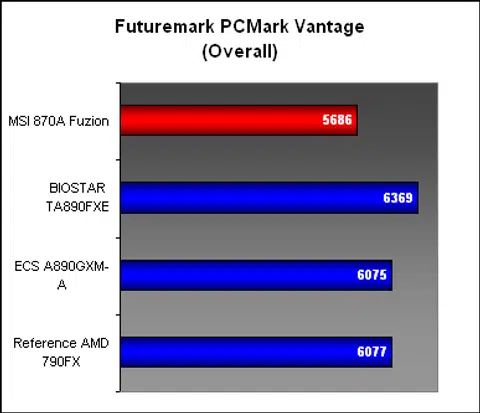
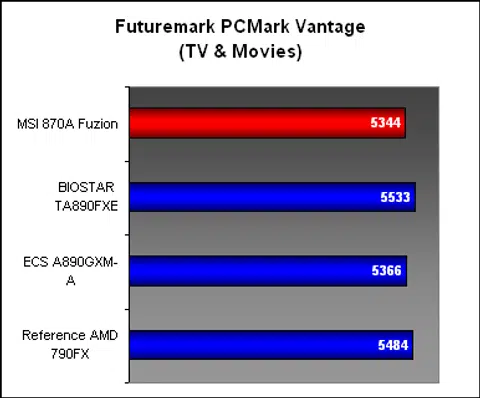
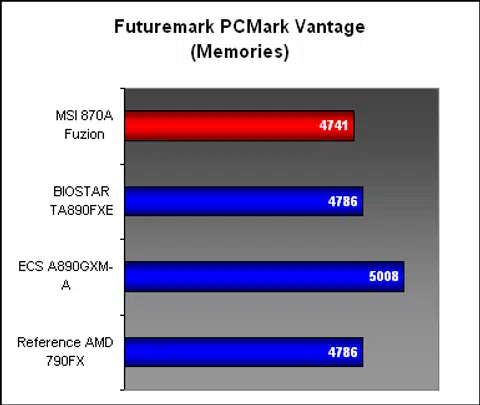
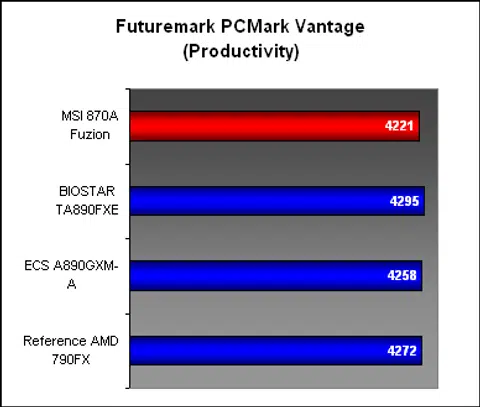
The overall score for the MSI 870A Fuzion was a bit of a downer, but looking at the breakdown, it wasn't that lacking in the important subsections. No doubt, the MSI ended up last in all the segments, though one can argue that the scores were within striking distance of the competition.

Results - SPECviewperf 9.0
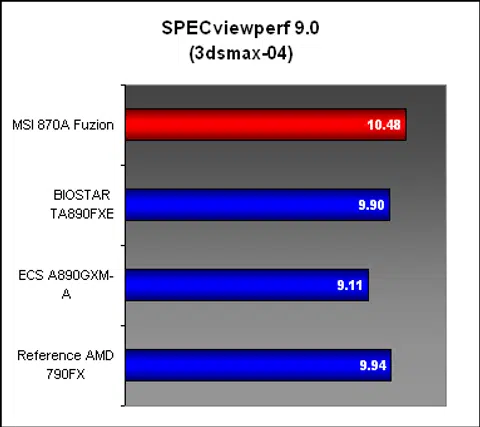
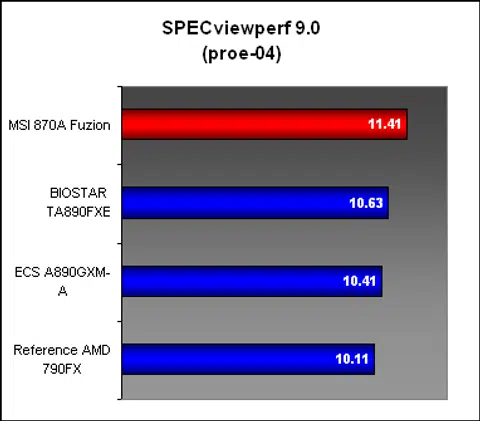
Given what we have seen of the Fuzion so far, it was a surprise to find it leading the pack in SPECviewperf, and by a decent margin too. At least we know that the memory performance is extremely competitive.
Results - Futuremark 3DMark Vantage & Far Cry 2
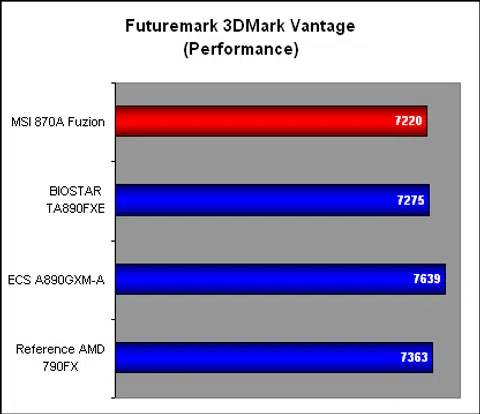
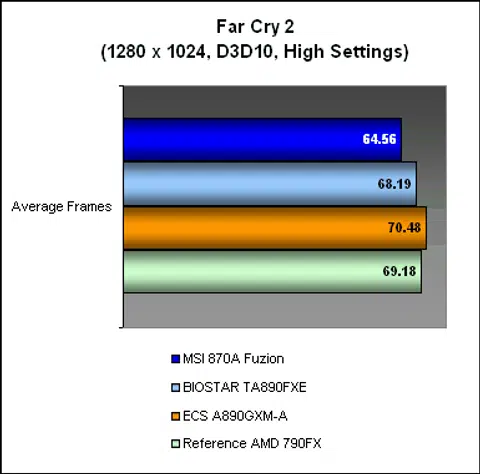
However, the MSI was back to taking up the bottom spot in our gaming benchmarks. While it was very narrowly behind the rest in 3DMark Vantage, there was a clear gap of around 3 to 4 frames in Far Cry 2, which is a substantial amount considering that we hardly see too much variation in this benchmark for motherboards. Note that these results are from our standard single-GPU testing. Flip the next page for more findings with the Lucid Hydra engine put to test.
Benchmarking the Hydra Engine
So far, the MSI 870A Fuzion hasn't been the snappiest of motherboards. Whether that can be attributed directly to the chipset or not, consumers who have an eye on the Fuzion are likely to care more about its star attraction - the Lucid Hydra Engine. Thanks to this chip, one can now do multi-GPU configurations from different vendors and even different classes of graphics cards (though having two cards with an extreme performance gap between them is likely to degrade your overall, combined performance). Then there are the issues that we had encountered with the Lucid chip previously. Are they still present?
Well, we have to say that despite progressing to version 1.51 for their drivers, the Lucid Hydra Engine is not perfect yet. It didn't appear to work with the latest NVIDIA GTX 460 when we tried.
Update: We got word from MSI after our testing was completed that they have "just received the multi-GPU technology V1.6.105 Beta-driver which extends the support for NV460 Graphics card". While it's good to know that Lucid is doing its best to keep up with GPU launches, it just highlights the problem that early adopters will face with this technology.
We also had to resort to ATI Catalyst 10.5 driver instead of the latest 10.6, but that seems to be an issue with the Catalyst driver rather than Lucid. So, for this test, we used a pair of NVIDIA GTX 260 and a pair of ATI Radeon HD 5770, and of course, we mixed and matched them in what Lucid calls the X-mode (ATI Radeon HD 5770 and NVIDIA GTX 460). We used NVIDIA's ForceWare 258.96 and ATI's Catalyst 10.5 for the graphics cards, while the Hydra driver used was 1.51.
Given its popularity as a benchmarking tool, Lucid has done its homework in 3DMark Vantage. We saw some impressive results from the technology, including Lucid's A-mode, which consists of two ATI graphics cards, narrowly beating the native CrossFireX implementation in this benchmark. N-mode, which combined two NVIDIA graphics cards, in this case, a pair of GTX 260 produced the highest score here, while the mix and match X-mode also churned out a very competitive score. Compared to the single card performance, Lucid's technology was definitely doing its best to show what it was capable of.
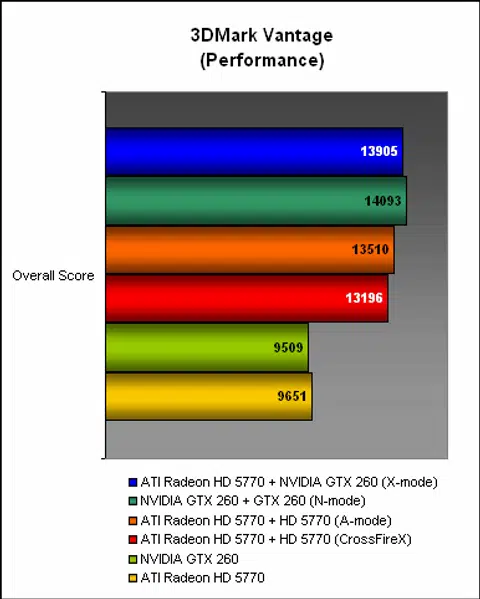
So how did the MSI 870A Fuzion perform in an actual game? We tried our luck with Far Cry 2, which is supported by Lucid. As our scores below showed, the results were a far cry (pardon the pun) from its 3DMark Vantage performance. The native CrossFireX implementation produced the best scores by a decent margin, with Lucid's N-mode finishing second. Since we couldn't really tell the effectiveness of the N-mode as the chipset does not support SLI natively, we could only use the A-mode score, where we found it was some distance behind the native CrossFireX implementation. Finally, the X-mode, which mixed an ATI Radeon HD 5770 with an NVIDIA GTX 260 worked, but the scores were only slightly better than a single card.
In short, Lucid's Hydra Engine works, but the results vary, based on the games and the particular configuration used. At its best, it's capable of matching the proprietary multi-GPU technologies from ATI and NVIDIA, but don't bet on that happening too often, especially when dealing with a just-released game title.

Temperature
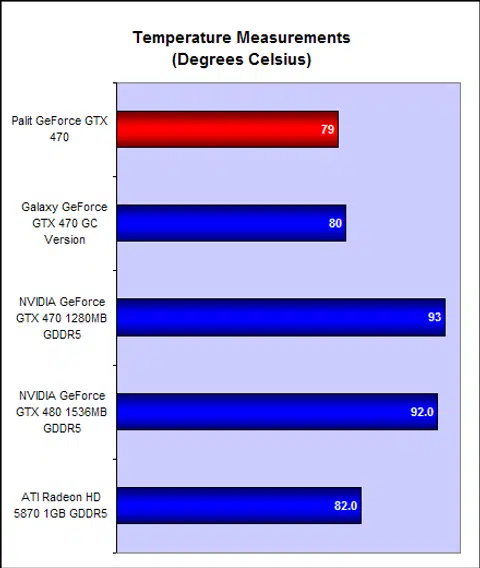
Despite the presence of a decent sized passive heatsink, the MSI 870A Fuzion's Northbridge was warm to the touch and compared to the other boards, it had slightly higher temperatures. The fact that the Northbridge and the Lucid chip were both under the same heatsink could account for the higher temperature. The Southbridge however, with its small passive heatsink, was in line with the others.
Power Consumption
We had a smattering of different chipsets in our comparisons, but generally, the power envelope of these boards did not deviate too far from the average. The MSI 870A Fuzion and its additional Lucid chip, had one of the higher power readings at peak, though its idle draw was second lowest, losing only to the Biostar 890FX board. Overall, it's acceptable considering the board's specifications.
Conclusion
With the MSI 870A Fuzion and the P55-based Intel alternative, the company is giving another shot at getting Lucid's Hydra Engine chip off the ground. Dubbed 'Fuzion' by MSI, this technology remains in its infancy, and even with the newer drivers that we tested the 870A Fuzion with, it's not without issues. At its best, like in 3DMark Vantage, we can see it competing with the proprietary multi-GPU technologies from ATI and NVIDIA. But at the same time, we also saw its flaws, with mediocre performance scaling in Far Cry 2, along with its main weakness - newer graphics cards will always be supported slower, due to the time lag between their debuts and Lucid's updating its drivers.
There's however potential in this technology and the mainstream segment that MSI has thrown it into may well be its defining moment. The AMD platform has lacked support for SLI since NVIDIA stopped its chipset development, so the 870A Fuzion definitely has a rather unique selling point here. Mainstream users unfortunately are less likely to be dabbling in multi-GPU setups, which doesn't bode well for it. It's possible that users will outfit this board with one graphics card first, and eventually add another when they could afford it, or when they find their graphics horsepower lacking.
In any case, to attract the mainstream user, the right price is needed. At US$140, the 870A Fuzion is in danger of pricing itself out of the market. MSI's other Fuzion-less AMD 870 variant costs about US$100 with very similar features (and with a newer Southbridge), which roughly puts the Fuzion premium at around US$40. While MSI has expressed its hope that users won't mind paying for Fuzion if the price is mainstream, we still think that the slight premium will limit the adoption. More so when similar AMD 870 boards from competitors, go for just US$90.

It's an unique motherboard, but since MSI is aiming at the mainstream segment, every dollar counts and at US$140, the 870A Fuzion has a lot to prove its worth.
Besides its Fuzion feature, this MSI board does include some of its best current technologies and features, which helps to keep it modern despite the choice of a slightly older chipset. The layout of the board was also generally very good, despite its odd alignment of two of its SATA ports. The performance, while slower than the newer chipsets, was not too far behind. The Hydra chip did seem to increase the temperatures recorded at the Northbridge heatsink by a fair margin, though power consumption did not spike up by too much.
If MSI can lower the price for this board just a bit more, we can see it having a real chance of bringing Fuzion to the mainstream. If not, a niche product it's likely to be.
Our articles may contain affiliate links. If you buy through these links, we may earn a small commission.