
The Mother of Boards: Gigabyte EP45-DQ6 Preview
We've shown you what Gigabyte's upcoming DS4-class Intel P45 motherboard has in store for you, but you haven't seen anything yet till you meet the mother of all boards - the DQ6 heavyweight. Big on storage, security and networking bandwidth, you would be hard-pressed to find a rival.

A Board That Probably has it All
Just a couple of days back, we brought you a preview of that's targeted at the high performance user group. Since then we've had more time to twiddle with Gigabyte's top P45 motherboard SKU and better understand its board design as we spoke with the respective technical managers. As you would have expected, this is none other than the all-encompassing DQ6 variant. To-date every DQ6 board model since the P965 Express chipset has been designed to impress and cram every possible feature of their time. For Gigabyte's new Intel P45 flagship, this was the scenario once again as the GA-EP45-DQ6 once again outdoes all its previous incarnations as it throws in everything but the kitchen-sink.
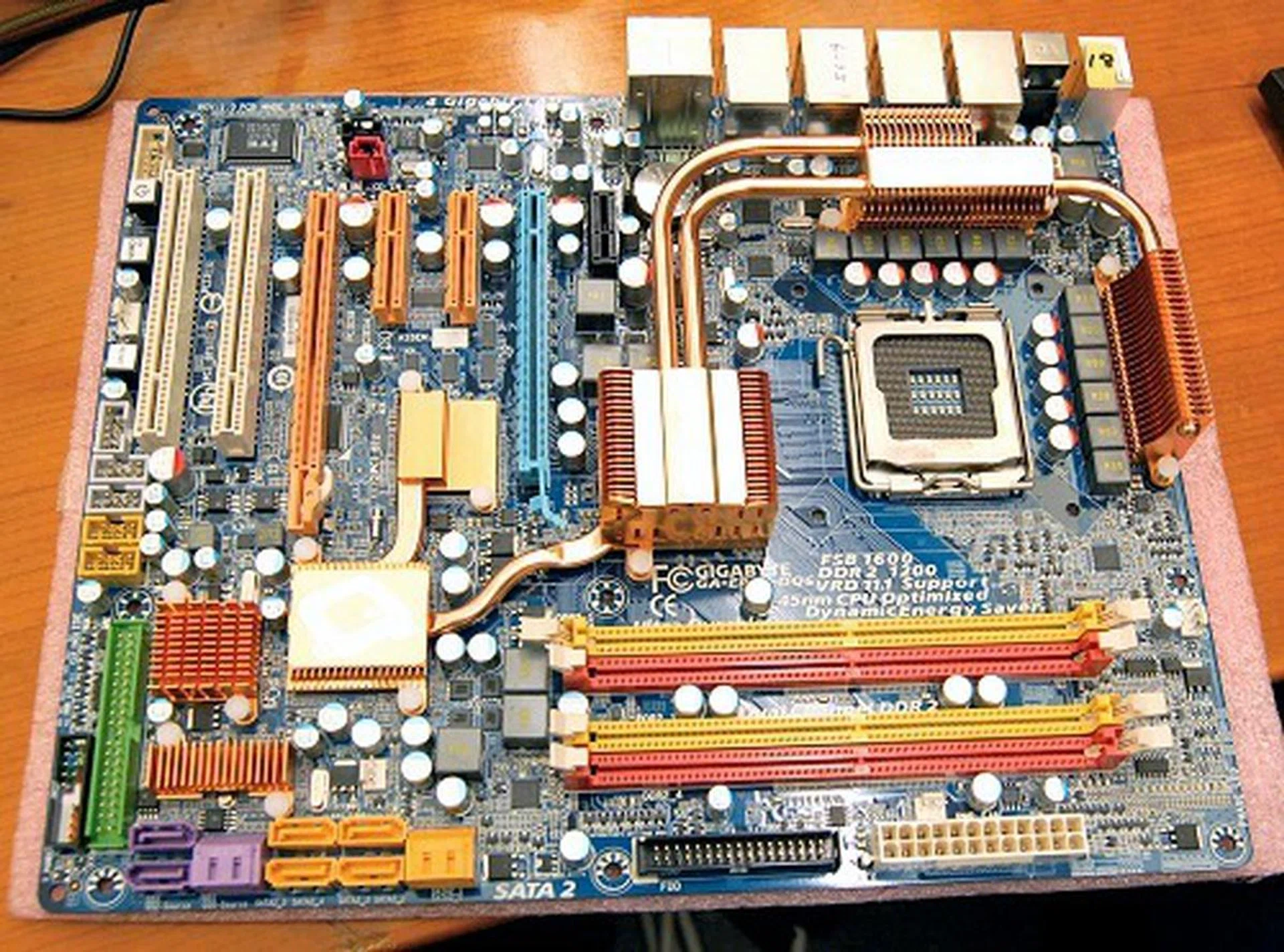
And here she is - the GA-EP45-DQ6 motherboard. While not appearing anything out of the ordinary for a high-end board from the company, you'll soon find out that there's a lot more features crammed into this seemingly 'normal' board.
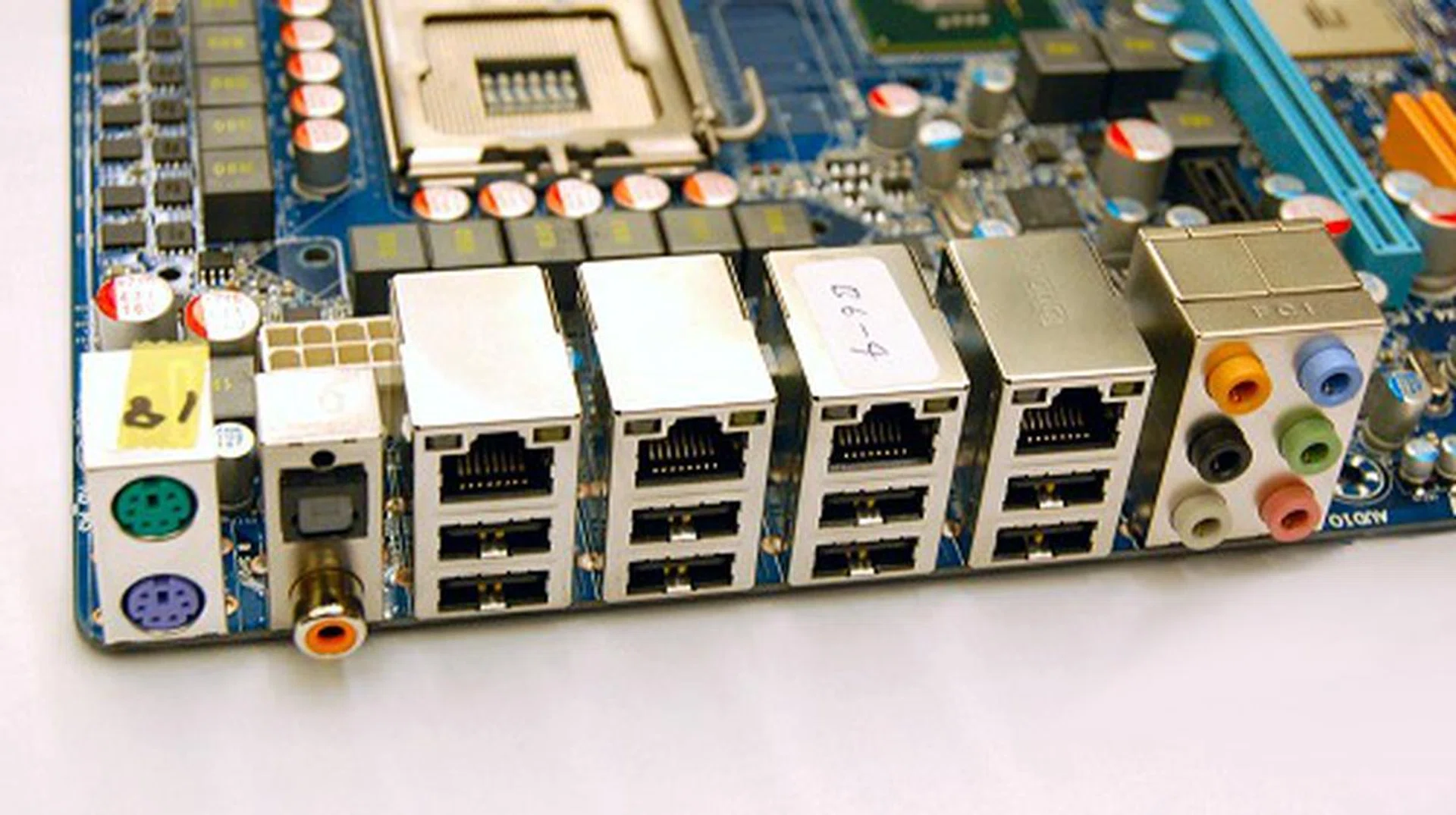
The first clue of this board's power and class is revealed on its rear-I/O panel where you'll find an impressive array of four Gigabit Ethernet ports, eight USB 2.0 ports and other usual accompanying ports. FireWire support is still available on the board, but that's been moved to the dedicated brackets to make way for the onboard 'router'. Serial and Parallel ports have long been abolished, but PS/2 ports still linger on for those of us still holding on to our older tried and trusted keyboard/mouse combos.
The DQ6 class of motherboards have a way of creating their own headlines as each revision comes into existence and GA-EP45-DQ6 has several landmark features to make the DQ6 family proud of this newcomer. On board, you'll find four PCIe based Realtek 8111C Gigabit LAN controllers and this is readily seen by the rear-I/O panel's impressive quad Gigabit LAN ports. Before your jaw drops to the floor, we'll jog your memory that this isn't the world's first consumer board with quad LAN ports - that honor while still belonging to Gigabyte, was first introduced in their nForce 680i implementation in the . So that makes the GA-EP45-DQ6 the second board in history to feature four Gigabit LAN ports.
That's not to say that that this isn't one-of-a-kind, because the Realtek Gigabit controllers as well as the new software stack now supports teaming functionality across all these ports which enables four discreet connections to act as a singe massive connection with four times the bandwidth. Simply put, you've the equivalent of a single 4Gbps connection at your disposal for an ultra high performance digital media home server. Factor in Duplex operational modes and your theoretically have an 8Gbps connection! And unlike previous onboard LAN incarnations, these new network connection standards support Receive Side Scaling (RSS) that helps balance network traffic load among dual-core processors for better overall system performance. Furthermore, the network ports and the software stack are more resilient than ever before with fault tolerance support. Should any link suffer from a hardware failure, it is able to prevent network downtime by transferring the load to the other remaining working ports - be it in teaming mode or not. Sounds almost as if you're getting an onboard router with this motherboard, doesn't it?
10 SATA Ports and Two Hardware RAID Processors
The board has an abundant concentration of SATA ports to the bottom corner of the board - far more than the six SATA 3Gbps ports that the ICH10R Southbridge supports. So how does it do it? The answer lies beneath those extra heatsinks covering a handful of crucial ASICs.
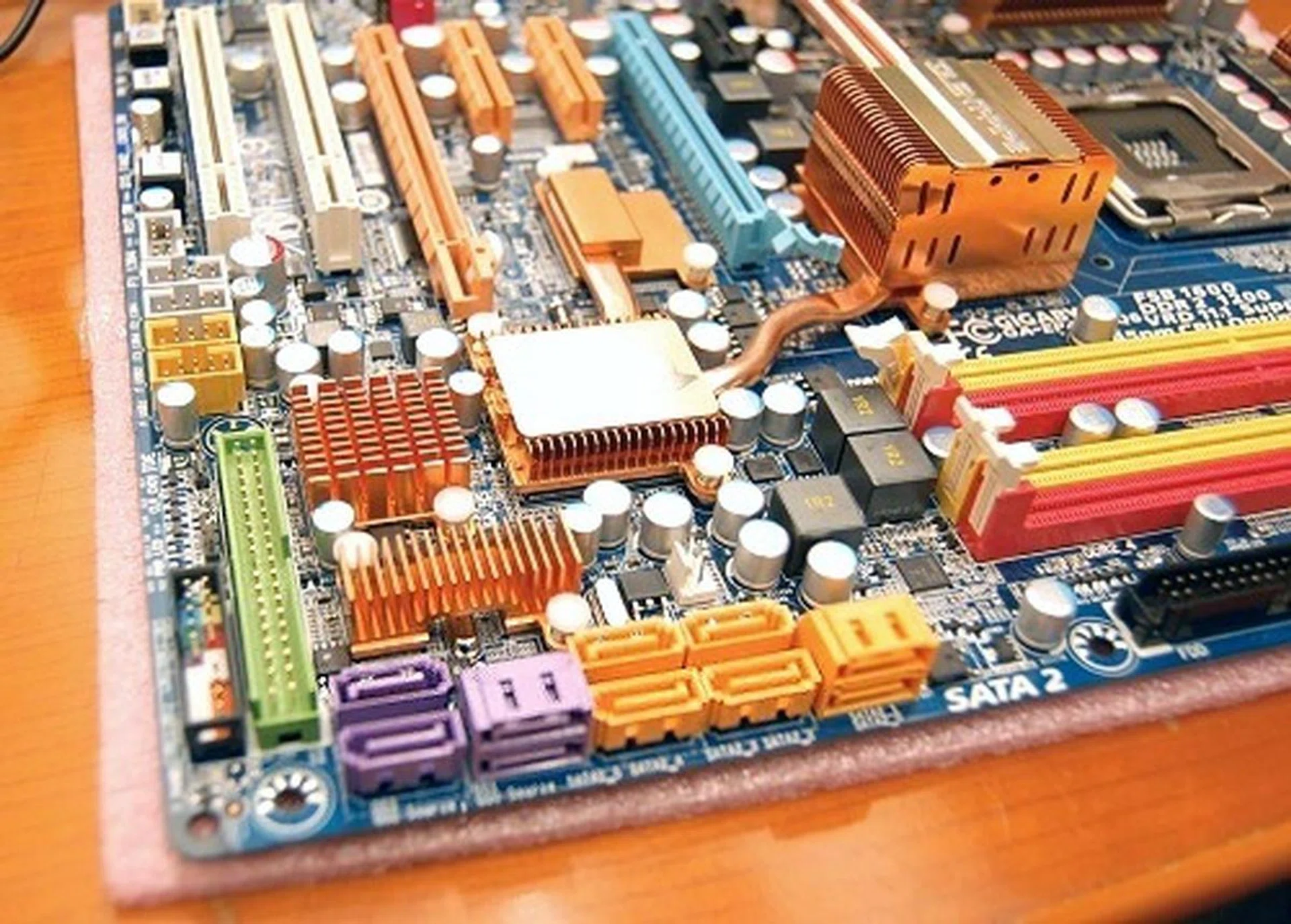
The GA-EP45-DQ6 board supports up to 10 SATA 3Gbps ports, but only six of those (colored orange) are supported directly by the Southbridge chip.
Remember, ICH10 Southbridge chips don't support PATA controllers and we'll all need one of those to at least run the optical drives that are still transitioning to the SATA interface. To facilitate this, Gigabyte is using a JMicron JMB363 PCI Express chip (uses a PCIe lane from the ICH10R) which provides dual SATA 3Gbps ports and a single PATA controller. Still, these don't account for the SATA port count. Here's where things get a little interesting. Just below the JMB363, you'll find a pair of Silicon Image SiI5723 SteelVine hardware RAID processors. Each of these SiI5723 RAID processors uses a single SATA 3Gbps interface (riding off the JMB363 controller) and has a built-in port multiplier which supplies two SATA 3Gbps ports. Thus, both the RAID processors together support the four extra SATA ports which the Intel P45 chipset doesn't supply.
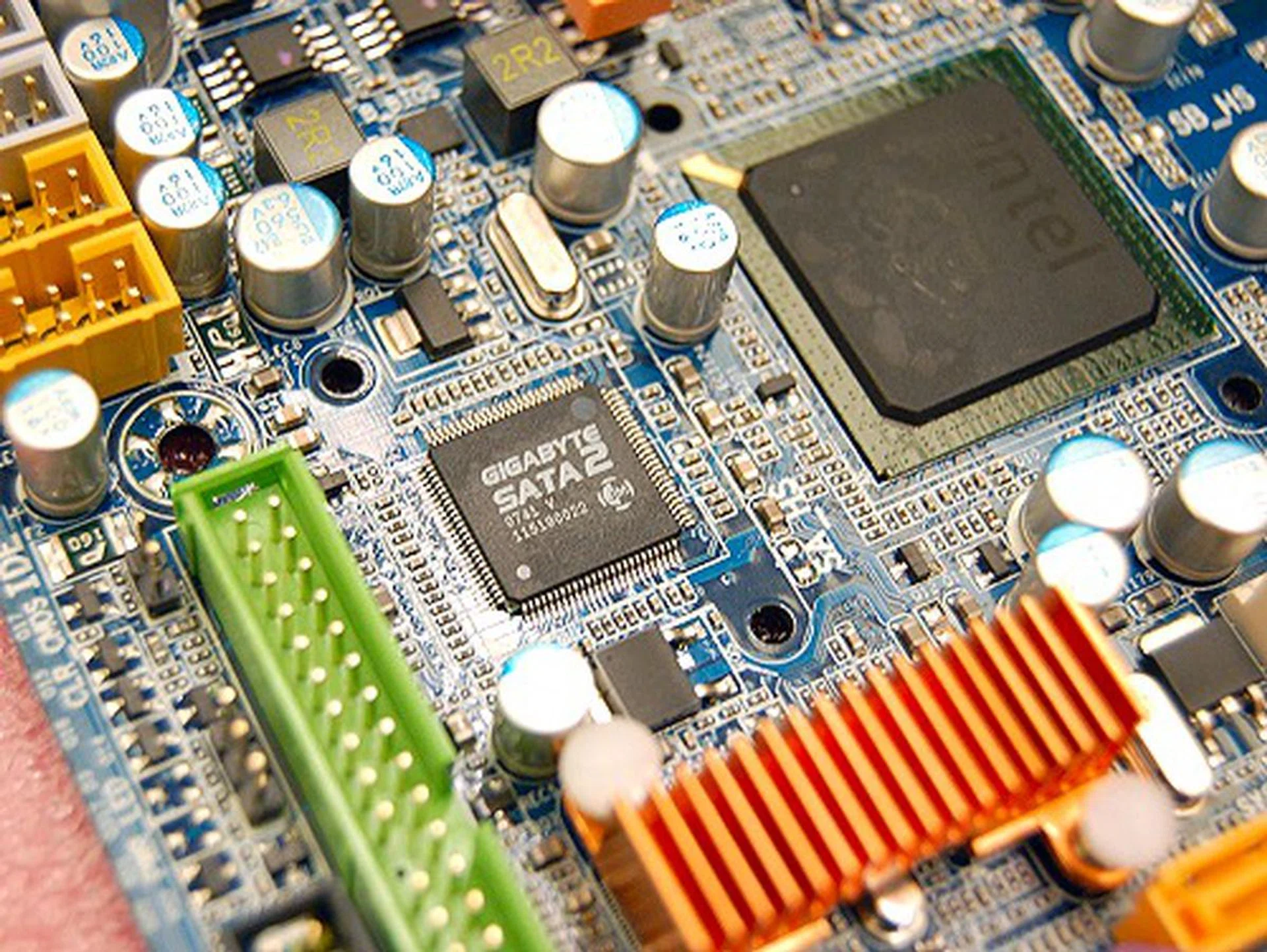
Removing the heatsink assembly off the board, this picture reveals the Intel ICH10R Southbridge and the PCIe based JMicron JMB363 dual-port SATA 3Gbps and PATA controller. However, this does not directly control the four extra ports.
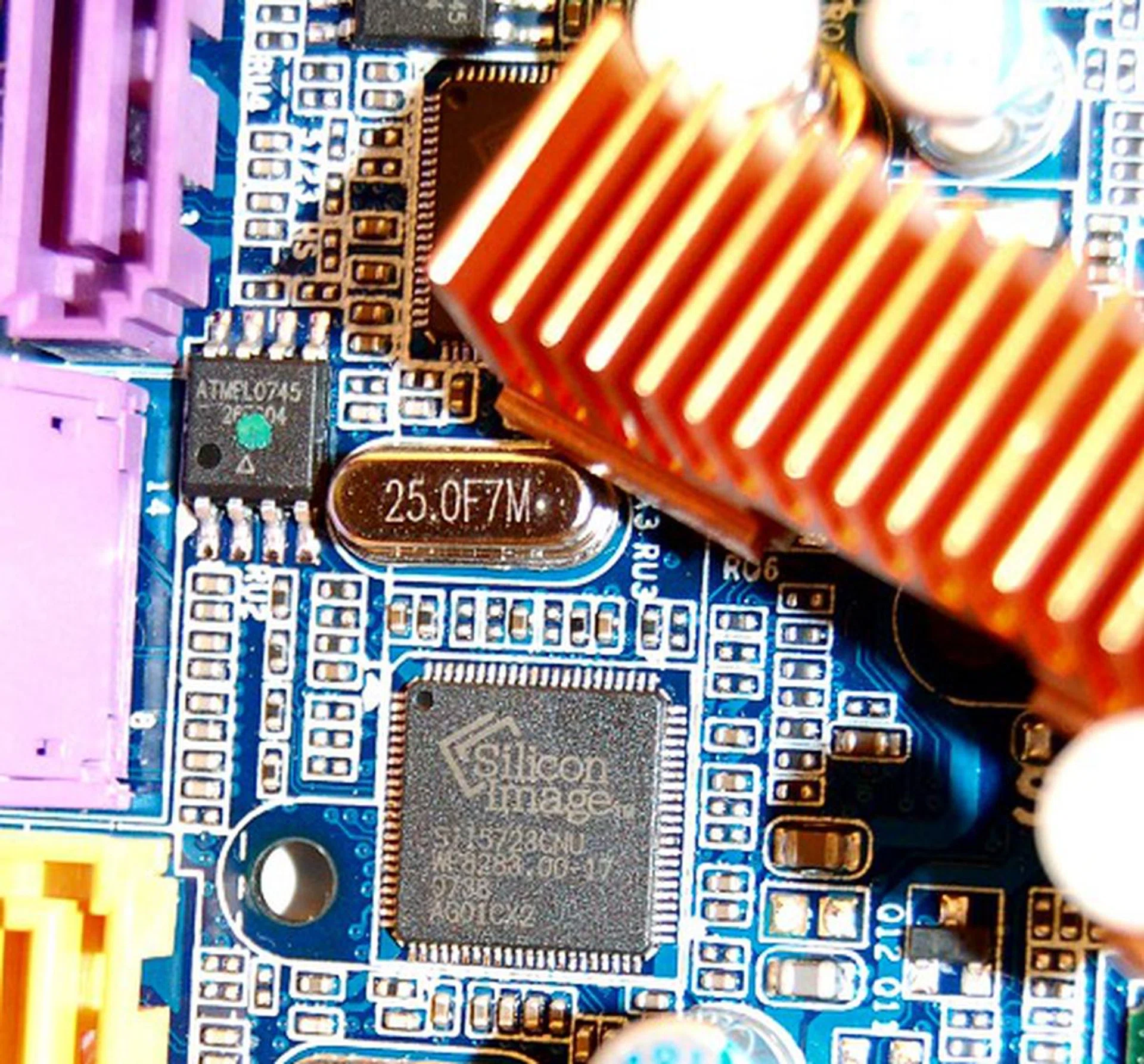
Removing another heatsink below the JMB363, we find a pair of Silicon Image SiI5723 SteelVine hardware RAID processors. These give rise to the four extra SATA 3Gbps ports in addition to those from the ICH10R chip.
This isn't the first board that we've encountered with hardware RAID processors as the and the featured the older Silicon Image SiI4723 model. The new SiI5723 uses much smaller footprint thanks to new process technology and introduces a few new interesting RAID modes. Although being only a 2-port RAID controller and thus primarily supporting RAID 0 and RAID 1 modes, it introduces two new multi-RAID modes known as SAFE33 and SAFE50. Here's a quote from Silicon Image on what they do:-
" Multi-RAID modes automatically create two virtual volumes, one SAFE and the other BIG (also known as concatenation), and are designed to balance the benefits of capacity and protection with only two drives. SAFE50 divides the physical space on each drive equally to create each virtual volume. In SAFE33, two-thirds of the available physical space is used to create the BIG partition, and the remaining one-third is used for the SAFE partition."
So Safe33 and Safe50 are alternative RAID modes to get the most out of your RAID subsystem. Of course if you require RAID 5 across your four hard drives, you can depend on the motherboard's native SATA RAID controller from Intel. In addition to hardware RAID processors freeing up your CPU processing overheard, the bigger highlight is that they don't require any configuration or drivers and work independently of the operating system used.
In all, the Gigabyte GA-EP45-DQ6 supports a total of three independent RAID subsystems - one software-based from Intel, and two hardware based from Silicon Image.
Enabling All Features - 'PCIe Magic'
By now from our "Eaglelake" motherboard coverage, you would come to realize that the Intel P45 chipsets are able to support two PCI Express graphics (PEG) slots with an x8/x8 electrical interface configuration. The Gigabyte GA-EP45-DQ6 is no different in this aspect, but the board has an interesting proposition to the extreme power users in making sure all peripheral based PCIe devices and expansion card slots are fully useable given the kind of features the board has. The Southbridge is able to supply only six PCIe x1 lanes, but despite that, the GA-EP45-DQ6 supports a pair of PCIe x4 slots, a single PCIe x1 slot, a JMicron JMB363 PCIe based SATA/PATA controller, and four Gigabit PCIe based LAN controllers. While this might sound normal to you - the difference here is that the board is able to work with all of these features concurrently and not disable any device or slot. Do the math and you'll realize that you'll need 14 PCIe x1 lanes to make this configuration feasible, but there are only six physical lanes. The answer lies with this IDT 89HPES16T7ZH PCI Express I/O expansion switch:-
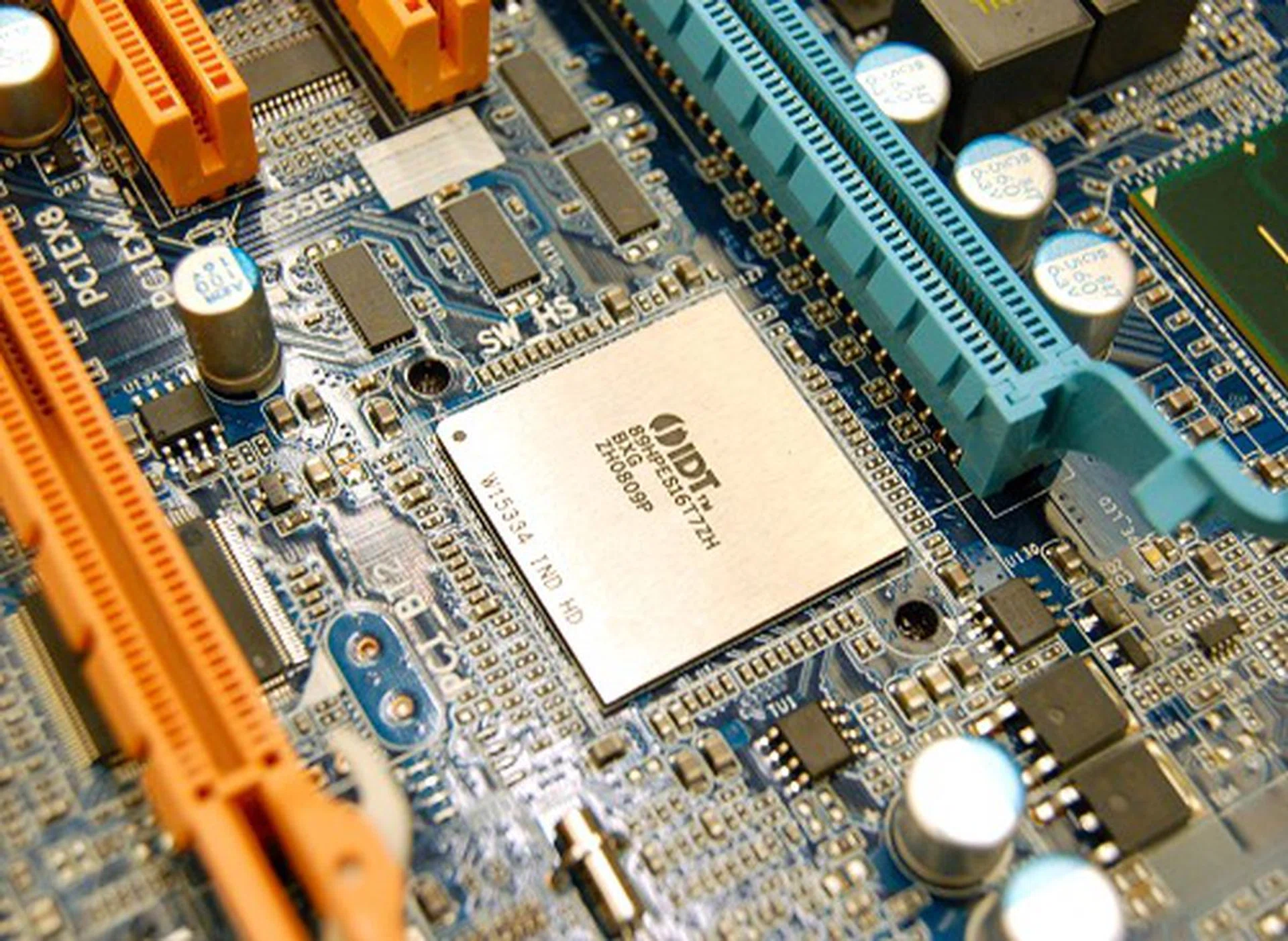
This IDT PCIe switch controller takes in four PCIe x1 lanes from the Southbridge and dynamically assigns the bandwidth to the various devices connected to it. This way, no device is shortchanged or disabled and all functionality of the board is available for use (subjected to the total bandwidth cap).
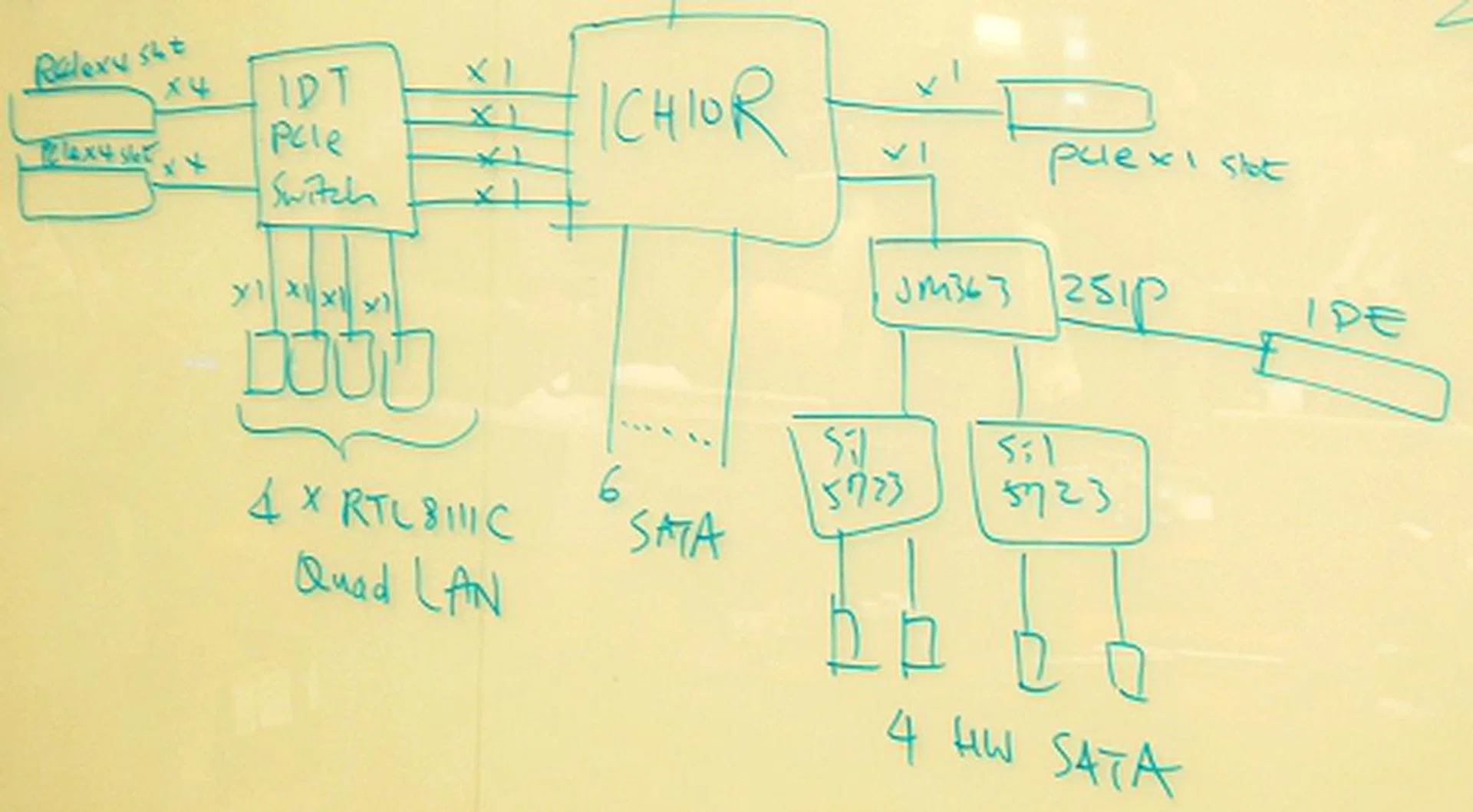
Here's a sketch from Gigabyte on how all the I/O ports, expansion cards and onboard devices are linked up.
As seen in the hand-drawn schematics from Gigabyte, the sole PCIe x1 slot and the JMicron JMB363 are directly linked to the Southbridge, thus occupying two PCIe lanes and leaving the remaining four PCIe lanes for the IDT PCIe switch to dynamically assign bandwidth to the other devices connected to it - namely the four Gigabit LAN controllers and the pair of PCIe x4 slots (totaling to 12 PCIe lanes). Although the IDT chip is a 7-port switch capable of handling 16 PCIe lanes, its total bandwidth that all the devices connected will receive is equivalent to a PCIe x4 slot, since that is all the ICH10R Southbridge is supplying it.
DES - Take Two!
In terms of motherboard longevity, reliability and power efficiency, the GA-EP45-DQ6 maintains the same Ultra Durable 2 design philosophy. What they did improve upon this time round is their Dynamic Energy Saver (DES) and in its second revision now, it goes by the DES Advanced naming scheme. While DES is a combination of both hardware (Intersil PWM controller) and software interface, we didn't have a lot of luck in when we tested the Gigabyte GA-X48-DQ6 with its early BIOS and software nature. Now with DES Advanced, Gigabyte has had time to advance both the granularity of control in power phases in operation as well as the software interface layer.
One of the key things that DES Advanced rectifies upon its earlier incarnation is that it is now fully operational even when overclocking. Previously, the minute you alter any overclocking related settings, like voltage or clock frequency, DES is deactivated. Now in DES Advanced, you can overclock and overvolt your components and DES will still function as it monitors your actual loading level to determine the optimum power phases to remain in operation to give the board optimal power efficiency and utilization. This alone is a big step in the right direction and additionally, DES now remains operational even when the utility is closed in the OS. In fact, it retains your preferred settings and operational mode and operates in stealth mode, without even having to load a taskbar tray utility.
However, it still hasn't solved the problem of it being reliant on the operating system - in this case, Windows XP/Vista. Gigabyte mentioned that they are working on the next revision of DES to ensure it's really a BIOS level switch rather than being tied to an OS. We suspect this is probably a feature of the next generation chipset motherboards since DES Advanced is barely even out. Of course, if Gigabyte does work overtime to bring about this advancement later via a BIOS update, that would be a really pleasant surprise.
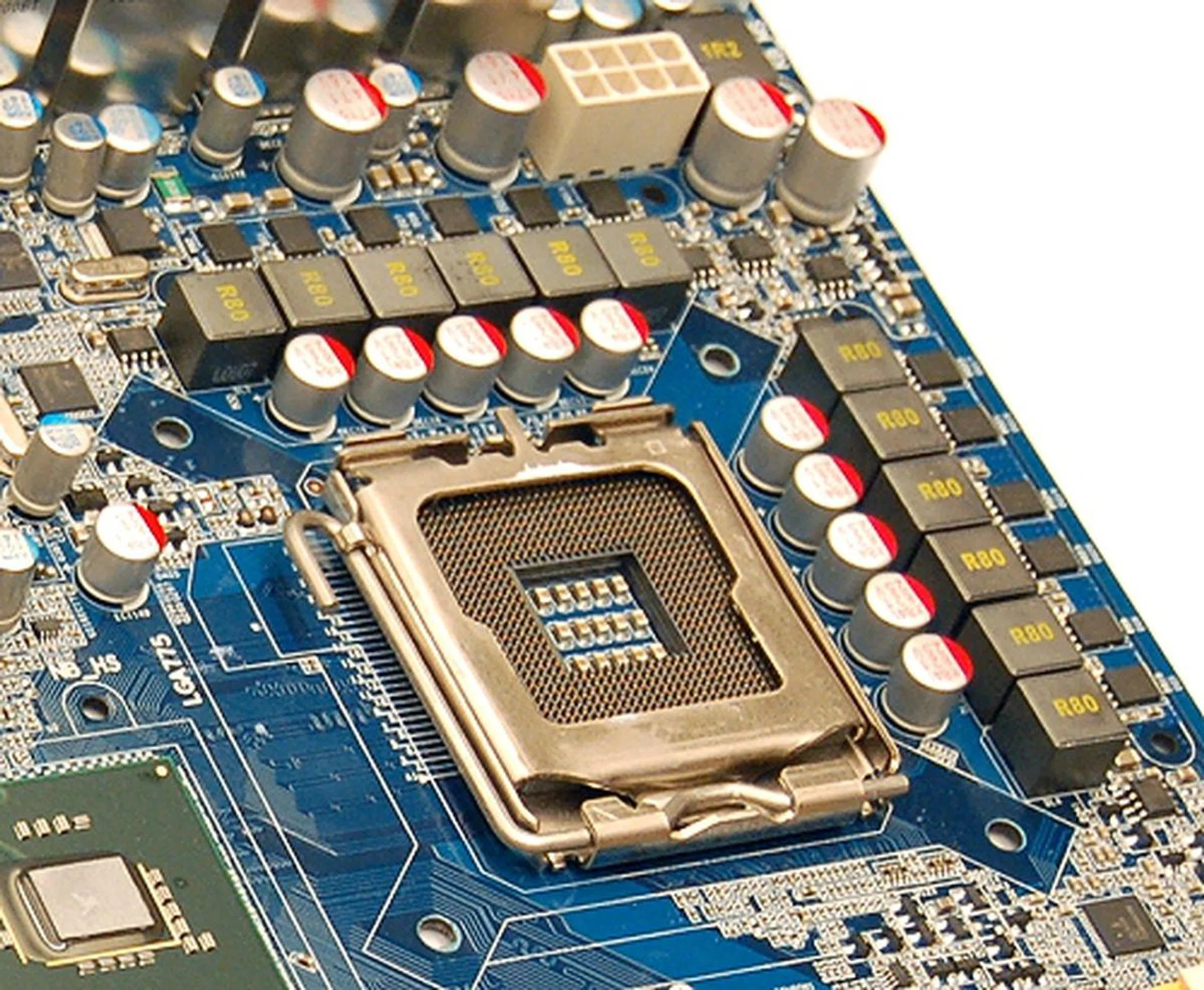
The board features a 12-phase power design and is assisted by DES Advanced for more efficient operation and power savings.
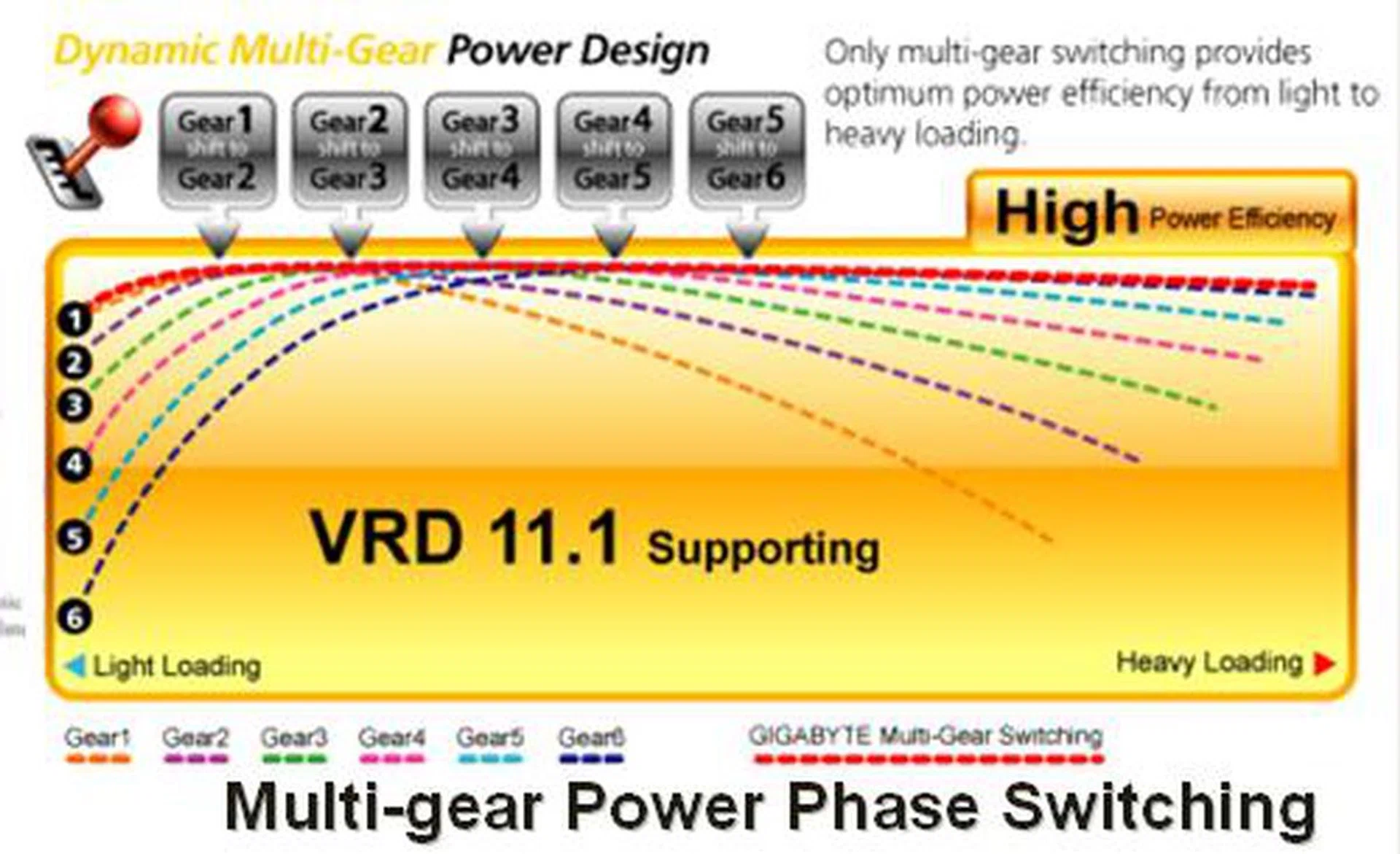
Gigabyte's diagrammatic representation of the power efficiency of the board at different loading levels at any given number of power phases in operation. Thus dynamic multi-gear power phase switching aims to achieve maximum power efficiency at any loading level.
The motherboard still employs a 12-phase power design as with its other DQ6 class boards for sometime now. With DES' dynamic six-gear switching design, it is able to determine the number of operable power phases (2, 4, 6, 8, 10 or 12 phases) for various system loading levels (low to high). Motherboards with a less extensive VRM design will feature a reduced variant of the dynamic multi-gear power phase switching. For example, an 8-power phase board only requires four gears and so on.
Other Notable Traits of the New DQ6
Diagnostic LEDs pinpointing the exact areas of trouble. is an interesting new touch, but if the board is installed within the casing, it can get a tad more difficult to figure out which LED is lighted up. While this is better than nothing, a standard debug LED placed in a prominent location could be just as helpful - if you've got your manual handy. In that respect, the diagnostic LED idea is more visible and direct to pinpoint the problem, but neither can it capture and relate all issues like a debug LED's various codes. So there's a tradeoff here.
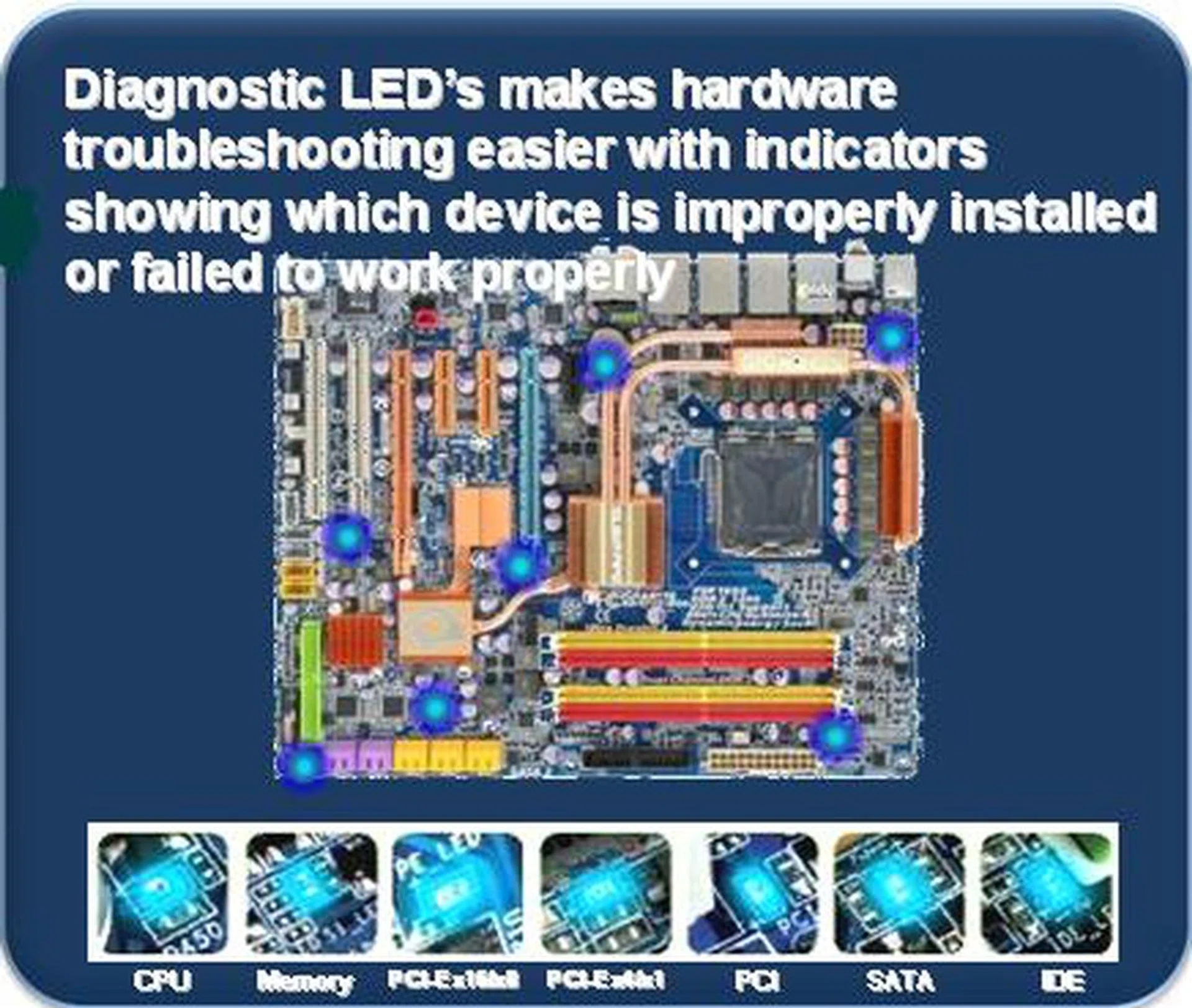
Diagnostic LEDs pinpointing the exact areas of trouble - if any.
Gigabyte's flagship P45 board also has security in mind and is equipped with a TPM chip from Infineon using a 2048-bit encryption key. Once set up, it stores your encryption key on a thumbdrive and you can't use your system without it; meaning no intruders or unauthorized users can have access to your PC as long as the key isn't plugged in. Additionally, Gigabyte's implementation also stores the encryption key in the BIOS (which is encased in yet another layer of password-based encryption prior to one accessing it), just in case you've lost your thumbdrive that has the access key. Nice.
At the moment, Gigabyte's busy perfecting their boards and BIOS before getting them ready for retail as well as for the media to review their final versions. So watch out for the full review in a few weeks at www.hardwarezone.com.
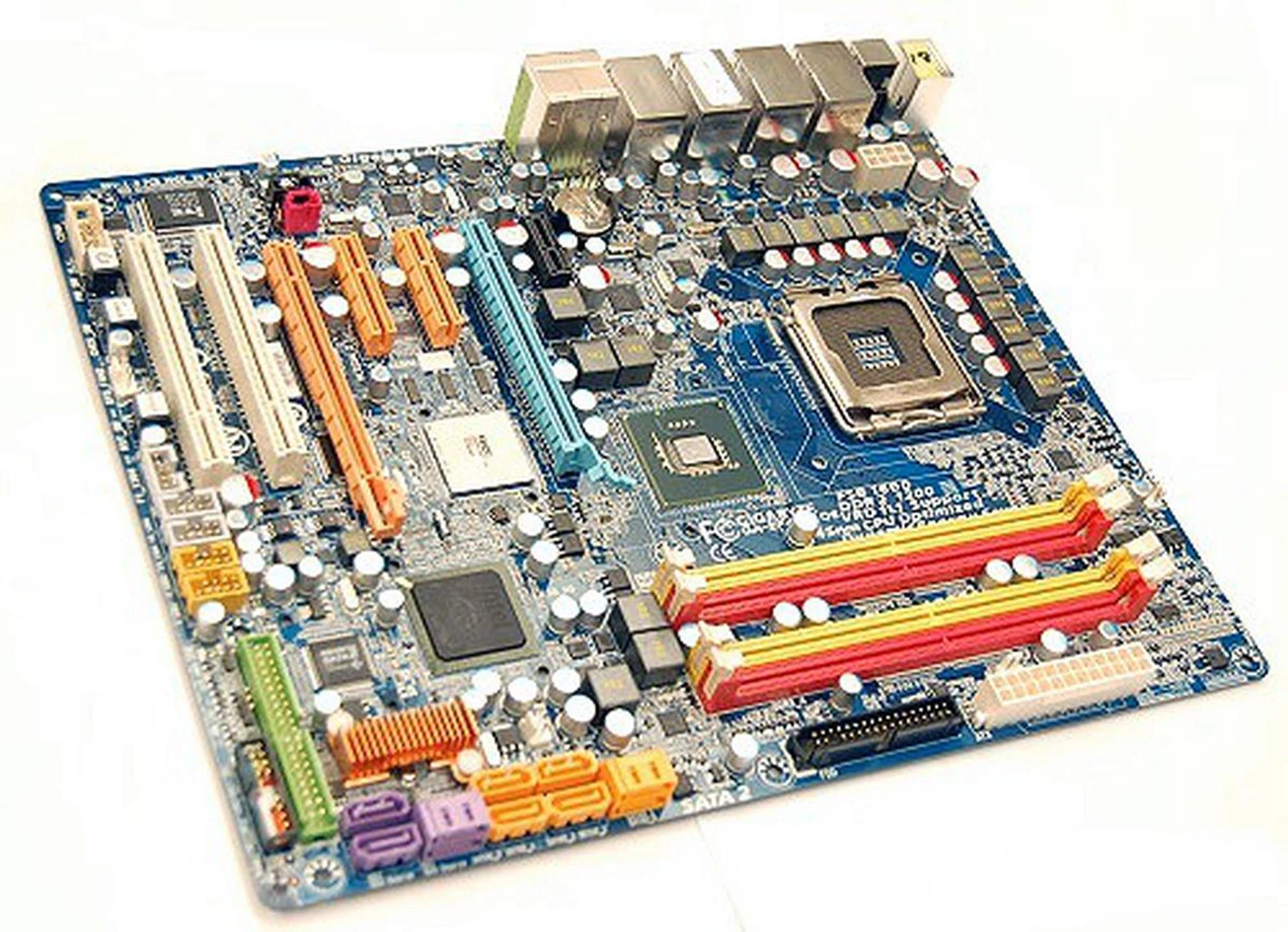
If this is your cup of tea, just stay tuned as these boards should be making their way in a couple of weeks.
Our articles may contain affiliate links. If you buy through these links, we may earn a small commission.