
LAN Party Potential - DFI BI 785G-M35 (AMD 785G)
The micro-ATX form factor appears to be the choice for motherboards using the AMD 785G chipset, including this latest version from DFI. With some enthusiast-friendly features, including its Auto Boost System, can the DFI LANParty BI 785G-M35 stand out from the rest?

LAN Party Potential
DFI has practically named all its motherboards with the LANParty moniker. While this may give some the impression that these boards belong in PCs which you lug to a LAN party, not all of the vendor's boards are micro-ATX versions. Of course, there's no stopping anyone from bringing a full tower to a LAN party either. However, when it comes to the AMD 785G chipset, DFI, like the other brands we have seen, has opted for a mATX form factor.
With the relatively capable Radeon HD 4200 graphics chipset integrated within, the AMD 785G is a slight upgrade over its 780G predecessor, bringing with it improved HD playback support and a newer Southbridge that adds the Advanced Clock Calibration (ACC) feature that improves CPU overclocking which was found initially on the AMD 790GX. Although the integrated graphics is entry level, install a more capable, discrete graphics card and voila! One gets a reasonably high-end, value gaming system and even with a Hybrid Graphics option should you choose to pair the integrated with an ATI GPU.
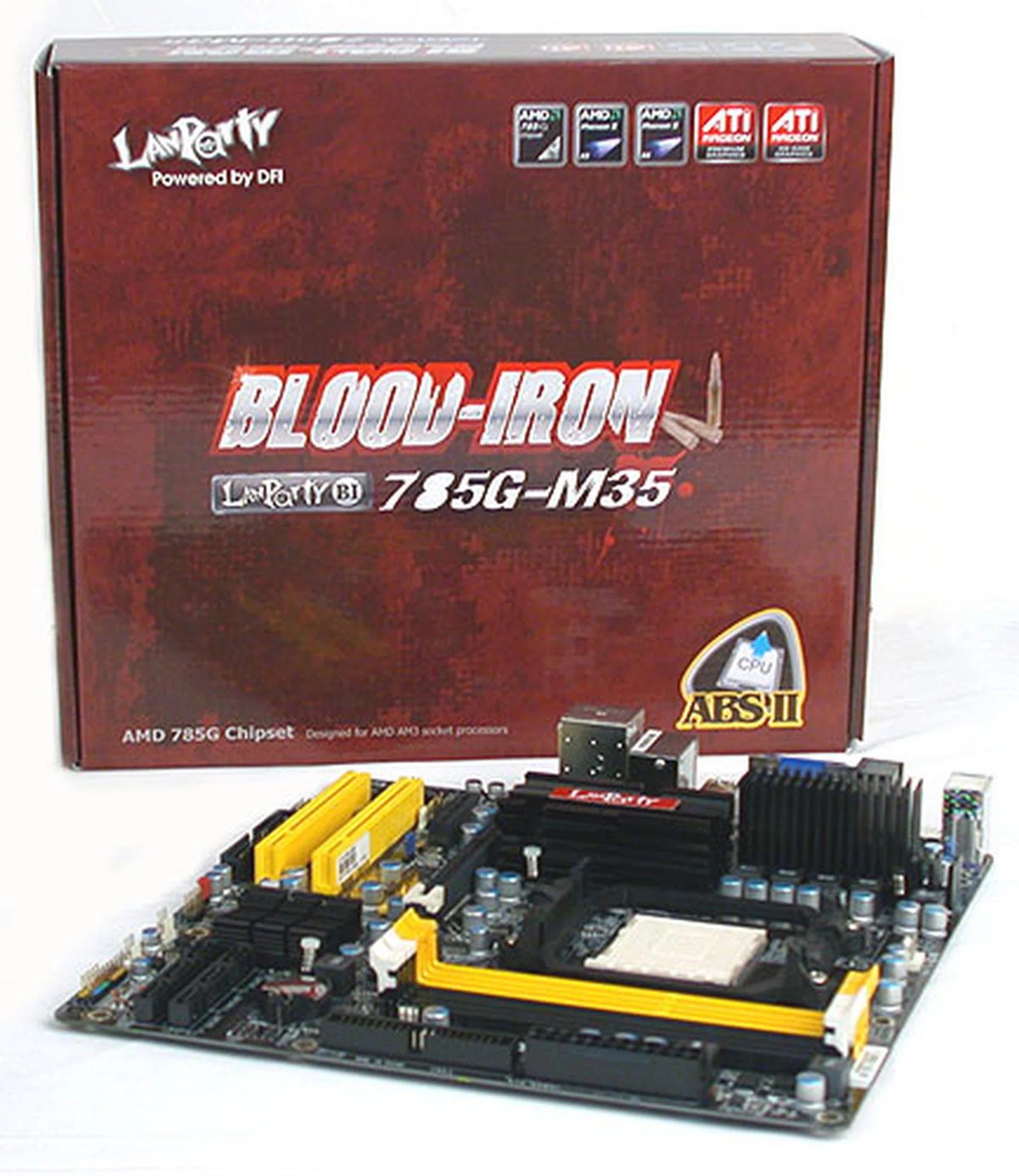
DFI's latest board in its Blood-Iron (BI) series, the LANParty BI 785G-M35 is hoping you have that same idea of building on the 785G chipset, by offering enthusiast-class features like its well-known Auto Boost System (ABS) overclocking utility on the mATX scene. Let's check out what DFI has in store:
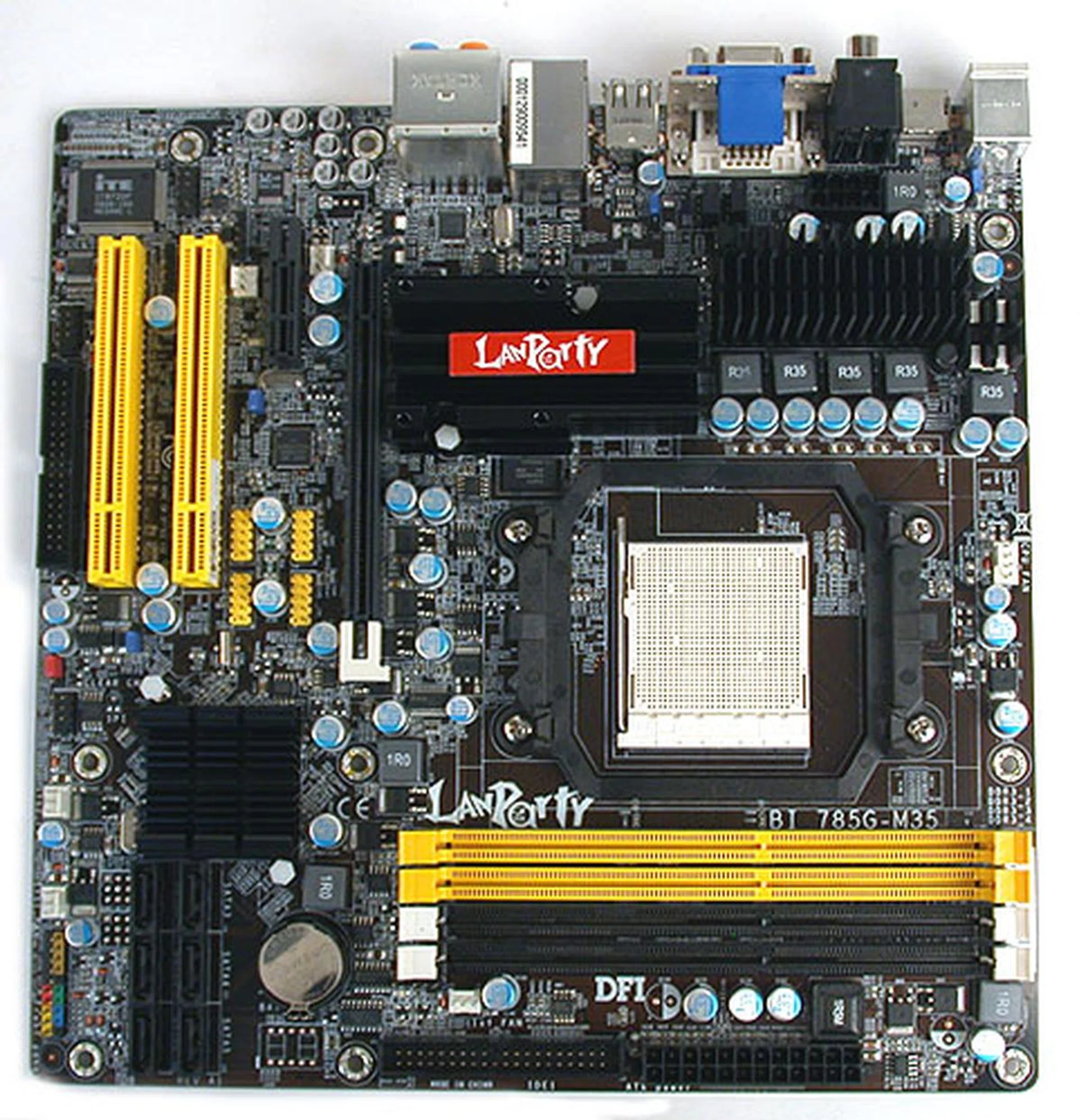
Micro-ATX seems to be the standard form factor for boards using the AMD 785G chipset, making it really suitable for small, LAN party oriented systems.
The DFI LANParty BI 785G-M35
As with any mATX board, getting all the components to fit on the limited space optimally takes some skill. DFI, though decent, did not excel in this department as the vendor made some compromises that we were not fans of. For one, this board's SATA ports are facing upwards, which meant that it is possible for the SATA cables to get in the way of any expansion cards. Fortunately, DFI has placed them far enough from the graphics card slot that even the modern, longer cards would not interfere. Still, it's less than ideal.
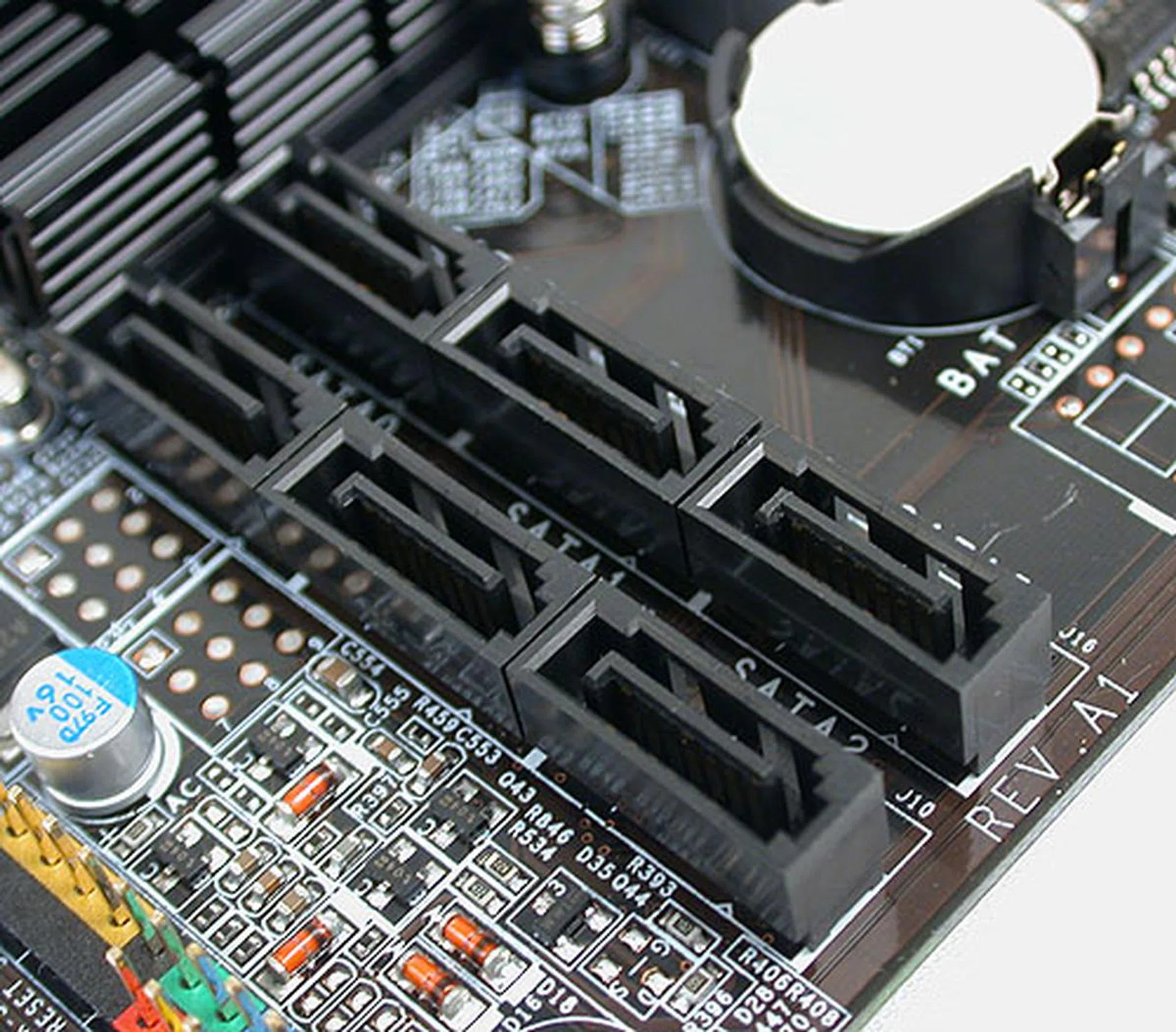
We usually prefer our SATA ports to be aligned outwards at the edge of the board so DFI's arrangement here is not ideal. Fortunately, it's not compounded by being close enough to interfere with the graphics card. A long PCI or PCIe x1 card however could pose some issues.
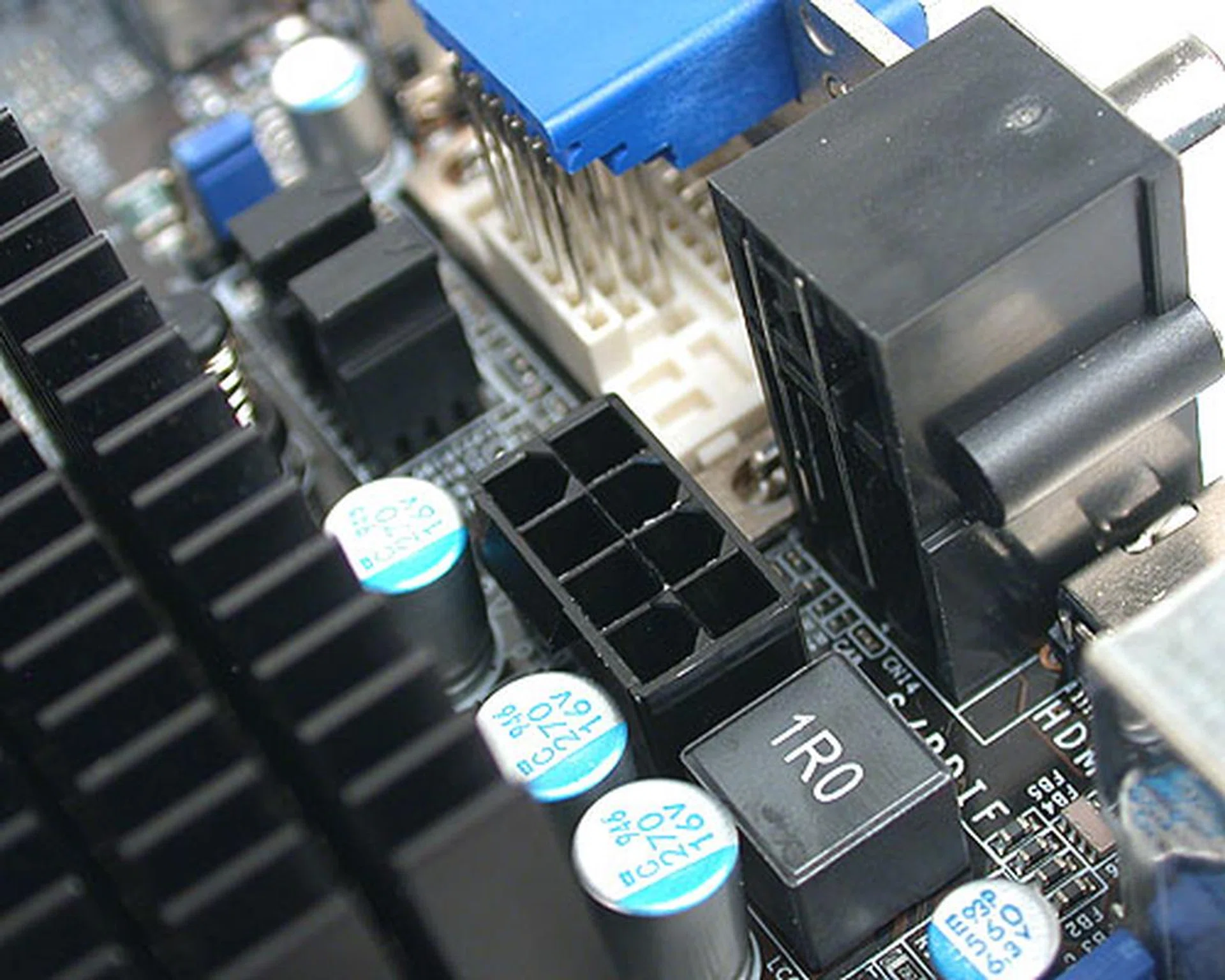
This 8-pin 12V power connector is located in a rather tight area, with little leeway for our fingers to maneuver. We had some difficulties removing our power cable after testing.
Another less critical issue is the location of the 12V ATX power connector, which is sandwiched in between the heatsink and the rear I/O panel. Although most users would hardly be removing the power cable often (likely only if they have changed their power supply unit), we found it quite difficult to remove the cable once it was attached due to the lack of room for our fingers to grasp and hold onto the retaining clip at the end of the power cable. It's not common but nevertheless, we felt that the connector could be located near the edge of the board instead.
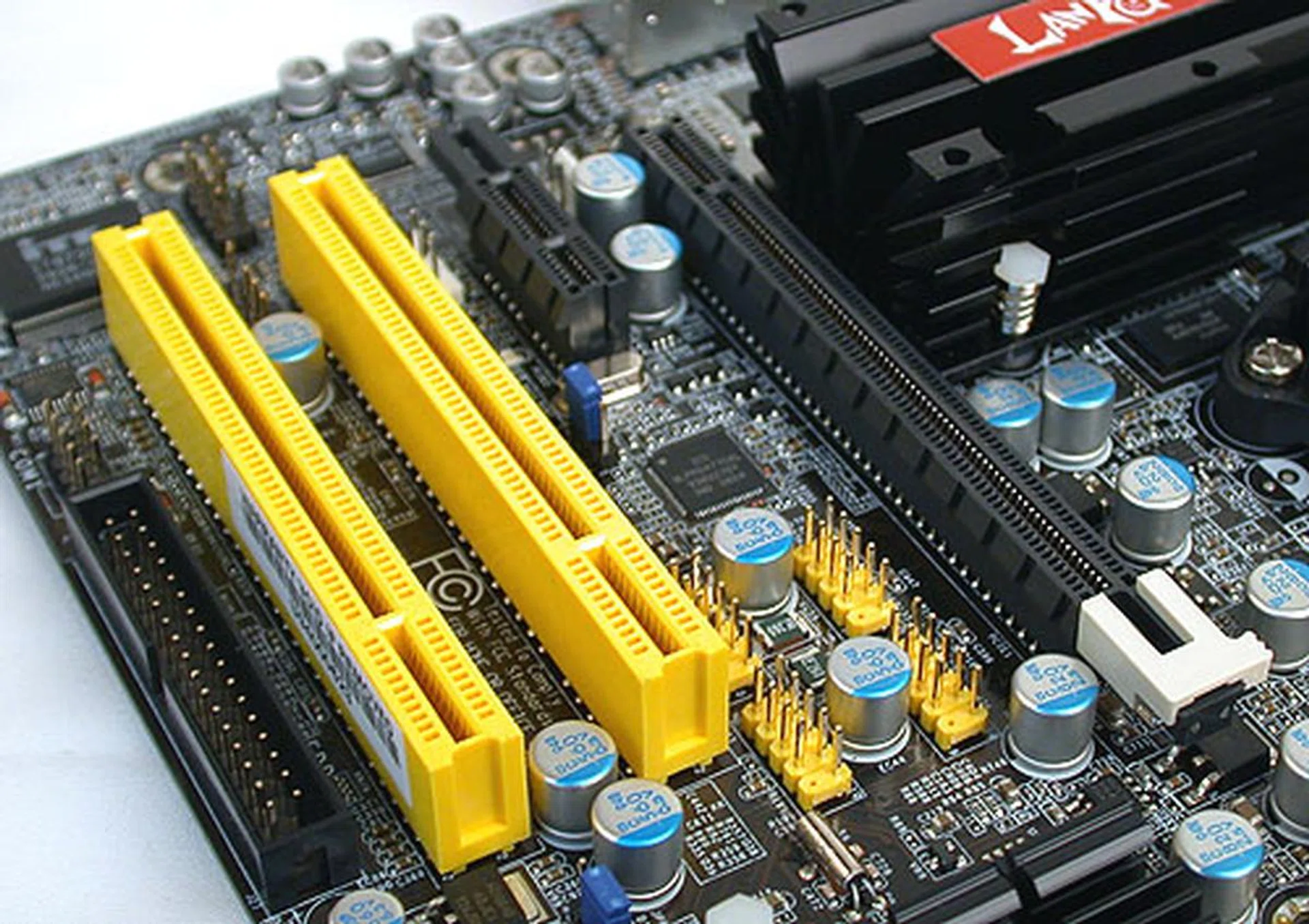
There's only so much one can do with limited PCB space and this arrangement of the expansion slots is fairly standard and usable. However, the location of the USB headers is another story.
Next, there's the placement of the USB headers. With only four at the rear panel, these headers are likely to be used. Notice then that they are placed besides the PCIe graphics slot, where a typical dual-slot graphics card would then block. Again, DFI could have done much better.
We do have to give the nod to DFI for the number of fan connectors on this board. There are six fan connectors, more than we expect for a mATX board. In fact, it even rivals some full-sized ATX boards. Enthusiasts hoping to turn this into a budget high-end system will find this very useful indeed.
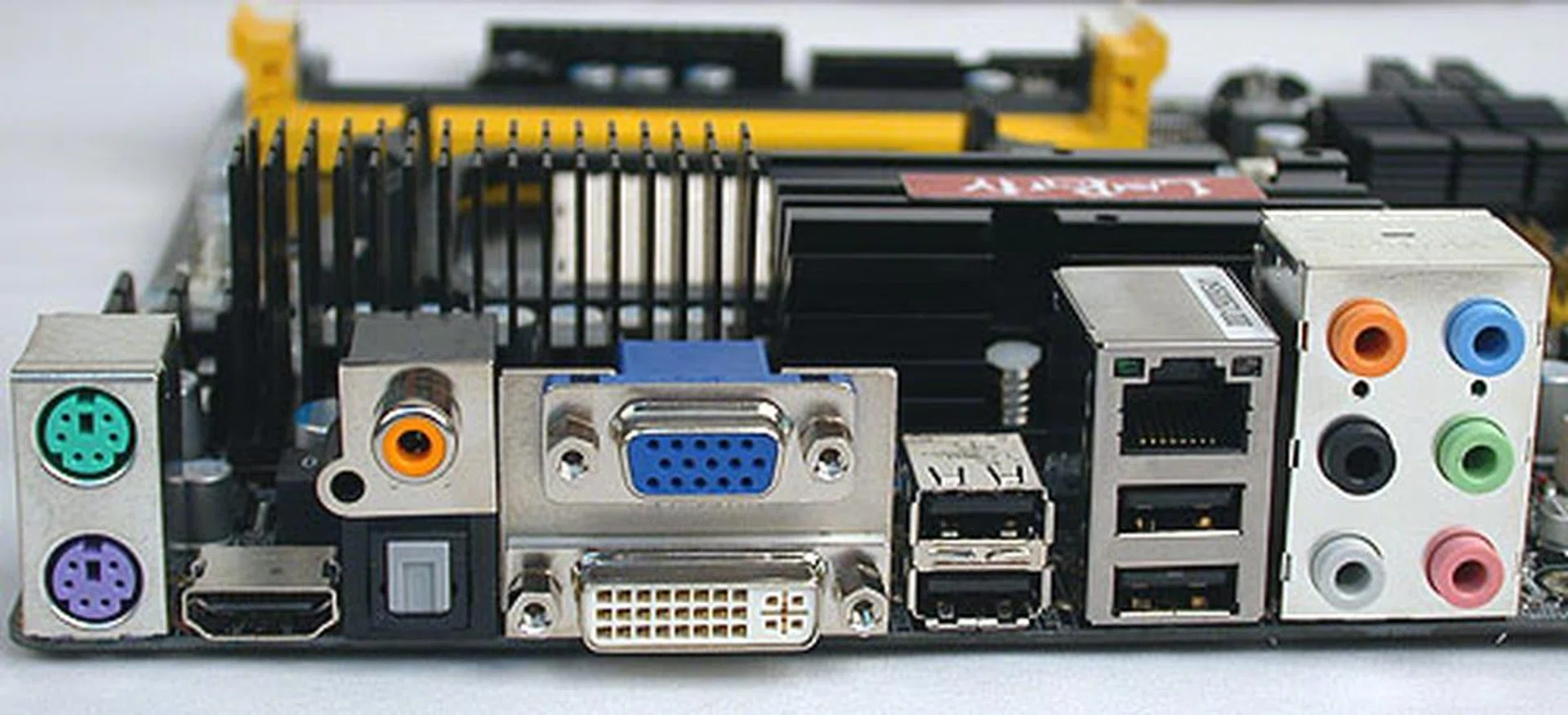
DFI went with having both optical and coaxial S/PDIF outputs at the rear, which meant there were fewer USB ports (four) compared to other similar boards. There's also no eSATA port.
Besides these shortcomings, the DFI LANParty BI 785G-M35 is a rather typical example of the current 785G boards on the market. We won't be delving into the chipset here, except to mention that it has all the advertised features, including the optional 128MB of SidePort memory (from Hynix) that adds to the integrated graphics buffer and gives a slight performance boost.
We did notice some common features that have been omitted, including FireWire and eSATA. By themselves, these are not exactly crucial so if you didn't need those, you're not losing anything. Meanwhile, the board retains the floppy and IDE connectors, even a COM port. You may also notice the use of solid capacitors, another common trend for motherboards despite the mainstream nature of the 785G.
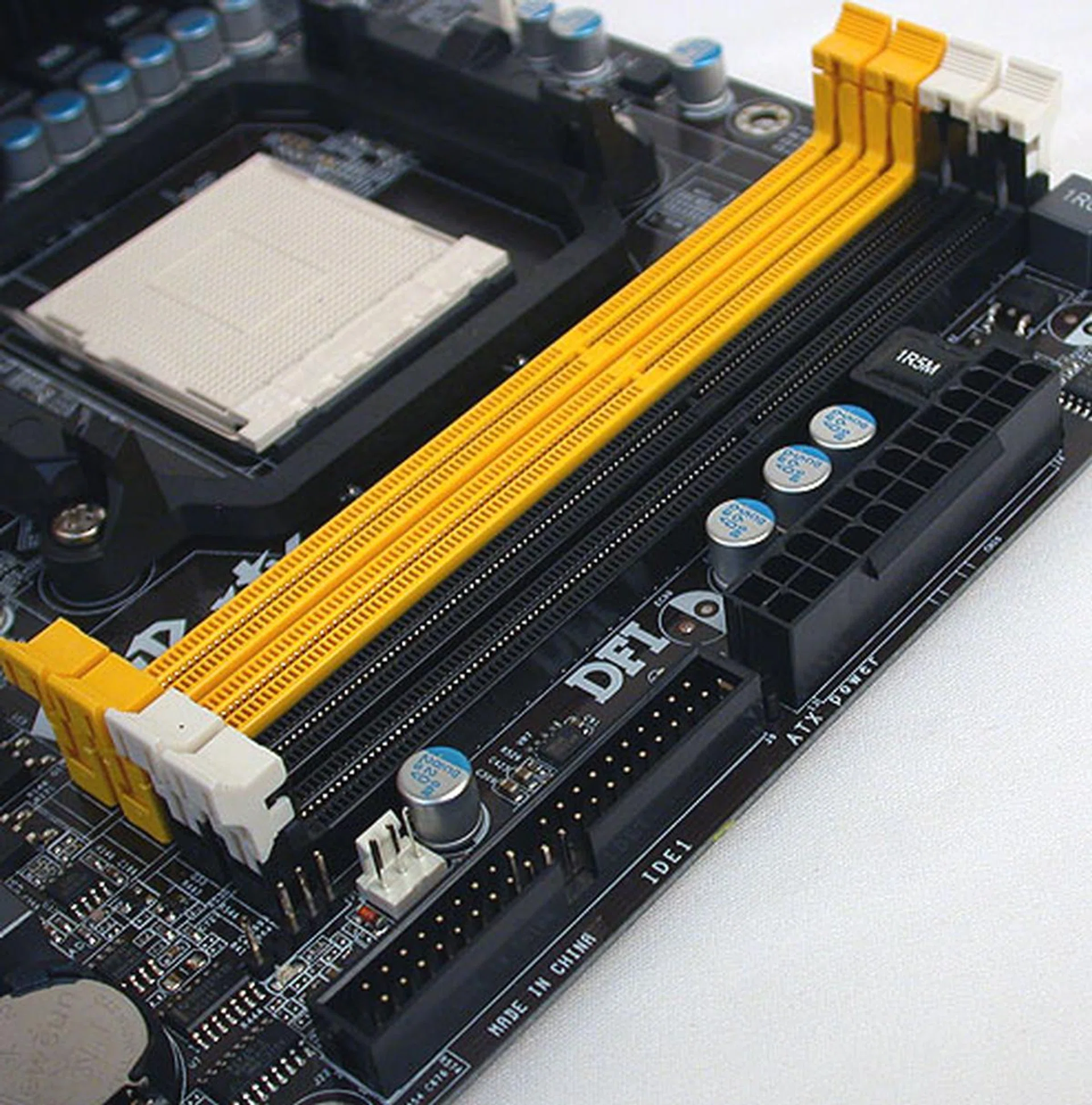
All very standard and typical here - four DDR3 DIMM slots, IDE and power connectors.
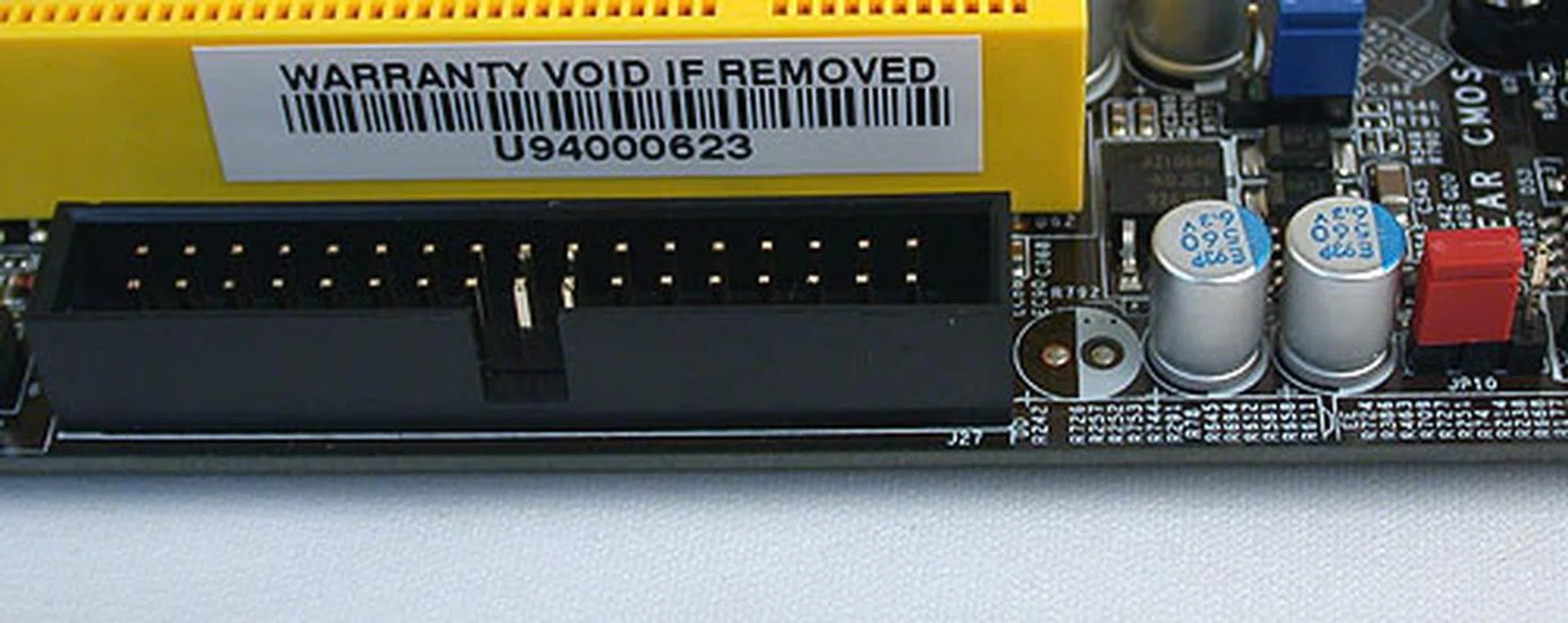
DFI has included a floppy controller with the connector at the very edge of the board. The red jumper seen here is for users to clear the CMOS.
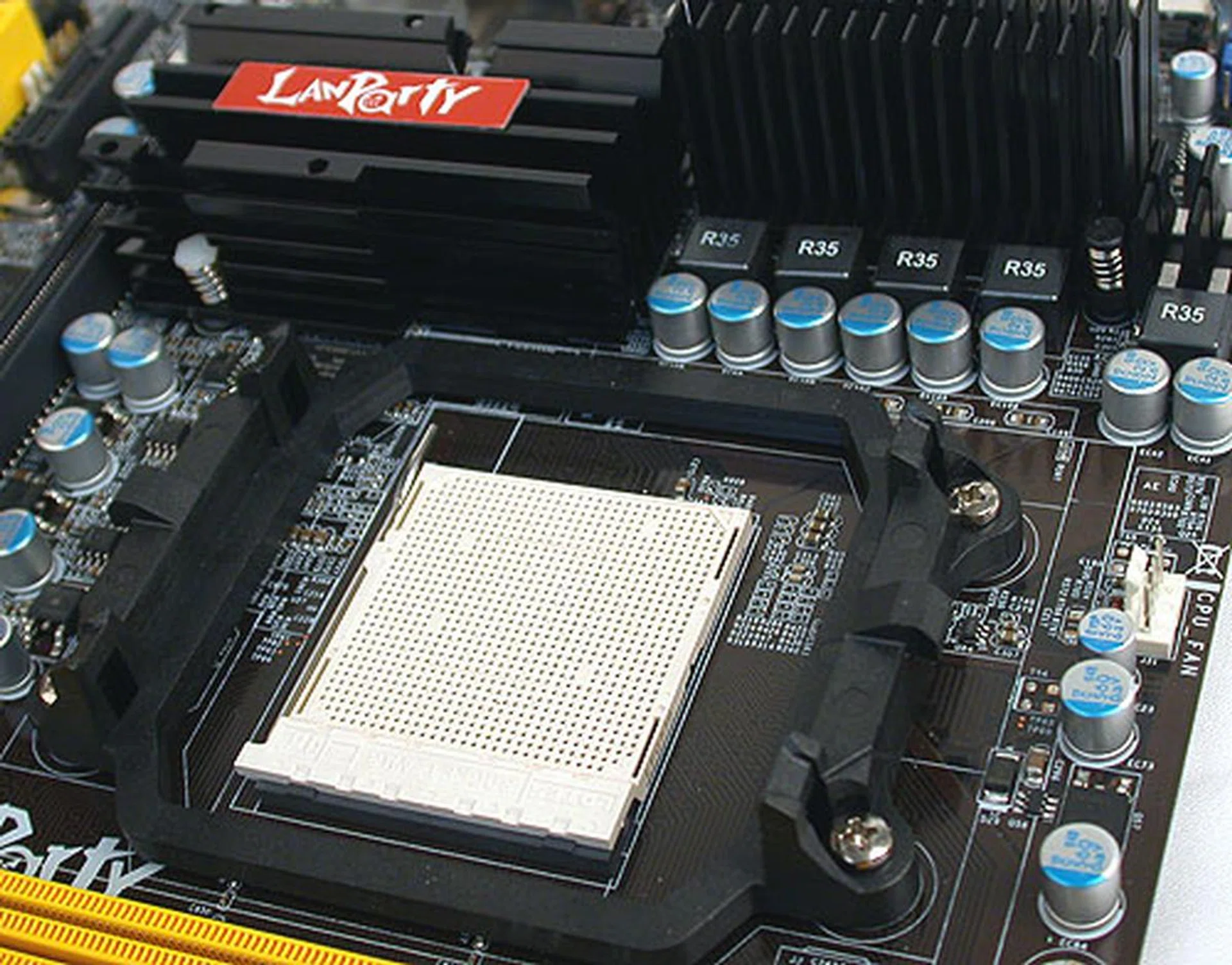
A mostly clear area at the CPU socket for users to install their coolers easily.
Since this is a DFI board, it also comes with the vendor's proprietary technologies. In this case, there's the Auto Boost System II (ABS II), which allows users to create custom profiles in the BIOS with their own preferred (and usually overclocked) settings. Users can also swap profiles online or download them from DFI's website, making it easy for beginners to get into this. This is supplemented by the CMOS Reloaded, where multiple BIOS settings can be saved and restored by the user.
BIOS Settings
DFI has brought over its Genie BIOS to this mainstream board, which means that the BIOS settings are more thorough and detailed than most of its competitors. The CMOS Reloaded feature for instance, gives users more saves for BIOS profiles, so they can experiment with different settings in order to get the best overclock. Of course, even with Advanced Clock Calibration on the 785G, we're not expecting most 785G users to be actively overclocking their systems.
As before, we pushed the integrated graphics chip beyond its default 500MHz clock speed on the DFI but it could only manage 650MHz, which was lower than expected. Nevertheless, one should get a decent amount of CPU overclocking with the ABS II system on this board to compensate.
Some of the more important BIOS settings:
- CPU Frequency: 200 - 700MHz
- CPU Ratio: x4 - x15 (0.15x steps)
- PCIe Frequency: 100 - 250MHz
- GPU Core Clock: 150 - 1000MHz
- Memory Ratio: DDR3-800, 1066, 1333, 1600
- CPU Voltage: +25mV to +775mV (25mV steps), -25mV to -800mV (25mV steps)
- Memory Voltage: 1.50 - 2.493V (0.022V steps)
- NB Core Voltage: 1.15 - 1.5V (0.05V steps)
- NB HT Voltage: 1.20 - 1.55V (0.05V steps)
Test Setup
Following the same system setup as our older AMD 785G motherboard reviews, we equipped the DFI LANParty BI 785G-M35 with an AMD Athlon II X2 250 processor (3.0GHz) and 2GB of Kingston HyperX DDR3 memory as this is a socket AM3 board. Take note that the memory settings on the comparison boards were varied due to memory compatibilities at the time of their testing in previous reviews. The full configuration is as follows:
- AMD Athlon II X2 250 (3.0GHz)
- 2 x 1GB Kingston HyperX DDR3-1333, 7-7-7-20 (MSI 785GM-E51 and DFI LANParty BI 785G-M35)
- 2 x 1GB Kingston HyperX DDR3-1333 @ 1066, 7-7-7-20 (ECS A785GM-M)
- 2 x 1GB Patriot DDR3-1866 @ 1333, 7-7-7-20 (ASUS M4A785TD-M EVO)
- 2 x 1GB Kingston HyperX DDR2-800 @ 5-5-5-16 (Gigabyte GA-MA785GPM-UD2H)
- Integrated GPU Memory size set to 256MB
- AMD SB Driver version 8.631 and Catalyst driver 8.631 for AMD 785G motherboards
- Seagate Barracuda 7200.10 200GB SATA hard disk drive (one single NTFS partition)
- LG GGW-H20L Super Multi Blue Blu-ray Disc Rewriter & HD DVD-ROM
- Microsoft Windows XP Professional with Service Pack 2 (and DirectX 9.0c)
- CyberLink Power DVD Ultra version 8.0.2021.50
The following benchmarks were used to test the AMD 785G motherboards here:
- BAPco SYSmark 2007 (with Patch 3)
- Futuremark PCMark05 (ver 120)
- SPECviewperf 9.0
- Futuremark 3DMark06 (ver 110)
- AquaMark3
- Unreal Tournament 3 (Ver 1.1)
- Quake 4 (ver 1.3)
Results - SYSmark 2007 Preview
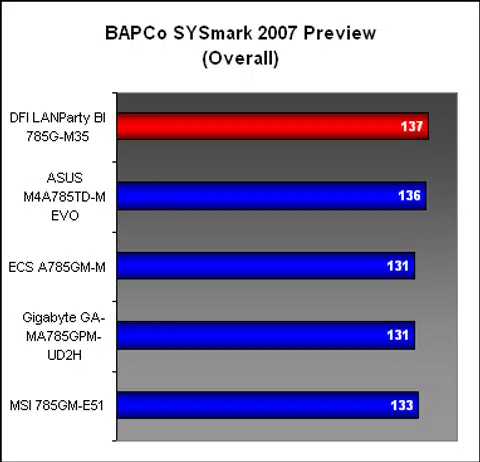
We know that the 128MB of SidePort memory can be the difference between these 785G boards and with this feature on the DFI, it managed to narrowly edge past the ASUS, which also has SidePort memory. The DFI was particularly fast in the Productivity and 3D segment and overall, it was certainly one of the better performers in this benchmark.

Results - Futuremark PCMark05 Pro
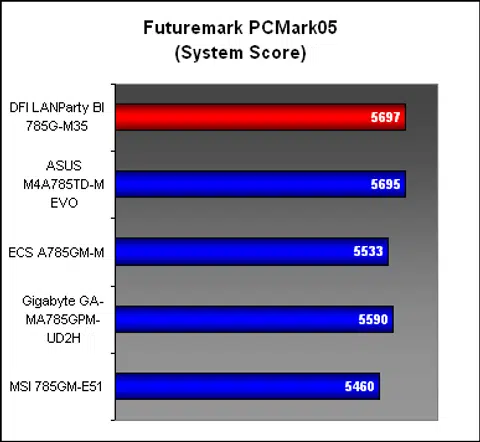
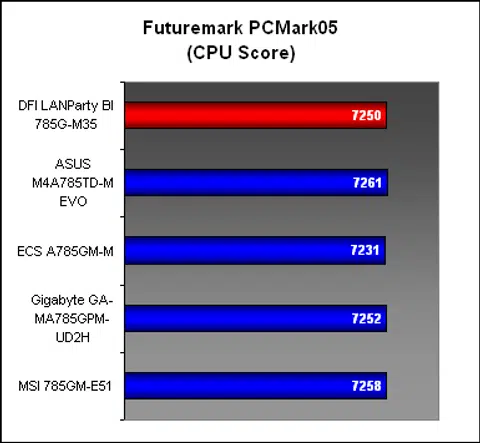
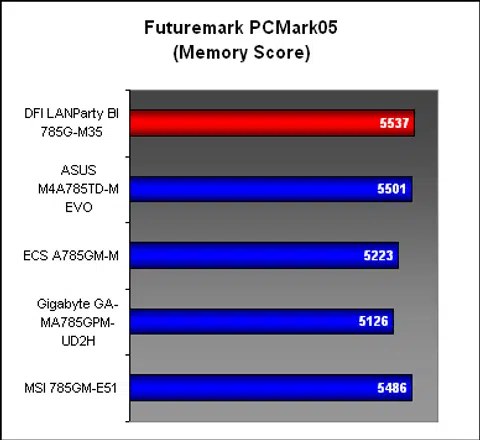
PCMark05 gave another picture of the DFI's performance. Its CPU performance was as expected, level with the other boards but thanks to its use of DDR3-1333 memory, it was ahead in the memory segment. Again, the presence of SidePort memory gave it an advantage in the Graphics section, where it was among the top three scorers. The hard drive performance however was not as positive, with the DFI finishing bottom of the heap.


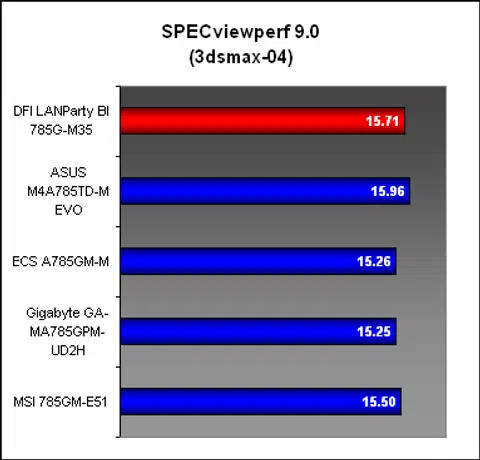
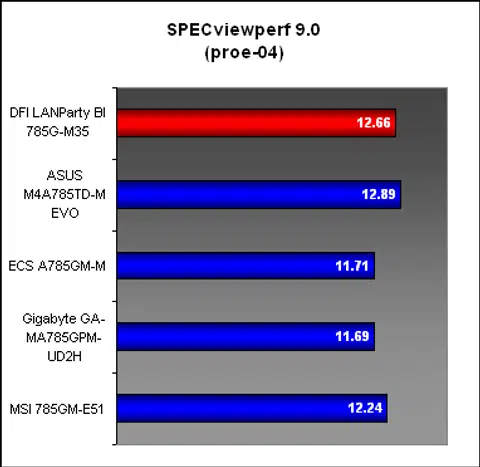
Results - SPECviewperf 9.0
The DFI was neck to neck with the ASUS in SPECviewperf 9.0, with the ASUS just about edging the contest. With the memory and graphics subsections tested in this benchmark, the results were not unexpected.
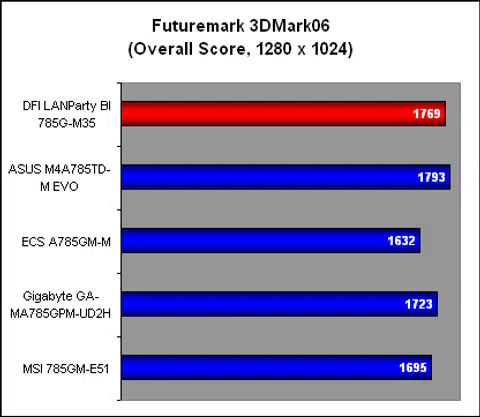
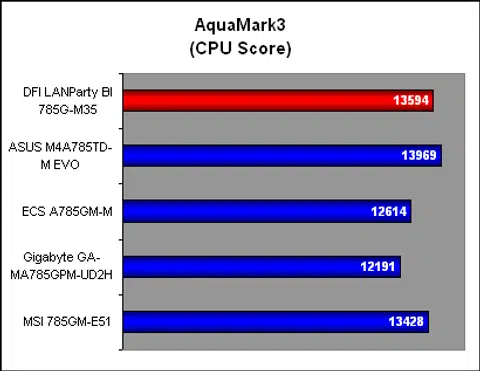
Results - Synthetic Gaming Benchmarks
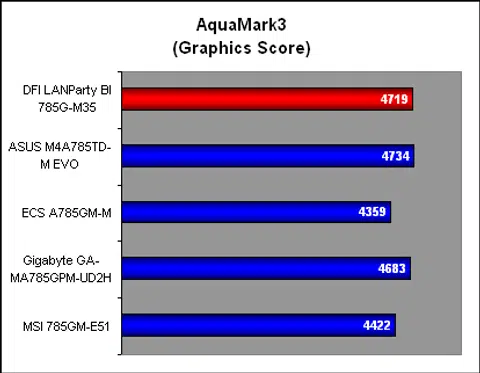
The synthetic gaming benchmarks were in line with our earlier results, with the DFI emerging as one of the better 785G boards. It remained marginally slower than the ASUS despite having the same amount of SidePort memory boost that gave it the advantage over those without.
Results - 3D Gaming Benchmarks
As one of the 785G boards to be equipped with SidePort memory, it's only expected that the DFI would have the edge here. It's a very slight and probably negligible difference however and our gaming benchmarks here summed up the extent of that extra 128MB frame buffer.
HD Playback
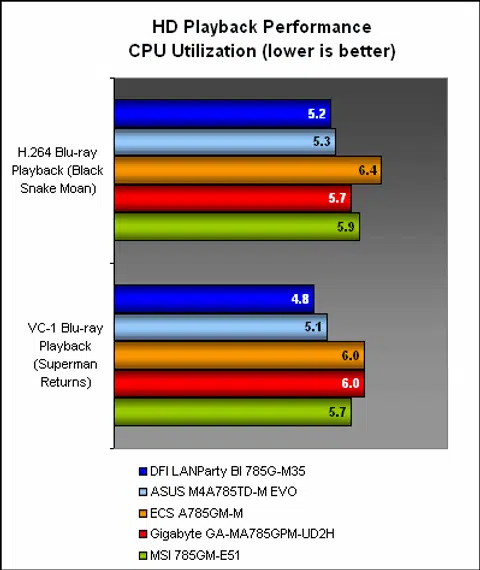
The Radeon HD 4200 handles HD content like a charm and from these low CPU utilization numbers, the DFI board is performing up to expectations.
Temperature
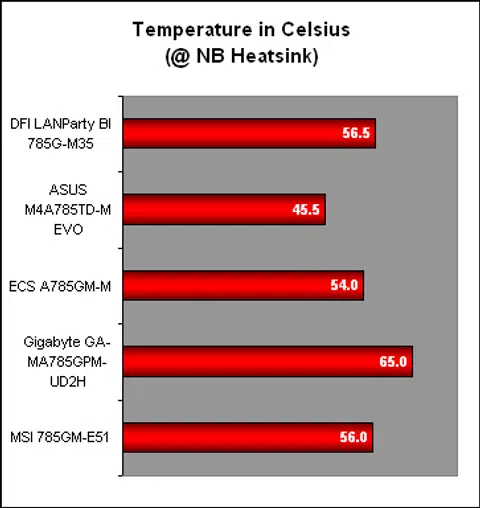
The temperature of the DFI 785G board was found to be close to most of its peers, with the ASUS still remaining as the coolest of the bunch by quite a significant margin. Since most of the boards have similar designs for the heatsink, this is not too surprising.
Power Consumption
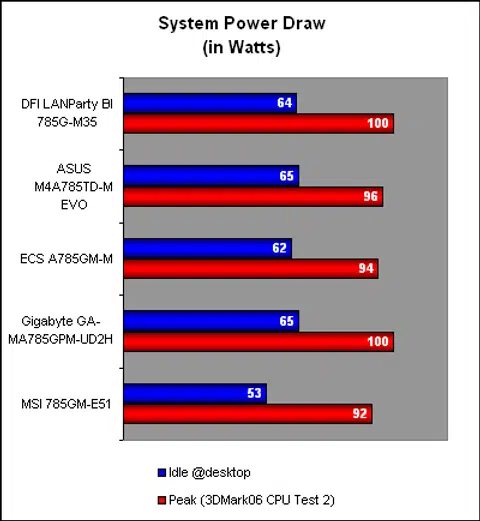
Moving on to power consumption, the power draw for the DFI was on par with the other 785G board. With a peak of around 100W, it's comfortably low enough to explain why mainstream users are flocking to these boards for a mid-range, integrated graphics solution.
Conclusion
There has been a recent spate of mATX boards in the market, with even the high-end Intel X58 chipset getting the treatment. This tells us that there is sufficient interest and demand for these smaller boards. It makes sense too, given the greater integration of functionality in today's processors and motherboards. You pretty much only need a discrete graphics card besides your memory modules if we're talking about integrated graphics chipsets like the AMD 785G or 790GX.
DFI's LANParty BI 785G-M35 looks to bring the mATX form factor to the enthusiasts, with some features that are rarely seen in a mainstream chipset or in this form factor. From the vendor's distinctive ABS II overclocking tools to the Genie BIOS that's never short of BIOS settings and the enthusiast friendly inclusion of so many fan connectors, this board is not short of features that will find favor among its niche crowd. Throw in a decent graphics card and it can be a great value system that will play the latest games and applications.
At US$100, this DFI board certainly is at the higher-end of the spectrum but the performance at least makes it worth the price.
Mainstream users who find these features of no interest however, will note that this DFI board is retailing at around US$100, making it one of the more costly 785G boards out there, even more so than the ASUS M4A785TD-M EVO that we rated highly in our Triple Mainstream AMD 785G Roundup (link listed below). And it comes without some perks, like FireWire and eSATA support. The layout too could do with some improvements, with the location of the USB headers a rather critical flaw.
Fortunately, DFI's general performance in our benchmarks have been excellent, aided no doubt by the presence of SidePort memory. At least it justifies its higher asking price with the numbers and the use of solid capacitors throughout the board for better reliability. Overall, it's a speedy board with some flaws that can make or break your user experience. It all boils down to your personal preferences.
Our articles may contain affiliate links. If you buy through these links, we may earn a small commission.