
Intel i7-4960X Extreme Edition – Ivy Bridge Goes Extreme to Save the Day?
The Intel Core i7-4960X Extreme Edition CPU brings life to the LGA2011 chip package with its new 22nm microarchitecture. It also offers owners of Intel X79-based motherboards, a much-needed upgrade option. Find out if its performance levels make the option compelling!

Intel Core i7-4960X Extreme Edition – Ivy Bridge Goes Extreme to Save the Day?
Since the launch of the Intel Core i7-3960X Extreme Edition processor in November 2011, the accompanying Intel X79-based motherboard has had a limited selection of LGA2011 processors to match. The market segmentation of the Sandy Bridge-E series is very clear; they are pitched to power users as they have the most demanding requirements. On top of that, the Sandy-Bridge E chips are able to support multi-GPU configurations. This is due to a powerful integrated PCIe controller on board the processor to support up to 40 PCIe Gen 3.0 lanes. Coupled with an Intel X79 motherboard that has PCIe 3.0 compatible switching components, the board is able to distribute these lanes to support up to 4-way SLI or CrossFireX graphics cards setup.
The last Sandy Bridge-E processors released to support this platform were the Core i7-3820 and the Core i7-3970X chips. Our experience with the Core i7-3820 made us conclude its compute performance was roughly on par with the Intel Core i7-3770K "Ivy Bridge" processor. However, the Core i7-3820 is considered a budget Sandy Bridge-E chip, manufactured on the older 32nm fabrication process. That would mean its only advantage would be its multi-GPU configuration support from its larger and powerful PCIe controller. Due to the limited availability and the high price of these Sandy Bridge-E processors without much much tangible gain, it lead many to question the viability of owning them and their supporting motherboard platform. Further to that, there are several enthusiast and gaming-centric Ivy Bridge motherboards (such as the Gigabyte GA-Z77X-UP7) that would incorporate a PLX switching chip component to double the PCIe lanes available. These further erode any benefits the Sandy Bridge-E processors bring for the vast majority of people.
However, with the first release of new Intel Core i7-4000 series "Ivy Bridge-E" processors, they bring much needed updates to the current Sandy Bridge-E platform owners. Currently, the Intel Core i7-4960X Extreme Edition CPU is the most powerful chip of the lot. The most important change the new chips bring is the use of the 22nm fabrication process that introduces 3D Tri-gate transistors while retaining the same LGA2011 CPU package. This means, all the new changes brought by the the Ivy Bridge processors are now extended to this Extreme CPU series as well.
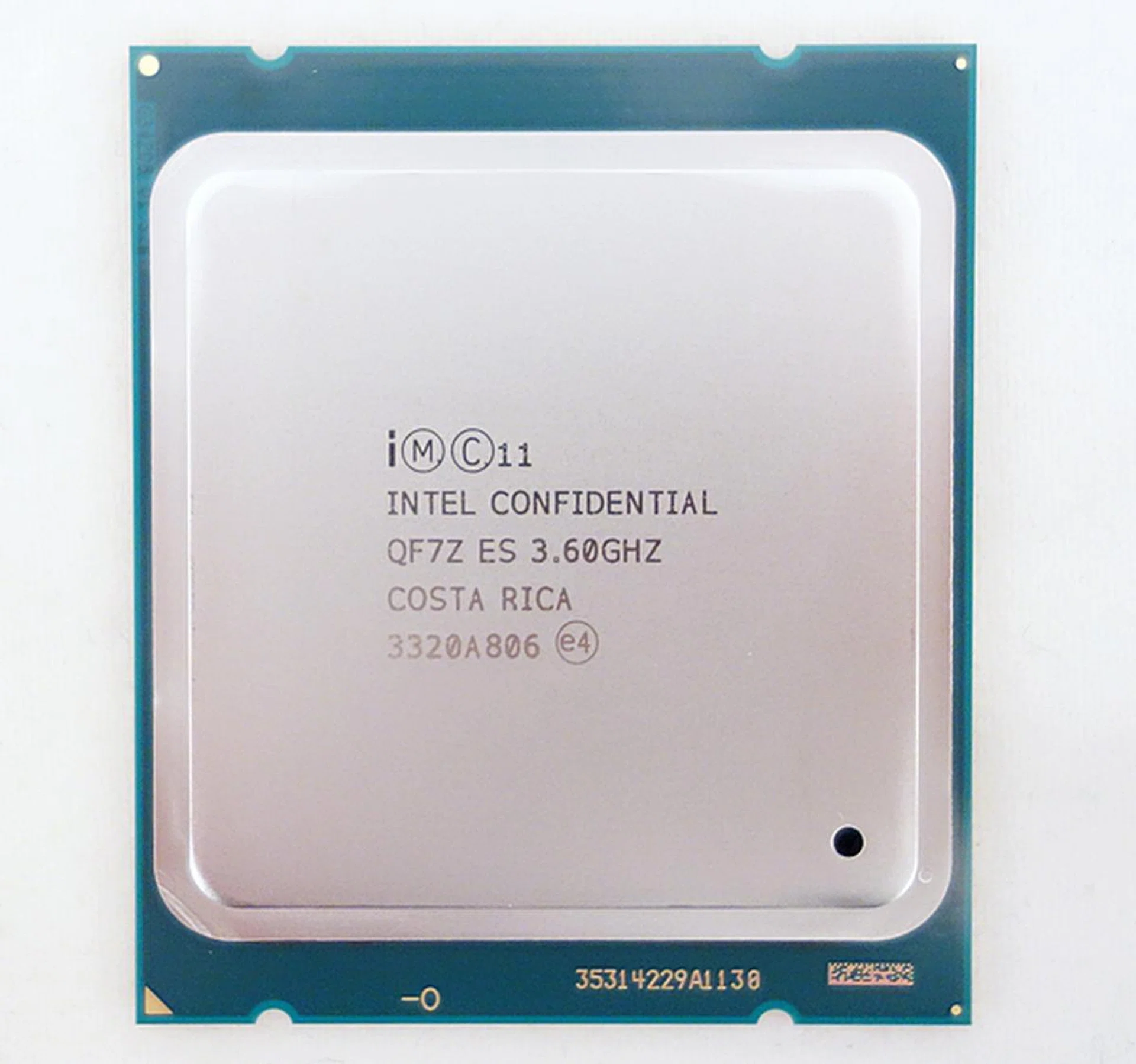
The Intel Core i7-4960X "Ivy Bridge-E" processor boasts of a base clock speed of 3.6GHz, which can be turbo boosted to 4.0GHz. Its officially supported clock frequency for quad-channel memory modules has been increased to 1866MHz, as compared to the lower 1600MHz for the previous generation Sandy Bridge-E processors.
The proposition of the new generation of Intel Core i7-4000 series chips is its ultimate performance. From gaming, 3D content creation to extreme overclocking, the new Ivy Bridge-E processors are touted as the ultimate desktop PC CPUs - for now. We take a quick look under the hood to see what has changed (or not).
Under the Hood
Quad-Channel Memory Controller
The signature quad-channel memory controller in the extreme processors has now been upgraded to support speedier DDR3-1866 memory modules on the new Ivy Bridge-E CPU, up from the DDR3-1600 class that was officially supported by the older Sandy Bridge-E CPUs. For a start, the extra headroom, provided by the increment of the supported operating frequency, will increase the theoretical bandwidth of the memory modules to roughly 14.9GB/s. This is an improvement of about 17 per cent over the theoretical bandwidth of DDR3-1600 memory modules. In terms of practical improvement in computing tasks, the advantages in the increase in memory bandwidth may not be so evident to the end-user. However, for overclockers, they would be well-served if they had invested in overclocked memory modules that are able to operate reliably beyond 1866MHz. This is because some overclockers may attempt to increase the base operating frequency of the motherboard during overclocking, which may inadvertently increase the DRAM frequency of the board beyond its the stipulated operating frequency of 1866MHz. Hence, at this point, the overclocked memory modules will come in handy to ensure the stability and reliability of the overclocked system.
Not the Same 6 Cores
Similar to the older Sandy Bridge-E architecture, the new architecture of the Ivy Bridge-E class processors, supports up to 6 processing cores that can execute a maximum of 12 concurrent threads of instructions when Hyper-Threading is fully taken advantage of.
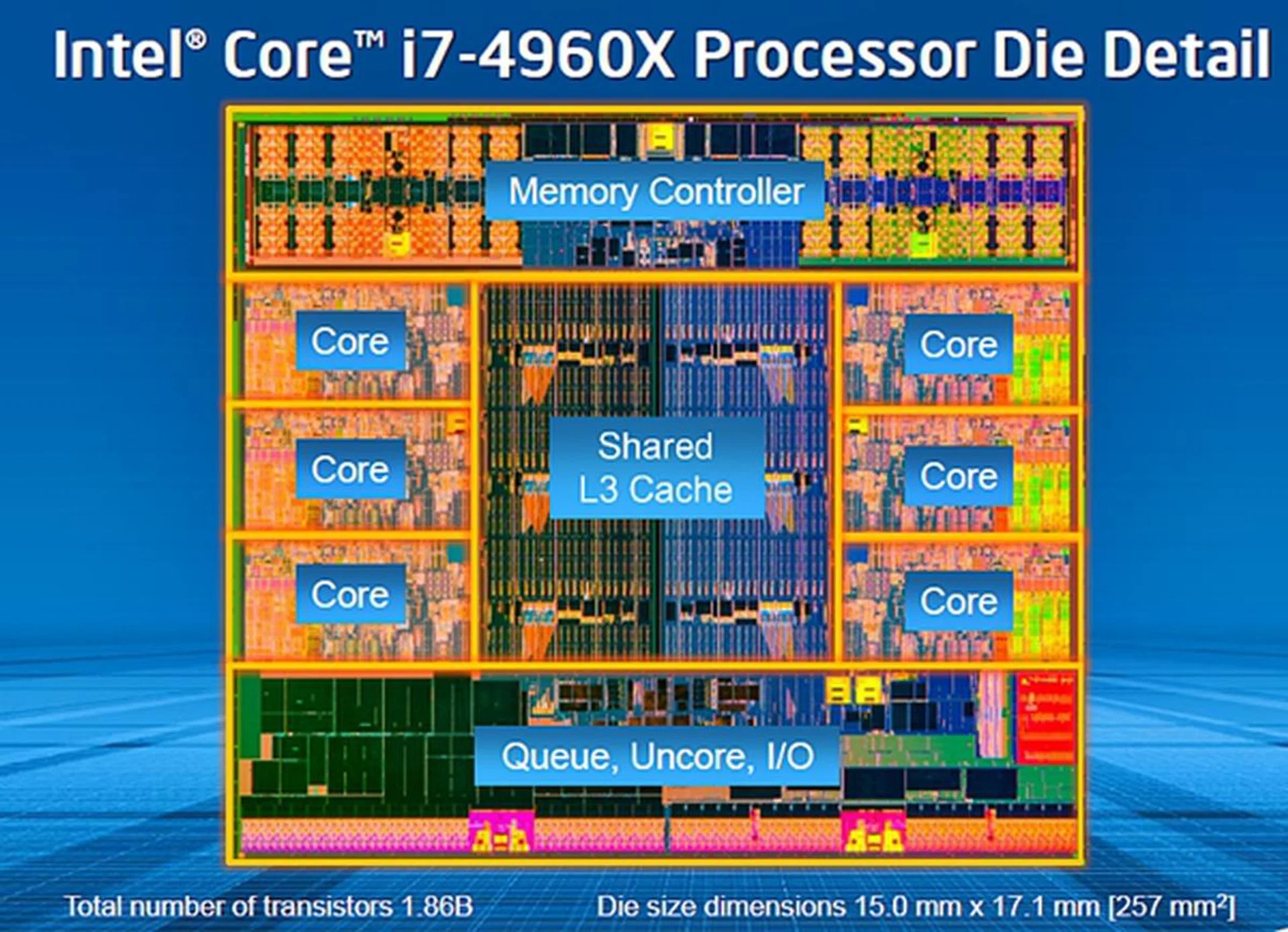
The die shot of the Core i7-4960X processor looks similar to the previous generation Sandy Bridge-E chips. But due to the introduction of the 22nm fabrication process, the new chip has a much smaller die size of 257mm squared. In comparison, the previous generation Core i7-3960X CPU has a die size of 435 mm squared.
As we can see from the die shot above, there are no unmarked regions of the die; unlike our previous experience with the Intel Core i7-3960X processor that appeared to have two disabled cores. Due to the upgraded 22nm fabrication process with its 3D Tri-gate transistors, these transistors are able to be packed more densely, resulting in a much smaller die size. In fact, the transistor count on the Ivy Bridge-E is lower than that of Sandy Bridge-E with 1.86 billion as opposed to 2.27 billion. Not surprisingly, the TDP of this new chip is down to a more manageable 130W instead of up to 150W of the older generation processors. Is the new chip more power efficient? We'll share more of those findings in our performance pages.
The other features of the processor are almost identical to the older Sandy Bridge-E compatriot. It has an integrated PCIe Gen 3 capable controller that supported up to 40 PCIe lanes. The new Ivy Bridge-E will also have up to 15MB of L3 cache. In terms of instructions sets, it supports most of the currents ones like VT-x, VT-d, VT-c, AES, AVX, SSE 4.1 and SSE4.2. But the Ivy Bridge-E chip lacks support for FMA3 instruction set that was introduced to the Haswell chips this year. Here's a look at the Ivy Bridge-E processors that are currently available at launch and how they compare with the previous generation of Sandy Bridge-E processors for comparison.
Processor Model
| Clock Speed | Cores/Threads | L3 Cache | Direct Media Interface
Gen 2 (DMI2) | Max TDP (W) | Retail Price (US$) (in 1k units) |
Core i7-4960X Extreme Edition | 3.6GHz
(4.0 GHz Max Turbo Frequency) | 6/12 | 15MB | 20Gb/s | 130 | $990 |
Core i7-4930K | 3.4GHz
(3.9 GHz Max Turbo Frequency) | 6/12 | 12MB | 20Gb/s | 130 | $555 |
Core i7-4820K | 3.7GHz
(3.9 GHz Max Turbo Frequency) | 4/8 | 10MB | 20Gb/s | 130 | $310 |
Processor Model
| Clock Speed | Cores/Threads | L3 Cache | Direct Media Interface
Gen 2 (DMI2) | Max TDP (W) | Retail Price (US$) (in 1k units) |
Core i7-3970X Extreme Edition | 3.5GHz
(3.9 GHz Max Turbo Frequency) | 6/12 | 15MB | 20Gb/s | 150 | $990 |
Core i7-3960X Extreme Edition | 3.3GHz
(3.9 GHz Max Turbo Frequency) | 6/12 | 15MB | 20Gb/s | 130 | $990 |
Core i7-3930K | 3.2GHz
(3.8 GHz Max Turbo Frequency) | 6/12 | 12MB | 20Gb/s | 130 | $555 |
Core i7-3820 | 3.6GHz
(3.9 GHz Max Turbo Frequency) | 4/8 | 10MB | 20Gb/s | 130 | $294 |
True to its enthusiast class heritage, all the current processor come unlocked for fine-tuning of their performance levels. Intel has also kept the launch prices of the two high-end processors identical to the older Sandy-Bridge E chips.
Overclocking Architecture
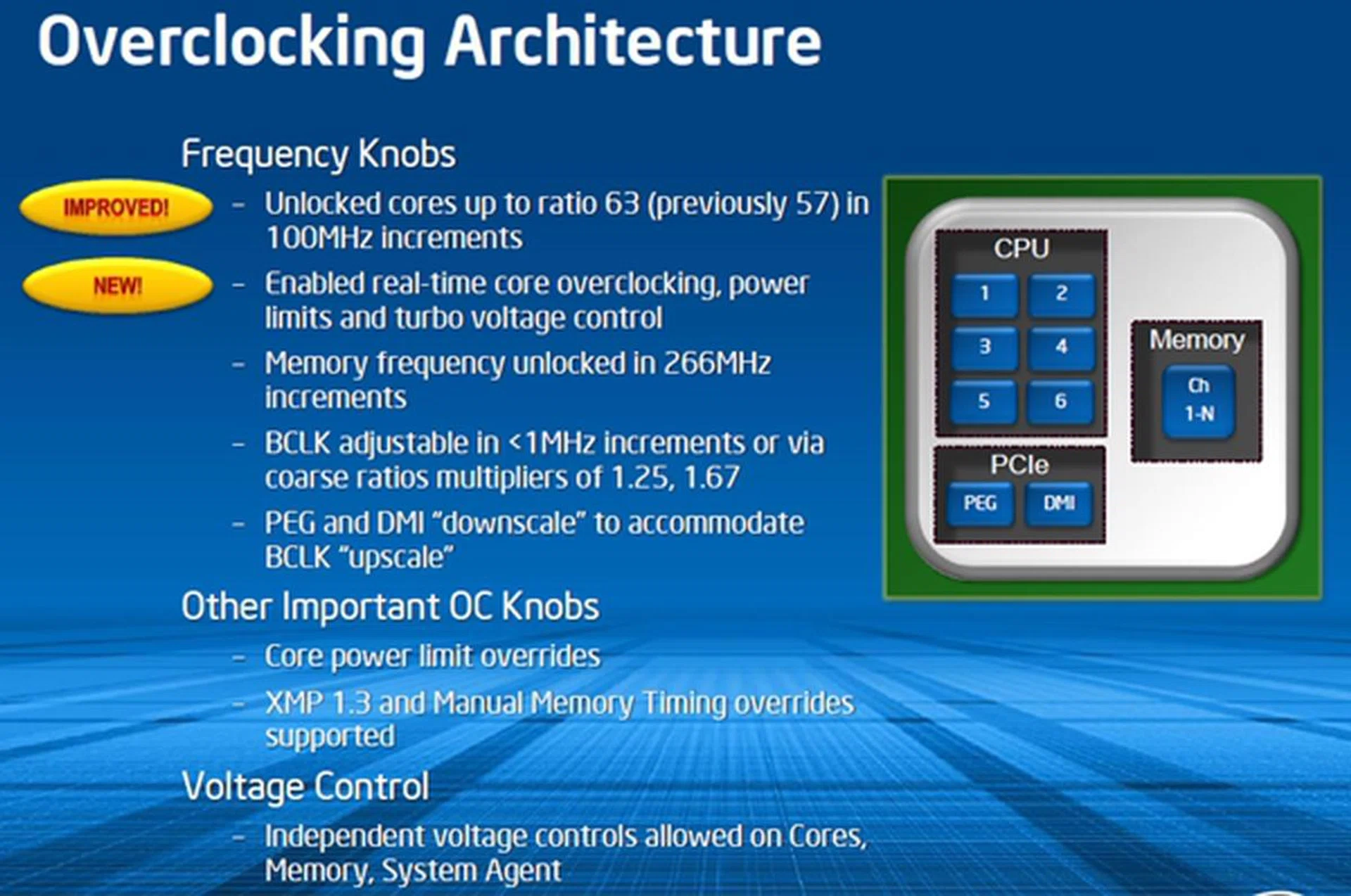
Since all the current launched Ivy Bridge-E processors are unlocked, their overclocking features are rich enough to address the requirements of high-end users. The CPU Strap option, which was first introduced with the Sandy Bridge-E processors, will allow the base clock to be increased from 100MHz without affecting the operating frequency of the PCI-E/DMI controller.
(Image Source: Intel)
The Intel X79 Chipset
At a glance, the new block diagram of the Intel X79 chipset has been updated to show its official support for PCIe Gen 3.0 technology. In order to officially support the new Ivy Bridge-E chip, the Intel Management Engine firmware on the Intel X79 chipset has to be upgraded to the latest version of 8.1.120.1336. This means that current Intel X79 platform owners will have to wait for firmware updates from their respective manufacturers of the boards before safely progressing to purchase the new processor. Apart from this, the chipset itself sees no revision or change since it was first introduced.
While new Intel X79 motherboard marketed with the Ivy Bridge-E processors in mind will have full PCIe Gen 3.0 support, we cannot say the same for the initial batch of Intel X79 boards from the various manufacturers. At that point of time, Intel hasn't yet qualified PCIe Gen 3.0 support, but many motherboards are capable of supporting it as long as the boards also feature PCIe 3.0-compliant switching components in order to support the full 40 PCIe Gen 3.0 lanes of the new Ivy Bridge-E CPUs. As such, you'll have to check the manual and support forums for your respective Intel X79-based motherboard model to truly ascertain PCI Gen 3.0 support on your board.
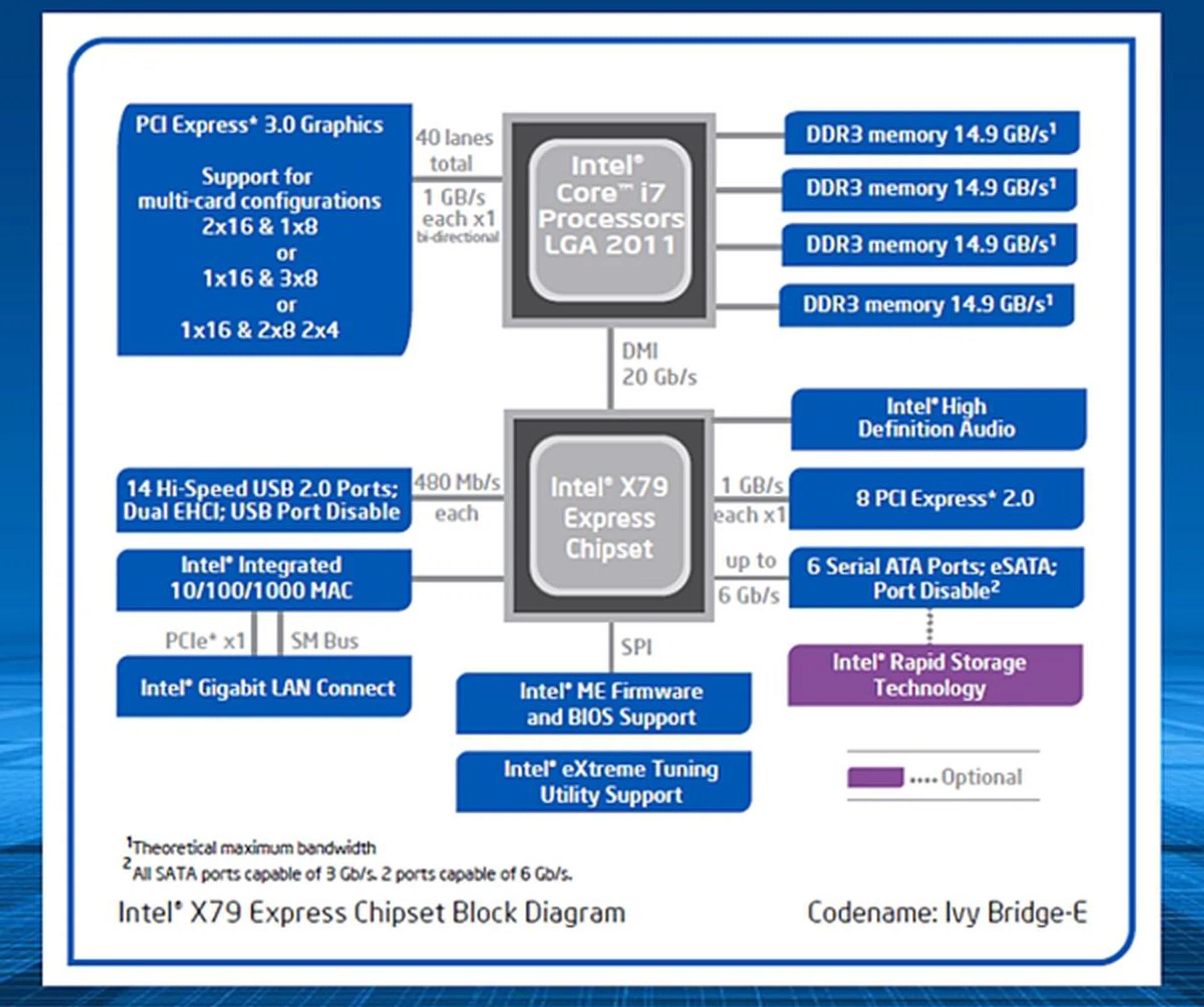
The updated block diagram of the Intel X79 chipset. (Image Source: Intel)
Test Setup
The motherboard we have chosen is the new ASUS X79-Deluxe motherboard. It features a range of high-end features like additional SATA 6Gbps controllers in order to supplement the official supported pair of SATA 6Gbps ones, courtesy of the Intel X79 chipset. There is also a ASUS Wi-Fi GO! onboard with a bundled 2T2R dual-band Wi-Fi antenna (which is identical to those bundled in some of the more recent boards like the ASUS Maximus VI Extreme).
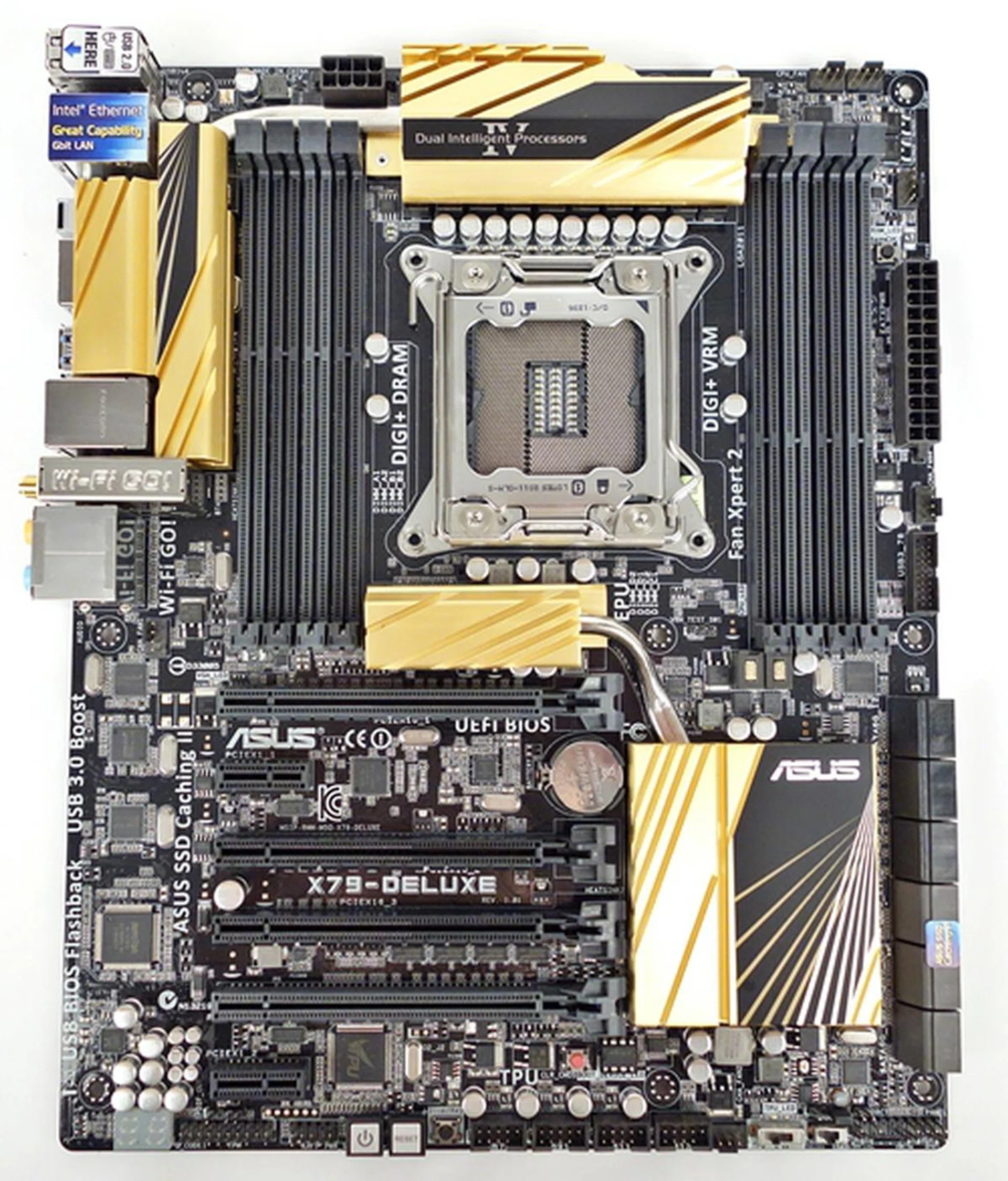
The ASUS X79-Deluxe motherboard.
Since DDR3-1866 memory modules are officially supported, we decided to use the four 4GB DDR3-2133 memory modules from the Crucial Ballistix Elite series for a total of 16GB system memory (but run at DDR3-1866). The cooling solution is provided by the Intel Active Thermal Solution RTS2011LC, a closed liquid cooling system. For comparisons, we tested two Sandy Bridge-E processors; they are the Intel Core i7-3960X and Core i7-3970X with the memory modules clocked at DDR3-1866 a well (higher than the official DDR3-1600) to minimize differences in the comparisons and see what impact the updated Core microarchitecture has in store for the Extreme processor series.
Our full test setup for all the platforms are as follows:-
Test Configuration
- ASUS X79-Deluxe (Intel X79 Express chipset), BIOS version 0253
- 4 x 4GB Crucial Ballistix Elite DDR3-2133 (Ran at DDR3-1866, Auto timings: CAS 9-9-9-24)
- NVIDIA GeForce GTX 660Ti (ForceWare 320.18)
- Western Digital Caviar Black 1TB SATA 6Gbps hard drive (one single NTFS partition)
- Windows 7 Ultimate 64-bit SP1
- Intel INF 9.3.2.1010

We used a MSI N660Ti PE 2GD5/OC graphics card and downclocked its GPU in order to emulate a stock NVIDIAGTX 660Ti card. The only reason we're using a mid-range GPU is to see what a high speed processor can do to elevate typical game performance when the GPU is overloaded - in essence, we're isolating everything possible to determine the noteworthiness of the main processing platform.
Benchmarks
The following benchmarks were used to test the CPUs:
- Futuremark 3DMark (2013)
- SPECviewperf 11
- Lightwave 3D 11.5 (64-bit)
- Cinebench 11.5 (64-bit)
- Handbrake 0.9.9
- Tomb Raider
Benchmarks - Part 1
SPECviewperf 11.0
The first of the synthetic benchmarks is SPECviewperf 11.0 which is primarily aimed at graphics rendering performance evaluation; however, with our graphics card kept constant, this software testing suite will give us an idea on how well the performance of each processor scales accordingly to assist in these workloads. SPECviewperf 11.0 consists of eight components and we have selected three of them for observation. They are Lightwave (light-01), Maya (maya-03), and Siemens Teamcenter Visualization Mockup (tcvis-02).
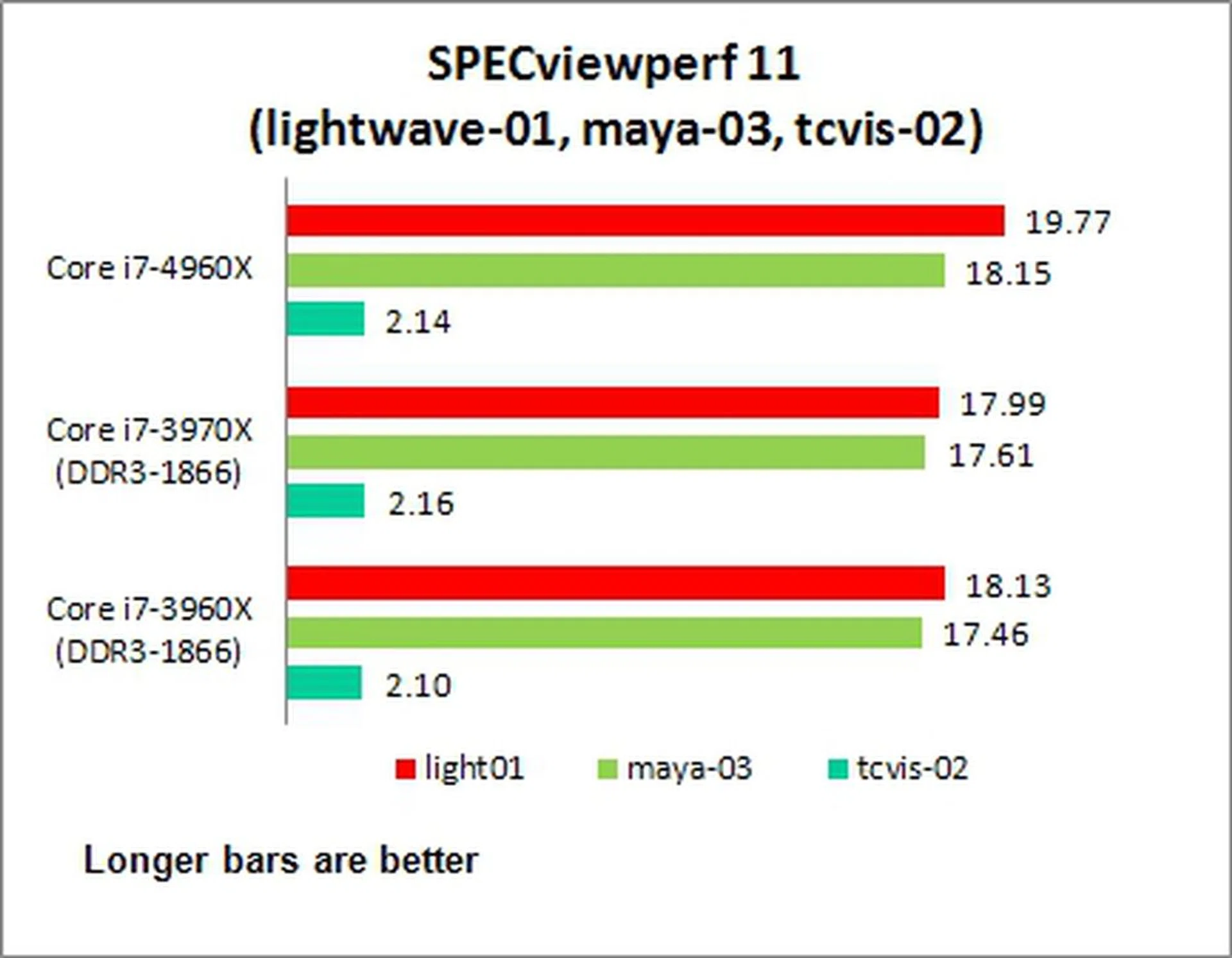
Generally, the new Ivy Bridge-E processor outperformed the older CPUs on most occasions in the range of 4- to 10%, with the exception of tcvis-02 where the Core i7-3960X beat it by a slight margin of about 1%.
Lightwave 3D 11.5 (64-bit)
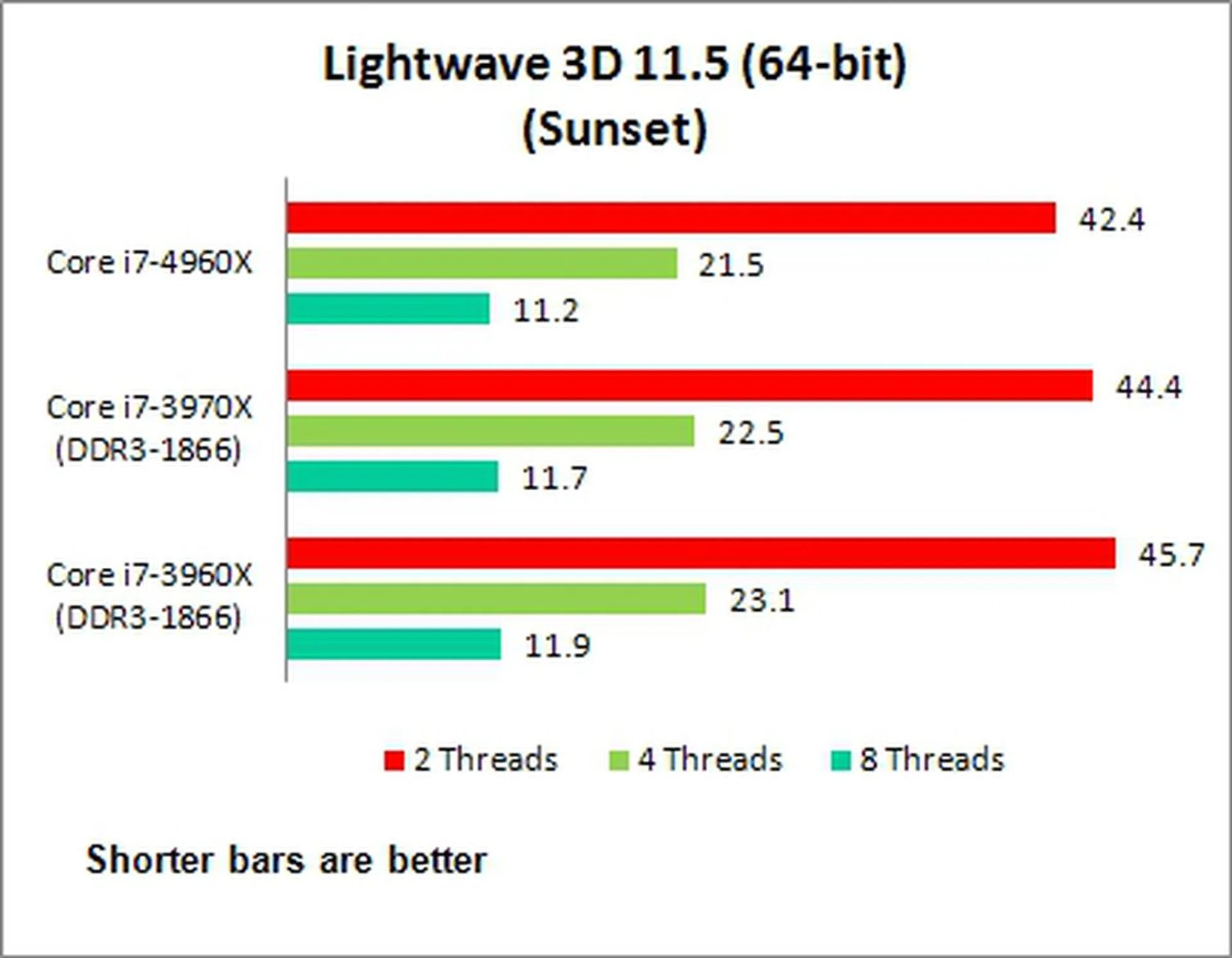
Next, we ran the full LightWave 3D software and updated it to version 11.5. We used it to render two scenes - Sunset and Tracer-Radiosity. We left out the results for the latter scene as they didn't show much difference among the tested processors. As seen in the chart below for the Sunset render scene, the latest and the greatest Core i7-4960X only managed gains in the range of just under 5%.
Cinebench 11.5 (64-bit)
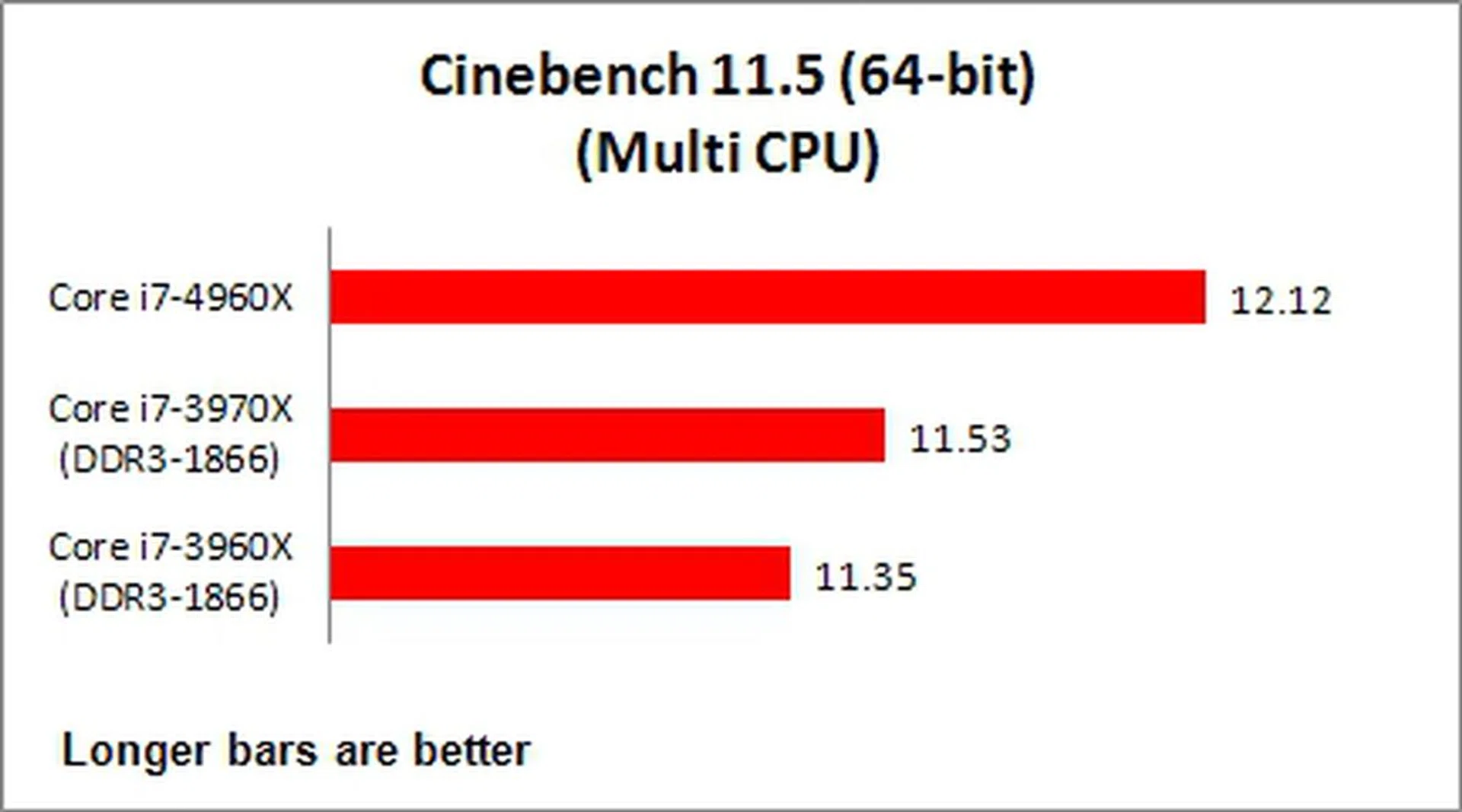
This test is well suited for testing multi-threaded CPU performance, but even in this synthetic benchmark test, we only saw gains ranging about 5% when compared with the previous Core i7-3970X processor.
Handbrake 0.9.9
Using a popular video encoding application, our test determines how fast each CPU encodes a 128MB MPEG2-2 Transport Stream (*.m2t) video file using H.264 encoding algorithm at the High Profile preset of the Handbrake software. Interestingly, the new Core i7-4960X manages an 8% speed-up over the older processors.
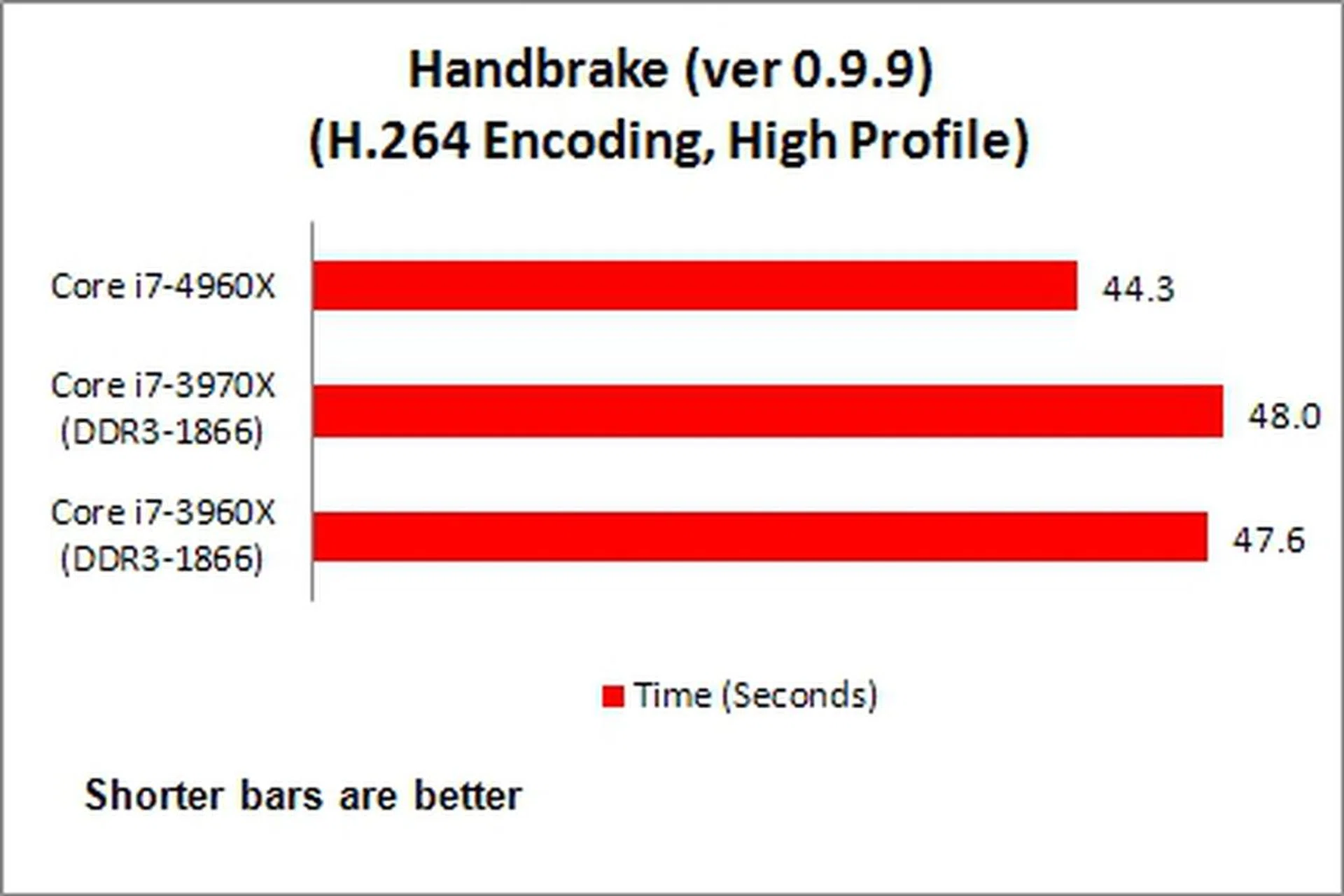
On a whole when reflecting upon performance gains seen in the above benchmarks, the gains of the new processor, with its updated microarchitecture and higher operating frequency, are rather expected as they mostly fall within the 5- to 7% range. In fact, the differences might just be accounted for differences in higher clock speeds and higher boost clocks. Then again, there's not a whole lot of change that took place that might directly propel these applications further in the updated microarchitecture. Remember, using the new manufacturing process was one of the main leaps in the Ivy Bridge hop and the same applies to the Ivy Bridge-E.
Gaming Benchmarks
The first gaming benchmark is 3DMark 2013 and we ran both Fire Strike and Fire Strike Extreme. The next benchmark used was the internal one provided by the game Tomb Raider where it measured the average frame rates at different settings.
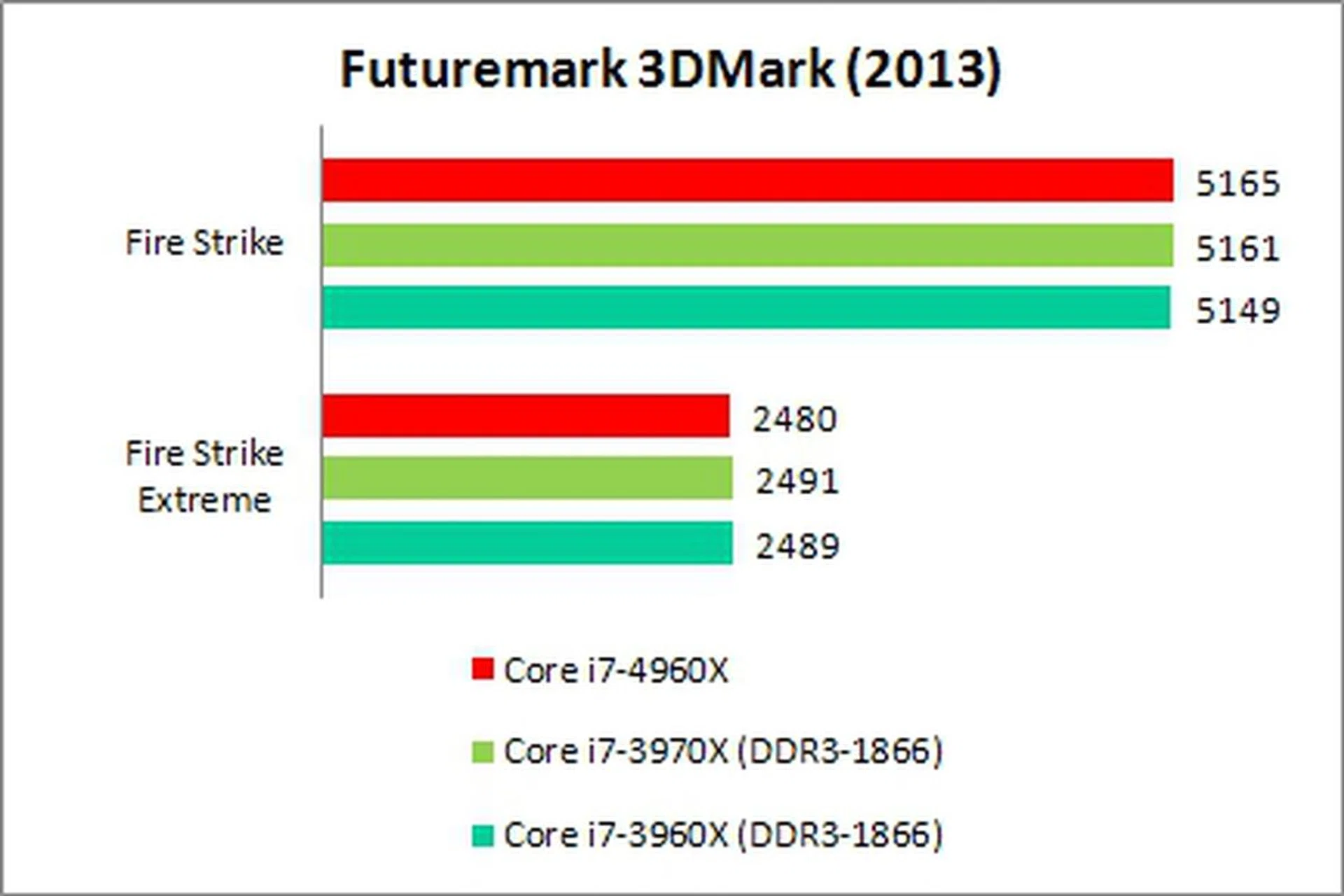
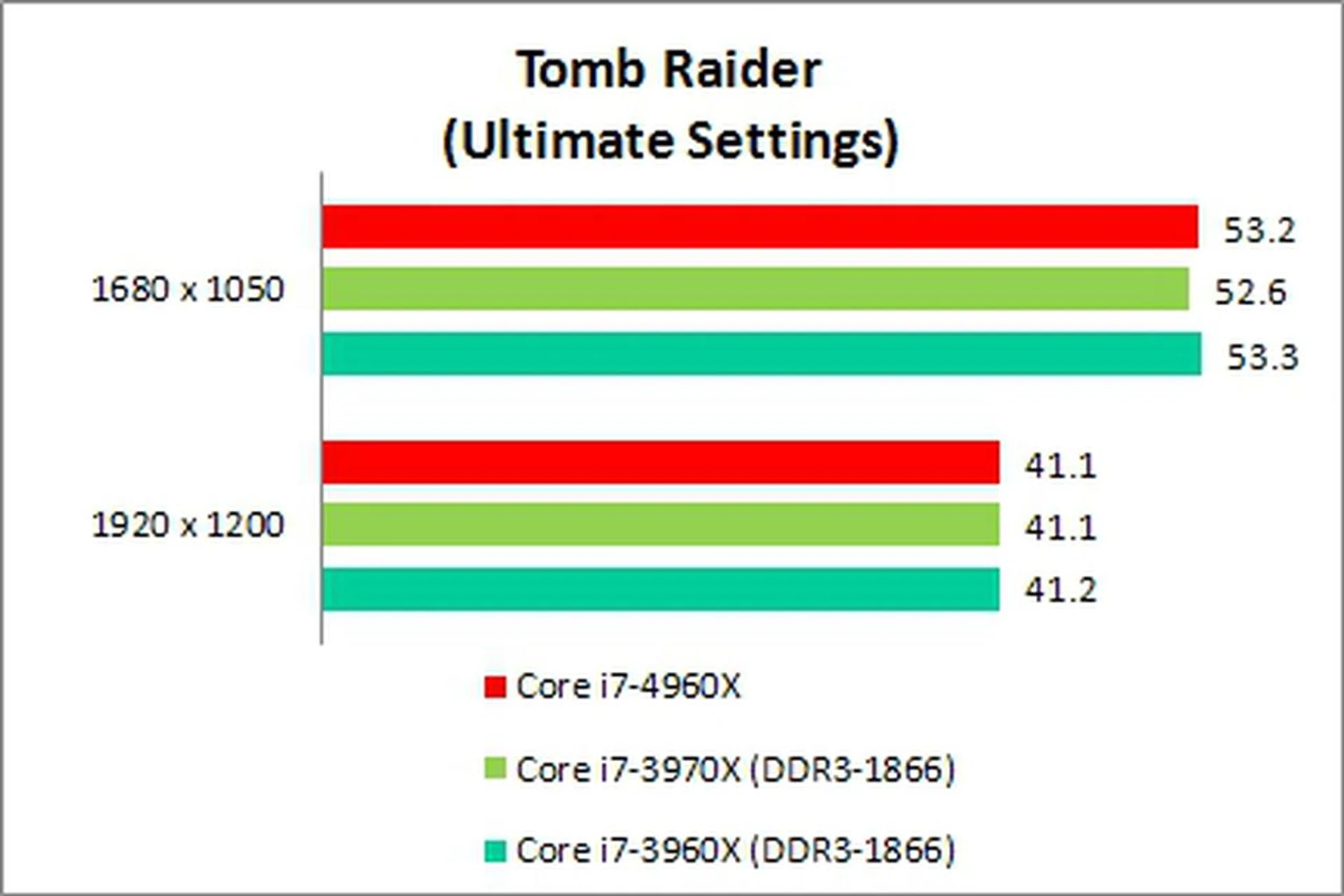
The gaming scores didn't show any differences that point to the advantages of using the new Ivy Bridge-E processor in a gaming rig. This means, if you're looking to improve your game performance, you'll need to invest in a newer and more powerful graphics card or graphics card(s). What this test here proves is that upgrading processors doesn't net you direct performance gains as was seen in the older days. Where the new processor and the Intel X79 platform comes in is to to provide you the necessary overhead so that your 3-way NVIDIA Titan or 4-way AMD Radeon HD-7970 setup has adequate data fed to it with the widest pipe possible. We would love to show you if there are gains to be had in such a setup, but acquiring such firepower in short notice is tough and we'll have to save that for another time.
Power Consumption
For power consumption matters, we were actually expecting to see substantial power savings for the Intel Core i7-4960X processor; however, it appeared that its power usage profile was similar to the Sandy Bridge-E Core i7-3960X CPU. Evidently, with its 150W TDP, the Intel Core i7-3970X consumed the most power during load. Even so, there is an improvement in performance-per-watt, but far from our expectations given the new manufacturing process and vastly reduced die-size. Power optimization might not be the main priority Intel had for the Extreme processors since they were designed to be overclocked to one's best abilities with no restrictions.

On a side note, one thing we can infer is that Intel's probably making more profit by selling the new Extreme processors over the old one, just by virtue of the amount of new dies they can churn out on a single silicon wafer.
A Muted Arrival of the Ivy Bridge-E Processor
From what we have witnessed of the Intel Core i7-4960X CPU's performance, it appears the ultimate desktop PC processor has yet to show its true prowess. We can see some slight compute performance gains; however, this is mostly attributed to the new processor's higher clock speeds. To reiterate, it has a base clock speed of 3.6GHz, and a turbo boost clock rated at 4.0GHz.
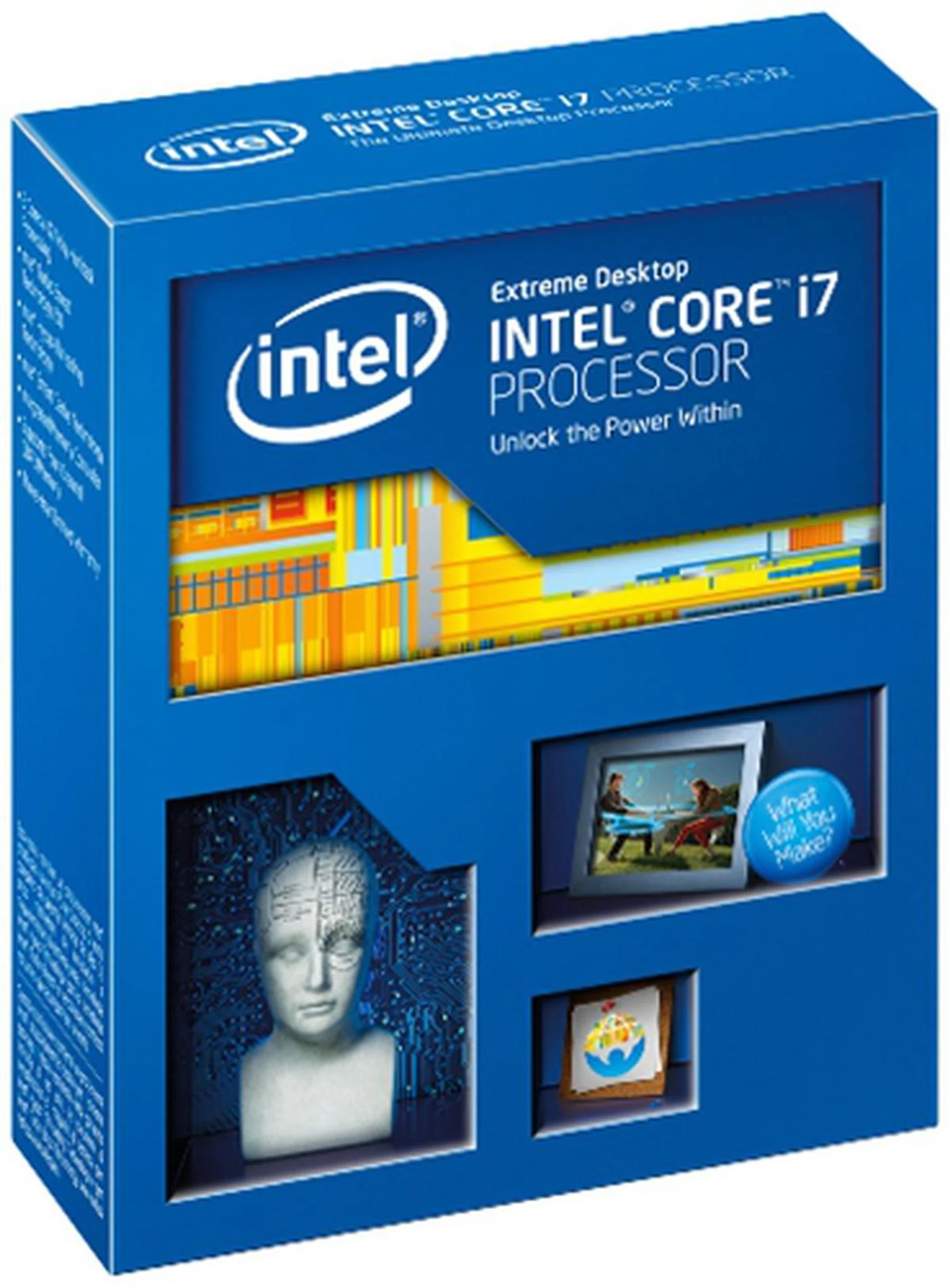
The Intel Core i7-4960X Extreme Edition processor performed in line with our expectations; however, its relatively poor power savings left us a little surprised.
It is probably a new processor upgrade that vested owners of Intel X79-based platforms will take to; however, this is only if they are willing to continue supporting this platform. To give it some credit, the new processor does manage to do slightly more for less. With its much reduced die size of 257mm2, and its subsequently reduced transistor count that is roughly 1.87 billion, it still managed to outpace the older Sandy Bridge-E CPUs with marginal gains. However, we are puzzled by its weak showing in terms of power consumption figures. Perhaps the memory and PCIe controllers need some rejigging in order to fit into the grand scale of improvements that were introduced by the chip's 22nm fabrication process?
When strictly compared against the previous best 6-core chip (Core i7-3970X) against today's top dog, the Core i7-4690X, it's quite unlikely anyone would be upgrading to Ivy Bridge-E. Even when compared with the the Core i7-3690X, the delta in gain isn't worth the US$990 price tag of the newcomer. So who then would this new chip appeal to? Frankly, it would be those who invested in the Intel X79 platform but with the lower tier Core i7 processors like the 3930K or the 3820.
In conclusion, the new Ivy Bridge-E has extended the lead that was gained by the previous generation Sandy Bridge-E processors. The new processor series will definitely appeal to power users with deep pockets and stringent compute performance requirements - at least for those who've not yet adopted the LGA2011 platform. These users are also likely to spend more on other components like graphics cards and displays in order to enjoy a multi-GPU configuration supporting multiple displays. In other words, the new processor and its platform is ideal for those year for the very best in computing without stepping into server-level hardware. With its overclocking architecture carried over from the Sandy Bridge-E, and some improvements made to its CPU strapping feature, the processor will also appeal to overclockers who will invest in cooling systems (note that the processor is sold without any cooler) and overclocked memory modules. For business users, the processor spells an upgrade option for their Intel X79-based workstations.
The Core i7-4960X still exudes the old charm of the Sandy Bridge-E series; while catering to the diverse needs of this peculiar user group. Alas, the newcomer only has marginal performance gains to show as seen in this performance preview. Perhaps the key lies with its overclocking capabilities? We'll find out soon as we spend more time with the system and updates from our Hardware Clinic enthusiasts. For now, the new Ivy Bridge-E series doesn't bring a lot to the table, but neither is it worse than its outgoing predecessor.
Our articles may contain affiliate links. If you buy through these links, we may earn a small commission.