
Gigabyte GA-X38-DQ6 (Intel X38)
The Intel X38 chipset has arrived featuring full speed PCIe x16 CrossFire support and introducing PCI Express 2.0. The Gigabyte GA-X38-DQ6 is the first retail-ready enthusiast class motherboard based on this new chipset to reach our labs and we've got the full scoop right here. Read on.

Introduction
Less than a month after we reviewed the , Gigabyte sent us a retail ready version of its successor based on the newly launched Intel X38 chipset. Using their already established Ultra Durable 2 and DQ6 designs, Gigabyte is banking on their first to market advantage to meet early adopters that have been waiting for the X38. Basically, this means that not much has changed between the new GA-X38-DQ6 motherboard and the GA-P35-DQ6, as you will see later in this review.
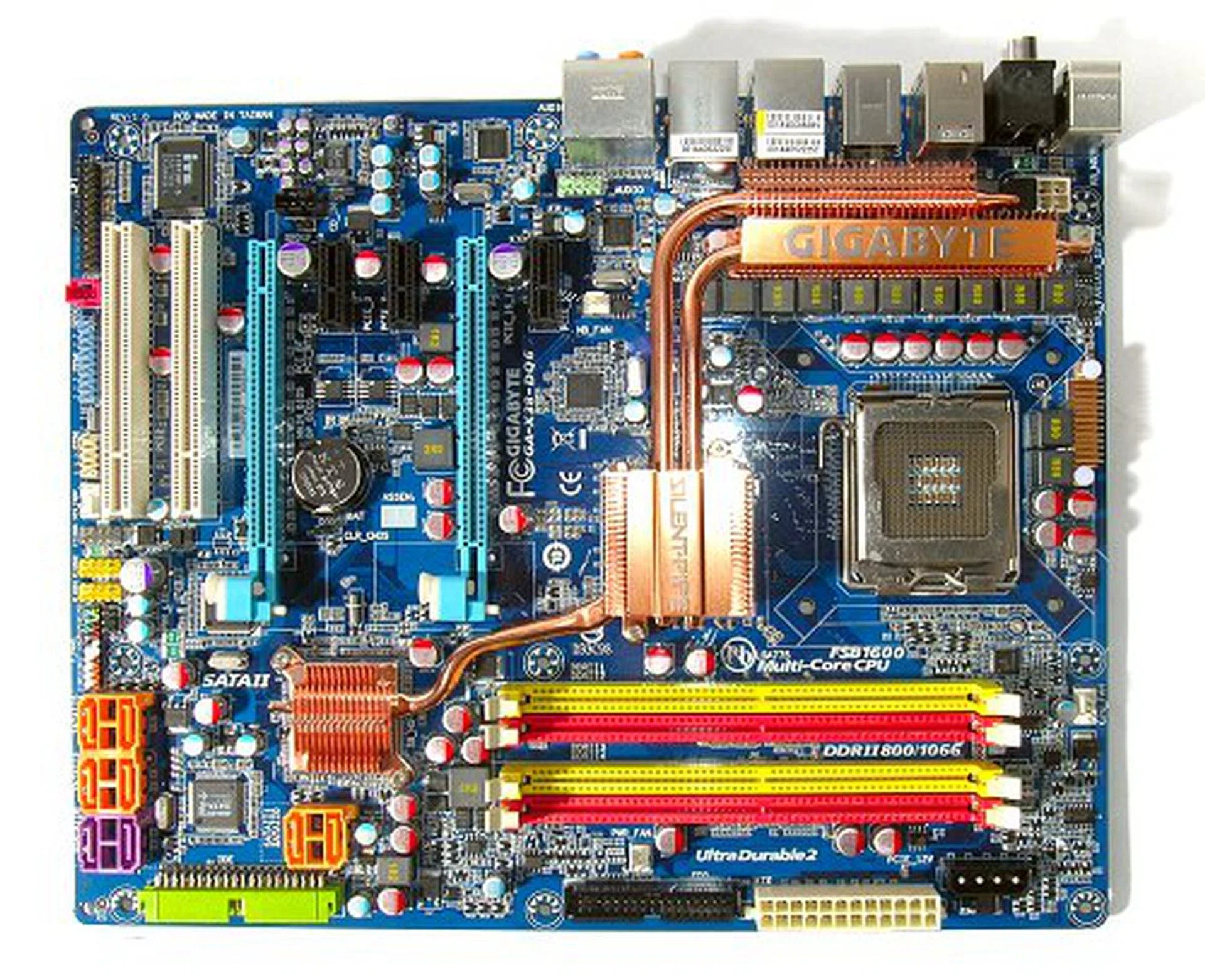
The Gigabyte GA-X38-DQ6 motherboard.
The main reason to be excited however, is the Intel X38, Intel's first attempt to re-introduce an enthusiast class chipset since the Intel 975X Express two years ago. The Intel X38 is part of the 3 Series (Bearlake) chipset family and thus shares the same architecture as the P35, which was launched in the second quarter of the year. Like all Intel chipsets to date, X38 based solutions will still be formed by combining the X38 MCH (Northbridge) and the existing ICH9 series Southbridges, so there will be no feature enhancements over the P35 besides the MCH. For a quick refresher, you can check out our original review of the MSI P35 Platinum right , which also details the basic features that the 3 Series chipsets share.
As the enthusiast chipset in the 3 Series family, the X38 will feature some significant Northbridge improvements in a while. Firstly, the X38 will improve upon the dual PCIe x8 support of the 975X Express and feature native dual PCIe x16 rails this time around, which will make full speed CrossFire configurations a reality with an Intel chipset. As yet, NVIDIA's SLI is still not officially on the table for any chipset outside of NVIDIA's own. In addition to the two PCIe x16 lanes, the X38 will also mark the introduction of the new PCI Express 2.0 specifications. Even then, it is important to note that PCI Express 2.0 is only available to the two PCIe x16 lanes on the MCH. Since there haven't been changes to the ICH9 Southbridge, all other PCIe devices other than the GPU slots will still be based on PCIe 1.1.
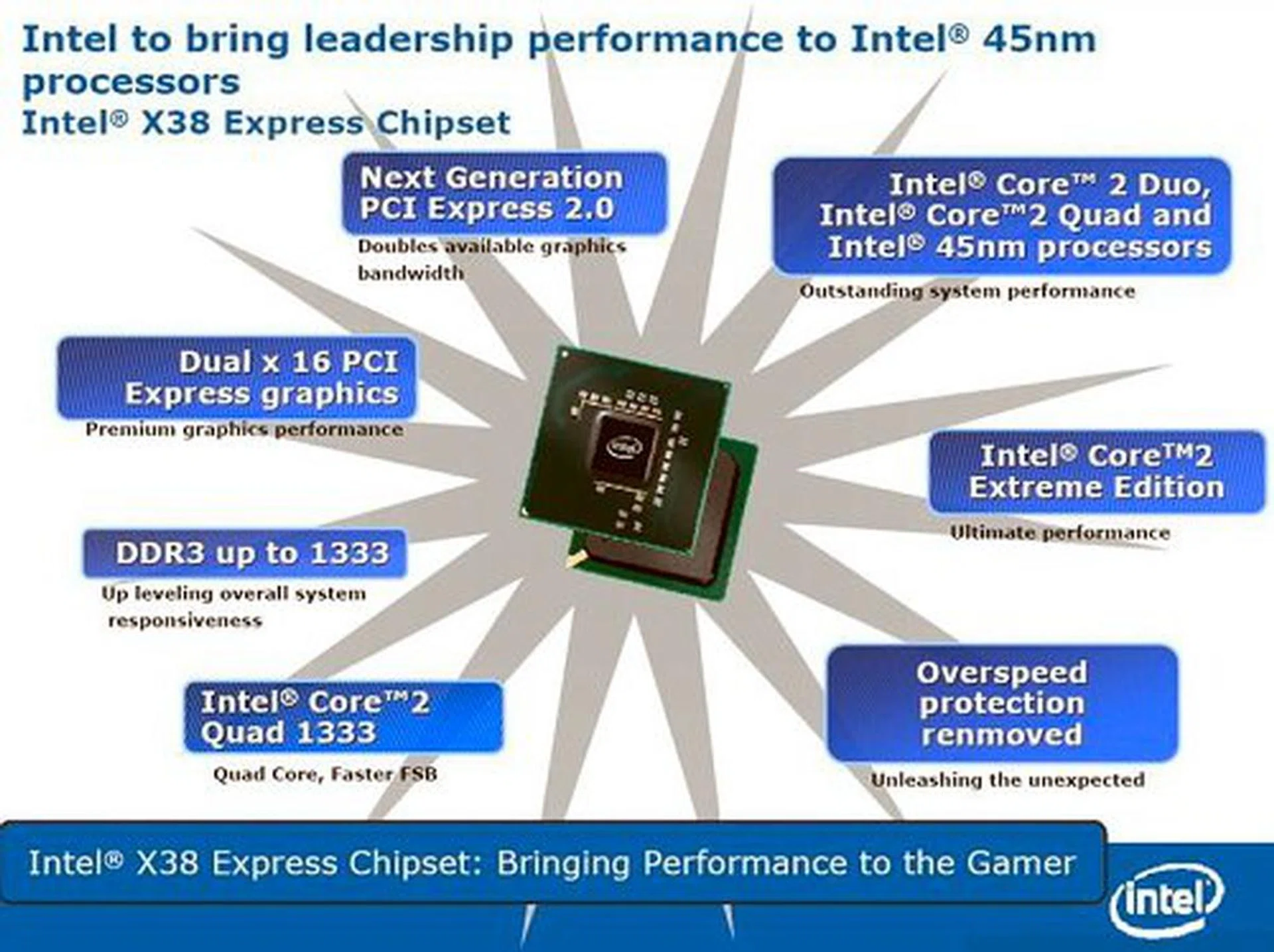
Intel X38 chipset feature highlights. Source - Intel.
So what does PCI Express 2.0 bring to the table? Basically, PCI Express 2.0 doubles the maximum bandwidth from 2.5Gbps to 5Gbps. A single x16 connector will now be able to achieve up to 16Gbps (8Gbps each way) total transfer rate. The PCI Express 2.0 specification also allows for dynamic link speed control as well as power limit redefinition. This theoretically allows PCIe 2.0 slots to support higher power devices, but looking at the way graphics cards are going, we don't think there is going to be any change on the requirement for external power input. At the moment, there aren't any retail graphics cards that can take advantage of the PCIe 2.0 standard yet, so readers shouldn't be expecting any boost in graphics performance just by upgrading to the X38. For those concerned of compatibility with existing PCIe graphics cards, the PCIe 2.0 standard is fully backward compatible with the existing PCIe specifications and cards based on either of these standards would work on either of kind of PCIe slots as well.
The second feature of note is the introduction of what Intel calls Extreme Memory Profiles, or XMP for short. XMP allows for a secondary set of timings and parameters outside of the SPD, used to boost system performance when used with supporting hardware. Sound familiar? NVIDIA launched an identical technology more than a year ago with their nForce 500 series chipsets called NVIDIA SLI Memory or Enhanced Performance Profiles (EPP).
Of course, NVIDIA's EPP and Intel's XMP will be mutually exclusive and non-compatible. This means you will see normal memory modules, EPP enhanced memory modules and XMP enhanced memory modules in the market, forcing users to tailor their memory purchase to match their motherboards if they want to maximize performance. We don't like it one bit, but that seem to be how the market is playing out. One thing is for sure though. With Intel's giant hand behind this new memory specification, XMP will gain ground much faster than EPP did. Already major enthusiast manufacturers like Corsair, OCZ and SuperTalent have pledged XMP support even before the chipset has been launched.
Product Bundle and Technical Specifications
The GA-X38-DQ6 comes with a minimal, yet functional peripheral bundle with the usual set of storage device cables and a bracket to enable eSATA functionality if you require it. Software bundle at this point seems to be one driver DVD. Our review sample came with the following package bundle:-
- 4 x SATA cables
- UltraDMA 133/100/66 cable
- Floppy disk drive cable
- 2-port eSATA bracket
- External SATA data and power cables
- I/O Shield
- Driver DVD and user's manual
CPU Support |
|
Chipset |
|
Memory |
|
Storage |
|
Audio |
|
Networking |
|
IEEE 1394 (FireWire) |
|
I/O Interface |
|
Expansion Slots |
|
Special Features |
|
PCB |
|
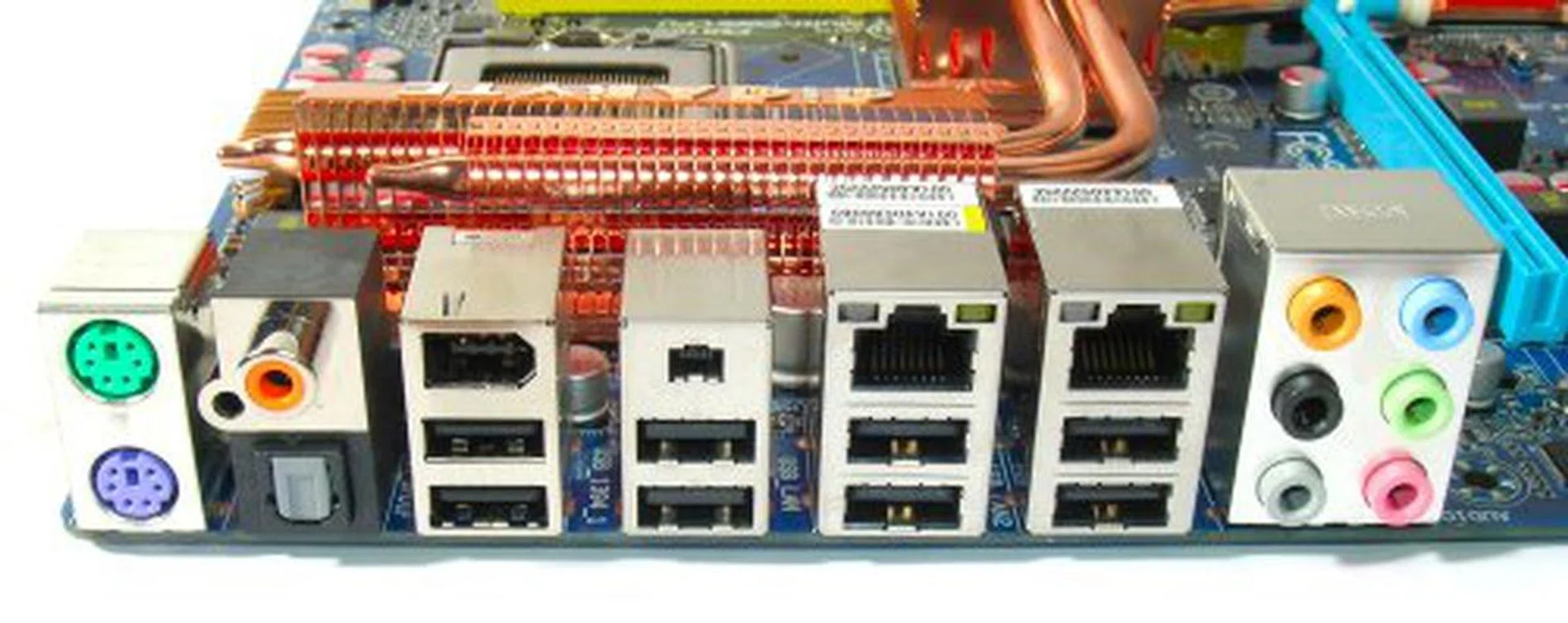
Expanded rear I/O panel compared to the Gigabyte GA-P35-DQ6 now features eight USB 2.0 ports, two FireWire ports in both six and four pin variants, two RJ-45 LAN ports and both analog and digital audio output. Parallel and Serial ports are still available through headers on the PCB.
Features
Chipset aside, the Gigabyte GA-X38-DQ6 as a motherboard is very much similar to the GA-P35-DQ6 in terms of features and choice of components used. The only real difference is that the GA-X38-DQ6 comes with two Gigabit LAN controllers compared to one on the GA-P35-DQ6. Everything else remains the same. For storage purposes, the board features six primary SATA 3.0Gbps ports powered by the Southbridge, which is the staple of all motherboards using the ICH9R. In addition, there is a Gigabyte re-branded JMicron JMB363 controller providing one legacy IDE port as well as two additional SATA 3.0Gbps ports. Like before, there are no eSATA connectors onboard, but Gigabyte does provide an eSATA bracket to bridge two internal SATA ports for use as eSATA.
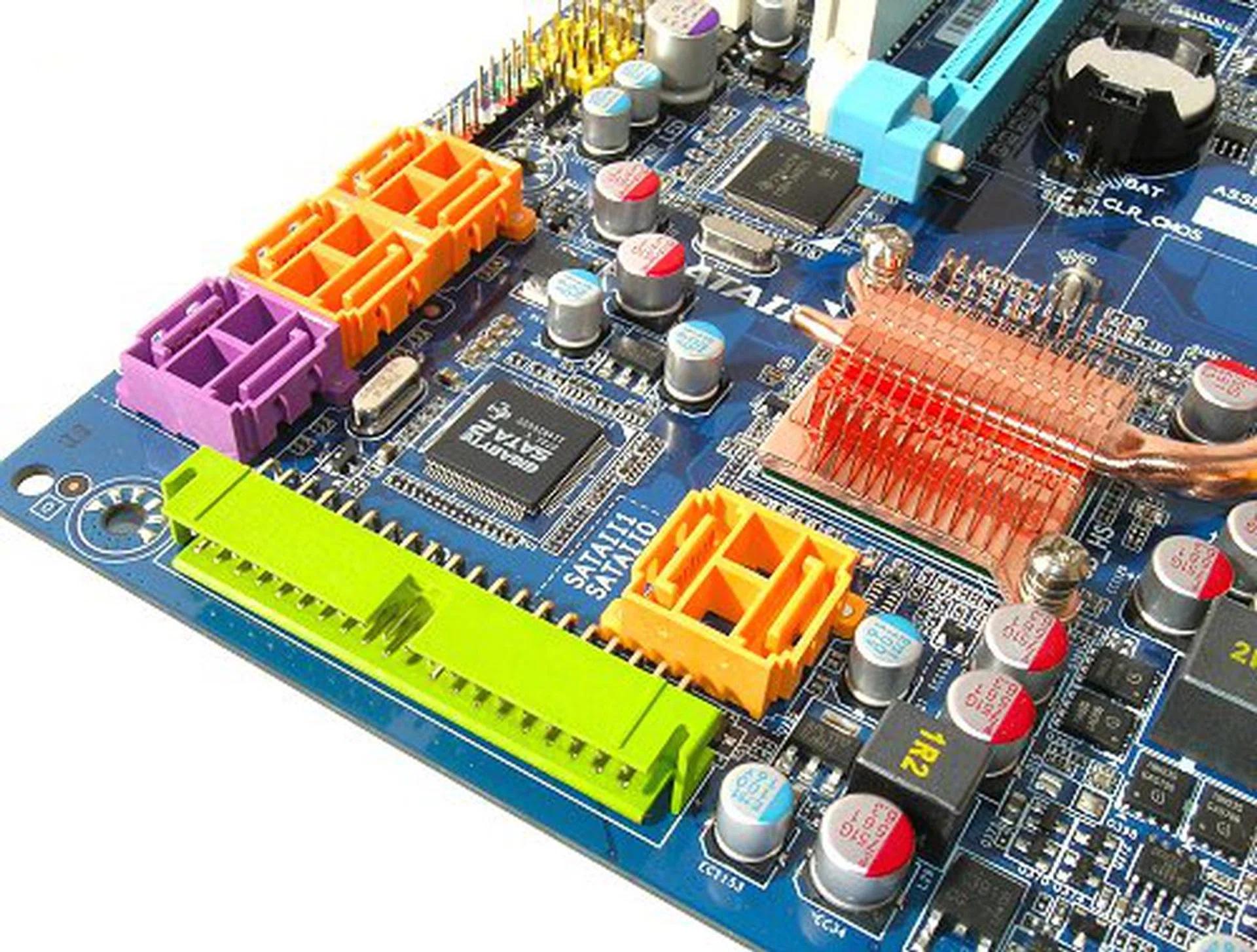
A total of eight SATA ports provided by the Intel ICH9R and Gigabyte SATA2 controller seen here in the picture. Internal connectors can be used to enable two eSATA ports through a bundled bracket as well.
The aforementioned twin Gigabit LAN ports on the board are each controlled by a Realtek RTL8111B chipset while FireWire-400 support is provided by a Texas Instruments TSB43AB23 controller. Audio-wise, Gigabyte doesn't follow the trend of MSI or ASUS, which have both tried to differentiate their audio delivery. However, they are still the only manufacturer we've come across to use Realtek's latest ALC889A HD Audio CODEC and the GA-X38-DQ6 is no different. On paper, the ALC889A is quite an impressive audio chipset with good SNR and protected path delivery as well for HD content. The board comes with full analog surround audio connections as well as S/PDIF onboard.
The motherboard features a total of seven expansion slots, two PCI, three PCIe x1 and two full speed PCIe x16 slots. One of the most interesting things about the board however, is the use of DDR2 memory. We had initially pegged the X38 to be DDR3 exclusive, but it seems that like the P35, we will see both DDR2 and DDR3 versions of X38 boards in the market.
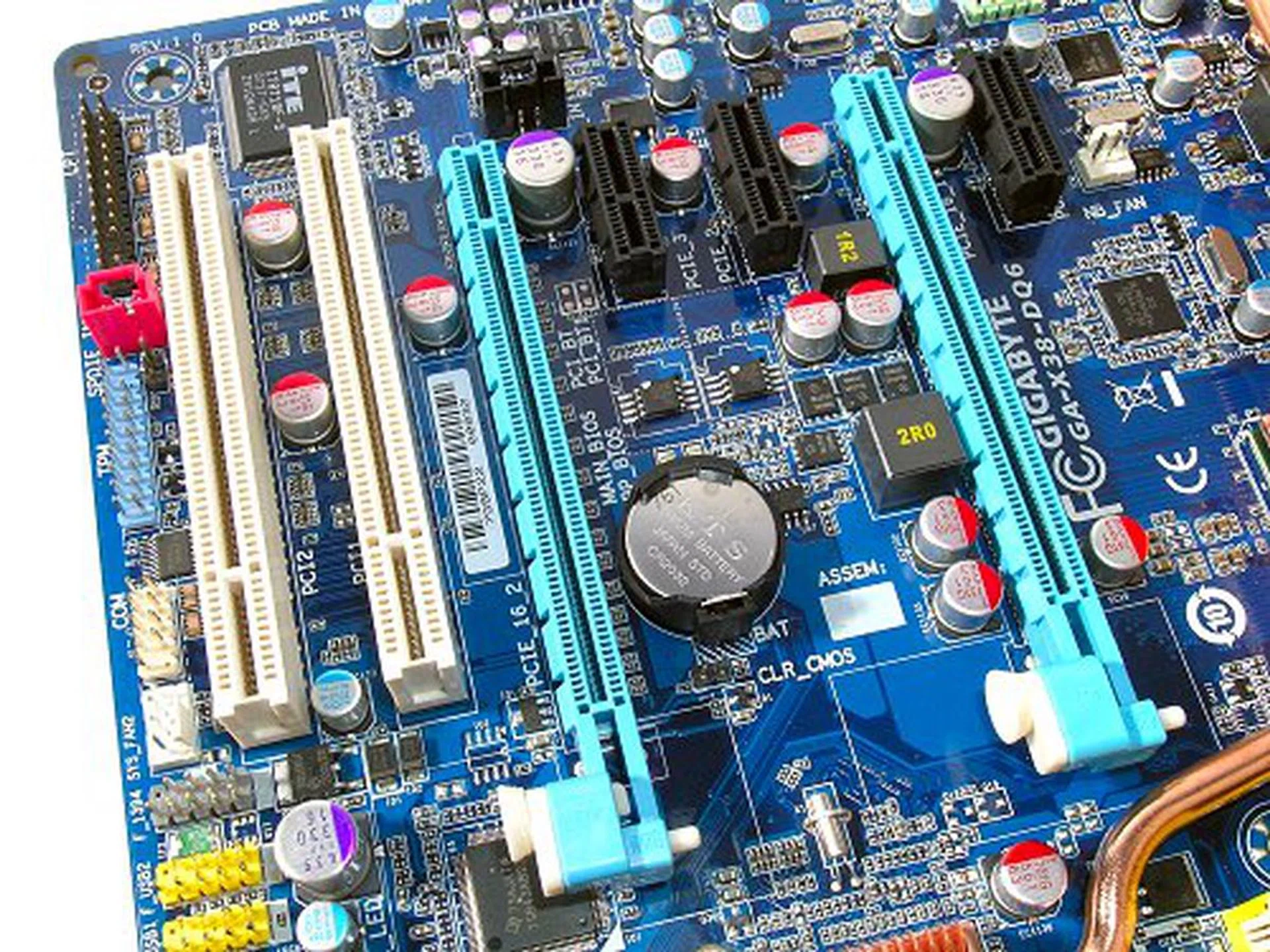
Seven-slot design with two full speed PCIe x16 slots courtesy of the new Intel X38 chipset. Note that only the two PCIe x16 slots supprt the new PCIe 2.0 specification.
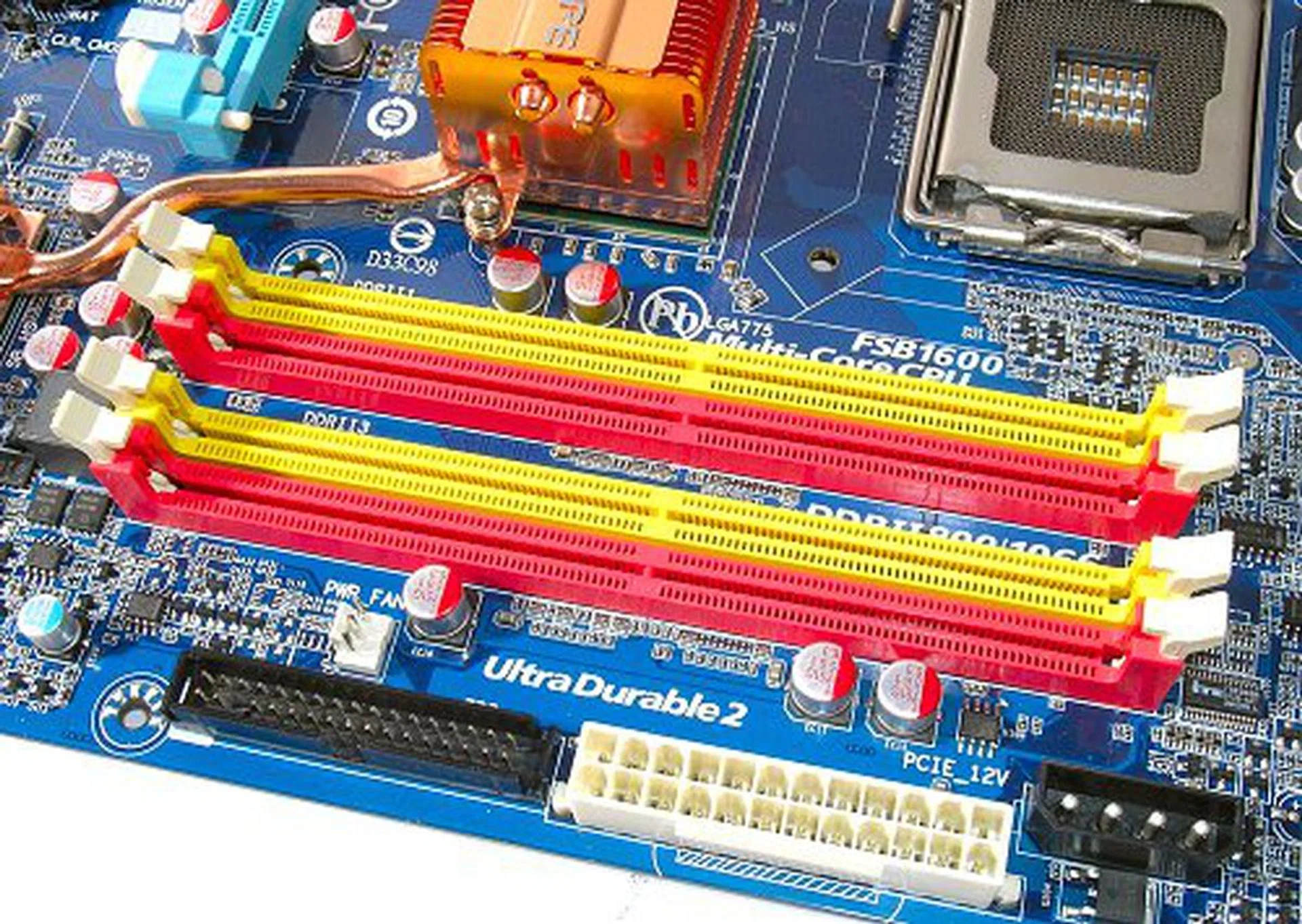
The GA-X38-DQ6 will still feature DDR2 support. For DDR3, you can check out the GA-X38T-DQ6 instead.
Layout
Although the GA-X38-DQ6 shares similar features and setup with its predecessor, the GA-P35-DQ6, the PCB design has undergone some important changes. Firstly, you will notice that the heat-pipe configuration is a lot more compact and functional, resembling the newer GA-P35-DQ6 rev 1.1 rather than the building-like structure of the original GA-P35-DQ6. Also notice that the GA-X38 DQ6 only features a three piece ensemble instead of the four-piece cooler previously. Gigabyte removed the need for a fourth piece be moving most of the MOSFETs to the top of the board instead, which explains the whole row of chokes and a larger back heatsink. This clears out some space to the sides of the board, so the CPU socket has been shifted slightly to the corner as well, giving more room for the expansion slots.
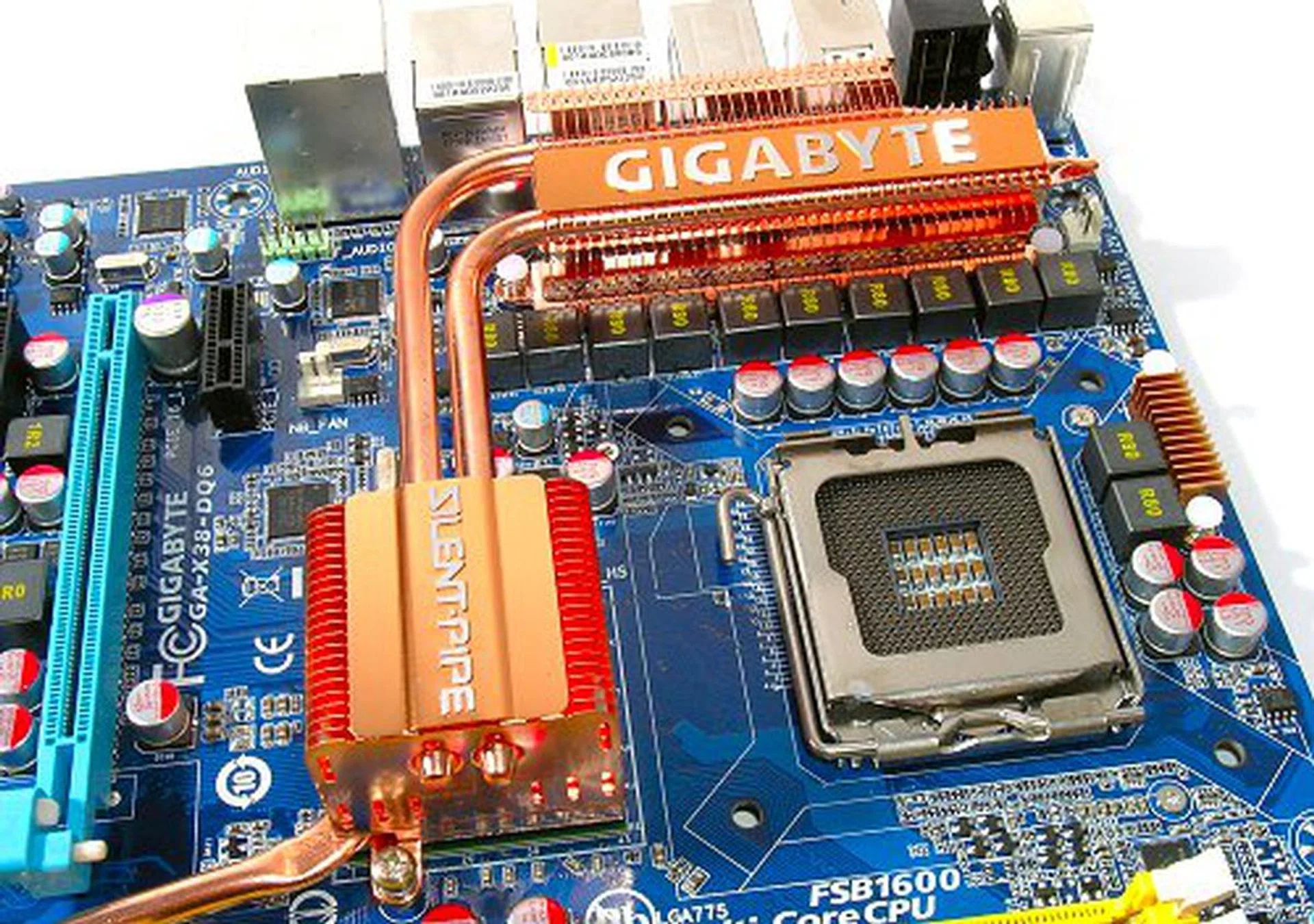
A smaller, more compact Silent-Pipe system.
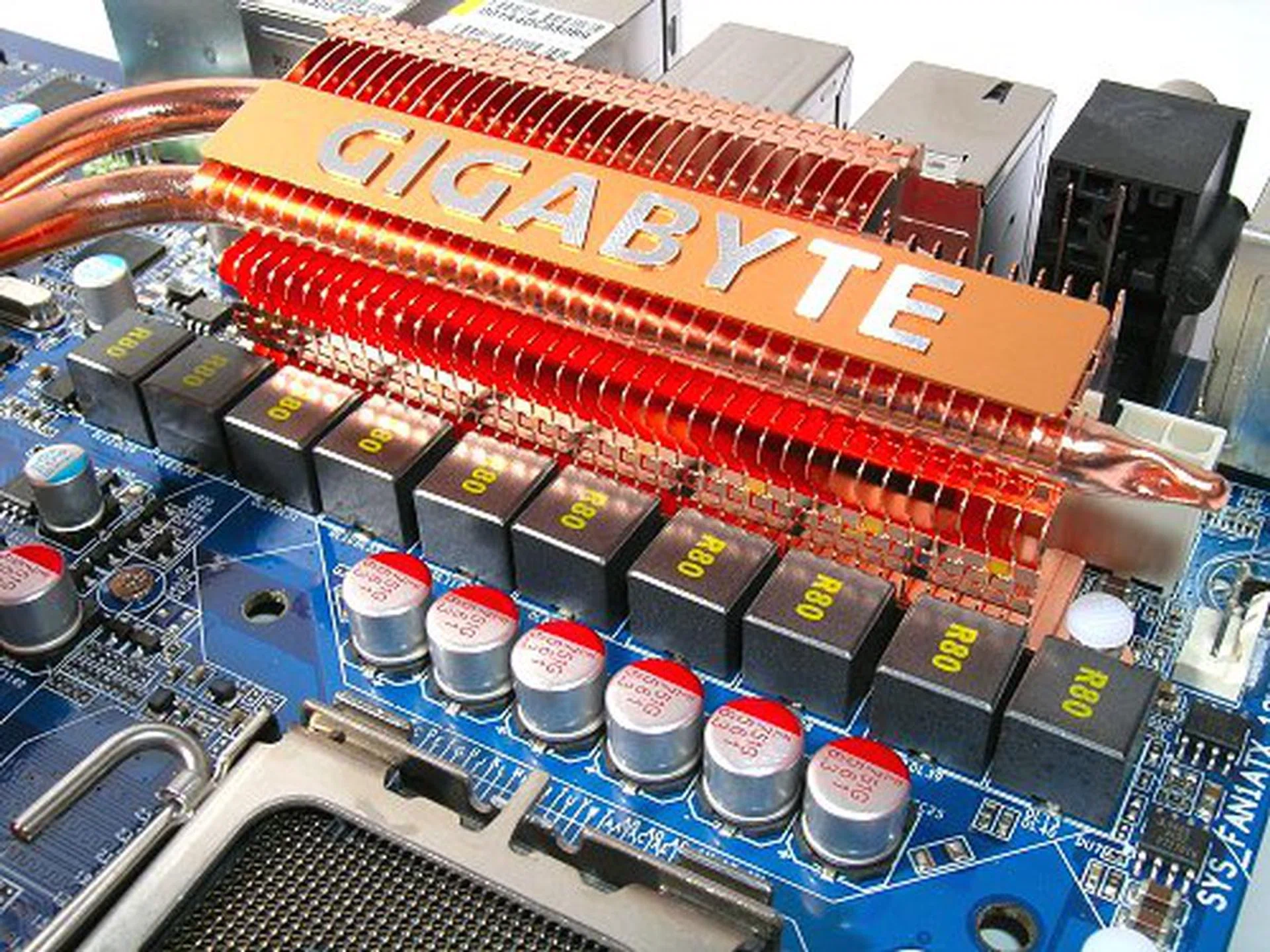
Close up of the consolidated PWM.
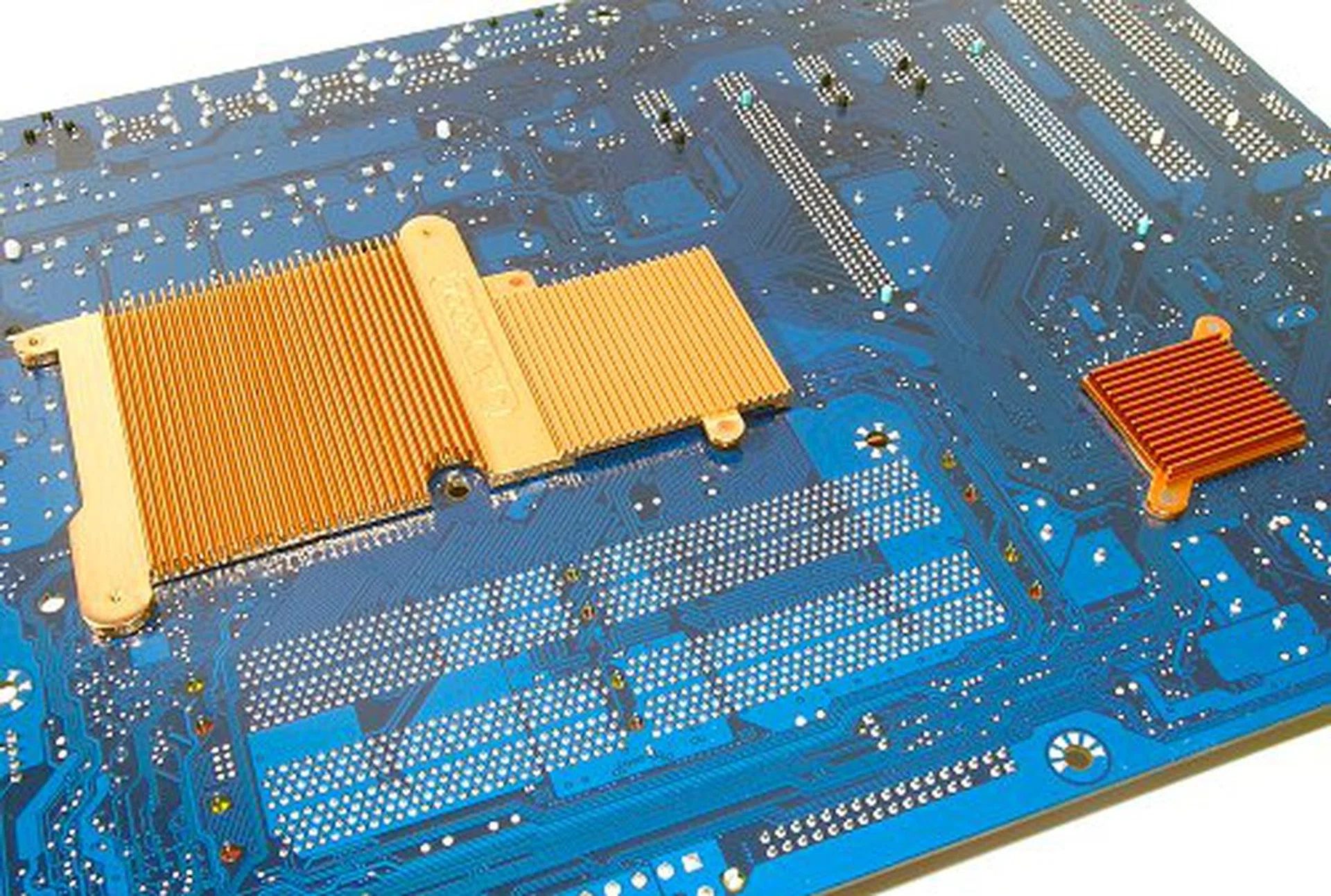
Gigabyte Crazy Cool back heatsinks cover the CPU socket and both chipsets.
There has also been some slight reshuffling of onboard connectors on the GA-X38-DQ6. Gigabyte moved all remaining headers towards the bottom of the board, where they are less likely to be obstructed by larger graphics cards. This however raises an issue with larger casings, where cables may not be long enough. Overall, we like the new PCB layout, which is cleaner and less cluttered than before.
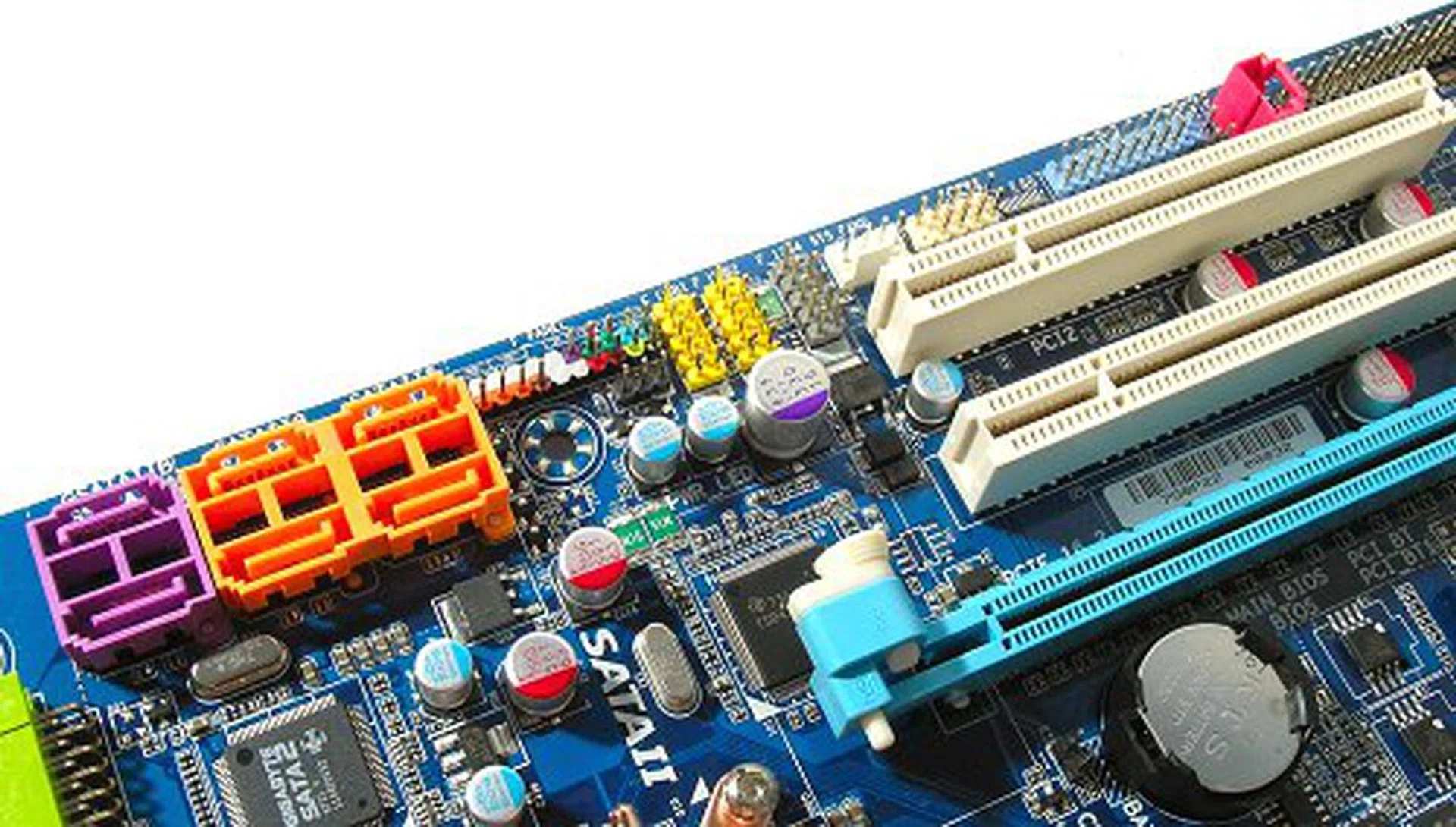
Almost all connectors and headers moves to the bottom lower side of the board.
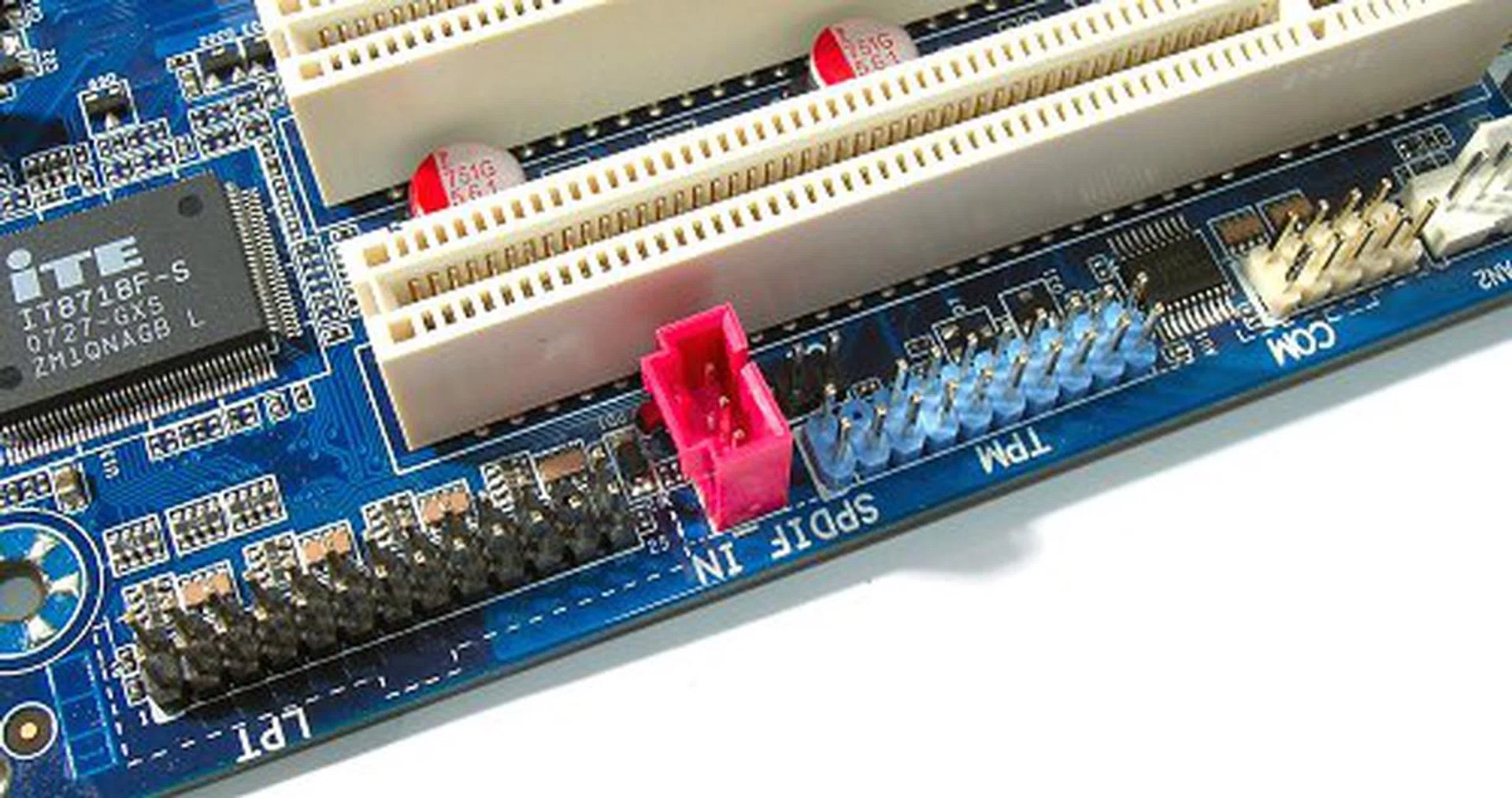
More connectors lining the bottom. Notice that the board supports optional TPM modules as well.
Overclocking
- FSB Settings: 100MHz to 700MHz
- DDR2 Settings: Auto, 2.0, 2.5, 3.0, 2.66, 3.33, 4.0+
- PCIe Settings: 90MHz to 150MHz
- CPU Voltage Settings: 0.51250V to 1.60000V (in 0.00625V steps), 1.60V to 2.35 (in 0.05V steps)
- Memory Voltage Settings: +0.05V to +1.55V (in 0.05V steps)
- Memory Reference Voltage Settings: +10%, -10%
- PCIe Voltage Settings: +0.05V to +0.35V (in 0.05V steps)
- MCH Voltage Settings: +0.025V to +0.375V (in 0.025V steps)
- MCH Reference Voltage Settings: +10%, -10%
- FSB Voltage Settings: +0.05V to +0.35V (in 0.05V steps)
- Multiplier Selection: Yes (unlocked CPUs only)
In terms of overclocking, the Gigabyte GA-X38-DQ6 sports an almost identical BIOS to its predecessor, the GA-P35-DQ6. Again, considering that the GA-X38-Q6 is just a minor chipset upgrade, it is expected that Gigabyte did not spend too much time revamping their BIOS settings. Frequency and voltage steppings as well as upper and lower limits matched the GA-P35-DQ6, with only a few extras like reference voltage options. You might have noticed that we did not list any XMP-specific options. Supposedly, the X38 chipset detects XMP modules and enables them automatically (which we have yet to confirm with proper RAM). However, all known XMP memory that has been announced so far have been for DDR3, thus the GA-X38-DQ6 may not benefit from this particular technology without hardware support.
For raw overclocking, the maximum stable FSB overclock achieved by the GA-X38-DQ6 was 490MHz, 25MHz lower than what we achieved on the GA-P35-DS3R, but still very much in contention with most of the better P35 boards we've come across. Now, readers must remember that the X38 is a new chipset and the GA-X38-DQ6 still has time to develop. When we first reviewed the Gigabyte GA-965P-DQ6, its overclocking capabilities were way below expectations, though several BIOS revision later fixed it. Time will tell if the GA-X38-DQ6 will be a better overclocker, but for now the P35 DS3 series remains one of the best and cost effective overclocking motherboards around.
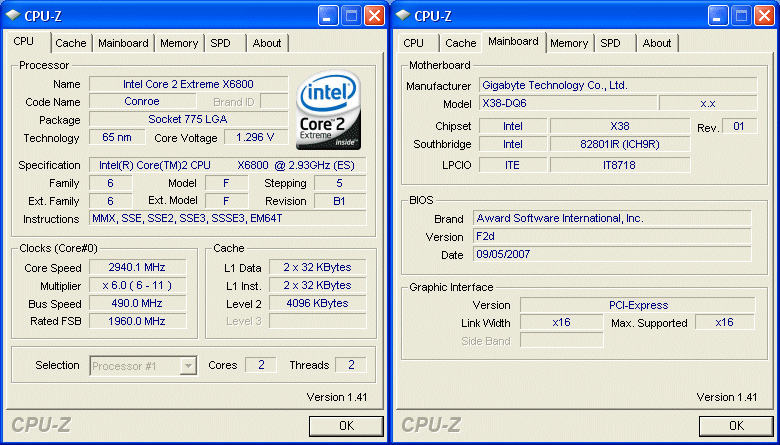
CPU-Z overclocking screenshot. Click for full size image.
Test Setup
Benchmarking the Intel X38 chipset isn't much different from the Intel P35 as both are from the same family. Hardware and software driver usage are identical as well, so we need to switch test bed configurations. Since the Gigabyte GA-X38-DQ6 is a DDR2-only motherboard, we are able to use our existing result library of the top enthusiast P35 motherboards to compare the new X38 with. These include Gigabyte's own GA-P35-DQ6, ASUS' P5K Deluxe, ASUS Blitz Formula and MSI P35 Platinum.
The benchmarking test bed configuration that will be used for this review is listed below:-
- Intel Core 2 Extreme X6800 processor (2.93GHz)
- 2 x 1GB Kingston HyperX DDR2-800 @ 4-4-12 CAS 4.0
- Seagate Barracuda 7200.10 200GB SATA hard disk drive (one single NTFS partition)
- MSI GeForce 8600 GTS 256MB - with ForceWare 158.22 drivers
- Intel INF 8.3.1.1013 and AHCI 7.5.0.1017 driver set
- Microsoft Windows XP Professional with Service Pack 2 (and DirectX 9.0c)
Benchmarks
The following benchmarks will be run to determine the performance of the Gigabyte GA-X38-DQ6:-
- BAPco SYSmark 2004
- Futuremark PCMark05
- SPECviewperf 9.0
- Futuremark 3DMark06
- AquaMark3
Results - BAPco SYSmark 2004
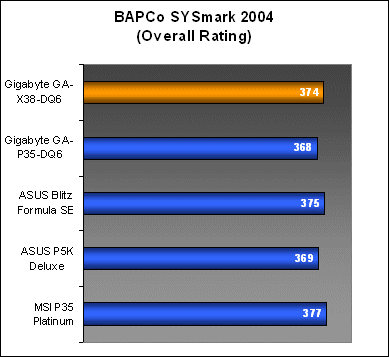
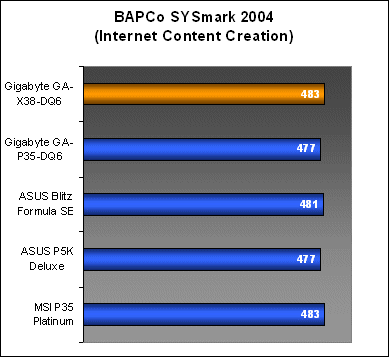
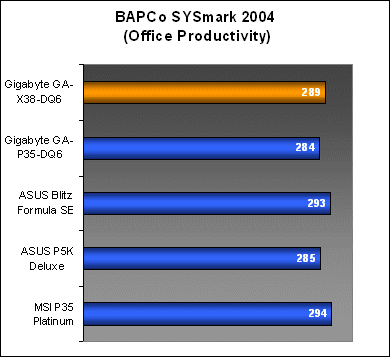
SYSmark 2004 performance of the GA-X38-DQ6 showed a decent improvement over Gigabyte's GA-P35-DQ6 in both Internet Content Creative and Office Productivity workloads. The new board is now able to go head to head with the high performing MSI P35 Platinum and ASUS Blitz Formula.
Results - Futuremark PCMark05
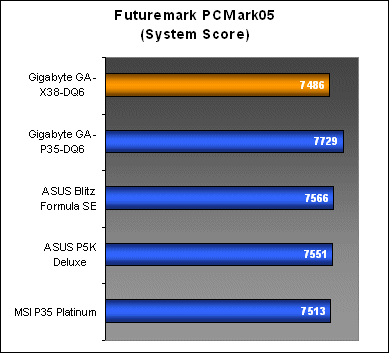
In PCMark05, the GA-X38-DQ6 performed well in three categories, with a good overall System result, CPU and high HDD scores. However, like the GA-P35-DQ6, the board wouldn't play nice with PCMark05 in its Memory workloads, resulting in below par performance.
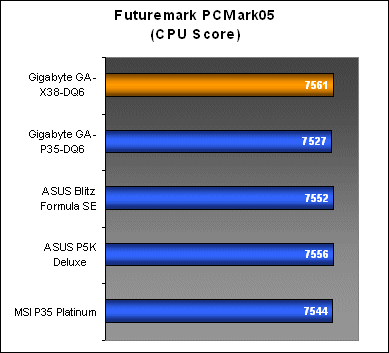
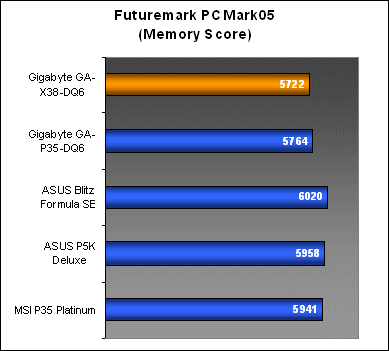

Results - SPECviewperf 9.0
SPECviewperf 9.0 results on the other hand were strongly in favor of the GA-X38-DQ6. The board managed to perform on par even with the ASUS Blitz Formula. These results are more of what we've been expecting from the X38 and it now seems like the Gigabyte boards may have some issue with PCMark05.
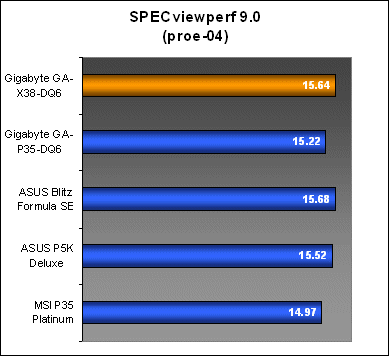
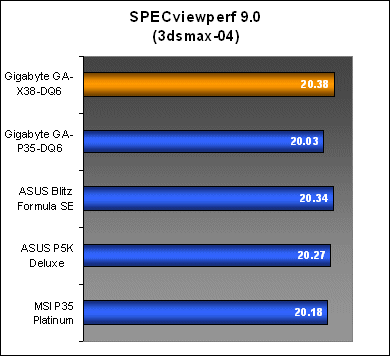
Results - Futuremark 3DMark06
The GA-X38-DQ6 was able to bring over its strong performance from our productivity benchmarks to the gaming side of things. On the overall scheme of things, there was only a minute difference in performance numbers for 3Dmark06, but the GA-X38-DQ6 managed to squeeze out a few more 3DMarks than the P35 boards.
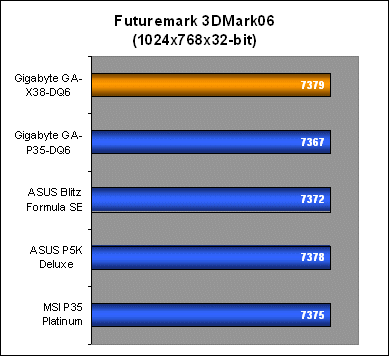
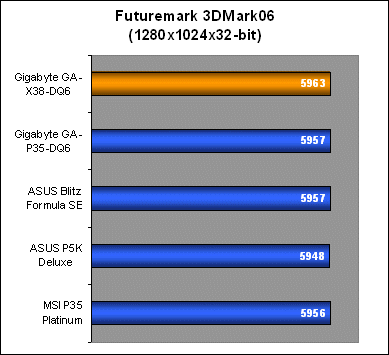
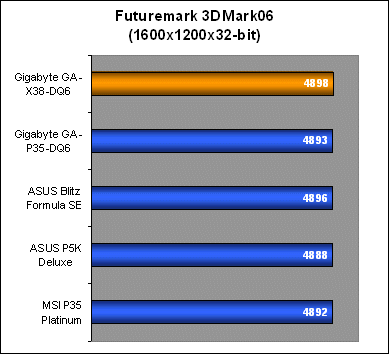

Results - AquaMark3
Surprisingly, the GA-X38-DQ6 did not fair as well in AquaMark3 as its CPU scores mirrored the low ratings on the GA-P35-DQ6. GPU and overall performance (in Frames Per Second) weren't really affected at all, but the CPU breakdown showed a significant drop in performance. In fact, both benchmarks (AquaMark3 and PCMark05) that reflected poorly on the GA-X38-DQ6 memory subsystem resulted in lower scores than the GA-P35-DQ6.
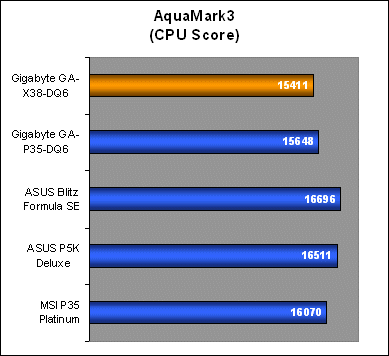

Conclusion
The Intel X38 is finally here, promising to be the chipset that every hardcore gamer (and Intel fan) has been waiting for, for the last two years. True dual PCIe x16 CrossFire graphics is one thing, but throw in PCI Express 2.0 improvements and you've got a whole lot of bandwidth to spare. Truly, this is a moment to be excited about.
However, you may have noted our seemingly lack of enthusiasm with the Gigabyte GA-X38-DQ6, but this has nothing to do with the X38 chipset itself. In Gigabyte's world, the DQ6 is the flagship series, bearing all the technologies from its Ultra Durable 2, S-Series and 6-Quad motherboards rolled into one. This means that every DQ6 motherboard is packed to the brim. The GA-X38-DQ6 is a logical upgrade to the GA-P35-DQ6 with a new chipset, but the board itself, its features and BIOS doesn't really change much. So, forgive us if we seem a little jaded with the GA-X38-DQ6 after reviewing the GA-P35-DQ6 only a little while ago, but aside from that fact, Gigabyte's X38 motherboard is perfectly in-line with our expectations of a DQ6 class board.
Let's review what is different though. Since the first revision of the GA-P35-DQ6, Gigabyte has had time to revise the PCB design of the board and the GA-X38-DQ6 is very much more cable friendly than before. The small tweaks here and there make the board easier to work with and less cluttered, all good things.
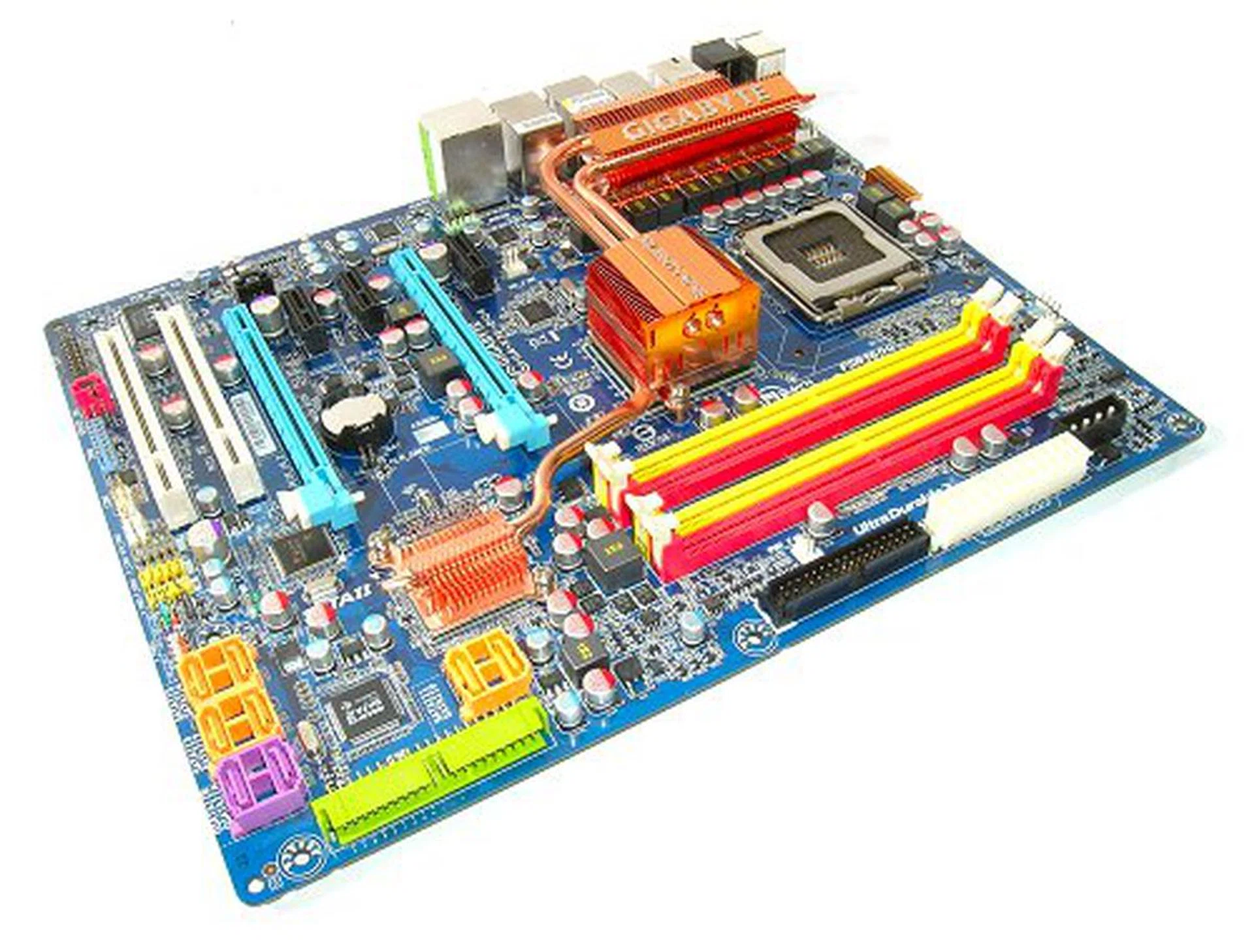
The Gigabyte GA_X38-DQ6 is a great filler motherboard for the incremental upgrader who has waited a long time for proper Intel CrossFire solution. For the rest of the world, wait for the DDR3-only GA-X38T-DQ6.
The general performance of the GA-X38-DQ6 has also improved over the GA-P35-DQ6. Benchmark results now put the GA-X38-DQ6 almost on par with the likes of the ASUS Blitz Formula. There were some inconsistencies where the board dropped back down to the P35 scores in PCMark05 and AquaMark3, but it doesn't detract from the overall improvements we saw. We had initially expected the X38 to outperform the P35, as Intel has a history of making sure their enthusiast chipsets have an advantage over its mainstream series, no matter how slight. However, in the case of the GA-X38-DQ6, it may have been due to the DDR2 implementation. Until we are able to fully test out a DDR3 based X38 motherboard, we'll reserve our comments on this topic.
The overclocking capabilities of the GA-X38-DQ6 was impressive enough, but our board was unable to break Gigabyte's own track record from their P35 boards yet. The Intel X38 chipset is supposed to have its overspeed protection removed to facilitate extreme overclocking. However, the overclockability of any motherboard is still very much determined by the overall tolerance of the CPU and RAM as well as the motherboard in question. Considering that the current overclockability of today's Intel chipsets and CPUs, we're already hitting the ceiling for both CPU and memory through stock cooling. The GA-X38-DQ6 may gradually improve through later BIOS revisions, but we do not foresee the X38 to be too much more powerful in this area than the P35 or even P965 when using current Core 2 processors and DDR2 memory.
By releasing a DDR2-only X38 motherboard, Gigabyte is catering to the current batch of enthusiasts who would love proper CrossFire, but still unwilling to part with their expensive high-end DDR2 memory. However, that's where we would draw the line. The Intel X38 was designed to maximize performance using the latest hardware technologies, which users might miss out with a DDR2 version like the GA-X38-DQ6. However, Gigabyte does feature a DDR3-only SKU in the form of the GA-X38T-DQ6. If you're looking to unleash the full capabilities of the X38 chipset, that is the board you probably want to check out instead.
Our articles may contain affiliate links. If you buy through these links, we may earn a small commission.