
ECS P55H-AK - Entering the Big Leagues
With the P55H-AK, ECS reveals its ambitions of competing in the consumer enthusiast segment. Packed with features that are practically unheard of on an ECS board, can this board change ECS' image in the market? Find out in our review.

The Extreme Side of ECS
Mention the brand ECS and the association that comes up first is the lower end segment of the market. Not that there's anything wrong with that since going for the high volume mass market is a legitimate business strategy and there's also the OEM market where ECS' real strength is. ECS however has been diversifying its motherboard strategy and has made inroads higher up the price ladder in recent years, notably with its Black Series of boards. These boards are targeted at mainstream enthusiasts, with features that emphasize overclocking and support for more powerful hardware like multiple graphics cards while being more reasonably priced than the bigger names like ASUS, Gigabyte or MSI.
The latest evolution of ECS' Black Series is the P55H-AK. It's a board that takes its enthusiast leanings very seriously and frankly, we haven't seen an ECS board packed with such high-end features since, well, forever. It won't be inaccurate to say that if you remove all visible signs of the ECS brand, you may even mistake it for an enthusiast oriented board from the more established retail motherboard brands.
Why do we say that? Well, how about an NVIDIA nForce controller for 3-way SLI/CrossFireX support, a PLX switch chip for full SATA 6Gbps and USB 3.0 speeds, dual Gigabit Ethernet controllers and memory frequency support up to 2400MHz? We could name more, like some of the new proprietary software and BIOS tools that ECS has prepared, but why tell when we can show?
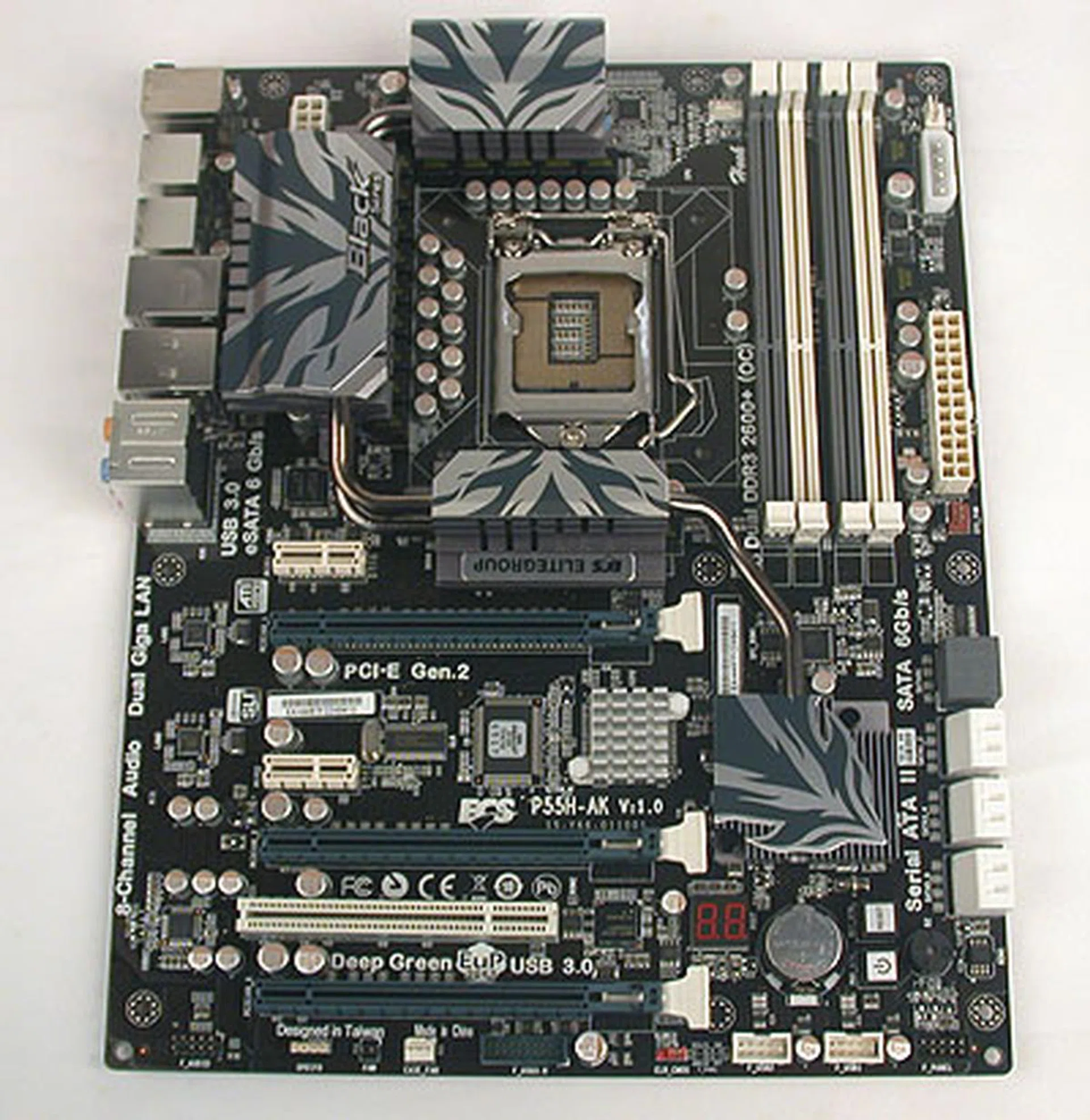
A gray board that had quite a substantial heft to it, this is ECS' latest attempt to crack the premium, enthusiast motherboard segment.
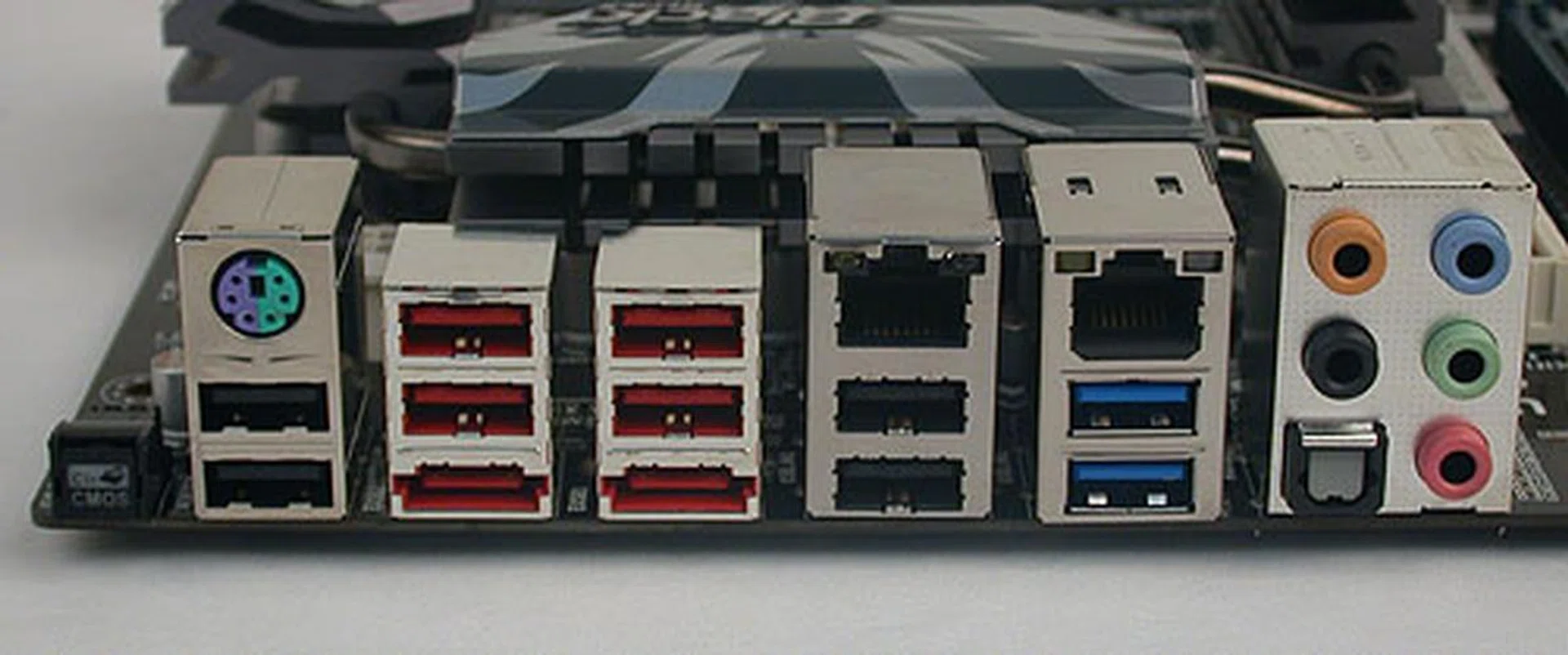
There are plenty of ports at the back, with eight USB 2.0 ports, the two USB 3.0 ports in blue, dual Gigabit LAN ports, a black Clear CMOS button and two eSATA 6Gbps ports. It means however that there is no space for coaxial S/PDIF output, with only the optical S/PDIF.
ECS P55H-AK
By now, you should have the impression that the ECS P55H-AK is anything but typical of ECS' motherboards, including even its higher end Black Series but what exactly is so different about it? We are tempted to say 'everything!' but let's start from the exterior design. Here, ECS has gone for a makeover, favoring a stark, serious appearance with its gray and white colors. Contrast that with the colorful (also a Black Series board) earlier this year.
In fact, compared to the ECS P55H-A, the new P55H-AK has physically changed for the better. The PCIe 2.0 x16 slots have a new locking mechanism that we feel is comparatively easier to remove installed graphics cards. The onboard buttons are more prominent and larger for users to press. The heatsinks are more elaborate, with heatpipes now used extensively. And last but not least, the PCB is no longer the off-putting brown but more towards a darker shade.
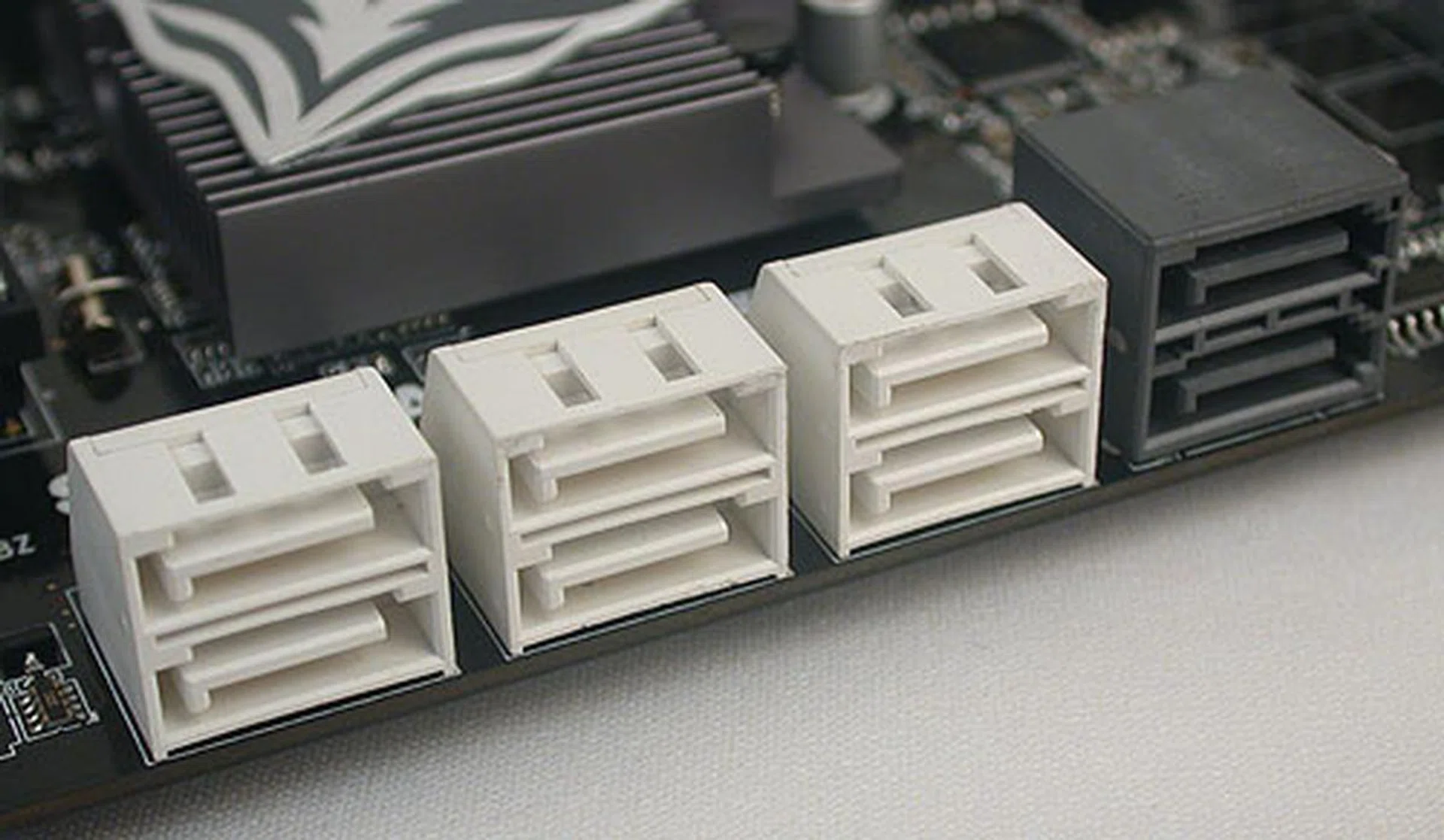
Six SATA 3.0Gbps ports (in white) and two SATA 6Gbps ports (in black), an increasingly common sight on newer motherboards. Marvell's 9128 SATA 6Gbps controller is used, with SATA RAID support.
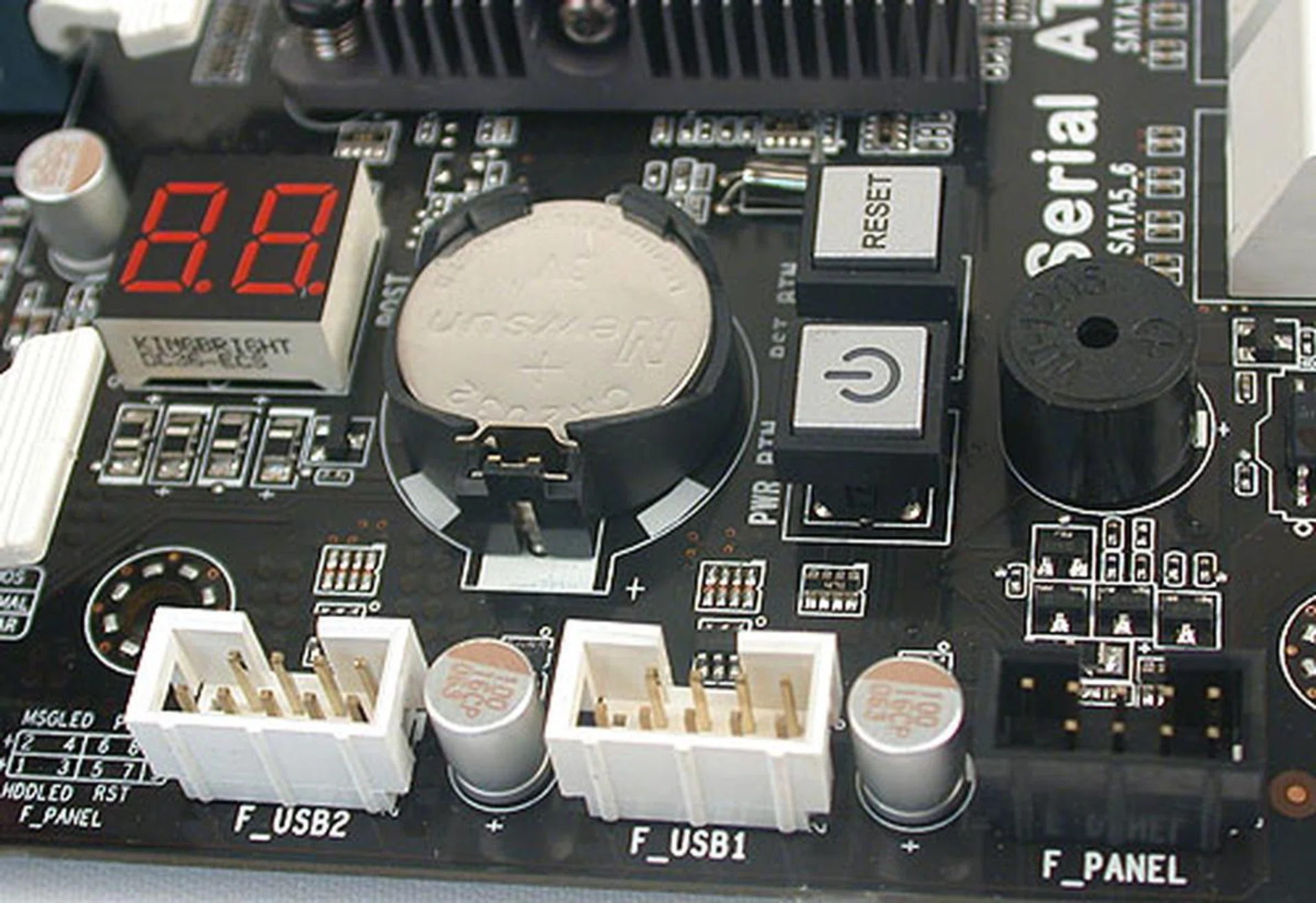
There are onboard buttons for power and reset, along with an LED for debugging purposes.
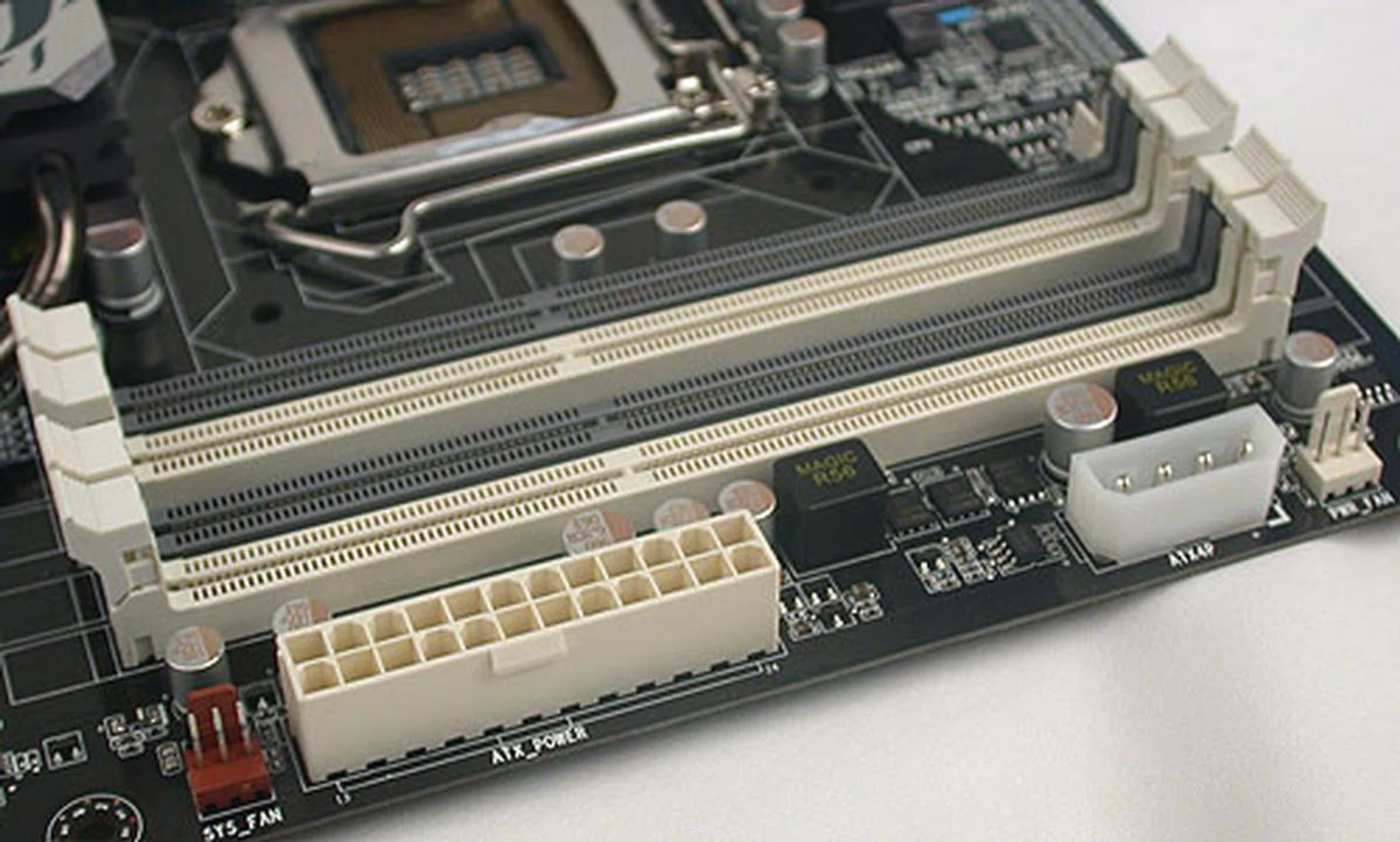
A dual-channel architecture on this chipset means the standard four DIMM configuration. There's also an additional four-pin power connector for the graphics card if required. Overclocked memory frequencies up to 2400MHz are also available for selection in the BIOS.
Users rightfully would be most concerned about the features on the P55H-AK and it is quite the departure from ECS' other Black Series boards. For one, this board supports 3-way SLI/CrossFireX, thanks to the presence of an NVIDIA NF200 controller that adds 32 more PCIe lanes to enable this feature without compromising on the bandwidth for each card. As you should know, the P55 chipset only supports up to two graphics cards for SLI/CrossFireX by default. According to the specs, the three PCIe 2.0 x16 slots on the P55H-AK will be configured as x16/x8/x8 when all three slots are filled.
Then there's the presence of a PLX switch chip that ensures the USB 3.0 and SATA 6Gbps features work at their intended speeds. The P55 chipset itself comes with limited PCIe lanes and is not intended to support USB 3.0 and SATA 6Gbps natively. Without the PLX chip, the third party solutions implemented by the motherboard vendor would be cannibalizing the chipset's PCIe lanes. Similarly, the graphics card taps onto the same pool of PCIe lanes, resulting in either the degradation of USB 3.0 and SATA 6Gbps speeds or a lower x8 (from x16) speed for the graphics. This is the reason why ECS went for the PLX chip to manage the PCIe lanes, something that other vendors like ASUS have done too, to guarantee the full speed experience in all cases.
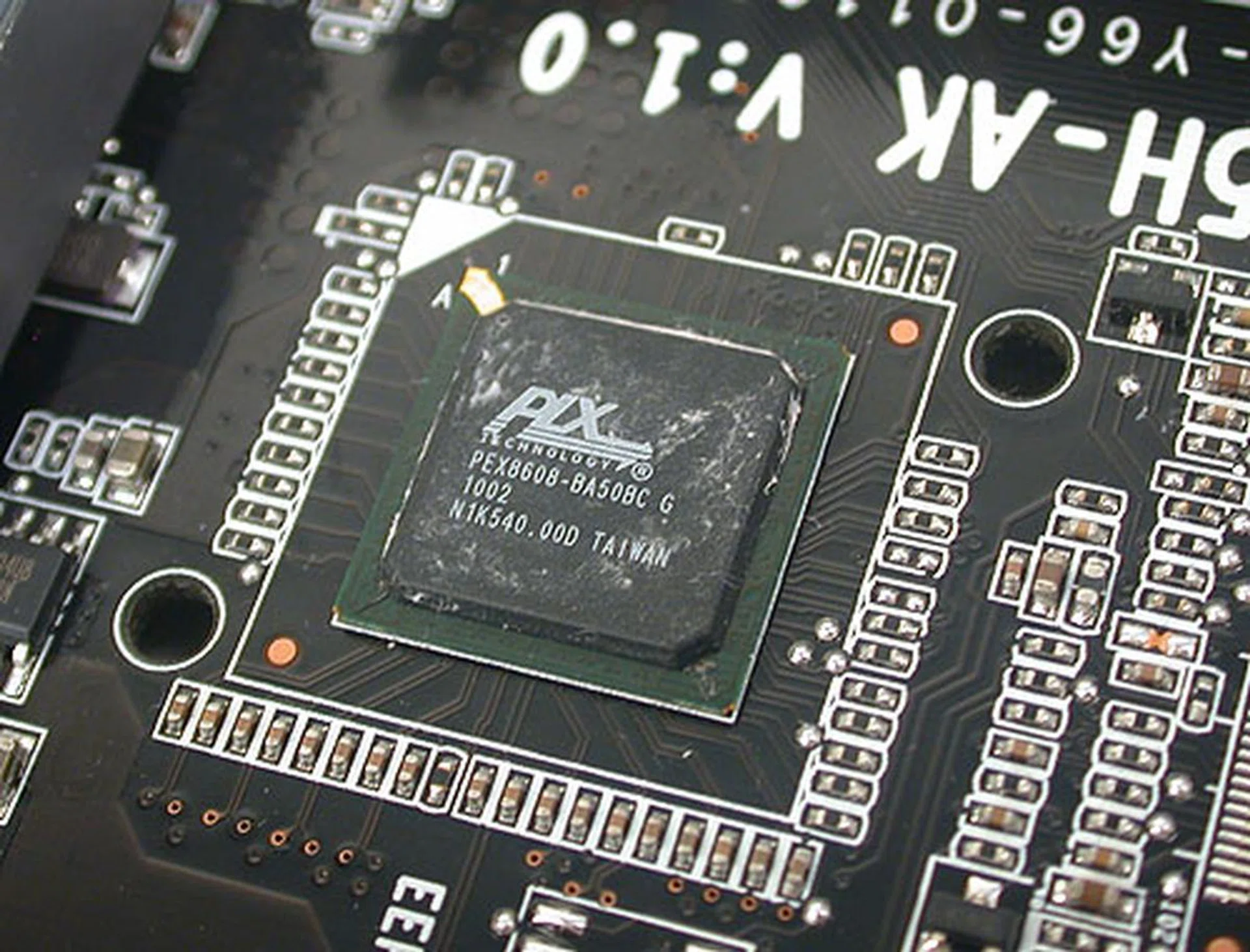
A PLX PEX 8608 PCIe Gen 2 switch ensure that your USB 3.0 and SATA 6Gbps will not have their bandwidth lanes diverted when you setup CrossFireX or SLI, which is what happens on some boards which tout these features. Hence, your SATA 6Gbps or USB 3.0 will always be running up to its maximum advertised speed.
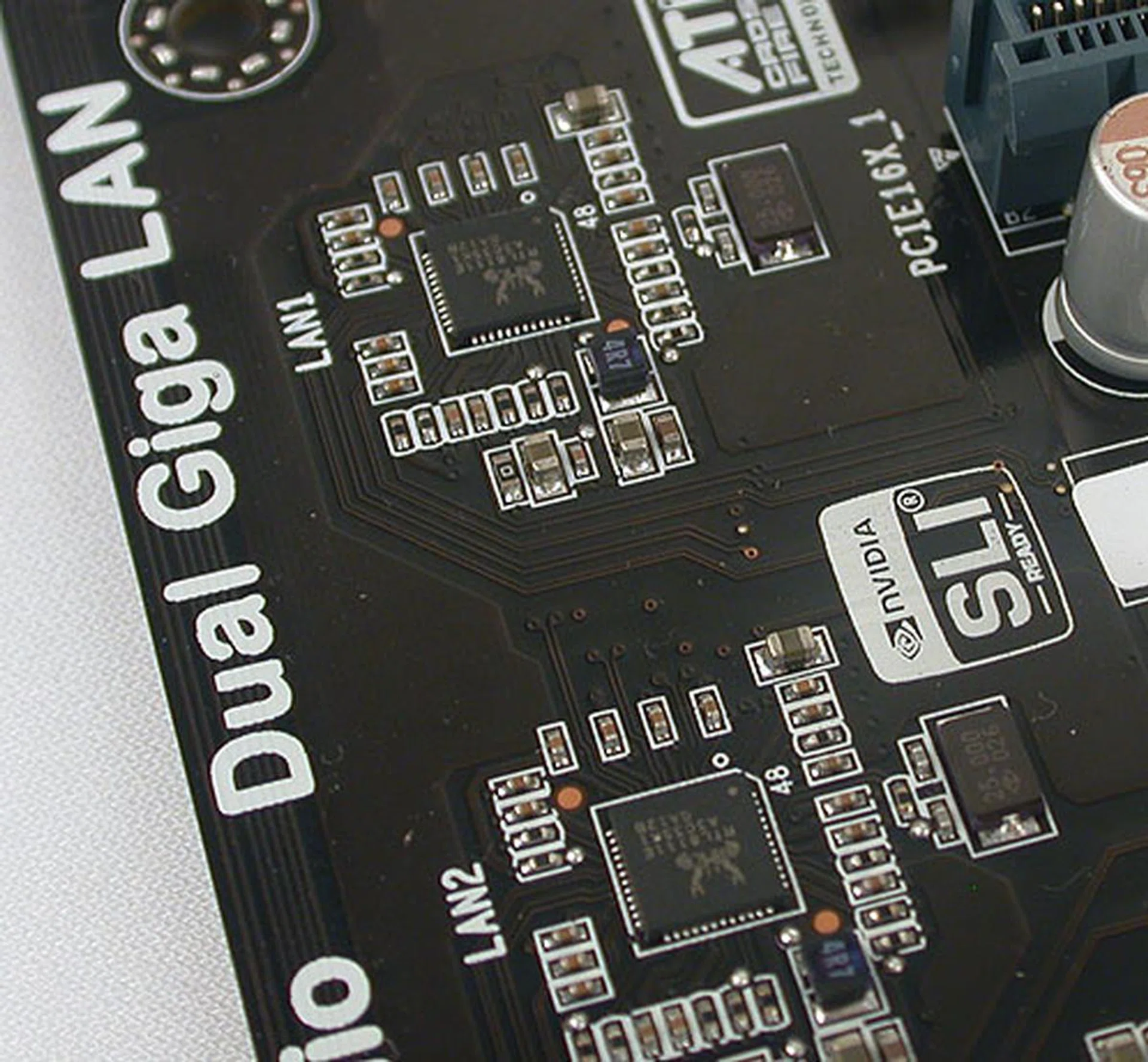
There are two Realtek Gigabit LAN controllers onboard, with the corresponding two Gigabit LAN ports.
Another sign that this board is targeted at the premium segment - the ECS P55H-AK comes with dual Gigabit LAN ports, with two Realtek controllers doing the work. Audio is also provided by a Realtek chip, but the rear ports only have optical and not coaxial S/PDIF output, which is a slight disappointment. There's an onboard S/PDIF header however. ECS has eight USB 2.0 ports; that's not including the two rear USB 3.0 ports (in blue). An onboard header gives two more USB 3.0 ports from a second NEC USB controller. A cable and front panel bracket is provided for those who want to make use of these extra USB 3.0 ports.

Connect the given cable and bracket to the onboard USB 3.0 header for two more front-facing USB 3.0 ports.
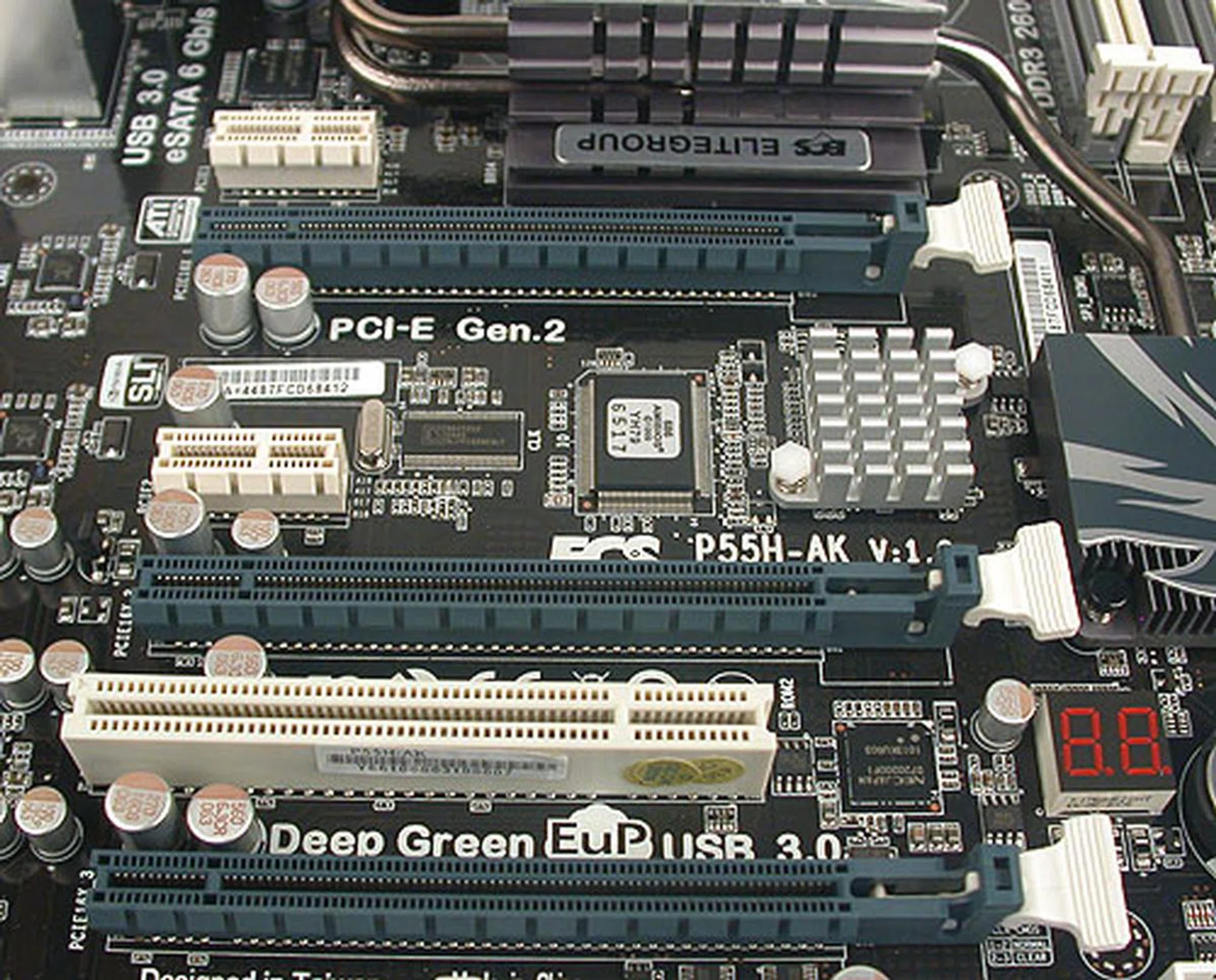
The three PCIe 2.0 x16 slots for the graphics cards are spaced such that dual-slot cards can fit easily, though it usually means that the neighboring slots will be blocked. The graphics slots also have a simple locking mechanism that makes the cards rather easy to remove without too much fumbling.
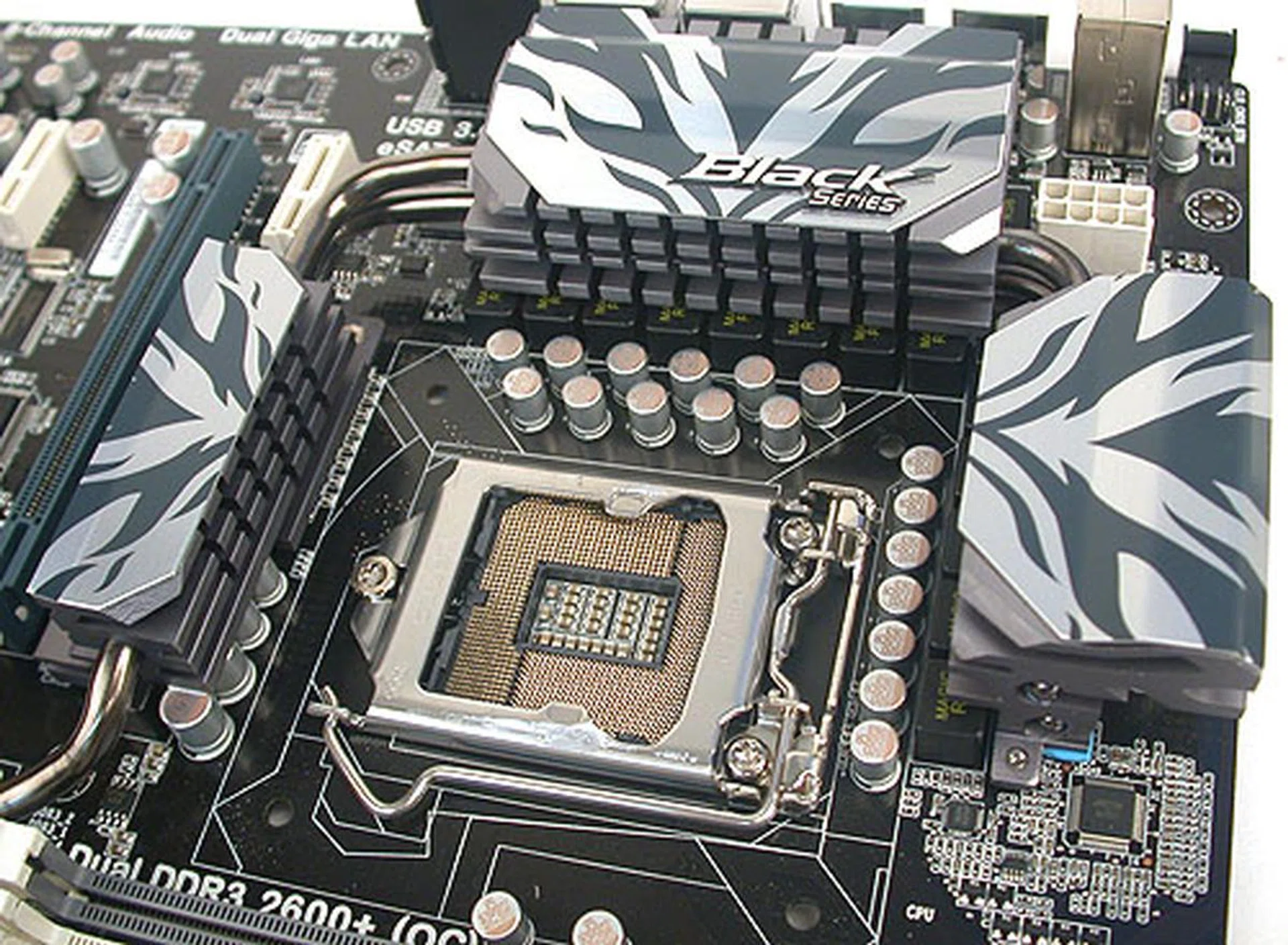
The CPU socket is surrounded by moderately high heatsinks, linked by heatpipes. We didn't find them intrusive when installing or removing the CPU heatsink.
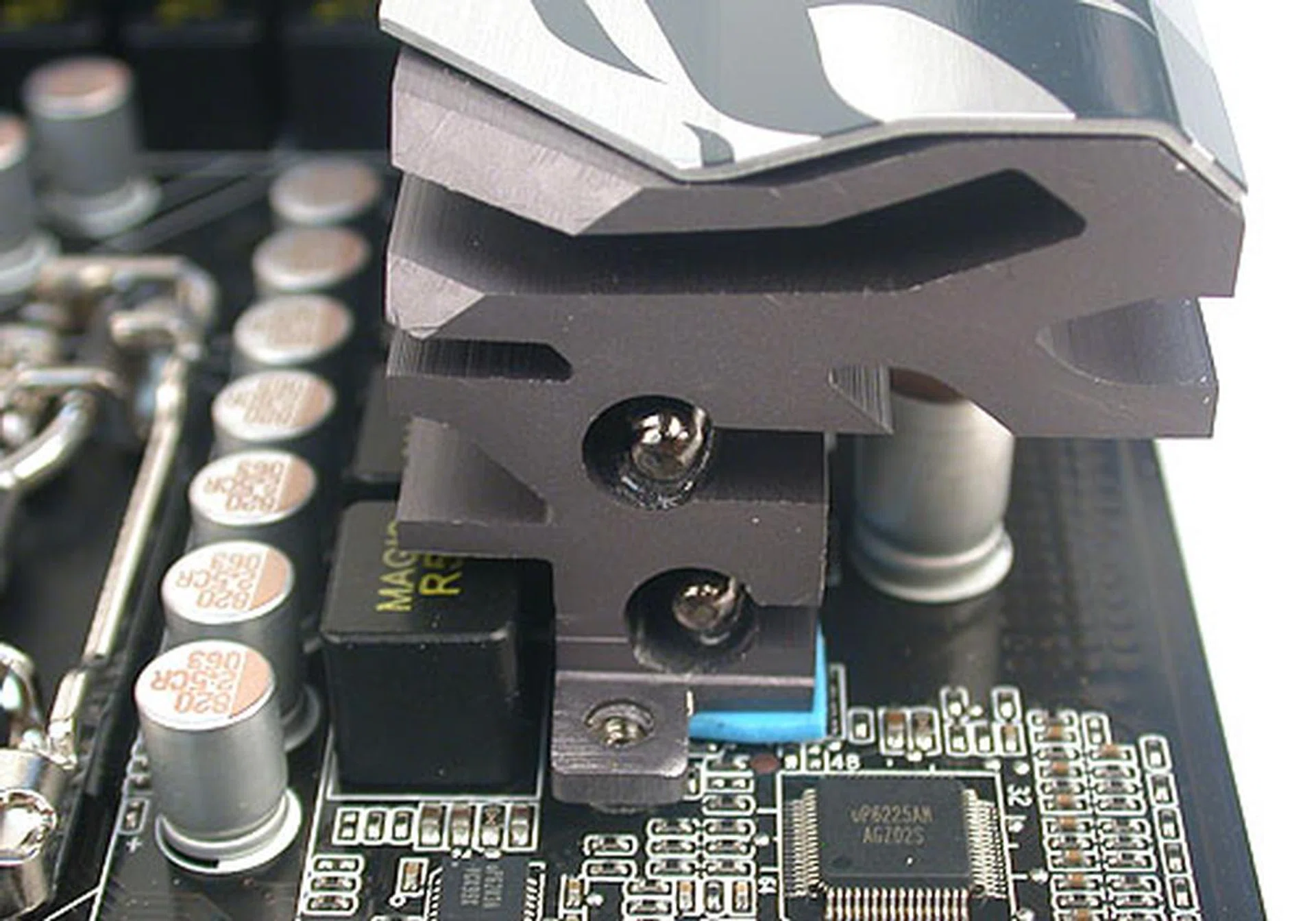
The double heatpipes used for some of the heatsinks near the socket.
Following the trend of vendors adding their own proprietary stuff to enhance the value of their offerings, ECS has also trotted out some tools and programs, some of which sound very similar to its competitors. For instance, this board comes with eDLU and eBLU - ECS Driver Live Update/BIOS Live Update - utilities that grabs new drivers and BIOS automatically for the user when online. Then there's eJiffy, an instant boot Linux-based solution that have been on ECS boards for a while now and a Windows-based overclocking tool.
The BIOS also comes with auto-overclocking tools, with set profiles that boosted our processor up to a maximum of 3.5GHz from 2.93GHz in our case. Known as ECS M.I.B X, users can save their own tweaked settings in profiles with it.
BIOS Settings
The BIOS settings are typical of what you'll see on many motherboards, though ECS does have a section, its M.I.B. X (MB Intelligent BIOS X) which allows the user to tweak the system and clock frequencies as well as voltages. These settings are dependent on your installed processor so the listed settings below are relevant only for the Core i7-870, which is the processor used in our test. ECS also has an auto-overclocking tool with three settings, Light, Medium and Heavy, that can ramp up your overall clock speed with one click. Saved profiles are also available for those who want to custom their own. In our test, we managed to get the Heavy setting (our processor speed went up to 3.5GHz with 1603MHz memory clock) running with no trouble.
Some of the more relevant BIOS settings are listed below:
- Base Clock: 100 - 600MHz
- CPU Ratio: 9 - 22x
- Memory Clock: Auto, 800, 1066, 1333, 1600MHz DDR
- Memory OC: 1800, 1866, 2000, 2133, 2200MHz
- CPU Voltage: -0.900 to +0.945V (0.015V steps)
- Memory Voltage: -0.80 to +0.63V (0.01V steps)
- CPU VTT Voltage: -0.80 to +0.63V (0.05V steps)
- PCH Voltage: -0.80 to +0.63V (0.01V steps)
While the auto-overclocking tool worked well, our attempt to overclock the board manually resulted in a maximum base clock of 180MHz, which is rather disappointing considering that 200 - 220MHz was what we usually managed for most other boards.
Test Setup
We have tested a number of Intel P55 motherboards previously. In order to keep these results directly comparable, we have chosen to replicate the system setup used, even if some of the drivers may seem a bit dated now. The following components were used:
- Intel Core i7-870 (@2.93GHz, Intel Turbo Boost, HyperThreading enabled)
- 2 x 1GB Kingston HyperX DDR3-1333 @ 7-7-20 CAS 7.0
- Seagate Barracuda 7200.10 200GB SATA hard disk drive (one single NTFS partition)
- ASUS GeForce 9800 GTX 512MB with ForceWare 190.38 drivers
- Intel INF 9.1.0.1007 and Intel Matrix Storage manager 8.9.0.1023 driver set
- Microsoft Windows 7 Ultimate
The following benchmarks were used to determine the performance of the P55 motherboards:
- BAPco SYSmark 2007 (ver 1.05)
- Futuremark PCMark05 (ver 120)
- SPECviewperf 9.0
- Futuremark 3DMark Vantage
- AquaMark3
- Far Cry 2
Results - SYSmark 2007 Preview
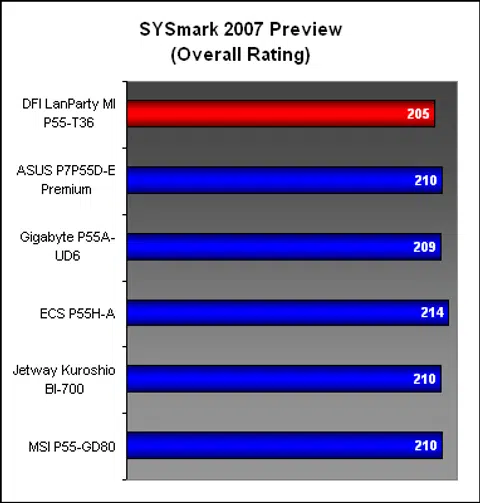
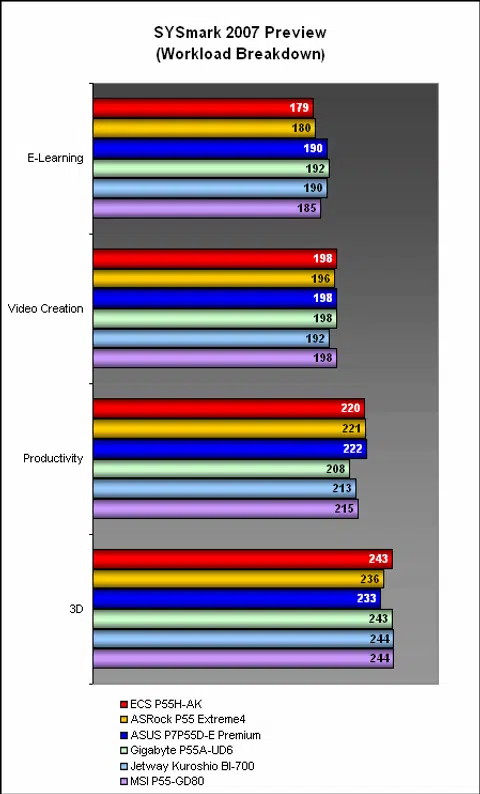
The ECS P55H-AK performed to expectations in the SYSmark 2007 system suite, with scores that are practically identical to the competition. While the breakdown showed a slight weakness in the E-learning segment, it more than made up for that in the other segments.
Results - Futuremark PCMark05 Pro
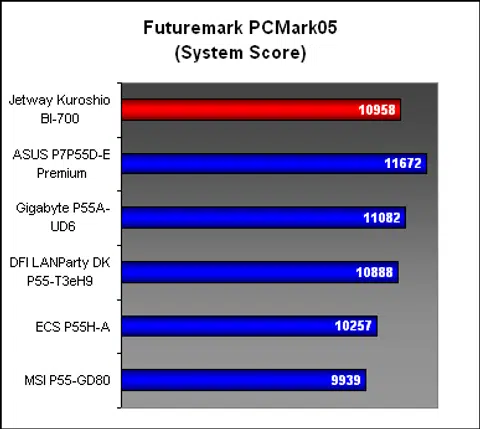
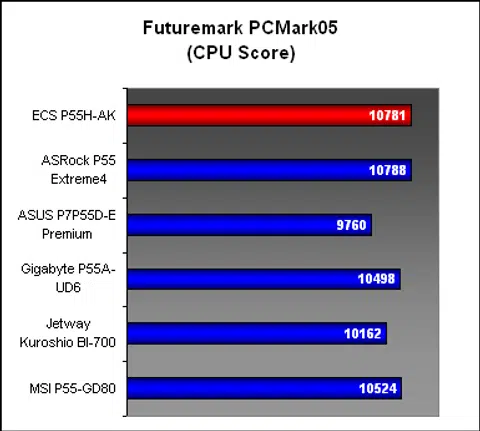
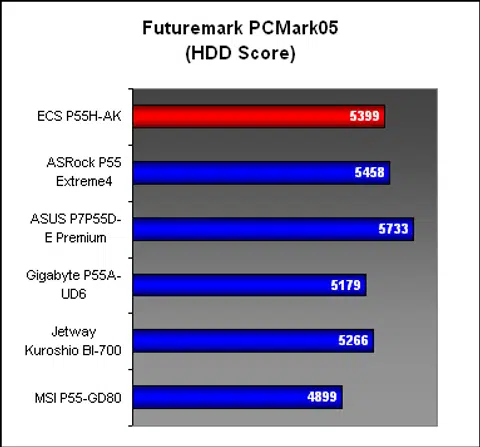
In the next benchmark, PCMark05, the ECS P55H-AK was in close running with the ASRock. Its overall system score was however slightly behind some of the other boards, though we did find it performing above average in the CPU and HDD segments.
Results - SPECviewperf 9.0
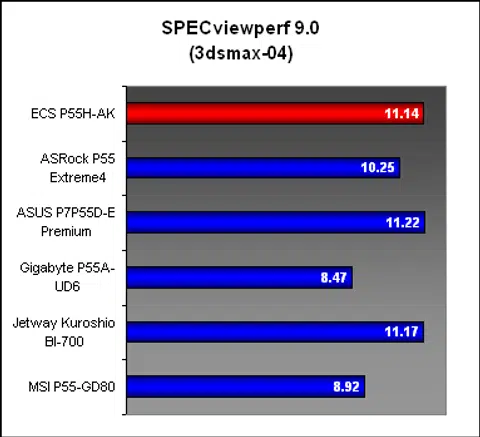
The ECS was one of the better performing boards in the first test viewset, 3dsmax, but it was the PRO/ENGINEER segment that took us by surprise. With the high score we encountered, we retested the system three times to verify that the score was not a fluke. We also checked our clock timings to ensure that everything was correct, so it just happens that the ECS board does particularly well in this benchmark.

Gaming Benchmarks
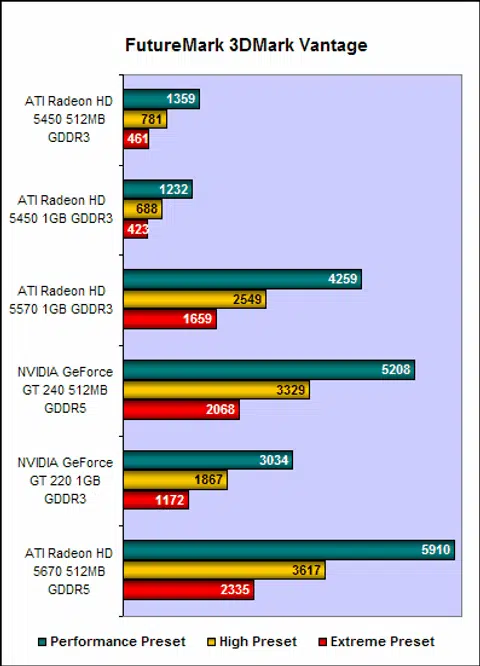
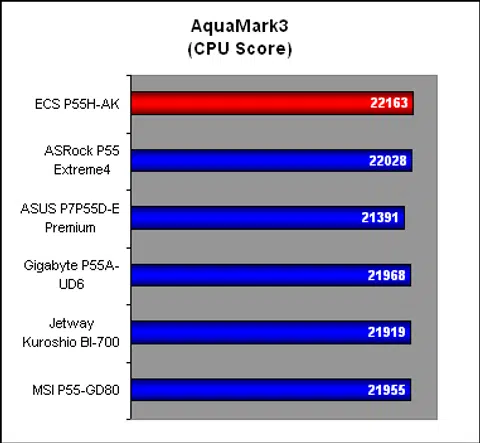
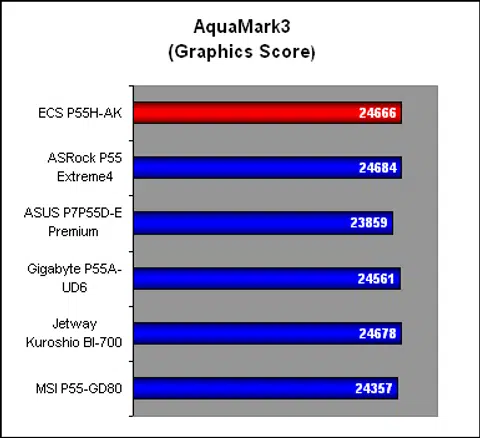
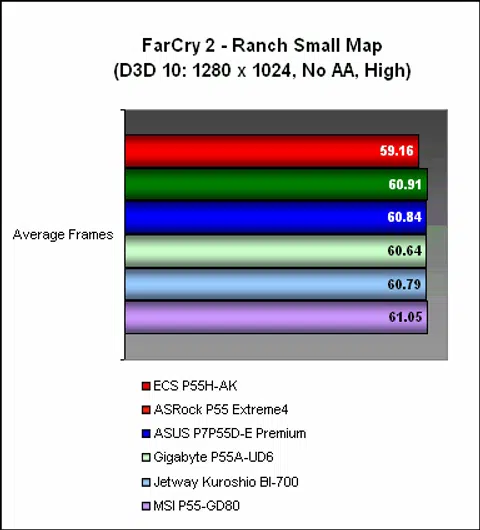
Starting with the synthetic benchmark, 3DMark Vantage, the ECS performed up to expectations, edging its rivals off slightly to top the table. It was also competitive in AquaMark3, though its score in Far Cry 2 was a shade lower than the rest.
Temperature
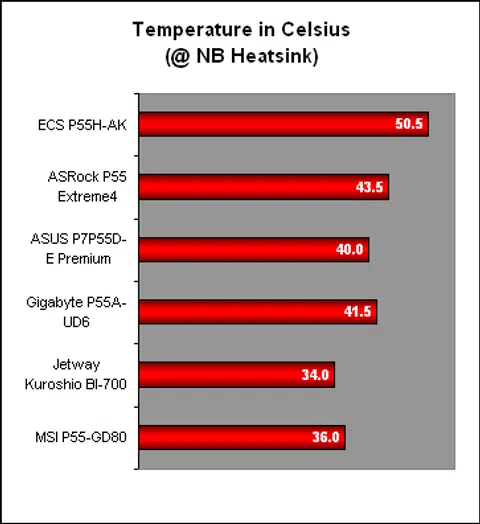
The ECS P55H-AK had by far the warmest heatsink among the boards that we tested, hovering around the 50-degree Celsius mark. There wasn't anything out of the ordinary about the ECS heatsink, so presumably it has to do with the power consumption then.
Power Consumption
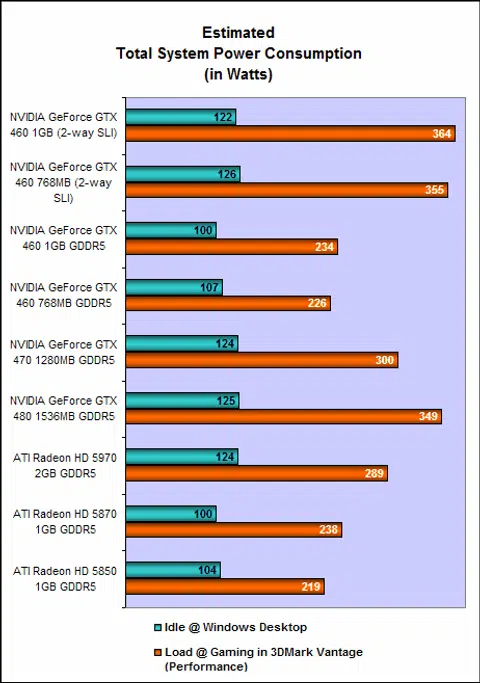
Indeed, the power draw of the ECS board, whether idle or at peak, was significantly higher than the others. Part of the reason could be extra controllers onboard, like the NVIDIA PCIe bridge, which could lead to a higher power consumption.
Conclusion
With this latest Black Series motherboard, ECS has shown that it is deserving of a spot among the top brands. Be it the features or its performance, the ECS P55H-AK was definitely competitive with its rivals. In fact, against many of the mainstream P55 boards available, the ECS board emerges as the clear features winner, no thanks to its support for 3-way multi-GPU configurations, full speed USB 3.0/SATA 6Gbps, higher memory frequencies and dual Gigabit Ethernet. Its performance too was highly competitive and it should hold its own against even the bigger brands.
Another point that is easily drowned out by its impressive feature list is the excellent layout. We didn't find anything wrong on this board and the new, improved PCIe 2.0 x16 slots were easier to use. Couple that with the more consistent and stylish color scheme and users should have no qualms about displaying this board in all its glory behind a transparent chassis window.
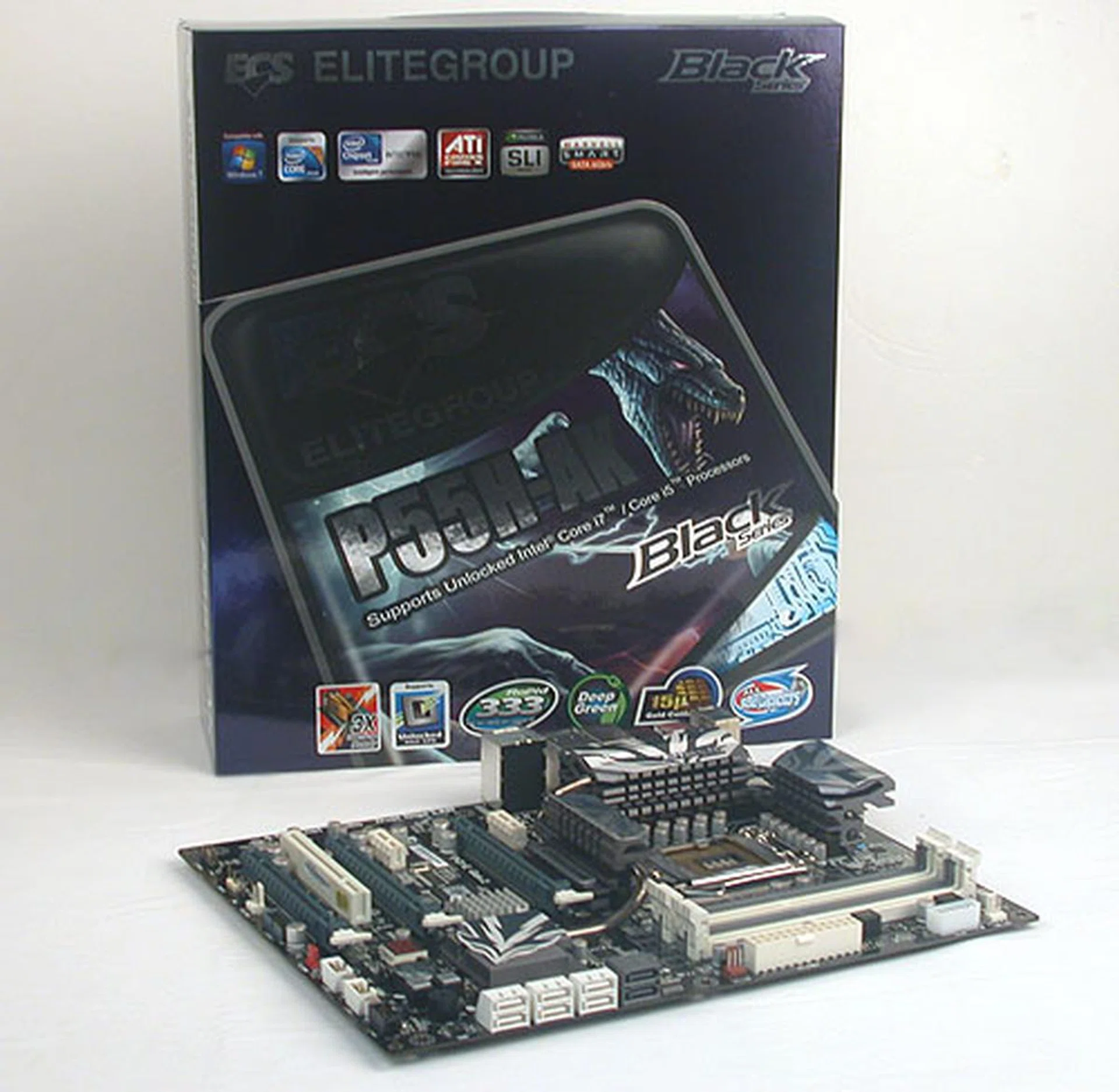
ECS attempts to get into the big leagues with the P55H-AK and for the most part, it has succeeded with a feature packed board that is well designed and performs pretty good too.
Unfortunately, along with its move up the ranks in terms of features and performance, this ECS board is also significantly more expensive than the usual P55 board. With a recommended retail price of S$399, it's currently more costly than most P55 boards except for the truly extreme high-end offerings like the ASUS Maximus III Formula. Add to that its higher operating temperature and power consumption when compared to the other P55 boards here and one can see the flaws hidden behind its strong feature set.
Finally, if you're sold on its features and performance despite the price, there's a last catch - it's not available yet in Singapore, though our sources indicate that this is just a matter of time.
Our articles may contain affiliate links. If you buy through these links, we may earn a small commission.