
The Budget P55 - Jetway Kuroshio BI-700
With Intel's new dual-core processors, there will be Nehalem-based processors for almost every segment. The Intel P55 chipset remains the choice for Intel's mainstream quad-cores but what about the motherboards? What's a cheap but decent P55 motherboard? We find out if the Jetway Kuroshio BI-700 fits the bill.

Introduction
Now that Intel's H55/H57 chipsets with integrated graphics have been released, they and the dual-core Clarkdale processors are probably being marketed as the mainstream choice for users who are not into things like video encoding or 3D rendering. While our showed that some models come with surprisingly high-end features, those looking to get a more complete set of features like multi-GPU support or RAID should look at the previous mainstream candidate for Intel's Core i7/i5 processors, the P55 Express chipset, where such features would be the norm rather than exceptions.
Unfortunately, a decent Intel P55 motherboard can set you back by at least US$120. That's the lower end though, as many boards are easily more costly than that. The budget shopper however will find some choices, albeit from smaller brands like ASRock and ECS. Now you can add to that list, Jetway's Kuroshio BI-700, which goes for around US$116 and has the basic P55 features.
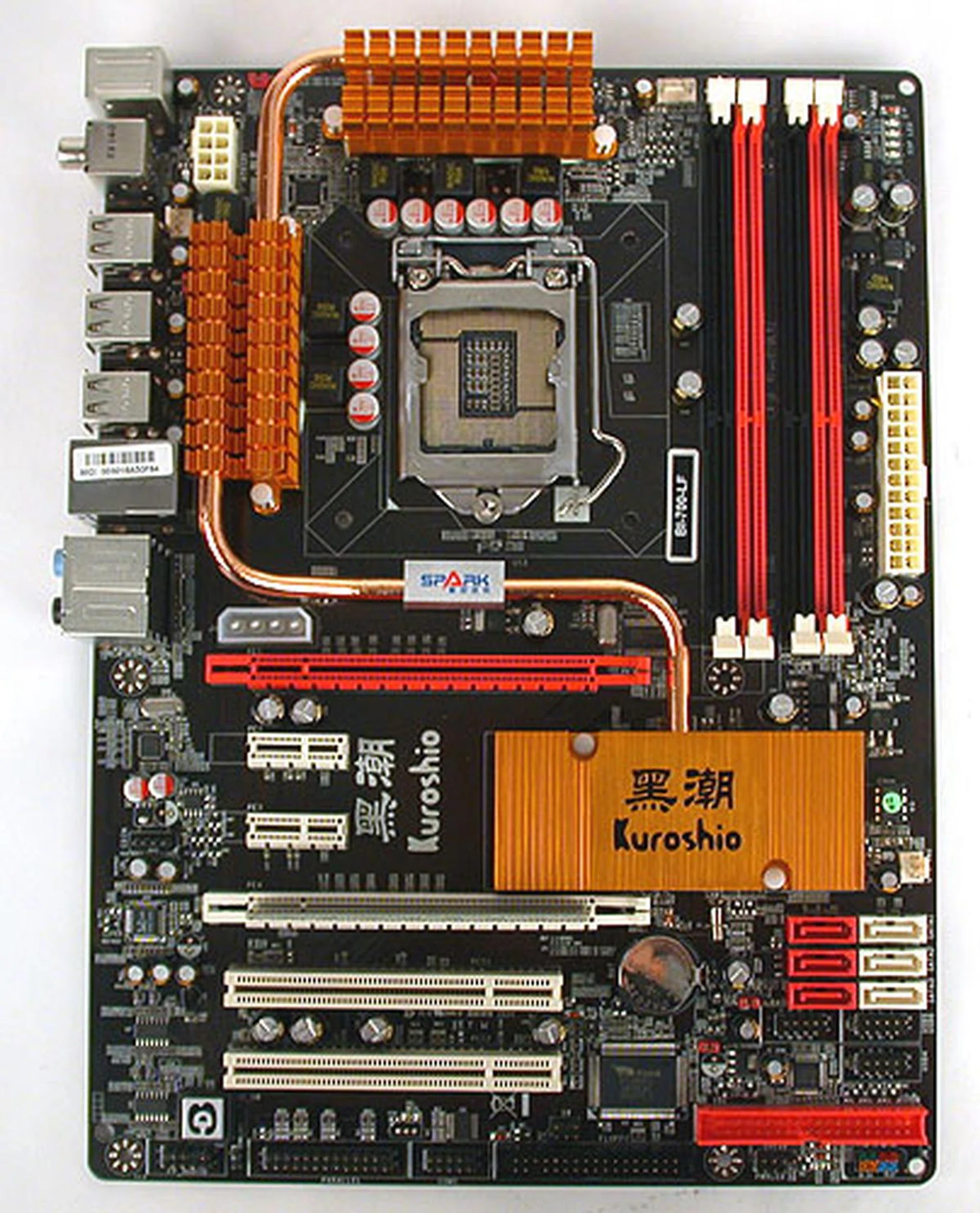
Jetway's P55 appears to be your vanilla version of the chipset, with six SATA ports (RAID), dual PCIe 2.0 x16 slots and four DDR3-1333 memory slots.
As we had mentioned, Jetway's P55 motherboard is about as vanilla as one gets. The P55 chipset features are all there, so one gets CrossFireX support but not NVIDIA SLI (which if you recall is only available upon certification to NVIDIA, which this board forgoes for a better price point). There's also RAID support for all the SATA ports onboard though no eSATA or FireWire options. A single Gigabit Ethernet connection is available, but not the dual connections offered by more premium boards.
In short, those extras that more expensive boards so often tout about are mostly missing. We did however find support for older devices, from the floppy connector to a JMB368 controller that enables PATA support.
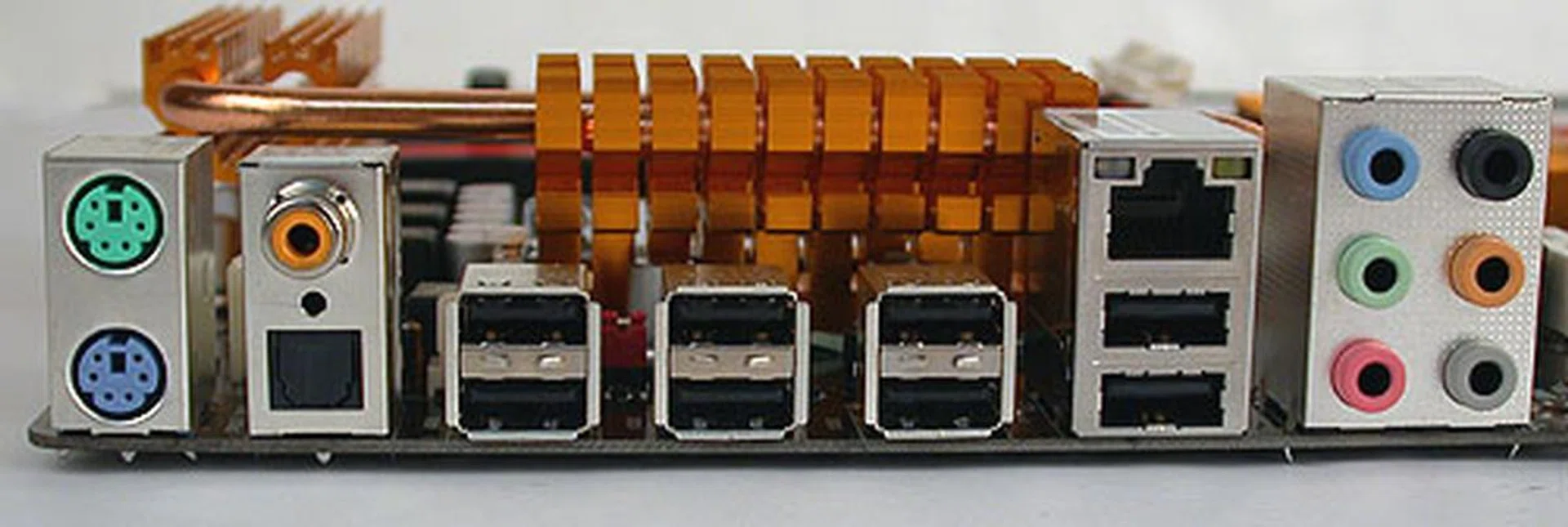
While there are no FireWire or eSATA ports on this board, there are quite a large number of USB 2.0 ports, eight to be exact. You'll also get both types of S/PDIF outputs and the usual Gigabit LAN port.
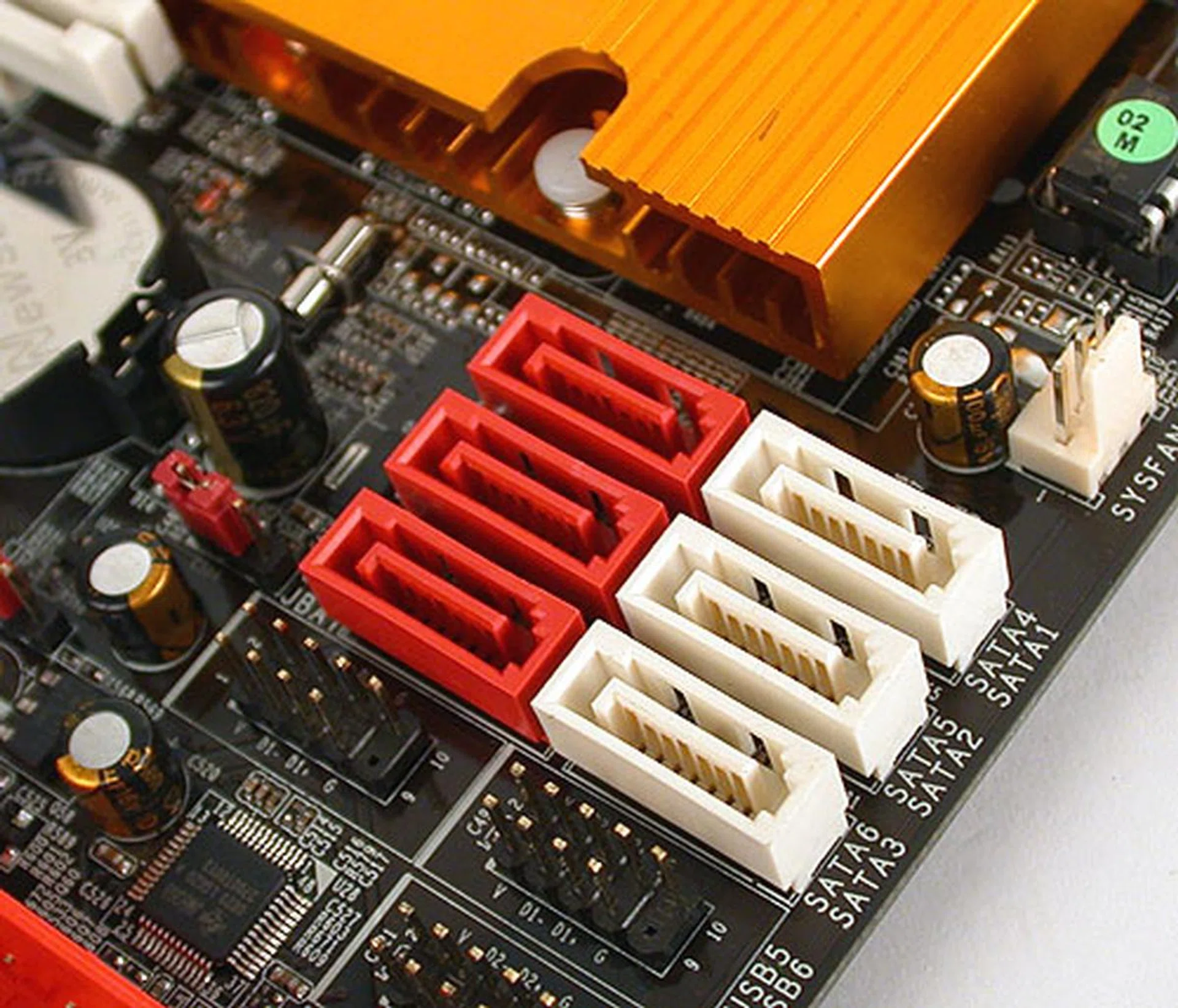
Six SATA ports like the specifications required, though their location and alignment places them in direct conflict with the longer, dual-slot graphics cards.
Our first grouse with this board was with its placement of the six SATA ports. Given the length of modern graphics cards, a dual-slot version is likely to be in the way of these SATA ports. Jetway should have taken a leaf out of vendors that are opting for edge-aligned ports.
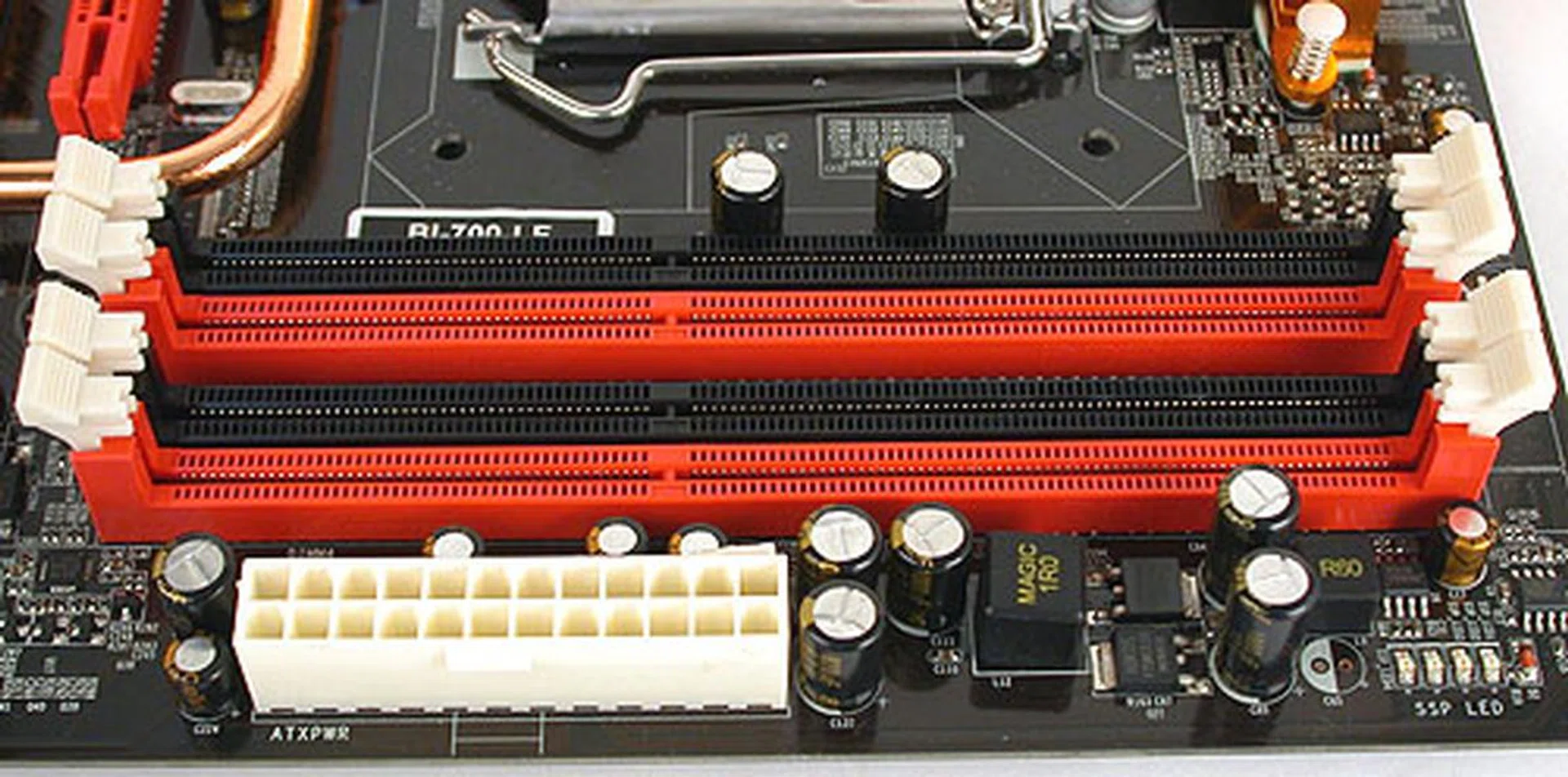
It's not exactly plain vanilla for the Jetway. It does have support for PATA devices and a floppy drive.
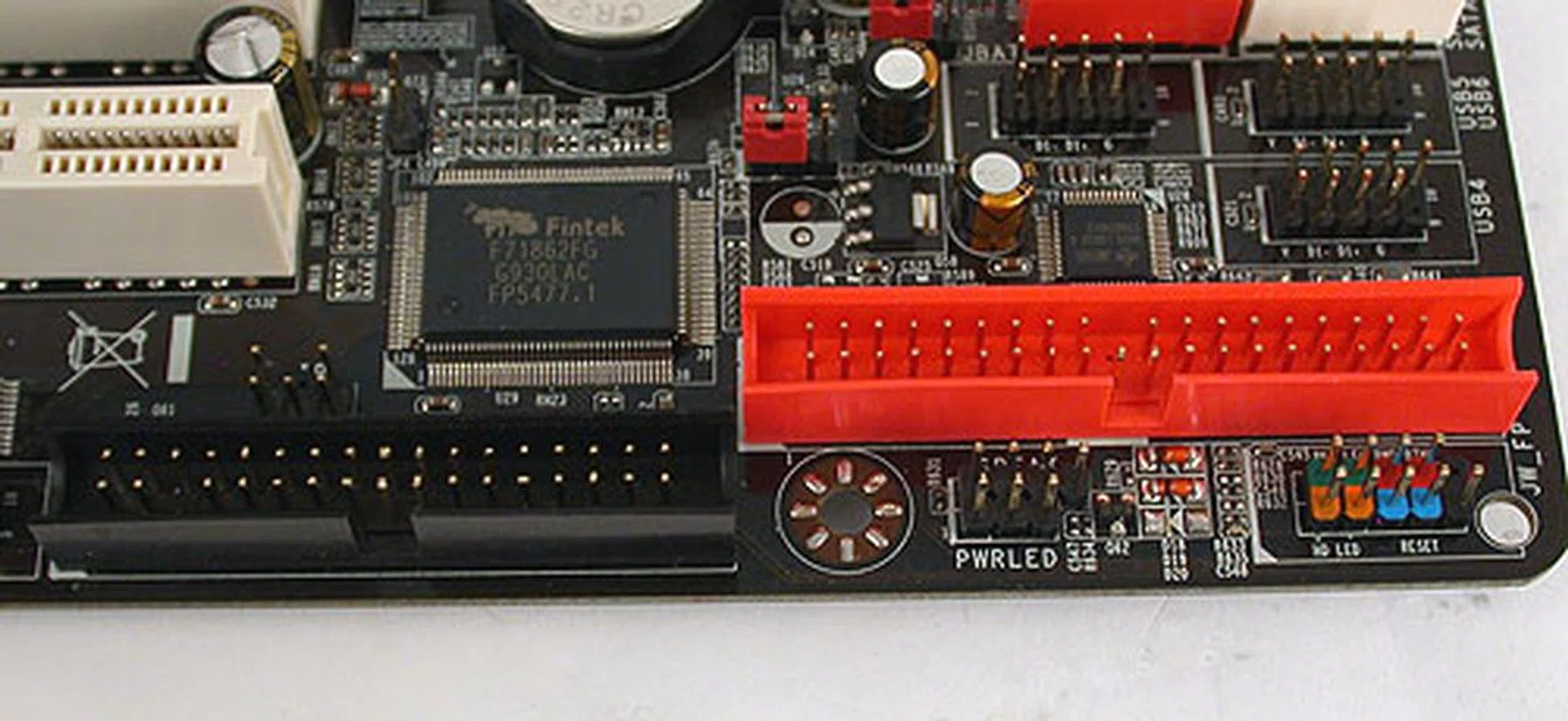
It's not exactly plain vanilla for the Jetway. It does have support for PATA devices and a floppy drive.
One thing that surprised us was the presence of a switch card for the secondary PCIe 2.0 x16 slot. This card has to be in place if you only have a single PCIe graphics card installed in the primary slot as it acts like a terminator such that one gets the full 16-lane bandwidth on the primary slot. The default configuration in other words is x8/x8. While this makes sense, most boards do this automatically without a need for a manual switch. Despite the automatic switching being a common place for most big brand boards, that convenience actually adds to the price so Jetway went for a more cost effective design.
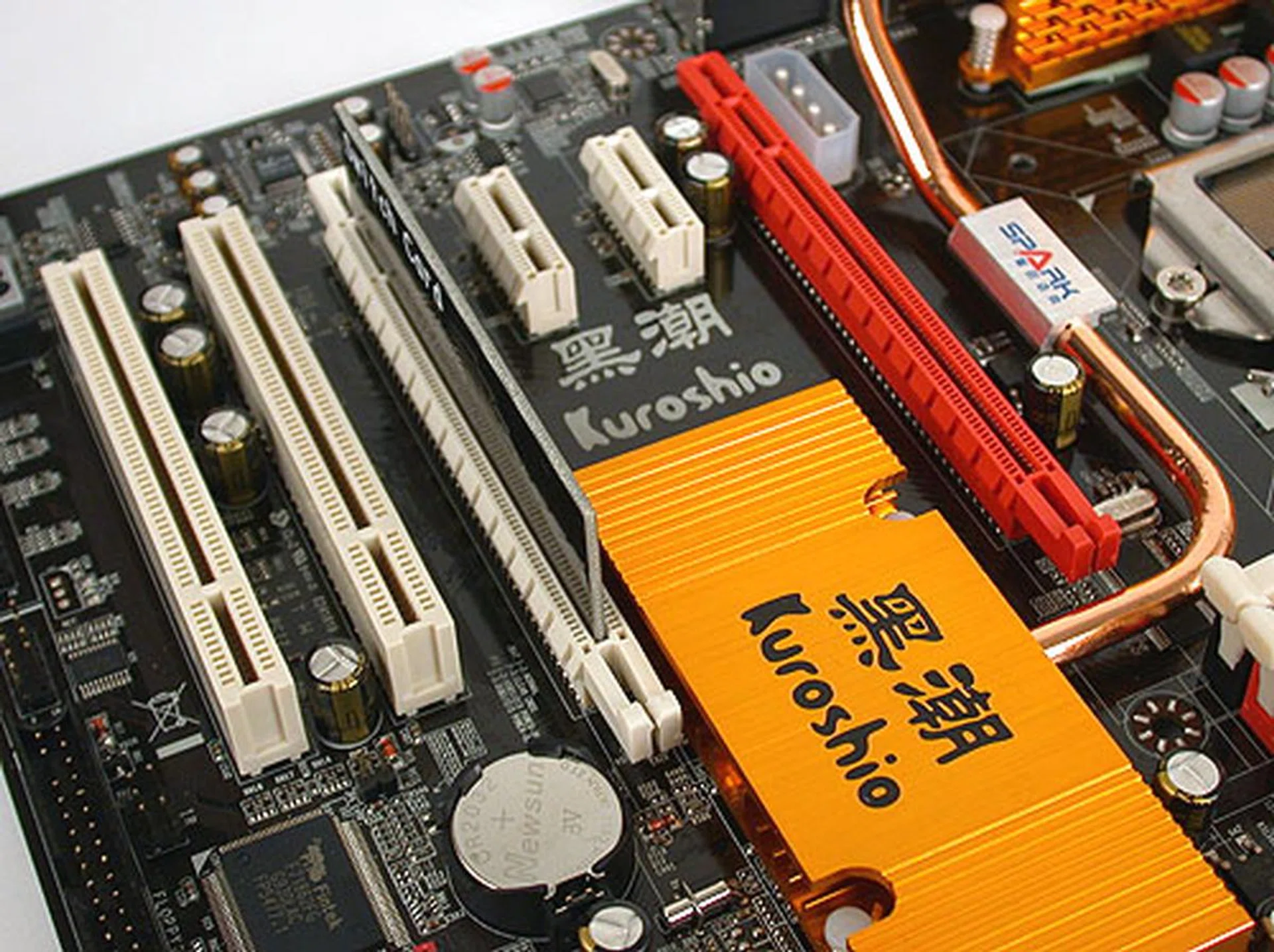
One lesser seen design for multi-GPU configurations nowadays is the need for a switch card as Jetway calls it for the vacant PCIe 2.0 x16 slot.
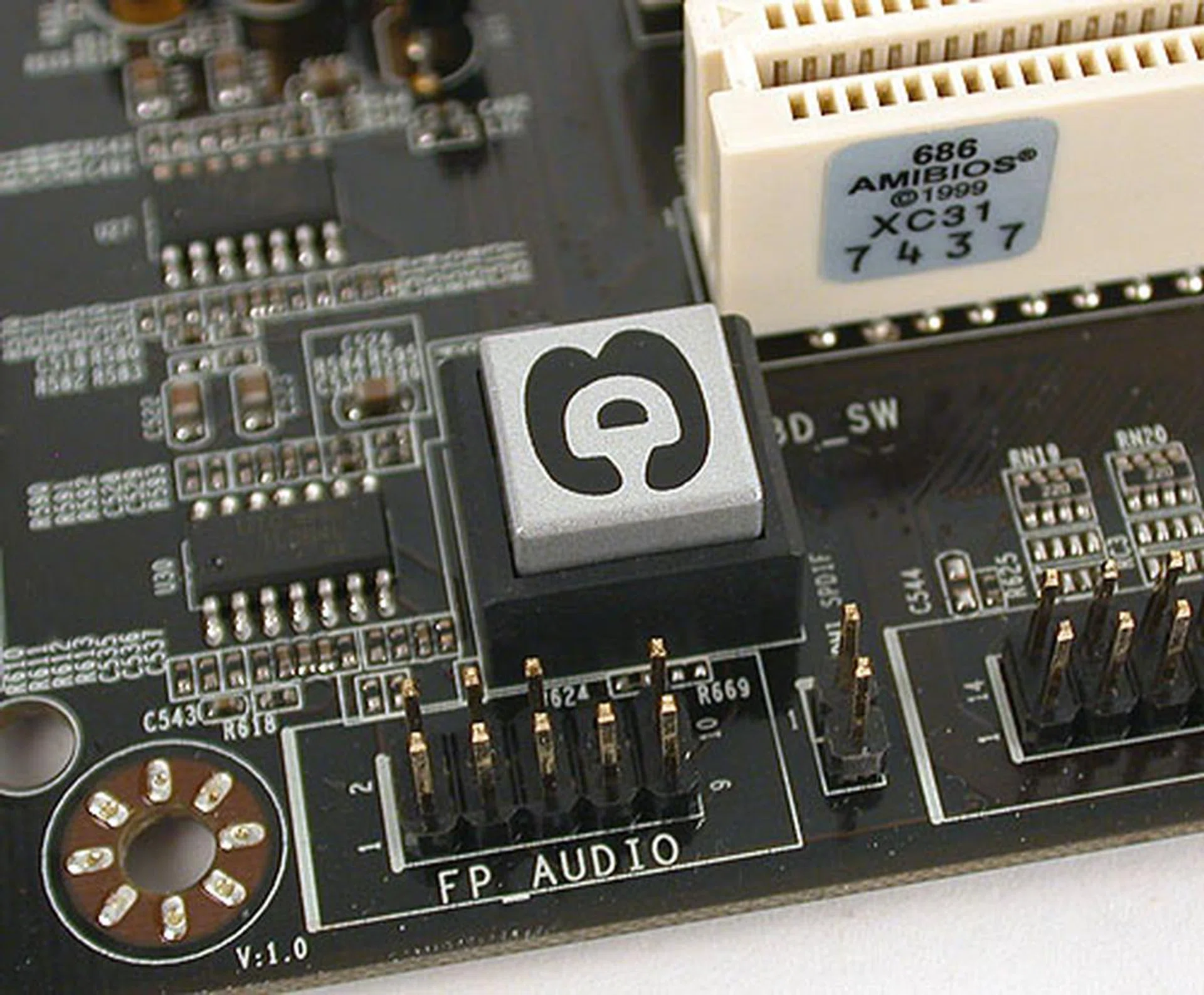
According to Jetway, pressing this 3D Audio button will enable hardware based audio effects like an enhanced bass effect.
Jetway has some form of audio enhancement feature, which it calls 3D Audio. The bass is claimed to be enhanced by this feature and the company has a web page with a short description and an audio sample for those who are interested.
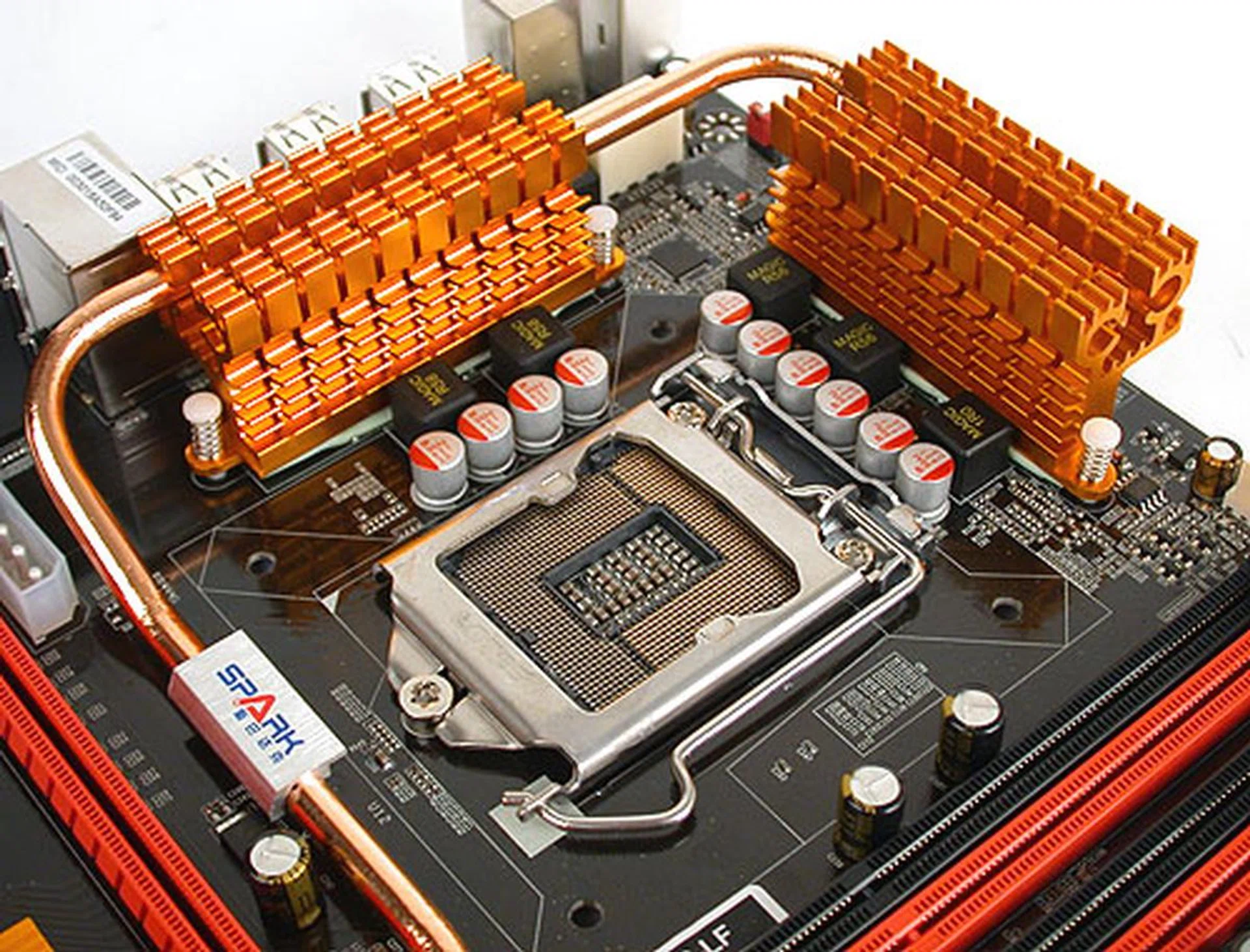
Even a budget P55 motherboard like the Jetway is going for solid capacitors nowadays, at least for the power delivery components around the CPU socket.
BIOS Settings
Jetway went with an AMI BIOS that may look quite familiar to those who have used this brand of BIOS before. Enthusiasts with a perchance for tweaking will find the relevant settings under Miscellaneous Settings and some of the more important ones are listed below. Users can also save their BIOS profiles internally for incremental tweaking, a feature that's found on many enthusiast-oriented boards.
- Base Clock: 133 to 500MHz
- CPU Ratio: 9 to 22x
- Memory Ratio: Auto, 800, 1066, 1333, 1600MHz
- CPU Voltage: +50mV to +350mV (+50mV steps)
- Memory Voltage: 1.538 to 3.254V (in 0.025V steps)
- CPU VTT: 1.122 to 2.226V (in 0.017V steps)
- PCH Voltage: 1.079 to 2.141V (in 0.016V steps)
When it came to the actual overclocking, we had limited success with this Jetway board compared to its peers. Our best base clock frequency was 170MHz, when the average Intel P55 board we tested could reach at least 200MHz.
Test Setup
We have built up quite a decent review list of Intel P55 motherboards and with an identical Windows 7 based test system, we are using these results as comparisons for this Jetway motherboard. There are some variations in memory timings, due to incompatibility, which resulted in the various different memory configurations below:
- Intel Core i7-870 (@2.93GHz, Intel Turbo Boost, HyperThreading enabled)
- 2 x 1GB G.SKILL DDR3-1600 (@1333, 7-7-7-21) for the DFI LANParty DK P55-T3eH9
- 2 x 1GB Kingston HyperX DDR3-1333 @ 7-7-20 CAS 7.0 for the ASUS, Jetway MSI & Gigabyte boards.
- 2 x 1GB Kingston HyperX DDR3-1333 @ 8-8-24 CAS 8.0 for the ECS P55H-A
- Seagate Barracuda 7200.10 200GB SATA hard disk drive (one single NTFS partition)
- ASUS GeForce 9800 GTX 512MB with ForceWare 190.38 drivers
- Intel INF 9.1.0.1007 and Intel Matrix Storage manager 8.6.0.1007 driver set
- Microsoft Windows 7 Ultimate
The following benchmarks were used to determine the performance of the P55 motherboards:
- BAPco SYSmark 2007 (with Patch 3)
- Futuremark PCMark05 (ver 120)
- SPECviewperf 9.0
- Futuremark 3DMark Vantage
- AquaMark3
- Far Cry 2
Results - SYSmark 2007 Preview
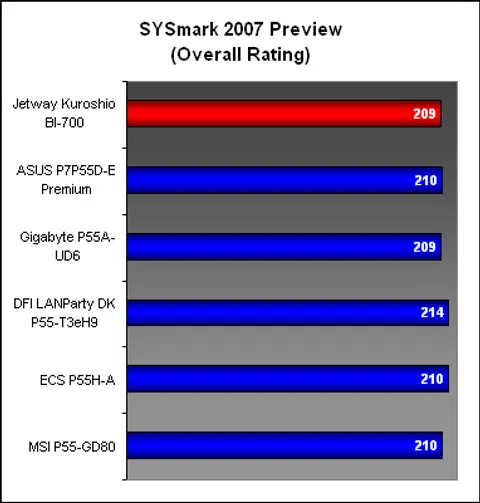
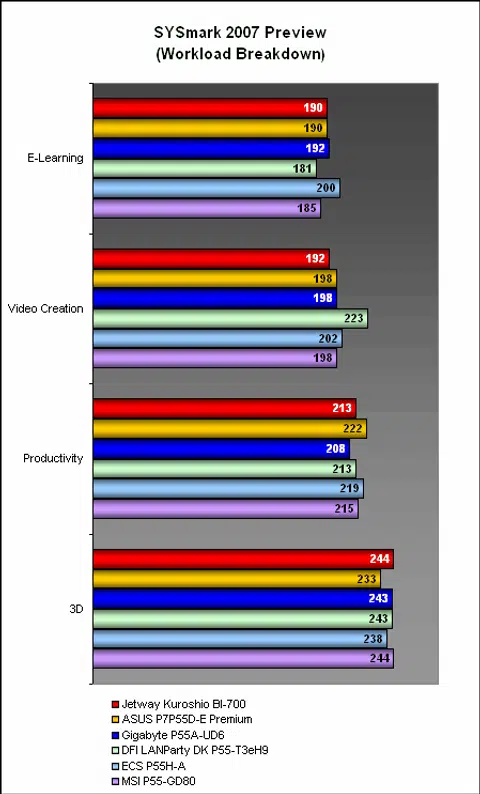
The Jetway was on par with the competition in our first system benchmark, with the Video Creation segment perhaps a bit behind. Overall however, there was little to distinguish it from the crowd.
Results - Futuremark PCMark05 Pro
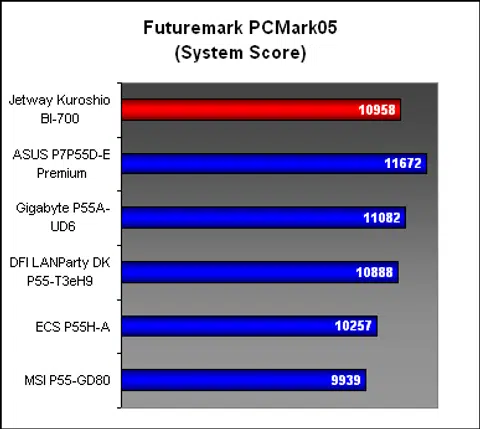
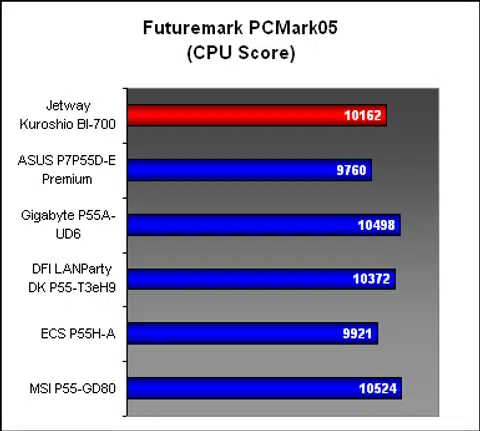
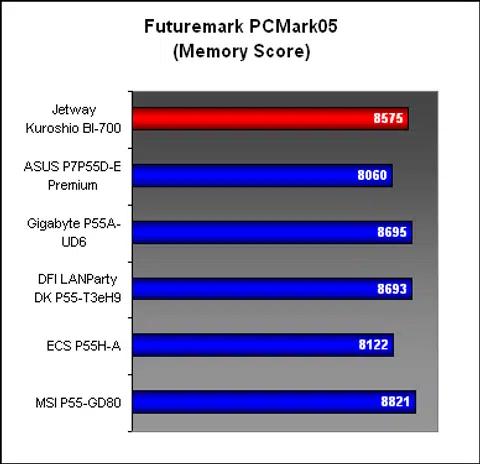
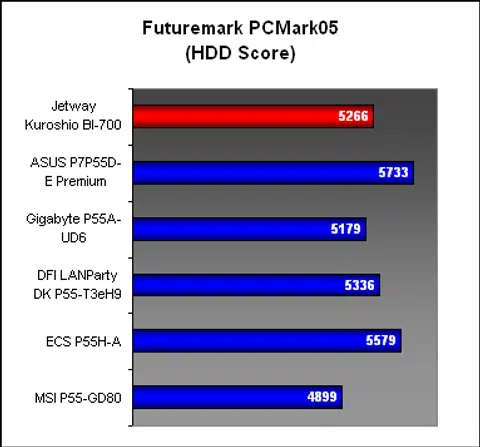
There was quite a bit of variation in scores for PCMark05 but the Jetway Kuroshio was able to keep up relatively well. Its overall score was in the top three and looking at the individual breakdown, it was not hard to see why. The Jetway never looked like dropping into the bottom spot and managed to stay with its competitors.
Results - SPECviewperf 9.0
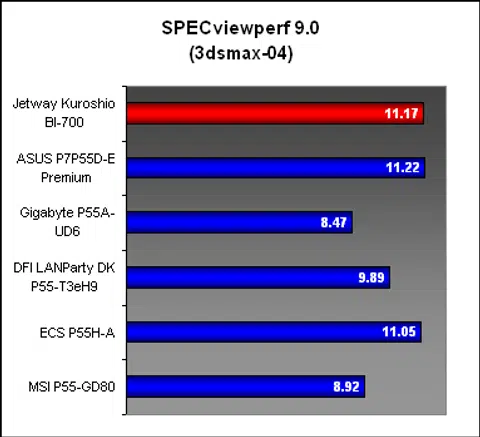
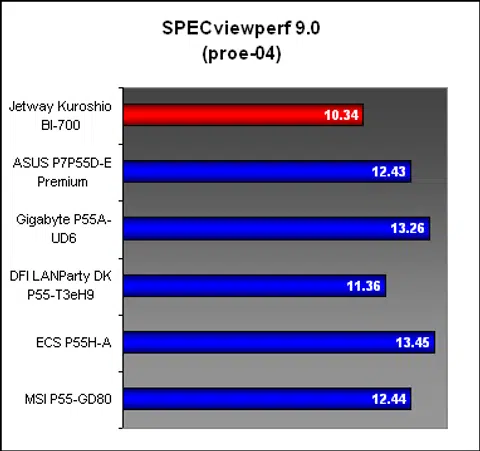
While the Jetway was among the better performers in the 3dsmax test, it was uncharacteristically in the last spot for the PRO/ENGINEER workload, which reflects not too favorably on its memory performance.
Results - Gaming Benchmarks
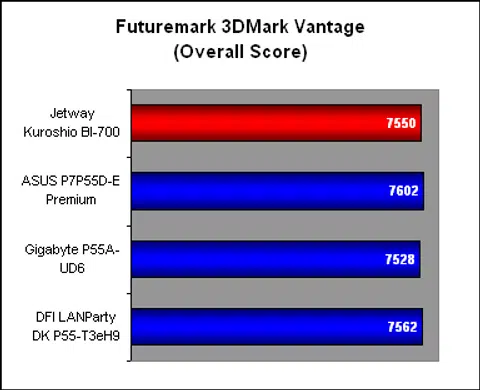
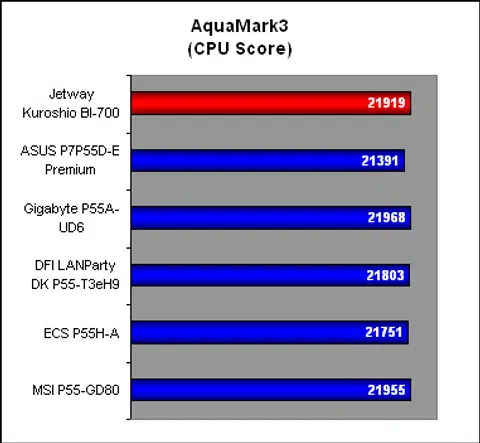
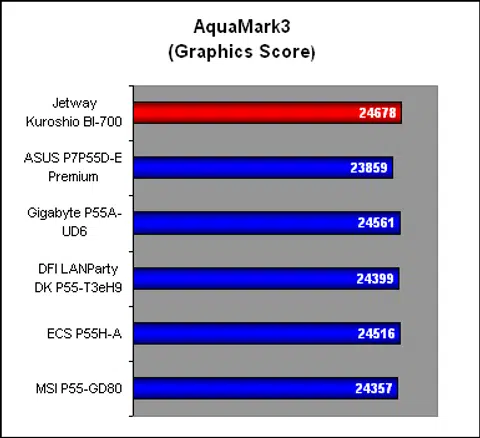
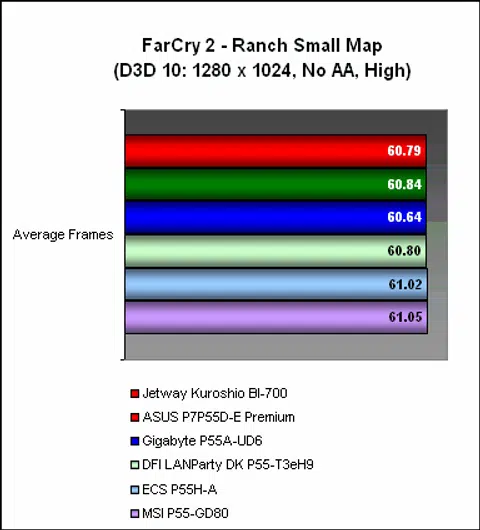
When it came to the gaming numbers, it has been difficult trying to distinguish between these P55 motherboards and the Jetway joins the tight group with scores that are separately by the merest of margins. At least you'll know that you can practically close your eyes and pick any P55 board if gaming is your sole consideration.
Temperature
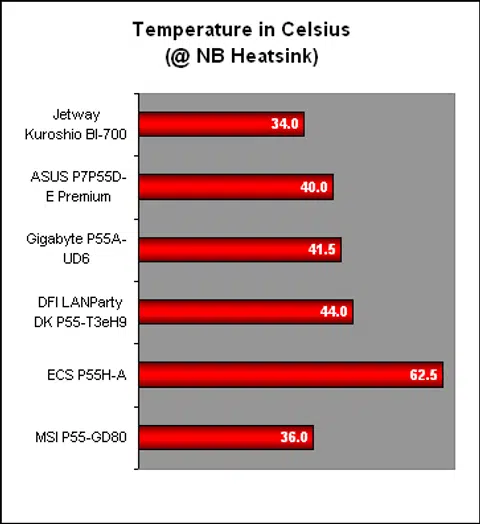
A surprise result was the temperature reading for the Kuroshio. While this Jetway board came with heat-pipes, we weren't expecting it to beat some of the more established brands. However it appeared to be the case, with the MSI closest to the Jetway in this section. At 34 degrees Celsius, it's hard to beat the Jetway. Perhaps another contributing factor is the board's low component count as it's a board with a very simple design.
Power Consumption
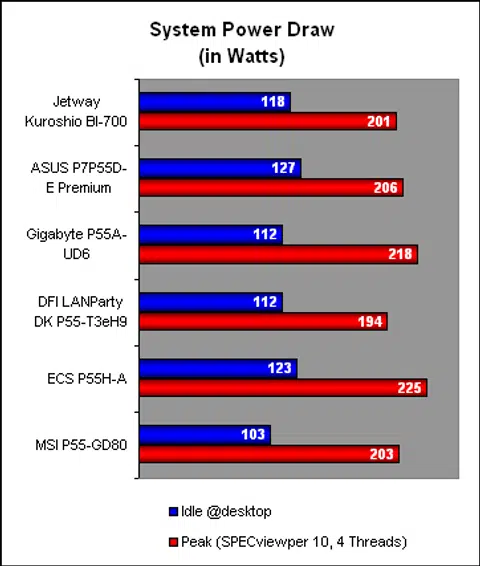
The power consumption of the Jetway Kuroshio was also very competitive. At peak, this board drew the second least power reading. Do note that many of the other boards have more features than the Jetway's plain configuration, which could contribute in a higher power draw.
Conclusion
We predict that the new dual-core processors from Intel with integrated graphics will soon flood the mainstream market, particularly from system integrators and OEMs. The enthusiast DIY will find it a decent budget processor for home theater PCs and the simple workhorse desktops but for more 'serious' tasks, a quad-core will be essential. That's when you find yourself looking at the Lynnfield CPU family and the Intel P55 chipset.
This may give the impression that the Intel P55 chipset will cost more, and it will be partly correct. In fact, if you're on a budget, there are quite a few microATX P55 motherboards out there, with some hovering near the US$100 mark. A full-sized ATX board using the Intel P55 chipset will nevertheless cost more than that, such as a basic model like the Jetway Kuroshio BI-700. As a plain implementation of the Intel P55 chipset, it's got the essentials, from the dual PCIe graphics slots to the RAID capable SATA ports.
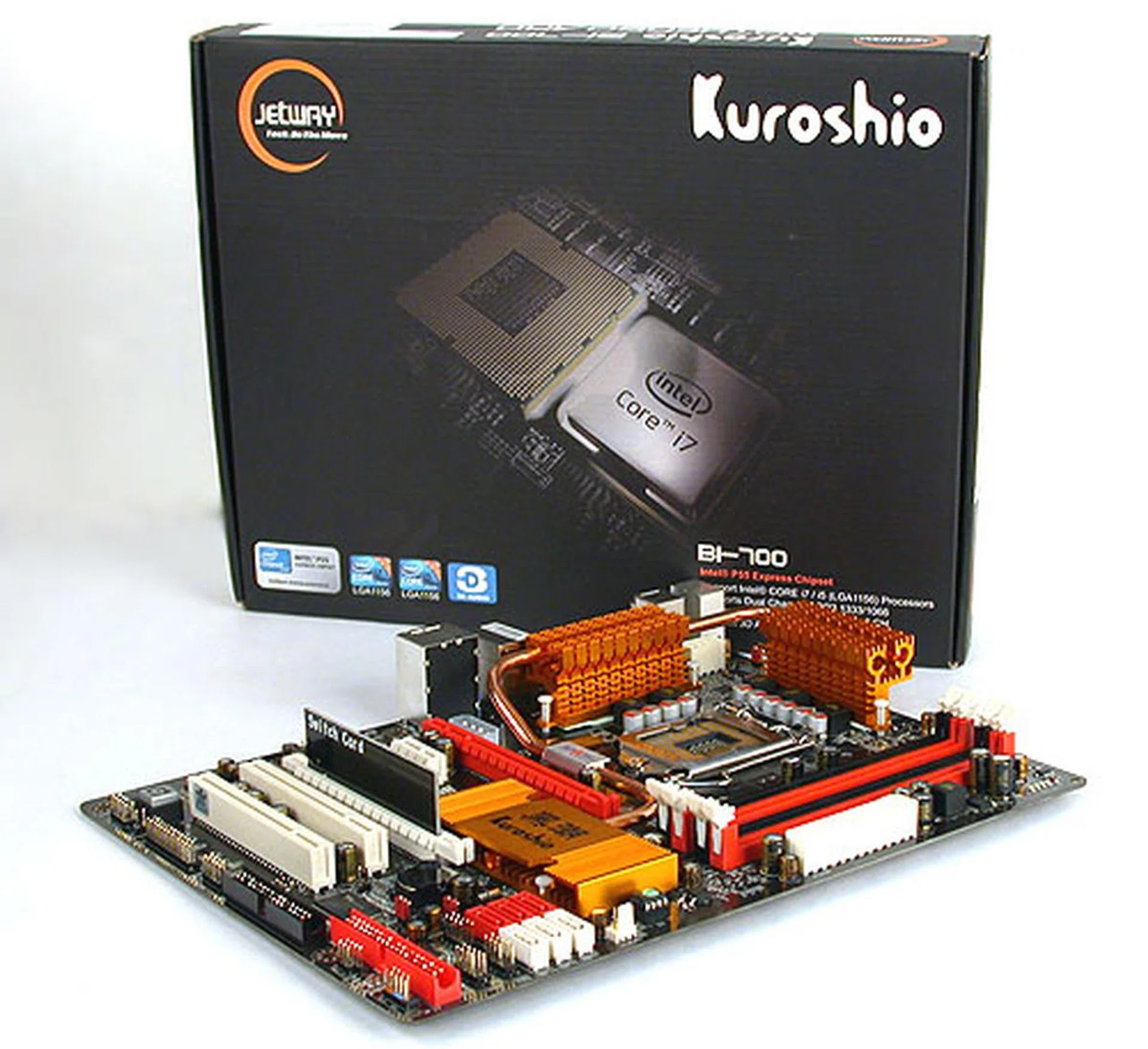
A budget P55 that just works. It may be not be the most polished board but it gets the job done.
There are even a few extras thrown in, from the PATA support to having limited but useful tweaking options in the BIOS. Given its US$116 price tag, don't expect to find those high grade components used in other brands, though there are some solid capacitors dotting the PCB of this Jetway.
Fortunately, the basics are enough, as our benchmark numbers for this board showed that it was competitive against its more costly rivals. The temperature reading we recorded was also quite exemplary. No doubt, the overclocking falls some way short of the other P55 boards but those who are considering such a budget board will surely not mind this. Essentially, you're getting what you paid for and you should have no illusions about the Jetway Kuroshio BI-700 after this review.
Our articles may contain affiliate links. If you buy through these links, we may earn a small commission.