
ASUS Matrix GTX580 Platinum - Over the Top
ASUS' latest ROG graphics card, the Matrix GTX580 Platinum comes with some extreme tweaking features that appear to take a leaf out of ROG motherboards. Along with a new, bundled tweaking utility, this Matrix promises to inject some excitement into GPU overclocking.

The Most Powerful Matrix Yet
Ever since it started the Republic of Gamers (ROG) brand, ASUS has always saved its best for the products in this series, knowing fully that this brand attracts the most demanding of enthusiasts and gamers. You can read more about the ASUS ROG brand in this , but the short story is if you can afford its premium, ROG products generally perform up to expectations. Whether you really need all the extra features is debatable, but that's not the focus of today's review.
For what we have here today is none other than the latest ROG graphics card that was . The ASUS Matrix GTX 580 Platinum uses NVIDIA's fastest single GPU now, the GF110 found on its GeForce GTX 580 that comes with the full . Inevitably, it's overclocked, but the main attraction isn't its clock speeds or even the huge triple-slot DirectCU II cooler onboard. The reason it's generating quite a lot of online buzz lies in a number of features that encourage serious tweaking.
ASUS has also released a brand new GPU Tweak utility along with this Matrix that will work across all graphics cards, regardless of brand or GPU. It's similar in many ways to what MSI did with its Afterburner utility (which we use for our own overclocking tests) and ASUS is probably hoping that enthusiasts will adopt its new software tool. You can get the free GPU Tweak utility here.
With a core clock speed of 816MHz, the ASUS Matrix GTX 580 boasts a clock frequency that's just a bit higher than the reference 772MHz. The 1536MB of memory is clocked at 4008MHz DDR, which is the same as the standard GTX 580. And that on paper is the difference between this Matrix GTX 580 and the reference NVIDIA GTX 580.
Physically, the ASUS card eschews NVIDIA's vapor chamber technology cooler for its own DirectCU II heatsink. It's significantly bigger than the standard GTX 580 and comes with two cooling fans. At its default settings, these two fans barely make any noise and we definitely rate it quieter than the reference design.
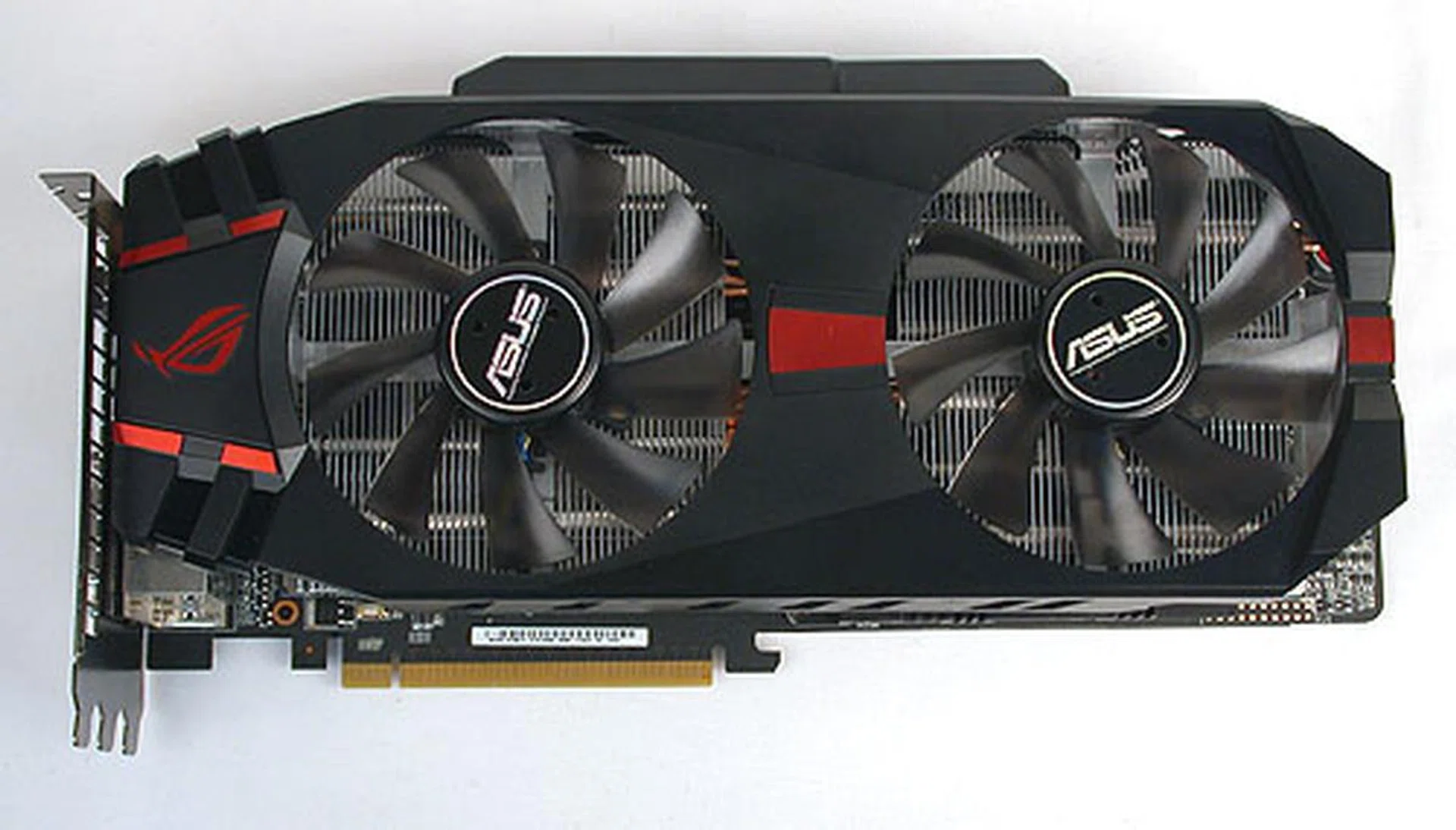
ASUS' DirectCU II isn't exactly new to us and with its copper heatpipes, twin cooling fans and that massive heatsink, it's claimed to improve operating temperatures by 20% over the standard design.
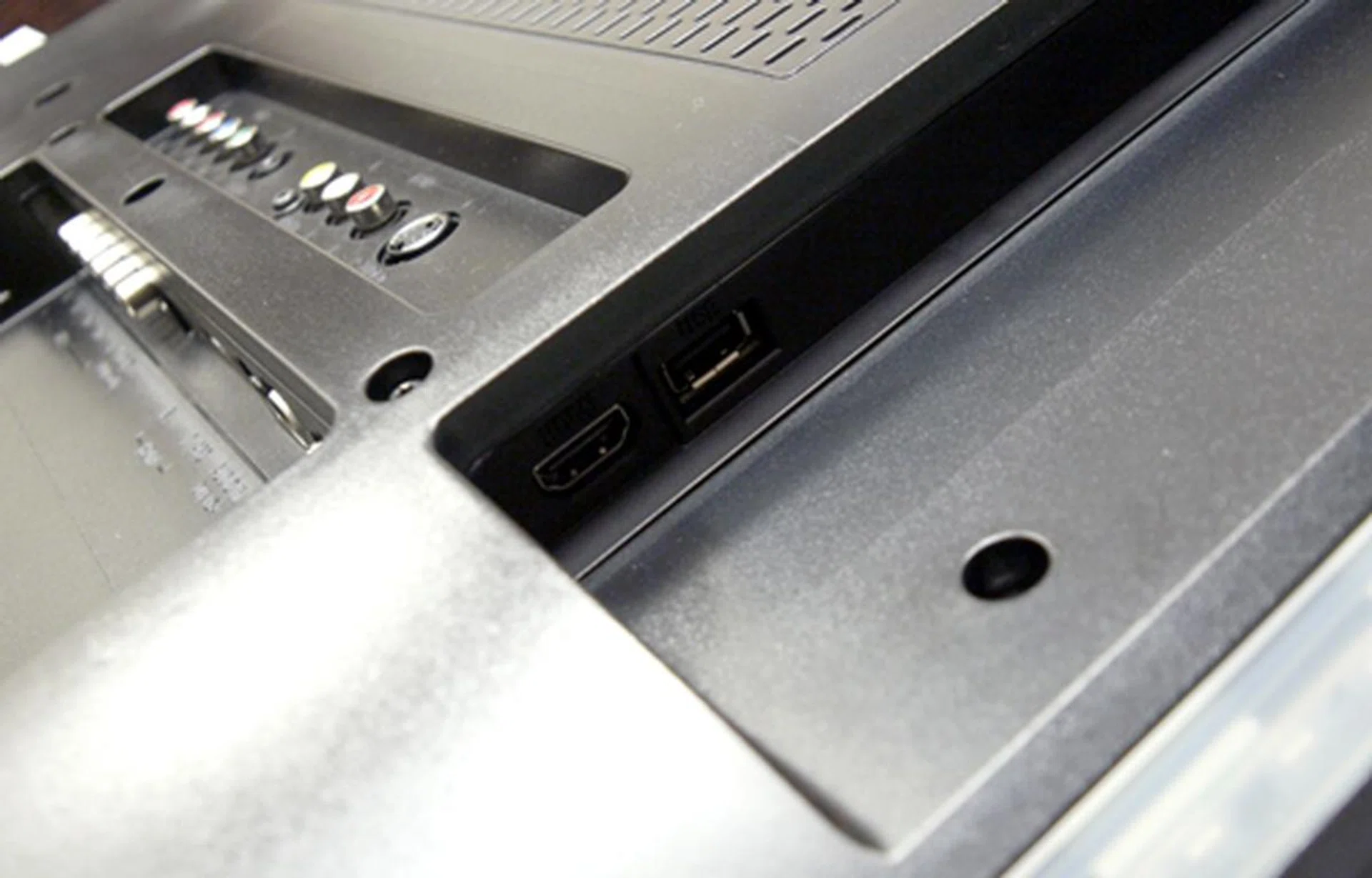
Nothing less than three, free expansion slots is required to fit this monster of a card, though ASUS calls it 2.6 slots in its specifications.
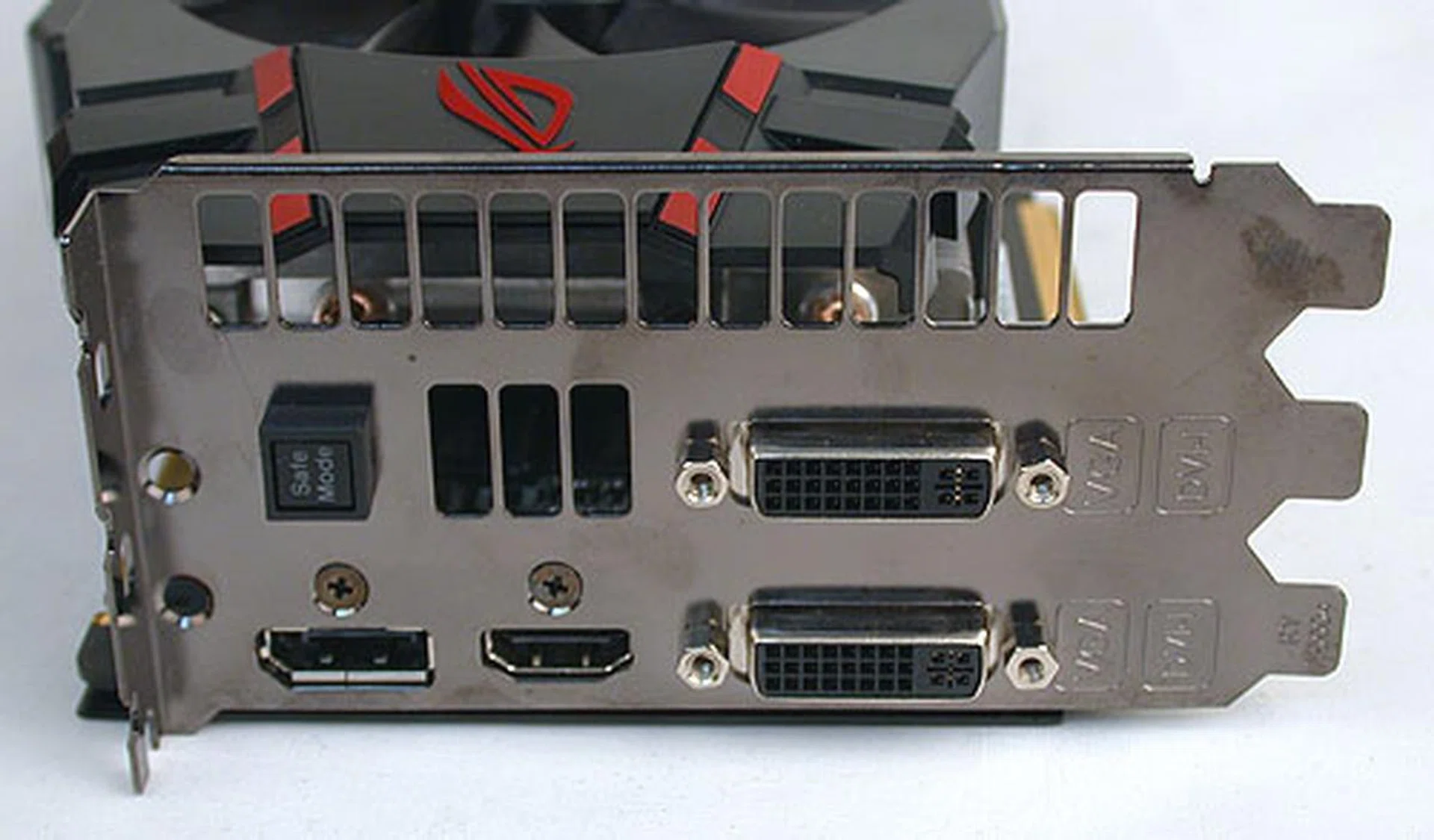
There are four display outputs on this GTX 580. Two dual-link DVI ports, a DisplayPort (not mini-DisplayPort like other NVIDIA cards) and an HDMI port. There's also the special Safe Mode button that will restore the BIOS to the default settings, giving enthusiasts the peace of mind to overclock. Despite the number of ports, like the standard GTX 580, this graphics card only supports dual monitors.
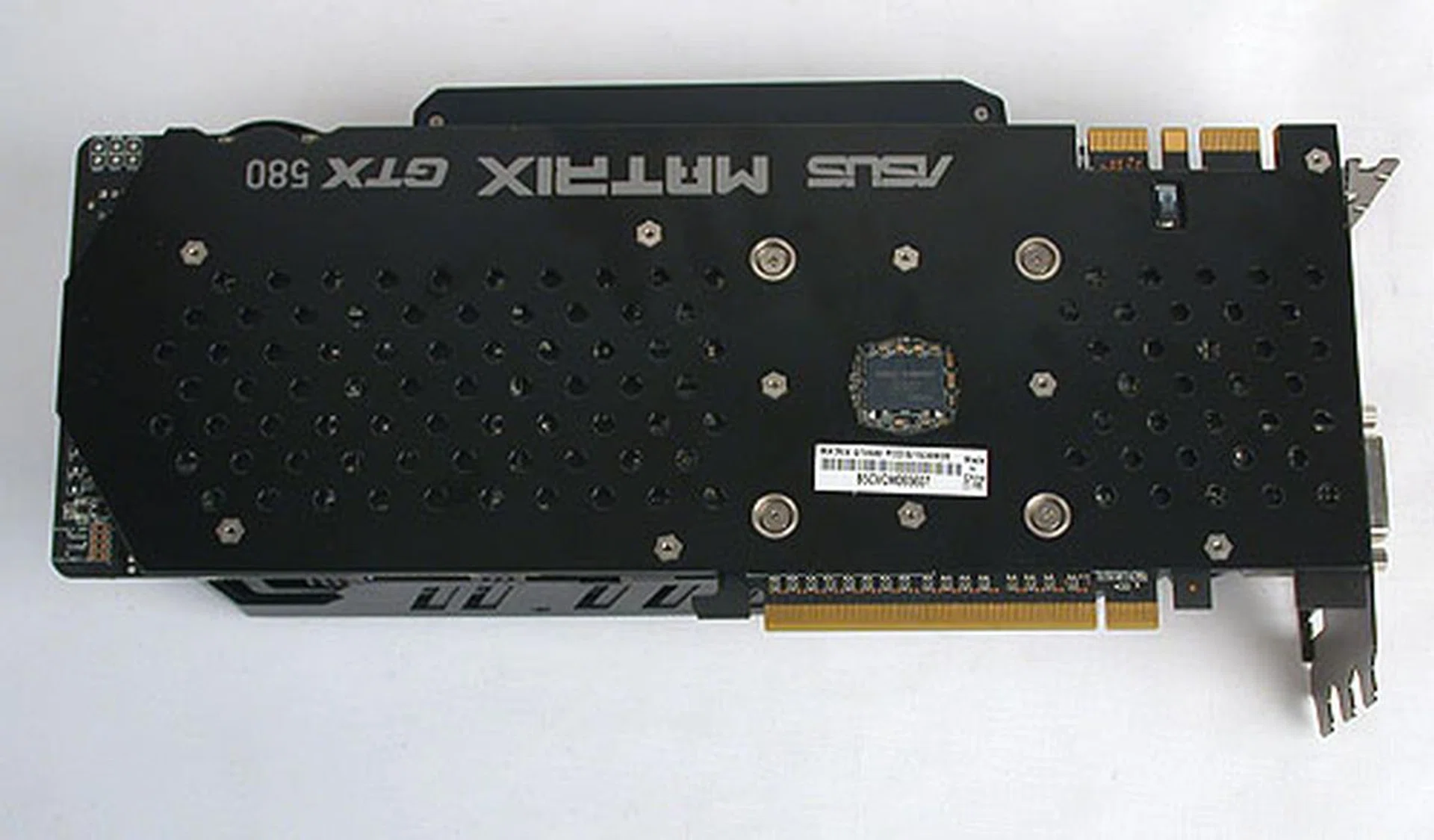
An extra backplate not only helps with the heat dissipation, but keeps the card rigid and stable in the face of its huge heatsink. If you're wondering why the name appears the wrong way up from this point of view, that's because it was designed to be easily readable from within a windowed casing to proudly display the card's label. It's a small but thoughtful design aspect.
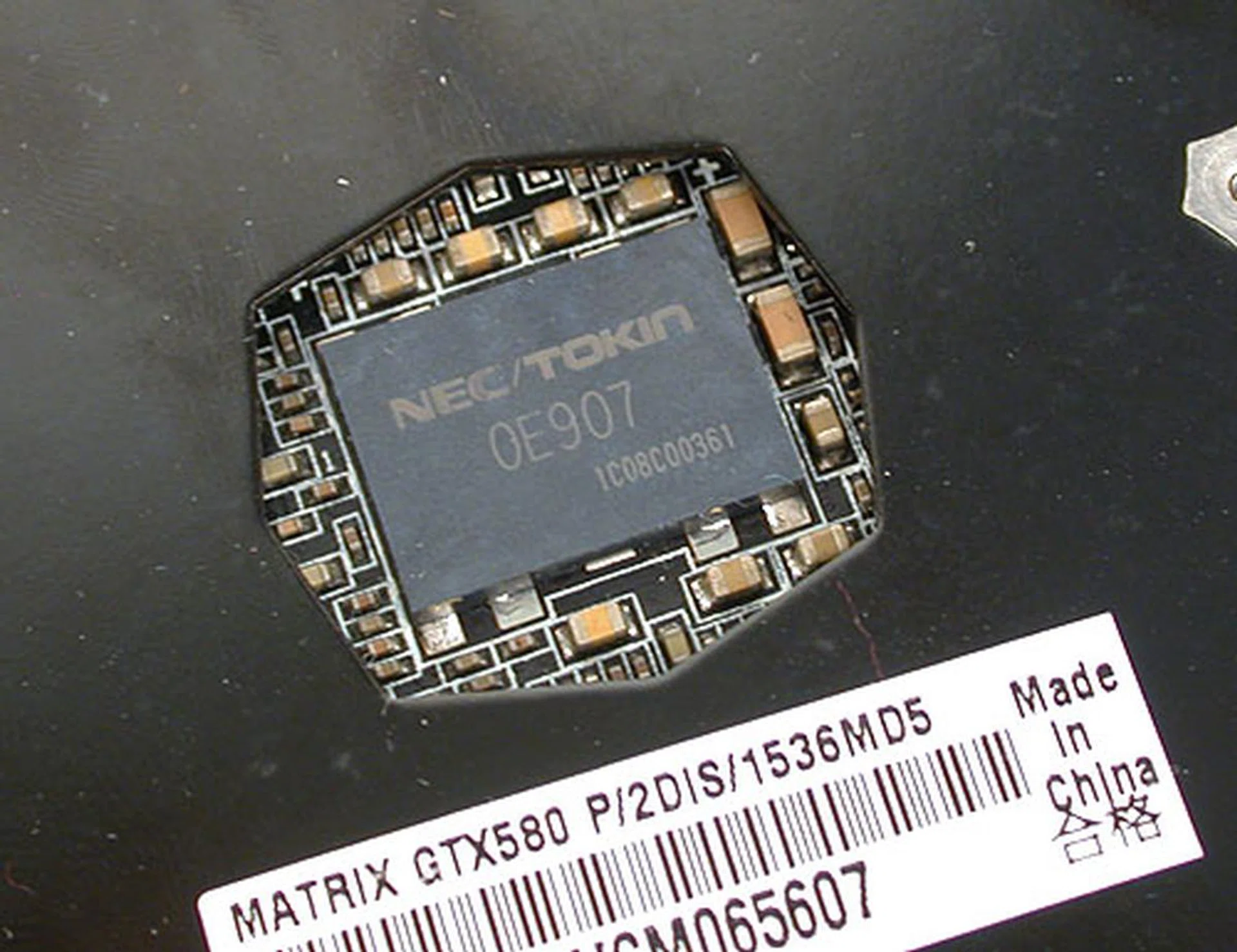
NEC/TOKIN Proadlizer appears to be the standard for high-end graphics cards to provide stable power. It's also used by MSI for its Lightning series.
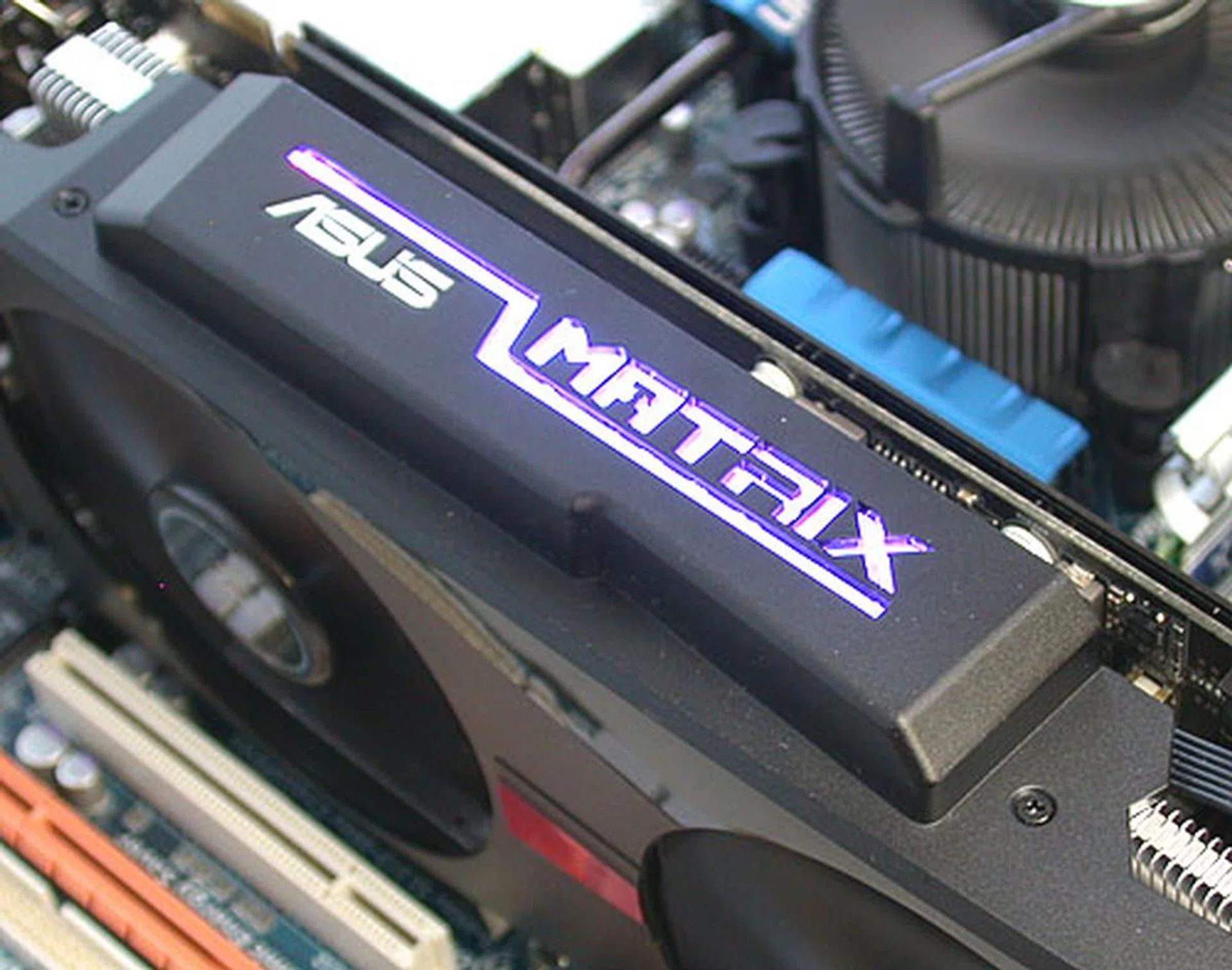
Users can find out the load on the GPU at a glance with this LED Load indicator. There are five colors, with green being Safe Mode, light blue representing light loads and red the heaviest. This is a feature that has been present on ASUS' Matrix cards for a while now.
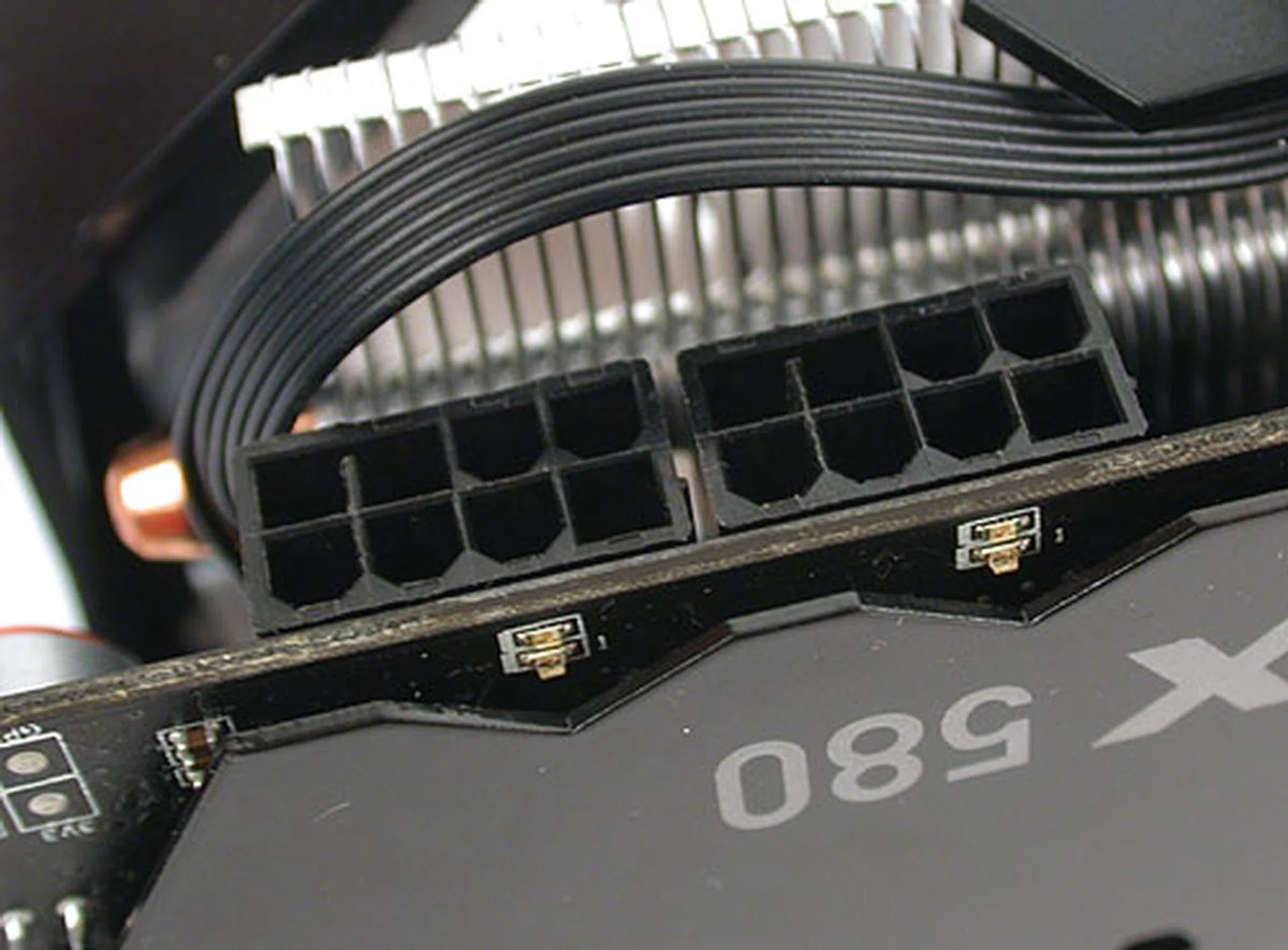
The two 8-pin power connectors have LED indicators that turn green if the power cables are plugged in properly.
Designed for Serious Overclockers
It's not an ROG product without some really cool features for the hardcore crowd. Firstly, there's what ASUS calls Mod Zone that caters to the extreme overclockers who practically rip out the standard coolers for their own liquid-cooled versions (we're talking LN2 capable ones here). On the PCB, there are clearly marked solder pads that when soldered, enable rather risky things like removing the built-in safeguards for overheating and overcurrent. That's the 'Disable OCP' marked on the PCB below. The Power PWM Freq meanwhile doubles ASUS' Super Hybrid Engine (its power management IC) clock on this card to provide stability even under high clocks. The other two contact pads allow the adjustment of memory voltage and PLL voltage. This is definitely not for beginners.
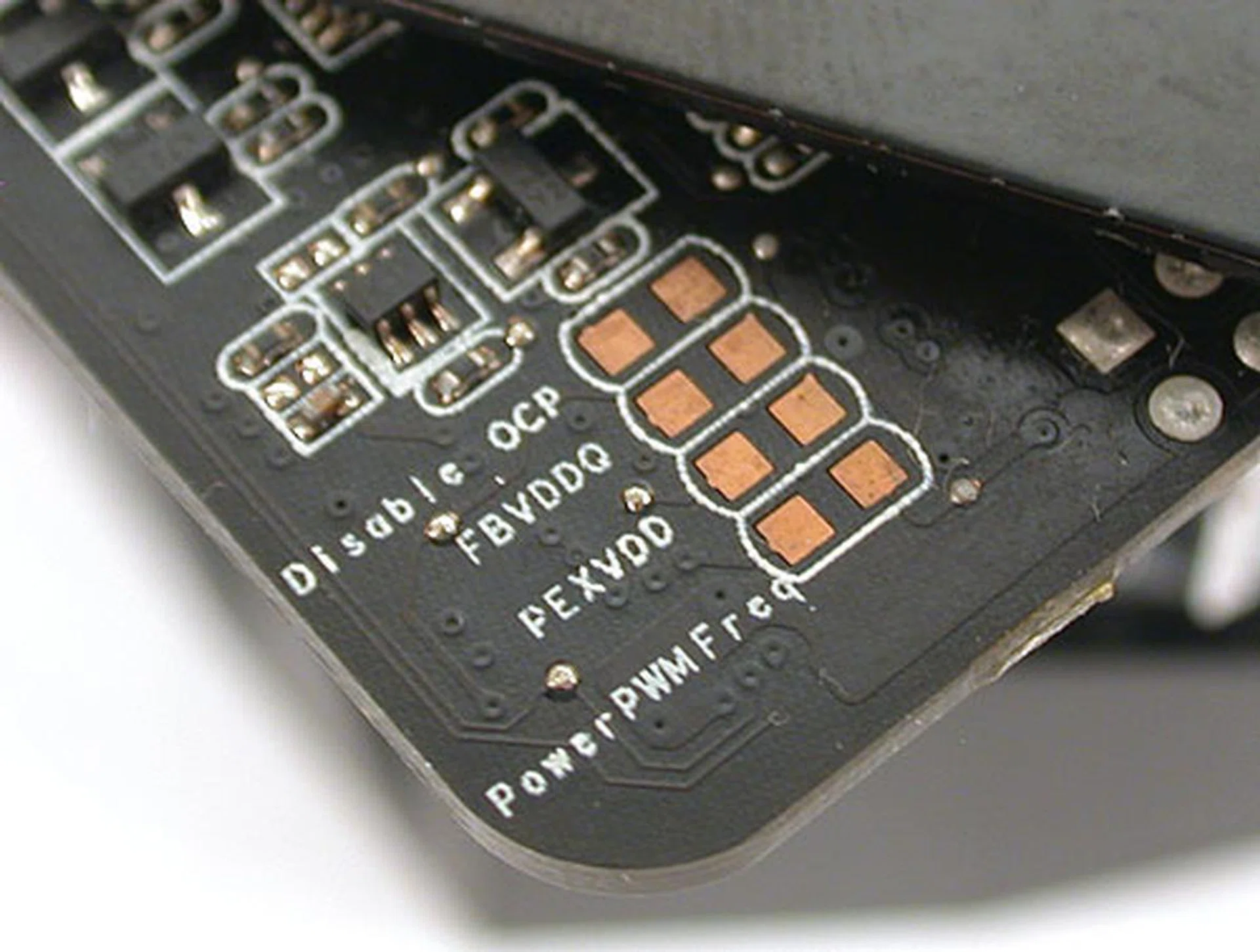
These solder pads here are meant for the hardcore crowd. The 'Disable OCP' here basically removes any last safeguards on this card. Recommended only if you are using LN2.
Then there's ASUS Probelt. It's a feature that we have seen for a while on ASUS' ROG motherboards, but it's the first time we have seen it on an ASUS graphics card. Basically, it's a set of voltage measurement points where enthusiasts with the inclination and a multimeter can just poke their sensors and check the voltage of the memory, graphics core and PCIe bus.
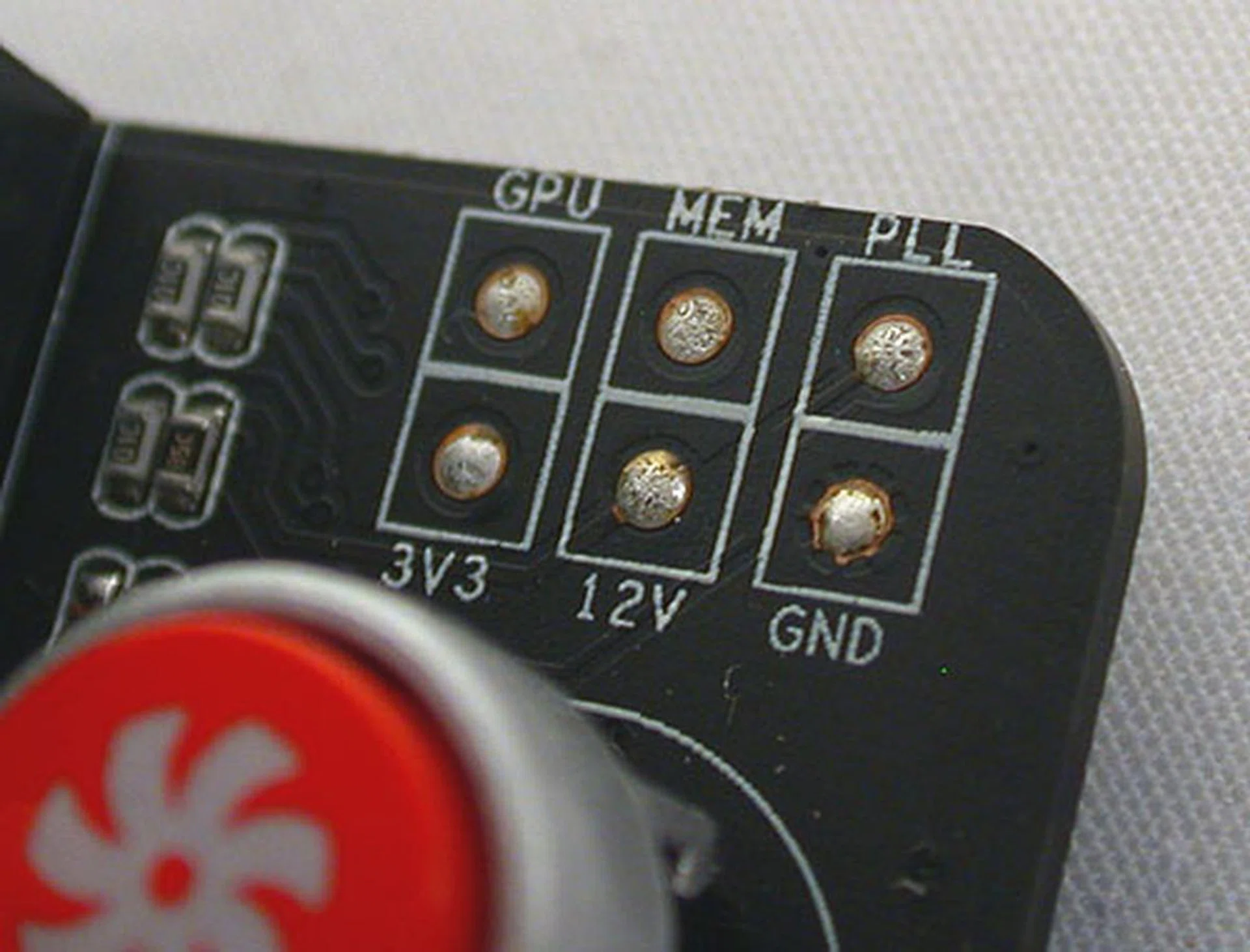
With a multimeter, you can also measure these voltages (GPU, memory, and PCIe bus), similar to what's available on ASUS' ROG boards.
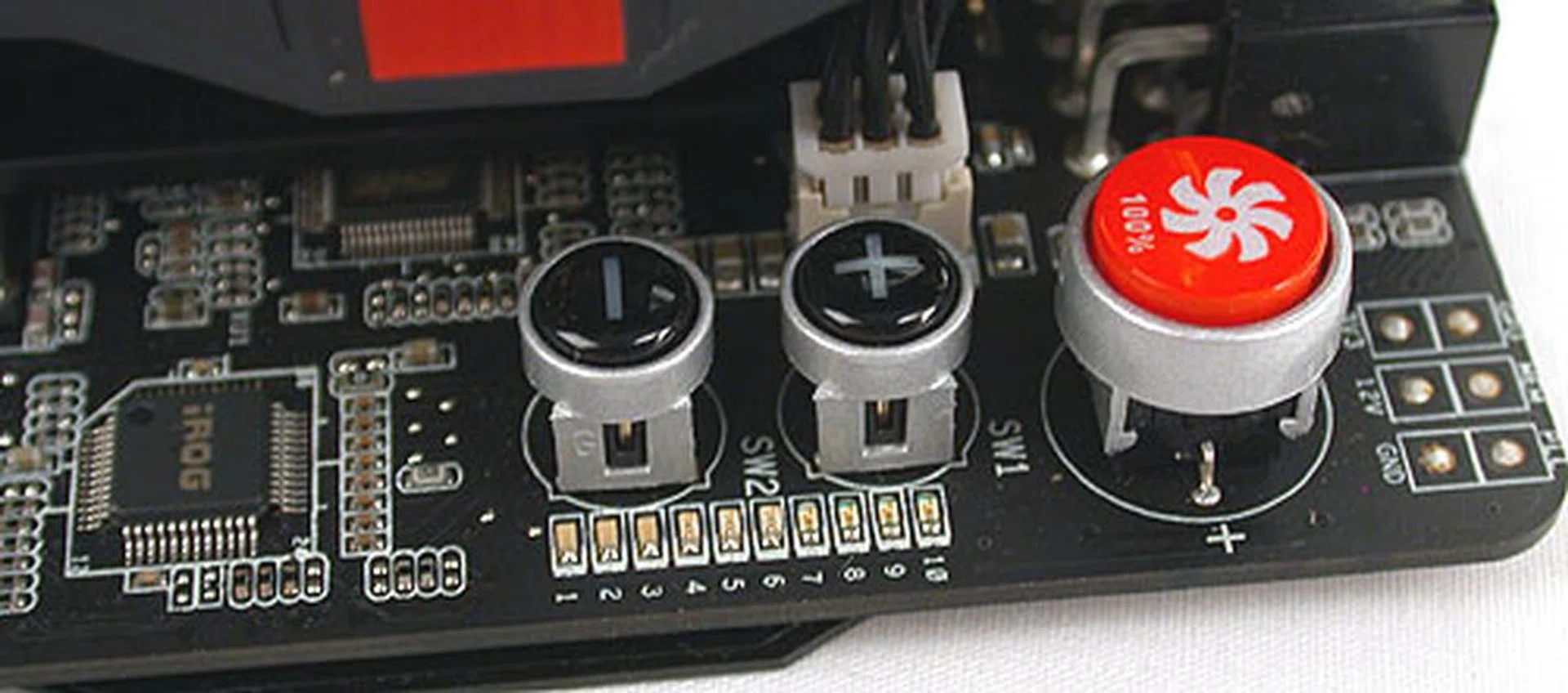
If you need a quick fix for your cooling issues, just press the red button. It instantly pushes the fan speed to 100%, which is pretty loud. The other two buttons, the plus and minus allows users to adjust the core voltage directly, without going through any software utility.
ASUS' GPU Tweak
Perhaps ASUS saw the success of MSI's Afterburner utility that has become popular among enthusiasts to tweak their graphics cards. If that was indeed the case, then the GPU Tweak is the response. On first glance, it's similar to the more powerful tweaking utilities out there and there's even a re-skinned GPU-Z that shows the key specifications of the installed graphics card.
What's important to most enthusiasts is that they can control the voltages, clock speeds and fan speeds easily and GPU Tweak's main control panel provides that. It can even lock the clock speeds and voltages such that when the user changes the core clock slider, the core voltage changes correspondingly. It's a nice touch for the less experienced users who may not have any clue to the appropriate voltages.
While GPU Tweak isn't hard to figure out for anyone who has previously tried any software tweaking utilities, we felt that it could do with more tooltips that explain in slightly more detail what each feature does. At the moment, the tooltips when they appear, just seem to state the name of the function/feature, without more information. The real-time monitoring panel (the left panel below) also seems to launch slower than we liked, but that's a minor quibble.
If you really like your tweaked settings, the GPU Tweak has a special BIOS Burn-in feature where your favorite clock, voltage and memory timings for the graphics card is saved in its BIOS. This means that your graphics card will start booting up with these custom settings. The catch is that this is only available on supported ROG graphics cards like the Matrix GTX580 Platinum, presumably because it has a Safe Mode feature in case users really mess up the BIOS with this Burn-in function.
The GPU Tweak also has a built-in recording feature, but it doesn't appear to be working when we tested it. ASUS has said that it's coming soon and with MSI's Afterburner also adding a similar Predator, video-capturing feature, both companies are competing to bring enthusiasts the best tweaking utility. And for free!

You can expand up to three panels with the GPU Tweak utility, a main control panel, a monitoring panel and the ASUS' reskinned GPU-Z. Click on image to enlarge.
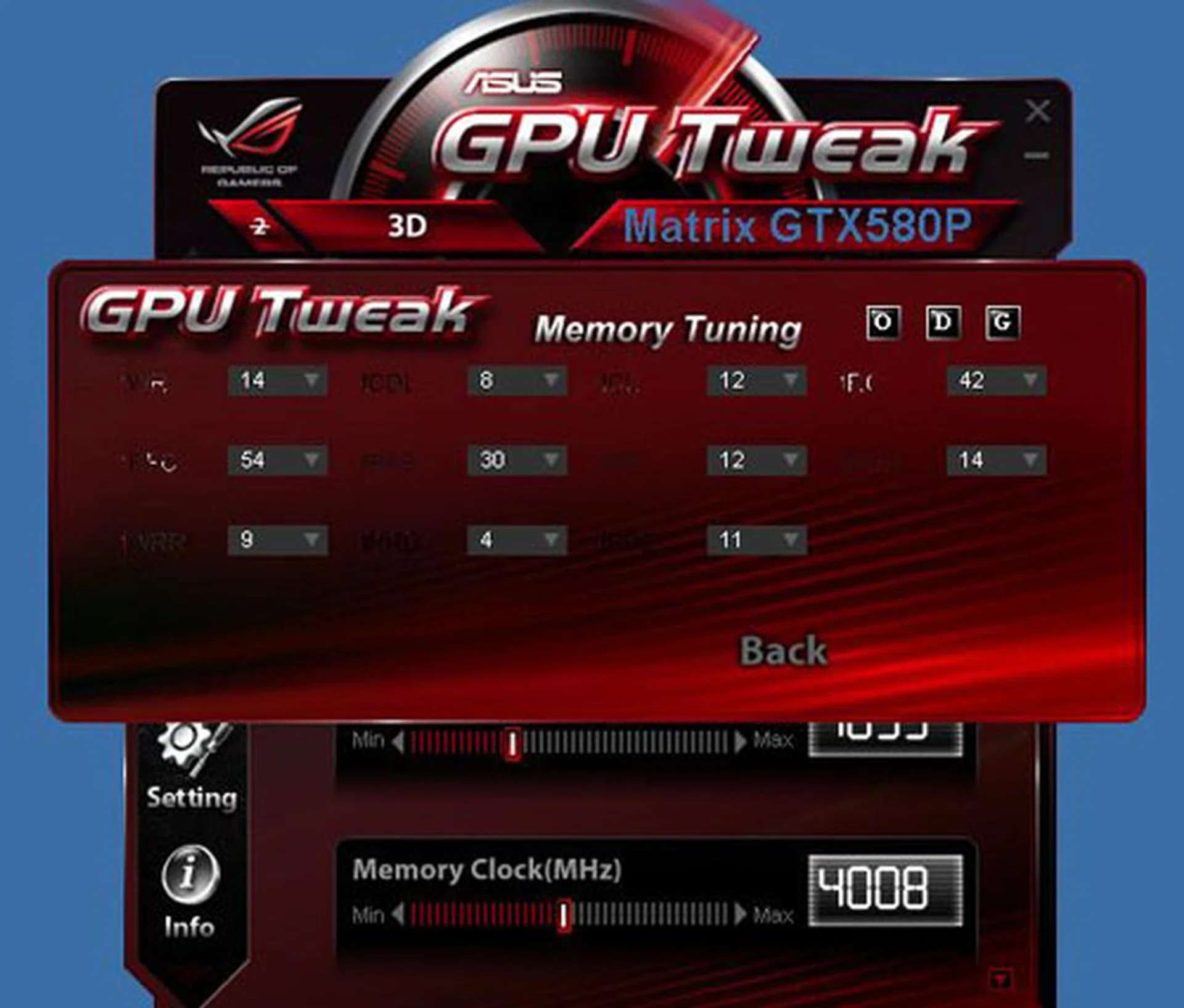
One advantage of GPU Tweak that ASUS is touting over rival tuning utilities is the added option to change the memory timings on the graphics card. In our experience, memory timing options bring little benefit these days, but that's what the ROG product is all about - pushing the capabilities to the max.
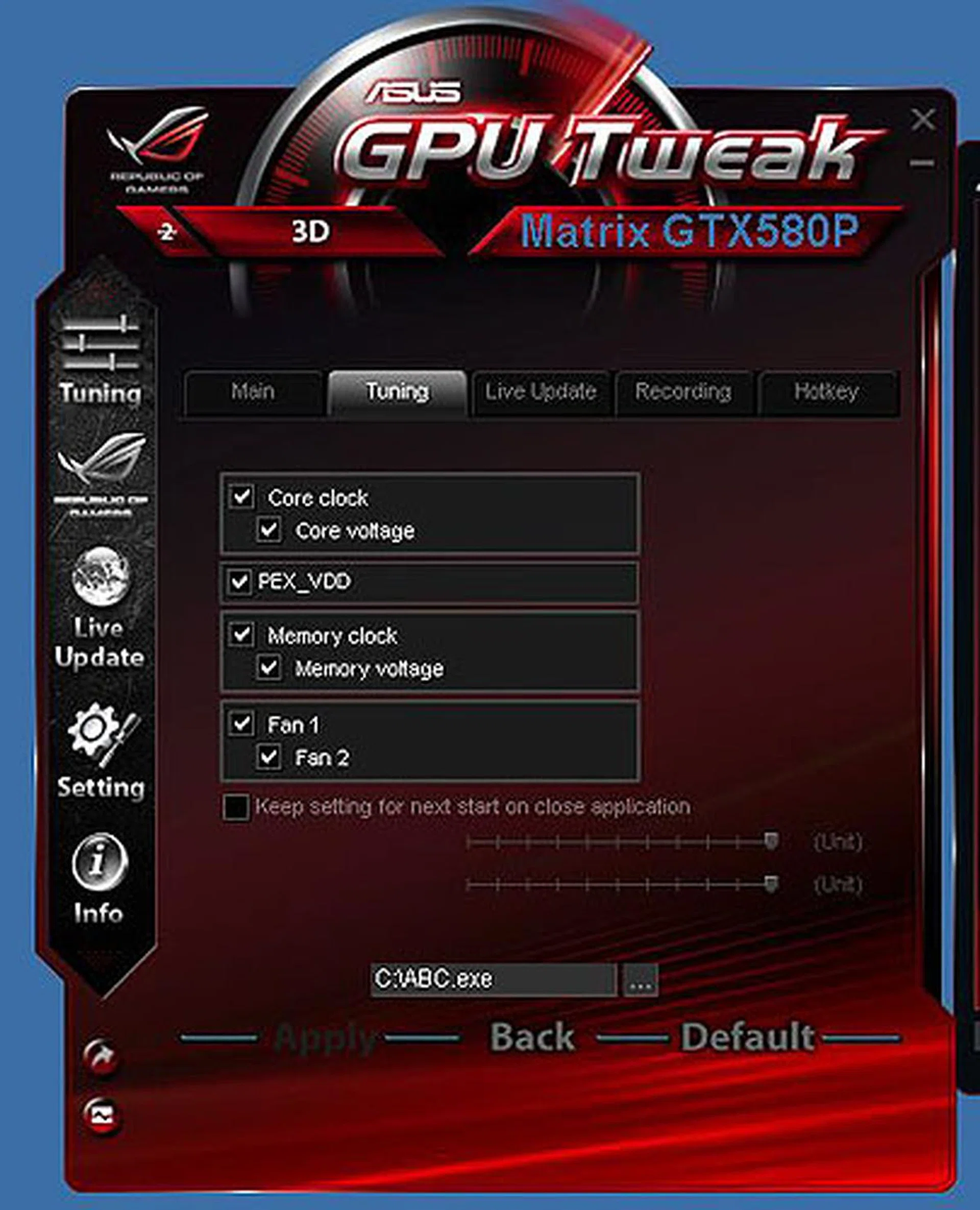
The settings for the Tuning page where users can customize what they see on the control panel. As you may tell from the other tabs here, other features include a realtime Recording utility for games and screenshots, Live Update to keep your driver and BIOS updated and of course hotkeys to trigger the recording.
Test Setup
As usual, we installed this ASUS Matrix GTX 580 on our test system which has the following specifications:
- Intel Core i7-975 (3.33GHz)
- Gigabyte GA-EX58-UD4P motherboard
- 3 x 1GB DDR3-1333 G.Skill memory in triple channel mode
- Seagate 7200.10 200GB SATA hard drive
- Windows 7 Ultimate 64-bit
Since, we have previously tested the standard NVIDIA GeForce GTX 580, albeit with slightly older drivers, we'll be recycling those scores as a reference Besides, we've already established in a past articles that even major driver updates don't give as much benefit as perceived and advertised. We also have another overclocked GTX 580, the that we will be including in the benchmarks. Finally, we'll throw in some results of other similar high-end graphics cards, like the older, dual-GPU Radeon HD 5970, an overclocked Radeon HD 6970 and the latest NVIDIA GeForce dual-GPU card, the GTX 590.
The list of card tested and driver versions used:
- ASUS Matrix GTX580 Platinum (ForceWare 275.33)
- NVIDIA GeForce GTX 580 1560MB GDDR5 (ForceWare 266.58)
- Sparkle Calibre X580 (ForceWare 262.99)
- MSI R6970 Lighting 2GB GDDR5 (Catalyst 11.2)
- NVIDIA GeForce GTX 590 3GB GDDR5 (ForceWare 267.71)
- AMD Radeon HD 5970 2GB GDDR5 (Catalyst 11.2)
The list of benchmarks used:
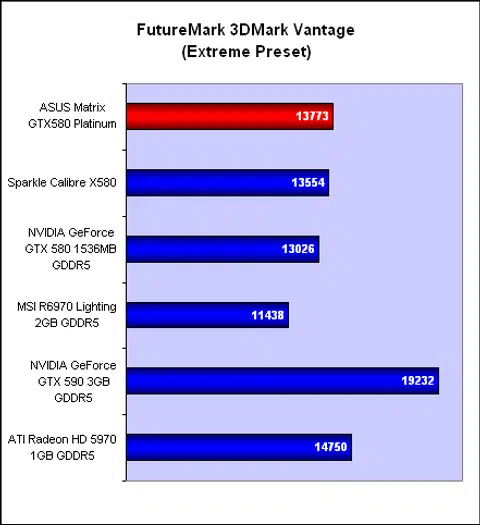
- Futuremark 3DMark Vantage
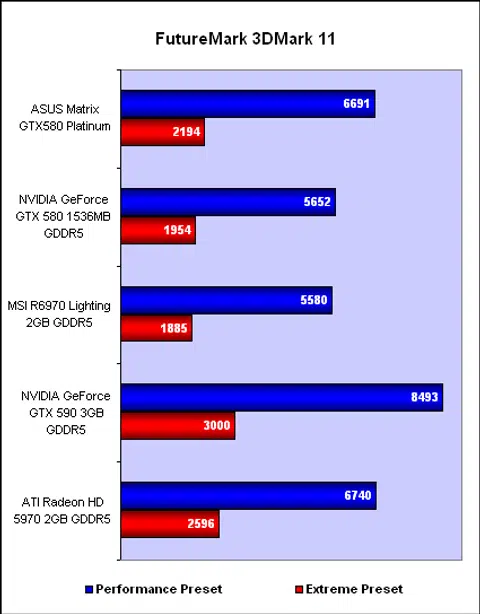
- Futuremark 3DMark 11
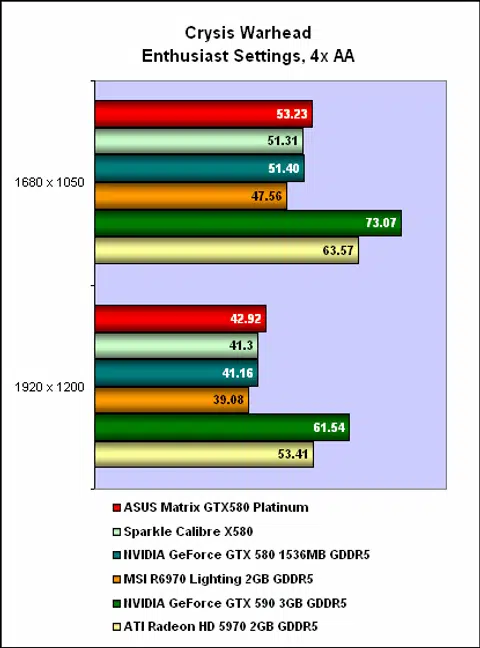
- Crysis Warhead
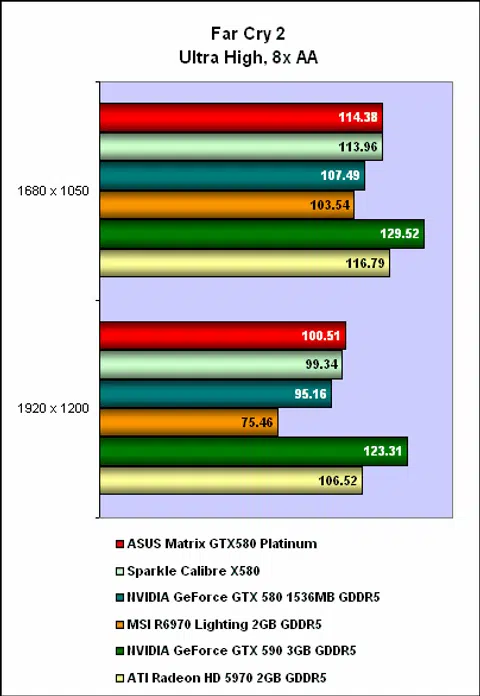
- Far Cry 2
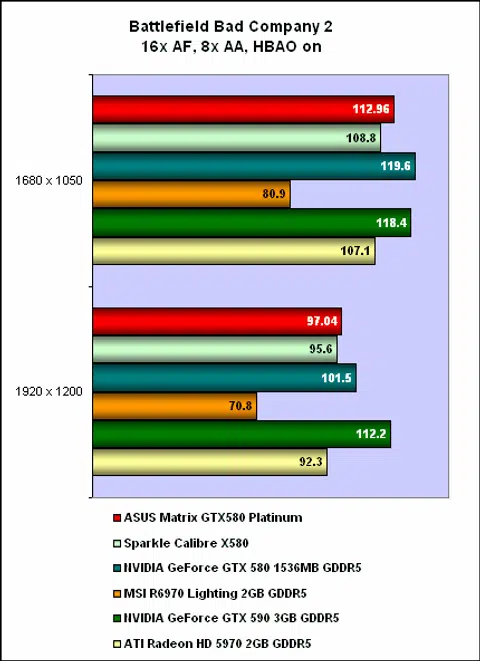
- Battlefield Bad Company 2
Benchmark Results
As we have said, the ASUS Matrix GTX580 Platinum is overclocked, but by a relatively modest amount. Hence, users will generally see only a slight bump in their scores, which brought its performance close to that of the older, dual-core Radeon HD 5970. In most of the actual games tested, the ASUS was mostly neck to neck with the Sparkle Calibre, which runs at 810MHz for the core and 4032MHz DDR for the memory.
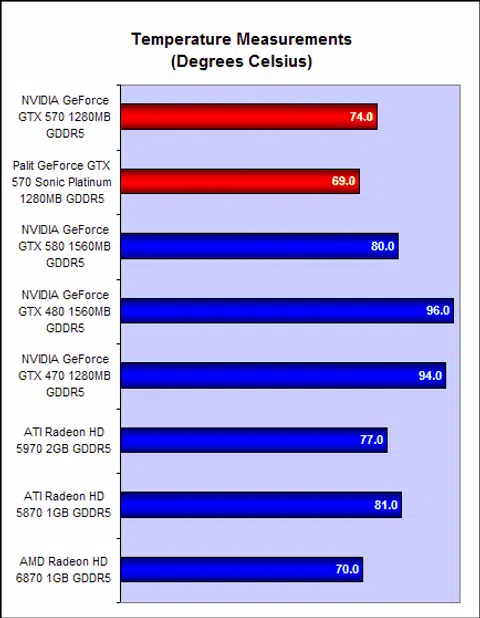
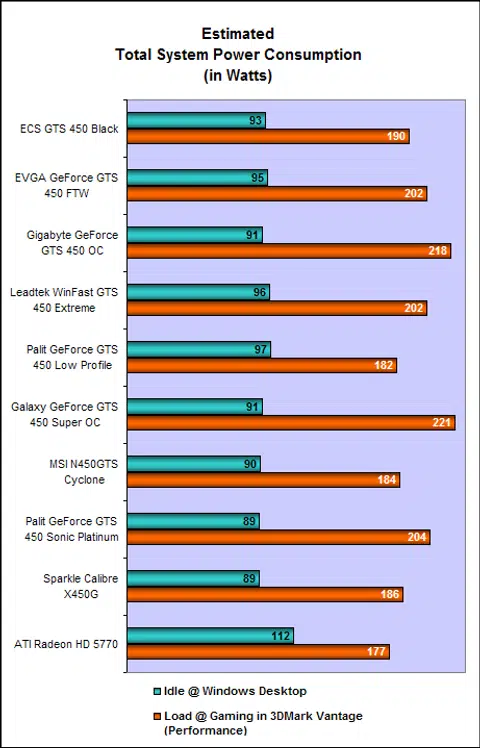
Where the ASUS excelled was in our temperature testing, as we found its 58 degrees Celsius reading to be 11 degrees less than the Sparkle Calibre, which has a triple-fan cooler. Compared to the 80 degrees that we recorded on the reference GTX 580, the ASUS' DirectCU II cooler was doing a great job. The ASUS also showed slightly lower idle and peak power draws than the other two GTX 580 cards here.
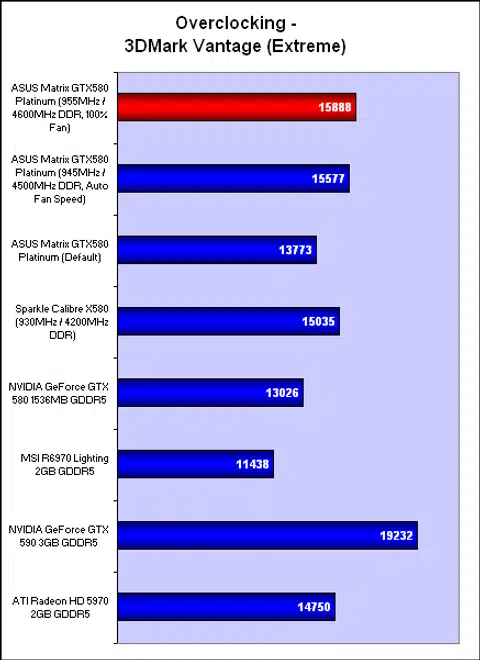
Finally, we tested the overclocking allowance of the ASUS. Bear in mind that we just went with the usual air-cooled method and simply pushed the clocks up using the GPU Tweak utility. We found that the ASUS Matrix reached higher core and memory clocks compared to the Sparkle. When we turned the fan on the Matrix to its extremely noisy, 100% speed, we could squeeze out a marginally higher result. However, we doubt that users will find the extra clock speeds worth the din created.
Conclusion
Surprisingly for an ASUS ROG product, this Matrix GTX580 Platinum doesn't come with clock speeds that will beat world records, at least not out of the box. While the default clocks are not too impressive, the tweaking features more than made up for it. Some of them are new to ASUS' graphics cards and honestly, won't be useful to 99% of users. Others, like the Safe Mode button to restore the BIOS is something that should be on more high-end enthusiast cards.
The biggest thing that comes with this card in our opinion is ASUS new GPU Tweak utility and this is in fact a free tool that works on all graphics cards, including those from other brands. There are some ROG exclusive features within this utility, but for the most part, it's a competitive take on other free tweaking utilities like MSI's Afterburner and we look forward to more innovations in this area.
Finally, we should give credit to ASUS' DirectCU II cooler for producing the lowest temperatures we have seen yet on a GeForce GTX 580. The power consumption too seemed to be slightly lower than the typical GTX 580 and justifies the power management IC on this card.
With a typical GeForce GTX 580 going for around US$500, the ASUS Matrix GTX580 Platinum with all its higher clocks and all those ROG frills, was always going to cost more. At the moment, we only have online reports stating that ASUS has pegged it at a very reasonable US$530 price for this card, but we'll update that again once we get any official news on the local availability and price.
If it's indeed US$530, ASUS has a very attractive deal here for aspiring overclockers and other enthusiasts. No doubt, the high price of any GTX 580 will deter most casual buyers but even those who don't intend to use the ROG features could be tempted at this price solely for the superior cooler on this card.
Latest update: ASUS has replied about the local price for the Matrix - it's a whopping S$809 here, though given that the competition like MSI's GTX 580 Lightning is going for $789, it's perhaps not unexpected. The first batch will arrive in July, but stocks will be limited.
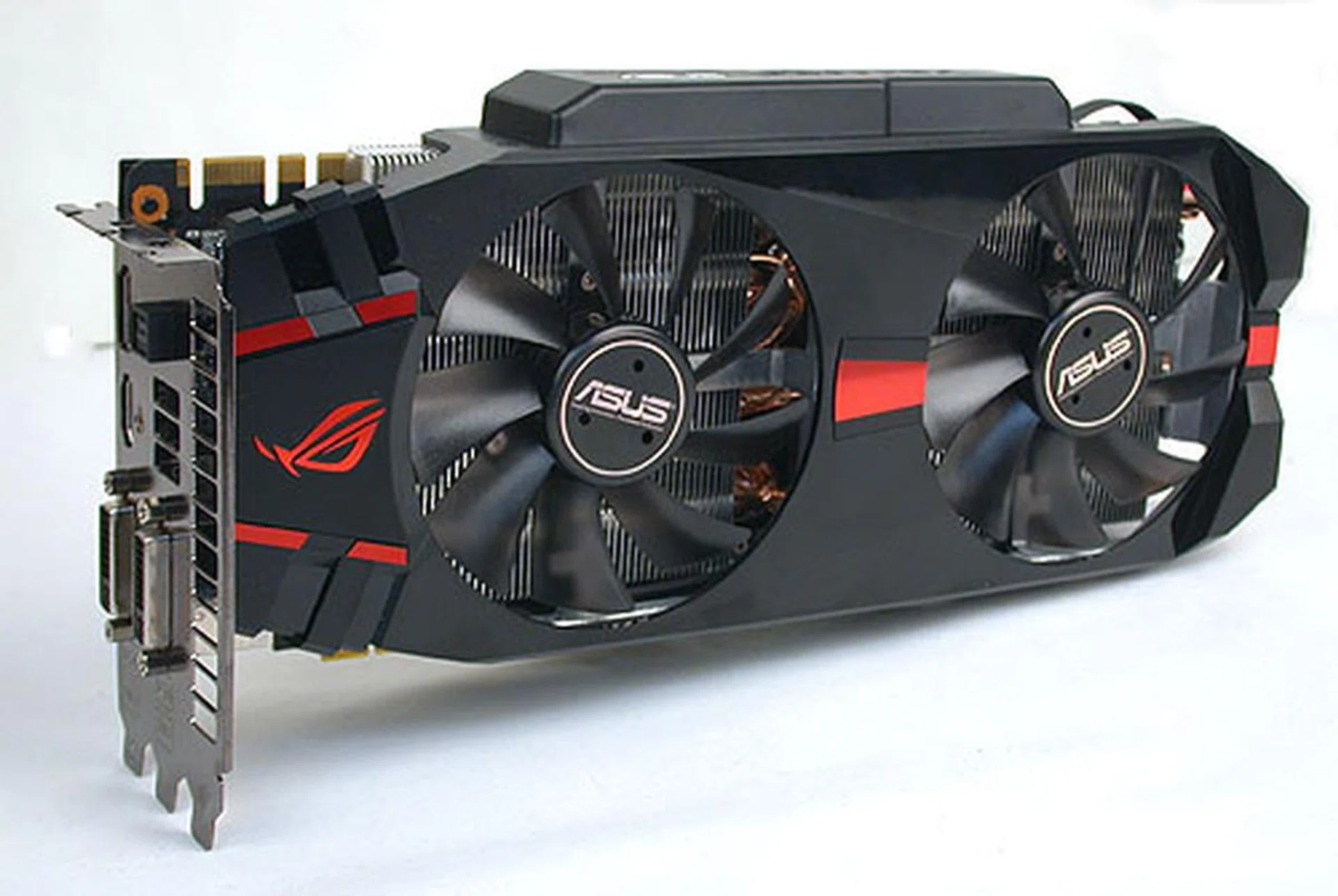
It's not the fastest GTX 580 in the market, but the ASUS Matrix GTX580 Platinum lives up to its ROG reputation with some extreme tweaking features and a superior cooler.
Our articles may contain affiliate links. If you buy through these links, we may earn a small commission.