
AMD Radeon R9 Fury reviewed: A tamer Fury
The AMD Radeon R9 Fury is a pared-down, air-cooled version of the Radeon R9 Fury X. We take a look at the ASUS Strix Radeon R9 Fury to find out whether the card's worth your time.

Expanding the high-end
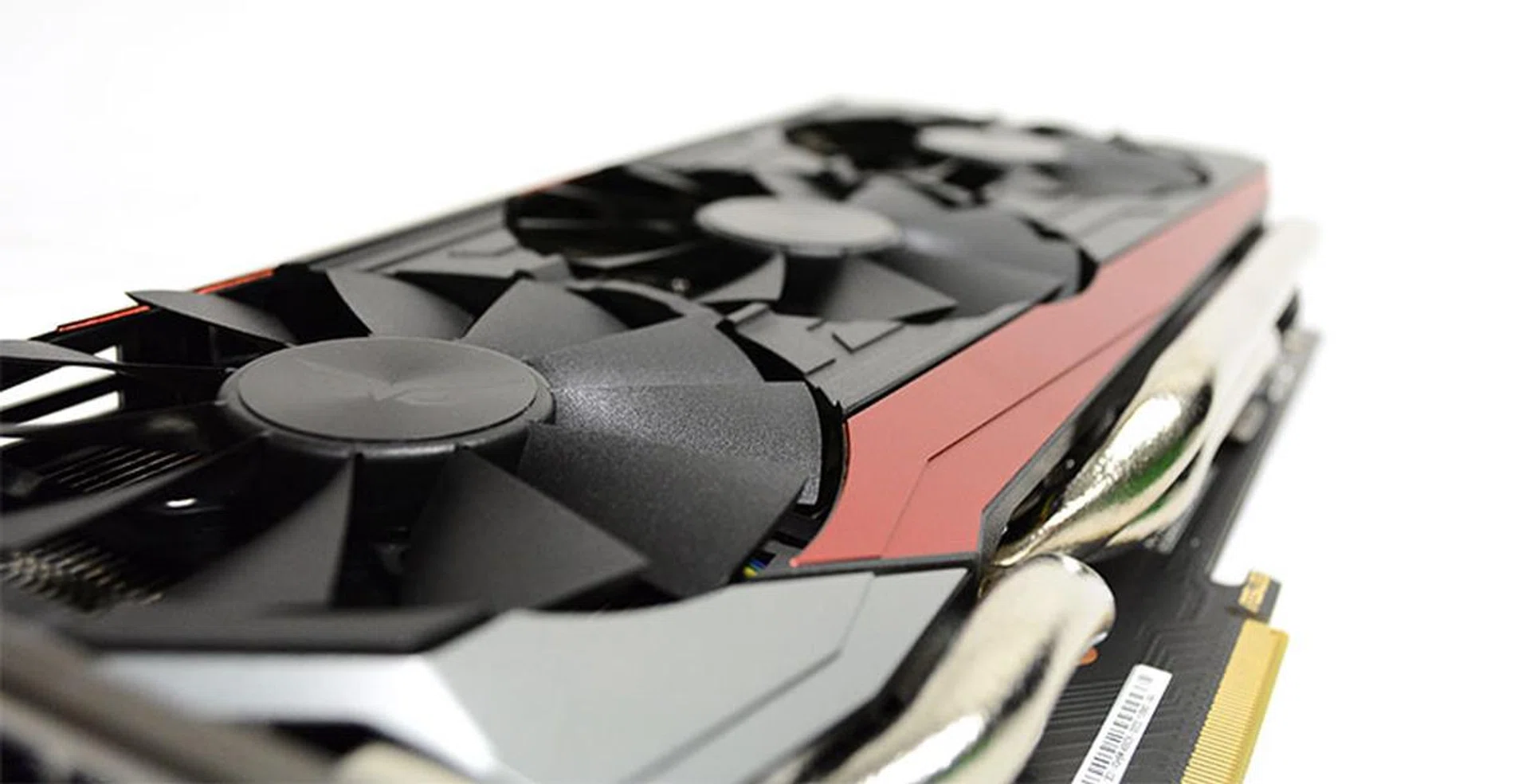
The Radeon R9 Fury adds even more choice for consumers to AMD's high-end line-up.
AMD’s 2015 line-up looks to be all about diversity and giving consumers more choice. The cards that go by the 300 series moniker are rebrands of various 200 series cards from 2013, and AMD has instead coined a new flagship with its new Radeon R9 Fury cards. By carving out a new niche for its top-end Fiji cards, AMD has freed up its entire 300 series of cards to cater to everyone from budget-conscious gamers to more performance-oriented enthusiasts.
AMD is even due to release the Radeon R9 Nano – an ultra-compact six-inch card – and a dual-Fiji GPU later this year, so fans of the red camp will indeed be quite spoilt for choice.
However, AMD isn’t content to release just a liquid-cooled version of its main Fiji GPU. It also announced the air-cooled Radeon R9 Fury, with a pared-down version of AMD’s new Fiji GPU but the same 4GB of High Bandwidth Memory (HBM) and an eye-popping 4096-bit memory bus width.
At US$549, the Fury is also a fair bit cheaper than the US$649 Fury X, so consumers who don’t see a need for the bells-and-whistles of the Fury X will still be able to enjoy AMD’s new GPU architecture at a more affordable price. And while the Fury X is currently only available in its reference design from various add-in card partners, custom versions of the Fury – complete with proprietary air-cooling solutions from manufacturers – will be available. In fact, we’ve heard that AMD hasn’t even bothered to release a complete reference design of the Fury.
That aside, the Radeon R9 Fury’s pricing places it squarely between the US$499 NVIDIA GeForce GTX 980 and US$649 GeForce GTX 980 Ti. This also means that unlike its bigger sibling the Fury X, the Fury is under no obligation to match or even beat the performance of the GeForce GTX 980 Ti.
It’s easier to think of the card as a more affordable entry point into Fiji, where its main selling point would be its use of HBM and its performance at quad HD and 4K resolutions.
Of particular interest will be whether its performance justifies the price premium over the GeForce GTX 980, and whether HBM does indeed provide the necessary increase in memory bandwidth to boost high-resolution gaming performance when compared to other cheaper GDDR5 cards.
A smaller slice of Fiji
A quick glance at the specifications sheet indicates that the Fury is a somewhat slower version of the Fury X. In a way, it is to the Fury X what the GeForce GTX 980 Ti was to the Titan X. It still features the same Fiji GPU, but with certain elements disabled.
Here’s a look at the block diagram of the Fiji GPU before we go into further detail on what’s changed on the Fury:
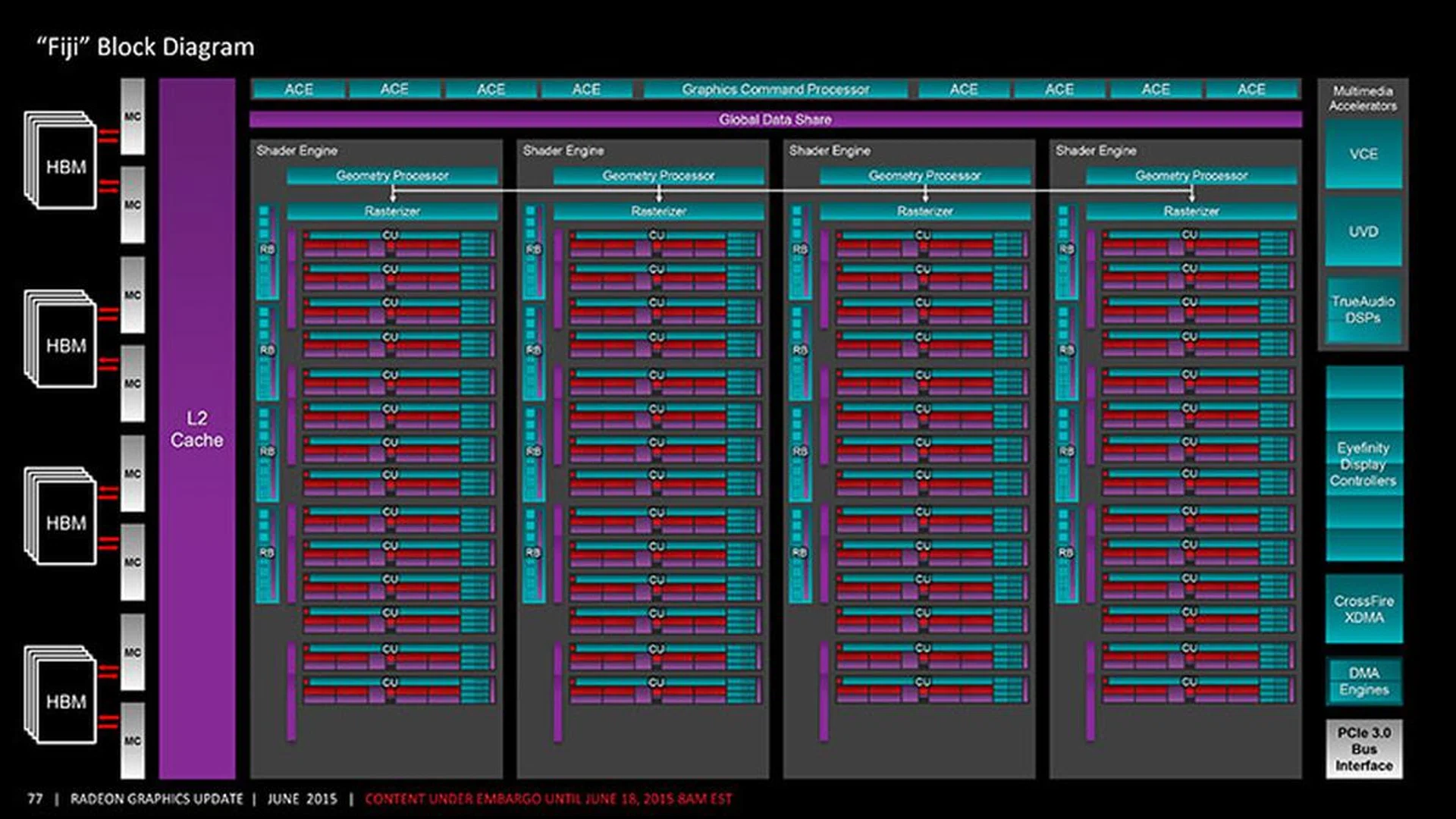
The Radeon R9 Fury's Fiji GPU has two CUs disabled per Shader Engine. (Image Source: AnandTech)
While the Fury X had 16 Compute Units (CU) per Shader Engine for a total of 64 CUs, two of these are disabled per Shader Engine on the Fury. This means that the number of functional CUs is down to 56, a 12.5% reduction. The number of stream processors has also consequently been proportionately reduced to 3,584, compared to 4,096 on the Fury X.
In addition, because of the eight disabled CUs (each CU has four texture filter units), the Fiji GPU on the Fury will feature 224 texture filter units instead of the full 256 on the Fury X, and core clock speed has been taken down a notch to 1000MHz. From a manufacturing standpoint, this could also allow AMD to salvage GPU chips that don’t make the cut for the Fury X and result in an overall more efficient production process with less wastage.
Other than that, the Fury’s Fiji GPU retains the same 64 ROPs on the Fury X and 4GB of HBM memory stacks. Here’s a quick GPU-Z snapshot to provide an overview of the card’s specifications:
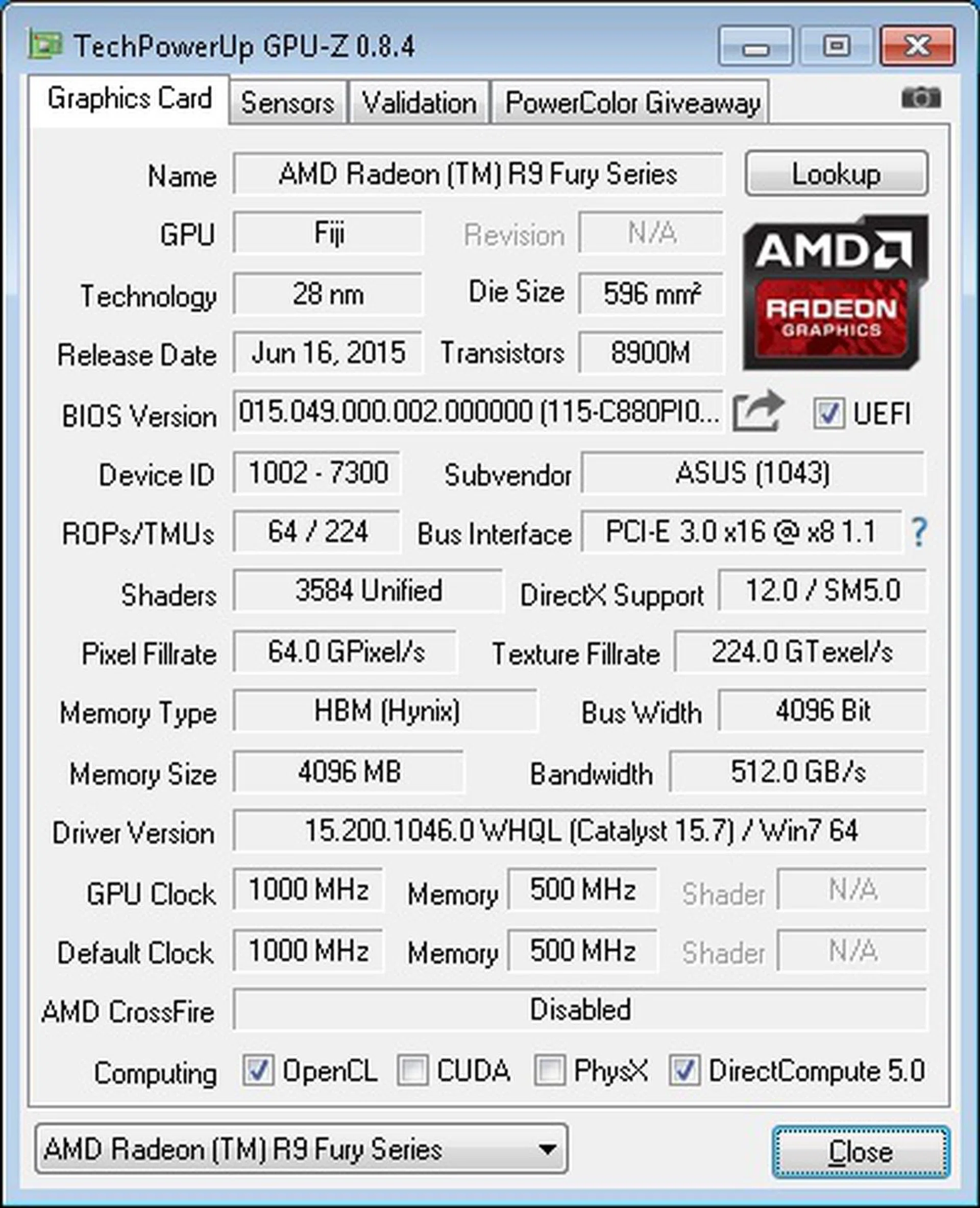
A quick look at the card's specifications.
For a more in-depth look at HBM, please refer to our initial coverage article and our review of the Fury X.
AMD’s first-generation design has placed four 1GB stacks of memory around the GPU die, all of which are attached to a silicon-based interposer. With a memory clock speed of 500MHz and a bandwidth of over 100GB/s per stack, the Fury has a total memory bandwidth of 512GB/s available to it, the same as the Fury X.
This means that it should perform well against the Fury X and other cards with less bandwidth where memory bandwidth is a bottleneck – for instance when resolutions and anti-aliasing are turned up – but the 4GB might turn out to be limiting in situations where an especially large-capacity memory buffer is needed.
As we’ve already noticed in our reviews of the Fury X and Radeon R9 390X and 390, the larger available memory bandwidth has often been the cards’ saving grace against NVIDIA’s own offerings.
A Closer Look: ASUS Strix Radeon R9 Fury
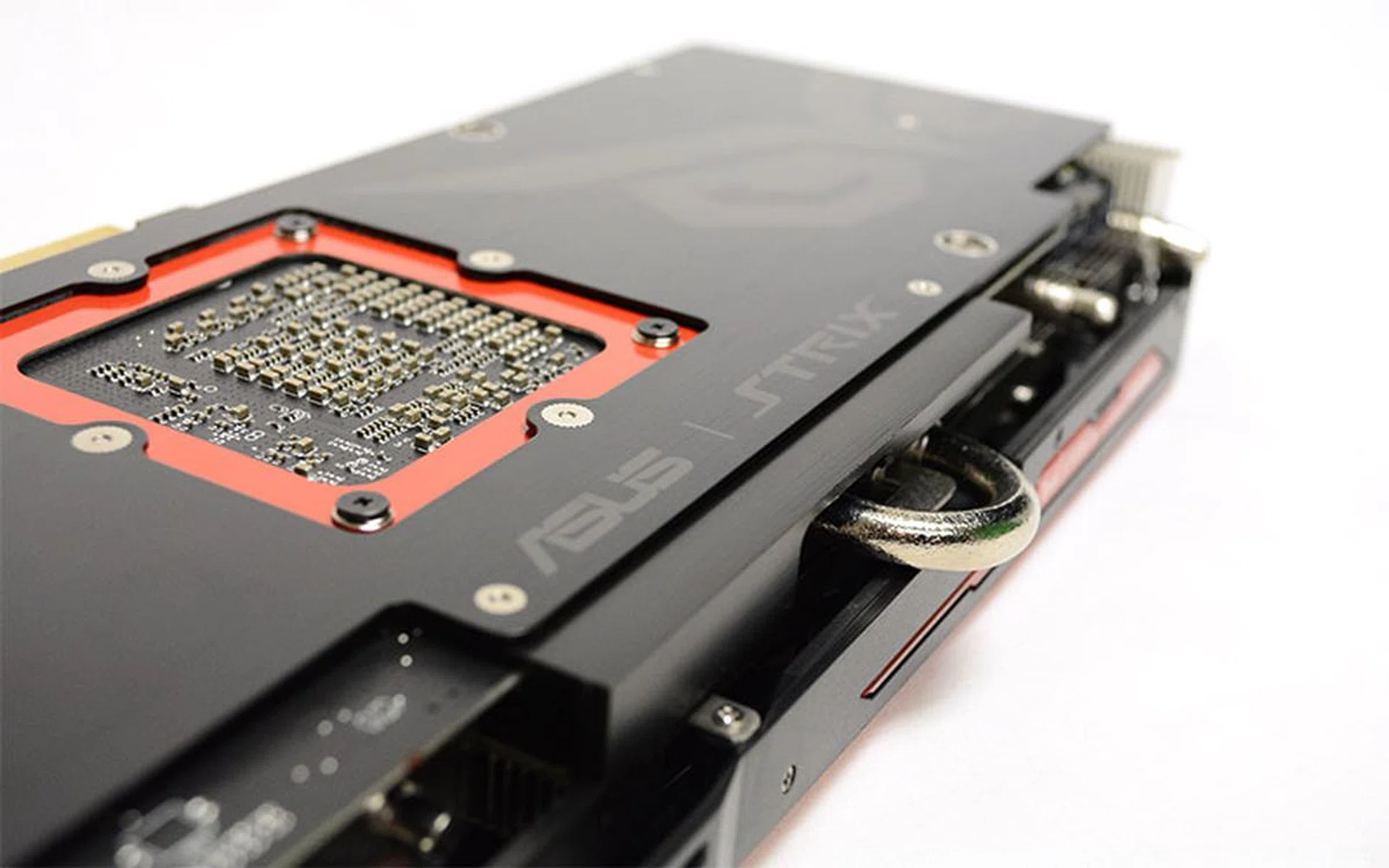
The Strix branding is emblazoned on the card's backplate.
AMD hasn’t made any reference cards available for review, so we’ll be using the ASUS Strix Radeon R9 Fury to get a better look at the card and what it’s capable of.
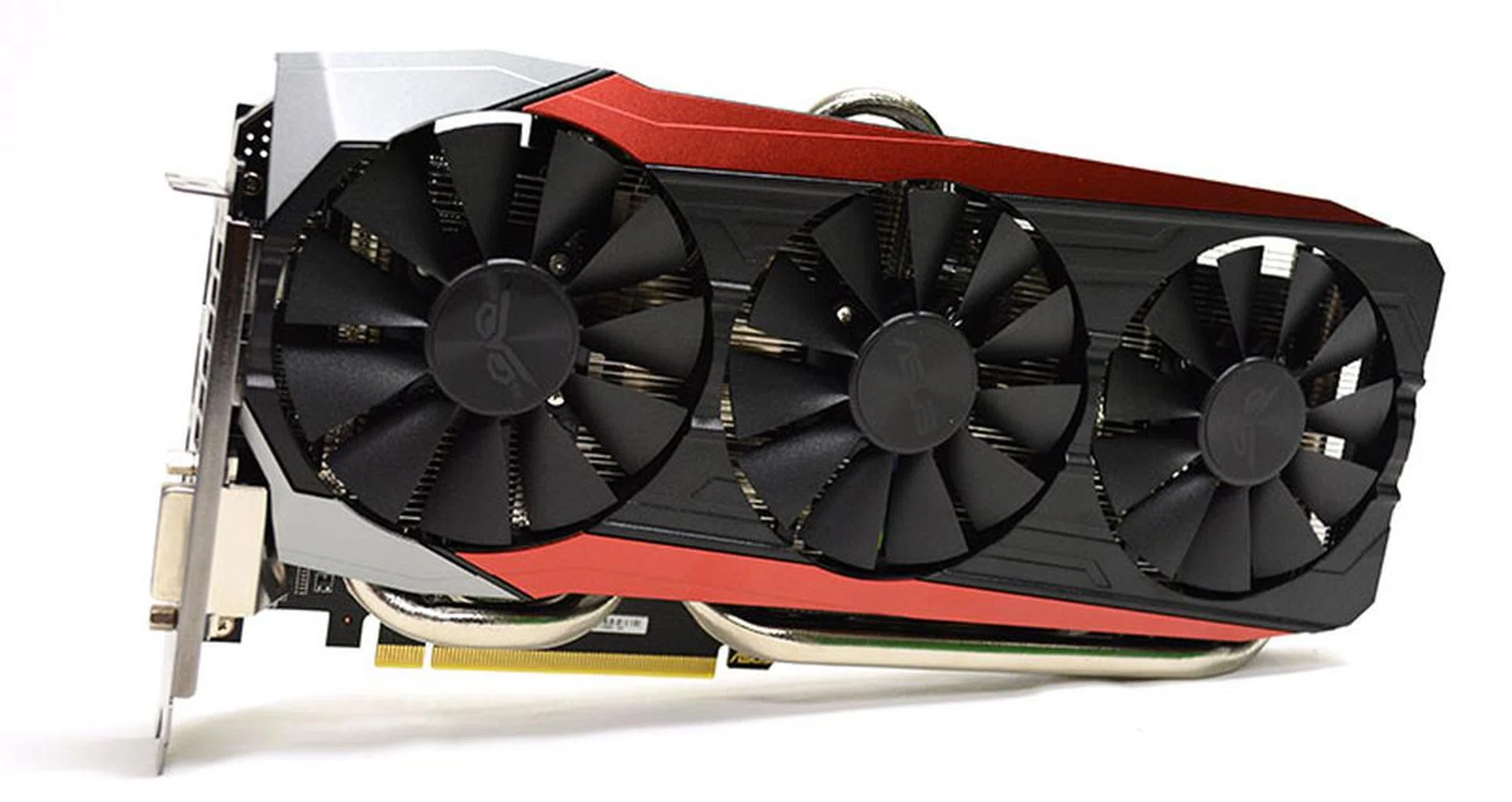
For starters, the card uses ASUS’ DirectCU III cooler with three fans. Like other cards from ASUS under the Strix brand, this particular Fury uses a predominantly black cooling shroud with daring dashes of red down its length.
The ASUS Strix Radeon R9 Fury ships with out-of-the-box clock speeds of a 1000MHz core clock and effective memory clock, the same as the reference specifications. The core clock increases to 1020MHz in OC mode.
The Radeon R9 Fury is rated for a Thermal Design Power (TDP) of 275 watts, the same as the Fury X. Of course, air-cooling won’t quite measure up to the stellar liquid-cooling loop on the latter card, but ASUS is certainly trying to deliver some decent cooling with its thick, dual 10mm heatpipes that are in direct contact with the GPU.
There’s also the Wing-blade fan design that we’ve seen on a number of ASUS cards for a while now.
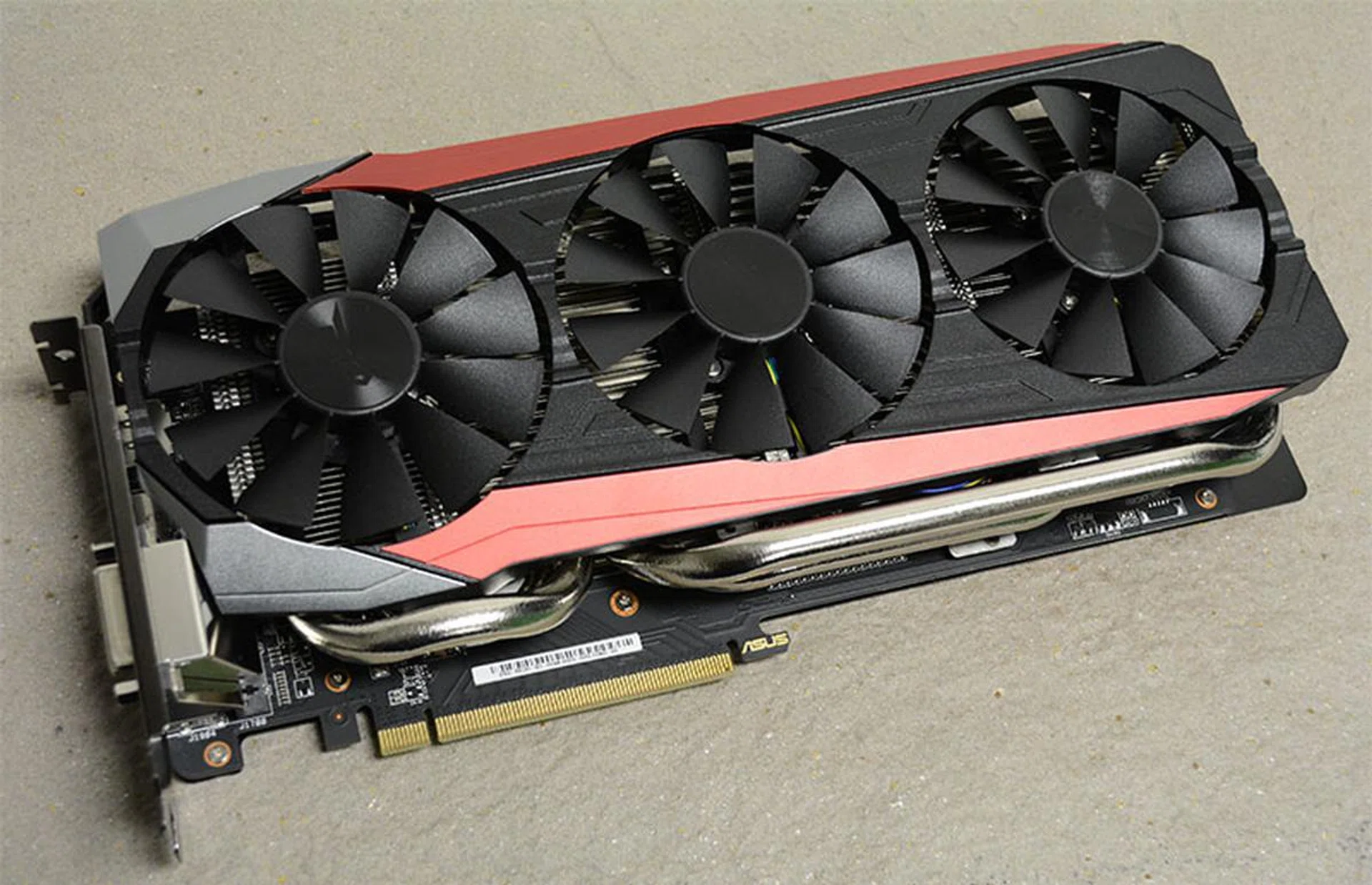
The card is cooled by ASUS' triple-fan DirectCU III cooler.
One particular feature we noticed is the use of a full-length metal backplate on the card. ASUS has also added on a dedicated GPU fortifying brace (red in color) to provide extra support to the GPU and prevent flexing to that particular area of the PCB.
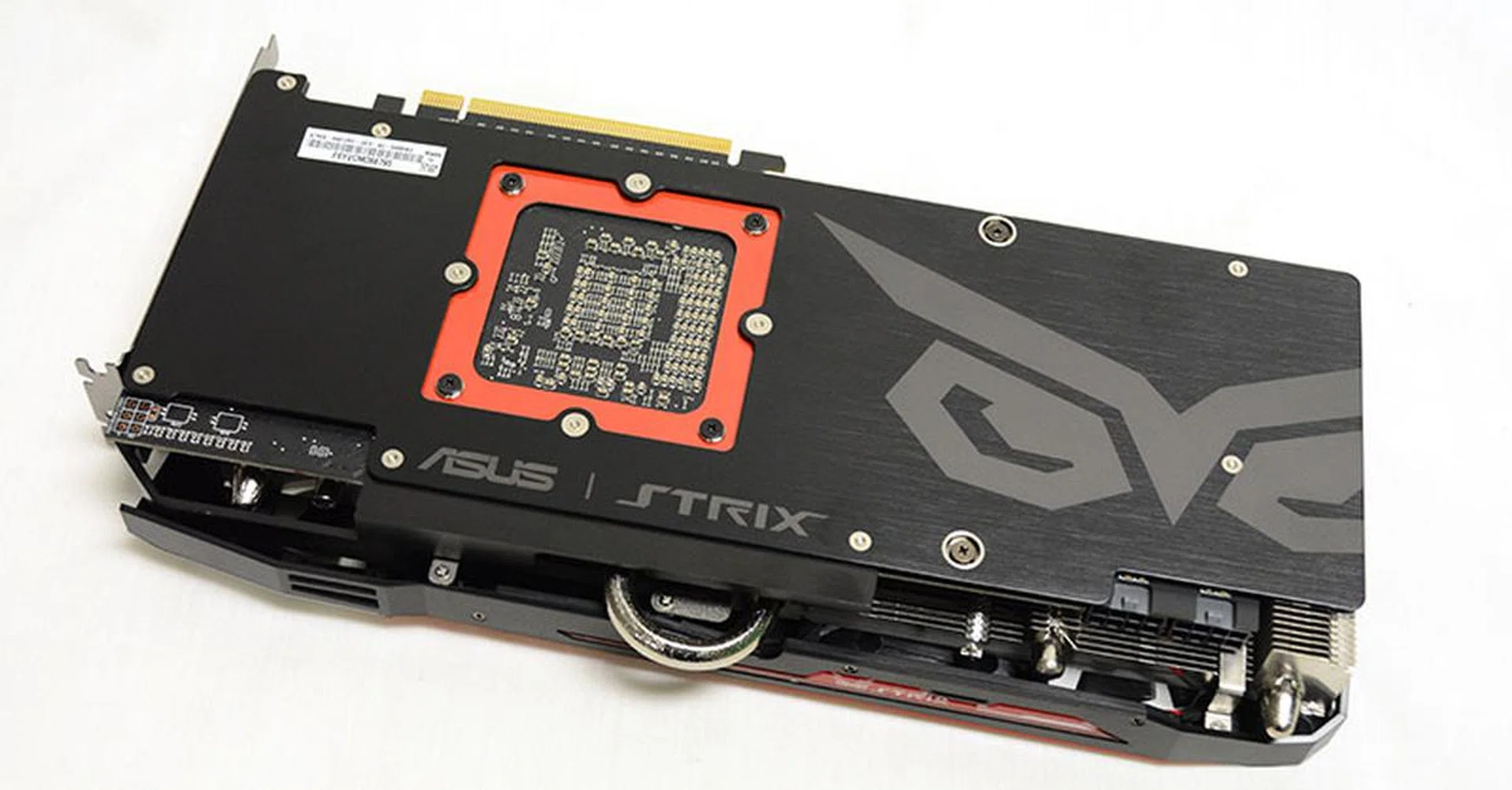
The card sports a full-length metal backplate for additional support.
This is unlike what we saw on custom versions of the Radeon R9 Fury from other manufacturers like Sapphire and PowerColor, which sported a shorter backplate that allowed the cooler to extend beyond both the PCB and backplate. Both manufacturers have probably hewed closer to the shorter reference PCB, but it looks like ASUS has gone with a completely custom PCB that spans the entire length of the backplate and heatsink fins.

From this angle, you can see that the PCB appears to span the entire length of the backplate.
Furthermore, part of this custom design includes the use of high-quality chokes and capacitors, which ASUS says have an increased lifespan and will help to minimize any potential buzzing noise
Unlike the Fury X, the Fury has a more standard complement of display connectors, comprising a much-missed DVI-D port, one HDMI connector, and three DisplayPort outputs.
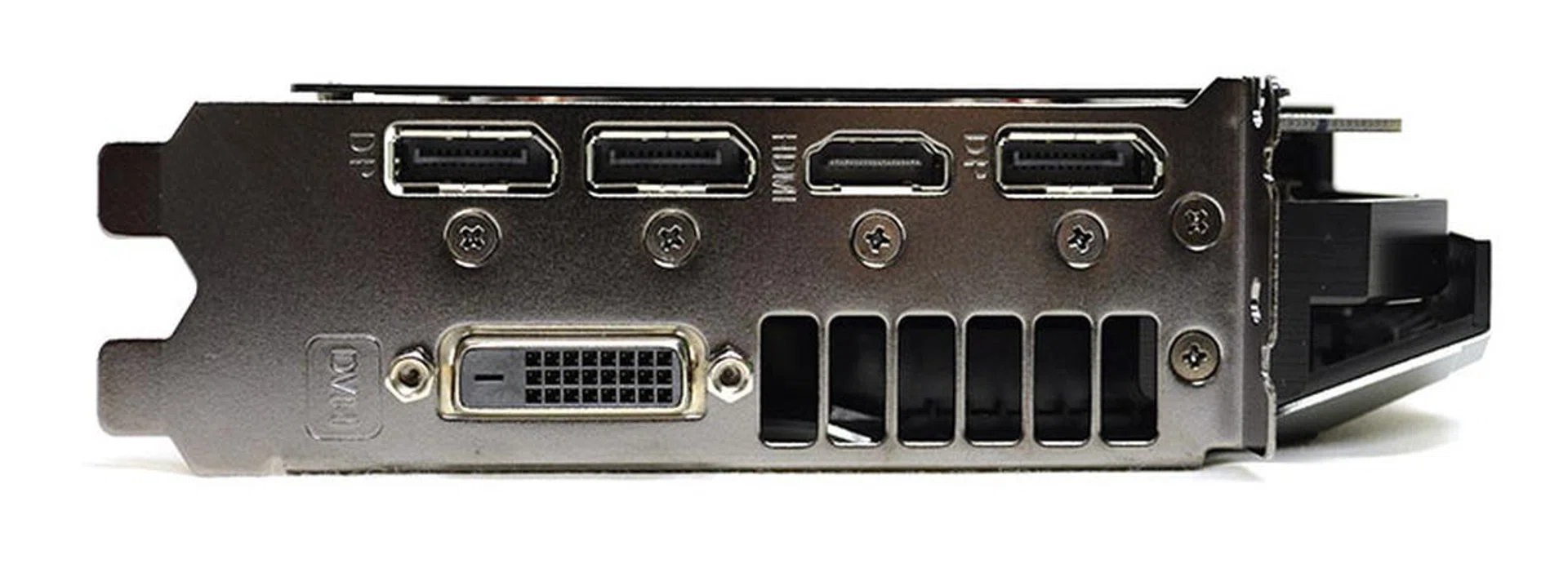
The rear of the card features one DVI-D port, one HDMI connector, and three DisplayPort outputs.
It is powered by two 8-pin PCIe power connectors like the Fury X. Twin LEDs located above the power connectors glow white when a successful connection has been established, so that should help with ruling out loose connections when troubleshooting.
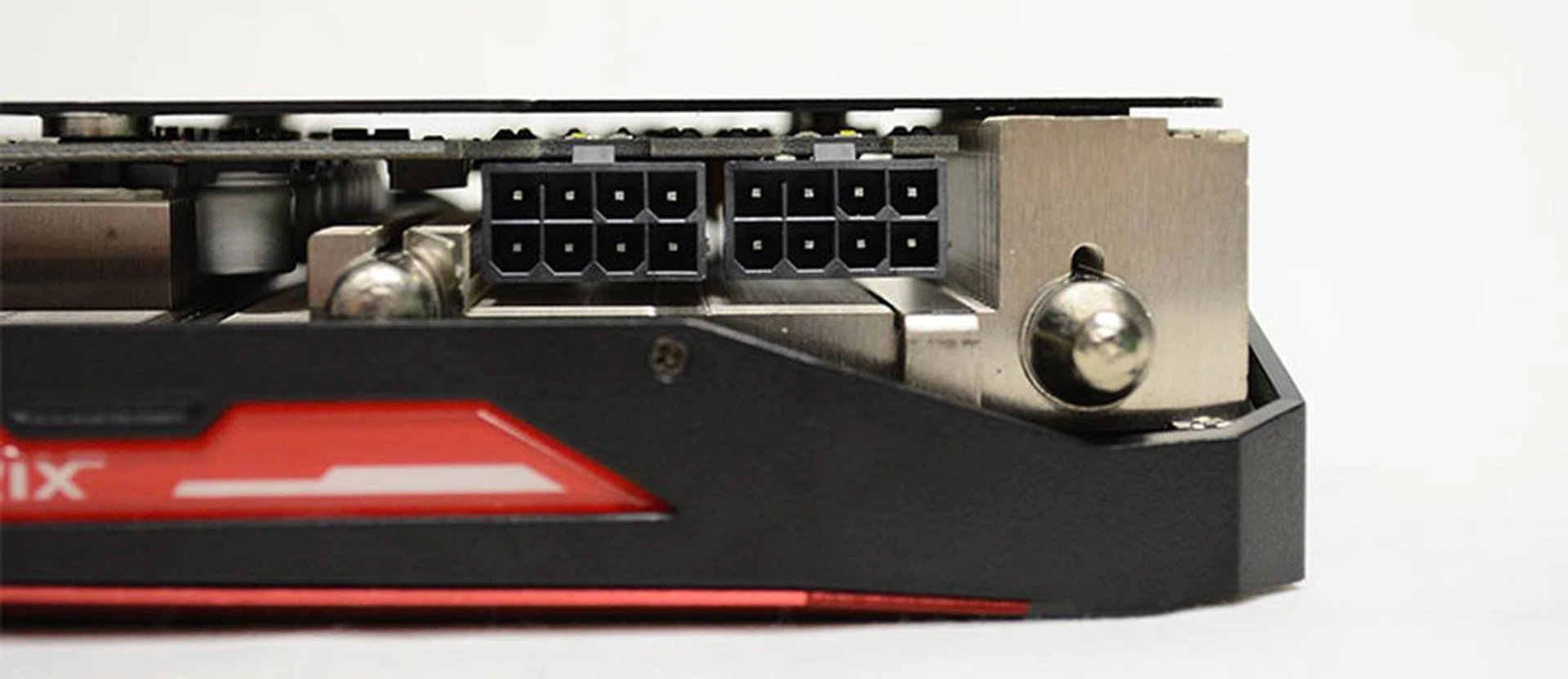
The ASUS Strix Radeon R9 Fury is powered by two 8-pin PCIe connectors.
Finally, the pulsating LED-illuminated Strix logo at the side adds a little vibrance to your setup.
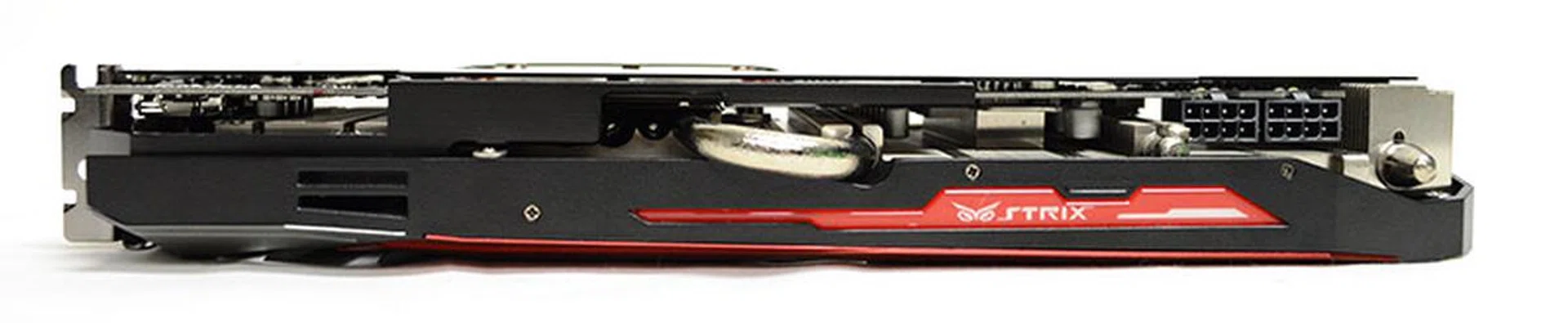
The LED-illuminated Strix logo flashes in a pulsating pattern.
Test Setup
These are specifications of our graphics testbed:
- Intel Core i7-5960X
- ASUS X99-Deluxe (Intel X99 chipset) motherboard
- 4 x 4GB Corsair Vengeance LPX DDR4-2133 (Auto timings: CAS 15-15-15-36)
- Samsung SSD 840 Pro 256GB SATA 6Gbps solid state drive (OS)
- Western Digital Caviar Black 1TB SATA 6Gbps hard drive (benchmark + games)
- Windows 7 Ultimate 64-bit SP1
- Intel INF 10.0.20
As the smaller sibling to AMD’s flagship Radeon R9 Fury X, the Fury goes head-to-head with the NVIDIA GeForce GTX 980. We’ve thus included the card in our comparisons, in addition to the Fury X and the Radeon R9 390X to see how the Fury stacks up against the cards immediately above and below it in AMD’s product hierarchy. Finally, we’ve also thrown in the NVIDIA GeForce GTX 980 Ti to provide some perspective on how the Fury performs against one of NVIDIA’s top graphics cards.
Do note that while our test scores for the Fury X are based on the older Catalyst 15.15 launch drivers, the 15.20.1046 display driver build in the 15.7 Catalyst package is actually just a slightly newer branch of that used in the 15.15 driver. The latter driver already incorporates all the major changes and improvements made in 15.7, so the numbers we obtained from the Fury X should still apply.
Here’s a full list of the cards compared and their driver versions:
- ASUS Strix Radeon R9 Fury (AMD Catalyst 15.7)
- Gigabyte GeForce GTX 980 G1 Gaming (ForceWare 353.30)
- PowerColor Radeon R9 Fury X (AMD Catalyst 15.15)
- NVIDIA GeForce GTX 980 Ti (ForceWare 353.30)
- MSI Radeon R9 390X Gaming 8G (AMD Catalyst 15.7)
Benchmarks
As this is our first review of the Fury, we’ll be putting it through our full suite of synthetic and real-world benchmarks to gain an idea of its complete performance characteristics.
This is a full list of the benchmarks used:
- Futuremark 3DMark 2013
- Middle-earth: Shadow of Mordor
- Crysis 3
- Tomb Raider
- Hitman: Absolution
- Thief
For our temperature and power consumption tests, we used the Fire Strike Extreme benchmark in 3DMark 2013.
We’ve also compiled a table to show how the cards stack up against one another on paper:
[hwzcompare]
[products=515698,476178,514138,508349,514916]
[width=200]
[caption=ASUS Strix Radeon R9 Fury compared against competitive SKUs]
[showprices=1]
[/hwzcompare]
Performance Results
3DMark 2013
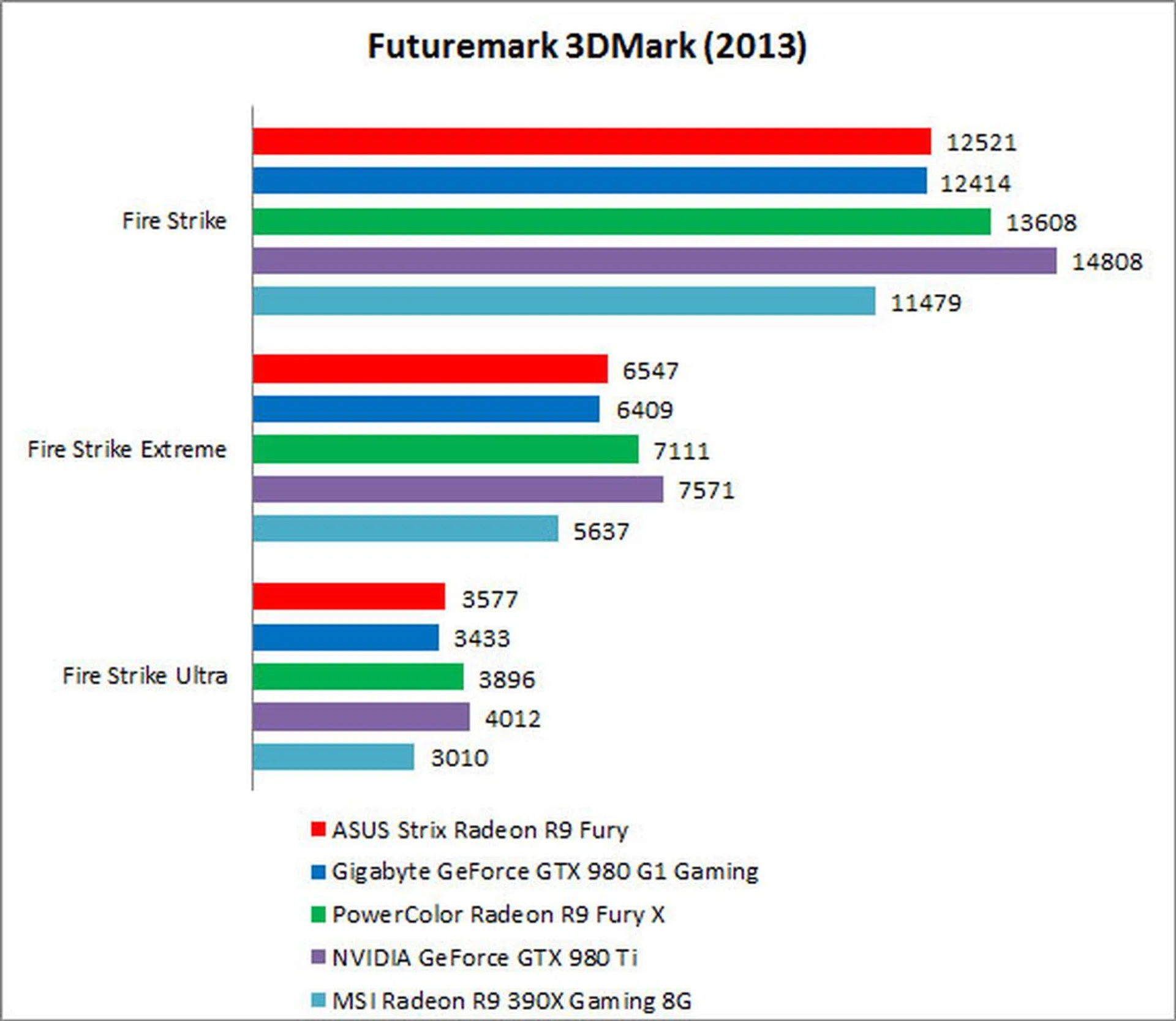
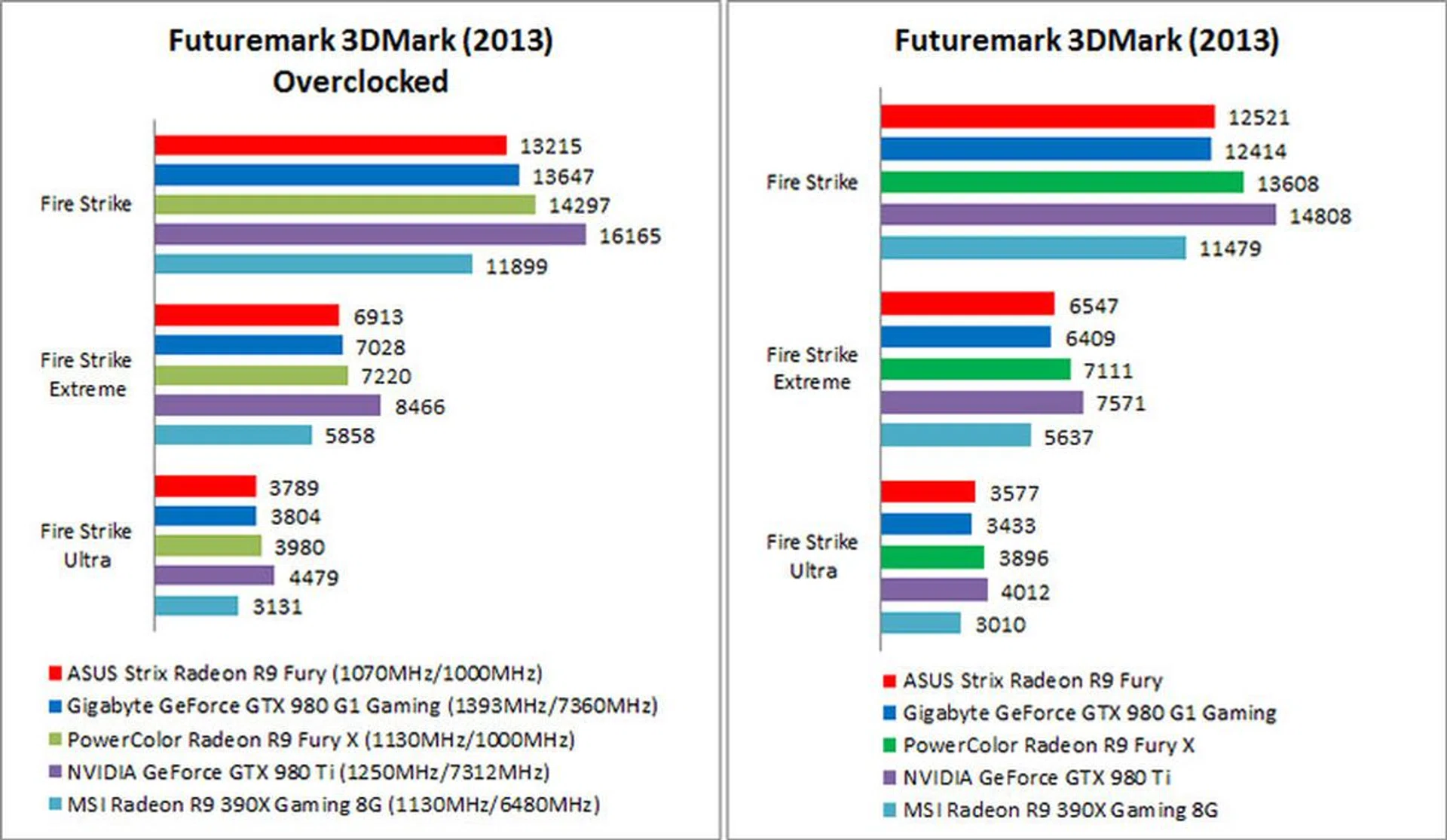
In 3DMark 2013, the Radeon R9 Fury came in at just under 1% faster than the Gigabyte GeForce GTX 980 G1 Gaming, hardly a convincing lead. Of course, do note that our Gigabyte card is factory overclocked to a 1228MHz base clock, a 9% increase over the reference clock of 1126MHz. As a result, its performance hardly signifies that of the cheaper reference card and we’re happy to see the Fury edge out an overclocked GeForce GTX 980.
The Fury also turned out to be around 8% slower than the Fury X, and 9% faster than the Radeon R9 390X. That works out to be quite an equal performance differential either way, and the Fury really sits right smack between the rebranded R9 390X and the Fury X.
In Fire Strike Extreme and Ultra however, the Fiji-based Fury widened its lead over the 390X, and the performance gap inched closer toward a 20% difference. The heftier graphics processing capabilities of the Fiji GPU are clearly coming into play here at the higher resolutions.
Middle-earth: Shadow of Mordor
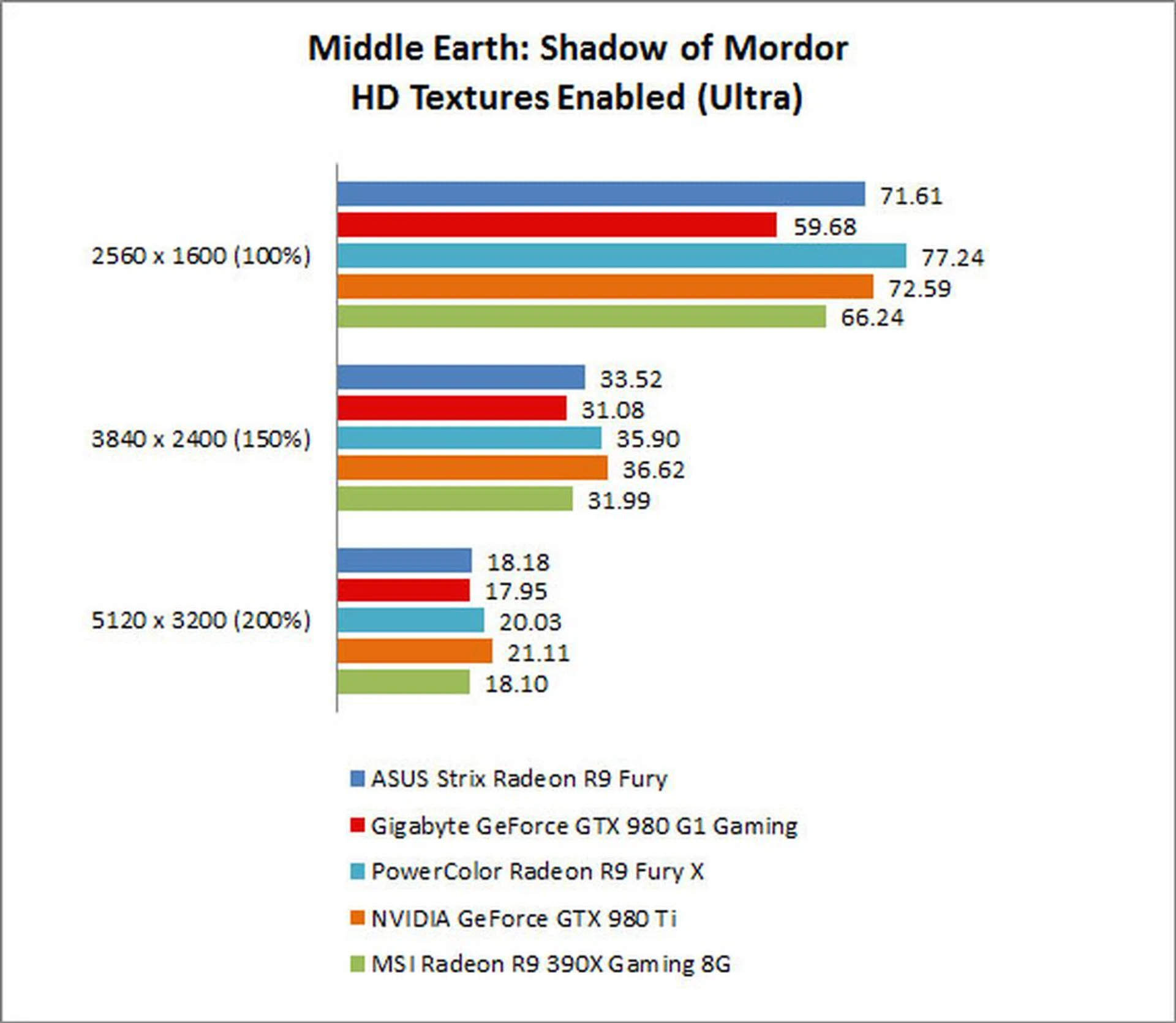
The Radeon R9 Fury was around 7% slower than the Fury X in Middle-earth: Shadow of Mordor. We tested the cards at Ultra settings with HD Textures enabled, so the game can indeed gobble up quite a bit of memory bandwidth. As a result, it makes sense for the HBM-equipped cards to do well here as this is the closest we’ll get to a situation where memory bandwidth is the bottleneck in our benchmark tests.
This is borne out by our results, where the Radeon R9 Fury and Fury X were among the top performers. At a resolution of 2560 x 1600, the Fury X was the top performer, while the Fury was within a frame of the NVIDIA GeForce GTX 980 Ti. In fact, this was the only time where the Fury X managed to top the GeForce GTX 980 Ti, and the Fury also managed to take a strong 20% lead over the GeForce GTX 980.
As we moved up to the two higher resolutions, the 980 Ti reclaimed the top spot, but the differences among the cards remained small. It looks like memory bandwidth is no longer the limiting factor at these ultra-high resolutions, but rather the amount of memory available because of the sheer storage requirements. This probably allowed the NVIDIA cards to do better than at the 2560 x 1600 resolution, since it has more video memory.
Crysis 3
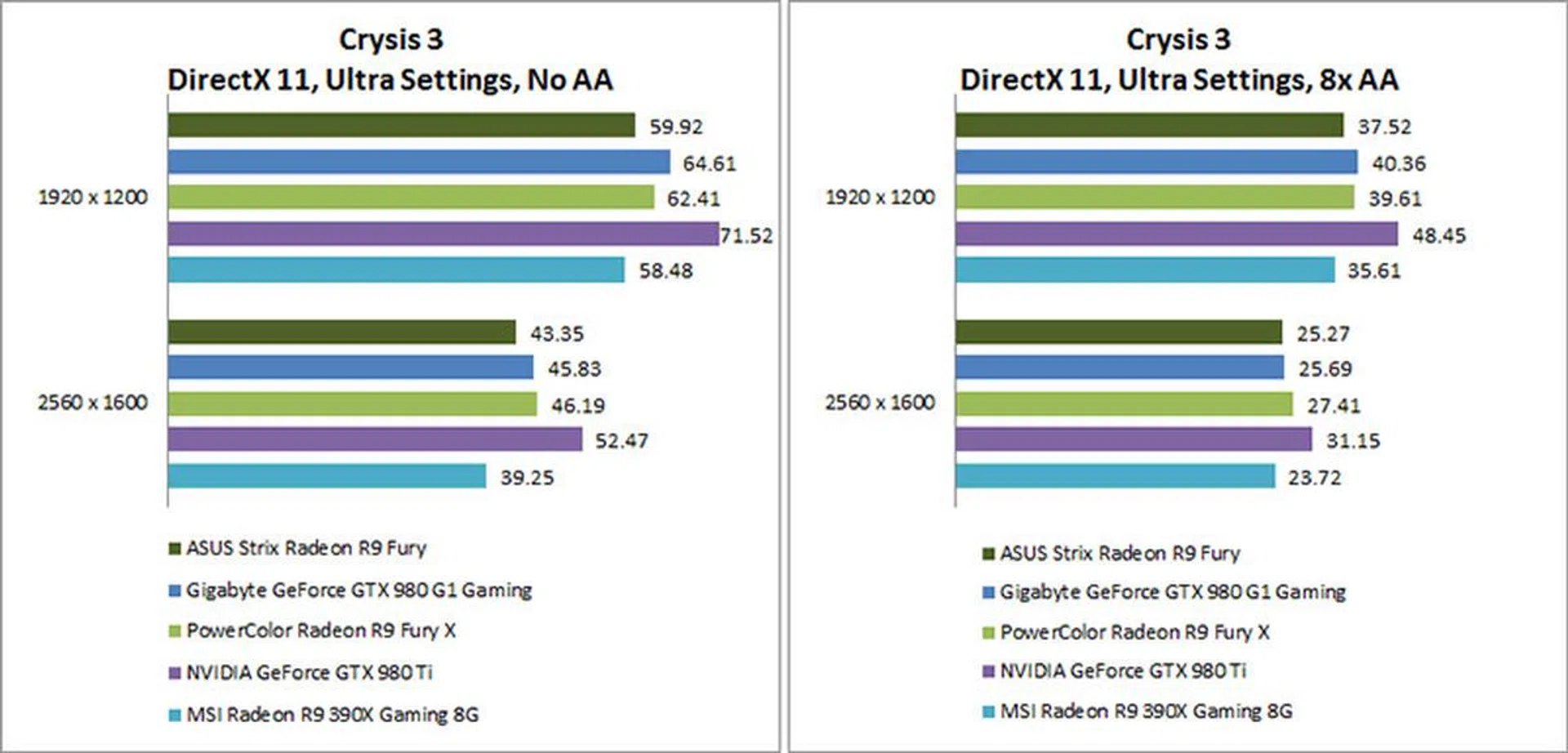
In Crysis 3, all three AMD cards turned out numbers that were rather close to each other. The Radeon R9 Fury was consistently within a few frames of the R9 Fury X, and the R9 390X was in turn only a few frames behind the Fury. The biggest performance gap between the Fury and the 390X was observed at a resolution of 2560 x 1600 with anti-aliasing turned off, where the Fury was just over 10% faster than the 390X.
The Fury also showed up behind the GeForce GTX 980 – it was around 6-8% slower in all our tested resolutions and settings save for the highest one, where it was more or less on par with the latter card.
Tomb Raider
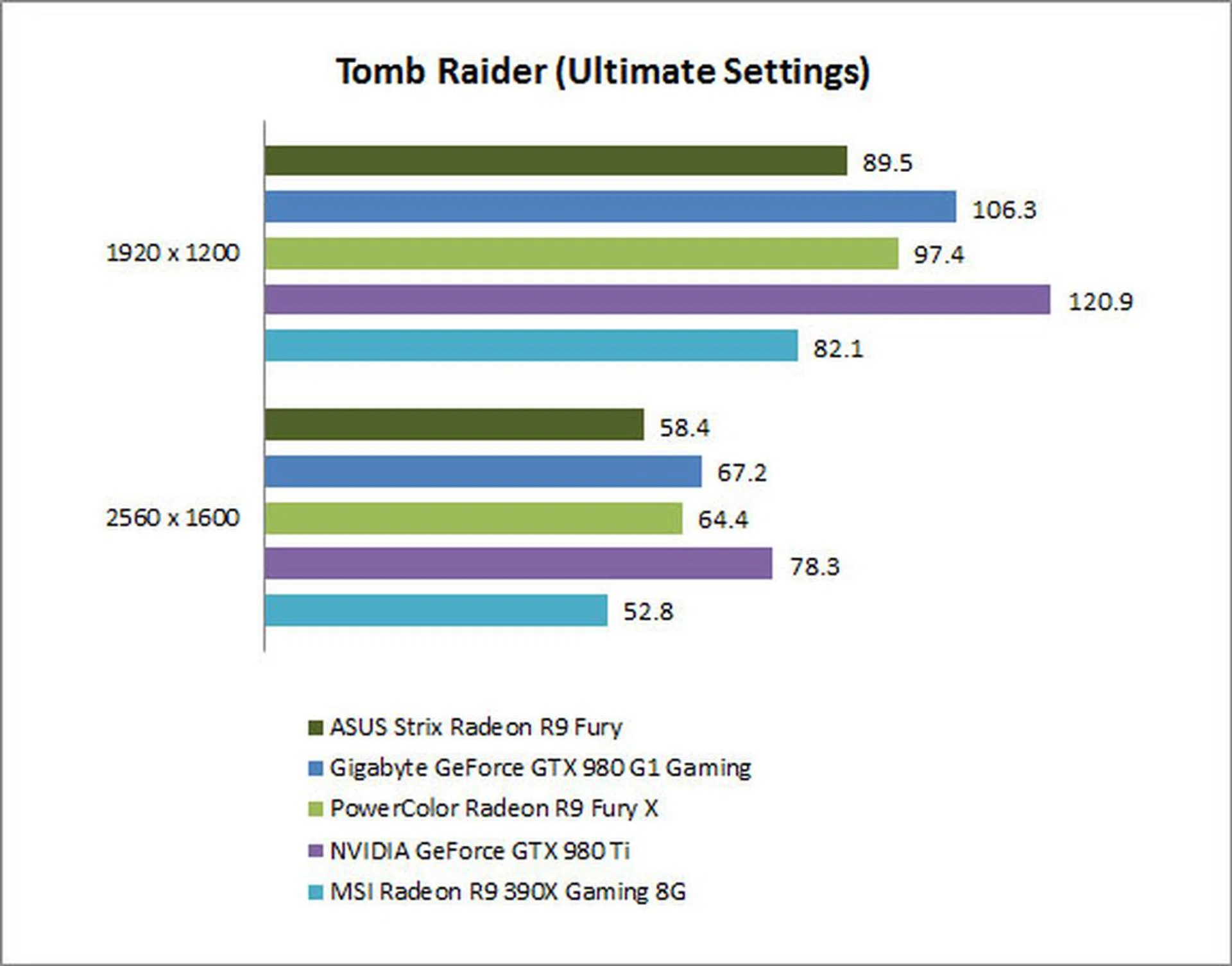
As we’ve seen in our previous reviews of AMD’s latest cards, Tomb Raider doesn’t shine a very flattering light on its recent offerings. The Fury is no exception, and it came in about 13% slower than the GeForce GTX 980 even at a resolution of 2560 x 1600. The performance gap was wider at a resolution of 1920 x 1200, where it was around 19%.
We postulated previously that Tomb Raider was not a taxing enough game in terms of memory bandwidth requirements to bring out the best in AMD’s latest cards, and we’d like to reiterate that again here. Instead, it all comes down to shader performance and the likes, which also explains the wider performance difference between the Fury and Fury X. The cards have the same 512GB/s memory bandwidth, so they should perform closer to each other if memory bandwidth was indeed the limiting factor.
That’s not the case in Tomb Raider, for better or for worse, and the Fury was around 9-10% slower than the Fury X.
Hitman: Absolution
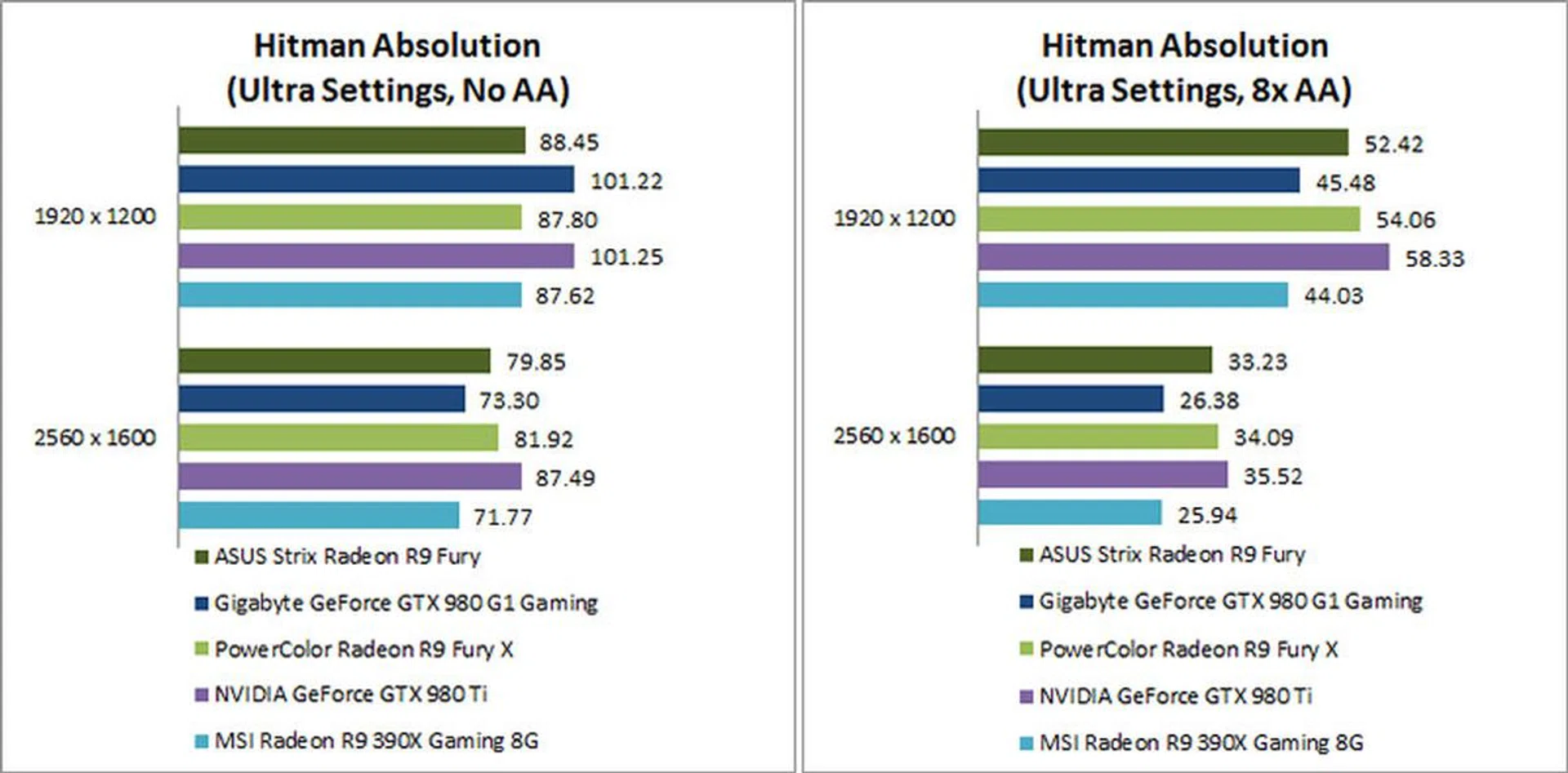
Things are set back on a more even keel in Hitman: Absolution, which continues to tax graphics cards at Ultra settings with 8X anti-aliasing turned on. Both the Fury and Fury X were always within a couple of frames of each other, and it’s difficult to say that this actually amounts to any significant difference.
On the other hand, the Fury pulled ahead of the Radeon R9 390X. At our most demanding settings, it was just over 28% faster than the latter card. The Fury also fared well against the GeForce GTX 980, pulling ahead of it in all benchmarks but the least demanding one. At a resolution of 2560 x 1600 with 8X AA turned on, the Fury was almost 26% faster than the GeForce GTX 980.
But because the GeForce GTX 980 Ti still trumped all the other cards, we’re guessing that the Fury owes its performance numbers – and advantage over the 390X – more to the improved capabilities of the Fiji GPU than the increased bandwidth offered by HBM.
Thief
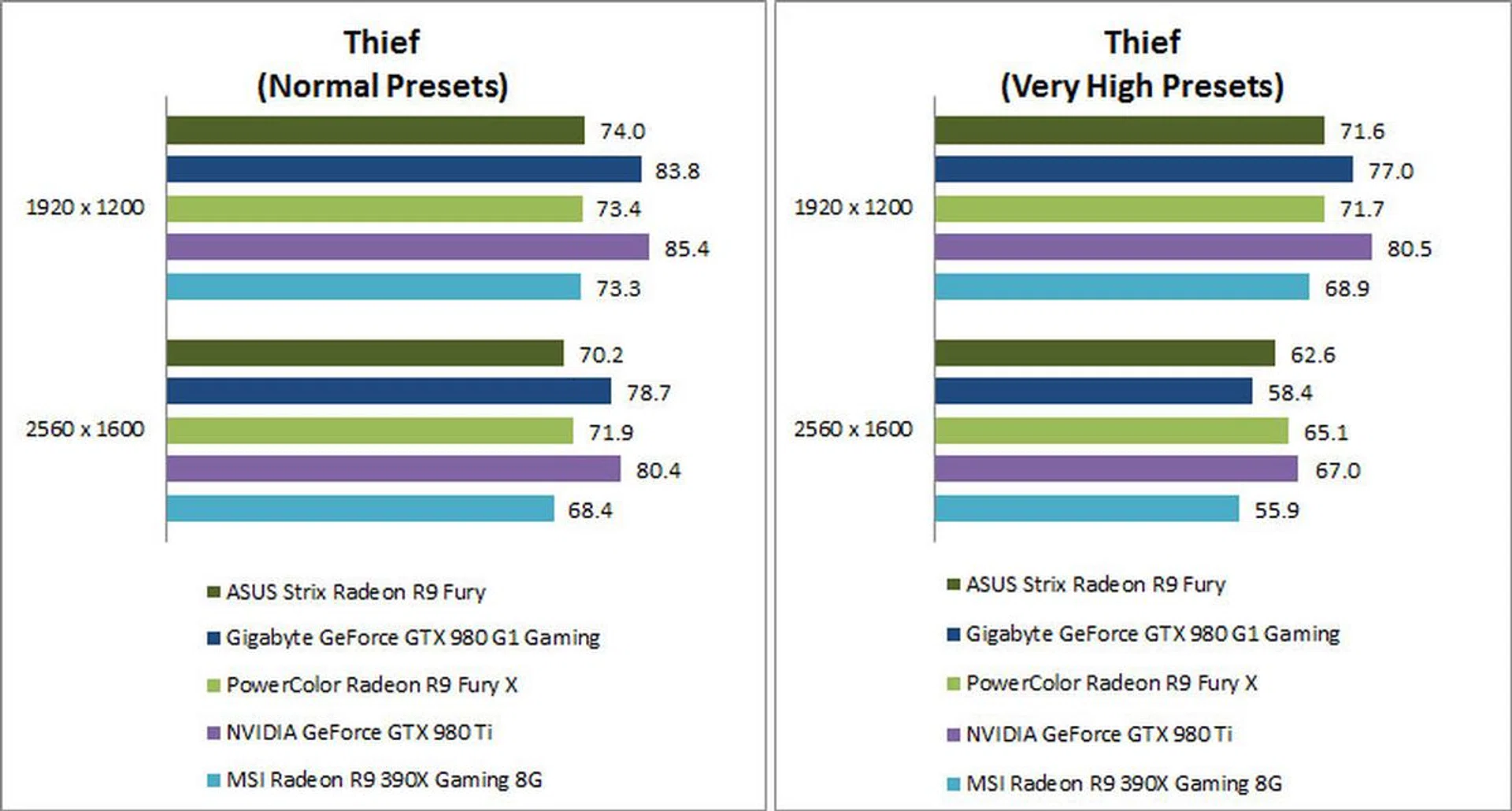
There was again little difference between the Fury and Fury X. Both NVIDIA cards led the benchmarks in all our tests but the last – and also most demanding – settings. At a resolution of 2560 x 1600 and Very High presets, we also observed the greatest frame rate differential amongst our three AMD cards.
The Fury was almost 12% quicker than the Radeon R9 390X, while the Fury X was approximately 4% faster than its smaller sibling. To put things in perspective, both Fury cards had mostly been within a frame of each other in the other tests. At the most demanding settings, the differences in shader-bound performance and GPU architectures are brought to the forefront, which allowed the Fury cards to pull ahead and close the gap with – or in the case of the GeForce GTX 980, even exceed – the competition.
Temperature and Power Consumption
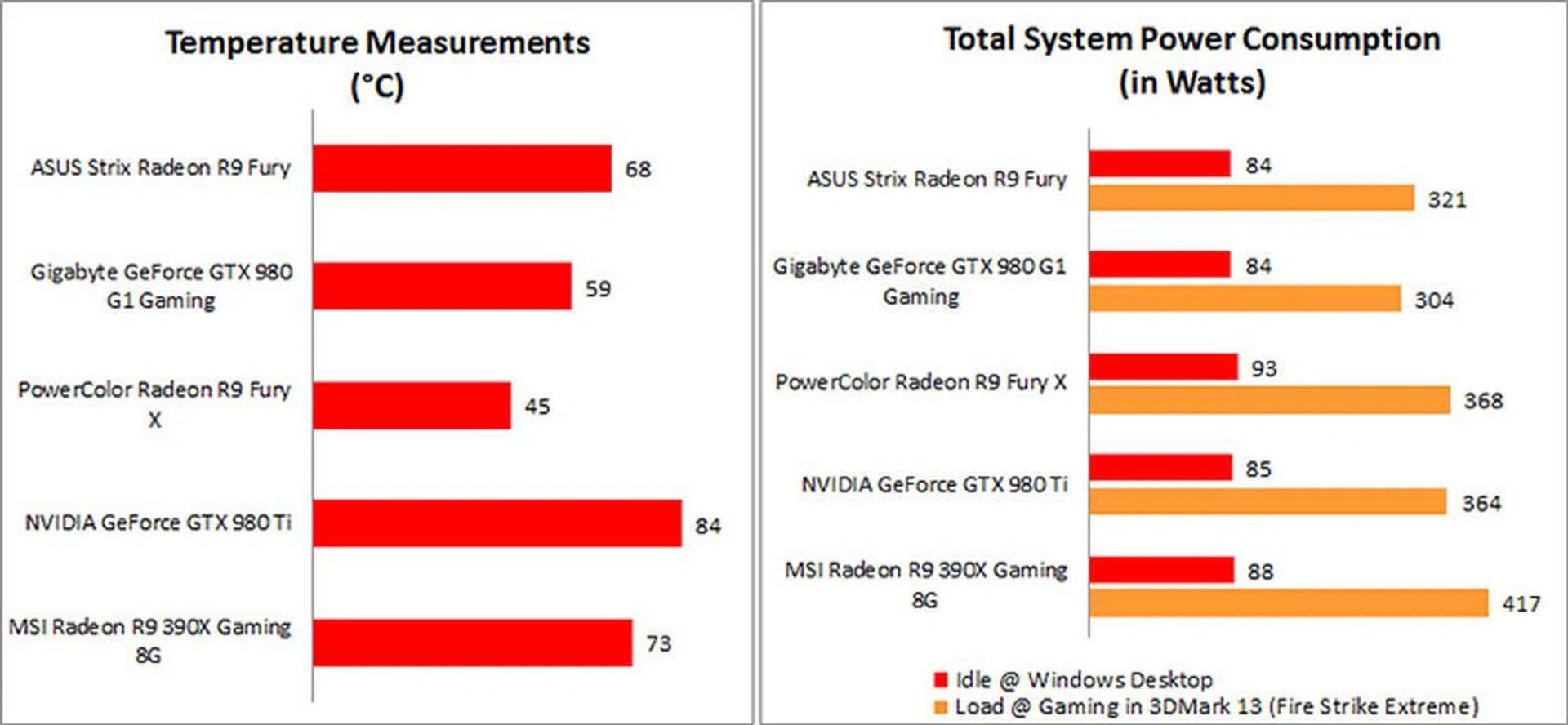
After looping 3DMark Fire Strike Extreme for 15 minutes, the ASUS Strix Radeon R9 Fury posted a peak temperature of 68°C. This was an improvement over the 73°C on the Hawaii-based Radeon R9 390X, so it looks like AMD has managed to improve on heat output on Fiji.
Of course, there’s just no holding a candle to the liquid-cooled Radeon R9 Fury X, which came in at a chilly 45°C.
When it came to power consumption, the Radeon R9 Fury recorded a peak power consumption of 321 watts in 3DMark Fire Strike Extreme, and an idle power draw of 84 watts. The former figure is a fairly stark improvement over the 417 watts consumed by the 390X, and it’s good to see AMD close the gap with NVIDIA in terms of power efficiency. As expected, the Fury also consumed less power than the Fury X, thanks to lower clock speeds and certain disabled functional units.
Overclocking
Like the Fury X, the Fury features the same locked memory clock speeds and voltage controls, so we were only able to push the core clock to 1070MHz. This translated into an approximately 6% gain across the board in 3DMark 2013, a fairly modest increase. Just as we noted in our review of the Fury X, the limited overclocking capability is also not likely to produce tangible gains in real-world frame rates for the Fury.
In the overclocking department at least, NVIDIA wins out handily, with the GeForce GTX 980 and 980 Ti posting close to 10% increases in 3DMark.
Challenging the GeForce GTX 980
The Radeon R9 Fury ends up trading blows with the GeForce GTX 980, eventually gaining a slight performance edge in newer games and higher resolutions.
On the surface, you’d be forgiven for thinking that this is a repeat of some of what NVIDIA did with the GeForce GTX 980 Ti. Of course, there are still key differences ‒ the 980 Ti wasn’t released together with the Titan X and its later release appeared timed to pre-empt the Radeon R9 Fury X. Nevertheless, it delivered near-Titan X levels of performance and cost US$350 less, so we were left wondering if NVIDIA had just been responsible for giving consumers a reason not to buy the Titan X.
But fortunately for AMD, the Fury is not a reason to not get the Fury X. On AMD’s end, the Fury delivers on average around 90% ‒ and oftentimes more ‒ of the performance of the Fury X and we find that it has priced the card a lot more sensibly in relation to the Fury X. At US$549, it is just US$100 cheaper than the US$649 Fury X, so it makes sense for its performance to be rather close to the latter card. And unlike the GeForce GTX Titan X, it’s also a lot clearer what tangible gains you’ll be getting if you do shell out US$100 for AMD’s top model ‒ excellent liquid-cooling temperatures, a snazzy design, and a bit more performance.
That aside, the Fury’s closest competitor in terms of price and performance is still the NVIDIA GeForce GTX 980. Both cards ended up trading blows in our benchmarks as they took turns to take the lead over the other, and it’s difficult to say definitively that one of them is the better card. The Fury bested our Gigabyte GeForce GTX 980 G1 Gaming in Middle-earth: Shadow of Mordor, and it also generally did better at higher resolutions and when anti-aliasing was turned on. On the other hand, the 980 did come out ahead in less demanding games and settings, and also consumed less power, ran cooler, and overclocked better.
Overall, we’d award a slight performance advantage to the Radeon R9 Fury, because of the edge it appears to gain over the GeForce GTX 980 in newer games and resolutions exceeding 1080p. This isn’t a decisive win for AMD though. Even though it was released last year, the 980 still manages to be competitive against AMD’s latest card, and we wouldn’t be getting too comfortable if we were AMD.
The local pricing for the ASUS Strix Radeon R9 Fury is set for a suggested retail price of S$969, which is a bit expensive compared to the many custom GeForce GTX 980 cards priced less than this amount. However, considering that the Radeon R9 Fury has some wins over the GTX 980 and is still cheaper than the GTX 980 Ti, it just means consumers have even more choice for consideration. We reiterate what we said before ‒ if you play older games or like to overclock your card and want a cooler running card, go for a custom GeForce GTX 980 solution, but if you want something more forward-looking, consider the Radeon R9 Fury.
Our articles may contain affiliate links. If you buy through these links, we may earn a small commission.