
Preview: NVIDIA's 3D Blu-ray Playback
This summer, NVIDIA is bringing 3D Blu-ray playback to the PC platform. And we have front row tickets to the 3D show. Find out in this exclusive preview.
3D Blu-ray on the PC
This summer, NVIDIA is bringing 3D Blu-ray playback to the PC platform. And we have front row tickets to the 3D show.
Now, unless you have been living under a rock for the past year or so, you would have noticed the proliferation of 3D movies in the theaters, the at consumer trade shows like CES 2010 and even the presence of 3D in our daily papers. Whether you think it's a gimmick, a fad or something that will eventually be as common as color in movies, is irrelevant. What's important is that the whole industry, from Hollywood to the large CE firms showing off their spanking new 3D HDTVs, appears to be fully committed to the 3D trend.
With 3D movies now a fixture in cinemas, the next move is to bring it into the home. 3D TVs have appeared in retail, available from companies like Panasonic and Samsung, with more manufacturers, notably Sony and LG, joining in June. The crucial part, the 3D content is also falling into place, with a handful of 3D Blu-ray movies expected to launch in the later half of the year. In fact, the 3D Blu-ray specification was only made official in Dec 2009, with the content on these discs encoded using MVC, a format that is backwards compatible with older Blu-ray players while allowing stereoscopic 3D streams. With this encoding, you'll get full 1080p content for each eye for only a 50% increase in the disk space required.
So the hardware is there in the form of 3D HDTVs. The content will be following suit, though it's limited to a small number of 3D Blu-ray movies this year, with hardly any 3D broadcasts yet. And come June, you can also watch 3D Blu-ray movies on your PC, thanks to NVIDIA's latest enhancement to its 3D Vision technology.
3D Vision Gets Blu-ray Playback
Even before the current 3D fever, NVIDIA has been able to support stereoscopic 3D in games with its 3D Vision kit and a compatible GeForce graphics cards. We early last year and the technology - a 120Hz display coupled with wireless, active shutter glasses alternating between feeding your left and right eye with the images at 60Hz, the whole process synchronized by an external IR emitter - remains unchanged. More importantly, the 3D conversion was done by NVIDIA's software and required no input from game developers. This of course meant that the end results varied from game to game, but at its best, the 3D Vision kit worked to improve the level of gaming immersion.
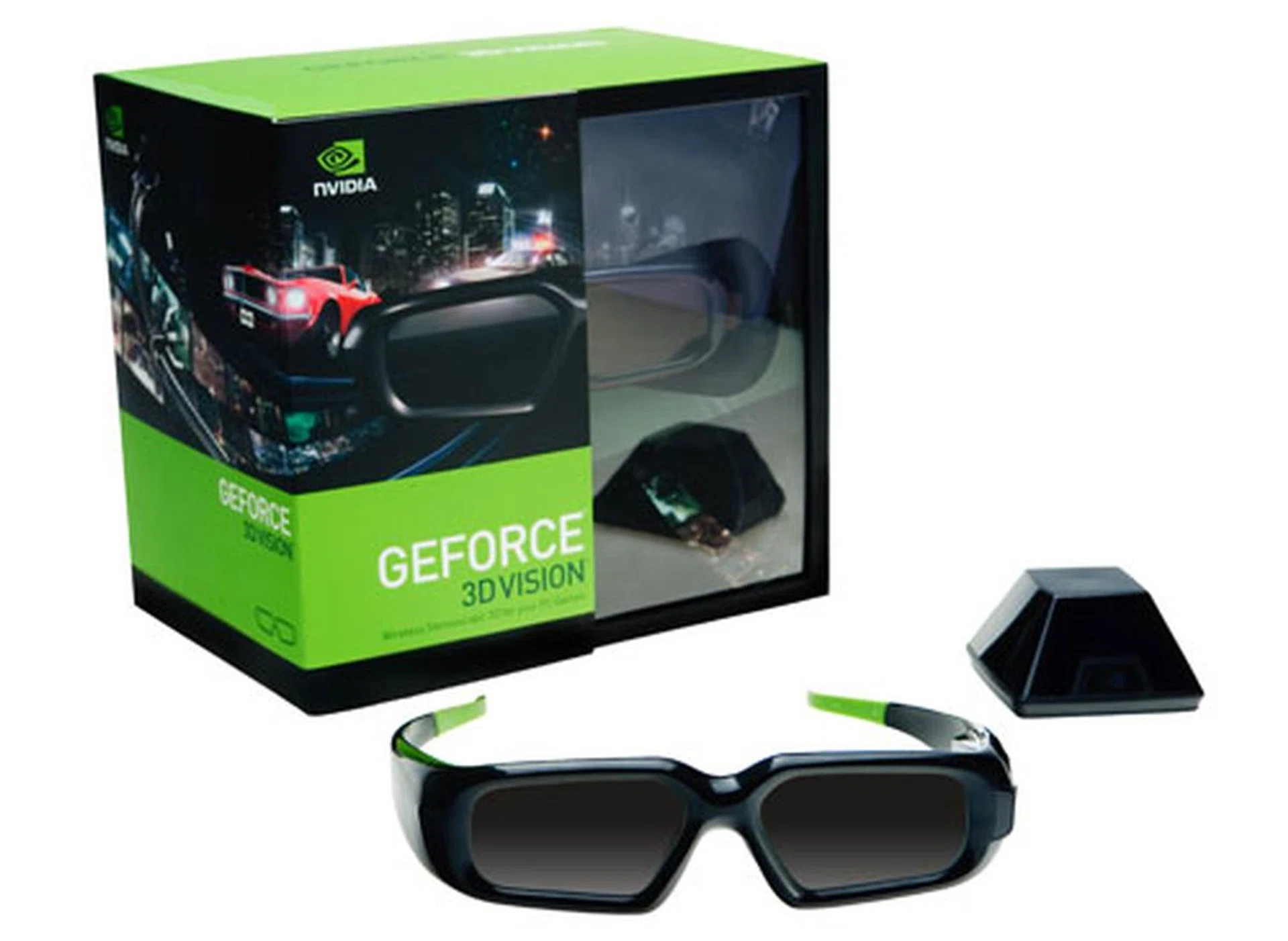
NVIDIA's 3D Vision kit, consisting of the active shutter 3D glasses and the IR external emitter.
The next frontier then is 3D Blu-ray playback and NVIDIA signaled its intentions at CES 2010, with demos of its 3D technology working with 3D Blu-ray. NVIDIA is now ready for a public release, and we managed to get a sneak preview of the technology.
What's Required
This June, NVIDIA will be releasing new drivers that will enable 3D Blu-ray playback on supported NVIDIA graphics cards. Besides the GPU and 3D Vision kit, you'll need a compatible display that supports 3D Vision; basically a 120Hz LCD monitor (no 3D TVs are currently supported at the moment). You can find the basic system requirements for NVIDIA 3D Vision here, including a list of GPUs that support 3D Blu-ray playback, but note that there are some additional hardware and software caveats about playing 3D Blu-ray on your PC. We'll first start off by listing the GPUs which NVIDIA declares hardware assisted 3D Blu-ray playback:-
Desktop GPUs | Notebook GPUs |
|
|
To understand why a selected group of new GPUs can only support hardware assisted 3D Blu-ray playback, you have to bear in mind that 3D Blu-ray titles are more demanding than their non-3D counterparts. This is because stereoscopic 3D streams have higher bitrates due to the specification's requirement for 1080p resolution output alternating between each eye at 60Hz (or 120Hz combined) , which as you can expect is roughly double the workload than standard Blu-ray playback (which is just 1080p resolution at 50/60Hz). Common among the GPUs above is the NVIDIA's newer VP4 video processing engine. To prove the point on the increased bitrates involved for 3D Blu-ray titles, here are a couple of photos taken with the media playback information:-
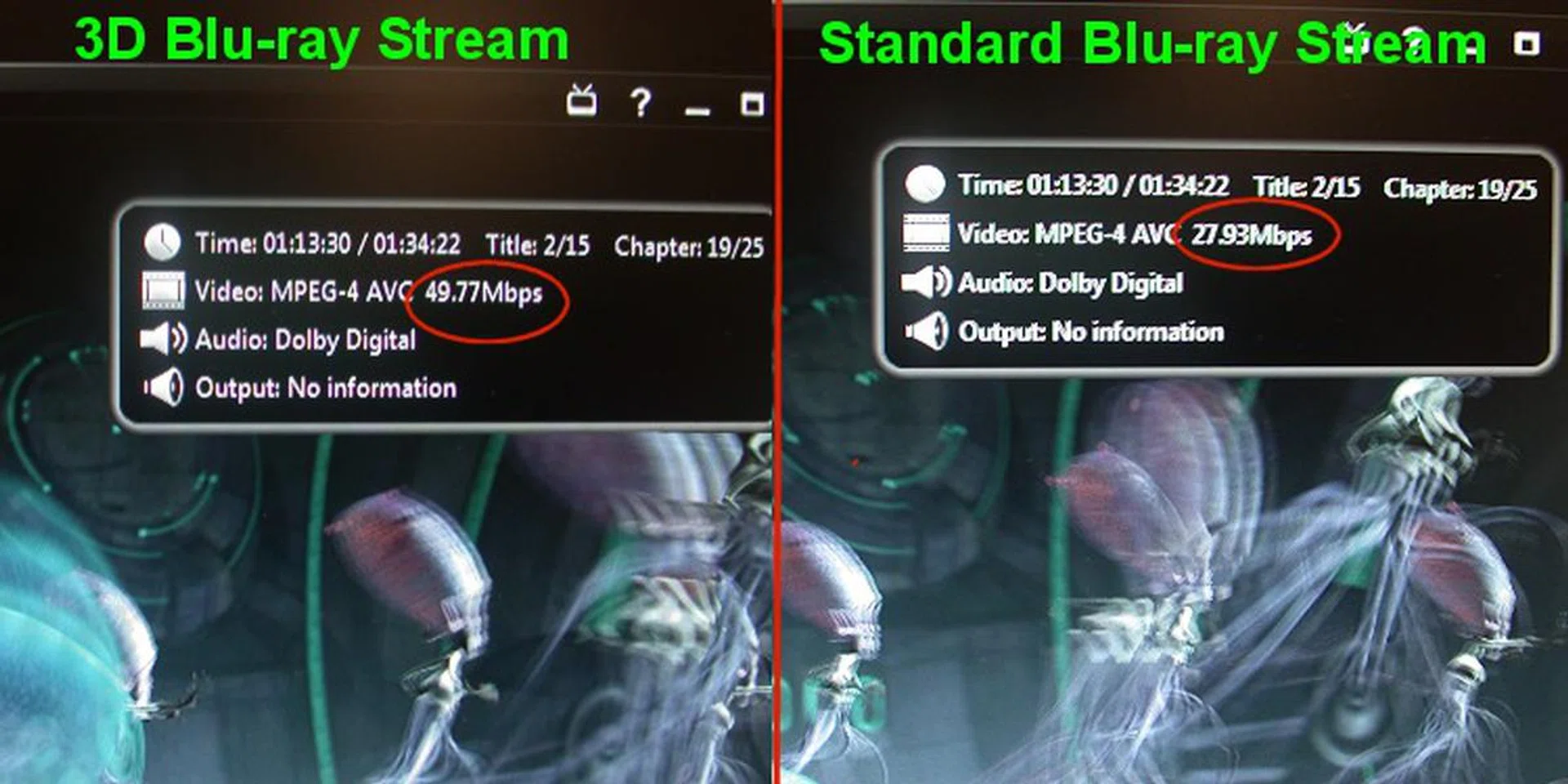
As seen from our digicam captures, Monsters vs. Aliens 3D Blu-ray title was played with 3D and without 3D and the video bitrates are found to be up to twice that of standard Blu-ray playback.
On the software side of things, Windows 7 is required. According to NVIDIA, Vista is not fully supported and while it's possible to play 3D Blu-ray, there may be some bugs that will affect the experience. Personally, we didn't have time to verify this. Windows XP support naturally is non-existent. Besides the OS, one will need a compatible application to playback the 3D Blu-ray disc. NVIDIA has stated that it has been working with major vendors like ArcSoft, Corel and CyberLink so one can expect the updated versions of these software to include 3D Blu-ray support in the near future. For the demo we tried, we received a copy of CyberLink PowerDVD 9 that supported 3D Blu-ray playback, though CyberLink states that PowerDVD 10 will include 3D Blu-ray support from the get-go.
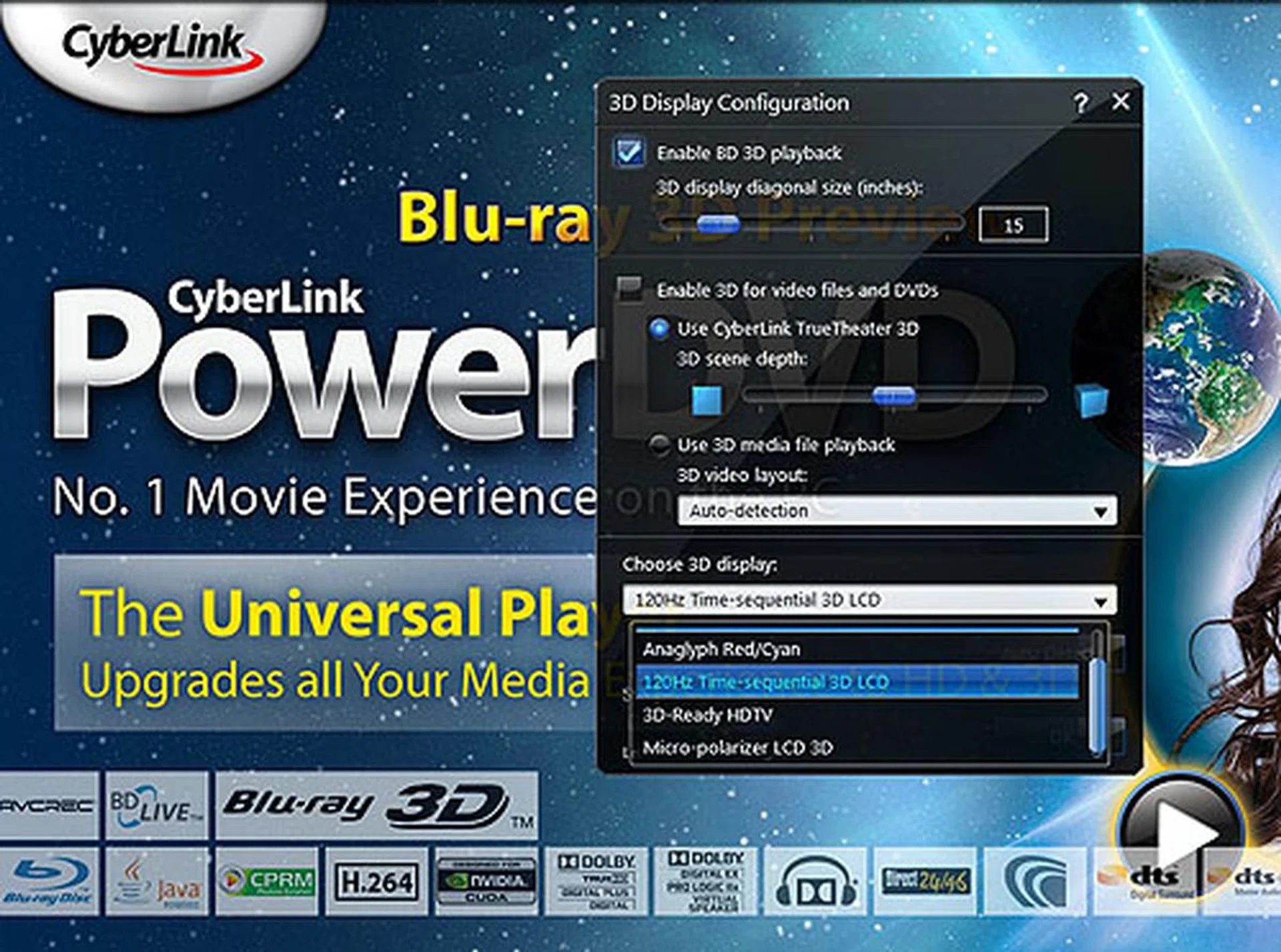
There's a 3D configuration menu in CyberLink that allows you to enable/disable the feature. CyberLink's own TrueTheater 3D can also create a pseudo 3D effect dynamically on non-3D video files and DVDs. It's like 'upscaling to HD' but you get spatial 3D instead.
Besides the desktop platform, there's also a notebook option. Some of you may have read about the , a notebook integrated with NVIDIA's 3D Vision from ASUS. While this notebook obviously was for 3D gaming, there will be a upcoming version from ASUS that adds support for 3D Blu-ray playback. This new model will have an internal emitter, which is a boon for users since that's one less component to pack in the laptop bag. It will have the necessary playback application and a more recent GTS 360M graphics core instead of the GTX 260M on the ASUS G51J 3D.
If you have seen the NVIDIA 3D Vision requirements which we linked to earlier on this page, you'll see that the GTS 360M is on the supported list, while the GTX 260M is not. This explains why there will be a newer 3D notebook model from ASUS.
To sum up, we received an ASUS notebook from NVIDIA and the relevant drivers/software to test NVIDIA's 3D Blu-ray playback for both desktop and notebook PC platforms. Read on for our findings.
Test Setup
For the purpose of testing the output and system overhead effectively, we needed a full HD 1080p, 120Hz display. Currently, there are only a few such LCD displays available, notably, Acer GD245HQ/GD235HQ, Alienware OptX AW2310, ASUS VG236H and LG W2362D. Since Acer does not sell its 3D Vision displays separately from its desktop systems, it shipped us its heavily pimped-out gaming machine, the Aspire Predator G series, which comes with a Core i7-920 processor, 6GB of DDR3 RAM and a GeForce GTX 260, along with the LCD display. While the monitor would be critical for our testing, we decided to go with a custom rig for this preview, as the GTX 260 graphics core was not on the supported list and the Core i7 processor was a bit too high-end for this purpose.
Hence our more mainstream system, with a supported entry level GeForce GT 240 GPU:
- Core i5-750 @2.66GHz
- ASUS P7P55D-E Premium motherboard
- 2GB DDR3-1333 RAM
- NVIDIA GeForce GT 240 512MB DDR5 (with beta ForceWare 257.01 drivers)
- Seagate Barracuda 7200.7 HDD
- Windows 7 Ultimate
- ASUS SBC-04D1S-U Slim combo Blu-ray drive
- CyberLink PowerDVD 9.0 (ver 2826.52)
- Acer GD245HQ (1920 x 1080)
- Monsters vs Aliens 3D Blu-ray disc
Our ASUS notebook test was conducted in a similar fashion, with a GTS 360M instead and a 3D display with a resolution of 1366 x 768 (the screen's maximum supported resolution). Software and drivers for both the desktop and notebook were the same versions.
Performance Results
3D Blu-ray on the Desktop
To find out how this system and the GPU performed during the 3D Blu-ray playback, we selected a 3 minute segment from the Monsters vs Aliens 3D Blu-ray movie that appeared to be the most taxing (high bitrates as indicated by CyberLink PowerDVD's info overlay) and played it in both 3D and 2D mode. In 2D mode, the bitrates hovered between 20 - 30Mbps while switching to 3D Blu-ray resulted in an increase to 40 - 50Mbps, which borne out the contention that there will be a 50% increase in bitrate/capacity with a 3D Blu-ray disc. CPU utilization figures were recorded using the built-in Performance Monitor in Windows 7.
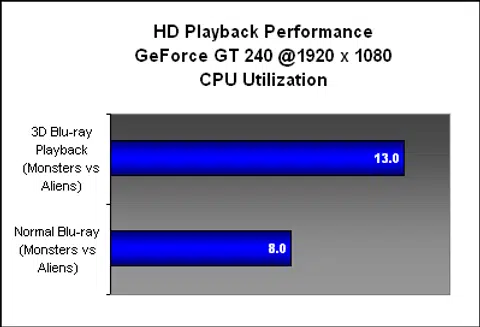
As you can see, the 3D Blu-ray playback added almost twice the amount of stress on the CPU, with our Core i5-750 spending up to 13% of its resources processing the movie. In contrast, the normal non-3D Blu-ray playback took up only 8% CPU utilization. Considering that each of the four CPU cores makes up 25% of CPU utilization, this means when running the 3D title in its full glory, it consumed almost half of a single processing core's resources. Not much of a problem for quad-core processors, but it could be something of a concern for a dual-core processor. This however is with the GeForce GT 240 doing the heavy lifting, with the newer VP4 (PureVideo HD) engine on this 40nm GPU likely responsible for undertaking the burden.
So how did it feel to view a 3D Blu-ray movie using 3D Vision? Well, besides being darker than usual (an inevitable effect of the active shutter glass technology), the flickering on the shutter glasses was also quite prominent in an office environment with florescent lightning. Turning off these lights will help improve the situation but again, it's undeniably part of the technology and there's no getting around it. Overall, it's quite an accurate replication of the 3D movie experience, except for the perks one gets in a proper movie theater of course.
It's not perfect of course: SLI currently doesn't work with 3D Blu-ray playback and must be disabled before enjoying your movie. However, NVIDIA promises a fix before the official driver release. Also, while CyberLink's PowerDVD appears to have options to dynamically adjust the amount of depth for 3D movies, this option is not available in current 3D Blu-ray movies as it is hard-coded.
Since we had the drivers and the software, our next step was to investigate if 3D Blu-ray playback was possible with a different NVIDIA GPU. As ATI had no competing 3D solution, we had to go with one of the NVIDIA GPUs that supported stereoscopic 3D, but was not on NVIDIA's official 3D Blu-ray list. This included a huge number of existing and older NVIDIA GPUs. We picked a GeForce 9600 GT and a GeForce GTX 260.
The results were surprising:
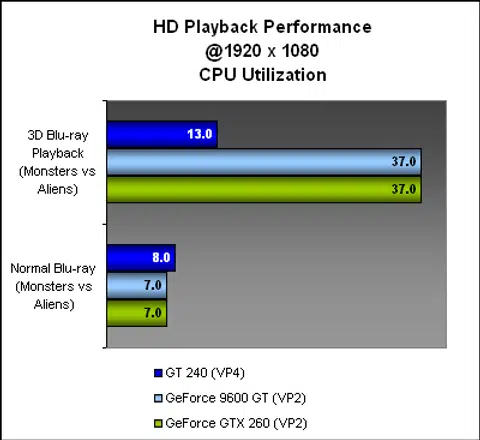
Despite not being on the supported list, it appears that one can slot in a NVIDIA GeForce GPU (3D Vision capable) and run 3D Blu-ray, provided one has the software/drivers. The 3D effect was present through the glasses and you won't know any better judging from the viewing experience alone. Underneath however, the CPU utilization told a different story - 37% CPU utilization on a quad-core processor is substantial. An older dual-core processor may have some trouble playing the 3D Blu-ray movie smoothly since you can expect the figures to shoot to 70% or higher.
Given that both the 9600 GT and the GTX 260 performed similarly, we guessed that the VP2 engine was perhaps not involved at all in the playback. Testing it further, we unchecked the hardware acceleration option in PowerDVD and ran the test again. The result was identical, with 37% CPU utilization. Referring to the graph again, one sees that for a normal Blu-ray movie, the VP2 kicked in, leading to a low, 7% CPU utilization, yet the VP2 did nothing for 3D Blu-ray playback. This leads us to believe that when the PowerDVD application failed to find a supported GPU e.g. one with a VP4 engine, it simply defaulted to using the CPU, ignoring the presence of the VP2.
Yet, a check online muddied the waters somewhat. That's because it appeared that the GT 240 is not the only lower end NVIDIA GPU using VP4. The GT 220 has VP4, but it's not on the supported list. So we had to try it out for ourselves. Thankfully, we had a lab filled with many models of GPU and we soon had the CPU utilization of a GT220 during 3D Blu-ray playback - 12%. This was on par with the result from the GT 240 and backs our feeling that any 3D Vision capable NVIDIA GPU with a VP4 engine should be able to play 3D Blu-ray with hardware acceleration. We don't know exactly why NVIDIA hasn't gotten around to adding the GT 220 to the support list (and it appeared to be supported by the drivers and PowerDVD), but it's something for us to check as soon as possible.
3D Blu-ray on the Notebook
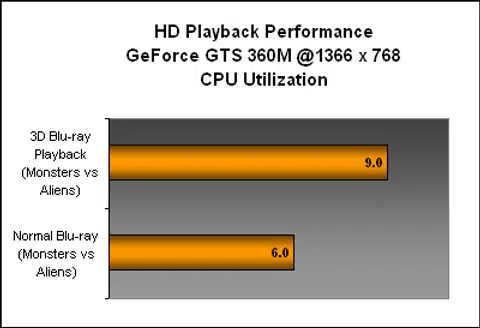
After all the testing on the desktop, the notebook testing couldn't get any more straightforward. The ASUS notebook only has a screen resolution of 1366 x 768, which is far from a full HD experience. Hence, the CPU utilization is also lower, though we can't find out differences in terms of the 3D experience besides the lesser pixels.
Conclusion
In this preview, we got hands-on with NVIDIA's 3D Vision and its upcoming support for 3D Blu-ray playback. We were told that 1st June is the date for the public release for the drivers needed (ForceWare 257.01 was provided to us and it's a huge jump from the current 197.75). There's the small matter of getting a 3D Blu-ray playback application, and the necessary hardware, the 1080p, 120Hz screen and the 3D Vision kit.
As for the NVIDIA GPU, we have found that if you have a GPU with a VP4 engine (as listed on the earlier page and over here), you're golden, but if not, a powerful CPU can more than make up for it, albeit at a higher CPU utilization. The viewing experience was also typical of the technology, and ideally, you'll want to watch it in the dark, where the flickering from the shutter glasses can be kept at a minimum. When it comes to notebooks however, the lower CPU utilization from using NVIDIA's solution will be more significant, since CPU utilization has a direct impact on battery life, especially with an Intel processor and its advanced clock gating technology for even better savings.
Finally, 3D Blu-ray playback is but the first step. NVIDIA is planning to move into the living room with 3DTV Play. With this software upgrade, expected sometime in August, NVIDIA GPUs will be able to connect to any existing 3D HDTV and play 3D Blu-ray content. NVIDIA says it's currently testing its technology with a few 3D TVs (from Panasonic and Samsung), but the objective is to work with the 3D technology in all 3D TVs, so that it doesn't matter if you have a X or Y branded 3D TV. One can plug in the NVIDIA GPU powered PC and have it play 3D content on the 3D TV via HDMI 1.4, working flawlessly with the TV vendor's own shutter glasses and emitter.
That's still a work in progress however, and while we like the idea of having a PC that can work with any 3D TV, (and bypass the stupidity that is proprietary 3D glasses technology), we'll have to see it when it's available. Existing 3D Vision users will get the 3DTV Play package as a free upgrade, so those who are keen to dive into the 3D scene can start with the 3D Vision kit now. And enjoy the few 3D Blu-ray movies that will be out this year.
Our articles may contain affiliate links. If you buy through these links, we may earn a small commission.