
Intel's 1600MHz FSB Platform: Tried, Tested, Judged
With the Core 2 Extreme QX9770 processor and X48 chipset, Intel officially put 1600MHz FSB on the table. However, is it worth the upgrade to a full 1600MHz FSB platform? We delved into performance numbers and liked what we saw, but it all boils down to memory.
The Path to Sixteen Hundred
It was 2006 when Intel launched their Core 2 processor overhaul and year on year since then, they've pushed the boundaries of their platform as well as keeping industry standards at an all time high. It actually seems that they are a little scared of slacking, no doubt haunted by the past where AMD managed to sneak up from behind and stole their thunder.
As a history recap, Intel introduced the Core 2 with 1066MHz FSB in 2006, which was the beginning of the storm. 2007 was an incredible year for the Intel desktop platform with the entry of quad-core processors, 1333MHz FSB, DDR3 and 45nm technologies. In 2008, Intel will officially set the next standard in platform performance, bringing 1600MHz FSB mainstream. This is realized with the Intel Core 2 Extreme QX9770 processor and the Intel X48 chipset. In truth, this is old news as these two products have already been launched over five months back in November 2007 (didn't we tell you that 2007 was a great year for the Intel platform?).
However, Intel jumped the gun with launches that were arguably too close to each other, which prompted the delay of the X48 chipset till OEMs could get rid of their X38 stocks. This is the reason you haven't really seen X48 motherboards and even we have trouble getting in samples. The only board we've managed to test is the Gigabyte GA-X48-DQ6, and even that was a DDR2-only board, which really defeats the purpose of the upgrade.
So now that we stand at the juncture where both the QX9770 and X48 products are imminent, what real benefits are there to the 1600MHz FSB bump? We explored the performance potential of a 1333MHz FSB back in 2006, and now, we're graduating to 1600MHz.
The Processor
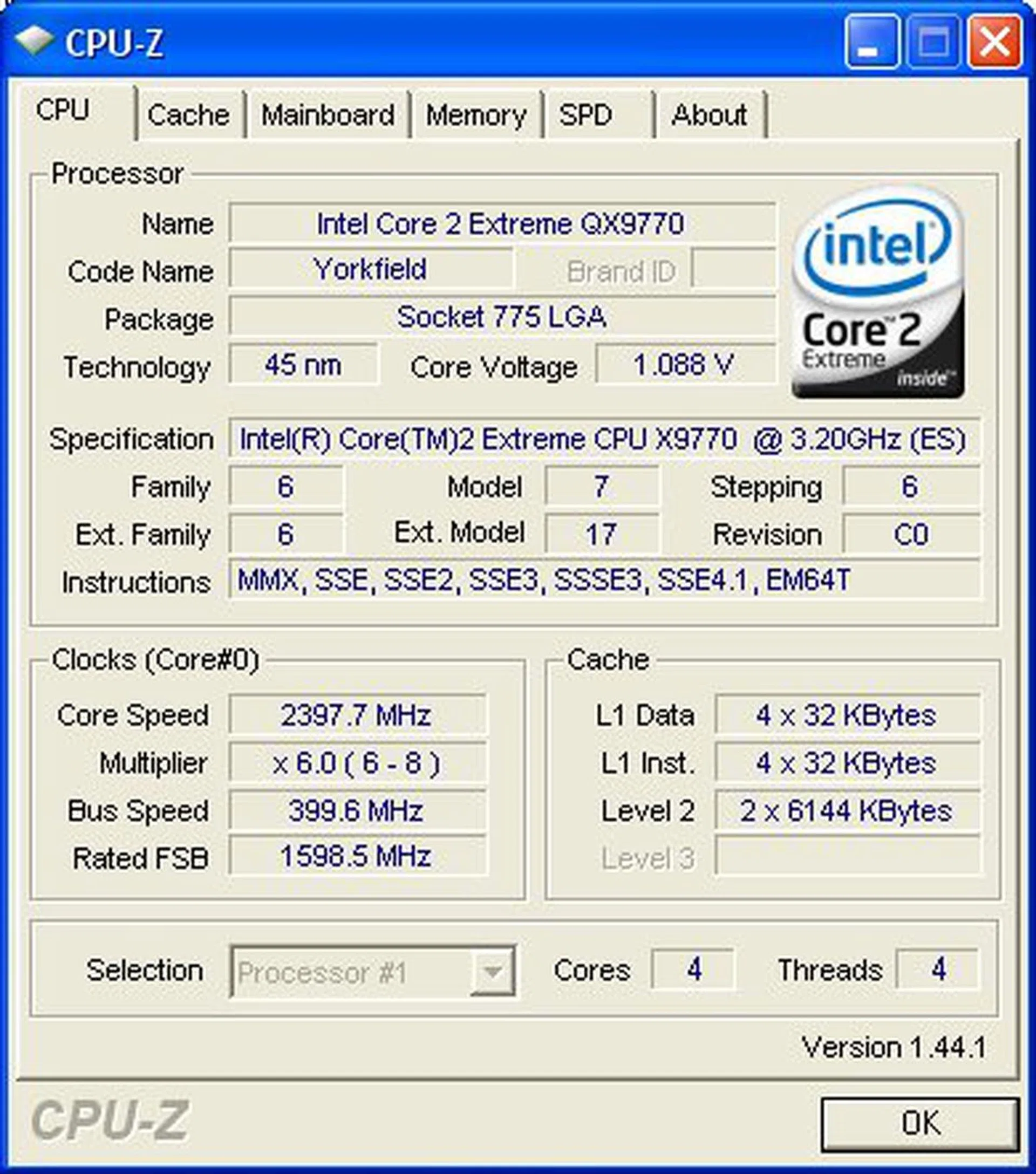
The Intel QX9770 processor was launched almost too quietly, right on the heels of the QX9650, which was Intel's flagship Extreme Edition processor with the new 45nm Penryn core back in October 2007. The technology behind it is exactly the same and since we've covered the launch in a previous article, we will not go into any specific details here. The only real difference that the QX9770 brings to the table is its 'official' 1600MHz FSB support. That, and a faster operating speed naturally. The QX9770 runs natively at 3.2GHz with a 400MHz base FSB and an 8x multiplier.
In the larger scheme of things, it looks like Intel will keep with their US$999 pricing for their flagship Extreme Edition, which still happens to be the QX9650 for now. The QX9770 sits on its own special throne priced at US$1399. Needless to say, not many people will be rocking these, but if you've got too much cash to spend and no time for overclocking, the QX9770 is for you.
The Core Logic Chipset
The second part of the equation is the motherboard and chipset. Intel's X48 was supposed to complement the QX9770 as the first processor and chipset with 1600MHz FSB support. However, this doesn't really mean that Intel's older chipsets are unable to support this speed or the new processor. In fact, ever since the P965 Express and the original Core 2 came out two years ago, we've already gotten past the 1600MHz FSB mark through overclocking. The only concern is the power requirements and features of new processors. To this end, the Intel X48 is just an X38 with Intel's official stamp of approval for 1600MHz operation. The X38 already has everything you need to fully take advantage of the 1600MHz FSB platform. DDR3 support, XMP memory support, and with a new BIOS, it will properly detect the QX9770 as well. From experience, X38 boards will also support 0.5x multiplier with the QX9770 too (subject to motherboard manufacturers and BIOS update availability).

The Memory
DDR3 memory is the logical successor to DDR2, but as with all new memory, it needs time to mature in terms of performance as well as availability. With DDR3, this has been an uphill battle, not only with price and performance, but also manufacturer reluctance to do away with cheap DDR2 just yet. This is still evident today as even the supposedly DDR3-only enthusiast X48 chipset has shown up sporting a DDR2 configuration (see our Gigabyte GA-X48-DQ6 review). Still, with the amount of bandwidth DDR3 is capable of, the industry has seen an incredible growth rate in terms of speed for DDR3 products. If you've read our NVIDIA nForce 790i Ultra SLI article, DDR3-2000 is already on the table, but latency is still a huge issue. From what we've seen, most improvements to DDR3 speed is countered by an increase in latency, the net effect being little real life performance changes.
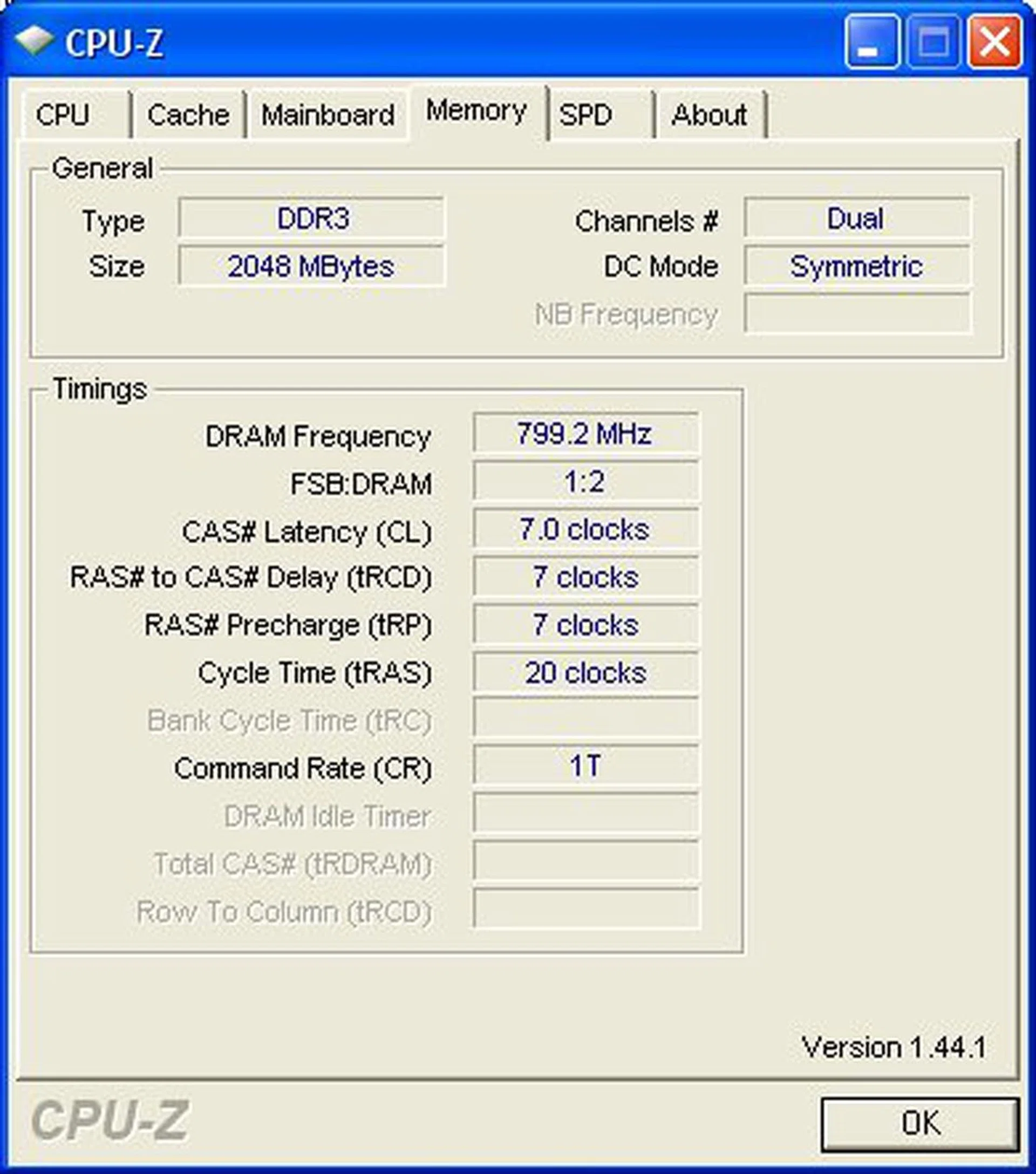
With Intel's push to 1600MHz FSB, the sweet spot is now set for manufacturers to aim for. DDR3 begins to pull itself away from DDR2 at the 1333MHz mark with low latencies CAS 7.0 and below. And now, there are DDR3-1600 modules available that are capable of CAS 7.0 as well. This is the ideal setup that we will be testing.
Test Setup
For this article, we will be benchmarking a full 1600MHz FSB platform that consists of the new Intel Core 2 Extreme QX9770 processor, Intel X38 reference motherboard and some DDR3-1600 memory. This system will be compared against Intel's current 1333MHz FSB platform. From the test bed below, there are a few things to take note of. Because the QX9770 and QX9650 are both running at different base FSB frequencies, the 200MHz difference in their clock speeds must be accounted for as well. Also, two different sets of memory are used, but we normalized their timings to match so only the speed difference should matter.
- 1600MHz FSB Platform
- Intel Core 2 Extreme QX9770 processor (3.20GHz, 1600MHz FSB, 12MB L2)
- Intel X38 reference motherboard
- 2 x 1GB Patriot DDR3-1600 @ 7-7-20 CAS 7.0
- Seagate Barracuda 7200.10 200GB SATA hard disk drive (one single NTFS partition)
- MSI GeForce 8800 GT 512MB - with ForceWare 169.21 drivers
- Intel INF 8.3.1.1009 and AHCI 7.8.0.1012 driver set
- Microsoft Windows XP Professional with Service Pack 2 (and DirectX 9.0c)
- 1333MHz FSB Platform
- Intel Core 2 Extreme QX9650 processor (3.00GHz, 1333MHz FSB, 12MB L2)
- Intel X38 reference motherboard
- 2 x 1GB Kingston HyperX DDR3-1333 @ 7-7-20 CAS 7.0
- Seagate Barracuda 7200.10 200GB SATA hard disk drive (one single NTFS partition)
- MSI GeForce 8800 GT 512MB - with ForceWare 169.21 drivers
- Intel INF 8.3.1.1009 and AHCI 7.8.0.1012 driver set
- Microsoft Windows XP Professional with Service Pack 2 (and DirectX 9.0c)
Benchmarks
As we wanted more comprehensive and conclusive results, our performance testing this time around called for the complete set of benchmarks we usually reserve for full processor reviews.
- BAPCo SYSmark 2007 Preview 1.02
- SPEC CPU2000 v1.3
- Lightwave 3D 7.5
- Futuremark PCMark 2005 Pro
- Cinebench 10
- XMpeg 5.0.3 (DivX 6.8 encoding)
- Futuremark 3DMark06
- AquaMark3
- World in Conflict 1.05
- Crysis 1.1
Results - SPEC CPU2000 v1.3
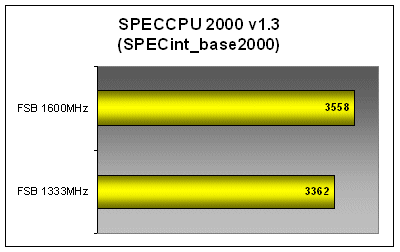
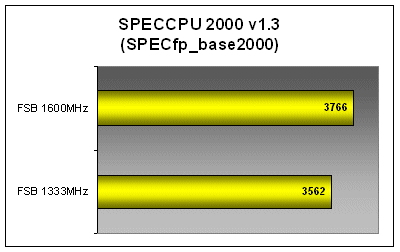
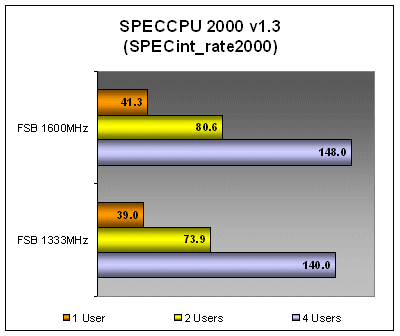
With a faster processor, there was no doubt that SPEC CPU2000 would post better results for the QX9770. However, the 1600MHz platform did seem to offer our test system an extra boost over a standard processor upgrade, deliving a over 5% gains in integer and floating point performance over the QX9650 and its 1333MHz setup. Multi-threaded tests showed even better performance gains, with dual-threaded scores at 9% over the 1333MHz FSB system, though it does seem to taper out when it goes to four threads.

Results - BAPCo SYSmark 2007 Preview
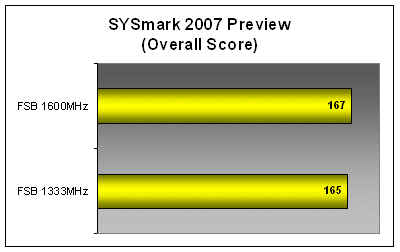
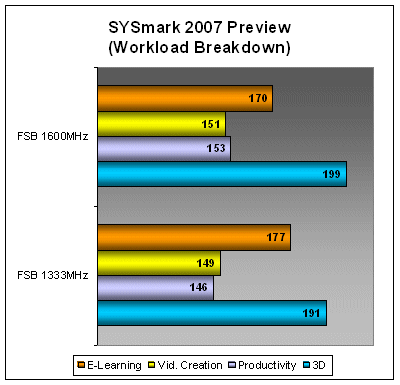
The 1600MHz FSB system performed only marginally better in SYSmark 2007 Preview's overall results because it actually scored lower in the E-Learning scenario. The rest of the workloads (Video creation, Productivity and 3D) managed better results, which was most probably due to faster cache and memory performance.
Results - Lightwave 3D 7.5
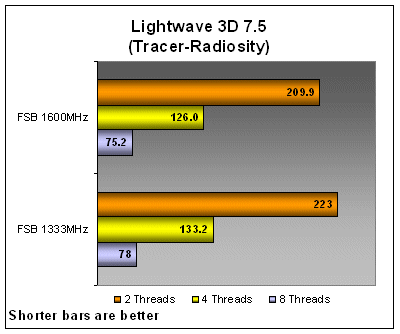
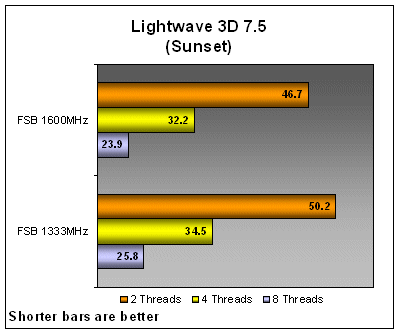
Lightwave 3D's rendering results for all workloads were more supportive of the 1600MHz FSB platform. Single and dual-threaded results showed very good scaling with an average 10-seconds improvement in rendering speed over the 1333MHz platform. Again, real-world performance didn't scale above dual-threaded workloads with the same gains.
Results - Futuremark PCMark 2005 Pro
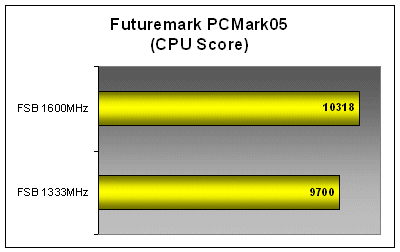
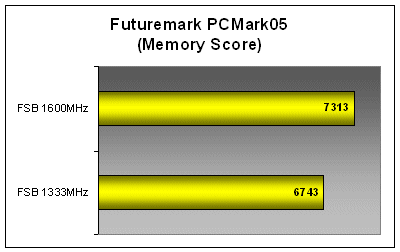
PCMark 2005 is a standard benchmark that many people will be able to relate to when looking at subsystem performance. In its workload breakdown, PCMark 2005 reported a little over 6% performance increase in its CPU subsystem tests for the QX9770 against the QX9650 and more than 8% for Memory subsystem performance with DDR3-1600 over DDR3-1333.
Results - Cinebench 10 and XMpeg 5.03
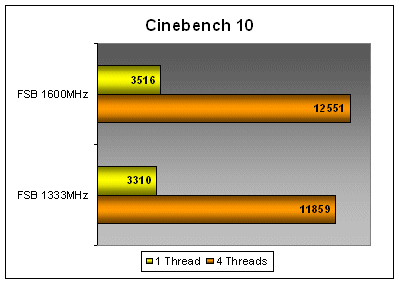
Both Cinebench 10 and XMpeg benchmarks are able to determine real-world performance usage models for 3D rendering and video encoding. Industry standard tools and applications are used here so the numbers are indicative of what you'll really see with the different platforms. In both Cinebench 10 and DivX 6.8 tests, we saw an average of around 20 seconds improvement going from the 1333MHz FSB system to 1600MHz FSB.

Results - Futuremark 3DMark06 and AquaMark3
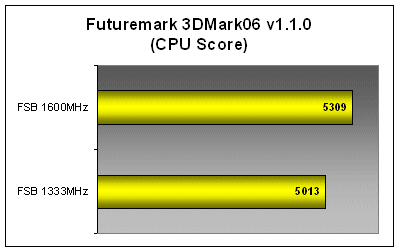
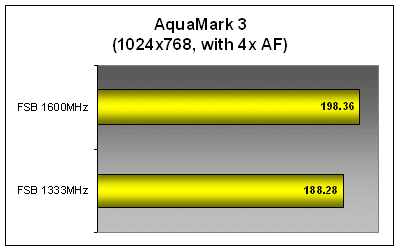
Synthetic gaming performance results were very impressive going from the QX9650 1333MHs FSB system to the newer QX9770 1600MHx FSB setup. In both 3DMark60 and AquaMark3 CPU results, improvements in results average above 6%. This is actually in-line with what we've seen this far from all our previous benchmarks. In terms of actual fps (frames per seconds) numbers however, 3DMark06 didn't post that big an offset. However, AquaMark3 actually saw a 10fps improvement on the 1600MHz platform.


Results - Crysis and World in Conflict
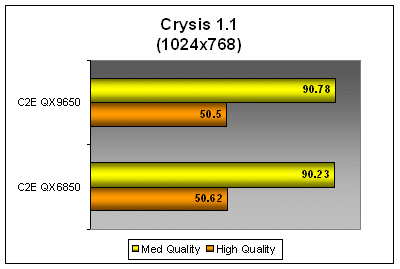
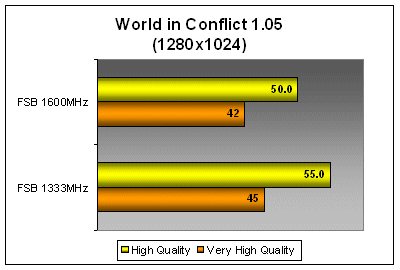
In real-world gaming performance, the two systems didn't really show any advantage over each other. The 1600MHz FSB platform was marginally (and we mean miniscule) better than the 1333MHz system in Crysis, but actually lost in World in Conflict. The frame rate scores are still within standard deviation and it goes to show that in today's PC gaming platform, the graphics card is what you want to be worried about, and not the CPU or memory.
Conclusion
It has been a very interesting two years since Intel launched the Core 2 processors for the fact that they've tried every other way to improve performance without pushing core clock speeds. The very first Intel Core 2 Extreme X6800 was clocked at 2.93GHz, and despite all the improvements that have gone into product revisions - from dual-core to quad-core, 1066MHz FSB to 1333MHz FSB, Conroe to Penryn - Intel's top end flagship processor have maintained a standard clock speed around the 3GHz mark up till the QX9650.
This is such a huge contrast from when Intel just kept pushing a MHz race back in the Pentium days. It also shows that there are more ways to improve system performance. Intel's latest effort to this end in the desktop space is the upgrade to 1600MHz FSB. Granted this time, the QX9770 processor has broken the 3GHz barrier and our benchmarks have shown that the entire platform benefits. In general, we saw a 5 - 9% performance improvement in almost every benchmark that we ran.
However, the final real-world gaming tests with World in Conflict and Crysis showed the naked, ugly truth about these performance gains - they were negligible in actual applications. It would seem that general PC performance today is already at an all time high, where software is actually struggling to keep up with the rapid advancement in processor technology. Multi-threaded software is no longer scarce, but many applications, tools and games are still not optimized to scale above two CPU cores. You can see this effect in most benchmarks as well, where the jump in performance between two to four threads do not match the same gains from one to two threads. Games are becoming less reliant on the CPU for computation needs, so the only hardware that gamers really need to focus on is the graphics card.
Officially, Intel's 1600MHz FSB platform is still limited to the ultra-elite. The cost of components required for this setup today will not justify the gains. Unofficially, overclockers have been running 1600MHz FSB and higher since 2006, so it's really nothing new. The only benefit Intel's latest chipsets brings into the picture is DDR3, and this is the real reason why you should be excited about the official 1600MHz upgrade.
Our articles may contain affiliate links. If you buy through these links, we may earn a small commission.