
Core i7 Overclocking and Graphics Performance Update
We've detailed and dissected the performance of the new Core i7 architecture with the top-end processor and today we extend that coverage with a little overclocking update as well as newer findings with a more powerful graphics subsystem. Will the Core i7 shine in these areas? That's what we intend to find out.
All it needs is a Little Push
After years of speculation, the Nehalem CPU architecture has finally surfaced in the form of the Core i7 processor. Were we taken by storm like the Core microarchitecture? Surprisingly no, but the performance leap is nonetheless quite notable in specific workloads and we figure that the sooner the mainstream applications are designed to be more threaded in nature, the more gains the existing platforms as well as the new Core i7 will stand to benefit. High-end applications in the multimedia content creation segment appreciate the most from the new CPU's integrated memory controller. You can check out our review of the Intel Core i7 for a good recap on the performance expectations of the new platform.
We also talked some on the overclocking aspect the new Core i7 over here. In addition, word has it that the TDP limitation imposed on the non Extreme Edition parts will hamper overclocking prowess, but we'll get to that shortly as we draw closer to complete testing of the entire Core i7 series. Today, we'll share with you on the most achievable overclock possible on the Core i7-965 Extreme Edition processor as well as some updates in the gaming realm using a more powerful graphics card subsystem.
The following screenshot below shows a typical screen from the Intel X58 motherboard BIOS on setting up the system for Turbo Mode, which is essentially overclocking the processor. The values shown are actually defaults for the 4-core, 3-core, 2-core and 1-core setup.
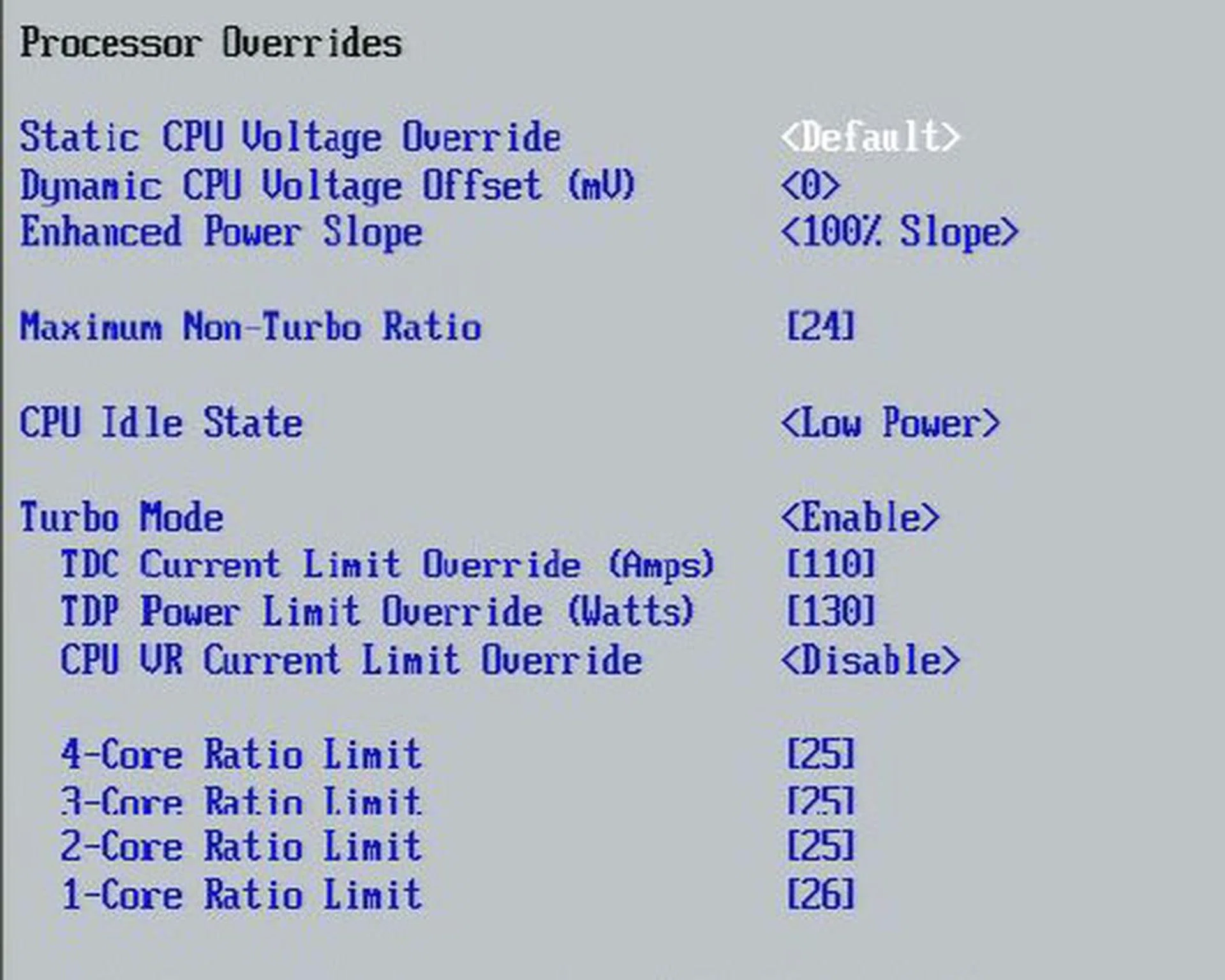
The 4 different CPU ratio limits here for different core configurations is part of the Turbo Mode option available on the Core i7, where you can set different clock speeds depending on the number of active CPU cores. This means that with fewer cores, you can set higher clock speeds while maintaining the thermal envelope of 130W.
After some trial and error, the maximum we were able to push the CPU was 3.86GHz on stock cooling and some voltage boost. That's achieved using a 29x multiplier. Too bad we couldn't crack the 4GHz barrier but we doubt that's difficult when using appropriate third-party coolers and better quality CPUs roll in. Of course the alternate method of overclocking via increasing the base bus speed is possible, there are so many interdependencies that we'll reserve that for motherboard reviews rather than a CPU-related article. So let's check out the performance margins with a Core i7 processor clocked at 3.86GHz.
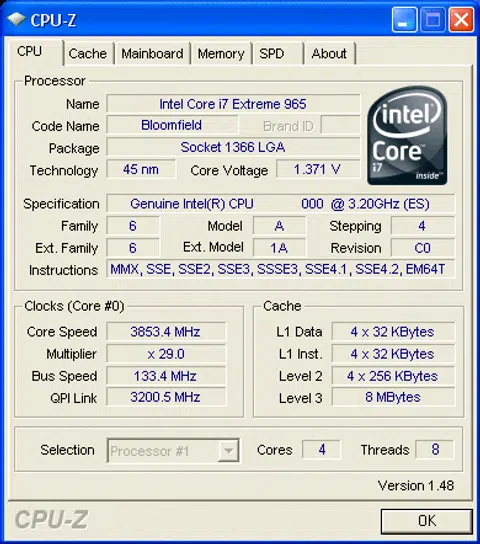
Here's the CPU-Z screenshot of our overclocked Core i7-965 XE processor.
Test Setup
Our test setup is quite similar to that used in the main review, with the exception of a reduced benchmark set and the use of GeForce GTX 260 graphics card for the two real-world game tests to revisit the usefulness of the new platform where gaming matters are concerned. Despite our low resolution testing of 1024x768 and 1280x1024, our usual GeForce 8800 GT seemed to be bottlenecked in performance. Thus, we'll be using a GTX 260 class graphics card to further bolster that subsystem and reassess the usefulness of the new platform's ability to extend gaming performance.
For the Intel Core Core i7- 965 Extreme Edition, the setup is as follows:-
- Intel DX58SO Motherboard (Intel X58 Express chipset)
- 3 x 1GB Kingston HyperX DDR3-1333 (7-7-7-20) @1.62V
- ASUS GeForce 8800 GT 512MB (ForceWare 169.21)
- Zotac GeForce GTX 260 AMP! Edition (ForceWare 178.24) � for Crysis and World in Conflict only
- Seagate 7200.10 200GB SATA hard drive (one single NTFS partition)
- Windows XP Professional with Service Pack 2
- Intel INF 9.1.0.1007 and Matrix Storage Manager 8.6.0.1007
For the Intel Core 2 Extreme (QX9770 only), the setup is as follows:-
- Gigabyte X48T-DQ6 motherboard (Intel X48)
- 2 x 1GB Patriot DDR3-1866@ DDR3-1600 (7-7-7-20)
- Seagate 7200.10 200GB SATA hard drive
- ASUS GeForce 8800 GT 512MB (ForceWare 169.21)
- Windows XP Professional with Service Pack 2
- Intel INF 8.3.1.1009 and Matrix Storage Manager 7.8.0.1012
For the Intel Core 2 Extreme QX9650 and Core 2 Duo E8500, the setup is:-
- ASUS P5E3 Deluxe (Intel X38 Express chipset)
- 2 x 1GB Kingston HyperX DDR3-1333 (CAS 7. 7-7-20)
- Seagate Barracuda 7200.10 200GB SATA hard drive (one single NTFS partition)
- ASUS GeForce 8800 GT 512MB - with NVIDIA ForceWare 169.21
- Zotac GeForce GTX 260 AMP! Edition (ForceWare 178.24) for Crysis and World in Conflict only
- Microsoft Windows XP Professional with Service Pack 2
- Intel INF 8.3.1.1009 and Matrix Storage Manager 7.8.0.1012
For the AMD Phenom X4 9950, the setup is as follows:-
- ASUS M3A32-MVP Deluxe Wi-Fi (AMD 790FX chipset)
- 2 x 1GB Aeneon DDR2-1066@ DDR2-800 (CAS 5-5-5-15)
- Seagate Barracuda 7200.10 200GB SATA hard drive (one single NTFS partition)
- ASUS GeForce 8800 GT 512MB (ForceWare 169.21)
- Microsoft Windows XP Professional with Service Pack 2
Benchmarks
The following benchmarks were used in this review:-
- SYSmark 2007 Preview (Patch 3)
- 3ds Max8 (SP2)
- Cinebench 10
- XMpeg 5.0.3 (DivX 6.8 encoding)
- Futuremark 3DMark06 v1.1
- AquaMark3
- World in Conflict v1.05
- Crysis v1.1
Results - SYSmark 2007 Preview v1.04
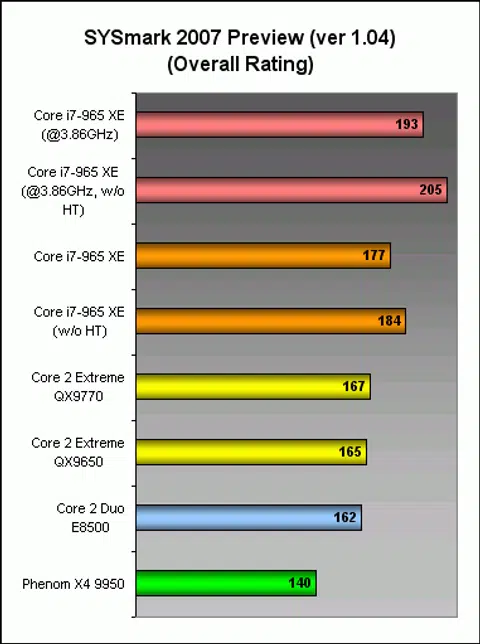
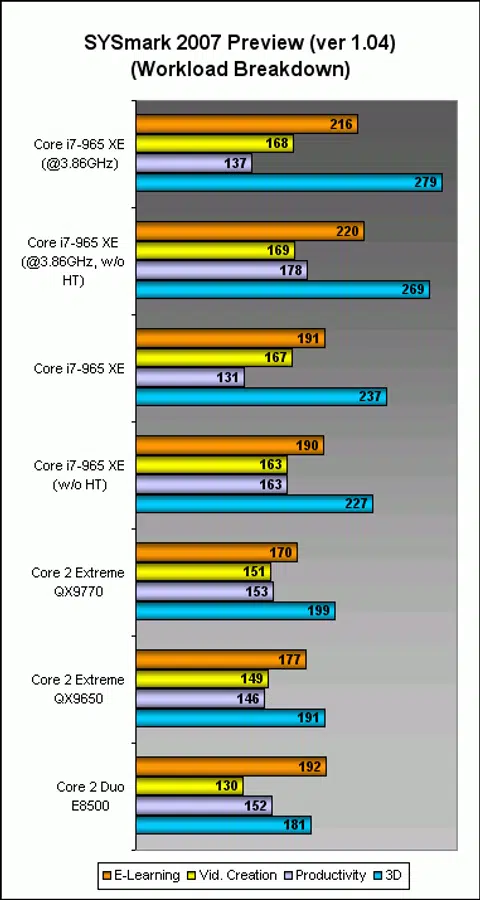
SYSmark 2007 is perhaps the closest to real-world multi-tasking usage one can get and looking through the various workloads it's clear that the clock speed advantages in the 3D content creation workload scaled the most with the higher clock frequencies. For a 20% overclock, the actual performance benefit was a cool 18%. On the other end of the scale, video content creation was hardly benefiting from the overclocked frequencies which is quite unlike the nature of such workloads. On an overall perspective, gains were on average 10%. As detailed in our main review, you're better off disabling HyperThreading in everyday usage.
Results - 3ds Max 8 (SP2)
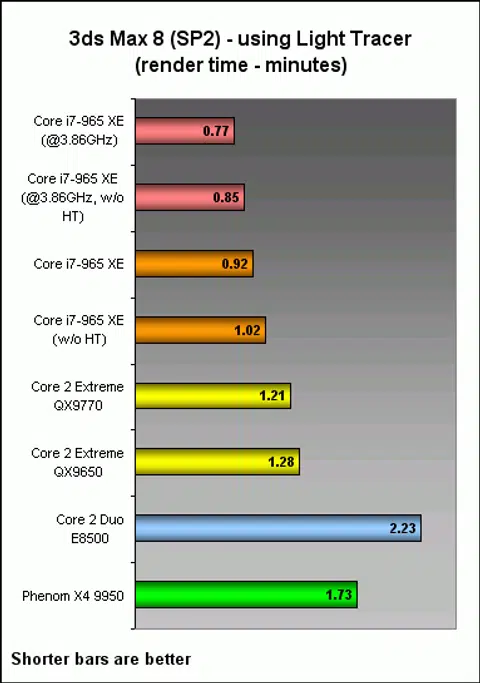
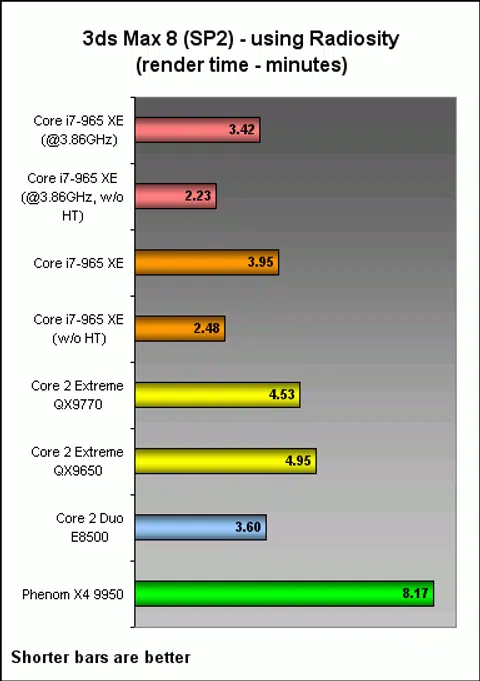
Using Autodesk's 3ds Max 8 to render a fixed workload and rendering it using Light Tracer and Radiosity advanced lighting options, we obtained the below results just like in our main Core i7 review. The overclocked Core i7-965 Extreme Edition wasn't really inspiring, but they were nonetheless speedier than the default runs which was in-turn still better than the Core 2 generation.
Results - Cinebench 10 and XMpeg 5.03 (DivX 6.8 Encoding)
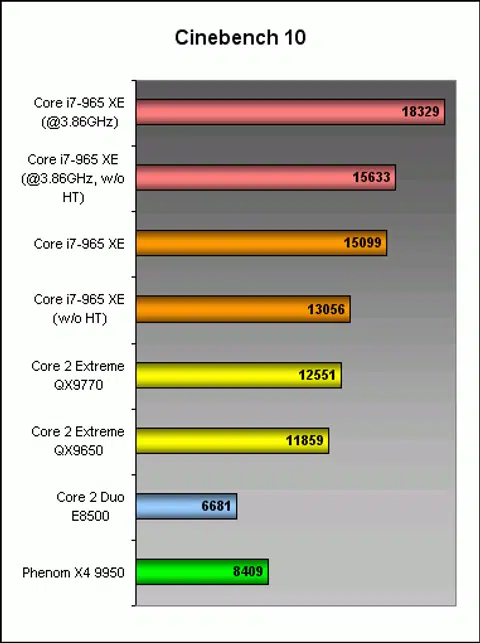
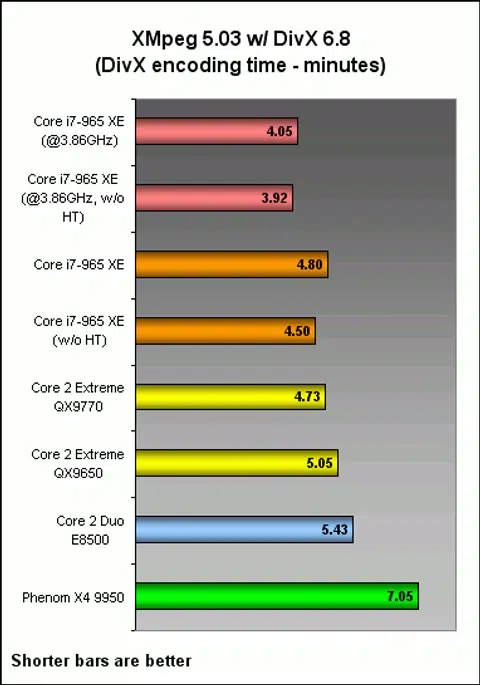
The highly threaded Cinebench rendering benchmarks never fails to amaze us and it scaled extremely well when we overclocked the processor. In our real world video encoding workload using XMpeg and DivX 6.8, it goes without saying that overclocking always brings a nice speed boost and that's exactly what we saw.
Results - 3DMark06 and AquaMark3
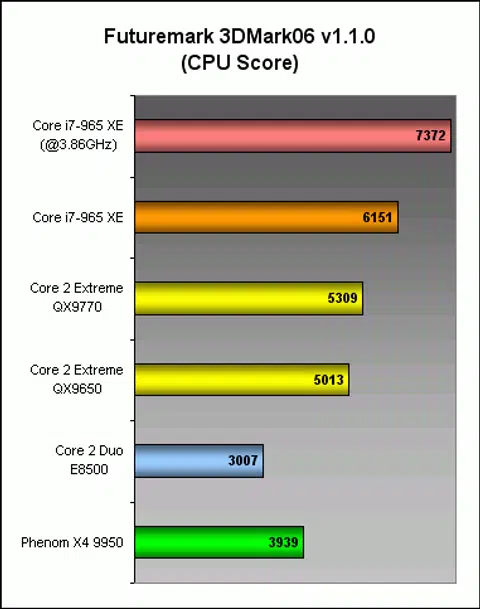
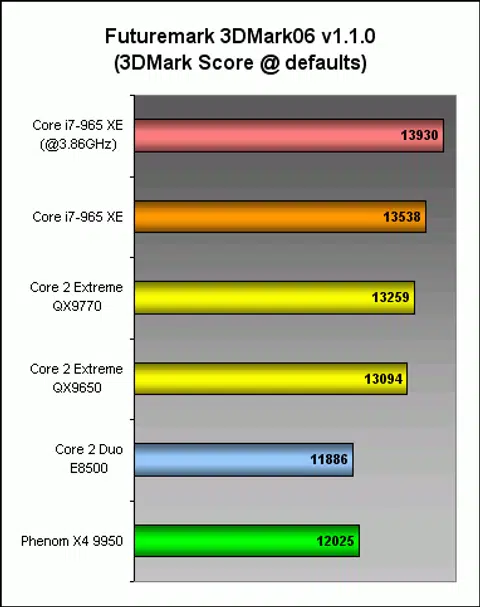
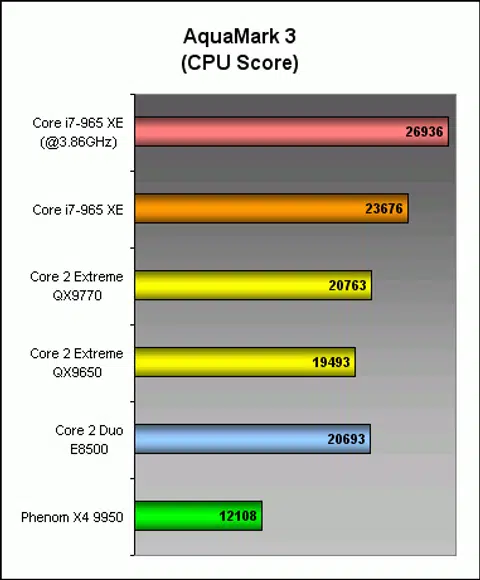
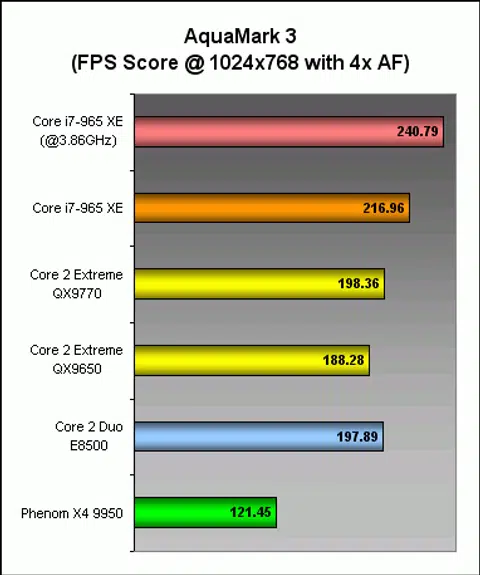
Now peering into our duo of synthetic benchmarks, we see Aquamark3 scaling flawlessly with the nice overclock but 3DMark06 only benefited within the CPU test portion and not much in the overall graphics performance equation.
Results - World in Conflict & Crysis
Now for our two real-world game benchmarks analysis with the new platform. Previously, we've been using a GeForce 8800 GT and running low resolution testing at 1024x768 and 1280x1024. Normally, this shouldn't pose a problem for a graphics card of its caliber when it comes to performance scaling. However as we've been increasingly moving towards more powerful platforms such as the new Core i7, it seems that the platforms are so fast that the GeForce 8800 GT became a bottleneck even at those meager resolutions. To rectify this situation, we've pumped up the graphics subsystem with a Zotac GeForce GTX 260 AMP! Edition.
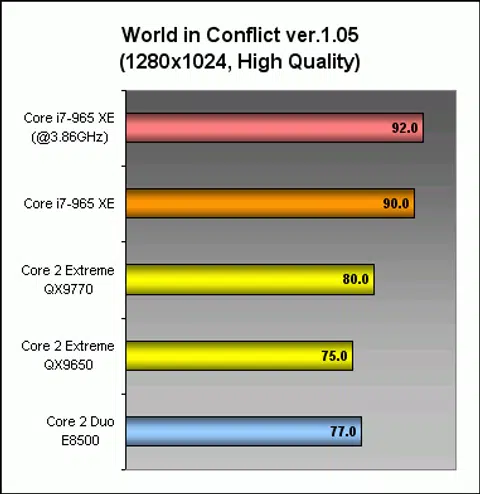
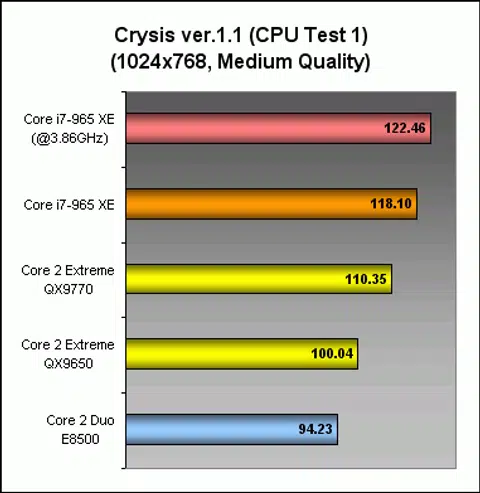
Lo and behold, we managed massive performance improvements and performance scaling between processors and platforms. So what does this mean? Simply put, if you're investing in high speed and high-end processors, you might want to maximize its performance capabilities with an equally high performance graphics card. However, while these results at lower resolution mean that the better platform is able to provide more horsepower to churn more FPS and raise the overall system-wide bottleneck threshold, you'll also have to realize that most folks investing in high-end graphics cards don't game at these low resolutions. Realistically at high resolutions with higher quality game settings, any advantages seen between these various platforms would quickly be truncated to smaller differences like these:-
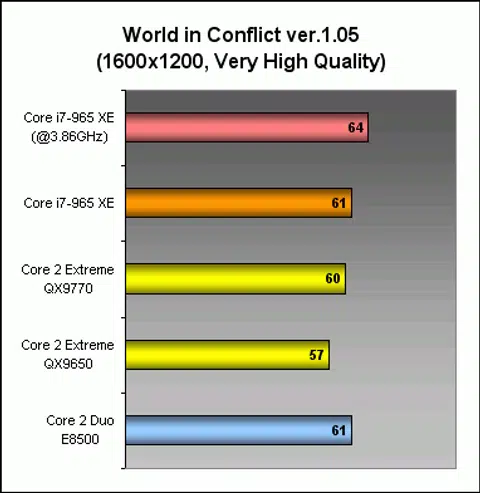
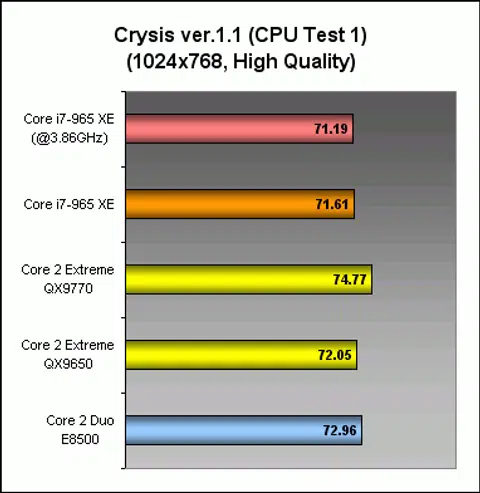
Take World in Conflict for example, we raised the resolution and quality level to the next notch, only to find that we're once again reaching the upper threshold of performance with this graphics card. There's still some performance scaling but it's very marginal. For Crysis however, once we bumped up the quality level, the alluring new Core i7 platform with the Extreme Edition processor is no better than a much lower cost Core 2 Duo processor. This only reinforces the ongoing notion that gaming these days requires a powerful graphics subsystem and not necessarily a top-end processor - unless one is true power user who dabbles in a wide variety of tasks.
So what if games were well multi-threaded and can take advantage of the extra processing cores of CPUs these days, what can we expect then? Crysis offers a glimpse of this through a second CPU test that is more grueling and is oriented towards multi-core processors (seen in the graph below). Interestingly, both medium and high quality settings still see performance scaling on this test. Most notably, there is a distinct difference between a dual-core and quad-core processor. The Core i7 processor improves the scores over the QX9770 and holds its own when being overclocked.
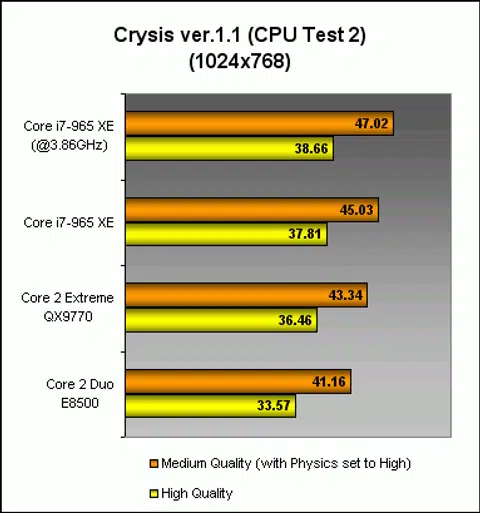
All said and done, the Core i7 doesn't really do much for gaming scene at the moment, but if the multi-core friendly test from Crysis is of any measure (just like 3DMark06), hopefully in the near future all that processing power would be put to better use in games as well and not just determined by the GPU's capability.
Meanwhile, stay tuned for our articles as we dissect the Core i7-940 and i7-920 models shortly on our various battery of tests.
Our articles may contain affiliate links. If you buy through these links, we may earn a small commission.