
Battling for the AM3 Crown - AMD 790FX Motherboard Shootout
Now that AMD's AM3 Phenom II processors are available, it's time we look at the DDR3 motherboard options. We check out how vendors have refreshed the enthusiast class AMD 790FX chipset for these new processors in this shootout.
The Spider AM3 Makeover
Launched initially along with the original AMD Phenom as part of the Spider platform, AMD's enthusiast chipset, the 790FX remains the only one capable of supporting quad CrossFireX configurations. Yet its standing among enthusiasts has diminished due to the arrival of the AMD 790GX chipset, which besides the integrated graphics, supports the more typical dual CrossFireX setup and includes the newer SB750 Southbridge with SATA ports. More importantly, it has Advanced Clock Calibration, the secret sauce that was exclusive to the 790GX and meant to help improve the overclocking limits on the Phenom.
To add to this perception that the 790FX is old news, AMD recently came out with the Dragon platform for the Phenom II launch and this time, there was no place for the 790FX, with the 790GX now replacing it as the 'official' chipset in its marketing efforts. Of course, the reason for choosing the 790GX could be due to the value performance and mainstream segment that AMD is targeting with the Phenom II, which made the 790GX a better fit. Nevertheless, it appears to marginalize the 790FX further as a niche enthusiast chipset that's edging inevitably towards its expiry date.
These doubts however have been cleared with the latest iteration of the 790FX that we are seeing from motherboard vendors recently. Updated to support AMD's AM3 compatible Phenom II processors, these new 790FX chipsets can handle the latest DDR3 memory. Paired with a SB750 Southbridge, these AM3 790FX chipsets have gained parity with the 790GX in offering the latest in AMD chipset technology and edging it out in terms of raw performance features (especially with 32 PCIe lanes dedicated to graphics cards). In short, the 790FX is back to being top of the chipset game.
If you need a refresher on what made up the original 790FX chipset, please refer to our previous articles in the related links below. We will be assuming that you know the basics regarding this chipset.
While the initial AM3 790FX motherboard models from vendors have been relatively slow to appear, we have managed to snag three models from well-known brands ASUS, Gigabyte and MSI for an AM3 shootout. Their specifications for these boards are listed below:-
ASUS M4A79T Deluxe | Gigabyte GA-MA790FXT-UD5P | MSI 790FX-GD70 | |
CPU Support | AMD Socket AM3 Processors | ||
Chipset | AMD 790FX + SB750 | ||
System Bus | HyperTransport 3.0, up to 5200MT/s | ||
Memory |
|
|
|
Storage |
|
|
|
Audio |
|
|
|
Networking | Realtek 8112 Gigabit LAN | 2 x Realtek 8111DL Gigabit LAN w/Teaming support | 2 x Realtek 8111DL Gigabit LAN w/ Teaming support |
IEEE 1394 |
|
|
|
Rear I/O |
|
|
|
Internal Connectors |
|
|
|
Expansion Slots |
|
|
|
Special Features |
|
|
|
Form Factor | ATX (30.5 x 24.4cm) |
Features and Layout - ASUS
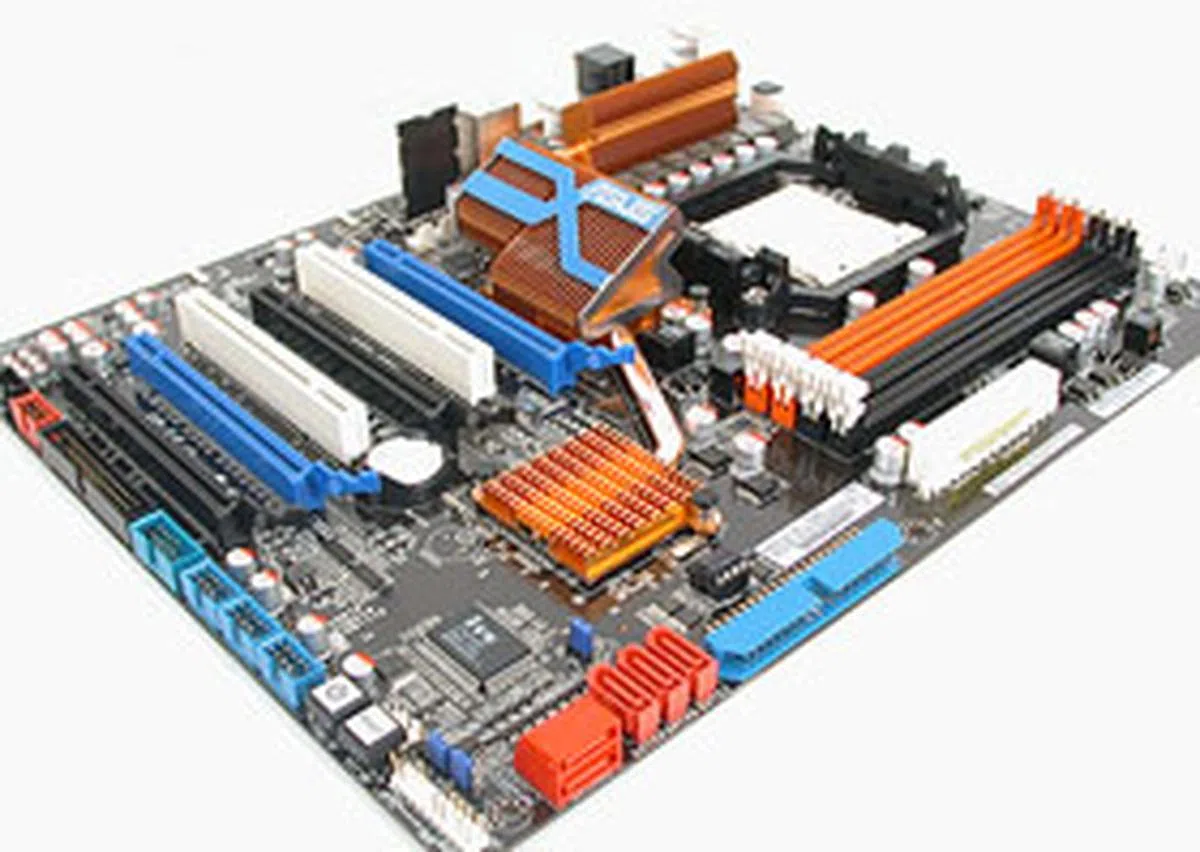
To start us off, we have a 790FX motherboard from ASUS, the M4A79T Deluxe, clad in the company's familiar board color scheme. As expected from one of the top motherboard manufacturers around, ASUS hardly gets anything wrong with the layout. The onboard connectors and ports are pushed to the edges of the board to maximize the PCB space.
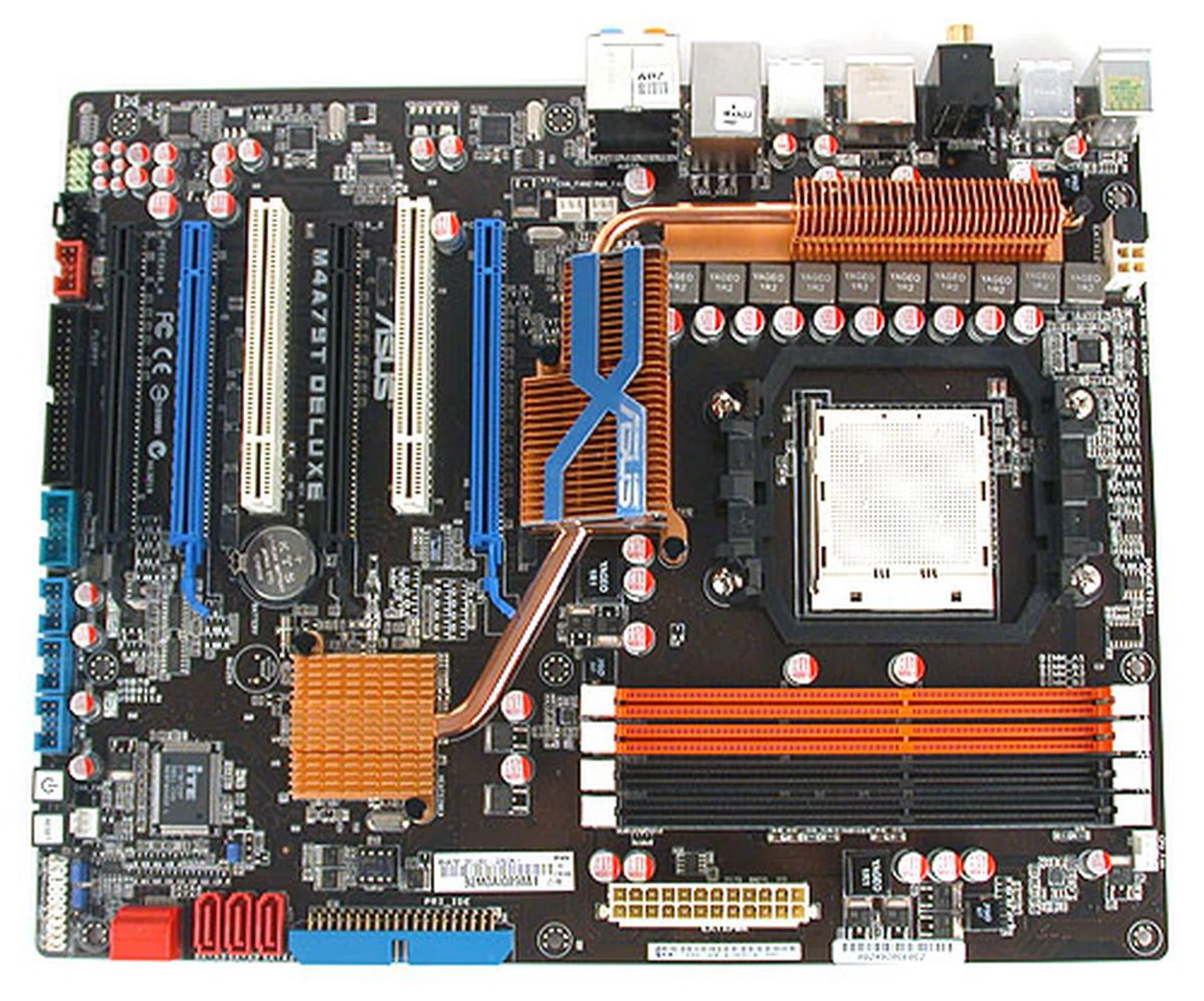
It's the usual ASUS motherboard color scheme on the M4A79T Deluxe, while the motherboard passive heatsinks appears to be modest in number.
However, there were a few niggling details that were less than ideal, especially coming from ASUS. For one, of the five onboard SATA ports (the remaining SATA was the eSATA at the rear I/O), three are oriented facing upwards. This arrangement means that it is possible that a longer graphics card may interfere with these SATA ports.
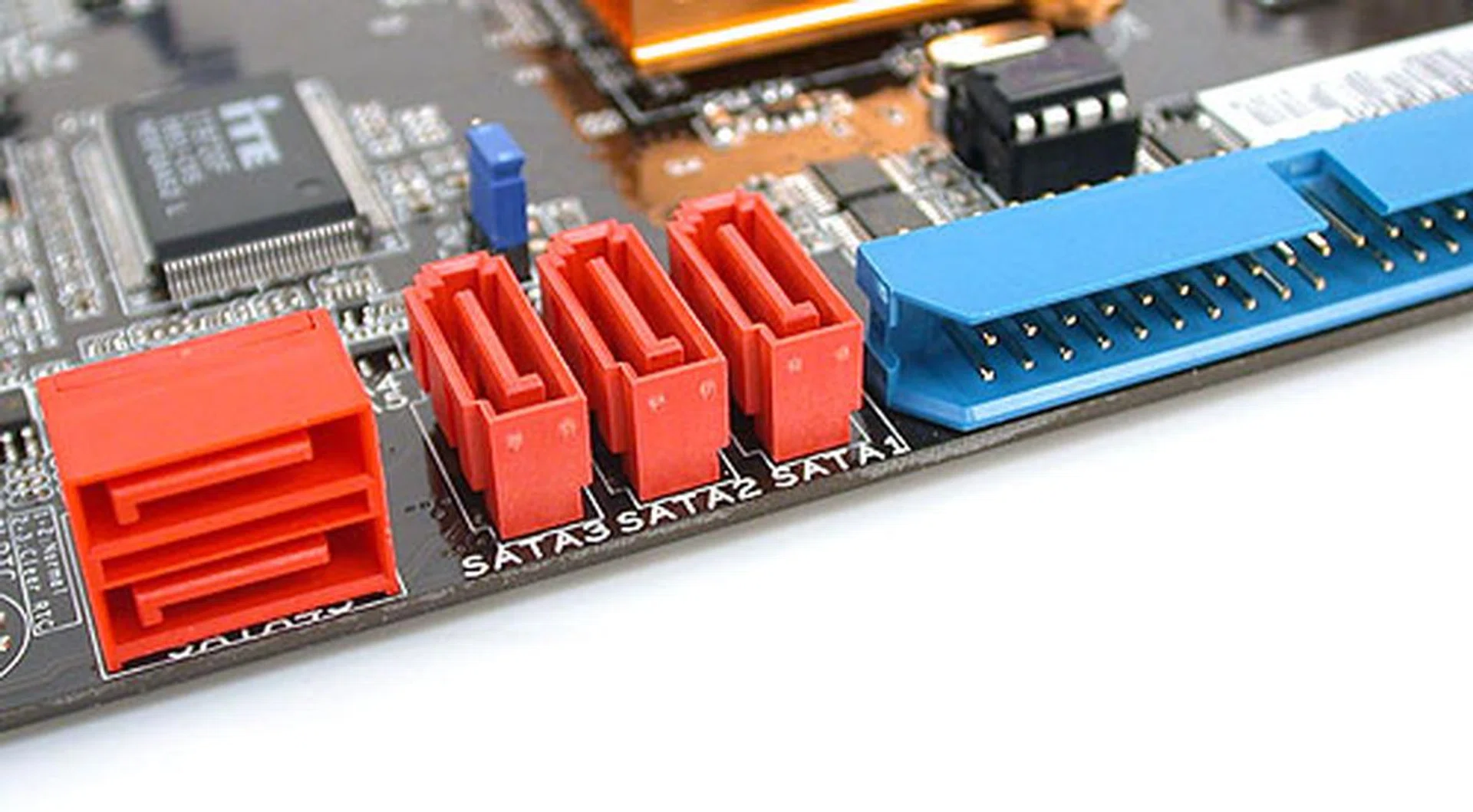
ASUS only had the standard 6 SATA (1 of which is eSATA on the ASUS) ports available from the AMD Southbridge 750 chipset. No additional ports were found from third-party controller chips.
Another thing that we noted is the fact that the ASUS M4A79T Deluxe seems to fall slightly short when it comes to sheer quantity of features. It's not that this board missed any of the important ones. After all, there are up to 12 USB 2.0 ports, six SATA/eSATA ports, two FireWire ports, optical and coaxial S/PDIF outputs for its Realtek-based HD audio CODEC and support for 16GB of DDR3 memory in a four DIMM slots configuration. Quad CrossFireX is present, though the proximity of the two slots closest to the board's edge, four dual-slot GPUs would be impossible.
Rather it is the number of SATA ports for instance, or the one less expansion slots available. Or that its two rivals here from Gigabyte and MSI have two Gigabit LAN instead of one. Of course, one could argue that one doesn't have to compete on numbers but on quality. In which case, the ASUS M4A79T Deluxe could well be a lean, optimized board in the eyes of these users.
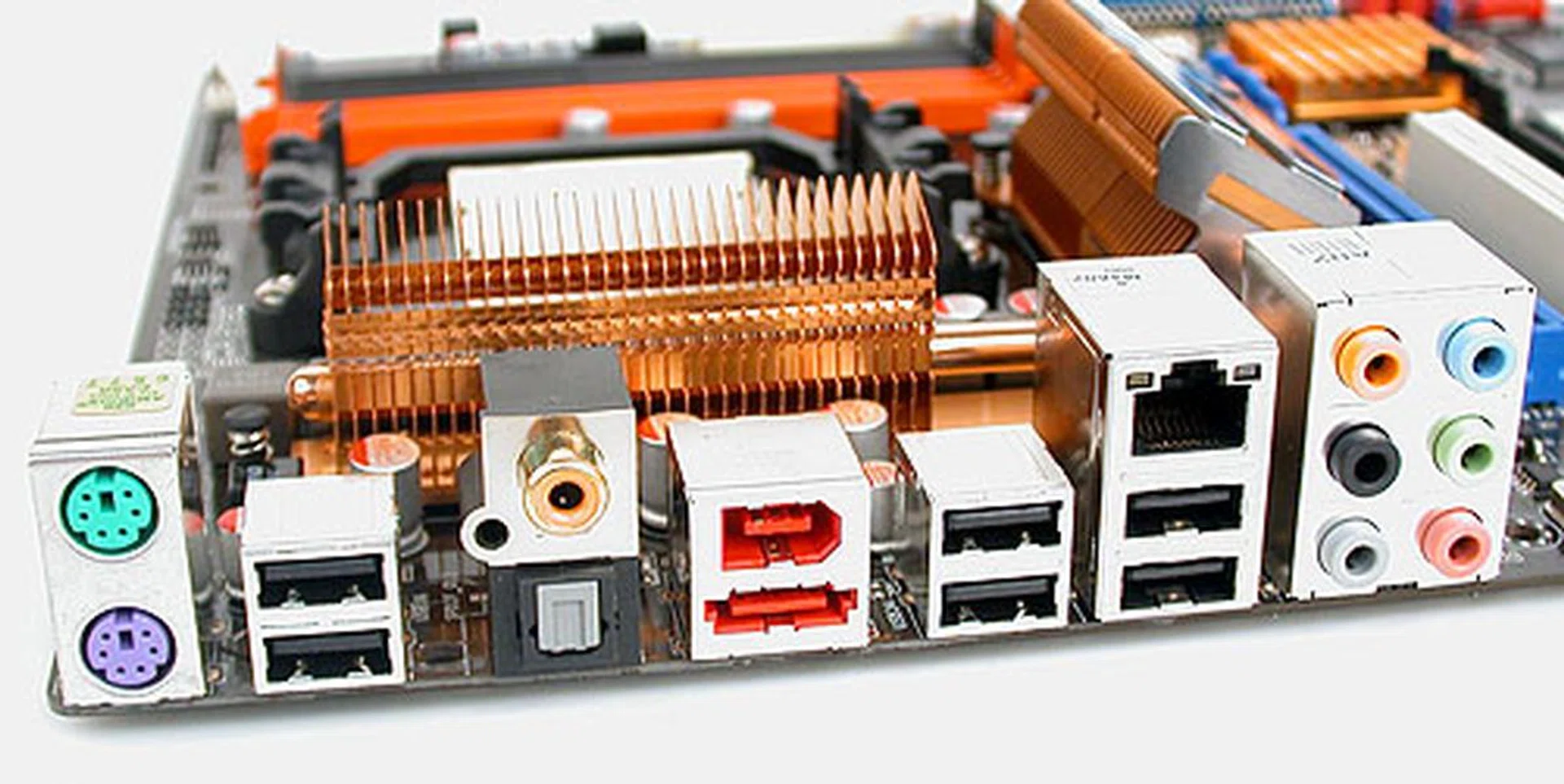
Variety rather than quantity was the approach here as this motherboard had a bit of everything for its inputs/outputs and it was more than adequate for most users.
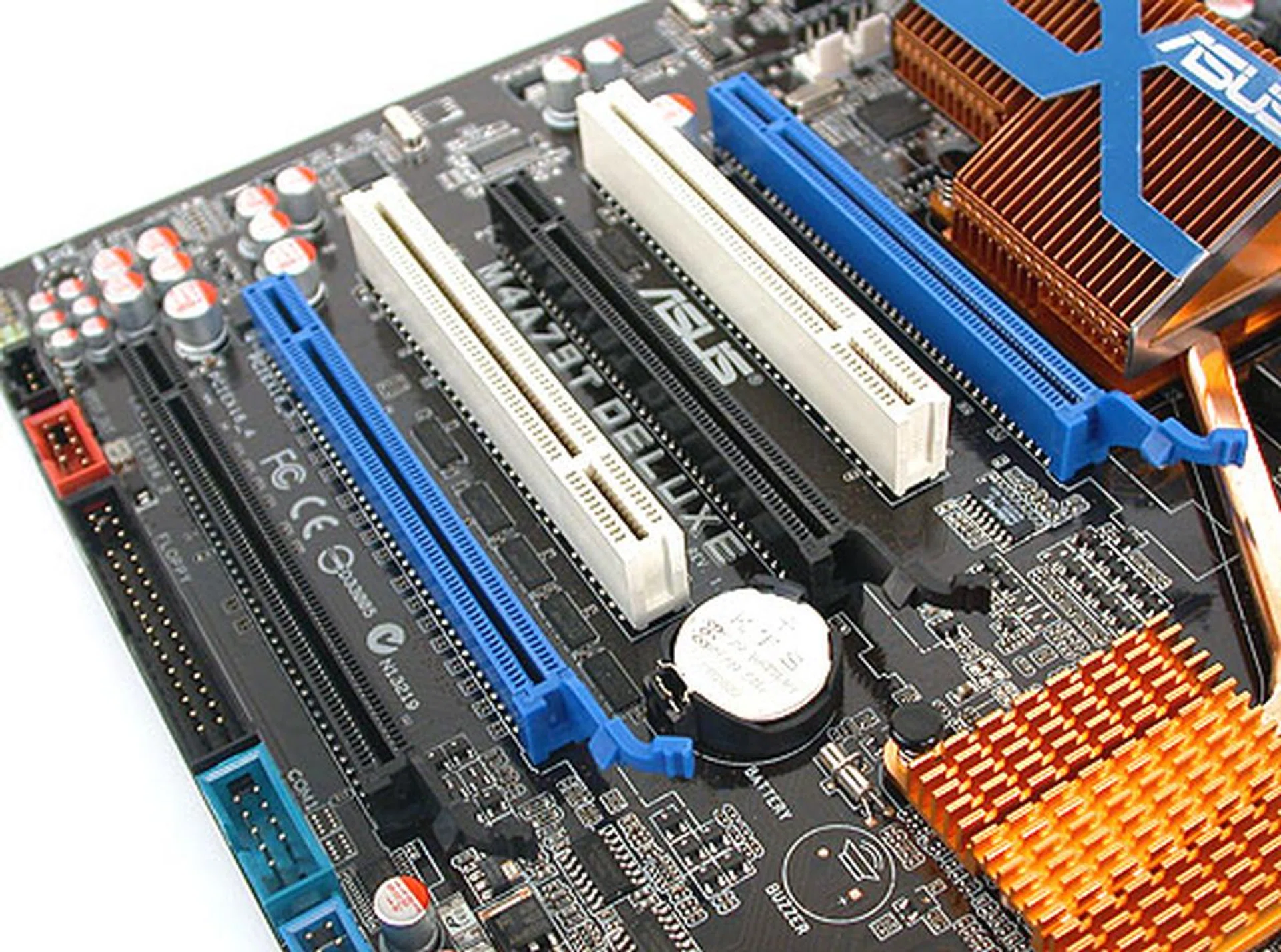
In terms of expansion slots, ASUS also had one fewer than the two other boards compared but then it was still capable of quad CrossFireX (in a x8 configuration each for four PCIe 2.0 x16 graphics cards). This means that there is no PCIe x1 slot on this board.
Other typical ASUS features like its Linux based Express Gate operating system, cool and quiet solutions like its Stack Cool 2 and heat-pipe assisted chipset heatsinks and its phased power design are present on this board, so it's not like you'll be missing the ASUS 'experience' here. Of course, unlike the Rampage series, you won't find any of those extreme overclocking features here. Even the Clear CMOS switch was done through the old-fashioned jumper switch and not with a button at the rear I/O panel or an onboard button.
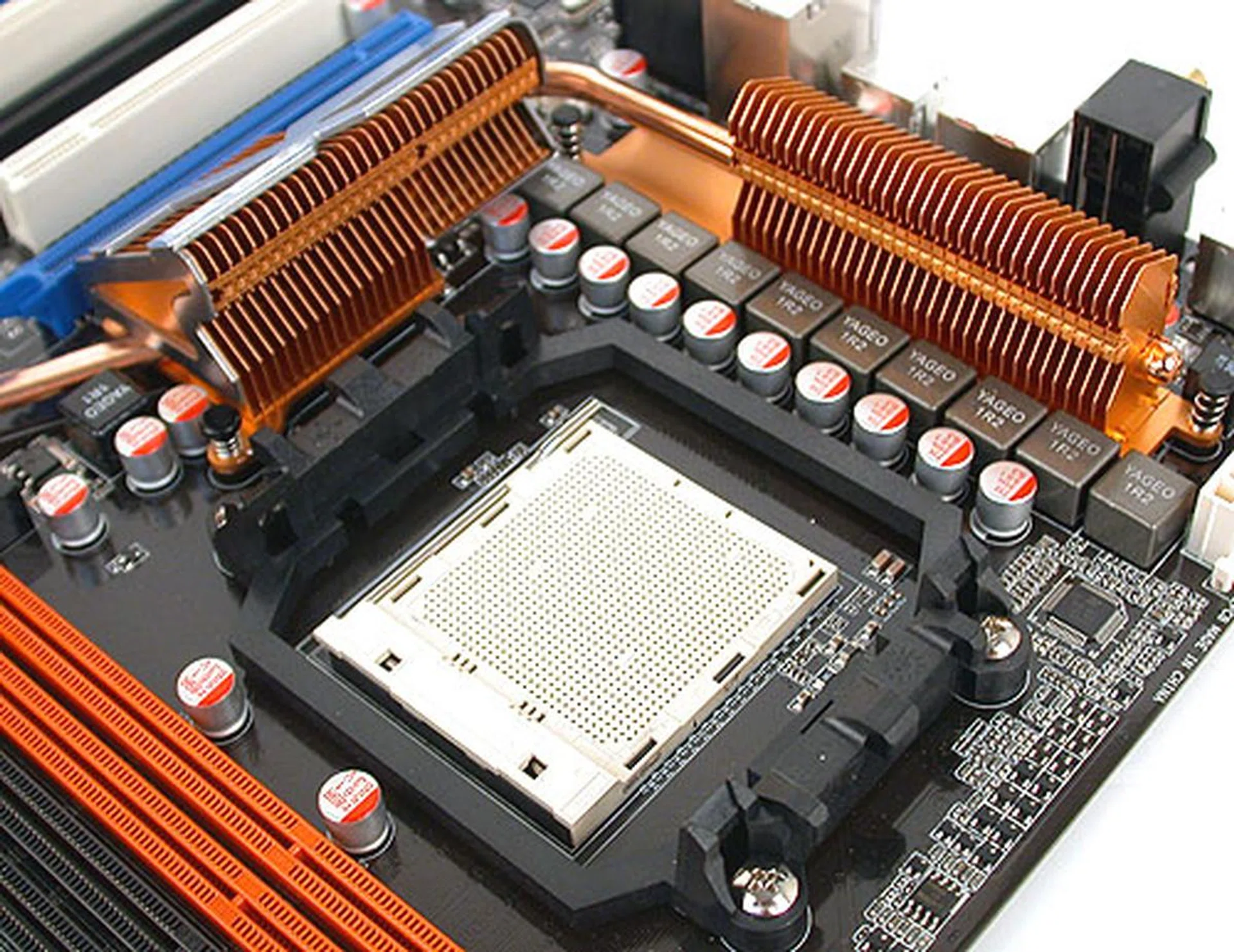
The heatsink design is typical of ASUS and you can expect all-solid capacitors from such a premium brand.
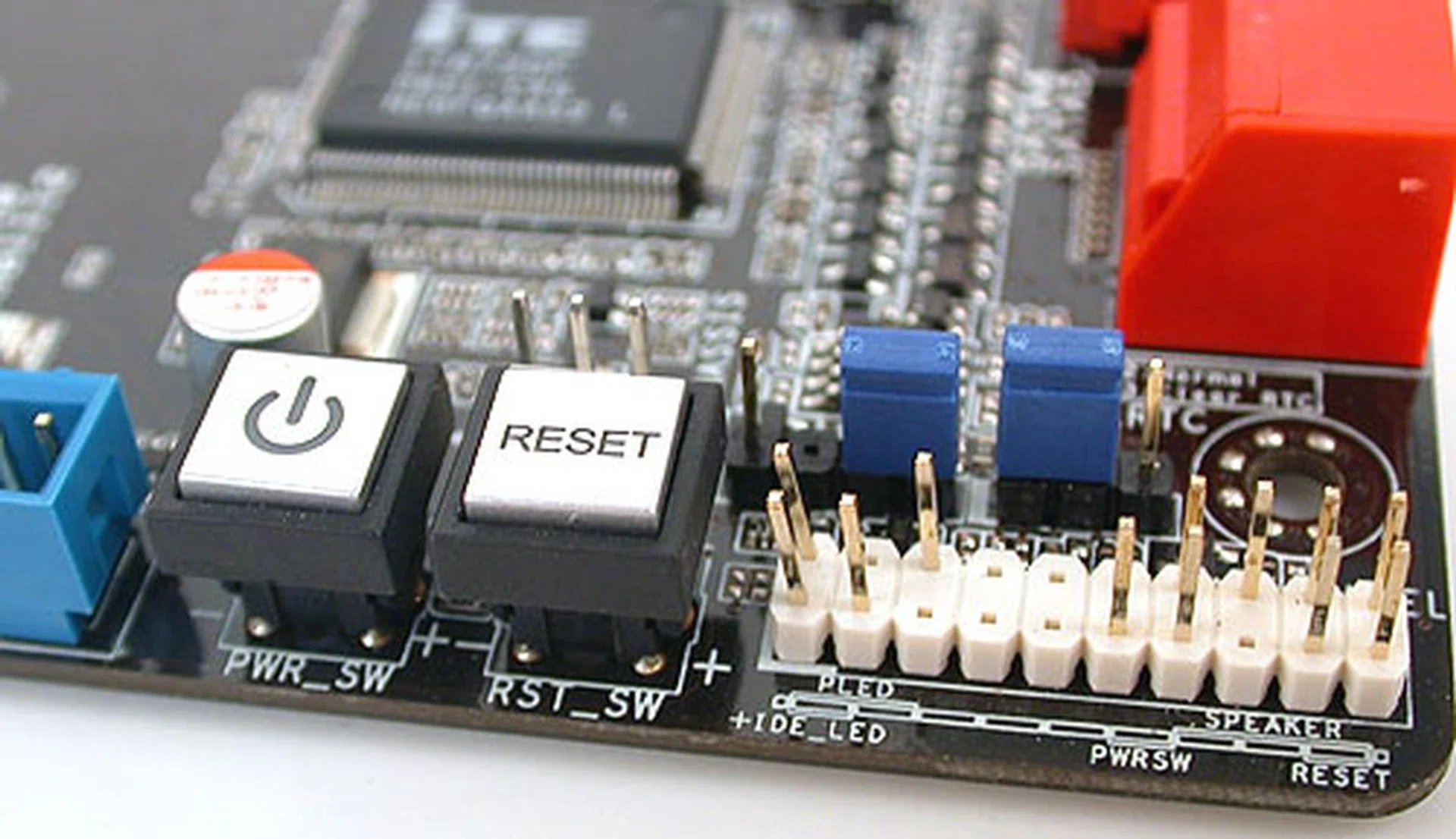
We only found power and reset buttons onboard; the clear CMOS option was surprisingly through the traditional jumper.
Finally, we encountered a slight issue when trying to remove our ZEROtherm CPU heatsink after testing. It seems that for our heatsink, the CPU socket was a tad too close to the chipset heatsink. Together with the elevated passive heatsink on the motherboard, the ZEROtherm CPU heatsink may have limited space to maneuver when uninstalling, which meant that we spent slightly more time on it.
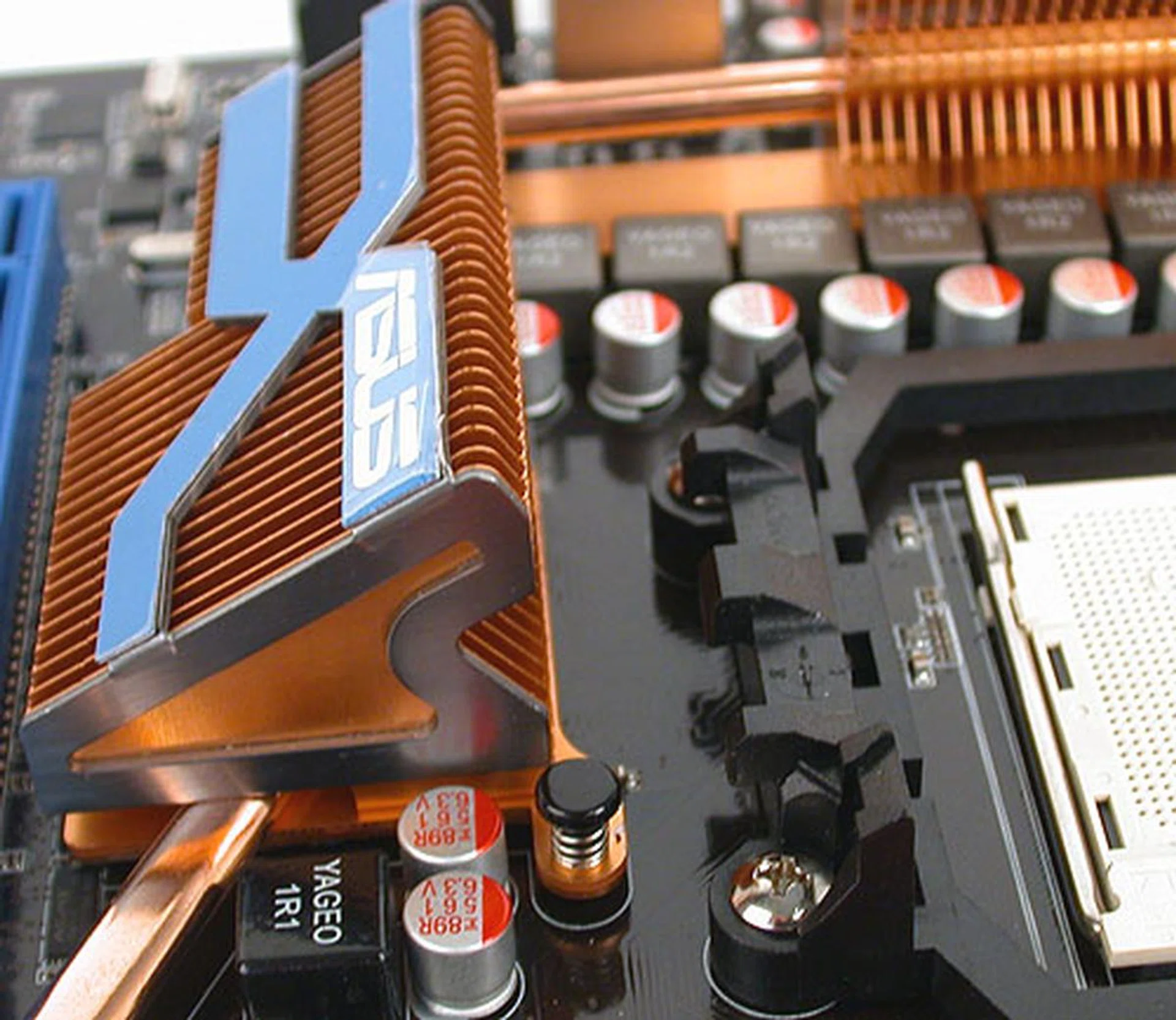
The heatsink here is just a fraction too close to the CPU socket mount. Or rather the combination of its height and the distance meant that we had some trouble uninstalling our ZEROtherm CPU fansink.
Features and Layout - Gigabyte
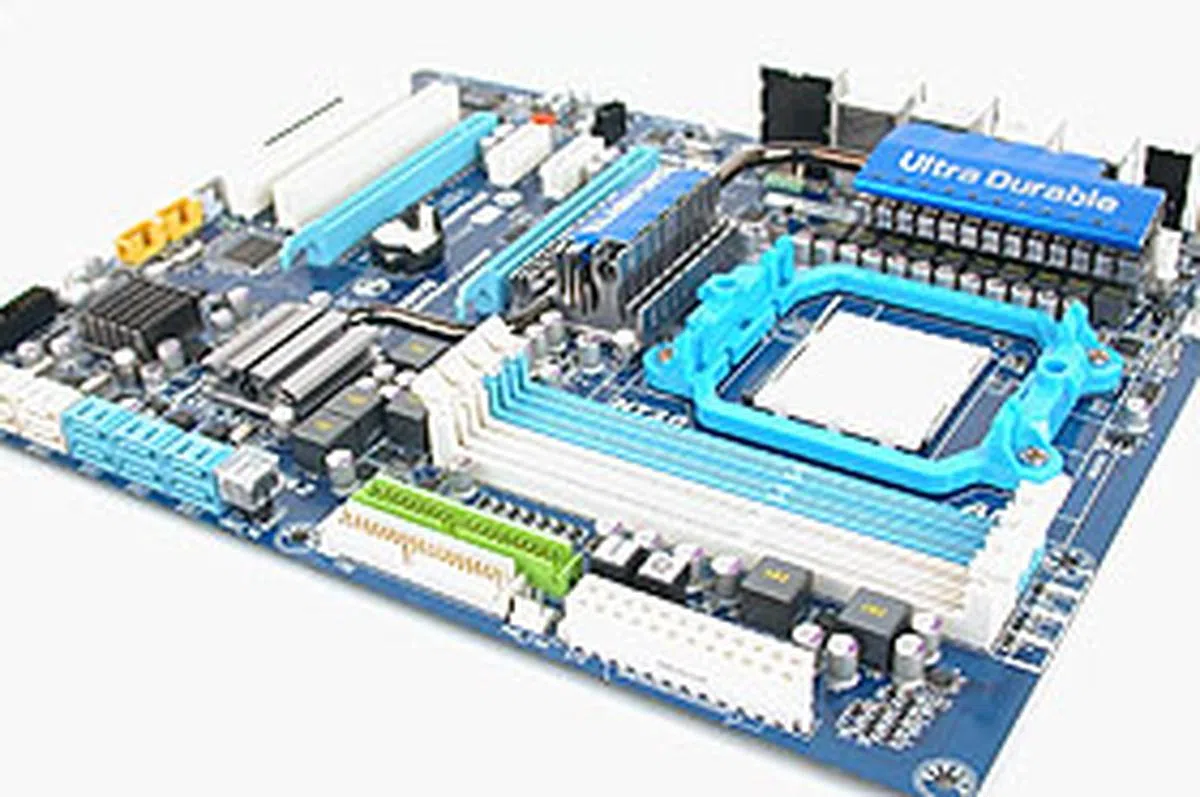
Gigabyte has relied heavily for its Ultra Durable feature in recent times, with practically all of its newer boards touting it, which means having twice the amount of copper in the motherboard's PCB in order to improve cooling efficiency. While we believe that this feature does work as advertised, it tends to make these Gigabyte boards rather heavy, especially when combined with the solid heft of the passive heatsinks on the Gigabyte MA790FXT-UD5P.
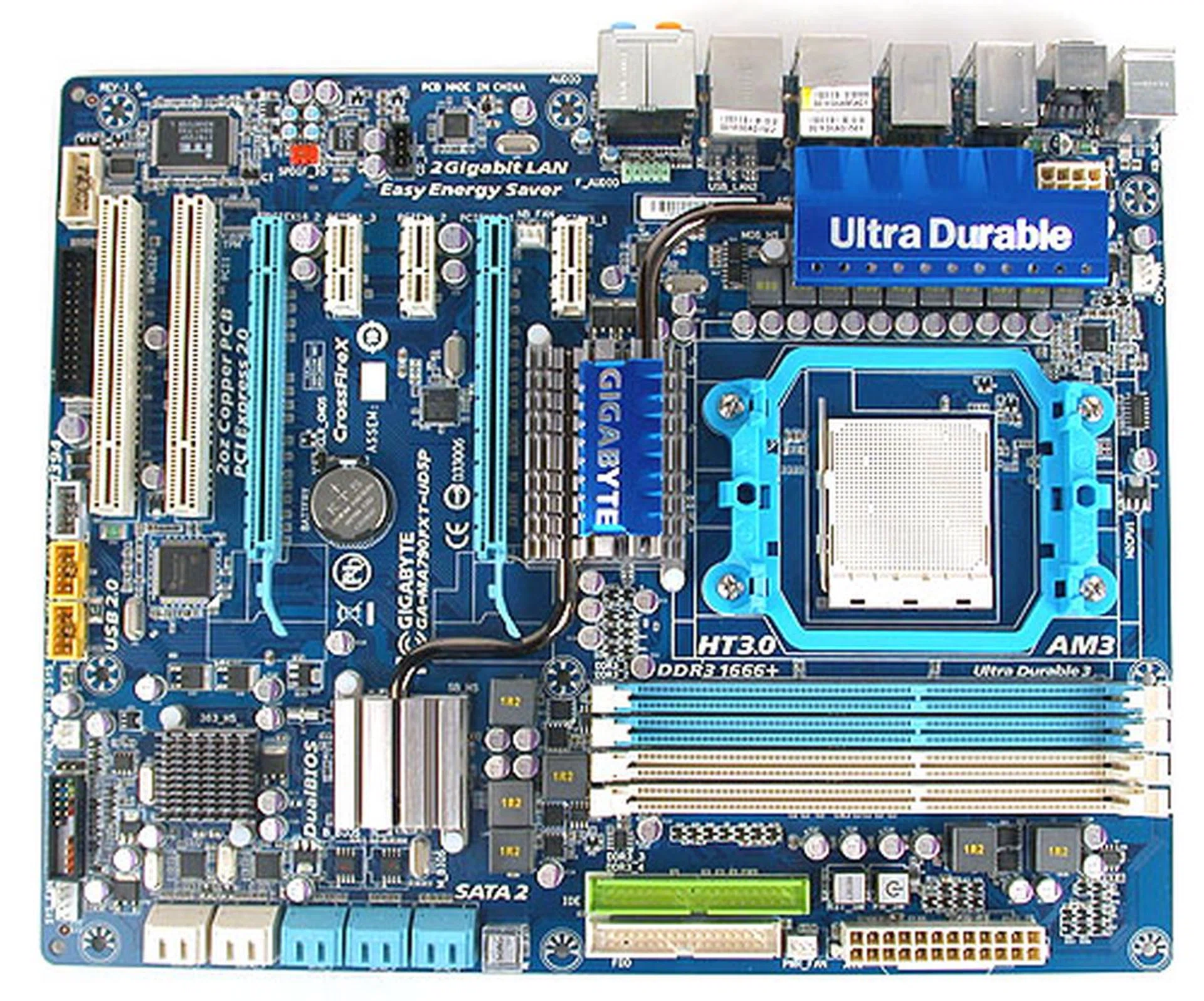
Gigabyte's recent color scheme has been dominated by whites and blues, a far cry from its formerly colorful designs. This is also an Ultra Durable 3 model, which has double the amount of copper in its PCB, making it slightly heavier.
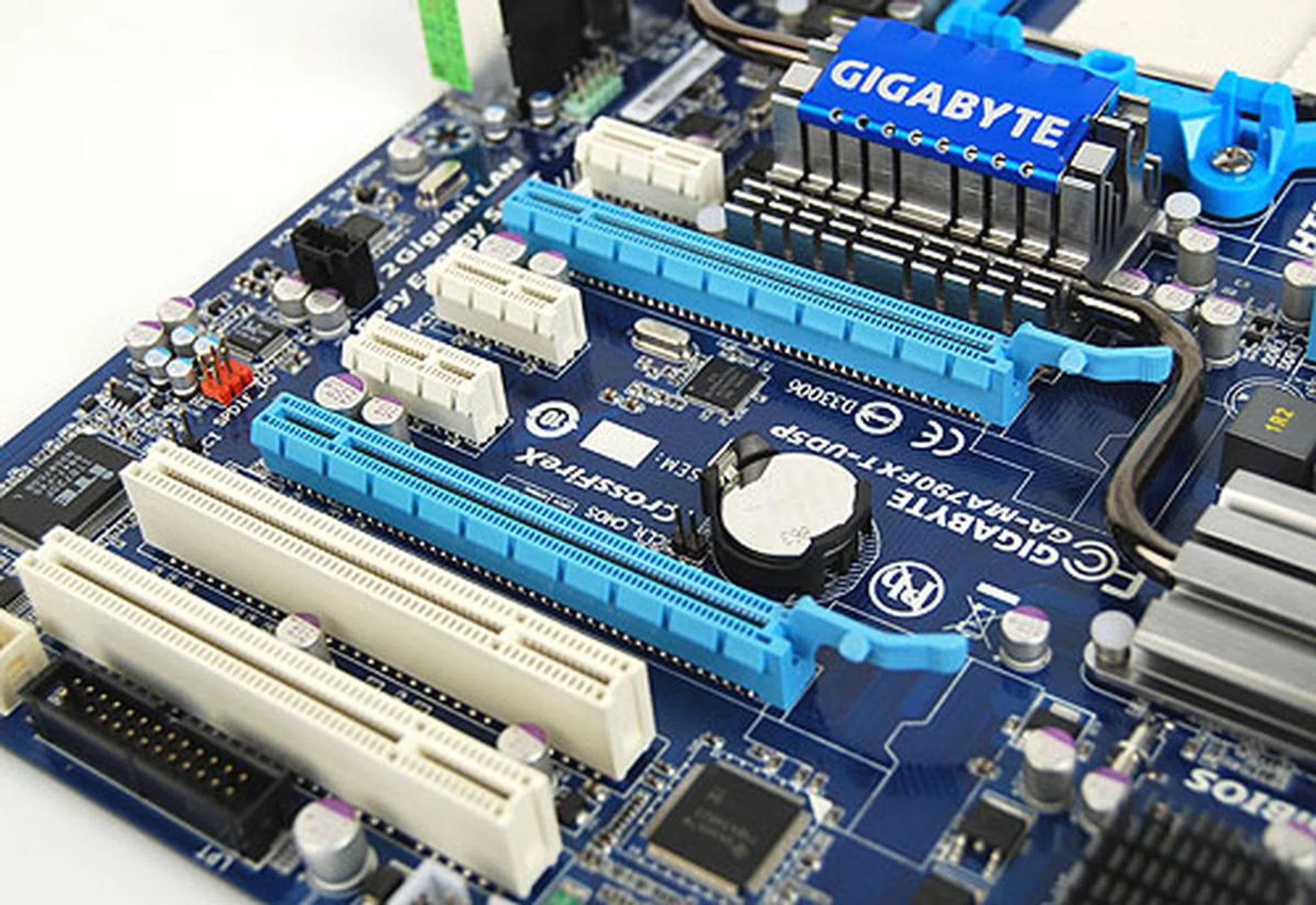
Of the three AMD 790FX motherboards, only the Gigabyte surprisingly could not do quad CrossFireX, with Gigabyte preferring PCIe x1 expansion slots instead.
The one thing we noticed immediately about this board is that it only has two PCIe 2.0 x16 slots. This means that quad CrossFireX is ruled out. It is a rather strange decision since that takes away one of the major advantage of a 790FX motherboard (though you'll still get a pair of 16 lanes for full bandwidth two-way CrossFireX). Gigabyte has replaced the additional PEG slots slots with PCIe x1 slots; three of them in fact and given the trend of beefing up the motherboard onboard components, it's hard to imagine what Gigabyte thinks enthusiasts will use these PCIe x1 slots for.
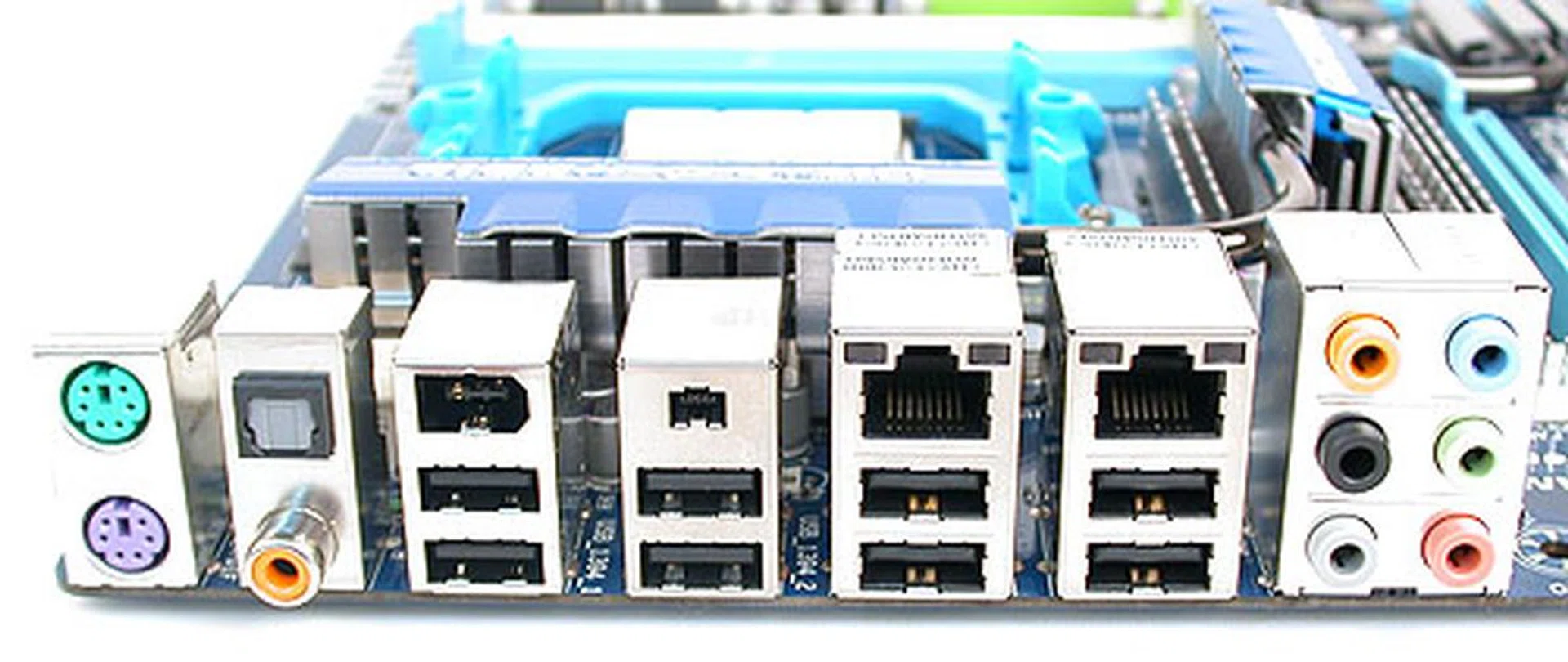
It's ports galore at the back of the motherboard, with two Gigabit LAN ports, six USB 2.0 ports and even 2 FireWire ports.
With eight USB 2.0 ports at the rear I/O panel, along with dual Gigabit LAN controllers and two FireWire ports, the Gigabyte MA790FXT-UD5P has quite a few more I/O ports than the ASUS M4A79T Deluxe we saw previously.
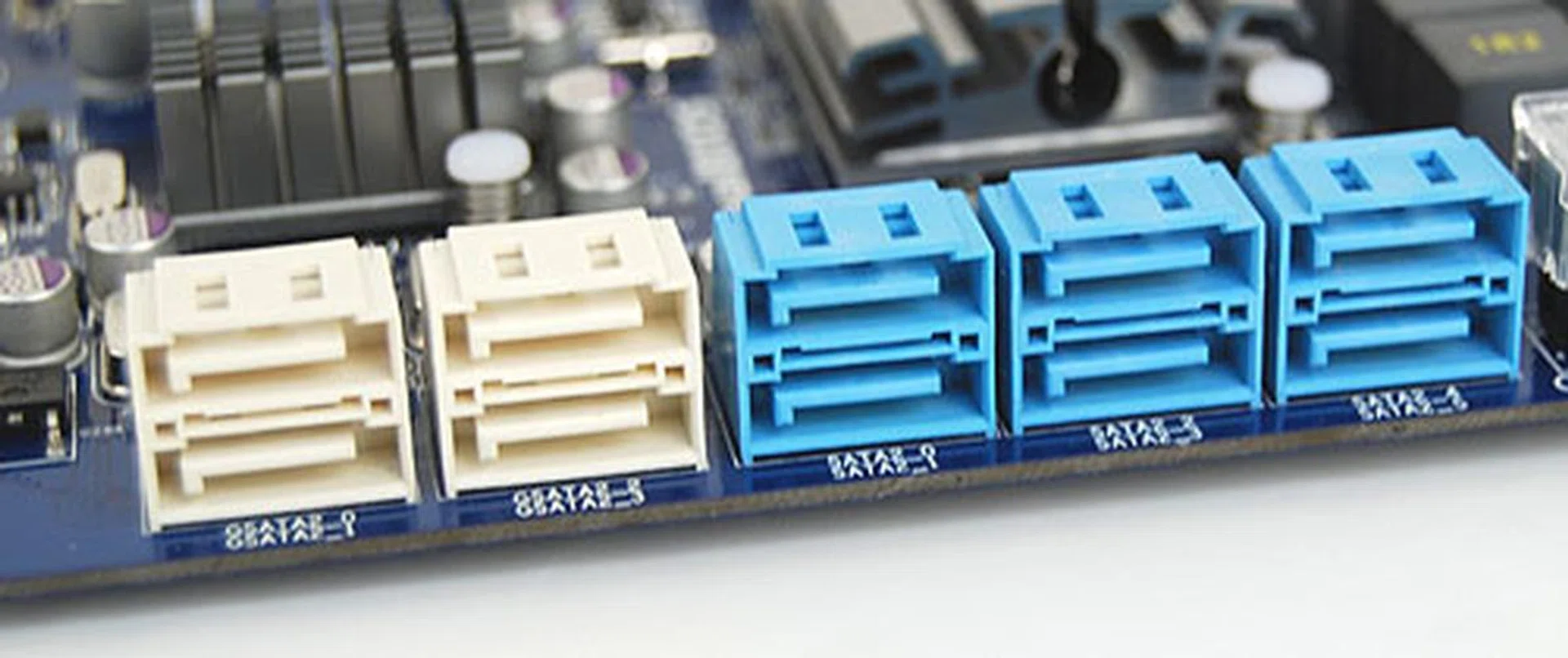
Gigabyte adds four more SATA ports to the six available from the AMD Southbridge. If you collect hard drives as a hobby, this is the board to get.
This Gigabyte board comes with a massive ten SATA 3.0Gbps ports. That is four extra from the standard six found on the Southbridge and they come from the two JMicron JMB322 chips that are onboard. A eSATA bracket kit is included to convert those SATA ports to get two eSATA. It will require one of your expansion slots however. With so many SATA ports, it's looking like a board for storage freaks.
Besides these surprising design choices, Gigabyte has gotten its layout right for the most part. The outward orientation of the SATA ports for one is our preferred choice while other connectors like floppy and IDE are rightly found at the edge of the board. Unlike the ASUS, there was no issue with installing or removing the CPU heatsink fan while the dual PCIe 2.0 x16 graphics slots were spaced apart sufficiently to accommodate a graphics card with a triple slot cooler. At least some good came out of reducing the graphics card expansion slots.
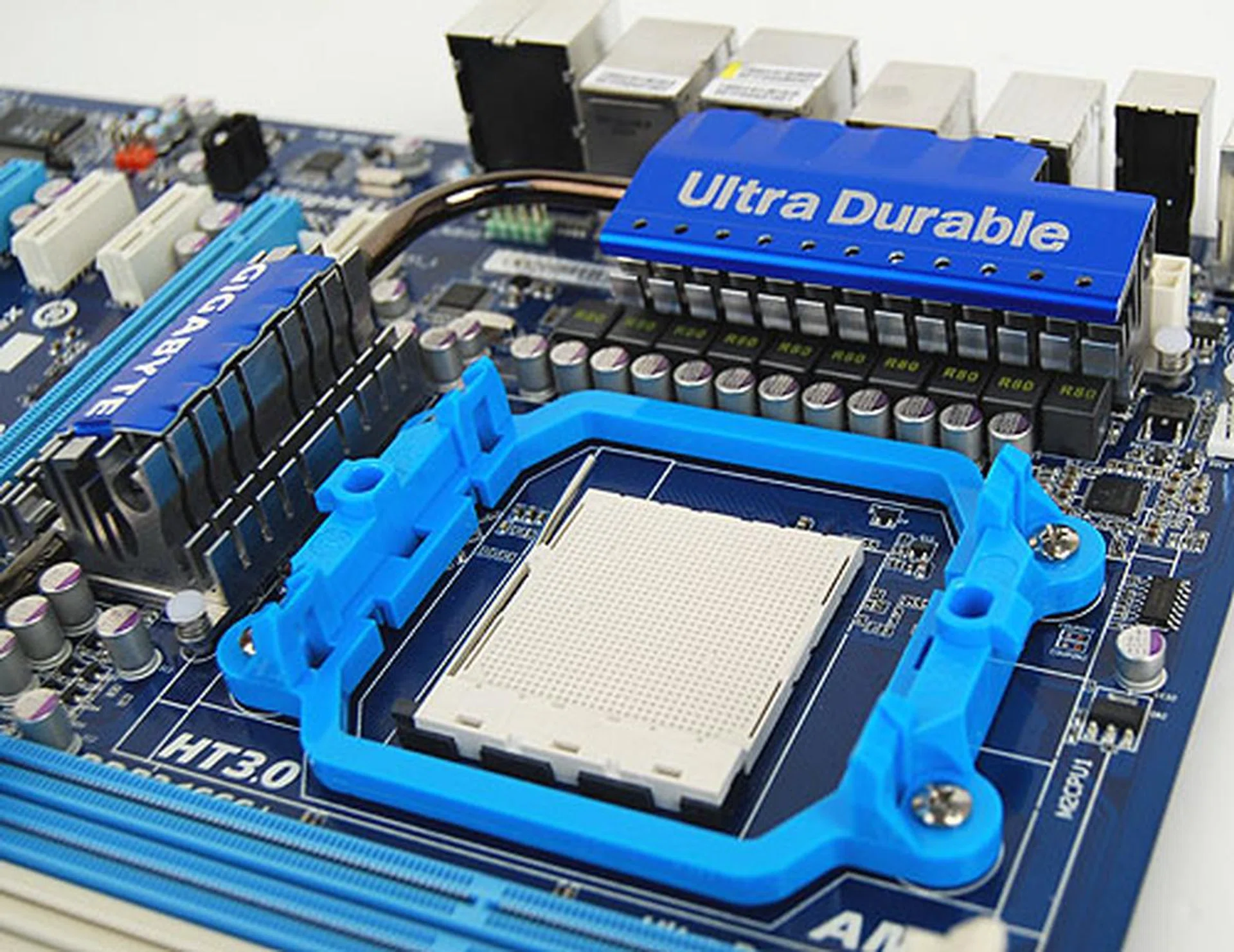
The Gigabyte heatsink was about as close to the CPU socket as the ASUS but thanks to its design, it did not interfere with our CPU heatsink.
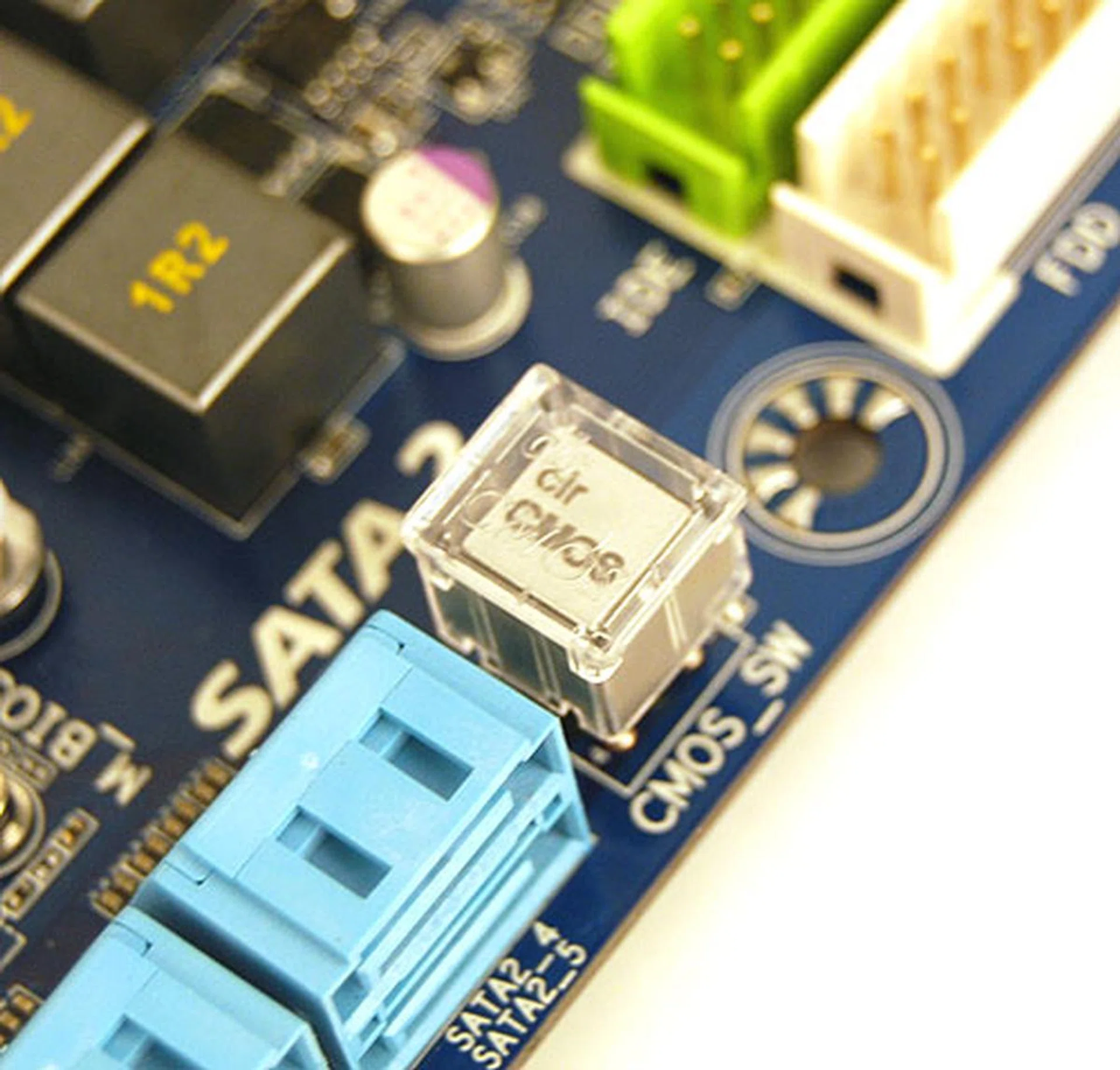
Perhaps Gigabyte heard the feedback of enthusiasts about the 'danger' of having a Clear CMOS button readily available because this button here has a plastic cap over it to prevent accidents.
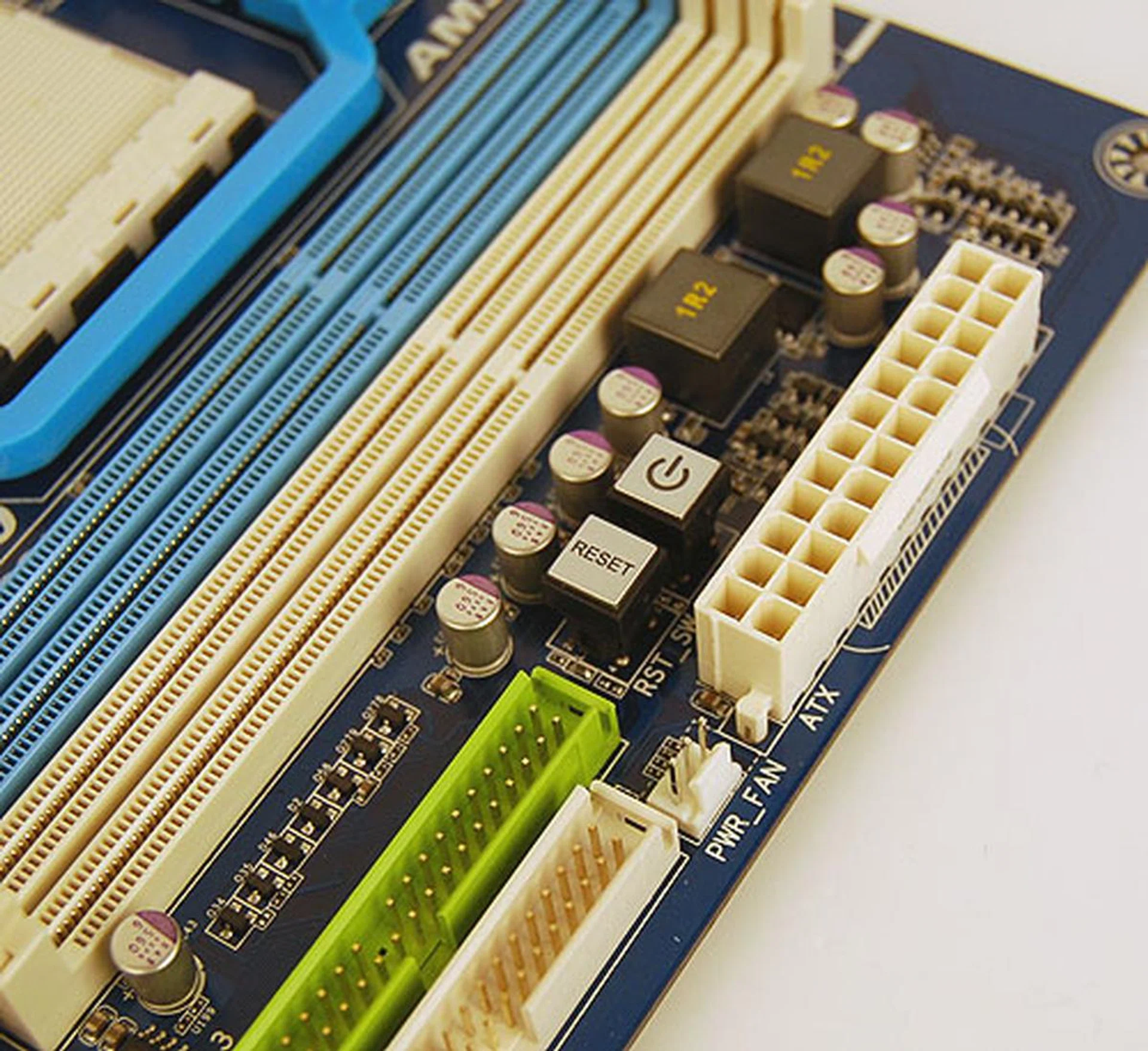
We initially assumed that Gigabyte did not include the onboard power and reset buttons but it turns out that they are hidden here in a rather unconventional location. It's slightly less convenient no doubt but nothing serious.
Features and Layout - MSI
And on to our final AM3 AMD 790FX competitor, the MSI 790FX-GD70. We could sum it up as a more palatable compromise between the storage and networking emphasis on the Gigabyte and the enthusiast class quad CrossFireX capabilities on the ASUS. As you can see, the four PCIe 2.0 x16 slots for CrossFire are present, with sufficient space for dual-slot graphics cards, which is more than what we could say about the ASUS board.
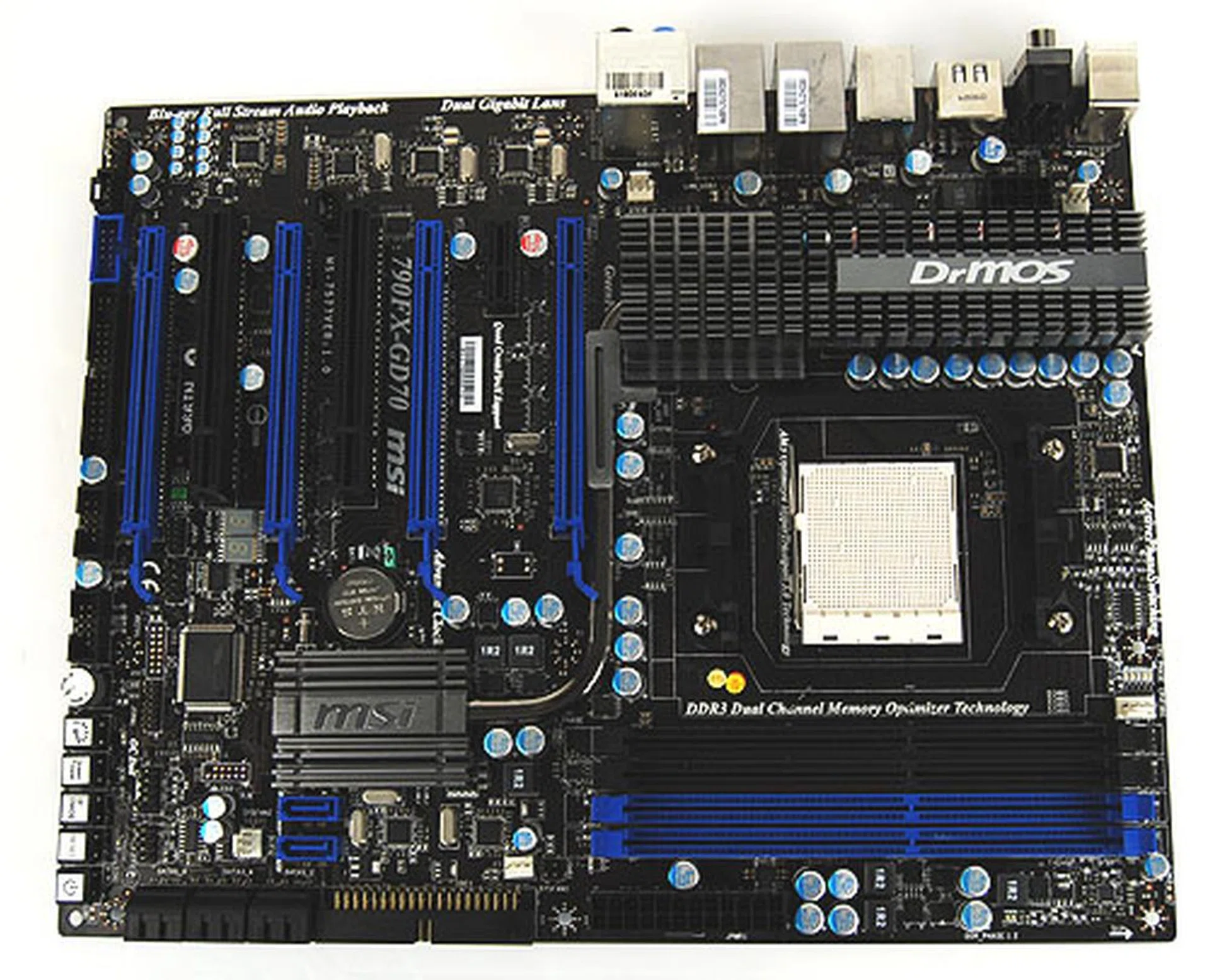
MSI is very serious about the enthusiast class features on its AMD 790FX board, with LED indicators, automatic overclocking and even an overclocking guide included in the package.
In terms of its features, the MSI board has a healthy mix of I/O ports. There's FireWire, eSATA/USB combo port, two Gigabit LAN ports, coaxial and optical S/PDIF outputs. You get the idea. It just about trumps the ASUS while having all the right ports.
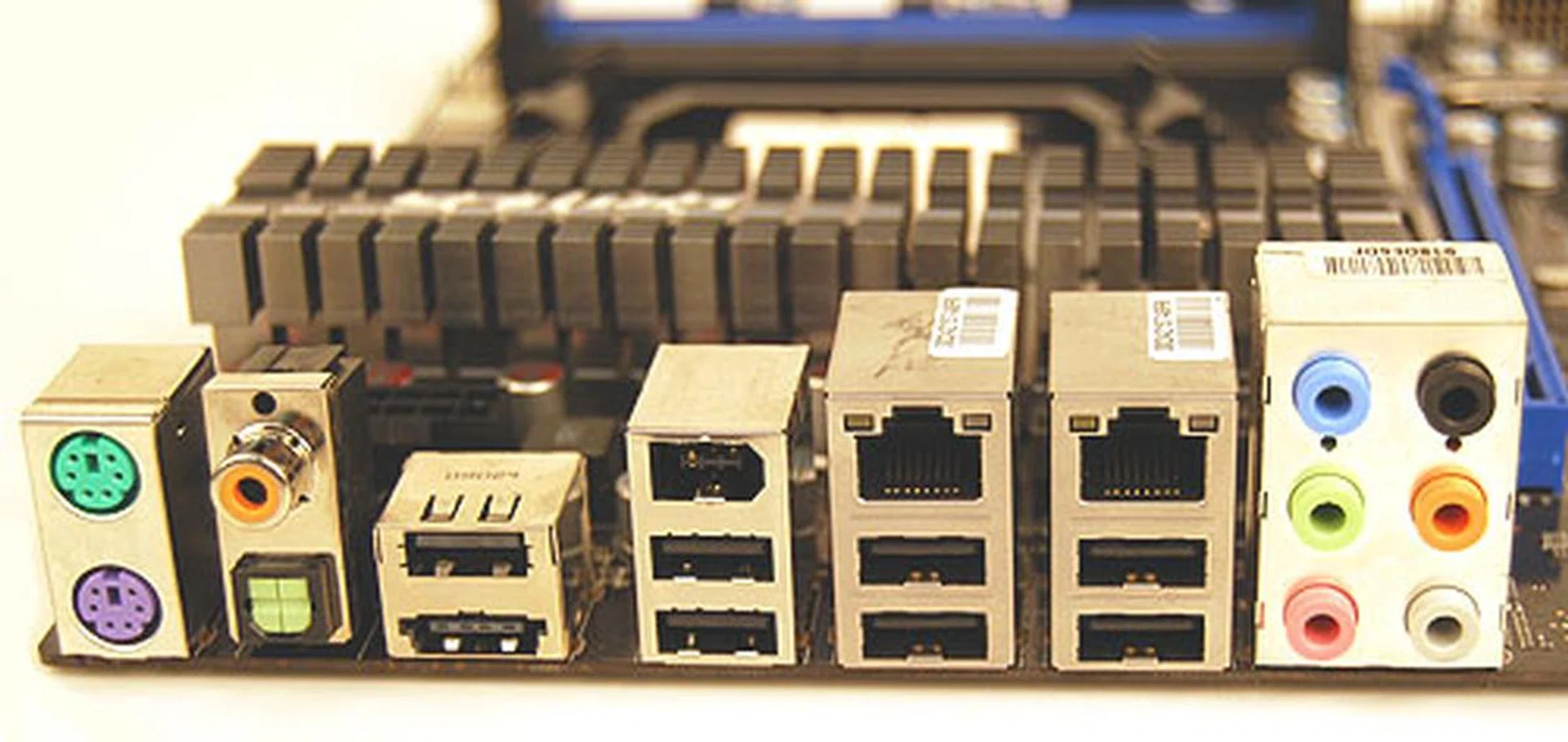
MSI has a rather full complement of I/O ports, from optical and coaxial audio outputs to FireWire, eSATA and of course lots of USB ports.
This is reflected in the SATA ports, with MSI adding just two more for a total of eight SATA 3.0Gbps ports. Notice that the original six ports are aligned facing outwards, with only two oriented upwards.
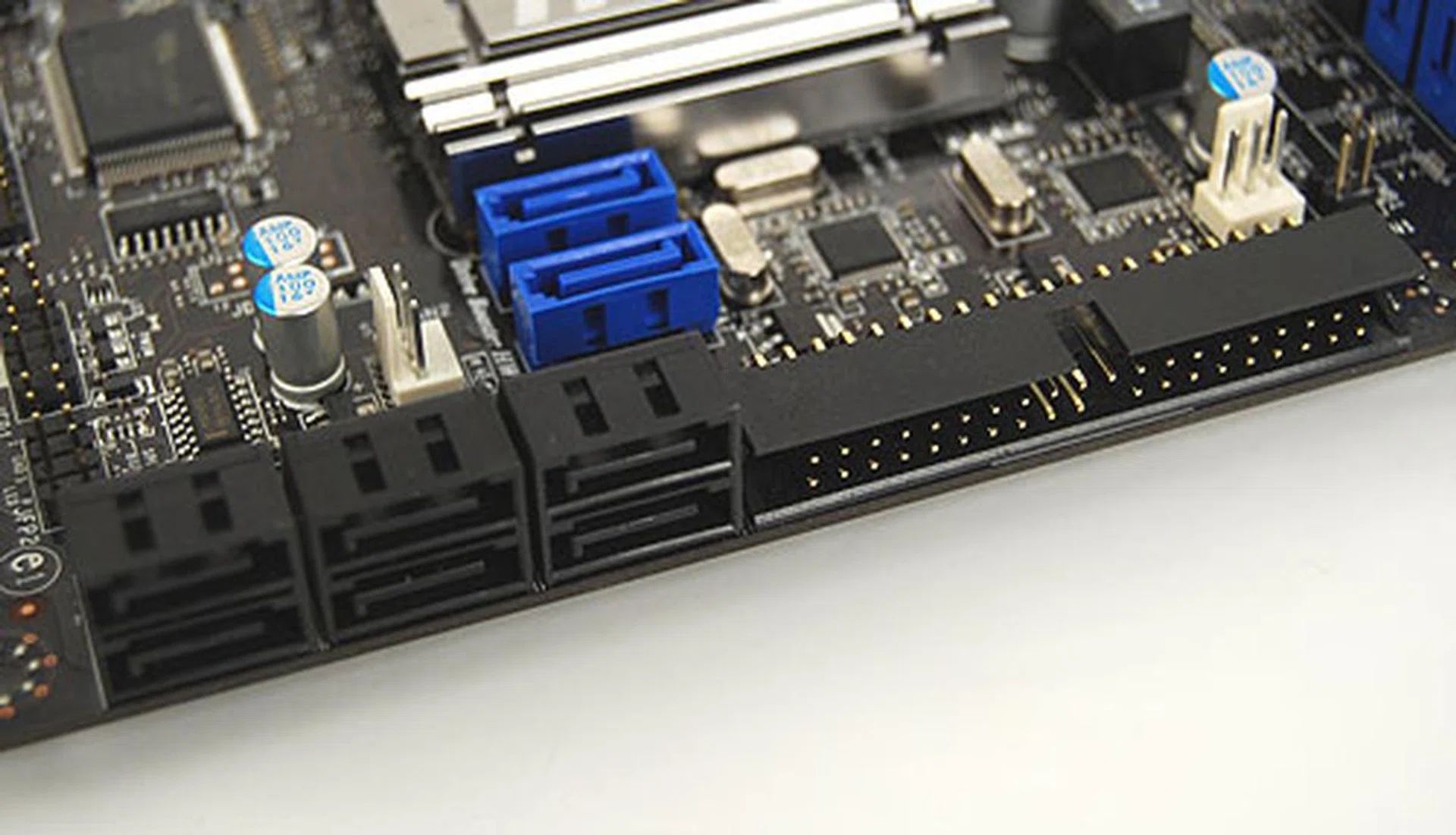
With two additional SATA ports, this MSI board may not go as extreme as Gigabyte but still provides an above average number of ports.
Even the expansion slots show a decent balance, with the remainder of the slots made up by two PCI and a single PCIe x1. Arguably, it's the right proportion of expansion slots, though of course, this all boils down to personal preferences (and the add-on cards that you plan to install).
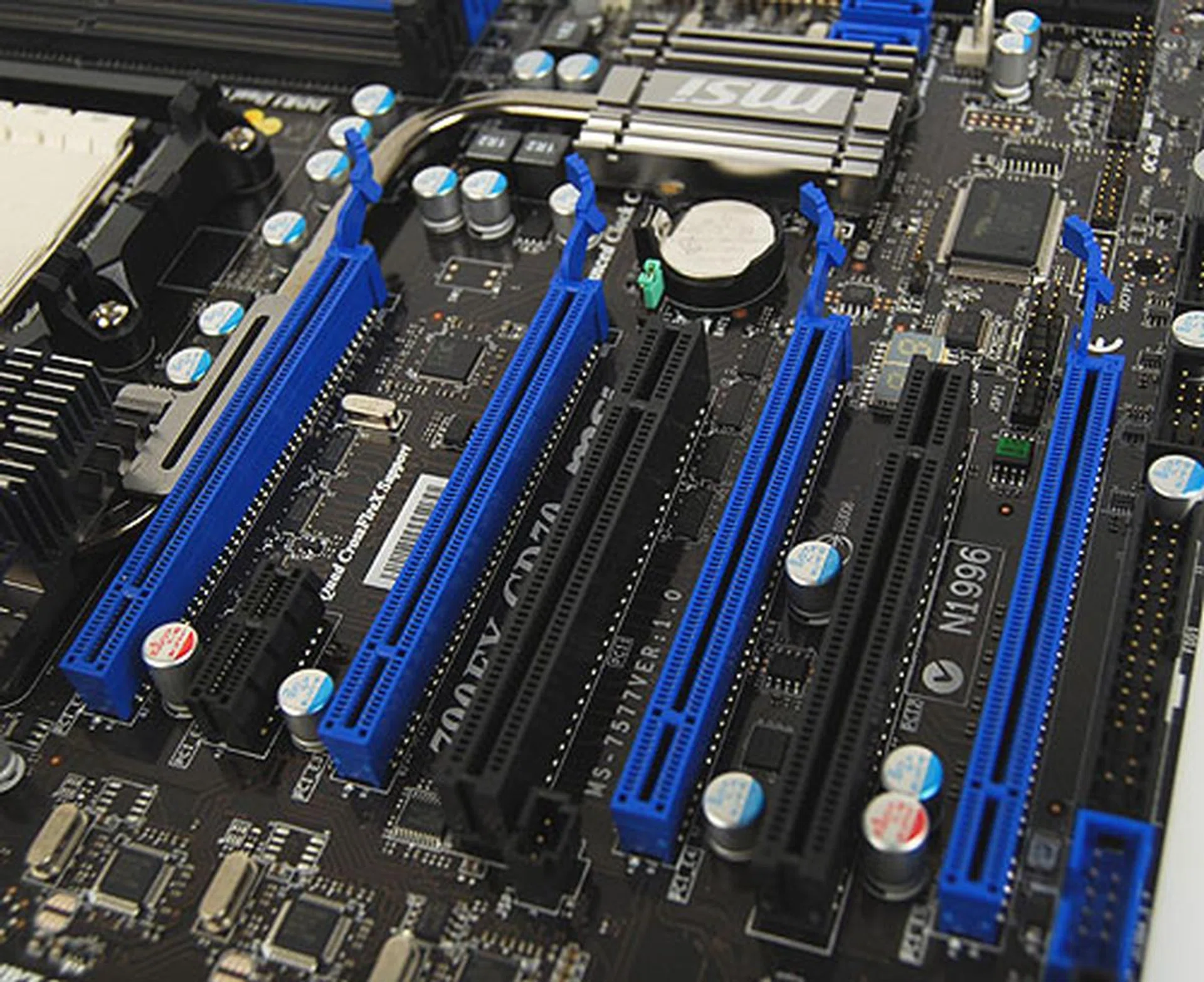
This board is more than capable of quad CrossFireX, marked out conveniently in blue.
As for the layout, MSI has nailed it with this board. To be fair, it's not so much about innovation as following the manual (if there's one) on motherboard layouts properly, with the connectors arrayed at the edges of the board and sufficient allowance and space reserved for the CPU socket and expansion slots. MSI uses a single, large heatsink in place of the two separate ones that we saw in the other two motherboards and this arrangement ensures that one won't find the CPU heatsink fan encountering installation issues, since the two latches for the socket have ample space. It also puts a huge chunk of heatsink cooling over the CPU power regulation bits, not to mention that it looks pretty unique.
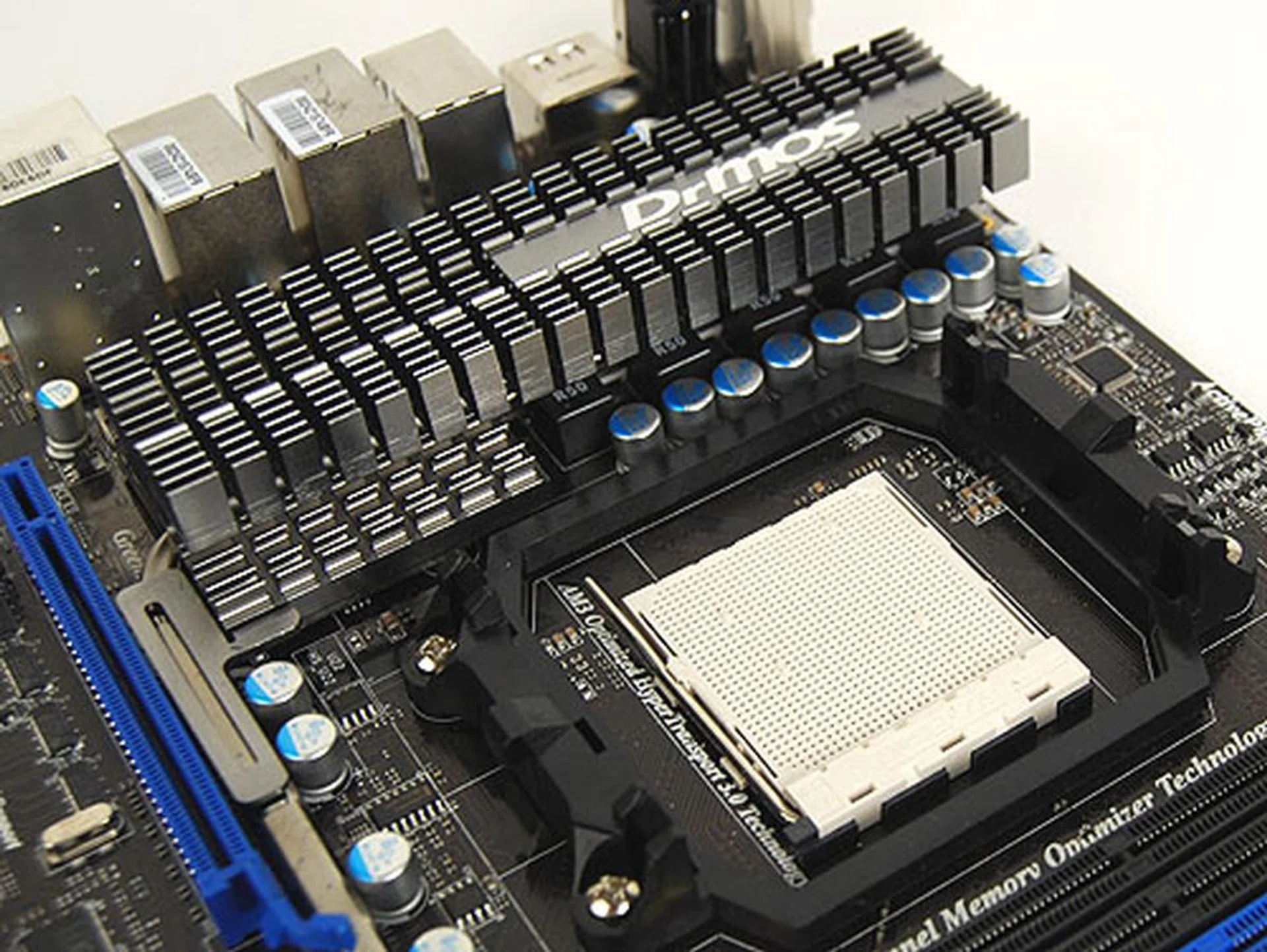
Instead of having the heatsinks split into two and on two sides of the CPU socket, MSI has gone for a huge single design. It doesn't seem to make much of a difference in terms of thermal performance but it does make it easier to mount the CPU heatsink fan.
Next, MSI boosts its enthusiast credentials with some new features that are geared towards PC tweakers. First, there are the convenient mini control panel of buttons onboard. While the other two brands have similar buttons, MSI impresses with its more extensive controls, reminding us a little of ASUS' Rampage series of motherboards. Besides the common Clear CMOS button, there's one to enable Green Power and the newest addition, the O.C Dial.
This needs to be enabled initially in the BIOS but upon doing so, you are able to use the dial and button to enable overclocking on the fly. The increment for each twist of the knob is set within the BIOS but once configured, you can use the dial to overclock the FSB in real time. We tried that and it worked, with CPU-Z showing the almost-instant change in FSB as it happened.
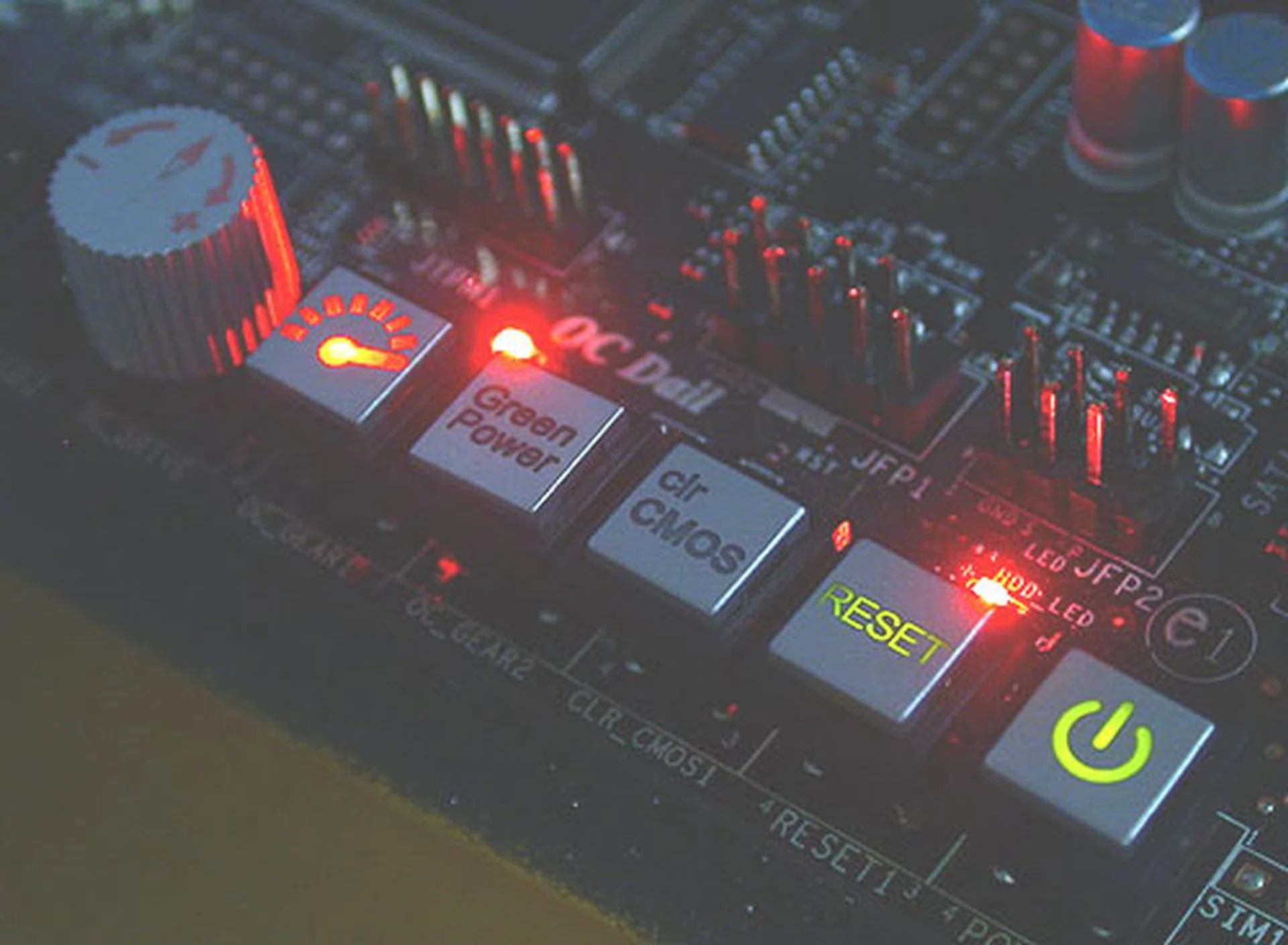
MSI has added quite a few switches and even a knob to its onboard panel here. The new O.C Dial feature is something you'll expect on an ASUS Rampage class board but MSI shows that it can do the same too.
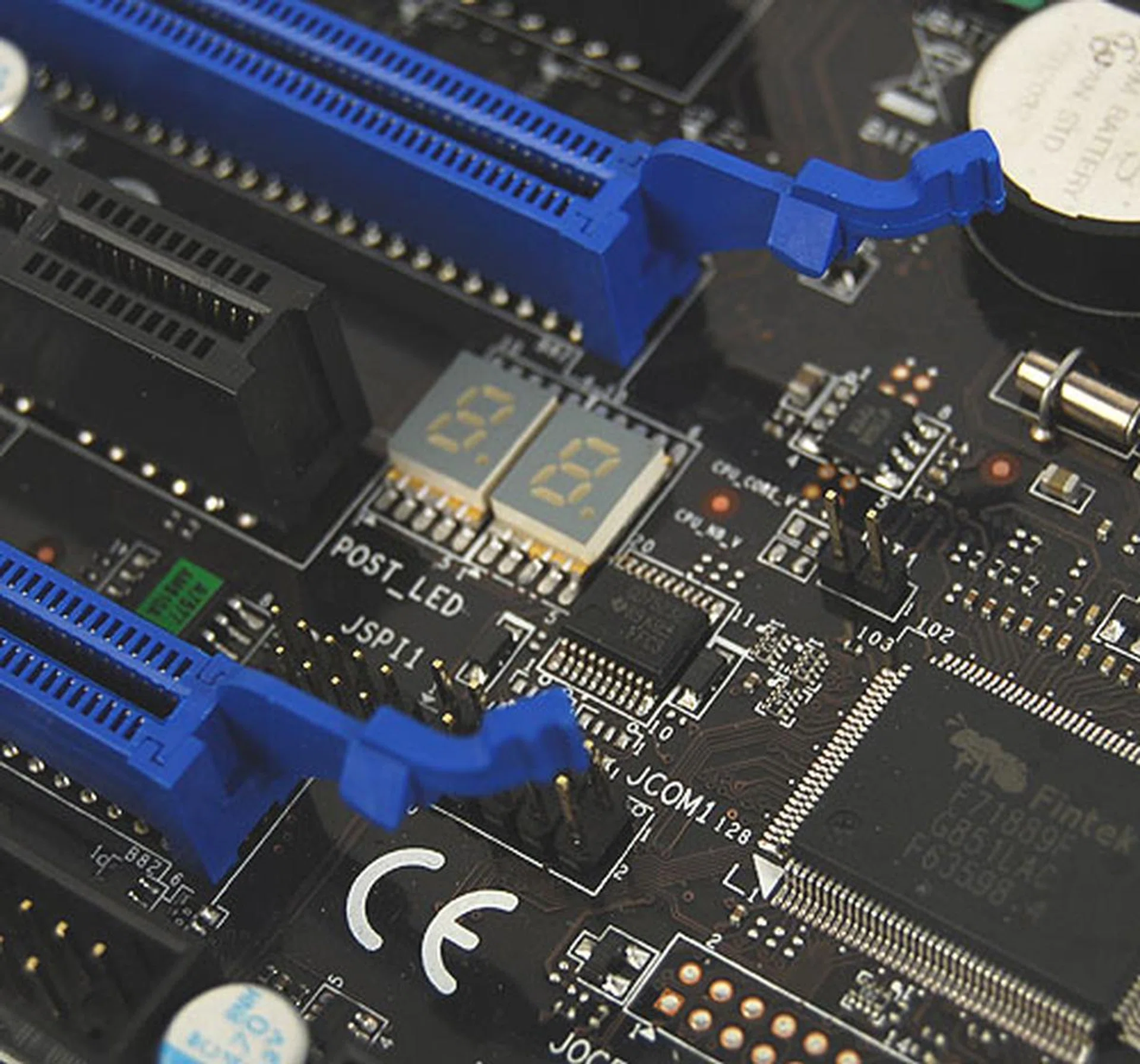
Besides this status LED indicators here that gives useful boot up information, there are other LED dotted throughout this board to show memory and CPU phase changes.
The other addition is an auto overclocking feature that can be enabled in the BIOS known as Max FSB. Once you select it and restart the system, the motherboard will proceed to test the FSB so there could be further reboots. But it will eventually settle on a FSB, usually within a minute at most. In our case, the maximum FSB for this 790FX-GD70 board as determined by this feature turned out to be 313MHz. We also have to mention that MSI's M-Flash, a very useful BIOS flashing utility is on this board, bringing the company on par with its competitors' similar tool and removing one of our previous grievances with MSI motherboards.
Finally, taking a leaf out of ASUS' book, MSI has its own instant-on Linux-based standalone OS, Winki that will come with this board and which has its own built-in browser and IM client. This OS will also see action in its mini-notebooks. Together with other MSI technologies that we have seen from before, like Green Power and DrMOS, along with the new additions today, MSI looks to have crafted quite a competitive 790FX offering.
Overclocking
While the latest Phenom II X3 720 'Black Edition' has been heralded by many as the best overclocking Phenom II processor currently, our test system was using a Phenom II X4 810 instead. However, this shouldn't matter because when it comes to assessing our motherboards, we're more concerned about the upper limits of the FSB, which starts at 200MHz for these boards. Hence, we'll be lowering multipliers and ratios to ensure that the CPU, HyperTransport bus and memory are not the bottlenecks during our overclocking tests.
All three boards are able to support higher speed DDR3 memory than the official DDR3-1333. Of course, none of that came into play since we kept our memory ratios to the minimum. We have also included some of the relevant BIOS settings for the three boards, which you can see below, are actually very similar.
O/C Settings | ASUS M4A79T Deluxe | Gigabyte GA-MA790FXT-UD5P | MSI 790FX-GD70 |
Base Clock | 200 - 600 | 200 - 500 | 200 - 600 |
CPU Ratio | 8 - 13 | 5 - 13 | 4 -13 |
PCIe Frequency | 100 - 150 | 100 - 200 | 100 - 200 |
Memory Ratio/Multiplier | Auto, 800, 1066, 1333, 1600 | Auto, 800, 1066, 1333, 1600 | Auto, 1:2, 1:2.66, 1:3.33, 1:4 |
Voltage Adjustment |
|
|
|
Maximum OC (FSB) | 325MHz | 320MHz | 320MHz (313MHz with Auto O.C) |
The resultant FSB overclocks achieved for the three boards turned out to be similar, with the boards failing to boot into Windows at around the 320MHz mark. The useful Auto overclocking utility on the MSI came close to that maximum with its 313MHz result.
Test Setup
Since our main objective is to find out the best AMD 790FX from the three contenders, we will only be comparing them among themselves, as our previous testing of the chipset was done on a different test bed and hence not directly comparable. The following configuration was used:-
- AMD Phenom II X4 810 (2.6GHz)
- 2 x 1GB Kingston HyperX DDR3-1333 @ 7-7-20 CAS 7.0
- Seagate Barracuda 7200.10 200GB SATA hard disk drive (one single NTFS partition)
- ASUS GeForce 9800 GTX 512MB - with ForceWare 178.24 drivers
- AMD SouthBridge Driver 8.522
- Microsoft Windows XP Professional with Service Pack 2 (and DirectX 9.0c)
The following benchmarks were used to determine the performance of the AMD 790FX motherboards:-
- BAPco SYSmark 2007 (with Patch 4)
- Futuremark PCMark05 (ver 120)
- SPECviewperf 9.0
- AquaMark3\
Results - SYSmark 2007 Preview
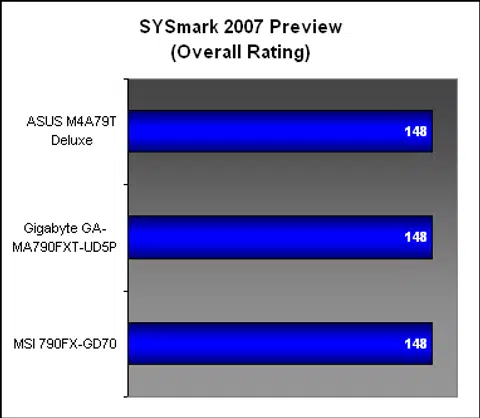
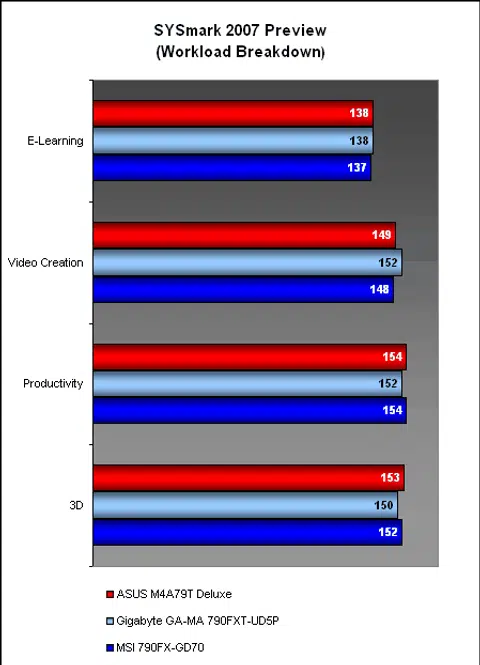
While the individual breakdowns of the various subsections in SYSmark 2007 had some minor variations, the overall system score for the three boards were identical. Hence we had to examine the breakdown to find out their strengths and weaknesses. The Gigabyte for instance, had the slight edge in Video Creation, but lost ground to the other two in 3D and Productivity. Users however are unlikely to find any discernible differences between the boards when running their applications.
Results - Futuremark PCMark05 Pro
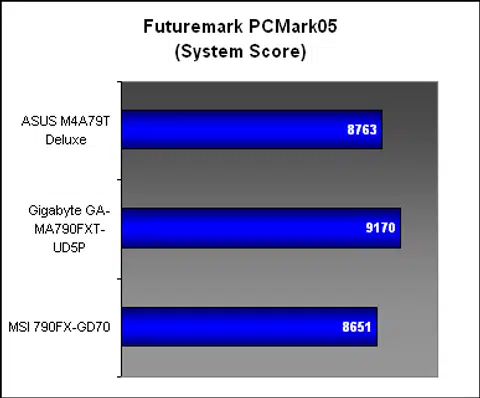
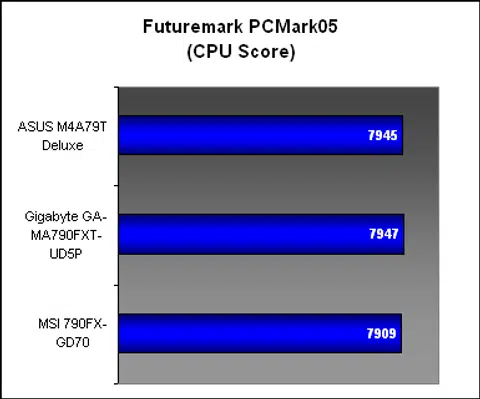
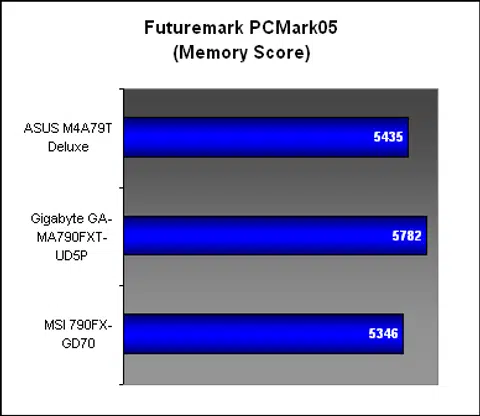
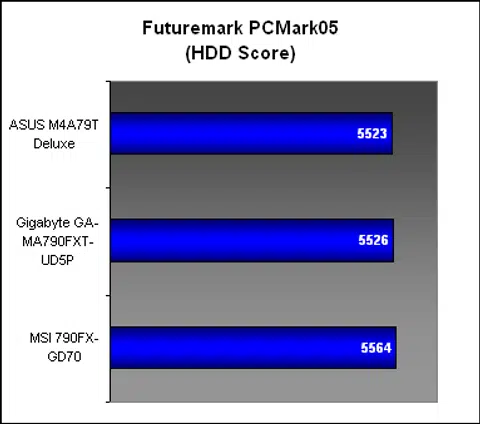
With the exception of the Gigabyte, which seemed to have a slightly anomalous performance for the memory segment, the three boards were mostly similar here, with close scores in the CPU and hard drive performance sections. Given what we saw of these boards in SYSmark 2007, the results were not unexpected.
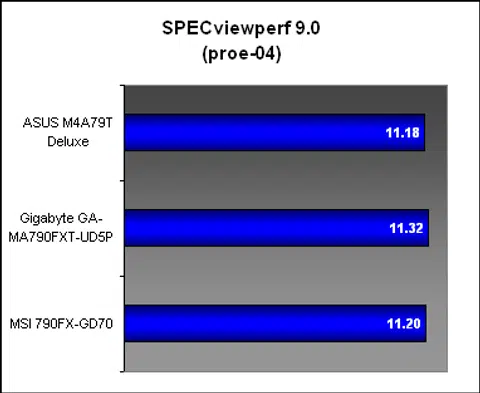
Results - SPECviewperf 9.0
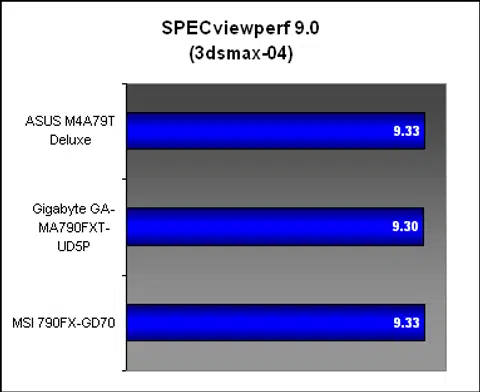
As expected, the results in SPECviewperf 9.0 were too close to call between the three motherboards. Since both the graphics and memory subsystems are tested in this benchmark, it's safe to say that if you're looking for performance alone, any of these boards will do fine.
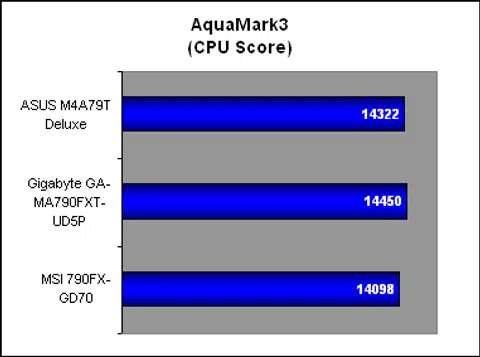
Results - AquaMark3
The AquaMark3 results were in line with our findings so far, with the boards scoring similarly. Of course, with the GPU the main determinant of graphics performance nowadays, this benchmark is effectively showing that the motherboards are working properly rather than a gauge of performance.
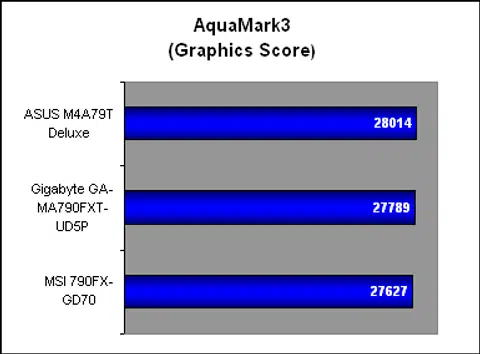
Conclusion
Performance | Features | Layout | Overclocking | Stability | Value | Street Price (US$) | |
ASUS M4A79T Deluxe | 4.0 | 4.0 | 3.5 | 4.5 | 4.5 | 4.0 | 200 |
Gigabyte GA-MA790FXT-UD5P | 4.0 | 4.0 | 4.0 | 4.0 | 4.0 | 4.0 | 180 |
MSI 790FX-GD70 | 4.0 | 5.0 | 4.5 | 4.5 | 4.0 | 4.0 | 212 |
Finally, we come to the concluding reckoning, where we sum up our opinions of these three motherboards. If you want to skip the wordy (but informative) version below, the table above lists how we feel about the boards based on selected criteria along with its street or online price. The performance from these boards have been very similar and one will do fine with any of them if that's your only criteria. If not, read on:-
ASUS M4A79T Deluxe - With this board, ASUS has maintained its usual high standards. This is a board that gave us no problems during testing. It also had the slightest of advantages when it came to overclocking. Along with the usual ASUS extras that we are so familiar with, it's a decent choice for an AMD 790FX motherboard.
However, when one looks at the other two competitors in this roundup, some of its minor faults became more prominent, from the less than ideal layout to the chipset heatsink that got in the way of our CPU heatsink. It suffers slightly when compared to its rivals in terms of the features available, like only having a single Gigabit LAN controller. Finally, its price is at a premium for what it has, albeit more reasonable than some ASUS products that we have seen. It's a good choice nonetheless especially if you don't need the extras offered by other brands.
Gigabyte GA-MA790FXT-UD5P - Gigabyte's contender is a strange beast. Due to some unconventional design decisions, the board is heavily oriented towards storage as a main highlight. We have seen Gigabyte doing this for some of its other boards but here, the decision to go for that many SATA is probably not ideal for consumers. Add to that the removal of quad CrossFireX for more PCIe x1 slots and it's just not our cup of tea.
On the flip side, it's a board that runs cool and mostly without a hitch. Consumers may feel reassured by the solid feel of its Ultra Durable 3 enhanced PCB. Gigabyte's proprietary features are also a familiar comfort, from its Q-Flash BIOS flash utility to its energy saving technologies. Besides, let's not discount its highly competitive price, which could just suit the budgets of some consumers.
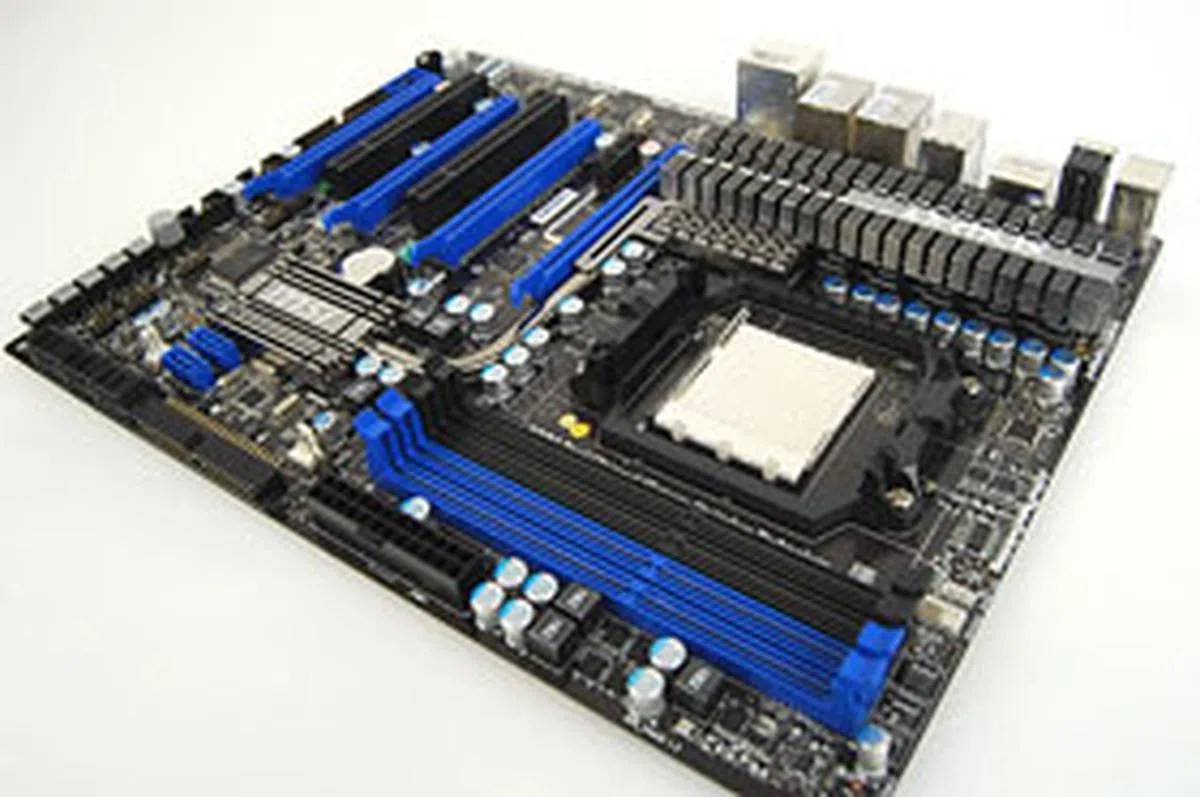
MSI 790FX-GD70 - Frankly, we had our doubts about MSI's motherboards in the past, from the way it was playing catch-up with some of its rivals in certain aspects of its board designs. With the 790FX-GD70, we have to say that this has been one of the more impressive designs from the company for a while. In our view, this MSI board has the right balance of features and technologies. You'll get quad CrossFireX like the ASUS but the layout of the slots is better. Minor things like the alignment of the SATA ports, to the presence of a eSATA/USB port, to the single chipset heatpipe based heatsink. In terms of features and layout, we prefer this board to the other two.
The only issue we had was that the testing was not as smooth as the other two. We ran into some problems during benchmarking, which were eventually solved with updated BIOS. If MSI has ironed out the bugs in its BIOS, it should be a pretty stable board and hopefully that's what we'll see in retail too. The asking price too is significantly higher than the other two boards but the addition of new features like the O.C Dial and Max FSB auto overclocking are interesting and something that the other boards lack. Although these features may not be that unique to the industry, they do add value over its direct competitors. For that, we believe that the MSI 790FX-GD70 is the best of the bunch.
 | |
 |  |
 | |

Our articles may contain affiliate links. If you buy through these links, we may earn a small commission.