
Network slicing, next-gen firewall: How Singtel Mobile Protect blocks malicious threats before they strike
Singtel’s Mobile Protect add-on offers enhanced network-level security as part of a comprehensive 3-Step Security Approach, creating multiple layers of defence against phishing attacks, potential scam calls and more.
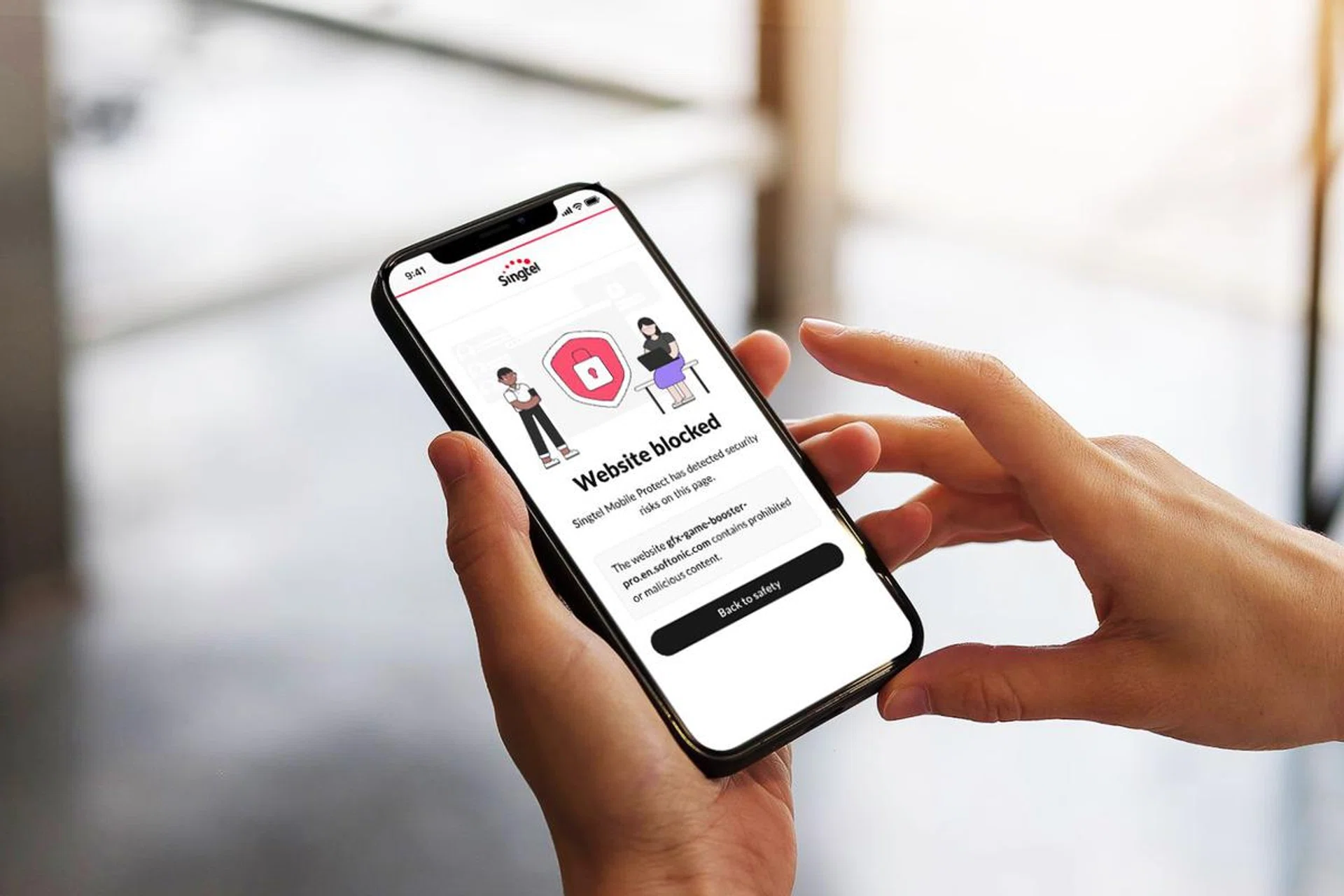
Over 300,000 users of Google Chrome and Microsoft Edge fell victim to a sophisticated malware attack in August. The culprit? Fake versions of popular platforms like YouTube and password manager KeePass distributed through convincing lookalike websites.
What made this incident noteworthy wasn’t just its scale, but its victims – they weren’t elderly users or tech novices, but Millennials and Gen Z users who considered themselves well-versed in online security.
Greater speeds, reduced latency and better efficiency are just some of the reasons why more critical infrastructure networks are starting to rely on 5G technology. But that increased adoption also brings more risk.
That’s why more has to be done to secure our devices. As scammers get more sophisticated, basic protection is not enough anymore.
Singtel’s network comes with a foundational level of security as a standard. Scam Call Protect and Barring Service for International Incoming Voice and International Incoming SMS come free for all Singtel subscribers, preventing scammers from reaching us with calls and messages.
But upsizing to Mobile Protect can provide better defence against evolving cyber threats. This is part of Singtel’s broader 3-Step Security Approach which aims to encourage the practice of safe cyber habits online while empowering users with the network and security tools to protect themselves.
Only by adopting a secure approach at the network, device and community levels can users be truly empowered to navigate today’s digital world with greater confidence, knowing they have the right tools to stay ahead of evolving threats.
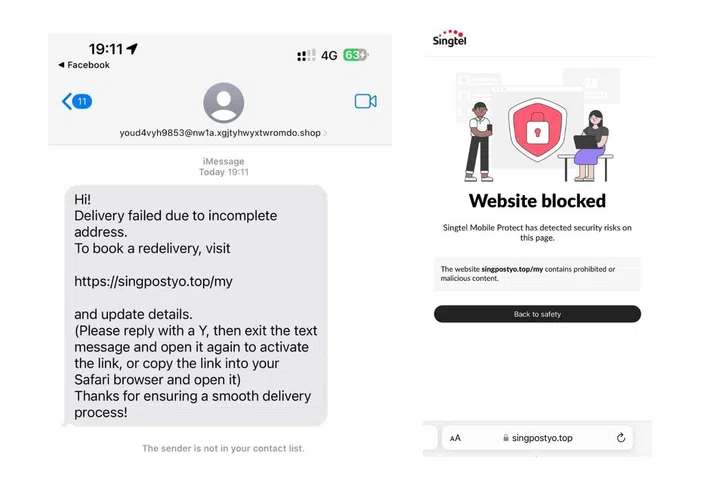
When you click on suspicious links, Mobile Protect can prevent access to potentially dangerous websites. PHOTO: SINGTEL
Stop threats before they reach you
Sometimes, too much knowledge can be dangerous. Especially if it creates a false sense of security. You might have paid for a top-class antivirus software solution or be in the habit of using a VPN, but these won’t protect you from your own risky actions.
Antivirus software won’t help much if you use a jailbroken phone that has already been compromised. Nor can even the strongest VPN safeguard you if you visit unsafe websites.
Device-level security is only as strong as the threat intelligence behind it, which relies on an up-to-date database. If that database is compromised or out-dated, then your protection will be weakened. Threat prevention is most effective before malicious content reaches your device.
That means identifying and blocking threats in real-time at the network level. This is particularly crucial for network-based threats like man-in-the-middle attacks, where cybercriminals intercept your data and steal sensitive information before it even reaches your device’s security software.
That’s where Broadband Protect comes in. Because it works on the network level, it protects all devices on your home network – including devices you can’t install additional protection on.
Mobile Protect, on the other hand, monitors network traffic and provides enhanced real-time protection when you’re out of home and connected to its 5G network. Should you click on a potential phishing link or try to access a malicious website, Mobile Protect blocks it immediately – preventing exposure to scams before they can reach your device.
The service requires no installation. And because it works on the network level, it protects you automatically even when you switch devices. It also provides a weekly threat summary which shows you exactly what you’ve been protected from and gives visibility to the service’s active protection.
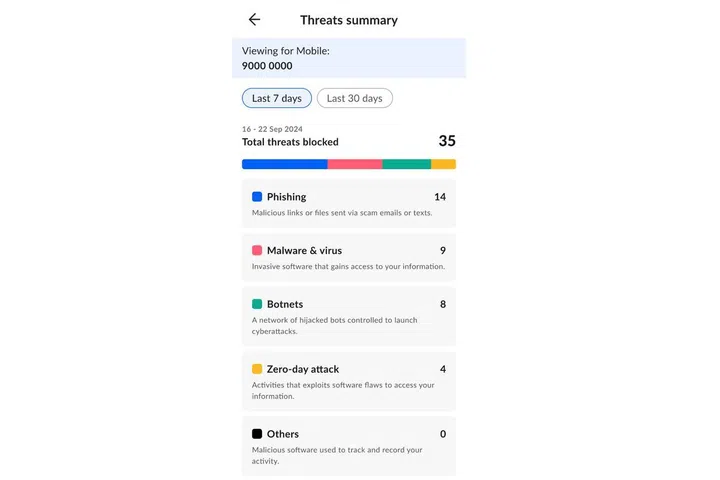
A weekly summary of the threats shows you exactly what you have been protected from. PHOTO: SINGTEL
Smart slicing for safer surfing
A unique technology that Mobile Protect uses, 5G Network Slicing, offers Singtel subscribers safer surfing. It recently took home the Security Solution of the Year accolade at the 2024 Global Telecoms Awards organised by UK-based telecommunication trade news and analysis platform Telecoms.com.
Singtel takes advantage of how a physical 5G network can be subdivided into smaller virtual networks that can be then managed separately.
This Security-as-a-Slice approach places subscribers on a dedicated virtual network where all data is first sent through Singtel’s next-generation firewall for added protection.
This firewall is capable of machine-learning, and provides protection with best-in-class features such as advanced URL filtering, advanced threat prevention and DNS security.
Advanced URL filtering prevents unknown, evasive and targeted web-based threats in real-time, while advanced threat prevention blocks off intrusion, malware and C2 (command & control) threats. Lastly, DNS Security analyses DNS requests in the cloud and denies web requests or traffic to domains marked for hosting malicious content.
Of course, a firewall is only as good as the database behind it, so Singtel has partnered with Palo Alto Networks, giving it access to one of the largest threat databases available globally.
With Palo Alto’s network of global firewalls, any new website detected will be immediately assessed by Cloud AI and marked as “safe” or “threat”. This shortens the time to detect and block new malicious sites significantly.
Because Singtel’s next-generation firewall stays connected to Palo Alto Networks’ cloud security services, it stays up-to-date, allowing it to detect and block new threats as quickly as possible.
Every layer counts
Different threats call for different solutions. For instance, network-level security like Mobile Protect and Broadband Protect can only be enforced on Singtel’s 5G network and your home network respectively.
If the malicious file is already on your device, it’s no longer on the network so you’ll need end-point security like McAfee’s Triple Protect Security instead. This will detect the threat and block it before it completes installation.
Conversely, if your device is already infected with malware, then only network-level security will help contain the spread. This blocks malware when it tries to connect to a C2 server to get further instructions (or send out stolen data), and limits what it can do.
So, network-level security protects from incoming and outgoing threats, while device-level security protects from threats on your device.
There’s also a final, crucial layer of protection and it starts with yourself. As users, you should and need to be the first – and also the ultimate – line of defence against scammers, who are constantly evolving their approach and modus operandi.
Even if you adopt the most advanced, sophisticated and up-to-date security tools, staying vigilant and practising safe cyber habits are good ways of protecting yourselves against potential threats when surfing online.
And then, there’s also your social responsibility of being part of an informed community.
Singtel helps build this community through regular updates about emerging threats and new scam tactics, but you can help too, simply by sharing what you’ve learnt.
Why upsize your security?
As a Singtel customer, you are already protected by two free security services:
- Scam Call Protect: Automatically blocks known scam numbers and spoofed government agency numbers
- International Call/SMS Barring: Option to block all international calls and SMS messages that are common sources of scams
Now, think of your home security. While basic locks are essential, adding security cameras and an alarm system provides better protection. Similarly, building on your basic Singtel security with add-ons helps protect you across all your digital activities.
Let’s see how this multi-layered approach works in a real-world scenario:
- A scammer sends you a phishing link via SMS.
- Network level: Scam SMS Protect blocks suspicious messages.
- If you click on a malicious link, both Mobile Protect and Broadband Protect block access to the dangerous website, depending on the network you’re on.
- Device level: McAfee Triple Protect provides additional scanning and monitoring.
- Community level: Singtel alerts other users about this new scam attempt.
Don’t wait for a security breach to think about protection. Singtel has various ways of upsizing your security – discover how its solutions and 3-Step Security Approach can provide additional peace of mind.
Brought to you by

Our articles may contain affiliate links. If you buy through these links, we may earn a small commission.