
Acer Iconia W3 - The World's First 8.1-inch Windows 8 Tablet
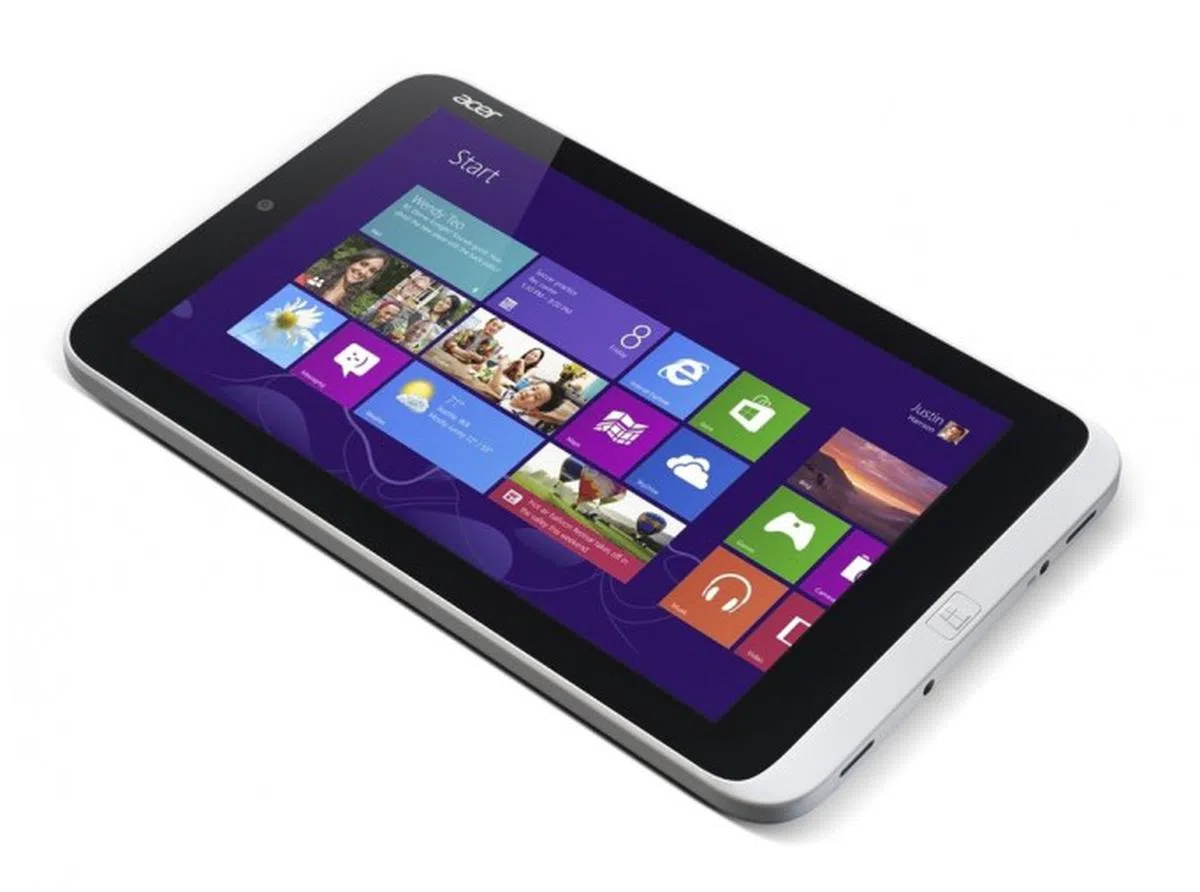
Acer's Iconia W3 tablet is the world's first 8.1-inch tablet running Windows 8. With a dual-core Intel Atom processor and a full featured version of Windows 8, could this tablet be the answer for anyone looking for a portable and affordable Windows 8 machine? We find out.

The World's First 8.1-inch Windows 8 Tablet
It's been a long time since we've seen any sub-10-inch Windows devices. There was a period in 2006 where probably-better-forgotten UMPCs (Ultra Mobile PCs) such as the 7-inch Windows XP-based Samsung Q1 UMPC were briefly in vogue, but since then the sub-10-inch device category has been dominated by iOS with its iPad Mini, and Android, thanks to the growing phablet category and the wealth of 7-inch Android tablets available on the market. Until now, all Windows 8 tablets - due in part to the OS naturally being well suited to larger devices - have been 10 to 13 inches.
Acer is no stranger to tablets, as its 2011 efforts show, the Acer Iconia Tab A500 and the smaller 7-inch Iconia Tab A100 were two of the first Android 3.2 Honeycomb tablets available on the market. It also has experience with Windows tablets such as the 10-inch Windows 7 based Iconia Tab W500. With the recently launched Iconia W3 tablet, Acer has built the world's first 8.1-inch tablet running Windows 8. First announced at Computex 2013, with a dual-core Intel Atom processor, a full version of Windows 8 (our version is running 32-bit Windows 8.1 Preview), a portable form factor and an affordable price of just S$499, the W3 looks like a very appealing buy. We find out if it's worth your money.
 |
|
Design
The W3 is heftier and thicker than an iPad Mini or Google Nexus 7, and weighs a fair bit more at 500g (the iPad Mini weighs just 308g). Despite its weight, the entire tablet is made of plastic.
On the front of the W3, its display is surrounded by a thin, matte white plastic bezel which is also used on the edges of the device. The bezel doesn't look too ugly, but compared to other consumer devices many of which sport edge-to-edge glass, it does look a little cheap in comparison. Button placement is fairly standard for a smaller tablet, with the Windows button located at the bottom when holding the W3 in portrait orientation. While this works great for reading content and using Windows 8's Modern UI, it's not so suitable for desktop-mode, which, naturally, feels more familiar in landscape orientation.
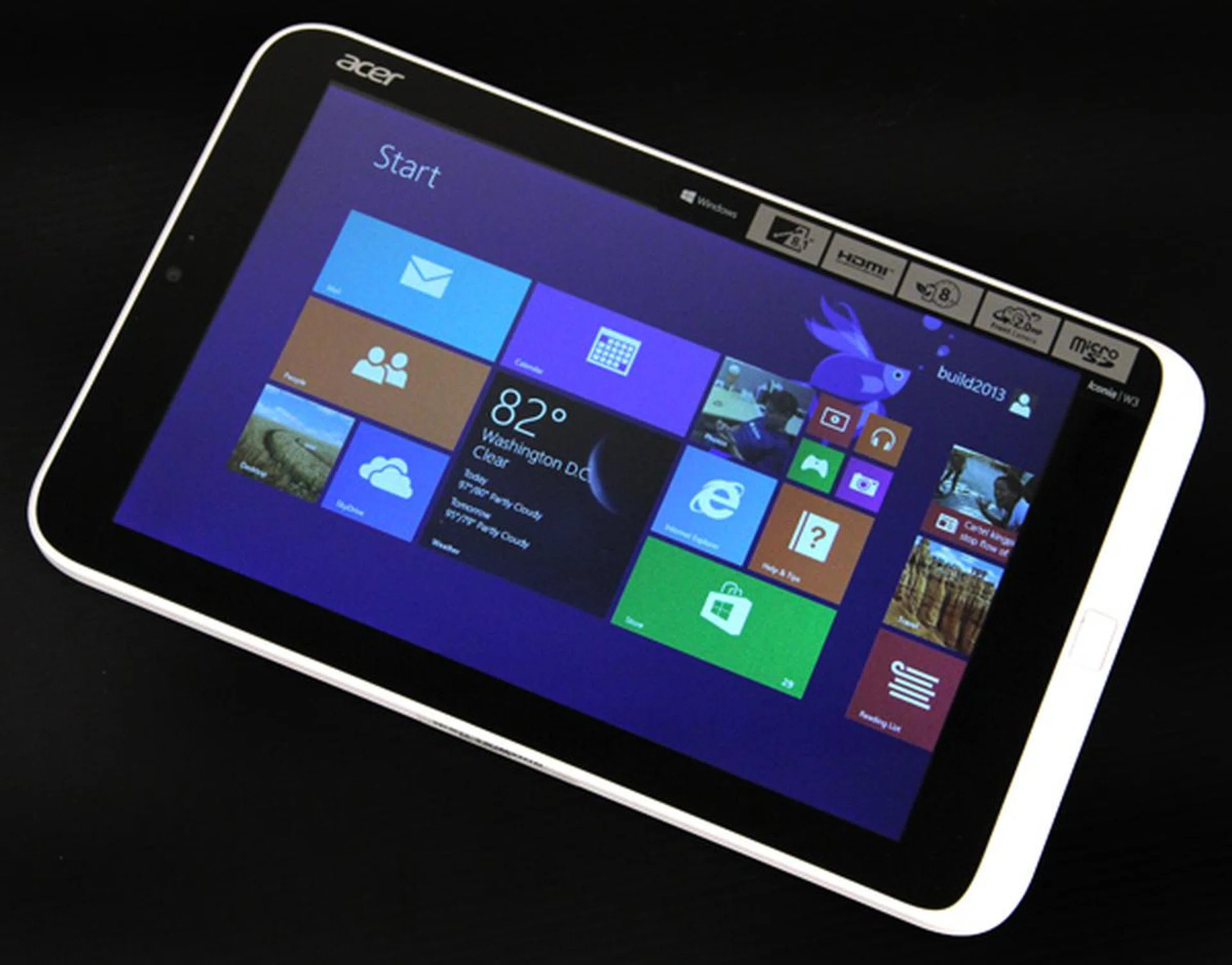
The W3 doesn't look too bad from the front, although the white, plastic bezel looks cheap in comparison to other tablets sporting edge-to-edge glass designs.
The rear of the device is finished in a metallic silver color. It's quite convincing from far away, but as soon as you get close, you can tell it's anything but metal. Up close, it actually looks quite cheap.
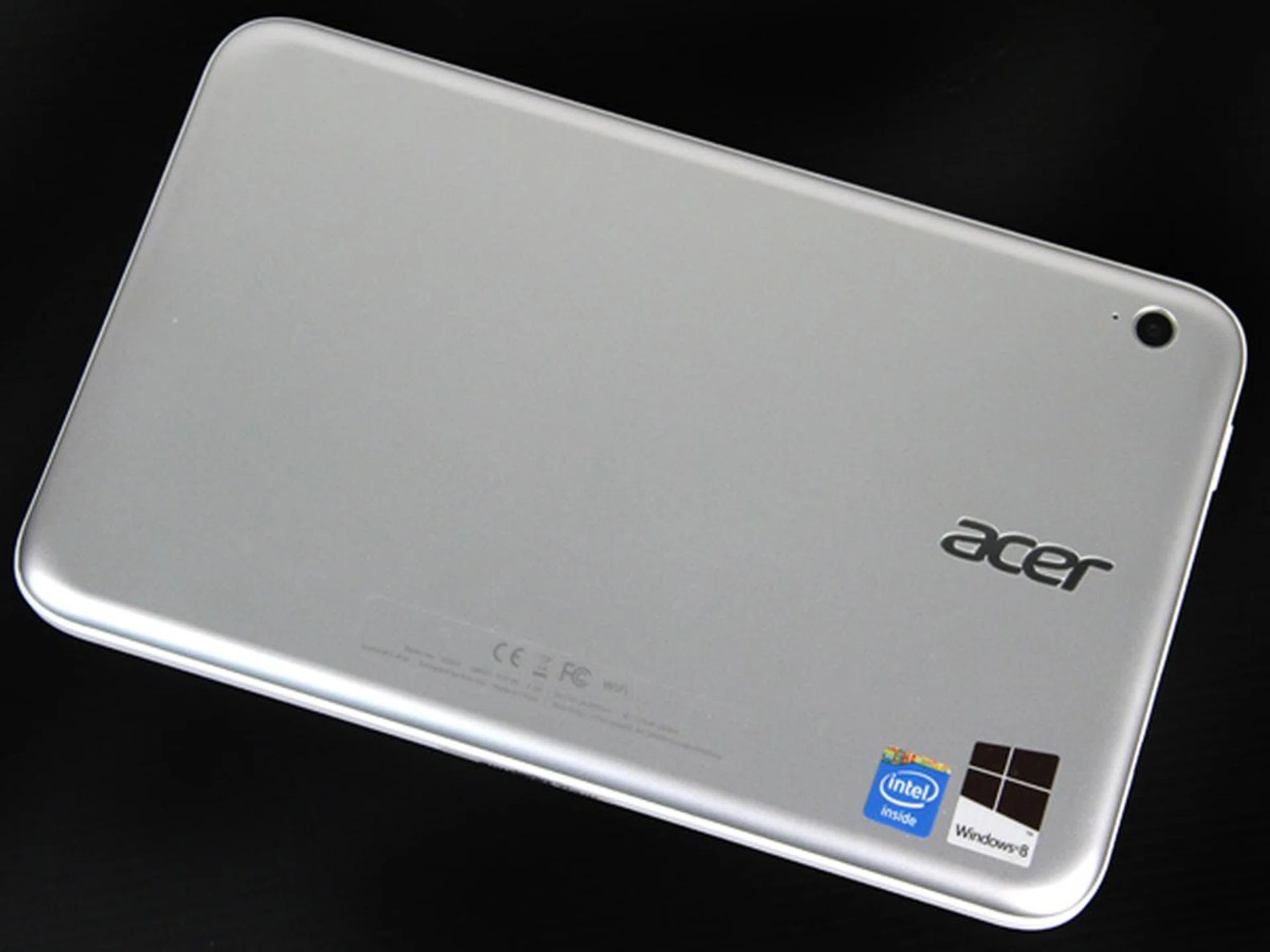
The rear of the W3 is finished in a metallic silver. It's not too bad from far away, but you can tell it's plastic when you get near.
Display
The W3 uses a 1280 x 800 pixel resolution display which isn't fantastic, but is acceptable for an 8-inch screen. Unfortunately, the screen itself is simply awful, with a very visible gauze-like, hazy coating that looks like someone left a cheap screen protector on it (they didn't - we checked). Viewing angles are also horrendous, and moving your head just a bit off-axis immediately results in a massive drop in image quality. Combined together, the screen is quite straining on the eyes, which is the last thing you want in a device you'll primarily be using for content consumption.
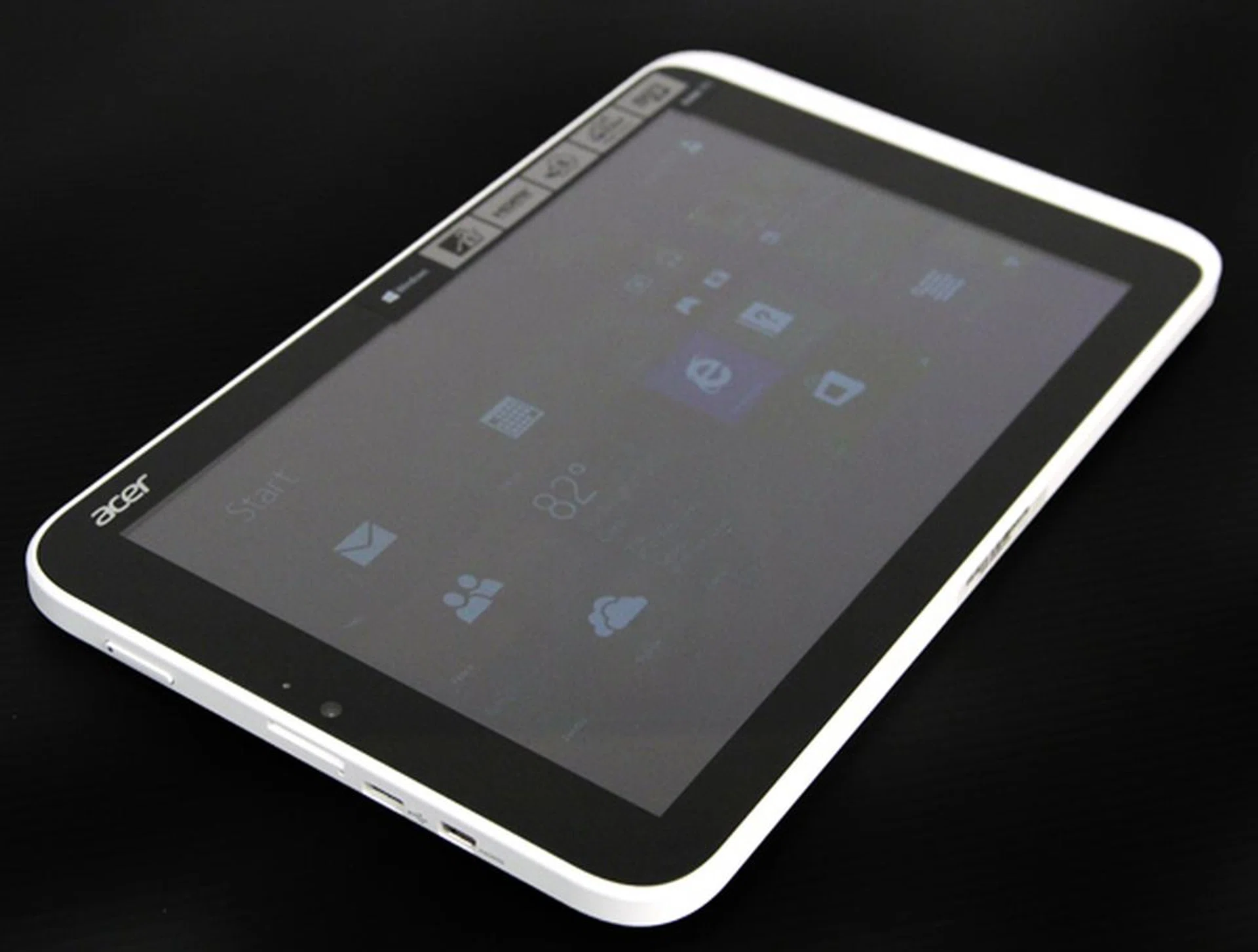
Viewing angles on the W3 quickly become very bad as soon as you start tilting the screen off axis.
While we don't expect amazing, full HD, IPS panel displays from a device aimed solely at the value-inclined customer, even budget buyers deserve more than this. It's particularly problematic for a tablet, where you might not have an optimum viewing angle much of the time (e.g. when you're riding the train and have the device in your lap).
In use, Windows 8's Modern UI worked nicely on the 8-inch display and, despite the smaller size, the tiles never felt cramped or undersized. On the other hand, Windows desktop mode was a different story. The desktop doesn't scale well, and icons and menus are all tiny and hard to read on the 8.1-inch screen and even harder to accurately select with just the tip of your finger, even with the 150% scaling option. A stylus would certainly have helped here.
Audio
Audio on an 8-inch device was never going to be great in the first place but, even with low expectations, the W3 managed to produce some of the worst audio we've ever experienced from a portable device.
To start with, the W3's two speakers are located on the right-edge (with reference to landscape handling), which makes sense if you're holding the device in portrait orientation (as it would then be the bottom edge) but of course, the majority of videos (barring some amateurs on YouTube) are shot in landscape orientation, so naturally, you'll want to hold the device sideways to maximize screen space.
Unfortunately, when you do this, you'll find that at least one (if not both) of the two speakers are now muffled by your hand that's gripping the tablet. Even if you put the tablet down, with both speakers located on one side, all the sound comes from the right of the screen, producing a very unbalanced 'broken left speaker' effect.
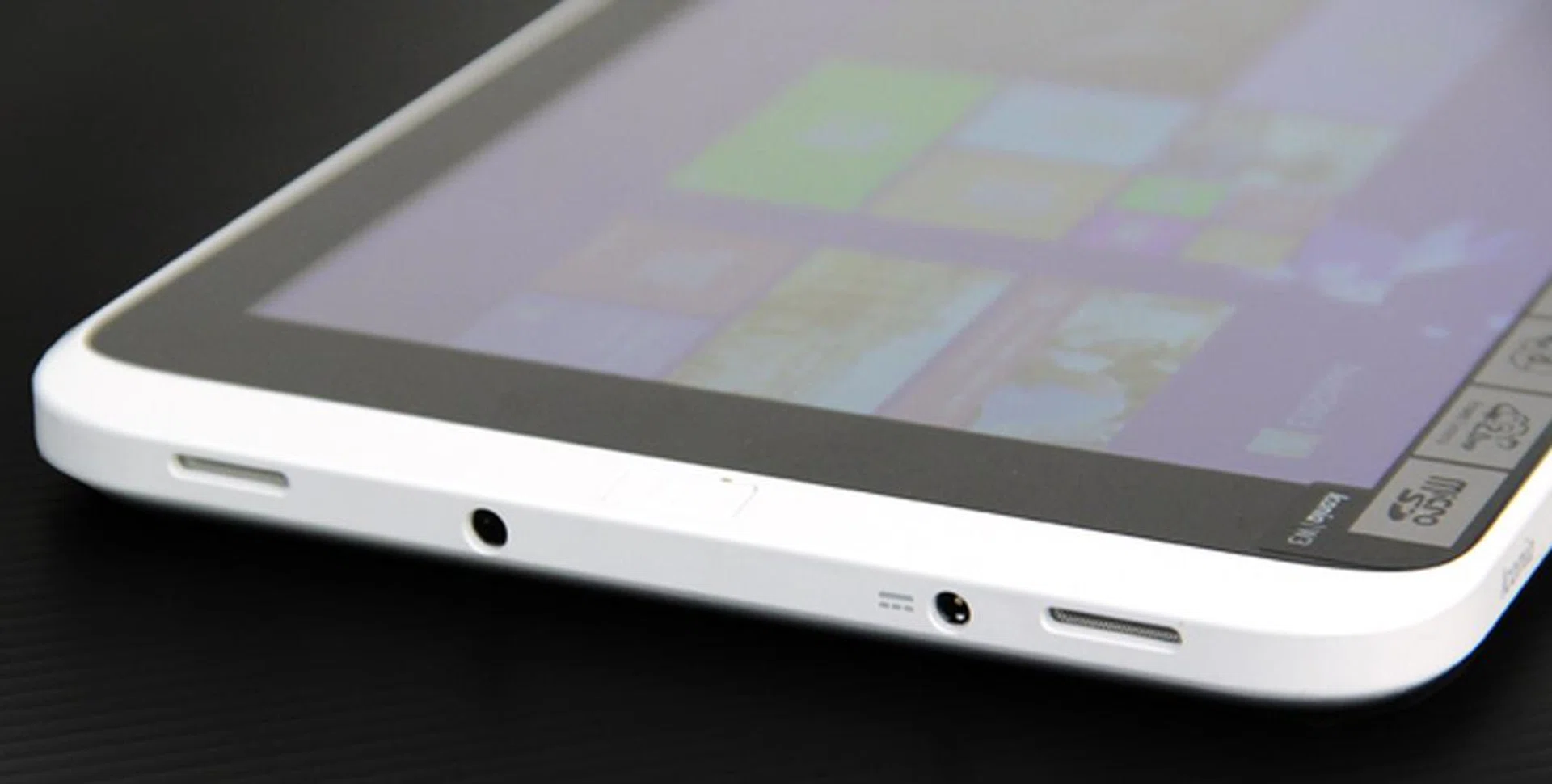
Audio from the W3's twin speakers was very disappointing.
Worse yet, what audio you do get is very quiet (even at maximum volume) and very thin and tinny. The audio is so soft, you can barely hear it, even when seated in front of the device in a relatively quiet room. There's no bass to speak of either so you'll definitely want a good pair of headphones if you're planning on listening to anything on the W3.
Connectivity
Connectivity on the W3 is fairly decent, comprising of one mini-HDMI port and one micro-USB on the left-edge and a microSD card slot on the top-left edge (all positioning is based upon holding the W3 in landscape orientation).
Wireless connectivity is provided via the standard 802.11 a/b/g/n bands and the W3 also supports Bluetooth 4.0. The W3's casing also has what appears to be a slot for a SIM card, however, on our model it is filled in, so you'll be stuck with wireless for any internet connectivity needs. Unlike some other tablets, the W3 also has no NFC support, but that's understandable at its price point.
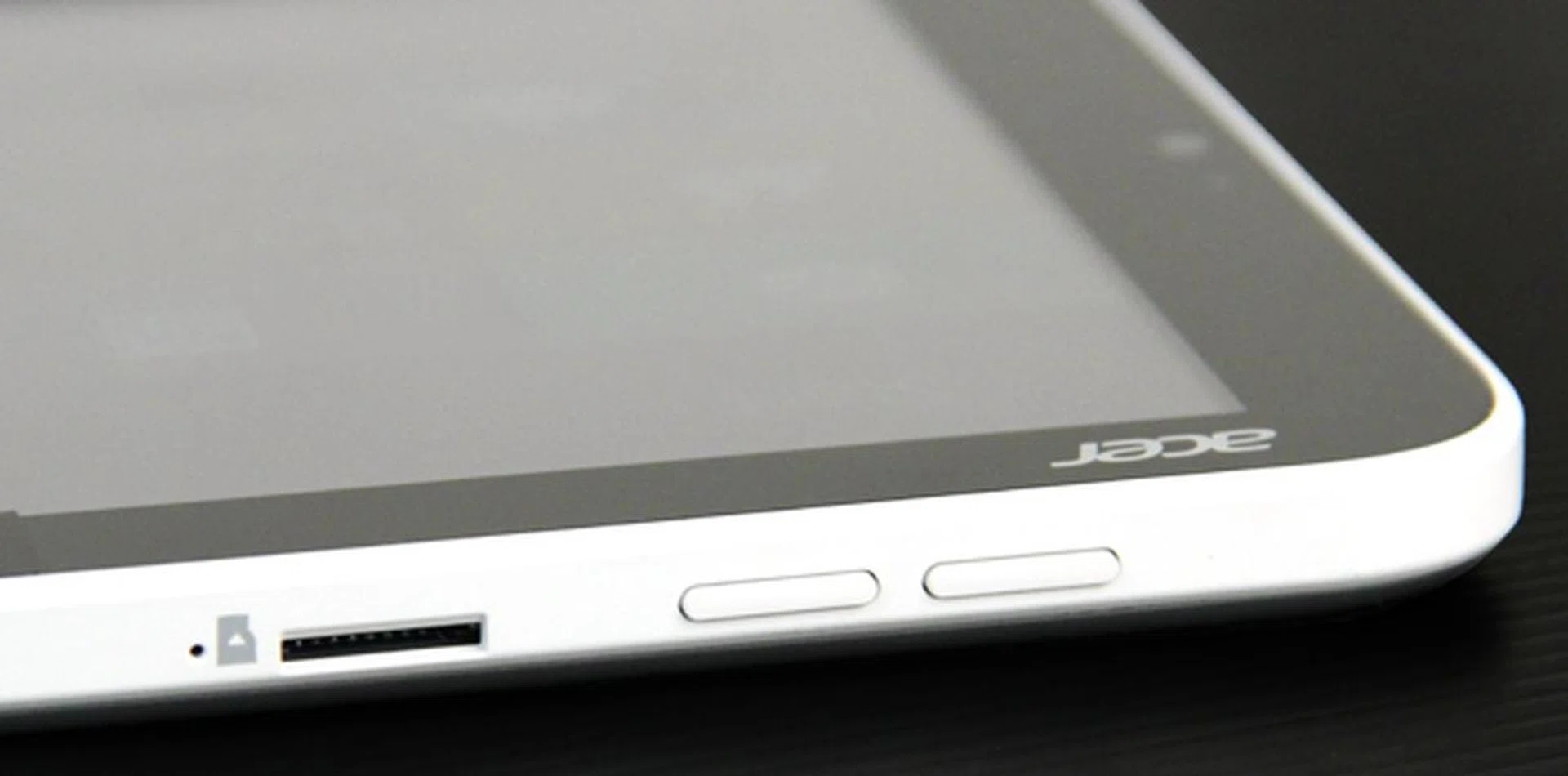
The microSD slot is located on the top edge next to the volume buttons.
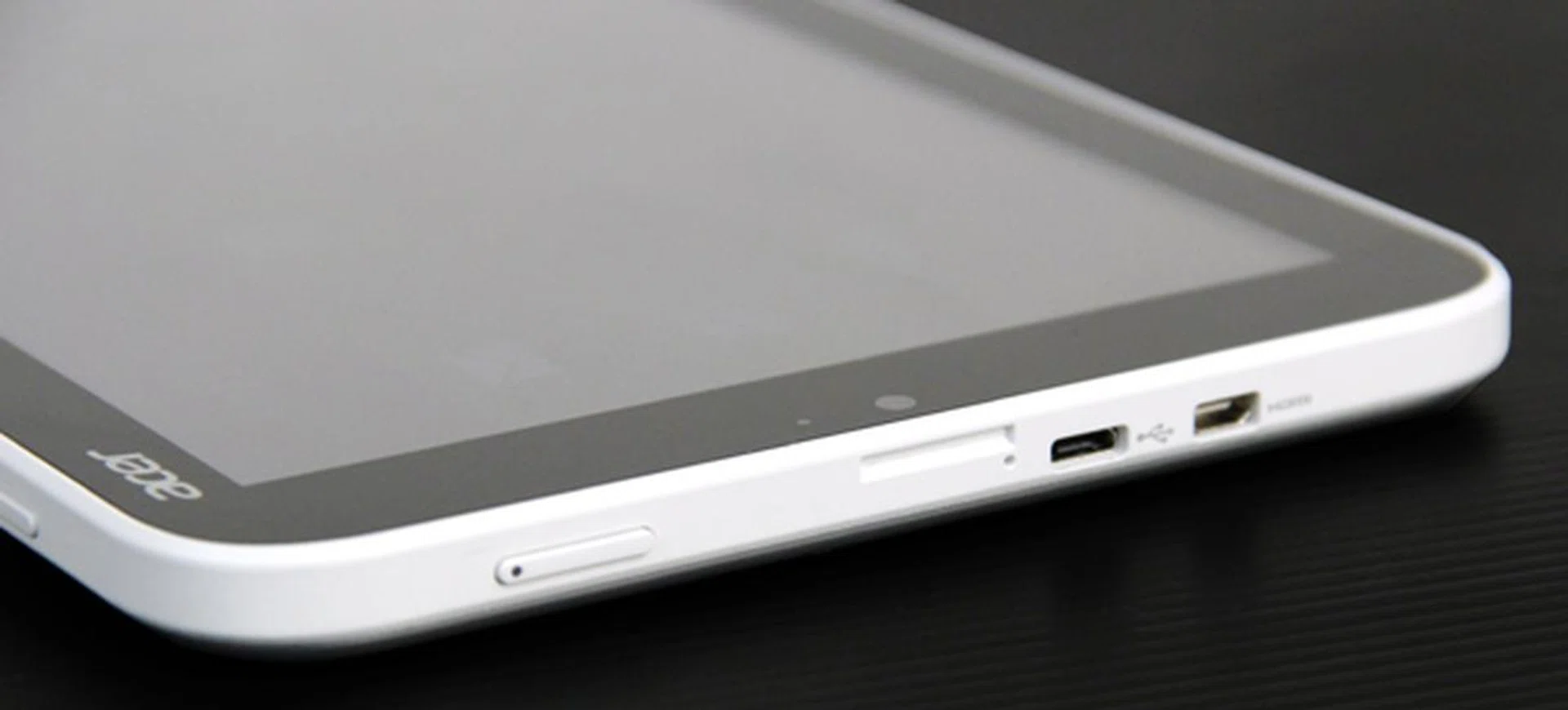
Held in landscape orientation, the micro-USB and mini-HDMI ports can be found on the left edge of the device. Note also the filled-in SIM card slot (perhaps there are future iterations with data connectivity support? The power button is also located here.
Accessories
An optional Bluetooth keyboard designed for use with the W3 is sold separately for S$69. Strangely enough, the keyboard is actually larger than the tablet itself, sized at about 11-inches, which makes it look and feel a bit mismatched.
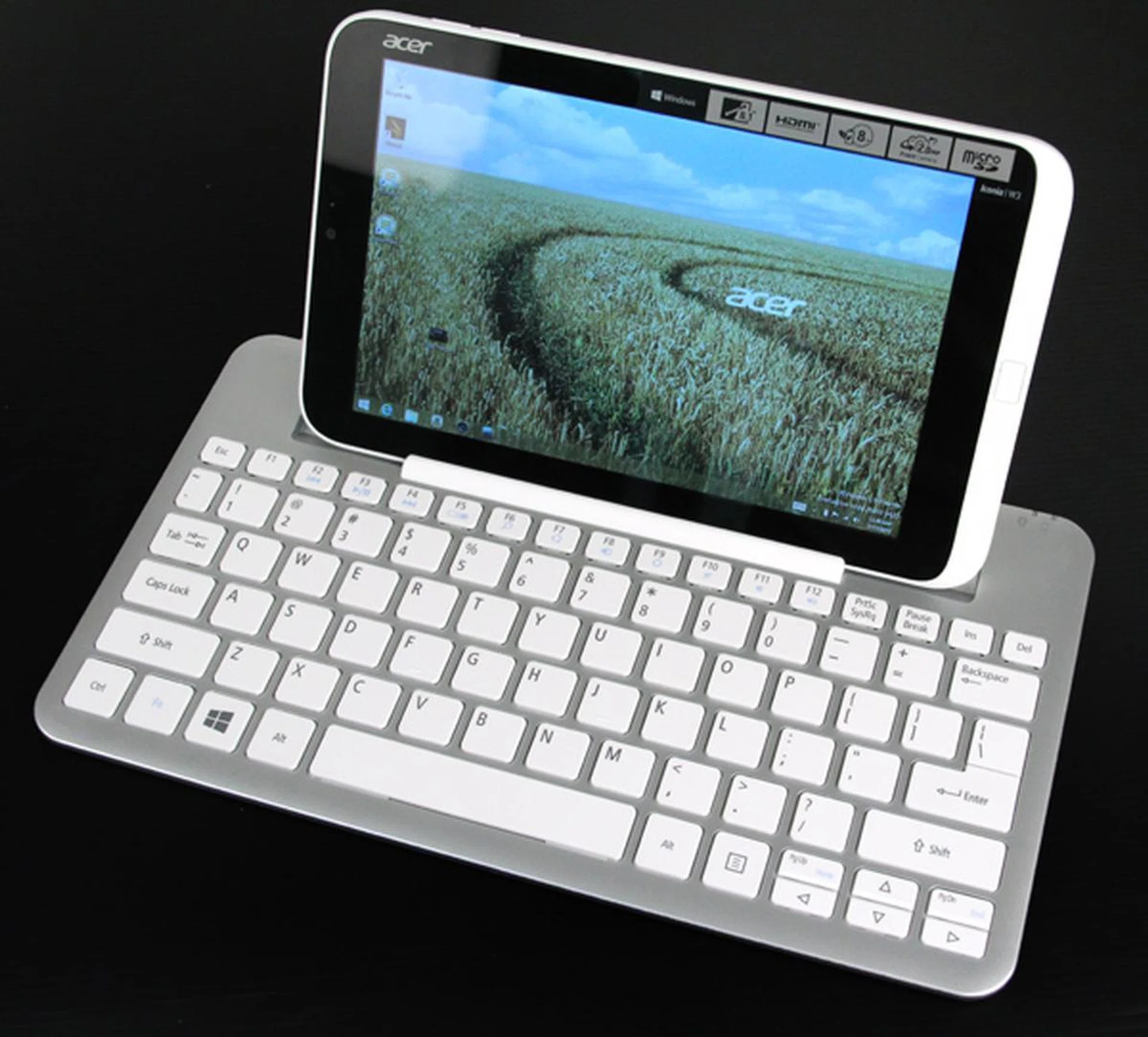
Despite being made for it, the W3's Bluetooth keyboard is strangely quite a bit larger than it, at about 11-inch long.
The keyboard has a rubberized slot along its top that the W3 can sit in, either in portrait or landscape orientation. The W3 feels quite secure and can be positioned in both landscape and portrait orientation, but unfortunately, the screen angle can't be adjusted. There's no docking option, so you'll have to make use of Bluetooth to connect the keyboard. The keyboard is powered by two AAA batteries.
The base of the keyboard has two pull out tabs that look like they could be tilted down to provide a better typing angle (such as how keyboard feet work) - but they don't. Functionally, they just provide slightly more stability for the tablet for when you're prodding the screen extra hard. One other annoyance is that if you put the W3 in portrait mode, the already quiet speakers become completely muffled (or even blocked) by the rubber slot. You could turn it the other way around of course, but then the webcam gets blocked.

The W3 docked in portrait mode with 'stabilizing feet' deployed.
Typing on the keyboard is actually fairly decent, and the larger size certainly helps as there's plenty of space between the keys. The keys themselves are quite firm, but feel a bit shallow and the entire keyboard, which is made of the same, cheap-looking silver plastic as the rear of the W3, also has quite a lot of flex, which makes it feel cheap. Additionally, unlike many other add-on keyboards (such as Microsoft's Surface keyboard), Acer's version doesn't have a trackpad or even a track point which, combined with how small the screen is, massively restricts the possibility of using the W3 for any kind of serious work. This is quite a conundrum considering that the Iconia W3 runs on an x86 processing platform, using a full fledged Windows 8 operating system and is yet restricted by its design considerations. Further to this, the keyboard dock also lacks any ports, so if you want to plug in a mouse or USB trackpad, you'll have to use a converter via the W3's own micro-USB port - far from ideal.
The other design feature the Bluetooth keyboard offers is that it doubles up as a 'carrying case' for the W3. On the back of the keyboard, a W3-shaped slot can be utilized to protect the screen while you carry the device around. Of course, due to the keyboard's larger size, this completely negates the portability benefits of having a smaller tablet (and also has the added negative of looking a bit daft as, to the unknowing observer, you'll appear to just be carrying a small keyboard around with you). From our casual usage, we've also identified that the latch that secures the tablet to the keyboard is not quite adequate and you could easily dislodge it accidentally and send your tablet crashing to the ground (and yes, it did happen in our time of handling the Iconia W3).
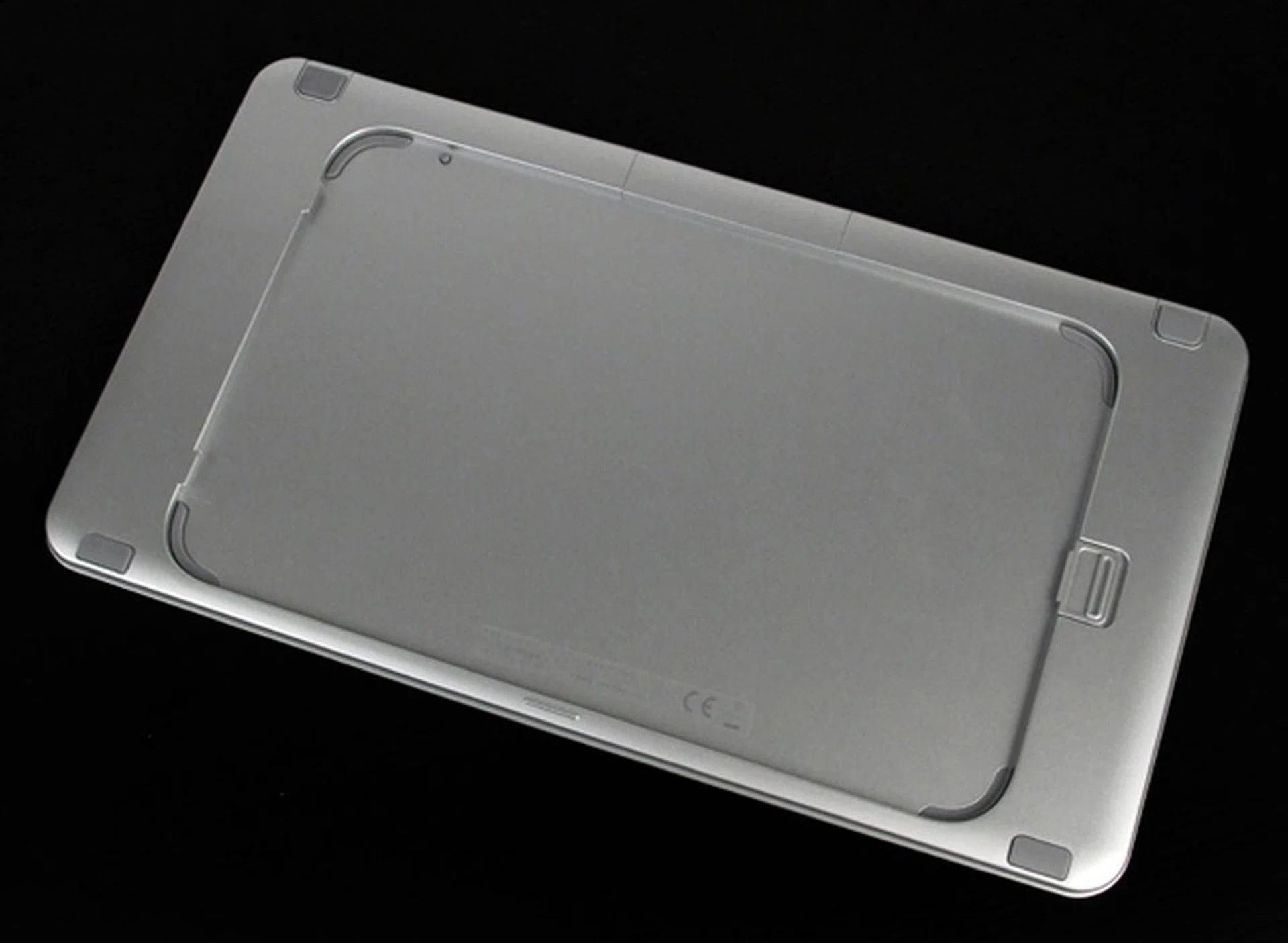
A slot at the back of the keyboard lets you use it as a protective carrying case.
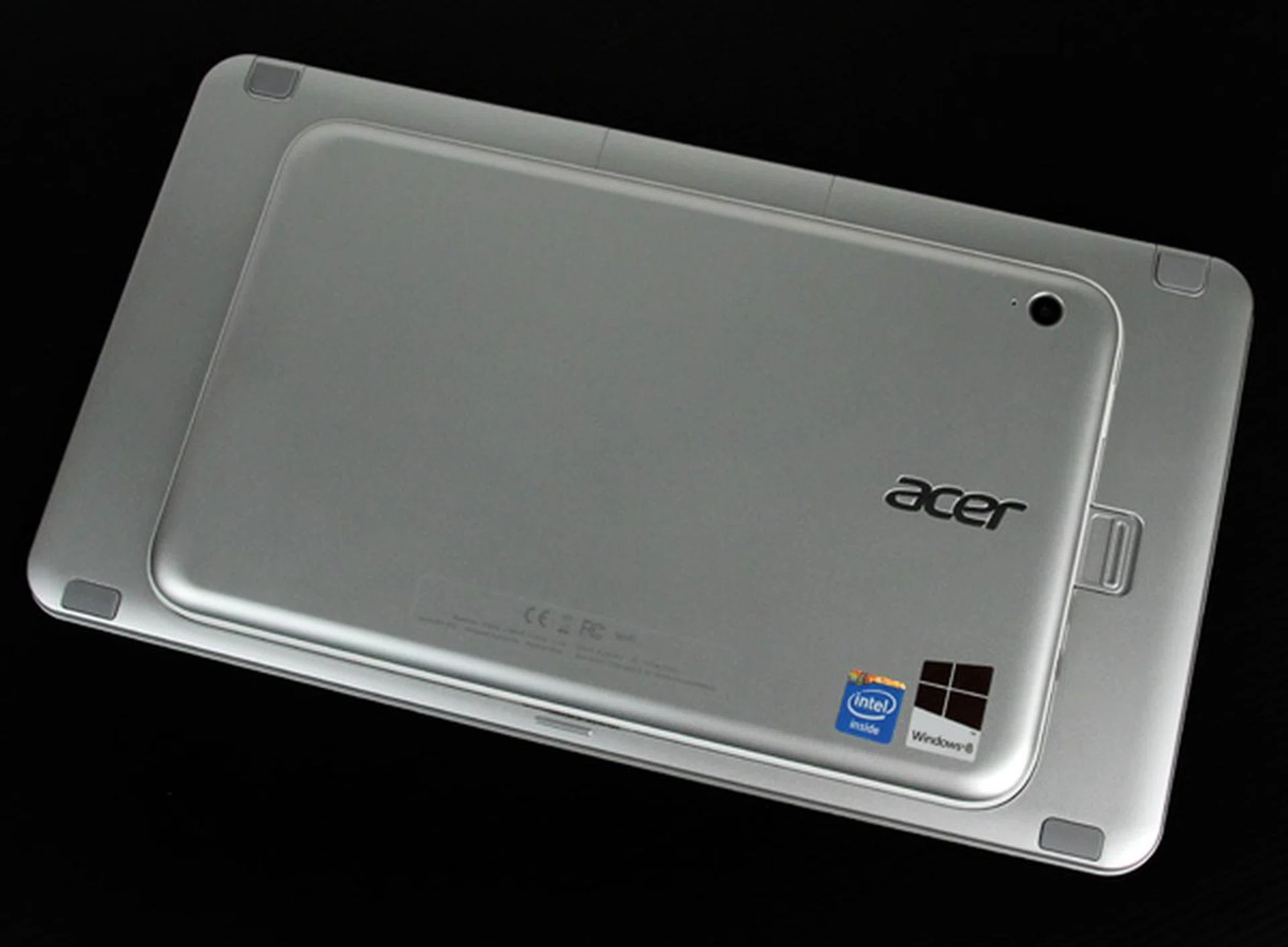
As you can see, the keyboard is much larger than the tablet, so if you opt to carry both together, you lose any benefit of having a smaller tablet. Also, we would advise caution in handling this combo as it's not as securely held as you would think so.
Performance
Despite its affordable price tag, the W3 is running the same hardware as more expensive enterprise-class Windows 8 tablets, such as Lenovo's Thinkpad Tablet 2 and HP's Elitepad 900.
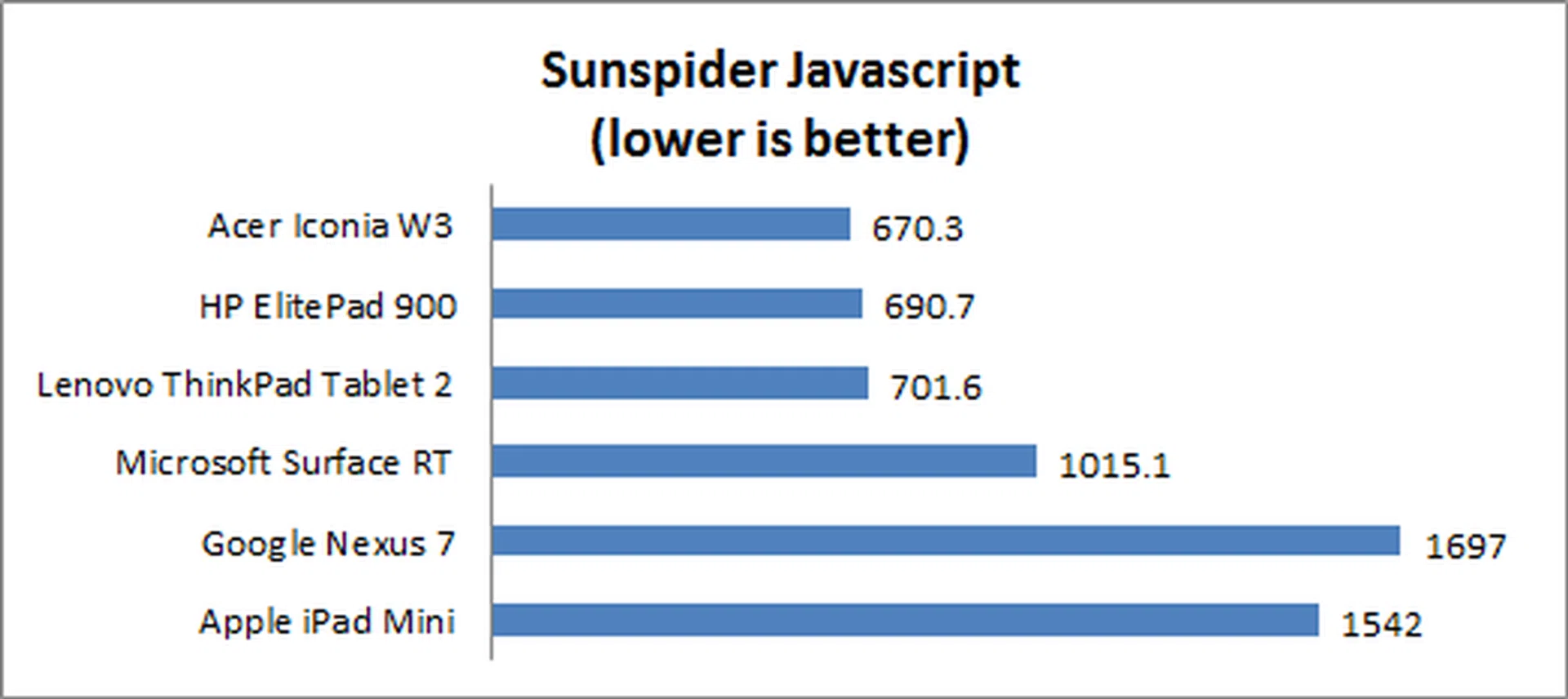
We also compared its scores on Sunspider Javascript, a browser based benchmark that measures browsing performance, against the most popular 7-inch tablets, Apple's iPad Mini and Google's Nexus 7, as well as Microsoft's 10-inch Surface RT, which is running an NVIDIA Tegra 3 quad-core 1.3GHz processor.
Device | Acer Iconia W3 | HP Elitepad 900 | Lenovo ThinkPad Tablet 2 | Microsoft Surface RT | Google Nexus 7 | Apple iPad Mini |
Display | 8.1-inch WXGA LCD | 10.1-inch LED-backlit IPS display | 10.1-inchLED-backlit IPS display | 10.6-inch ClearType HD | 7-inch LED-backlit IPS LCD | 7.9-inch LED-backlit IPS display |
Resolution | 1280 x 800 | 1280 x 800 | 1366 x 768 | 1366 x 768 | 1280 x 800 | 1024 x 768 |
CPU | Intel Atom dual-core Z2760 (1.8GHz) | Intel Atom dual-core Z2760 (1.8GHz) | Intel Atom dual-core Z2760 (1.8GHz) | NVIDIA Tegra 3 quad-core (1.3GHz) | NVIDIA Tegra 3 quad-core (1.2GHz) | Apple A5 dual-core (1GHz) |
GPU | Intel HD SGX545 | Intel HD SGX545 | Intel HD SGX545 | 12-core GeForce | 12-core GeForce | PowerVR SGX543MP2 |
RAM | 2GB | 2GB | 2GB | 2GB | 1GB | 512MB |
OS | Windows 8 | Windows 8 Pro | Windows 8 Pro | Windows RT | Android 4.1.1 | Apple iOS 6.0.1 |
Battery Capacity | 3500mAh | 2500mAh | 3000mAh | 4257mAh | 4325mAh | 4440mAh |
Dimensions | 219 x 135 x 11.4mm | 261 x 178 x 9.2mm | 262.6 x 164.6 x 9.8mm | 274.6 x 172 x 9.4mm | 198.5 x 120 x 10.45mm | 200 x 134.7 x 7.2mm |
Weight | 500g | 625g | 600g | 680g | 340g | 308g |
PCMark 7
PCMark 7 tests a tablet's overall capabilities. Only full Windows OS devices are able to install and run the benchmark, so the Surface RT, Google Nexus 7 and iPad Mini have been excluded in this test. The benchmark tests a wide range of workloads and system aspects ranging from computation to image and video manipulation and storage. As expected, the W3 scored equally with the more expensive Lenovo and HP tablets, thanks to utilizing the same hardware.

Sunspider Javascript
The SunSpider JavaScript benchmark measures the browsing performance of a device. It not only takes into considering the underlying hardware performance, but also assesses how optimized a particular platform is at delivering a high-speed web browsing experience. In this benchmark, the W3's Atom processor again proved very capable, and actually slightly outperformed both the HP and Lenovo tablets, as well as easily beating the Surface RT, Nexus 7 and iPad Mini. Overall user experience was smooth and fast, with no noticeable lag, even on image-heavy websites.
Imaging Performance
Tablets are generally not known for their imaging capabilities since they are not designed for that purpose, however we decided to put the W3's 2 megapixel camera to the test:
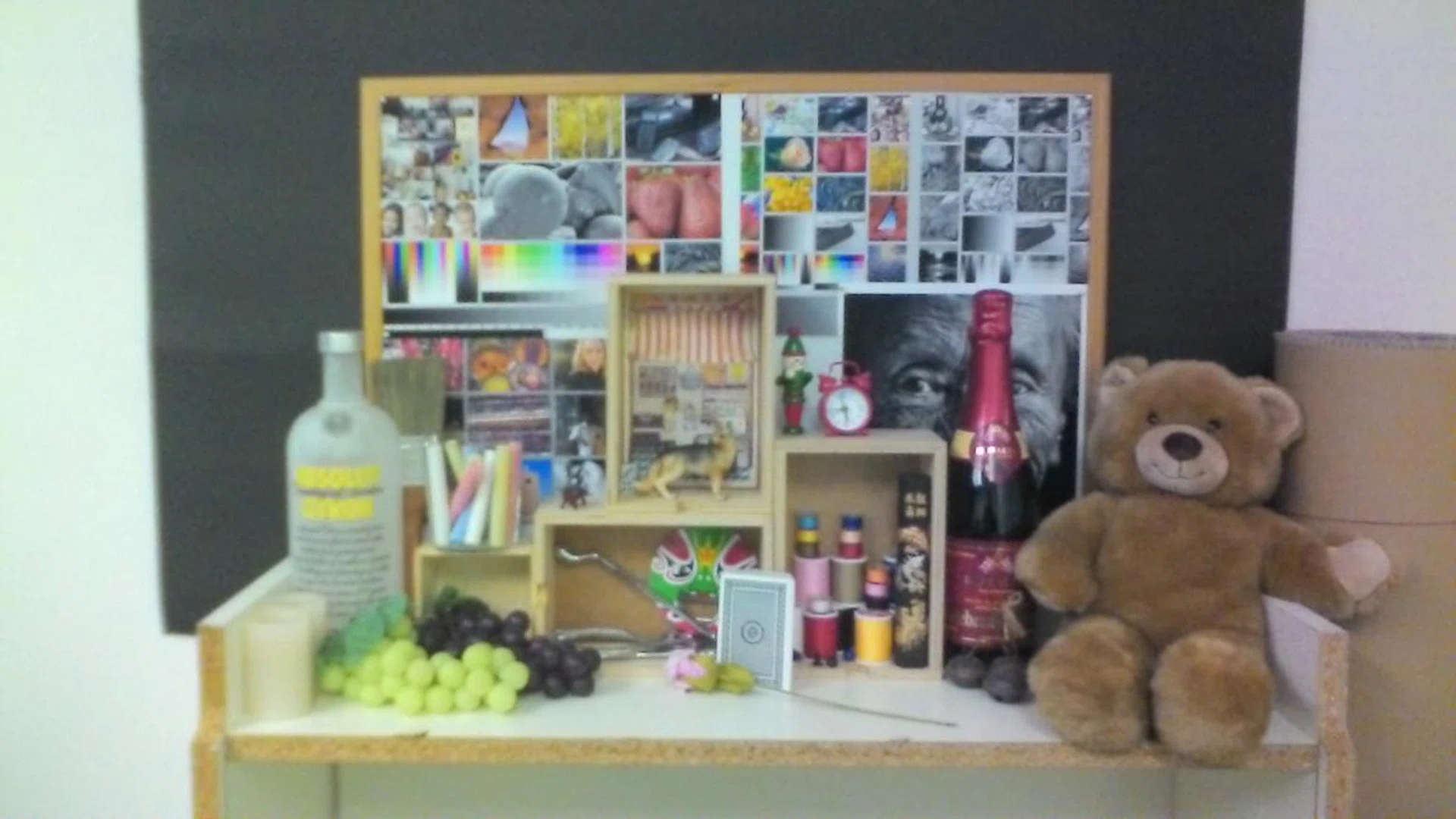
As you can see, image quality was rather lacking, with a noticeably grainy quality, lack of contrast and washed out color reproduction. Below, we've included closeup shots for comparison:
 |  |
Battery Performance
Next, we ran the W3 on an intensive battery test, which involves looping a 1280 x 720 pixel resolution video on the unit. The test is performed under specific parameters:
- Screen brightness and volume at 100%
- Wi-Fi and Bluetooth connectivity turned on
- Constant data streaming through email and Twitter
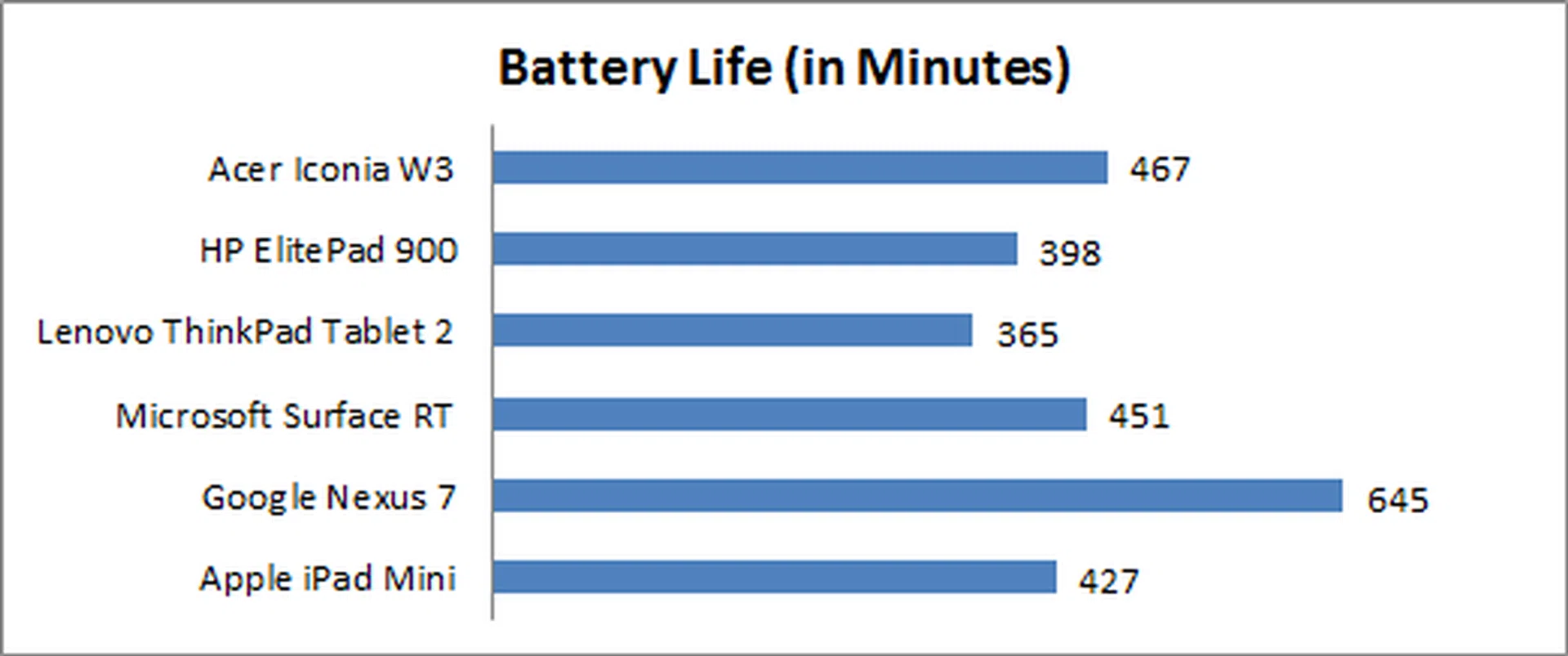
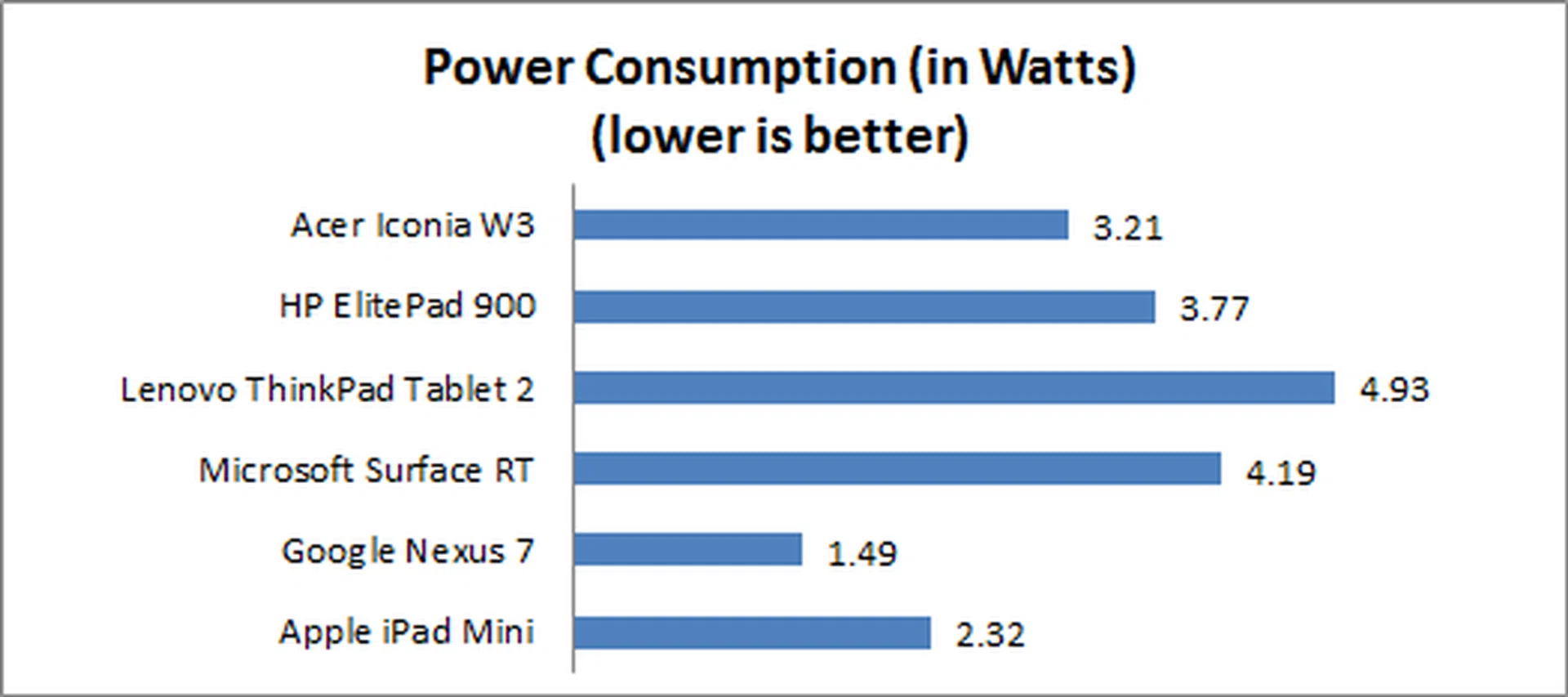
The Iconia W3 displayed fairly impressive battery life, lasting 7 hours and 47 minutes, beating all three of our 10-inch tablets, including the ARM-powered Microsoft Surface RT. It also managed to outlast Apple's iPad Mini, however it still fell short to the massive staying power of Google's Nexus 7. Power consumption, as expected, was slightly lower than our 10-inch Atom-powered devices, but higher than both the Nexus 7 and iPad Mini. On a side note, we reckon the Iconia W3's weak speakers hardly added to the power consumption figures, unlike the other devices.
Portability
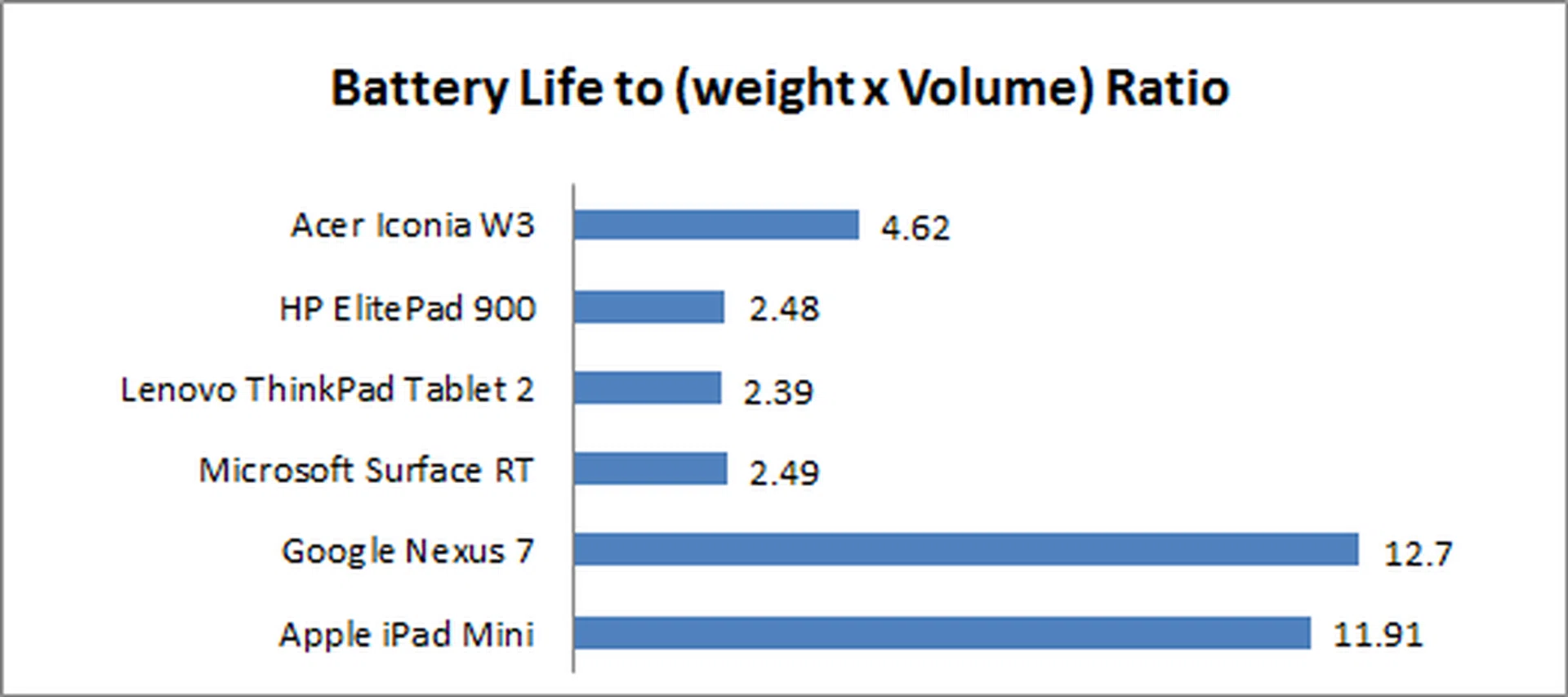
We measure the portability of a device by calculating its battery life to (weight x volume) ratio. While the W3 was more portable than its 10-inch Windows 8 cousins, it fell far short of both the iPad Mini and Nexus 7 due to its thickness and hefty weight. In our personal experience, while the W3 is fairly small, its weight makes it less attractive to carry - it feels much heavier than both the iPad Mini and Nexus 7, but not much lighter than our 10-inch tablets. This is because the 10-inch devices are not much heavier than the Iconia W3, but they have a bigger surface area to spread the weight thus making them feel less hefty in overall handling.
Of course, carrying the W3's Bluetooth keyboard with you further hurts its portability, as essentially the keyboard gives the W3 an 11-inch footprint.
Conclusion
The Acer Iconia W3 proves that Windows 8 can work on a smaller form factor tablet. Windows 8's Modern UI is far better suited for a smaller display than any Windows OS of the past, and Intel's Atom processors are finally able to deliver solid performance in a small package. The problem is, the Iconia W3 just isn't a very good tablet. While Acer has opted to deliver value with a very reasonable S$499 price point, even budget-minded shoppers deserve more - especially from the display - out of a device that's primarily aimed at content consumption.
Windows 8 can work on an 8-inch tablet, just not this one.
Although battery-life was quite good, staring at the screen strains the eyes to the point where after just 30 minutes, we had to take a break to recover. The W3's optional Bluetooth keyboard is one of the worst available, as its lack of a trackpad or trackpoint limits its usefulness for productivity, while its large size completely negates any portability benefits gained from opting for a smaller tablet. It does its best to integrate with the W3, but the benefits are minimal as compared to opting for other keyboard alternatives from the open market.
Compared to other products on the market, the only advantage the W3 holds is its Intel Atom processor and full Windows 8 OS, which lets you install regular desktop programs such as Microsoft Office and Adobe Photoshop to the device. However, due to the poor quality display, small screen size, and underwhelming Bluetooth keyboard, you're unlikely to use the W3 for any serious productivity or event content consumption.
The W3's value proposition is also hurt by the fact that Microsoft has just lowered the price of the 32GB Surface RT tablet to $488, which includes full versions of Microsoft Office Home and Student 2013 RT. If you're after a Windows 8 device at this price point, honestly, at this time, you're likely better served with the Surface RT. While it won't let you install regular Windows desktop programs and is a tad heavier and larger, it does have a far superior display, much better build quality, just as good battery performance, and can be equipped with a more capable Bluetooth keyboard with trackpad. Further to that, you could also opt for the Surface tablets' keyboards - Touch Cover and Touch Type - both of which are class-leading in their own right. You can check out our detailed review of the Microsoft Surface RT for further information.
In all honesty, the Acer Iconia W3 could have been a really pivotal product to help improve Windows 8 tablet sales, but it blew it chances. Fortunately, if you've got your heart absolutely set on an 8-inch Windows 8 tablet, according to Engadget, via Dutch website Tweakers.net, Acer could soon be releasing a successor to the W3, with a thinner, lighter build and a much improved (and needed) IPS display. Acer spokesperson Sterre Swank revealed that this successor may be released as soon as September of this year. If this proves true, it would immediately fix the most glaring problems of the W3 and could make it a worthy challenger in the sub-10-inch device market. We'll find out personally if version 2.0 of the W3 can make amends once it's made available to us.
Our articles may contain affiliate links. If you buy through these links, we may earn a small commission.