
Family Link: 3 updates that will help reduce distractions for kids
All these useful features are expanding to Android phones and tablets. #google #android

Note: This article was first published on 18 February 2025.
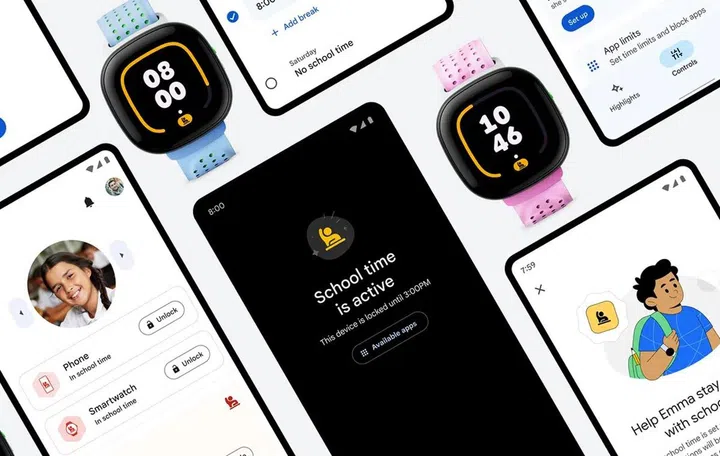
Developing healthier relationships with your devices can start young. Just ask Google Family Link. Image: Google.
Google’s latest updates to Family Link introduce new supervision tools for parents, helping them manage their children and foster healthier digital habits.
The new updates should, ideally, make it easier for parents to create easy-to-understand rules, enforce them, and hopefully help reduce distractions for their children.
In the coming months, Google will add or improve the following features in Family Link:
Revamped interface
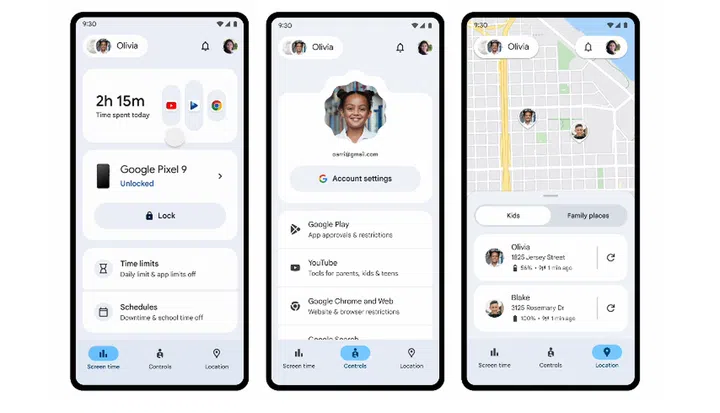
The new interface makes Family Link easier for parents to follow. Image: Google.
The new Screen Time tab combines all time management features in one place. It provides device-specific summaries, time limits, and an easier way to set Downtime and School time for the kids.
School time supported on more devices
School time is a control feature limiting phone functionality and silencing notifications during school hours. It was first introduced on the Samsung Galaxy Watch for Kids, and now, School time support is available on Android phones and tablets.

An example of how granular School time can be and how it works. Video: Google.
Parents can choose apps to restrict and silence during school hours while allowing studying apps during those periods. In addition to seeing apps their kids use outside of School time, they can temporarily remove restrictions during school holidays or vacations by simply putting School time on a “break”.
Phone contacts with parental supervision
Don’t want your kid to contact strange uncles on the phone? Family Link allows parents to whitelist contacts for their kids to call and text on Android phones.

Whitelisting contacts for your offspring is a bit easier with the help of Approved Contacts in Family Link. Video: Google.
Parents can use Family Link to add approved contacts into their child’s devices, and limit calls or texts to these approved contacts. Their children can also request to add contacts for approval.
This feature was also initially introduced on the Samsung Galaxy Watch for Kids, but it has now been extended to other Android mobiles.
What’s Google Family Link?
Google digital safety tools are many, if a little messy and scattered. Image: Google.
Launched in 2019, Google’s parental supervision tool, Family Link, is an app that helps parents protect their children’s Google Accounts and content exposure until they come of age.
It doesn’t just limit screen use or approve contacts. Family Link can also help limit the type of apps found on the Google Play Store and monitor the child’s whereabouts using Google Maps.
Interestingly, in 2023, Google said Singaporean parents with at least one child (aged 5 to 17) are most concerned about misinformation and deceptive advertising, which speaks to the savviness of our future generations.
Our articles may contain affiliate links. If you buy through these links, we may earn a small commission.