
HTC Shift - A Paradigm Shift
Take a ride with us on the HTC bandwagon as we introduce the Shift, a UMPC that comes with both HTC's proprietary SnapVUE interface and Microsoft's new Origami Experience 2.0.

A Paradigm Shift
Following the success of its TyTN II and Touch Cruise series, HTC is once again gunning for the niche consumer with the HTC Shift, their latest UMPC offering that seeks to deliver mobile computing and top-notch communication. Whilst its predecessor, the Dopod U1000, has enjoyed some success by melding mobile communication with Microsoft's Windows XP, the Shift ups the ante even further with improvements in the aesthetic and functionality departments. So without further ado, let's take a quick look at the updates on this new UMPC.

HTC Shift
Sophistication at a Price
Unlike some UMPCs that focus more on functionality at the expense of aesthetics, the Shift is a very impressive looking unit. Sporting well-contoured edges on its chassis, the Shift embraces a sleek, dark gray color scheme, lending it a whiff of sophistication. Laid out on the left side of the front display is an integrated video camera for video conferencing, and right below that are the left and right mouse buttons. At the left bottom is a shortcut key that brings you to the HTC's proprietary SnapVUE interface. Meanwhile, the top button on the right gives you direct access to the Shift's wireless manager, and below that is another shortcut button that allows you to toggle the Shift's screen resolution between 800 x 480 and 1024 x 600.
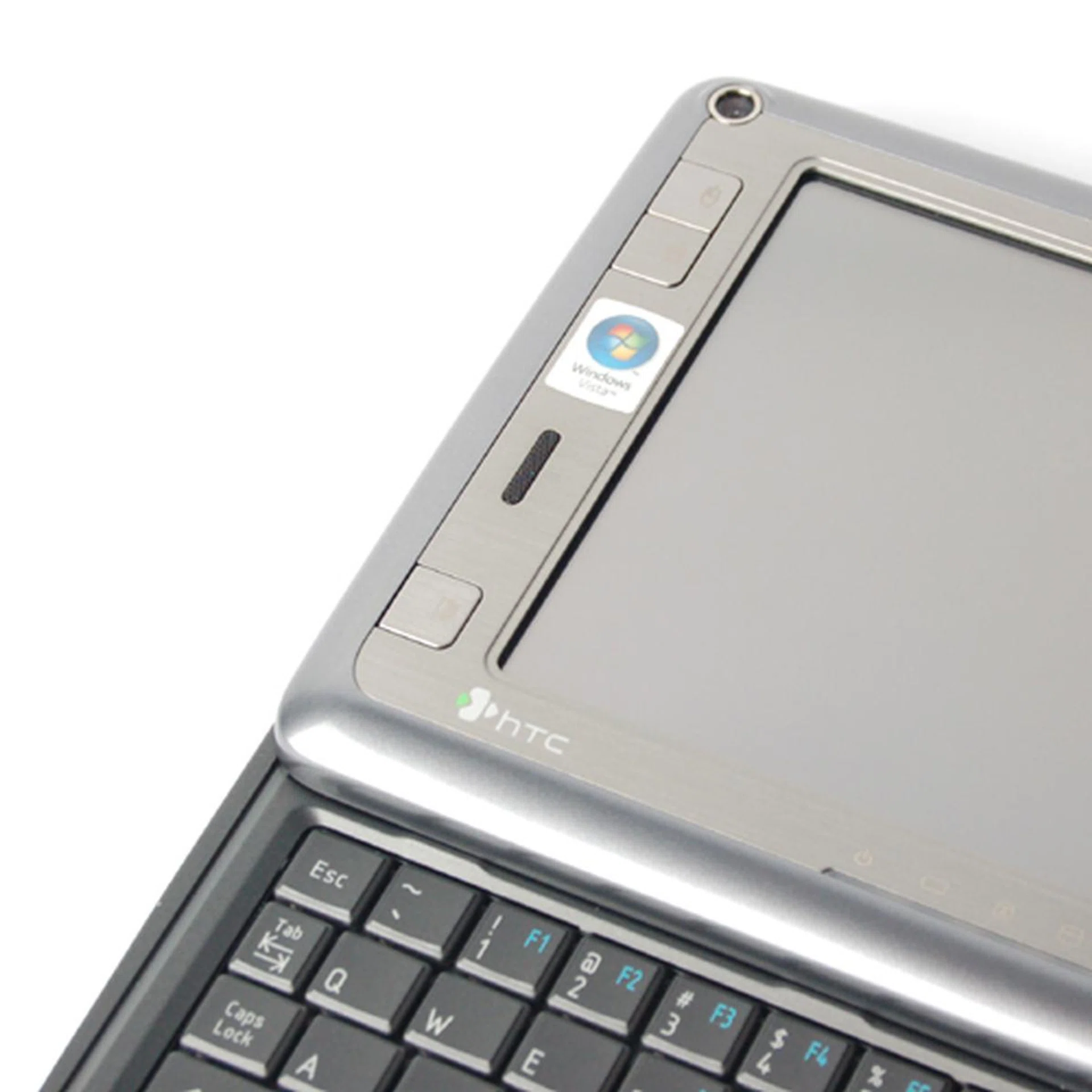
From the top: video camera, mouse buttons and the SnapVue shortcut button.
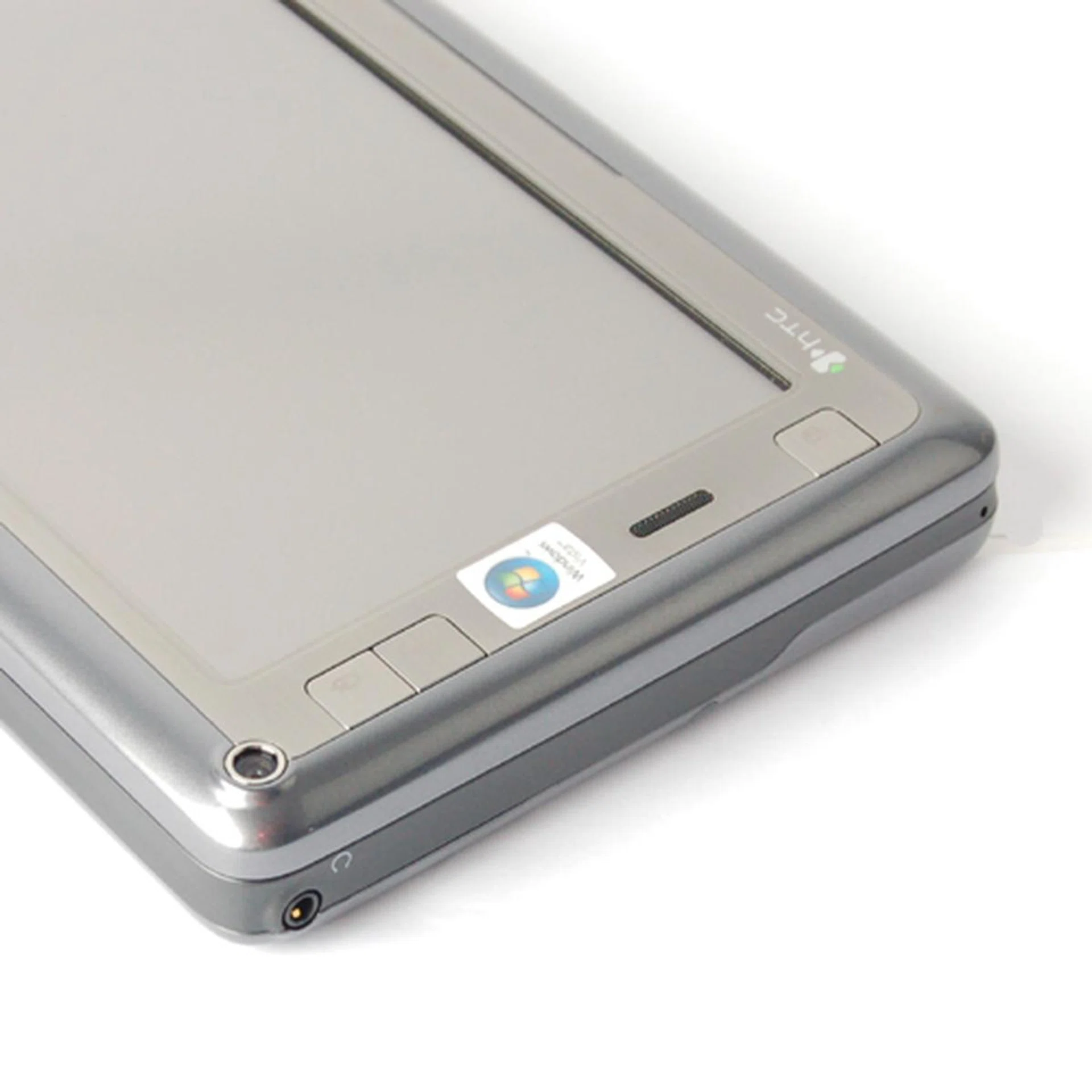
The 3.5mm audio jack, located at the top of the left profile.
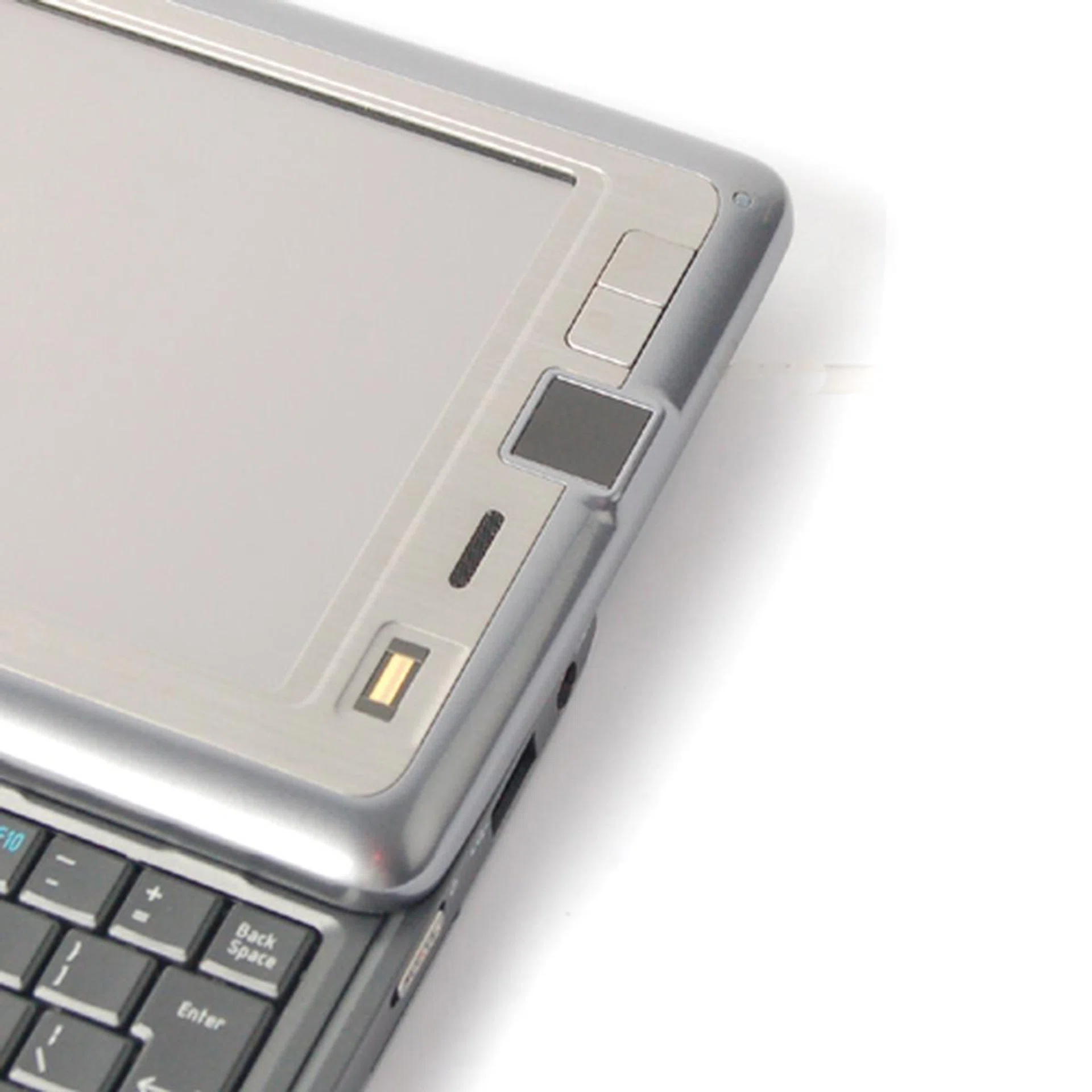
From top: Wireless Manager shortcut, Screen Resolution shortcut and the teeny mousepad, which is likely to be neglected in favor of the on-screen mouse.
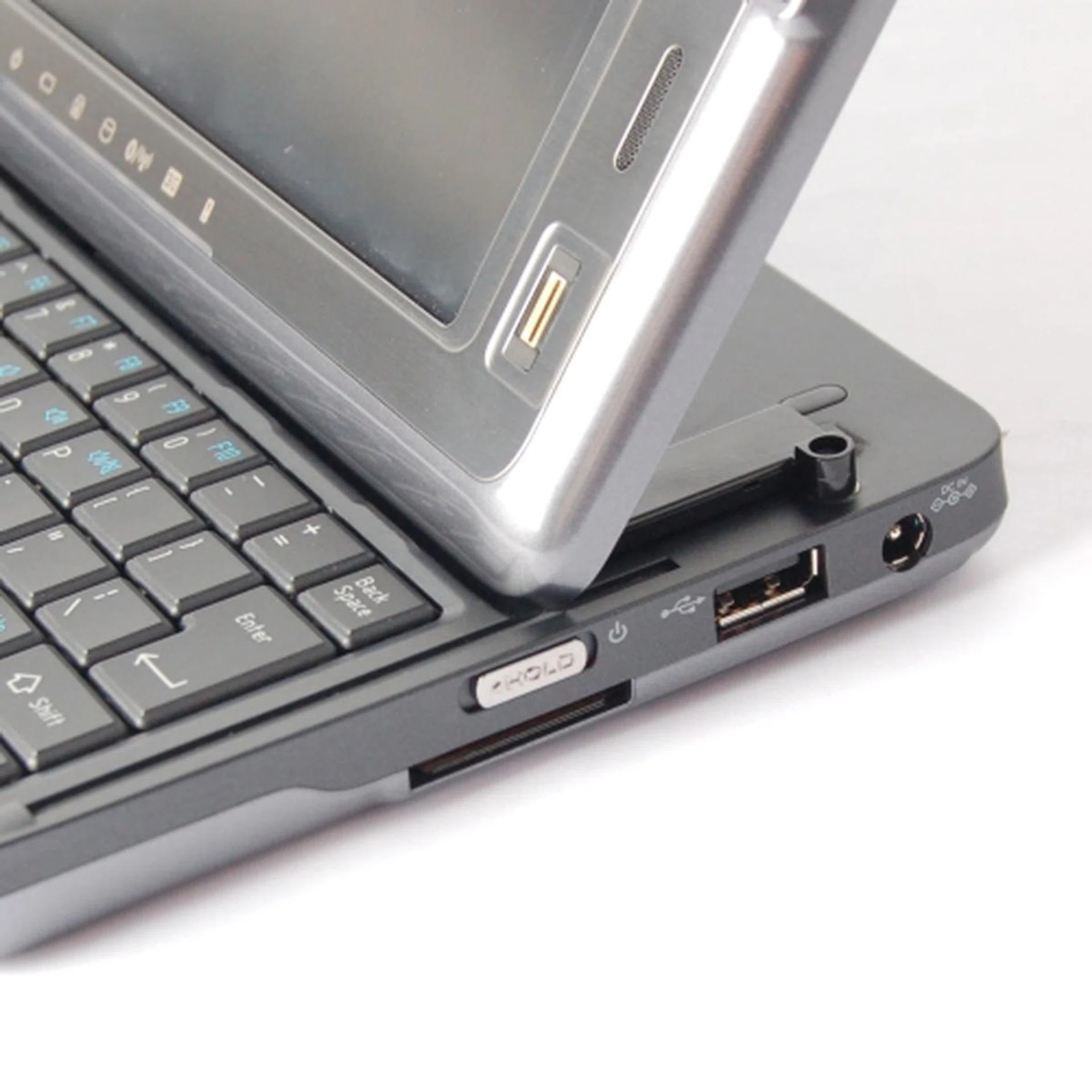
The Power button also acts as a Hold button, and right below it is the SDIO slot commonly found in many such devices. Though there's only one USB slot available on the right profile, HTC includes an additional USB hub within its package.
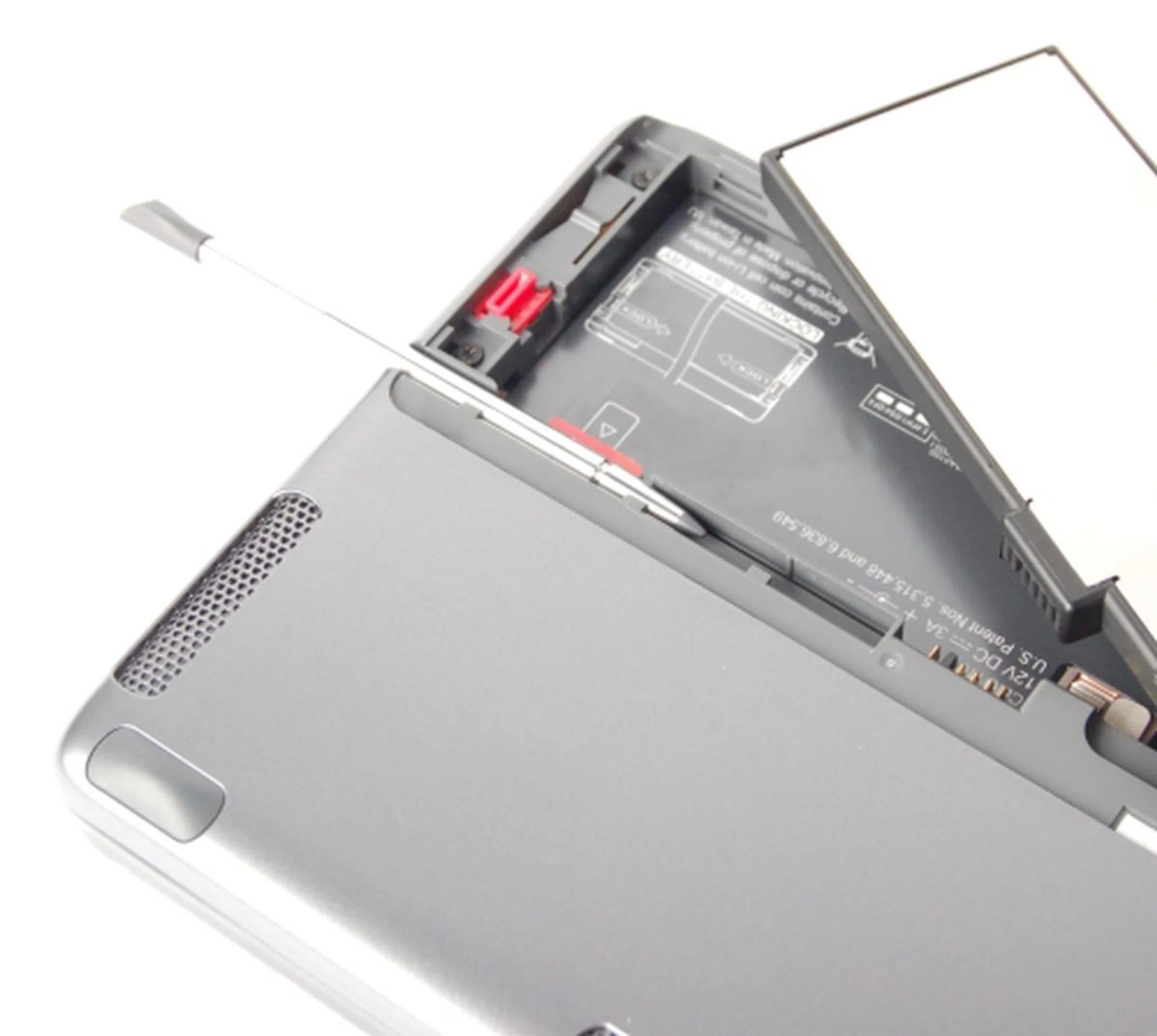
Insertion of the SIM card for HSDPA connectivity requires removing the battery first. A spring mechanism then makes it rather easy to remove/insert the SIM card. A telescopic stylus is also located underneath the device, though we hardly used it in our tests.
Basic mouse navigation is done either using the 7-inch touchscreen display, or the integrated mouse pad located on the right. More often than not, you'll find yourself utilizing the on-screen mouse due to the petite nature of the mouse pad. Similar to the U1000, the Shift comes with an integrated QWERTY keyboard underneath the display. However, unlike the U1000's two-piece design where you separate the keyboard and the screen and realign the display at a tilted angle to the keyboard, the Shift follows a one-piece design similar to the TyTN II, allowing you to slide the display up and utilizing it either completely flat or at an angle.
Tilting the display requires some due care and attention and you have to ensure that the screen has been fully pushed upwards (you'll hear a click) before attempting to tilt it. Whilst the keyboard is relatively wide, the individual keys are not exactly well-spaced and are thinner than we would have liked, making the typing experience less than ideal. This is however a common problem among many UMPCs attempting to fit in a full-sized QWERTY keyboard and HTC has not managed to solve it either.
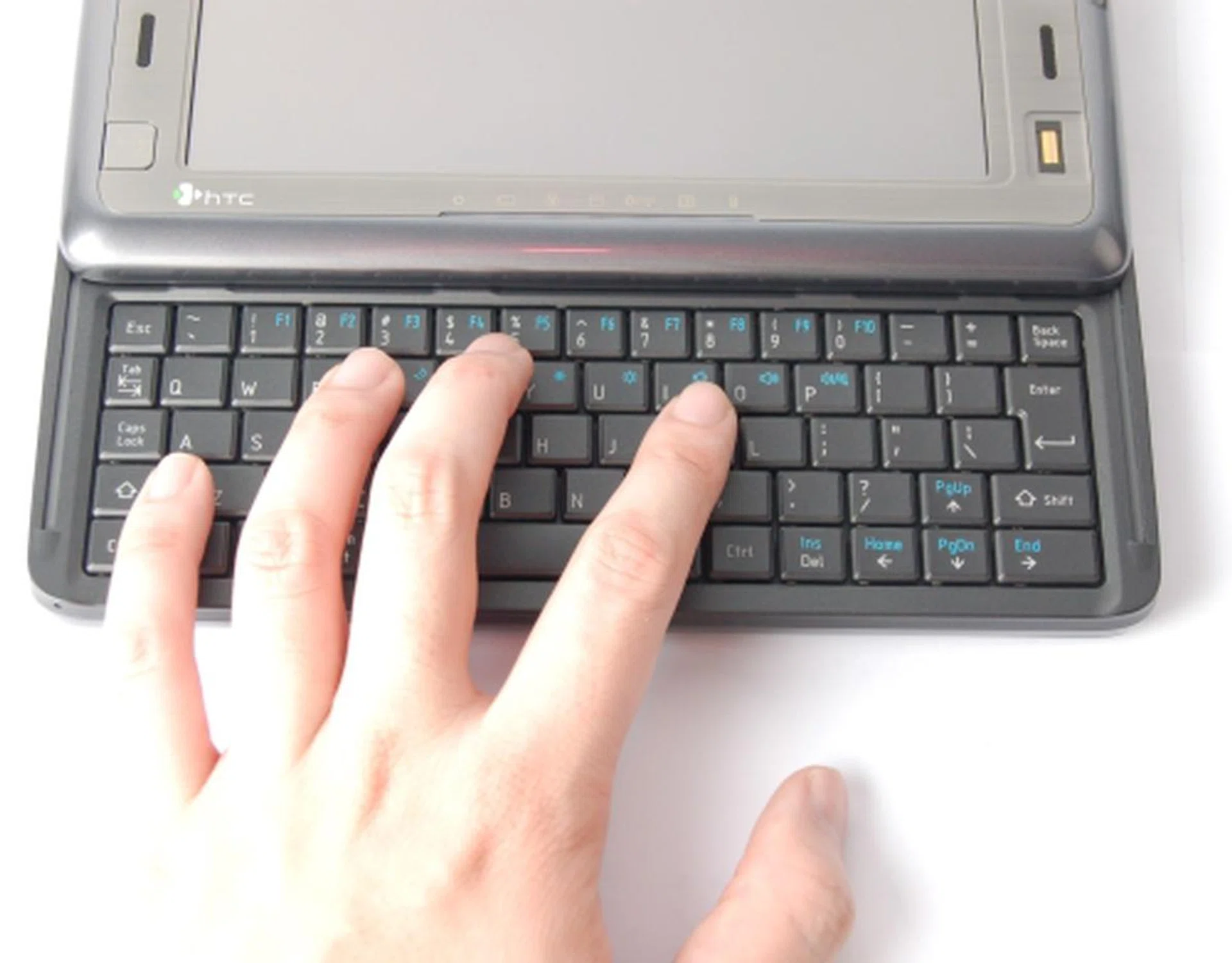
As you can see here, the keys on the Shift's QWERTY keyboard can be a bit too close for the ideal typing experience, but it was overall acceptable.
Origami, the Paperless Experience
There are actually two graphical user interfaces on the HTC Shift. The first and more basic one is known as SnapVUE which bears a strong resemblance to the proprietary HTC interface found on its Touch and TyTN II devices. Here's where HTC's background in smart mobile devices come into play. Providing access to essential functions such as e-mails, text messages and contacts, the SnapVUE interface is built around cellular functionality and works, as HTC states, 'without having the device switched on'. In other words, SnapVUE runs independently of the Windows Vista Business operating system on the Shift.

Notice the similarity of SnapVUE to the interface found on other HTC Windows Mobile devices. This is exactly what the always-on SnapVUE is all about, providing some essential functions like emails, SMS, calendar, etc without actually running the power hungry main OS. In short, users get some basic use out of the device while saving some battery life.
Unlike SnapVUE, the other GUI - collectively known as Origami Experience 2.0 - consists of applications built on top of Windows Vista. The main concept of Origami is to provide easier access to applications frequently accessed by users. You should be aware however that these applications will incur higher overheads on a UMPC compared to SnapVUE, due to the requirement of running Windows Vista. There are three main components, Origami Picture Password, Origami Central and Origami Now. We will briefly introduce the two more important ones, Origami Central and Origami Now as it is implemented in the Shift.
On Origami Central, the main interface is separated into three main categories, namely Internet, Media and Programs. Think of it as something similar to the Sidebar from Vista, just on a larger scale. Customization is also possible, with the option to add more applications to the Programs tab. More importantly, under the Origami Central interface, you can access your favorite multimedia clips on the same screen. With its ease of accessibility, Origami Central fulfills its primary purpose of organizing your applications.
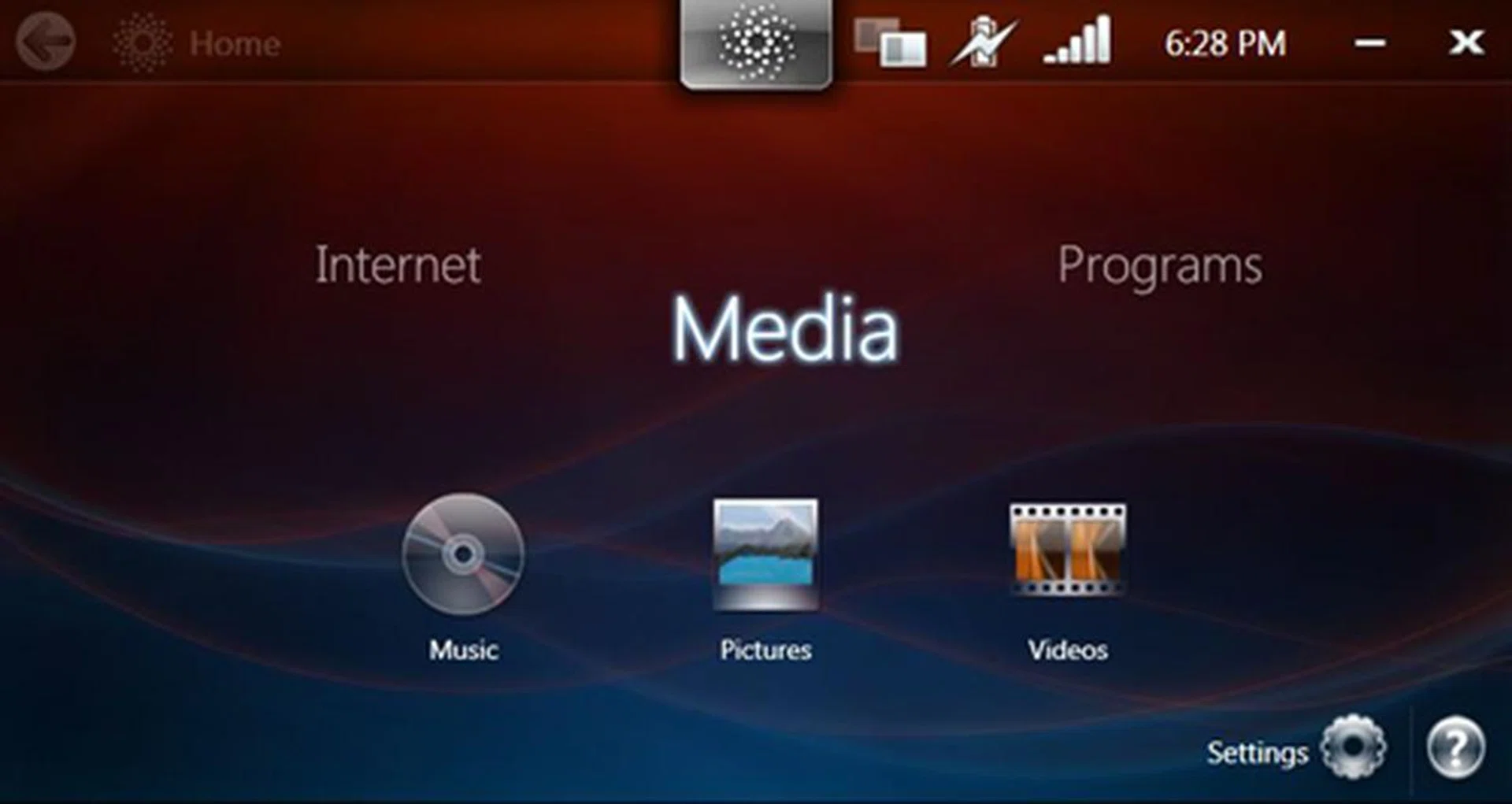
The main menu of the Origami Central interface, split into three categories with their own respective sub-categories for quick access.
As for Origami Now, it has a more productivity-centric focus. As the Now moniker suggests, Origami Now provides you with immediate information, presented on numerous tiles arranged on the screen. Similar to Origami Central, customization plays an essential role here and you can customize the number of tiles and their content. This idea of adding tiles as desired to the main screen reduces unnecessary clutter. Users can choose from information tiles that provide you with the current weather to the latest newsfeed from RSS, and many more. Additionally, the application comes with handwriting recognition that allows you to jot notes easily.
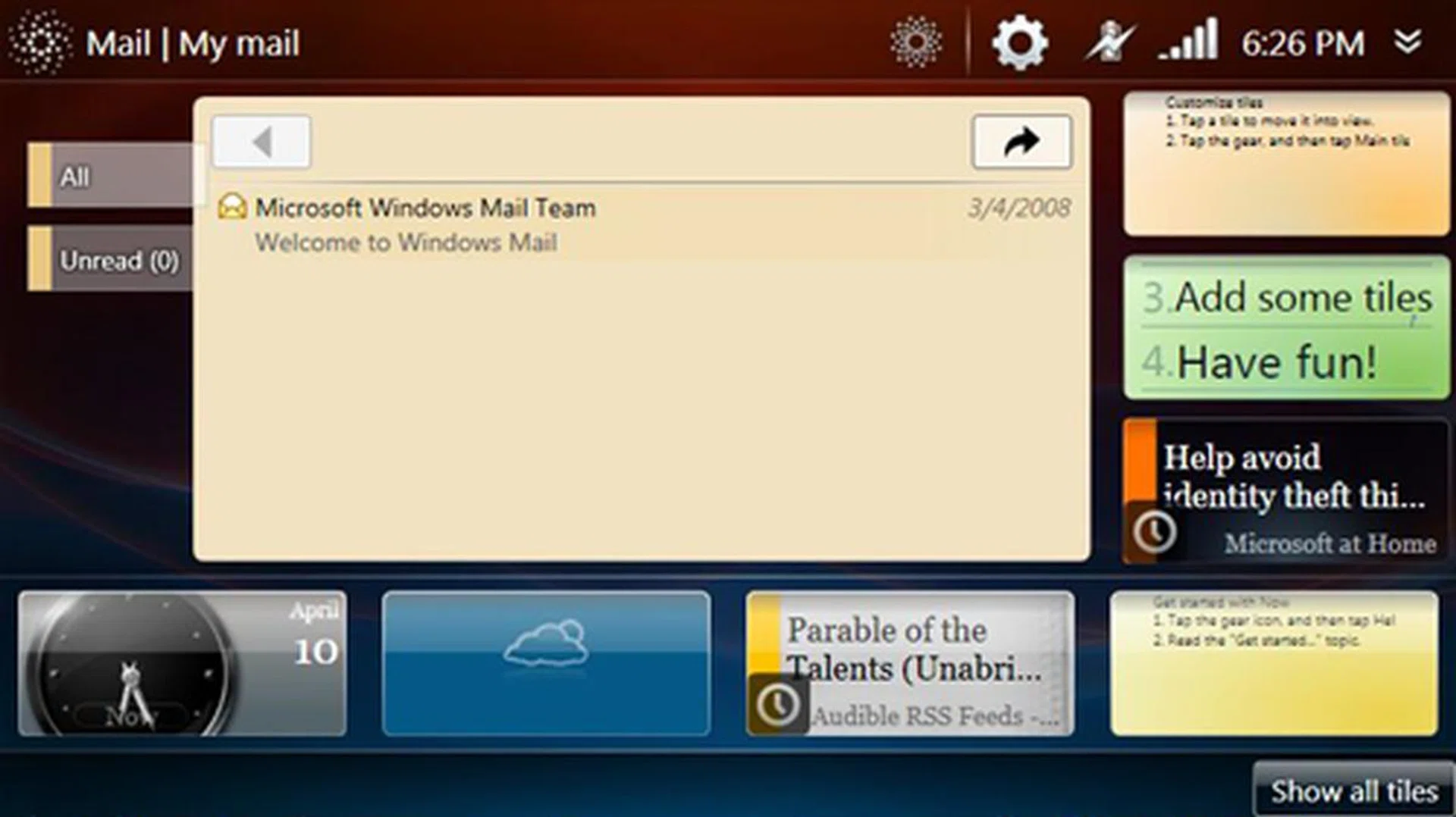
As seen, the Origami Interface is a notepad of sorts, providing you with essential and updated information at your fingertips, literally so with the Shift's touchscreen capability.
Battery Stamina
Heat dissipation seems to be an issue with the Shift, a situation we have noticed amongst other UMPCs. During prolonged usage, heat buildup was apparent on the device. While we loved the extra warmth from the Shift in our freezing office, this heat would be a slight discomfort in the outdoors.
The battery lifespan on the Shift varies depending on your usage pattern. For instance, going for the SnapVUE interface over the resource intensive Windows Vista will enhance your battery lifespan, hence some users would be more inclined to stay with the basic interface, switching only to Windows Vista should the need arise. We performed a simple battery test on the Shift, looping a video clip running at 30 frames per seconds and the Shift lasted approximately 1 hour 20 minutes. This test was performed on Windows Vista instead of SnapVUE since as an UMPC, it should be running its main OS most of the time. We also used the recent HP Compaq 2133 Mini-Note as a test comparison.

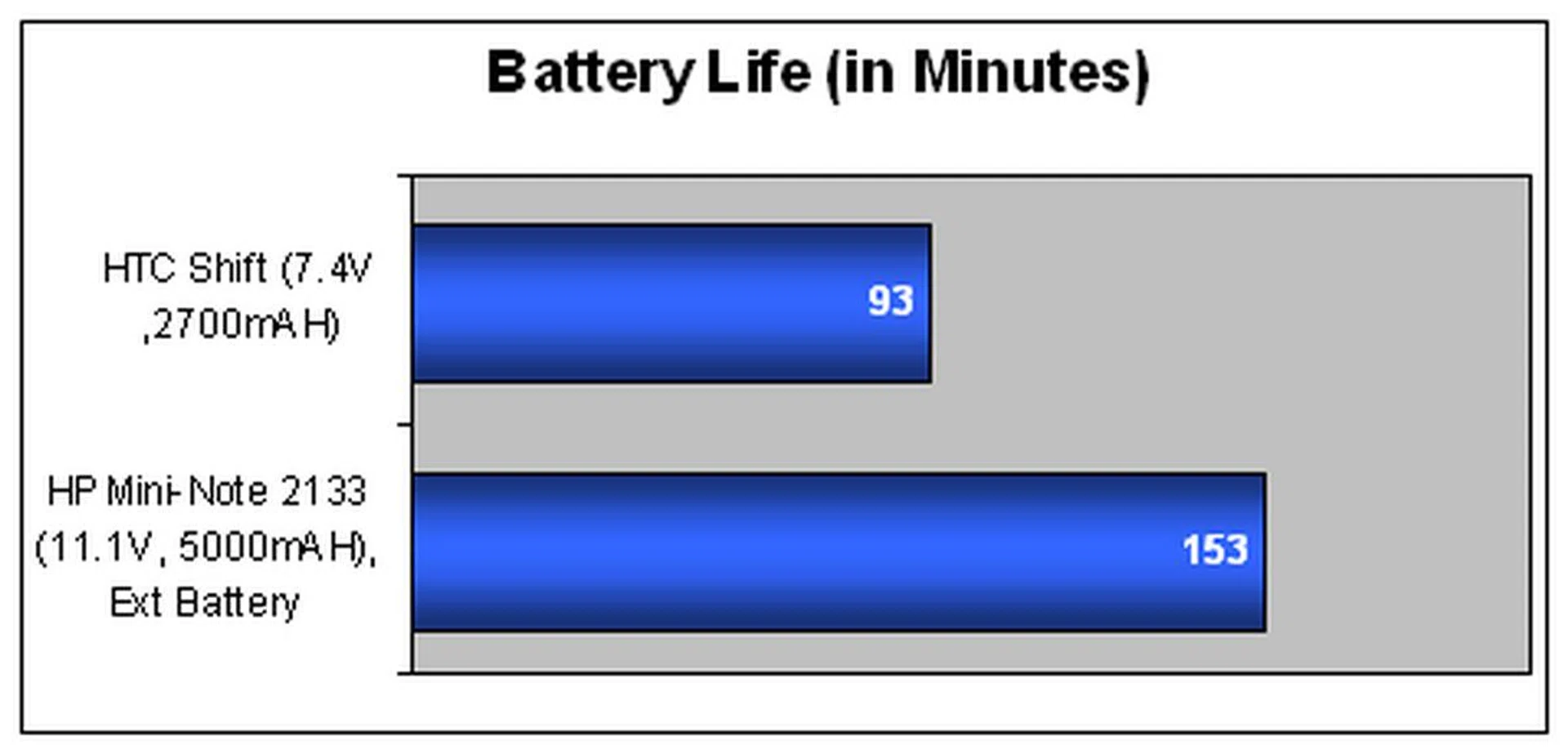
The results are apparent, with the Mini-Note having a distinct battery life advantage over the Shift. In fact, the results will show greater disparity in favor of the Mini-Note should we consider that the Mini-Note has the additional option to utilize a more powerful 6-cell battery, whereas the Shift is stuck with its 2700mAH battery.
The battery to (weight x volume) ratio here is more of a gauge of where the Shift stands as a portable device, with the Shift scoring substantially higher than some other UMPCs and notebooks. However, do remember that for the amount of portability that's found on the Shift, it also sacrifices a certain amount in terms of functionality and performance.

Performance Benchmarks
In terms of specifications, the Shift is powered by an Intel A110 800MHz processor, whilst its graphics is supported by Intel's GMA 950. While we do understand the need for HTC to include Windows Vista Business on the Shift to keep it competitive with current technology, the inclusion of the resource heavy operating system tends to negatively affect its performance. To confirm for ourselves, we took the Shift on a little benchmark test with PCMark05 and did a quick comparison between the HP 2133 Mini-Note and the Shift.
Specifications/Notebook | HTC Shift | HP 2133 Mini-Note PC |
Processor |
| VIA C7-M ULV Processor (1.60GHz) with 128KB L2 cache |
Chipset | Intel 945/GU Express | VIA CN896 Northbridge and VT8237S Southbridge |
Memory | 1 x 1GB DDR2 | 2 x 1GB DDR2 |
Video | Intel GMA 950 | VIA Chrome 9 Graphics |
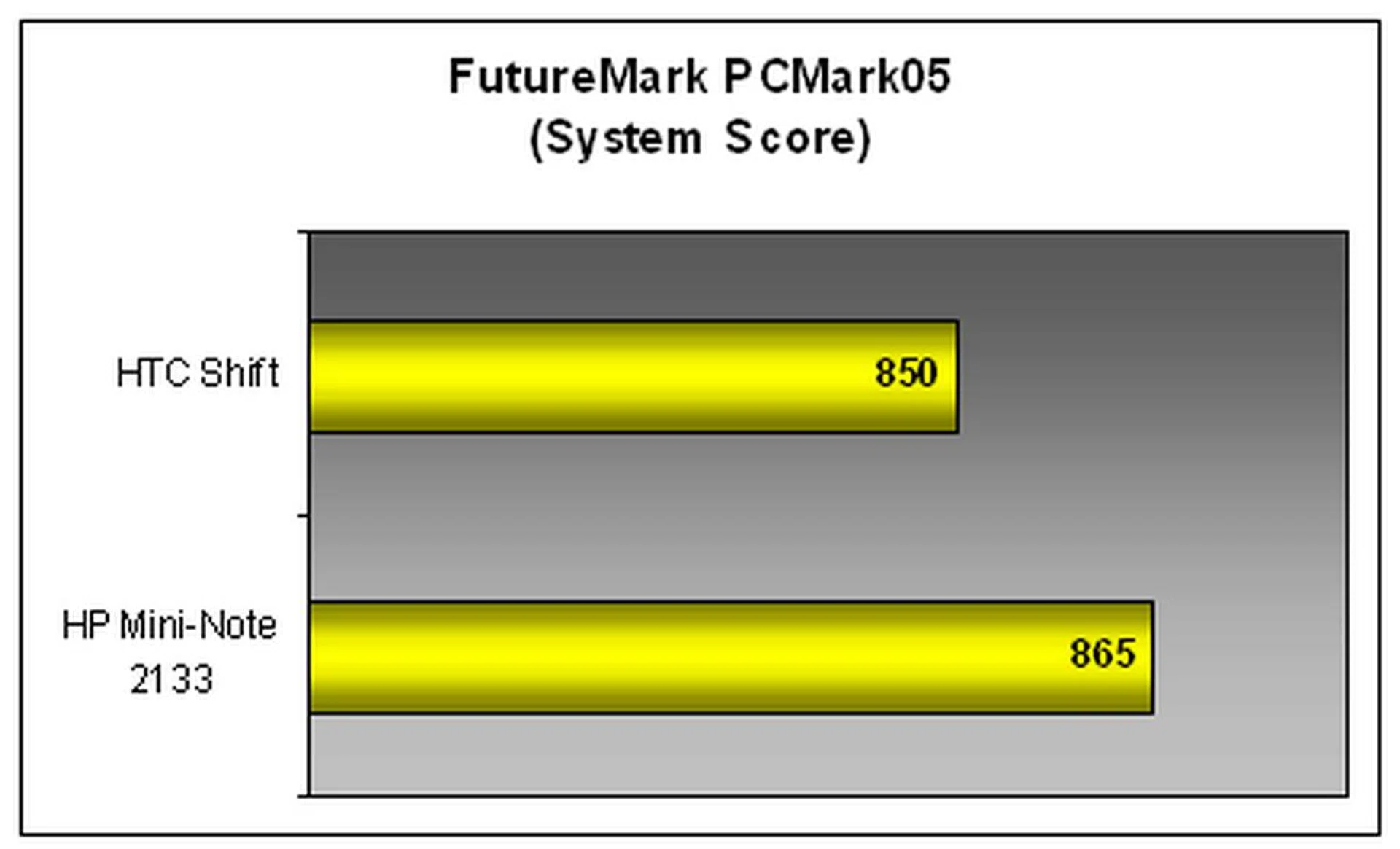

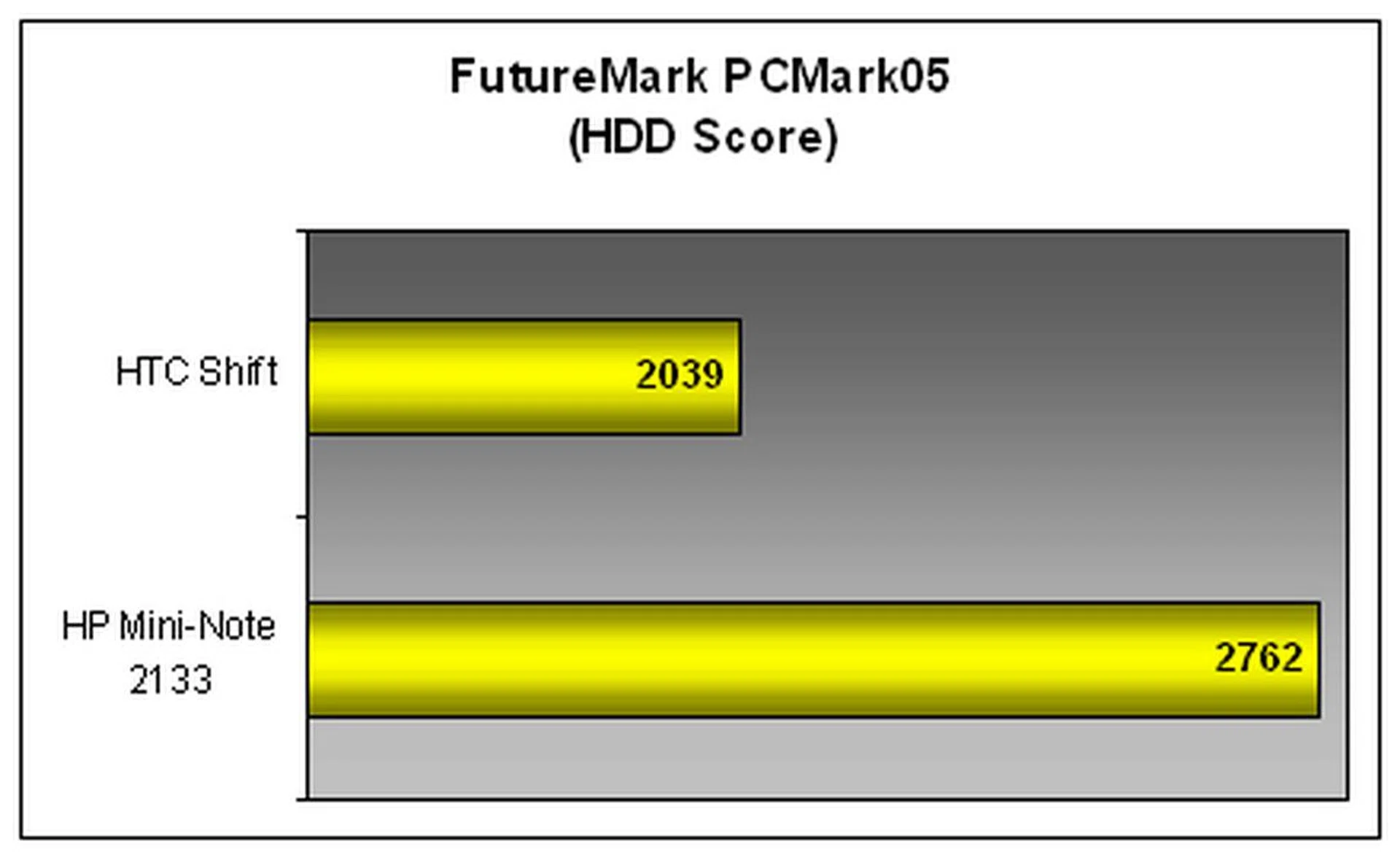
Surprisingly, the Shift outperformed the Mini-Note on the CPU index. This could be a one-off oddity, as the Shift does support two main processors, the Intel A110 800MHz processor and a secondary Qualcomm MSM7500 400MHz for the SnapVUE interface. The Mini-Note however had a higher score due to its 7200RPM hard drive. Overall, the Mini-Note emerged with a slight advantage over the Shift, which can be attributed to the Mini-Note's larger memory cache and superior hard drive.
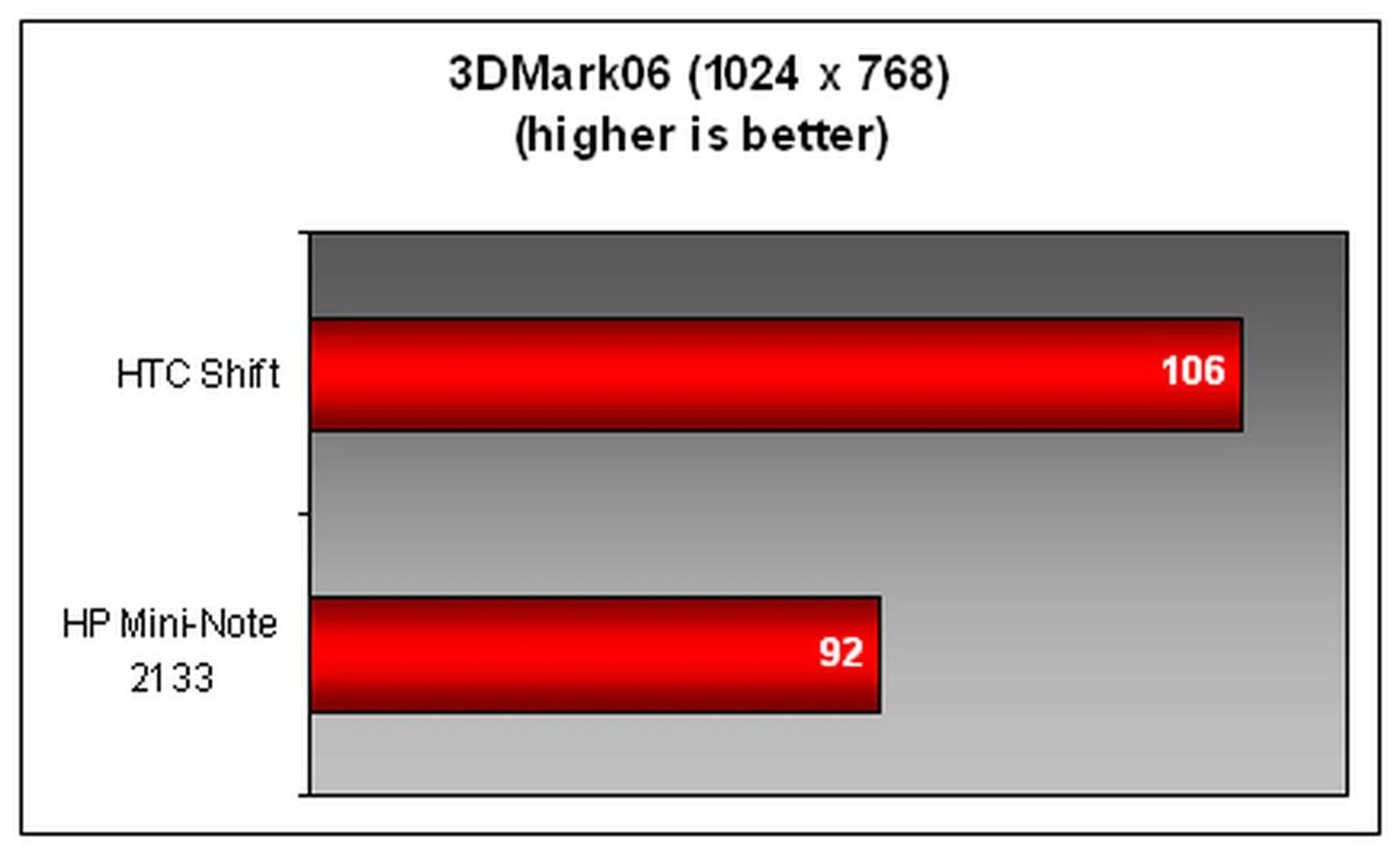
Taking a notch further, we did a graphics benchmark test with 3DMark06, pitting the Mini-Note versus the Shift and were surprised by the results. The Shift narrowly beat the Mini-Note here, and as a follow-up to this, we decided to employ a similar, unofficial test done on the Mini-Note - running World of Warcraft on the Shift. The results definitely matched our 3DMark06 test, with frame rates in World of Warcraft being slightly better for the Shift compared to the Mini-Note at similar game locations and conditions. Intel is obviously winning the battle of the integrated graphics here.
Final Thoughts
The HTC Shift goes all out with the inclusion of Microsoft's Origami Experience 2.0 and brings UMPC designs up a notch with a touch of sophistication. More importantly, the addition of HTC's SnapVUE interface gives business executives who value battery life more than fancy interfaces, an opportunity to remain productive without sacrificing functionality and usability.
While the specifications for the Shift do not exactly have the wow factor, this UMPC definitely gets the job done, and has added value with the suite of applications available on Microsoft's Windows Vista Business. Of course, not everyone agrees with the choice of the operating system, especially with the higher resource demands of Windows Vista. Connectivity options on the Shift such as Wi-Fi, Bluetooth 2.0 and HSDPA however makes it a very connected device.

Jokes aside about it being a blown-up version of the HTC TyTN II, the Shift fulfills it's primary aim as a mobile office platform for executives with the prowess to pull it off.
While we have mentioned the issue of heat on the Shift after prolonged use (for the record, even a short 10 minutes will generate a substantial amount of heat), the main beef for most consumers is likely to be the Shift's premium pricing of S$2188. Such a price elevates the Shift into one of the more expensive UMPCs on the market to date, alongside luxury brands like Sony's VAIO series. We aren't sure that's a good idea, since HTC's branding has yet to reach the heights inhabited by Sony. Nonetheless, for the amount of sophistication and interface tweaks you get with the Shift, HTC has mostly got it right with this UMPC, even if it's priced out of the consideration for most consumers.
Our articles may contain affiliate links. If you buy through these links, we may earn a small commission.