
Panasonic Lumix DMC-G2 Review
The Panasonic Lumix DMC-G2 is the update to the first ever Micro Four Thirds (MFT) camera, the G1, released to market in late 2008. Find out in our full review on what's new in this successor and how it fares against compacts and DSLRs today.

Introducing the G2
The Micro Four Thirds (MFT) standard sure has grown since its debut in late 2008 with the . From a single camera and two lenses at launch, we now have four MFT cameras from Panasonic, three from Olympus, eleven lenses total from both companies, with adapter mounts for lenses from the Four Thirds and Leica systems. The competition has intensified as well, with Samsung and Sony launching their own independent line of mirror-less interchangeable lens cameras.
Micro Four Thirds rode on a lot of hopes when it came out. Users wanted a digital camera that could deliver near DSLR-like photo quality in a smaller, lighter body. The manufacturers hoped to capture a new segment of the market; compact camera upgraders who wanted better quality pictures but didn't want the complexity or size of a DSLR.
This need for the young and growing segment will help a lot when we review the new Panasonic Lumix DMC-G2, the update to the first ever MFT camera (the G1), as we try to understand its strengths, weaknesses, who it's for and if it works.
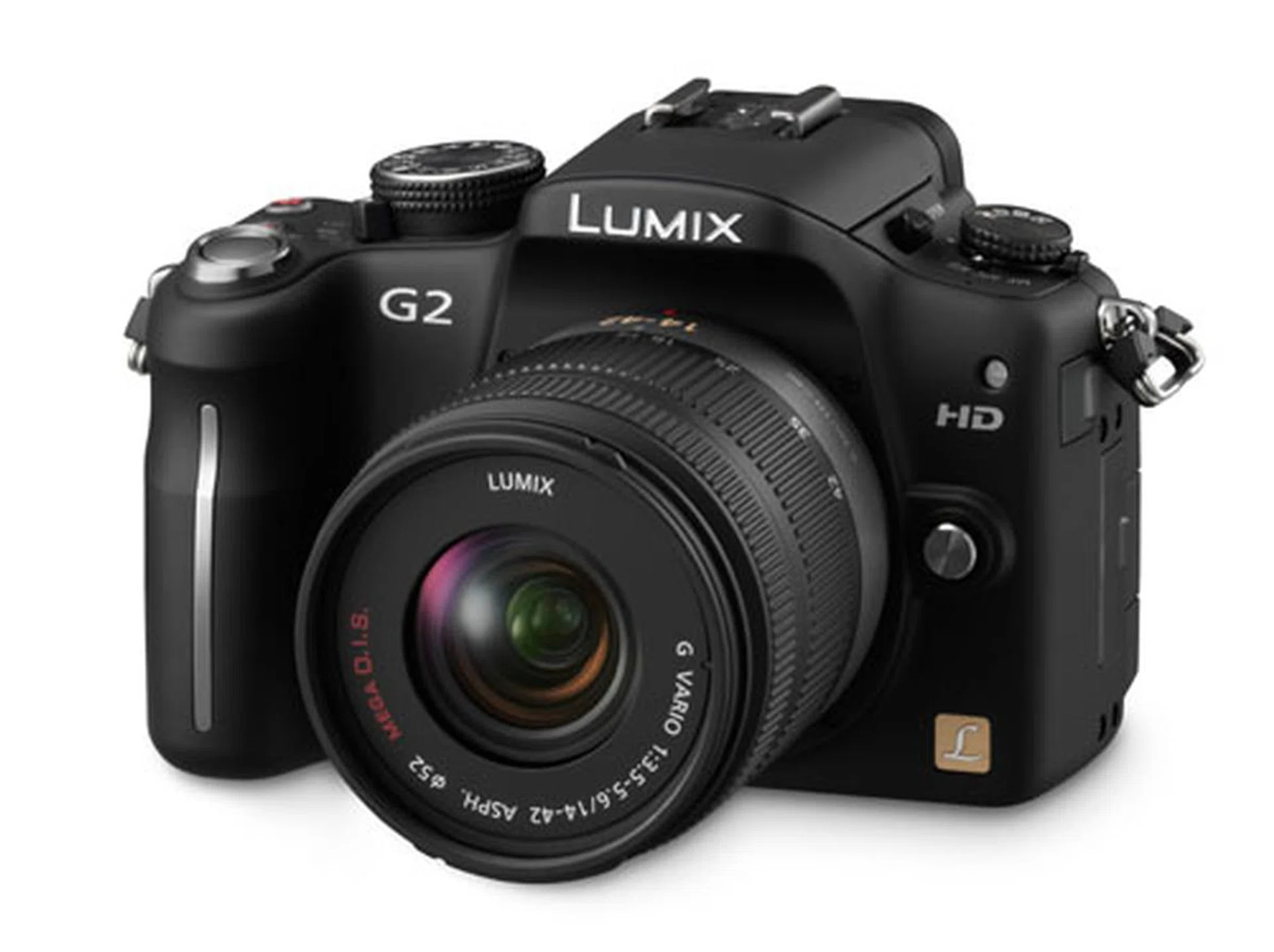
The all new Panasonic Lumix DMC-G2.
Touch Controls
As the successor of the , the G2 clarifies the Panasonic MFT lines. The GH series (GH1) is the premium Full HD line, while the G series (G1, G2, G10) is more suitable for photographic than video-centric roles, which explains the 720p recording limit on the G2. And it seems the GF series () is designed to be the smaller, portable models.
While HD video recording might be limited to 720p resolution, the G2 brings something new to the MFT game - touch-screen controls. You can now focus, shoot and change settings right on the touch-sensitive LCD with your fingers, sans button pushing, a first for a Micro Four Thirds camera.
The G2 is hardly the first digital camera on the scene with a touch-screen, but we have to admit to being wary of the idea. We've found it hard to like the few touch-screen cameras we've come across to-date, which suffer from hard to use interfaces. This is why we found ourselves pleasantly surprised by the G2; this is the first digital camera with a touch-screen that's really usable, and adds to the photographic experience instead of taking away from it.
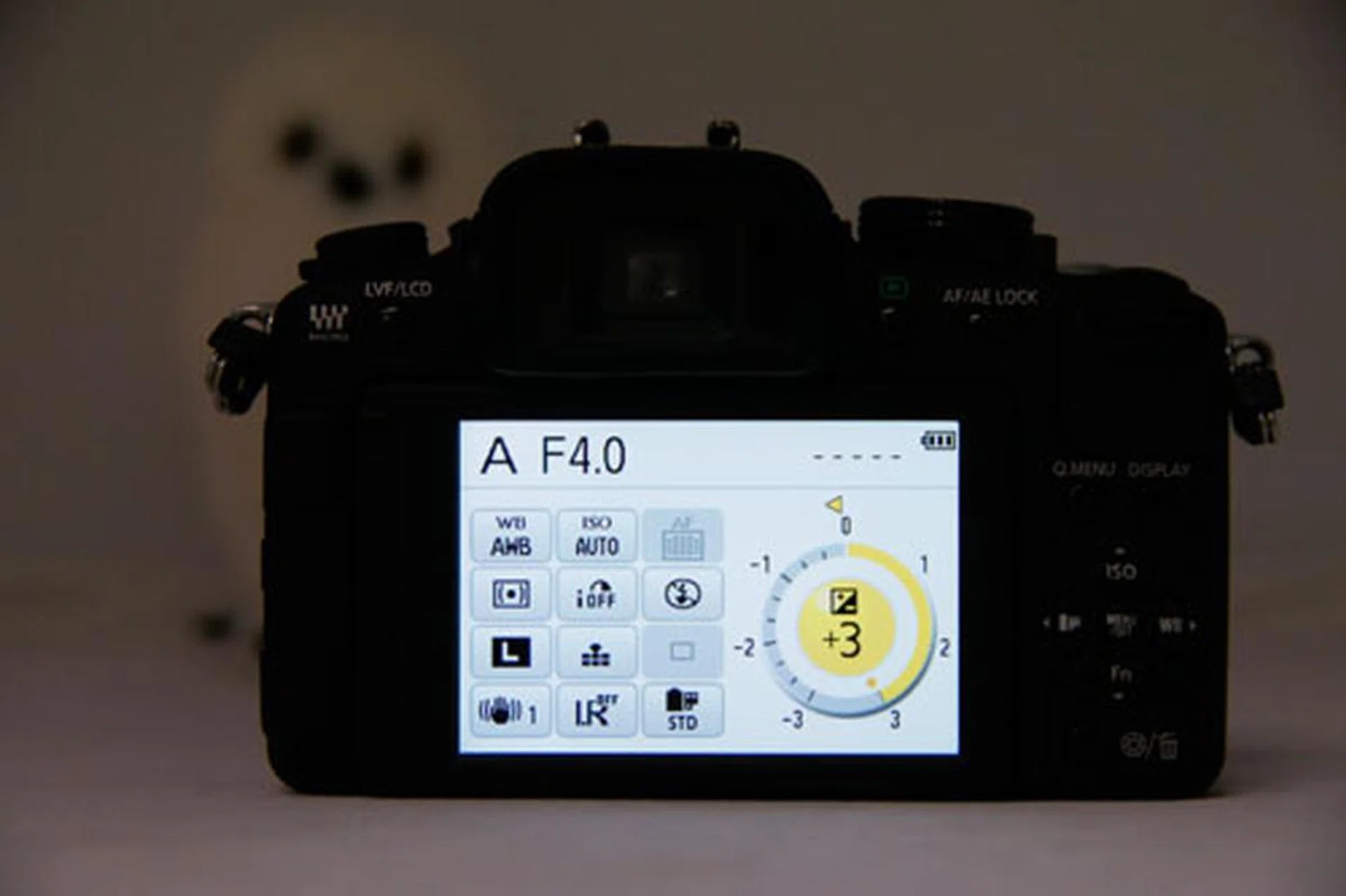
This new display screen is a favorite feature. Since every control on this surface is touch-sensitive, it lets you change your settings with the tap of a finger. The circle on the right lets you adjust exposure just by sliding around its circumference, which works quite well.
Being used to quick manual AF-point selection on a DSLR, we always miss it on an entry-level camera. But the G2 kind of solves that. While you still don't get a dedicated joystick to change AF points, the touch-screen lets you select a single target point or a cluster of target points. This adds more flexibility to the already impressive auto-focus ability. In fact, the G2 one-ups that ability with a press, focus and shoot in a single move. Activate it by touching an icon, and the next touch on the LCD will focus the camera on that point and shoot it immediately.
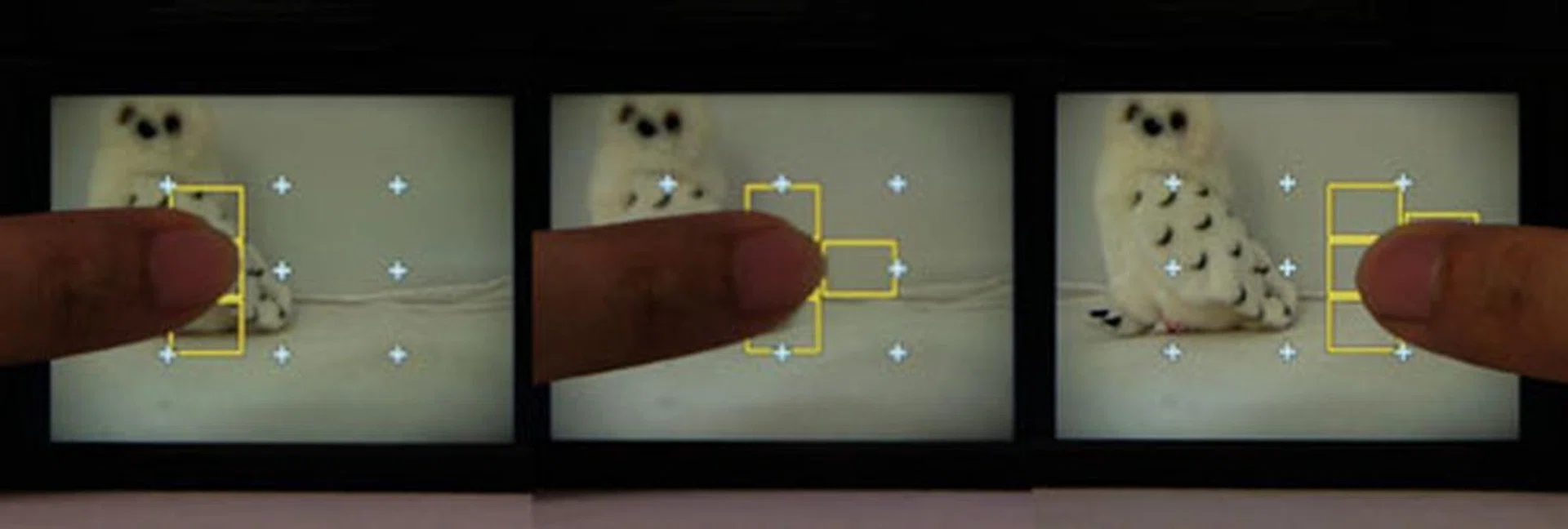
Touch focusing helps you refine your focus points easily, working as an alternative for us more familiar with focus point selection using a physical d-pad.
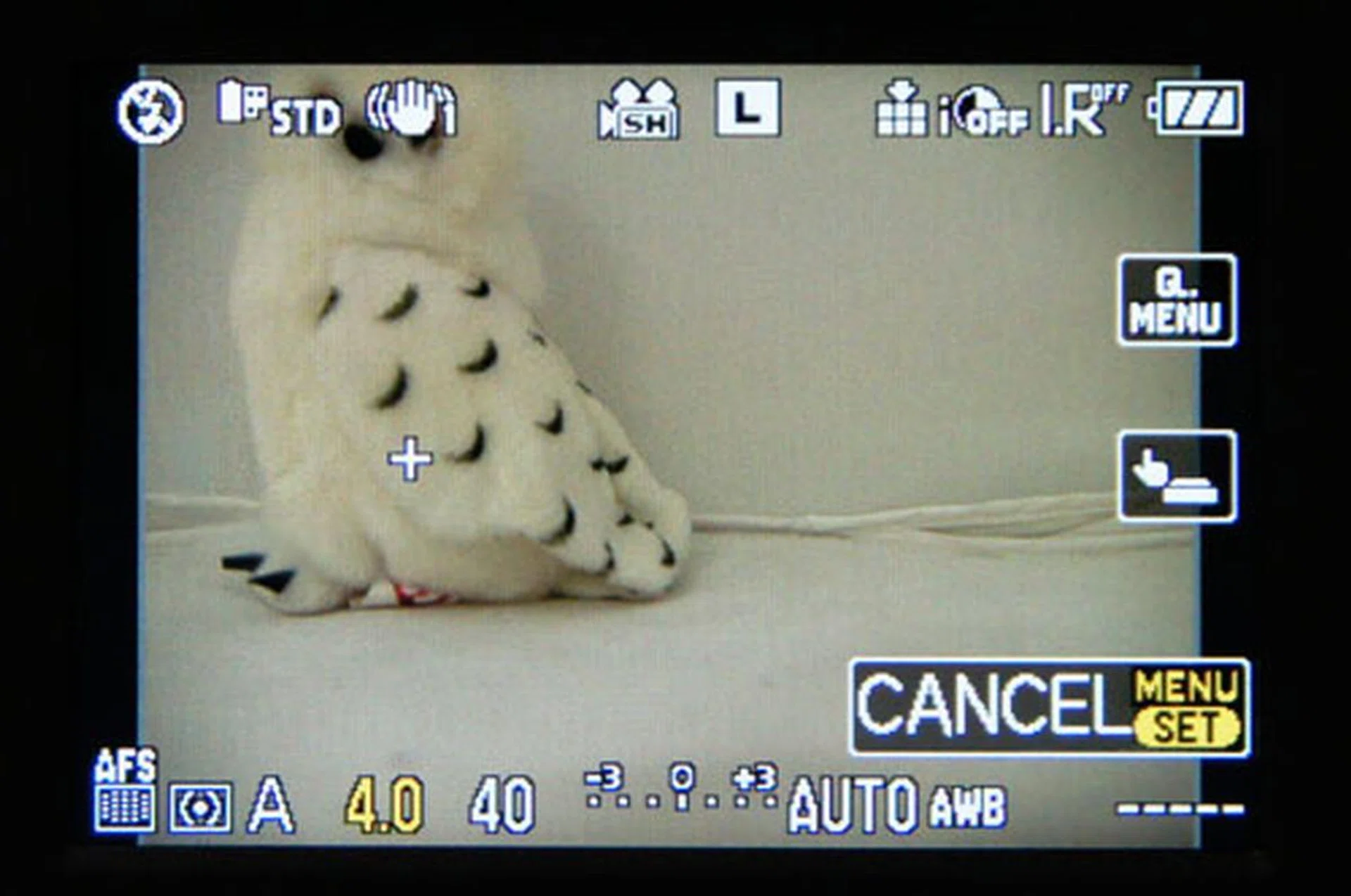
The G2 also brings touch-shooting to the table. When you tap on the finger-and-button logo on the middle right of the screen, the camera will focus on and snap whatever you tap on the LCD. This lets you grab a shot pretty easily without having to fuss with pre-focusing.
Touch controls are also enabled in playback mode, letting you swipe your photos to move them along, or tap to zoom, gestures that should be familiar to any touch-screen mobile phone user.
The moment you align your eyes with the G2's viewfinder, a sensor switches off the LCD and all those touch-controls are gone, requiring a switch back to physical buttons to access your settings. That's not necessarily a bad thing; it just requires a shift in shooting mindset. When shooting, we often wished that Panasonic had made the LCD and viewfinder work in tandem, so that even when we were shooting through the viewfinder, our fingers could work the touch-controls on the large LCD.
Touch AF is responsive and useful, but mainly for still subjects. Even though there's a focus tracking mode, using touch to shoot fast-moving subjects still doesn't cut it, your finger won't track across the LCD as fast as it can depress a shutter button, and your fingers will obscure the scene just as you need to view the action the most. Still, these are little usage model niggles from a DSLR user than technical faults of the G2. We think that the user-friendly touch-screen controls will mostly be welcomed by users upgrading from point and shoot cameras, for the simple reason that touch-shooting is a LCD-shooting experience, and will be more comfortable to consumers who are used to shooting from the LCD compared to DSLR camera users who're accustomed to button mashing from the viewfinder.
Design & Handling of the G2
Manual controls are sophisticated on the G2, Panasonic has packed as many manual functions onto as few buttons as possible.
Two dials on the left, built on top of each other, let you dictate auto-focus modes. While useful, the buttons are a little small for fast tweaking on the move.
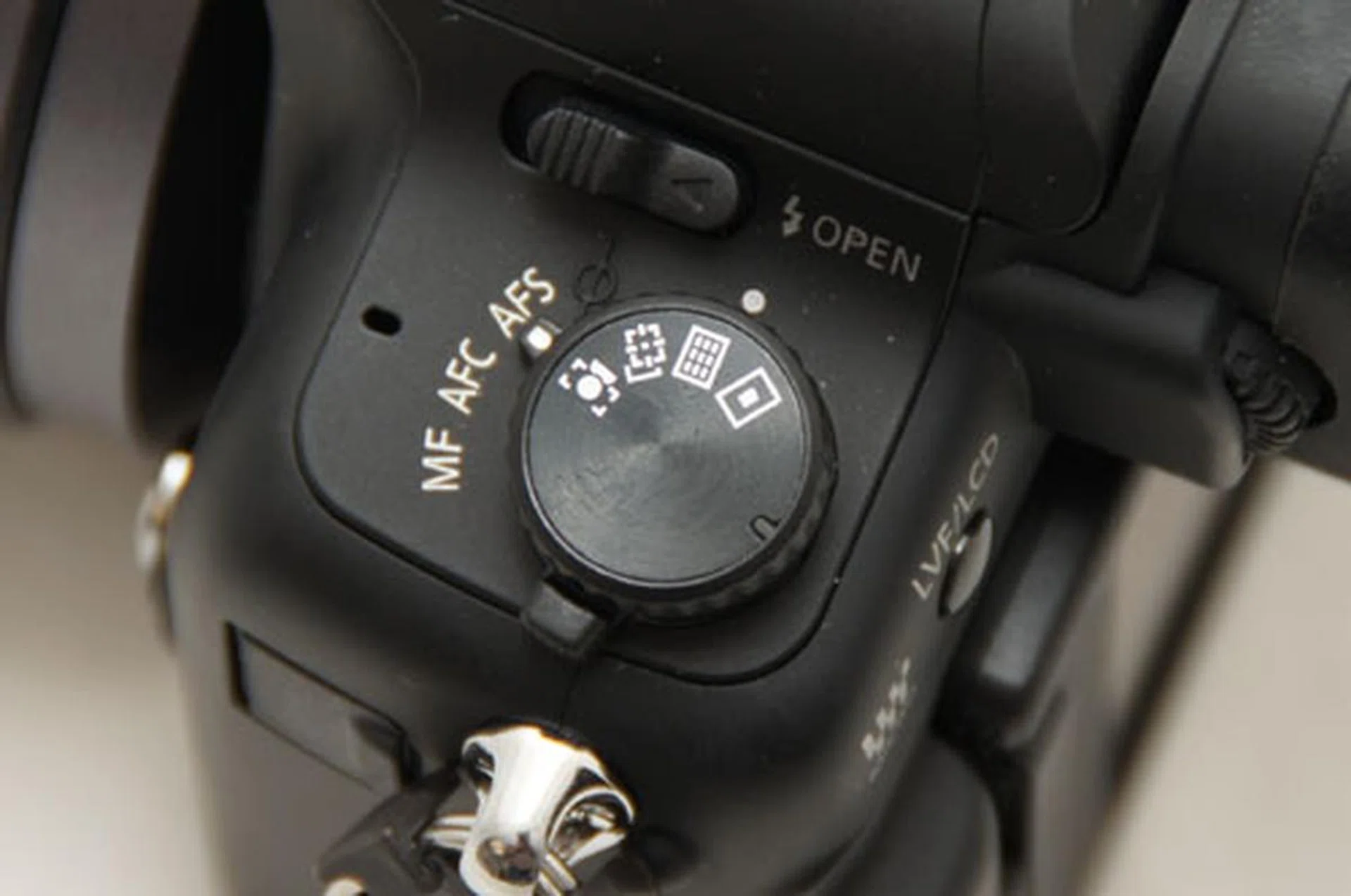
The lower control lets you specify focus modes (Manual Focus, Auto Focus Continuous, Auto Focus Single) and the upper dial lets you specify auto focus points (face recognition, tracking AF, multi-area AF and single-area AF).
The Mode dial, located on the right, is also stacked (see below). It shares triple duty with a control for shooting modes (single, continuous, bracket, timer) and the Power switch. You'd think the Power switch gets toggled accidentally quite a bit, but no, that doesn't happen.
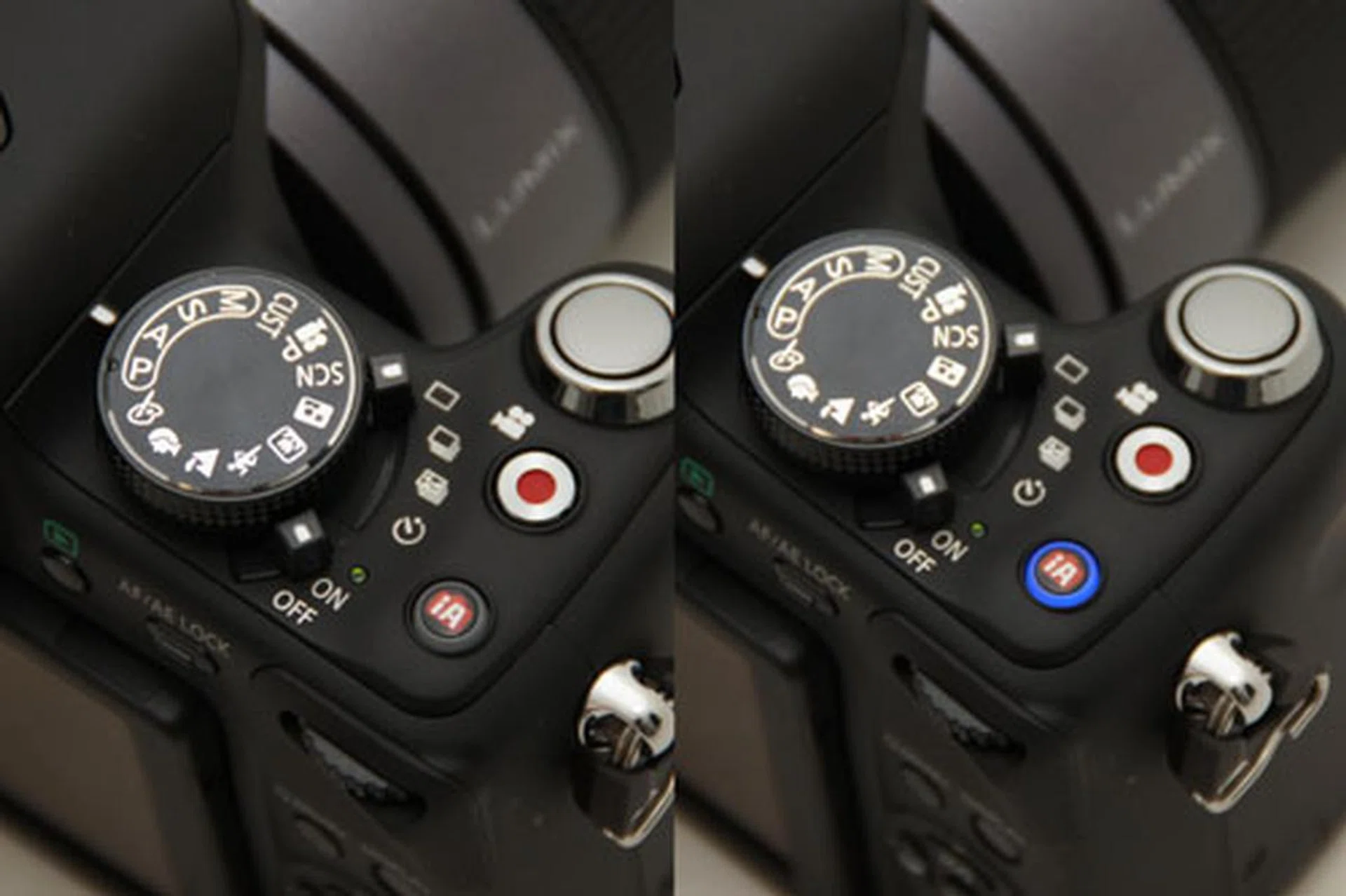
Video and iA both have dedicated buttons near the shutter release (see above). This is great; with a single touch you can start shooting video without twirling the Mode dial to video mode, and you can turn on iA for easier shooting or handing off to someone. One minus point is how the two buttons are similar in size and closely arranged; with just a difference in size, we've accidentally shot video when just meaning to turn on iA mode.
The dual function dial wheel makes a welcome return (see below). To control a setting like aperture in Aperture mode, simply turn it normally, and to control exposure press down and then turn again. Useful and elegant.
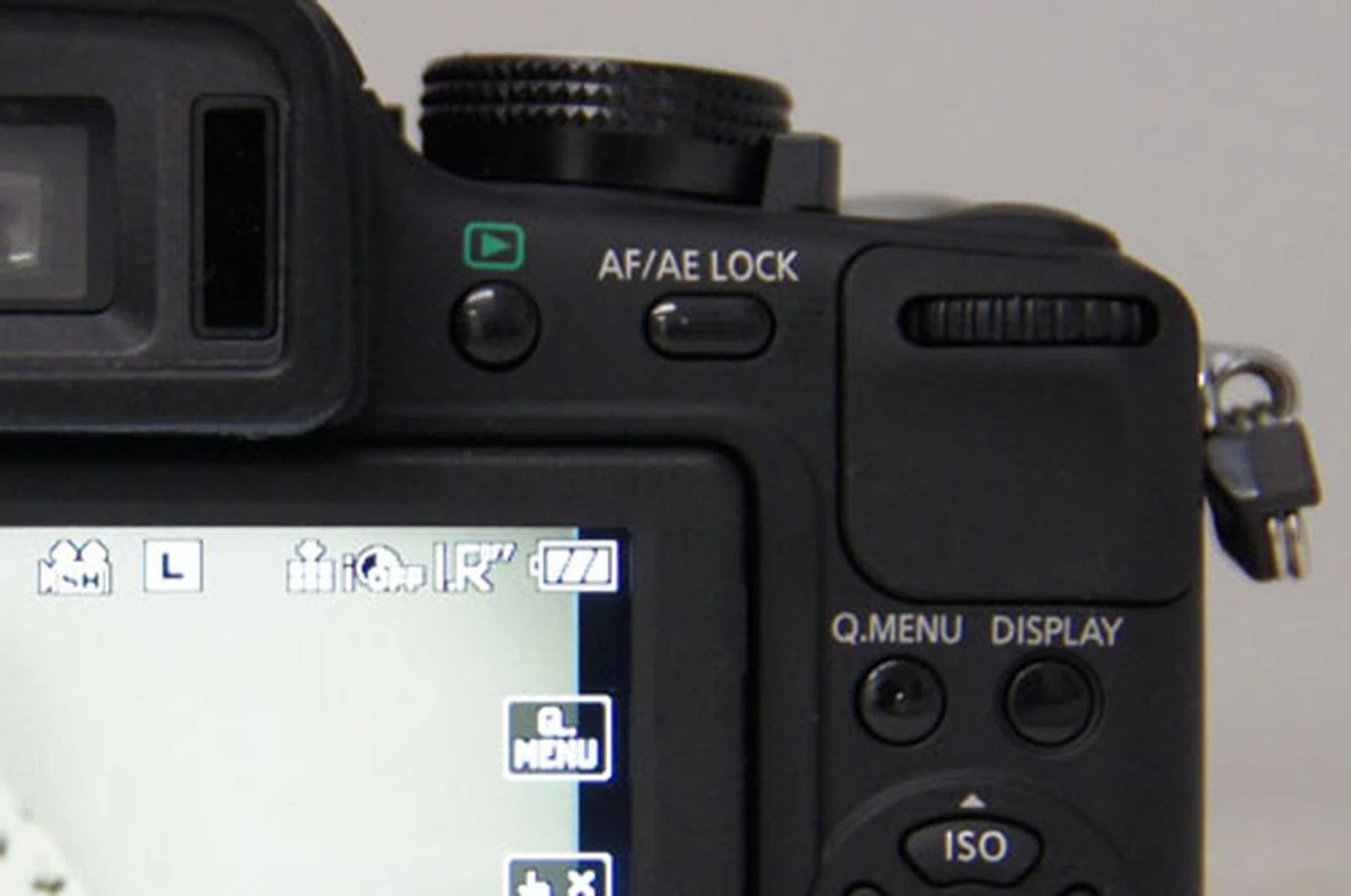
We found the digital viewfinder less bright and sharp than an optical viewfinder. It's fast and bright enough, but you'll have a better experience shooting through the larger LCD. A sensor built right next to the viewfinder piece detects when your face approaches and switches between the two accordingly, which can get annoying if it senses something like a wall and switches off the LCD you're looking at it. Helpfully there's a LVF/LCD switcher button you can activate manually.
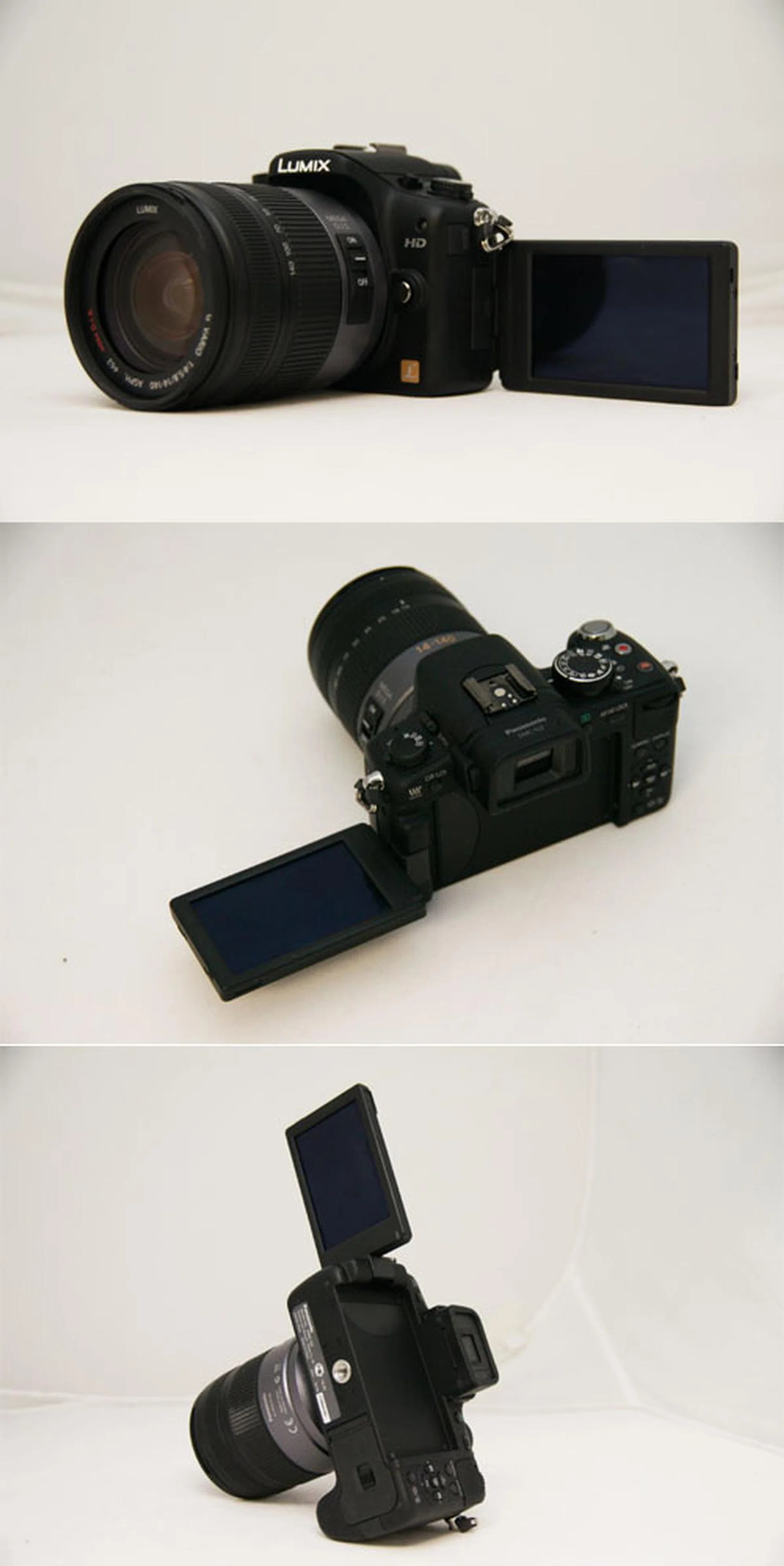
The G2 comes with an articulating LCD screen which can twist around to help you get those awkward shooting angles.
Overall, the G2 handles well and its shape sits nicely in the hand with a comfortable grip and weight. The best way we can think of describing how the G2 handles is like a DSLR-shaped camera that wants to be used like a compact. For all the physical controls you can find on its small body, the touch-sensitive controls and easy to use auto functions makes it feel more like a sophisticated compact camera than a toned-down DSLR.
Imaging Performance
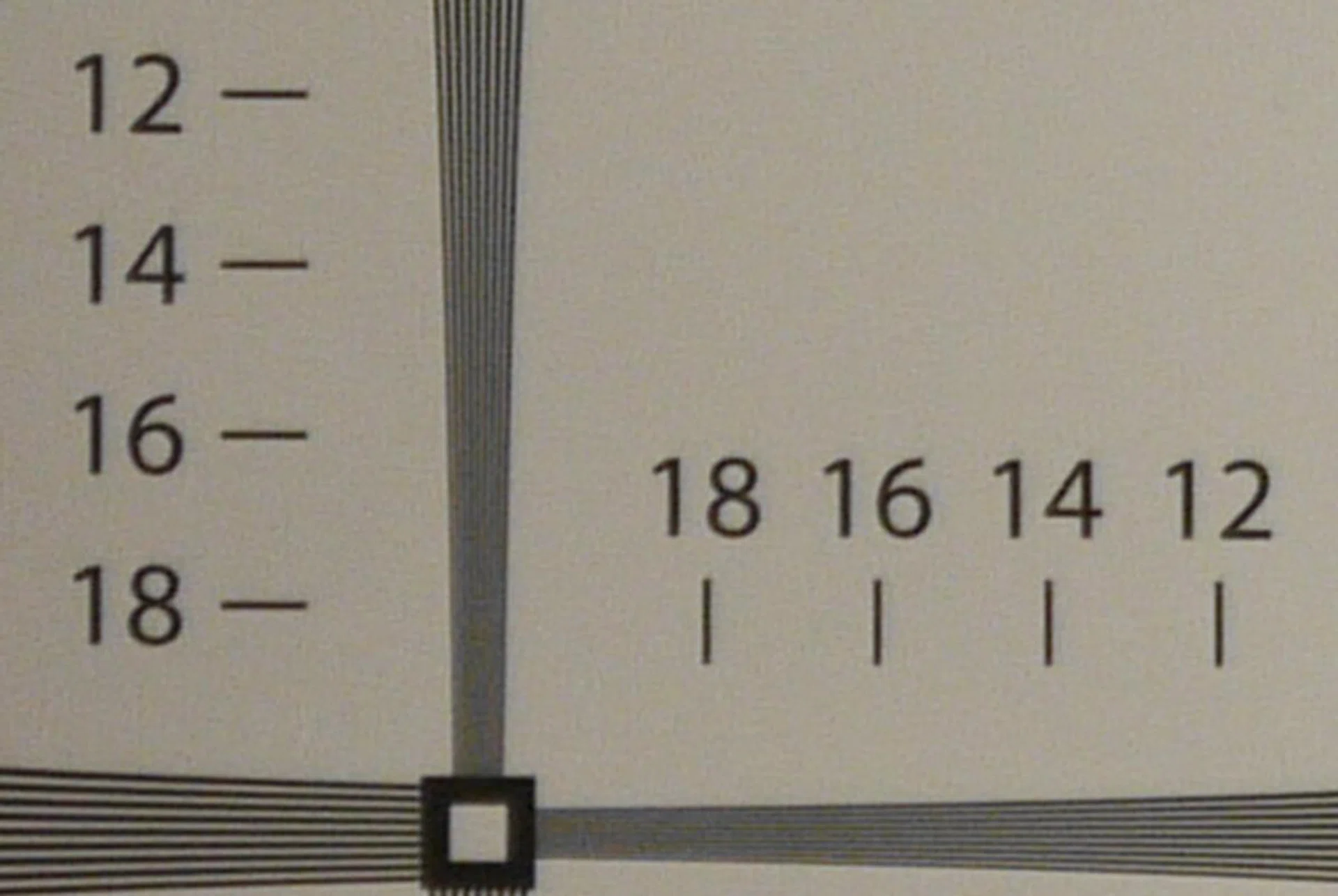
Overall we found the images pleasing to the eye, with punchy colors and clear results. Image quality is sharp and distinct, at 14LPH vertical and 16LPH horizontal according to our test chart. This places it in DSLR territory for clarity, losing out to the Canon 550D's 20LPH vertical and horizontal but doing better than the Nikon D5000's 12LPH vertical and 14LPH horizontal.
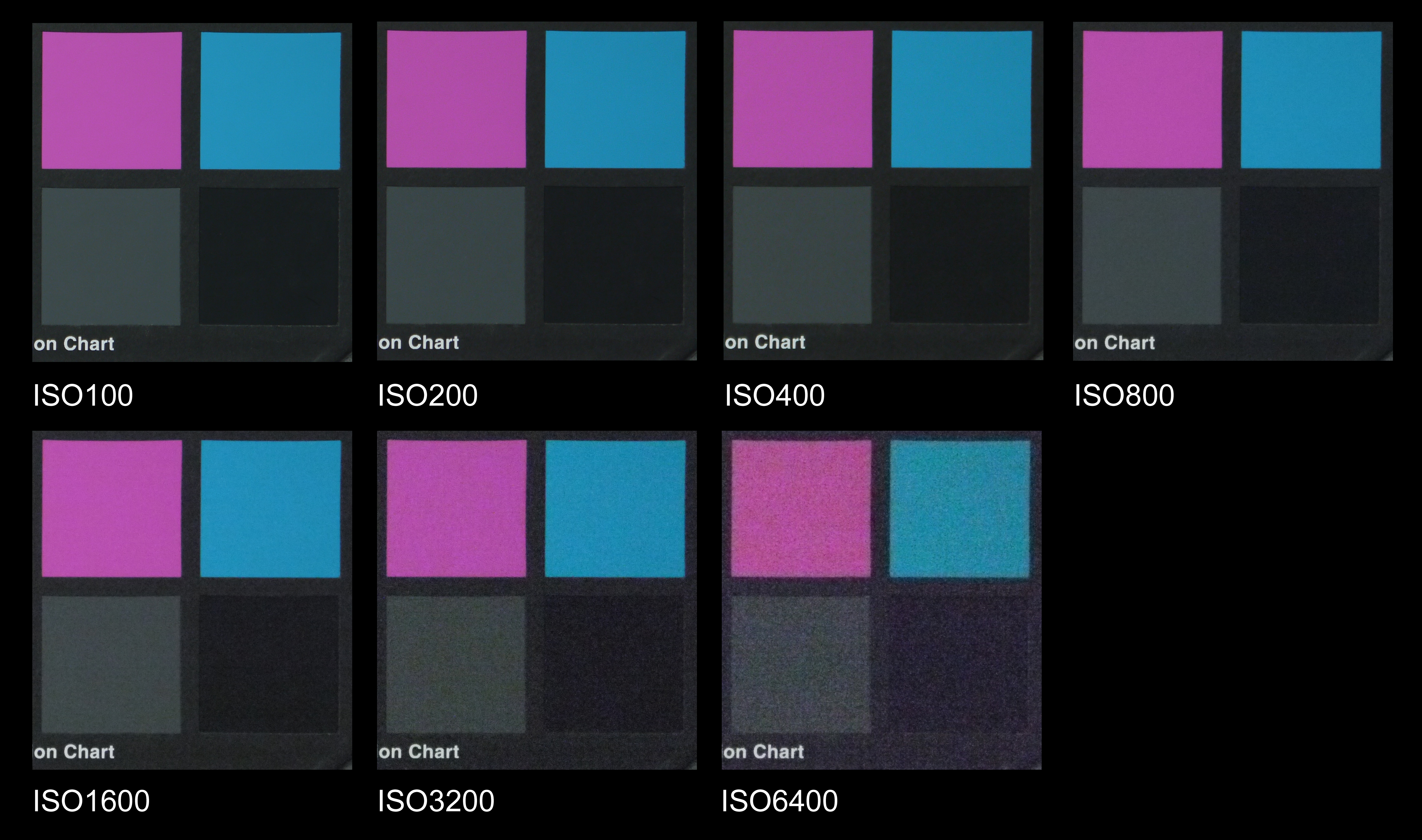
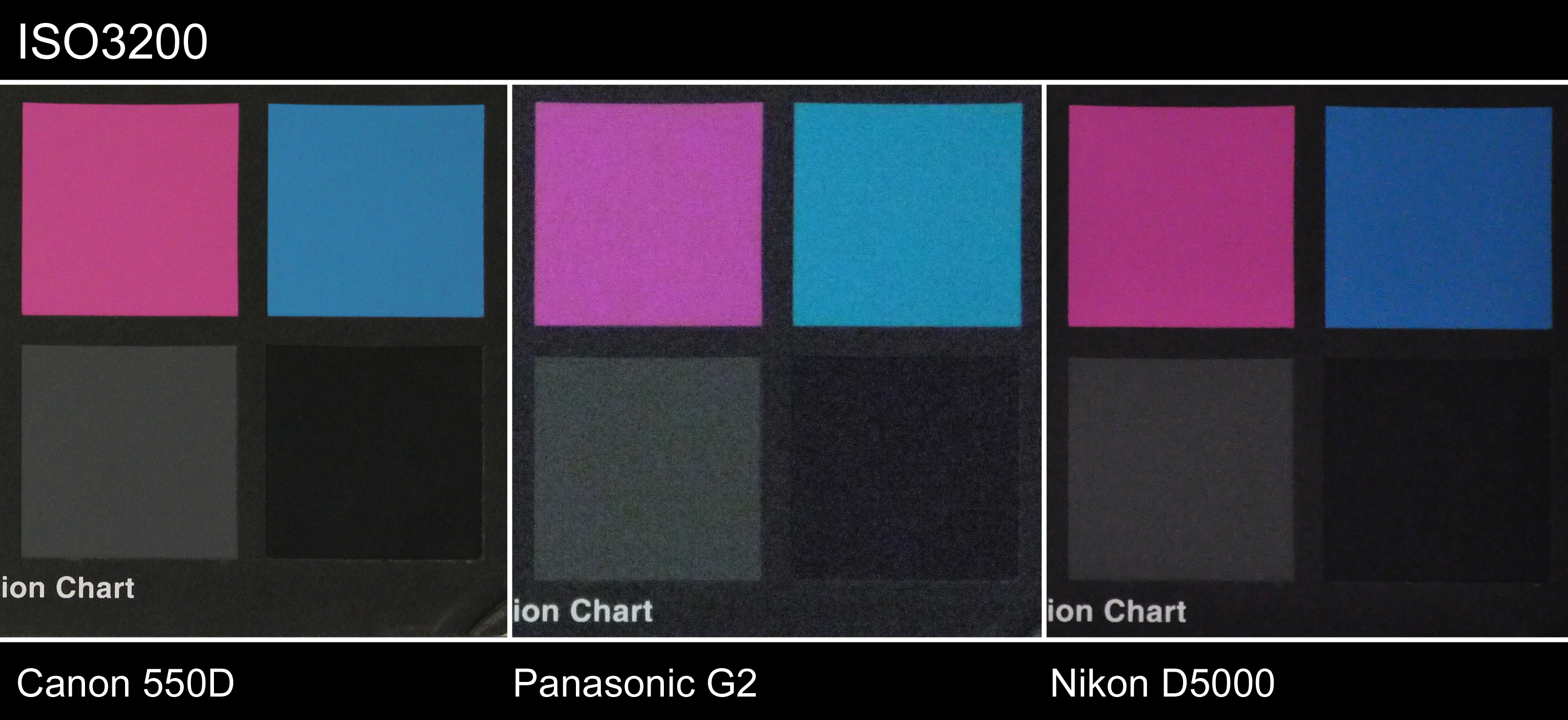
ISO performance didn't perform as well however. We found that we could get clean shots up to ISO800, while at ISO1600, noise became noticeable and from ISO3200 onwards it was too noisy to bear (the G2 shoots up to ISO6400). Even at ISO800 chromatic noise can be seen in the darker areas of the photo.
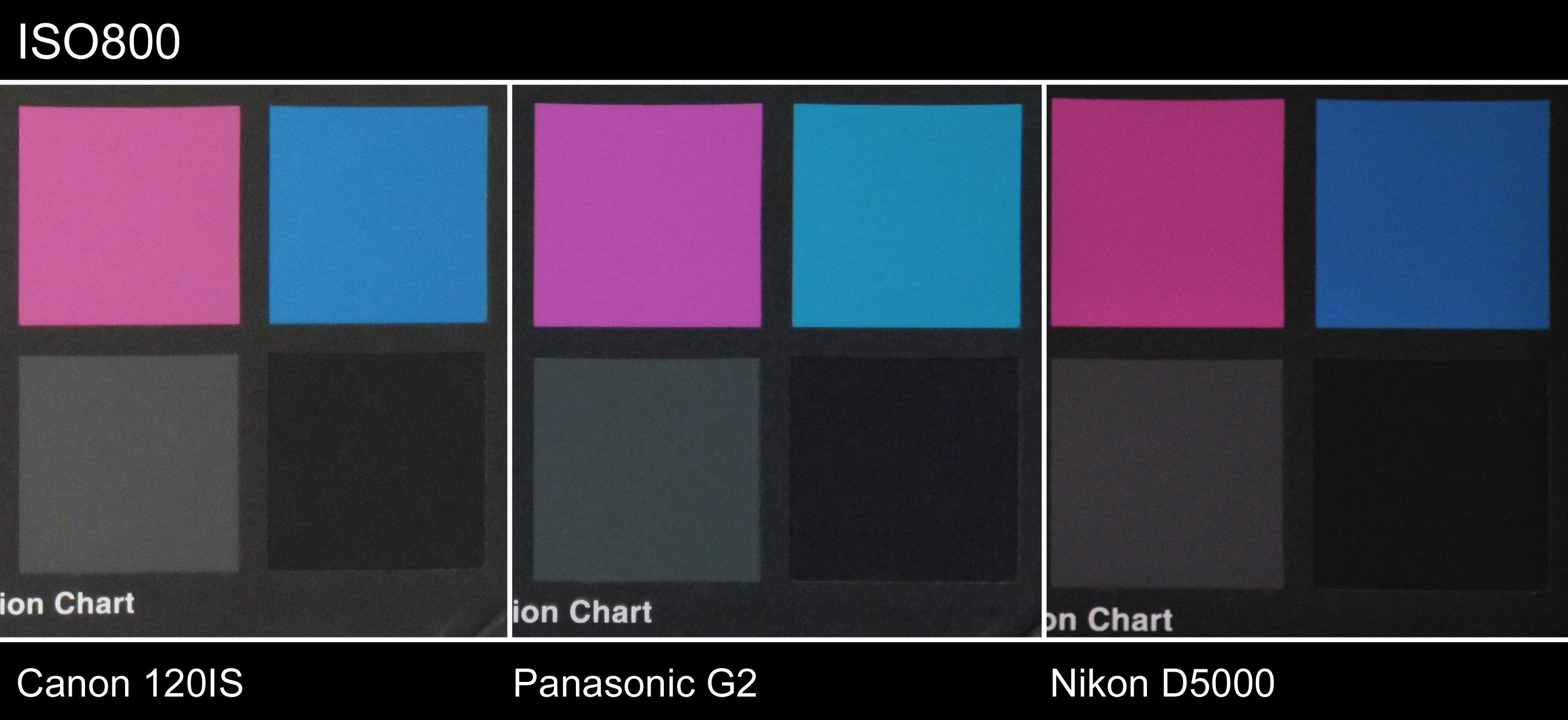
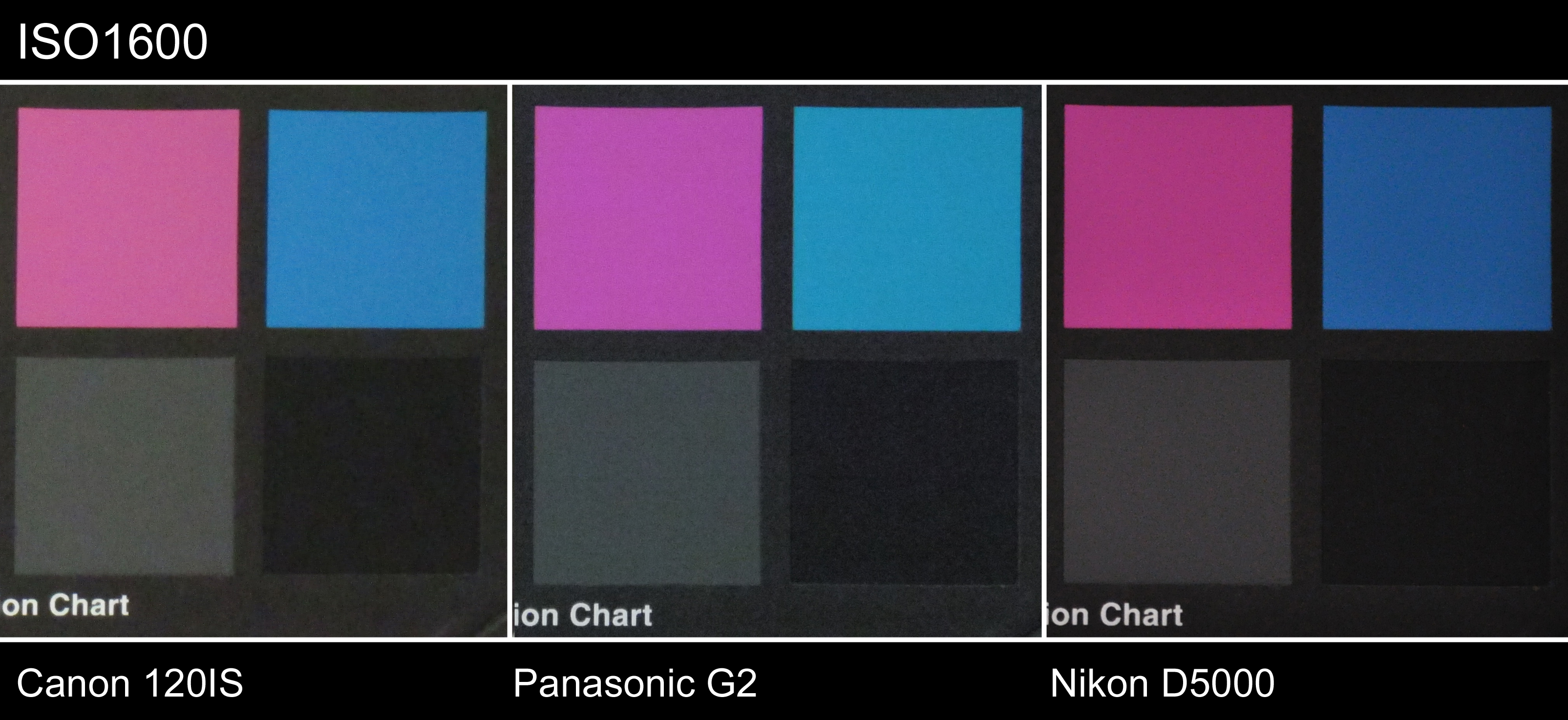
When compared against a standard compact camera and a DSLR, the G2 fares better than the compact (a Canon 120IS) at ISO800 and ISO1600, remaining sharper and clearer. But it is clearly noisier than the DSLR (a Nikon D5000) at both levels, and at ISO3200 fares worse than two DSLRs (a Canon 550D and the Nikon D5000). So even though the G2 delivers great clarity at entry-level DSLR levels, it only fares better than compacts at ISO performance. You can find real-world samples of the G2's performance in the image samples section on the following page.
The G2 shoots HD video up to 720p resolution, which can be encoded in either AVCHD Lite or Motion JPEG. AVCHD Lite promises more recording time due to more aggressive compression, and the final file still comes in a confusing file structure rather than a single video file. Unless you have an AVCHD work-flow or AVCHD capable video software, we suggest you shoot in the more space-consuming motion JPEG.
We don't have the expertise to tell you if the video quality is suitable for broadcast, but for a home video, it more than passes muster, with beautiful and clear images, while the built-in mono microphone is adequate. To tell the truth, while AVCHD Lite and Motion JPEG quality looked the same to us, AVCHD Lite seemed slightly softer, but it's not something we guess an ordinary user will notice unless one's hunting for it. The real draw in shooting video with the G2 is the auto-focus that stays active during shooting, so you don't have to adjust focus manually through the lens, a feature still lacking in HD DSLR cameras. This makes it much easier for the consumer to just point, shoot and focus on the action.
G2 Sample Images
These are sample images shot with the Panasonic Lumix G2. The images have not been post-processed and are copyright to SPH Magazines. We kindly ask that you do not reproduce them elsewhere. Click to see the original full resolution images (which are rather large).

1/80 sec at f/8, ISO200.

1/160 sec at f/8, ISO100.

1/60 sec at f/6.3, ISO100.

1/400 sec at f/4.5, ISO100.

1/100 sec at f/8, ISO100.

1/8 sec at f/8, ISO100.

1/13 sec at f/8, ISO200.

1/13 sec at f/8, ISO400.

1/25 at f/8, ISO800.

1/60 sec at f/8, ISO1600.

1/80 sec at f/8, ISO3200.

1/125 sec at f/8, ISO6400.
Conclusion
We found that the Panasonic G2 is suitable exactly for whom it's designed for: a camera for the compact camera upgrader, who will find welcome in its user-friendly features, rather than the DSLR downgrader who might find the ISO performance a little lacking.
It's best handled using the LCD, which compact users will be used to taking advantage of the excellent touch-sensitive controls and the large screen, but also because the screen is more pleasant to use than the viewfinder which we found a little dark for our taste. Image clarity is comparable to the best of the entry-level DSLR models in the market, but ISO performance only fares better than compacts. Video performance is excellent, with auto-focus a strong feature lacking in DSLR video cameras.
These are all factors that will appeal to and attract compact camera upgraders, who're looking for better image performance than they can wrangle out of their compacts, without the weight and bulk of a DSLR. The biggest appeal to an upgrader (and even to a DSLR user) is how smart the camera is. Panasonic's contrast AF system is fast and accurate, and its Intelligent Auto (iA) mode is one of the best auto modes in the consumer market, letting an ordinary user switch it on and trust its advanced features, like face detection, to help them get the best shot each time.
Unfortunately the local retail price for the G2 hasn't been fixed yet, but looking at prices from overseas, we're guessing that it'll come in the S$1100 region for a G2. The high prices of the Micro Four Thirds cameras is something , but it looks like Panasonic's going to be more aggressive with the G2. Now that prices are comparable to competing DSLRs, it comes down to a matter of preference. Do you prefer ease-of-use, lightness and compactness, or do you prefer ultimate image quality over bulk and complexity? If you belong to the former profile, than the Panasonic Lumix G2 is your ideal choice, despite the price.
Our articles may contain affiliate links. If you buy through these links, we may earn a small commission.