

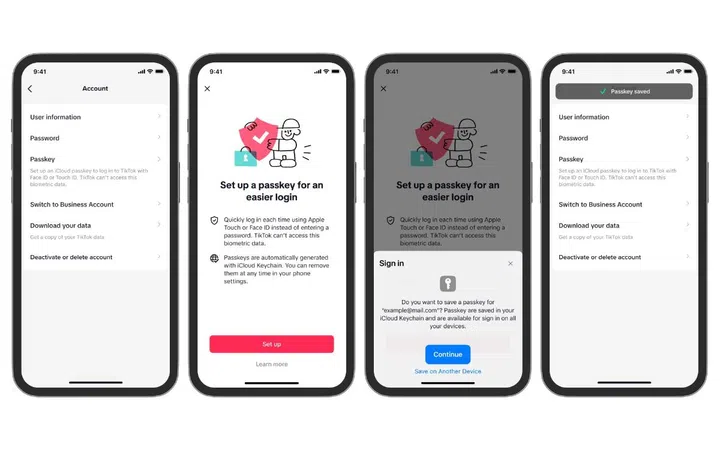
Here's how you can set up passkeys for TikTok. Click to enlarge. (Image source: TikTok)
TikTok has just announced that will support passkeys. This will allow users to sign into their accounts using biometrics like Face ID or Touch ID.
However, there's a catch. It's only supported on iPhones. For now, at least.
Passkeys are said to be the future of passwords because they are easier to use and safer than traditional passwords and 2FA authentication methods.
That's because you log in using a pre-authenticated device and by using methods that you are highly familiar with like biometrics or a passcode. Crucially, this login data only exists on device, which means that there's no password that can be stolen in a traditional phishing or hacking attack.
This feature will be rolled out in selected regions first, starting with Asia, Africa, Australia, and South America, and will be expanded to other regions in time.
To set up a passkey for your TikTok account, follow these steps:
- Go to the Profile menu at the bottom right
- Hit the Menu button at the top right
- Go to Settings and Privacy
- Go to Account
- Go to iCloud passkey and follow the on-screen instructions
Source: TikTok
Our articles may contain affiliate links. If you buy through these links, we may earn a small commission.